With its 5.7-inch QHD AMOLED display the Nexus 6P is a little smaller than last year’s Nexus 6 in terms of both display size and overall dimensions. It comes with an aluminum shell and overall high-end specs, along with a new 12.3MP Sony sensor and an F2.0 aperture. DxOMark’s mobile evaluation puts it at third place in its rankings – find out why. Read more
Tag: mobile
-
DxOMark report puts Sony Xperia Z5 on top of mobile rankings
DxOMark has published its test results for the Sony Xperia Z5, a high-end smartphone with a 23MP 1/2.4″ BSI CMOS sensor, F2.0 lens and dual-LED flash. Calling its hybrid AF system ‘impressive in all conditions,’ the Z5 takes the top spot in DxO’s rankings, sending the Samsung S6 Edge to second place. Read more
-
DxOMark Mobile report: LG G4 takes second place in rankings
DxOMark has released its test results for the LG G4, which boasts a 16MP 1/2.6″ sensor and F1.8 lens. Other camera features include a laser system to support autofocus speed and accuracy, 3-axis optical image stabilization and an LED flash. We’ve updated our LG G4 camera review with a summary of DxO’s findings – find out what makes the G4 worthy of DxO’s top 10 mobile rankings. Read more
-
GoPro adds Trim + Share feature to mobile app
GoPro has added a Trim and Share feature to its mobile app and some of its camera models, allowing users to pull short clips from video footage and share the finalized video. The feature is available now in the latest version of the GoPro mobile app, and is offered on the HERO4 Black + LCD BacPac, HERO4 Silver, and the HERO+ LCD. Read more
-
Skate Park To Go: Duo Designs Mobile Modular Setup
[ By Steph in Design & Products & Packaging. ]

Skateboarding isn’t classified as a real sport in the Netherlands, but one duo decided to take the resulting lack of decent official skate parks into their own hands with a guerrilla solution. Now, legally or not, virtually any public space can become a skate park thanks to a series of modular DIY components by Martijn Hartwig and Dario Goldbach.

The JIRAJIRA project is the duo’s final work as graphic design graduates at Willem de Kooning Academy, and consists of nine hand-painted ramps, quarter pipes and benches that can be loaded onto rolling platforms and transported to any location within Rotterdam. Dutch artists Leon Karen and Vincent Blok were commissioned to decorate each element, turning the collective park into a sort of portable gallery.


Keeping the whole setup mobile is ideal, since the cops are likely to come along and tell you to get lost. The modular parts are designed to work in conjunction with objects typically found in parks and city squares, like trash cans and benches. Since skaters are going to make use of any surfaces they can find anyway, possibly including some of the city’s temptingly curvy war monuments, it’s a decent compromise with the authorities.


Rotterdam’s only skate park, a metallic monstrosity known as the Westblaak, closed down after being deemed unsafe. In a profile on the city’s scene, skateboarding magazine Kingpin says that since nearly the entire city was destroyed during World War II, most of the streets are smooth and there’s plenty of eminently skateable new construction. “The only downside would be that The Netherlands is pretty much flat, so not too many stairs and or rails,” they note, so clearly the JIRAJIRA project is filling an underserved niche.
Want More? Click for Great Related Content on WebUrbanist:

Under London: Disused Tunnel Now a Subterranean Skate Park
The infamous Old Vic Tunnels under London’s Waterloo Station are now home to the city’s first subterranean skate park with the opening of House of …
Click Here to Read More »»

Sensational Skate Park & Urban Climbing Wall in Spain
Factoria Joven, a skate park and climbing wall in Spain, sets an example for urban youth centers worldwide with its bright and beautiful architecture.
Click Here to Read More »»

Flip for This: 12 Crazy and Creative Skate Ramps & Parks
Glide you way through a multi-story dedicated skate park, a glow-in-the-dark bowl, an old subway tunnel under London, a floating ramp on Lake Tahoe or even a …
Click Here to Read More »»


[ By Steph in Design & Products & Packaging. ]
[ WebUrbanist | Archives | Galleries | Privacy | TOS ]
-
Eco Capsule: Mobile Grid-Free Home Harnesses Sun, Wind & Rain
[ By WebUrbanist in Architecture & Houses & Residential. ]

With stylistic nods to classic rounded Airstream trailers, this next-generation mobile pod dwelling is powered by solar and wind energy and provides drinkable water by recycling and filtering the rain.

Designed by Nice Architects, the Ecocapsule shelter is intended to accommodate two people, providing basic necessities and bonus amenities including a fold-out bed, living and dining space, cozy kitchenette, working shower and flush toilet.


A 750-watt wind turbine attaches to the exterior and the roof is clad in a series of built-in solar cells providing multiple means of generating energy for the home. Power can be stored in an onboard battery with close to a 10,000 watt-hour capacity.


The entire structure is road-worthy as well: just under 15 feet long, 8 feet wide and 8 feet tall and weighing a bit over 3,000 pounds. It can be fit into a standard-sized shipping container or towed behind a vehicle. Currently in a prototype phase, the company plans to put these units on the market within the next year.


Its makers envision a great variety of potential uses: “Ecocapsule is a portable house offering an unmatched dwelling experience. With its immense off-grid life span, worldwide portability and flexibility it is suitable for a wide range of applications: from an independent research station or a tourist lodge to an emergency housing or a humanitarian-action unit.”
Want More? Click for Great Related Content on WebUrbanist:

World’s First Public Streetlight Network Powered by Sun & Wind
Unveiled in Spain and planned for the streets of several towns and cities in 2015 and beyond, these grid-free street lighting units are completely …
Click Here to Read More »»

Drive & Live Off Grid: Convertible Mobile Caravan Concept
Forget the trailer and start trailblazing – this emission-free and fully-electric vehicle can use solar power, recharging on or off the grid.
Click Here to Read More »»

Mobile, Modern & Modular: 15 Capsules for Off-Grid Living
Why stay tethered to the grid in a fixed location when you could live in a compact mobile pod that can be transported to the location of your choice? These …
Click Here to Read More »»
[ By WebUrbanist in Architecture & Houses & Residential. ]
[ WebUrbanist | Archives | Galleries | Privacy | TOS ]
-
DxOMark Mobile Report: Motorola Moto X Style
DxOMark has put Motorola’s brand new Moto X Style to the test. With a 1/2.3″ 21MP BSI CMOS sensor, F2.0 lens and dual-LED flash it’s no slouch in the camera department. See where it lands in DxOMark’s mobile rankings. Read more
-
A Brief Guide to Lightroom Mobile and Lightroom Web
As you are aware, there are two ways to buy Lightroom.
The first is to buy a perpetual license, which means that you pay a set one-off fee to use the software for as long as you want. The second way is to subscribe to Adobe’s Creative Cloud Photography plan. With this, you pay a monthly fee that allows you to use Lightroom CC, Photoshop CC, Lightroom mobile and Lightroom web for as long as you keep up the subscription.
The subscription plan is somewhat controversial, and I know from comments on previous articles that some of you don’t like it. However, as it gives you access to Lightroom mobile and Lightroom web (as well as Photoshop CC) it’s worthwhile exploring the benefits of this licensing model.
Photoshop needs no introduction, but Lightroom mobile and Lightroom web are less well known. So let’s take a look at what they do, and how you can use them in your workflow.
Note: Lightroom mobile is now available for most Android and iOS smart phones and tablets. Up to date operating systems may be required.
Lightroom mobile helps you synchronize photos on your mobile device
In Lightroom CC you can synchronize any Collection with Lightroom mobile.

The lightning bolt icons on the left indicate these Collections are synchronized with Lightroom mobile.
Synchronized Collections appear on your mobile device (internet connection required) and you can download them for offline viewing.

Synchronized Collections created in Lightroom CC are immediately available for viewing in Lightroom mobile.
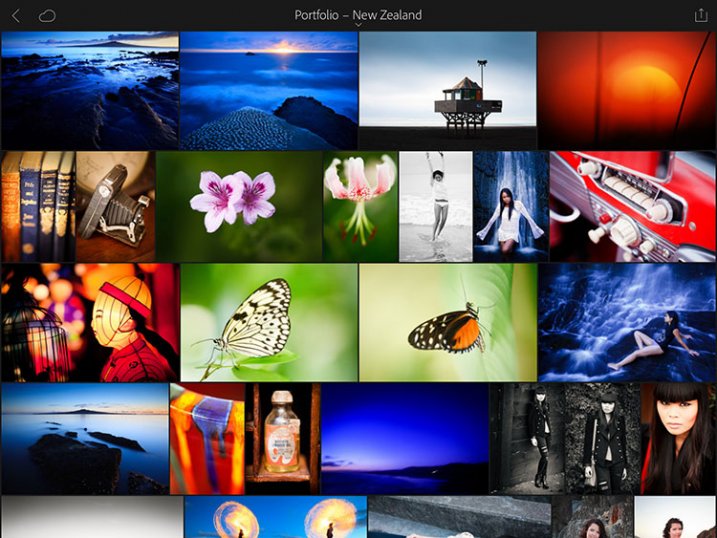
One practical application of this is that you can create a Collection containing your best photos to show people interested in viewing your portfolio. You can add or remove photos in Lightroom CC, and the updates are automatically pushed to Lightroom mobile. Very little work is required on your part, as most of the process is automated.

Lightroom mobile doesn’t require much storage space on your mobile device
Unless you have a device with a lot of storage space you probably don’t have room to store hundreds of full-size JPEG or Raw files in addition to what’s already on there.
Lightroom mobile works around that by using Smart Previews; a compressed preview of your photo that measures 2540 pixels along the longest edge. Crucially, Smart Previews are only a fraction of the size of a JPEG or Raw file (around 2%).
When you synchronize a Collection with Lightroom mobile, Lightroom CC generates Smart Previews of the photos it contains (if they don’t exist already) and uploads them to Adobe Cloud.
In turn, Lightroom mobile accesses Adobe Cloud and downloads the Smart Previews when they are required. They are cached and can be deleted when you need to free up memory. This system ensures you can use Lightroom mobile on devices without much spare storage space.

This Collection contains 37 photos yet only takes up 54.6Mb of my device’s storage space.
You can also download Smart Previews to your device and store them to enable off-line viewing and editing. This requires more storage space (although not a lot), but doing so both speeds up Lightroom mobile, and lets you view and edit photos without an internet connection. If you have a device with 64GB or 128GB storage, you have space for tens of thousands of Smart Previews.
Note: Lightroom mobile can be set to use a wi-fi connection only, so it doesn’t consume mobile bandwidth.
Lightroom mobile lets you Flag and rate images
If you use the Lightroom Library module to view images you will be aware that even on fast systems it’s not always as fast as you would like. Viewing images in Lightroom mobile is much faster. There’s virtually no delay in previewing images as long as you have enabled offline editing.
This means you can view photos and assign Flags or Ratings very quickly, greatly speeding up the amount of time it takes to view images from a shoot, and decide which ones to process.
Any changes you make to metadata, including Flags and Ratings, are automatically updated in Lightroom CC (internet connection required).

Lightroom mobile lets you process photos
Yes, you can process your photos in Lightroom mobile as well. All edits are synchronized with Lightroom CC. However, you don’t have the full functionality of Lightroom’s Develop module. But you can carry out the following:
- All the adjustments available in the Basic panel
- Cropping images
- Apply one of 42 built-in presets
- Add a vignette
- Adjust Tone Curves
- Use the Color/B&W adjustment tool
Note: Most mobile devices are not colour calibrated, so critical processing work should be carried out on a computer with a calibrated monitor.

Lightroom mobile synchronizes photos taken with your mobile device, with Lightroom CC
You can create a Lightroom mobile Collection that automatically populates with photos taken with, or added to your mobile device. Lightroom mobile uploads them to Adobe Cloud when you go online, and when you open Lightroom CC it downloads them and saves them on your computer. This works with JPEG, PNG and video files but not Raw files.
Lightroom web lets you make photos available for online viewing
When you synchronize a Collection with Lightroom mobile you can also make it available for public viewing. Lightroom generates a unique link for you to share with people so they can view the Collection in a web browser. Viewer’s logged in with an Adobe ID can comment on photos and mark favourites.

Lightroom web lets you access your photos from a web browser
Log in to the Adobe Lightroom website using your Adobe ID to access all your synchronized Collections. You can assign flags and ratings, make comments, mark images as favourites, and view essential metadata such as exposure settings. However, you can’t carry out any processing. You can also download a large JPEG file (generated from the Smart Preview).

Lightroom mobile as a backup
You may be wondering if you can use Lightroom mobile to edit or view photos taken in the field. The answer is you can, but with restrictions. The major one is that you can’t import Raw files into Lightroom mobile, even if they have been downloaded from your camera to your mobile device.
But you can import JPEG files. This is the workflow. It’s not as straightforward as it could be, but it works.
- Shoot Raw+JPEG in-camera
- Download all the photos to your mobile device
- Import the JPEG files into Lightroom mobile
- Assign Flags and Ratings, or process images in Lightroom mobile
- When you get home, import the Raw files into Lightroom CC without changing the name. Meanwhile the JPEGS are synchronized via the Adobe Cloud
- Use John Beardsworth’s Syncomatic plug-in to synchronize the changes you made to the JPEG files with their Raw equivalents
Your turn
Do you use Lightroom mobile or Lightroom web? What do you use them for? I’d love to know – please tell us in the comments.
The Mastering Lightroom Collection

My Mastering Lightroom ebooks will help you get the most out of Lightroom. They cover every aspect of the software from the Library module through to creating beautiful images in the Develop module. Click the link to learn more or buy.
googletag.cmd.push(function() {
tablet_slots.push( googletag.defineSlot( “/1005424/_dPSv4_tab-all-article-bottom_(300×250)”, [300, 250], “pb-ad-78623” ).addService( googletag.pubads() ) ); } );googletag.cmd.push(function() {
mobile_slots.push( googletag.defineSlot( “/1005424/_dPSv4_mob-all-article-bottom_(300×250)”, [300, 250], “pb-ad-78158” ).addService( googletag.pubads() ) ); } );The post A Brief Guide to Lightroom Mobile and Lightroom Web by Andrew S. Gibson appeared first on Digital Photography School.
-
Lensbaby launches Creative Mobile Kit
Lensbaby has launched the Creative Mobile Kit, consisting of a mounting device and kickstand for your smartphone, and two lenses, the LM-20 and LM-30. The former captures a large sweet spot surrounded by gradually increasing blur, and the latter produces images with a sharp center surrounded by reflections. Read more
-
DxOMark Mobile report: Sony Xperia Z3+
The Xperia Z3+ is the international version of the Japan-only Xperia Z4. On paper, it’s only a minor upgrade over the predecessor Xperia Z3. The 1/2.3-inch 20.7MP Sony Exmor sensor and F2.0 25mm equiv. lens are shared with the previous model. Despite having the same specs, camera performance is improved and nabs the Z3+ DxOMark’s third place ranking. Read more