RSS
 

Posts Tagged ‘mobile’

Updated: iPhone 7 and iPhone 7 Plus added to mobile studio scene comparison

30 Sep

When the most popular camera in the world gets a major update, it’s a newsworthy event all around. We’ve put the 12MP iPhone 7 and iPhone 7 Plus cameras in front of our studio test scene to see what they (and their new Raw capture abilities) can do.

$ (document).ready(function() { ImageComparisonWidget({“containerId”:”reviewImageComparisonWidget-55056378″,”widgetId”:405,”initialStateId”:2855}) })

The iPhone 7 Plus includes both wide-angle and telephoto lenses. However, because the telephoto lens is 1.3EV slower, the phone will sometimes use a digitally zoomed shot from its brighter wide-angle lens in low light when in ‘telephoto’ mode.

For this reason we’ve focused on getting the Raw images for the iPhone 7 Plus, to ensure we’re seeing the results from telephoto lens/sensor. It’s reasonable to assume that the wide-angle JPEGs will look the same as those from the iPhone 7.

Please also note that the 7 Plus has also used a much faster shutter speed for its low light telephoto shot, presumably to avoid camera shake on the unstabilized telephoto lens/camera.

Articles: Digital Photography Review (dpreview.com)

 
Comments Off on Updated: iPhone 7 and iPhone 7 Plus added to mobile studio scene comparison

Posted in Uncategorized


iPhone 7 and 7 Plus added to mobile studio scene comparison

29 Sep

The iPhone 7 and 7 Plus don’t exactly break new ground for mobile photography. As has been the case in the past, Apple has embraced emerging technology that other manufacturers already offer in their devices. But when the most popular camera in the world gets a major update, it’s a newsworthy event all around. We’ve put the 12MP iPhone 7 and its bigger dual-cam sibling in front of our studio test scene to see what they (and their Raw capture abilities) can do.

See the iPhone 7 and iPhone 7 Plus in our studio test scene

Articles: Digital Photography Review (dpreview.com)

 
Comments Off on iPhone 7 and 7 Plus added to mobile studio scene comparison

Posted in Uncategorized


iPhone 7 is best Apple device yet in DxOMark Mobile testing

28 Sep

The engineers at DxOMark have put the iPhone 7 camera through its paces and found it to be a solid upgrade from the iPhone 6s and 6s Plus, in terms of both features and image quality. With an overall DxOMark score of 86 it’s better than Apple’s previous best score of 84 for the iPhone 6s Plus. This is the third best score among mobile phones tested and on the same level as devices such as the LG G5 or Samsung Galaxy S6. 

The testers were pleased by the improved texture performance, which they attribute to the new lens design, and the low noise and artifact levels. They also found the camera to produce good exposures with a wide dynamic range as well as accurate white balance and color rendering. The iPhone 7’s main weakness is a loss of fine detail and visible luminance noise in low light. The DxOMark team was also impressed by the efficient stabilization, fast autofocus and good detail in video mode.

Read the full report at DxOMark.com

Articles: Digital Photography Review (dpreview.com)

 
Comments Off on iPhone 7 is best Apple device yet in DxOMark Mobile testing

Posted in Uncategorized


Rebuilding Blocks: Mobile Factory Turns Disaster Debris into Modular Bricks

26 Sep

[ By WebUrbanist in Architecture & Houses & Residential. ]

mobile-factory-homes-copy

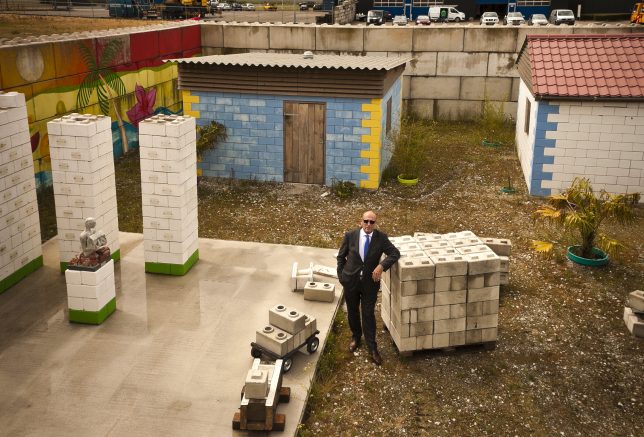
In the wake of intentional demolition or unexpected disasters, the Mobile Factory system can be shipped inside just two cargo containers and begin to turn rubble from ruins into building blocks for reconstruction.

Developed in The Netherlands, the technology filters concrete from other rubble, which is then cast into interlocking blocks (like LEGO bricks) that require no joinery to form stable walls. These units can be stacked without specialized training or equipment, making it possible for communities to rebuild efficiently and cheaply.

The resulting structures are earthquake-resistant, held together in part by bamboo rods threaded through voids in a certain subset of the wall blocks (which can also be used to thread in utilities, including plumbing and electrical lines).

mobile-factory-walls

Since the system fits into a pair of shipping containers, it can easily be transported from site to site, building blocks close to where they will be used and reducing transit time and costs. The reversibility of this construction approach also means that temporary buildings can be erected quickly in the wake of a disaster. In turn, these can be disassembled or adapted easily in the weeks, months and years following an emergency situation.

Consider the 2010 earthquake in Haiti that left hundreds of thousands dead and millions homeless. Over five years later and the country is still littered with 25 million tons of construction debris, which technologies like this can help turn into affordable housing. Indeed, the Mobile Factory organization is looking into expanding their work in Haiti, Peru and other countries in need of this tech.

mobile-blocks

“In disasters, you have piles and piles of rubble and the rubble is waste. If you are rich, you buy more bricks and rebuild your home,” said one of the organization’s founders. “But what happens if you are poor? In disasters it is the poorest people who live in the weakest houses and they lose their homes first. I thought, what if you recycled the rubble to build back better homes for poor people?”

Beyond wars and tsunamis in nations further afield, there are potential urban applications in densely-built places like the Europe and the United States: cities like Baltimore and Detroit spend vast amounts of money demolishing buildings (and in some cases: entire blocks), then clear the rubble and put it in landfills. This technology suggests an alternative: reusing on or close to the demolition site, reducing material and energy waste as well post-demolition transportation costs.

Share on Facebook


[ By WebUrbanist in Architecture & Houses & Residential. ]

[ WebUrbanist | Archives | Galleries | Privacy | TOS ]


WebUrbanist

 
Comments Off on Rebuilding Blocks: Mobile Factory Turns Disaster Debris into Modular Bricks

Posted in Creativity


MIOPS displays its MIOPS Mobile smart camera remote

25 Sep

The makers of the MIOPS smart trigger have returned to Kickstarter looking to fund their latest project, the MIOPS Mobile and are showing a prototype at their Photokina booth. The Mobile connects your DSLR and smartphone via a Bluetooth LE connection and uses your mobile device’s built-in sensors to offer a range of creative capture modes. The camera can be triggered by vibration, sound, motion, a predefined travel distance or a combination of all those events. Advanced timelapse modes are included as well and all parameters and modes are controlled via an iOS or Android smartphone app. 

Remote shutter control is on board as well – functions include Cable Release, Press&Hold, Press&Lock, Timed Release, Self Timer and Timed Release with Self Timer. The system is compatible with 350 camera models from most major manufacturers and the battery provides power for approximately 24 hours of use with one charge. Firmware is updated automatically over the air. More information including a video can be found on the MIOPS Mobile Kickstarter page. The funding goal has already been reached but you can still secure a unit with a $ 79 pledge. Shipping is planned for April 2017.

Articles: Digital Photography Review (dpreview.com)

 
Comments Off on MIOPS displays its MIOPS Mobile smart camera remote

Posted in Uncategorized


Adobe Lightroom Mobile for iOS 2.5 brings Raw DNG capture

14 Sep
In order to capture shadow detail, this image was metered from the shadows, resulting in blown out highlights. The DNG version on the right enabled the highlights to be recaptured without issue. Photo and caption courtesy of Adobe.

Adobe has released an update for the iOS version of its Lightroom Mobile app, taking advantage of iOS 10’s DNG support. Version 2.5 offers Raw capture and editing within the app, provided that you’re running Apple’s newest OS version on an iPhone 6s, 6s Plus, SE or iPad Pro 9.7.

Apple snuck a mention of iOS 10’s Raw capabilities into its WWDC keynote in June. Available for download today, iOS 10 brings DNG raw capture and editing to Apple devices. Today’s Lightroom Mobile update for iOS brings the app’s feature set into line with the Android version, which has been able to capture and edit Raw since February. 

Version 2.5 also brings support for the wide gamut P3 color space offered by the iPad Pro 9.7 and the forthcoming iPhone 7 and 7 Plus. 

Adobe Lightroom for iOS 2.5 is available for download now from the App Store.

Articles: Digital Photography Review (dpreview.com)

 
Comments Off on Adobe Lightroom Mobile for iOS 2.5 brings Raw DNG capture

Posted in Uncategorized


VW Doubleback: Hacked Camper Van Unfolds into Huge Mobile Home

09 Sep

[ By WebUrbanist in Technology & Vehicles & Mods. ]

doubleback huge

The recent comeback of modernized (and modified) mobile homes has seen many novel transformations of cars and trucks into various sizes of living space, but the Doubleback may have more secret additional area than any other vehicle of its size and class.

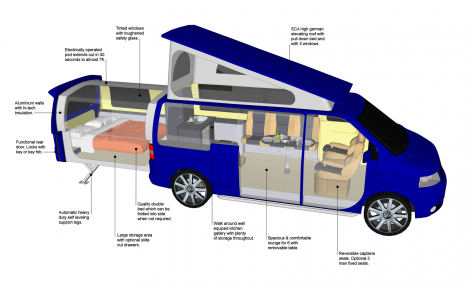
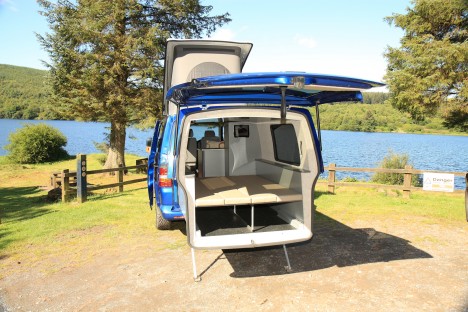
These modified T5 transports have a pop-up top, but also a slide-out back adding up to six feet of extra length – each of these extensions can sleep two people.

doubleback diagram

Self-leveling feet drop down from the rear extension, making sure the cantilevered zone remains level at all times, including on variegated terrain.

doubleback rear

Further exterior space can be covered as well via a roll-out canopy top or custom flip-up door, turning parking lots and campgrounds into cookout spaces and backyards.

doubleback interior

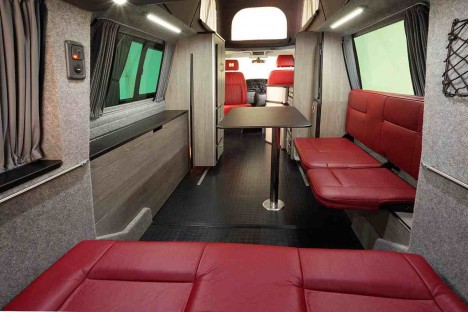
Various configurations are possible, sleeping up to four people (drop-down beds in the back and additional sleeping space above) and seating depending on the design details. Newer models also include space for a camping toilet and cooking amenities.

Share on Facebook


[ By WebUrbanist in Technology & Vehicles & Mods. ]

[ WebUrbanist | Archives | Galleries | Privacy | TOS ]


WebUrbanist

 
Comments Off on VW Doubleback: Hacked Camper Van Unfolds into Huge Mobile Home

Posted in Creativity


DJI Osmo Mobile brings 3-axis gimbal stabilization to smartphones

03 Sep

DJI has introduced the Osmo Mobile, a variation of its previously launched Osmo that is, in this case, designed for smartphones. With Osmo Mobile, users can insert a smartphone into the mount and record smooth, stabilized footage with the handset thanks to the SmoothTrack technology and 3-axis gimbal stabilization. The stabilizer works with the DJI GO App for livestreaming videos, sharing content, and tracking moving objects via DJI’s ActiveTrack.

The Osmo Mobile’s 3-axis stabilization claims accuracy down to 0.03 degrees, while the SmoothTrack tech works to reduce small movements and shaking. Trigger control enables switching between the handset’s front and rear camera, as well as re-centering and locking the gimbal direction. Standard, Portrait, Flashlight, and Underslung operation modes are available.

The DJI GO App offers, in addition to ActiveTrack, functions including access to camera settings, Panorama, Long Exposure, Live Stream, and Motion Time Lapse. Other Osmo features include Bluetooth, a 3.5mm charging/upgrade port, and compatibility with Osmo accessories. DJI says Osmo Mobile ‘should’ support any smartphone between 2.31 and 3.34 inches wide; this includes the most recent high-end smartphones, including the Galaxy S7, iPhone 5/6/6s Plus, and the Huawei Mate 8.

The Osmo Mobile is available as of today for $ 299.

Via: PRNewswire

Articles: Digital Photography Review (dpreview.com)

 
Comments Off on DJI Osmo Mobile brings 3-axis gimbal stabilization to smartphones

Posted in Uncategorized


Sony Xperia X Performance achieves top score in DxOMark Mobile ranking

29 Jul

DxoMark has published its test results for Sony’s flagship device in the Xperia X series, the Xperia X Performance. At 88 points the Sony achieves the same score as the HTC 10 and Samsung Galaxy S7 and now shares the top spot in the DxOMark Mobile rankings with those phones. 

The DxOMark testers were particularly impressed by the Xperia X Performance’s fast and accurate AF system, good exposure and dynamic range, well-controlled noise in low light and good detail in flash images. On the downside, the HDR mode does not always trigger when it should, small amounts of chroma noise are visible in outdoor conditions and the white balance is inconsistent when shooting with flash. 

The Xperia X Performance comes with a very similar camera specification to the Xperia Z5. A 23MP 1/2.3-inch Sony Exmor multi-aspect sensor is coupled with a F2.0 aperture in a wide angle lens with an equivalent focal length of 24mm. A predictive AF system, developed in collaboration with the engineers in Sony’s Alpha camera division, allows for improved subject tracking and low light mode ISO to be increased to 12800. You can read the full test report on the DxOMark website.

Articles: Digital Photography Review (dpreview.com)

 
Comments Off on Sony Xperia X Performance achieves top score in DxOMark Mobile ranking

Posted in Uncategorized


Adobe boosts Lightroom Mobile with Raw editing for iOS

14 Jul

Adobe’s Lightroom Mobile apps for Apple and Android mobile devices have both been given significant updates that allow users a much wider range of controls when editing and shooting. The company has quite different apps for the two operating systems, and while Android users have been able to edit Raw files for some time the facility is now offered to iOS users via version 2.4. Owners of Android devices can now install version 2.1 which offers what Adobe calls a ‘Pro’ shooting mode that allows much more detailed control over the way pictures are recorded.

Adobe says the version 2.1 for Android has a completely new Lightroom Camera function that features a mode that gives the photographer access to shutter speed, ISO, white balance and focus so that they can all be adjusted manually. Aperture isn’t listed as few mobile cameras have significantly variable apertures. The company also says it has improved the app’s ability to export high resolution files.

Apple iPhone and iPad users get Raw Technology Preview, which effectively allows photographers to import files from all the cameras supported by the main desktop version of Camera Raw. These Raw files can be edited using a wide range of tools to control contrast, exposure and white balance, and marked with star ratings and flags – all of which can be synched with Lightroom on the owner’s other devices. The company says it has edited 50MP images from the Canon EOS 5DS on an iPhone 6 to demonstrate how powerful the application is.

iOS users can also now make radial and linear selections that allow local editing of particular areas of the image.

Both the Android and iOS versions of Lightroom Mobile are free to download and use, but to enjoy the new features iOS users need to have a subscription to Creative Cloud.

For more information see the Adobe blog. 

Photograph by Elia Locardi of the valley in Meteora, Greece. Shot in raw on a Fuji XT-2 and edited on location with an iPad Pro with Lightroom for iOS.

Manufacturer’s information:

Two big updates for Lightroom for mobile are now available for download

Lightroom for iOS 2.4
In version 2.4, two major improvements have been added: a raw technology preview and the addition of local adjustment tools. In addition to these major improvements, we’ve also added the ability to use keyboard shortcuts with physical keyboards connected to iPads, the ability to add your copyright to all imported photos, functionality to turn on lens profiles (if your camera and lens combination are supported), as well as the usual bug fixes and improvements.

Raw Technology Preview
We’re sure it’s happened to you before: you’re out taking photos (in raw of course) and you capture a real stunner that you can’t wait to share with the world. Until now, you had to either transfer a JPEG version of the file over or you had to wait until you got back to your desktop or laptop. With the raw technology preview, you’ll be able to import raw photos immediately to either your iPhone or iPad, edit them, and then share them, anywhere you’ve got a connection. Our goal with Lightroom for mobile is to make it an indispensable part of your photography workflow, providing the tools that you’re familiar with and the quality you expect in a product that can be with you, no matter when inspiration strikes. With this technology preview, we want to push the boundaries of how photographers around the world work with their mobile devices.

You get all of the benefits of raw, such as the ability to change the white balance, being able to recover blown out highlights, access to the full range of color information, as well as editing an uncompressed file, all using the exact same technology that powers Lightroom on your desktop. An added benefit is that the raw file that you’ve imported into Lightroom for iOS will be synced with Lightroom on your other devices, such as Lightroom for desktop or Lightroom on the web, along with any of the edits, star ratings, or flags that you added.

Lightroom for mobile supports all of the same raw files that Lightroom for desktop as well as Adobe Camera Raw support, with the full list available here.

To transfer photos to your mobile device, you need to use either the camera connection kit or the lightning to SD or USB kits from Apple to transfer your raw files over to your device, which will bring up the Import tab within the iOS Photos app. Importing the files will add them into your camera roll, where you can then access and load in any raw file directly into Lightroom mobile. It’s important to keep in mind that raw files are significantly larger (3-5 times larger) than JPEGs, meaning the raw files will take longer to import, upload, and take up more space on your device. Even as such, we found that the added control and quality that the raw files afforded were so useful that it outweighed the negatives.

Just as when working with raw files that were synced from Lightroom for desktop or Lightroom on the web, you’ll be able to perform raw-specific enhancements, such as changing the white balance with greater control and recovering clipped highlights, but unlike when working with raw files synced from Lightroom for desktop, you’ll have access to the full resolution file AND you can do it anywhere in the world, even from your iPhone! 

We’ve run Lightroom for mobile through its paces on a number of different files, including the 50MP Canon 5DS running on an iPhone 6, proving that you really can edit nearly any photo anywhere. After playing with the app for a few months, we’ve found that it’s a really great way to take a few of your favorite images from the day (or even that you just captured), review to make sure you captured what you saw, edit, and then share them, all right away, and with all of your edits carried through the rest of the Lightroom ecosystem.

We had the pleasure of working with a number of photographers while creating the raw technology preview, take a look at how travel photographer Elia Locardi was able to put the technology to use while shooting on location in Greece.

You can read more about the images that were created for this release through an article about Elia on Adobe Create as well as on Elia’s own blog.

Linear and Radial Selections
In addition to the raw technology preview, we’ve also added in the ability to perform local adjustments with linear and radial selections, the two most requested features after raw support.

Lightroom for iOS Availability
Lightroom mobile 2.4 is available immediately for iPhone and iPad from the iOS App Store for free. Both of these improvements are available only for members with a creative cloud subscription or or if you start a free Creative Cloud trial.

Lightroom for Android 2.1

While the iOS team was working hard on the raw technology preview, the Android team doubled-down on the unique end-to-end DNG capture experience first announced in Lightroom for Android 2.0 and created a brand new capture experience. Our goal is to create the best mobile photography experience available, and with the amazing quality possible on Android devices, especially thanks to DNG raw capture, we wanted to provide all of the controls and functionality needed.

Now, the built-in camera has a new Pro mode that lets you control the shutter speed, ISO, white balance, and focus all manually, in a brand new interface.

You can access the camera directly using the new Lightroom Camera widget. This new widget will launch the Lightroom camera directly, making it faster for you to get in and start taking pictures.

In addition to the new built-in camera, we’ve also improved the app’s ability to export full-resolution files. If the files are available somewhere within the Lightroom ecosystem, Lightroom for Android will now download the full resolution version and enable you to export them.

You can download Lightroom for Android 2.1 here now for free.

Articles: Digital Photography Review (dpreview.com)

 
Comments Off on Adobe boosts Lightroom Mobile with Raw editing for iOS

Posted in Uncategorized