RSS
 

Posts Tagged ‘Manual’

Tips for Using Legacy Lenses and Shooting in Full Manual

19 Jan

Shooting Manually

Full manual. Two words. Ten letters. Yet those words can be some of the most discouraging for new photographers to ingest. There has long been a perceived over complication concerning shooting in Manual Mode. Personally, I always leave my camera set to manual. Granted, I dont shoot many fast-paced sporting events that require speedy autofocus, or many situations where there is constantly fluctuating light. Still, the idea of controlling the aperture, shutter speed, ISO, and focus, all independently of your camera’s computer, unsettles even experienced photographers at times. Happily though, not only is there a swelling community of photographerss who are embracing the somewhat challenging, but highly organic and rewarding, benefits of shooting manually…but also upping the ante by adapting completely analog legacy lenses for use with their cameras.
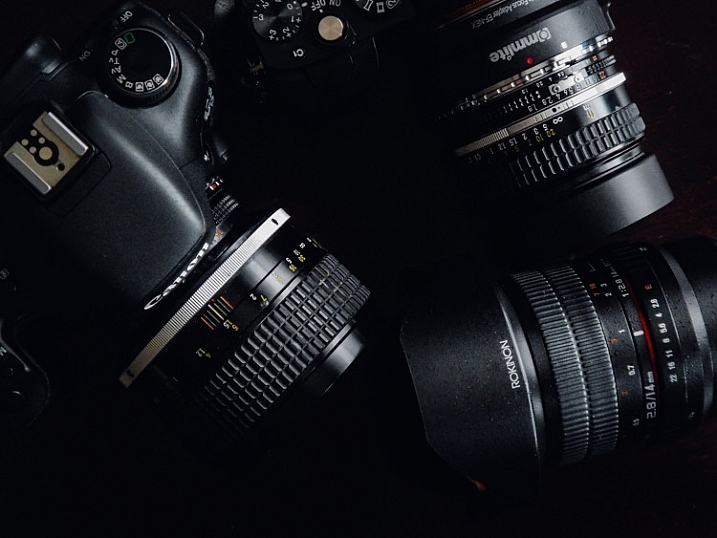
image

In this article, you will learn how to enjoy what might be considered a devolved methodology of making photographs using legacy lenses, and shooting in full manual mode. Full manual lenses, are generally built to exacting quality standards, but are relatively low-priced, which makes them great for beginners, and those shooting on a budget. Furthermore, adapters are available for virtually all mirrorless and digital SLR camera systems, so that you can start making great photographs using these low-tech lenses. Let’s jump right in.

What are Legacy Lenses?

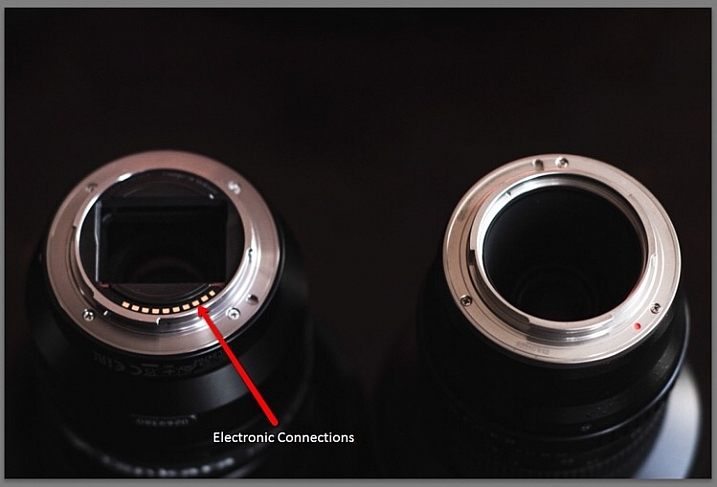
Lenses that were geared for use with older film camera (35mm or medium/large format) systems are called legacy lenses. Glass of this type are non-motor driven, and operate autonomously of your camera. This means that the focus and aperture selection are all accomplished inside of the lens, which is controlled by you. There is no electronic communication between the lens and the camera. You must use the lens’s aperture, and focusing ring, to produce the desired depth of field and focus. Legacy lenses are generally made of metal, making them relatively heavy, but heartily constructed.

Which lenses are fully manual?

Full manual lenses does certainly not include all legacy lenses. Many manufacturers still make completely manual lenses, engineered specifically for the digital camera market. A lens is designated as being fully manual when there is no control being provided by the camera. However, there are quite a few fully manual lenses which have incorporated focus indicator chips into their design. While remaining fully manual, these types of lenses will communicate with your camera when focus has been achieved.
image

Adapting lenses to your camera

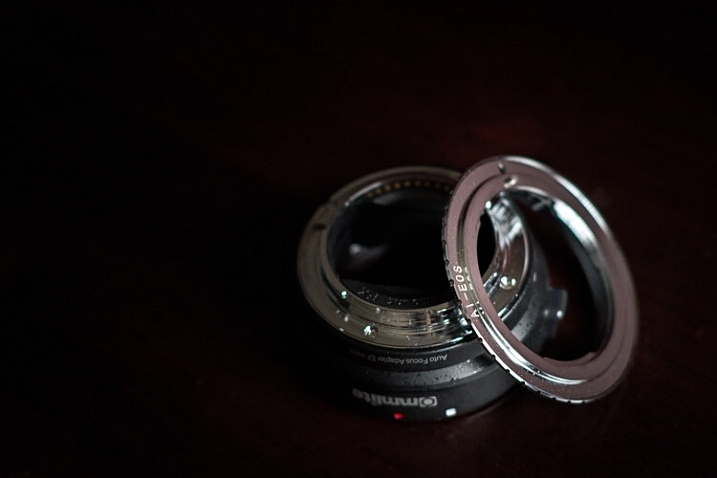
In a previous article on dPS we discussed how easy it really is to use legacy lenses (and other non-native glass) with your digital camera. The same holds true. All that is needed to enable the use of fully manual legacy lenses to be used with your modern digital camera body is a simple adapter.
image

These adapters vary in capability from simple adapter rings, to advanced electronic contraptions, with focus indicator chips of their own. Keep in mind though, there are a few things to consider before adapting any non-native lens to your camera. More on that shortly.

Using your camera in full manual mode with manual lenses
image

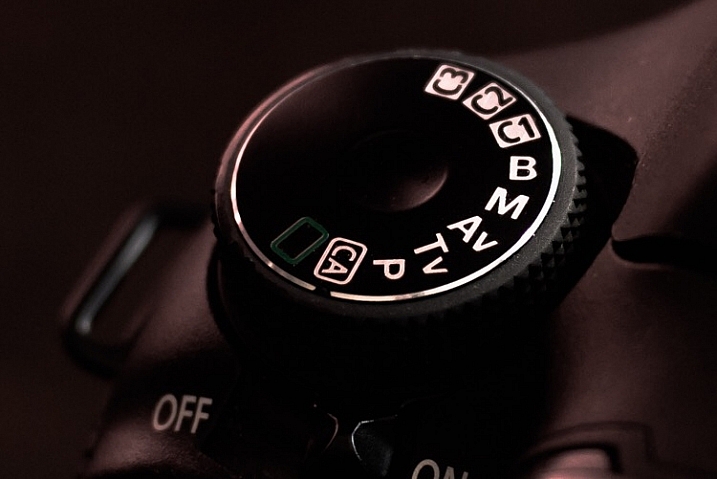
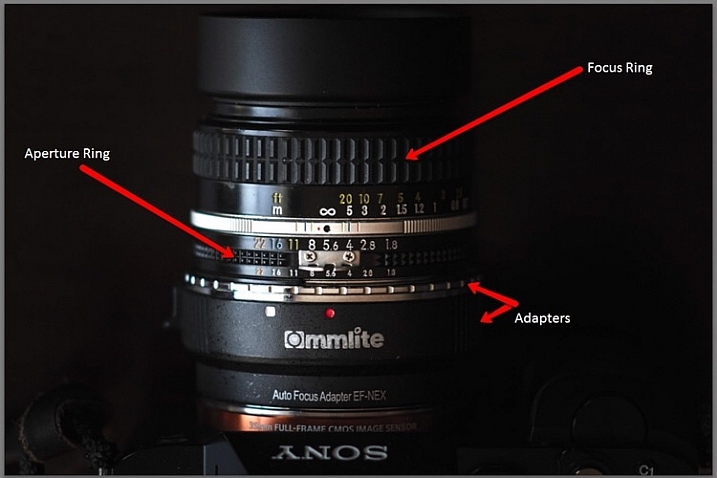
You’ve found an elegant legacy lens and located the appropriate adapter for your particular camera system. You’re excited and ready begin shooting completely manually, so now what? Well, take a breath and exhale a well deserved sigh of relief, because all of that was the hard part. Now all that’s left are a few quick steps. The first of those steps is to switch your camera into Manual Mode. This is almost always done by moving your selector wheel to M for manual mode. This will give you, the courageous photographer, complete control over all aspects of the shot. If you are using a completely manual lens, or a legacy lens, everything except the shutter speed will now be manipulated using the lens. The aperture will be controlled using the aperture selector ring, and so too will be the focusing.

This is a breakdown of the essential features found on an adapted, full manual legacy lens (in this case a Nikkor 50mm f/1.8).
image

Here are a few tips for using your camera in full manual mode, in conjunction with a fully manual or legacy lens:

Focus Peaking Function

Some cameras now incorporate a technology called focus peaking which visually outlines the edges of the most in-focus area of a scene,, before the shutter is ever released. The technology detects the area of the most contrast between pixels, thus determining what region is most in focus. Though not perfect, this a great option to aid with manual focusing.

Focus Magnifier

Not all camera bodies come equipped with the focus peaking feature, but most modern digital cameras are capable of focus magnification. This lets you digitally magnify the scene, and inspect areas for proper focus. I use focus magnification in all of my landscape work. It is a great way to achieve pin point focus on the areas where precision is a necessity. (Note: this is usually available in LiveView mode).

Shoot RAW

Yes, the old shoot RAW lecture again. Even though focus correction can’t be achieved, even in RAW format files, it will however give you much more room to work on contrast and clarity. This will sometimes help to salvage an image that may otherwise be culled.

Things to consider before using legacy lenses

Along with all the benefits of shooting manually with legacy and full manual lenses, there are also some things to remember before, and during shooting times.

Complete Autonomy of the Camera

There is of course no electronic communication between the lens and the camera, unless you have chosen an adapter or lens equipped with focus indicator technology. So there will be no way to use your shutter priority or aperture priority modes.

Physical Considerations

Some lenses will obstruct the mirror function of digital SLRs. This is one of those things that carries a little bit of buyer beware baggage. Make absolutely sure that the lens you are adapting to your camera does not physically occlude the operation of the mirror, this will damage your camera, possibly beyond repair. This becomes less of an issue with mirrorless camera systems.

Crop Factor

The crop factor of any lens is dependant on the size of the image sensor (or film) being used. Always be mindful of the interactions between your lens, and whatever size sensor you are using, be it full frame of APS-C (cropped). Most legacy lenses were intended for use with 35mm film. This will play a major role in your practical focal length, when shopping for lenses of the prime variety.
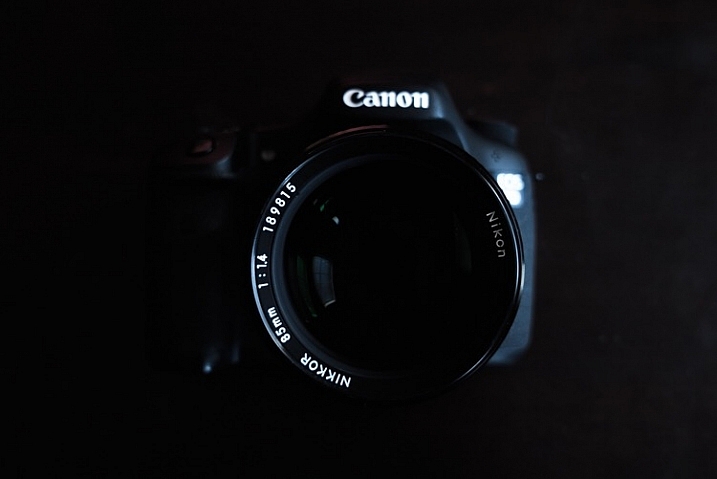
image

Fully manual and legacy lenses have a firm grasp on today’s digital world. Though viewed as antiquated by some, the essential elements of this type of photography can produce exceptional images. Shooting in Manual Mode gives you ultimate generalship over your work, and allows you to take every aspect of photo making into your own hands. Not only is the use of legacy and manual lenses a cost efficient way to make photographs, but it is also a reflection of a time when the buck stopped with the photographer, not the camera.

Newer isn’t always better. And even though manual shooting might not be the most effective course in some situations, there is no reason why it should be discounted in today’s modern era. Full manual shooting allows you to use lenses of extremely high quality to fully realize your creative vision, in ways you may not have otherwise been able to accommodate. Take your photography back to the future, and go beyond the realm of the automatic.

Do you have a favorite manual setup that you use regularly? Share it in the comments below!

googletag.cmd.push(function() {
tablet_slots.push( googletag.defineSlot( “/1005424/_dPSv4_tab-all-article-bottom_(300×250)”, [300, 250], “pb-ad-78623” ).addService( googletag.pubads() ) ); } );

googletag.cmd.push(function() {
mobile_slots.push( googletag.defineSlot( “/1005424/_dPSv4_mob-all-article-bottom_(300×250)”, [300, 250], “pb-ad-78158” ).addService( googletag.pubads() ) ); } );

The post Tips for Using Legacy Lenses and Shooting in Full Manual by Adam Welch appeared first on Digital Photography School.
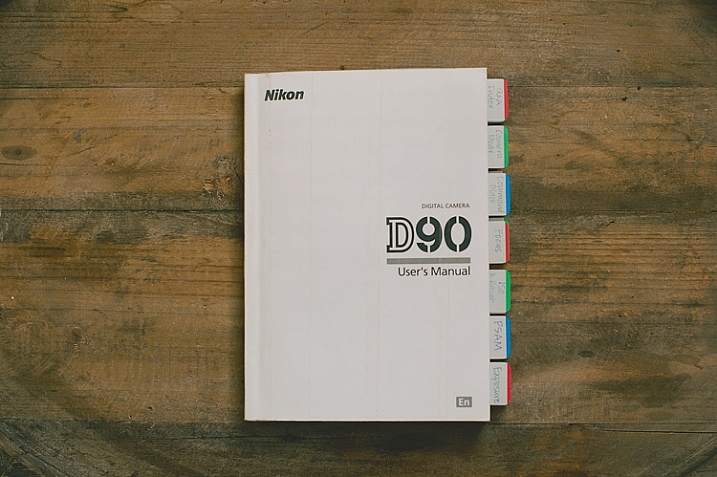
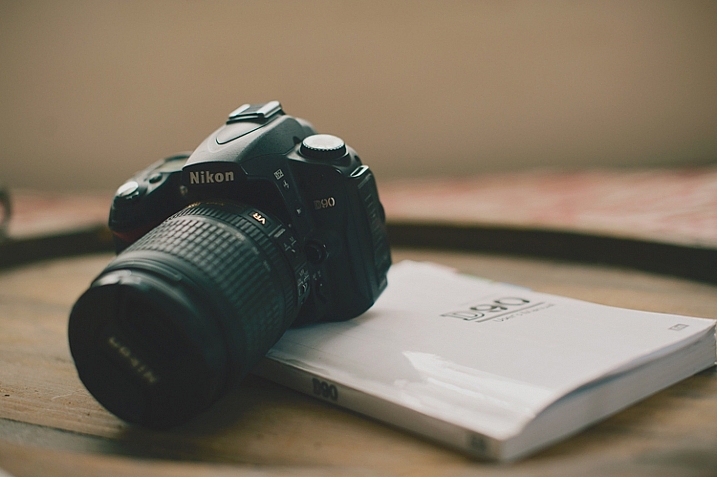
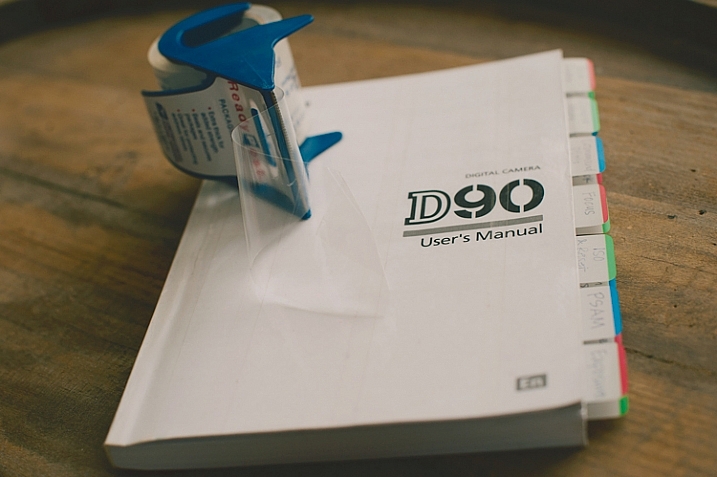
Digital Photography School

 
Comments Off on Tips for Using Legacy Lenses and Shooting in Full Manual

Posted in Photography


How to be a Better Photographer: Camera User Manual University

11 Jan

dPSmanual

Let me guess; you got a brand new camera, you don’t know how to use it, and you have no idea where to start – about right? Let me introduce you to one of the best ways to get to know your camera inside and out, backward and forward. It’s included with your camera, so there is no extra cost! It’s at your fingertips 24 hours a day. It’s patient, and never gets frustrated if you ask it the same questions over and over again. Welcome to:

Camera User Manual University!

dPScamera

For many of us, getting a brand new camera is beyond exciting. We start trying to use it right away, throwing the manual back in the box, forgotten forever. The problem is, we soon run into frustrations and questions, and end up just putting the camera aside, or searching and asking for the answers one at a time, learning slowly and with difficulty. Or maybe we have even had our camera for ages, and just barely discovered something amazing that it can do.

If I can convince you to actually USE that camera manual, you will start out with much more knowledge than the average camera owner, and you will discover lots of cool stuff that your camera can do, that your seasoned photographer friends may not even know!

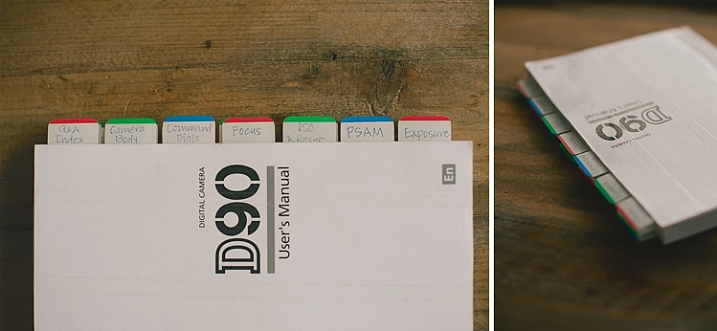
I am going to share my first camera manual and how I made it useful for me. These tips might help you transform your boring manual, into something that can actually help you become a better photographer.

Protect Your Manual

dPSprotect

The covers on camera manuals are usually very flimsy, and easily torn or bent. The first thing to do is laminate your cover, so it’s more durable and stays nicer. I did this by simply covering the front and back covers with packaging tape. I made the pieces of tape slightly bigger than the book, and folded them under so the edges were protected also. Take your time with this, and make sure you use a clean surface to avoid bubbles and dirt stuck underneath the tape.

Add Divider Tabs

dPStabs

I went through the book and labeled and divided each section, so I could find them at a glance. Not only does this make finding things easier later on, but labelling the tabs and sticking them in each section, gets you familiar with the manual even before you start digging in deeper. You will know what your manual has to offer, and what kind of things you are going to be learning very soon.

I used removable tabs that I bought from an office supply store. They have a slight plastic feel to them, and are very sturdy. I like using removable ones, because you can move them later if you don’t need one of the labels in there.

Start at the Beginning

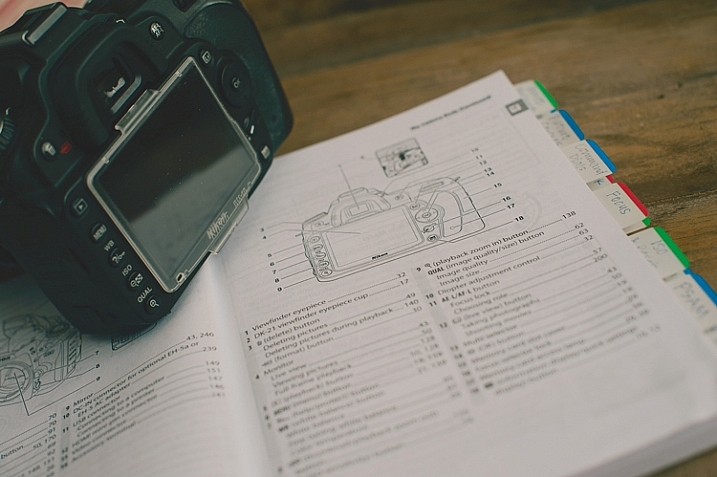
dPSpages

With your camera in your hands, go through the manual from the very beginning. Look at the diagrams, and find each item on your camera body. Even if you don’t understand what something is yet, find it on your camera. Later, as you read more detail, everything will start to come together. Read every page, even if it doesn’t make sense at first. Getting a nice camera is a big investment, so wouldn’t you want to know what it can do?

Camera manuals usually have very basic instructions near the beginning of the manual to get you shooting, almost right out of the box. Feel free to read that part, and begin using your camera right away, but don’t stop there! As you work your way through the manual, you will discover the reason you wanted a DSLR in the first place.

Try Everything

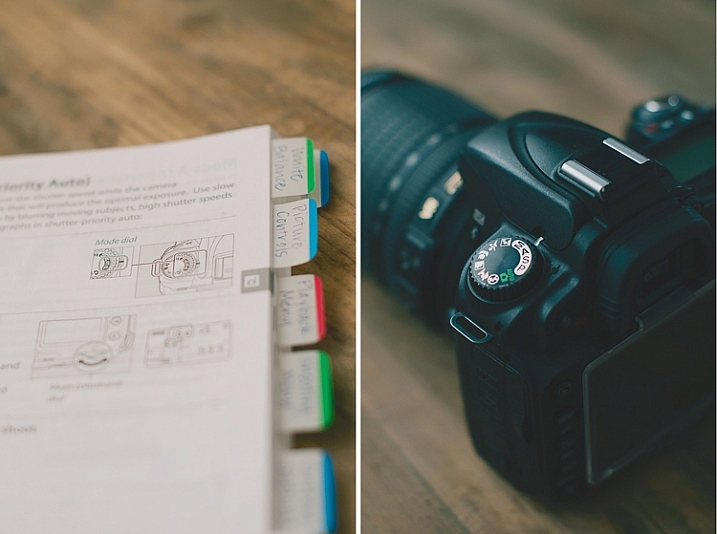
dPSdial

As you read and find each dial, button, and menu item on your own camera, give everything a try. If the manual is talking about different shooting modes, dial your camera in to each one, follow the instructions, and try a few test shots. Reading about things is good, but reading and then getting hands-on experience is infinitely better. You will understand what the manual is talking about with more clarity if you try things out for yourself.

Keep in mind that not everything will make sense the first time through, that’s okay. After you’ve practiced awhile, try going back through the manual page by page again. You’ll find that much of what confused you initially, has now become clear.

Once you’ve tried something, you may realize that it isn’t a feature that you will ever use. If that’s the case, just move on, and know that you at least tried it. You may end up wanting to use that feature in the future, and now you know that it exists.

Underline the Key Words

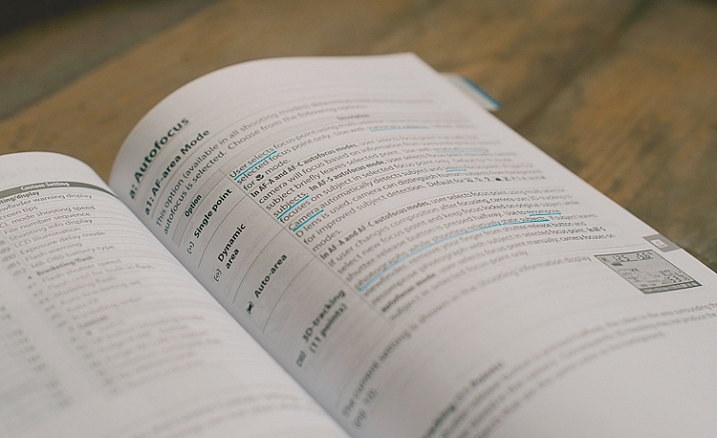
dPSmark

As you are reading through and learning, have a pen handy. Underline (or highlight if that’s your thing) key words that will help you focus on what is most important. Sometimes manuals can be wordy, and hard to understand. If you can zone in on the most important words, it will become more clear. Later, when you are trying to find something, those underlined words will pop out and make it easier to find.

Take notes in the margins if you try something, love it, and know that you will want to remember that in the future. Add an extra tab or sticky note there, or put a star next to it. It’s hard to remember everything you read after one read-through, but if you can quickly go back to your starred items and practice those often, you’ll be well on your way to mastering your camera.

dPSmanual

All of this might seem a little obsessive, and maybe it is for some. However, I have taught many photography classes, and had many one-on-one mentoring sessions with new photographers, and almost every question they ask me about their camera can be found in the manual. Some people learn better from a live teacher, but the great thing about the manual is that you can refer back to it as many times as you need to, and you don’t have to pay anything extra to learn.

Have you attended Camera Manual University? Do you have any tips for making your camera user manual easier to use? I’d love to hear them in the comments.

googletag.cmd.push(function() {
tablet_slots.push( googletag.defineSlot( “/1005424/_dPSv4_tab-all-article-bottom_(300×250)”, [300, 250], “pb-ad-78623” ).addService( googletag.pubads() ) ); } );

googletag.cmd.push(function() {
mobile_slots.push( googletag.defineSlot( “/1005424/_dPSv4_mob-all-article-bottom_(300×250)”, [300, 250], “pb-ad-78158” ).addService( googletag.pubads() ) ); } );

The post How to be a Better Photographer: Camera User Manual University by Melinda Smith appeared first on Digital Photography School.

Digital Photography School

 
Comments Off on How to be a Better Photographer: Camera User Manual University

Posted in Photography


Why Every Photographer Should Use a Manual Focus Lens

27 Aug

Your camera is smart. It has processors that are able to run algorithms, for near instantaneous adjustments to compensate for lighting conditions and changing environments. I’m a professional lens reviewer, and tend to complain if a lens/camera combination takes more than a split second to achieve accurate autofocus. But the reality is that most modern camera/lens combinations achieve accurate autofocus remarkably fast. Modern DSLRs can pretty much see in the dark, and still focus reasonably well with a near absence of light, and their performance at extremely high ISO settings is phenomenal.

Yes, your camera is most certainly smarter than your father’s, but the question is, are you a smarter photographer than your father?

Dustin Abbott DPS MF 15

Could it be that the wizardry of modern processors, sensors, and autofocus motors (AF) cocoon modern photographers from what actually happens in the process of taking photos? And, in doing so keep us from having to learn some of the essential basics of photography that could make us better? Here is why I think every photographer should spend some time with a manual focus only lens.

Aperture

A press release for a modern lens will say something like, “Nine rounded aperture blades.” That means next to nothing to most modern photographers for one simple reason – they will never see those blades. All they will ever see is the glass within the barrel of their lens. The reason for this is simple: lenses with an automatic iris aperture (the camera sets the aperture electronically), focus with the lens wide open (aperture blades withdrawn), and only stop down to the chosen aperture in the split second when that the shot is taken. It is pretty amazing how quickly this all happens, when you stop and think about it.

Most lenses produced for Canon EF mounts (excluding Samyang/Rokinon lenses along with a few non-mainstream models) have an auto iris aperture control. Even Zeiss manual focus lenses in Canon (ZE) mounts have automatic irises, and Samyang/Rokinon is retooling many of their lenses with AE versions with auto aperture control. Put simply, very few modern lenses in a Canon mount have an actual aperture ring. Nikon shooters get a few lenses with manual aperture rings (for some reason Zeiss lenses include one on Nikon [ZF] mounts.)

Auto aperture iris control is great for convenience. Just twist the dial on your camera (often in third stop increments) and select the aperture you want, or even let the camera choose it for you in an auto mode. It’s quick and painless.

The downside, of course, is that the actual significance of what is happening when that iris is opened wide or closed down is often lost upon modern photographers. We can talk about “stopping down” a lens or the advantage of a wide aperture prime, but until you have actually seen the difference in an aperture iris you won’t have a full sense of what that really means. Take a look at this series from the new Rokinon 50mm f/1.4.

When you actually see that aperture closing down you really get a sense of the difference between the f-stops and how much more light gathering there actually is at wide apertures. This series starts at f/1.4 and goes to f/8 – see how much difference the aperture size makes in the amount of light entering the camera?

Dustin Abbott DPS MF 8

Dustin Abbott DPS MF 9

Dustin Abbott DPS MF 10

Dustin Abbott DPS MF 11

Dustin Abbott DPS MF 12

Dustin Abbott DPS MF 13

Dustin Abbott DPS MF 14

My wife is an intelligent woman. She even has a pretty decent eye as a photographer, and has taken some great photos. But despite having been married to a gear guy since 1997, and having a hundred or so lenses going in and out of our house, she still to this day often gets confused about aperture. It can be confusing, as the logic (due to the way that f-stops often get reported) is backwards. Bigger numbers mean smaller apertures -and that seems backwards. There is no mistaking this with a manual focus lens with a manual aperture ring – you can physically see the aperture iris shrinking as you stop the lens down (choose a smaller aperture size – larger f-stop, like f/11 etc).

More photographers would get what aperture numbers really mean in terms of light gathering, if they physically saw the aperture blades close down or open in their lenses.

Light Gathering

Most cameras have a standard focusing screen, that does not show the true depth of field. This, added with the fact that the camera typically focuses with the lens wide opened, means that you often don’t get a sense of how much less light is available when the lens is stopped down (f/4-f/16, for example) or how much more is available at large apertures (f/1.2-f/2.8). Most DSLRs have a DOF (depth of field) preview button somewhere, but it is often in an obscure location and rarely gets used by many people. For this reason many photographers have never seen the true depth of field of any of their wide aperture lenses, or any other lens for that matters. This changes when you use a manual focus lens (particularly with a focus screen that shows true depth of field). More on this in a moment.

Yes, it is a pain when the viewfinder is quite dark when you have a manual aperture lens mounted and stopped down to, say, f/8. That’s the reason that modern lenses and cameras don’t show you this in your viewfinder. But it also means that you aren’t being forced to learn what f/8 really means in terms of light gathering. You also don’t see how much more light is available, or how much more shallow the depth of field is with a large aperture. You don’t really think about your aperture setting at the time of capture, resulting in a loss of creativity because your mind isn’t forced to visualize what aperture means to the shot.

But beyond this, manually selecting your aperture really helps you to mentally dial in the relationship between aperture and depth of field. The fact that you have to think about selecting the aperture, and see a difference in the viewfinder, in both the depth of field and the amount of light, helps you to realize how shallow depth of field shots (with a large aperture) and large depth of field shots (with a small aperture) are going to turn out. I have learned how to mentally visualize how depth of field is going to affect a scene so much more because of using manual aperture lenses. Here is a series from the Zeiss Planar T* 50mm f/1.4 lens. It starts at f/1.4, f/2, f/2.8, and then finally shows f/4. Notice the huge difference this makes to the degree in which the background is blurred.

Dustin Abbott DPS MF 1

Dustin Abbott DPS MF 2

Dustin Abbott DPS MF 3

Dustin Abbott DPS MF 4

The large aperture shots are much more attractive, and give a better three dimensional effect to the image. You probably won’t always shoot with manual focus lenses, but using one will help train your brain to visualize your shots more effectively and artistically.

Depth of Field and Focus

It is quite a revelation to use a wide aperture, manual focus prime, with a focusing screen like an EG-S that shows true depth of field. At close to medium distances you can actually watch focus travel from one thing to another, and subjects pop into focus. It really helps you think about storytelling as a part of your imagery. When you think about what you want in focus, it means that you have become intentional about what you want your viewer to see.

Many cameras have AF point spreads that are not wide enough to reach the edges of the frame. Manual focus lenses remove that limitation, and I am more likely to take an image with my subject in focus in an extreme corner when I use one. The rule of thirds for composition is a great starting tool, but sometimes rules are made to be broken. Take a look at this shot of a family games night. The cards are in the extreme bottom corner. Your eye goes there first, but then considers the whole out of focus scene beyond. Your brain allows you to mentally fill in the blanks, and image possibilities, rather than just a looking at a scene.

Dustin Abbott DPS MF 7

Many macro photographers have learned to choose to use manual focus at those very fine distances. It is often challenging to place an AF focus point right where you need it (particularly when using a tripod), but manually focusing allows you to simply focus until what you need to be in focus is sharp. I’ve heard a lot of people fuss over the focus speed of some macro lenses, including the amazing EF 100mm f/2.8L IS. All I can say is that you need to use a manual focus macro lens sometime. Using the Zeiss Makro-Planar in either a 50mm or 100mm focal length helps you to realize how much the macro range adds to the focus possibilities of such a lens. There are so many extra focus points! Using a manual focus macro lens will certainly help you appreciate the AF on macro lenses, and will also help you understand why the AF focus (distance) limiter switch is there and how to properly use it.

Dustin Abbott DPS MF 6

Dustin Abbott DPS MF 5

Learning to focus with a manual focus lens will help your mind to understand how to better use autofocus lenses (particularly those with focus limiters).

In Conclusion

We live in a high-paced world. We want everything to be faster and easier. But great art is rarely created is rarely created in a rush. When I am shooting professional event work and weddings, I tend to use image stabilized, wide aperture, zoom lenses. They are big and heavy, but they are extremely flexible and deliver great results. I need speed in those situations, but some of my most creative shots in my catalogue have been taken with manual focus lenses. I slow down and become more creative. Some of my most critically acclaimed images have been taken with manual focus lenses, both inexpensive and expensive ones.

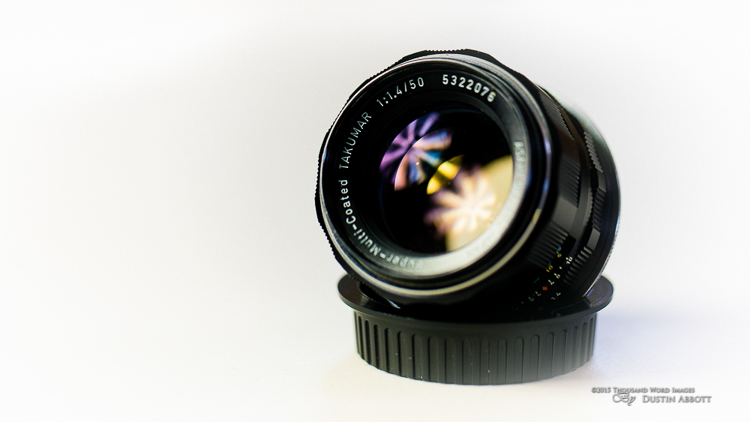
If you have been guilty of doing most of your photography in a rush, do yourself a favor a get yourself a manual focus lens (even a cheap one). If you want a cheap option, grab yourself an SMC Takumar 55mm f/1.8, and an adapter to your mount of choice. You can probably get a lens and an adapter for under $ 100. It takes some amazing pictures, and will open a world of appreciation for some of the lenses from another era. It will probably also make you a better photographer.

Even better is the SMC Takumar 50mm f/1.4, or if you want to use a value oriented modern manual focus lens, try one in your favorite focal length from Rokinon or Samyang (same thing, just rebranded lenses). You’ll find a number of reviews of different ones on my website. If you are willing to spend more and want the finest optics and image quality available, Carl Zeiss makes some of the best lenses period. They tend to be mostly manual focus, and I’ve had the privilege of using and reviewing many of them.

Once you learn how to take good pictures with a manual lens, shooting with your modern gear will seem easier than ever, and you might even use it more creatively. These are just a few reasons why every photographer should spend some time with a manual focus only lens.

googletag.cmd.push(function() {
tablet_slots.push( googletag.defineSlot( “/1005424/_dPSv4_tab-all-article-bottom_(300×250)”, [300, 250], “pb-ad-78623” ).addService( googletag.pubads() ) ); } );

googletag.cmd.push(function() {
mobile_slots.push( googletag.defineSlot( “/1005424/_dPSv4_mob-all-article-bottom_(300×250)”, [300, 250], “pb-ad-78158” ).addService( googletag.pubads() ) ); } );

The post Why Every Photographer Should Use a Manual Focus Lens by Dustin Abbott appeared first on Digital Photography School.

Digital Photography School

 
Comments Off on Why Every Photographer Should Use a Manual Focus Lens

Posted in Photography


Don’t Be Afraid of Manual Focus

04 Mar

If you’re a beginner in the wonderful world of photography, if you’ve never used an older film camera, or a combination of both, you might be unfamiliar with the workings of manual focus. Even if you are, you may not have thought about how you would use it in real-world situations.

Fortunately as DSLR owners, we have the best of both worlds between manual and automatic focusing; we have a choice as to how we decide the subject of our photo, and other points that aren’t as important. This is an advantage for you, and having a better understanding of the “other” focusing method will allow you more flexibility and leave you better prepared for a wider array of situations while in the field.

seagrass

But keep in mind, you’re not learning manual focus as a replacement for automatic focus, you’re learning it as a compliment.

While modern DSLR’s and their lenses have varying degrees of complexity for automatically focusing on a specific point within a scene, film cameras before them relied on a manual system to focus. The photographer would turn the focusing ring on the lens until the subject was sharp, then snap the photo. When the modern AF (autofocus) systems came around, the camera became smart enough to identify the subject(s) or the more important part of the photo, and focus on that without much interaction from the user.

You might think, why would I want to do it any other way? I can have the camera choose the most important thing to put into focus, or I can even manually select a focus point, and have it always focus there. What reason would I have to turn this system off completely and rely on myself?

There are a few reasons, in fact, but first, let’s cover how to use manual focus in the first place.

How to manually focus your camera

To manually focus an AF-capable lens on a DSLR, first locate the mode switch on the lens. It is usually labelled “AF – MF”. Switch it to MF. After you’ve done that, the lens will be in manual mode, and pressing down the shutter release halfway will no longer engage the autofocus system.

Find the focusing ring near the end of the lens. Twisting this ring will adjust focus, and you will immediately see the effects of this through the viewfinder, with different areas of the frame coming into, and going out of focus. Because your viewfinder isn’t a perfect representation of what your image will look like, you may need to use a couple of other tools to verify focus.

The AF-MF switch is located on the lens itself if compatible.

The AF-MF switch is located on the lens itself if compatible.

Firstly, you can use the depth of field preview button. Almost all modern DSLR’s have this feature, and it allows you to get an idea of how your current aperture and focus will appear in the final image. If equipped, the button is usually next to the lens mount, although the exact placement might vary depending on your camera model; be sure to check your camera’s manual if you’re unsure of its location.

When you press the button, the aperture will close down to its actual setting, so the preview image could darken a bit. This darkening will not be recorded on the actual image.

An even better way to monitor your focus is by using the Live View feature of your camera, which gives you an accurate representation of what your camera sees on the LCD screen. After focusing, switch to Live View and zoom in to the area you’re focusing on (zoom the view, not the lens). You’ll be able to clearly see what is actually in focus, and what is not.

So what shooting situations might benefit from the wonders of focusing like our forefathers?

Macro photography

When you’re shooting macro or close-up photography, you’re usually dealing with an extremely thin depth of field. At larger apertures, focusing is extremely important. Manual focus allows you to ensure that the most important part of your subject is crisp.

When shooting subjects up close, focusing manually will give you tighter control.

When shooting subjects up close, focusing manually will give you tighter control.

Low-light situations

As wonderful as autofocus is, it tends to falter a bit in low-light situations, the amount of which usually depends on the lens being used. You’ve undoubtably experienced times where the autofocus struggles to find a focal point, and leaves you with nothing more than a blurry preview through the viewfinder.

Subjects captured in low light are notorious for muddling up autofocus systems; manual focus is the best way to solve the problem.

Subjects captured in low-light are notorious for muddling up autofocus systems; manual focus is the best way to solve the problem.

Focusing manually allows you to take the guesswork out of these situations (remember to use Live View to check it)

Selective focus

There are also times where you may prefer to control your focus for creative reasons. Shooting a model through a frame of trees, for example, or requiring the background of the photo to be in focus while the foreground is not.

While modern autofocus system can usually get this right, manual focus allows you a level of control that’s hard to automate.

A photo like this gives the autofocus system too many options to get the depth of field exactly right.

A photo like this gives the autofocus system too many options to get the depth of field exactly right.

Wide-angle shots

When shooting with a wide-angle lens, particularly in landscape photography, your subjects can tend to be a larger objects shown on a smaller scale, such as trees, buildings, and other inanimate objects. In this situation, since they occupy a smaller area of the frame, controlling the focus of the shot on your own will usually yield better results.

Smaller subjects in a wide-angle picture means more work for the autofocus system.

Smaller subjects in a wide-angle picture means more work for the autofocus system.

Panoramas

When we take panoramic photos, or a set of photos stitched together in post-production, consistency throughout the shots is key in several areas, one of which is focus. Not ensuring your focus is consistent throughout the shots, along with other things such as lighting and white balance, can produce a disjointed result, failing to convince the viewer’s mind that they’re looking at one continuous photograph.

When your camera is set to focus manually, you can be sure that the proper subjects are always sharp in a panoramic shot.

When your camera is set to focus manually, you can be sure that the proper subjects are always sharp in a panoramic shot.

Low contrast situations

Autofocus on modern cameras work best when there is a higher level of contrast between the dark and light tones within an image. These systems tend to struggle when contrast in the frame is reduced, such as shooting a light-colored subject against a bright background.

Low contrast is another situation that tends to confuse autofocus systems; your eyes can better differentiate between the subject and the background.

Low contrast is another situation that tends to confuse autofocus systems; your eyes can better differentiate between the subject and the background.

Since the human eye has a much higher dynamic range than the cameras you’re shooting with, you can manually choose the best focus in these situations.

Give it a try!

Although it may seem counterintuitive to disable systems on our cameras that are intended to make things easier, it may be just the thing to spark our creativity.

A habit I always try to maintain is to visualize what settings I’ll need to use before I go out to shoot, and this is a good time to determine if the scenario I’m going to be presented with lends itself to turning my autofocus system off.

At the end of the day, just keep in mind that there is no right way or wrong way. The “right way” is different for all of us. However, knowledge is power, and you can only benefit from knowing the ins and outs of how your camera works and what options are available to you.

“There is only you and your camera. The limitations in your photography are in yourself, for what we see is what we are.” – Ernst Haas

googletag.cmd.push(function() {
tablet_slots.push( googletag.defineSlot( “/1005424/_dPSv4_tab-all-article-bottom_(300×250)”, [300, 250], “pb-ad-78623” ).addService( googletag.pubads() ) ); } );

googletag.cmd.push(function() {
mobile_slots.push( googletag.defineSlot( “/1005424/_dPSv4_mob-all-article-bottom_(300×250)”, [300, 250], “pb-ad-78158” ).addService( googletag.pubads() ) ); } );

The post Don’t Be Afraid of Manual Focus by Tim Gilbreath appeared first on Digital Photography School.

Digital Photography School

 
Comments Off on Don’t Be Afraid of Manual Focus

Posted in Photography


How to Learn Your Camera’s Light Meter and Master Manual Mode

23 Dec

Most cameras have a few different shooting modes such as Automatic, Aperture Priority (A or Av), Shutter Priority (S or Tv), and Program. It’s not uncommon for people to take a majority of their photos in Automatic mode since it generally does a good job of getting decent results, though more advanced photographers will often use Aperture or Shutter Priority. Shooting in Manual, however, might seem intimidating and highly complex but once you understand a few basics it starts to make a lot more sense. Certainly you should have a working understanding of the three components of the exposure triangle: shutter, aperture, and ISO.

But in order to get the most out of your camera you will need to know how to use a simple, but incredibly powerful, tool that functions as the glue that binds everything together: the light meter.

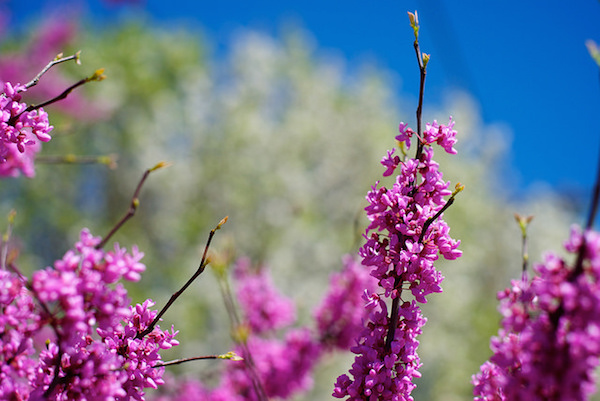
purple-flowers

Nestled quietly at the bottom of your camera’s viewfinder or Live View display is a small block of lines or bullets accompanied by a few numbers. You might also have noticed a little triangle moving back and forth, or some vertical hash marks appearing and disappearing from time to time, in a fashion that seems nonsensical or completely random. If these numbers and symbols make no sense at all, don’t worry, you are not alone. It can be a bit confusing to understand the light meter at first. But once you get the fundamentals you will probably find yourself growing much more confident in understanding how photography works. Maybe you’ll even venture out of Automatic and into Manual for the sheer amount of control you are able to have over your photos.

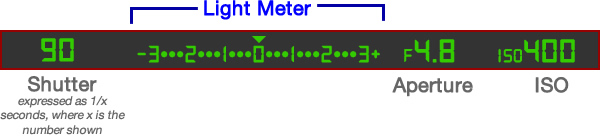
Before I get into the nitty gritty of the light meter itself, I want you to take a look at it in relation to the other data shown in your camera’s viewfinder. Note that this diagram is highly simplified and your viewfinder might look slightly different, or include other information, but all cameras (except some point-and-shoots) include the elements shown here.

light-meter-master

In this example the camera’s shutter is set at 1/90 of a second, the lens aperture is f/4.8, and the ISO is 400. The light meter is a readout that shows whether these values are going to result in a photo that is properly exposed – that is, a photo that is neither too light or too dark. The small triangle hovering over the zero in the light meter shows that the exposure is correct, and when the shutter button is pressed the picture will look fine.  But, I’ll show you a few pictures to see what happens as the camera’s exposure settings are changed. If you want to try this yourself you will need to have your camera in Manual mode, and I would recommend reading the rest of this article with your camera at your side so you can do a bit of experimenting on your own.

For my first shot, I’ll show you a photo that is underexposed and then illustrate how the camera settings can be adjusted to get the proper exposure. The values shown on these images are exactly what I used in my camera to get these shots, and nothing has been edited or retouched in Photoshop.

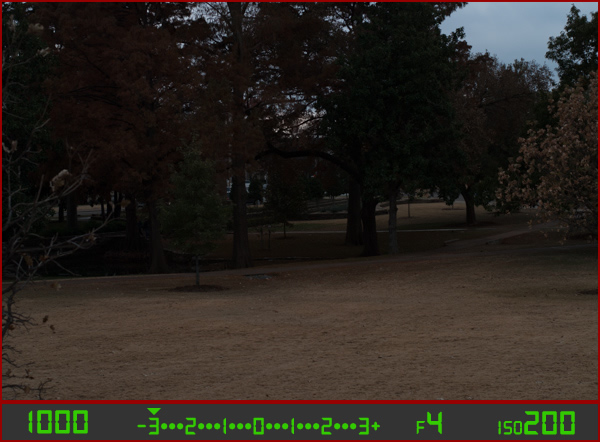
landscape-under

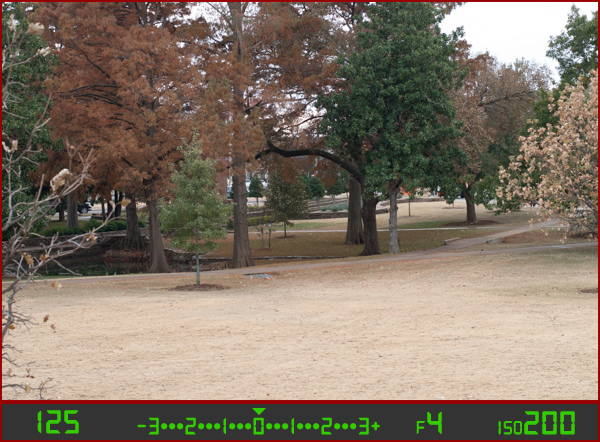
Here you can see that the shutter speed is 1/1000 of a second, the aperture of the lens is f/4, and the ISO is 200. The camera’s viewfinder displays this information along with the light meter, and note how the triangle has moved all the way over to -3 EV. (EV stands for Exposure Value, and technically this image is underexposed by three stops. Don’t worry about the technical jargon though! For now just follow along with the examples to see what happens when the exposure values are altered.

To get a properly exposed photo you are essentially trying to re-create what your eye already sees, but right now the light meter tells us that the photo will be way too dark. And indeed, the resulting photo turned out just how the light meter predicted: it’s so dark it looks like it was taken at night instead of mid-afternoon.

So what can be done to fix this? By adjusting the aperture, shutter, or ISO you can change the exposure settings with the goal of getting that little triangle to hover above the zero. Watch what happens when I change the shutter speed but I leave the aperture and ISO fixed at their present values:

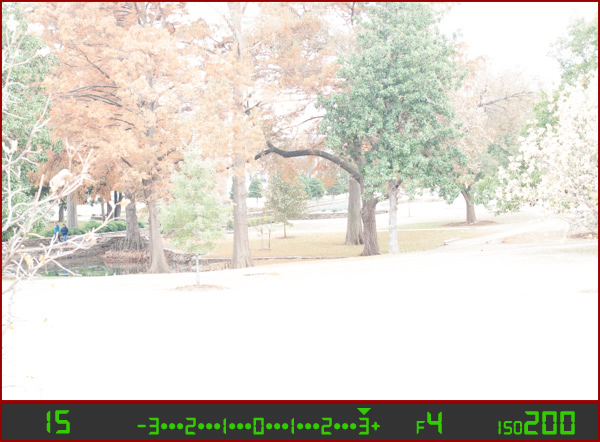
landscape-over

By altering the shutter speed from 1/1000 of a second to 1/15 of a second, the photo is now too bright – exactly as the light meter said it would. It is overexposed by three stops, and the image is virtually unusable. Because the viewfinder itself does not change as the aperture, shutter, and ISO are adjusted, you have to rely on your light meter to tell you how bright or dark the image will be. And sure enough, the triangle is hovering above the +3, which tells us the photo will be too bright. Here is what a properly exposed photo looks like.

landscape-correct

Finally, a good picture! By adjusting the shutter speed to 1/125 of a second, I was able to get the triangle to hover above the zero, which means the photo would be properly exposed. Note that there is no one correct way to do this, and a proper exposure could have also been obtained by changing the aperture or ISO instead of the shutter speed, or a combination of all three. For instance, I could have left the shutter at 1/1000 and increased the ISO to get the same result.

Why bother with all this?

At this point you might be wondering why you would want to go to all this trouble when you can put your camera in Automatic mode and it will just take care of everything. The answer lies in the fact that you, not your camera, know exactly what kind of photo you want to take. Your camera does not know whether you are shooting landscapes, portraits, sports, starry nights, kids, pets, or anything else. All it sees is how much light is coming in, and it tries to adjust the shutter, aperture, and ISO to get that triangle to hover above the zero. But if you know how to control those values yourself, you can open up vast new areas of photographic creativity that Automatic mode can never do for you.

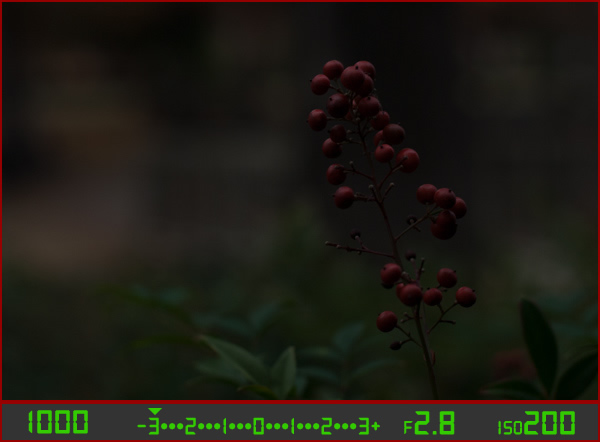
As another example, here is a picture of some berries, but again notice how it is underexposed by three stops.

berries-underesposed

There are several settings I could adjust in order to fix this, or I could just put the camera in Automatic mode. The problem with Automatic in this case is the camera does not know that I am looking at berries. It just sees light, and would attempt to adjust the shutter, aperture, and ISO to get a proper exposure even though it might not end up with the exact type of picture I want to take.

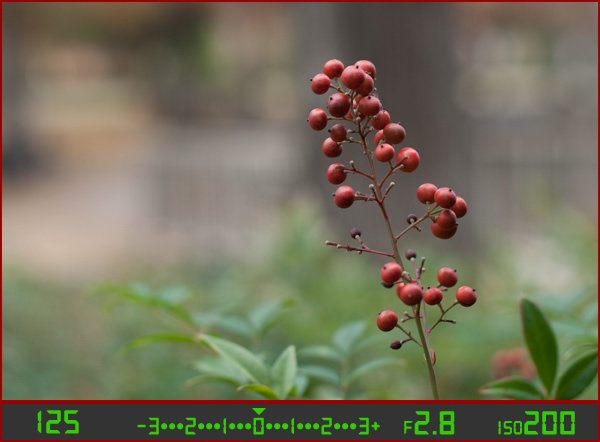
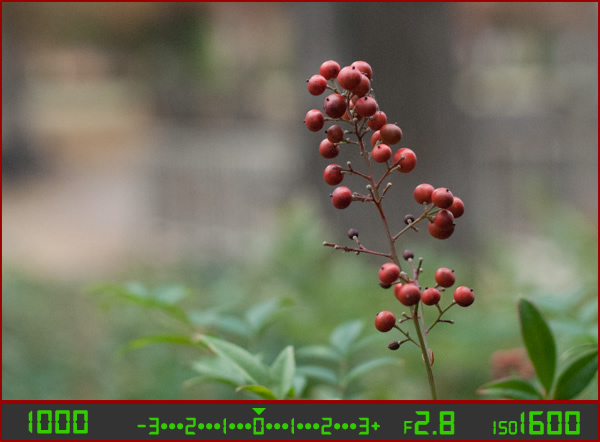
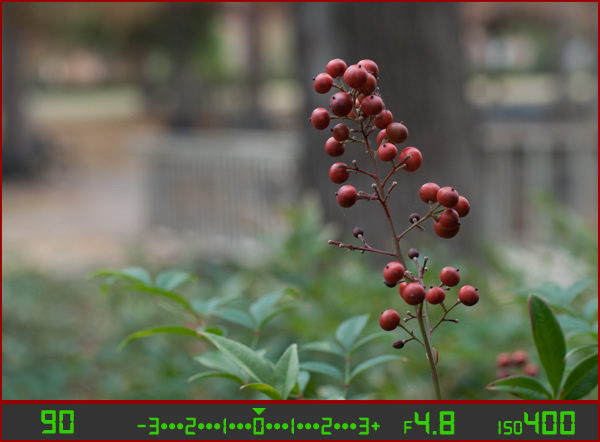
Because I shot in manual using the light meter as my guide I was able to get precisely the shot I was looking for. I knew that I wanted a shallow depth of field, which meant I should use a large aperture of f/2.8. I knew that an aperture of f/1.8 would be too wide for my taste, and a smaller value like f/4 or f/8 would not give me the nice blurry background I was hoping for. By leaving the aperture at f/2.8 and changing the shutter speed I got a properly exposed photo with a nice smooth background as you can see here:

berries-correct

But what if I had changed the other values instead? Look what happened when I left the aperture and shutter at their original values from the underexposed photo (f/2.8 and 1/1000), and raised the ISO instead:

berries-correct-high-ISO

The end result is almost the same: a properly exposed photo (just like our light meter told us it would be, with the triangle hovering above the zero), but this image has much more noise and grain than the previous one. Notice how the tree in the background just behind the berries looks speckled and grainy instead of silky smooth, which is what usually happens at high ISO values. Thus, raising the ISO might not be the best way to get the image I want even though the photo itself is properly exposed.

So what about changing the aperture instead?

berries-correct-small-aperture

Once again the result is a photo that is properly exposed, but the depth of field is much wider – see how the background is not quite as smooth and blurry as before? Also, because the aperture was smaller I had to leave the shutter open longer at 1/90 of a second and even raise the ISO a bit in order to maintain a proper exposure.

Get the exact shot you envision

Shooting in manual and using the light meter as your guide is a good way to ensure that the image you see in your mind is exactly what you end up with when you click the shutter. If you are shooting fast-moving subjects like cars or sports, you would want to start with a fast shutter speed and adjust the other settings until you get that little triangle to hover above the zero. If you are taking portraits and want a shallow depth of field with nice blurry backgrounds, keep the aperture wide and change the shutter and ISO until the exposure is correct. It’s all about giving control back to you, the photographer, instead of letting your camera make the creative decisions for you.

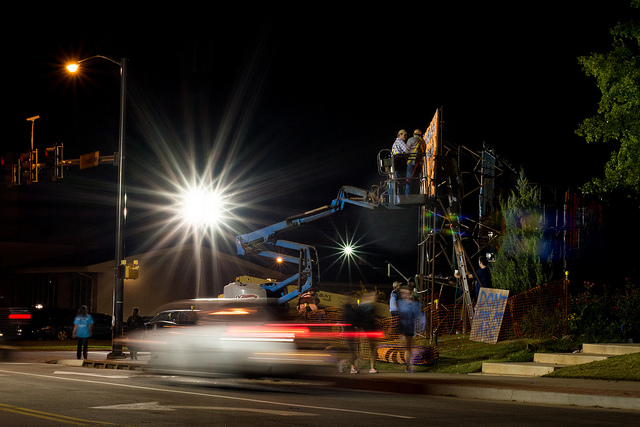
construction-lights

Shooting in manual was the only way to capture this photo. By reading the light meter while carefully adjusting my exposure settings I got precisely the shot I was aiming for. Camera settings: f/16, 1/3 second, ISO 800

Understanding the basics of the light meter is really just scratching the surface, though. Additional settings like your camera’s metering mode and the Exposure Lock function are even more tools you can use to take control over your photography and unlock your true artistic potential. Using manual mode and reading the light meter might seem like a complicated way to take photos, but remember that you know better than your camera what kind of picture you want to take. Once you know how to read your light meter and adjust your camera’s settings accordingly, you can open up a whole new world of creativity that has been right in front of you just waiting to be discovered.

Practice time

So now it’s your turn: grab your camera, put it in Manual mode, and hold the viewfinder up to your eye. Now start changing the aperture, shutter, and ISO values and watch what happens to the light meter. Is your image going to be overexposed? Lower the ISO, raise your shutter, tighten the aperture, or try a combination of all three. Is your image going to be underexposed? Do the exact opposite. The more practice you get, the easier it will be and soon you will feel much more comfortable shooting in a mode that might have seemed hopelessly confusing before.

Do you shoot in manual? If so, how did you get yourself off Automatic mode? Or do you actually prefer Automatic? Share your thoughts and experiences in the comments below.

googletag.cmd.push(function() {
tablet_slots.push( googletag.defineSlot( “/1005424/_dPSv4_tab-all-article-bottom_(300×250)”, [300, 250], “pb-ad-78623” ).addService( googletag.pubads() ) ); } );

googletag.cmd.push(function() {
mobile_slots.push( googletag.defineSlot( “/1005424/_dPSv4_mob-all-article-bottom_(300×250)”, [300, 250], “pb-ad-78158” ).addService( googletag.pubads() ) ); } );

The post How to Learn Your Camera’s Light Meter and Master Manual Mode by Simon Ringsmuth appeared first on Digital Photography School.

Digital Photography School

 
Comments Off on How to Learn Your Camera’s Light Meter and Master Manual Mode

Posted in Photography


Why Manual Exposure is Better for Winter Wildlife Photography?

18 Dec

My winter wildlife photography tours and workshops put us in locations with lots of snow on the ground, which presents a new issue for most people – how to get good exposure without continuously messing around with exposure compensation.

You have to tell the camera to brighten your images by up to two stops of exposure to make whites white, because the meter in your camera wants everything to be a mid-tone gray.

MBP Cranes Exposure Example

For example, here is a photograph of one of our main subjects, the Japanese Red-Crowned Crane (above, left). It’s a predominantly white bird on a snowy white background. For a shot like this if I put the camera in Aperture Priority mode with the aperture set to f/8 for example, the camera would tell me that the shutter speed should be about 1/2000 of a second, which would result in a photo like the under-exposed dark version (above, right).

To avoid under-exposing images like this, one thing you can do is to dial-in +2 stops of exposure compensation in Aperture Priority mode. This would result in a new shutter speed of 1/500 of a second at the same aperture, and a beautifully white image.

There is one fundamental problem with this method though, and this is what most people fail to understand until they’ve missed enough shots for them to take my advice seriously. The moment your subject moves away from their white background, the exposure with +2 stops of exposure compensation is no longer valid.

To prove my point during a recent tour, I switched to Aperture Priority with auto-ISO and photographed this Whooper swan on the snow with +2 stops of exposure compensation dialed in. This gave me a perfectly white bird with perfectly white snow, as we’d expect.

MBP Hokkaido 20140221 0212

Then, just moments later, I photographed a flock of Whooper swans flying into the same location, this time with a darker background, which fooled the camera into increasing my exposure and the result was this totally over-exposed photograph.

MBP Hokkaido 20140221 0217

To avoid this, when photographing wildlife in the snow, the best course of action is to lock your exposure down (using Manual) so that when the opportunity to photograph something with a darker background arises, the exposure doesn’t shift, and the subject and the snow remains perfectly exposed, as in this example.

MBP Hokkaido 20140131 1261

The downside of this method is that you do have to continually check your exposure, especially on a day with patchy cloud for example. Because you’ve locked down your exposure totally, you are responsible for noticing when it gets a bit brighter or darker, and updating your camera settings.

In my experience though, although you sometimes have to tweak the exposure in post-processing, you still return home with many more usable shots, as opposed to the above example with the flock of supernova swans, which is a firm candidate for deletion.

Settings Your Exposure for White

To set my exposure I usually just fill the frame with snow, and adjust the settings in Manual mode, until I see the caret on the camera’s meter indicate that the exposure is now at +2 stops for overcast snow or +1 1/3 stops for brightly lit snow.

MBP Filling the Frame with Snow 640 f8 ISO1001

How you achieve your exposure depends on your subject. Personally, I usually start with the aperture, as that controls depth-of-field, and I want to select that based on how much of the subject or scene I want to be sharp, and how much of it I want to be nice blurry out of focus bokeh.

Then I select the shutter speed, based on my focal length and how much I expect my subject to move. The rule of thumb for the slowest shutter speed you can use without the risk of introducing camera shake, is to use the focal length as the denominator of the fraction in your shutter speed. For example if you are shooting with a 200mm lens, the slowest shutter speed you can safely shoot hand-held is 1/200 of a second.

Of course, image stabilization or vibration reduction in the lens can help you to go slower, but you also have to consider subject movement with wildlife. To freeze a large bird in flight you need at least 1/500 of a second, but ideally 1/1000 or higher if possible.

These are, of course, general guidelines. You may decide to slow down the shutter speed and pan with your subject to use the blur of the wing movement artistically as in this example, but that’s the subject for another article.

MBP Hokkaido 20130207 4320

Once I’ve decided the aperture and shutter speed based on the subject and any artistic decisions I might make, the last setting that I usually change as I lock in on my manual exposure is the ISO. Once the caret reaches +2 on the camera’s meter scale, I make a test shot, and check the histogram.

For a photograph of a field of snow, or a white bird on a white background, most of the data in the histogram should be almost touching the right shoulder of the histogram. This means the image data captured is almost pure white, as it should be. If the data is in the middle of the histogram, the whites will be gray. This is what the camera would do automatically without our help.

MBP White on White Histogram

Also remember to turn on your highlight alert or highlight warnings in your camera’s settings, commonly called “the blinkies”, as these will alert you to any areas of your image that you might be over-exposing. It’s okay to over-expose a few specular highlights, but try not to over-expose large areas of your image, especially on your main subject, or the detail in those areas will be lost, and cannot be recovered on a computer later.

One of the other nice things about photographing birds over snow is that the light from the snow reflects up onto the underside of the birds in flight, as in this example. This means that you really don’t have to worry about where the bird is once you have locked your exposure down in Manual mode.

MBP Hokkaido 20140221 6768

The subject can be on white background, a dark background, or a blue sky, and your exposure will be spot on, leaving you free to concentrate on focusing and composition, instead of frantically trying to adjust your exposure compensation as the action unfolds.

googletag.cmd.push(function() {
tablet_slots.push( googletag.defineSlot( “/1005424/_dPSv4_tab-all-article-bottom_(300×250)”, [300, 250], “pb-ad-78623” ).addService( googletag.pubads() ) ); } );

googletag.cmd.push(function() {
mobile_slots.push( googletag.defineSlot( “/1005424/_dPSv4_mob-all-article-bottom_(300×250)”, [300, 250], “pb-ad-78158” ).addService( googletag.pubads() ) ); } );

The post Why Manual Exposure is Better for Winter Wildlife Photography? by Martin Bailey appeared first on Digital Photography School.

Digital Photography School

 
Comments Off on Why Manual Exposure is Better for Winter Wildlife Photography?

Posted in Photography


Shooting In Manual Mode: The Starter Kit [Infographic]

25 Oct

I was hanging out in one of my blogging groups the other day, and people were discussing things they wanted to do to improve their photography. One thing that popped up a few times was switching to manual mode, and how daunting that seemed. I am here to tell you that I thought the same thing until I actually went Continue Reading

The post Shooting In Manual Mode: The Starter Kit [Infographic] appeared first on Photodoto.


Photodoto

 
Comments Off on Shooting In Manual Mode: The Starter Kit [Infographic]

Posted in Photography


Hipstamatic updates Cinamatic with manual video controls

10 Oct

Cinamatic, Hipstamatic’s iOS app for capturing short video clips, has been updated to implement manual control over focus, exposure, white balance, shutter speed and ISO. This has been made possible by changes to the camera API in iOS 8. After the launch of the new OS manual control had been implemented in several still photography apps very quickly but Cinamatic is now the first video app to come with the additional controls. Read more

Articles: Digital Photography Review (dpreview.com)

 
Comments Off on Hipstamatic updates Cinamatic with manual video controls

Posted in Uncategorized


More manual control on iOS with Manual Cam

30 Sep

With the release of Apple’s latest mobile OS version, developers have been scrambling to take advantage of newly unlocked camera controls. In the wake of this development new apps have emerged, including Manual Cam, one of the best implementations of manual control on the iPhone we’ve seen so far. Read more

Articles: Digital Photography Review (dpreview.com)

 
Comments Off on More manual control on iOS with Manual Cam

Posted in Uncategorized


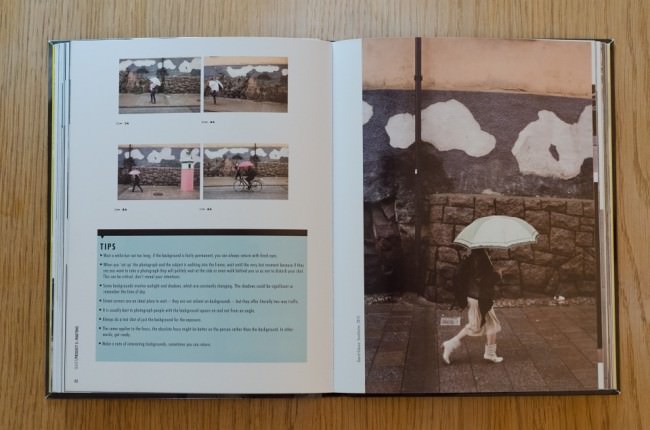
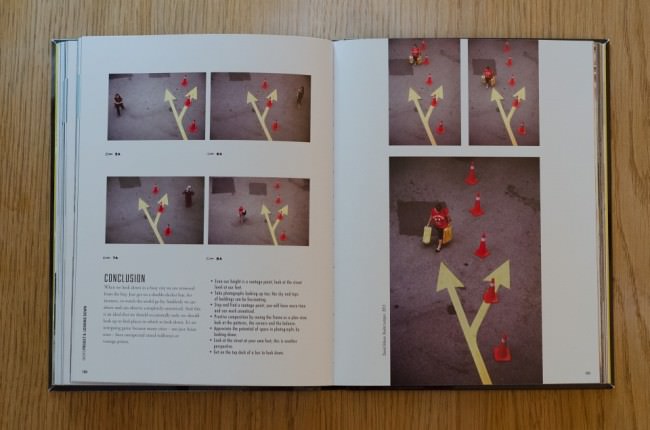
David Gibson: „The Street Photographer’s Manual“

29 Sep

Ein Beitrag von: Tilman Haerdle

David Gibson lebt in London und ist eines der Gründungsmitglieder des Straßenfotografie-Kollektivs in-public. Neben seiner eigenen fotografischen Aktivität leitet er regelmäßig in aller Welt Workshops zum Thema Straßenfotografie. Jetzt hat er mit „The Street Photographer’s Manual“* ein Buch vorgelegt, das Interessierten als Leitfaden zur Straßenfotografie dienen soll.
Als ich über den Blog von in-public vom Erscheinen dieses Buchs erfuhr, dauerte es nicht lange, bis ich mich entschloss, es mir auch zu kaufen. Da ich mich vorher intensiver mit der Interpretation von Straßenfotografie aus der Sicht der in-public-Fotografen auseinandergesetzt hatte, kam dieses Buch, zudem noch mit dem Versprechen, ein Handbuch der Straßenfotografie zu sein, genau zur rechten Zeit.
The Street Photographer’s Manual © David Gibson

In seiner tongebenden Einleitung befasst sich Gibson mit der Frage, was Straßenfotografie überhaupt ist. Rein formal kann man hier einige Regeln exemplarisch nennen:

  • Keine gestellten Bilder
  • Bilder sollten nicht zugeschnitten oder anderweitig wahrheitsverfälschend bearbeitet werden – es zählt das fotografierte Bild
  • Gegenstand der Straßenfotografie ist der Mensch und Anzeichen seiner Existenz in unserer Umwelt – es müssen also nicht notwendigerweise Menschen zu sehen sein

In der Fotografie geht es um Beobachtung, nicht um die Manipulation von Bildern.

Elliott Erwitt –

The Street Photographer’s Manual © David Gibson

Die Abgrenzung zu fast jeder anderen fotografischen Kategorie ist damit einfach möglich, er gibt jedoch zu, dass der Übergang zur dokumentarischen Fotografie fließend ist. Bilder, die diesen Regeln genügen, mögen dem Genre der Straßenfotografie zuzuordnen sein, doch gibt sich Gibson mit diesen elementaren Grundsätzen, die er durch Zitate wie das obenstehende in den Text einwebt, nicht zufrieden.

Bei mir blieb nach diesem Abschnitt das Gefühl, dass die Haltung des idealen Straßenfotografen schon fast spirituell zu nennen ist. Ob man diese Maximen in voller Konsequenz umsetzt, bleibt am Ende jedem selbst überlassen.

Jenseits des Formalen betont Gibson, dass die Beschäftigung mit Straßenfotografie zwingend erfordert, dass man jegliche Berührungsängste aufgibt, dass der Gedanke an Zurückweisung oder Ablehnung durch die fotografierten Menschen kein Hinderungsgrund sein darf, ein Bild zu machen. Für viele Einsteiger ist das ein harter Brocken, typischerweise ist man lange Zeit eher zu weit von den fotografierten Menschen weg.

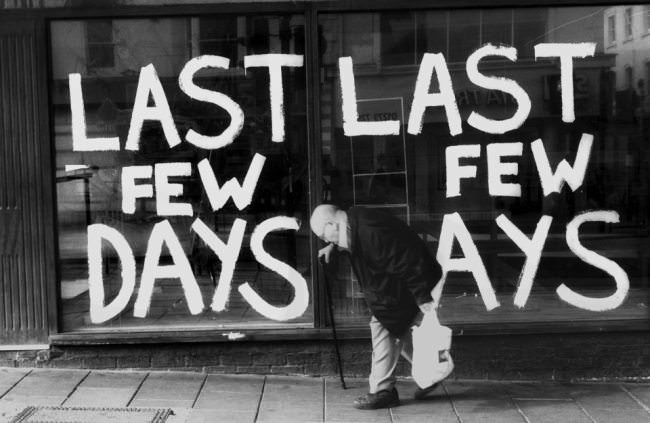
Ein gebeugt gehender alter Mann vor einem Schaufenster mit der Aufschrift „Last few days“.

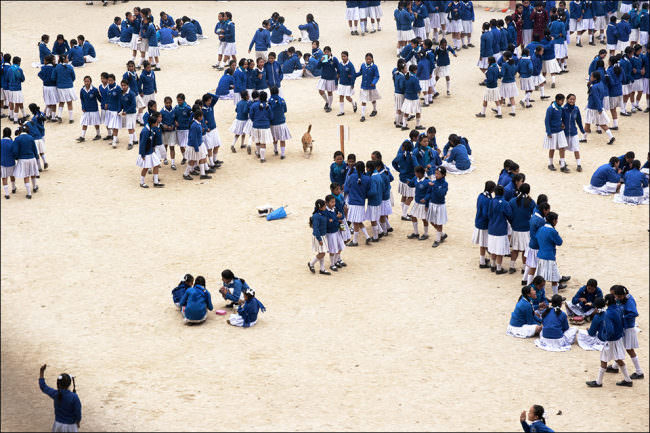
Viele Mädchen in blau-weißer Schuluniform.

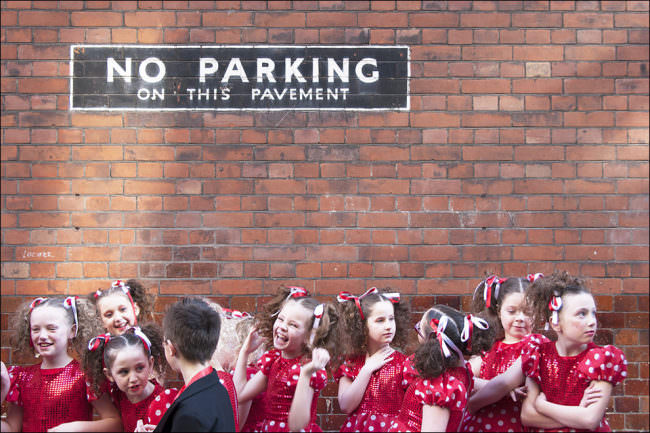
Viele Mädchen in roten Kleidern und ein Junge im Anzug vor einer Backsteinmauer mit der Aufschrift „No parking on this pavement“.

Gibson befasst sich ausführlich auch mit Fotografen-Kollektiven. Er identifiziert den Straßenfotografen als Einzelgänger, wenn er fotografiert, der jedoch den Austausch mit Gleichgesinnten sucht, um von der Rückmeldung anderer zu lernen und selbst durch das Wahrnehmen anderer Fotografien andere Sichtweisen zu erfahren.

Neben den exklusiven, kleinen Zirkeln von Kollektiven wie Street Photographers, in-public, Burn My Eye oder nicht zuletzt auch Magnum geht er auch auf den Austausch auf sozialen Plattformen wie beispielsweise Flickr und Facebook ein. Gerade letzteres identifiziert er als möglichen, aber nicht für jeden passenden Kanal zur Kommunikation mit Gleichgesinnten und Fans.

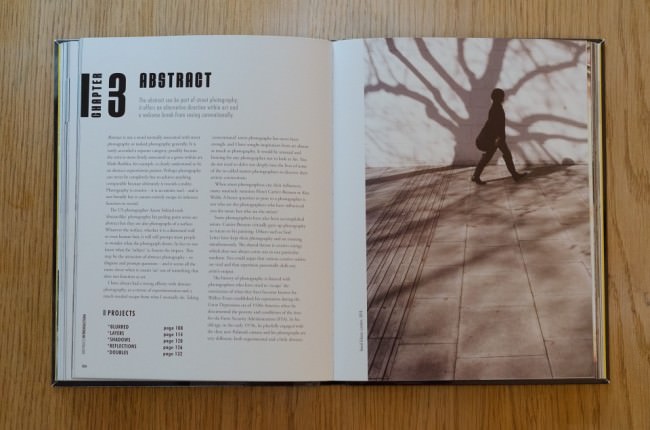
Das Buch und ein gutes Foto haben Gemeinsamkeiten: Struktur. Gibson gelingt es, durch die Unterteilung des Buches in grössere Kapitel, die die sehr knappen Titel „Busy“, „Quiet“, „Abstract“, „Still“ und „Subjects“ tragen, und Projekte, die die Maximen der Kapitel mit Leben füllen, das weite Feld der Straßenfotografie in begreifbare Abschnitte zu unterteilen.

Über allem liegt ein großer Bogen, das Buch beginnt mit viel Energie und wird immer langsamer, bis es im Kapitel „Still“ dann fast zum Stehen kommt. Das letzte Kapitel „Subjects“ markiert eher einen Abschluss und Ausblick, als noch wirklich zur Reihung der vorderen Kapitel zugehörig zu sein.

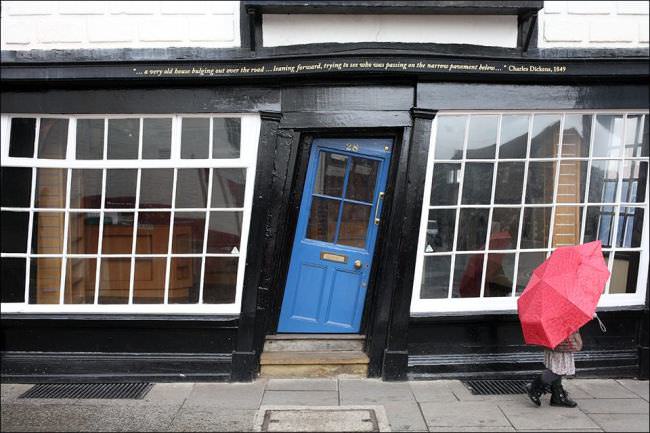
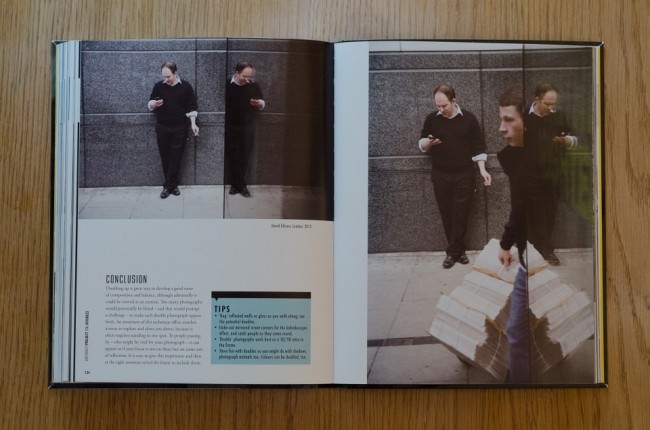
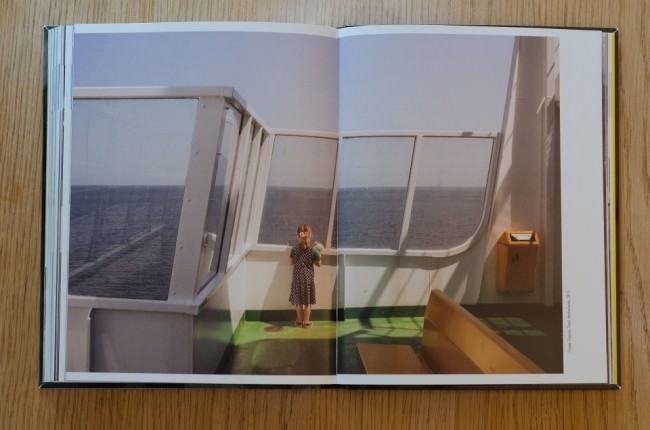
Eine Person mit rotem Regenschirm vor einer schiefen Fassade mit blauer Tür.

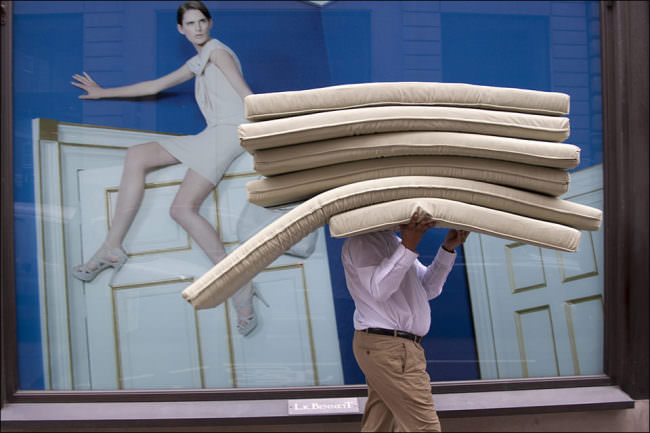
Ein Mann trägt einen Stapel Matrazen vor einem Bild einer Frau, die auf einer Tür sitzt.

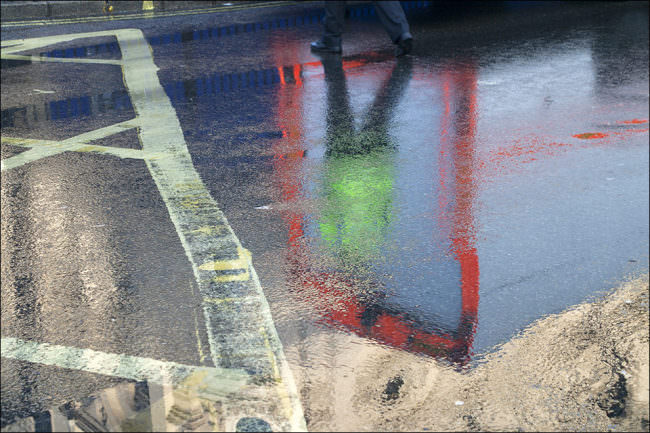
Bunte Spiegelungen auf nassem Asphalt.

Die Wahl seiner Projekte, wie beispielsweise „Order“, „Following“, „Blurred“ oder „Doubles“ mag willkürlich erscheinen, doch sie ergibt Sinn. Vor allem hat diese Strukturierung zumindest mich dazu gebracht, zu hinterfragen, was ich überhaupt darstellen will.

Die einzelnen Projekte führten dazu, dass ich mir beim Fotografieren Gedanken darüber gemacht habe, aus welchem Grund ich genau jetzt den Auslöser drücken will. Die Menge meiner Bilder wurde dadurch nicht weniger, da ich gleichzeitig versucht habe, Situationen aktiver zu bearbeiten und nach Möglichkeit von einer Szene mehr als nur ein Bild zu machen, wenn sie mir interessant erschien. Gibson selbst zur Wahl seiner Projekte:

Es ist wichtig zu wissen, dass die Straßenfotografie keine exakte Wissenschaft ist, dieses Buch also eher wie eine Auswahl verschiedener Gitarrenakkorde – und -einstellungen – sowie ein paar empfohlener Lieder zu verstehen ist.

The Street Photographer’s Manual © David Gibson

Während Gibson in der Beschreibung der einzelnen Projekte in der Regel auf seine eigenen Bilder zurückgreift und dabei auch nicht davor zurückscheut, zur Illustration des Auswahlprozesses schwächere Bilder zu zeigen, schiebt er zwischen jedes Projekt Kurzportraits von zum Kapitelthema passenden Fotografen ein. Die Bandbreite reicht hier von „Ikonen“ wie Saul Leiter über in-public-Kollegen wie Blake Andrews oder Matt Stuart bis hin zu nur echten Insidern bekannten Fotografen wie Oliver Lang oder Shin Noguchi.

Überhaupt bietet das verwendete Bildmaterial genügend Grund, das Buch auf einer zweiten Ebene zu verstehen, eben nicht nur als Lehrbuch, sondern als exemplarisch für Gibsons Sichtweise der Straßenfotografie.

Somit ist auch klar, dass das Buch nicht nur für Einsteiger in die Straßenfotografie interessant ist. Der Novize profitiert von vielen Anregungen, die einen einfachen Einstieg in dieses Genre ermöglichen. Als erfahrener Straßenfotograf hat man seine Freude am ausgewählten Bildmaterial und an der Möglichkeit, die Entscheidungsprozesse des Autors bei der Bildauswahl nachvollziehen zu können.

The Street Photographer’s Manual © David Gibson

Einziger Kritikpunkt ist die Erscheinungsform als, wenn auch großes, Taschenbuch. Eine etwas robustere Ausführung und Bindung mit Seiten, die auch aufgeschlagen bleiben, wäre schöner gewesen. Dafür ist der Preis mit unter 20 € für ein Buch in dieser Kategorie recht attraktiv.

David Gibson bietet regelmäßig Workshops zum Thema Straßenfotografie an. Termine veröffentlicht er auf seiner Website und auf Facebook.

The Street Photographer’s Manual © David Gibson

Informationen zum Buch

Autor: David Gibson
Taschenbuch: 200 Seiten
Verlag: Thames & Hudson
Sprache: Englisch
Größe: 23 x 17,8 x 2 cm
Preis: 17,30 €

* Das ist ein Affiliate-Link zu Amazon. Wenn Ihr darüber etwas kauft, erhält kwerfeldein eine kleine Provision, Ihr zahlt aber keinen Cent mehr.


kwerfeldein – Fotografie Magazin | Fotocommunity

 
Comments Off on David Gibson: „The Street Photographer’s Manual“

Posted in Equipment