RSS
 

Posts Tagged ‘makes’

Minimum flash duration of 1/63,000sec makes the Profoto D2 the fastest TTL monolight in the world

17 Sep

Flash manufacturer Profoto has launched what it is describing as the fastest TTL monolight heads in the world. The Profoto D2 studio flash heads have a shortest output duration of 1/63,000sec, can run at a rate of 20 bursts per second and can sync with camera shutter speeds as short as 1/8000sec. The heads come in two output varieties, 500Ws and 1000Ws, with both featuring full TTL control for Nikon and Canon users via the company’s AirTTL 2.4GHz radio system. The heads can also be controlled in manual mode with 10 stops of output in 1/10th stop increments.

The heads are available to order now, retailing for $ 2000/£1554 for the Profoto D2 1000Ws AirTTL Monolight and $ 1500/£1194 for the Profoto D2 500Ws AirTTL Monolight.

For more information see the Profoto website.

Press release

Profoto releases the D2, the world’s fastest monolight with TTL

With the ability to freeze action at up to 1/63,000 of a second, to shoot bursts of 20 images per second and sync with camera shutter speeds as fast as 1/8,000 of a second the D2 is redefining the definition of speed in monolights.

“For a photographer, every new day is a new challenge. So for them, speed isn’t one thing – it’s many. That’s why we created the D2 to be remarkably fast in every way” says Johan Wiberg, Product Manager at Profoto.

A photographer might need to freeze action with absolute sharpness. The D2 brings pin sharp clarity with a flash duration of up to 1/63.000 of a second, which makes it faster than most high end studio packs on the market. Better still, it offers supershort flash duration across the full energy range.

If flash duration is exceptionally fast, recycling time is equal to it. With the D2 you can shoot up to 20 flashes per second . That allows you to catch 20 versions of the same moment, and quite often that’s the difference between capturing a good image and a great image.

Bringing yet another dimension to speed is Profoto’s High-Speed Sync technology (HSS). This allows the D2 to sync with the fastest shutter speeds available. An advantage when you need to catch a deep blue sky or take full control of ambient light.

The D2 can also help to speed up workflow because it’s equipped with patented TTL technology. You can point-andshoot and the D2 will automatically adjust its output for perfect exposure. But manual mode is available at click of a button, so switching between both modes with settings intact just makes everything move faster.

In terms of output, the D2 is available in 500Ws and 1000Ws versions. At full power you’ll easily overpower the sun, or fully illuminate a larger Light Shaping Tool. Both versions come with a super wide 10 f-stop energy range and superior color consistency over the entire range. So leave the ND filters at home and add just a hint of light if needed.

Above all, this is Profoto Light Shaping equipment. So the design is smooth and minimal, it’s intuitive to use, the build quality as you’d expect, is rugged and sturdy, and it can be used with more than 120 different Light Shaping Tools.

“We designed the Profoto D2 to be the world’s fastest monolight,” says Johan Wiberg, Product Manager at Profoto. “But the speed is not a gimmick. We truly believe that more speed allows you to be more creative and consistently take better images regardless of what challenge you face – with the D2, you’re always up to speed.”

For high volume production when you shoot thousands of images per day, like packshot photography, there is an optional Quartz flashtube available.

The D2 is released Sept 15, 2016. Both the 500Ws and 1000Ws versions are available in different kits configurations.

Learn more at profoto.com/d2

Articles: Digital Photography Review (dpreview.com)

 
Comments Off on Minimum flash duration of 1/63,000sec makes the Profoto D2 the fastest TTL monolight in the world

Posted in Uncategorized


6 Reasons Why an iPad Makes a Good Photography Companion

08 Sep

I have an iPad Air 2 and I simply love it. It’s my portable digital workhouse. I can pop into most cafés where free wi-fi is the norm. I can enjoy a delicious cup of java, while checking my inbox, or pen a draft for my next article for dPS.

iPad Air 2

iPad Air 2

My main reason for purchasing the iPad was that I went back to college recently. I thought about buying a laptop. After a bit of research, I decided an iPad, paired with a keyboard case, essentially turned it into a mini laptop of sorts. Plus it was less expensive and more portable. I’ve completed the course, but the iPad has now become a great companion for my photography.

I was recently in a cafe waiting to meet a client, when an idea started to take shape about the advantages of having an iPad as a photographer. Following on from a previous article I wrote on “Can an iPad be used as a softbox or custom background?“, I realized that I am using my iPad more and more in my photography work than ever before.
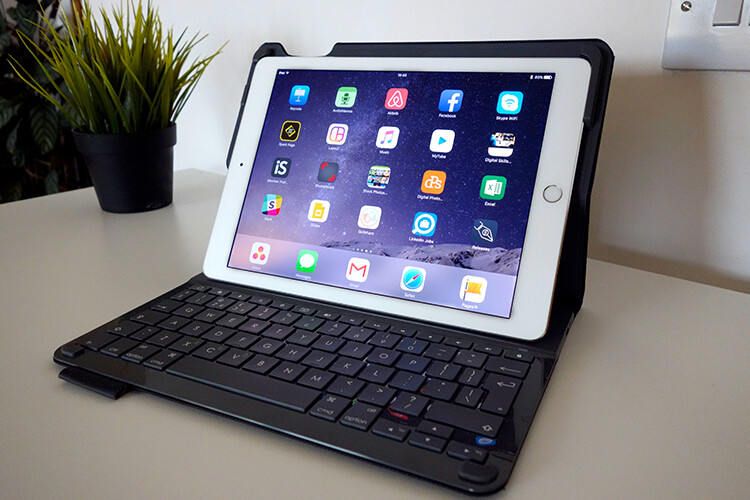
ipad-paired-with-keyboard-open

iPad Air 2 paired with a Logitech keyboard

I could go on at length, extolling the many virtues of having an iPad/tablet as a photographer. Instead, I’ll limit my list for now to just six.

Here are my top six reasons an iPad makes a good photography companion

  1. Portability makes it handy to take anywhere
  2. Displaying your work or portfolio makes you look good
  3. Editing and sharing images is easy
  4. Reading and learning
  5. Spoiled for choice with so many Apps
  6. Google Drive

1. Portability of the iPad

The iPad Air 2 and other tablets are just so light, and even more portable than most laptops. The iPad Air for me is the ultimate Digital Briefcase! The dimensions are 9.4 x 6.6 x 0.24 inches (240 x 169.5 x 6.1 mm). It weighs just 0.96 pounds (436 grams). I feel like James Bond! (sorry Jane Bond)
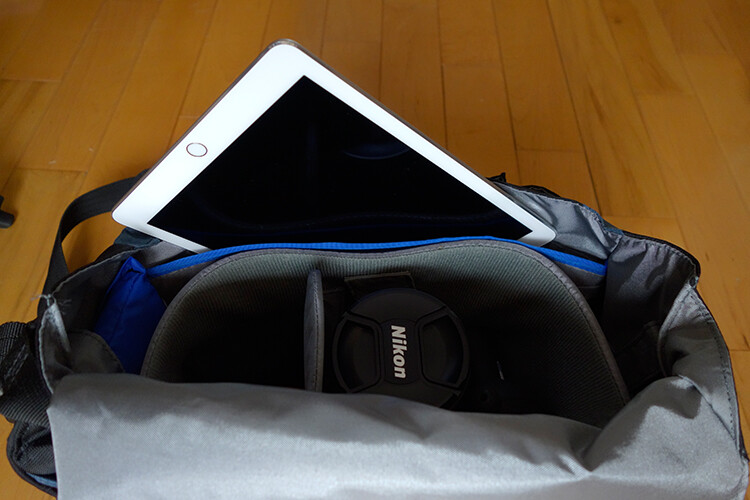
portability

The iPad fits snugly into my camera bag.

2. To display your work

As a photographer, your work should speak for itself. As a commercial photographer, it’s what gets you your next gig. Now more than ever, there are so many ways to get your work online.

The first option is to have a personal website. But this does mean paying for a domain name and hosting. So what if you don’t want to invest in a website? If you are just starting out in your photography career or you’re a keen hobbyist? Again there are many ways to showcase your portfolio online and in most cases for free. For example there is Behance Display, Flickr, 500px and Morpholio to name just a few.

The retina display on the iPad allows maximum clarity of your photos, and makes it very easy for the viewer to look at the details by easily “zooming in” by pinching the screen. Also, flicking through your images or albums with a swipe of a finger, makes the experience much more tactile and hands-on. Similar to flipping pages of a book.

Recently, I met with a client and I needed to bring a digital portfolio with me. I don’t have my full range of work online. I also couldn’t rely on a solid wifi connection. So I put together a portfolio, saved it out as a PDF, and synced it to iBooks on the iPad. A typical page layout program, such as InDesign would be used to put a portfolio together. However, if you just have Photoshop, then here is a great way to create your own portfolio PDF for your iPad from multiple pages.

Creating a PDF portfolio from multiple pages in Photoshop

Open Photoshop and create all your pages the same size, 2048 X 1536 pixels. Place each image and text on a separate page. You can determine how many pages that you want in your portfolio. A general guide is 15-20 pages.

Go up to File>Automate>PDF Presentation. Check this box, “Add Open Files”, and click Save. Name your file and Save it to a location on your computer.
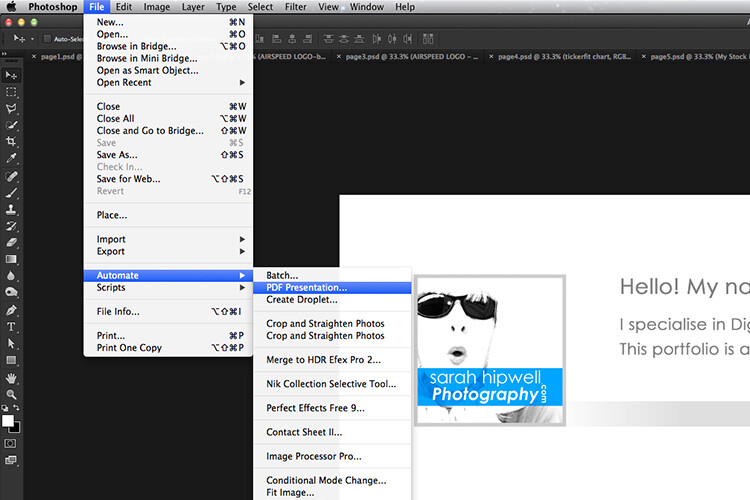
File-Automate-PDF-Presentation

This is handy tip in creating a pdf file from multiple pages or images in Adobe Photoshop.
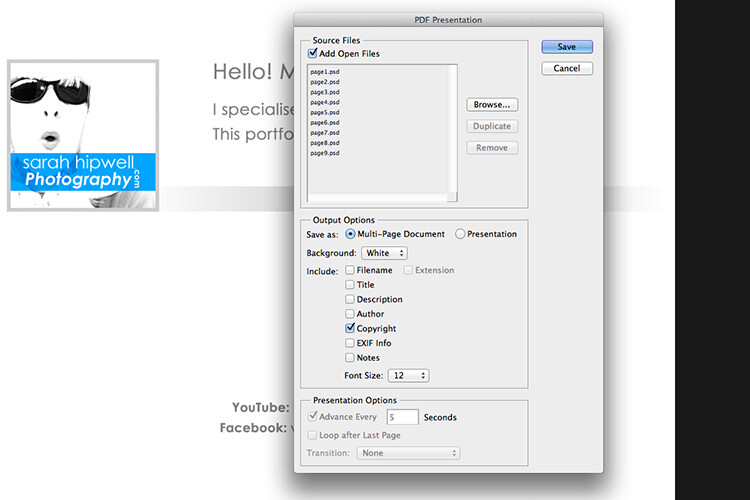
Make sure to check the Add Open Files box.

When another dialog box appears, make sure Optimize for Fast Web Preview is checked.
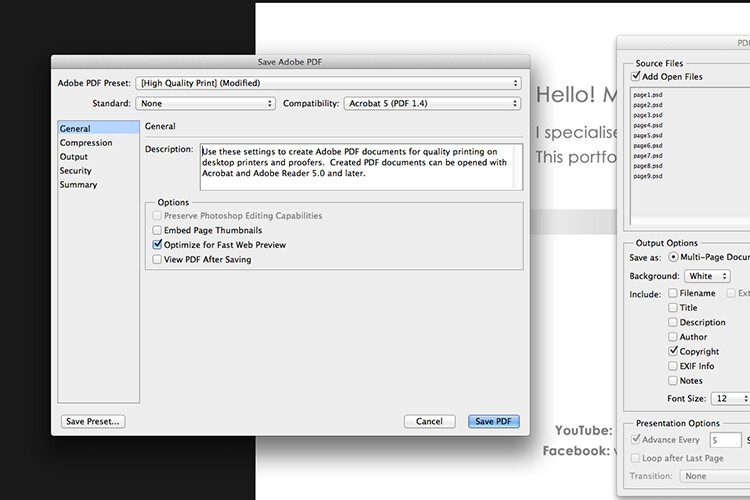
Optimize-for-fast-webpreview

Make sure that the Optimize for Fast Web preview box is ticked.

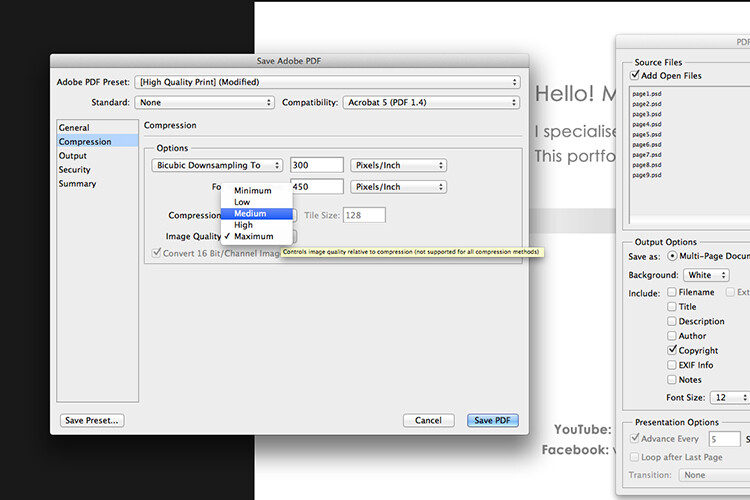
Click on Compression under General (on the left side, see below screenshot). At the top, change the Adobe PDF Preset to High Quality Print, and next to Image Quality, change the setting from Maximum to Medium. Then click on the Save PDF button.
Compression-image-quality-medium

Choose the High Quality Print from the Adobe PDF Preset at the top. Then change Maximum beside Compression to Medium.

Tip: Try and keep the file size below 5mb so as you can email it to potential employers or clients. If you can’t optimize the file size to less than 5mb, then create another portfolio with less pages. PDF files can be viewed on a Mac or PC.

If you don’t have Photoshop, then read on to number six below, and I’ll show you how to create a PDF portfolio using Google Slides.

3. Editing and sharing images is easy

I haven’t done a lot of editing on the iPad. I prefer to do my post-processing at my desktop, where I have the big monitor and stylus. However, I think the iPad Pro could possibly change my mind.

I did try Snapseed. It’s impressive, so intuitive, and free. Other free editing apps are VSCO, Adobe Photoshop Express, and Instagram. What also makes these apps powerful is the ease with which you can share your images online to your social media accounts, or upload them to the cloud.

4. Reading and learning

I’m coming around to reading ebooks and PDFs on my iPad rather than a book. Although, you can’t beat a physical book in your hand. That said, from a practical point of view when travelling, carrying just one book takes up so much room!

I now have my Nikon D750 user manual downloaded on the iPad. This manual alone, although relatively compact in size, still has 507 pages and weighs 310g (11oz).

Tip: If you are using the Safari browser and open a PDF file, you can save it straight to iBooks.

5. Choice of Apps for the iPad

Given the array of apps already in the app store, it’s just not possible to run the gauntlet on them all. Here are a few that popped up on my radar.

  • LightTrac ($ 8.99): LightTrac calculates and plots the angle of Sun and Moon on top of a map, for any location.
  • The Photographer’s Ephemeris ($ 8.99):  TPE  shows you which direction the sun is shining at any given time during the day, no matter what location you choose.
  • Pocket Light Meter (FREE): A light meter that is always in your pocket. It is indispensable for film photography with a manual camera. Measures reflected light, and allows reciprocity calculations.
  • Simple DoF Calculator ($ 1.99): Simple DoF Calculator allows you to calculate the depth of field and hyperfocal distance for any given settings.
  • Take notes to a new level with Evernote (FREE), the productivity app that keeps your projects, ideas, and inspiration handy across all your digital devices.
  • Photography Releases – 500px has a free one. If you shoot Stock photography, a model/property release is a must have.
  • Snapwire also has a free model/property release. I downloaded this app and found it really useful, especially as it stores the photographer’s information. No need to keep filling in this info for every release. Plus it has the templates for all of the major stock sites.

6. Google Drive

What’s not to like about Google Drive? Google Drive is a complete office suite with Google Docs, Sheets, and Slides. Plus you get 15 GB free storage online. In Google Photos, images not exceeding 2048 x 2048 pixels, and videos shorter than 15 minutes ,also do not count towards this limit. It is hard to find fault with this setup when it’s all free!

It is really a Digital Photo Assistant. You can access email, write and publish blog posts, keep track of your schedule and contacts. Share out documents and collaborate with clients online. I also love that you can work with Google docs offline. This has proven as a great time saver if your internet connection is poor, or you simply don’t have access to an internet connection when you need it.

Google Slides is Microsoft’s version of Powerpoint. Here’s an animated gif to illustrate how easy it is to create your PDF portfolio. It’s well worth giving it a go.

animated-gif-slides-portfolio

An animated gif illustrating how easy it is to use Google Slides to create a PDF portfolio for the iPad.

To sum it all up

It was a challenge to keep this list to just six things. I know this could change over the next few months as I continue to use the iPad.

I didn’t mention uploading your photos from your camera directly onto the iPad. You can, but you need the Lightning to SD Card Camera Reader – $ 29.00 or the Lightning to USB Camera Adaptor – $ 29.00.
I only mentioned a mere smidgen of available apps, and most of those were free. This is only a tip of the app-iceberg-store. Some of the paid apps look interesting too.

It’s mind boggling just keeping up with trends. With the recent launch of the iPad Pro. It won’t be long before the iPad has morphed into a real contender, in place of a laptop, for the photographer out in the field.

Do you have an iPad or tablet? What apps do you use? Please share in the comments below.

googletag.cmd.push(function() {
tablet_slots.push( googletag.defineSlot( “/1005424/_dPSv4_tab-all-article-bottom_(300×250)”, [300, 250], “pb-ad-78623” ).addService( googletag.pubads() ) ); } );

googletag.cmd.push(function() {
mobile_slots.push( googletag.defineSlot( “/1005424/_dPSv4_mob-all-article-bottom_(300×250)”, [300, 250], “pb-ad-78158” ).addService( googletag.pubads() ) ); } );

The post 6 Reasons Why an iPad Makes a Good Photography Companion by Sarah Hipwell appeared first on Digital Photography School.


Digital Photography School

 
Comments Off on 6 Reasons Why an iPad Makes a Good Photography Companion

Posted in Photography


Tag, You’re It! Banksy Shows Softer Side, Makes Mural for Kids

16 Jul

[ By WebUrbanist in Art & Street Art & Graffiti. ]

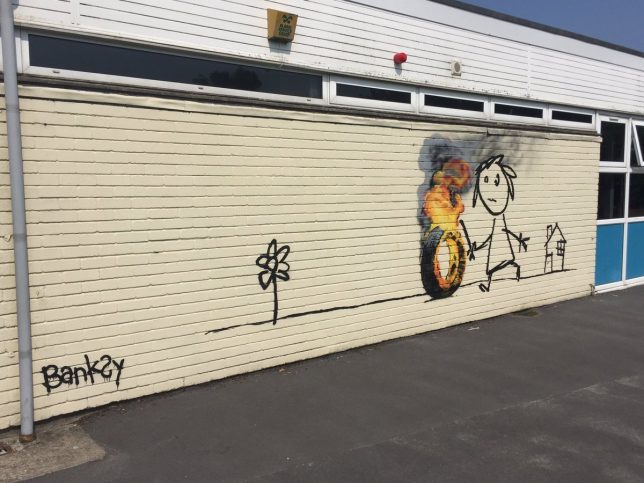
banksy stick figure art

Best known for biting political commentary and poignant artistic critiques, mysterious artist Banksy showed a somewhat friendlier side of his personality in gifting a mural to elementary students who named a building after him.

banksy in bristol

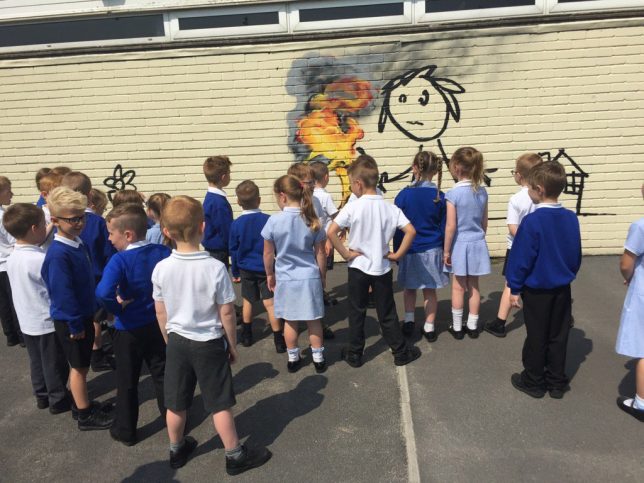
Students at the Bridge Farm Primary School in Bristol, thought to be the anonymous street artist’s hometown, renamed several campus structures in a contest. Among the winners were Blackbeard, Cabot and Banksy.

banksy rolling tire

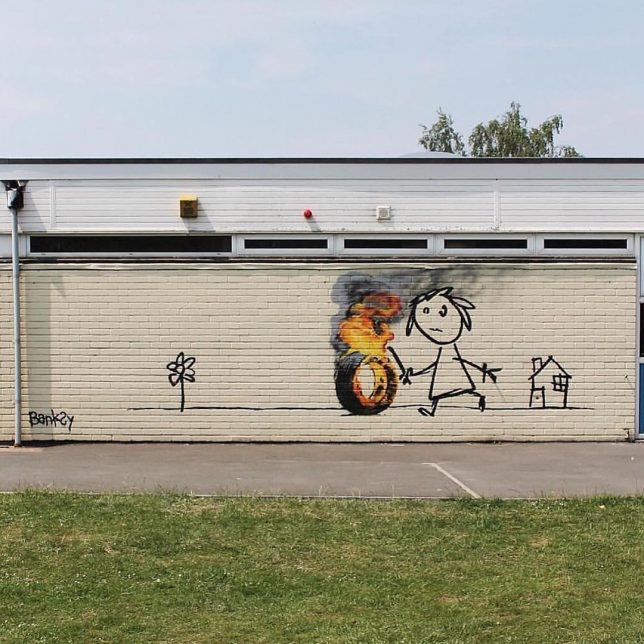
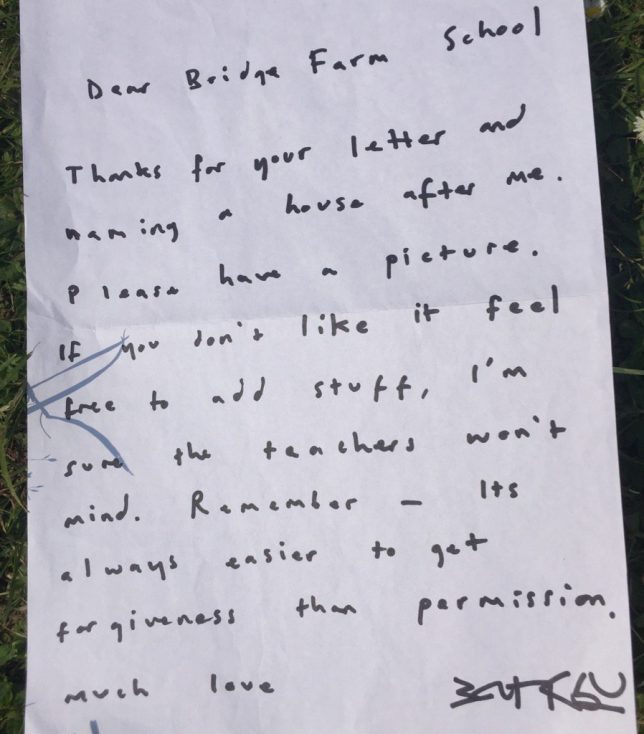
The work itself features a child playing with a hoop, but because it’s Banksy … the hoop was turned into a tire, and the tire was set on fire. Banksy stopping by to make a mural was surprise, but he also left a note, which is even more out of character (though the work has been confirmed authentic):

banksy hand written note

“Dear Bridge Farm School,” the letter reads. “Thanks for your letter and naming a house after me. Please have a picture, and if you don’t like it, feel free to add stuff. I’m sure the teachers won’t mind. Remember, it’s always easier to get forgiveness than permission. Much love, Banksy.”

banksy school mural stick

In a somewhat ironic twist, the school is forbidding children from painting over or around the mural, perhaps out of respect or because if its doubtless high monetary value – either way, one can be sure Banksy would approve should one of those students break the rules (images by Jon Kay via Colossal).

Share on Facebook


[ By WebUrbanist in Art & Street Art & Graffiti. ]

[ WebUrbanist | Archives | Galleries | Privacy | TOS ]


WebUrbanist

 
Comments Off on Tag, You’re It! Banksy Shows Softer Side, Makes Mural for Kids

Posted in Creativity


Missing Pyramid: Louvre Installation Makes Iconic Monument Disappear

27 May

louvre pyramid camouflage 1

In a work of large-scale urban camouflage, French street artist JR has made the iconic glass pyramid standing outside the Musée du Louvre disappear. At least, it seems to disappear, when viewed from one very particular angle, thanks to a massive wrapping printed with a photograph of the museum’s facade. Known for paste-ups on a monumental scale as well as digital projections on architecture, JR transforms the 11,000-square-foot pyramid by I.M. Pei, which became a Paris landmark after its installation in 1989.

louvre pyramid camouflage 2

The illusion convincingly stands in for the entrance to the Louvre palace, despite being rendered in black and white, and matches up perfectly with the facade. Before the Pyramid became publicly accepted as an integral part of the Louvre, it was controversial, with some critics arguing that the clash of architectural styles was an affront to what the museum itself represents. In camouflaging it, JR takes us back to the days before it was built, leaving us with the distinct feeling that something is missing. The display will be in place through June 27th, 2016.

louvre pyramid camouflage 3

“Making the Pyramid disappear is a way for me to distance myself from my subject,” says JR. “The feud between traditional and modern tastes in art and architecture is nothing new. The Pyramid, Buren’s columns at the Palais-Royal, and the Pompidou Center – all of these caused controversy. My work is about transmitting history to better understand the present, and find echoes with our own times. What happened in the past is part of a broader context that can still have relevance for today.”

“By erasing the Louvre Pyramid, I am highlighting the way Pei made the Louvre relevant for his time, while bringing the Louvre back to its original state. The Pyramid is one of the most photographed French monuments. I am redirecting its energy, because people are going to have to move around it. They are going to look for the best angle to get the full impact of the anamorphic image, and really make the Pyramid disappear.”


WebUrbanist

 
Comments Off on Missing Pyramid: Louvre Installation Makes Iconic Monument Disappear

Posted in Creativity


Sigma claims new firmware makes 150-600mm F5-6.3 AF up to 50% faster

15 Mar

Lens manufacturer Sigma has announced new firmware for its 150-600mm F5-6.3 DG OS HSM | Sports and Contemporary lenses, saying that it makes the autofocusing system up to 50% faster. The firmware applies to lenses fitted for Canon EOS and Nikon F cameras, and can be installed via the company’s USB dock and the Optimization Pro software program.

The company says that in normal conditions the improved HSM algorithm boosts the AF speed of the lenses by between 20% and 50%. The Optimization Pro software needed to install the firmware can be downloaded from the Sigma website.

Press release:


SIGMA 150-600mm F5-6.3 DG OS HSM | Sports / Contemporary
Firmware update for Canon and Nikon mount

We would like to announce the availability of a new firmware update for the SIGMA 150-600mm F5-6.3 DG OS HSM | Sports in Canon and Nikon mount, and the SIGMA 150-600mm F5-6.3 DG OS HSM | Contemporary in Canon and Nikon mount. This firmware update can be installed using SIGMA Optimization Pro, the dedicated software for the SIGMA USB DOCK.

Benefit of this firmware update
The latest firmware update improves the AF algorithm of 150-600mm F5-6.3 DG OS HSM lenses and further enhances AF speed by optimizing HSM (Hyper Sonic Motor) drive control. Depending on shooting conditions, it is expected to increase autofocus speed by approximately 20%, to a maximum of 50%, during normal shooting as well as when using “Speed Priority” set through SIGMA Optimization Pro.

For customers who own the SIGMA USB DOCK and applicable products listed below, please update the firmware using SIGMA Optimization Pro. Please ensure SIGMA Optimization Pro is updated to Version 1.2 before updating the lens firmware.

For customers who do not own a SIGMA USB DOCK, please contact Sigma Imaging (UK) Ltd for details about updating the firmware free of charge.

SIGMA Optimization Pro Download page
http://www.sigma-global.com/download/en

We appreciate your continued support for our company and products.

Articles: Digital Photography Review (dpreview.com)

 
Comments Off on Sigma claims new firmware makes 150-600mm F5-6.3 AF up to 50% faster

Posted in Uncategorized


H2O Yeah! The Water Tank Project Makes NYC Cooler

13 Mar

[ By Steve in Art & Installation & Sound. ]

water-tank-project-0
Like rainwater flowing from rooftops to roads, The Water Tank Project seeks to artistically enhance New York City‘s gritty skyline from the top down.

water-tank-project-1a

Spearheaded by artist/activist Mary Jordan, The Water Tank Project does double duty as both a cool art installation and an innovative awareness campaign spotlighting the global water crisis.

water-tank-project-1b

water-tank-project-1c

Compared by one of the participating artists to “a museum waiting to happen,” NYC’s rooftop water tanks expand the 2D format of advertising billboards into the next dimension!

water-tank-project-3a

water-tank-project-3e

Over 30 artists including Jay-Z and Jeff Koons signed on to transform dozens of otherwise nondescript rooftop water tanks into colorful examples of activist art. The tanks themselves won’t be painted – preparing the exterior surfaces alone would be expensive, time-consuming and environmentally unfriendly.

water-tank-project-10a

water-tank-project-10b

Instead, the artists will work on vinyl “canvases” customized to fit each individual water tank. Once imprinted with the artwork, the rectangular pieces will be wrapped around the tanks and secured against wind and weather. As The Water Tank Project is neither a permanent nor a fixed exhibit, works can be removed and/or replaced quickly and easily as required.

water-tank-project-4a

water-tank-project-4b

The Water Tank Project was organized by Word Above The Street, headed by Mary Jordan, who was inspired to shine a spotlight on wasteful water use after visiting Ethiopia in 2007. “Water is our most challenged but taken-for-granted resource. It’s all around us but virtually invisible,” explains Neville Wakefield, a member of the project’s curatorial team. “By drawing attention to the water tanks, we hope to alert the world to the wastage of our most precious commodity.”

Next Page – Click Below to Read More:
H2o Yeah The Water Tank Project Makes Nyc Cooler

Share on Facebook


[ By Steve in Art & Installation & Sound. ]

[ WebUrbanist | Archives | Galleries | Privacy | TOS ]


WebUrbanist

 
Comments Off on H2O Yeah! The Water Tank Project Makes NYC Cooler

Posted in Creativity


Flickr makes Auto-Uploadr tool a Pro-account exclusive

10 Mar

In a statement released on Tuesday, photo sharing site Flickr announced that its desktop Auto-Uploadr tool, which automatically and privately uploads images to a user’s account, is now available only to paying ‘Pro’ customers. Users with free accounts must upgrade to Pro to continue using the tool.

Flickr Pro offers a few benefits over free accounts, including ad-free browsing, access to additional stats, discounts on Flickr merchandise shipping, a 20% discount for Adobe Creative Cloud Photography and, as of yesterday, exclusive use of the Auto-Uploadr tool. 

Flickr Pro is temporarily discounted by 30%, putting it at $ 34.99 for a year’s subscription.

Via: Flickr

Articles: Digital Photography Review (dpreview.com)

 
Comments Off on Flickr makes Auto-Uploadr tool a Pro-account exclusive

Posted in Uncategorized


Fujifilm’s budget FinePix XP90 rugged camera makes a splash

18 Jan

$ (document).ready(function() { SampleGalleryV2({“targetContainerClass”:”sampleGalleryImageViewerContainer”,”galleryId”:”1687256184″,”isEmbeddedWidget”:true,”selectedImageIndex”:0,”startInCommentsView”:false,”isMobile”:false}) });

Fujifilm has released the FinePix XP90, a relatively minor update to last year’s XP80 rugged camera. As with its predecessor, the XP90 is waterproof to 15m/50ft, shockproof from 1.8m/5.8ft, freezeproof and dustproof. The only major new feature is the LCD, which received a bump in both size and resolution (3″ vs 2.7″ and 920k vs 460k-dot).

It sports a 16MP BSI CMOS sensor and F3.9-4.9, 28-140mm equivalent lens with image stabilization. The camera has numerous special effects modes and can take HDR and panoramic photos. Video can be captured at 1080/60p or at frame rates of up to 480 fps (at lower resolutions). Naturally, Wi-Fi is also built in.

The XP90 can also serve as an action cam, with support for standard mounts and a dedicated mode which turns off the LCD for extended battery life. An optional 18mm equivalent wide-angle conversion lens is also available.

The FinePix XP90 will available in yellow, blue, orange and green for $ 229.95.

FUJIFILM ANNOUNCES NEW ADDITIONS TO THE X-SERIES LINE OF CAMERAS AND LENSES

X-Pro2, X-E2S, X70 and XF100-400mmF4.5-5.6 R LM OIS WR join the X-Series; all-weather FinePix XP90 gets the shot from sand to slopes

Valhalla, N.Y., January 14, 2016 FUJIFILM North America Corporation, a leader in digital imaging, today announced new additions to the award-winning X-Series line of premium fixed and mirrorless cameras, and ultra-high quality lenses, including: the FUJIFILM X-Pro2, FUJIFILM X-E2S, FUJIFILM X70 and FUJINON XF100-400mmF4.5-5.6 R LM OIS WR.  Fujifilm also introduced the new rugged and waterproof FinePix XP90, perfect for capturing amazing images everywhere, from underwater to mountain tops.

FUJIFILM X-Pro2

The FUJIFILM X-Pro2 is the new flagship range-finder style camera in the award-winning X-Series line. The X-Pro2 is the pinnacle of X-Series photography, and gives professional photographers an innovative Advanced Hybrid Multi Viewfinder capable of instantly switching between optical and electronic finders, a new 24.3MP X-Trans CMOS III sensor for truly remarkable image resolution, and a new X-Processor Pro that delivers dramatically improved response times for unmatched performance.

By combining these features with the ultra-high image quality of FUJINON X-Mount lenses and the world-renowned color reproduction technology refined over more than 80 years as a photographic film leader, the FUJIFILM X-Pro2 delivers the best ever results from an X-Series camera.

FUJIFILM X-Pro2 key features:

  • World’s first Advanced Hybrid Multi Viewfinder with 2.36 million dots and maximum speed of 85 frames per second
    • Diopter correction mechanism with an eye point of 16mm and a telephoto bright frame with enlarged focal length of 140mm
  • 24.3MP APS-C X-Trans CMOS III Sensor
    • Fast AF of up to 0.08 seconds
    • Phase detection AF and motion predictive AF for continuous shooting up to 8 frames per second
    • Start-up time of 0.4 seconds
    • Shutter time lag of 0.05 seconds
    • Shooting interval of 0.25 seconds
    • Focal plane shutter top speed of 1/8000 second
    • Flash sync speed up to 1/250 second
  • Dust and splash-resistant body with more than 61 points of weather sealing and freeze resistance to 14°F
  • High-precision 3” rear display with 1.62 million dots
  • Dual memory card slots (Slot 1 compatible with UHS-II Standards)
  • New monochrome  ACROS film simulation for smooth tones, deep blacks and rich textures
  • New Grain Effect mode for images reminiscent of old film photos, especially when printed
  • Maximum ISO performance up to 12800 sensitivity; Extended ISO ISO100, 25600, 51200
  • Improved electric charge transfer rate for ultra-fast readout speeds
  • Interval timer for shooting time-lapse sequences of one second to 24 hours, up to 999 frames
  • Free FUJIFILM Camera Remote application and Wireless Communication function allows users to remotely shoot images from smartphones and tablets via WiFi
  • Photos can be sent to the INSTAX Share Printer using the free INSTAX Share App (iOS and Android) SHARE Smartphone Printer
  • Full HD video 1080p at 60fps; bit rate of 36Mbps for clear capture of delicate movements; frame rates of 60 fps, 50fps, 30fps, 25fps and 24fps, supporting worldwide motion picture formats
  • Advanced creative filters
  • Optional accessories:
    • Hand Grip MHG-Xpro2 – improves grip and retains access to battery and SD card, and compatible with an Arca Swiss plate
    • Leather Case BLC-XPRO2 – genuine leather bottom case elegantly shows off the X-Pro2’s classic design while protecting the camera body with battery access


FinePix XP90

The new FinePix XP90 rugged digital camera is waterproof to 50ft./15m, shockproof from 5.8ft./1.75m., freezeproof to 14°F/-10°C and dustproof*,**. It features a 16.4MP CMOS sensor with a 28-140mm 5x optical zoom lens, Wi-Fi® connectivity for one touch transfers to smartphones and tablets, and captures full HD movies at 1080p, even underwater.

FinePix XP90 key features:

  • 16.4MP 1/2.3” CMOS sensor
  • Waterproof to 50ft./15m, Shockproof from 5.8ft./1.75m, Freezeproof to 14°F/-10°C and Dustproof
  • Complies with IP68 standards
  • 5x optical zoom with 28mm wide-angle setting
  • 3” LCD with anti-reflection coating
  • Wireless connectivity for instant image and movie sharing
  • Action Camera mode
  • Optical Image Stabilization
  • Full HD movie capture at up to 60 frames per second
  • Interval Timer Shooting and Time-Lapse Movie function
  • 480 frames per second slow motion mode
  • 11 Advanced Creative Filters
  • High Dynamic Range (HDR) capture
  • Motion Panorama 360°
  • Available in Blue, Yellow, Graphite with green, and Graphite with orange

The FinePix XP90 will be available in February 2016 for USD $ 229.95 \ CAD $ 239.99.

* Waterproof and dustproof protection standards of products, stipulated by IEC (International Electrotechnical Commission)

** Measurement method of MIL-Standard 810F Method5 16.5-Shock of the “MIL Standard”, a standard stipulating the durability of supplies procured by the American military, set by the United States Department of Defense

FinePix XP90 specifications

Price
MSRP $ 229
Body type
Body type Compact
Body material Metal, composite
Sensor
Max resolution 4608 x 3456
Other resolutions 4:3 (3264 x 2448, 2048 x 1536), 3:2 (4608 x 3072, 3264 x 2176, 2304 x 1536), 16:9 (4608 x 2592, 3264 x 1840, 1920 x 1080), 1:1 (3456 x 3546, 2432 x 2432, 1728 x 1728)
Image ratio w:h 1:1, 4:3, 3:2, 16:9
Effective pixels 16 megapixels
Sensor photo detectors 17 megapixels
Sensor size 1/2.3" (6.17 x 4.55 mm)
Sensor type BSI-CMOS
Color space sRGB
Color filter array Primary color filter
Image
ISO Auto, 100-3200, 6400 available at lower resolutions
White balance presets 7
Custom white balance No
Image stabilization Sensor-shift
Uncompressed format No
File format
  • JPEG (Exif v2.3)
Optics & Focus
Focal length (equiv.) 28–140 mm
Optical zoom 5×
Maximum aperture F3.9 – F4.9
Autofocus
  • Contrast Detect (sensor)
  • Multi-area
  • Center
  • Tracking
  • Single
  • Continuous
  • Face Detection
  • Live View
Autofocus assist lamp Yes
Digital zoom Yes (2X)
Manual focus No
Normal focus range 60 cm (23.62)
Macro focus range 9 cm (3.54)
Screen / viewfinder
Articulated LCD Fixed
Screen size 3
Screen dots 920,000
Touch screen No
Screen type TFT LCD
Live view Yes
Viewfinder type None
Photography features
Minimum shutter speed 4 sec
Maximum shutter speed 1/2000 sec
Exposure modes
  • SR Auto
  • Program
Scene modes
  • Portrait
  • Landscape
  • Sport
  • Night
  • Night (Tripod)
  • Sunset
  • Snow
  • Beach
  • Underwater
  • Underwater (Macro)
  • Party
  • Flower
  • Text
Built-in flash Yes
Flash range 4.40 m (with Auto ISO)
External flash No
Flash modes Auto, flash on, flash off, slow synchro
Drive modes
  • Single
  • Continuous Top
  • Continuous Last
  • Self-timer
Continuous drive 10.0 fps
Self-timer Yes (2 or 10 sec, group)
Metering modes
  • Multi
Exposure compensation ±2 (at 1/3 EV steps)
WB Bracketing No
Videography features
Resolutions 1920 x 1080 (60p, 30p), 1280 x 720 (60p), 640 x 480 (30p)
Format MPEG-4, H.264
Microphone Mono
Speaker Mono
Storage
Storage types SD/SDHC/SDXC, Internal
Storage included 96MB
Connectivity
USB USB 2.0 (480 Mbit/sec)
HDMI Yes (micro-HDMI)
Microphone port No
Headphone port No
Wireless Built-In
Wireless notes 802.11/b/g/n
Remote control Yes (via smartphone)
Physical
Environmentally sealed Yes (waterproof to 15m/50ft, shockproof to 1.8m/5.8ft, freezeproof to -10C/+14F, dustproof)
Battery Battery Pack
Battery description NP-45S lithium-ion battery & charger
Battery Life (CIPA) 210
Weight (inc. batteries) 203 g (0.45 lb / 7.16 oz)
Dimensions 110 x 71 x 28 mm (4.33 x 2.8 x 1.1)
Other features
Orientation sensor Yes
GPS None

Articles: Digital Photography Review (dpreview.com)

 
Comments Off on Fujifilm’s budget FinePix XP90 rugged camera makes a splash

Posted in Uncategorized


Sea Organ: Concrete Jetty Makes Music with Crashing Waves

21 Nov

[ By Steph in Art & Installation & Sound. ]

sea organ 1

The ocean already makes music of its own, but in one Croatian town, its natural sounds are enhanced with the help of an interactive jetty-turned-instrument called ‘Sea Organ.’ Created by architect Nikola Basic in collaboration with engineers, craftspeople and a musical professor who tuned all of the pipes, the 230-foot installation on the coast of Zadar emits a constantly-changing concert of harmonic sounds with the flow of wind and water.

sea organ 3

A system of polyethylene tubes and a resonating cavity are disguised beneath a set of marble steps leading straight into the Adriatic Sea. The channels connect to 35 organ pipes, and each set of steps containing five pipes is tuned to a different musical chord. As waves and the wind push air into the pipes, they create a haunting chorus of sound. The rougher the sea, the louder and faster the music.

sea organ 4

sea organ 2

The Zadar-Morske Orgulje, as it’s known locally, is also topped with an interactive display of LED lights that seem timed to show the movement of the water under the marble. This 22-meter-diameter, disc-shaped solar-powered installation called ‘Sun Salutation,’ also created by Basic, only serves to make the music of the sea even more magical.

Images via Flickr Creative Commons: linssimato, J We, Suzanne Hamilton, EyeofJ

Share on Facebook


[ By Steph in Art & Installation & Sound. ]

[ WebUrbanist | Archives | Galleries | Privacy | TOS ]


WebUrbanist

 
Comments Off on Sea Organ: Concrete Jetty Makes Music with Crashing Waves

Posted in Creativity


Dirt Cheap: World’s Largest 3D Mud Printer Makes Green Homes

23 Sep

[ By WebUrbanist in Architecture & Houses & Residential. ]

3d printer aerial view

Able to print full-sized structures from mud and clay, this 40-foot-tall 3D printer represents a huge step toward printing affordable housing from free materials. The project was unveiled yesterday, debuting with a live demonstration at a three day rally event in Italy along with a series of workshops and conferences.

giant 3d house printer

wasp printer

Representing a hybrid of biomimicry, new technologies and ancient building techniques, the BigDelta printer from World’s Advanced Saving Project (WASP) draws inspiration from natural and human precedents.

3d printer demo

3d printer scale models

BigDelta’s structural strategies and resulting home shapes are informed by a breed of wasp that constructs mud homes as well as a long human tradition of creating earthen dwellings.

3d mud printer above

Building with water, dirt, clay and plant fibers taps into a set of plentiful organic resources, reduces environmental impacts, obviates the cost of and need to ship materials and provides naturally robust and insulated housing shells.

3d mud printer nozel

The lightweight steel frame of the printer itself, supporting a giant printing nozzle suspended in its open center, is easy to collapse and transport between construction sites.

3d printer italy stage

This larger model follows a smaller Delta prototype used to execute a series of complex geometric structures at reduced size, testing the technology and materials.

The design aims to address a growing housing crisis: “by 2030, international estimates foresee a rapid growth of adequate housing requirements for over 4 billion people living with yearly income below $ 3,000. The United Nations calculated that over the next 15 years there will be an average daily requirement of 100.000 new housing units to meet this demand.”

Share on Facebook


[ By WebUrbanist in Architecture & Houses & Residential. ]

[ WebUrbanist | Archives | Galleries | Privacy | TOS ]


WebUrbanist

 
Comments Off on Dirt Cheap: World’s Largest 3D Mud Printer Makes Green Homes

Posted in Creativity