RSS
 

Posts Tagged ‘LOOK’

Nokia EOS rumors abound: A look at what’s likely

08 Jun

EOS.png

Rumors are flying about a supposed Nokia EOS smartphone that would surpass even the 41-megapixel Nokia 808 PureView model. Reports indicate that the ‘EOS’ will sport the same size sensor that made the Nokia 808 so remarkable. Photos of a purported EOS prototype also show a similar raised camera profile as the 808. See what other speculations are likely by clicking through to connect.dpreview.com.

News: Digital Photography Review (dpreview.com)

 
Comments Off on Nokia EOS rumors abound: A look at what’s likely

Posted in Uncategorized


Achieving a ‘Big’ Look with little Gear | Using What You Have

04 Jun

A Guest post by Judd Green

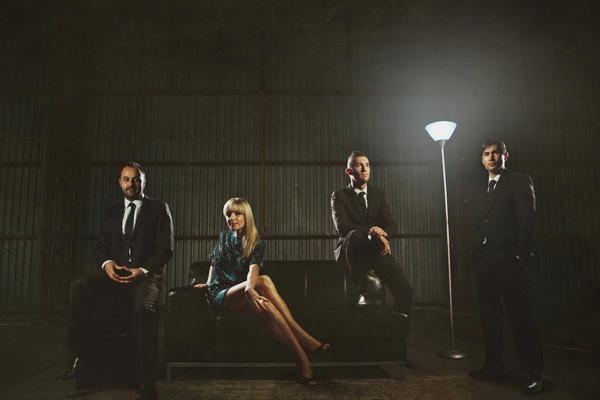
Bandshoot

There’s always, always an upgrade that I ‘need’ or a new lens I ‘can’t do without’. And I could easily convince myself, and the boss (the wife) I can’t do my next shoot without getting this strobe or lens or wireless system, it would make the shoot awesome! Turns out the gear doesn’t make you awesome, you make you awesome. I have consciously decided to not upgrade any of my gear yet, I’ve made the decision to push my knowledge and the gear that I have to achieve what I want to achieve.

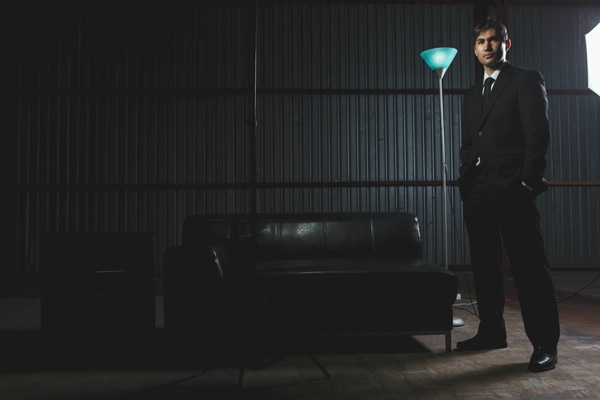
I recently had a band approach me to do some promo shots for them. All they gave me to work with was ‘classy with an edge’ which sounded like fun. Straight away I’m thinking I wanted the ‘look’ of a big production, I organized to do the shoot in a warehouse to give the ‘edge’ and have a set up with a lounge, side table and lamp to add some class. I’ve seen with something like this you’d have strobes and reflectors and assistants running around everywhere. I had my 580exii, a $ 100 strobe I bought off ebay and my mate Dylan.

I did the shoot with my 5d2 (would love to get the mark 3) and a cactus v4 wireless system (would love to get a pocket wizard system) and my 24-70 lens that I have dropped in the past (would love to upgrade that too) and my 580exii and a cheap strobe.

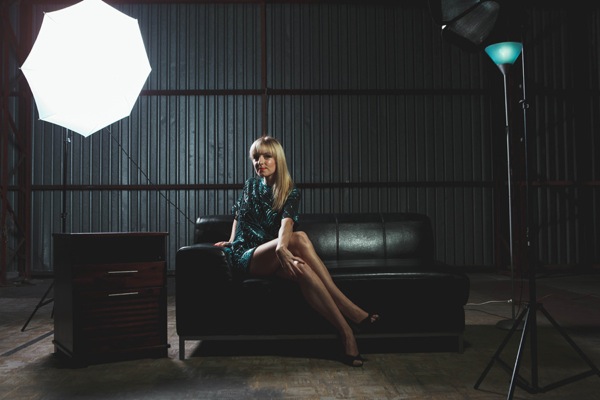
1

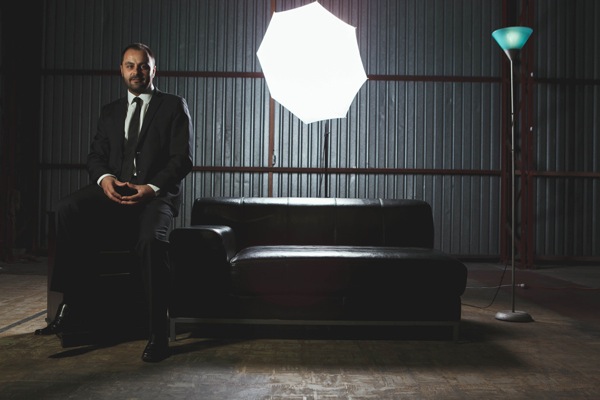
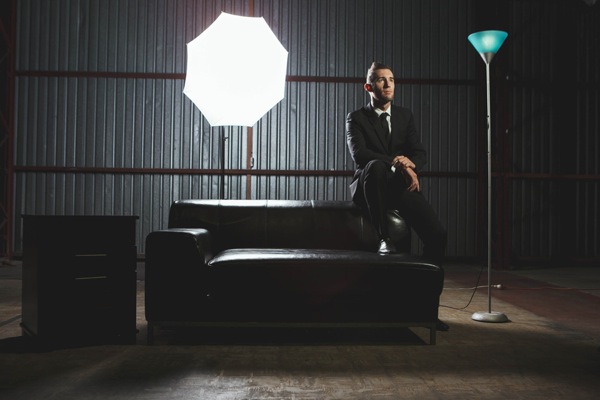
We had no ambient light to work with and in order to light every band member up perfectly I had to shoot them one at a time as a composite image so it would be a simple cut and paste job later. One good tip also when doing this style of shoot is to get a ‘clean slate’ shot, a shot with nothing in it but the background, it just makes it easier to cut and paste onto.

2

Don’t let only having little gear stop you from achieving what you want to achieve, but make sure you work it all out before hand, you can never be too prepared when it comes to shoots as to not waste your clients time.

3

Pushing boundaries and my knowledge is what I love about photography, I had an idea and a goal set and then just made it happen. Learn the gear you have and become excellent at it. It’s always nice to get the latest and newest gear, and it often helps and makes things easier, but it’s not the gear that makes you awesome, it’s you.

4

Judd Green is a Photographer from Brisbane Australia. See more of his work at www.juddricphotography.com

Post originally from: Digital Photography Tips.

Check out our more Photography Tips at Photography Tips for Beginners, Portrait Photography Tips and Wedding Photography Tips.

Achieving a ‘Big’ Look with little Gear | Using What You Have


Digital Photography School

 
Comments Off on Achieving a ‘Big’ Look with little Gear | Using What You Have

Posted in Photography


In-depth look at Google+ Photo Update with the Team that Designed it

18 May

TS520x0~cms_posts_1400574775_mainscreen.jpg

At its I/O developers conference a couple of days ago Google introduced various updates to its Google+ social networking platform, many of which will be of interest to photographers. As well as changes to layout, images can be ‘auto-enhanced’, made into panoramas and animations, and the system can also select the best facial expressions in group shots. Click through for more details on connect.dpreview.com.

News: Digital Photography Review (dpreview.com)

 
Comments Off on In-depth look at Google+ Photo Update with the Team that Designed it

Posted in Uncategorized


Google Unveils Cutting Edge Photography Tools to Make Your Photos Look Better and the World A More Beautiful Looking Place

16 May

Through Glass

Google unveiled significant new innovation in the world of online photography this morning, continuing their rapid development pace on Google+. All in, Google+ pushed out 41 new features today.

Much of the new work is focused on post production photography to make people’s photographs look better than they can straight out of the camera.

Some have suggested that part of Instagram’s success has been their ability to enhance users’ photos with very simple, one touch filters. Instagram has focused on a faux film aesthetic which actually highlights the flaws in many photos to give them more of an artistic, old school feel. By contrast, Google’s easily and automatically applied post production tools, released today, work to make photos look more vivid, life like and realistic.

By using simple techniques like skin softening, clarity adjustment, smart vignetting, HDR and other enhancements, Google, by default, now offers an enhanced photo for every photo uploaded by users to Google+. Also, with this new tech, Google will give you the ability to view the before and after results and decide which you prefer to use. For photographers who do not want their photos altered in any way, these users can turn this default functionality off.
Google Releases New Tools for Photographers Using Google+

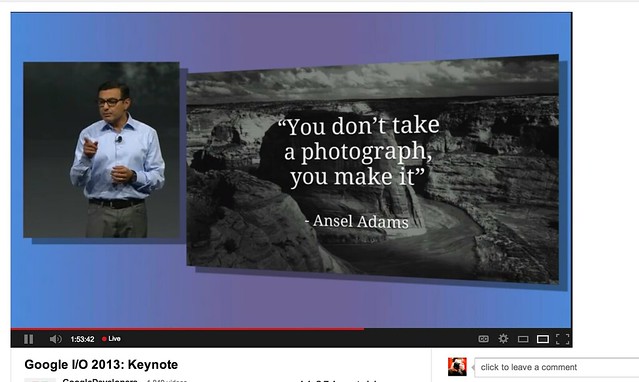
As a photographer, I have long been a believer of photo manipulation and post processing technology. Ansel Adams said “you don’t take a photograph, you make it,” as highlighted in Google Social Chief Vic Gundotra’s keynote this morning. Much of Ansel Adams’ genius has been attributed to the work that he did in the darkroom with his photos, his zone system, his post production technology of his time.

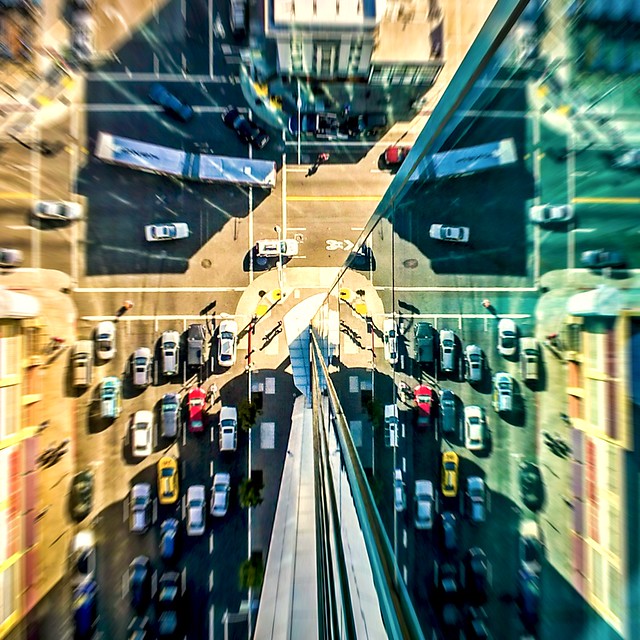
I post process all of my photos. The photo at the top of this post is the very first photo that I made with my new Google Glass that I bought yesterday. While I was able to get the composition to a point where I wanted in camera, much of the pop of that image is done with my own post production technique and style.

Many of my photographer friends also spend a great deal of time post processing their images — but the vast majority of the people out there really don’t post process at all. These people don’t own Lightroom and Photoshop or Nik Suite or Aperture or whatever else they might use to improve their photos. These are every day non-photographers who are still enamored with photography and imagery.

By applying some very basic algorithmic based enhancements, Google can make photos for the masses look much better than straight out of the camera. This is a very smart move on Google’s part. Where Instagram makes your bad photos look purposefully worse, Google now makes your bad photos look purposefully better! I stole that line from an unnamed source, btw. ;)

Where this new tech is especially powerful is in photos of people. By using basic skin softening post production tech, photos of people will look better on Google+ than on other social networks. By appealing to our vanity, this gives Google a big advantage. If people can post photos of themselves on Google+ that make them look BETTER than on other networks, many more people will choose to post their photos on G+. Just watch as people post photos of themselves on G+ for auto beautification and even download and post them to other networks I bet.

All of this sort of fancy post production *can* be done today by skilled post production photographers who spend hours and hours behind Photoshop. Now much of it will be automated and released to the masses.

There will undoubtedly be some naysayers about this tech. The same folks who moaned about the Instagramification of mobile photography will probably also complain about this new tech too. Google was smart here by giving users a very simple way to deal with this, by simply turning off this feature.

While the photo enhancements were the sizzle of Google’s announcements today, there were many other significant enhancements added to Google Photos.

Google will now begin to analyze your images and auto tag them. This is no trick where low paid overseas workers are manually reviewing your images; Googles’ algorithms now can look at the context of your photo and the actual subjects in your photos to identify possible tags for the images. If you post a photo of the Eiffel Tower, Google can detect the Eiffel Tower in your photo and add that tag for you. If Google gets the tag wrong, for whatever reason, it’s simple for you to just remove it.

What this means is that more of your photos will be seen in search by people using Google products. Many photographers are looking for more traffic and views on their photos. Who better to provide this traffic than Google Search, yes, using Google auto applied tags. This is the future of image search. If you are a photographer, especially one who depends on photography for your living, you cannot afford to ignore the significance of Google Search. Many of my own photo sales are made by people finding my photos while searching on Google. By uploading your photos to Google+, your photos will rank better in search and now even moreso with this new auto-keywording functionality.

Google Releases New Tools for Photographers Using Google+

Google also introduced a new smart algorithm that can analyze your photos and show you which ones Google thinks are the best of the batch, offering you highlights. Oftentimes we will “spray and pray,” taking 20 images of one person or subject. Google will analyze all of the images and suggest the best one for you. Google uses not just technical information about a photo (is it blurry or underexposed?) but they are using human tested aesthetics to look for what is most appealing.

But there’s more! In addition to the tech released above, Google has also added some very easy tools which will auto generate gifs for you of your photos, auto HDR bracketed shots, and suggest other compelling ways for you to present your photography to the world. Almost miraculously, Google can even look at photos of multiple people and merge the photos into a single photo that takes the best expression of each individual from *different* photos.

All of this also comes with an awesome new look and layout of Google+ which better highlights photography on the network. Popular photos will now be featured in jumbo new oversized form across a three column layout. For non highlighted photos, Google also made portrait oriented photos, especially, look better and bigger. In the past, the portrait format was the worst looking photo format on Google+, now it’s the best — that’s worth noting. ;) For folks who don’t like the three column layout, they can switch back to a single column if they’d like.

A couple of other notes: all of this work that Google does with your photos is done behind the scenes for your eyes only. You can use the tech or not use the tech. If you use the tech and like it, *you* then choose to share the image to Google+. Nothing is shared until you choose to share it.

The new technology will only work with the JPG format (hopefully Google comes out with RAW support down the road). Google increased everyone’s storage to 15GB of online storage, but note that any photo sized 2048 px or smaller does not count towards your 15GB storage limit (you can also buy more storage if you want to). Google allows unlimited uploading of photos that you either manually resize or allow Google to resize to 2048 px. There is an option on Google where you can set whether or not you want to upload full high res photos or resized 2048 sized images.

I upload some of my photos full res, and many of them I resize manually myself to 2048 px.

Google also introduced a free, stand alone hangout app that you can now use with your mobile phone or desktop device bridging text, photos and real time group video into a single app that preserves conversations (at your choice) over long periods of time. Hangouts have been one of the most popular Google+ feature and several photography related shows have been built around them.

More detail on these changes at Google here. More from Matthew Hanley here. Trey Ratcliff wrote insightful commentary here.


Thomas Hawk Digital Connection

 
Comments Off on Google Unveils Cutting Edge Photography Tools to Make Your Photos Look Better and the World A More Beautiful Looking Place

Posted in Photography


Samsung Galaxy S4: Our first look at imaging features

11 May

Eraser_passerby.png

The Samsung Galaxy S4 has no doubt been one of the most high-profile smartphone launches of the year. We’re digging into its camera capabilities for our full review of Samsung’s newest flagship phone, first playing with some of the more innovative capture features from its Dual Shot to Drama mode. We offer our first thoughts on the S4’s camera today on connect.dpreview.com.

News: Digital Photography Review (dpreview.com)

 
Comments Off on Samsung Galaxy S4: Our first look at imaging features

Posted in Uncategorized


HTC One camera first look: Imaging features

08 May

htcone.png

After our recent Smartphone Super Shootout we are working full steam ahead toward our comprehensive camera review of the HTC One, the Taiwanese manufacturer’s new flagship smartphone which features a 4 ‘ultrapixel’ sensor, a fast F2.0 lens and optical image stabilization. Unti then, we offer up a close look at the new phone’s imaging features.

News: Digital Photography Review (dpreview.com)

 
Comments Off on HTC One camera first look: Imaging features

Posted in Uncategorized


How taking tablet photos can look even sillier: Just add a telephoto lens

23 Apr

ipad_telephoto_lens.jpg

If taking a photo with a nearly 10-inch tablet didn’t look silly enough, you can now pair your iPad with a telephoto lens to expand tablet photography horizons. Regardless of the awkward appearance of the iPad as a camera, shooting with the tablet has grown in popularity. The new 10x zoom accessory for the iPad 3 and 4 and 12x zoom for the iPad Mini is a further proof. Read more about the lens at connect.dpreview.com.

News: Digital Photography Review (dpreview.com)

 
Comments Off on How taking tablet photos can look even sillier: Just add a telephoto lens

Posted in Uncategorized


Nikon D7100 preview updated with a look at effect of OLPF omission

05 Apr

D7100_18_105_front.png

In the course of preparing our in-depth review of the Nikon D7100, we’re exploring the potential image quality advantages of Nikon’s decision to forgo an optical low pass filter (OLPF). As part of this process, we compared the D7100 alongside the Nikon D5200, which also uses a 24MP APS-C sensor, but includes an OLPF and have just added the results to our hands-on preview. Does the D7100’s lack of OLPF really make a difference? Click through to read what we’ve found.

News: Digital Photography Review (dpreview.com)

 
Comments Off on Nikon D7100 preview updated with a look at effect of OLPF omission

Posted in Uncategorized


BBC and Forbes look at the booming action camera business

13 Mar

_66198768_brinno_bikecamera.jpg

Small, rugged, go-anywhere action cams have become increasingly popular. Both BBC news and Forbes magazine have taken a look at the booming action camera business over the last week. The BBC’s  Forbes posted an interesting story about GoPro’s Founder and CEO Nick Woodman with details on the company’s success. Click through to read more and for links to the posts.

News: Digital Photography Review (dpreview.com)

 
Comments Off on BBC and Forbes look at the booming action camera business

Posted in Uncategorized


Meet the Look Lock: Bringing Your Camera and Your Phone Closer Together

25 Feb

Extra photos for bloggers: 1, 2, 3

You, your smartphone and your DSLR are about to become the very best of friends. Like one teeny tiny gang.

It’s all thanks to the Look Lock,
an adjustable arm that mounts to your camera’s hot shoe and grabs onto your phone with a strong clamp.

When your camera and phone join forces you can really grab your subject’s attention, make a video of your photoshoot, or even set up a teleprompter.

Who needs an assistant when these pals have got your back?

Check out the Look Lock
$ 75 at the Photojojo Store

%20http%3A%2F%2Fphotojojo.com%2Fstore%2Fawesomeness%2Flook-lock%2F”>


%20http%3A%2F%2Fphotojojo.com%2Fstore%2Fawesomeness%2Flook-lock%2F”>Tweet it!

     Share

Related posts:

  1. Meet Mr. Digital Clover, A Keychain Camera with Film Camera Appeal Extra photos for bloggers: 1, 2, 3 Bus rides can…
  2. Attachable Lenses for Your Camera-Phone, Fisheye & Macro/Wide Angle Phone Lenses Extra photos for bloggers: 1, 2, 3 Camera-phones. They’re a…
  3. The Phlash: Camera Phone Super Flash Every photographer knows that the key to the art is…


Photojojo

 
Comments Off on Meet the Look Lock: Bringing Your Camera and Your Phone Closer Together

Posted in Equipment