RSS
 

Posts Tagged ‘Lights’

Bright Idea: London Street Lights Converted to Electric Vehicle Charging Points

24 Jun

[ By SA Rogers in Technology & Vehicles & Mods. ]

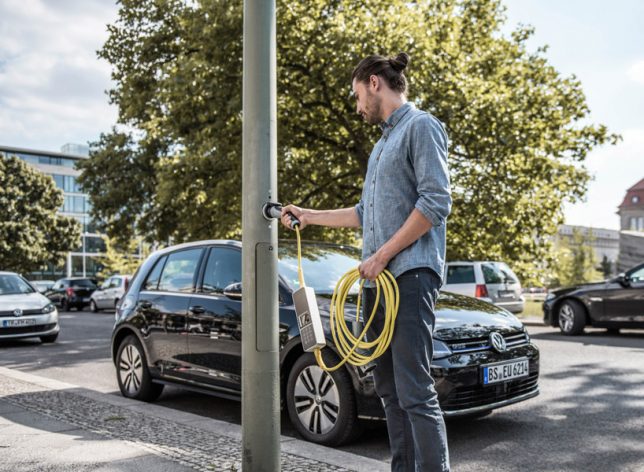
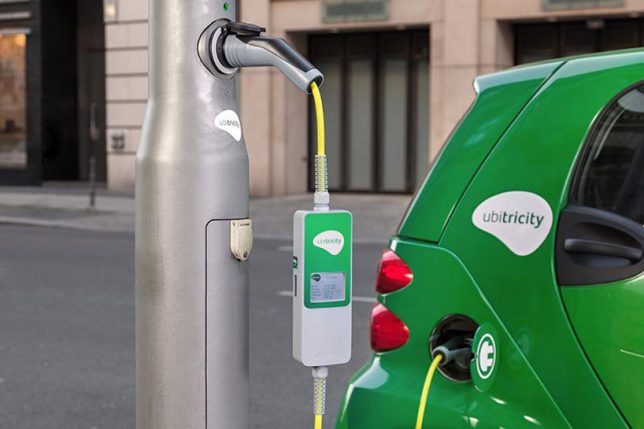
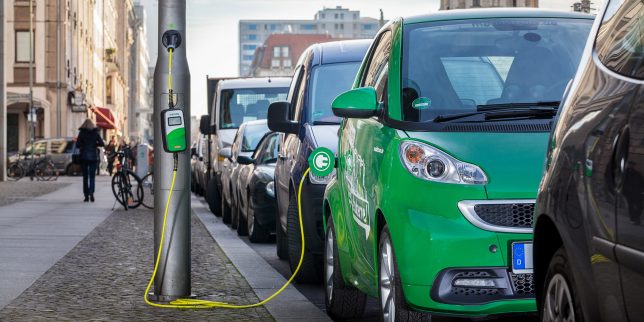
It sounded kind of far away when announced in 2013, but German renewable energy firm Ubitricity’s plan to convert street lamps to electric vehicle chargers is now underway in London, making it easy to plug in just about anywhere in the Hounslow borough of the city. Owners of electric vehicles simply order a custom charging cable featuring a built-in electricity meter so they can take advantage of the discreet power outlets built right into the lamp posts as well as standard electrical outlets.

You might be wondering what’s to stop random passersby from plugging whatever they feel like into the outlets. The answer is that little box, which communicates with the power company to activate charging from the light pole. The lights themselves were converted to LEDs to draw less power, making more available for other purposes.

The meter allows for remote billing, monitoring your usage and reimbursing the person or company the outlet belongs to, making it easier (and more polite) to juice up your vehicle whenever and wherever needed. You can keep track of how much power you’re drawing, and how much it costs, on a smartphone app. Ubitricity believes this setup will give potential electric car owners more confidence in their ability to take their vehicles on the road for longer trips.

The integration with existing city infrastructure also makes sense, especially in areas where there’s no room for permanent charging stations. The lamp posts are already there, and there’s already power running through them, so adding an outlet makes it possible to simply pull over to the side of the road to charge. Electric car owners in the area can request that outlets are added to lamp posts near their homes.

Share on Facebook


[ By SA Rogers in Technology & Vehicles & Mods. ]

[ WebUrbanist | Archives | Galleries | Privacy | TOS ]


WebUrbanist

 
Comments Off on Bright Idea: London Street Lights Converted to Electric Vehicle Charging Points

Posted in Creativity


Before you invest in LED lights, make sure you understand CRI

30 May

LED lighting technology is all the rage, and there are great reasons to invest in LED lights. (Beyond using them as a lightsaber.) However, photographers are keenly aware that it’s not just the light that’s important, but also the quality of light you have.

One tool we can use to assess the color accuracy of a light is the color rendering index, or CRI, which provides some information about how accurately a light can reveal color compared to an ‘ideal’ light. A light which perfectly emulates the color accuracy of natural daylight would have a CRI score of 100.

Companies love to state CRI numbers on their products, leading you to believe that they can provide the color accuracy you’re looking for. However, while a higher CRI number is generally better, it’s important to understand how that number is generated, and why it’s not as definitive as manufacturers like to make it sound.

Learn more at premiumbeat.com

Articles: Digital Photography Review (dpreview.com)

 
Comments Off on Before you invest in LED lights, make sure you understand CRI

Posted in Uncategorized


Ricoh announces WG-50 rugged compact with 5x zoom, built-in macro lights

25 May

Ricoh has introduced a new rugged compact camera – the WG-50 – which replaces the WG-30. The WG-50 offers a 28-140mm equiv. F3.5-5.5 lens. The WG-50 uses a 16MP BSI-CMOS sensor and is capable of recording Full HD video at 30 fps. It is waterproof for two hours at a depth of 14m/45ft, and can cope with being dropped from a height of 1.6m/5ft, will operate at temperatures as low as -10°C/+14F and can withstand 100kg/220lbs of force.

As with Ricoh’s other recent rugged cameras, the WG-50 has an array of six LEDs around the lens that can be used to assist macro shooting, selfies and when using the 2MP digital microscope mode.

The camera will go on sale at the end of June in a choice of orange or black, and will cost $ 279/£249. For more information see the Ricoh website.

Press release

RICOH COMPANY, LTD and RICOH IMAGING COMPANY, LTD. announced the launch of the RICOH WG-50 digital compact camera.

This new model features a compact, lightweight body design, delivering exceptional waterproof and shockproof performance.

Developed as a standard-class waterproof digital compact camera, the RICOH WG-50 provides dependable performance and outstanding operability in demanding outdoor conditions. The WG-50 is waterproof to a depth of 14 metres, shockproof against falls from a height of 1.6 metres, and freeze-proof to temperatures as low as -10°C. It also provides a range of features to facilitate all types of still-image and movie shooting, including approximately 16.0 effective megapixels and Full HD (1920 x 1080 pixels) movie recording capability. It also comes equipped with an outdoor friendly LCD screen on the brightness can be instantly adjusted to the lighting levels in a particular shooting situation.

The RICOH WG-50 features a range of optional camera-mounting accessories allowing the user to fix the camera securely on a bicycle or watercraft. Using the camera’s creative shooting functions, such as interval shooting and Full HD movie recording, the user can capture unique images seen from a very different angle or viewpoint.

RRP £249.99
Availability: End June 2017
Colours: Orange or Black

Main Features

1. Heavy-duty construction allowing underwater shooting down to 14 metres, for up to two hours of continuous operation (equivalent to IPX 8 or JIS Class 8). The RICOH WG-50 is also shockproof against falls from a height of 1.6 metres,* dustproof (equivalent to IPX 6 or JIS Class 6), freeze-proof to temperatures as low as -10°C, and crushproof against weights up to 100kgf (kilogram force). ** Thanks to this heavy-duty construction, the camera performs superbly and dependably even in difficult and demanding outdoor conditions.
* Measured under RICOH IMAGING-original testing standards — from a height of 1.6 metres, onto a surface of 5cm-thick plywood — conforming to Method 516.5-Shock of the MIL-Standard 810F
** Measured under RICOH IMAGING-original testing standards

2. Exceptional image quality
The WG-50 comes equipped with a back illuminated CMOS image sensor, which delivers excellent high-sensitivity and low-noise characteristics and high-speed readout of image data signals. Coupled with a high-performance imaging engine, this image sensor delivers a top sensitivity of ISO 6400 and super-high-resolution images with approximately 16.0 effective megapixels. This model also provides advanced image processing functions, made possible by the latest super-resolution technology, to assure sharp, clear, high-resolution images. It also offers such innovative features as Hand-held Night Snap mode, which automatically captures several images of the same night-time scene from which it produces a single, blur-free composite image. Some advanced features have also been added to this model to facilitate and upgrade scenic photography. For example, white-balance optimisation in the Landscape shooting mode reproduces brilliant greens of trees.

3. 5X optical zoom lens with a 28mm wide-angle coverage
The WG-50 features a high-performance, five-times optical zoom lens with a focal-length coverage from 5mm to 25mm (equivalent to approx. 28mm to 140mm in the 35mm format) to accommodate a wide range of scenes and subjects, including sweeping landscapes. It also provides other convenient shooting functions, such as a macro mode to capture dramatic close-up images from a minimum focusing distance of a mere one centimetre; an Intelligent Zoom function to extend the zoom range to approximately 36 times (equivalent to 1008mm in the 35mm format) without compromising image quality and ideal for superior telephoto photography; and an interval shooting mode, which comes in handy for fixed-point observation.

4. Underwater shooting mode
Specifically designed for underwater photography, the Underwater and Underwater Movie shooting modes are programmed to optimise colour and contrast, based on the data of images actually captured under the water. These modes deliver sharp, true-to-life images by enhancing shades of red which are lost in underwater photography, while effectively compensating for the loss of contrast caused by the diffusion of light in water. During Underwater mode, the Flash Off + Flash On option, allows the user to consecutively capture two images — with a single shutter release — one without flash and another with flash.

5. Six Macro Lights to assist close-up shooting, and a Self-Portrait Assist mode
Ideally positioned around the circumference of the lens barrel for macro shooting, six LED Macro Lights allow the WG-50 to provide bright, uniform illumination on a subject when the Digital Microscope mode is selected.*** Using these Macro Lights, the user can clearly see a magnified view of the microscopic world on the camera’s LCD screen, normally undetectable by the naked eye, to effortlessly capture eye-catching, close-up images. In order to minimize camera shake and subject shake, the Instant Illumination Enhance function allows for the use of a higher shutter speed by automatically raising the discharge level of the Macro Lights at the moment of shutter release. The Macro Lights also provide other useful functions, such as a Self-Portrait Assist mode, which uses the blink of an LED lamp to check if the subject’s face has been safely captured within the picture frame, and the LED Lighting mode, which uses the Macro Lights as a lighting device in the dark.
*** When this mode is selected, the image size is fixed at 2.0 megapixels (at 16:9 proportions).

6. Full HD movie recording for extended shooting of high-quality movies
The WG-50 provides Full HD movie recording employing the H.264 recording format. Users can capture high-quality, extended movie clips (1920 x 1080 pixels, 16:9 proportions) at a frame rate of 30 frames per second. To add some creative touches to movie recording, it also features a high-speed camera function**** for slow-motion playback of captured movie clips, and an interval movie function. A micro-HDMI terminal (Type D) is also provided on the camera body for simultaneous output of Full HD movie clips and sound to external audio-visual devices.
**** When this function is selected, the recorded size is fixed at 1280 x 720 pixels.

7. Triple anti-shake protection to prevent blurred images in all applications
(1) Pixel Track SR mechanism
When recording still images, this advanced shake-reduction mechanism effectively compensates for camera shake by digitally processing affected images.

(2) Digital SR mode
When the camera detects low-lighting conditions in still-image shooting, this mode automatically raises the sensitivity up to as high as ISO 6400, making it possible to use a higher shutter speed and effectively minimise the adverse effect of camera shake and subject shake when dealing with poor lighting conditions.

(3) Movie SR mode
During movie recording, this mode effectively compensates for the misalignment of images caused by camera shake through the use of exclusive software to produce beautiful, blur-free movie clips.

8. 2.7 inch LCD screen with Outdoor View Setting mode
The WG-50 comes equipped 2.7 inch LCD screen with horizontally extended 16:9 proportions and approximately 230,000 dots. The screen’s AR (Anti-Reflection) coating minimises annoying glare and reflections to deliver a sharp, clear on-screen image even in sunshine during outdoor shooting. It also comes equipped with such convenient features as the Outdoor View Setting mode, which easily sets the optimal screen brightness level for a given lighting situation.

9. Other features

  • A range of WG-series mount accessories (optional) for a range of shooting situations
  • Two remote control receptors (one in front and another in the back) to widen signal coverage
  • Macro stand (included) to maintain a minimum focusing distance of one centimetre to the subject during extended observation and shooting of macro images
  • High-speed Face Detection function to capture as many as 32 faces in focus in approximately 0.03 seconds (minimum); Smile Capture function to automatically release the shutter when the subject’s smile is detected
  • Outdoor friendly Style Watch function to display the time on the LCD monitor, using an extended push of the OK button when the camera’s power is turned off
  • Delay-free, push-button start of the playback mode, using an extended push of the playback button
  • Auto Picture mode to automatically select the most appropriate shooting mode from 16 different scene modes
  • A choice of 12 digital filters
  • Pet detection function to automatically detect the face of a cat or dog

Ricoh WG-50 specifications

Price
MSRP $ 279/£249
Body type
Body type Compact
Body material Composite
Sensor
Max resolution 4608 x 3456
Image ratio w:h 1:1, 4:3, 16:9
Effective pixels 16 megapixels
Sensor photo detectors 17 megapixels
Sensor size 1/2.3" (6.17 x 4.55 mm)
Sensor type BSI-CMOS
Color space sRGB
Color filter array Primary color filter
Image
ISO Auto, 125-6400
White balance presets 6
Custom white balance Yes
Image stabilization Digital only
Uncompressed format No
JPEG quality levels Fine, normal, basic
File format
  • JPEG (Exif v2.3)
Optics & Focus
Focal length (equiv.) 28–140 mm
Optical zoom 5×
Maximum aperture F3.5–5.5
Autofocus
  • Contrast Detect (sensor)
  • Multi-area
  • Center
  • Tracking
  • Single
  • Continuous
  • Face Detection
  • Live View
Autofocus assist lamp Yes
Digital zoom Yes (7.2X)
Manual focus Yes
Normal focus range 50 cm (19.69)
Macro focus range 1 cm (0.39)
Number of focus points 9
Screen / viewfinder
Articulated LCD Fixed
Screen size 2.7
Screen dots 230,000
Touch screen No
Screen type TFT LCD
Live view Yes
Viewfinder type None
Photography features
Minimum shutter speed 4 sec
Maximum shutter speed 1/4000 sec
Exposure modes
  • Auto
  • Program
Scene modes
  • HDR
  • Handheld Night Snap
  • Movie
  • High Speed Movie
  • Digital Microscope
  • Landscape
  • Flower
  • Portrait
  • Underwater
  • Underwater Movie
  • Interval Shot
  • Interval Movie
  • Surf & Snow
  • Kids
  • Pet
  • Sport
  • Night Scene
  • Night Scene Portrait
  • Fireworks
  • Food
  • Digital SR
  • Report
  • Green
Built-in flash Yes
Flash range 5.50 m (at Auto ISO)
External flash No
Flash modes On, off
Drive modes
  • Single
  • Self-timer
  • Continuous
  • Burst
  • Remote control
  • Auto Bracketing
Continuous drive 8.0 fps
Self-timer Yes (2 or 10 secs, remote)
Metering modes
  • Multi
  • Center-weighted
  • Spot
Exposure compensation ±2 (at 1/3 EV steps)
AE Bracketing ±2 (3 frames at 1/3 EV steps)
Videography features
Format MPEG-4, H.264
Modes
  • 1920 x 1080 @ 30p, MOV, H.264, Linear PCM
  • 1280 x 720 @ 120p, MOV, H.264, Linear PCM
  • 1280 x 720 @ 60p, MOV, H.264, Linear PCM
  • 1280 x 720 @ 30p, MOV, H.264, Linear PCM
Microphone Stereo
Speaker Mono
Storage
Storage types SD/SDHC/SDXC card
Connectivity
USB USB 2.0 (480 Mbit/sec)
HDMI Yes (micro-HDMI)
Microphone port No
Headphone port No
Remote control Yes (Wireless)
Physical
Environmentally sealed Yes
Battery Battery Pack
Battery description D-LI92 lithium-ion battery & charger
Battery Life (CIPA) 300
Weight (inc. batteries) 193 g (0.43 lb / 6.81 oz)
Dimensions 123 x 62 x 30 mm (4.84 x 2.44 x 1.18)
Other features
Orientation sensor Yes
Timelapse recording Yes
GPS None

Articles: Digital Photography Review (dpreview.com)

 
Comments Off on Ricoh announces WG-50 rugged compact with 5x zoom, built-in macro lights

Posted in Uncategorized


Light’s L16 camera is in final stages of testing

15 Apr

$ (document).ready(function() { SampleGalleryV2({“containerId”:”embeddedSampleGallery_3689211902″,”galleryId”:”3689211902″,”isEmbeddedWidget”:true,”standalone”:false,”selectedImageIndex”:0,”startInCommentsView”:false,”isMobile”:false}) });

Light has been teasing images of its first prototype L16 cameras for a while now. Today, it offered a look inside production of its Design Verification Test cameras as well as a peek at the camera’s current design, as noted by LightRumors. Next month, beta testers will receive pre-release cameras, and emails have gone out to pre-order customers with shipping details. In other words, things are getting real.

Light announced its L16 camera in 2015, presenting a compact camera with 16 lenses using folded optics. Its 16 13MP sensors can be used to create up to a 52MP composite image, and it will offer 28mm, 70mm and 150mm equivalent focal lengths. Light’s website mentions that the camera will go on sale to the general public at the end of 2017.

Articles: Digital Photography Review (dpreview.com)

 
Comments Off on Light’s L16 camera is in final stages of testing

Posted in Uncategorized


How to Photograph Northern Lights (The Aurora Borealis)

15 Apr

A trip to photograph Northern Lights (also called The Aurora Borealis) often tops the wish list for many photographers. For good reason too; the aurora is a natural phenomenon unlike any other. Lights dancing over the frozen winter landscape is ethereal, beautiful, and at times, jaw-dropping. Living in Alaska has provided me the opportunity to shoot the lights more often than most, and yet more than once, I’ve had to stop clicking and just watch the curtains shift and dance. In fact, let that be my first tip if you are planning an aurora

In fact, let that be my first tip if you are planning an aurora photo shoot – occasionally just stop and watch. Seriously, put that camera down for a moment and relish the sight. Okay, now let’s figure out how to photograph the Northern Lights.

How to Photograph Northern Lights (The Aurora Borealis)

Gear

Tripod

You need one. There is no faking this one, get one and use it. If it’s brutally cold (which, let’s face it, it probably will be) you’ll appreciate carbon over cold-channelling aluminum, but either will work. Bring it, use it, no excuses.

Camera

I’ve seen beautiful images of the Northern Lights made with everything from good point and shoot cameras to high-end mirrorless and DSLRs. So don’t feel too restricted by your choice of camera. That said, a camera with low noise at high ISO is definitely preferable. Though not absolutely necessary, the ability to change lenses, too, is a major asset.

Lenses

As a general rule, you want a lens that is wide and fast (has a large maximum aperture). The faster the better. My primary aurora lens is a 14mm f/2.8, but I’m eyeing a 20mm f/1.8 for the extra speed. All lenses will need to be manually focused, so make sure that is straight-forward. A variety of focal lengths, either in the form of a zoom, or a choice of lenses is also helpful. I’ve used everything from a 70-200mm to my fixed 14mm to photograph Northern Lights.

How to Photograph Northern Lights (The Aurora Borealis)

I’ve got to admit, living in the far north has its advantages. I merely needed to step out my front door to make this image. (If you are wondering what that strange U-shaped white form in the sky is, it’s the exhaust trail from an aurora research rocket fired off by the University of Alaska Fairbanks).

Remote Release

Though not absolutely necessary, a cable or wireless release for your camera will help reduce camera shake when you click the shutter. A jiggly blur in the stars can ruin an otherwise good shot. If you don’t have a release, use the camera’s self-timer, many have a 2-second setting which is useful. Keep in mind that using a timer rather than a release will slow you down.

Clothing

Maybe I should have put this one at the top of the gear list, because it is probably the most important thing for a successful winter shoot of any kind. Right now, as I’m writing this article, I’m sitting in a cabin 70 miles north of the Arctic Circle in the Brooks Range of northern Alaska. I’m leading an aurora photo tour, and the warmest night-time temperature we’ve seen so far was -35F (-37c). Good clothing has not just been important, but vital.

How to Photograph Northern Lights (The Aurora Borealis)

Right now, as I’m writing this article, I’m sitting in a cabin 70 miles north of the Arctic Circle in the Brooks Range of northern Alaska. I’m leading an aurora photo tour, and the warmest night-time temperature we’ve seen so far was -35F (-37c). Good clothing has not just been important, but vital. I don’t want to go into too much detail here, but a thick down coat with a hood, down or synthetic fill pants, mittens, liner gloves, face masks, and warm hats should all be on your list.

That said, I do want to take just a second to talk about footwear. Trips like the one I’m currently leading are not the time to toy around with light winter boots. This is not the time for fashion. Pack boots, god-ugly bunny boots, mukluks, and other extreme-cold footwear, a couple sizes too big (to account for thick socks and toe warmers) are what you are looking for. Nothing will wreck a night of photography more quickly than painfully cold, or (please no) frost-bitten toes. Enough said.

How to Photograph Northern Lights (The Aurora Borealis)

Interesting foregrounds are an important part of any image, and aurora shots are no different. In this case, I climbed a rock outcrop and used a wireless trigger to make this image.

The Day Before

Prefocus – autofocus rarely works in the dark, so you’ll need to manually set your focus. The first thing I do when I’m leading a photo workshop or tour is to take my clients out in the daylight, before our first night chasing the lights, and have them set their focus to some distant mountaintop. After making sure it is tack sharp, I hand out small pieces of electrical tape and have everyone tape the focus in place so it won’t shift around accidentally.

With the excitement of the first aurora show, no one has to worry about messing with their focus points, or worse, find their shots heartbreakingly soft. A caveat: You still need to check your focus periodically. I’ve found that some lenses will shift their focus point slightly when there are extreme temperatures. Pixel-peep occasionally and adjust as necessary.

How to Photograph Northern Lights (The Aurora Borealis)

When the lights are directly overhead, sometimes pointing your camera straight up can be the best option.

In the Field

Have patience. The aurora is a fickle lover, and she only appears when she wants. Even when the forecasts are coming together and everything seems set for success, the lights may take awhile to appear, they may erupt when you don’t expect it, or clouds may obscure the sky. Plan several nights to account for bad weather or uncooperative conditions. Be prepared to stay up late, and again, be patient.

Exposure

How to Photograph Northern Lights (The Aurora Borealis)

This is one of my first images of the aurora. The lights were bright, and while I managed to capture some color, the 20-second exposure blurred the details into an indistinct curtain. I know better now.

In the days of film and early days of digital, long exposures of 15 or 30 seconds for the aurora were the name of the game. This allowed the lights to appear bright and colorful, but details within the aurora, the pillars, and beams blurred away leaving behind an indistinct curtain. Technology has moved beyond this.

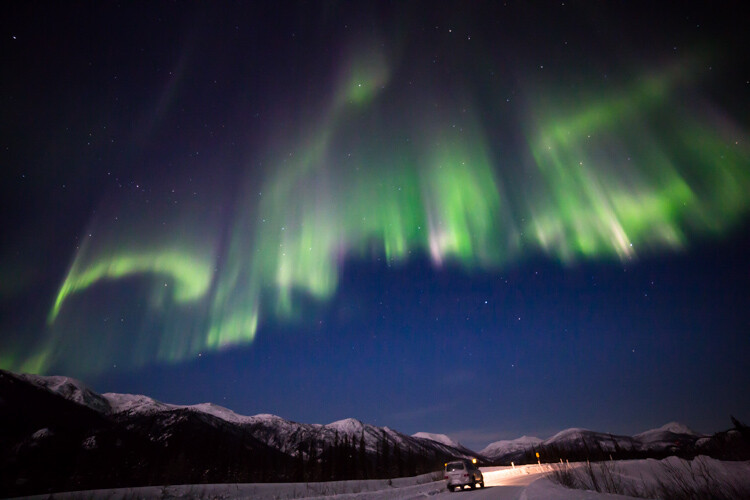
You want the shortest shutter speed possible that allows sufficient brightness and low noise. ISOs in the 1600-6400 range are typical. I start with a setting of f/2.8, ISO 1600 or 3200, for 5 seconds. From there, depending on what the lights are doing, the amount of moonlight, and other factors, I’ll adjust up and down.

Last night, for example, for about 10 minutes the lights brightened and started moving VERY fast. Sacrificing some noise, I went to ISO 6400, f/2.8, and a 1-second exposure. The shots needed a bit of noise reduction in post-processing, but I was able to capture the details of the curtains, and that sharpness in the aurora makes the images successful. A shutter speed just a second or two longer would have blurred the lights.
How to Photograph Northern Lights (The Aurora Borealis)

In contrast to the previous image, for this shot of a very fast moving display, I used a shutter speed of just one second at ISO 6400, f/2.8. As a result, the pillars of light and details in the curtains are sharp.

Composition

When the aurora is hopping, your attention will shift to the sky and away from the foreground. This is natural, but try to pay attention to your composition, just as you would with any landscape image. In the dark, a poorly framed image may not stand out the way it does in daylight. But, I’ll guarantee that you’ll notice when the photos appear on your computer the next morning, and you’ll kick yourself.

Consider where you are, provide some context, avoid distractions, and compose carefully.

How to Photograph Northern Lights (The Aurora Borealis)

A red aurora is a very rare thing indeed. Of the hundreds of nights I’ve spent shooting the Northern Lights, this one had the deepest, brightest reds I’ve ever seen. (FYI, I used my headlamp to light paint the trees in this image.)

Where and When to Photograph the Northern Lights

Choosing the right location for an aurora trip is a big decision. The Aurora Borealis can be seen around the planet’s northern regions. Scandinavian countries, Iceland, northern Canada, and of course Alaska, are popular destinations. While your budget and available time may limit you, it is important to consider the likely weather conditions, local tours, lodging and transportation options, and seasons.

The aurora is primarily a winter phenomenon. In the far north, nights don’t get dark enough in the summer for the lights to appear. Here in Alaska, you can see the lights from late August or early September through mid-April, but prime time is late September through early April.

How to Photograph Northern Lights (The Aurora Borealis)

The nearly full moon in this image was not enough to blow out the bright display of lights, but it takes strong aurora to overcome a full moon. Moonlight is great for foregrounds but can cause issues with visibility of the Northern Lights. If you are shooting the aurora for the first time, I recommend making your trip around the new moon.

Research weather patterns. Some months are more likely than others to have clear skies. In Alaska, March is the driest month with the best chance for clear skies, but other locations will differ.

Moonlight is another thing to consider. While great lights can occur regardless of how bright the moon is, during the dark nights of a new moon, even low-grade aurora displays will appear more distinct against the darker sky.

Getting Help

How to Photograph Northern Lights (The Aurora Borealis)

One of my clients on an aurora photo workshop photographs the northern lights in the Brooks Range of northern Alaska.

Like any discipline of photography, learning to shoot the aurora takes practice. This can make aurora photography a frustrating pursuit for people new to it or with limited time. Organized workshops or tours, or private photo-guide services are a great way to assure some success. Even if you prefer to shoot independently, hiring a local expert for a night to get you started may help you dodge the usual pitfalls and find the best locations to shoot.

How to Photograph Northern Lights (The Aurora Borealis)

Patience Pays Off

Last night it was bitterly cold here in the Brooks Range. We started the night about 9:00 p.m. by driving 50 miles north to a spot high above tree line, a stone’s throw from the continental divide. There, we waited in the moonlight for the Northern Lights to appear. They didn’t, not for the three hours we sat patiently watching the sky. I had a sinking feeling that we were about to get skunked.

Half past midnight we gave up, turned around, and headed back to our rented cabin. Another hour later we pulled in and started unloading the gear. I glanced toward the sky, and there, sure enough, was a single, pale band of northern lights. It was nearly 2:00 a.m., and I’ll admit, my warm bed was sounding really good. But stubbornly, we reloaded our camera bags and tripods and drove a few miles back up the road where the mountains loomed close. When the lights exploded 20 minutes later, we were ready. Our cameras popped in the frigid air as the aurora swirled. We made some of the best images of the trip there.

How to Photograph Northern Lights (The Aurora Borealis)

Be Ready

We were patient, had the right clothing to handle the -40 temperatures, and had our cameras and settings ready. That’s really the core lesson here: be ready. The lights sometimes don’t last long and if you are fiddling with camera focus, or clothed improperly, you’ll miss it. However, preparation and research will greatly increase your chances of success. A chance to photograph Northern Lights, or simply observe them, is not an opportunity to squander.

The post How to Photograph Northern Lights (The Aurora Borealis) by David Shaw appeared first on Digital Photography School.


Digital Photography School
 
Comments Off on How to Photograph Northern Lights (The Aurora Borealis)

Posted in Photography


Fotodiox Pro FACTOR Series announced with nine high-output LED lights

04 Apr

Fotodiox Pro has launched its new FACTOR Series, a lineup of nine bi-color and high-output LED light panels for various photographic needs. The series contains three circular lights and five square/rectangular lights with removable barn doors. According to Fotodiox, these nine lights are designed to provide area lighting and spot illumination, and to facilitate ‘studio-style shoots.’ 

The FACTOR LED lights have adjustable color temperatures that range from 5600 Daylight to 3200 Tungsten, according to Fotodiox marketing director Bohus Blahut. The series utilizes Fotodiox’s Factorsoft, a technology that sets LED chips deep within the lights for ‘a soft, beautiful beam with no hot spots and a single, clean shadow,’ says Blahut. This is complemented by a svelte 1.5in / 3.8cm profile and all-metal construction.

This light series is also suitable for use during slow-motion video recording, as they will not produce flickering in high frame rate scenarios. As well, the lights can be powered from an ordinary AC wall adapter or V-lock batteries. The following models are available now through the company’s website:

  • FACTOR 1×1 – Comes with removable barn doors ($ 899.95 USD)
  • FACTOR 1×2 100 (100 watt draw) – Comes with removable barn doors ($ 749.95 USD)
  • FACTOR 1×2 200 (200 watt draw) – Comes with removable barn doors $ (1,249.95 USD)
  • FACTOR 1.5×1.5 – Comes with removable barn doors ($ 1,299.95 USD)
  • FACTOR 2×2 – Comes with removable barn doors ($ 2,199.95 USD)
  • FACTOR 1×4 – Comes with removable barn doors ($ 2,299.95 USD)
  • FACTOR Jupiter 12 (circular) ($ 659.95 USD)
  • FACTOR Jupiter 18 (circular) ($ 1,099.95 USD)
  • FACTOR Jupiter 24 (circular) ($ 1,999.95 USD)

Press release

Fotodiox Pro Announces FACTOR Series of Bi-Color LED Lighting

Featuring Factorsoft™ technology, the FACTOR series is the next step in the evolution of LED light panels

GURNEE, IL (PRWEB) MARCH 30, 2017

Fotodiox Pro, creator and distributor of several lines of specialty solutions for videography, cinematography and photography, has announced the FACTOR series of high-output, bi-color LED light panels. Designed for spot illumination, studio-style shoots and area lighting, the series contains nine models in various sizes and shapes that are built to use an assortment of creative, series-specific modifiers for shaping and directing the FACTOR lights’ soft beams. They are all available for purchase on FotodioxPro.com.

“At the core of the new FACTOR series is our Factorsoft™ technology,” says Bohus Blahut, marketing director for Fotodiox Pro. “Factorsoft™ refers to our unique use of LED chips, which are set deep in the body of each FACTOR light and produce a soft, beautiful beam with no hot spots and a single, clean shadow. We’ve also built the lights to have fully adjustable color temperature – anywhere from 5600 Daylight to 3200 Tungsten – without sacrificing their fantastic output.”

The FACTOR series features a sturdy, all-metal build and a convenient 1.5 inch profile that makes it simple to position the lights virtually anywhere on set. They run off included AC adapters or V-lock batteries, and produce no flickering at high frame rates – perfect for slow motion video.

  • FACTOR Models 
  • FACTOR 1×1 – Comes with removable barn doors
  • FACTOR 1×2 100 (100 watt draw) – Comes with removable barn doors
  • FACTOR 1×2 200 (200 watt draw) – Comes with removable barn doors
  • FACTOR 1.5×1.5 – Comes with removable barn doors
  • FACTOR 2×2 – Comes with removable barn doors
  • FACTOR 1×4 – Comes with removable barn doors
  • FACTOR Jupiter 12 (circular)
  • FACTOR Jupiter 18 (circular)
  • FACTOR Jupiter 24 (circular)

Accessory options for the series include model-specific honeycomb grids and creative masks for the FACTOR Jupiter models. To learn more about the FACTOR series and other photography and videography accessories from Fotodiox Pro, please visit FotodioxPro.com.

Articles: Digital Photography Review (dpreview.com)

 
Comments Off on Fotodiox Pro FACTOR Series announced with nine high-output LED lights

Posted in Uncategorized


Fotodiox launches soda-can sized LED lights with Fresnel focusing

08 Mar

Accessory manufacturer Fotodiox has introduced a battery-powered LED lighting head that uses a Fresnel lens to create a focusing spot function – and the whole thing is as small as a can of soda. The new PopSpot J-500 comes with removable barn doors and can run via the supplied AC adapter or with a NP-F750 video camera battery.

Using only white LEDs the head has a color balance of 5600k (+/- 300) but will accept filters for matching to tungsten or other light sources. The focusing spot allows the beam of light to be varied between 25° and 55° as the lens is rotated, and the output of the light can be controlled using a 0-100% dimmer switch. A fully charged battery can run the light for up to an hour and twenty minutes at 100% power, or three hours and forty five minutes at 50%. The company says that the emittance at the 55° spot is 2258lx, and is 5400lx at the 25° position.

The head measures 3¼ x 3¼ x 8¼ inches (8 x 8 x 21cm) without the battery and weighs 2 lbs / 0.95kg, and is available on its own in a three-head kit. The single head costs $ 274.95 without the battery module and $ 399.95 with it, while the three-head kit costs $ 1099.95 including two batteries of each head. For more information see the Fotodiox website.

Press release

Compact LED Light Delivers Power, Control and Dramatic Looks for Photo and Video Projects

Fotodiox Pro, creator and distributor of several lines of specialty solutions for videography, cinematography and photography, has announced the PopSpot Focusable Fresnel – a mighty Fresnel LED light in a tiny package. Roughly the size of a soda can, the PopSpot allows photographers and videographers to focus its powerful beam for fantastic precision, strong contrast and dramatic shadows. It is available now on FotodioxPro.com in three configurations: the PopSpot Focusable Fresnel, the PopSpot Focusable Fresnel + Battery Module, and the PopSpot Focusable Fresnel 3-Light Kit with Rolling Carrying Case.

“The problem with most Fresnel lights is they’re typically quite bulky, heavy and fragile, and they get screaming hot to the touch,” said Bohus Blahut, marketing director for Fotodiox Pro. “But our new PopSpot Focusable Fresnel does away with those pitfalls by combining power and control in a form factor about the size of a pop can. A simple twist focuses the PopSpot’s output from a 55° to 25° beam angle, and removable barn doors offer further control of the shape and direction of the light. We’ve even included a slot for a slide-in tungsten filter.”

Not only is the PopSpot an ideal light for tabletop shooting or as a rim or hair light, it can be used as a primary light in many shooting scenarios. Its compact size and lightweight build offers flexibility in mounting, positioning, and concealing, and allows it to travel virtually anywhere. The PopSpot runs off either conventional AC power or an optional battery module for on-the-go lighting, and remains cool throughout use.

To learn more about the PopSpot Focusable Fresnel and other photography and videography accessories from Fotodiox Pro, please visit FotodioxPro.com.

Articles: Digital Photography Review (dpreview.com)

 
Comments Off on Fotodiox launches soda-can sized LED lights with Fresnel focusing

Posted in Uncategorized


Lighting 103: How to Gel Big Lights

03 Feb

Abstract: How to economically gel umbrellas, beauty dishes and soft boxes

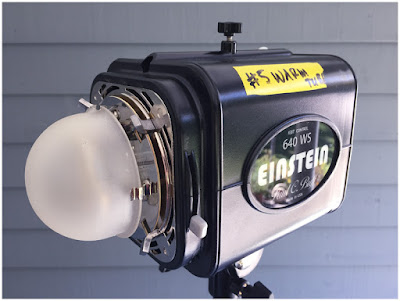
When using bigger lights (such as an Einstein e640, seen above) gelling gets a bit more complicated and expensive. Why? Big lights have protruding flash tubes and modeling lights, and potentially big modifiers.

But for each kind of modifier, there are workarounds that will allow you total gel coverage without having to buy large sheets of gels.Read more »
Strobist

 
Comments Off on Lighting 103: How to Gel Big Lights

Posted in Photography


Slik Lite tripods feature built-in LED lights

02 Dec

Intro 2020 has launched its Slik Lite series, a line of tripods that feature a built-in removable LED light. The series is comprised of five models, three made of aluminum and two made of 8-layer carbon fiber. According to Intro 2020, all five models can be compactly stored and transported thanks to Rapid Flip Mechanism locks for inverting the tripod’s legs 180-degrees. 

The Slik Lite series tripods all feature rubber feet and a ball and socket head. The aluminum models, which include the AL-420, AL-420M, and AL-20S, feature lever-locking four-section legs. The CR-422 carbon fiber model, meanwhile, has four-section twist-locking legs, while the CF-522 carbon fiber model has five-section twist-locking legs.

The series’ most notable, feature, however, is the removable LED light powered by two AAA batteries built into the bottom of the center column. The LED light aids in viewing camera bag gear in low light and dark settings, and can also double as a flashlight when needed. 

All five models are available now from Intro 2020 in the UK and SlikUSA for the following prices:

  • Slik Lite AL-420S tripod: £121.99 inc VAT / $ 89.95 USD
  • Slik Lite AL-420M tripod: £131.99 inc VAT / $ 104.95 USD
  • Slik Lite AL-420 tripod: £142.99 inc VAT / $ 119.95 USD
  • Slik Lite CF-422 carbon fibre tripod: £439.99 inc VAT / $ 304.95 USD
  • Slik Lite CF-522 carbon fibre tripod: £415.99 inc VAT / $ 274.95 USD

Articles: Digital Photography Review (dpreview.com)

 
Comments Off on Slik Lite tripods feature built-in LED lights

Posted in Uncategorized


Choosing Big Lights

13 Oct

If you shoot small lights long enough, you will run up against some limitations. You might be trying to light big areas, or trying to get a combo of soft light with a large working distance. Most likely, you might be trying to light against full sun. Or, obviously, any combination of the above.

Suffice to say that at some point you might want a big gun in your lighting bag. But how do you choose? Read more »
Strobist

 
Comments Off on Choosing Big Lights

Posted in Photography