RSS
 

Posts Tagged ‘Lights’

Canon could put continuous LED lights inside pop-up flash units according to patent application

15 Apr

Canon is looking into putting continuous LED lights into the pop-up flash of its cameras, according a recent patent application.

Japanese patent application 2019-056787 (translated) details how Canon could put continuous LED lights inside the pop-up flash alongside the conventional xenon tubes used for still photography. This combo would not only provide a modeling light function, but also serve as a continuous lighting source for video.

An illustration from the patent application highlights the LED lights (part 15) attached to the heat-dissipating substrate (part 16a), which would then be reflected off the aluminum substrate (part 14) through the fresnel lens (part 11) at the front of the flash unit.

According to the patent text, the LED array would lay flat at the bottom part of the flash housing with the diodes facing upwards. When turned on, the LED light is then reflected off a specialized aluminum substrate through the fresnel lens on the front of the flash unit. This arrangement not only allows space for the standard Xenon tube to operate, but also helps to dissipate the intense heat the LEDs will put out when used for extended periods of time. Canon does note, however, that the exact arrangement is still ‘flexible’ to account for any overheating and alignment issues.

A profile shot of the flash unit showing the LED lights (part 15) attached to the heat-dissipating substrate (part 16), which would then be reflected off the aluminum substrate (part 14) through the fresnel lens (part 11, 11a) at the front of the flash unit.

Canon also addresses the spread of light from the LED units, saying it can narrow or widen the spread of light through alteration of the fresnel lens and limiting the throw of the LEDs, but notes it also has to balance the throw of the xenon tube as well.

An illustration showing the pop-up unit open (left) and closed (right). Note the illustration shows a DSLR, not a mirrorless camera, although that could be because Canon hadn’t yet launched the EOS R at the time of this patent application’s development and didn’t want to give away any hints.

As with all patent applications and patents, there’s no way of knowing whether or not this technology will make it into future cameras, but it’s interesting to see what Canon is cooking up behind the scenes regardless.

Articles: Digital Photography Review (dpreview.com)

 
Comments Off on Canon could put continuous LED lights inside pop-up flash units according to patent application

Posted in Uncategorized


A Beginners Guide to Exposure When Mixing Flash and Continuous Lights

14 Apr

The post A Beginners Guide to Exposure When Mixing Flash and Continuous Lights appeared first on Digital Photography School. It was authored by Ana Mireles.

Have you ever struggled with high contrast situations? Perhaps you’ve encountered shadows so dark or big that they steal the attention from the subject? That’s because sometimes you need to add a second light to your images. However, if they are different types of light, it can be difficult. Keep reading for a beginners guide on how to expose when you’re mixing flash and continuous lights.

Taking a photograph means to capture and register the light, so understanding how to do that is key to obtaining a good result. In this tutorial, I want to talk about continuous light and flash lighting, and how you can set your exposure to register both. First, I’ll explain what I mean by these terms.

Types of lighting

Continuous lighting

Continuous light (also called constant light) is the light that is on for the entire duration of the photo. This can be natural light when you’re outside, but can also be window light when you are inside. It can also be artificial light such as a table lamp or even professional photography lighting. Basically, it ranges from the sun to a candle – as long as it is continuous.

Flash lighting

Then there is flash lighting, which is only available for a quick moment when triggered. It can be from a professional strobe light, an off-camera flash, or the flash integrated into your camera. You can use these two different lights exclusively or together to complement your lighting. You can use them to create a special ambience or to achieve a particular effect. In this tutorial, I’ll explain how you can set your exposure when you use both continuous and flash lighting in the same shot.

Mixing the lighting styles together

I want to show you a situation in which I used continuous natural light as the main light and then filled in the shadows with an off-camera flash.

This first shot I took with only sunlight coming in from a window on the left and behind the camera. The camera settings used were ISO 2OO, f/8, and 0.3 sec. It’s enough to light the bowl of fruit; however, the dark shadows it has cast on the wall are not appealing.

Photography is about representing our tridimensional world in bidimensional ways. To do this, we make use of different things. One of them is shadows because they give depth. So we don’t want to eliminate all of the shadows – we want to control how many there are, how dark they look and their direction. If I slow the shutter speed to let in more light and try to ‘fill in’ the dark shadows to soften them, it overexposes the main subject.

If I slow the shutter speed to let in more light and try to ‘fill in’ the dark shadows to soften them, it overexposes the main subject. It happens here at ISO 2OO, f/8, and 2 seconds.

Therefore, it needs another source of light from the right. You can add this light source using either another continuous light or with a flash. I did this image with ISO 200, f/8, 0.3 seconds – the same settings I used for the correct exposure using only the continuous light. This solved the problem of one set of shadows but ended up creating new ones on the opposite side, so I need to fix the exposure again.

Since the flash is just a shot of light that lasts for a fraction of a second, it doesn’t make a difference how long your shutter speed is open like it does when shooting with continuous light. You can set your shutter speed as slow as you want or as fast as the synchronization limit allows you (in my case is 1/250 sec). The flash lighting exposure needs to be regulated by the aperture.

I used ISO 200, 1 sec, f/11 for this image.

In this image, I used ISO 200, 1 sec, f/16.

If you set the shutter speed to the light coming in from the left, meaning the continuous sunlight coming from the window, and set the aperture according to the light coming from the flash on the right side, you can control the complete illumination of the scene.

Conclusion

You can decide which shadows are good to keep and which ones to fill and by how much. In summary, have an image with depth and enough information both in the highlights and the shadows to either keep as shot or post-produce to your liking.

Exposure ISO 200, 1/250, f/8

*Extra tip

As you may have noticed on the examples, every light has a different color temperature, that’s why some photos have warmer or colder tones. This is a broad topic that I can’t manage to cover in this one article, but I did want to mention it. When you’re mixing different types of lighting you may need to deal with this. Sometimes the auto-white balance of the camera does a good enough job. However, if it doesn’t, I advise you to do some more research about it.

The post A Beginners Guide to Exposure When Mixing Flash and Continuous Lights appeared first on Digital Photography School. It was authored by Ana Mireles.


Digital Photography School

 
Comments Off on A Beginners Guide to Exposure When Mixing Flash and Continuous Lights

Posted in Photography


What to do When the Light’s Down Low

03 Jan

The post What to do When the Light’s Down Low appeared first on Digital Photography School. It was authored by Kevin Landwer-Johan.

Cameras create images using reflected light. When there’s not much light reflecting off your subject, the camera is challenged. You need to learn the methods of controlling your camera when you are photographing in low light situations.

What to do When the Lights Down Low Bronze Crucible

© Kevin Landwer-Johan

Our cameras and our eyes ‘see’ in different ways. When the light is low, our eyes often do not see color so vividly. When we are photographing in low light we can make adjustments to our camera exposure settings. This enables them to make photos our eyes never see naturally.

Light streaks from passing vehicle lights or blurred movement of flames in a fire are never things our eyes see naturally. These are only the result of using a slow shutter speed on your camera.

Opening up your lens aperture will produce a shallow depth of field beyond what your eyes will see. Doing this allows more light to affect the sensor and can produce some surreal results in low light.

What to do When the Lights Down Low Silhouettes in a Passageway

© Kevin Landwer-Johan

Setting your ISO very high, especially on newer cameras, makes it possible to take photographs in near darkness.

Visualize the look you want

Starting out with an idea in your mind about with the look and feel you want your photo to have makes it easier to achieve. This will lead to more creative development in your photography.

What to do When the Lights Down Low Istanbul

© Kevin Landwer-Johan

Starting out this may be a challenge for some, but it is a great thing to learn as it pushes you to learn how to use your camera more flexibly.

Consider if you want a sharp image, or if you want to embrace the blur of slow shutter speed if there’s movement in your subject. Think about how a wide aperture setting will affect how much of your photo is in focus. Is this the look you want?

How do I know which settings to adjust?

I can give you some guidelines but you will only truly know through experimenting with the settings yourself. I can’t tell you the precise settings to use because every situation you will photograph contains many variables.

What to do When the Lights Down Low Merlion Park, Singapore

© Kevin Landwer-Johan

You could set your camera to Program Mode on Auto ISO and let the camera make choices for you. Alternatively, choose one of the night scene modes your camera may have.

Both these options are very helpful when you first begin to experiment with low light photography. Both, however, will produce rather generic looking results.

Automatic settings are best when you use them to get you started and then analyze the EXIF data they contain. Having in mind the way you want your photo to look means you can then study the aperture, shutter speed and ISO information contained in the EXIF.

Asian New Year Lanterns

© Kevin Landwer-Johan

Once you have done this, switch your camera to Manual Mode using the same three exposure settings. Now adjust the ones you think will begin to give your desired effect. Continue to make small adjustments, one at a time, tweaking them until you are happy with what you see.

As you practice this and become more familiar with your camera settings and lighting conditions you will no longer need to use an auto mode to help get you started.

What to do When the Lights Down Low Fire 1

© Kevin Landwer-Johan

In this photo I was aiming to have my subjects relatively sharp. The lens I used on my Nikon D800 was the 35mm f1.4. The ISO was set to 4000, aperture to f/1.4 and the shutter speed was for 1/10th of a second. I did not use a flash.

What to do When the Lights Down Low Fire 2

© Kevin Landwer-Johan

An 8 second exposure time was used in this photo to allow for some motion blur in the people and the fire. My ISO was set at 1600 and my aperture was f/7.1

The varying amount of light from the flames meant I had to carefully watch my exposure settings and adjust them as necessary.

Adding an external light

Flash and LED light added to a scene when the light is low will influence your photograph. You need to control these lights carefully to be able to obtain the most natural looking results.

Too much extra light will cause unsightly shadows and possibly harsh highlights. With not enough additional light, you may not be able to see the effect at all. Again, when you are first starting out, experimentation is the key.

What to do When the Lights Down Low Tuktuk

© Kevin Landwer-Johan

Test the various flash settings to determine which one will give you the best look. Try TTL or auto settings first. Depending on your camera and flash these settings in any situation the results will be better or worse.

If you are not satisfied, switch your flash to Manual Mode. Start with the power set to half and take a photo. Adjust the setting higher or lower and gradually taking a series of photos until you are happy with the result you see on your monitor.

Create RAW files and post process them

Low light being challenging, you will obtain the best results only after some post-processing. Camera technology continues to improve, but is not yet ideal, especially when the light is low.

What to do When the Lights Down Low Loi Krathong

© Kevin Landwer-Johan

Making RAW images allows you greater flexibility to post process and retain a higher quality. Most commonly you will want to reduce the amount of digital noise which occurs at higher ISO settings.

Color and contrast can both become flat and dull at higher ISO settings. Boosting contrast and saturation will make your photo look crisper.

Keep focused

Many cameras will struggle to autofocus in low light conditions. The lens may search for some time before it finds a focus point. Even then, it may not choose the point you want it to focus on if your camera is set to multi-point focus. In more extreme circumstances it may not be able to focus at all.

What to do When the Lights Down Low Dancer

© Kevin Landwer-Johan

Manually focusing may be the best option. But this is also more challenging in low light. Using an external light source, like a flashlight, aimed at the area of your composition you wish to focus on can help. Once your lens is focused turn your flashlight off if you do not want it to affect your exposure.

Conclusion

Practice and experimentation will lead to the best results. The more you photograph in low light the more familiar you will become with the variables different settings will produce.

Start with easy subjects when you have ample time. Learning to take great photos in low light is not something that will happen overnight.

The post What to do When the Light’s Down Low appeared first on Digital Photography School. It was authored by Kevin Landwer-Johan.


Digital Photography School

 
Comments Off on What to do When the Light’s Down Low

Posted in Photography


Weekly Photography Challenge – Christmas Lights

22 Dec

The post Weekly Photography Challenge – Christmas Lights appeared first on Digital Photography School. It was authored by Caz Nowaczyk.

In the spirit of the Christmas season, this week’s photography challenge topic is CHRISTMAS LIGHTS!

You could take portraits using christmas/fairy lights, use the lights for creative bokeh, photograph Christmas trees or houses all lit up. So many possibilities!

Some Instagram Inspiration:


View this post on Instagram


A post shared by Brandon Woelfel (@brandonwoelfel) on


View this post on Instagram


A post shared by Chris Spoons (@chris.spoons) on


View this post on Instagram


A post shared by Iggy & Michalina (@kanapowy_team) on


View this post on Instagram


A post shared by Alyssa (@justagirlwithbraids) on


View this post on Instagram


A post shared by Nikolay Dimitrov (@nikolay_dimitrov_photography) on

Check out some of the articles below that give you tips on this week’s challenge.

Tips for Shooting Christmas Lights

Step-by-step Guide to Long Exposure Photography

6 Tips for Shooting Long Exposure Night Photographs

How to Take Photos of Kids with a Christmas Tree Bokeh Background

How to Take Beautiful Bokeh Christmas Images [With 39 Stunning Examples]


Weekly Photography Challenge – Christmas Lights

Simply upload your shot into the comment field (look for the little camera icon in the Disqus comments section) and they’ll get embedded for us all to see or if you’d prefer, upload them to your favorite photo-sharing site and leave the link to them. Show me your best images in this week’s challenge.


Share in the dPS Facebook Group

You can also share your images in the dPS Facebook group as the challenge is posted there each week as well.

If you tag your photos on Flickr, Instagram, Twitter or other sites – tag them as #DPSChristmasLights to help others find them. Linking back to this page might also help others know what you’re doing so that they can share in the fun.


The post Weekly Photography Challenge – Christmas Lights appeared first on Digital Photography School. It was authored by Caz Nowaczyk.


Digital Photography School

 
Comments Off on Weekly Photography Challenge – Christmas Lights

Posted in Photography


5 Tips for Using Continuous Lights in Your Photography

31 Oct

Lighting is an essential building block of photography. Learning how to use light to your advantage can transform an ordinary photo into an extraordinary one. Many photographers begin their journey working with natural light and I firmly believe this is is a great place to start. But depending on the circumstance, artificial light may be needed.

When it comes to artificial light, there are many options to choose from. Speedlights, strobe lights and continuous lights are all at your disposal, not to mention the various light modifiers. But while it’s nice to have this variety, trying to work out which light source is best for your shoot can become overwhelming.

Tips for using continuous lights in your photography

The Difference Between Speedlights, Strobe Lights and Continuous Lights

Tips for using continuous lights in your photographySpeedlights are portable, battery operated lights that can attach to most cameras through the hot shoe mount. They can also be used off-camera by attaching them to a light stand and then activating them via wireless triggers.

Strobes are larger (and typically more powerful) lights that are attached to light stands and activated through wireless triggers. Both speedlights and strobe lights emit a powerful burst of light when fired.

Continuous lights emit light the entire time you have them on. Years ago these lights were commonly used in video production. After using them they’d be physically hot, and you had to wear special gloves to break them down. (I remember those days.)

Thankfully, continuous lights are now more powerful, more portable, and cool to the touch.


When to Use Continuous Lights

Tips for using continuous lights in your photography

Continuous lights are often overlooked in the world of photography. But sometimes they’re the best choice. If you’re an event photographer, you may find yourself shooting in a venue that doesn’t allow flash photography. In these cases, continuous lights may be permitted. Even if flash photography is allowed, you may still opt for continuous lights to avoid being a distraction. If it’s a sensitive event, setting continuous lights and leaving them on may be a better option.

Continuous lights are also a viable option for portrait photography, especially for beginners. When using strobe lights, you can’t truly evaluate your lighting situation until they’re fired. Because of this, they often take more time to set up and adjust. (You need to keep taking photos of your subject and adjusting the lights until they’re right.)

With continuous lights, you can see the lighting situation in real time, which helps you learn to see the best lighting situations and achieve your aesthetic goal. They generally emit an even stream of light onto your subject, allowing you to set them up once and then forget them.

And many strobe lights need a moment to power up between shoots. Those few seconds could bethe difference between a perfect shot and a mediocre one. If you’re taking photos of a subject that might move around a lot such as children or pets, continuous lights may be the answer.

Here are five photography tips to make using continuous lights easier and more effective.

1. Get stronger lights

Because of their design, continuous lights generally aren’t as powerful as strobe lights. To ensure you get a nice light source, opt for more powerful lights. I recommend an LED with at least 1000 bulbs. If it’s too strong, you can always dial it back. Better to have more than you need in these situations.

2. Soften the light

Tips for using continuous lights in your photography

We want a soft light on our subject to avoid unwanted harsh shadows. Continuous lighting is no different. Use light modifiers to soften your light as much as possible, especially if you’re taking portraits. Whether you use softboxes or umbrellas is up to you. (I like using softboxes or scrims.)

3. Check the color temperature

Unlike most photography lights, some continuous lights let you change color temperature. In most cases you’ll want to make sure they’re set to daylight (around 5600k), which will give you the most natural look. Check your lights to make sure they’re set to the right color temperature.

4. Turn off all other available lighting

Because color temperature is so important, chances are the current lighting in the space will interfere and mix the color temperatures. Turn off all other light sources in the space to ensure the only light your camera is working with is the light you’ve provided.

5. Use a three-point light system

If you’re taking portrait, I suggest using a three-point light system, especially with continuous lights as they aren’t as powerful. The two front lights will be your key and fill, while the back light can serve as a hair light or be used to separate your subject from the background.

Ready to Try Continuous Lights?

I hope you consider using continuous lights next time you’re in the studio. The results may surprise you.

The post 5 Tips for Using Continuous Lights in Your Photography appeared first on Digital Photography School.


Digital Photography School

 
Comments Off on 5 Tips for Using Continuous Lights in Your Photography

Posted in Photography


Creative Macro Photography – Using Fairy Lights

31 Jul

Are you interested in doing some creative macro photography? Oftentimes, we macro photographers find ourselves photographing the same subjects over and over, searching for new compositions that seem like they’ll never appear.

fairy light creative macro photography flower

In this article, I’ll discuss a macro photography technique that will get you out of that creative rut: using fairy lights. I’ll explain where to purchase them, how to set them up, and how to use them. Ultimately, you’ll learn how to enhance your macro photography with a cheap accessory. You’ll even have lots of fun in the process!

What are fairy lights?

Fairy lights are tiny LED lights. They come in a number of different colors and can be picked up for cheap ($ 10 or thereabouts) on Amazon.com. I prefer to use warm white colored fairy lights, but feel free to experiment. Different colors will give your photographs different tones.


fairy light creative macro photography flower daisy

What makes fairy lights interesting?

There is one reason why I love fairy lights, and it is this:

Bokeh, bokeh, bokeh!

When placed properly in a photograph, fairy lights can create wonderful out of focus highlights that add a magical feel to your images.

fairy light creative macro photography flower

This can be used in any genre of photography. For instance, it is fairly popular in some portrait photography circles. But I most enjoy using fairy lights in creative macro photography, which is what I’ll be focusing on in this article.

How to use fairy lights?

Work in the twilight hour

Fairy lights are not very bright relative to ambient light. Therefore, it’s necessary to shoot late in the day.

fairy light creative macro photography flower daisy

I photographed this daisy a few minutes after sunset.

If your subject is shaded, or if the day is cloudy, you can start shooting a few minutes before the sun has gone down. As the level of ambient light decreases, the overall look offered by the fairy lights will change.

The fairy lights will become more noticeable, and will really pop off the background (which can be good or bad, depending on the look you desire).

fairy light creative macro photography flower bokeh

I generally shoot until I can no longer handhold my camera. This is usually in the area of 30 minutes after sunset. However, If you like to use a tripod, feel free to stay out later.

Shoot wide open and feel free to underexpose

What should you use for camera and lens settings?

The lens aperture is the easiest setting to choose, widen it as much as possible. Not only does this let in the most light (to compensate for the lack of ambient lighting), but it also blurs the fairy lights in a more pleasing way.

Therefore, when working with fairy lights, I generally stick to my lens’s widest aperture, usually f/2.8.

fairy light creative macro photography flower bokeh

This image was taken with a shallow aperture to ensure better bokeh. The large blobs (lower right) were created by putting some of the lights closer to the camera than the flower.

As for shutter speed, I meter off the main subject (for me, this is usually a flower), and then deliberately underexpose the image. Why? I like that blue twilight aesthetic and I want it to be clear that the image was taken after sundown. This also really causes the fairy lights to stand out.

Regarding lenses, I usually shoot with a macro lens. However, you might also work with another fast lens, such as a 50mm f/1.8. These have the added benefit of being smaller and are therefore easier to handhold.

fairy light macro photography flower bokeh

In macro photography, being able to focus manually is often essential. This is even truer when it comes to fairy light photography. When working in such dark conditions, your autofocus will hunt and hunt until the light is completely gone and you’re forced to pack up.

Instead, switch your lens to manual focus. You can also switch on Live View, which can be very helpful in such difficult conditions.

Place the fairy lights directly behind or in front of the subject

There are two general approaches that I recommend for fairy light photography.

#1 – Put the lights a few inches behind the subject

This distance can decrease if you’re working at high magnifications or a very wide aperture. But it should increase if you are farther from your subject or working with a narrow aperture. If I’m photographing flowers, I often just drape the lights over other flowers or branches behind the main subject.

fairy light creative macro photography flower bokeh aster

I positioned some fairy lights behind this flower by placing them in a nearby bush.

The key is to ensure that the lights themselves are out of focus. You don’t want viewers to look at your images and actually see the fairy lights as fairy lights. They should appear as beautiful background highlights. This means that you should work with a bit of distance between the subject and the fairy lights in the background.

Holding the lights in behind the daisy.

Final image.

#2 – Put the lights in front of the subject

The second approach is harder to pull off but is well worth the difficulty. This involves placing the fairy lights in front of the subject, close enough to the lens that they remain out of focus.

fairy light creative macro photography flower daisy

I held the fairy lights between the lens and the subject in order to ensure the fairy lights remained out of focus and generated strong bokeh for this image.

I generally hold the lights in front of the lens with my left hand while manual focusing the lens with the other. This ensures that the fairy lights remain nothing more than out of focus highlights.

fairy light creative macro photography flower bokeh

Final Techniques to Consider

Now you know the basics of fairy light macro photography. But how do you create compelling images?

creative macro photography fairy lights

I find that there’s a particularly useful guideline for fairy light photography which is to incorporate the fairy lights into the composition.

creative macro photography fairy lights flower daisy bokeh

That is, don’t just let the fairy lights spray randomly throughout the background. Yes, this will result in an interesting image, but it will probably seem chaotic as well. In any type of photography, you want every bit of your photograph to be deliberate. Fairy light macro photography is no exception.

Instead, compose so that the fairy lights complement the main subject. Place them so that they appear above the subject (in the background). Make them appear beside the subject. Put them so that they seem to ring the main subject.

creative macro photography fairy lights flower cosmos bokeh

I held the fairy lights in the bottom of the frame, so as not to obscure the flower.

If you are using the second technique that I mentioned above, in which you put the fairy lights in front of the lens, make sure that they don’t block out important parts of the subject.

You don’t want to obscure your main subject with lights. It needs to be recognizable in order to offer a point for the viewer to focus on.

creative macro photography fairy lights flower aster

Conclusion

Fairy lights can add creative flair to your macro photography. They can also help you get out of a creative rut.

If all goes well, you might find yourself inspired to experiment with different colored fairy lights, or even take them with you when engaging in other genres of photography like portrait or pet photography.

creative macro photography fairy lights flower bokeh

By following the guidelines set out above, you’ll be able to take some fantastic eye-catching images!

Got any creative macro photography techniques of your own? Please share them in the comments section below.

fairy light macro photography flower

fairy light macro photography flower abstract

fairy light macro photography flower daisy abstract

fairy light macro photography mushroom

fairy lights photography leaves autumn

The post Creative Macro Photography – Using Fairy Lights appeared first on Digital Photography School.


Digital Photography School

 
Comments Off on Creative Macro Photography – Using Fairy Lights

Posted in Photography


How to photograph the northern lights

17 Dec

After publishing my recent 2017 Gear of the Year article, in which I highlighted a lens I used for shooting the aurora borealis, numerous people reached out to ask if I would write a follow-up article on how to photograph auroras. So, I decided to team up with DPReview contributor, astrophotographer, and aurora tour guide, José Francisco Salgado, to share some insight into capturing this amazing natural phenomena.

The aurora is the Earth’s own special effects show, seen here from Grundarfjörður, Iceland.
ISO 2500 | 30 sec. | F2.8
Photo by José Franciso Salgado

What causes the lights?

The Northern Lights, or aurora borealis, are natural displays of light that occur in the upper part of Earth’s atmosphere due to interaction between charged particles from the Sun and the Earth’s magnetic field and atmosphere.

The Sun releases charged particles (including electrons) into space in a continuous stream, called solar wind, as well as in sudden and violent releases called Coronal Mass Ejections. Several days after leaving the Sun, these particles can reach our planet. Most are deflected by the Earth’s magnetic field, but some find themselves inside the magnetic field and populate reservoirs within the field. Different events, including interactions with the solar wind, accelerate these particles towards an oval around the magnetic poles.

The Northern Lights are produced when these charged particles, guided by the magnetic field of the Earth, precipitate through the atmosphere and collide with nitrogen and oxygen. These collisions lead to atomic processes called ionization and excitation, which result in the emission of lights of varying color. A corresponding phenomenon in the southern hemisphere is called the Southern Lights, or aurora australis.

The aurora occurs when charged particles, guided by the Earth’s magnetic field, collide with nitrogen molecules and oxygen atoms in the upper atmosphere.
ISO 6400 | 3 sec. | F2.8
Photo by José Francisco Salgado

Getting to where the auroras are visible

Auroras are typically produced in a band known as the auroral zone, which can be 3° to 6° wide in latitude and between 10° and 20° from the geomagnetic poles. This means that auroras are normally seen at very high latitudes (north and south). The region where auroras occur at any given time is called called the auroral oval. Auroras are also produced in the dayside of the Earth, but since sunlight is about a million times brighter this renders them invisible during the day.

Although it’s easier to see auroras at higher latitudes, solar activity can cause the auroral oval to enlarge, making them visible at lower latitudes, including the northern regions of the continental US. Since geomagnetic activity responds to solar activity several days later, it’s possible to forecast auroral activity to help with your planning.

NOAA provides long-term (3 days) and short-term (30 min) aurora forecasts online. Also, there are several alert systems including email notifications from spaceweather.com or smartphone apps that can provide alerts when the aurora is active at your location, such as My Aurora Forecast & Alerts (iPhone; Android) and Aurorasaurus (iPhone; Android).

NOAA’s 30-minute forecast shows the intensity and location of the aurora forecast for the time shown at the top of the map.

When Northern Lights are forecast to be visible, find an open field with an unobstructed view of the north. If you don’t want to wait for that to happen, or if you want to see the most intense aurora, you’ll need to move to higher latitudes. Before traveling to a particular northern location, consider three factors:

  • Is the location within the auroral zone?
  • Is the weather usually clear at that location during the month you’re planning to visit? (Clouds occur at much lower altitudes than auroras, which occur above 100 km.)
  • Will local light pollution impede your observations and photography? The website Lightpolutionmap.info can be of assistance here.

Some locations to consider are:

  • Fairbanks, Alaska
  • Yellowknife, NT, Canada
  • Churchill, MB, Canada
  • Outside Reykjavik, Iceland
  • Norwegian Lapland, Norway
  • Swedish Lapland, Sweden
  • Finnish Lapland, Finland
  • Stewart Island, New Zealand
  • Ushuaia, Argentina
  • Antarctica
Photographing the Northern (or Southern) Lights is not very difficult, but you do need to get to a location where you can see them. One of the advantages of shooting from frozen lakes in Yellowknife, Canada, is the unobstructed views they provide of the entire sky.
ISO 5000 | 5 sec. | F2.8

Remember, locations at extreme latitudes will have almost no nighttime close to the summer solstice, so avoid visiting these place from mid-April to mid-August in the northern hemisphere, or mid-October to mid-February in the southern hemisphere.

Equipment

There’s no ‘correct’ gear for taking pictures of the auroras, but having the right equipment can translate into higher quality images and provide more creative options.

Camera: A camera with a full frame sensor will provide better high ISO performance than those with smaller sensors. That said, modern sensors are extraordinarily good, and it’s possible to get great aurora photos even if you don’t have a full frame sensor, so don’t let that stop you. On a recent trip, some friends of ours captured great aurora pictures using a Sony RX100 III, a camera with a 1”-type sensor.

This photo was captured using a Sony RX100 III, a camera with a 1″-type sensor. The Big Dipper and Ursa Major can be seen in the sky behind the aurora.
ISO 3200 | 6 sec. | F1.8
Photo by Steve and Colleen McClure

Lens: A fast, wide lens will let you capture as much light as possible. Anything wider than 24mm will work, though a 14mm or 16mm lens will allow for more dramatic shots. A lens with a maximum aperture of F2.8 is a good starting point, but faster is better. For example, a lens with an aperture of F1.8 has 2.5x the light gathering ability of a F2.8 lens. That’s a big difference in low light.

Tripod: Exposures are usually measured in seconds, so a sturdy tripod is a must. ‘Sturdy’ is the key word. It doesn’t have to be a fancy, state of the art carbon fiber model. As long as it holds your camera steady it will do the trick.

There are some optional accessories worth considering as well. If you plan to capture time-lapse sequences, an intervalometer is required, and these are included on many cameras today. A remote trigger, such as a cable release or smartphone app, will make it easy to trigger the shutter without touching your camera. Finally, since you’re working in the dark, a headlamp that allows you to see what you’re doing while leaving your hands free to work will be useful. (Fellow observers will appreciate you using a headlamp with a red light.)

Footage from The Legend of the Northern Lights, a film shot and produced by José Francisco Salgado to augment symphony orchestra concerts. These time-lapse sequences were shot in 2014 with the Nikkor 14-24mm f/2.8G lens on a Nikon D4 and D3s.

Taking photos

Shooting aurora isn’t technically difficult, but every night is different and you may need to experiment a bit. It’s best to operate your camera in manual mode, with manual focus, for predictable, consistent results.

File format: Set your camera to capture Raw files. This provides the best image quality and the most latitude for making adjustments in post processing, particularly useful if you need to tweak settings like exposure or white balance. Don’t depend on a manufacturer’s baked-in Jpeg profile.

Focus: Focusing directly on the aurora is little bit like trying to focus on smoke. Fortunately, relative to your position, the aurora is effectively at infinity. It may be tempting to just rotate the focus ring on your lens to the infinity marker, but on many lenses that’s really more of an approximation.

Aurora in Canada’s Northwest Territories.
ISO 3200 | 4 sec. | F2.8
Photo by Dale Baskin

If you’re focusing at night, use your camera’s live view feature. Point the camera at the brightest star you can see, magnify the view to the maximum, and rotate the focus ring until the disk of the star looks the smallest. Once you think you’ve achieved critical focus, take a test shot and review the image for sharpness. If adjustment is needed, repeat.

Once focus is achieved, a useful technique is to lock the focus ring in place with gaffer’s tape to prevent it from moving. Alternatively, you can place marks on the lens with a marker in order to return the ring to the same position. These methods can also be used if you want to focus on a distant object during the day and save the focus position for later.

Aperture: Set your lens to its widest aperture to let in as much light as possible. If you’re concerned about optical performance wide open you can stop the lens down a bit, but doing so will quickly reduce the amount of light reaching the sensor. If at all possible, shoot at F2.8 or wider.

Shutter speed: Optimal shutter speed will depend on the brightness of the aurora and how quickly it’s moving. A short shutter speed will capture detail and structure that would otherwise be averaged out over a longer exposure. On the other hand, a slight motion blur can make an aurora photo more aesthetically pleasing. Take a few test shots to find the optimal balance, but 5-10 seconds is a good starting point to work from.

If the lights are dancing around quickly, shorter shutter speeds will let you capture more of the detail and structure of the aurora that would be otherwise be averaged out in a longer exposure.
ISO 1600 | 3.2 sec. | F1.8
Photo by Dale Baskin

ISO: Set your ISO to the highest level that gives you acceptably clean results on your camera. This will allow you to keep shutter speeds as low as possible in order to capture more detail in the aurora. Depending on conditions, you may be able to get by with ISO 800, though you may have to go to 6400 or higher.

Long exposure noise reduction: If you’re planning to take individual photos, turning this on will provide some benefit; however, it will effectively double exposure time while the camera shoots a dark frame. If you plan to shoot time-lapse sequences, leave this feature off to avoid long delays between exposures.

Other considerations

Embrace the landscape. Part of what makes the aurora interesting are the remote places where it’s frequently seen. In Alaska, photos may contain mountains. In northern Canada, it might be silhouettes of trees in the taiga forest. Iceland might present you with glaciers. Each place is unique and part of the story behind the photo.

Embrace landscape features and even man-made objects to enhance your aurora photos.
ISO 6400 | 8 sec. | F2.8
Photo by José Francisco Salgado

When creating compositions, think about other features or objects you could include. Snow and water can reflect light from the aurora, though in very different ways. Man-made structures can provide interesting elements in a scene or silhouettes. Since a wide aperture will produce a shallow depth of field, avoid objects close to the camera unless you want them to be way out of focus on purpose.

Know your equipment. Depending on where you are, aurora can quickly go from being a slow, undulating wave to a rapidly moving, multi-colored light show. Be prepared to shift gears and adjust your settings quickly to avoid missing great photo opportunities.

Finally, be patient. Mother Nature works on her own schedule, and you’ll need to work around it. If at first you don’t succeed, keep trying. It’s worth it.


José Francisco Salgado, PhD is an Emmy-nominated astronomer, science photographer, visual artist, and public speaker who creates multimedia works that communicate science in engaging ways. His Science & Symphony films through KV 265 have been presented in 200 concerts and lectures in 15 countries.

José Francisco is a seasoned night sky and aurora photographer and filmmaker. If you would like to view, photograph, and learn about the Northern Lights then you can inquire about his Borealis Science & Photo Tours in Yellowknife, Canada.

You can follow him on: Flickr, Instagram, 500px, Facebook, and Twitter

Articles: Digital Photography Review (dpreview.com)

 
Comments Off on How to photograph the northern lights

Posted in Uncategorized


How to turn household lights into cheap DIY lighting modifiers

27 Nov

This article was originally published on Jake Hicks blog, and is being republished in full on DPReview with express permission from the author.


There is an almost endless supply of lighting modifiers available on the market right now—some are cheap, and some of the better ones are certainly a lot more expensive. But does cost directly relate to quality?

Well, a lot of the times yes it does, especially if you’re referring to build quality. In general, the more you spend, the better-made and more durable the modifier will be. But does that extra money you spend mean you’re getting a better lighting modifier overall? I would have to say no; in fact, for less than £15/$ 20 you can get some stunningly beautiful light from a homemade lighting modifier.

Read on to see examples of the stupidly cheap DIY lighting modifiers I’m referring too.

I’d like to think that my work is known for its creative approach to lighting. The reason for that is because I strongly believe lighting is the single most important subject in a shot.

I can honestly say that I’ve ‘saved‘ some frankly awful shoots through engaging lighting alone. Terrible locations, inexperienced or even no experience in the model/subject can certainly make a shoot hard, but far from impossible to pull off engaging results. Dynamic lighting can bring a boring room to life and flattering lighting can enhance any subject, lighting really is the one and only tool you need and should have complete control and mastery of.

So what makes good lighting? Well that is probably a topic/article/book/anthology for another day as there are certainly a lot opinions on the subject, but I think no matter how experienced or inexperienced you are as a photographer, we all know what we don’t like and we definitely know what we do like when we see it.

In this article I aim to show you a couple of very cheap alternatives to professional lighting modifiers that I think create some beautiful light that are very functional in a lot of situations.

Regular Household Lights

The lighting modifiers we’ll be taking a look at are the dome-like frosted globes. These can be fantastic at lighting a scene in a shot, as they spread light everywhere very evenly. It also turns out that, not only do they spread light everywhere, but they also create a beautiful portrait light as well. Let’s take a closer look at the lights in question.

I purchased two white frosted dome lights from IKEA. One was small and the other was far larger. The smaller one is intended to be used as ceiling light in a bathroom. The reason it’s intended for this is because it casts light everywhere from a very small source close to the ceiling making it ideal for small rooms and corridors.

Small bathroom ceiling dome light.

The second one I purchased was far larger and is actually originally intended as a table lamp. Again this dome-like design is perfect for casting light over a large area without being overly harsh.

Large table lamp dome.

Where can you get them?

I got mine from IKEA and they are silly-cheap.

The small globe is a ceiling light called VITEMÖLLA and it can be found here for £13. The one in the picture looks slightly different as it has a white base compared to my silver one but the dome (the important part) is the same.

The large dome is a table lamp called FADO and that can be found here for £15. It’s worth pointing out and making sure that you get the white one. There are several of these FADO’s in a variety of tones so just make sure you choose the white one as the others will be fairly useless.

Regular Photographic Modifier

I also wanted to get a bit of a gauge on how the light from these domes looked compared to a regular photographic lighting modifier. For the sake of this test I actually compared them to a few shots taken with a 22″ white beauty dish.

There’s a couple of reasons for this. Firstly, it’s probably my most used lighting modifier so I have a very good idea of how the lighting looks with it. And secondly, the beauty dish is pretty pricey compared to these domes so I thought it would be an interesting comparison.

The image above also gives a nice size comparison and it clearly shows how all three of the modifiers used in the test look when side-by-side.

Getting the Domes ‘Shoot-Ready’

Obviously the domes are designed for an alternative purpose to a photoshoot, so I needed to do make a few adjustments before they were ‘shoot-ready’.

Small Dome

The smaller dome was fairly simple: I just removed the inner wiring and bulb housing and then I simply rested it atop one of my standard dish reflectors. I could have taped it on but there was no fear of it moving or tipping out so I just left it as it was and it was fine.

The small dome was easily made shoot-ready by removing the inner workings and then simply resting it in a current reflector dish.

Large Dome

The larger dome took a little more work, but not much. I simply removed the inner workings once again and then found an old speed-ring to attach it too.

A speed-ring is the metal rotating mount that attaches modifiers like softboxes to your flash head. I’ve acquired a few over the years that I no longer use so I simply taped one of them to the dome. With strong tape like gaffers tape it was surprisingly snug and there was no fear of it coming loose even when mounted on its side.

The large dome was taped snugly onto an old speed-ring which enabled me to attach it to my light horizontally if needed.

The Setup

The actual lighting setup was nothing fancy, but I also wanted to try out some alternative colouring ideas at the same time.

The model was positioned about 5 feet from the white wall behind her. I had the main lights positioned about 2 feet in front of her and above eye level, and then I also had a small softbox on the floor at the models feet with an orange gel* in place for the entirety of the test.

*Obviously you don’t need to the orange gel but I was seeing how much the gel was washed out by the modifiers so that’s why I had it in place.

A very simple setup that involves two lights; a key and orange gelled fill light.

The Results

After I had taken a few shots with the beauty dish, I switched that out for the larger dome. Then, after a few more frames, I changed it too the smaller dome. The resulting images should speak for themselves.

Beauty dish Images

Beauty Dish Shot – Click to Enlarge Beauty Dish Shot – Click to Enlarge

The Small Dome Images

The small dome setup
Small Dome Shot – Click to Enlarge Small Dome Shot – Click to Enlarge

Large Dome Images

The big dome set-up
Large Dome Shot – Click to Enlarge Large Dome Shot – Click to Enlarge

CAUTION: I’m using LED modeling bulbs in my flash heads which produce very little heat. If your flash heads have tungsten modeling bulbs, these globes will get VERY HOT as there is nowhere for the heat to escape when the globes are in position on the heads. Be sure to turn them down or off entirely.

Conclusions

I think you guys can draw your own conclusions from the images above and however you feel about the three looks, I think one thing is very clear that we can all agree on: you don’t necessarily need to spend a lot of money on expensive modifiers to produce beautiful light.

The beauty dish obviously produces a more directional light, and you can see that by how dark the background is compared to the other setups. The other dome shots throw light everywhere so more light is spilling onto the background. Because of this beauty dishes directionality and lack of spill, you should notice that the shadows on the models face are darker too. In contrast, the domes are bouncing light around the room and that spilled light is filling in a lot of the shadows on the models face. This gives the appearance of a far more flattering light as a result.

This dome spill is far from being a bad thing either; in fact, if you’re using the domes in a small space you can use that spill and bounce to really blend the subject into a scene with just a single light. This type of modifier is perfect for location shooting or environmental shots, and it’s certainly something I’ll be using for that type of work.

The small dome actually produced a far better light than I expected. Its small source creates a contrasty light that falls off quite quickly, leaving brighter highlights and darker shadows as a result. I also found that this creates some nice shimmering effects on the skin and makeup as a result of the hard-light properties.

I was really excited to try the big dome, as I thought it was going to be far and away the best looking lighting. Although I wasn’t disappointed, I still feel the resulting light didn’t look like I expected. The light was very clean in that there was a very smooth transition from shadow to highlight, which was nice, but it was still darker overall than I expected.

As a singe beauty light I think the small dome won for me with its look. If I was shooting in a larger area and wanted to illuminate more of the subject in a scene then the big dome placed a little further away would surely be the best choice.

In hindsight, I think I know where I went wrong with this test and what I would like to do differently next time.

You’ll notice that the light stand did not move the entire time, so from the small dome setup to the big dome setup the angling of the flash head caused the light source to get a lot closer to the model, which required me to turn the power of the head down. That’s not a problem normally, but when I turned the power of the head down, I also reduced the amount of light that bounced around the room. This in turn reduced the amount of light falling back into the shadows making the light appear darker than it actually is.

I would like to try this big dome again, but move it further back from the model, thereby allowing that light to bounce around the room and giving a far softer impression to the lighting—perfect for environmental shots.

Closing Comments

So there you have it: a couple of great lighting modifiers and at the cost of just over £25 for the both of them! That’s pretty damn impressive in my book, and you’d be crazy not to grab at least one of them and give them a go. Of course, if you really wanted an excellent dome modifier then you can always grab the Profoto frosted dome one here for a cool $ 177! I’m sure that’s miles better 😉

As always, if you have any questions then let me know. If there was something that didn’t make sense and you wanted clarification on then let me know. Also if you’ve ever tested a DIY modifier that has provided excellent results, I’d love to hear about it. Let me know in the comments!


Jake Hicks is an editorial and fashion photographer specializing in keeping the skill in the camera not just on the screen. To see more of his work or read more tutorials, be sure to visit his website, like his Facebook page, and follow him on Instagram and Twitter.

Articles: Digital Photography Review (dpreview.com)

 
Comments Off on How to turn household lights into cheap DIY lighting modifiers

Posted in Uncategorized


Blooms: Hypnotizing 3D Printed Sculptures Come Alive Under Strobe Lights

28 Sep

[ By SA Rogers in Art & Sculpture & Craft. ]

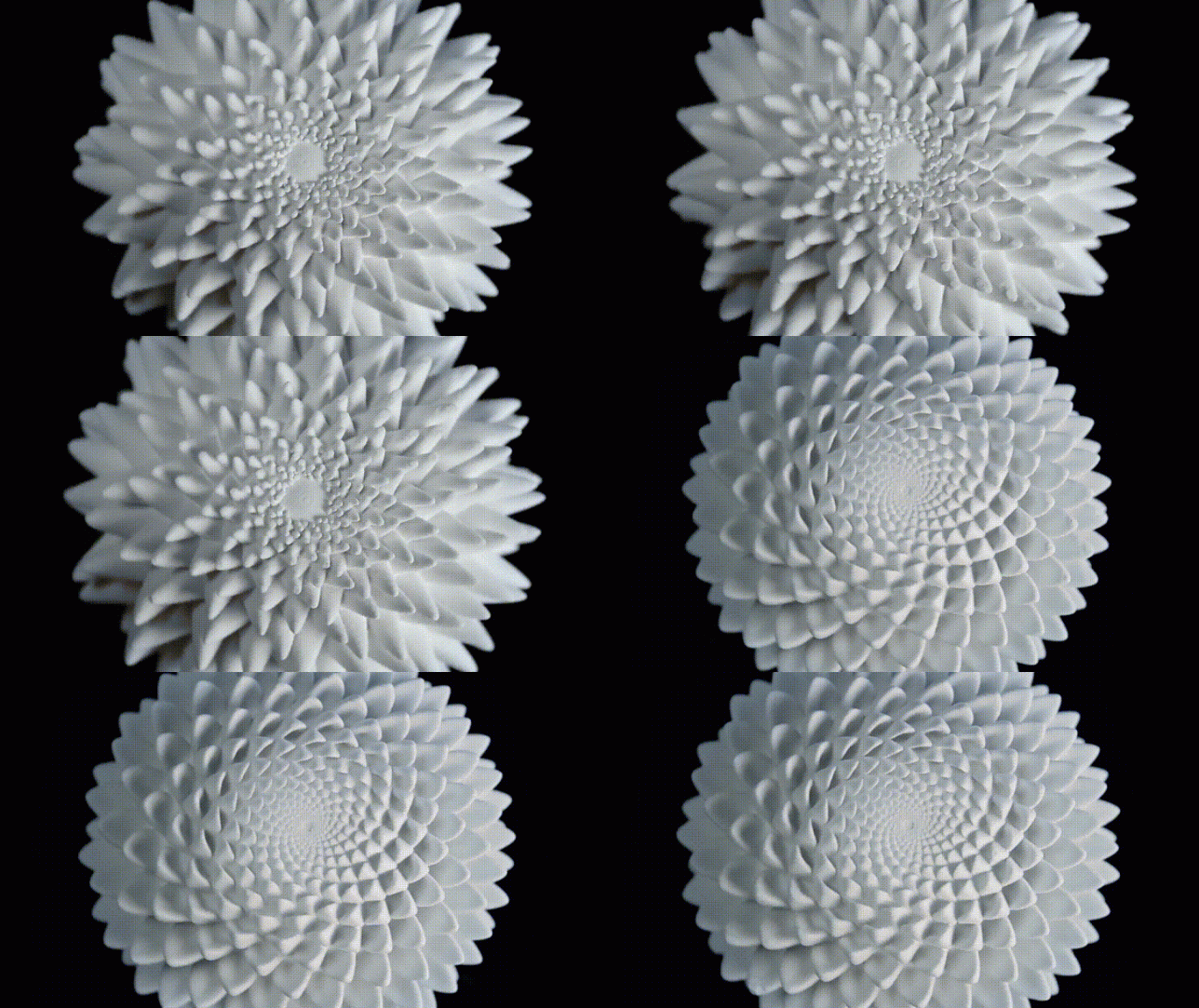
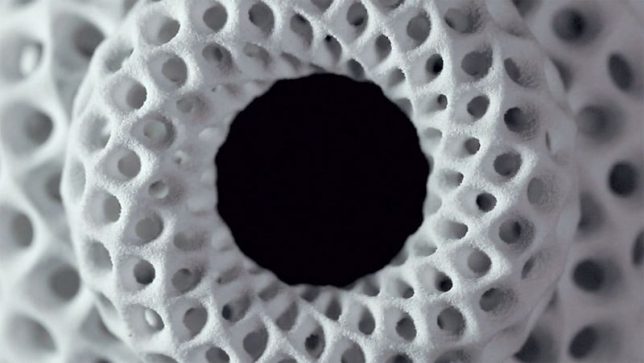
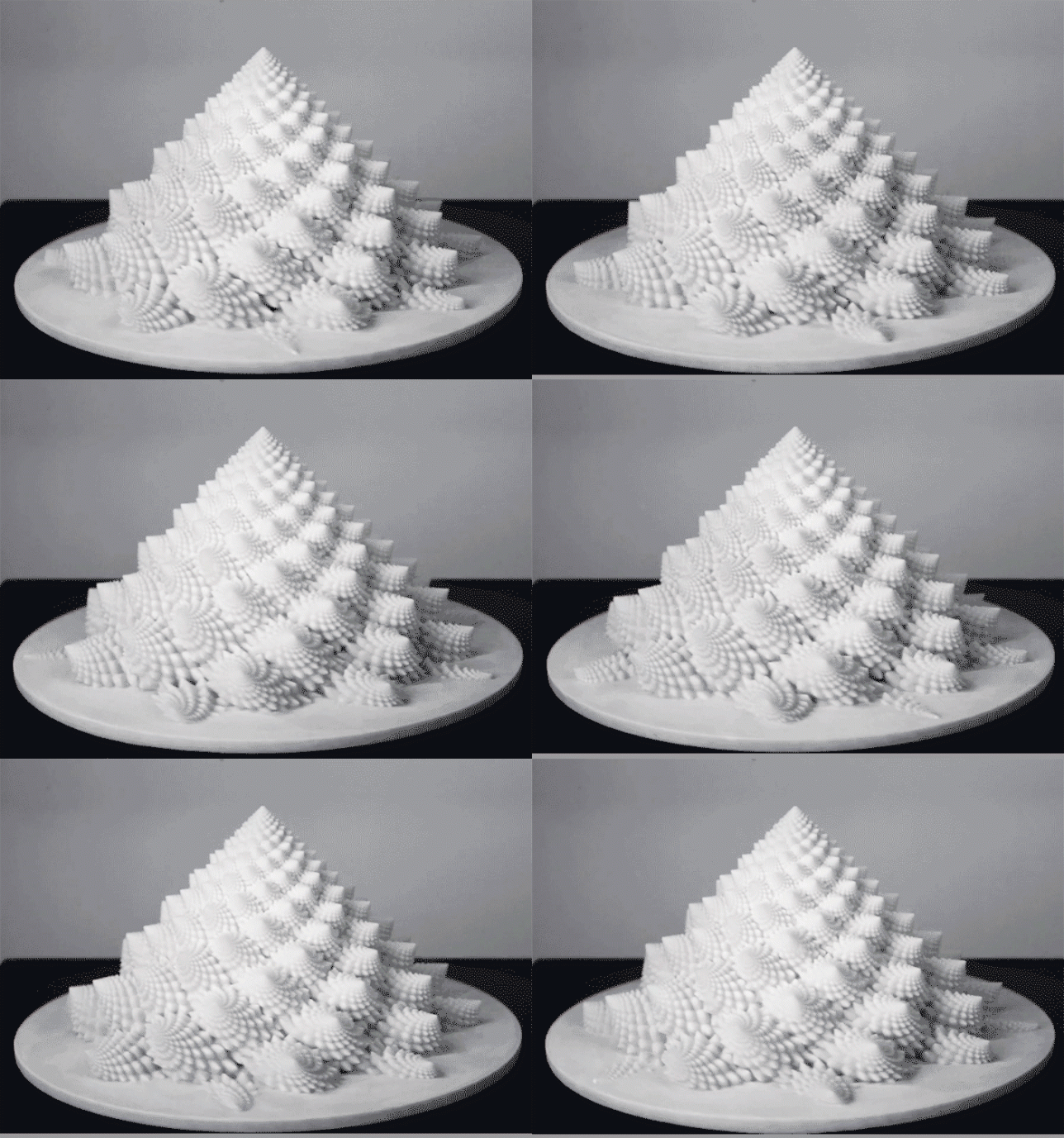
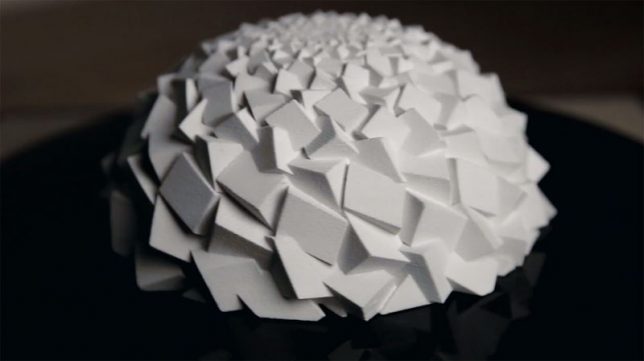
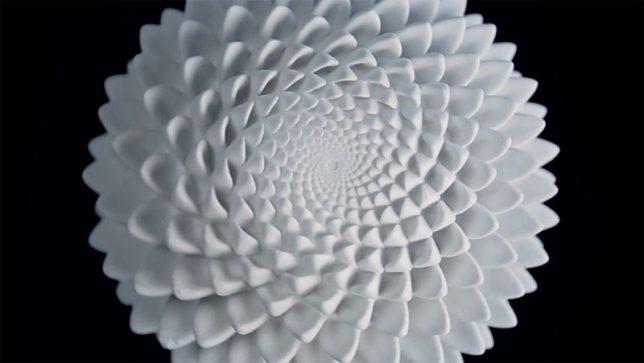
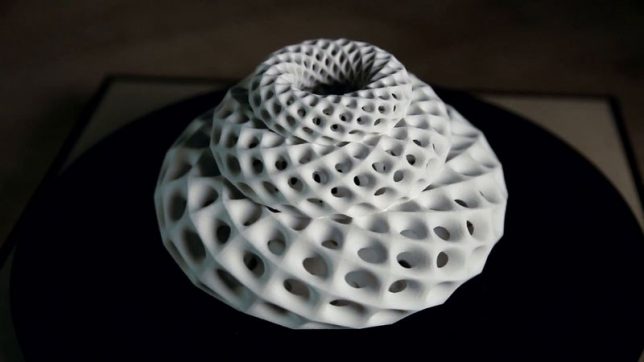
It’s really easy to lose a chunk of your day getting lost in the hypnotizing effects of these trippy 3D-printed sculpture animations by artist John Edmark. Drawing from spiral patterns and numerical sequences often found in natural objects like pine cones, cacti, sunflowers and seashells, the objects seem to shift and change before your eyes when spun under a strobe light. Watching the videos of the sculptures in motion, it’s hard to believe these aren’t digital animations.

“Unlike a 3D zoetrope, which animates a sequence of small changes to objects, a bloom animates as a single self-contained sculpture,” says Edmark. “The bloom’s animation effect is achieved by progressive rotations of the golden ratio, phi, the same ratio that nature employed to generate the spiral patterns we see in pinecones and sunflowers. The rotational speed and strobe rate of the bloom are synchronized so that one flash occurs every time the bloom turns 137.5 degrees (the angular version of phi.) Each bloom’s particular form and behavior is determined by a unique parametric seed I call a phi-nome.”

The artist explains that much of his work celebrates the patterns underlying space and growth, explored through kinetic sculptures and transformable objects. Highly precise mathematics come into play in both the design and fabrication of each object, more to ask questions about spatial relationships that can only be answered with geometrically exacting constructions than to put that precision on display or “exalt the latest technology.”

It’s a cool way to utilize 3D-printed objects, though, and if you want to play with the effect yourself, you can even purchase the individual shapes from Edmark via Shapeways. He offers a tutorial to repeat the results at Instructables.

Share on Facebook


[ By SA Rogers in Art & Sculpture & Craft. ]

[ WebUrbanist | Archives | Galleries | Privacy | TOS ]


WebUrbanist

 
Comments Off on Blooms: Hypnotizing 3D Printed Sculptures Come Alive Under Strobe Lights

Posted in Creativity


Photo of the week: Shooting the northern lights in Norway

02 Jul

This image was taken in Skagsanden beach is—my favorite location in the Lofoten Islands—with one of my Lofoten workshop groups earlier this year. The Northern Lights were dancing wildly all over the sky, and I arrived at the beach after having shot another location earlier that night.

This time around, I decided to try and shoot the Aurora with this beautiful stream and its black & white sand patterns in the foreground. Luckily, the lights were reflecting on the stream, emphasizing those patterns.

To get the whole scene in the frame, I used the Canon EF 11-24mm F4L, one of my favorite lenses. Even though the lens is only an F4, the Aurora was very bright and there was some moonlight as well, both of which gave me enough light for a decent exposure.

The final image above was focus stacked from two shots, both taken at 11mm and F4, with my Canon 5D Mark IV set to 8 seconds and ISO3200.


Erez Marom is a professional nature photographer, photography guide and traveler based in Israel. You can follow Erez’s work on Instagram, Facebook and 500px, and subscribe to his mailing list for updates.

Articles: Digital Photography Review (dpreview.com)

 
Comments Off on Photo of the week: Shooting the northern lights in Norway

Posted in Uncategorized