RSS
 

Posts Tagged ‘lighting’

Your Basic Lighting Kit: A Spin Around the Block

13 Apr

So you bit the bullet and spent ~$ 100 for the stuff needed to turn your hot shoe flash into a mini portable studio lighting system. What do you with the box of stuff the UPS guy just dropped onto your dorstep? Where do you start?

That is exactly the gap we explore whenever I teach a beginner's lighting class. So today we are going to walk through a "first steps" exercise.

Read more »
Strobist

 
Comments Off on Your Basic Lighting Kit: A Spin Around the Block

Posted in Photography


Review: Flash Disc Lighting Modifier by Fstoppers

28 Mar

The more you experiment with off-camera flash, the more you realize that many lighting modifiers are pretty large in size. From softboxes to beauty dishes to umbrellas, many take up space not only in your camera equipment bags, but also on site at a photo shoot. This may be a small price to pay for the dramatic impact these modifiers can have on the resulting image, but sometimes you just want a really compact lighting modifier that can produce great results. One of the answers to this problem is the new Flash Disc by Fstoppers.

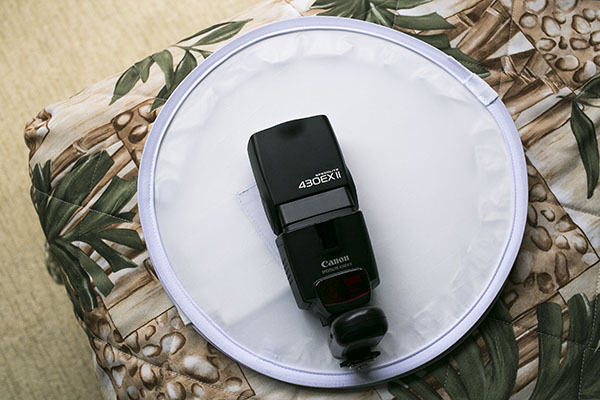
Flash Disc Product 02

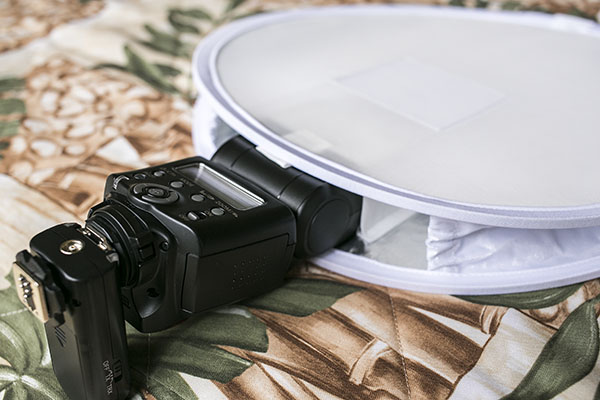
A handy little device made to fit speedlights, the Flash Disc was created by Lee Morris of Fstoppers with the intent of being a portable softbox. It appears at first to be a little white reflector, as it folds up like one into a compact size that can fit into a large pocket or small bag. However, the Flash Disc is actually more like two reflectors that sandwich your speedlight. When a flash is fired, the light bounces between the two reflectors, creating a softer spread of light. Available for purchase online at a price of $ 49.99, the first batch of Flash Discs were so popular they sold out and supplies were only recently replenished.

Flash Disc Product

As a food, portrait, and event photographer, who travels a lot for photo shoots, the main features I’m looking for in a lighting kit are portability and functionality. I generally travel with one Speedlite flash (Canon 430 EXII) and a pair of wireless flash triggers (Yongnuo RF-603 II) for on-location portraits, candid event shots, and food photos in varied lighting conditions. When I have the luxury of space, I’ll bring an octabox softbox or shoot-through umbrella as a lighting modifier, although these devices take up both space in my photography kit as well as setup time while on location. I recently got my hands on the Fstoppers Flash Disc and was very impressed by its compact form, as well as big impact in helping diffuse and bounce my off-camera flash lighting.

Without a lighting modifier, off-camera Speedlight flash tends to be way too harsh.

Without a lighting modifier, off-camera flash tends to be way too harsh and overpowering.

Pro: Small and low-profile

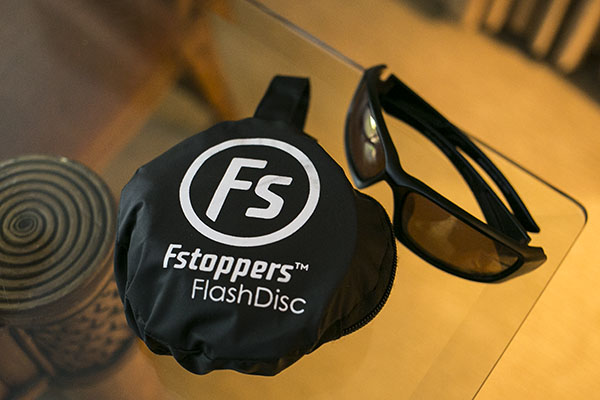
The first big plus about the Flash Disc is that it is incredibly tiny when it folds up like a reflector and is put into its little black carrying case. Dimensions-wise, the Flash Disc is 12 inches in diameter when open, and 4 inches in diameter when closed. It’s very lightweight at less than 1 pound, and it is compatible with most external flash units. It really can fit into a jacket pocket, or be clipped (via a carabiner) to a loop on your belt or camera bag.

Flash Disc 05

Con: Very tight when collapsed

A possible drawback to having two reflectors folded into each other is that the Flash Disc can literally pop opened. I had a close call once when I opened the Flash Disc with my hands right next to an open bottle of water, resulting in said bottle being knocked over and spilled. Be sure not to open it close to your body or camera as it could possibly knock something over.

Pro: Includes a grey card

One side of the Flash Disc is translucent white and the other has built-in strips of white, black, and 18% grey. This is helpful for setting your white balance in post-processing (or doing custom white balance in the field)

Con: Sometimes the lighting is too harsh

Considering the 12″” diameter of the Flash Disc, sometimes the light it emits isn’t the softest, especially when compared to light from a 30″” softbox or umbrella. It’s a size trade-off that can sometimes result in the Flash Disc light still being a tad too harsh, although there are certain situations and photography styles that can benefit from this look.

Best uses

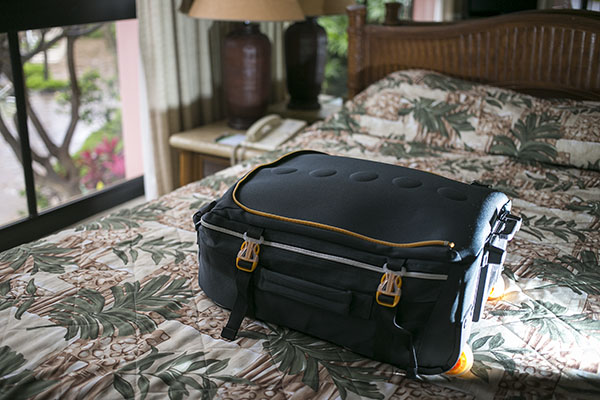
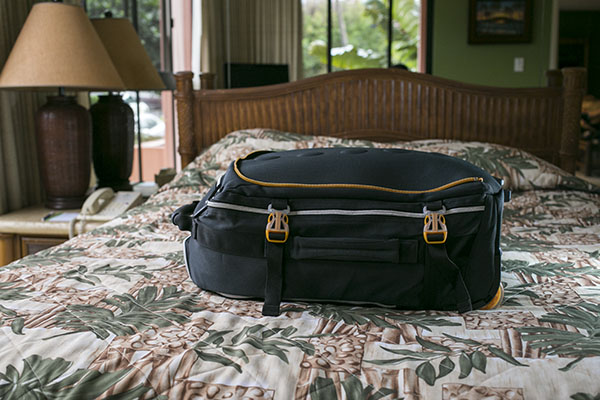
I tested out the Flash Disc during a recent tropical vacation-  using it on food, portrait, and product photography – and was pleased with the overall results. In the below product photo of a carry-on suitcase, the Flash Disc on a Canon 430 EXII was positioned camera right. The flash was in manual mode, dialled down to 1/64 power, and the result is a soft fill light on the bottom of the suitcase.

Flash Disc

For food photography, the Flash Disc’s compact size was crucial as many food photos are taken in restaurants or tight kitchens where there isn’t the space or time to indulge in more elaborate lighting setups. In the image below of a fish taco plate, natural lighting was illuminating most of the dish. The Flash Disc was camera right, fired at 1/64 power to fill in the shadow areas of the dish.

Flash Disc 02

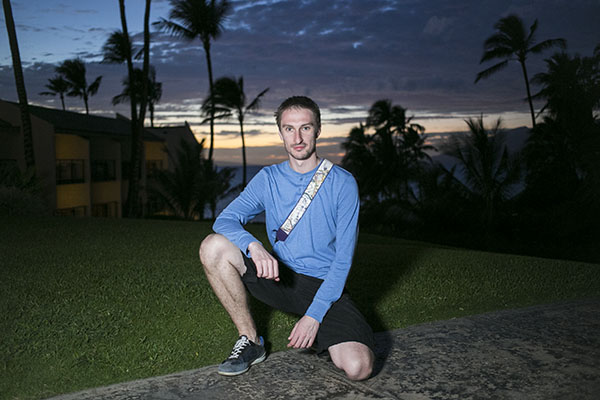
The Flash Disc also came in extremely handy while doing casual location-based outdoor portraits, another scenario in which lugging around a large umbrella or reflector wouldn’t be convenient without an assistant. The portrait below was taken just after sunset, and my subject is lit by the Flash Disc fired at 1/64 power from camera left. This is an example of when the Flash Disc’s light quality is arguably on the harsher side, especially if you’re working as a lone “run and gun” photographer without an assistant, meaning you can only place the Flash Disc as near or far from your subject as your arm can stretch.

Flash Disc Portrait

Has anyone else tested out the Flash Disc? I’d love to hear your thoughts on how useful (or not) you find it.

googletag.cmd.push(function() {
tablet_slots.push( googletag.defineSlot( “/1005424/_dPSv4_tab-all-article-bottom_(300×250)”, [300, 250], “pb-ad-78623” ).addService( googletag.pubads() ) ); } );

googletag.cmd.push(function() {
mobile_slots.push( googletag.defineSlot( “/1005424/_dPSv4_mob-all-article-bottom_(300×250)”, [300, 250], “pb-ad-78158” ).addService( googletag.pubads() ) ); } );

The post Review: Flash Disc Lighting Modifier by Fstoppers by Suzi Pratt appeared first on Digital Photography School.


Digital Photography School

 
Comments Off on Review: Flash Disc Lighting Modifier by Fstoppers

Posted in Photography


Adaptalux introduces portable lighting studio for macro photography

28 Mar

Adaptalux has introduced a new portable lighting studio, likewise called Adaptalux, which is designed specifically for macro photography. The design is modular in nature, allowing photographers to ‘rebuild’ it in different ways to meet different needs. This is achieved using a core Control Pod into which Lighting Arms are plugged, with each Lighting Arm being customizable in regards to color, beam angle, brightness and diffusion. Read more

Articles: Digital Photography Review (dpreview.com)

 
Comments Off on Adaptalux introduces portable lighting studio for macro photography

Posted in Uncategorized


Five Places for Perfect Natural Portrait Lighting

10 Mar

1 portrait lighting

Wouldn’t it be great if you could get beautiful, natural-looking portraits without ever having to use flash?

Well, perhaps you can. There are many different locations, often closer than you think, where you can find the right lighting for great looking portraits. Often they’re missed because we might not know where to look.

Generally, your best strategy is to look for what is called Open Shade. Ideally, you are looking for a situation where the stronger overhead light is being blocked by a structure, either man-made or natural.
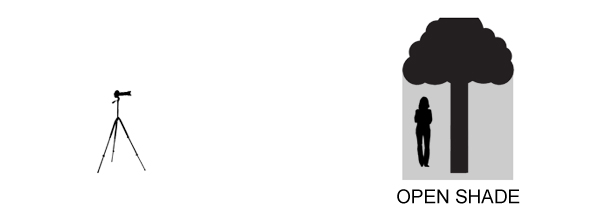
2 open shade diagram

There are a lot of variables to pay attention to, but with a little practice you begin to recognize good natural lighting situations that are right in front of you.

1. Find a gazebo or front porch with a roof

This is a particularly good technique for you to use when it’s sunny outside in the middle of the day, but it can work on overcast and rainy days as well.

It’s often a bad idea to pose your subject out in the direct sun, particularly when it is up high in the ske. That kind of lighting can produce harsh shadows, as well as cause your subject to squint their eyes.

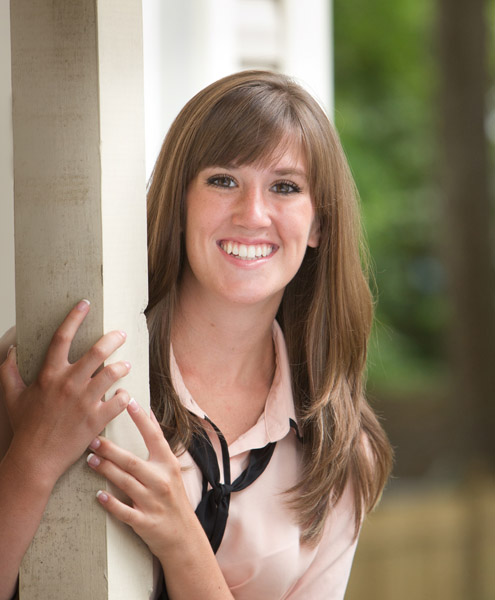
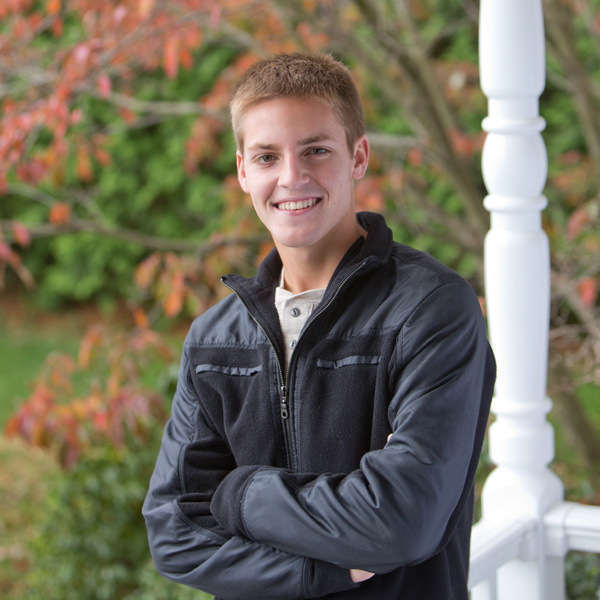
I use the front porch location quite a bit when photographing high school seniors in the middle of the day. An overhang of any sort can block strong overhead light and allows your subject to be lit with the softer surrounding bounce lighting.
3 front porch lighting

In the case above, I also used a large white collapsible reflector, off to the right side, to provide additional fill-light with this handsome young man. A large aperture was used to help create an out of focus background.

If you have no porch available you can get your model to help create a good lighting situation by using a prop like a wide-brimmed hat for a close-up head shot.

2. Under an umbrella
Andrew Menage

By Andrew Menage

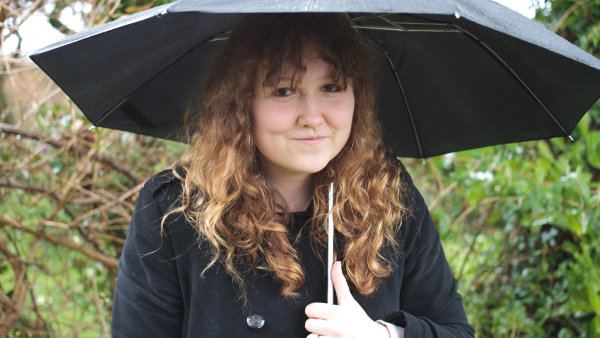
Using an umbrella can work well to protect your subject from both the rain, and overhead lighting. Note that the color of the umbrella will have a significant effect on the color of the light that is illuminating your subject. A black umbrella is neutral in color and will block almost all of the light from above.

3. Near a window

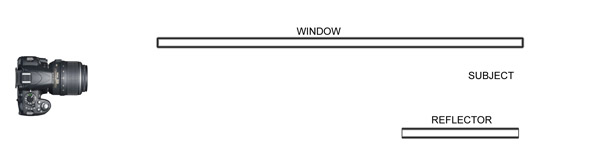
Just because you may not be able to shoot outside doesn’t mean you still can’t use the outdoor light to create a natural looking portrait. There is a right way and a wrong way to do this.
5 window lighting

6 window lighting diagam

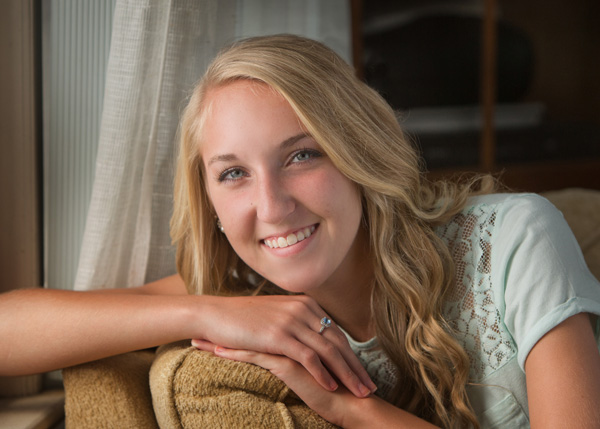
Make sure that most of the window is forward of your subject. The larger the window, the softer the lighting. The reflector can be any light colored object that is fairly neutral in color. The closer it is to your subject, the more fill light it supplies.

4. Find a bridge or an overpass

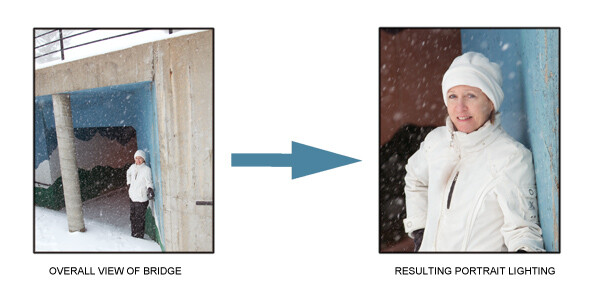
If you shoot in a more urban setting, you’ll likely have bridges or overpasses in your area. The photo below was taken at the entrance to a pedestrian underpass. Not only did we get good portrait lighting, we also got the model out of the wind and snow.
7 under bridge lighting

One important thing to remember is to watch your background. Although I was generally happy with the pose and the lighting, I could have done a better job controlling the background in this portrait.

5. Anywhere at sunset

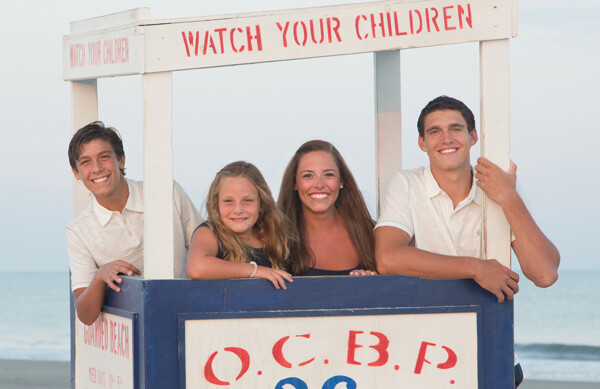
This is one time when you do want the sun in the face of your subject. You only have a few minutes of this sweet light when most, or all, of the sun has disappeared below the horizon.
8 diffused portrait lighting sunset

Direct sun can be too bright at the beginning of sunset. You may have to wait until just after sunset to get a softer look. In the beach photo above, the light was nicely diffused by a few clouds on the horizon between my subjects and the setting sun.

More ways to find places with great natural portrait lighting

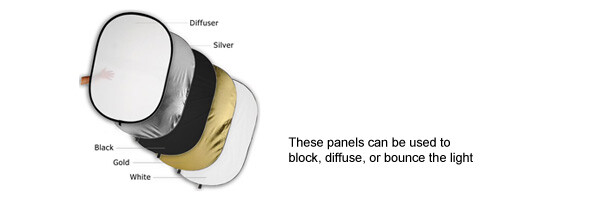
Similar to the way you use an umbrella, you can create your own overhead roof by having an assistant hold a light blocker above your subject. This could be anything lightweight, a large piece of cardboard, or even one of the a collapsible, panels like the ones shown below.
9 Photodiox diffusion panels

There are two factors that dramatically effect how well this technique works.

The first is how far back your subject is posed underneath the covering object. If you pose her too far back, you may not have enough light to get a nice photograph. If she is too far forward, you may get too much overhead lighting.

Secondly, how high the shading object is above your subject’s head affects how the light will illuminate their features. The best way to master this technique is to play around and experiment.

It’s always a great idea to shoot a few variations in several locations, and adjust exact placement of your subject. You’ll be able to learn a lot from your mistakes and your successes.

googletag.cmd.push(function() {
tablet_slots.push( googletag.defineSlot( “/1005424/_dPSv4_tab-all-article-bottom_(300×250)”, [300, 250], “pb-ad-78623” ).addService( googletag.pubads() ) ); } );

googletag.cmd.push(function() {
mobile_slots.push( googletag.defineSlot( “/1005424/_dPSv4_mob-all-article-bottom_(300×250)”, [300, 250], “pb-ad-78158” ).addService( googletag.pubads() ) ); } );

The post Five Places for Perfect Natural Portrait Lighting by Bruce Lovelace appeared first on Digital Photography School.


Digital Photography School

 
Comments Off on Five Places for Perfect Natural Portrait Lighting

Posted in Photography


4 Lighting Effects You Can Create in Photoshop

10 Mar
Title-image-green-energy

Lighting Effects using Color Dodge Blend Mode in Photoshop.

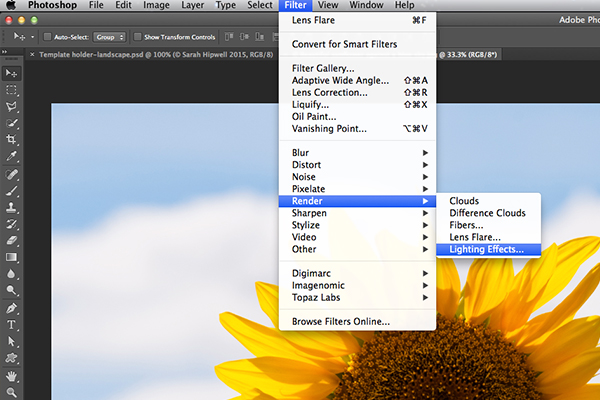
There are numerous methods to creating lighting effects in Photoshop. I’m only going to cover four but they can be used in many ways. But first let’s take a look at a couple that are in the Filter gallery under Render in Photoshop (CS6 and CC). The first is Lighting Effects, which has been upgraded and is more powerful and easier to use than previous versions of Photoshop.

Lighting-effects-filter

How to access Lighting Effects in Photoshop CS6.

The preview box has been replaced with a more sophisticated interface. You are presented with three different types of lighting effects in the Options Bar – Spot, Point and Infinite – and various presets to choose from. There is a Properties panel that customizes the look of the light that you want in terms of direction, placement, etc. This filter works on Smart Objects, so that you can work non-destructively. It is too comprehensive to go through all the aspects of this filter in this article. The best way to use it is simply open an image, experiment with the different options and see what you think.

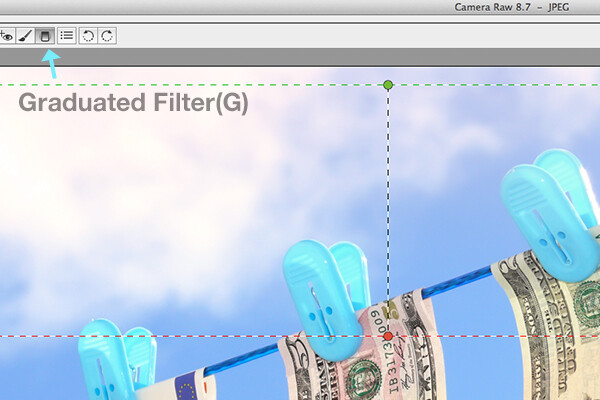
Instead, I will show alternative techniques that I prefer to use in Photoshop and Adobe Camera Raw (ACR), some of which you may already be familiar with. I really like the Graduated Filter tool in ACR. This works in similar way to a Graduated Neutral Density filter on your camera. Landscape photographers use graduated filters so that they don’t overexpose the sky area. The dark bit on the ND is on top allowing less light in, as exposure is set for the foreground. You can achieve similar results using the Gradient Editor in Photoshop.

Graduated-filter

The Graduated Filter icon in Adobe Camera Raw.

With your image opened in ACR, select the Graduated Filter tool. Drag over an area on your image where you want the effect to be applied. Adjust the slider options on the right – Exposure, Highlights etc., to either lighten or darken the area. You can also choose a color to add warmth or a cooler effect.

snail

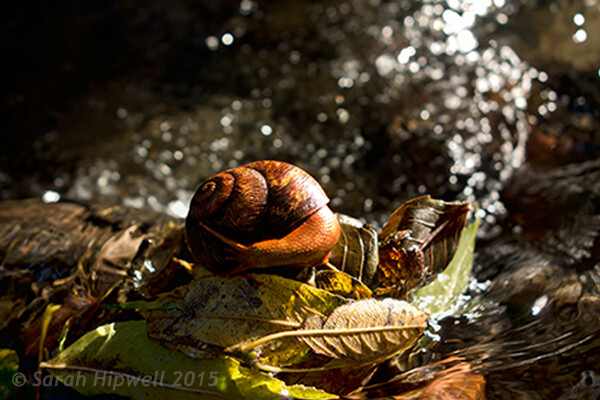
This is the original image of a snail before the Graduated Filter has been applied.

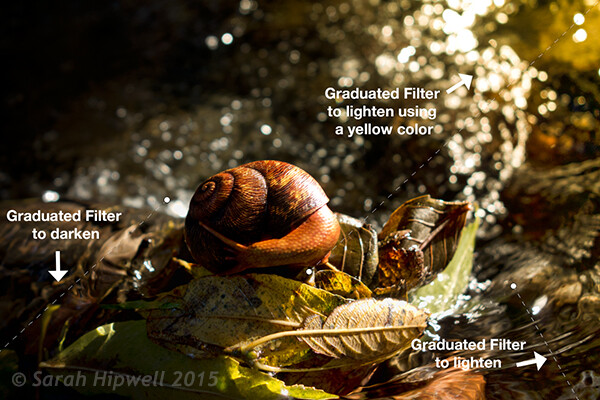
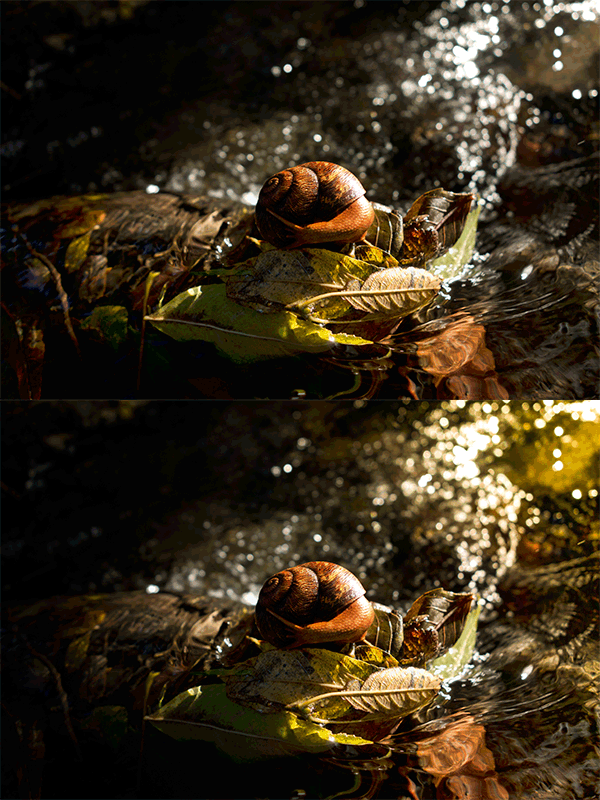
In the image of the snail, I used the Graduated Filter in three different areas on the image. I wanted to add more warmth to the water, so I used a yellow color to create an impression of a sun dappled effect. The second area was to lighten a little more of the water eddy, bottom right of the photo. Finally the third spot, I wanted to simply darken the area directly behind the snail so that the viewer’s eye is drawn to the it. Although, these are subtle light effects, they can add more drama and even change the composition of a photo.

Snail with Graduated Filter effects

The snail image with the Graduated Filter applied in three different areas.

Snail animated gif

Animated GIF  to show before and after effect from the Graduated Filters effects.

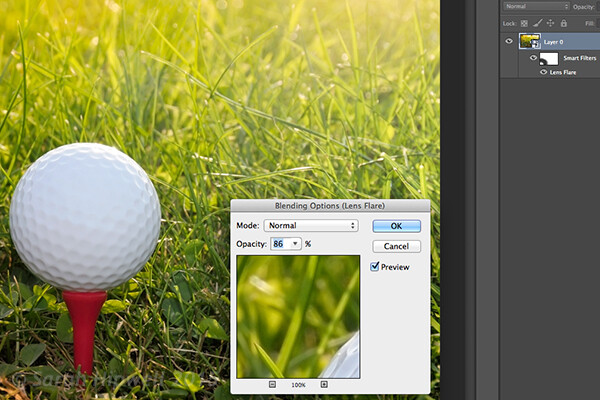
The Lens Flare, which is also found in the Filter gallery under Render, is a lighting effect that can be quite useful but you need to use it with care, using the less is more approach. For example in the image with the golf ball on the red tee below.

golf-ball-lens-flare

Lens Flare effect added to this image.

I used the Graduated Filter in three areas, similar to the snail image. I added a magenta color tint on the grass, bottom left of the image to break up the green flat look. Adding a different color using the graduated Filter in this way gives the image more depth. I then added a Lens Flare effect to the top right and reduced the opacity so that the effect caught the tips of the blades of grass. Converting your image to a Smart Object first before applying the filter effect, makes it easier to make changes non-destructively. I was also able to mask out some of the effect that I felt was too strong.

Animated gif of golf ball with Lens Flare

Animated GIF of golf ball with Graduated Filter effects and Lens Flare.

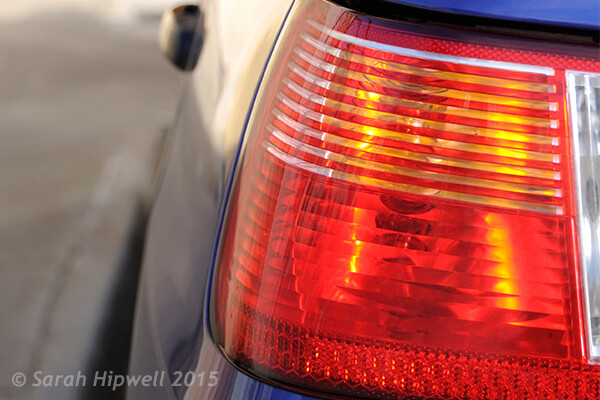
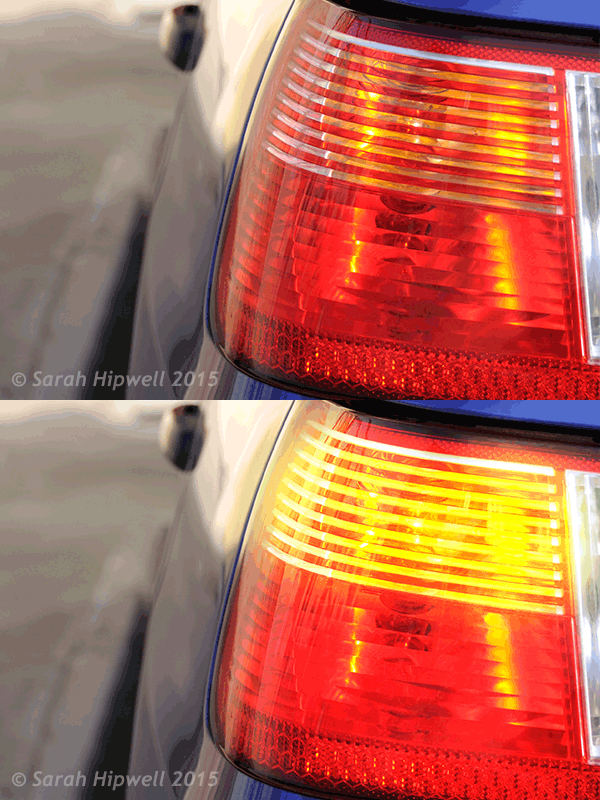
This brings me onto the third technique, the Color Dodge blend mode. I wanted to create the effect that the rear lights were switched on in this image of a car (below). This is such an easy way of creating a lighting effect in Photoshop and the result is brilliant.

First, create a new blank layer on top of the original image. Select a darker colour to the part of the image that you will be working on. For the lower section of the light, I used a dark red. Using the Brush tool set to soft, paint a small daub and then make it a bit bigger using the Free Transform tool.

car tail light

Rear taillights of a car.

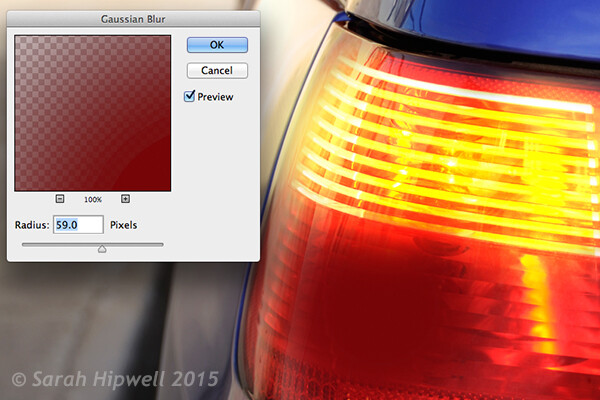
Add some Gaussian Blur so that there is no ‘hotspot’ in the middle and the color looks uniform. Position this on a section of the light, change the blend mode to Color Dodge and reduce Fill, not Opacity, to achieve the desired effect. In this case, I reduced the Fill to 59%. I then duplicated this layer and moved it over to the right. You can reduce the size of the spot area if you feel the over spill is too much. So now I had the bottom tail light working. I repeated the same steps for the top section of the light. But I used a darker color yellow there.

Color-dodge-gaussian-blur

On a separate layer, paint a darker colour to the area intended and add Gaussian Blur.

car tail lights flashing

Animated GIF with flashing taillights using Color Dodge Blend Mode in Photoshop.

The forth and final technique is similar to above. When you need to add a highlight(s) to an area of an image to bring out more detail, this technique and the one above can be used on any type of image. It is so easy, quick and very effective. In the photo of the grapes (below), I wanted to create highlights on the dark areas to make them stand out. Same as the above step, create a new blank layer on top of the image and using white as your color, paint a small daub. Make it bigger using the Free Transform tool and add some Gaussian blur. Change the blend mode to Overlay or Softlight, I generally use Softlight. Reduce the Opacity until you get the result that you want.

grapes

Animated GIF to show highlights on areas of some of the grapes, using Overlay/Softlight Blend Modes in Photoshop.

Do you have any other tips for adding or creating lighting effects in Photoshop or another way? If so please share in the comments below.

googletag.cmd.push(function() {
tablet_slots.push( googletag.defineSlot( “/1005424/_dPSv4_tab-all-article-bottom_(300×250)”, [300, 250], “pb-ad-78623” ).addService( googletag.pubads() ) ); } );

googletag.cmd.push(function() {
mobile_slots.push( googletag.defineSlot( “/1005424/_dPSv4_mob-all-article-bottom_(300×250)”, [300, 250], “pb-ad-78158” ).addService( googletag.pubads() ) ); } );

The post 4 Lighting Effects You Can Create in Photoshop by Sarah Hipwell appeared first on Digital Photography School.


Digital Photography School

 
Comments Off on 4 Lighting Effects You Can Create in Photoshop

Posted in Photography


New Artificial Lighting Tricks Human Brain into Seeing Sunlight

18 Feb

[ By WebUrbanist in Design & Fixtures & Interiors. ]

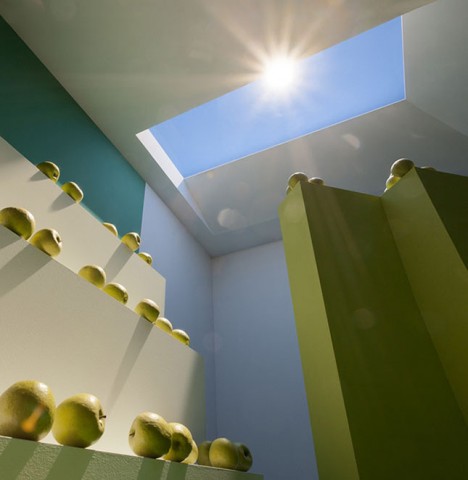
skylight

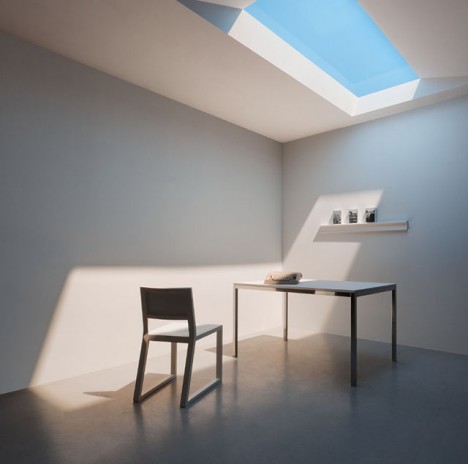
Access to natural daylight has long been one of the biggest limiting factors in building design – some solutions involve reflecting real daylight from the outdoors, but until now no solution has been able to mimic natural refraction processes and fool our minds into thinking we are surrounded by actual sunlight.

artifical snlight interior image

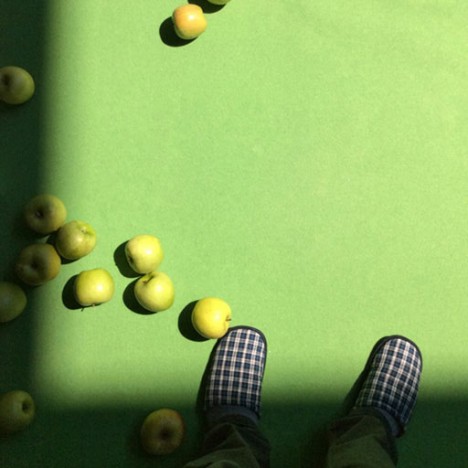
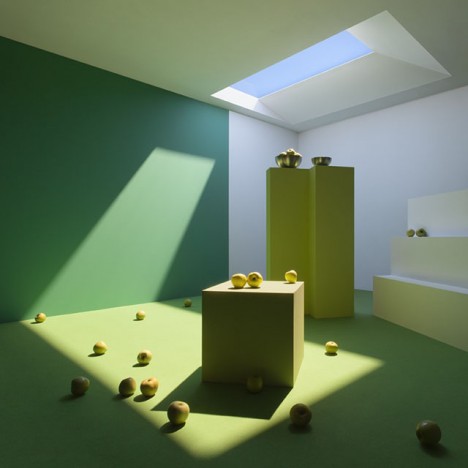
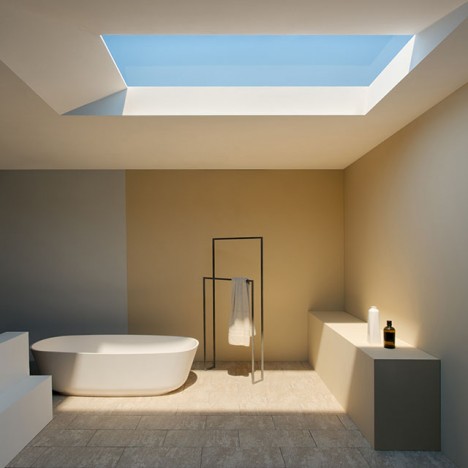
Developed by CoeLux in Italy, this new form of artificial light is able to dupe humans, cameras and computers alike using a thin coating of nanoparticules to simulate Rayleigh scattering, a natural process that takes place in Earth’s atmosphere causing diffuse sky radiation. It was not enough to make the lights brighter or bluer – variegation and other elements were needed as well.

artficial skylight system design

light bring to market

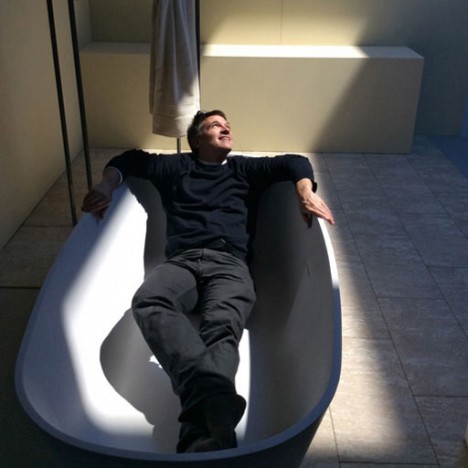
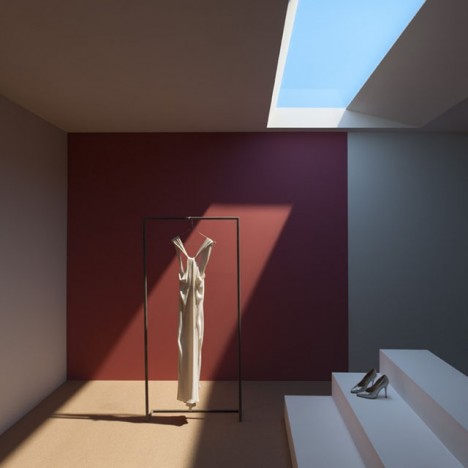
The result is an effect that carries the same qualities we are used to experiencing outside, from color to light quality. The company also boasts that these photos are untouched and that their fake skylights in showrooms fool people in person just as effectively, appearing to have infinite depth just like one would expect looking up into the sky (James Turrell’s skyspaces and this work by Christo come to mind).

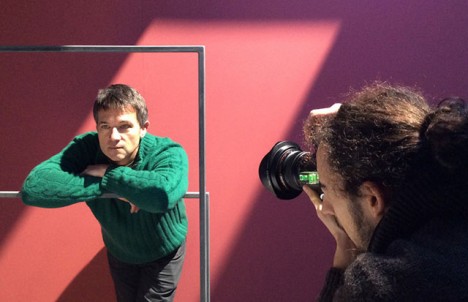
artificial light photo shoot

daylight light soucre innovation

The potential applications are effectively endless, from lighting deep indoor spaces to replacing natural light in places where winters drag on and daylight hours are short. The company sees opportunities in areas like healthcare facilities where it may not be possible to put patients near real windows for spatial or health reasons.

lux live winner award

light real simulation design

Currently, three lighting types are on offer to simulate various broad regions – Mediterranean, Tropical and Nordic – featuring various balances of light, shade, hue and contrast. They are also working on additional offerings, including simulated daytime sequences (sunrise through sunset) and color variations to reflect different kinds of weather conditions.

Share on Facebook


[ By WebUrbanist in Design & Fixtures & Interiors. ]

[ WebUrbanist | Archives | Galleries | Privacy | TOS ]


WebUrbanist

 
Comments Off on New Artificial Lighting Tricks Human Brain into Seeing Sunlight

Posted in Creativity


Using Low Key Lighting in Your Portraits: Getting Moody On the Down Low

26 Jan

So you’ve been shooting for a while and you want to add a little more visual oomph to your shots, why not try a little low key? Low key lighting is a classic technique, a la where you use shadow and high contrast to show the shape of your model. Making the background dark can be super complicated or super Continue Reading

The post Using Low Key Lighting in Your Portraits: Getting Moody On the Down Low appeared first on Photodoto.


Photodoto

 
Comments Off on Using Low Key Lighting in Your Portraits: Getting Moody On the Down Low

Posted in Photography


4 Tips for Effective Lighting Using Only One Speedlight

19 Jan

Flashes

If the idea of incorporating flash into your photography work strikes fear in your heart, this is a must read article for you!

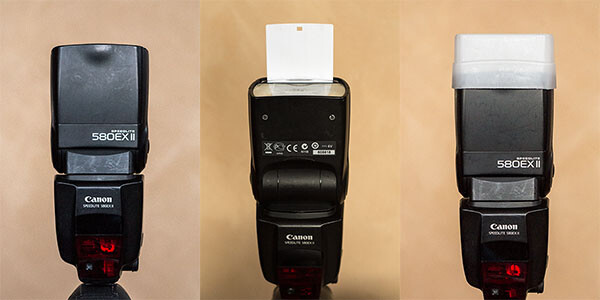
The ability to use a portable electronic flash can do wonders for your work by giving you more creative options, and the truth is you don’t need a ton of fancy equipment to begin utilizing flash. In fact, this article is focused purely on the speedlight, the Canon 580 EXII Speedlite to be exact (equivalent to the Nikon SB-900), and how you can get started experimenting with lighting effects using just one speedlight.

Among the smallest, most compact forms of external lighting, speedlights offer consistent, daylight-balanced lighting powered by four AA batteries. They are easy to fully integrate with your DSLR camera, allowing the two units to operate as one. While most speedlights offer manual settings, it is also easy to just leave it on auto (TTL) and let it adjust the light output according to your camera settings. Depending on what kind of camera you own, it might come with its own built-in pop up flash, but a speedlight is still recommended due to its ability to tilt and swivel, giving you more control over where the flash is aimed.

The following examples were photographed using a Canon 5D Mark III and a 580 EXII Speedlite. All included photographs were shot in auto (TTL) setting and received no retouching other than cropping and resizing.

Ambient Light Isn’t Always the Best Light

No Flash

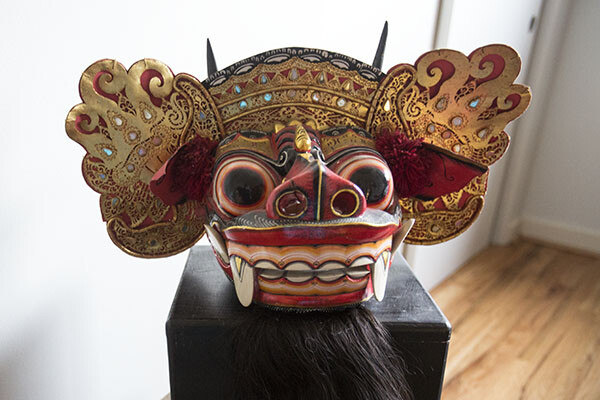
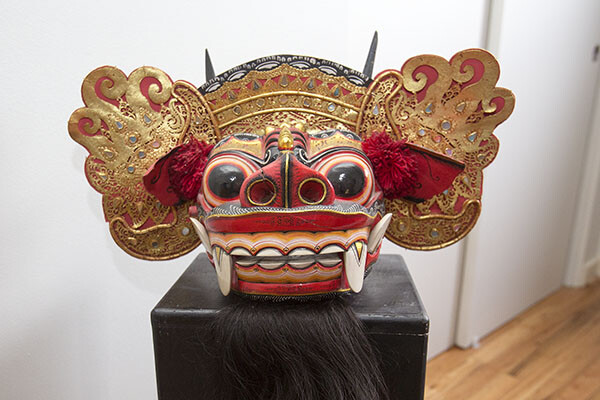
While ambient lighting is often the easiest lighting source to use, it comes with its share of shortcomings. There might be too much or too little ambient lighting, it might be coming from the wrong direction, or it might have a strong color cast. To kick-off this example, let’s see how this Balinese mask photographs using just the ambient light available in the room (see image above). Notice that the colors are dull and the surfaces of the mask are unevenly illuminated. It’s a less than optimal photo, showcasing all of the shortcomings of relying purely on ambient lighting.

If you’re lucky, the ambient light might be able to be moulded using a reflector or simply moving your photo subject. But say you can’t control the ambient light? Here are some tips for using a speedlight in your favor.

Option 1: Shoot with the flash straight on

Straight On

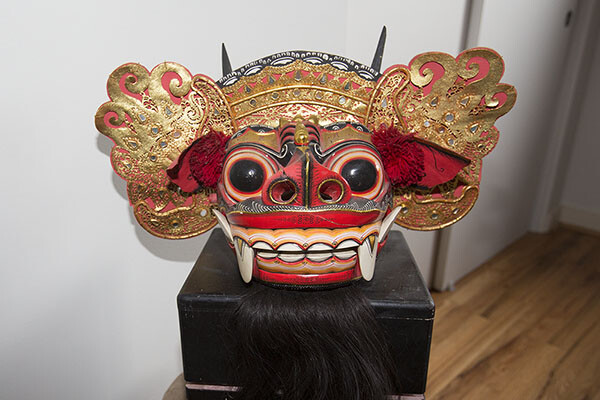
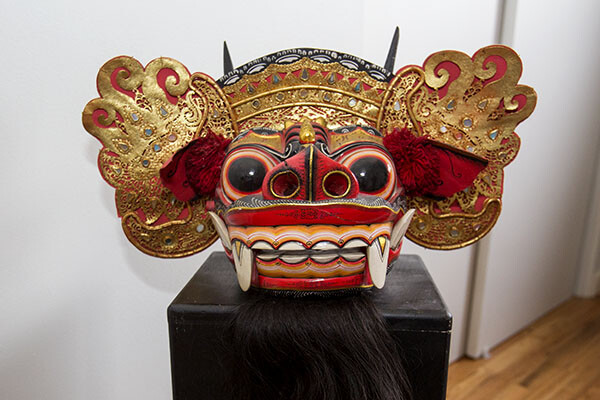
The easiest way to use your speedlight is to aim it directly at your subject. The result is a decently lit subject, similar to the type of photo that a built-in pop up flash would produce. Notice how that colors pop more and the mask is more evenly lit compared to the photo shot in ambient light. However, aiming your flash straight forward can result in some harsh shadows, not to mention cause human photo subjects to be temporarily blinded by light flashing in their faces. It is also very non-directional light making the subject appear flat and lacking dimension.

Option 2: Bounce the flash off the ceiling or wall

Straight UP

Flash bounced straight up off the ceiling

The simplest way to soften the speedlight’s effects is to bounce the flash off of a nearby surface. In this case, the flash is aimed directly up at a white ceiling. When the flash is fired, the light is spread out onto the ceiling and reflected down on the subject. As a result, the front part of the mask from the eyes to the nose are nicely lit, but the mouth, ears, and ornamental headdress are left in the shadows. This is one of the pitfalls of simply bouncing the flash off the ceiling: the image will generally produce shadows on any protruding elements of your subject.

Bounce Off Wall My Left

Bounced of the wall to the left of the camera.

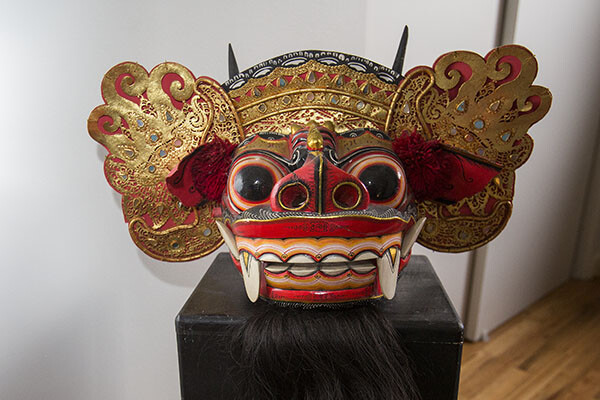
Alternatively, the flash can also be pointed directly at a nearby wall so the light is bounced in another angle. In the above example, the flash was bounced off a white wall to the right of the mask. The result is more dramatic lighting that focuses on one side of the mask, using the shadows to indicate more depth.

Option 3: Use the built-in white bounce card


Straight Up with Whitecard

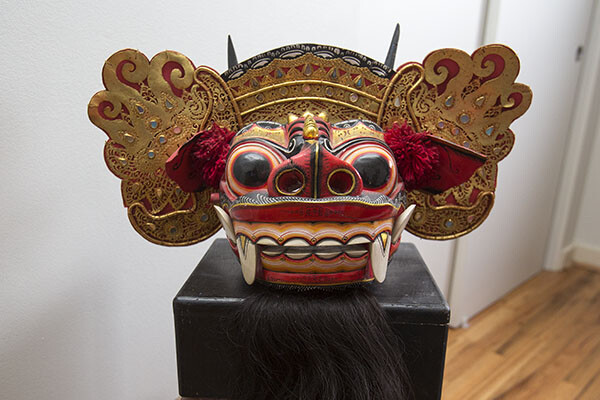
To solve the problem of shadows produced by bouncing the light off the ceiling, one solution is quite simple. Keep the speedlight pointed at the ceiling, and simply pull up the thin white bounce card that is built into the top of the flash. When the flash is fired, the light not only bounces off the ceiling, but a portion of it is also reflected off the bounce card, as seen in the catchlight of the mask’s eyes.  The resulting image is much more evenly illuminated, all thanks to a thin piece of plastic. However, the eyes do reflect quite a bit of the spilled light from the ceiling.

Option 4: Use a white flash diffuser cap on your speedlight

Flash Cap copy

When it comes to flash modifiers for speedlights alone, there are a ton of options to choose from. One of the most effective modifiers is also incredibly compact and cheap: a translucent white cap or box that fits snugly on your flash. It helps to evenly spread out the light to eliminate harsh shadows. In this case, the diffuser cap was attached to the flash which was pointed directly up at the ceiling. The effect is similar to using the built-in white bounce card in Option 3, but the light is more controlled. The evidence is strongest in the mask’s eyes, which now only have the catch light and not the spilled light bounced from the ceiling.

This is just a very basic introduction to flash photography with a speedlight, intended to simply demonstrate how adding a single external flash can produce dramatically different results. What is your take on flash photography? Do you prefer natural light, speedlights, or strobes?

googletag.cmd.push(function() {
tablet_slots.push( googletag.defineSlot( “/1005424/_dPSv4_tab-all-article-bottom_(300×250)”, [300, 250], “pb-ad-78623” ).addService( googletag.pubads() ) ); } );

googletag.cmd.push(function() {
mobile_slots.push( googletag.defineSlot( “/1005424/_dPSv4_mob-all-article-bottom_(300×250)”, [300, 250], “pb-ad-78158” ).addService( googletag.pubads() ) ); } );

The post 4 Tips for Effective Lighting Using Only One Speedlight by Suzi Pratt appeared first on Digital Photography School.


Digital Photography School

 
Comments Off on 4 Tips for Effective Lighting Using Only One Speedlight

Posted in Photography


Fashion Photography Lighting Is Overrated

14 Jan

Fashion Photography Lighting


 Hi FashionPhotograhyBlog.com readers, 

We have a contributed post by fashion photographer, Per Zennstrom on FPBlog today. Based in Berlin Per had worked for recognizable brands such as Absolut Vodka, Bentley, Bon Magazine, Dior, Elle, Guy Laroche, H&M, Marie Claire, Porsche, Rolling Stone, Schwarzkopf and Toni & Guy. Per shares his thoughts about lighting and how dramatic affects can be created through simple techniques and by understanding the basics of lighting. Let’s not keep you waiting! Here’s Per…


Fashion Photography Lighting – I’m going to stick my neck out a bit here – Drum roll… Fashion Photography Lighting is overrated!


This might sound like blasphemy, especially since this article is a basic introduction to fashion photography studio lighting, but bear with me just for a moment. In photography, circles we’re inundated with statements and ideas such as “a photographer is a painter using only light” or blatantly cheap flattery such as “your light is beautiful” (If you really want to get on a photographers good side just tell him/her that his/her light is beautiful).


I actually don’t buy any of this and I say it again, I believe lighting is overrated (especially if you come at it from a fashion photography perspective) and in this article I will tell you why.


If you’re a fashion photographer I believe speed and flexibility are much more important than lighting. What really matter is not the lighting but what is in front of the camera. Well, after this preamble let me jump straight into the basics of studio lighting because even after having said all that I believe you need to know the basics of lighting. Learn it and then unlearn it. Make lighting become part of your photographic reflexes.


There are only 3 things you need to understand to really get lighting. If you master this you can reverse engineer any images to understand how they were lit. Any changes to these three things will change the character of your lighting, so pay attention please:


– Relative size of Light source

– Ambient Light

– Color of Light source


And even if you do become a master of lighting there is something very important that I’d like to underline – If it looks good, just shoot! 


That sounds pretty simple but you would not imagine how many photographers that drag on the session, endlessly making minuscule adjustments to the lighting that don’t actually make a difference and, in the process, losing what’s in front of the camera; the model. So again, if it looks good, just shoot it!


Relative Size Of Light Source


The relative size of the light source is the most important aspect of the character of the light. By character, I mean that we say “that’s a really hard light” or “that is very soft and flattering light” and “the relative size of the light source determines how the edge of the shadow will look”.  


It is the relative size of the light source that will decide this. Look at the edge of the shadow; if the edge is sharp and hard we have what we call a hard light if the edge of the shadow is soft we have a soft light. It is the relative size of the light source that gives us a either hard or soft light. A big light source gives a soft light. A small relative light source gives a hard/sharp light.


Character of Light – Hard Light

A good example to use is the sun on a cloudless day. The size of the sun is enormous but because of the distance the sun appears very small in the sky, ergo a hard light!


Character of Light – Soft Light

Now think of the same scenario, but this time on an overcast day with clouds filling the entire sky. In this case, the relative size of the light source is very big; the overcast sky (which takes up 50% of your total field of vision). The light on a day like this is very soft and the edges of the shadows are super soft – in fact, there are no real shadows actually. An even softer light would be inside a white room with all white walls, ceilings and floor.


Ambient Light


Ambient light is any light that you don’t actually control. You can also think of it as “junk light” – the unintended light which is left over or just bouncing around in the studio. Examples of ambient light are reflections off studio walls or floor or ceiling, or stray light creeping out from umbrellas or soft boxes. Ambient light is very important because it fills in the shadows and decreases the contrast of the image; it makes the shadows brighter. 


Learn to control the ambient light. In a studio situation, this is typically done by using black & white polystyrene flats “killing” off reflections from walls and ceilings; usually with the intention to darken and deepen the shadows. “The ambient light determines the “fill” in the shadows… If the ambient light is strong enough = no shadows”.


Color of Light


This is easy, no need to really talk about it actually… 


Fashion Photography Is Overrated


I also would like to give you a tip on an interesting studio lighting simulation software – set.a.light 3d by Elexxier. I used this software to build the 3D models to illustrate this video and article. If you’re interested in taking it for a test spin it’s free to use for 15 days – pretty good!


Thank you very much,

Per


Did you find this lighting post by Per Zennstrom useful? Leave your comments below in the comment section. We would like to know what you thought about the post.


MEDIA SOURCE: 

Feature image, video & image 1: contributed by Per Zennstrom. To view more of his work visit his website.


Fashion Photography Blog

 
Comments Off on Fashion Photography Lighting Is Overrated

Posted in Uncategorized


Deal 10: 50% Off the Portrait Lighting On Location Course

24 Dec

Today is day 10 in our 12 days of Christmas and we’ve got a deal that is really special to us because it is from our very own Managing Editor – Darlene Hildebrandt.

It’s 50% off her Portrait Lighting on Location Course! (Note: you need to use the coupon code of 12days2014 during the checkout to get the 50% off).

Portrait lighting on location course

Darlene started writing for us as a regular contributor several years ago and to this day some of her posts are among our all time most popular ones.

We liked her so much that we made her the editor!

While working with us Darlene has also been working with pro photographer Bruce Clarke to develop this brand new Portrait Lighting Course which has had some great reviews already from around the web.

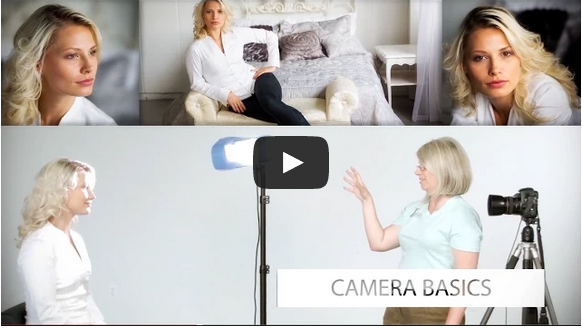
You can get a full rundown of what is covered in the course here (don’t forget the 12days2014 coupon code) but in short it is all about giving you the confidence, techniques and tools around lighting your subjects – to be able to take better portraits using natural light and off camera flash.

It is perfect for beginners to intermediate photographers and gives you:

  • over 6 ours of video instruction over 25 lessons
  • over 240 pages of course notes to support the videos
  • quizzes after each lesson to help you cement what you’ve learned
  • printable cheat sheets and diagrams
  • lifetime access and updates
  • ongoing support through regular live webinars

This course can be taken at your own pace – so whip through it in an intense weekend of study or spread it out over the first weeks and months of 2015!

As with all the products in our 12 days of Christmas promotion – this comes with a 60 day money back guarantee. So you can sign up today and get the 50% discount but if you are not satisfied can ask for your money back for a full refund.

Get full details of the course and sign up at 50% off with the coupon code 12days2014 here

But don’t delay – this deal ends in 24 hours from the time this post goes live.

googletag.cmd.push(function() {
tablet_slots.push( googletag.defineSlot( “/1005424/_dPSv4_tab-all-article-bottom_(300×250)”, [300, 250], “pb-ad-78623” ).addService( googletag.pubads() ) ); } );

googletag.cmd.push(function() {
mobile_slots.push( googletag.defineSlot( “/1005424/_dPSv4_mob-all-article-bottom_(300×250)”, [300, 250], “pb-ad-78158” ).addService( googletag.pubads() ) ); } );

The post Deal 10: 50% Off the Portrait Lighting On Location Course by Darren Rowse appeared first on Digital Photography School.


Digital Photography School

 
Comments Off on Deal 10: 50% Off the Portrait Lighting On Location Course

Posted in Photography