RSS
 

Posts Tagged ‘lighting’

Take your Composition & Lighting Skills to the Next Level with this 70% Off Deal

18 Dec

It’s time for day 6 of our 12 Deals of Christmas and this one is from our good friends at Photography Concentrate who have two fantastic eBooks for you to choose from (and a great offer when you pick them both up).

Concentrate ebooks

Incredibly Important Composition Skills

Are you ready to unlock your superpowers in composition and gain real skills that you’ll use in every single shot you take?

Save 60% on this ebook and video guide from Photography Concentrate (and get a bonus Printable Field Guide and 7 bonus teaching videos)!

Fantastic Fundamental Light Skills

When you understand why light looks and behaves the way it does, you’ll know how to control and change it to suit your creative vision – and take better photos.

Save 60% today on this comprehensive guide (and get a bonus Printable Field Guide)!

Bundle Them Together

Grab both Incredibly Important Composition Skills and Fantastic Fundamental Light Skills in this amazing combo deal (with all the bonuses mentioned above).

A HUGE 70% OFF for 24 hours only!

googletag.cmd.push(function() {
tablet_slots.push( googletag.defineSlot( “/1005424/_dPSv4_tab-all-article-bottom_(300×250)”, [300, 250], “pb-ad-78623” ).addService( googletag.pubads() ) ); } );

googletag.cmd.push(function() {
mobile_slots.push( googletag.defineSlot( “/1005424/_dPSv4_mob-all-article-bottom_(300×250)”, [300, 250], “pb-ad-78158” ).addService( googletag.pubads() ) ); } );

The post Take your Composition & Lighting Skills to the Next Level with this 70% Off Deal by Darren Rowse appeared first on Digital Photography School.


Digital Photography School

 
Comments Off on Take your Composition & Lighting Skills to the Next Level with this 70% Off Deal

Posted in Photography


Manfrotto launches bright and compact Lykos LED lighting panels

05 Dec

$ (document).ready(function() { SampleGalleryV2({“targetContainerClass”:”sampleGalleryImageViewerContainer”,”galleryId”:”2759212496″,”isEmbeddedWidget”:true,”selectedImageIndex”:0,”startInCommentsView”:false,”isMobile”:false}) });

Italian accessories manufacturer Manfrotto has announced it is to introduce a new range of LED light panels under the Lykos brand name. The Lykos Daylight and Lykos BiColor panels are small enough to hold in one hand but can also be mounted on a lighting stand, and can be powered by an L-type video-camera battery or via the included AC adapter. Both panels use surface-mounted LEDs which the company claims deliver better power efficiency, more consistent color, flicker-free illumination and an improved working life.

The Daylight version has a color temperature of 5600K while the BiColor model uses white and warm LEDs. These can be mixed to produce anything from 3000-5600K, to match local lighting conditions or for color effects. The Daylight version can manage 1600lux@1m, while the BiColor is not quite as bright at 1500lux@1m. 

All controls have separate knobs so that the panels can be left to produce the same temperature or brightness when they are switched off and on again, as the on/off function is not integrated into one of the dials. 

An optional Bluetooth dongle allows the panels to be controlled individually or in groups via a Smartphone app that has a memory function to recall light levels and temperature. The app is also compatible with Litepanel’s Astra models, so both types can be controlled from one app simultaneously.

Manfrotto has also introduced a softbox for the Lykos panels, as well as a set of filters for the Daylight model and a gel diffuser. 

The Lykos Daylight will cost £299.95/$ 449.99 and the BiColor version will be £399.95/$ 514.99. The Bluetooth dongle will be £75.95/$ 99.99

For more information visit the Manfrotto website.


Press release: 

December 2015 – Manfrotto, world leader in the photography, imaging equipment and accessories industry, announces the launch of the LYKOS portable light with new LED technology (Surface Mounted Technology). Available in Daylight and BiColor versions, the LYKOS guarantees the highest illuminance in compact size and is the best solution for the photographer and videographer on the go who needs a lightweight light source.

LYKOS LED panels, powered by Litepanels, is part of the new, ready to use Manfrotto LED lights.

POWERFUL LIGHT 

Portable and compact light, LYKOS is designed to meet the needs of demanding professionals. The powerful light is capable of an output of 1600lux and exists in two versions. LYKOS Daylight is centered at 5600K and LYKOS BiColor has the option to change colour temperature from warm white (3000K) to cold white (5600K). A color LCD display on the back of the unit allows easy monitoring of the functions.

Thanks to the new generation SMT technology, the LYKOS lights ensure long LED life, energy efficiency, consistent colour reproduction and flicker-free functionality. This light can be operated by L-Type Li-ion batteries or by mains through the AC adaptor included. 

SMART CONNECTION

All units are “Bluetooth-ready”. An optional Bluetooth dongle transforms LYKOS in a smart device and permits remote control through a downloadable iPhone App or via the Digital Director App. Controllable functions include the On/Off switch, dimming 0%-100%, colour temperature regulation, grouping of lights and recall of previously stored scene settings with new features to soon be implemented. Manfrotto LYKOS and Litepanels Astra will embed a compatible wireless technology which will mean it will be possible to control both through the same app. 

KIT AND MORE

The LYKOS pack includes a Ball head, gel diffuser (filters for the Daylight version) and a mains adaptor.

Moreover, the Manfrotto LYKOS Softbox is a perfect optional accessory to be used in combination with LYKOS LED panels. It creates a beautifully soft lighting, softening shadows in the images. It can be set up in seconds without any tools and the diffuser film is specifically designed for LED Lighting and reduces the light output by 1.3 f-stops.

The new portable LYKOS LED panels are a powerful, efficient and smart device ready to use for professional photographer and videographer.

Articles: Digital Photography Review (dpreview.com)

 
Comments Off on Manfrotto launches bright and compact Lykos LED lighting panels

Posted in Uncategorized


Low-Key Lighting for Dramatic Portraits

19 Nov
Becky-in-witch-outfit

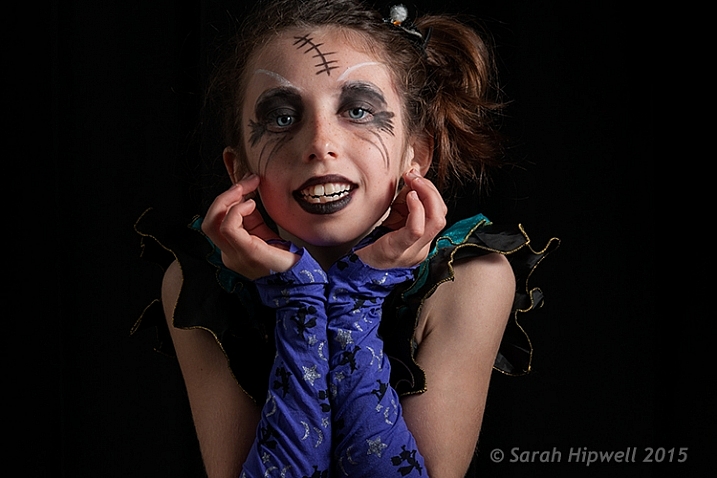
Young girl dressed up for Halloween. Low-key portrait using one speedlight, against a typical black background.

I dare say that nothing is quite like the effect of low-key lighting to show drama in an image. So what does low-key lighting mean in terms of photography? A good definition is found here.

Low-key lighting often uses only one key light, optionally controlled with a fill light or a simple reflector.

The term “low-key” is used in cinematography to refer to any scene with a high lighting ratio, especially if there is a predominance of shadowy areas. It tends to heighten the sense of alienation felt by the viewer, hence is commonly used in film noir and horror genres.

To simplify the term further, low-key lighting focuses on the shadows by using usually one light source. Therefore, shadows are now the primary element of the composition.

What you should know about low-key lighting

The nice thing about low-key lighting is that it’s quite experimental. There are no hard and fast rules that you need to adhere to. You can vary the position, and the distance, of the one light source more to the front or side of the subject, depending on how much contrast you want your model to have. Or ask the subject to turn more into light source or away from it. Here are a few more guidelines:

  • A black seamless background is the classic low-key look.
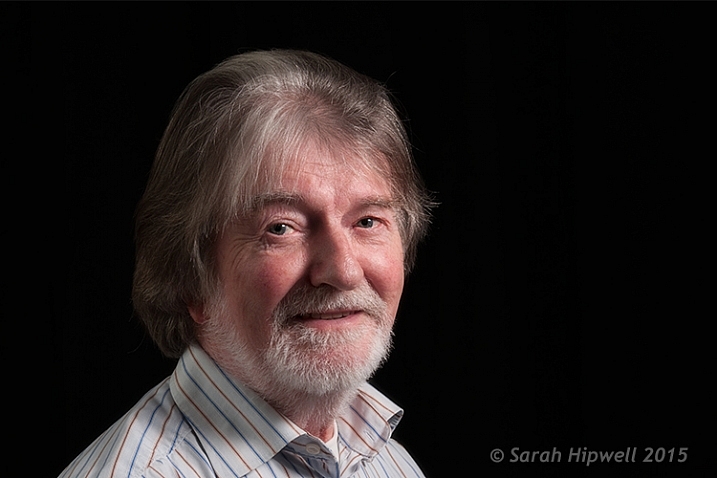
  • As this type of lighting is quite strong and contrasty, it’s probably suited for the very young, who in general have flawless skin and subjects (seniors 65+) where the emphasis is on the character of the person. For people who don’t have great skin, this type of lighting won’t be the most flattering.
  • You can move the light more to the front and use a reflector to control the light and act as a fill.
  • Creates drama and mystery to your portraits.
  • This type of lighting is probably not best to do wedding portraits!
  • Keep ISO low to 100/200 so that ambient light doesn’t reach the sensor. This will keep the quality of images high by reducing noise.
  • Set your flash to manual and start on a low setting of 1/8th power.
  • Use a small aperture setting of f/8 and upwards (f/11 and smaller).
  • Keep the shutter speed at 1/125 second or higher (not to exceed the native sync-speed of your camera).
senior model low key lighting

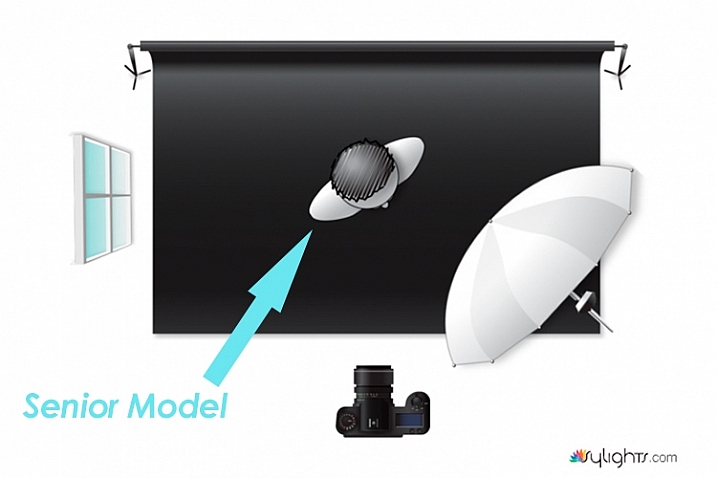
A senior model poses with his body turned more towards the light source to provide less extreme shadows while emphasizing the model’s facial character.

Senior-model

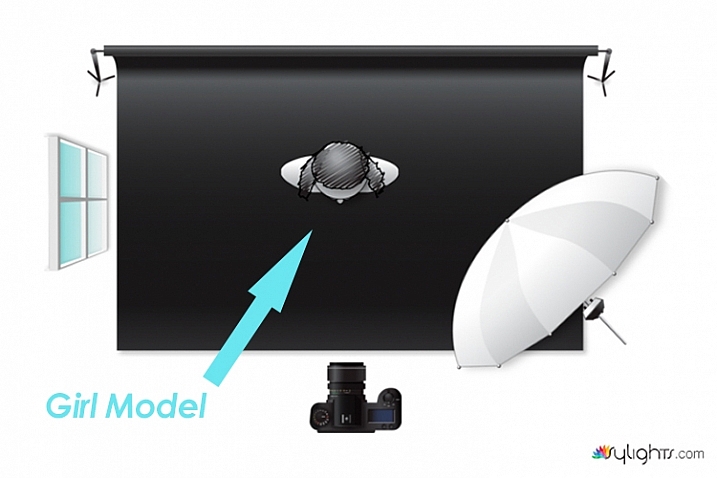
Lighting diagram to show the position of the model in relation to the light source.

Young girl low key photography in Halloween costume

In this particular shot, I wanted more shadow on the model’s right side to give more drama to the shot.

Lighting diagram low key photography

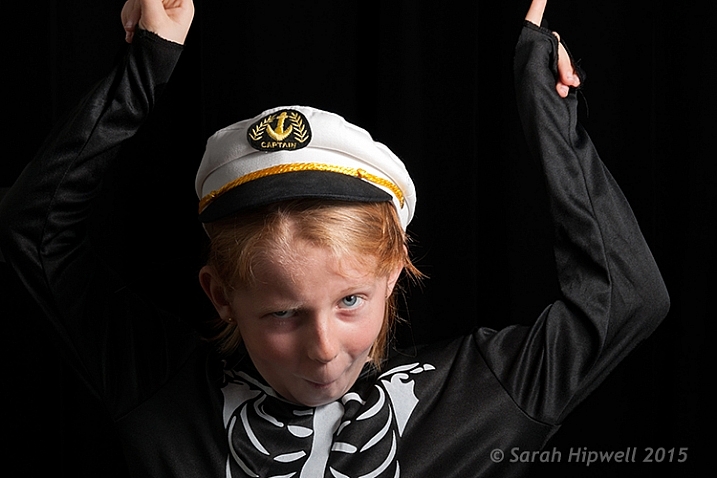
Keeping the light source in the same position, I got the model to look directly at the camera.

What’s involved in a low-key setup?

You may be surprised, but this type of setup doesn’t require a proper studio. You can do a low-key portrait in a relatively small area, or anywhere in fact. This setup requires the minimal of gear:

  • A camera and lens (whatever lens is your choice for portraits)
  • One speedlight
  • One lightstand
  • One light modifier (a shoot through umbrella is a great and inexpensive modifier that acts like a softbox)
  • A subject or model, or willing participant
  • Preferably a black background. See my DIY solution below.

Low-key low cost

I am a great believer in practicing what I preach. So I came up with a DIY solution for shooting a low-key setup, using a black shower curtain, in your own home. It is inexpensive, and doesn’t require a lot of time to implement.

First item was the black background

  • I sourced a black shower curtain for less than $ 10USD. Size L180, W180cm. It also comes with plastic rings. Don’t worry that the curtain doesn’t reach the floor. Remember, this is for portraits only. I already had a telescopic white shower rail.
  • 1 ½inch in diameter x 10ft. length of white PVC tubing will do equally well. It works out at $ 2.10 from Home Depot. I would cut this down to 8ft.
  • One pair of White Command Cord Clips that cost from $ 3 to $ 5. These clips have a self-adhesive backing and can stick to most surfaces. So they are easy to put up, and are also removable. They can hold up to 900g or 2 lbs.

So that is your background sorted. The shower curtain, when taken out of the packaging, has obvious pleats. Don’t worry about these. This is easily sorted in post-production.

As I really enjoyed using this DIY method. I have left the Cord Clips up on the wall in my kitchen. They are relatively discreet. I intend to use this setup again. It is so simple and a perfect solution if you can’t get to your studio, or if you don’t have one!

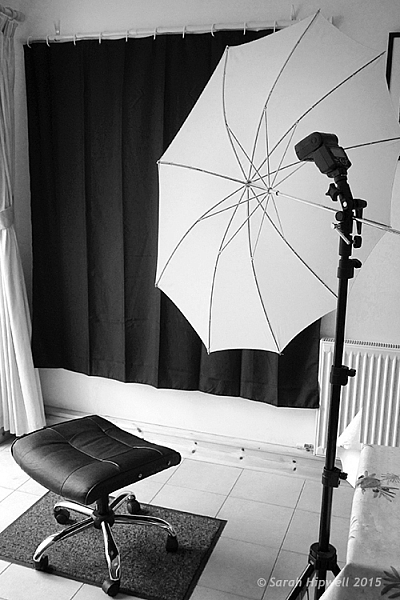
Black-shower-curtain-setup

A DIY low-key solution that you can set up at home.

Post-production to get rid of pleats or wrinkles

You don’t want any light to hit the black background, this is called contamination. Plus you want the black background to be texture, and wrinkle free. In some of my shots, the pleats were a little obvious in the background.

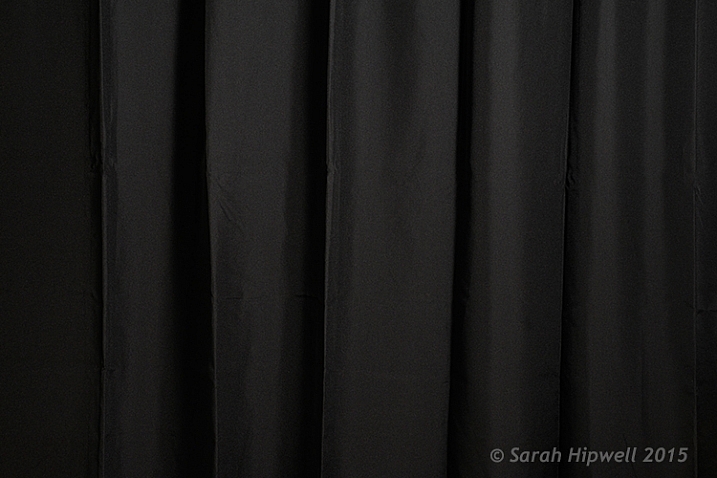
black-shower-curtain

Black shower curtain with pleats visible.

Getting rid of them was relatively easy. In Adobe Camera Raw (ACR), I adjusted the Shadows and Blacks sliders,
until I had a wrinkle free black background. However, as this is a global adjustment, you may need to an Add Adjustment Brush to areas on the subject to bring back some detail.

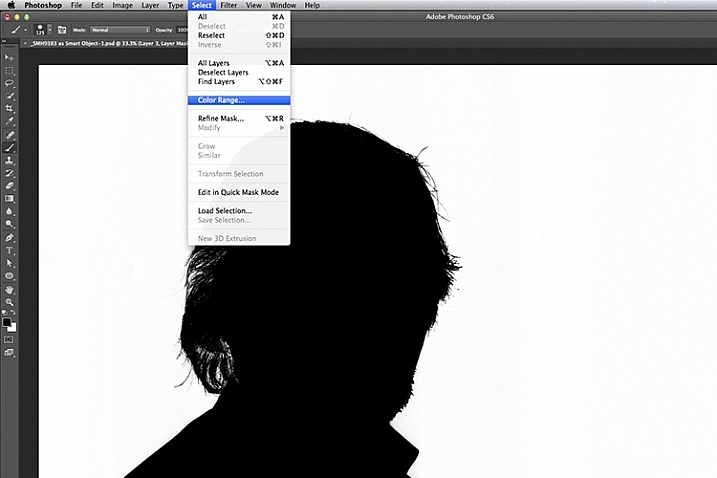
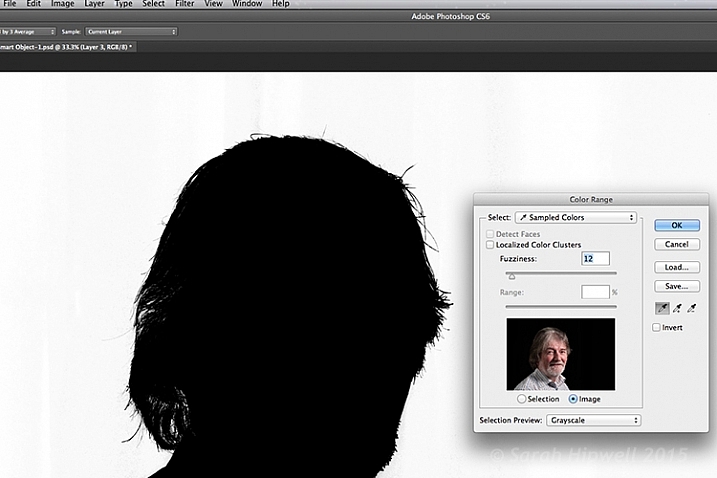
Another alternative in Photoshop, is to apply a mask to isolate the subject. For the image of the senior man, I used Select>Color Range rather than using the Quick Selection tool or the Refine Mask tool. The Color Range is a color-based selection tool which was ideal in this case, as my subject was much lighter than the background making selection relatively easy. A few clicks on the background and I had a near perfect mask, except where the two eyes were. I applied the mask and filled in areas that were needed in black with the brush tool.

color-range

Choosing the Color Range under Select in Photoshop to create a mask.

I then applied a Levels Adjustment layer, and moved the black slider ever so slightly to the right, until the background was completely black.

color-range-dialog-box

The Color Range dialog box.

Of course shooting lo-key isn’t restricted to indoors, nor do you need a black background. You can achieve similar effects outside. Check out this great video on the topic of creating an invisible black background to portraits using the same techniques.

Caution: You may possibly experience lots of fun shooting low-key! So let’s see your examples in the comments below.

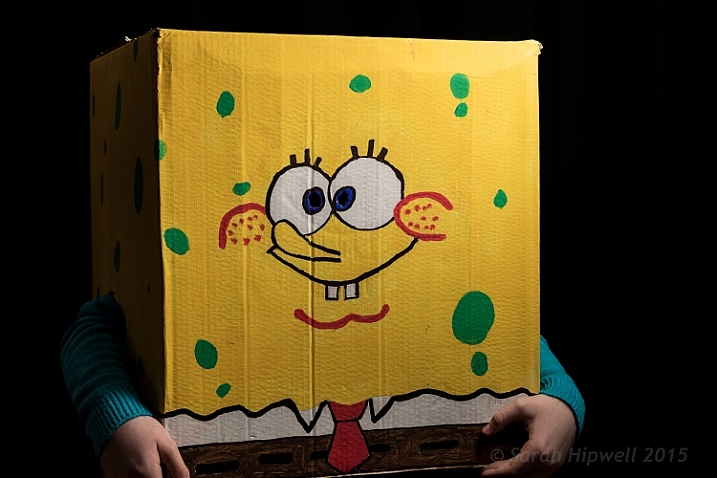
Sponge-Bob-costume

My daughter’s friend dressed for Halloween as Sponge Bob.

googletag.cmd.push(function() {
tablet_slots.push( googletag.defineSlot( “/1005424/_dPSv4_tab-all-article-bottom_(300×250)”, [300, 250], “pb-ad-78623” ).addService( googletag.pubads() ) ); } );

googletag.cmd.push(function() {
mobile_slots.push( googletag.defineSlot( “/1005424/_dPSv4_mob-all-article-bottom_(300×250)”, [300, 250], “pb-ad-78158” ).addService( googletag.pubads() ) ); } );

The post Low-Key Lighting for Dramatic Portraits by Sarah Hipwell appeared first on Digital Photography School.


Digital Photography School

 
Comments Off on Low-Key Lighting for Dramatic Portraits

Posted in Photography


Tips for Using Speedlights to Create the Right Lighting for Outdoor Portraits

08 Aug

In these two video tutorials brought to us by ExpoImaging, NYC photographer Erik Valind shows two different tips:

#1 – How to create artificial sun with a speedlight

#2 – Creating soft light during midday harsh light

Gear and things mentioned in the videos:

  • ExpoImaging ROGUEGELS-U Rogue Photographic Design Rogue Gels Universal Lighting Filter Kit
  • Rogue Photographic Design ROGUERELG2 FlashBender 2 Large Reflector, Bounce Flash, Snoot, Gobo (Black/White)
  • Other things available from Rogue Photographic Design

googletag.cmd.push(function() {
tablet_slots.push( googletag.defineSlot( “/1005424/_dPSv4_tab-all-article-bottom_(300×250)”, [300, 250], “pb-ad-78623” ).addService( googletag.pubads() ) ); } );

googletag.cmd.push(function() {
mobile_slots.push( googletag.defineSlot( “/1005424/_dPSv4_mob-all-article-bottom_(300×250)”, [300, 250], “pb-ad-78158” ).addService( googletag.pubads() ) ); } );

The post Tips for Using Speedlights to Create the Right Lighting for Outdoor Portraits by Darlene Hildebrandt appeared first on Digital Photography School.


Digital Photography School

 
Comments Off on Tips for Using Speedlights to Create the Right Lighting for Outdoor Portraits

Posted in Photography


Improve Your Lighting Skills with a Trip to the Toy Store

19 Jul

You’ve heard it before: Photography is seeing and capturing light. It’s absolutely true, but what’s the best way to learn how to see something that can be infinitely shaped, altered by both environmental factors, and through intentional manipulation? As with most things, there’s a hard way and an easier way.
Learn lighting with toys batman

The hard way entails grabbing your camera and photographing everything you can, in every possible condition, and hoping everything clicks in one magic moment, thereby learning gradually through scattered experience. This works, but it can take an awful lot of time and practice before it leads to any real understanding of various lighting conditions.

The easier method, that this article covers, involves a more structured and goal oriented approach. It can get you looking at light in new ways and push you to the top of the learning curve in a very short period of time.

A trip to the toy store

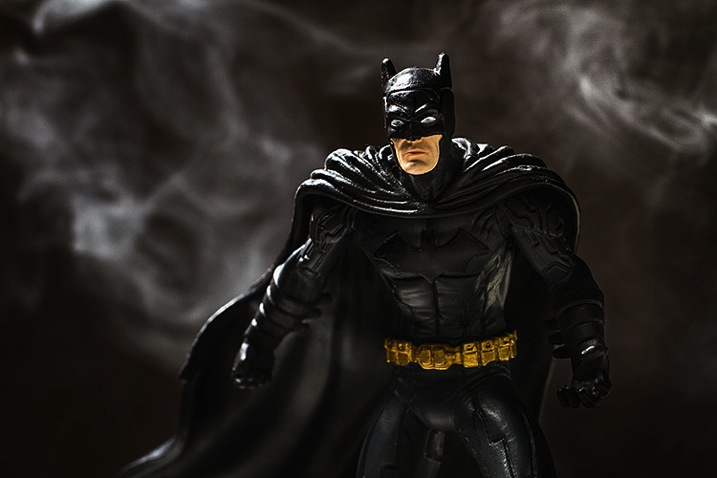
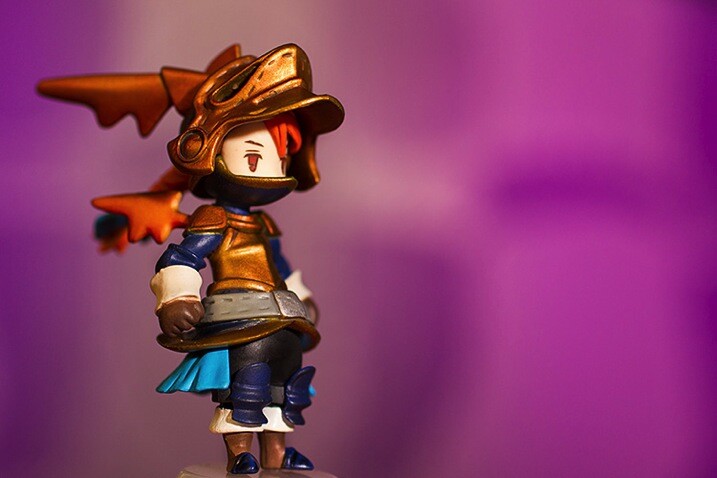
Because of the studious nature of this exercise, it can seem far less exciting and adventurous than being out and about with your camera. To combat this, I propose using toys as your subjects. Aside from the quirkiness and fun this can add to the exercise, a lot of toys, particularly action figures, have insane amounts of fine details that will really show off any changes in lighting conditions.
Learn lighting with toys ff 2859

Another bonus of using toys for studying light is that if you use a character from a film or game that you know, you already have some idea of cinematic lighting schemes associated with that character, and you will quickly recognize some of them as you move through this process.

What you need to start

  • A camera set on manual mode
  • A tripod
  • A toy
  • A light source (natural or artificial with a modifier of your choice)
  • A reflector
  • A notebook (not required, but taking notes on what works and what doesn’t work never hurts)
  • A macro lens for smaller toys is useful if you have one

Note: I’m using studio strobes for this exercise out of personal preference and ease, as it’s easier to move a light source around a subject than it is to move a subject around a fixed light source such as a window. Strobes also allow you to keep the exposure constant, provided the distance from light source to subject doesn’t change.

Also, please bear in mind that the intent of these exercises isn’t to create a final polished image. You’re simply watching and gaining experience with altering light. However, you can use the images you get from these exercises to build your own reference sheet for lighting effects for various light sources and modifiers.

Exercise one

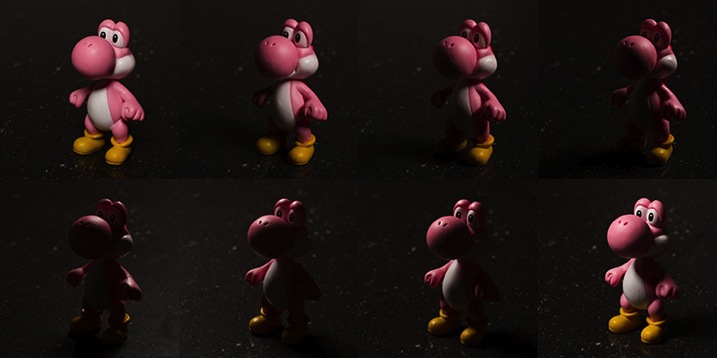
To start off, place your light source directly in front of your subject, pointed down at a 45 degree angle. Work out the correct exposure for your setup and dial it into your camera. These settings won’t change.

Now take your first photo.

Once that’s done, move your light source gradually around your subject, a little bit at a time, and take another photo at each angle. Repeat until you’ve come back to your starting position. Just make sure that your light source stays the same distance from the subject, while still pointed directly at it, each time you move it.

What you’re looking for is a series of images that clearly show how the light is altering as it moves around the toy. You can use these images to study how the light records in a photograph from any of the positions.
Learn lighting with toys yoshi 2795

Exercise two

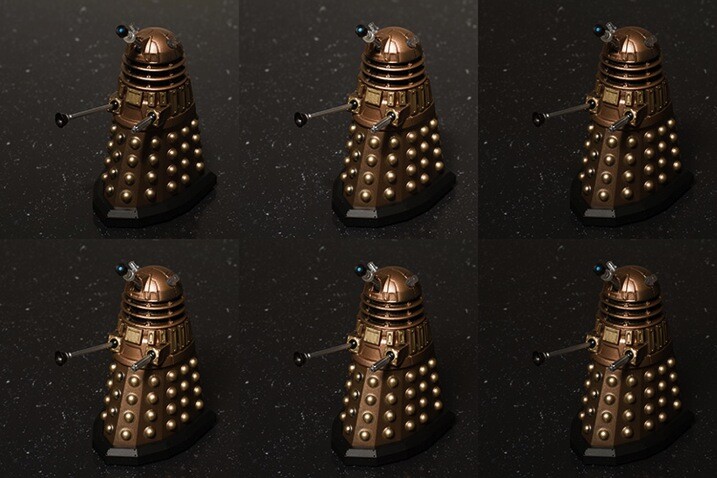
For the second part of this task, start with your light source directly in front of your chosen subject and as high possible. Work out your exposure and take the first photo. This time, move your light source down a few inches, again keeping it pointed directly at your toy. Repeat this until you can’t lower your light source any further. Now, your exposure will probably change this time as your light source gets physically closer to your subject. It’s up to you if you want to calculate a new exposure for each interval.
Learn lighting with toys dalek 2785

Top Left: Highest position of the light source. Bottom Right: Lowest position of the light source.

If you feel inclined, don’t be afraid to take the extra time and repeat this exercise once in each of the vertical positions as well. Doing so will only give you a more complete lighting reference in the end.

Exercise three


In this step, start with your light source as close to your subject as you can and place it at a 45 degree angle to camera right, pointed down at your subject. Once you have taken your first image, move it backward one foot.

Changing the distance of your light source from your subject is going to alter your exposure settings. By moving it backward, you will have less light falling on your scene. Simply recalculate your exposure and take your second shot. Repeat this until you can’t move your light source any further back.

What you should see as you do this is the light changing in quality. The closer your light source is to your subject, the softer the light. The further your light source from your subject, the harder the light. A lot people tend to have a personal preference on how they prefer their quality of light. Try to use this exercise and see if you can figure out yours.

When you change your modifiers, you may start to notice a shift in the colour temperature as shown in the bottom right image of the example. No two modifiers will be the same in this regard, so it’s always good to know exactly what you’re getting when you use your equipment.
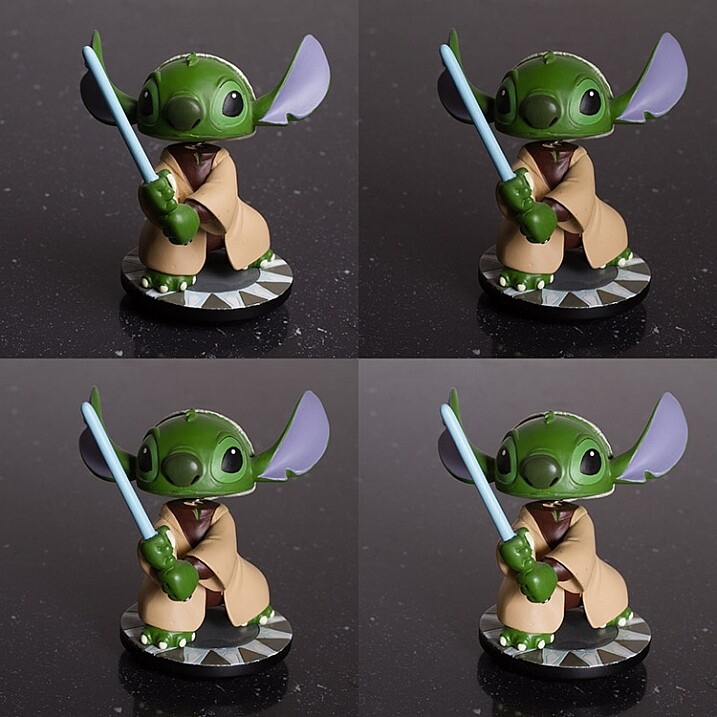
learn-lighting-with-toys-yoda-2890

Top Left: Softbox at 2′ (61cm) away
Top Right: 4′ (1.2m) away
Bottom Left: 6′ (1.8m) away
Bottom Right: 8′ (2.4m) away

Exercise four

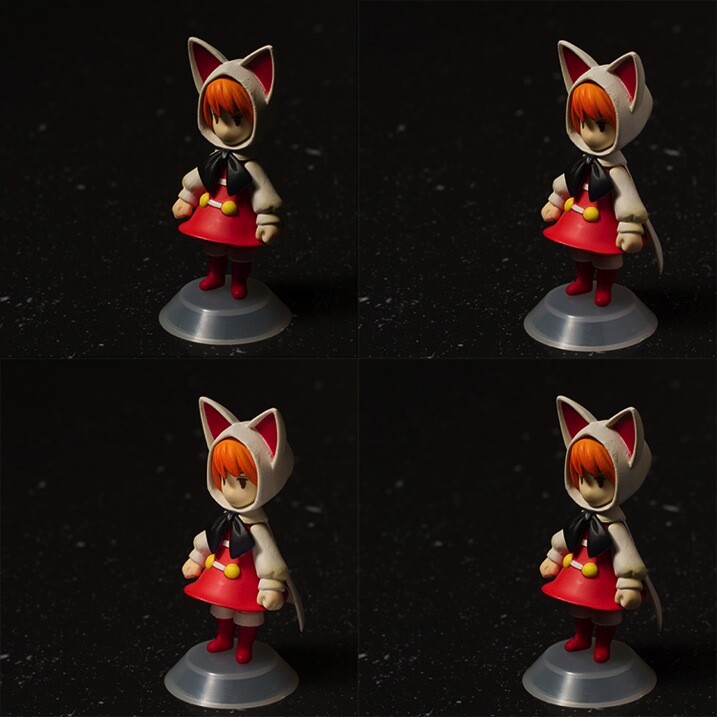
The next step is to start modifying your light; with a reflector in this case. Start with your light source pointed directly at your subject from camera left and above. Calculate your exposure and take a starting image with no modification.

For the next image, put your reflector at camera right, parallel to your light source.

Next, place it directly in front of your subject but as low down as you need to not block your lens and to keep it out of the frame.

Finally, if you can, curve your reflector and hold it at camera right with the centre pointed at 45 degrees from your subject.

Feel free to play around here and take photos with your reflector in as many positions as you can/want. The goal is to observe the changes it makes to the overall images. These changes can be extremely subtle so the more you can observe the better (more you will learn).
Learn lighting with toys ff 2815

Top Left: No reflector. Top Right: Reflector from the right. Bottom Left: Reflector from in front and below the subject. Bottom Right. Reflector curved around the front right corner.

Exercise five

If you have a light source that can be modified with grids or similar (or maybe a window with blinds) it might be advantageous to study the different effects these modifiers provide. If you have a selection of modifiers available, you can use this as an opportunity to study the differences between them in a no pressure environment.

Like exercise one, your light source should be directly in front of your subject and pointed downward at a 45 degree angle. Start with no modifier at all and calculate your exposure and take your first image.

Add each of your different modifiers (softboxes, umbrellas, beauty dishes, etc.) taking a photo at each step. With that, you should have a reference for each of the modifications you can make to a particular light source.
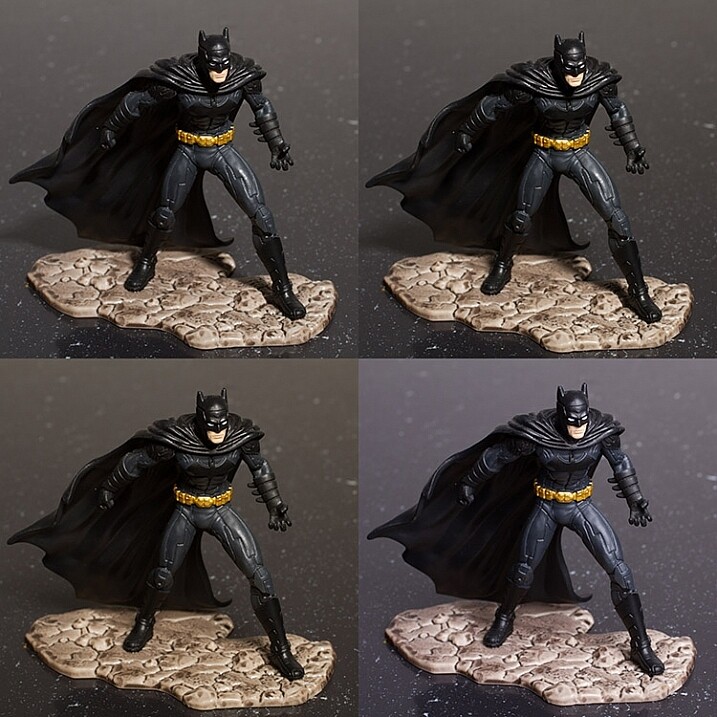
    Top Left: No modifier ( bare bulb)     Top Right: 60 degree reflector     Bottom Left: Beauty dish     Bottom Right: Softbox

Top Left: No modifier ( bare bulb)
Top Right: 60 degree reflector
Bottom Left: Beauty dish
Bottom Right: Softbox

After-matter

By going through these exercises, you will have lit a subject from a huge variety of angles, with a good variety of modifications. From this, you should already start to see which angles are flattering and which aren’t. You may have also spotted ones that have affinity with your own personal tastes.

If you repeat the exercises with any new modifiers you get, as well as in natural lighting conditions at various times a day, then all of this should add together to quicken your understanding of light and how to apply it to your final images without a lengthy trial and error process. From here, you can start to automatically decide how to light or manipulate based on what you’ve learned.

Of course, if you don’t like the idea of using toys, feel free to use food, flowers, people or anything that’s fun and interesting to you!

googletag.cmd.push(function() {
tablet_slots.push( googletag.defineSlot( “/1005424/_dPSv4_tab-all-article-bottom_(300×250)”, [300, 250], “pb-ad-78623” ).addService( googletag.pubads() ) ); } );

googletag.cmd.push(function() {
mobile_slots.push( googletag.defineSlot( “/1005424/_dPSv4_mob-all-article-bottom_(300×250)”, [300, 250], “pb-ad-78158” ).addService( googletag.pubads() ) ); } );

The post Improve Your Lighting Skills with a Trip to the Toy Store by John McIntire appeared first on Digital Photography School.


Digital Photography School
 
Comments Off on Improve Your Lighting Skills with a Trip to the Toy Store

Posted in Photography


One Speedlight Portrait Lighting Tutorial

25 Jun

If you’ve ever wondered how to improve the look of your portraits using only one speedlight, then make sure you read every single word on this page. It isn’t so much the type or quality of the speedlight you are using; it is more about how you modify and shape the light, that will help you to improve the overall look of your portraits.

Craigbecktabts

Let’s break speedlight portrait lighting down into three simple action steps that are easy for you to follow:

Step 1: Get the speedlight off-camera

Start by first getting your speedlight off of your camera. In order to trigger your strobe once it is off of your camera, you will need a remote trigger such as a Cactus V6 that I am using in the video below. You can also use a Pocket Wizard or any number of different triggers that are available on the market. The key is to be able to remotely fire your speedlight, so you are free to modify, and position your light source for more flattering results.

Check out the video below for a video demonstration of a one light, speedlight beauty lighting set up.

Step 2: Add a light modifier

Next step is to increase the size of your light source by using a speedlight modifier. The key to improving the quality of the light is this; the larger the light source and the closer the light is to your subject, the softer the light will appear. As a general guideline for a starting position, I suggest you put your light roughly the same distance as its diameter from your subject.

CraigBeckta1

For example if your speedlight modifier is three feet (36″) in diameter (or 91cm), you can start by placing your modifier the same distance from your subject. In the image above I placed my light in the butterfly lighting position and used a white reflector for fill. This type of lighting is often referred to as ClamShell lighting or Beauty lighting.

Craigbeckta2

Step 3: Place your focus on the subject

Once you have your lighting in place, shift your focus to making a connection with the person you are photographing. Pay close attention to the pose and the expression; tests have shown that 60% of people look more attractive from their left side. So make sure you experiment with your subject to find their most flattering side right at the beginning of the portrait session. You can ask them if they have a side they prefer, or you can make a guess based on where they part their hair.

Once you have that figured out, focus on capturing an expression that makes them appear confident in from of the camera. You can have the best lighting in the world ,but if you don’t nail the right expression, you will miss the shot. Look for the position of their eyes and mouth, confidence is portrayed from the eyes and it is something that can make or break a shot.

Craigbeckta3

Any article about photography isn’t complete unless we talk about the gear used to create the shots. The first image in this series was shot on the Canon 5D MK III with the Canon 100mm Macro lens at ISO 100, f/5.6 and shutter speed 1/160th. The reason you should use a shutter speed of 1/160th on the Canon 5D MK III is to stay within the flash sync-speed. If you shoot at a shutter speed of 1/200th, or faster, you may see a black line in your image because are shooting at a faster shutter speed than your camera can handle when using flash.

Screen Shot 2015 06 01 at 8 19 33 AM
Lighting diagram showing the setup for these images.

The other two images in this series were both shot on the Canon 5D MK III with the Canon 135mm f/2 lens. Both lenses are tack sharp and are great portrait lenses but if you prefer a better bokeh, then I would choose the Canon 135mm f/2. The reason is that the lowest aperture is f/2, and the longer focal length of 135mm will give you a more out of focus background when shot at f/2.

CraigBecktaDPS

If you have any questions about the video or article above, I would be more than happy to answer them for you. Just post your questions in the comment section below.

googletag.cmd.push(function() {
tablet_slots.push( googletag.defineSlot( “/1005424/_dPSv4_tab-all-article-bottom_(300×250)”, [300, 250], “pb-ad-78623” ).addService( googletag.pubads() ) ); } );

googletag.cmd.push(function() {
mobile_slots.push( googletag.defineSlot( “/1005424/_dPSv4_mob-all-article-bottom_(300×250)”, [300, 250], “pb-ad-78158” ).addService( googletag.pubads() ) ); } );

The post One Speedlight Portrait Lighting Tutorial by Craig Beckta appeared first on Digital Photography School.


Digital Photography School
 
Comments Off on One Speedlight Portrait Lighting Tutorial

Posted in Photography


Lighting 101: 4 Basic Lighting Looks

09 Jun

I recently came across a proof book that I had shot wayyyy back in the dinosaur ages, when people used a thing called film, and photography was about your skill with a camera, not skill with your computer….but that’s a topic for another day. Anyway, in those days, I was all about people’s expressions, and not lighting at all, which Continue Reading

The post Lighting 101: 4 Basic Lighting Looks appeared first on Photodoto.


Photodoto

 
Comments Off on Lighting 101: 4 Basic Lighting Looks

Posted in Photography


Learn How to Setup Studio Lighting in 15 Minutes

29 May

Do you find studio lighting daunting? Understandable. When I got my first set of lights I played with it for half an hour. Intimidated and confused, I shoved it back in the box where it stayed for six months.

Don’t worry though, mastering exposure with studio strobes is easy; in fact it’s probably one of the easiest of the photographic skill sets. By following this tutorial, you can go from no experience with studio lighting, to getting a correct exposure on your first frame, without the aid of expensive and unnecessary light meters. This isn’t a crash course in complicated theories and physics; our goal is to get you using strobes and creating photographs as quickly as possible. You can return to the theories at your convenience. I am a firm believer in the idea that it’s easier to learn the why, when you’ve already figured out the how.

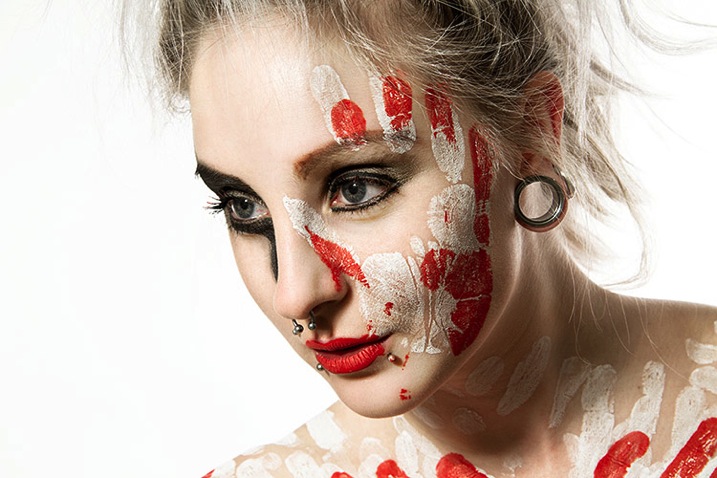
Warpaint john mcintire photography 0754 2

Getting Ready

Before we start, you’ll need to do a few things in preparation:

  1. Setup your studio strobe on its stand, set it to full power and make sure it works.
  2. You should know how to connect your strobe to the camera and make it fire by way of remote trigger, pc sync cable, slaved to your on-camera flash, or by way of an in-camera system. Refer to your manuals if you need help.
  3. Have your strobe’s instruction manual at hand.
  4. Settings: Set your camera to manual mode, your shutter speed to 1/125th of a second, and your ISO to 100. (If you have an older model, or a film camera, then default to 1/60th of a second.)
  5. Have a calculator at hand will make things easier.
  6. Finally, I recommend that you start to think in full stops, which I’ll cover in the next section.

Thinking in Full Stops

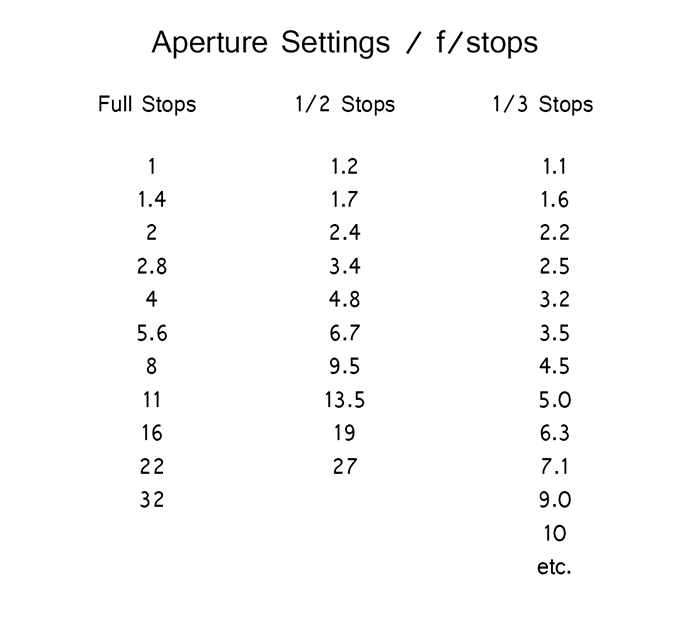
Most of our modern cameras are capable of setting the aperture in increments of 1/3 or 1/2 of a stop. This is extremely useful for fine tuning the exposure in most situations; however, for the purpose of this exercise, it is much easier to ignore them for now and concentrate on the full stop values as indicated in the chart below.

Fstops

Finding Your Guide Number

The next step is to flip through your strobe’s manual and find where it lists the Guide Number (also check whether the guide number is listed in feet or meters; this is vital). This magic number is a rather complicated thing and steeped in the brain-wracking Inverse Square Law. As promised, you don’t yet need to know why it works; you only need to know how to use it at this point.

There are two main ways to use the guide number, that will be useful to you. You can choose your aperture based on the desired outcome of your photo and calculate where to put your strobe, or you can place your strobe for a desired lighting effect and calculate the correct aperture.

Calculating Aperture

Some lighting effects require strobes to be in certain positions, and distances from your subject and other strobes. In other circumstances, your strobe might be in a fixed position and it cannot be moved.

In these events, to calculate the aperture for a correct exposure all you have to do is measure the distance between the light source and your subject in feet or meters (whichever your guide number is listed as). Now divide your guide number by that distance. For example a guide number of 66 with a distance of 6 feet between your subject and the light source would result in: 66 divided by 6 for a result of 11. Your answer is your aperture for a correct exposure: f/11.

Most guide numbers never divide so evenly into full stops. For example, if you get a result along the lines of f/9.2, just round it off to the nearest full-stop for the moment and we’ll learn how to fine-tune the exposure shortly.

Calculating Strobe Distance

Conversely, if you know what aperture you want to use, for a creative effect perhaps, simply divide the guide number by your desired aperture. My tendency for studio portraits is f/8, so if you divide our previous example of 66 by 8 (66/8) you get 8.25. To get a correct exposure for this setup, you would just place your light source 8.25 feet away from your subject. It really is that easy.

One caveat: if you have a high powered strobe in a small place, you’re not going to be able to set your camera to something ridiculous like f/64. If your power output is too high, just turn your strobe down to half power and divide the guide number by two.

Fine Tuning Exposure without Changing Your Settings

As you learned, there are instances where you want your aperture to remain constant. You also don’t want to mess with the power settings on your strobe so much that they completely change your guide number and negate your ability to calculate your exposure with ease. Yet subjects move, or you might want to over or underexpose your image for creative effect. The way to do this is simple.

To underexpose or reduce the amount of light falling on your subject, you would move your strobe further away. If your light source is really close to the subject and you move it back about a foot, you will lose 1-2 stops of light (smaller f/number). If your source is farther away from the  subject and you move it back one foot, you will lose less light. This is caused by the Inverse Square Law which states:  In physics, an inverse-square law is any physical law stating that a specified physical quantity or intensity is inversely proportional to the square of the distance from the source of that physical quantity.  (and link to the wiki definition). Just know that closer in you lose more light as you back it away, than if the light is situated farther from the subject to begin.

This is also why I asked you to consider thinking in full stops rather than fractional increments. Moving a strobe or a model one or two feet is much easier to judge on the fly than the four inches (10cm) a third of a stop increment would require.

Notes on Modifiers

The most common modifiers in studio photography will affect the output of the strobe in terms of exposure. You may need to increase or decrease your aperture, or the distance of your light source, depending on which modifier you choose.

Soft boxes and white or translucent umbrellas, which all produce a softer, more diffused light, will decrease the amount of light falling on your subject. To combat this, choose a larger aperture (smaller f/number) or move your light source closer to your subject.

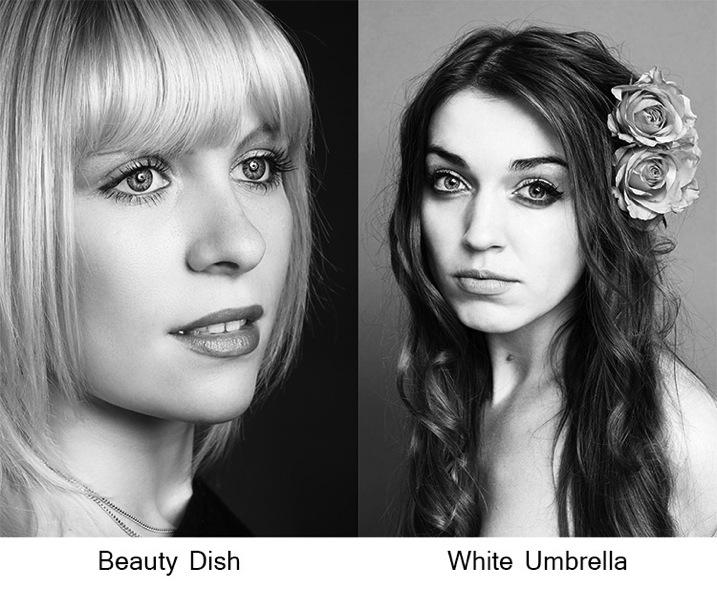
Beauty dishes, silver umbrellas and reflectors, which all produce a harder, more defined light, will increase the amount of light falling on your subject requiring you to choose a smaller aperture (larger f/number) or to move your light source further from your subject.

Modifierexamples john mcintire photography

If you choose to alter your aperture in these situations, feel free to revert to your 1/3 stop increments. A modifier will rarely alter the output of a strobe by a full stop.

You will quickly learn how your modifiers affect the output of your strobes and within a few sessions you should find yourself automatically compensating for them without thinking about it.

Putting it into Practice

I set up a quick portrait session to help demonstrate how to employ these techniques. Gemma graciously volunteered for the task.

The only preparation was the setup of a paper background and fitting the strobe with a beauty dish. After she arrived, I asked Gemma to stand two feet from the background and I placed the light source straight in front of her and as high possible with the beauty dish pointed downward at her face.

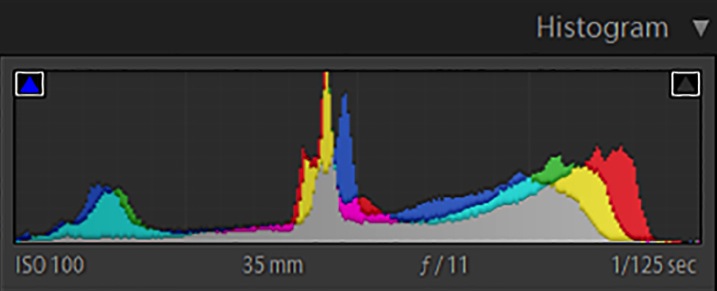
All that was required to start shooting was the correct aperture. The Bowens GM400 I used has a guide number of 76. I measured how far away the light source was; which was 7.5 feet. Dividing 76 by 7.5 gives a result 10.133. Because I was using a silver beauty dish, we know that I need to stop down the aperture to get a precise exposure so I set the camera to f/11 and took a test shot. As you can see from the histogram, these simple calculations gave me the correct exposure and it took less than a minute to get there.

Gemmahistogram

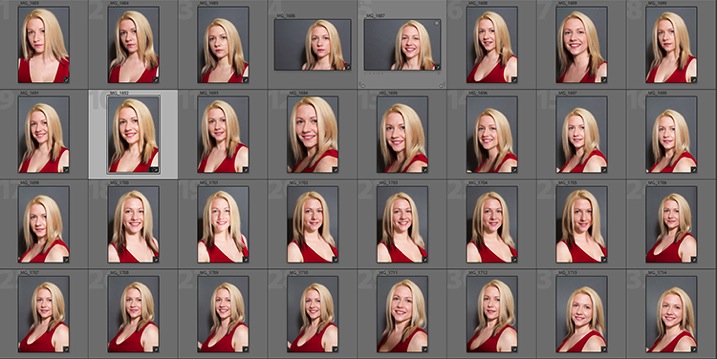
In this image you can see that from the first frame to the last, the exposure remained constant leaving me free to concentrate on other aspects of the images.

Gemmacontactsheet

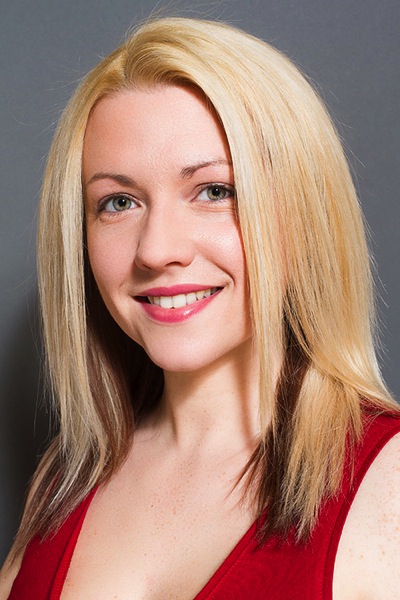
Finally, here you can see the end result.

Gemma john mcintire photography 1692

I hope you’re still with me, and that I’ve convinced you that studio strobes are nothing to be afraid of. With a little practice, the techniques outlined in this article will quickly become second nature, allowing you to concentrate less on the technicalities of exposure, and more on aesthetic variables such as composition and establishing rapport with a client or model. As with most things, the key is practice. Snag a friend, a pet or even a bowl of fruit and run through the whole process again and again, until calculating the correct exposure becomes reflex, and you’ll find yourself spending more time and energy on the creative processes rather than the technical ones.

googletag.cmd.push(function() {
tablet_slots.push( googletag.defineSlot( “/1005424/_dPSv4_tab-all-article-bottom_(300×250)”, [300, 250], “pb-ad-78623” ).addService( googletag.pubads() ) ); } );

googletag.cmd.push(function() {
mobile_slots.push( googletag.defineSlot( “/1005424/_dPSv4_mob-all-article-bottom_(300×250)”, [300, 250], “pb-ad-78158” ).addService( googletag.pubads() ) ); } );

The post Learn How to Setup Studio Lighting in 15 Minutes by John McIntire appeared first on Digital Photography School.


Digital Photography School
 
Comments Off on Learn How to Setup Studio Lighting in 15 Minutes

Posted in Photography


Creating Effective DIY Studio Lighting With Household Items

12 May

When I first started to experiment with controlling the light, I couldn’t afford to splash out on studio gear just to experiment, so I improvised with what I could find around the house, or acquire for only a few dollars. Some improvisations were, let’s just say, less successful than others. But some did produce good results. Some DIY studio lighting I still use, even though I now have a studio setup.

Let’s start with an easy and free lighting method, because free is my favourite price!

Use a table lamp

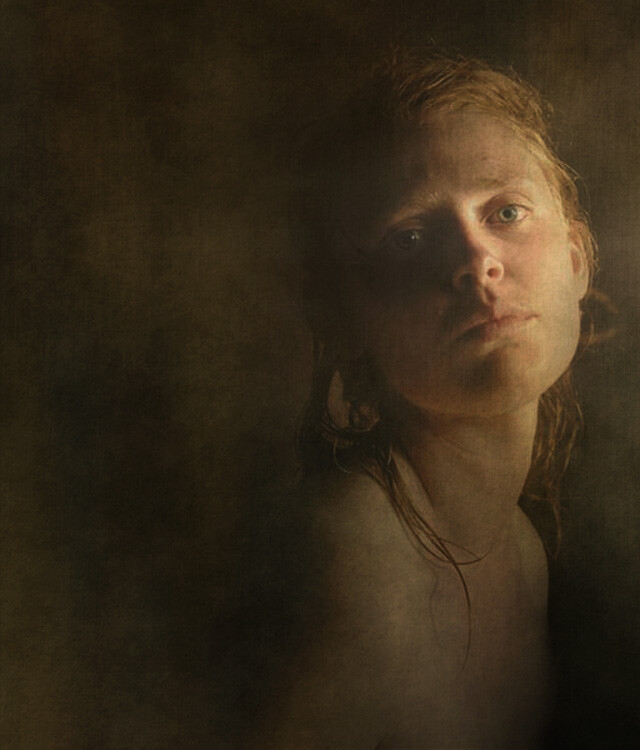
HawkinsDPS1

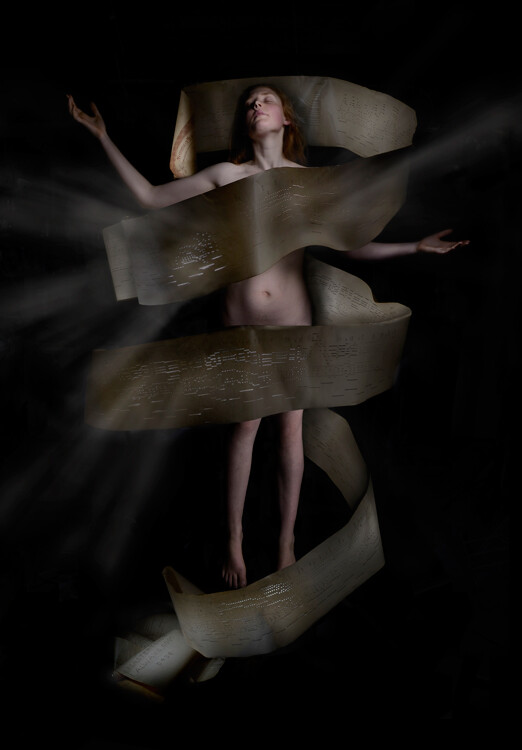
This shot was taken with a table lamp. Most of us have some sort of lamp around the place. Any kind will do. They come with their own diffuser, the lamp shade, and are easy to move around. You can adjust height with boxes, books, or anything stable you can find. You can experiment with alternative lamp shades as well as different strength, variety, or colour of light bulbs, or the number of lamps you use.

Lamp lighting usually isn’t very bright so you might need a tripod or somewhere solid to put your camera. For the image above I had the model hold the lamp and move it around slowly as I fired away, getting her to go even slower or stop when things were looking good.

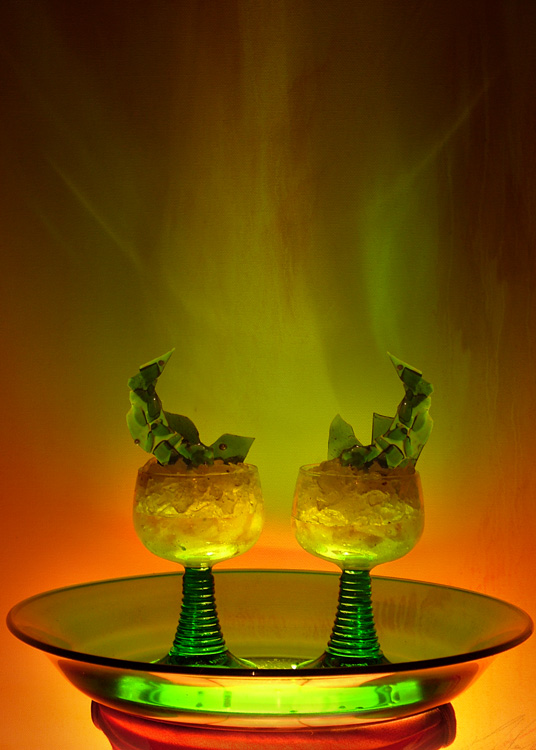
For the shot below I put the green glass dish directly on top of a lampshade, in front of an abstract painting. It’s all about experimenting.

HawkinsDPS2

Make-shift softbox

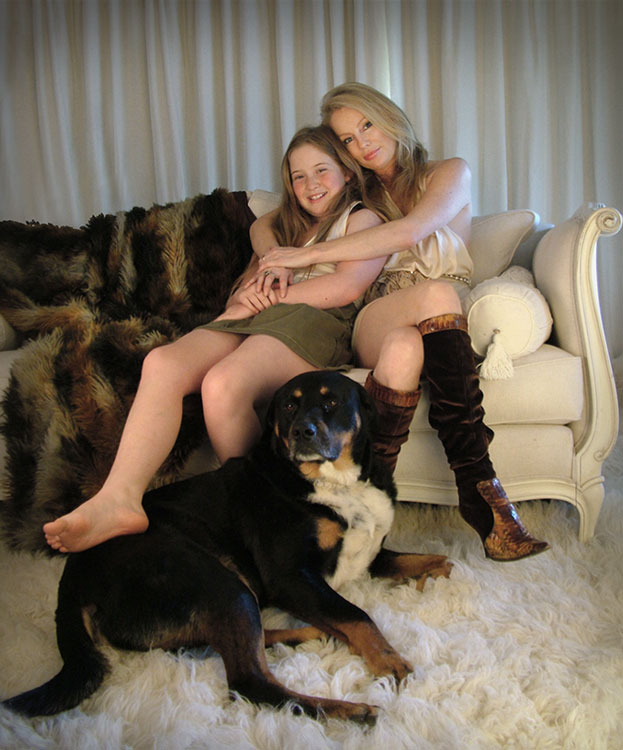
While lamps were great, I really wanted to try soft box style lighting, so I had to get a bit more creative. The portrait below of friends and their dog was lit using a large open cardboard box lined with aluminium foil and placed on its side. I then shone a bright halogen work-light into the box, and softened the resulting light with a white sheet held up in front of the setup. Off to the side was a similar setup using a lamp with the shade removed, a smaller foil lined box, and a white pillow case.

HawkinsDPS3

It’s not a perfectly lit portrait. I was just starting out with portraiture and it was my first attempt with my DIY softboxes, but the results were encouraging enough for me to keep experimenting.

Try different things – experimentation is key

I went on to using regular white umbrellas, of the rain repelling variety, to diffuse the bright bulbs used for household outdoor lighting. I’ve bounced the light from an array of heavy duty flashlights, into a foil lined rain umbrella, all attached to a tripod with about a million miles worth of gaffer tape. I’ve used metallic cardboard sheets from the newsagent, or foil covered boards as reflectors. There were many experiments, some good, some not so much, and some were surprising.

Basically you just need a light, or two, and something to diffuse or reflect/bounce the light, or both. Preferably without setting fire to anything. Work-lights and other really bright bulbs can get surprisingly hot. It’s best not to have flammable things like sheets or cardboard too close and have something protective underneath if the light is placed on surfaces.

If you are not so keen on lining boxes and hanging sheets, you might like to try light painting.

Light painting

HawkinsDPS4

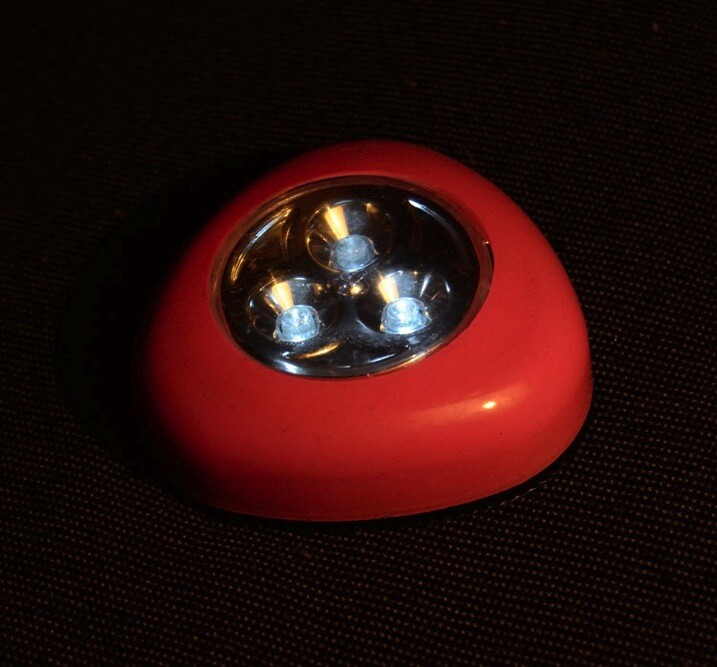
Apart from the emanating beams of light which were added later in Photoshop, the rest of this image, shot in my kitchen, was lit with only a two dollar LED light from the junk store. This was a complicated shoot, which had to be lit and shot several times, then blended in Photoshop. But you don’t have to go to that extreme. With a bit of experimenting and practice you can light a subject this way in one single shot.

There are many interesting and informative articles about light painting here on dPS. I highly recommend having a browse through them if you’ve never tried it before, but I’ll just run you through the basic idea here.

You’ll need a tripod (or somewhere solid to put your camera), a completely or almost completely dark room and a cheap little flashlight, or LED light. This is what I used for the shot above, a two dollar press button, night light.

HawkinsDPS5

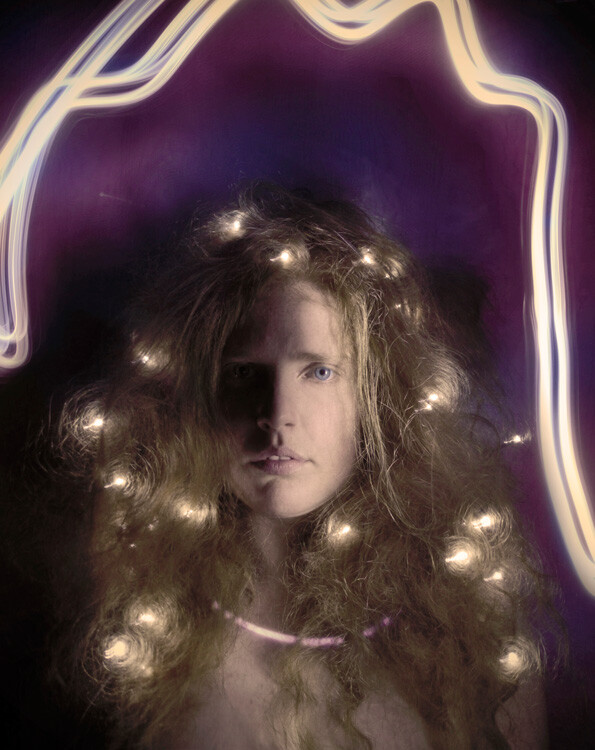
A slow shutter speed is necessary to give you time to paint. I usually start off with a shutter speed of about 20 seconds, ISO 400, aperture at roughly f/11. Then adjust from there, depending on the subject and light brightness. Once you are all set up, turn out the lights, shine your flashlight on your subject while looking through viewfinder to get your focus, then click the shutter and start painting your subject with light.

You’ll have to move in close and run your light around only a few inches from the areas you want to light. That means being in front of the lens when the shutter is open, but the camera will only pick up what you shed light on, so as long as you don’t accidentally light yourself up, you won’t show up in the shot.

Try a bit of side lighting, play around with different lengths of exposure time, different light sources. If the light shines directly into the lens, you will get what I call ghost lines, which can be used deliberately as I did in this shot below.

HawkinsDPS6

While these methods are obviously not a replacement for studio lighting gear, they are an effective alternative that can produce some surprisingly good results and allow you to take a bit of control over your lighting without forking out more than a few dollars. It’s also very fun and even though I now have a properly equipped studio, I still sometimes love to play around with a simple table lamp or two dollar torch (flashlight).

Feel free to share any photographs you created with DIY lighting setups in the comments, I’d love to see them!

googletag.cmd.push(function() {
tablet_slots.push( googletag.defineSlot( “/1005424/_dPSv4_tab-all-article-bottom_(300×250)”, [300, 250], “pb-ad-78623” ).addService( googletag.pubads() ) ); } );

googletag.cmd.push(function() {
mobile_slots.push( googletag.defineSlot( “/1005424/_dPSv4_mob-all-article-bottom_(300×250)”, [300, 250], “pb-ad-78158” ).addService( googletag.pubads() ) ); } );

The post Creating Effective DIY Studio Lighting With Household Items by Lea Hawkins appeared first on Digital Photography School.


Digital Photography School
 
Comments Off on Creating Effective DIY Studio Lighting With Household Items

Posted in Photography


Lighting for Macro Photography

23 Apr

Macro photography is great for exploring new worlds that are otherwise invisible to the naked eye. You can turn ordinary, boring subjects into fascinating ones. A closeup photograph’s composition is 80% determined by the lighting, therefore it is the single most important element a macro photographer should have complete control over. With good lighting your macro photographs will pop out of the frame and will be sharp, vibrant, and visually stunning. If you get the lighting wrong however, your macro photograph will just look dull and boring.

Image 1

In this article I hope to show you some of the ways you can illuminate your macro subjects in order to capture fantastic photographs. Macro photography can be achieved using three forms of light; continuous, flash, and natural. All of these have separate advantages over one another, but it is completely down to personal preference as to which one you should use.

Continuous Lighting

Continuous macro lighting is great for controlling a number of lighting characteristics. Furthermore, with continuous light you can see how the light is affecting the subject at all times. I believe continuous light is the best option for beginning macro photography. It allows you to build your understanding of how lighting effects macro photography considerably, which will result in you becoming a better macro photographer. Continuous lighting also offers a much more convenient way to direct light on to specific areas of a subject. This gives you full control of the lighting environment, which can result in some stunning photographs.

Continuous lighting also adds another weapon to a macro photographer with a video capable camera. Macro videography is incredible and with continuous lighting, you don’t even need to change anything to switch between capturing photos and videos.

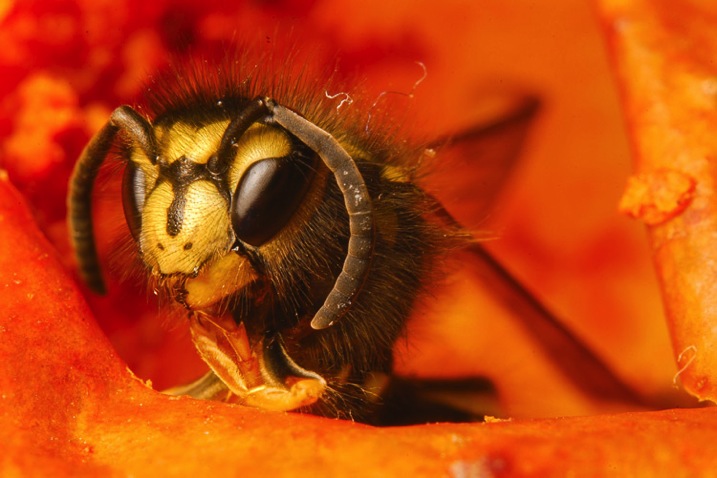
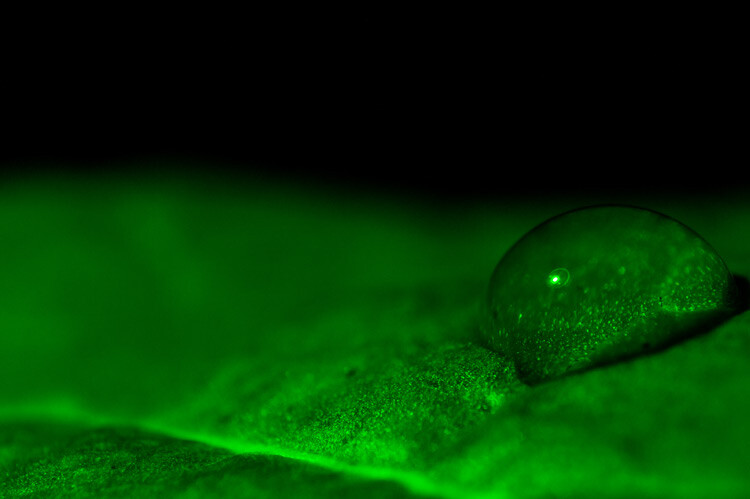
Image 2

The images above were both captured using continuous lighting techniques. The first image subject is a wasp and the second is moss.

Flash (strobe)

Flash photography is great if used properly. Its main advantage is the ability to freeze subjects due to the short duration of the light. This makes it excellent for out in the field as a fill light and for capturing moving insects.

Flash is more complex to learn to use properly, with strange flash settings such as manual mode, TTL and rear curtain sync. However, once learned well the results are amazing. Using flash is very much a trial and error process and it takes a lot of time to get right.

Natural Light

Image 3

Natural sunlight usually provides more than enough light for macro photography. You can combine it with reflectors and other photography accessories to gain an element of control. Natural light can also be used alongside either continuous or flash light accessories.

Image 4

The two images above were captured using natural light.

Adding additional elements of lighting control:

Controlling your lighting environment is essential to producing that perfect macro photograph. Here are a couple of methods that you can use to help achieve complete control.

Diffusion

Lighting that doesn’t look natural is not a good look for a macro photograph, if it is unintended. The way to avoid this is to use diffusers, which spread out the light across a bigger surface area. This results in a softer light that looks natural and makes your macro photographs aesthetically more pleasing. Diffusers can be made out of materials found in the home; tissue paper is great for example.

Image 5

This image was taken with no diffuser, notice how the light is quite harsh and reflects off the subject.

Image 6

This is the same subject, but captured using a diffuser. Notice how the light looks much more natural and makes the image look more appealing.

Colour

Adding coloured lighting to macro photos can make them unique, and stand out in the crowd. You can do this by applying gels or colour filters to your lighting equipment.

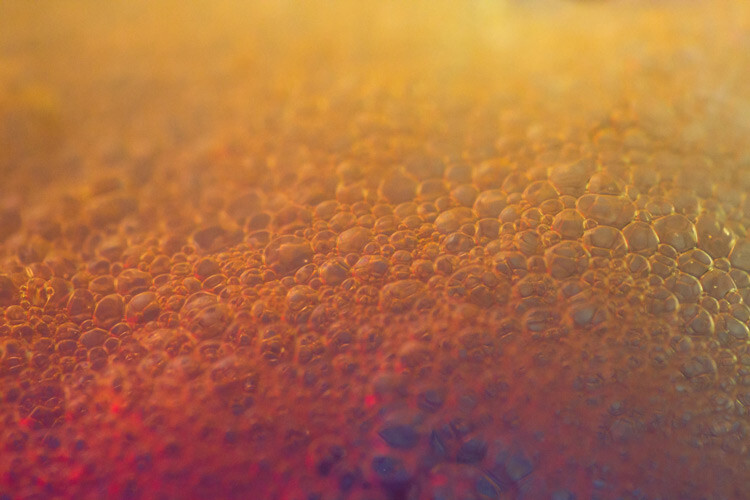
Image 7

This image of shaving foam has been captured using coloured continuous lighting.

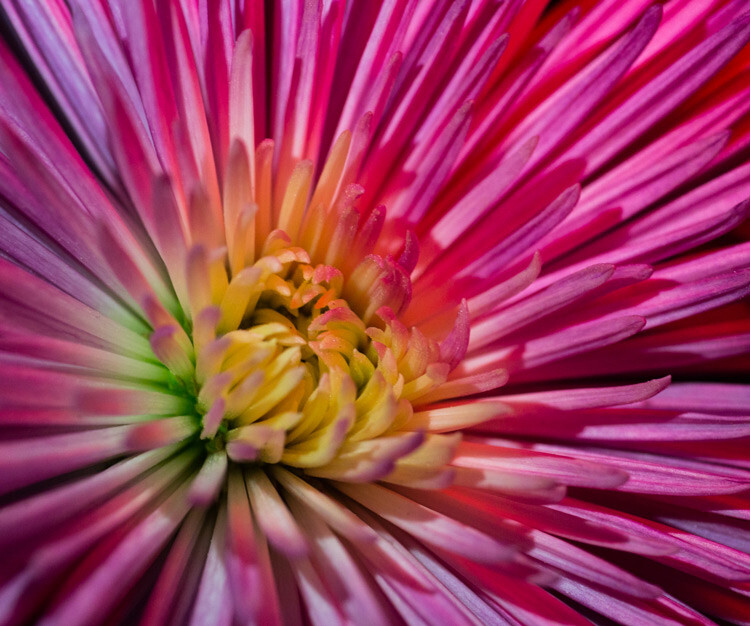
Image 8

This image of a flower has been captured using coloured continuous lighting.

Lighting Position

Understanding how the direction of light alters the appearance of your subject is significant. This is much easier to do with continuous light, although it can be done with flash as well. A macro subject will look completely different with a light behind it for example.

Image 9

This image of liquid soap has been captured using a light positioned from behind the subject.

I hope this article has given you a great insight to how lighting affects macro subjects and how you can control it. If you have any questions or additional tips, please leave a comment below.

googletag.cmd.push(function() {
tablet_slots.push( googletag.defineSlot( “/1005424/_dPSv4_tab-all-article-bottom_(300×250)”, [300, 250], “pb-ad-78623” ).addService( googletag.pubads() ) ); } );

googletag.cmd.push(function() {
mobile_slots.push( googletag.defineSlot( “/1005424/_dPSv4_mob-all-article-bottom_(300×250)”, [300, 250], “pb-ad-78158” ).addService( googletag.pubads() ) ); } );

The post Lighting for Macro Photography by Samuel Granger appeared first on Digital Photography School.


Digital Photography School
 
Comments Off on Lighting for Macro Photography

Posted in Photography