RSS
 

Posts Tagged ‘Light’

LxMeter transforms your smartphone into a light and flash meter

05 Aug

The LxMeter from Italian manufacturer Optivelox has introduced an accessory that turns your smartphone into a light meter. It’s similar to the Lumu light meter, but provides flash meter functionality and is capable of working with Android devices via a dedicated app. Read more

Articles: Digital Photography Review (dpreview.com)

 
Comments Off on LxMeter transforms your smartphone into a light and flash meter

Posted in Uncategorized


How to Light a Beer Bottle – a Video Tutorial

02 Aug

If you’ve ever wanted to photograph a bottle (beer, wine, soda, ever water) and make it look like they do in the magazines or advertisements you’ll want to watch this!

In this video tutorial Lee Morris from Fstoppers shows how to light a beer bottle, step by step, one light at a time. See what each is doing as he adds them one by one. Check it out and scroll down below the video to get links to some of the gear he mentions in the video.

Things mentioned in the video:

  • Yongnuo flash
  • Flash Disc by Fstoppers
  • PocketWizard triggers
  • C-stand
  • Magmod grid
  • Acrylic Ice Rock Cubes 3 Lbs Bag, Vase Filler or Table Decorating Idea- Clear

Want to see more beverage images – have a look here.

googletag.cmd.push(function() {
tablet_slots.push( googletag.defineSlot( “/1005424/_dPSv4_tab-all-article-bottom_(300×250)”, [300, 250], “pb-ad-78623” ).addService( googletag.pubads() ) ); } );

googletag.cmd.push(function() {
mobile_slots.push( googletag.defineSlot( “/1005424/_dPSv4_mob-all-article-bottom_(300×250)”, [300, 250], “pb-ad-78158” ).addService( googletag.pubads() ) ); } );

The post How to Light a Beer Bottle – a Video Tutorial by Darlene Hildebrandt appeared first on Digital Photography School.


Digital Photography School

 
Comments Off on How to Light a Beer Bottle – a Video Tutorial

Posted in Photography


LumoPro LP742 LightSwitch Speedlight Case doubles as light modifier

30 Jul

LumoPro has announced the LP742 LightSwitch Speedlight Case and Modifier. The case is made from padded ballistic nylon and is able to accommodate most speedlights on the market. LightSwitch can also be transformed into three types of light modifiers: a reflector, bounce card, and flag. The case features a double-zipper design and a velcro strap on the back. Read more

Articles: Digital Photography Review (dpreview.com)

 
Comments Off on LumoPro LP742 LightSwitch Speedlight Case doubles as light modifier

Posted in Uncategorized


How to Creatively Alter the Light in Your Photo Using Lightroom

28 Jul

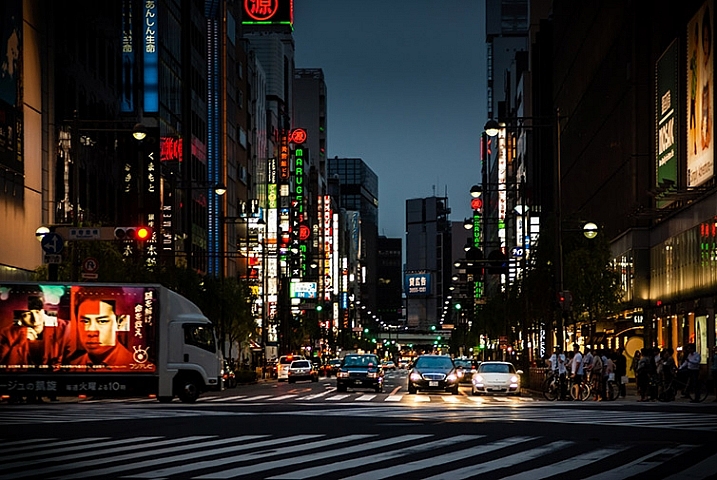
photo of a Tokyo streetscape after being fixed in Lightroom

Learn how to fix problem light and enhance your vision for your photos in Lightroom.

If you’re like most of us, you’ve taken photos from time to time that you’ve had high hopes for, only to realize later on that they didn’t turn out the way you’d hoped. Often what looks like awesome light when you captured the image, just doesn’t translate to great light when you view the photo on your computer screen.

When the photos you’ve captured are once in a lifetime memories they deserve better than this. Thanks to Lightroom they can be improved, fairly quickly and easily. In this video you’ll see how to relight a photo in Lightroom. You’ll learn techniques that you can use on your photos to move the light from where it is now to where you want it to be.

You will see how to use the Graduated Filter to darken skies, how to use the Radial Filter and the Adjustment Brush to bring light and saturation to where you want it to be.

Don’t get me wrong, I’m a big advocate of using the correct settings and capturing a good photo right in the camera. I’m also pragmatic and I know that, despite the best of intentions, the photos you capture don’t always look as good you’d like. Lightroom can help.

So here’s how you can use Lightroom’s tools to improve a photo. This rather lifeless Tokyo streetscape is improved so it is a crisper, shinier image with light and saturated color where it should be. This is something you can do too.

We’d like to see what you do with these tools and your photos, so feel free to show us in the comments below.

googletag.cmd.push(function() {
tablet_slots.push( googletag.defineSlot( “/1005424/_dPSv4_tab-all-article-bottom_(300×250)”, [300, 250], “pb-ad-78623” ).addService( googletag.pubads() ) ); } );

googletag.cmd.push(function() {
mobile_slots.push( googletag.defineSlot( “/1005424/_dPSv4_mob-all-article-bottom_(300×250)”, [300, 250], “pb-ad-78158” ).addService( googletag.pubads() ) ); } );

The post How to Creatively Alter the Light in Your Photo Using Lightroom by Helen Bradley appeared first on Digital Photography School.


Digital Photography School

 
Comments Off on How to Creatively Alter the Light in Your Photo Using Lightroom

Posted in Photography


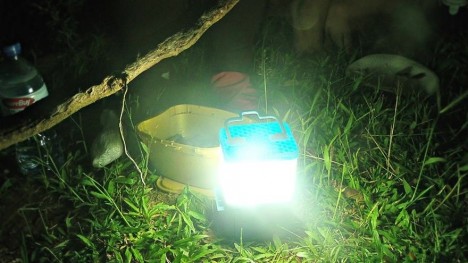
Salt-Powered Lamp: 8 Hours of Light from 1 Glass of Saltwater

27 Jul

[ By WebUrbanist in Design & Products & Packaging. ]

salt energy lamp design

Aiming to bring low-cost illumination to residents of the Philippines, a nation of 7,000 oceanic islands, the Salt Lamp uses a free and abundant resource to reduce fire risk from candles and replace the cost of traditional lighting.

salt water lamp

Developed by engineer Lipa Aisa Mijena of De La Salle University, the Salt Lamp requires a single glass of water with two tablespoons of salt to provide a night’s worth of a light, but, best of all, it can run off the naturally salty water of the surrounding ocean.

salt powered charger device

The electrode can run for over a year without requiring replacement as well. The next-generation version of the Salt Lamp will also have the capacity to charge portable electronic devices like cellular phones.

salt powered light

Currently, many households in the country lack access to or funds for electricity, resorting instead to oil lamps (which can cause house fires) or battery-powered lights (which cost more to use). Worse, during times of critical need (the area being prone to natural disasters) the resources required to make light are all the more essential yet difficult to acquire.

salt lamp design

As someone who has both spent time with locals around the country and a member of Greenpeace Philippines, Mijena developed the Salt Light as an eco-friendly, low-footprint alternative that could be sold commercially but, first and foremost, deployed via non-profit organizations to those in need. “There are no materials and components inside the lamp that may cause fire accidents. One less thing to worry about for families that rely on kerosene lamps as their main source of lighting. This lamp uses the science behind the Galvanic cell, the basis for battery-making, changing the electrolytes to a non-toxic, saline solution — making the entire process safe and harmless.”

Share on Facebook


[ By WebUrbanist in Design & Products & Packaging. ]

[ WebUrbanist | Archives | Galleries | Privacy | TOS ]


WebUrbanist

 
Comments Off on Salt-Powered Lamp: 8 Hours of Light from 1 Glass of Saltwater

Posted in Creativity


Shooting Indoors in Ambient Light: Yoga Photo Session

23 Jul

Shooting indoors is always a challenge unless you have a professional lighting setup with you. The light is usually low, so it’s hard to get any kind of depth of field. Lightbulbs inside of lamps tend to glow orange, while overhead florescent lights show up on the greenish side, and aren’t very pretty. So what do you do? Let your Continue Reading

The post Shooting Indoors in Ambient Light: Yoga Photo Session appeared first on Photodoto.


Photodoto

 
Comments Off on Shooting Indoors in Ambient Light: Yoga Photo Session

Posted in Photography


How to Use Your Tablet or SmartPhone as a Light Source for Photography

23 Jul

In the early 90s I was just a kid, and I remember watching a VHS tape about photography lighting with the great Dean Collins. I was truly amazed with the way things were arranged in the studio and how he placed the light. This was magic to me, and Dean Collins was the magician.

I watched it over and over, trying to find the little tricks behind everything he was doing. Since that day, every time I see a picture, I try to understand how it was done and how the light was placed, the quality of the light, the reflections, and the shadows it casts. What I’ve learned along the way is that a lot of the commercial images you see are done with some really simple lighting setups, and not in the big studios with the big production sets that you might imagine.

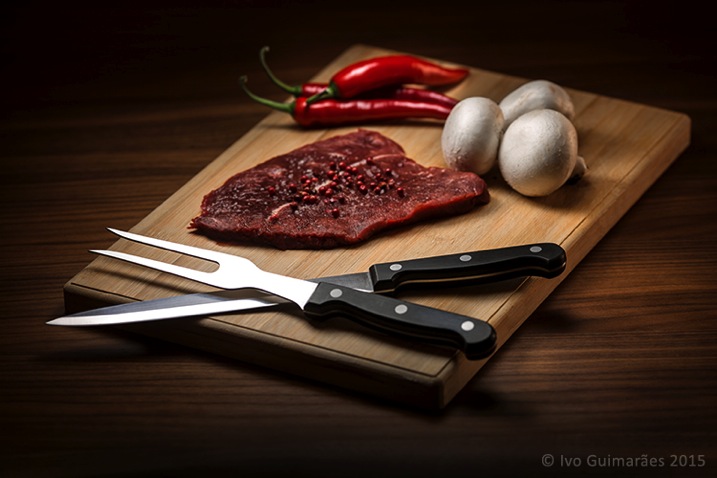
The next image is an example.

01

This image might look like a complicated and high-end lighting setup, but in fact, the only light sources used here were simply a tablet and a smartphone.

02

This is a typical light painting image, where the camera is placed on a tripod and the image shot at ISO 50, f/5.6 and a 4 second exposure time. I used the lowest ISO so I could make the image as clean and noiseless as possible. F/5.6 was the chosen aperture to give me the depth of field effect I was looking for, and after a couple of test shots, I realized that 4 seconds was the correct exposure time for the light I was using. It also gave me a comfortable time-frame in which I could move the light around and create the desired effect. An infrared remote shutter release was used to avoid touching the camera and keep it as steady as possible.

Light painting is a technique I use a lot in my work. I used to do it mostly with small lanterns and led light panels, but I realized that a tablet screen light and a smartphone camera led light are fantastic tools to use as light sources in this type of images. There are a few apps that can help to control what shows up on the screen, and transform your device into a mean light-painting machine, but you don’t really need them.

What I’ve done is to create my own masks in Photoshop which I have in my iPad Mini Retina’s camera roll to use when I need. Here are some examples of masks I’ve created.

03

These masks control the shape and colour on the screen, and the brightness can be easily controlled in the device’s screen definitions.

I took some readings with a colour meter. The iPad screen is around 5,500k and the iPhone camera LED light is around 6,500k, so it’s easy to adjust your camera to match the light source’s colour temperature or use different colours on the device’s monitor to create colour effects in the image.

The light from these screens is usually soft; you can make it even softer with some tracing paper in front of the screen and you can control the spread of light with some black card flags.

In this case I was holding the device by hand and moving it around, but you can buy cheap tablet and phone holders with ¼” thread connectors that can be mounted onto tripods, magic arms or even handles that make it easier to hold.

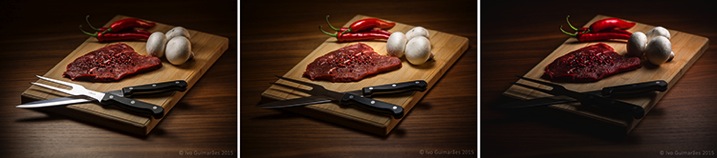
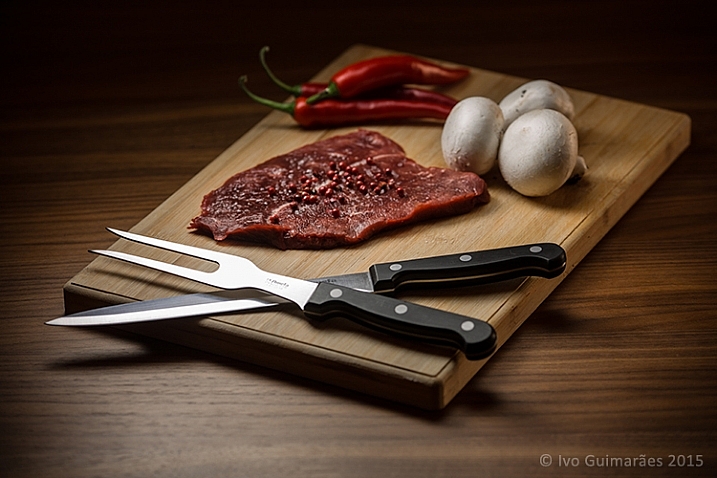
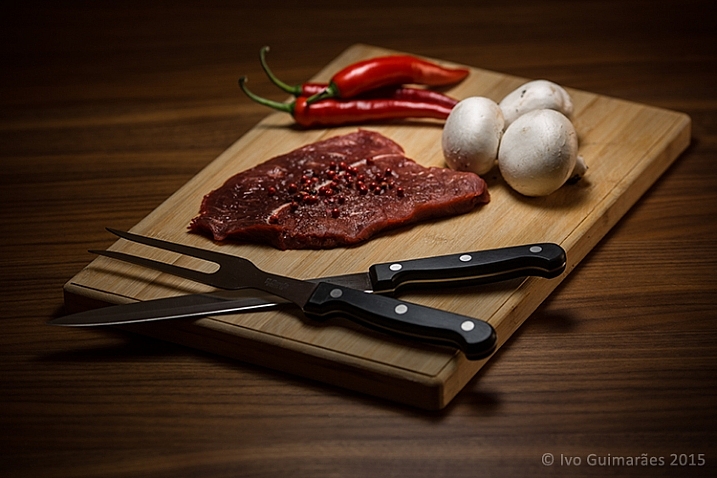
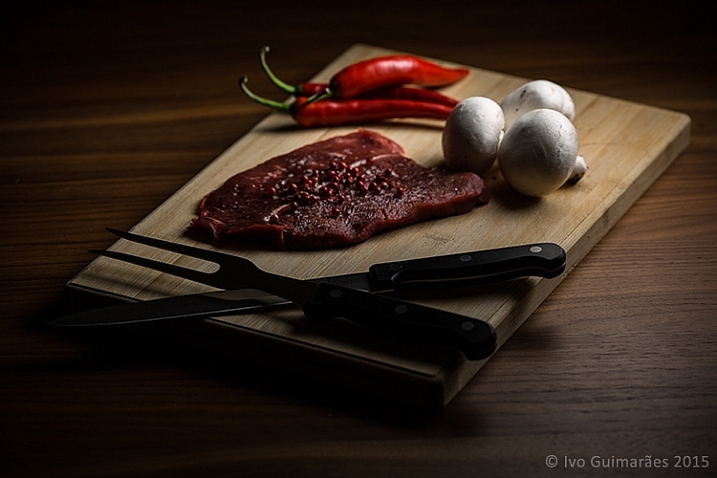
This particular image could have been done with only one exposure, but I decided to take it a bit further with a composition of three images with three different types of light.

04

04a

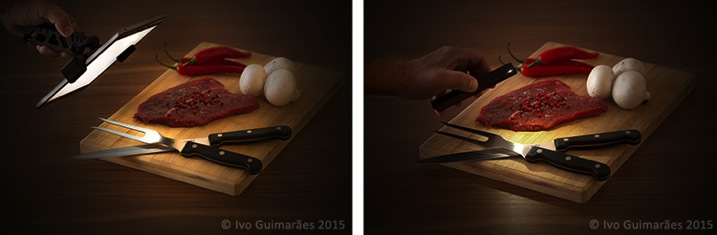
The first image (above) was created with perfect light on the knife and fork, with the iPad positioned at an angle, and with a white screen for a nice light reflection.

The second image (below) has the perfect light on the steak, chilies and mushrooms, with a circular faded mask on the iPad screen.

04b

The third image (below) gives a vignette effect and some dramatic light with the LED camera light of the iPhone which is a much harder (smaller) light and therefore casts harder shadows.

04c

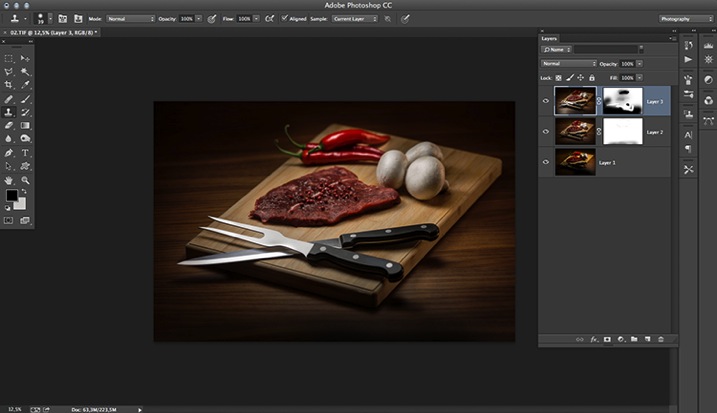
Now it’s just a matter of composing the final image in Photoshop using the best that each of these images has to offer.

05

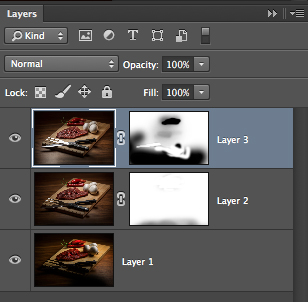
The idea here is to stack the three images and use layer masks to show the good light spots and hide the bad ones. Here is a closer look at the layers with associated masks for each one.

06

These lighting and composition techniques are not exactly new. This was done long before Photoshop and digital photography were around. Film with multiple exposures or darkroom masking techniques were used with similar effects a long time ago. Nowadays, things are just a lot easier with the digital advent, but the fact is that the basics and references are still there, and understanding this puts you on the right path to be a better photographer.

Have you tried this technique before? Give it a go and post any comments or questions you have below.

googletag.cmd.push(function() {
tablet_slots.push( googletag.defineSlot( “/1005424/_dPSv4_tab-all-article-bottom_(300×250)”, [300, 250], “pb-ad-78623” ).addService( googletag.pubads() ) ); } );

googletag.cmd.push(function() {
mobile_slots.push( googletag.defineSlot( “/1005424/_dPSv4_mob-all-article-bottom_(300×250)”, [300, 250], “pb-ad-78158” ).addService( googletag.pubads() ) ); } );

The post How to Use Your Tablet or SmartPhone as a Light Source for Photography by Ivo Guimaraes appeared first on Digital Photography School.


Digital Photography School

 
Comments Off on How to Use Your Tablet or SmartPhone as a Light Source for Photography

Posted in Photography


How to Make Creative Images with a $12 LED Light

22 Jul

Photography is all about the light. As photographers, our aim is to capture and control the amount of light hitting the camera’s sensor to perfect a good photo.

When photographers talk about light, you will hear terms mentioned such as ambient, which is natural light. Note this type of light is always changing, it doesn’t remain constant. Split, Rembrandt, and Butterfly are some of the classic lighting patterns used for portraiture in a studio setup.

torch-shining--against-wall

A LED torch with a paper snoot.

One of my favorite basic setups when I shoot outdoors is when the day is overcast (dull), which makes the light act like one big soft diffuser. The ambient light provides my main source of light (key light) and I use a white, silver, or gold reflector to act as fill.

This is in sharp contrast to shooting in a studio where artificial lights are used. The choice and range of lights will depend on whether you use flash or continuous lighting. The main advantage to this kind of setup is that you have complete control over the lighting, plus it doesn’t rain!

The best method I find in learning about lighting, be it natural or artificial, is to experiment. Recently, I was flipping through a camera magazine when this product caught my eye – The Ice Light 2 by Westcott. It stood out for two reasons: The concept and the price. I really liked the Stars Wars light-sabre appeal to it. It’s different, and has that wow factor, as does the price. It’s not cheap.

This is not a review of the Ice Light, but it did give me some inspiration for an idea. For less than $ 12.00 USD, I purchased this LED light which, surprisingly, has 140 lumen. I set myself a challenge to see how effective this light source could be when used for photography.

Torch-in-hand

A small but powerful LED torch light.

How did I test it? I took some shots outdoors, as well as indoors, just to get some variety and scope to this project.

For my initial shots, it was 10:30 p.m. at night, not quite dark, but dusky. I went to a little park near where I live, placed the torch horizontal in the grass, and had the toy plastic Gorilla in a grassy verge, roughly a couple of feet away. I had the aperture at f/2.5, the ISO at 400, and the shutter speed at 1/50th.

Gorilla-in-grass

A toy plastic gorilla in the grass.

Nearer home and again outside, I place this Lego figure on a garden wooden chair with slats. I had the torch underneath standing vertically. Just by moving my camera rather than the light, I was able to get a bit of flare that really added drama to the shot.

Lego-girl-figurine

Cool Lego girl figure.

Torch-under-chair

I placed the torch upright under a garden chair with slats.

Back indoors, I had my daughter hold the torch with paper wrapped around the end to form a snoot.

torch-with-paper

Using plain white printing paper wrapped around the torch to form a snoot.

I got her to move the torch around until I was happy with the light. I really liked the catchlights. The camera settings were: Aperture f/4.5, shutter speed 1/30th, ISO at 800, the focal length was 44mm.

Amy-faraway-look

Interesting catchlights from the torch with a white paper snoot.

Amy-reading-book

The torch was placed in the centre of the book facing towards the camera.

I had the idea brewing for some time of trying to get that shot lit from the inside of a tent; the one that is ubiquitous in great landscape shots. I had a lot of fun doing this shoot, and would highly recommend you try to do the same! The plan was to have my daughter inside and get a nice silhouette of her against the wall of the tent. It didn’t go to plan, which was fortunate for me.

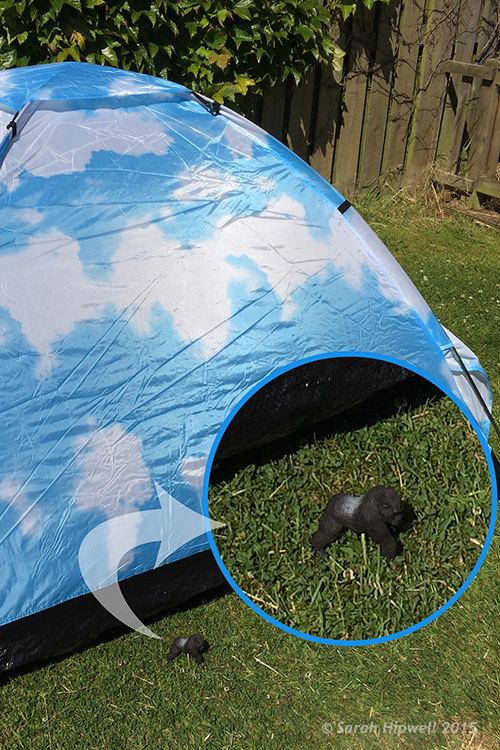
As a last resort, I got my plastic gorilla figurine and placed him inside the tent with the torch lying horizontal on the floor of the tent, only about 6 inches behind him. I was well chuffed (pleased) with the final result. It was even better than I had envisioned; especially as the gorilla is only 3.5 inches tall. I did have the camera on a tripod as it was dark. The settings were: ISO 800, aperture f/4, shutter speed 1/8th, and focal length was 40mm.

gorilla

Fun with a toy gorilla inside a tent with a torch.

Gorilla-scale-to-tent

The gorilla is only 3 and half inches tall, small relative to the size of the tent.

Conclusion

To be honest, I wasn’t expecting this project to yield the results that it did. It has been the best $ 12.00USD that I’ve spent in a long time. It is now another must item to have in my camera bag.

What non-photography light sources have you used in your photography? Please share in the comments below.

googletag.cmd.push(function() {
tablet_slots.push( googletag.defineSlot( “/1005424/_dPSv4_tab-all-article-bottom_(300×250)”, [300, 250], “pb-ad-78623” ).addService( googletag.pubads() ) ); } );

googletag.cmd.push(function() {
mobile_slots.push( googletag.defineSlot( “/1005424/_dPSv4_mob-all-article-bottom_(300×250)”, [300, 250], “pb-ad-78158” ).addService( googletag.pubads() ) ); } );

The post How to Make Creative Images with a $ 12 LED Light by Sarah Hipwell appeared first on Digital Photography School.


Digital Photography School

 
Comments Off on How to Make Creative Images with a $12 LED Light

Posted in Photography


The Ice Light by Westcott – Product Review

22 Jul

Having easy access to the right light at every photo shoot is essential to any photographer, and in this case made possible by the Ice Light. A portable and brightness adjustable, continuous LED light source, the Ice Light is a lightweight and simple on-demand lighting solution. If anything, its similar build to that of a light sabre, will almost always be a conversation starter between you and your photo subject. This review will discuss the pros and cons of the Ice Light, as well as some photo shoot scenarios where it shines the most.

History of the Ice Light

A relatively new product, the Ice Light was developed in 2012 by world-reowned photographer Jerry Ghionis and manufactured by Wescott. The Ice Light’s main attributes are its ability to transmit daylight-balanced LED lighting via a long, handheld device, and the fact that is is powered by a rechargeable battery. Despite its relatively simple function, the Ice Light was groundbreaking as the very first daylight-balanced, handheld LED light on the market. It has quickly become a favorite light source for on-the-go photographers and videographers.

Ice-Light-Kit-b


The Ice Light Specs

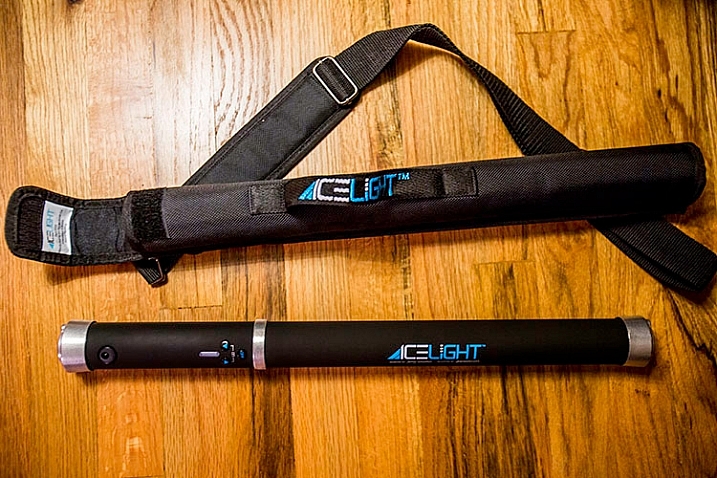
The Ice Light’s long light bulb emits a perfect 5,200K color temperature through a frosted diffusion panel, helping your camera find the best white balance in the scene. With an outer encasing of aluminum, the Ice Light is durable, yet transportable. It stands about 24 inches long, weighs a mere 1.3 pounds, and it fits inside most regulation carry-on luggage. In fact, a slim carrying case is included with the light, making it easy to swing over one’s shoulder, or clip to a belt while on a photo shoot. The Ice Light has a very comfortable hand grip on one end, but also has mounting threads on both ends so it can be easily mounted to a tripod or light stand.

Powered by a single rechargeable Lithium Ion battery, the Ice Light can run for up to 60 minutes at full power, and be fully charged up in about 2.5 hours. Battery packs are also available to boost battery life by an extra 5 hours. There are also some light modifier accessories available including tungsten gels and barn doors to further modify the light.

Ice-Light-example-2b


Best uses

Given the Ice Light’s long shape, it can be likened to a rectangular strip light that operates according to the logic of the larger the light source is in relation to the photo subject, the softer the light will be.  As a result, the Ice Light really shines in these specific photography situations:

Achieving dramatic lighting

Due to the Ice Light’s long, narrow body, achieving a photo that is equally balanced with light requires at least two Ice Lights, or a single Ice Light and a reflector. However, if you’re aiming for a dramatically lit photo with lots of shadows, the Ice Light can give you just that!

Ice-Light-Buttons-2


When you don’t have a knowledgable photo assistant

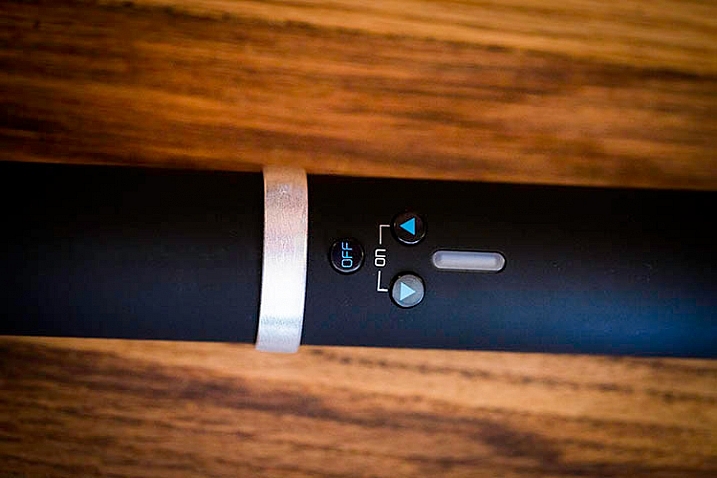
If you consistently perform run-and-gun type of photography, or change locations frequently, you will likely be in need of an assistant to hold or set up your lights as you shoot. If you have a spur-of-the-moment need for lighting, the Ice Light’s easy-to-use interface makes it simple for anyone to operate. There are three simple buttons: an on/off switch, a button to increase light, and another to dim it. As a result, there’s less time required to futz around with light testing as you might have to with strobes, and you can use any Average Joe as a lighting assistant.

When you need continuous lighting

Another big advantage of the Ice Light is its ability to emit continuous lighting rather than strobes. This can be hugely beneficial for videographers or any other media specialists who need a constant, on-demand stream of daylight-balanced LED illumination.

Ice-Light-example-1b


Sold? Well, about that price…

All in all, the Ice Light makes a compelling case to be a photographer’s new best friend. There is only one potential downside: the cost. A brand new Ice Light runs roughly $ 400, while its newer, upgraded version the Ice Light 2 is priced at $ 549. Both Ice Lights include a battery charger, power cords, plug converters, gel clips, and a carrying case. Still, the price may seem steep to some.

Maybe try your own DIY solution – How to make creative images with a $ 12 LED light

What are your thoughts on the Ice Light?

Have you tried out an Ice Light? If so, would your recommend it to others?

googletag.cmd.push(function() {
tablet_slots.push( googletag.defineSlot( “/1005424/_dPSv4_tab-all-article-bottom_(300×250)”, [300, 250], “pb-ad-78623” ).addService( googletag.pubads() ) ); } );

googletag.cmd.push(function() {
mobile_slots.push( googletag.defineSlot( “/1005424/_dPSv4_mob-all-article-bottom_(300×250)”, [300, 250], “pb-ad-78158” ).addService( googletag.pubads() ) ); } );

The post The Ice Light by Westcott – Product Review by Suzi Pratt appeared first on Digital Photography School.


Digital Photography School

 
Comments Off on The Ice Light by Westcott – Product Review

Posted in Photography


How to Make Unique Portraits Using Light Painting

19 Jul

Using the surprisingly simple technique of light painting you can create a wide variety of portrait styles using only a small flashlight as your light source. I should warn you though, light painting of all kinds can be highly addictive. Once you start, you may not be able to stop.
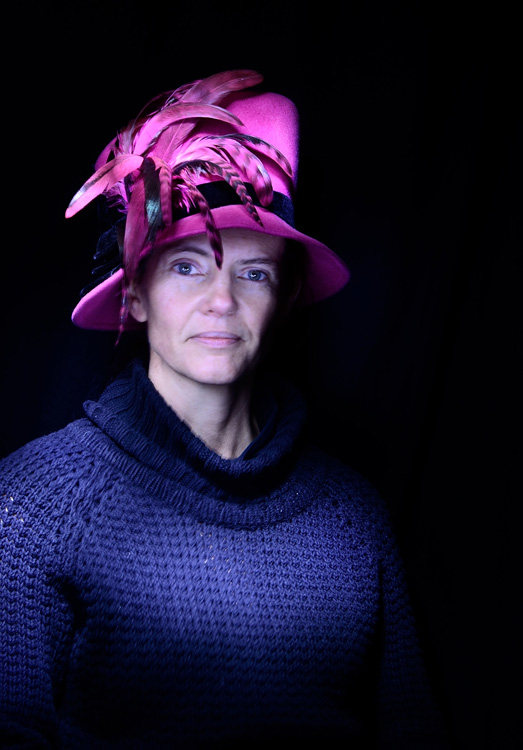
Light painted portrait

Light painted portrait

One of the main things to understand with light painting is that the camera sensor only reads light, if there isn’t any light hitting the person shining the flashlight, they simply do not show up in the image. This allows you to move around in front of the camera while the shutter is open, and gives you ultimate control of what areas of your subject are lit. This is great for portraiture, especially in situations where you might have a complicated background, or one where you only want to light certain sections.
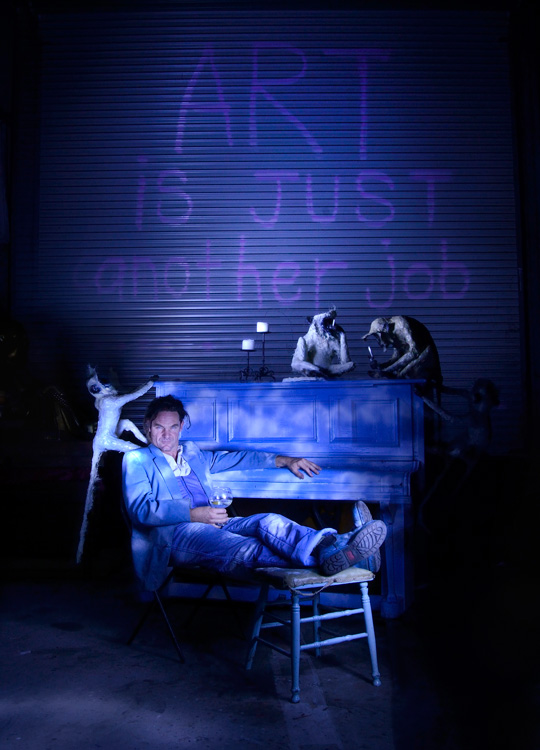
light painting a portrait

Below is a list of what you will need for any light painting, and a guide on how to use the technique specifically for portraiture. For a more detailed information on light painting have a look at this two part tutorial .

What you will need:

A hand held light source. Any cheap flashlight or LED light will do, you can even use your mobile phone.
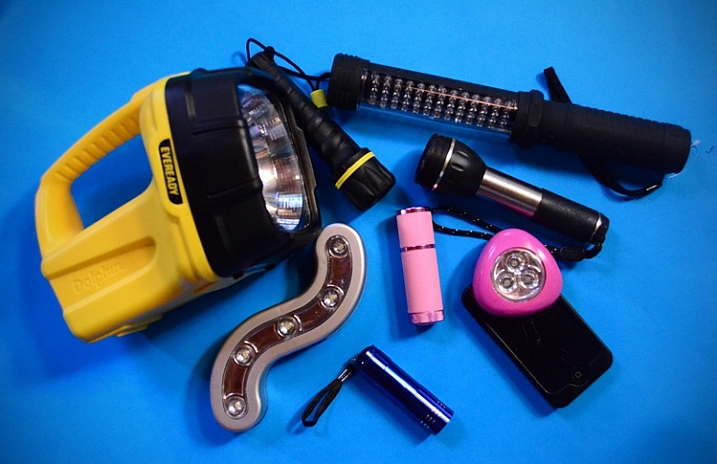
Tools of the light painting trade

Any small LED or flashlight will do, even your mobile phone.

For light painting a portrait subject a directional beam of light is best, non-directional (or diffused) light will illuminate you as well. Different flashlights give off different types of light. Some have blue cast, which isn’t great for portraiture so you might want to experiment with your white balance, or add a warming filter in post-processing. You can also add color to your light source with cellophane (colored gels) or colored sheer fabric.

Tripod and camera settings

Light painting needs a long exposure, so you will need your camera set up on a tripod. Setting your shutter speed somewhere between 10 and 30 seconds is a good place to start, then play around from there. Your ISO should be at its lowest to avoid the grain (noise) caused by a long exposure.

The cover of darkness

You’ll need a completely dark room or studio, or you can shoot outside at night. If shooting outside, you’ll have to be careful of incidental light, such as street or car lights, overexposing your image. But these things can be used to your advantage in creating interesting backgrounds for your portrait subject.
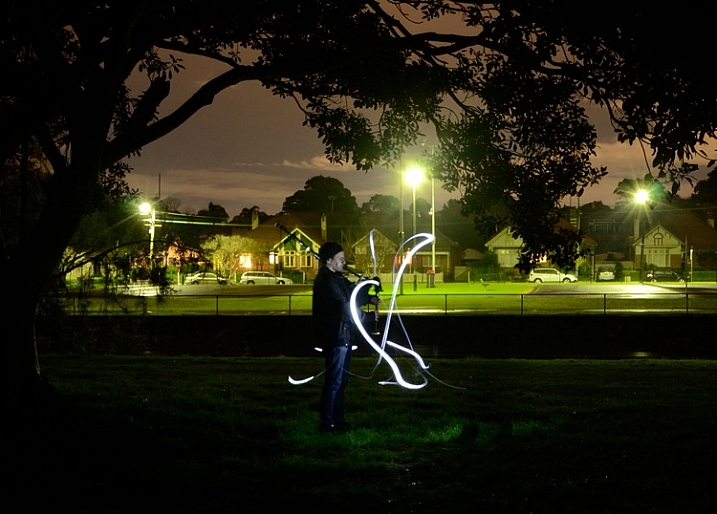
Light painting a portrait outdoors

Light painting a portrait outdoors

Ready, set, light paint

Have your portrait subject in position and turn all lights out. Shine your light source on your portrait subject to help you get focus. You’ll want to focus on the face, so it’s possibly best to have your subject close their eyes before you shine your light directly into their face.

Note: to keep the focus locked when you press the shutter button, you will either need to switch it to Manual Focus or use back button focus.

Then click the shutter, and try not to trip over anything in the dark as you move in toward your subject. How close you get to your subject depends on your light source strength, how fast you move it, and the effect you are after. You’ll have to experiment, but for a small LED, a few inches from your subject is a good starting point. Keep the torch (flashlight) moving constantly, and pointed away from the lens.

Getting sharp images of people when you are using long exposures usually doesn’t work so well due to people’s inability to sit perfectly still. With light painting, you are only exposing a small part of them at a time, and only for a brief moment, so while it can be a bit tricky with fidgety subjects, for the most part you will be able to get sharp images. Sometimes a bit of motion blur can also be effective.
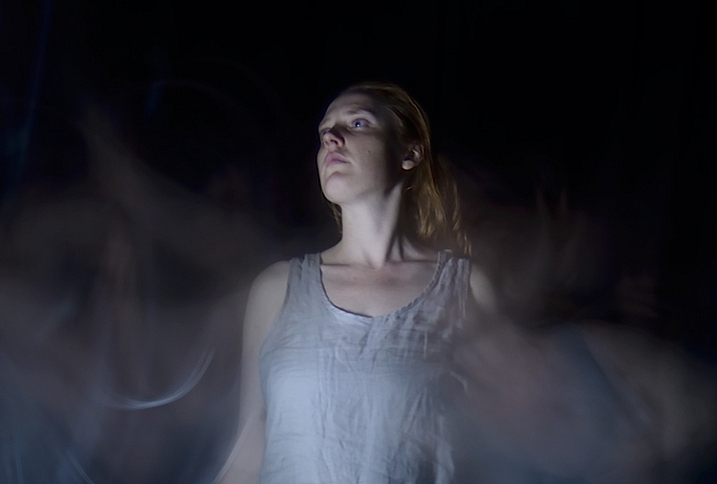
Making the most of motion blur

Making the most of motion blur

Help your subject stay still during the exposure by letting them know when you release the shutter, and when you are about to shine your light on them. They’ll be in the dark, literally, so they won’t know what you are doing.

Have them take a deep breath in and out just as, or after, you release the shutter. Don’t have them hold their breath, you don’t want them to look strained. Start your light painting with the face so they don’t have to hold their head still for your entire exposure.

Letting your portrait subject have a look at your camera preview can help them to understand what you are trying to do. If they are unfamiliar with the technique, it can seem a bit odd, all this waving a torch in their face in the dark.

You can set a flash to a slow sync so it fires off at the beginning of the exposure (or you can just set your flash to manual mode and fire it using the Test button), sharply lighting your subject, and then move in with your light source or have your model wave it around. Alternatively you can give a quick burst from a studio light.
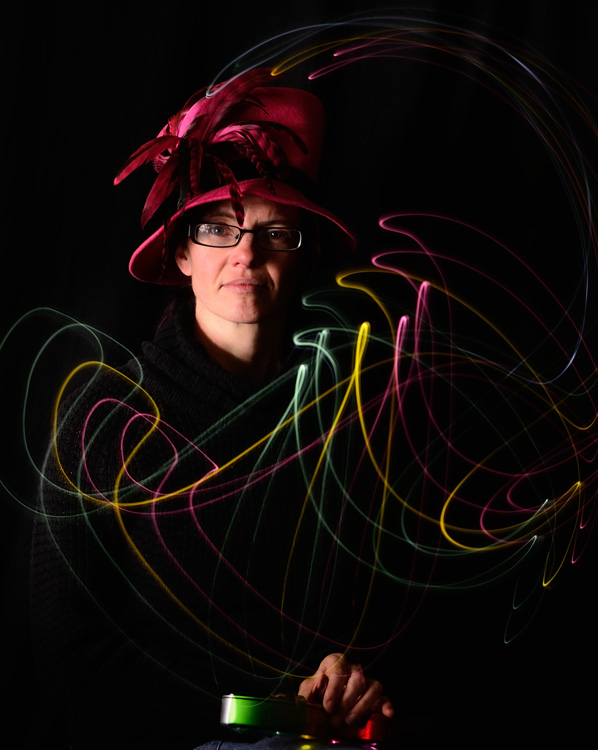
Slow flash sync combined with light painting

While still technically a light painting portrait this method is more of portrait with some light painting added in as opposed to light painting the portrait subject themselves.

It will probably take you and your portrait subject a few attempts to get the hang of it, but once you’ve got the general idea, and have tested out how your light source plays on your subject, you can then experiment. Below are some ideas to try out.

Creating light trails
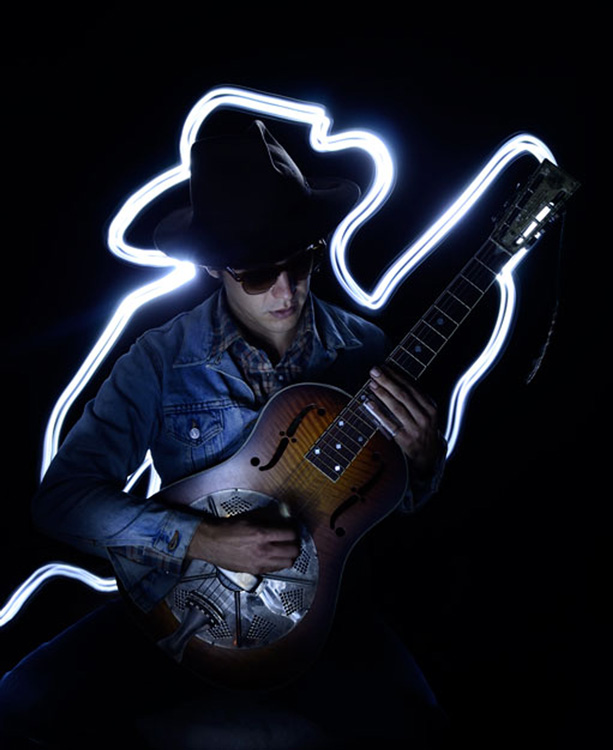
Adding light trails

Adding light trails

To get trails of light, shine the torch directly at the lens as you move it. You can move it anywhere, including in front of your subject.

Multiple sources of light
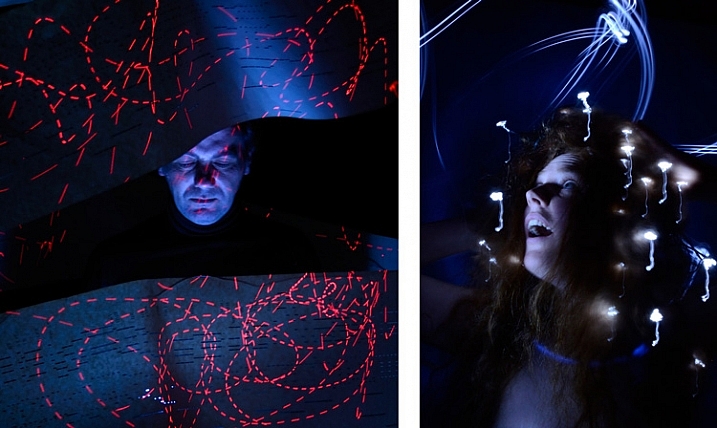
portrait-light-painting08b

In the first image above I’ve used a small LED light to paint the face, and a laser pointer for the red patterns. The laser pointer shines in very short bursts creating the broken lines. In the second image on the right, I put fairy lights in the model’s hair. The subtle movement as I light painted the rest of the model caused the fairy lights to take on the wiggly forms.

Using an iPad or tablet
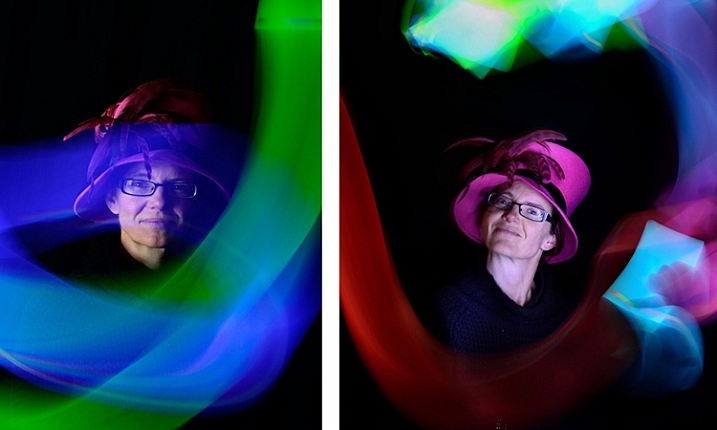
portrait-light-painting09b

For this effect I downloaded an app for my tablet that lit the screen with a solid block of bright color. The colors could be changed with a slider, so with a few attempts I managed to get coordinated enough to change the colors as I moved the tablet around the subject.

Have fun with movement
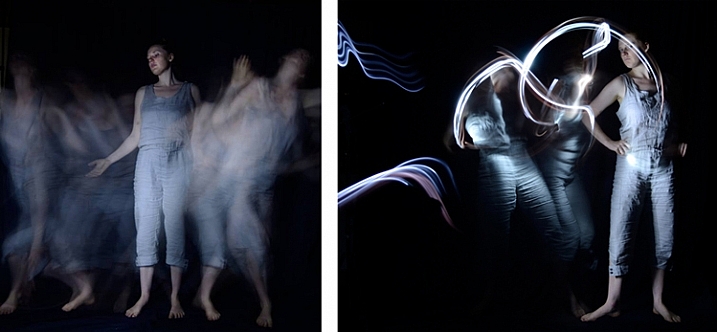
portrait-light-painting11b

For both these images I shone the light over the model in one position, then had her move to the side and lit her again. As you can see, two fairly different effects using exactly the same process.

I confess I am thoroughly addicted to light painting portraits. I love that no two shots are alike, there’s plenty of room for getting creative and having happy accidents. You can use it for many styles of portraiture, and it costs basically nothing in lighting gear. So what are you waiting for? Grab a flashlight and get started! Share your results in the comments below.

googletag.cmd.push(function() {
tablet_slots.push( googletag.defineSlot( “/1005424/_dPSv4_tab-all-article-bottom_(300×250)”, [300, 250], “pb-ad-78623” ).addService( googletag.pubads() ) ); } );

googletag.cmd.push(function() {
mobile_slots.push( googletag.defineSlot( “/1005424/_dPSv4_mob-all-article-bottom_(300×250)”, [300, 250], “pb-ad-78158” ).addService( googletag.pubads() ) ); } );

The post How to Make Unique Portraits Using Light Painting by Lea Hawkins appeared first on Digital Photography School.


Digital Photography School

 
Comments Off on How to Make Unique Portraits Using Light Painting

Posted in Photography