RSS
 

Posts Tagged ‘Light’

How to do Light Painting by Rotating the Camera

22 Nov

Circular lines are a great way to draw your viewer into the photo. The animation artists knew what they were doing with the Looney Tunes design. A similar effect is possible in photography through a process known as kinetic light painting. This technique involves moving the camera around in front of stationary lights, creating a pattern in your photo. If you use camera rotation you can create circular light lines.
rotation-light-painting11

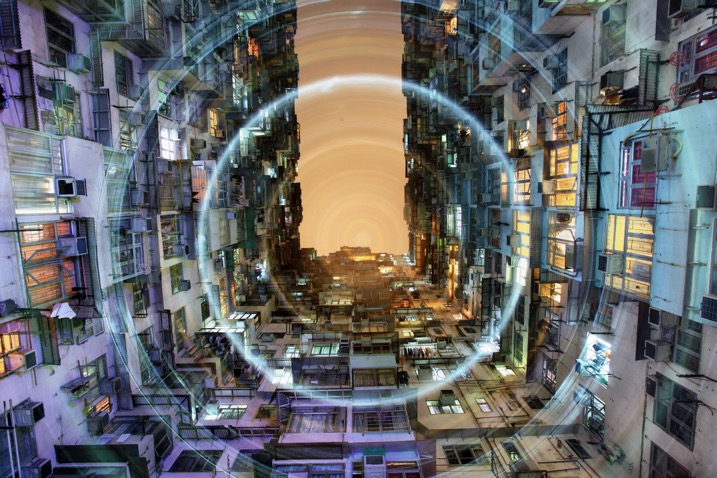
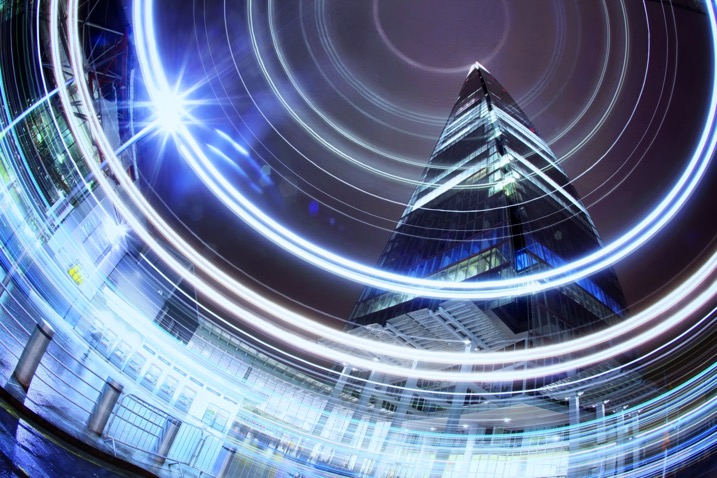
This photograph in Hong Kong has been taken many times now, the use of rotation during the long exposure gives the photo a different aesthetic.

How to take rotation light painting photos

  1. Scout a location which has lots of light, you are looking for tall buildings or big architectural structures.
  2. Set up the camera on a tripod, looking straight up. You can set the camera at an angle between 45 degrees to straight up. The worm’s eye view works very well for this technique.
  3. Choose a wide-angle lens, or even a fish-eye for this photo. A kit lens will work but use the widest focal length.
  4. Now compose your photograph, and focus the image. Use an angle finder or live view to help you do this.
  5. Make a mental note of the position of your camera on the tripod, if your tripod head shows the number of degrees of rotation jot this number down. The aim is to rotate the tripod head, starting and finishing in the same position.
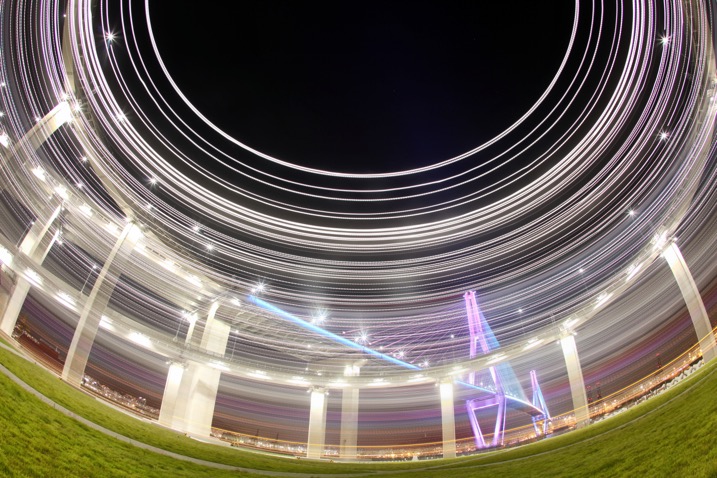
A bridge in Busan is photographed using a fish-eye lens in conjunction with kinetic light painting. A shallower angle was used here, perhaps around 45 degrees.
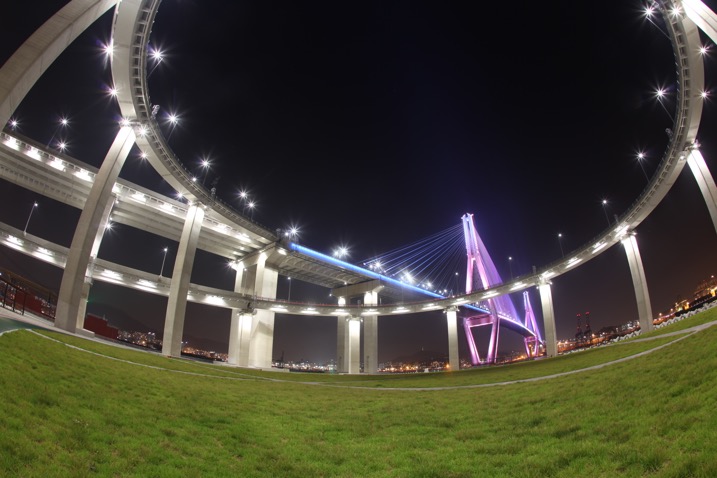
A bridge in Busan is photographed using a fish-eye lens in conjunction with kinetic light painting. A shallower angle was used here, perhaps around 45 degrees.

A bridge in Busan is photographed using a fish-eye lens in conjunction with kinetic light painting. A shallower angle was used here, perhaps around 45 degrees.

The same scene without the rotation.
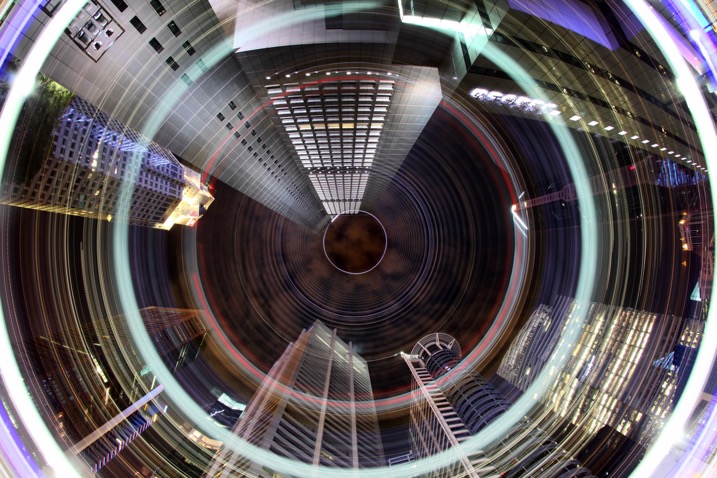
The CBD area of Singapore has many locations where a worms eye view looks good. The light rotation adds an extra element to this photo.

The CBD area of Singapore has many locations where a worm’s eye view looks good. The light rotation adds an extra element to this photo.

  1. Set the camera to expose for 30 seconds, and adjust the aperture and ISO to get the correct exposure value in the photo. The exposure value should be 0 or +1, this is because you’ll lose some of the light exposing the buildings during the light painting.
  2. Use the camera’s self-timer to start the exposure, and set it to 10 seconds.
  3. Start to rotate the camera around the axis of the tripod just before the exposure begins. The rotation has to me smooth, and last for between two and five seconds.
  4. Make sure you finish the rotation at the same position where you started by watching the degrees of rotation on your tripod.
  5. The camera then has around 25 seconds to capture the structures in your scene.
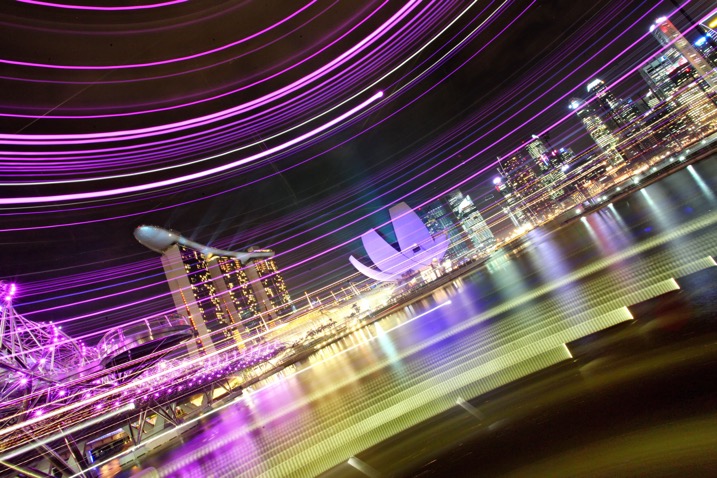
Using a more horizontal angle allows you to paint light through the scene, again this is a unique way of capturing the iconic Singapore skyline.

Using a more horizontal angle allows you to paint light through the scene, again this is a unique way of capturing the iconic Singapore skyline.

If you prefer to see how this is done visually, watched the video below:

Why use circular light painting?

Those who like long exposure will know about light painting, though not everyone is familiar with kinetic light painting. Getting great photos requires a bit of experimentation, hence the need to try out new techniques from time to time.

Kinetic light painting is a great way of creating dynamic photos, which have a futuristic feel. The image you take is likely to be from a worm’s eye view, in an urban setting. Therefore using a technique that adds lights and patterns to your scene can look good. You will also find that many people have already taken photos from the most popular locations. So techniques like this allow you to give your photo a different slant.
rotation-light-painting13

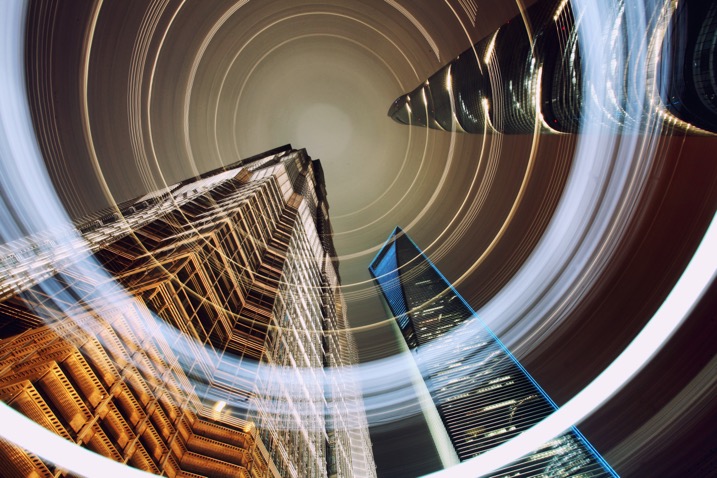
The light patterns in this photo have given this scene a lot of energy. A slightly shallower angle than straight up was used here.
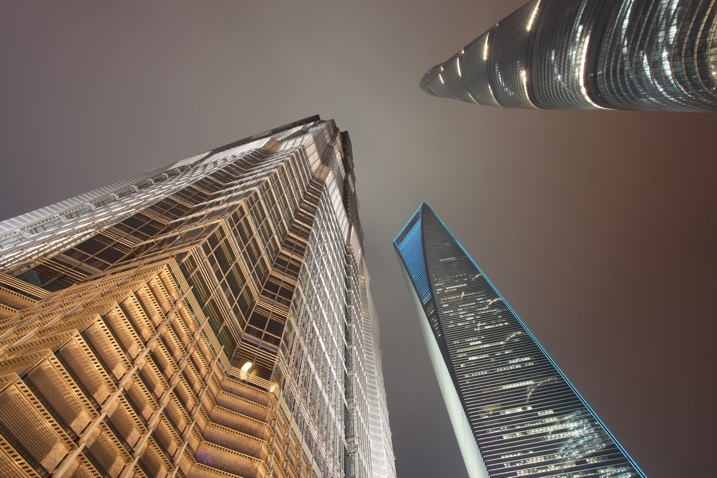
rotation-light-painting12

This is a worm’s eye view of the same skyscrapers in Shanghai, without using any light painting.
rotation-light-painting04

Where can I try this technique?

The best place to try this type of technique is near skyscrapers, though if you don’t have any near you then tall apartment buildings can work as well. Any tall architectural structure that’s lit could work for you, as long as you can get underneath it, and it shows in the frame with a wide angle lens.

You don’t live in the city? No problem you can head to your nearest forest and use the trees in place of skyscrapers. If you use trees the shot will be daytime, and you’ll be painting the sunlight shining through the leaf canopy. There may be too much light during the day to make a long exposure; therefore consider using an ND filter to reduce the amount of light coming into the camera.
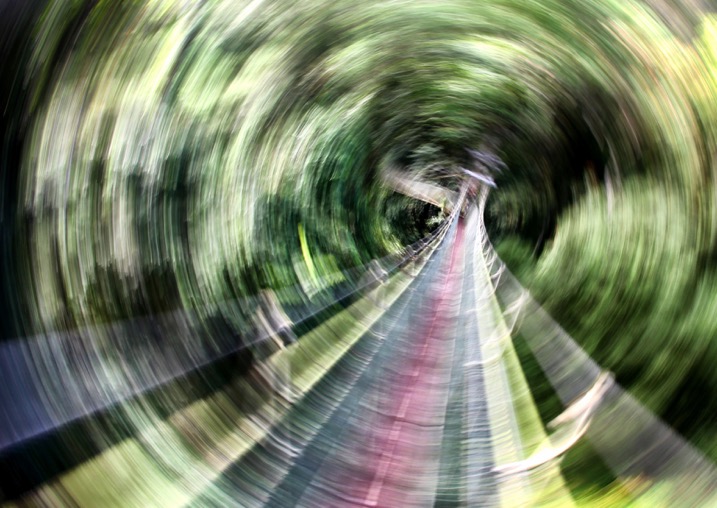
It's possible to use this technique under, or in this case in a leaf canopy. This is the Jungle at Mulu national park, Malaysia.

It’s possible to use this technique under, or in this case in, a leaf canopy. This is the Jungle at Mulu national park, Malaysia.
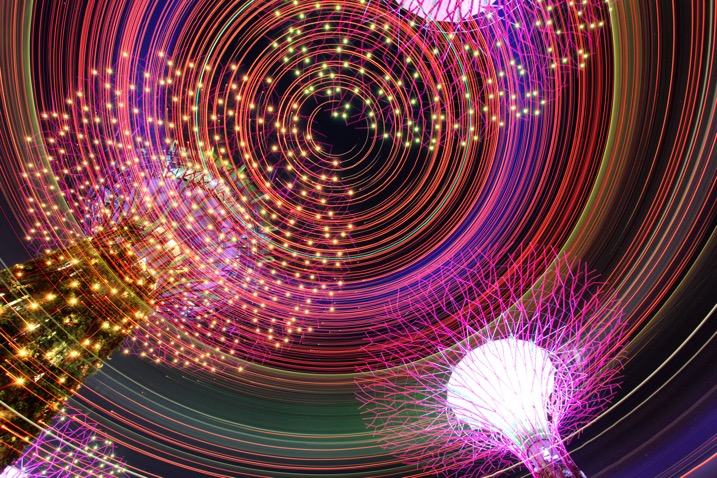
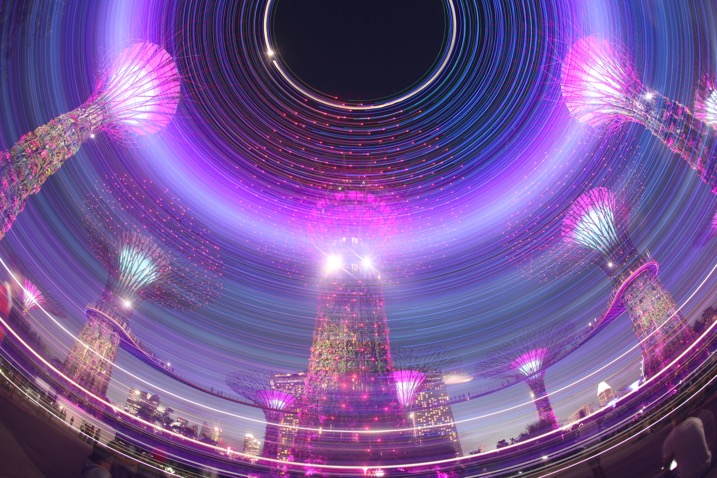
Another photo from the super trees in Singapore, this time aiming strait up.

Another photo from the super trees in Singapore, this time aiming straight up.
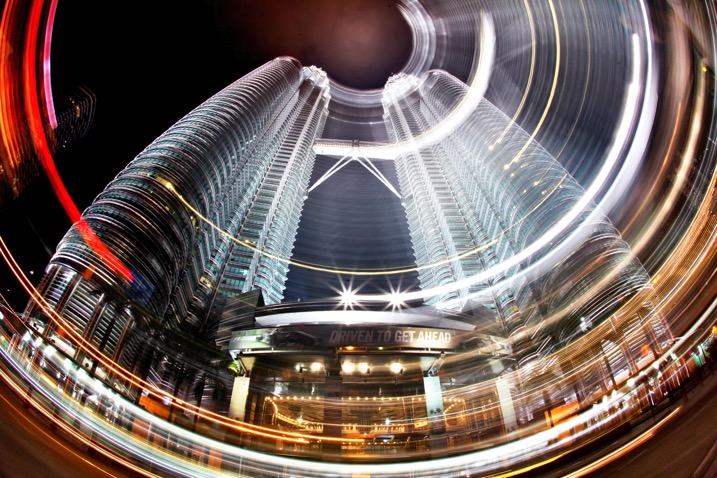
rotation-light-painting01

Malaysia’s Petronas twin towers, partial rotation.

Get kinetic, and get light painting!

It’s a great idea to experiment with photography. Trying out long exposure techniques such as this one will only improve your work. It can help you to get unique images that other people won’t have seen; therefore you’ll generate a lot more interest in your work. Having a tripod, and access to a city is really a prerequisite of a style like this one. I look forward to seeing your work. If you have any other idea’s of how you can light paint using your camera please share them in the comments section below.
I look forward to seeing your work. If you have any other idea’s of how you can light paint using your camera please share them in the comments section below.

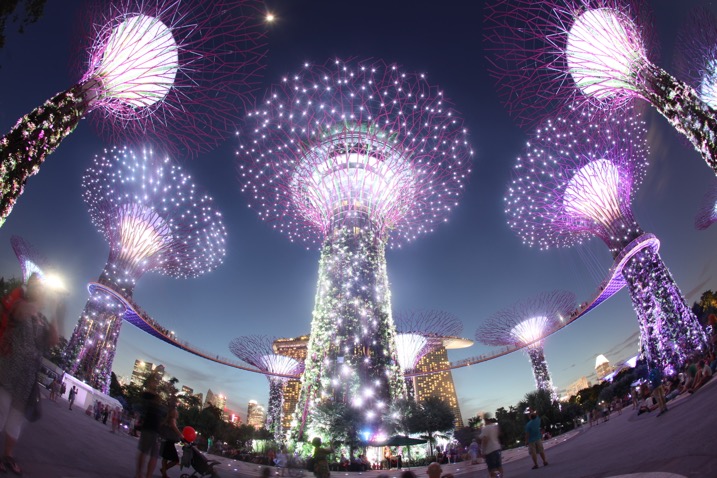
Scene without rotation.
Scene without rotation.

The super trees found in Singapore's garden by the bay make a great subject for kinetic light painting as they have so many lights.

The super trees found in Singapore’s garden by the bay make a great subject for kinetic light painting as they have so many lights.

googletag.cmd.push(function() {
tablet_slots.push( googletag.defineSlot( “/1005424/_dPSv4_tab-all-article-bottom_(300×250)”, [300, 250], “pb-ad-78623” ).addService( googletag.pubads() ) ); } );

googletag.cmd.push(function() {
mobile_slots.push( googletag.defineSlot( “/1005424/_dPSv4_mob-all-article-bottom_(300×250)”, [300, 250], “pb-ad-78158” ).addService( googletag.pubads() ) ); } );

The post How to do Light Painting by Rotating the Camera by Simon Bond appeared first on Digital Photography School.


Digital Photography School

 
Comments Off on How to do Light Painting by Rotating the Camera

Posted in Photography


Bright Ideas for Dark Art: Murals by Skurk Play Tricks with Light & Night

24 Oct

[ By WebUrbanist in Art & Street Art & Graffiti. ]

painted-angler-fish-art

The deep sea anglerfish is a disturbing monstrosity that uses lights to lure in its prey and is the featured backdrop of a recent work of graffiti best experienced at night.

day-lit-night-art

Existing wall lamps serve as the lures in this case, while the fish itself is positioned to swallow up anyone brave enough to venture down the stairs from above.

night-light-painting

Hailing from New Zealand but living in Bergen, Norway, street artist Skurk hand-cuts stencils and paints large-scale murals around different themes but often involving light and shadow. The works are also site-specific, made to interact with and respond to conditions in a given physical context.

sillhouette-art

In some cases, his silhouettes seem to be cast like shadows. In other instances, the idea of electrical lighting takes various forms, like a bulb being plugged into an available (vent) socket.

light-socket-art

Share on Facebook


[ By WebUrbanist in Art & Street Art & Graffiti. ]

[ WebUrbanist | Archives | Galleries | Privacy | TOS ]


WebUrbanist

 
Comments Off on Bright Ideas for Dark Art: Murals by Skurk Play Tricks with Light & Night

Posted in Creativity


The range of light: what made one of Ansel’s most famous books so special

22 Oct
 
Continuing his video series, Marc Silber of Advancing Your Photography interviews Ansel Adams’ son Michael in Ansel’s home. In this episode they discuss Ansel’s book ‘The Range of Light’ which contains some of Ansel’s most famous images from Yosemite and the Sierra Nevada. They also discuss Ansel’s thoughts on how to develop your skill set as a photographer. Michael says that Ansel would have encouraged new photographers to ‘photograph, experiment and to try new things.’ 

Articles: Digital Photography Review (dpreview.com)

 
Comments Off on The range of light: what made one of Ansel’s most famous books so special

Posted in Uncategorized


Fast and light: Nikkor 24mm F1.8G ED lens review

05 Oct

The AF-S Nikkor 24mm F1.8G ED was first announced back in August 2015. It joins Nikon’s growing family of modern full frame primes alongside the 20mm F1.8G, 28mm F1.8G, 35mm F1.8G, 85mm F1.8G and the 50mm F1.8G. It’s priced at just under $ 750 making it a well matched option to be paired with cameras like the Nikon D610 and the Nikon D750. The Nikkor can also be used on DX format cameras with an equivalent focal length of 36mm.

This fast wide-angle prime will most likely appeal to architecture, landscape and portrait or wedding photographers. Additionally, the F1.8 max aperture may come in handy for those looking to utilize the lens for astrophotography work as well.

At 24mm the lens is Nikon’s second widest prime option to date, coming in just behind the Nikkor 20mm lens. It’s worth noting that there are a few other options at 24mm that potential buyers should definitely be aware of. One of those options is the slightly faster Sigma 24mm F1.4 DG HSM Art that comes in at just under $ 850.

The Sigma 24mm can be seen mounted on a Nikon D810 on the left and the Nikkor 24mm can be seen mounted on a D810 on the right.

Although the Sigma is a bit pricier, it is a sensible alternate option for folks looking for a lens at this focal length. By comparison the Nikkor 24mm F1.4G ED is is priced at just under $ 2000 which makes the Sigma version that much more attractive to potential buyers. We will be taking a closer look at the Nikkor 24mm F1.8G and the Sigma 24mm F1.4 as an alternative lens option in this review.

APS-C

If you’re an APS-C shooter the 36mm equivalent focal length with an equivalent aperture of F2.7 will be a nice addition to your lens kit, being flexible enough to allow environmental and photojournalistic portraits while still being wide enough to accommodate for some landscape and architectural photography as well. It is worth noting however that if you’re looking to purchase this lens for an APS-C camera, then other options, such as Sigma’s 18-35mm F1.8 lens, might be a better alternative for the money. For this reason, we’re not going to consider this lens for use on APS-C in this review.

Nikkor 24mm F1.8G ED Headline Features

  • 24mm Focal Length
  • F1.8 Maximum Aperture
  • ‘Silent wave’ focus motor with full-time manual override
  • F-mount FX format lens, works on both DX and FX format Nikon SLRs
  • Accepts standard screw-type 72mm Filters

Lens Specifications

  AF-S Nikkor 24mm F1.8G ED Sigma 24mm F1.4 DG HSM A (Nikon Mount)
Price (MSRP) $ 745 $ 849
Announced 2015 2015
Lens Type Wide Angle Prime Wide Angle Prime
Lens Mount Nikon F Nikon F
Max Format Size 35mm FF 35mm FF
Focal Length 24mm 24mm
Image Stabilization No No
Max Aperture F1.8 F1.4
Minimum Aperture  F16 F16
Aperture Ring  No No 
Diaphragm Blades 7 (rounded)  9 (rounded)
Elements 12  15
Groups  9 11
Special Elements/Coatings  2 extra-LD glass elements and 2 aspherical elements, Nano Crystal Coat and Super Integrated Coating 2 aspherical elements, 3 FLD and 4 SLD glass elements coupled with Multi Layer Coatings
Minimum Focus 23cm (9.1″) 25cm (9.9″)
Maximum Magnification 0.2x  0.19x
Autofocus Yes  Yes
Motor Type Silent Wave Motor autofocus mechanism HSM (Hyper Sonic Motor)
Full Time Manual  Yes Yes
Focus Method  Internal Internal
Distance Scale Yes Yes
DoF Scale Yes Yes 
Weight  355g (12.5 oz) 665g (23.1 oz)
Dimensions (DxL) Approx. 78 x 83mm (3.1 x 3.3″) 85 x 90mm (3.4 x 3.6″)
Materials Metal Mount/Plastic and composite material Metal Mount/Thermally Stable Composite (TSC) material
Sealing  None  None
Color Black Black
Filter Thread 72mm 77mm
Hood Supplied  Yes Yes
Hood Product Code HB-76 Bayonet Hood  
Tripod Collar No No

The Nikkor 24mm has a metal lens mount and a mostly plastic/composite material body. It feels surprisingly light for being such a fast prime lens; especially when compared to the Sigma 24mm lens which weighs nearly twice the amount and is slightly larger in size (this is broadly to be expected with the Sigma’s 2/3 stop extra light gathering ability). The build quality of the Sigma lens definitely feels more robust with the majority of its components constructed of metal and a composite material that can be found on most of Sigma’s Art series lenses.

It’s worth mentioning that both the Nikkor and the Sigma 24mm lenses lack comprehensive weather sealing, but the Nikkor does offer some protection with rubber gasket around the lens mount, so that’s definitely something to keep in mind if you plan to use these lenses in adverse weather conditions.

With these specifications in mind, how do these lenses stack up against one another in terms of performance? In this review we will be looking at the performance of the Nikkor 24mm and how it compares to the heavier and faster Sigma 24mm. 

Articles: Digital Photography Review (dpreview.com)

 
Comments Off on Fast and light: Nikkor 24mm F1.8G ED lens review

Posted in Uncategorized


Manfrotto launches Pro Light Reloader 55 carry-on roller case for kit-heavy travelers

27 Sep

Bag and accessory manufacturer Manfrotto has announced a new roller case that has enough space for three DSLR bodies and eight lenses, which is designed to meet carry-on limits for most airlines. The Pro Light Reloader 55 is suitable for stills and video equipment and can hold a gripped DSLR with a 400mm F2.8 lens still attached and can also be re-arranged to fit lights.

The external 55 x 35 x 23cm/21.65 x 13.78 x 9.06in dimensions are said to make the case acceptable on ‘most’ airlines as cabin baggage and the bag with its dividers weighs just under 11lb. A fold-away rain protector is included and the rip-stop nylon of the outer has been coated to make it water repellent. Internal dividers are adjustable and Manfrotto has included laptop and tablet pouches that are separate from the main kit compartment so that they can be taken out without having to open the whole case.

The Pro Light Reloaded has large user-changeable wheels and will retail at $ 359.99/299.95
For more information see the Manfrotto website.

Press release

MANFROTTO PRESENTS: Pro Light Reloader-55
YOUR FAVOURITE CABIN SIZE PHOTO ROLLER

The new solution for the travelling professional:

  • International carry-on size roller bag for photo and video cameras
  • Fits gripped DSLR with attached 400/2.8 or 200-400/4 or 500/4 (detached)
  • Fully customizable dividers also fit Canon C100 w/ light stands inside
  • Manfrotto Camera Protection System absorbs shock and safeguards equipment
  • TSA-approved combination zipper lock
  • Strong, wear-resistant, weather-resistant protection
  • Comfortable handle, high-mileage replaceable wheel system

Manfrotto, world leader in the photography, imaging equipment and accessories industry, presents the Pro Light Reloader – 55 Photo Roller bag, the new carry-on size camera roller designed to give professional photographers and videographers a highly protective, comfortable and stylish bag to travel and work with.

The Manfrotto Pro Light Reloader-55 is built to carry typical pro DSLR camera sets (e.g. 3 bodies with 8 lenses), super-tele DSLR sets (e.g. 1 body with 400mm f/2.8 lens attached and 3 more lenses) & camcorder with lighting set (e.g. disassembled Canon C100 with 2 light kits).

Fitting the standard for carry-on luggage for most airlines, it gives professionals the peace of mind of having their most valuable possessions near them at all times. When it’s time to shoot, the roller becomes a workstation, with gear and accessories visible and in easy reach.

The low profile design handle securely holds the bag, leaving more space for the kit. Inside the fully customizable Manfrotto Camera Protection System dividers provide shock absorption and vibration reduction with all configurations – from full day photo or video shoots to intercontinental assignments – or a personal photography adventure on the go.

The outside of the bag is made of high quality, water-repellent Pro Light Rip-Stop nylon fabric, ensuring reliable protection from external shock & extreme weather conditions.
The corners & bottom of the bag are carefully designed to resist wear. Large 84mm wheels ensure comfort and extensive mileage, and users can easily replace them when needed. A built-in TSA-approved combination zipper lock ensures a hassle-free travel experience through TSA partner airports.

The Pro Light Reloader-55 features independent padded pockets for 17” laptop & 10” tablet outside the equipment compartment, so they can quickly be taken out at security without opening the main zipper. The bag also carries a tripod and comes with a rain cover to keep its contents dry in the rainy season.

The Pro Light Reloader 55 is priced at £299.95.

Articles: Digital Photography Review (dpreview.com)

 
Comments Off on Manfrotto launches Pro Light Reloader 55 carry-on roller case for kit-heavy travelers

Posted in Uncategorized


Traveling light: M.Zuiko 12?100mm F4 Real-world Samples

26 Sep

$ (document).ready(function() { SampleGalleryV2({“containerId”:”embeddedSampleGallery_6403402487″,”galleryId”:”6403402487″,”isEmbeddedWidget”:true,”standalone”:false,”selectedImageIndex”:0,”startInCommentsView”:false,”isMobile”:false}) });

The new M.Zuiko Digital Ed 12?100mm F4 IS PRO is a 24-200mm equivalent zoom for the Micro Four Thirds system. On paper, it’s the ideal travel lens, and we were lucky enough to bring one back from Photokina last week to try out. 

So how does it stack up? That’s what we wanted to know, so we spent a jet-lagged morning back in Seattle trying it out with the OM-D E-M1. And we have the pictures to prove it.

Articles: Digital Photography Review (dpreview.com)

 
Comments Off on Traveling light: M.Zuiko 12?100mm F4 Real-world Samples

Posted in Uncategorized


Lumulabs Lumu Power adds a light and color meter to your iPhone

22 Sep

Lumulabs is showing off its new Lumu Power light and color temperature meter add-on for smartphones that was successfully funded through a Kickstarter campaign earlier this year. Attached to an iPhone, the Lumu Power can measure ambient light and flash output, as well as color temperature. It uses two sensors, one on each side of the half-dome design. A photodiode with CIE spectral luminous efficiency measures the light levels and a True Color sensor, which is compliant with the CIE 1931/DIN 5033 color standard, analyzes the color temperature. 

The electronics are protected by a stainless steel housing and the device attaches to your Apple device via the Lighting connector. An Android version that uses a USB Type-C port is planned for next year.

The diffusers are made from polycarbonate lexan, and like the original Lumu, the Lumu Power is controlled via a dedicated app. The latter is still in development but Lumulabs says new functions are added almost on a daily basis. Color temperature, illuminance flash output curve, flash duration and flash versus ambient light ratio are some of the functions that have already been implemented. You can pre-order now on the Lumu website for $ 229. Shipping is planned to start by the end of the month.

Articles: Digital Photography Review (dpreview.com)

 
Comments Off on Lumulabs Lumu Power adds a light and color meter to your iPhone

Posted in Uncategorized


How to Use 1 Natural Light Setup to Create 3 Different Portrait Looks

22 Sep

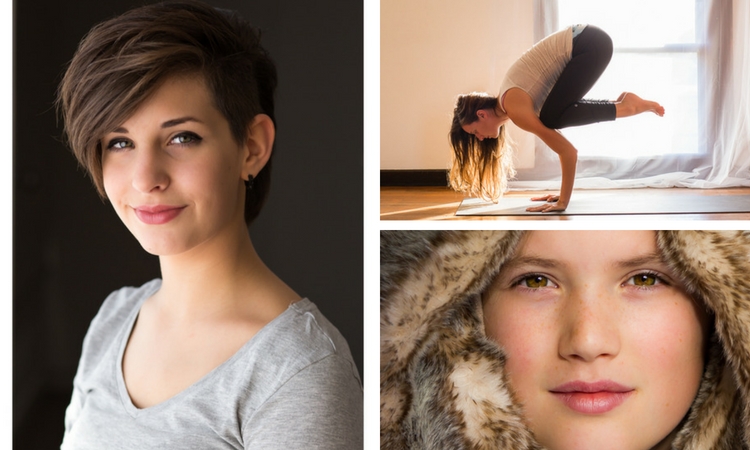
As a portrait photographer, the majority of my work is shot on location. This can be outdoors or in my clients’ homes or places of business. I mostly shoot using natural light and have become adept at finding the best light source in any location as well as creating backgrounds that won’t interfere with the subjects. In this tutorial, I want to show you an easy, natural light portrait setup you can recreate in your own home. Simply by repositioning yourself and your model, you can create three distinctly different portraits from this one setup.

one natural light setup - 3 looks

No special lighting or fancy equipment is needed, and the techniques are straightforward and easy to master. Experiment to create different looks using various backdrops such as plain walls or sheets, or different outfits for your subject. You can also get different effects by changing your lens, distance to the subject, and experimenting with different apertures.

Equipment

Below is a list of the items I have used for this setup and suggested substitutes:

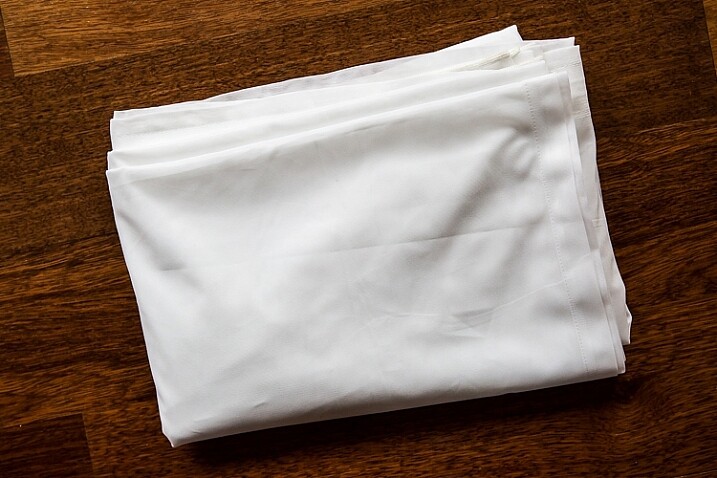
  • SHEER CURTAIN or FABRIC: You can buy a sheer curtain or length of fabric from any fabric or haberdashery store. I picked this one up from the clearance table at my local Spotlight store (Australia) for under $ 20.
Image showing basic natural light portrait setup using a white cloth

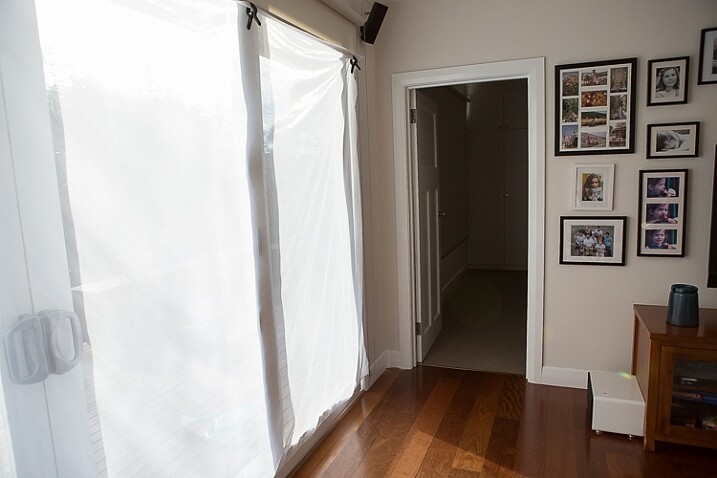
A white sheer curtain or large sheet of sheer fabric will filter the window light.

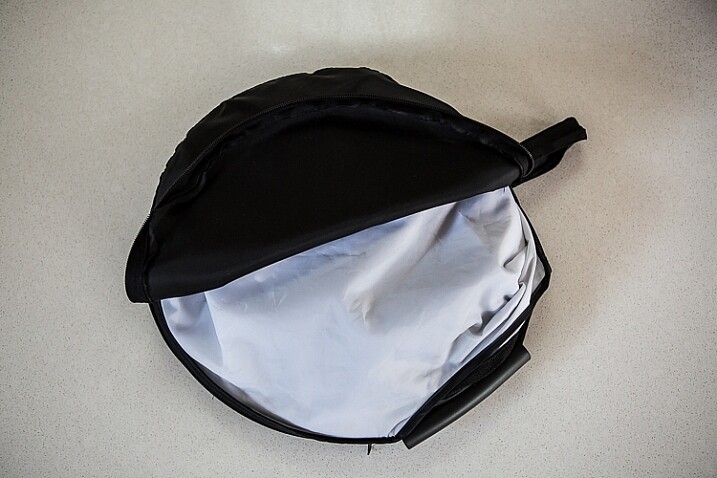
  • REFLECTOR: I have a circular, five-way reflector that follows me everywhere. Each side has a different colour; white, silver, gold, and black, plus a diffuser. It folds into a neat little disc, is lightweight, and can be thrown into the back of my car. You will get endless use out of a portable reflector, and at around $ 30 from Amazon, it’s a worthwhile investment. However, if you don’t want to rush out and buy a reflector (or wait for your order to arrive before you start shooting) a large piece of white card, polystyrene, or foam board, will work equally well.
Image showing basic natural light portrait set-up with a reflector

This reflector was a great investment at around $ 30. It is lightweight and folds up compact to the size of a dinner plate.

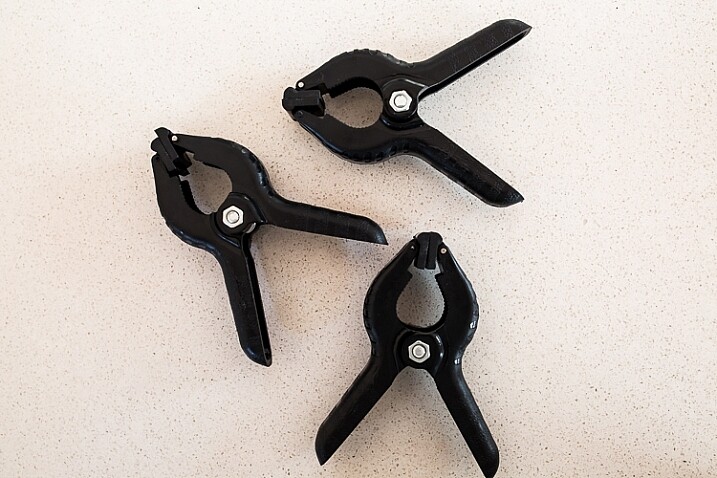
  • BACKDROP CLAMPS: another Ebay or Amazon purchase, my backdrop clamps come in packs of 12 for under $ 20. These are infinitely useful for creating makeshift studios. In this instance, I used them to attach the sheer curtain to the rolled-up window blind. You can also use masking tape to stick the curtain directly onto the window, or use heavy-duty stationery clips.
clamps can be helpful for a natural light portrait setup

Backdrop clamps can be purchased inexpensively from Ebay or Amazon and similar.

Lens

My favourite portraiture lens is the Canon EF 85mm f/1.8, but you can use a 50mm, a 100mm – whatever works in the space you have. A tighter space will require a shorter focal length.

Basic portrait setup

Look for a window or glass door with a good strong light source coming through, so that you can shoot at the lowest possible ISO. If the window has a sheer curtain, pull it across to filter the light. If there is no curtain, you can attach a piece of sheer fabric to the window using the backdrop clamps or masking tape.

As you can see, the setup couldn’t be simpler. This is the corner of my living room, with sliding glass doors to the left of the shot. The strong afternoon light is filtered with a sheer curtain clipped to the bottom of the roller blinds. I have closed the curtains in the adjoining room to create a dark background for my subject. If your room layout doesn’t allow this, you can hang a sheet or large piece of coloured fabric behind your subject, or just use a plain wall.

natural light portrait setup background

The setup couldn’t be simpler.

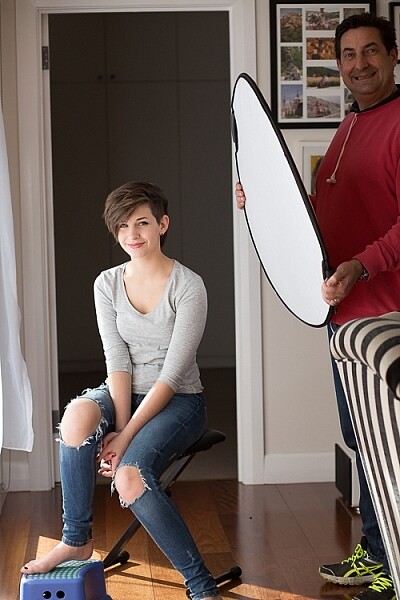
As you can see in the setup below, I brought my model forward (away from the open door behind her). This is to ensure she has good light on her face, and that there is sufficient distance between her and the room behind her to make sure it is completely out of focus. In this pull-back shot, you can see some detail in the room behind her. However, in the first pair of portraits, further along, you can see no background detail. The room behind looks like a studio backdrop.

Add a reflector

If you are going to use a reflector, you’ll need someone to hold it for you. If there is no-one to help, try propping it on a chair. Let your creative photographer’s brain get to work and figure out a creative solution.

natural light portrait setup reflector and assistant

You’ll need an extra person to hold the reflector – in this case, my husband!

Portrait #1: side lighting and a reflector

This is my most-used natural light setup. Side lighting contours and shapes the face, and is flattering for most subjects. If your subject is male, or if you want to create a moodier portrait, you can try moving the reflector further away from your model or removing it altogether. This creates more contrast by increasing shadow on one side of the face.

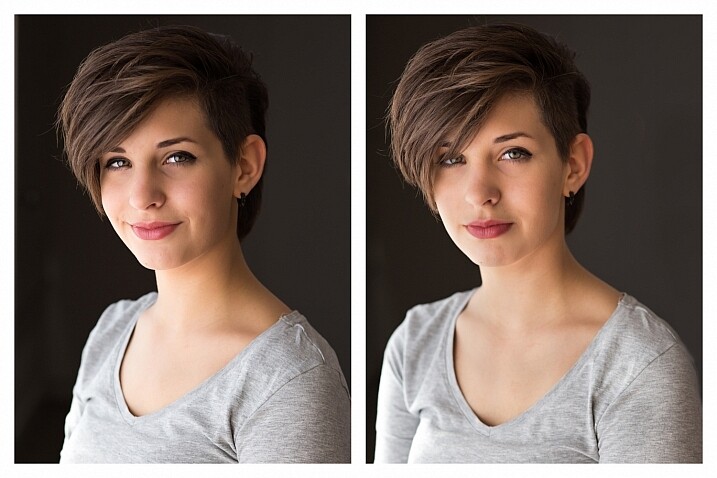
Your model can sit, stand, or even lie on the floor if the window is low enough. How you position your model’s face and body is up to you. To recreate the look below, your model’s face needs to be at a 90° angle to the main light source (the window). Her body turns 45º away from you. The door behind my model is opened and I darkened the background room to minimize distracting elements. Position the reflector on the shadowed side of her face, to bounce the light back and fill in the shadows

In the photos below, the image on the left is shot without a reflector. The one on the right is shot with a reflector. The effect in this example is subtle because the light in this room is already balanced somewhat by small, high windows on the opposite wall to the main window. In the photo on the right, you can see how the reflector brightens the face and fills in the shadows, particularly the under-eye shadow of her left eye. It also brings out more detail and highlights in her hair and improves separation from the background.

natural light portrait setup with and without reflector

Left (no reflector): ISO 320, f/4, 1/200th. Right (with reflector): ISO 320, f/4, 1/320th.

Portrait #2: shooting into the backlight

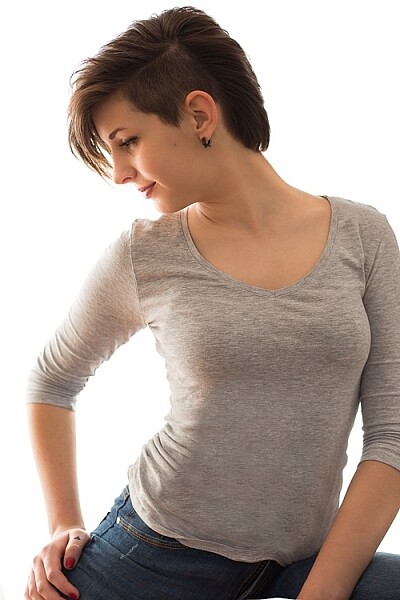
I love this technique for photographing women and girls. It creates soft, non-directional  lighting on the face, so is flattering to every age group. And the backlighting creates a gorgeous halo around the hair. This works especially well if the model wears her hair out, or wears a dress with some sheer elements – think darling little girls in fairy costumes and tutus!

Technique for backlighting

Using the same window setup as before, your model sits or stands with her back to the window. Position the reflector in front of her, bouncing the light back into her face. Your light meter will try to read the light coming from the window, and will underexpose your model’s face. You can obtain the correct exposure by getting in close to her face to set your exposure. You might also bracket your exposures and check the back of the camera until you’re happy with the result (review the histogram but note that the background area may show clipping – that’s okay). To get the exposure right on the face, you will lose detail in the background, which is the idea!

natural light portrait setup backlighting

ISO 320, f/4, 1/160th

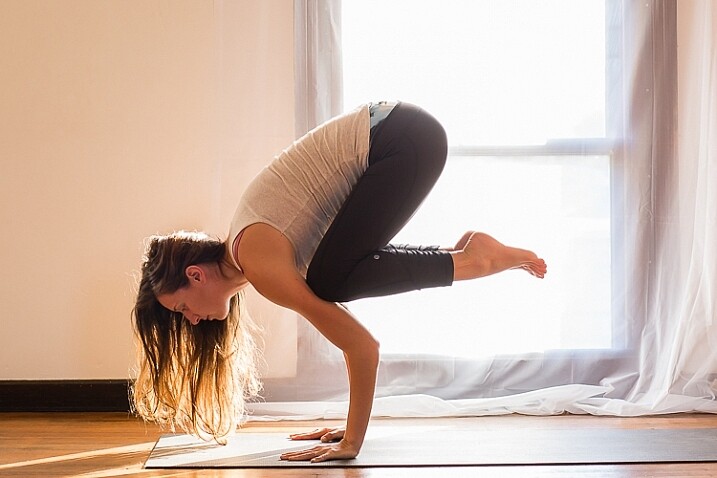
The photo below is a yoga instructor posing in front of a window on the floor of her studio. The backlighting is beautiful through her hair, and the warm tones of the timber floor reflect back on her skin to give her a golden hue. The lighting technique is identical to the previous photo. But in this photo, I have allowed the curtain and window to be visible as I think it adds something to the scene.

natural light portrait setup backlighting

ISO 500, f/5, 1/80th.

Portrait #3: shooting with front-on light

For this set-up, the sheer curtain remains in place. Your model faces the window, and you position yourself between your model and the window. If you are taking a wider shot than the example below, you may be able to bounce light into the back of her hair with a reflector.

Frontal lighting removes virtually every shadow on the face. It brings out detail and colour in the eyes, and can be quite striking with the right subject. However, this technique is not for everyone. It can give the face a flat, two-dimensional appearance, and if the light source is too strong, your subject will squint. This lighting tends to highlight every imperfection, which is fine if your subject happens to be young and gorgeous. But, it can be too harsh for a mature model, or someone with a lot of blemishes.

Examples of front lighting

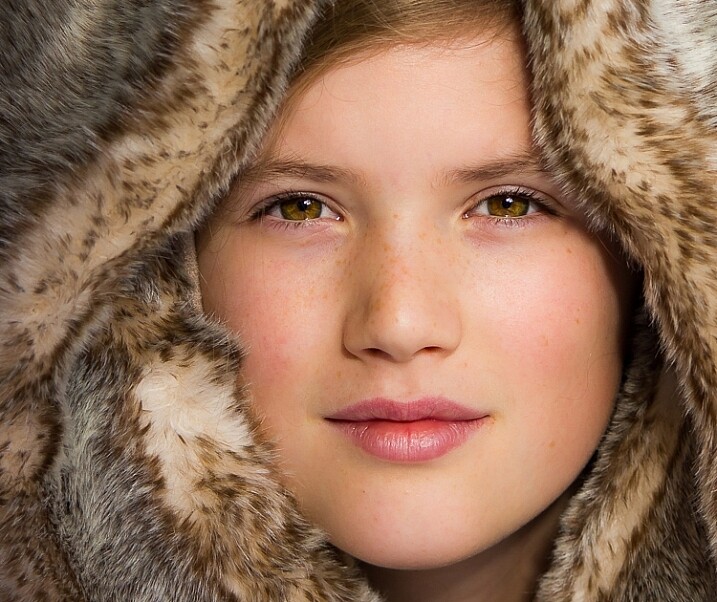
The photo below of a young girl snuggled into a faux-fur hood has been enduringly popular on my social media sites. It was shot using this lighting technique in warm, late-afternoon light.

natural light portrait setup front lighting

ISO 400, f/4.5, 1/200th.

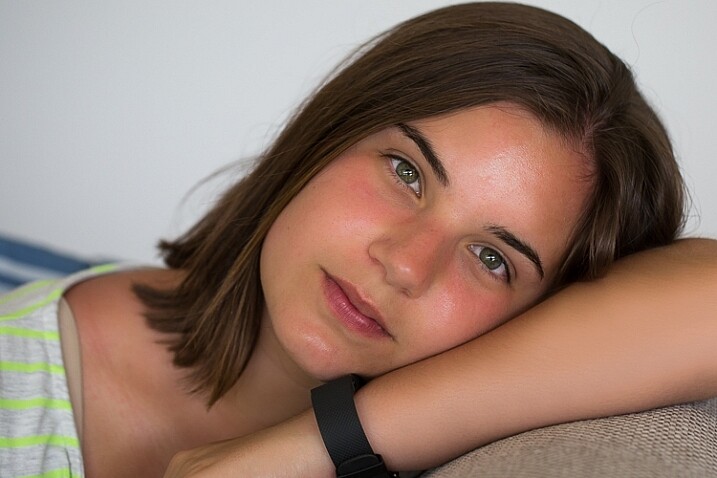
The photo below of my daughter, sun-kissed after a day at the beach, was photographed with front-on lighting. As we were  on vacation and I didn’t have my usual bag of tricks at hand, I didn’t use a sheer curtain to filter the light. As you can see, the highlights are more pronounced than those in the first photo, but the effect is similar.

natural light portrait setup front lighting

ISO 250, f/3.5, 1/125th.

Now it’s your turn

I’d love to hear how you get on trying this setup at home. Please post any questions, comments or examples of your portraits in the comments section below.

Don’t forget, there is also our dPS Facebook Group, which you can join to share your photos and get a critique from other dPS readers.

googletag.cmd.push(function() {
tablet_slots.push( googletag.defineSlot( “/1005424/_dPSv4_tab-all-article-bottom_(300×250)”, [300, 250], “pb-ad-78623” ).addService( googletag.pubads() ) ); } );

googletag.cmd.push(function() {
mobile_slots.push( googletag.defineSlot( “/1005424/_dPSv4_mob-all-article-bottom_(300×250)”, [300, 250], “pb-ad-78158” ).addService( googletag.pubads() ) ); } );

The post How to Use 1 Natural Light Setup to Create 3 Different Portrait Looks by Karen Quist appeared first on Digital Photography School.


Digital Photography School

 
Comments Off on How to Use 1 Natural Light Setup to Create 3 Different Portrait Looks

Posted in Photography


PABLO is a long exposure and light painting app for the iPhone

17 Sep

Czech photographer Miroslav Tichy once described photography as painting with light. Now there is an app for that, but instead of naming it after Tichy, its makers decided to call it PABLO for Pablo Picasso, who created some of the first notable light art images with photographer Gjon Mili in 1949.

PABLO has been developed for light painting with the iPhone. You can create pictures and video by moving a light source in front of the camera while capturing a long exposure. Alternatively, you can illuminate a subject, shine a point of light directly at the camera, or move the camera itself during exposure.

In the app’s ‘live view’ you can watch as light paintings are created and a community feed lets you see a continuous gallery of light images by PABLO users around the world. Additionally, you can create light paintings by uploading existing video clips. Any lights in the video will freeze to create light trails.  You can find more information in the video below and on the PABLO website. How-to videos are available in the PABLO Youtube channel and if you’d like to try the app yourself you can now install it for free from the App Store. 

Articles: Digital Photography Review (dpreview.com)

 
Comments Off on PABLO is a long exposure and light painting app for the iPhone

Posted in Uncategorized


How to Create Stunning Architecture Photography by Painting with Light

15 Sep

My name is Mike Kelley. I’ve been lucky enough to travel the world and see incredible architecture while working for hotels, architects, designers, and developers.

Architecture tips 04

Architecture tips 07

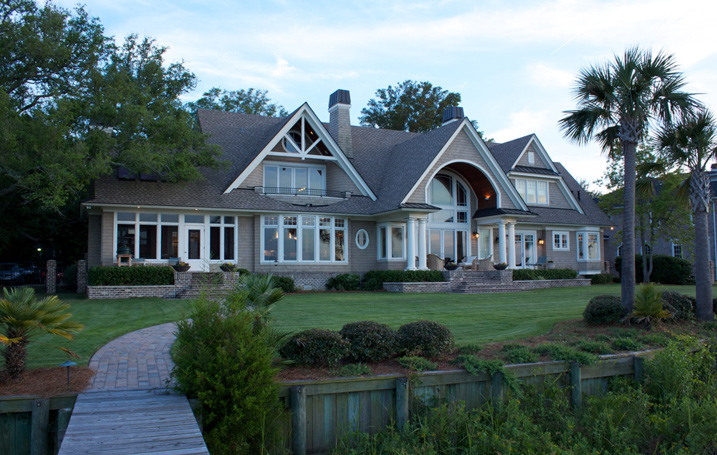
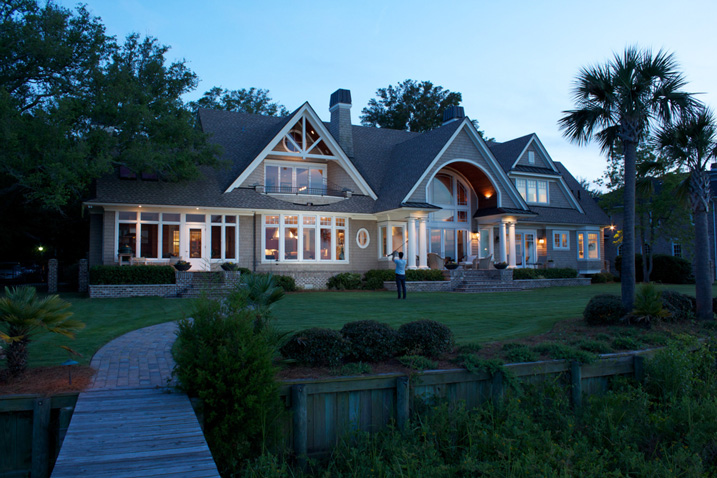
In this article, I’d like to share with you one of my favorite techniques for photographing architecture. If you’ve ever tried to photograph a building at twilight, you know how tough it can be to properly expose all parts of the scene. You know how some areas tend to fall into darkness.

When this happens, many photographers will just try to recover the shadows with a brighter exposure or some dodging and burning. Unfortunately, that can lead to muddy results which often display a lack of texture and color.

Although this article touches on my basic processes, a full tutorial on my workflow is $ 100 off right now over at Snapndeals – Mike Kelley’s Where Art Meets Architecture Course

Light painting for architecture photography

One technique that I’ve adapted to use with modern photographic tools is light painting. Back in the old days, depending on how old you are, there were many photographers who painted with light. They would literally stop down the aperture, wear an all-black outfit, and wave a light around for a 30-60 second exposure to fill in shadows and give the image some nice snap.

Luckily, things are a bit easier these days (to me, at least). You can use a single Speedlight and see the results instantly. All without burning through expensive sheets of 4×5 film, or having to dress like Steve Jobs to keep yourself from showing up in the exposure.

I personally use either a Lowel GL1, Yonguo Speedlight or Profoto B1 light to pull it off, depending on how much power I’ll need. The aim here is to add light in spots that appear to have natural light falling on them – either from landscape lighting or interior lighting. Adding flash or hot light will dramatically clean up the quality of light, by giving it direction and fall off. Whereas the ambient light may create a muddier appearance due to having no directionality, incoherent color casts, or being mixed with the falling light of the day.

Architecture tips 01

So you’re all set up for your twilight. You’re waiting for that perfect balance between falling ambient exterior light and interior glow. Before, during, and after twilight, you should have the camera set in one place on a tripod and every couple of minutes, shoot a bracketed set of images at 0 EV, -2, and +2, or something similar, whatever your preference may be.

Shooting at twilight

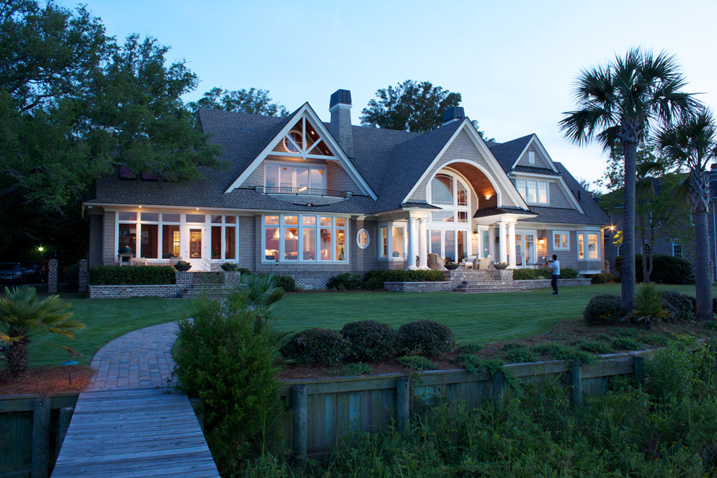
When the time for the perfect twilight has arrived, and the falling ambient exterior light and interior glow from the practical lights are perfectly balanced, it’s time to add your hot light or flash. Moving quickly (it helps to have a plan ahead of time for what you’ll flash) add light to areas that you think have fallen into too much shadow or places that could use a little texture and color.

I also recommend adding a CTO gel to your lights to warm them up so that they match the interior glow of the house or any exterior lighting that may be present. This process should take no more than five minutes and should be shot tethered, whether to a computer or a wireless solution like a CamRanger, so you can see what you’re doing immediately and adjust accordingly.

Architecture tips 12

Architecture tips 17
Architecture tips 27

After you’ve gone around and added light, continue to bracket exposures to cover your bases. Sometimes I’ll use an exposure from when it’s completely dark outside and the only light in my scene is from the interior glow to remove any distracting reflections or color casts that popped up.

Processing the images

When in post-production, try to keep it simple. I used to think it was a source of pride to edit these photos and have to use 50, 70, or even more layers. But the fewer layers there are in Photoshop, the less of a chance there is for something to go awry. Depending on the subject, 10-15 flash pops should be more than enough to get this amazing effect on your images. You may want to add or remove some color using curves, and it would also be wise to make sure that everything blends together seamlessly by setting the blend mode of your flash pop layers to Lighten.

Replace the sky if necessary

Lastly, in many of my images I end up replacing the sky. Don’t underestimate what an amazing impact a new sky can have on your image – but only when it’s done perfectly! If there’s anything that takes people out of an image and ruins the moment, it’s a poorly composited sky that doesn’t match the color and brightness of the rest of the image So choose your sky carefully. I personally like to vary the opacity of my sky layer to taste so that things all blend seamlessly.

No architectural photo would be complete without nice, straight verticals lines, so use CMD/CNTL + alt + shift + E to stamp all to a new layer. Then drag out some ruler lines and make sure there’s no distortion – we don’t need people thinking our clients can’t build straight homes.

Architecture tips 08

Here is the final image

You can watch a video of this entire process below and see me in action:

Summary

I hope you enjoyed this quick tour through one of my favorite techniques. The more you use it, the more flexible you will become with adding light and mood to make your photos really stand out.


If you would like to go more in depth with this technique and learn how to build your own business in real estate and architectural photography, Kelly’s full-length tutorial is currently 33% off over at Snapndeals – grab it before the sale ends September 27th, 2016.

googletag.cmd.push(function() {
tablet_slots.push( googletag.defineSlot( “/1005424/_dPSv4_tab-all-article-bottom_(300×250)”, [300, 250], “pb-ad-78623” ).addService( googletag.pubads() ) ); } );

googletag.cmd.push(function() {
mobile_slots.push( googletag.defineSlot( “/1005424/_dPSv4_mob-all-article-bottom_(300×250)”, [300, 250], “pb-ad-78158” ).addService( googletag.pubads() ) ); } );

The post How to Create Stunning Architecture Photography by Painting with Light by Mike Kelley appeared first on Digital Photography School.


Digital Photography School

 
Comments Off on How to Create Stunning Architecture Photography by Painting with Light

Posted in Photography