RSS
 

Posts Tagged ‘Light’

The Light at the End of the Tunnel – 18 Totally Tubular Images

10 May

Tunnels have a unique lighting situation – they are dark in the middle, with the light coming from one end.

They can also be a great place to create or take unique photographs. Here is what 18 photographers created with photos of tunnels:

By Tore Bustad

By Metropolitan Transportation Authority of the State of New York

By Susanne Nilsson

By _ Liquid

By Indigo Skies Photography

By Rex Boggs

By ??? tocausan

By Matt Niemi

By Andi Campbell-Jones

By Hernán Piñera

By Vincent Lock

By darkday

By darkday

By Vaidotas Mišeikis

By pieter musterd

By Rahigrim Monasterios

By Simon & His Camera

By darkday

The post The Light at the End of the Tunnel – 18 Totally Tubular Images by Darlene Hildebrandt appeared first on Digital Photography School.


Digital Photography School

 
Comments Off on The Light at the End of the Tunnel – 18 Totally Tubular Images

Posted in Photography


Holy Housing: Stained Glass Walls & Ceiling Fill Cabin with Color & Light

10 May

[ By WebUrbanist in Architecture & Houses & Residential. ]

The complete opposite of a minimalist Modernist glass-clad house, this rustic and homey backyard cabin exhibits hand-crafted details, rich dark wood and best of all: a gorgeous array of custom stained glass panels.

Built behind her home in Mohawk, New Jersey, this wonderful work of micro-architecture was constructed by glass artist and jewelry maker Neile Cooper as a private personal retreat.

Her Glass cabin is constructed from reused window frames and spare lumber, evidenced by all of the different shapes and sizes that add character and complexity to the structure. The gaps are filled in not with walls but rather with works of her own art, bringing the entire place to live with flowers, birds, stones, minerals and other natural subject materials.

While she is not in the business of building and selling small homes (alas), her jewelry work features similar themes as do many of her other stained glass creations.

Some of her unique wearable pieces use “real butterfly wings. The butterflies I use are farmed all over the world, and collected when naturally expired. They live out their short winged stage in a protected enclosure. Butterfly farming protects the natural habitat of the butterflies through conservation of the natural vegetation and leaves the wild butterfly population intact. I turn these fragile beauties into heirloom pieces, by pressing them in hand-cut glass and encasing them with a silver alloy. “

Share on Facebook


[ By WebUrbanist in Architecture & Houses & Residential. ]

[ WebUrbanist | Archives | Galleries | Privacy | TOS ]


WebUrbanist

 
Comments Off on Holy Housing: Stained Glass Walls & Ceiling Fill Cabin with Color & Light

Posted in Creativity


National Geographic photographer shares tips for controlling light

09 May

National Geographic photographer Bob Holmes has posted a video on YouTube explaining how to control the three different types of light to give your pictures the trademark look from the famous magazine.

Articles: Digital Photography Review (dpreview.com)

 
Comments Off on National Geographic photographer shares tips for controlling light

Posted in Uncategorized


Sekonic announces price and availability of ‘groundbreaking’ L-858D-U light meter

28 Apr

Light meter manufacturer Sekonic has announced that its new L-858D-U light meter is now available and priced at $ 599/£599.

This new meter offers a number of firsts, including the ability to measure flash duration and to work in HSS mode. It can read out the duration of a burst of light as short as 1/55500 sec and work with shutter speeds as short as 1/16000s ec, both of which will be useful for those working with high-speed photography or trying to balance bright daylight with flash.

Designed for moviemakers as well as still photographers, the meter can display frame rates or shutter speeds under continuous lighting, and with more sensitivity than previous models it can now measure down to 0.1 lx of illuminance for low-light scenes and night photography.

The L-858D-U is also compatible with the radio triggering and control systems of a range of studio and hotshoe flash units via drop-in modules for the PocketWizard, Elinchrom’s Skyport and Phottix Ares ll and Strato ll environments. This 2.7″ touchscreen meter offers reflected 1-degree spot metering as well as built-in filter factor modes, an ISO range of 3 – 13,107,200 and a shutter speed range for ambient light that runs from 30 minutes to 1/64000 sec. The wireless modules cost $ 159/£159 each – the Skyport and Phottix functionalities are combined into a single module.

For more information see the Sekonic website.

Press release:

Now Available: The Sekonic L-858D-U Speedmaster

The next generation of light measurement control

Sekonic is proud to announce their ground breaking L-858D-U Speedmaster Light Meter is now available for purchase.

As previewed at last year’s Photokina, the L-858D-U Speedmaster is the combination of Sekonic’s cutting-edge light measurement technology and 60 years of experience in the photographic and filmmaking industries. The meter has undergone significant design changes from previous models and has a feature set sure to meet and exceed the demands of today’s image-making professionals.

The First of Its Kind
The Sekonic L-858D-U Speedmaster is the first fully featured light meter to offer flash duration measurement from 1/40 to 1/55,500 sec. at t0.1 through t0.9, which can be changed in 0.1 steps. A long-held secret of some of the world’s most talented photographers, the key to freezing action consistently is found in being able to measure flash duration. Photographers are now able to do this easily for the first time, demystifying one of photography’s most challenging techniques.

Wireless Freedom
Having pioneered wireless exposure measurement, Sekonic has expanded upon this groundbreaking innovation by creating hot-swappable radio control modules for the L-858D-U Speedmaster. With the PocketWizard module, photographers can easily trigger any PocketWizard wirelessly and control the power of their lights with any Control TL compatible unit. With the combined Elinchrom & Phottix module, Phottix users have Strato II and Ares II triggering capabilities, while Elinchrom users have access to wireless triggering and Skyport’s full range of power-control capabilities.

“The Sekonic L-858D-U Speedmaster has all the touchscreen features I love about my L-478D, with the added benefit of replacing my old spot meter. Now I only have to carry one meter, and have gained a lot of speed and convenience while on set.”
Timur Civan, Director of Photography

A Low Light Monster
Increased ISO capabilities in today’s cameras have created a need for light meters to increase their ability to measure light in the dimmest of settings. With an additional 3-stops of light sensitivity for incident light, 2-stops of light sensitivity for reflected light (spot), and an ability to capture a reading down to 0.1 lx of illuminance, accurately metering candle-lit scenes or getting the right measurement for long-exposure night photography is now a possibility.

Master High Speed Sync
Like its name implies, the Sekonic L-858D-U Speedmaster is optimized for photographers looking to exceed the maximum sync speed of their camera. For the first time, a light meter can measure the stroboscopic pulses fired from strobes when they are used for High Speed Sync. Finally, photographers now have an accurate way of measuring their lights when they want to overpower the sun or achieve a very shallow depth of field through using HSS.

Multifaceted
The L-858D-U Speedmaster is an invaluable tool for image-makers of every kind. A HD Cine Mode for DSLRs and CINE Mode for Motion Picture Cameras gives filmmakers the ability to set the meter to collect the information relevant to the camera being utilized. Users can set frame rates from 1 to 1000 fps and choose to adjust either their shutter speed or change their shutter angle to acquire an accurate reading. Custom frame rates and shutter angles can also be set for an unprecedented amount of versatility. Now, a content creator can accurately measure their light regardless of the camera, or combination of cameras, they are using.

Pricing and Availability:
The Sekonic L-858D-U Speedmaster is now available for purchase at photographic retailers across the United States.
Sekonic L-858D-U Speedmaster (Cat# 401-858) – $ 599
RT-EL/PX Elinchrom & Phottix Transmitter Module (Cat# 401-626) – $ 159.95
RT-20PW PocketWizard Transmitter Module (Cat# 401-627) – $ 159.95

Additional Features:
Full Information Spot Viewfinder

The 1-degree spot meter has a broad reading range from EV 1 to EV 24.4 for ambient light and measures flash down to an amazing f/2.0

Expanded Shutter Speed Range for Ambient Light
Measure ambient light for shutter speeds between 30 min. to 1/64,000s

Expanded Shutter Speed Range for Strobe
Measure strobes for shutter speeds between 30 min. to 1/16,000s

Extended ISO Range
Additional ISO range from ISO 3 to ISO 13,107,200, with ISO 850 for cinema cameras

Filter Compensation Mode
Photographers and filmmakers using high-density ND filters now have a filter factor of up to 12EV. Save up to 30 “favorites,” to instantly know what exposure compensation needs to be considered.

2.7” Color dot-matrix touch screen
Allows users to quickly and easily change settings and read important information
Connectivity with MAC/PC DTS Software

Upgrade firmware, apply custom settings, and utilize exposure profiling
All-Weather Design

Dust-proof and Splash proof (JIS Standard Water Resistance Class 4, Splash-Proof Type) for continued reliability and durability on-set, in any location.

For a full list of specs and features please visit sekonic.com

Articles: Digital Photography Review (dpreview.com)

 
Comments Off on Sekonic announces price and availability of ‘groundbreaking’ L-858D-U light meter

Posted in Uncategorized


Google software engineer shows what’s possible with smartphone cameras in low light

27 Apr
Image: Florian Kainz/Google

On a full moon night last year, Google software engineer Florian Kainz took a photo of the Golden Gate bridge and the City of San Francisco in the background with professional camera equipment: a Canon EOS-1D X and a Zeiss Otus 28mm F1.4 ZE lens. 

When he showed the results to his colleagues at Google Gcam, a team that focuses on computational photography, they challenged him to re-take the same shot with a smartphone camera. Google’s HDR+ camera mode on the Google Nexus and Pixel phones is one of Gcam’s most interesting products. It allows for decent image quality at low light levels by shooting a burst of up to ten short exposures and averaging them them into a single image, reducing blur while capturing enough total light for a good exposure. 

However, Florian being an engineer, wanted to find out what smartphone camera can do when taken to the current limits of technology and wrote an Android camera app with manual control over exposure time, ISO and focus distance. When the shutter button is pressed the app waits a few seconds and then records up to 64 frames with the selected settings. The app saves DNG raw files which can then be downloaded for processing on a PC. 

He used the app to capture several night scenes, including an image of the night sky, with a Nexus 6P smartphone, which is capable of shutter speeds up to 2 seconds at high ISOs. On each occasion he shot an additional burst of black frames after covering the camera lens with opaque adhesive tape. Back at the office the frames were combined in Photoshop. Individual images were, as you would expect, very noisy, but computing the mean of all 32 frames cleaned up most of the grain, and subtracting the mean of the 32 black frames removed faint grid-like patterns caused by local variations in the sensor’s black level.

The results are very impressive indeed. At 9 to 10MP the images are smaller than the output of most current DSLRs but the photos are sharp across the frame, there is little noise and dynamic range is surprisingly good. Getting to those results took a lot of post-processing work but with smartphone processing becoming even more powerful it should only be a question of time before the sort of complex processing that Florian did manually in Photoshop can be done on the device. You can see all the image results in full resolution and read Florian’s detailed description of his capture and editing workflow on the Google Research Blog.

 Image: Florian Kainz/Google

Articles: Digital Photography Review (dpreview.com)

 
Comments Off on Google software engineer shows what’s possible with smartphone cameras in low light

Posted in Uncategorized


Lighting 103: Using Gelled Flash to Correct Ambient Light

07 Apr

Abstract: You can alter your camera's white balance and gel your flash to "correct" nearly any ambient light color shift. But should you?Read more »
Strobist

 
Comments Off on Lighting 103: Using Gelled Flash to Correct Ambient Light

Posted in Photography


Canon introduces EF-S 35mm F2.8 macro lens with built-in ring light

06 Apr

$ (document).ready(function() { SampleGalleryV2({“containerId”:”embeddedSampleGallery_8064378539″,”galleryId”:”8064378539″,”isEmbeddedWidget”:true,”standalone”:false,”selectedImageIndex”:0,”startInCommentsView”:false,”isMobile”:false}) });

Canon has introduced a compact 35mm F2.8 IS STM macro lens for crop-sensor DSLRs. Similar to the EF-M 28mm F3.5 Macro lens introduced a year ago, the 35mm F2.8 has a built-in LED ring light. 

The lens, which is equivalent to 56mm when mounted on crop body, has a minimum focus distance of just 3 cm (1.2 in.). It uses Canon’s ‘Hybrid’ IS system, with up to four stops of shake reduction. Canon says that the lead-screw-type STM motor allows for quiet AF operation, which is ideal for video capture. The lens has seven rounded aperture blades as well as a glass-molded aspherical element.

The EF-S 35mm F2.8 IS STM lens will ship this June with an MSRP of $ 349.

Press Release

UP CLOSE AND PERSONAL: CANON ANNOUNCES NEW EF-S 35MM F/2.8 MACRO IS STM LENS TO HELP EXPLORE THE BEAUTY OF MACRO PHOTOGRAPHY

New Compact and Lightweight EF-S Macro Lens Opens Up a World of Photographic Possibilities and Helps Capture Close Subjects with Incredible Detail

MELVILLE, N.Y., April 6, 2017 – Compact and lightweight, the new Canon EF-S 35mm f/2.8 Macro IS STM, announced today by Canon U.S.A., Inc., a leader in digital imaging solutions, is the widest-angle Macro offering in Canon’s popular EF-S lens series. The new lens is designed to help both entry-level and advanced amateur DSLR photographers discover the incredible possibilities of macro photography. Capable of capturing close-up subjects with incredible detail, Canon’s new EF-S macro lens is also the first in the series to feature built-in Macro Lites that allow users to control lighting with ease.

“Macro lenses are an amazing way to explore the worlds that exist all around us, and the new Canon EF-S 35mm f/2.8 Macro IS STM lens is the ideal starting point for amateur photographers eager to capture incredible, up-close details on the go,” said Yuichi Ishizuka, president and COO, Canon U.S.A., Inc. “Whether capturing a delectable dessert or the subtleties of a backyard flower, users will be challenged to find new colors and shapes that turn everyday moments into art.”

The new Canon EF-S 35mm f/2.8 Macro IS STM captures stunning images and is a terrific companion lens for entry-level users eager to expand beyond their existing Canon EOS DSLR kit lens. Capable of shooting as close as 30mm from the end of the lens to the subject, aspiring photographers can get up close to a fruit or flower for an entirely new perspective, while capturing high-quality images with beautiful background blur. Additional technologies built into the new Canon EF-S 35mm f/2.8 Macro IS STM lens include:

  • Popular 35mm focal length (56mm equivalent) and wide f/2.8 aperture
  • Hybrid IS system offers up to four stops* of shake correction
  • Smooth Movie Servo AF with Lead Screw-type STM ensures quiet AF operation
  • Full-time Manual Focus

In a first for the EF-S lens series, the new Canon EF-S 35mm lens sports built-in Macro Lites that allow photographers to carefully arrange macro lighting without using special equipment. With built-in LED lights on each side of the lens, users can create compelling shadows on either side of a subject or adjust intensity to give images a sense of dimension. Once the scene is set, the lens uses superb rendering performance to capture high contrast, sharp images.

While specialized for high magnification photography, the Canon EF-S 35mm f/2.8 Macro IS STM is still a versatile option for day-to-day use, easily capable of capturing portraits, landscapes or snapshots. As the latest addition to the lineup of EF-S lenses, Canon continues its commitment to providing a wide-range of affordable lens options for photographers of all levels.

The Canon EF-S 35mm f/2.8 Macro IS STM lens is scheduled to be available in June 2017 for an estimated retail price of $ 349.99.

Canon EF-S 35mm F2.8 Macro IS STM specifications

Principal specifications
Lens type Prime lens
Max Format size APS-C / DX
Focal length 35 mm
Image stabilization Yes (4 stops)
Lens mount Canon EF-S
Aperture
Maximum aperture F2.8
Aperture ring No
Number of diaphragm blades 7
Optics
Elements 10
Groups 6
Special elements / coatings Glass-molded aspheric element
Focus
Minimum focus 0.03 m (1.18)
Maximum magnification 1×
Autofocus Yes
Motor type Stepper motor
Full time manual Yes
Focus method Internal
Distance scale No
DoF scale No
Focus distance limiter No
Physical
Weight 190 g (0.42 lb)
Diameter 69 mm (2.72)
Length 56 mm (2.2)
Sealing No
Colour Black
Filter thread 49.0 mm
Hood supplied Yes
Tripod collar No

Articles: Digital Photography Review (dpreview.com)

 
Comments Off on Canon introduces EF-S 35mm F2.8 macro lens with built-in ring light

Posted in Uncategorized


Datacolor updates Spyder5 calibration software to add auto ambient light switching

30 Mar

Calibration company Datacolor has updated the Spyder5 software package that accompanies its Spyder5 monitor calibration devices for Pro and Elite customers. The update sees the packages renamed Spyder5Pro+ and SpyderElite+ to indicate that both now feature automatic ambient light switching and what the company calls 1-Click Calibration. The ambient light feature relies on the Spyder5 calibration device recognising that the lighting conditions in the monitor room have altered to trigger a different monitor profile. In previous versions users had to remember to make the adjustment manually.

The new 1-Click Calibration system is really a 1-click solution for monitors that have already been calibrated by the device before, and allows the re-calibration with a single click without having to go into the menu system. Both versions of the software also provide more in-depth control of saved profiles through an extra profile management tool.

The Elite package additionally offers a better soft-proofing workflow as well as Enhanced StudioMatch which helps users to calibrate multiple monitors so they all look the same.
For more information, including pricing for upgrades for each of the packages, see the Datacolor website.

Press release

Datacolor Announces Spyder5+ Software Upgrade with Enhanced Display Calibration Features

Datacolor®, a global leader in color management solutions, today announced the release of Spyder®5+, the next generation software expertly designed to build upon its popular color calibration tools for photographers, designers, videographers and imaging professionals.

“Spyder5 is already an amazing tool for getting the best color out of your display. With the Spyder5+ upgrade, Datacolor has added several really nice features that are an absolute no-brainer for the price,” said David Cardinal, professional photographer and Datacolor Friend with Vision. “I’ve been using the new capabilities and am really pleased with how much time they’ve saved me, as well as the additional productivity they’ve provided.”

The software upgrade is now available for all existing and new Spyder5 customers, with the option to purchase Spyder5PRO+ or Spyder5ELITE+. Spyder5+ adds unique features to the Spyder5 calibration tools by enhancing users’ digital color workflow, including:

* Automatic Room Light Switching ensures users’ monitor profile changes as the room light conditions shift, with no user interaction required
* 1-Click Calibration streamlines a user’s workflow with a single click to start the calibration without having to re-select saved settings
* Profile Management Tool gives users the ability to edit, remove, rename, locate, and activate each display profile for ultimate control and flexibility

Users who purchase the Spyder5ELITE+ upgrade will have access to all of the above features, in addition to:

* Spyder SoftProof improves “Screen-to-Output” matching with a new workflow to simulate how photos will look on any printer or device – including home printers, online or retail printers, and certain mobile/tablet devices
* Enhanced StudioMatch verifies precise monitor matching and takes the guess work out of making all connected displays look the same – including a new visual verification step that assists you by fine tuning your results

“We’re very excited to add this upgrade to our Spyder5 product line. This new software offers unique tools to ensure color management across all devices, so our customers can remain confident in their decision to choose Datacolor for their color calibration needs,” said Stefan Zrenner, Director Global Sales & Marketing Imaging, Datacolor. “With a competitive set of features, Spyder5+ is the perfect tool for creatives that rely on consistency in their work.”

New and existing Spyder5 customers wishing to purchase the Spyder5+ software add-on can find out more and buy via the Datacolor website. Upon software purchase, customers will receive a software serial number and a step-by-step guide for easy download.

Articles: Digital Photography Review (dpreview.com)

 
Comments Off on Datacolor updates Spyder5 calibration software to add auto ambient light switching

Posted in Uncategorized


Resolution, aliasing and light loss – why we love Bryce Bayer’s baby anyway

29 Mar

It’s unlikely Kodak’s Bryce Bayer had any idea that, 40 years after patenting a ‘Color Imaging Array’ that his design would underpin nearly all contemporary photography and live in the pockets of countless millions of people around the world.

It seems so obvious, once someone else has thought of it, but capturing red, green and blue information as an interspersed, mosaic-style array was breakthrough.
Image: based on original by Colin M.L Burnett

The Bayer Color Filter Array is a genuinely brilliant piece of design: it’s a highly effective way of capturing color information from silicon sensors that can’t inherently distinguish color. Most importantly, it does a good job of achieving this color capture while still capturing a good level of spatial resolution.

However, it isn’t entirely without its drawbacks: It doesn’t capture nearly as much color resolution as a camera’s pixel count seems to imply, it’s especially prone to sampling artifacts and it throws away a lot of light. So how bad are these problems and why don’t they stop us using it?

Resolution

There’s a limit to how much resolution you can capture with any pixel-based sensor. Sampling theory dictates that a system can only perfectly reproduce signals at half the sampling frequency (a limit known as the Nyquist Frequency). If you think about trying to represent a single pixel-width black line, you need at least two pixels to be sure of representing it properly: one to capture the line and another to capture the not-line.

Just to make things more tricky, this assumes your pixels are aligned perfectly with the line. If they’re slightly misaligned, you may get two grey pixels instead. This is taking into consideration by the Kell factor, which says that you’ll actually only reliably capture resolution around 0.7x your Nyquist frequency.

A sensor capturing detail at every pixel can perfectly represent data at up to 1/2 of its sampling frequency, so 4000 vertical pixels can represent 2000 cycles (or 2000 line pairs as we’d tend to think of it). This is a fundamental rule of sampling theory.

But, of course, a Bayer sensor doesn’t sample all the way to its maximum frequency because you’re only sampling single colors at each pixel, then deriving the other color values from neighboring pixels. This lowers resolution (effectively slightly blurring the image).

So, with these two factors (the limitations of sampling and Bayer’s lower sampling rate) in mind, how much resolution should you expect from a Bayer sensor? Since human vision is most sensitive to green information, it’s the green part of a Bayer sensor that’s used to provide most of the spatial resolution. Let’s have a look at how it compares to sampling luminance information at every pixel.

Counter-intuitive though it may sound, the green channel captures just as much horizontal and vertical detail as the sensor capturing data at every pixel. Where it loses out is on the diagonals, which sample at 1/2 the frequency.

Looking at just the green component, you should see that a Bayer sensor can still capture the same horizontal and vertical green (and luminance) information as a sensor sampling every pixel. You lose something on the diagonals, but you still get a good level of detail capture. This is a key aspect of what makes Bayer so effective.*

Red and blue information is captured at much lower resolutions than green. However, human vision is more sensitive to luminance (brightness) information than chroma (color) information, which makes this trade-off visually acceptable in most circumstances.

It’s a less good story when we look at the red and blue channels. Their sampling resolution is much lower than the luminance detail captured by the green channel. It’s worth bearing in mind that human vision is much more sensitive to luminance resolution than it is to color information, so viewers are likely to be more tolerant of this shortcoming.

Aliasing

So what happens to everything above the Nyquist frequency? Well, unless you do something to stop it, your camera will try to capture this information, then present it in a way it can represent. A process called aliasing.

Think about photographing a diagonal black stripe with a low resolution camera. Even with a black and white camera, you risk the diagonal being represented as a series of stair steps: a low-frequency pattern that acts as an ‘alias’ for the real pattern.

The same thing happens with fine repeating patterns that are a higher frequency than your sensor can cope with: they appear as spurious aliases of the real pattern. These spurious patterns are known as moiré. This isn’t unique to Bayer, though, it’s a side-effect of trying to capture higher frequencies than your sampling can cope with. It will occur on all sensors that use a repeating pattern of pixels to capture a scene.
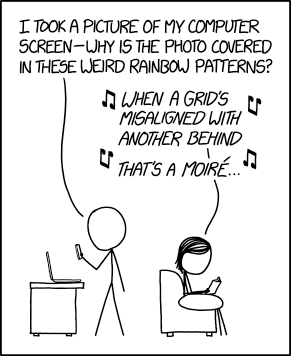
Source: XKCD

Sensors that use the Bayer pattern are especially prone to aliasing though, because the red and blue channels are being sampled at much lower frequencies than the full pixel count. This means there are two Nyquist frequencies (a green/luminance limit and a red/blue limit) and two types of aliasing you’ll tend to encounter: errors in detail too fine for the sensor to correctly capture the pattern of and errors in (much less fine) detail that the camera can’t correctly assess the color of.

‘the Bayer pattern is especially prone to aliasing’

To reduce this first kind of error most cameras have, historically, included Optical Low Pass Filters, also known as Anti-Aliasing filters. These are filters mounted in front of the sensor that intentionally blur light across nearby pixels, so that the sensor doesn’t ever ‘see’ the very high frequencies that it can’t correctly render, and doesn’t then misrepresent them as aliasing.**

The point at the center of the Siemens star is too fine for this monochrome camera to represent, so it’s produced a spurious diamond-shaped ‘alias’  at the center instead. This image second was shot with a very high resolution camera, blurred to remove high frequencies, then downsized to the same resolution as the first shot. It still can’t accurately represent the star, but doesn’t alias when failing.

These aren’t so strong as to completely prevent all types of aliasing (very few people would be happy with a filter that blurred the resolution down to 1/4 of the pixel height: the Nyquist frequency of red and blue capture), instead they blur the light just enough to avoid harsh stair-stepping and reduce the severity of the false color on high-contrast edges.

With a Bayer filter, you get a fun color component to this aliasing. Not only has the camera tried to capture finer detail than its sensor can manage, you get to see the side-effect of the different resolutions the camera captures each color with. Again, if you compare this with a significantly over-sampled image, blurred then downsized, you don’t see this problem. However, look closely you can still see traces of the false color that occurred at the much higher frequency this camera was shooting at.

This means that, a camera with an anti-aliasing filter, you shouldn’t see as much false color in the high-contrast mono targets within our test scene, but it’ll do nothing to prevent spurious (aliased) patterns in the color resolution targets.

Even with an anti-aliasing filter, you’ll still get aliasing of color detail, because the maximum frequency of red or blue that can be captured is much lower. This image was shot at the same nominal resolution but with red, green and blue information captured for each output pixel: showing how the target could appear, with this many pixels.

Light loss

At the silicon level, modern sensors are pretty amazing. Most of them operate at an efficiency (the proportion of light energy converted into electrons) around 50-80%. This means there’s less than 1EV of performance improvement to be had in that respect, because you can’t double the performance of something that’s already over 50% effective. However, before the light can get to the sensor, the Bayer design throws away around 1EV of light, because each pixel has a filter in front of it, blocking out the colors it’s not meant to be measuring.

‘The Bayer design throws away
around 1EV of light’

This is why Leica’s ‘Monochrom’ models, which don’t include a color filter array, are around one stop more sensitive than their color-aware sister models. (And, since they can’t produce false color at high-contrast edges, they don’t include anti aliasing filters, either).

It’s this light loss component that may eventually spell the end of the Bayer pattern as we know it. For all its advantages, Bayer’s long term dominance is probably most at risk if it gets in the way of improved low-light performance. This is why several manufacturers are looking for alternatives to the Bayer pattern that allow more light through to the sensor. It’s telling, though, that most of these attempts are essentially variations on the Bayer theme, rather than total reinventions.

The alternatives

These variations aren’t the only alternatives to the Bayer design, of course.

Sigma’s Foveon technology attempts to measure multiple colors at the same location, so promises higher color resolution, no light loss to a color filter array and less aliasing. But, while these sensors are capable of producing very high pixel-level sharpness, this currently comes at an even greater noise cost (which limits both dynamic range and low light performance), as well as struggling to compete with the color reproduction accuracy that can be achieved using well-tuned colored filters. More recent versions reduce the color resolution of two of their channels, sacrificing some of their color resolution advantage for improved noise performance.

‘The worst form… except all those others that have been tried’

Meanwhile, Fujifilm has struck out on its own, with the X-Trans color filter pattern. This still uses red, green and blue filters but features a larger repeat unit: a pattern that repeats less frequently, to reduce the risk of it clashing with the frequency it’s trying to capture. However, while the demosaicing of X-Trans by third-party software is improving, and the processing power needed to produce good-looking video looks like it’s being resolved, there are still drawbacks to the design.

Ironically, devoting so much of the sensor to green/luminance capture appears to have the side-effect of reducing its ability to capture and represent foliage (perhaps because it lacks the red and blue information required to render the subtle tint of different greens).

Which leaves Bayer in a situation akin to Winston Churchill’s take on Democracy as: ‘the worst form of Government except all those other forms that have been tried from time to time.’

40 not out

As we’ve seen before, the sheer amount of effort being put into development and improvement of Bayer sensors and their demosaicing is helping them overcome the inherent disadvantages. Higher pixel counts keep pushing the level of color detail that can be resolved, despite the 1/2 green, 1/4 red, 1/4 blue capture ratio.

And, because the frequencies that risk aliasing relate to the sampling frequency, higher pixel count sensors are showing increasingly little aliasing. The likelihood of you encountering frequencies high enough to cause aliasing falls as your pixel count helps you resolve more and more detail.

Add to this the fact that lenses can’t perfectly transmit all the detail that hits them, and you start to reach the point that the lens will effectively filter-out the very high frequencies that would otherwise induce aliasing. At present, we’ve seen filter-less full frame sensors of 36MP, APS-C sensors of 24MP and Four Thirds sensors of 16MP, all of which are sampling their lenses at over 200 pixels per mm, and these only produce significant moiré when paired with very sharp lenses shot wide-enough open that diffraction doesn’t end up playing the anti-aliasing role.

So, despite the cost of light and of color resolution, and the risk of error, Bryce Bayer’s design remains firmly at the heart of digital photography, more than 40 years after it was first patented.


Thanks are extended to DSPographer for sanity-checking an early draft and to Doug Kerr, whose posts helped inform the article, who inspired the diagrams and who was hugely supportive in getting the article to a publishable state.

* Unsurprisingly, some manufacturers have tried to take advantage of this increased diagonal resolution by effectively rotating the pattern by 45°: this isn’t commonplace enough to derail this article with such trickery, so we’ll label them ‘witchcraft’ and carry on as we were.

** The more precocious among you may be wondering ‘but wouldn’t your AA filter need to attenuate different frequencies for the horizontal, vertical and diagonal axes?’ Well, ideally, yes, but it’s easier said than done and far beyond the scope of this article.

Articles: Digital Photography Review (dpreview.com)

 
Comments Off on Resolution, aliasing and light loss – why we love Bryce Bayer’s baby anyway

Posted in Uncategorized


Rim Light – A Simple Way to Create Powerful Images with a Single Flash

22 Mar

In this article, I will introduce you to creating a rim light using a single flash. While not so common, it is extremely easy to put in place and will allow you to get very interesting and powerful images. To do this kind of photography you just need a flash with the ability to place it off camera. A welcome accessory, the only one you may need, is a light stand or tripod to easily keep the flash in place.

Rim Light - A Simple Way to Create Powerful Images with a Single Flash

Learning flash doesn’t have to be hard

If you are just getting started in portraiture, chances are you have been faced with the “flash versus natural light” dilemma, and you probably went with natural light. I find many amateur and beginning photographers are intimidated by lighting equipment because they think that in order to get something good, they have to use complicated setups where many pieces of equipment are required.

In my opinion, the problem with learning to use flash is that the easiest possible setup, i.e., a single flash used off-camera, is often presented only as a way to create a basic image that needs to be improved by adding more gear and by creating more complicated lighting setups. As if nobody would seriously use just one light. So, I can see why flash photography is intimidating.

If you are a beginner, you probably want to know how to use your single, entry level, flash and how to create images that will stand out from the gazillion of portraits out there.

googletag.cmd.push(function() {var gpt_slot = googletag.defineSlot( “/1005424/_dPSv5in-post-mobile(300×250)”, [300, 250], “pb-ruleset-mobile-ad-0” ).addService( googletag.pubads() );ruleset_mobile_slots.push( gpt_slot );});

googletag.cmd.push(function() {var gpt_slot = googletag.defineSlot( “/1005424/_dPSv5in-post-mobile(300×250)”, [300, 250], “pb-ruleset-desktop-ad-4” ).addService( googletag.pubads() );ruleset_desktop_slots.push( gpt_slot );});

Keep it simple

My solution was to forget about the magazine and fashion style portraits. I wanted to take advantage of the limitations of my single light setup to create strong and moody portraits by combining the hard light from the bare flash with a low-key style. Note; this style will better suit male models.

Rim lighting 01

Self-portrait using a single flash on my right, without any light modifiers.

By changing the output power and the zoom setting of the flash, you can get a more gentle and intimate portrait, like the one below.

Rim lighting 02

A single light setup can produce less punchy and contrasty images by changing the flash output power and the zoom settings.

Creating a rim light

This is all nice and good, but you can get a very different look by using a rim light. This kind of light highlights only the contours of the subject, and I love it.

Rim lighting 03

Rim light and low-key style; a powerful combination.

The setup is extremely simple. Just hide the flash right behind the model or the object, and point it back directly at the subject.

In practice, we could see the rim light as the opposite of a silhouette, where the subject is seen as a black shape against a brighter, often white, background. In the studio, the light setup for a silhouette is, in fact, the same of as that used to create a rim light, except that the flash is pointing at the background instead of at the subject.

Rim lighting 04

Self-portrait in silhouette.

Ideally, you want to have only the rim light in the scene and not record any ambient light. But this does not mean you have to work in a dark room. The only thing you need to be careful about with rim light setup is to ensure that the flash output power is such that the light does not spill over and around the subject edges. You want to have only the light running along the subject contour.

googletag.cmd.push(function() {var gpt_slot = googletag.defineSlot( “/1005424/_dPSv5in-post-mobile(300×250)”, [300, 250], “pb-ruleset-mobile-ad-1” ).addService( googletag.pubads() );ruleset_mobile_slots.push( gpt_slot );});

googletag.cmd.push(function() {var gpt_slot = googletag.defineSlot( “/1005424/_dPSv5in-post-mobile(300×250)”, [300, 250], “pb-ruleset-desktop-ad-5” ).addService( googletag.pubads() );ruleset_desktop_slots.push( gpt_slot );});

Rim Light - A Simple Way to Create Powerful Images with a Single Flash

It is all about that thin light running along the subject’s edges.

Refine it a little

If possible, the editing is even easier. Make sure that the blacks in your image are deep and the highlights are bright. Do this and you have pretty much done with the editing.

What I like about this technique is that the resulting photo has a mysterious look that captures the viewer’s imagination. I guess it has all to do with the “see/not see”.

If you like props, you can also use them with a rim light to better convey a message, like in the photo below.

Rim Light - A Simple Way to Create Powerful Images with a Single Flash

Addiction. Here I have allowed the light to spill a bit more, so as to light my hands and the mobile screen.

We all live, most of the time, with our noses inside a smartphone screen, somewhat unaware of the reality around us. That and a feeling of addiction is the message I tried to attach to the photo.

Adding emotion

Emotions can also be easily conveyed in an interesting way by using rim light. We had a new baby girl a few months ago, and a few weeks before the due date, I experimented with a rim light in the living room when my pregnant partner passed by. I decided to take the usual very cliché photo of the father kissing the belly of the mother. While kissing her baby bump, I had the vision of the sun rising from behind the Earth, seen from space and thought, “Use a rim light!”. This is the result:

Rim Light - A Simple Way to Create Powerful Images with a Single Flash

Rim light can change a cliché image into a very moody and interesting one.

googletag.cmd.push(function() {var gpt_slot = googletag.defineSlot( “/1005424/_dPSv5in-post-mobile(300×250)”, [300, 250], “pb-ruleset-mobile-ad-2” ).addService( googletag.pubads() );ruleset_mobile_slots.push( gpt_slot );});

googletag.cmd.push(function() {var gpt_slot = googletag.defineSlot( “/1005424/_dPSv5in-post-mobile(300×250)”, [300, 250], “pb-ruleset-desktop-ad-6” ).addService( googletag.pubads() );ruleset_desktop_slots.push( gpt_slot );});

I think this simple light setup transformed the same old same old photographic cliché into a much more powerful and interesting image.

Special effects

Finally, because the scene is backlit, an easy way to add interest is to include in the shot smoke or aerosols. Both will capture and scatter the light around, creating some interesting effects.

Rim Light - A Simple Way to Create Powerful Images with a Single FlashSince I do not smoke, I sprayed water around to make this self-portrait shot more interesting.

Finally, try to turn the model towards the light and allow the flash to light them a bit more for some interesting variations.

Rim Light - A Simple Way to Create Powerful Images with a Single FlashTurning the model to face the light can be an interesting variation on the theme.

To conclude, I hope I have given you some ideas to start playing with a single off-camera flash in a simple and non-intimidating way using a rim light. The bonus is creating some particular and interesting photos in the process.

googletag.cmd.push(function() {var gpt_slot = googletag.defineSlot( “/1005424/_dPSv5in-post-mobile(300×250)”, [300, 250], “pb-ruleset-mobile-ad-3” ).addService( googletag.pubads() );ruleset_mobile_slots.push( gpt_slot );});

googletag.cmd.push(function() {var gpt_slot = googletag.defineSlot( “/1005424/_dPSv5in-post-mobile(300×250)”, [300, 250], “pb-ruleset-desktop-ad-7” ).addService( googletag.pubads() );ruleset_desktop_slots.push( gpt_slot );});

The post Rim Light – A Simple Way to Create Powerful Images with a Single Flash by Andrea Minoia appeared first on Digital Photography School.


Digital Photography School

 
Comments Off on Rim Light – A Simple Way to Create Powerful Images with a Single Flash

Posted in Photography