RSS
 

Posts Tagged ‘Light’

Voyager is a waterproof, smart LED light stick that you control with a phone

23 Jul

A new Indiegogo campaign is seeking funding for Voyager, a waterproof smart light stick made with LEDs, a diffuser tube, integrated battery, remote controller, and animation controller.

Voyager is the brainchild of Digital Sputnik, which says it packed all the features from its other DS products into this light stick. The company plans to offer Voyager in both 2ft / 61cm and 4ft / 123cm lengths, each version with slightly different specs.

The 2ft Voyager has a weight of 2.4lbs / 1.1kg, a resolution of 39 pixels, built-in 45Wh battery and 20 watt power draw. Compared to that, the larger 4ft Voyager has a 4.9lbs / 2.2kg weight, 83 pixels resolution, 90Wh battery, and 40 watt power draw. Both models allow photographers to use their own diffusion filters via two installation slots, and both can be used under water at depths of up to 2m / 6.6ft for up to 30 minutes at a time. A special version capable of greater depths will also be offered.

Unlike some competing lighting products, Digital Sputnik explains that Voyager utilizes LightGrading software that eliminates the need for technicians to manually adjust every light on a set, instead offering complete control from a smartphone. Assuming the Indiegogo campaign hits its $ 500,000 stretch goal, Digital Sputnik plans to add an integrated WiFi router to Voyager, enabling one unit to act as a router for other units on the set.

The Voyager campaign has thus far raised approximately $ 320,000 in funds, exceeding its $ 300,000 goal with 22 days remaining. Interested consumers can pledge at least $ 290 USD in exchange for a single 2ft Voyager unit or $ 440 USD for a single 4ft Voyager unit. Shipping to these backers is estimated to start in December 2017.

To learn more or put down a pledge of your own, head over to the Indiegogo campaign.

Articles: Digital Photography Review (dpreview.com)

 
Comments Off on Voyager is a waterproof, smart LED light stick that you control with a phone

Posted in Uncategorized


That crazy 16-module Light L16 camera is finally shipping today

15 Jul
The Light L16 boasts a crazy 16 total camera modules, creating images by blending photos taken with all 16 simultaneously. Photo: Light.co

It took four years, but Light.co’s L16 computational photography camera is officially shipping to pre-order customers. The 16-module camera is about the size of a regular smartphone, but by using 16 cameras at once, it claims to shoot the kinds of photos we’re used to seeing from DSLRs.

The announcement dropped just a couple of hours ago on the Light.co website, where the company seemed to go to great lengths to justify the last 4 years.

“We’ll admit, bringing this breakthrough computational camera to market hasn’t been easy,” reads the blog post. “You see, Light is not just building a camera. Or an app. Or an algorithm, as most other startups do. We’re building all of these things and then combining them to create something radically different.”

Creating this crazy camera has involved a wide variety of engineering feats: designing camera-modules, building new chipsets, creating proprietary computational-imaging software, building out an e-commerce platform, and putting it all into a mobile device.

The camera that came out the other end is allegedly, “something the world has never seen before.”

Light.co Director of Hardware Engineering, Brian Gilbert, holding the first ‘lunch box’ model of the L16 Photo: Light.co

“Like any other new invention, revolutionizing the camera has taken some time. For years, we’ve been maniacally focused on producing the highest-quality images possible,” continues the announcement. “Our standards are extreme—they have to be if we are truly reinventing the camera—and we hope you can understand why it’s taken so long for the L16 to reach the high bar we’ve set for ourselves.”

With words like that, the real deal had better be something spectacular. Fortunately, we won’t have to wait long to find out.

Light.co is determined not to rush things, or send out an unfinished product, but the first pre-orders shipped today and the company is working hard to get the rest “in the mail as soon as [they’re] ready—but not any sooner.” For our part, we’ll be reaching out and hoping to get an L16 into the DPReview studio ASAP.

Articles: Digital Photography Review (dpreview.com)

 
Comments Off on That crazy 16-module Light L16 camera is finally shipping today

Posted in Uncategorized


What is Good Light and How to Use it to Create Beautiful Portraits

12 Jul

Two of the most commonly used and misunderstood phrases thrown around by photographers today are, “It’s all about the light” and “Look at that beautiful light”. But what does that actually mean? How can you use it to make beautiful portraits?

good light portraits

In my early years, I kept hearing photographers online and in person preach about the importance of light yet never clearly explain what good light is and how to actually use it to flatter or minimize a subject’s flaws. Here are a few tips to keep in mind on your next shoot to help understand light and how to use it to make better portraits.

Direction of Light

Before you pick up your camera, stop and look around the scene to see what direction the light is actually coming from which will help you decide what to do with your subject. This might seem really obvious, but once you understand the importance of the direction of light half the battle has been won.

direction of light portraits

For example, when you first walk into a room for an indoor portrait or bridal session the most obvious light source is likely from a window. With window light there are three common lighting scenarios you can create by simply changing your camera and subject position to the light.

Flat Lighting

In this scenario, the window is behind you (you have your back to the window) thus soft light is falling onto your subject. There is no light coming into the lens compared to if you were shooting into the window. Usually the lighting is even and flat with no shadows, provided, of course, that there is no direct sunlight coming through the window.

flat lighting - good light portraits

Here the light was behind the camera providing a nice even light across the groom’s face.

Back Lighting

A backlighting situation is created when you’re shooting into the light (the camera is facing the window). Shooting into the light will cause a lack or loss of contrast in your image, and the background will most likely blow out and be over exposed. You may also choose to shoot this way to purposely eliminate distracting details that maybe outside like a building or car that detracts from the scene.

This is okay if that’s the look you’re going for or you’re shooting a silhouette, but for a portrait it’s usually not the most flattering light.

back lighting silhouette - good light portraits

Here I chose to purposely backlight the bridal party. So the light wasn’t coming directly into the lens and to try and retain some contrast, I simply turned the blinds slightly so the light wasn’t coming directly through the window as much.

Split or Side Lighting

Having your subject next to the window and shooting parallel to it can be a good way to create some shape, tone, and texture by defining highlight and shadow detail in the face and body. It’s also a great way of hiding or highlighting certain features that might be prominent. For example, if your model has blemishes on one side of her face, to hide or minimize this simply place that side of the face in shadow and or crop it out entirely if possible.

side lighting - good light portraits

Here the light was coming from camera left, which also makes her the brightest part of the image compared to the darker back ground. The bride and I were standing parallel to the window.

Light with Intention

To highlight your subject’s face, rather than the torso or arms which are bigger in proportion to the face, simply turn their body away from the light source and turn their face back toward the camera.

Also if you can find a location where the background tone is darker than the subject it will help make the model stand out as the center of interest in your image. This could mean choosing a location in the house which has a darker midrange tone not a white or cream. It’s also most likely going to be out of focus anyway.

good light portraits

Here the light was coming from the window to the right of the bride (from camera view). I asked the bride to turn her body away from the light (to my left, her right) and then bring her face back towards the window. This is how I achieved the shadow detail on her left side of her face and body. I was also shooting from the shadow side or her face.

Quality of Light

Sun light, window light, reflected light, diffused light and back light all have a different quality of light. Direct light sources tend to be harsher and will show skin imperfections easier. Direct midday sunlight can create hard shadows in the eye sockets which can look like dark bags.

If you have to shoot during midday, remember that the light is coming from directly above. So wherever possible find poses to get the models to tilt their heads up towards the sunlight so their entire face is lit to avoid having horrible bags under their eyes.

Look at the quality of light and if it is too harsh like direct sunlight it may be a good idea to introduce some sort of diffuser like a scrim, or get into the shade.

quality of light - portraits

Here I was shooting indoors, but the light coming through the window was too harsh. So I asked my assistant to hold a scrim in the window which created a beautiful even soft quality of light.

Sometimes natural reflectors can be found at the locations where you’re shooting. So if you see a white wall or big white truck and the sun is hitting it, that is now a diffused light source and will be much softer than a direct light source like the sun.

diffuse light portrait

This image was taken outdoors before sunset using a translucent reflector as a diffuser. I asked my assistant to hold the reflector in-between the subjects and myself. This created beautiful, soft, non-direction diffused light on their faces filling in all shadows. The natural sunlight behind them added a nice soft highlight to her hair. You can even see the reflection of the reflector (catch lights) in their eyes.

Conclusion

With all these tips in mind, the most important thing to remember is that all light is not created equally. The best thing I can suggest is to go out and just practice for an hour or so at different times of day with varying light sources to see what works and what doesn’t. This way you’ll have confidence on your next the wedding day or portrait photography shoot.

The post What is Good Light and How to Use it to Create Beautiful Portraits by Andrew Szopory appeared first on Digital Photography School.


Digital Photography School

 
Comments Off on What is Good Light and How to Use it to Create Beautiful Portraits

Posted in Photography


Living Light: 11 Transforming Kinetic & Illuminated Art Installations

22 Jun

[ By SA Rogers in Art & Installation & Sound. ]

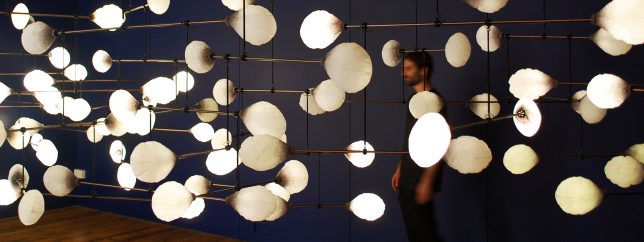
Rippling, unfolding, slithering and glowing like bioluminescent creatures, these kinetic and illuminated works of art are mesmerizing to watch. We can’t help being fascinated by the combination of light and motion, especially when it’s integrated into clothing, responds to our gaze or voices, or is engineered into monumental interactive installations of laser beams for our slack-jawed amusement.

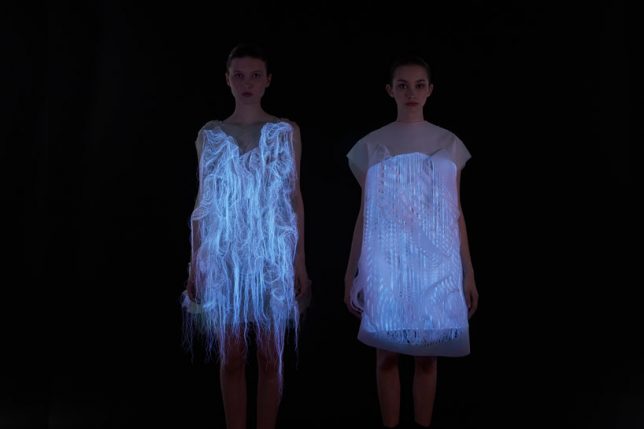
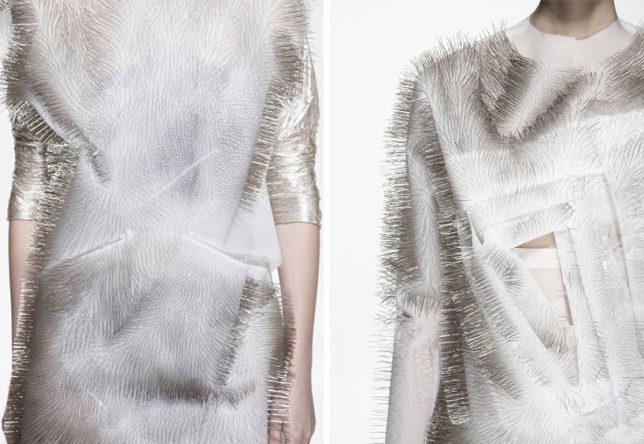
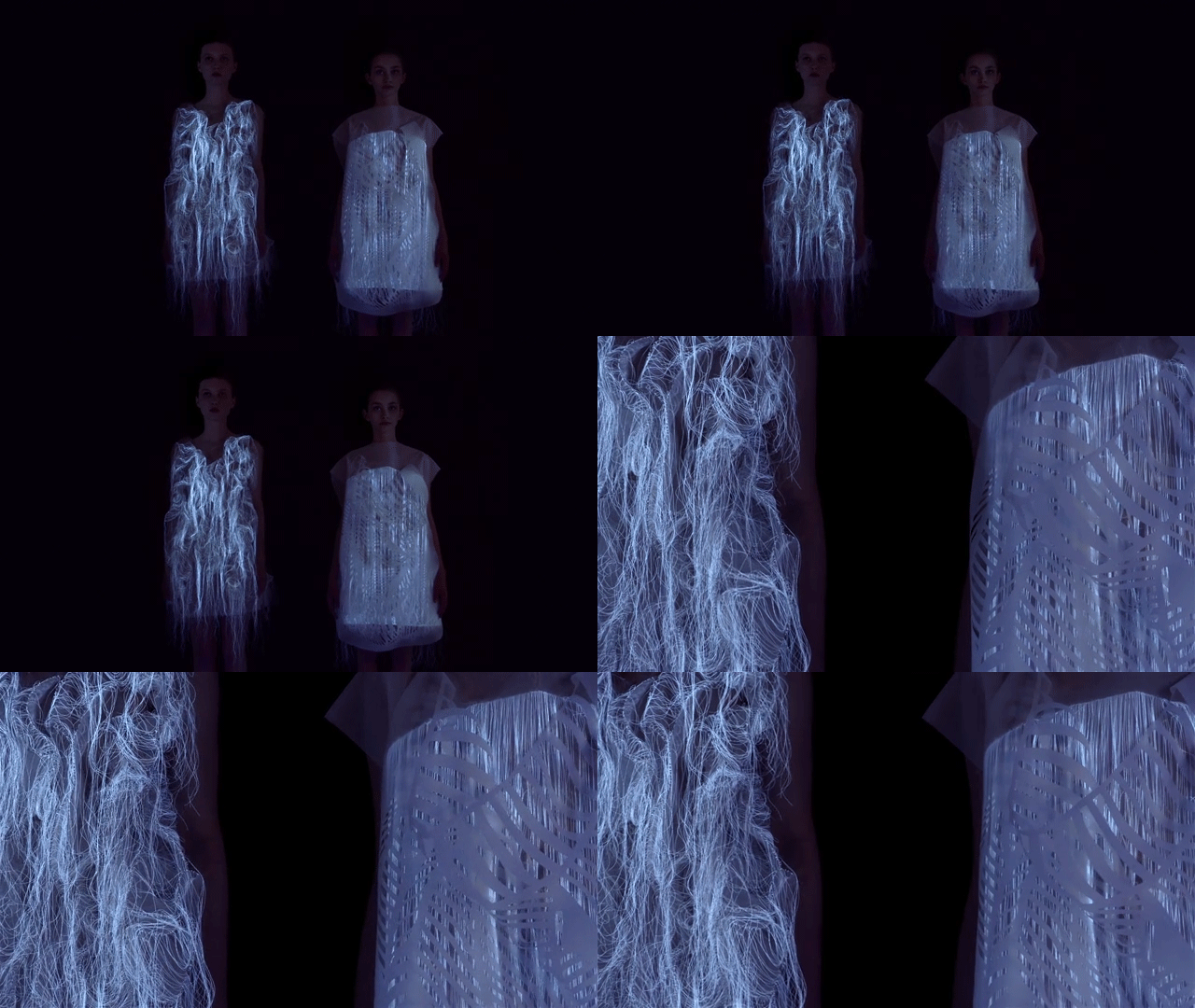
Sound Activated Clothing by Ying Gao

‘Incertitudes’ and ‘(NO)Where (NOW)here’ by fashion designer Ying Gao are two series of unusual reactive garments – the former covered in rippling dressmaker pins, and the latter moving like a living creature while glowing eerily in the dark. The photo luminescent thread works with eye tracking technology to activate movement by the gaze of spectators, while the pins respond to spectators’ voices.

Experimental Kinetic Glass Installations by LASVIT

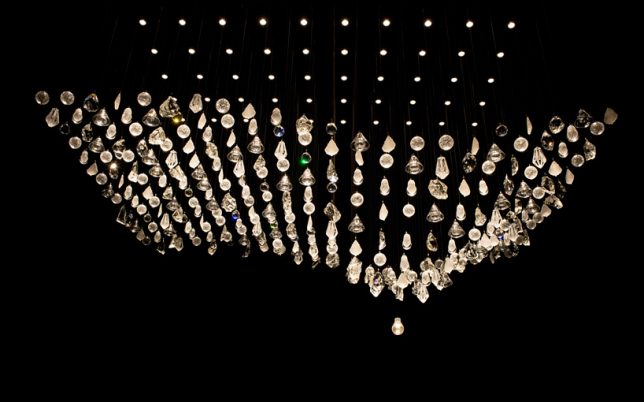
Czech lighting company LASVIT presents a series of experimental kinetic glass installations during Milan Design Week, creating immersive illuminated environments that move and shift in synchronized rhythms.

La Vie en Rose by Atelier Öi & USM

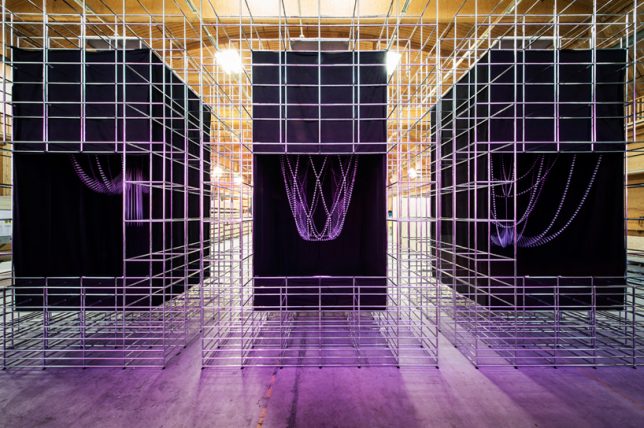
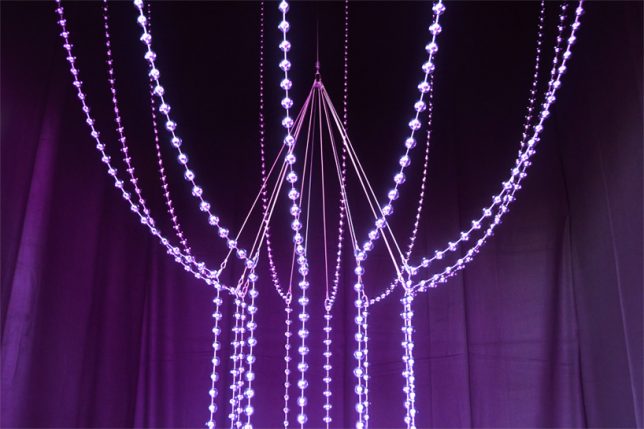
A company called USM produces a network of industrial components known as USM Haller Systems that offer infinite reuse and reconfiguration possibilities. For Designer’s Saturday 2014 in Switzerland, the company commissioned Atelier Öi to use these parts as a base for a kinetic art installation expressing these possibilities. ‘La Vie en Rose’ is the result.

CL:OC Installation by GROSSE 8

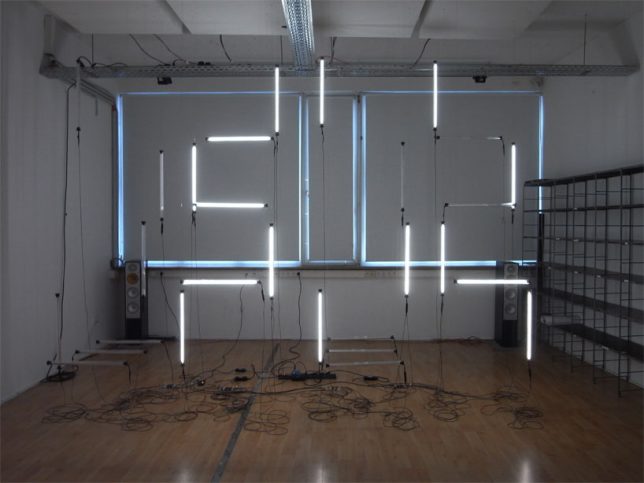
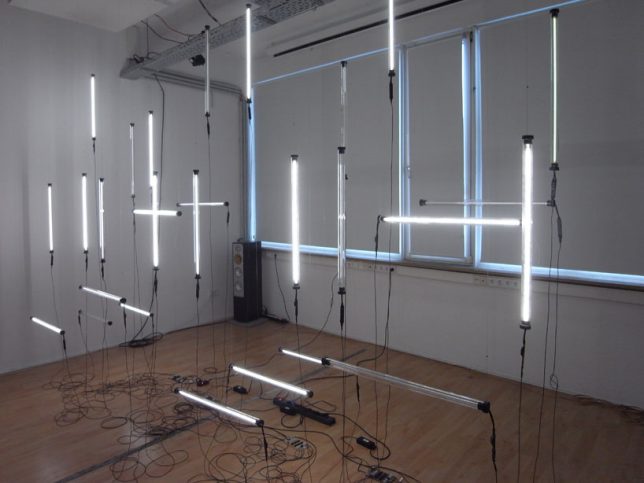
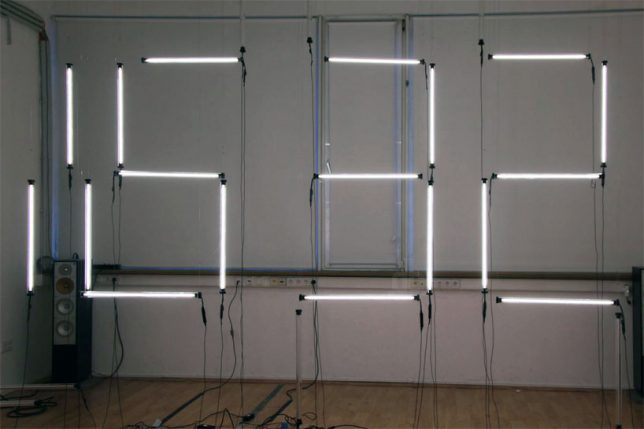
Hanging flurorescent tubes powered by twenty-eight motors hang in the air, constantly rearranging themselves to display the time in digital numbers. Created by German design collective GROSSE 8, the sculpture debuted at Interior Design Week Cologne.

Big Dipper: Helical Kinetic Sculpture by Michael Candy

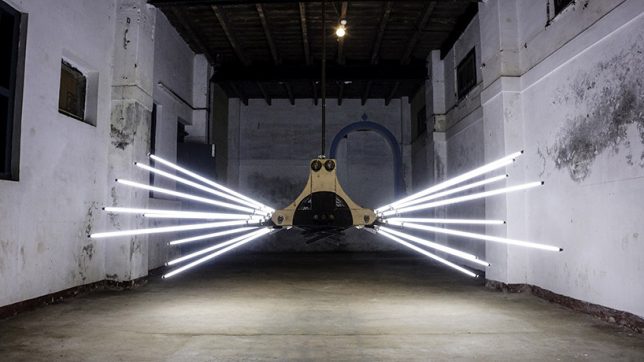
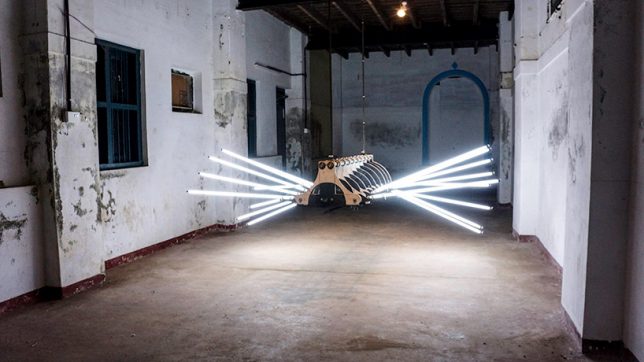
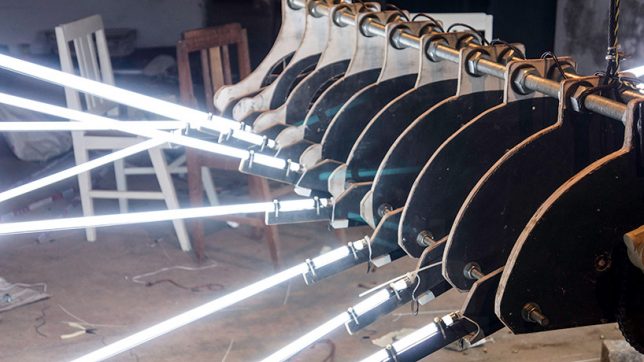
Looming in the air like some kind of monstrous mechanical spider, BIG DIPPER by Michael Candy is suspended within an old warehouse in India, just waiting to scare the pants off a passerby. It features 18 fluorescent tubes sticking out of a plywood and metal body.

Next Page – Click Below to Read More:
Living Light 11 Transforming Kinetic Illuminated Art Installations

Share on Facebook


[ By SA Rogers in Art & Installation & Sound. ]

[ WebUrbanist | Archives | Galleries | Privacy | TOS ]


WebUrbanist

 
Comments Off on Living Light: 11 Transforming Kinetic & Illuminated Art Installations

Posted in Creativity


New Pro Light Bumblebee family from Manfrotto targets still, video and drone users

15 Jun

Manfrotto has introduced a new collection of outdoor backpacks and messenger bags that are designed to cope with extreme environments and to allow users to carry loads of kit. The largest backpack in the Pro Light Bumblebee series, the Bumblebee-230 PL can hold a DSLR with vertical grip with a 70-200mm F2.8 zoom attached as well as an extra ten lenses, according to Manfrotto.

The series comprises two backpacks and two messenger bags all of which can hold a laptop as well as cameras and lenses. The backpacks have configurable internal dividers so the main compartment can be arranged for high-end still or video cameras, lenses and accessories. These backpacks also have a tripod holder and the Bumblebee-230 PL features a lens pouch on the waistband strap.

$ (document).ready(function() { SampleGalleryV2({“containerId”:”embeddedSampleGallery_0518829044″,”galleryId”:”0518829044″,”isEmbeddedWidget”:true,”standalone”:false,”selectedImageIndex”:0,”startInCommentsView”:false,”isMobile”:false}) });

The two messenger bags, the Bumblebee-M30 PL and M10 PL, can also be configured to hold a small gimbal with their XtraSecure handheld gimbal strap. The larger of the two, the M30 PL can also be used to carry a DJI Mavic plus the Osmo gimbal camera.

The messenger bags have NoiseFree Velcro for silent access to the main compartments and all of the Bumblebee bags have DuoFace rain/sun covers. For more information see the Manfrotto website.

Prices:
MB PL-B-230 Bumblebee-230 PL Backpack $ 279.99
MB PL-B-130 Bumblebee-130 PL Backpack $ 229.99
MB PL-BM-30 Bumblebee M-30 PL Messenger $ 149.99
MB PL-BM-10 Bumblebee M-10 PL Messenger $ 129.99

Press release

Manfrotto Launches New Pro Light Bumblebee Camera Bag Family

Performance, Quality & Comfort, Redefined

Manfrotto, a leading global innovator and manufacturer of premium photo, video and lighting support products and accessories, has launched the new Pro Light Bumblebee bags – perfect for professional and amateur photographers and videographers who work outdoors and want a reliable carrying solution. With this collection, users can stay comfortable in the harshest of conditions despite high temperatures, extreme cold or high humidity.

The new Pro Light Bumblebee family is an exceptional assortment of high-performance camera backpacks and messenger bags which perfectly embody Manfrotto’s Italian heritage. This family introduces Manfrotto’s unique-to-the-market breathable harness system that greatly reduces photography gear fatigue, allowing image makers to cover more ground and locate the best spots for the perfect shots.

Inside, the bags’ innovative designs safeguard the latest professional equipment options. The renowned Camera Protection System (CPS) dividers take extra care of camera bodies and lenses. They are fully adjustable and built to distribute weight evenly and avoid tension to the body.

The new Manfrotto Bumblebee backpacks are designed to take stress and heat off the shoulders, neck and lower back and feature Manfrotto’s state-of-the-art AirSupport breathable harness and back panel, adjustable sternum support, shaped hip and waist support systems. A side handle helps users put the pack on or take it off, while elastic side pockets keep water bottles outside the critical gear zone.

The removable Manfrotto CPS insert safeguards equipment right at the heart of the pack and keeps it organized with the efficiency of a portable studio:

  • The Bumblebee-230 PL backpack protects a gripped DSLR with a 70-200/2.8 lens attached and 10 additional lenses or an attached 400/2.8 with five additional lenses. In video configuration, it protects a disassembled modular camcorder like the Canon C100 with numerous lenses & accessories. It also fits a 17” laptop in its own padded compartment.
  • The Bumblebee-130 PL backpack keeps a high-end CSC or a DSLR safe with a 70-200/2.8 lens attached and eight additional lenses or an unattached 400/2.8 with three additional lenses. In video configuration, it protects disassembled modular camcorders like a SONY FS-5. It also fits a 15” laptop in its own padded compartment.

The entire internal space is padded to protect camera gear but can be also configured to accommodate accessories and personal gear as well. The main zipper comes with four pullers, which can be divided by a stopper into a top and lower compartment. Just open the top zipper for rapid access to frequently used contents from above.

A smart NeverLose tripod connection secures both longer and shorter tripods on the side of the pack. The connection straps are stitched in the side pocket and can be tucked away when not in use for a tidier appearance and to prevent straps getting lost.

The bigger Bumblebee-230 PL also features a lens pouch located in the waist belt. When not in use, the pouch can be flattened by tightening the webbing strap. (This feature is not available in Bumblebee-130 PL.)

Manfrotto’s new Bumblebee Messengers have significantly raised the bar for their category: a combination of flawless design and reliable performance, they meet all the needs of demanding professionals who travel light and fast. Like the backpacks, the messengers’ body-gripping fit and 3-point AirSupport harness system is breathable and perfect for prolonged outdoor use. The length of the strap can be rapidly adjusted using the EasyGrip buckle.

Despite their compact size, they hold a substantial amount of professional gear:

  • The Bumblebee M-30 PL Messenger protects a DSLR with a 70-200mm/2.8 lens attached and three additional lenses, a handheld gimbal (such as a DJI Osmo) and a 15” laptop in their own padded compartments, with all the necessary accessories.
  • The Bumblebee M-10 PL Messenger keeps a CSC/DSLR safe with a 24-70/4 lens attached and two additional lenses (including 70-200/2.8) and a handheld gimbal (such as a DJI Osmo) and a 13” laptop in their own padded compartments, with all the necessary accessories. It can also carry a full set DJI Mavic plus the Osmo gimbal camera.

These bags introduce the XtraSecure handheld gimbal-carrying solution – a stretchable band that holds the gimbal’s moving parts so it can be taken out quickly. The area can also be used as a traditional lens compartment if there is no gimbal in the bag.

Manfrotto’s Bumblebee Messengers feature a secure silent quick-access flap. When shooting in quiet environments (e.g. during a ceremony), apply the NoiseFree Velcro silencer to keep a low profile. The broad front organizer keeps everything on hand. There are two bungee cord straps to hang a small tripod, monopod or selfie pole, which are also protected by the front flap. The Bumblebee Messengers can hold a gripped DSLR body when you take out the laptop from its compartment.

All the bags of the Bumblebee collection come with a DuoFace sun/rain cover to protect from rain, reflect sunlight and keep the gear cool and dry all day long.

Key features:

  • Breathable design – comfortable carrying solutions for professional and amateur outdoor photography
  • Super lightweight construction – carry more lenses and stay comfortable even with prolonged use
  • High-performance materials – rip-stop fabric and the Manfrotto Protection System safeguard equipment

The following models are now available nationwide:

MB PL-B-230 Bumblebee-230 PL Backpack $ 279.99
MB PL-B-130 Bumblebee-130 PL Backpack $ 229.99
MB PL-BM-30 Bumblebee M-30 PL Messenger $ 149.99
MB PL-BM-10 Bumblebee M-10 PL Messenger $ 129.99

Articles: Digital Photography Review (dpreview.com)

 
Comments Off on New Pro Light Bumblebee family from Manfrotto targets still, video and drone users

Posted in Uncategorized


Bikesphere: Car-Detecting Ring of Red Light Puts Cyclists in a Safety Bubble

09 Jun

[ By SA Rogers in Design & Products & Packaging. ]

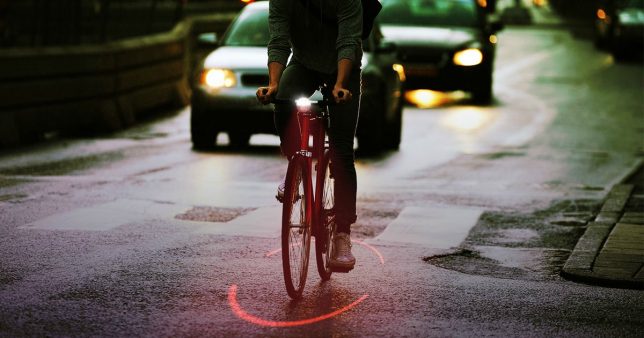
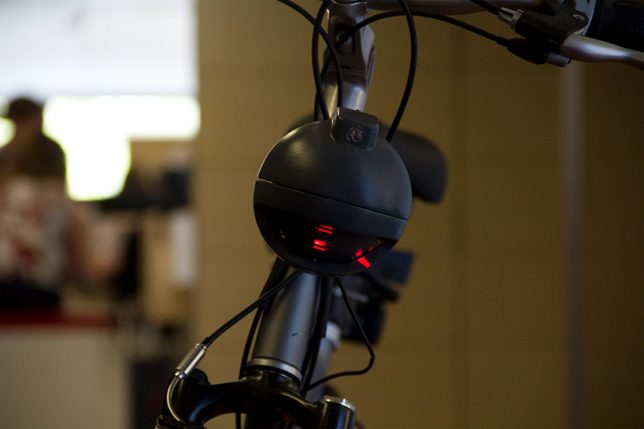
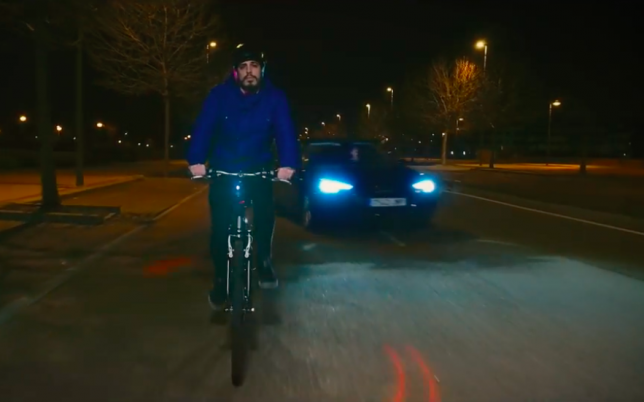
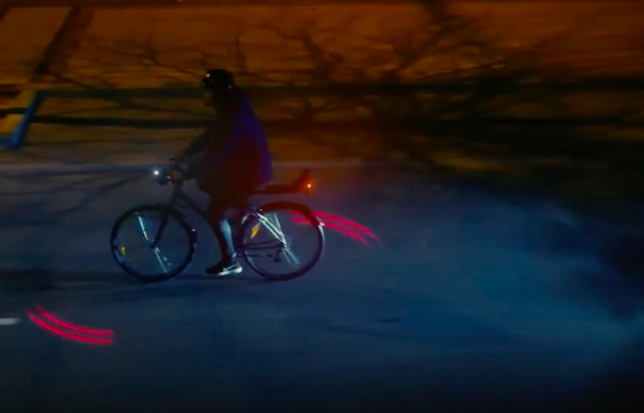
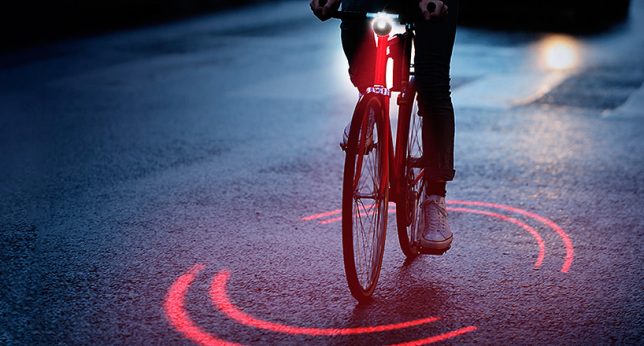
There’s no missing cyclists – or the zone of space you need to safely pass them – when they’ve got a ring of red light encircling them as they ride down the road. Michelin’s new open-source project, Bikesphere, features a light sensor and proximity detecting sensor that work together to monitor the environment around a cyclist and react accordingly if a car gets too close, pointing a double laser spotlight on the ground to define a safety area.

As it stands, riding a bike in an urban area can be a risky proposition, with more than 5,000 avoidable accidents happening every year due to cars passing cyclists at an unsafe distance.

During the day, the Bikesphere works like a normal light-detecting bike lamp, turning on when you go through dark areas as needed. By night, it’s ready to defend you, projecting a single-lined sphere for the entirety of your ride. When it can tell a car is coming, the light turns into a double line and starts to spin faster to alert both the cyclist and the driver.

Bikesphere is the first crowd-sourced idea to come to fruition through Michelin’s #TrendyDrivers movement, which aims to change the habits of drivers to make the roads safer. When an idea is approved, they fund the project to get it off the ground. Ultimately, the Bikesphere will be made public, so anyone who wants one can purchase the common components and download the plans to print the rest using standard 3D printers.

Share on Facebook


[ By SA Rogers in Design & Products & Packaging. ]

[ WebUrbanist | Archives | Galleries | Privacy | TOS ]


WebUrbanist

 
Comments Off on Bikesphere: Car-Detecting Ring of Red Light Puts Cyclists in a Safety Bubble

Posted in Creativity


Canon demonstrates its cameras’ low light capabilities in two new videos

06 Jun

Canon US has published two new videos that show off the low-light capabilities of several of its camera models. The company says “See Beyond Darkness and See the Light showcase the capabilities of Canon imaging technology which enables researchers, professional photographers, cinematographers and enthusiasts to shoot impactful clear and crisp imagery, even when masked in darkness due to extremely low-light conditions.”

In “See Beyond Darkness” Director of Photography Andy Casagrande records images of a rare biofluorescent turtle found only in the remote, unspoiled reefs of the Solomon Islands, using the Canon ME20F-SH Multipurpose Camera and EOS-1D X DSLR. In “See the Light” Canon cameras were used to capture the beauty of bioluminescent creatures under the sea, the grandeur of the extremely difficult-to-photograph Aurora Borealis (Northern Lights), and the wonder of the earth from far above it. Canon’s EOS C300 Mark II, ME20F-SH, and EOS C500 were used to capture all of the imagery in this video.

In addition to the videos you can view a gallery of still images and behind-the-scenes videos for See Beyond Darkness and See the Light on the Canon US website.

Articles: Digital Photography Review (dpreview.com)

 
Comments Off on Canon demonstrates its cameras’ low light capabilities in two new videos

Posted in Uncategorized


How to Understand Your Camera’s Light Meter and Get the Exposure You Want

26 May

Regardless of how you shoot, and whichever shooting mode you prefer to use, there is one item that remains constant – the light meter. Somehow, either you or your camera has to know how much light in on your scene in order to determine the optimal combination of aperture size, shutter speed, and ISO sensitivity to get the photo you want. This tool, which may not seem all that relevant to new photographers, is called a light meter.

Understanding what your camera’s light meter does and how it works is critical to advancing your skills and helping you get the shots you really want. Hopefully, this article will help you get a grip on it.

How to Understand Your Camera's Light Meter and Get the Exposures You Want

An analogy to help you understand the light meter

Before I get into a discussion about how the light meter works, think about the last time you cooked some meat on the grill. Whether it was a steak, some pork chops, or even just a couple hamburgers – you likely had a vision in your mind of what the finished product would be.

For backyard chefs like me who aren’t very good at this sort of thing, we have to use a meat thermometer to make sure our food is properly cooked. There’s always the question of where to put the thermometer to check and see if the meat is done. Or, in photography terms, check to see if the meat is properly exposed. You can touch it to the surface, poke it through to the middle, or insert the thermometer at various points around your dinner in order to get a good overall reading.

Each method would work for a different scenario, but it all depends on what you are cooking and how you want the finished food to turn out.

How to Understand Your Camera's Light Meter and Get the Exposures You Want

Your camera’s light meter is like measuring the temperature using a meat thermometer. Placement is crucial for an accurate reading.

How the camera light meter works

When you point your camera at a scene you also need a way of measuring the incoming light so you know how much of it there is and what settings you (or your camera) need to control in order to get the shot you want. It’s just like measuring the temperature of your food with a thermometer to make sure it’s done properly.

Most cameras today use a process called TTL Metering, which stands for through-the-lens. It means that your camera examines the light coming in through the lens and evaluates the brightness of the scene. Then you, or your camera, can adjust the settings in order to make sure your photo is exposed how you want. You may not ever notice the light meter at work or even see that it’s there at all unless you shoot in Manual Mode. But trust me, it’s constantly monitoring the light whether you know it’s working or not.

View the metering scale in Manual Mode

To see the light meter doing its thing, put your camera in Manual Mode and look for a series of dots or vertical lines at the bottom of your camera’s viewfinder.

How to Understand Your Camera's Light Meter and Get the Exposures You Want

In Manual Mode, look at the bottom of the screen in your viewfinder. Notice the scale with zero in the middle. That is the light meter at work.

The number scale at the bottom of the image above is an example of a camera’s light meter, and the tiny little triangle shows whether the picture is properly exposed or not. In this case, the triangle is at 0, which means the image is neither under or overexposed, but changing the aperture, shutter speed or ISO would make the triangle move up or down the line accordingly and result in a picture that is either a little too bright or a little too dark.

What part of the scene is the camera measuring the light from?

While that is all well and good, it’s only part of the story because it doesn’t explain how your light meter actually functions. Is it looking at all the incoming light or just some of it? Where in the frame is it looking as it measures the light? Understanding the answers to these questions is the key to unlocking the power of your camera’s light meter, and it all has to do with what’s known as metering modes.

How to Understand Your Camera's Light Meter and Get the Exposures You Want

Measuring the Light

Most cameras today have a few basic ways of measuring the incoming light:

  1. Matrix or Evaluative Metering – the camera looks at the light in the entire scene and averages it, (Nikon puts a bigger emphasis on the area where your lens is focused as well). Nikon calls this Matrix Metering, Canon calls it Evaluative.
  2. Center-Weighted Average Metering – looks at the light of the entire scene and averages it, but with emphasis on the center of the frame. Nikon and Canon both call this Center-Weighted Average Metering.
  3. Partial Metering – this measures the light only in a small portion of the center of the frame (about 8-12% of the scene). This is a Canon metering mode, Nikon does not have one similar.
  4. Spot Metering – measures the light only in a small area around the central autofocus point (about 1.5-3% of the frame). Nikon and Canon both call this Spot Metering.

Other camera manufacturers have different names for these modes, but suffice it to say the way in which your camera measures incoming light can have a huge impact on whether your photo is properly exposed. As an example, here are three shots that were taken with different metering modes.

Image #1, taken with Matrix (Nikon) or Evaluative (Canon) Metering.

Image #2, taken with Center-Weighted Metering.


Image #3, taken with Spot Metering.


Reflective versus incident metering

There’s another aspect of light metering that comes into play when setting up a shot. It has to do with how TTL metering works as opposed to a handheld light meter.

Reflective metering

The former, (the type of metering used in DSLRs), works by measuring the amount of light that comes through the lens. But the problem with that is that unless you are pointing your camera directly at the light source, the light being measured is actually bouncing off your subject first.

All the colors we see in the world around us get their hues and tonal values by absorbing every color of light except for what is bounced off of them. As many of us learned in grade school, light is made up of a spectrum of colors including red, orange, yellow, green, blue, indigo, and violet. A green tree leaf absorbs every color of light except for green. A red car absorbs every color except for red, and so on.

reflective metering - camera light meter

When your camera measures incoming light, it’s looking at the amount of light being bounced off your subject, not the amount of light actually hitting your subject. This has huge implications and can dramatically affect your exposure. In the illustration above, the subject is wearing clothes that absorb most colors of light except for blue, which means there is still a great deal of light being bounced off him and sent to the camera. However if the child changes clothes things can change a great deal.

reflective metering dark subject - camera light meter

In the illustration above, even though the amount of light hitting the boy has not changed, the camera will read the scene much differently because he is now wearing a dark shirt and pants. The camera will think it needs more exposure to compensate for what it thinks is less light on the scene, and the overall image will be overexposed as a result.

Here’s a real-world example of how this works:

reflective metering - camera light meter

Nikon D7100, 200mm, f/2.8, 1/8000th of a second.

In the photo above, so much light was being reflected off the girl’s white shirt that my camera had a hard time metering the scene properly. Much of the sunlight was bouncing off the shirt and coming directly back to my camera, so it responded by using a very fast shutter speed and low ISO value in an effort to make sure the shirt was properly exposed. Unfortunately, the rest of the scene was underexposed as a result.

Nikon D7100, 200mm, f/2.8, 1/1500th.

This was a few seconds later in the exact same spot, and all I did was have her put on a brown shirt. With much of the light from the sun being absorbed by the dark color of her outfit, my camera created a much brighter exposure by using a slower shutter speed. Not as much light was being captured by the TTL metering system so the camera thought more light was required for a good exposure.

Incident metering

This phenomenon can be particularly troublesome if you are shooting a wedding; grooms often wear dark tuxedoes whereas brides will usually be dressed in dazzling whites, which can really throw off your camera’s TTL metering system. The solution is to use an external handheld light meter, such as the Sekonic L-308S-U, which actually measures the amount of light falling on the subject.

Handheld light meter for incident light metering (light falling on the subject).

In the image above you can see that the meter shows you need an aperture value of f/16, shutter speed of 1/125th of a second, and ISO 100 in order to get a properly exposed scene. These numbers will likely be different from what the camera’s TTL system measures because some light will invariably be absorbed by the subject, which is why an external system like this can be so useful.

Here’s how the diagram from earlier would look if the setup involved an external handheld incident light meter.

incident metering - handheld light meter

You will often see wedding photographers using a light meter such as this in order to get a more accurate reading of how much light is hitting the wedding party during formal photos. This is especially true if they’re using a system of flashes or external speedlights because they need to know how much extra light the scene will require or tolerate.

When shooting a wedding it is quite common for the bride to wear a white dress, which reflects a great deal of light, and the groom to wear a dark tuxedo which absorbs almost all light. This can wreak havoc with a TTL metering system, and an external light meter is a great way to address the problem.

light metering - camera light meter

Conclusion

The overall goal here is to understand how the light meter in your camera functions. This, in turn, will help you know how you will need to alter the exposure settings to get the shot you want.

I hope this article has been helpful in explaining how the light meter works, how light is reflected off your subjects, and why your camera may not see a given scene quite like you expect it to. Ultimately it’s important to remember that there is no one correct way of metering a scene. Any of the metering modes and methods will work as long as you know what you are shooting and what type of results you are trying to achieve.

Knowing the difference between the various metering modes and types, and understanding how light is measured as it hits your camera can help you get the shots you want. None of these methods are any better or worse than the other, but each one has its own strengths and weaknesses. The more you know about how all of this works the better equipped you will be to get precisely the photographs you want.

The post How to Understand Your Camera’s Light Meter and Get the Exposure You Want by Simon Ringsmuth appeared first on Digital Photography School.


Digital Photography School

 
Comments Off on How to Understand Your Camera’s Light Meter and Get the Exposure You Want

Posted in Photography


Review of the Interfit Fluorescent Ring Light INT812

20 May

What is a ring light?

Interfit Fluorescent Ring Light

Even if you don’t know what a ring light is, it is probable that you have seen photos made using them. As the name suggest, they are a light source in the shape of a ring, often, your camera is mounted on the light so the lens points through it. This on-axis lighting provides even, shadowless illumination on the front of your subject. It is a very distinct style most often seen in fashion photography.

In the past, ring lights were expensive or required a solid set of DIY skills to build your own.

The effect is not to everyone’s taste, and that’s fair enough. Sometimes, the light can appear flat and lifeless, which puts some people off. Also, a lot of photographers don’t like the distinctive ring-shaped catch-lights. That is also fair. If, however, you do like what can be achieved with a ring light, but you’ve been put off by price in the past, then the Interfit Fluorescent Ring Light may just be for you.

Pros of the Interfit Fluorescent Ring Light

Interfit Fluorescent Ring Light

There are a lot of things to love about the Interfit Flourescent Ring Light. In no particular order, they are:

Cost

At $ 100, the Interfit Fluorescent Ring Light is cheap. No, it’s not a strobe, but when you compare it to, say, Bowens’ dedicated Ringflash Pro (listed for $ 2021 on B&H), the Interfit is close to $ 2000 cheaper. This makes ring lights accessible to almost every photographer who wants to use one.

Weight

The unit itself is quite large, but at 1.3 kg it’s light enough to carry anywhere without much trouble. If you often shoot in a studio or space that isn’t your own, throwing the Interfit ring light in the back of your car is not going to be a logistical issue.

Size

Interfit Fluorescent Ring Light

The ring light itself is rather large. But because you are not attaching the lens to the light, it gives you a lot of space to move around with the camera while still being able to see your subject through the light’s aperture. It also means that you can use a longer lens, such as 200mm while keeping the light really close to your subject.

Continuous

Interfit Fluorescent Ring Light

With the Interfit INT812 being a continuous light source, you gain a few advantages. The first of these being that replacement bulbs are cheap, despite the size, they are only around $ 14 each.

Another is that after being on for about an hour, the bulb never gets particularly hot. This is great if you’re photographing people as you don’t have to worry about that aspect of your subject’s comfort.

Finally, there’s the matter of your subject’s pupils. With strobe lighting, you are usually in dark environments with periodic bursts of bright light. As we all know, our eyes adjust to the dark and our pupils dilate to allow us to see. In bright light, such as this ring light offers, it’s the reverse and your subject’s pupils contract, revealing more of the color in their eyes.

Bendable arm

Thanks to a bendable arm, the Interfit INT812 is able to be put in almost any position, making it a very versatile light.

The real beauty of this light is the bendable arm that it is mounted on. This arm, combined with the fact that the light is not mounted to your camera, means that you are not limited to using it as a traditional ring light. You can use and position it as you would any other light source. It’s also possible to point it straight down, a feat usually reserved for boom arms.

At one point I found myself using it as a hair light, alongside a softbox fitted to a strobe as my key light. The versatility all of this provides is more than worth the price tag, even if you never use it on-axis as a traditional ring light.

Interfit NG-65c ring light

Placed at a 45-degree angle, the narrow edge creates interestingly shaped highlight and shadow areas.

Interfit NG-65c ring light

Positioned straight down and a few inches above, the Interfit Ringlight provided some much-needed fill on an all black subject.

Cons of the Interfit Fluorescent Ring Light

As much as I like this light, it does have a few problems as outlined below.

Build quality

As I’ve mentioned already, the Interfit Fluorescent Ring Light is not an expensive piece of equipment. In terms of build quality, it’s reasonable to not expect too much from it. The entire casing is made out of lightweight plastic and does feel a bit flimsy at the best of times. That said, both the bulb and the bendable arm seem to be of good quality. So far, I’ve used it about a dozen times and I have yet to have an issue.

Low intensity

Because this is a continuous light at the cheaper end of the market, the intensity of the light isn’t exactly the brightest. Because of this, you will be limited to working with large apertures and high ISO settings. Depth of field is unforgiving at apertures like f/1.8, so I would encourage using a tripod and taking your time focusing.

At the other end of the scale, it is very bright to look directly into from less than a foot away. This may be uncomfortable for your subjects if you have them in front of it for a long period of time.

If you’re used to using high powered strobes, you need to keep an eye out for other light sources that may affect your images. As the ring light isn’t very high powered, any ambient light around will add unwanted color casts to your images.

Chromatic aberration

When used on axis, chromatic aberration appears around the catch-lights in almost every photo. This isn’t much of a problem as Lightroom will make short work of the aberrations, but it is important to know about.

Chromatic aberration appears around the catchlight from the Interfit INT812; however, this easily fixed in Lightroom.

Color temperature

In terms of mixing multiple light sources, The Interfit INT812 does pose a few problems. It is not daylight balanced, nor does it match the fluorescent light balance preset in camera or in Lightroom. If this is the only light source present, you can eyeball the sliders in Lightroom or use a simple grey card to solve the problem.

Interfit Fluorescent Ring Light

The Interfit Right Light works well as a fill/hair light, although it does take some time to fix the resulting color casts.

However, when you’re mixing light sources, for example, if you use the ring light in combination with studio strobes, you will have to overcome unwelcome color casts. With the white balance set to flash, the color from the ring light is an unpleasant green. It’s an easy fix with all of the color correction tools in Photoshop and Lightroom, but it’s a problem easily avoided if you’d rather not spend the time correcting it. Of course, you could just use this as an excuse to shoot in black and white.

Interfit Fluorescent Ring Light

Extra equipment

So far, I have only come across one real problem while using the Interfit ring light. Because it is so light, I was happy to put it on one of my cheaper light stands. When I started using the bendable arm to put the light at weird angles, it became top-heavy and off balance and started to fall over. Putting it on a heavy duty light stand solved the problem. However, watching one of your lights start on its way to the floor is not an experience that I recommend anyone replicating.

The problem here is that good quality, heavy-duty light stands can start at around half the price of the ring light. If you don’t already have a good light stand before you consider purchasing the Interfit INT812, please be sure to include that into your pricing considerations.

Overall Impressions

Interfit Fluorescent Ring Light

For $ 100, I love this thing. No, it isn’t perfect, but it does add an awful lot of versatility to my toolkit. I like it so much, that as long as there’s a place to plug it in, I will be going out of my way to take it with me from now on.

It might be obvious, but I do like the ring light effect a lot. However, even if you hate ring lights, the Interfit Fluorescent Ring Light INT812 brings a lot to the table and does so in a price range that doesn’t make it cost prohibitive to give it a try.

The post Review of the Interfit Fluorescent Ring Light INT812 by John McIntire appeared first on Digital Photography School.


Digital Photography School

 
Comments Off on Review of the Interfit Fluorescent Ring Light INT812

Posted in Photography


Lighting 103: Greg Heisler on Light and Color

18 May

Abstract: Chromatically complex light adds much more realism to your lit photos.

Today’s Lighting 103 post features excerpts from a bar conversation with Greg Heisler. It's just as if we cornered him at a conference (which I did) and he agreed to have a drink and talk color (which he did).

This is roadmap stuff. It's above and beyond the specific info he includes with each of the assignments in his book, 50 Portraits, the companion text to L103.Read more »
Strobist

 
Comments Off on Lighting 103: Greg Heisler on Light and Color

Posted in Photography