RSS
 

Posts Tagged ‘Light’

How to Make Your Own DIY Light Box with Tape, Paper and a Window

01 Sep

Photographers are pretty savvy when it comes to saving money. This DIY  light box is a surprisingly simple method for photographing small, translucent objects like flower petals.

Remember holding sheets of paper against a window to trace out a design? This process is similar in technique. The sheet of baking paper will act as a diffuser, spreading light evenly through a translucent object so it can be photographed in detail. Using a well-lit sheet of paper also isolates the subject from the background with a nice, even, white backdrop. Plus, you get to take great photos without leaving the comfort of your own home. So really, it’s win-win!

Make Your Own DIY Light Box

Supplies you will need

  • Camera
  • Tripod
  • Macro lens or extension tubes
  • A well-lit glass window or door
  • Butcher’s paper
  • Clear sticky tape
  • Glass cleaner or rubbing alcohol
  • Eucalyptus oil (for removing any remaining sticky tape from the glass surface once you have finished shooting)
  • Small transparent objects to photograph (I like using flowers)

Picking a location

Before you start, you’ll need to locate a light source. While the butcher’s paper will serve as a background for your image, you’ll need a strong, even amount of light to illuminate the subject.

Depending on the time of day, you might have to try different windows around your house.  The position of the sun will dictate the strength of the light penetrating the butcher’s paper. Choose a window that is unimpeded by exterior blinds or trees if possible.

Make Your Own DIY Light Box

Capturing the intricate detail of organic materials like leaves is made much easier with the glow of light coming through the subject from behind.

Setting up

Once you’ve settled on a well-lit window, you’ll need to prepare the glass. Wipe a small amount of rubbing alcohol or glass cleaner over the window and pat down with a cloth. This will minimize any particles that may impede light from coming through. It will also allow the sticky tape to adhere to the glass more effectively. Make sure that the glass surface is completely dry, however, or the tape and butcher’s paper will become soggy and unusable.

Take your piece of butcher’s paper and hold it against the window. The reason I use butcher’s paper is because I’ve found that run-of-the-mill copy-paper disperses light in mottled and uneven patches, which looks poor in photographs. Butcher’s paper diffuses light more evenly and makes for a uniformly white background. You can use a piece as large as you like, just make sure there is enough paper to fill the viewfinder in your camera.

Make Your Own DIY Light Box

Not all paper is created equal. This is an example of the uneven, mottled light caused by a sheet of standard A4 copy paper.

Fix your piece of butcher’s paper to the glass. I recommend using clear sticky tape rather than blue-tack or colored tape because it may show up in your photographs and can wrinkle the paper. Once you have fixed the paper flush with the glass, you can begin adding your subjects.

Carefully stick your objects to the butcher’s paper with small amounts of clear sticky tape. This can be tricky on a vertical surface, so having lightweight, translucent subject matter like flowers work best. I also like to sit on a chair for this part, to avoid a backache.

Make Your Own DIY Light Box

Fix your subject matter to the butcher’s paper with bits of clear sticky tape.

Taking the shot

Once your subjects have been adequately adhered to your butcher’s paper, it’s time to get the camera out. Mount your camera on a tripod and position it so that the subject and the butcher’s paper fill your viewfinder. To capture the detail in your subject, a macro lens is ideal. I used my Kenko extension tubes to get a nice detailed shot. Of course, you could also arrange larger subjects or patterns on the butcher’s paper, focusing on pattern and light rather than macro detail.

Set your camera to Aperture priority mode (Av on Canon and A on Nikon) and adjust the aperture to allow for the desired depth of field. Remember, to maintain focus throughout the whole image, use a smaller aperture like f/22. However, this may be limited depending on the lens you use.

For the sharpest detail, using a low ISO count is also a good idea. Although this will cause your camera to automatically increase the shutter speed, your tripod will minimize camera shake, especially if you view your composition using with the LCD screen and Live View rather than the viewfinder.

Make Your Own DIY Light Box

Conclusion

Once you start photographing, you’ll notice the diffused light enveloping and illuminating your subjects. With the abundance of the soft light, you’ll discover that detail is much easier to capture and view. Using this butcher’s paper method eliminates pesky shadows, allowing the subject to lift off the background with striking contrast and intricacy.

Try photographing all sorts of flowers, fruits, leaves and other transparent materials and see your subjects in a whole new light!

Make Your Own DIY Light Box

Make Your Own DIY Light Box

Make Your Own DIY Light Box

Make Your Own DIY Light Box

Make Your Own DIY Light Box

Make Your Own DIY Light Box

Make Your Own DIY Light Box

The post How to Make Your Own DIY Light Box with Tape, Paper and a Window by Megan Kennedy appeared first on Digital Photography School.


Digital Photography School

 
Comments Off on How to Make Your Own DIY Light Box with Tape, Paper and a Window

Posted in Photography


Humor: Sports reporter tries to pass off iPhone calculator as ‘light meter’

30 Aug

You can’t make this stuff up… the website Deadspin stumbled across this on-field report from a cricket commentator, who tries to pass off his iPhone calculator as a “light meter.”

The question he’s trying to answer is whether or not it’s getting too dark to continue the test match between New Zealand and South Africa. According to his “light meter” there’s only 6.5 EV of light left to work with, which in his words is, “getting a little dodgy.”

Don’t worry though, the refs will take their own reading before they stop the match…

Articles: Digital Photography Review (dpreview.com)

 
Comments Off on Humor: Sports reporter tries to pass off iPhone calculator as ‘light meter’

Posted in Uncategorized


The Polaroid LED Macro Flexi is an affordable macro light

25 Aug

Lighting your subjects in macro photography can be tricky (and expensive) business, and Polaroid wants to help. The instant photography icon has announced a new lighting accessory that aims to make your macro lighting easier without breaking the bank: The Polaroid LED Macro Flash Flexi light.

This insect-like camera appendage features twin LED-antennas and, according to its makers, is ideal for subject distances between five centimeters and two meters (two inches to six feet). What’s more, the arms are bendable and can be independently controlled, giving photographers control over light fill, intensity and direction.

The Flexi flash offers a large range of set up options, including continuous lighting, LED support flash, pilot light and more, and an LCD display shows a range of settings and parameters, including battery life and light intensity.

The Polaroid LED Macro Flash Flexi light ships with two interchangeable hot shoe bases to provide mounting compatibility with multiple camera systems. It is available now on Amazon for $ 40.

Press Release

Polaroid Perfects the Art of Macro Photography with Flexible Twin Flash Lights

Ultra-adjustable Polaroid LED macro flash flexi light creates perfect light fill and shadow control for larger-than-life photo shoots

Edison, NJ – August 23, 2017 – The Polaroid LED macro flash flexi light with twin antennas makes it easy for photographers to capture the intricate details of macro photography from beautifully designed jewelry on online marketplaces, to mouth-watering images captured by food bloggers, to the flowers freshly in bloom. Ideal for distances of five centimeters to two meters (two inches to six feet), the macro flash flexi light’s two bendable, independently controlled arms give photographers precise control over light fill, intensity and direction, as well as near endless set up options for their macro photo shoots.

The Polaroid LED macro flash flexi light lets photographers combine or isolate light effects to best compliment the size of their subject and balance out the surrounding environmental light. They can also easily adjust the vast array of light settings including continuous lighting, LED support flash, pilot and more to help pinpoint the perfect exposure for their macro shoot every time.

Simple to set up and easy to use, the Polaroid LED macro flash flexi light features a large, intuitive LCD display that shows an arrangement of indicator levels including battery life and light intensity. With key lighting information at their fingertips, photographers can adjust the Polaroid macro flash flexi light source to perfect their shot. The flexi light ships with two hot shoe bases, providing simple mounting for a variety of camera systems.

The Polaroid LED macro flash flexi light with twin antennas is available now on Amazon for $ 39.99 USD.

Articles: Digital Photography Review (dpreview.com)

 
Comments Off on The Polaroid LED Macro Flexi is an affordable macro light

Posted in Uncategorized


Equivalence is useful if you have any interest in light (and as a photographer, you probably should)

23 Aug

Photography is all about light, something you’ll quickly discover even if you’re not familiar with the word’s Greek origins. Most of the time, we use a standard framework (the standard exposure model) to discuss how much light your camera is receiving. However, this isn’t the only way of looking at things.

‘Equivalence’ gives us another way of looking at light, that just happens to give a clearer understanding of the capabilities of different formats. It’s a common misconception that equivalence and the more familiar standard exposure model are at odds with each other, but the two systems aren’t contradictory – they just tell different parts of the same story.

The Standard Exposure Model

The standard exposure model uses shutter speed and F-number (the ratio of a lens’s focal length, relative to its exit pupil) to describe how much light your camera is receiving. Using this ratio normalizes the behavior of lenses based on how much light they project per unit area, meaning it works consistently across different focal lengths. The available light and the exposure you can devote to it tend to dictate most of the noise in your image, so are the most effective way of reducing it.

A third factor (which is applied after the light has been captured, so doesn’t affect exposure, per se) is sensitivity (ISO) which, at its most basic can be thought of as essentially ‘whatever amplification or brightening is needed to provide the expected image brightness from a given exposure.’ This has the effect of ensuring that the exposure system works, regardless of what format you’re shooting on.

Lightmeters are designed to express the light level in terms of the standard exposure model. Since this system is, by design, independent of format so are their results.

There are many benefits to this system. It means that you never have to think about what format you’re shooting with: everything from your smartphone to a medium-format back will work using the same settings in the same lighting conditions. This is the reason light meters are able to work without giving a fig for what camera you’ve got.

The main downside to this*, is that it obscures the effects of format. There’s nothing wrong with thinking in terms of exposure, but it leads to slightly wooly conclusions such as ‘full-frame sensors can give less depth of field and are better in low light’ which is generally correct but not very precise. In turn, this can lead to confusion about why this is the case. ‘Something to do with bigger pixels?**

Equivalence: the whole image perspective

Equivalence is simply a different way of looking at the same thing. Instead of thinking about light per unit area, it looks at the total amount of light that goes to make up the whole image. As a result, it assumes you’re trying to take a specific picture (matched framing, shot from the same position) and also requires you to compare images at the same size. In other words, it’s about pictures, not pixel peeping.

It’s not a matter of faith, nor does it contradict anything that the exposure model says, it’s simply a question of geometry. In the film era, where most people used a single format and only a generally knowledgeable minority used medium and large formats, the same underlying effects were usually discussed in terms of enlargement. But, since there’s no fundamental link between the size of your pixels and the size you choose to view or print them, ‘enlargement’ becomes a slightly arcane way of thinking about it.

Equivalence is simply a way of looking at how much light a system gets, and just happens to use the 135 film format as the baseline for those comparisons (because it was the dominant system in the film era, which saw it being used as the basis of comparison for focal lengths, when the many and various sensor formats emerged at the beginning of the digital era).

Equivalence, the basics

Equivalent f-numbers are a means of considering the combined effect of the aperture and sensor size.

In the same way that equivalent focal lengths describe the effect of sensor size on the field-of-view a lens gives, equivalent apertures describe the effect of sensor size on the properties that aperture affects (depth of field, diffraction, total light projected). In both instances, the underlying properties are not changed: neither the focal length or F-number of a lens is changed by different sensor sizes, only their effects.

  • F-number = focal length/aperture diameter
  • Equivalent f-number = equivalent focal length/aperture diameter

Comparing equivalent apertures allows you to understand how much control a lens will give you over depth-of-field. It also gives a good idea of how low-light performance will compare between two cameras of different sensor sizes, since it tells you how much total light is making up the final image (most noise is most images comes from the amount of light captured).

However, because the exposure and ISO system is, by design, independent of sensor size, equivalent apertures should only be used to understand camera/lens capability, not exposure.

To keep things real-world relevant, equivalence assumes you’re shooting the same framing from the same position and then viewing the images at the same output size.

Looking at total light or light per image, means we can better recognize the effect of light on depth-of-field, diffraction and noise. Rather than vaguely saying that ‘full-frame is, er, better than APS-C’ we can understand why and how much more or less light a larger or smaller sensor will receive at the same exposure settings (same shutter speed and same F-number), by calculating what the equivalent F-numbers are.

So, since a 50mm F2 lens used on APS-C behaves equivalently to a 75mm F3 lens on full-frame, we can see that a full-frame camera with a 75mm F2 could receive up to one and a sixth stops more light, if you opened the lens up to its maximum aperture. You can see this would give a shallower depth of field and a little over one stop of noise improvement, assuming comparable sensor performance.

Looking at it this way not only shows us the boundaries of the capabilities of each system but also gives us a meaningful way to assess whether either system is under or over-performing, relative to other systems, since it gives us a set of expectations about what it should be capable of.

This really shouldn’t be controversial

You do not need to consider equivalence for a moment when choosing an exposure. You do not have to multiply the F-number by the crop factor, unless you want to understand its behavior, relative to another system. However, it is completely legitimate to do so. The logic behind it is mathematically sound***, it holds up to real-world testing and it can be informative, if you’re interested. It’s an effective tool, whether you have need for it or not.

For more information, with real-world examples, read our more in-depth article on the subject.


* …beyond the flexibility in the ISO standard that means cameras don’t actually have to produce the image brightness you expect, and the fact that ISO as used by camera makers has very little meaning in terms of Raw shooting. [Back to text]

** If you view two images at the same size, the ones taken with the larger sensor at the same field of view, F-number and shutter speed will usually be cleaner in close proportion to the sensor size increase, almost regardless of the pixel size. Whether you have the same number of larger pixels or a larger number of the same sized pixels generally makes very little difference. [Back to text]

*** As Andy Rowlands’ Physics of Digital Photography points out, equivalence works at most normal photographic distances but, because it’s based on a slightly simplified depth of field equation, doesn’t hold true as you approach the close focus distances used for macro photography. This is equally true for focal length equivalence. [Back to text]

Articles: Digital Photography Review (dpreview.com)

 
Comments Off on Equivalence is useful if you have any interest in light (and as a photographer, you probably should)

Posted in Uncategorized


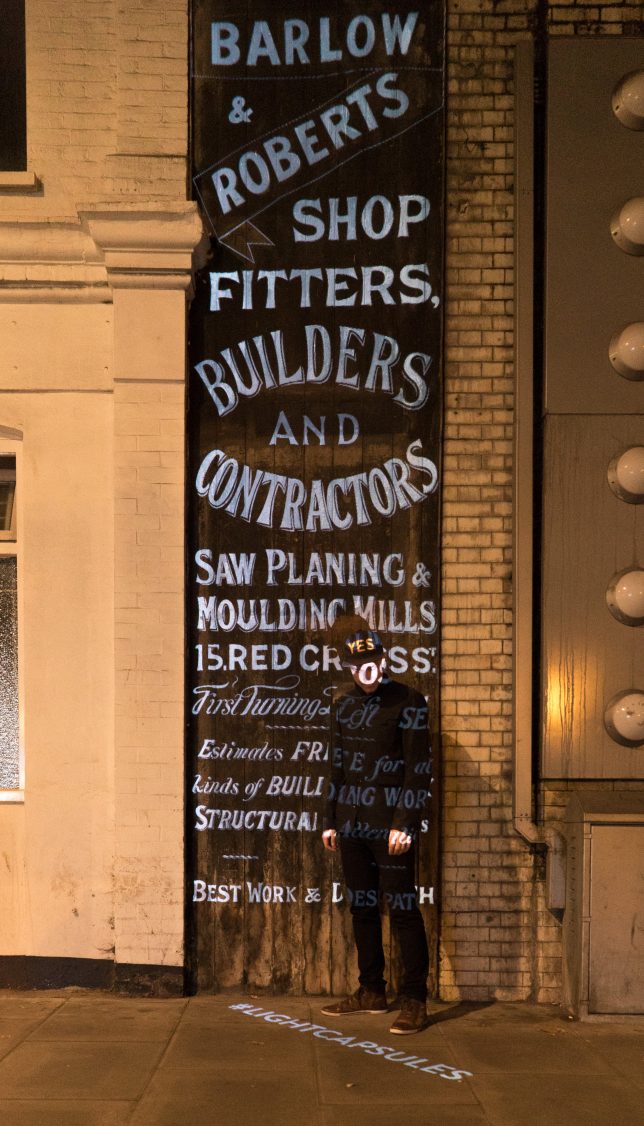
Light Capsules: Projections Bring Building-Side ‘Ghost Signs’ Back to Life

22 Aug

[ By WebUrbanist in Art & Drawing & Digital. ]

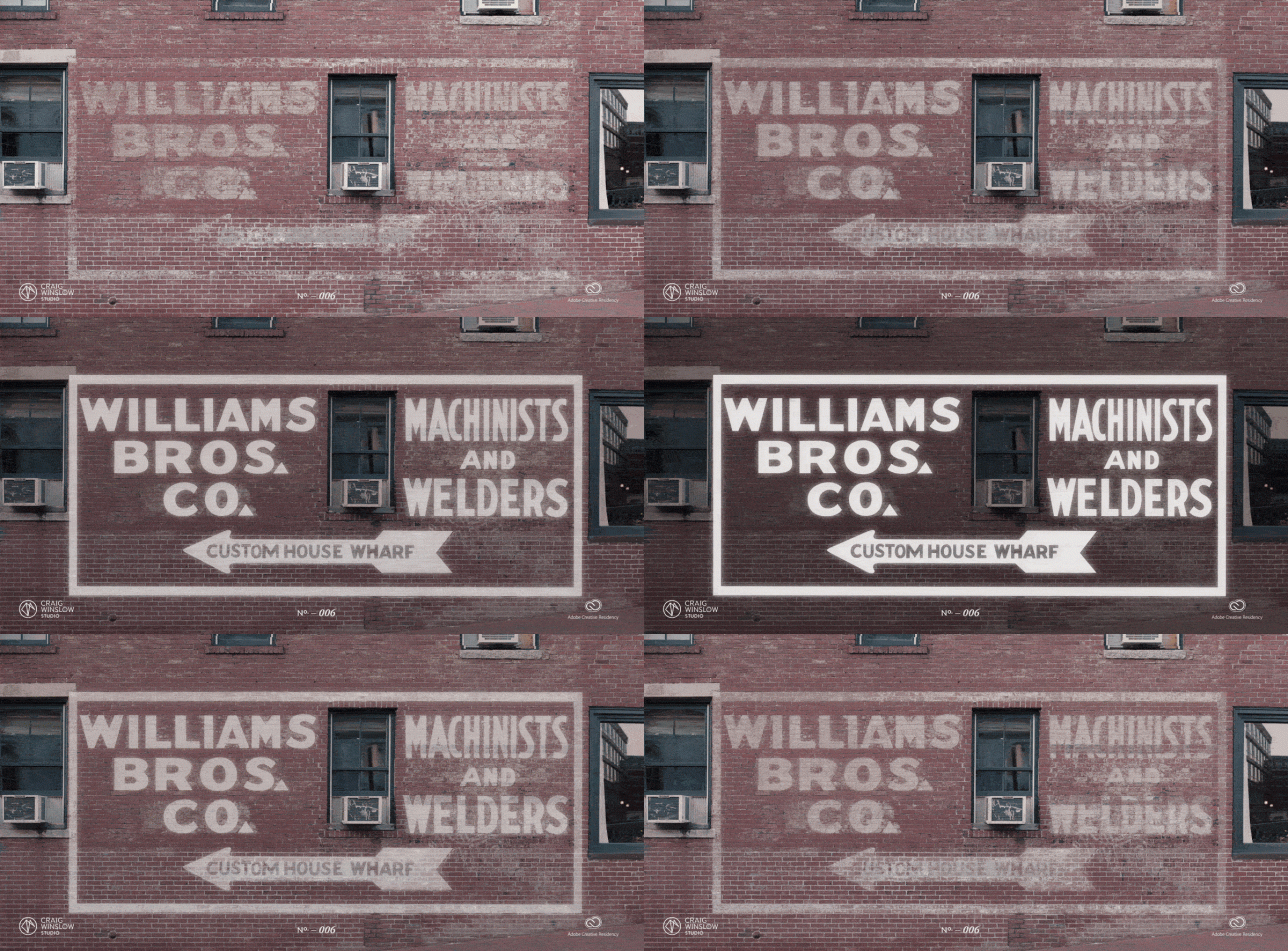
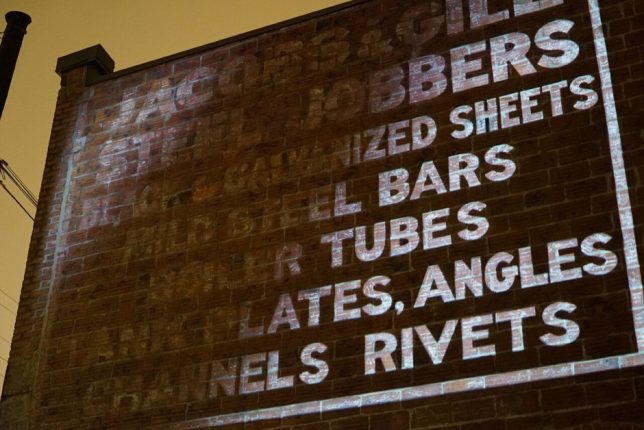
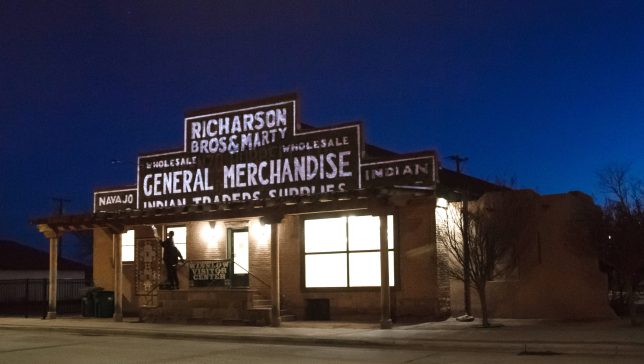
Exposed to the elements, hand-painted signs on building exteriors chip, crack and fade over time, but one artist is shining a spotlight on these historic illustrations, restoring them through animated and layered projections.

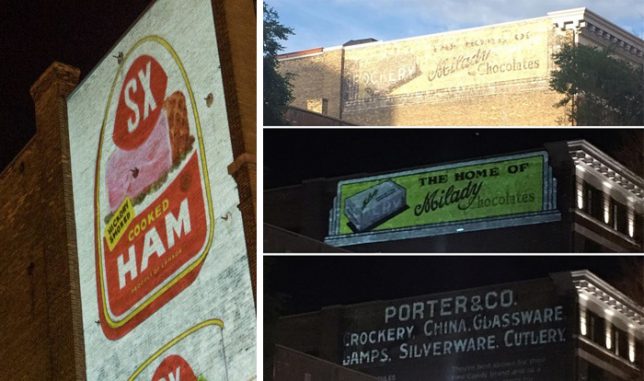
Craig Winslow is meticulous about his work on “Light Capsules,” digging through archived newspapers, magazines and photographs to find ads showing what these signs and their typogrophies originally looked like (in some cases over 100 years ago). The result of one such search recently helped him project over an ad in Winnipeg, Canada for Porter & Co., crockery, china, glassware, lamps, silverware, cutlery, which then switched to another projection for The Home of Milady Chocolates on the same spot.

And it isn’t just about recreation, but also spectacle and preservation. People passing by, used to ignoring faded signs, suddenly stop, look up and start thinking about them and the histories they represent as well as their historic value to a city.

In the last few years, Winslow has brought his projections to cities around the world including Detroit, London and Los Angeles. A lot of the advertisements he projects over provide insights into what was popular in the early 1900s when hand-painted signs were common.

His projections are often layered, cycling through to highlight different stages of ads (or overlapping ones) that have evolved and changed over the decades. Importing digital images, Winslow uses a suite of editing tools to fill in the gaps and create animations.

And while some argue for restoring them outright (using paint), that can be problematic — critics say repainting ruins the authenticity, plus new paints tend to be more vibrant and would be unlikely to represent the original. In a way, Winslow has found a middle ground — his method lets people get a sense of what they looked like without putting the originals at risk.

More from the artist’s website: “There’s an extra element of excitement in signs that are incredibly worn or have multiple layers—The best ghostsigns candidates to become Light Capsules have multiple layers, called palimpsests, providing a compelling canvas which digital recreations can bring a focus to specific layer in time. Projection is ephemeral, non-damaging, and non-invasive, providing a strong preservation solution that traditional mediums can’t provide. Using light as a medium, we can visually explore the stories of every layer, seeing how a building changed throughout the years.”

Share on Facebook


[ By WebUrbanist in Art & Drawing & Digital. ]

[ WebUrbanist | Archives | Galleries | Privacy | TOS ]


WebUrbanist

 
Comments Off on Light Capsules: Projections Bring Building-Side ‘Ghost Signs’ Back to Life

Posted in Creativity


How to Use a Reflector to Improve Your Natural Light Portraits

20 Aug

Reflected light can add depth and a fresh dynamic to your natural light portraits. Sometimes naturally occurring reflected light can be used, but by far the easiest way is to use a reflector. The most important thing is to learn to see the light falling on your subject and then control the strength and quality of the reflected light you are adding. Here are some tips to help you learn to use a reflector.

Hmong woman drying skeins of hemp thread outdoors - How to Use a Reflector to Improve Your Natural Light Portraits

Hmong woman drying skeins of hemp thread which are reflecting light back onto her face.

Naturally reflected light

When making candid portraits, I’m always looking to see if some reflected light is affecting my subject. At the right angle, any surface can bounce light back onto your subject. You can train your eye to see it.

It may be light bouncing off a nearby wall or pavement, an open newspaper or skeins of yarn (as in the photo above). With the strong sunlight behind the lady as she hangs out her skeins of washed thread, the light is reflecting softly back into her face.

Thai woman holding a bamboo tray of steamed fish - How to Use a Reflector to Improve Your Natural Light Portraits

A fish vendor at the fresh market with light reflecting onto her from an adjacent white wall.

Naturally reflecting light is easier to make use of if you are posing your subjects and have some control over where they are positioned. Finding a location where the sun is hitting a large light-toned neutral surface can provide you suitable reflected light for portraits.

In this photo of the fish vendor at the local fresh market, the light is reflecting off a white painted building behind me. Behind her is an open entrance to a room with no windows, providing a dark background to nicely isolate my subject.

Types of reflectors

Close up of a Kayan long neck girl with traditional face painting, make-up

Close up of a Kayan long neck girl with traditional face painting makeup.

When there’s no naturally occurring reflected light, a folding reflector is a fabulous accessory to have on hand. These reflectors are relatively inexpensive and come in various shapes, sizes, and colors. The most efficient are the ones which have multiple reflective surfaces.

Note: you can even DIY and build your own reflector.

These reflectors typically have a sleeve which covers a translucent fabric attached to the foldable frame. The sleeve is removable and reversible with four different surfaces (5-in-1 reflectors). Normally they are white, silver, gold, and black. Some even have more complex reflective surfaces. Learning to use this type of reflector well can take some practice, but it’s worth while for the fresh dynamic lighting it will bring to your portraits.

How to Use a Reflector to Improve Your Natural Light Portraits

One of my models assisting me during a portrait session.

How to use a reflector

Having someone to hold the reflector is the best way to use it as the direction of light and angle of the reflector in relation to your subject is important. If the reflector is not at the best angle you will have too much or too little light bouncing onto your subject. You may need to coach whoever is assisting you and demonstrate the effect the reflector has, so they can hold it precisely right for the best lighting.

Careful choice of reflective surface for whatever light you are working in is important too. If you are making portraits outside in full sunshine the use of the white reflector surface may be best. It’s likely the silver or gold surfaces will reflect too much light back onto your subject. Don’t be afraid to experiment though, as that is a great way to learn.

KAren Woman Smoking Her Pipe against a black background

Karen Woman Smoking Her Pipe against a black background.

Using a reflector in bright sunlight

In the bright sunshine, the person holding the reflector needs to be careful not to bounce strong light into your subject’s eyes as they are searching for the best angle to hold the reflector. That can be most uncomfortable for your subject. It’s a good idea to instruct your subject not to look directly at the reflector. If they have not seen a folding reflector before many people will look at it as it is unfolded.

Two long neck Kayan ladies laughing together in a village in Thailand - How to Use a Reflector

With this photo of the two laughing ladies, my wife was using a medium sized gold surfaced reflector. She is an expert assistant and photographer so she knows how to get the optimal reflected light in most situations. My subjects were standing in the shade of a tree and the reflector was also in the shade, so it was not bouncing back full sunshine.

I find the gold surface works well with Asian skin tones. With the strong back light, the bounce light fills in the shadows nicely reducing the over all tonal range in the photo. Because the reflected light is stronger on the ladies faces, (where I was taking my light reading from,) it is more balanced with the light in the background. The bright sun reflecting off the light colored ground also adds nicely to this photo. If my wife had been standing so the gold reflector was in the full sunshine the light would have been too bright and harsh, blinding our models and creating hard shadows on them.

How to Use a Reflector

Reflecting light to balance with the ambient light can reduce shadows without eliminating them.

Using a reflector in soft light

On overcast days a silver reflector will bounce a clean, soft light onto your subject. If you can position your reflector so it balances with the ambient light, gently filling in shadows on the face but not completely eliminating them, you can obtain some very pleasing results.

Varying the angle of the reflector in relation to the light source and your subject will vary the amount of light affecting your subject. You do not need to always have the reflector blasting out the maximum amount of light as this can look very unnatural. Using the white surface rather than the silver side will also reduce the amount of reflected light.

Senior Pwo Karen woman smoking a pipe against a black background - How to Use a Reflector

With the sun behind the model, an overhead diffuser and reflector to my left and the ground also reflecting light.

Other uses for reflectors

Black or white surfaces of very large reflectors can make great backgrounds and the translucent inner part can be used as a screen to hold above your subject to block direct sunlight. In the past, I have used this method but now prefer to use my *portable daylight studio to provide a black or white background and filtered back lighting, (in principle it’s the same thing.) I then use my large folding reflector to help control the light on the front of my subjects.

Sunlight also reflects off the ground. Typically in a northern Thai village, the earth is a light color and creates a pleasing reflection. But if I have to work on grass we lay down some large sheets of white plastic to avoid having a green color cast in the images.

*Reading Irving Penn’s book “Worlds In A Small Room” was the inspiration for my portable studio which I have used in many locations in the mountains of northern Thailand and occasionally when teaching our workshops.

Portrait on a black background of a senior Pwo Karen man - how to use a reflector

A careful balance of reflected and diffused light.

Conclusion

As you practice using a reflector you will learn to manipulate just the right amount of light onto your subject. At times you might prefer hard light and other times soft light will be more pleasing. Learning to see how light affects your subject and learning to control it will greatly improve your portraiture.

The post How to Use a Reflector to Improve Your Natural Light Portraits by Kevin Landwer-Johan appeared first on Digital Photography School.


Digital Photography School

 
Comments Off on How to Use a Reflector to Improve Your Natural Light Portraits

Posted in Photography


Canon EOS 80D to EOS 6D Mark II: in the light of the review, should I upgrade?

14 Aug

Is it worth upgrading my EOS 80D to the EOS 6D Mark II?

We already had a simple look at how good an upgrade the EOS 6D II makes for 80D owners, based on our early impressions of the camera. Now we’ve had a chance to spend more time with it (and to go back and shoot with the 80D again), we thought we’d look at the differences and benefits in more detail.

We’re going to try not to make too many assumptions about what you shoot with your 80D and what you value in a camera, beyond assuming that you kinda like your current camera, that you enjoy using a camera that works broadly as well in live view mode as it does through the viewfinder and that you’d like something fairly similar but, you know, better. Will the 6D II do that for you?

Image quality improvements

The 6D II’s larger sensor means it receives more total light than the 80D, when shot with the same exposure settings (the same light per unit area, but with more capture area). This generally means the 6D II will offer better image quality than the 80D. As much as anything else, this tends to be what prompts most people to move to larger sensor formats.

However, you don’t get the full advantage that you’d get if the 6D II simply used a scaled-up version of the 80D’s sensor, so how much of a step up does the 6D end up being?

The sensor size difference means you can get shallower depth-of-field more readily than you could on the 80D. Indeed, shoot the same scene from the same position and at the same f-number and you’ll get shallower depth of field. For certain types of photos, shallow depth of field is interpreted as better.

The 6D II’s larger sensor also means you get better performance in low light. If you regularly shoot above about ISO 1600, the 6D II will give you an immediate improvement in image quality, simply because it gets more light.

Image quality concerns

The more sophisticated design of the 80D’s sensor means it adds less noise to its images than its big brother. This means that, at low ISO settings, the 80D will produce more flexible Raw files, that make it easier to represent the detail in high-contrast scenes, before you hit the noise floor. If you’ve become used to exploiting the 80D’s pretty impressive dynamic range, it may be a bit of a shock to find you end up with more prominent noise if you try to manipulate an image shot in high-DR circumstances, such as sunsets or backlit subjects.

That said, we’re aware that a great many people primarily shoot JPEG. Since the differences in performance between the two cameras’ sensors tends to occur in very dark tones within the image, so may well be either too dark to perceive or clipped entirely to black if you’re only looking at JPEG images. Even engaging Auto Lighting Optimizer or Highlight Tone Priority – the camera’s two DR compression modes that risk pulling noise into the image – isn’t a problem (though it’s interesting you can’t use the two in conjunction). However, you don’t get the noise improvement at low ISO you might reasonably expect from the move to full-frame.

Viewfinder differences

The 6D II has a viewfinder with 98% coverage and 0.71x magnification, while the 80D has 100% coverage and 0.94x magnification. Yet that’s not the clear win to the 80D that it might seem.

Since both magnification figures are measured using a 50mm lens, the 80D’s figure benefits from its 1.6x crop factor. Compare them on a normalized basis and the 6D II’s 0.71x magnification looks pretty good compared with 0.59x. And, sure enough, in use the 6D II’s viewfinder is appreciably bigger. It’s one of the benefits that a full frame DSLR offers over a cropped sensor that is often overlooked, especially by anyone too young to have regularly shot film and become accustomed to a large finder. It’s lovely to shoot through a nice, big viewfinder and the 6D II’s is a significant step up from the 80D’s.

It’s not all good news, though. The 80D’s 100% finder means its easier to construct precise compositions. Knowing exactly where the corners are is hugely valuable for ensuring lead-in lines run directly from the corner of the frame, for instance (the 6D II’s 98% coverage should be enough that you don’t have to worry too much about stray objects intruding in your shots).

Autofocus

The camera uses essentially the same AF module as the 80D. This means the spread of AF points is considerably less extensive on the larger camera. This means that, unlike the 80D, you don’t get AF points on the ‘thirds’ lines of your image: the outer columns of points reach a little beyond the thirds horizontally, but they don’t quite reach the vertical thirds lines. This isn’t an unworkable situation, of course: the parallax error of focus-and-recompose isn’t going to be significant over such a small distance, but it’ll take some getting used to, after the 80D’s wider spread.

In terms of autofocus performance, we doubt you’ll notice any great difference. Both cameras performed fairly similarly in our testing. The EOS 6D II isn’t terrible at tracking a subject but it’s not great, either. If you’ve found settings or a way of working that suits the kind of shooting you like to do, you can carry this over to the 6D II.

Like the 80D, the 6D II’s tracking in live view mode is pretty good, especially if you’re shooting single images at a time. It’s in continuous (servo) mode that the performance drops significantly compared with the 80D, in terms of accuracy (in Continuous H mode) or a much slower frame rate (in Continuous L). So not really an upgrade, but broadly consistent with the system you’ve already learned and adapted to.

Difference in features

The EOS 6D II has Canon’s latest, Digic 7 processor, but the differences between this and the older chip used in the 80D are subtle. There don’t appear to be any additional functions associated with the newer processor but Canon has talked about using the additional processing power to run more sophisticated algorithms that prevent the camera’s AF tracking from being distracted by other potential targets.

Another underlying hardware difference is in the two camera’s Wi-Fi connectivity. The 80D has a fairly conventional Wi-Fi setup, with the option to use NFC to speed-up pairing to your smartphone, if its manufacturer allows such frivolity. The updated implementation in the 6D II is a step forward, in that it allows a constant Bluetooth connection to be maintained between your phone and the camera. Again, the degree to which this simplifies life depends at least in part on what brand of phone you’re using, but it does make image transfer very straightforward.

The EOS 6D II also offers GPS, which the 80D doesn’t. This may not sound like something you’ll need but, even if you’re not an especially frequent traveler but, if you switch it on, it means every one of your images gains a useful additional piece of metadata that can be valuable in terms of organizing and retrieving your files, after you’ve shot them. Battery life does take a hit when using the GPS, however.

Other feature aspects

While the similarity of body shape and button layouts make it clear they’re aimed at similar photographers, there are a few differences that reflect the 80D’s position higher up the APS-C lineup than the 6D II’s position, relative to Canon’s other full-frame options.

The 80D gets a shutter mechanism that can fire as fast as 1/8000th of a second and can sync with flashes as fast as 1/250th of a second. With a larger distance to travel and perhaps some money being saved, the 6D II can only shoot at up to 1/4000th of a second and flash sync at 1/180th. These may sound like small differences but you may well notice them if you use fill flash or wide aperture lenses outdoors.

Other differences include the 80D having a headphone socket for audio monitoring during video shooting: something 6D II users will have to live without. It’s not quite clear why Canon chose not to include it or the less-compressed ‘All-I’ video option, both of which might be a frustration if you’ve been enjoying the 80D’s easy-to-shoot video.

But what about lenses?

The usefulness of lenses, vs simple compatibility is a subject I can be something of a stuck record about, but I do believe it’s something worth thinking about very hard before you upgrade. Don’t think about how many of your existing lenses will be usable, think about how many of them will perform roles that you actually need. At least take stock of how committed you really are to a system before concluding that you can only look within your current system.

Before I started at DPReview, I owned an APS-C DSLR, a mid-level kit zoom, a 50mm F1.8, and a third-party 70-200mm F2.8 (bought secondhand from a DPR forum member). How committed to ‘my’ brand was I?

The kit zoom is a write-off straight away, so I may as well try to sell that along with my old APS-C body. Having got used to using it as a 75mm equiv lens, do I suddenly need the 50mm field-of-view? Maybe, but it’s a cheap-enough lens that it’s not a deciding factor. The 70-200mm F2.8 was secondhand anyway, so I can probably recoup much of what I’ve paid for it if I sold it.

If it’d come down to it, it was a couple of spare batteries and the time I’d spent learning the quirks of my camera’s interface and behavior that was really holding me to that brand, not my ‘investment’ in lenses.

Should I upgrade?

Ultimately, that’s something only you can decide, we’re just trying to lay out what we see as the key factors you might want to consider.

We should be clear: the EOD 6D II isn’t a bad camera. In many respects, it’s a perfectly good one: certainly one that’s pretty enjoyable to shoot with. Although Dual Pixel AF really shines when shooting video, it’s still useful for stills shooters, providing what’s still the best and most usable live view experience of any of the DSLR makers.

If you enjoy your 80D, then you’ll probably like the 6D II for many of the same reasons (with the added bonus of more control over depth of field, better low light image quality and a bigger viewfinder).

The only real reason we’ve devoted so much space to addressing the question is because, with the 6D II, Canon has made the decision slightly less clear-cut than it’d normally be. You don’t get a significant improvement in AF performance, nor do you get the all-round improvement in image quality that the cost of moving to full-frame usually brings. But there certainly are advantages, and ones that you might find beneficial.

If you’re and 80D owner who’s decided to move to the 6D II or have decided not to, let us know what swung the decision for you.

Articles: Digital Photography Review (dpreview.com)

 
Comments Off on Canon EOS 80D to EOS 6D Mark II: in the light of the review, should I upgrade?

Posted in Uncategorized


5 Tips for Better Concert Photography in Low Light Conditions

04 Aug

Concert photography is one of the hardest subjects to nail down for one main reason: the conditions almost always have low lighting and you aren’t allowed to use flash. With that said, there are some tips for optimizing your concert photography experience. Whether you’re equipped with a DSLR and a photo pass for a big arena show or simply shooting a local band in a pub or a school performance, use these tips to enhance your low lighting photography.

1. Choose a Low Lighting Lens

5 Tips for Better Concert Photography in Low Light Conditions - use a fast lens

One of my first concert photos snapped with an old Nikon D90 and a 24-70mm f/2.8 lens.

Generally speaking, the gear you shoot with doesn’t really matter, except when it comes to low lighting photography. In this case, you’ll want to have a fast lens with the lowest f-stop possible. For most concert photographers, this equates to a 24-70mm f/2.8 and/or a 70-200mm f/2.8. These are two of the most popular concert and event photography lenses thanks to their low f-stops and vast focal length coverage.

However, fast lenses like these two can be very expensive. If you’re on a budget, consider an affordable prime lens such as the 50mm f/1.8 or 85mm f/1.8. While you sacrifice the ability to zoom, you gain an extra stop or two of light while also saving money.

2. Adjust Your Aperture to Shoot Wide Open

Now that you have a large aperture lens, switch your camera over to Aperture Priority or Manual mode and shoot “wide opened” at the lowest f-stop number your lens allows. This will let the most amount of light get to your camera’s sensor.

As a tradeoff, the lower f-stop number means a smaller depth of field, meaning your images may not be as sharp as if you were shooting at a higher f-stop. So if you happen to be shooting in ultra bright lighting conditions, consider bumping your f-stop up to get more of the scene in focus.

5 Tips for Better Concert Photography in Low Light Conditions

Sometimes you are blessed with ample venue lighting that gives you more flexibility with your camera settings. Shot at f/4 at 1/125 at ISO 640.

3. Watch Your Shutter Speed

If you shoot in Aperture Priority mode like I do, then you won’t have to worry about setting your shutter speed. However, you should always take note of it while shooting and understand how it may affect your image.

As a baseline, your shutter speed should be at least 1/250th to freeze motion while shooting concerts. But this is a luxury often reserved for shooting well-lit shows or outdoor concerts. In low lighting conditions, your shutter speed will probably be much lower than 1/250th. I can usually push my camera to go as low as 1/60th and still pull off decent concert photos, but it’s best to not go any slower than 1/100th.

5 Tips for Better Concert Photography in Low Light Conditions

4. Increase the ISO

Increase the ISO until you are able to shoot at your desired aperture and shutter speed. For most conditions, this means cranking the ISO up to 3200 or even as high as 6400. The exact ISO limitations will vary according to your camera. And just because your camera can shoot at ISO 10,000 doesn’t mean that you should. Experiment with your camera until you find the highest ISO that you are comfortable using (based on the noise level, etc.).

As a tradeoff, a higher ISO means you’ll have more noise or grain in your images. However, many digital cameras today produce very good quality images even at high ISOs. Also, there is noise reduction software available that will help you reduce noise in post-production. The bottom line is that more digital noise or grain in an image is better than having it be blurry due to a slow shutter speed. Don’t hesitate to increase the ISO.

5 Tips for Better Concert Photography in Low Light Conditions

Shot at f/2.8 at 1/100 at ISO 5000. Not the sharpest photo, but it captured a key moment in a venue with horrible lighting.

5. Shoot in RAW

If your camera allows for it, shoot your images in RAW format, rather than JPG. Concert photography is notorious for having inconsistent lighting with red or blue lights that can flicker or change throughout a concert, making it hard to adjust the in-camera white balance. If you shoot in RAW, you’ll have more flexibility to fix and edit those photos in post-production.

concert photography tips

Over to You

What are some of your best tips for photographing concerts in low lighting without flash? Please share them in the comments below.

The post 5 Tips for Better Concert Photography in Low Light Conditions by Suzi Pratt appeared first on Digital Photography School.


Digital Photography School

 
Comments Off on 5 Tips for Better Concert Photography in Low Light Conditions

Posted in Photography


Full-res image samples from the 16-module Light L16 camera

02 Aug

The Light L16 camera has been in the works for years now. A 16-module camera that looks like a smartphone, it uses up to 10 camera modules at once to capture 52-megapixel (minimum) photographs, and promises to “DSLR quality in the palm of your hand.” Plenty of people are skeptical of that claim, but now that the L16 is finally shipping to pre-order customers, Light has released three high-resolution image samples for you to pour over and critique.

Admittedly, none of the three photographs pits the L16 agains what you might consider a challenging lighting scenario. There’s a portrait, a landscape photo taken at the Grand Canyon’s famous Horseshoe Bend, and a photograph of the iconic shipwreck at Point Reyes.

All three are taken when there was plenty of natural light around, and while the Point Reyes shot does contain some more intense contrast between the highlights and shadows we really wish Light had shared one or two low-light shots. Still, barring that, the photos will give you a good idea of what this diminutive little computational photography camera can do:

$ (document).ready(function() { SampleGalleryV2({“containerId”:”embeddedSampleGallery_3604419316″,”galleryId”:”3604419316″,”isEmbeddedWidget”:true,”standalone”:false,”selectedImageIndex”:0,”startInCommentsView”:false,”isMobile”:false}) });

The smallest of the three photos is 53.3MP, the largest a whopping 81MP, giving you some serious cropping power. Give our gallery a second to deal with the photos, especially if you’re using the 100% zoom feature… these files are nothing to scoff at.

To see more photos taken with the L16, or if you want to download these full-res samples for yourself, head over to the Light.co gallery. And once you do pixel peep these shots your heart’s content, let us know what you think of the L16 in the comments.

Articles: Digital Photography Review (dpreview.com)

 
Comments Off on Full-res image samples from the 16-module Light L16 camera

Posted in Uncategorized


Learning to ‘see’ light, tips from a National Geographic photographer

24 Jul

National Geographic photographer Bob Holmes takes stunning photos all over the world. But when you ask him how he captures these images, he won’t tell you about his favorite lens or any specific technique he uses. He’ll talk to you about what he sees. He’ll talk to you about light.

That was the subject of a recent conversation he had with Marc Silber of Advancing Your Photography: light. “Most people ‘look’ and don’t really ‘see.’ You’ve got to learn to see,” says Holmes. “We all look, everybody looks, but you’ve got to go beyond that and analyze what you’ve seen… to start with anyway.”

Once you acquire this ability to ‘see,’ explains Holmes, photography becomes about reacting to and capturing what’s in front of you—the camera is no longer ‘in the way.’

The duo goes on to talk about learning about light from iconic painters, and why it’s important to find work that speaks to you and try to unpack why exactly the lighting, composition, subject etc. evokes a certain emotion. The whole conversation, about 10 minutes long, is well worth your time and packed full of little gems. Check it out up top and let us know what you think in the comments.

Articles: Digital Photography Review (dpreview.com)

 
Comments Off on Learning to ‘see’ light, tips from a National Geographic photographer

Posted in Uncategorized