RSS
 

Posts Tagged ‘Light’

How to do Clamshell Lighting: A Reliable Two Light Setup

15 Sep

When it comes to lighting, there is an infinite choice on how you can light your portrait subjects. That’s great and it’s addicting, but when you are starting out it can also be overwhelming. To counter the inevitable information overload that you will get researching lighting, it is a good idea to know a few basic setups that you can fall back on should you be pressed for time or should you need a backup. This article will introduce you to a basic two light setup often called clamshell lighting.

It will provide you with a beautiful soft light with faint shadows and glorious catchlights. Clamshell lighting works very well and it is very flattering for men and women of all ages and it could be a very useful technique in your toolkit.
How to do Clamshell Lighting: A Reliable Two Light Setup

What is clamshell lighting?

In a nutshell, clamshell lighting is a configuration where two lights are placed facing toward your subject at a 45-degree angle. Your key light is facing downwards at a 45-degree angle and your fill light is a facing upwards at a 45-degree angle. The resulting appearance of your lights from the side somewhat resembles an open clamshell (imagination may be required).

How to do Clamshell Lighting: A Reliable Two Light Set-Up

Apologies for my stick figure skills, but here you can see just how easy clamshell lighting is to do.

If you start with your main light on axis (directly in front of your subject), raised up and pointed downward, you have a basic butterfly lighting set-up. Adding the second light from below serves as fill and eliminates any heavy shadows caused by the key light. This combination results in soft, flattering light that works well with almost any subject.

What you need

How to do Clamshell Lighting: A Reliable Two Light Set-Up
To create a clamshell lighting setup, you need two light sources. If you have modifiers to soften your light, all the better, but as long as you have two light sources you can get started with clamshell lighting.

I do recommend starting with a pair of softboxes roughly the same size. Once you’ve mastered that, you can then start experimenting with other modifiers such as beauty dishes and strip boxes.

Setting it up

How to do Clamshell Lighting: A Reliable Two Light Setup
Start with your key light (your main light source) and place it in front of your subject. Go closer for softer light and faster light fall off, or further away for a harder light. Place it above your subject, pointed directly at their nose. Meter for your desired aperture (we’ll use a hypothetical f/11 from this point) and take a test shot.

If everything is setup correctly you should have a decently lit image with deep shadows under your subject’s nose and chin.

How to do Clamshell Lighting: A Reliable Two Light Setup

Now, take your fill light and place it directly underneath your key light. Point it upwards toward your subject at 45-degrees and meter this light for two stops below your preferred aperture, which would result in f/5.6 for our hypothetical aperture of f/11. If the effect is too strong and your fill light is obliterating the shadows, turn the power down. If it isn’t doing enough, turn it up. The main thing to look out for is that you need to ensure that your fill light is not overpowering your key light. This would result in your image being lit from below with your shadows being filled in from above. This is not a good look to go for.

How to do Clamshell Lighting: A Reliable Two Light Setup

What to watch out for

The main thing to look out for is that you need to ensure that your fill light is not overpowering your key light. This would result in your image being lit from below with your shadows being filled in from above. This is not a good look.

Now that you have two lights sharing the same vertical space, stand behind them and shoot through the gap. If there isn’t much of a gap, raise and/or lower both of your lights (change the angle of each and take another meter reading if you need to) until you have enough room to work in the middle.

That’s all there is to it. Clamshell lighting is really is easy to set up and with a bit of practice you will be able to get it up and running in a couple of minutes.

How to do Clamshell Lighting: A Reliable Two Light Setup

Note: The softbox at camera left is NOT on so isn’t doing anything.

Alterations

Although I suggested using two evenly sized softboxes, to begin with, that is by no means a restriction of any kind. Feel free to use any kind of modifier you want and experiment liberally. Have a pair of strip boxes you want to use? Go for it. Do you want to use a beauty dish as your key light and an umbrella as fill? Sure. How about a snoot and a small soft box? Absolutely. Use what you have at hand.>

Also, you are not limited to just using two lights from the front. Feel free to add rim and hair lights and a background light as your images require.

Examples


How to do Clamshell Lighting: A Reliable Two Light Setup

How to do Clamshell Lighting: A Reliable Two Light Setup

How to do Clamshell Lighting: A Reliable Two Light Setup

How to do Clamshell Lighting: A Reliable Two Light Setup

This image included a third light serving as a background light.

How to do Clamshell Lighting: A Reliable Two Light Setup

How to do Clamshell Lighting: A Reliable Two Light Setup

Conclusion

If you’ve made it this far, hopefully, you can see how useful a basic clamshell lighting setup is, and how it might serve you. It’s easy, fairly compact and produces lovely, flattering light. If you’re still not sure, I urge you to try it for yourself. You may very well fall in love with it.

The post How to do Clamshell Lighting: A Reliable Two Light Setup by John McIntire appeared first on Digital Photography School.


Digital Photography School

 
Comments Off on How to do Clamshell Lighting: A Reliable Two Light Setup

Posted in Photography


Nissin announces Super Light Stand LC-50c: The world’s lightest light stand

15 Sep

Nissin has released a new light stand that it claims is the lightest in the world. The Super Light Stand LS-50C uses carbon fibre for its central column to keep its total weight down to just 575g/1.2lb. But even at that featherweight, it can still hold 1.5kg/3.3lb and extends to a maximum height of 200cm/79in.

Packed away, it stores at a minimum length of 48.5cm/19in.

As these stands are generally static, the idea of using carbon fibre to make them lightweight is mainly to reduce the weight of the photographer’s kit when traveling, but also to make assistant’s work a little easier—whether carrying to and from a shoot, or holding during one.

The centre column uses a collar-style rotary locking mechanism more often seen on tripods, which the company says makes tightening easier and more effective than standard locking nuts and handles. Nissin has also come up with an interesting design for the leg clamps that allows them to be extended to a flat position on the ground for added stability.

The Nissin LS-50C will go in sale in the next couple of days priced 13,500 yen plus tax (approx. $ 130). For more information see this translated version of the Nissin product page.

Articles: Digital Photography Review (dpreview.com)

 
Comments Off on Nissin announces Super Light Stand LC-50c: The world’s lightest light stand

Posted in Uncategorized


How to Understand Reflected Versus Incident Light and Get More Accurate Exposures

14 Sep

Do you ever get under or overexposed photos when you use your camera’s light meter? Do you get frustrated that even in auto-mode you can’t get the correct exposure? That’s because there are two different type of light to deal with when taking a photo.

When you make a photograph the light is your raw material, which is why it’s important to understand how it works. It’s a very broad topic to cover, so for this article, we are just going to focus on the difference between incident and reflective light because that’s the key to getting your exposure right.

Incident versus reflective light


We all know this difference in a very intuitive way; let me give you an everyday example: when there is a sunny day, do you wear white clothes or black ones? Easy! You wear white or at least light colors, but why? If the sun will be the same, why wouldn’t you wear dark colors? Because you know that dark colors absorb light and therefore you’ll feel the heat more than wearing white which will reflect more light and keep you fresher. This is the same principle you need to apply when measuring the light for photography.

The difference explained

Diagram How to Understand Reflected Versus Incident Light and Get More Accurate Exposures

Incident light is that which is illuminating your scene. It falls on the subject before being altered (reflected) by it which is why it’s also a more accurate light reading.

When light hits objects it gets transformed by them and reflected out; this is what we perceive and what the camera captures and reads. This is called reflective light.

Light metering

Let’s see how these two concepts apply to light metering and exposure when you take a photo. In the next examples, I always used the same light for each.

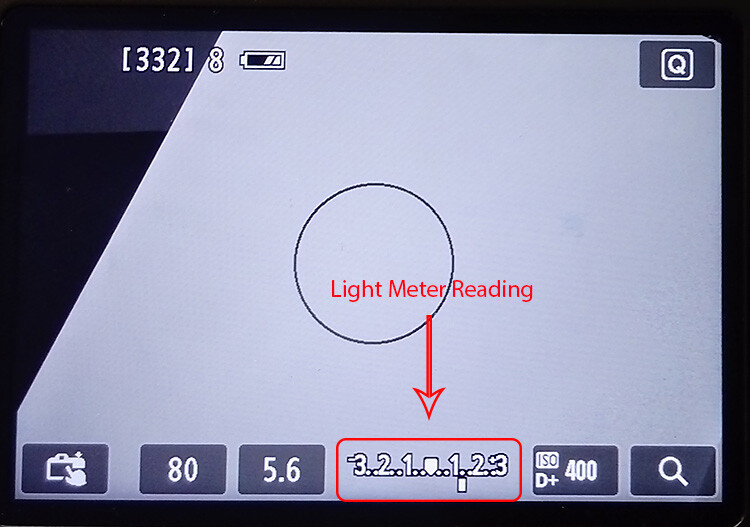
In this first shot, I metered the light once I had framed the image I wanted, so it gave me a reading making an average of the reflective light.

General Reading - How to Understand Reflected Versus Incident Light and Get More Accurate Exposures

The settings were ISO 400, f/5.6, with a shutter speed of 1/80th.

And the resulting photograph looked like this:

General Reading Result - How to Understand Reflected Versus Incident Light and Get More Accurate Exposures

Reflected light from a dark subject

However, like we said when talking about clothes, dark objects absorb light. So if I make the reading by measuring the black part of the photo, the settings that were “correct” before, now appear to be underexposed.

Black Reading - How to Understand Reflected Versus Incident Light and Get More Accurate Exposures

Even if the lighting is always the same, your camera thinks there is less. As a result, your photos will be overexposed.

Black Reading Result - How to Understand Reflected Versus Incident Light and Get More Accurate Exposures

Exposure: ISO 400, f/5.6, shutter speed 1/13th.

Reflected light from a light subject

On the other hand, light objects reflect most of the light, so your camera will receive the message that it needs to reduce the exposure if you meter off something light.

White Reading - How to Understand Reflected Versus Incident Light and Get More Accurate Exposures

And as a result, you will end up with underexposed images.

White Reading Result - How to Understand Reflected Versus Incident Light and Get More Accurate Exposures

Exposure: ISO 400, f/5.6, shutter speed 1/200th.

None of these three readings gave you the correct exposure on your image because none of them were about the incident light. In order to get this accurate reading, you need to use a handheld external light meter, which can be very expensive. Fortunately, there are other ways to get the right exposure without having to spend a fortune.

Black and white… and gray

Back in the 1930s, a photographer called Ansel Adams developed a technique for the optimal exposure of photographs by dividing the degrees from light to dark into 11 zones, therefore it’s called the zone system. Everything in the world has a color and lightness that correspond to a zone. All light meters, including the one integrated into your camera, are designed to give you the middle zone: Gray V that reflects 18% of the light. So, what you need in order to have a correct exposure is to measure the light reflecting off of this tone.

Gray card Reading - How to Understand Reflected Versus Incident Light and Get More Accurate Exposures

You’ll find gray cards on the market which are used to calibrate your exposure and white balance. They are a very practical and economical way to turn the reading of your reflective light into an incident light accuracy.

It is also very easy to use, you just have to put one in front of your subject and frame it with your camera. Once that’s the only thing in your shot, press the shutter button halfway to see the light meter and adjust your exposure accordingly. With those settings, you can have the perfect exposure regardless of the tones in your image.

Grey cardReading Result - How to Understand Reflected Versus Incident Light and Get More Accurate Exposures

Exposure: ISO 400, f/5.6, shutter speed 1/30th.

Real world examples

I know what you’re thinking, that was an unreal example because most of your photos will have much more colors than just black, white and gray V. That’s true, but the principle remains the same. Look at these real life examples:

Bridge Reflective - How to Understand Reflected Versus Incident Light and Get More Accurate Exposures

Reflective reading with an exposure of ISO 400, f/5.6, shutter speed 1/80th.

Compared to the incident reading:

Bridge Incident - How to Understand Reflected Versus Incident Light and Get More Accurate Exposures

Incident reading with an exposure of ISO 400, f/5.6, shutter speed 1/320th.


How to improvise!

What if you don’t want to be carrying around a gray card? Or did the perfect image catch you unprepared? No problem, everything in the visual world has its equivalent in the zone system.

For example, grass or wet cement correspond to the gray V zone so you can always look for elements like that in your photo and you will get a very accurate reading from them.

Take this composition of candle holders. When they are all white the photo is dark, sad and shows all the imperfections of the backdrop because it’s underexposed. However, when I add a gray candle holder and measure the light in it, the exposure is perfect.

Candleholders Reflective

Exposure: ISO 1250, f/11, shutter speed 1/125th.

Candleholders Incident

Exposure: ISO 1600, f/8, shutter speed 1/125th.

Tip: So that you are never caught off guard, you can measure the palm of your hand and figure out how much lighter or darker it is than the gray card, that way you will always have the perfect reading “at hand”.

Things to remember:

  • Get close enough to the gray object so that it’s the only thing you see through the lens, or at least the majority of it, and take that reading to set the exposure values.
  • The gray card or object needs to receive the same light as the rest of the scene. Be careful to not cast a shadow with your body or your camera when getting closer to measure the light.
  • Reflective light depends also on the material and shape of the object so a black car, for example, reflects more light than a black wool sweater.

There you go, understanding the difference between reflective and incident light can transform your photo from snapshots to pro shots!

The post How to Understand Reflected Versus Incident Light and Get More Accurate Exposures by Ana Mireles appeared first on Digital Photography School.


Digital Photography School

 
Comments Off on How to Understand Reflected Versus Incident Light and Get More Accurate Exposures

Posted in Photography


How to Photograph the Aurora Borealis – Nature’s Night Light

14 Sep

The Valkyrior, the “Dance of the Spirits,” polar lights, Goddess of the dawn, the mythical firefoxes of Lapland, the Northern Lights, Aurora Borealis. By any name, Aurora has intrigued, scared, excited, and fascinated humans since the dawn of time.

Named after the Roman goddess of dawn, Aurora, and the Greek name for the north wind, Boreas, in Northern latitudes, they are known as the Aurora Borealis (or the Northern Lights), in Southern latitudes (e.g., Antarctica, South America, New Zealand, and Australia), the Aurora Australis (or the Southern Lights).

How to Photograph the Aurora Borealis - Nature's Night Light

These phenomena are commonly visible between 60 and 72 degrees north and south latitudes, which place them in a ring just within the Arctic and Antarctic polar circles. Aurora sightings, while occasionally seen at lower latitudes are not as common. Thus, making the trek to extreme Northern or Southern latitudes is a necessity if you want greater viewing opportunities along with greater success in photographing the Aurora.

If you are interested in learning more about exactly what the Aurora are, where they come from, and what produces the various colors that often accompany an Auroral display, there are countless books you can read and websites that one may search for this information.

How to Photograph the Aurora Borealis - Nature's Night Light

This article will provide you with insider tips on how to successfully photograph the Aurora. Return home with lasting memories and images of one of life’s most amazing experiences.

Okay, I am ready to photograph my first Aurora – now what?

Observing and photographing the Aurora is subject to local weather conditions, patience, geographic location, dark sky venue, patience, minimal ambient light, patience, being in the right place at the right time, patience and some luck.

How to Photograph the Aurora Borealis - Nature's Night Light

You see a central theme developing here, patience. If you are not willing to spend time in the field, sometimes in extremely cold weather, your opportunity for both bragging rights and capturing that awesome image, will be severely limited.

When all is said and done, you are at the complete mercy of the Sun, Earth, solar winds, nature and space. The Aurora is not a man-made light show, the cosmos rule here.

So, beyond patience, what does it take to capture that jaw-dropping image of this wonderful phenomena?

Location, Location, Location

Your first challenge is getting yourself to the right location in either the Southern or Northern hemisphere that will maximize your potential and opportunity to see the Aurora.

The best Northern hemisphere latitude is within the Auroral zone – between latitude 65 to 72 degrees. In the Northern hemisphere, you will need to head to destination cities laying on or slightly above the Auroral zone (also referred to as an Auroral oval, is centered about the magnetic poles) and north of the Arctic Circle.

How to Photograph the Aurora Borealis - Nature's Night Light

You will stand a good chance of viewing the Aurora, if you head to Tromsø, Norway, Yellowknife, Northwest Territories, Canada or Bettles, Alaska. Other excellent choices are Svalbard, Norway, Jukkasjärvi, Sweden, Kakslauttanen, Finland, Kangerlussuaq, Greenland and Reykjavik, Iceland. This is only a representative list as there are many Northern latitude cities, which make good Aurora viewing destinations.

Under the right conditions, you can see the Aurora Australis from Ushuaia, Argentina, Tasmania, Australia, Stewart Island, New Zealand and the Southern tip of South Africa, all destinations more easily accessible in the Southern hemisphere.

Estote Parati (Be Prepared)

Photographing the Aurora by its very nature requires heading out at night. Here are some things to watch out for and prepare.

  • Be aware of your surroundings, especially if you are visiting unfamiliar territory, a foreign country, or even your own neighborhood park.
  • Take extreme caution when walking in deep snow, ice, and across frozen bodies of water. You may not be able to see or identify potential hazards.
  • Team up with someone as excited about viewing and photographing the Aurora as you are or who is just willing to sit in a nearby warm car, in case you need support. Always ensure you head out with a full tank of gas.
  • Conduct visual reconnaissance during the day, identify potential ground hazards, layout a destination path and test snow and ice conditions en route to your evening’s photographic destination.
  • Let someone know your planned photographic destination(s) and anticipated return time, especially if you are headed out on your own.
  • Don’t count on your mobile phone working if you are far from service towers or in a foreign country.
  • At all times consider your intended shooting location and ensure that you comply with all local laws regarding access to properties (private and public), lakes, bridges, etc.

How to Photograph the Aurora Borealis - Nature's Night Light

Dress for Success

Dressing for the location, season, and weather conditions are essential both for your safety and for the ability to remain outside for an extended period of time in potentially body-numbing temperatures.

  • Wear many wicking, warm, and insulating layers and consider clothing appropriate for the local geographic and weather conditions.
  • Protect your entire body from exposure to what will probably be the coldest temperatures you may ever experience.
  • Carry a fully charged torch/flashlight (although wearing a headlamp frees up your hands).
  • Outfit your torch or headlamp with a red light or filter. The red light allows you to easily see where you are walking yet, preserves your night vision so you can easily and quickly operate your camera.
  • Pack chemical hand and foot warmers. Take more than you think you will need because you will need more than you think.
  • Use extra hand warmers to keep your camera batteries warm. This helps to extend their useful life in extremely cold conditions.
  • Invest in a really good pair of boots, e.g., affordable military surplus Bunny boots are rated to -60F (-51.11C) in cold, dry climates.
  • Bring a warm (non-alcoholic) drink and a snack, it may be a long night.

How to Photograph the Aurora Borealis - Nature's Night Light

Camera Equipment

You really don’t need much technical equipment to photograph the Aurora but there are some essential kit items you simply cannot do without.

Camera

A camera with interchangeable lenses will be best, but in principle, any camera can be used, even your mobile phone. Handholding your mobile phone, attempting to capture a shimmering, undulating Aurora, will not produce the same quality image that you can get with a digital camera, supported by a sturdy tripod, using a remote shutter release. This, however, should not stop you from capturing that moment and preserving the memory.

Be sure to keep your camera dry and avoid contact with snow or moisture. When walking about, it is always a smart idea to place your camera in a large zip lock plastic bag. Should you trip, slip or accidentally drop your camera (numb fingers will do that to you) in the snow, your camera body will stay dry and protected from the elements and the lens free from moisture, grime, etc.

DPS Aurora Article Image 7

Lens

To take in as much of the sky as possible and a bit of interesting foreground, using a wide or super wide-angle lens (focal length between 10mm and 24mm, with an aperture of f/1.2-2.8) will give the best results overall. In reality, almost any lens will work, keep in mind, however, your images will look different than those you see posted on the web, taken with wide or super wide-angle lenses.

Prior to your first shot, focus your camera at a distant point, back off slightly from the infinity setting and then turn off the autofocus feature on your lens. Given the dark sky, you don’t want your camera and lens trying to automatically focus on an ever-changing, moving Aurora. Locking in on manual focus, set slightly south of infinity, will give you well-focused images.

If the temperature warrants a brief duck into your car for a “warmup,” leave your camera and tripod safely outside. Bringing your camera into a nice warm car and then back out again into frigid arctic temps, will cause lens fogging, condensation, and other nasties to potentially damage your camera.

Read more on shooting in tough conditions here: How to Take Care of Your Camera in Cold Weather.

DPS Aurora Article Image 8

If you notice lint, dust or any other foreign material on your lens, NEVER blow on it. Your warm breath will instantly fog the lens. Depending on the ambient temperature outside, even small traces of moisture vapor in your breath may crystallize and freeze your lens, rendering it useless until it defrosts. Use only a lens brush pen or dry microfiber lens cleaning cloth.

Sturdy Tripod

To avoid blurring your picture due to camera movement, shaky hands, or unsteady footing on snow or ice, a sturdy tripod is essential. If you will be photographing in arctic conditions, be certain that your tripod is up to the task. Plastic tripod legs will snap in extremely cold temperatures.

Here are a few tripod options to check out:

  • Product Review: Polaroid Carbon-Fiber Travel Tripod and Varipod
  • Benro FGP18C SystemGo Plus Travel Tripod with B2 Ball Head – Review
  • Induro PHQ-3 Head and CT-214 Tripod [REVIEW]
  • Review of the K&F Concept TC2534 Lightweight Carbon Fiber Tripod

Remote Shutter Release

A remote shutter release, designed to be used with your camera, provides important benefits in obtaining that memorable photo of the Aurora. First, it will be invaluable in its contribution to creating sharper images by reducing camera shake, which occurs naturally when you depress the shutter release. Secondly, for longer exposures, which may be necessary depending on changing atmospheric conditions and your ISO setting, you can hold the shutter open without physically touching the camera’s shutter release button.

Memory Cards

Pack extra memory cards, having formatted them prior to going outside. Backup and clear your memory cards prior to your next outing. Extra cards are essential if you do not have a means to download each evening’s images to a backup device. Plan to use a single card each evening you head out. If you shoot all of your Aurora images on a single card, and that card fails, for whatever reason, well – enough said.

DPS Aurora Article Image 10

Spare Batteries

Photographing in cold temperatures drains batteries very quickly, photographing in arctic temperatures drains batteries exponentially faster. Always pack extra camera batteries. Running out of fully charged batteries when the Aurora is on full display is heartbreaking, especially when proper preparation would have prevented this situation.

Keep all extra batteries in an interior pocket of your jacket, close to your body. Trapped body heat, created by your insulated jacket and multiple layers of clothing will help keep the batteries reasonably warm, holding the charge longer.

Airtight Waterproof Dry-bag

Tough, waterproof and airtight, a dry-bag is essential. It protects your camera’s sensitive internal optics and circuitry from moisture and condensation buildup that occurs due to the extreme fluctuation in temperature when you bring your camera inside after a long evening photographing outside in sub-zero temperatures. Lens fogging and damage to your camera itself may occur if you don’t let your camera acclimatize gradually to the warm inside temperatures.

DPS Aurora Article Image 11

Prior to going inside for the evening, slip your camera into the dry-bag, roll and seal it tightly and then bring the bag and your camera inside. While there is no official rule as to the length of time your camera should remain in the dry-bag, a good rule-of-thumb is to let the camera sit in the bag for two to four hours. That’s plenty of time to acclimatize to the much warmer indoor temperature and for you to remove multiple layers of clothing and secure a warm beverage of choice.

Include several small bags of silica, moisture absorbing dry-packs in the dry-bag prior to sealing it. The silica protects against mildew, corrosion, fogging and condensation, which might damage your camera’s sensitive electronics.

Taking that Memorable Aurora Picture

While the mechanics of taking a picture of the Aurora are not complex, there are a few guidelines that will enhance your success of taking that amazing and memorable picture.

DPS Aurora Article Image 12

1. Select and shoot in the RAW format – this will provide you with the maximum amount of digital information needed to create a final image.

2. Remove the protective clear, polarizing or UV filter on your lens prior to going out to photograph the Aurora. The UV filter will likely cause concentric rings to appear in your final image.

3. Set your camera to M (manual) and turn off the camera’s flash settings.

4. Dial the lens focus ring to infinity and back off slightly.

5. Turn OFF any autofocus capabilities associated with your lens. You don’t want the autofocus feature of your lens attempting to continually refocus on the quickly moving, shifting Aurora.

DPS Aurora Article Image 13

6. Open up the aperture as wide as possible. This is when the f-number is as low as possible, i.e. f/1.2 – f/2.8 or lower for many prime and pro lenses, or f/3.5 or f/4 for many consumer zoom lenses.

7. Set the shutter speed to Bulb. This allows you to use the remote shutter release necessary to keep the shutter open for longer exposures. Depending on the intensity and movement of the Aurora, you may need to hold the shutter open anywhere between three and 12 seconds. Check your image using your camera’s live view function (if so equipped). Too long of an exposure time will tend to blur both the Aurora and the stars as they move across the sky.

DPS Aurora Article Image 14

8. Determine the proper ISO setting. This is somewhat both a technical and a personal decision. Technical as it will depend on the type of camera you have and the camera’s inherent ISO range. Personal depends on how much noise you are willing to live with in your image, again as a factor of an increasingly higher ISO setting. Start off with an initial ISO setting of 800 and adjust as your personal preferences and the photographic conditions warrant.

9. Bring and use a sturdy tripod. You want sharp Aurora images and to keep your camera as still as possible. If you don’t have a tripod, you can use a beanbag, flat rock, or another solid surface. Do not touch the camera until it is done exposing, and shield it from the wind if you can.

DPS Aurora Article Image 15

10. When possible, include a contrasting foreground. The Aurora by its very nature looks best when photographed to include a foreground, which provides scale, context, and perspective. A suitable foreground can be a tree, a building, fellow photographer, a car, etc.

11. Consider joining a professional tour if (a) this may be your first trip to the Arctic or (b) you are headed to a new international destination. Most professional “Aurora hunting” tour operators have many years of seasonal experience are very familiar with the local area, best viewing venues, are eager for you to see and photograph the Aurora and know where you can tread both safely and legally.

DPS Aurora Article Image 16

Ah…The Amazing Aurora

Being present during Aurora’s magical dance fills the observer with wonder, awe, and excitement and the experience often leaves one speechless. Capturing the Aurora in a photograph preserves that experience for a lifetime.

I hope that you may be fortunate enough to be at the right place, during the right months, at the right time, to observe and photograph Aurora’s magical dance.

DPS Aurora Article Image 19

For most of us, getting to the dance is not easy. But once there, none of the logistics, long flights, cost, or cold, make a difference. You are witness to the most spectacular light show orchestrated by Mother Nature.

The next time you gaze into the night sky, be assured that the Aurora is there dancing the night away…just waiting for you.

The post How to Photograph the Aurora Borealis – Nature’s Night Light by Al Marcella appeared first on Digital Photography School.


Digital Photography School

 
Comments Off on How to Photograph the Aurora Borealis – Nature’s Night Light

Posted in Photography


Behind the scenes with Albert Watson: Watch a photographic legend shape light

07 Sep

Profoto recently connected two icons in their respective fields: Albert Watson, the portrait photography legend, and Sergei Polunin, the so-called “bad boy of ballet” and probably the only ballet dancer you could call “mainstream.” Together, they set about capturing some unique portraits, and filmmaker Eric Becker, the director of our own long-form video series, was there to document the process.

Watson’s work—which you can find in galleries and museums world-wide—spans a few genres. But the shots that define his career are his portraits… photographs of influential men and women that often look almost sculpture-like. If you’re interested at all in portrait photography, listening to Watson talk you through his light shaping process will be incredibly inspirational.

And if you’re a fan of high end lighting equipment well… you might just slobber all over your keyboard as you watch his assistants unpack a veritable army of Profoto Pro-10’s ($ 14,000 each) for this shoot.

$ (document).ready(function() { SampleGalleryV2({“containerId”:”embeddedSampleGallery_1445470748″,”galleryId”:”1445470748″,”isEmbeddedWidget”:true,”standalone”:false,”selectedImageIndex”:0,”startInCommentsView”:false,”isMobile”:false}) });

In the end, of course, Watson was less concerned with the gear than the portraits he was trying to capture with said gear. His process is a journey that he describes as, “not a distinct road to the final shot. You don’t know until you get there.”

And when he got there, this is what he captured: three photographs, one showing Sergei in flight, the other two described as “modern sculptures.”

$ (document).ready(function() { SampleGalleryV2({“containerId”:”embeddedSampleGallery_8776530642″,”galleryId”:”8776530642″,”isEmbeddedWidget”:true,”standalone”:false,”selectedImageIndex”:0,”startInCommentsView”:false,”isMobile”:false}) });

All in all, Profoto doesn’t miss the mark when they call the video above “a masterclass in light shaping.” Check it out for yourself, and then head over to the Profoto website to hear the story in their own words.


All photographs courtesy of Profoto

Articles: Digital Photography Review (dpreview.com)

 
Comments Off on Behind the scenes with Albert Watson: Watch a photographic legend shape light

Posted in Uncategorized


Broncolor unveils the Litepipe P: A versatile wand-style light shaper

06 Sep

Swiss flash manufacturer Broncolor has introduced a new wand-style light shaper called the Litepipe P: a “powerful, versatile and dismountable” flash accessory that can be used to create an ambient light effect, or as a long thin softbox when fitted with the included reflectors.

The light-shaper is basically just a roll-up sheet of diffuser that fits over a flash head using a Broncolor bayonet mount bracket. The flash tube fills the ‘pipe’ with light which, is then diffused in all directions perpendicular to the source.

“Due to the long construction of the Litepipe P, the use of a boom stand or a ceiling mounting is not necessary. Also, in defined spaces or with deep ceilings, the Litepipe P is more practical than bulky softboxes,” explains Broncolor. “Disassembled, the Litepipe P packs down to half its size, which makes it possible to pack it into a practical transport bag.”

The LitePipe comes with a pair of reflectors that wrap around the pipe and attach with Velcro to control the direction and intensity of the light, leaving a wide or narrow slit for the light to emerge from. When assembled, the pipe is 49.2in long and 6.7in in diameter, but it packs away into a 23.7×8.7×8.3in bag for transport.

The Broncolor Litepipe P costs 992 Swiss Fr/£784 (approx. $ 1,000). For more information visit the Broncolor website.

Press Release

Introducing the new Litepipe P…

With Litepipe P, broncolor launches a real innovation in the market of professional lighting systems.

Powerful, versatile and dismountable – this makes the Litepipe P the ideal companion for any photographer in the studio and on location.

Consisting of only five components, this revolutionary, lightweight light shaper is mounted and ready for use in just 60 seconds.

As normal for broncolor, Litepipe P stands out for its robustness and high quality, essential for reliable use over a period of many years.

Equipped with the approved broncolor bayonet, Litepipe P is compatible with the following broncolor lamps: Pulso G, Unilite, Litos and MobiLED (if a mat protecting glass is available we recommend its use as an optimized illumination can be achieved). In addition, Litepipe P can also be used with the broncolor Siros monolight. It produces a homogeneous light which is adaptable to the respective circumstances.

Due to its concept, Litepipe P can combine the mode of operation of various light shapers in one design; thus, there are nearly no limits for your photographic creativity. This sneaky light shaper can operate without a counter-reflector (textile cover with alu reflex coating) as a natural ambient light. The counter-reflectors mounted with the integrated Velcro® fasteners, the visible light section may be changed seamlessly. A wide (27 cm / 10.6 in.) and a small (19 cm / 7.5 in.) counter-reflector are included in the scope of delivery. This allows the setting of precise light edges.

Due to the long construction of the Litepipe P, the use of a boom stand or a ceiling mounting is not necessary. Also, in defined spaces or with deep ceilings, the Litepipe P is more practical than bulky softboxes.

Disassembled, the Litepipe P packs down to half its size, which makes it possible to pack it into a practical transport bag. The latest light shaper in the broncolor range weighs only 1.7 kg (3.8 lbs) or 3.5 kg (7.7 lbs) with the transport bag.

Whether interior, fashion, beauty or product photography – the broncolor Litepipe P will display its strengths in all these fields.

The Litepipe P is available to order as item number 32.452.00 and has an MRSP of £784 ex. VAT.

Included in the kit:

  • 1x special, colour neutral diffuser foil with zip
  • 2x counter-reflector with alu reflex coating inside
  • 1x base tube with reflector, broncolor bayonet and push buttons
  • 1x counter piece with push buttons
  • 1x transport bag

Articles: Digital Photography Review (dpreview.com)

 
Comments Off on Broncolor unveils the Litepipe P: A versatile wand-style light shaper

Posted in Uncategorized


Rotolight unveils the Neo 2: A portable LED HSS flash that doubles as a modeling light

06 Sep

Rotolight has announced the launch of Neo 2, an “industry first” high speed sync-capable LED flash that doubles as a continuous light source and boasts no recycle time.

The company says it designed the Neo 2 specifically for videographers and portrait photographers, and that it collaborated with Elinchrom to build its Skyport 2.4GHz HSS wireless flash receiver into the model. That Skyport receiver, in conjunction with the Rotolight HSS transmitter, enables photographers to wirelessly control up to four groups of 10 lights at ranges up to 656ft / 200m.

The Neo 2 light itself is powered by AA batteries and is capable of 85,000 full-power flashes on a single charge. This model’s shutter sync can be set at fast as 1/8000th of a second, and it offers 500% flash output.

Compared to the original model, the Neo 2 is 85% brighter when used as a continuous light, and there’s a built-in kelvin display for adjusting both flash and continuous light color temperature. Rotolight used its AccuColour LED tech with the Neo 2, the result being “perfect color rendering,” according to the company.

The Neo 2 is available now in a £250 (~$ 325 USD) bundle that includes a single light, the power supply, an accessory shoe, belt pouch, and a 4-piece filter pack. Rotolight is also offering a £1,125.00 (~$ 1,465 USD) bundle that features three lights, stands, balls heads, and a hard flight case.

Press Release

ROTOLIGHT UNVEILS NEO 2

A revolutionary all-in-one High Speed Sync flash and continuous light for photographers and filmmakers

The dawn of a new age of on-camera lighting

Pinewood Studios, London, 4th September 2017: Rotolight, award-winning British LED lighting manufacturer, has announced the launch of an industry-first, all in one High Speed Sync (HSS) Flash and continuous on-camera LED lighting innovation, NEO 2. Unlike traditional on-camera flash, NEO 2 has no recycle time, which ensures users never miss a shot, making it the perfect light choice for today’s modern high-frame-rate-capable cameras.

NEO 2 can be simultaneously a continuous ‘modelling light’ and HSS flash, allowing the photographer to easily acquire focus in dimly lit situations and optimise composition. Designed for portrait photographers and videographers on the go, NEO 2 provides the ‘shoot what you see’ benefits of continuous light, and the flexibility of HSS flash (1/8000th sec.) with 500% flash output, whenever users need more power or to freeze action. HSS also enables users to shoot with wider apertures to create beautiful separation between subject and backgrounds.

Rotolight has collaborated with Elinchrom to integrate its ‘Skyport’ 2.4Ghz HSS wireless flash receiver into NEO 2, eliminating the need to purchase a standalone flash receiver, whilst providing rock-solid reliability, range, flexibility and control for multiple off camera lighting setups. Skyport enables users to wirelessly control up to 10 lights, in four groups at up to 200m(656ft) with the new Rotolight HSS transmitter, optimised for Rotolight by Elinchrom. It is available on launch for Canon, Nikon, Sony, Olympus, Panasonic, and, shortly, Fuji camera systems, and compatible with all other Elinchrom Skyport devices.

“The NEO 2 is going to revolutionise how people use light, and eliminate the need for external flash. If you have those moments that you just cannot afford to miss, this is an incredible light for you. You’ll never miss a shot,” says Jason Lanier, a Sony Artisan of Imagery and professional photographer.

“I tested NEO 2 on a Sony A6500 at 11 frames per second,” explains Lanier. “It fired every single time. There’s genuinely no recycle time, no light loss, no power loss. That is just a game-changer, there is no other light in the world that can do that.”

Featuring electronically adjustable colour temperature in both flash and continuous modes, with a built in kelvin display, NEO 2 enables photographers to easily adjust white balance or match ambient light settings to create more natural looking shots.

Lightweight and portable, NEO 2 can be mounted both on or off camera for ultimate creative control. Delivering the longest battery life of any speedlight or flash, ever made, NEO 2 provides 85,000 full power flashes on a single set of rechargeable AA batteries, compared to the 200 flashes of a typical speedlight. Now 85% brighter in continuous mode than its predecessor, NEO 2 is a small light that delivers big results.

“It enables photographers to spend more time composing the perfect shot, rather than spending time on cumbersome lighting setups. For those shooting both stills and video, it entirely eliminates the need for two separate purchases, says Rod Aaron Gammons, managing director of Rotolight.

Packed with innovative features for video users, NEO 2 is ideal for interviews and filmmaking. It includes an updated suite of CineSFX™ effects, Rotolight’s award-winning feature set for video productions/ filmmaking, (fire, lightning, TV, gunshot, paparazzi and others), as well as Designer Fade mode for custom in-camera fade FX.

NEO 2 also features Rotolight’s AccuColour ™ LED technology that delivers outstanding colour rendering for perfect skin tones. The unique circular shape provides a naturally soft, flattering light output, with Rotolight’s signature catchlight effect.

Rotolight NEO 2 is available as a single light, including a belt pouch, accessory shoe, power supply and four-piece filter pack including diffusion, skin tone and magenta, or as a three-light kit with hard flight case, stands and ball heads. Optional accessories include softboxes, raincovers, and 10-piece colour filter pack.

For more information visit www.rotolight.com

Articles: Digital Photography Review (dpreview.com)

 
Comments Off on Rotolight unveils the Neo 2: A portable LED HSS flash that doubles as a modeling light

Posted in Uncategorized


Spatial Calligraphy: Projected Light Animates Picturesque Japanese Landscape

06 Sep

[ By WebUrbanist in Art & Installation & Sound. ]

Over a dozen installations are bringing Japan’s 5,000,0000-square-foot Mifuneyama Rakuen to life, combining nature with cultural traditions and modern technology in dazzling and moving ways.

Designed by TeamLab, this exhibition incorporates a sweeping landscape of lakes, mountains and forests as well as ancient structures, some predating the park (which itself is nearly 200 years old).

Their driving idea: create new immersive interactions with nature without doing any damage, using an array of lighting techniques to facilitate a unique nighttime experience. In some places, abstract lighting patterns contrast with or highlight natural elements, like koi fish swimming in a lake — in other instances, projections of scanned nature illustrate the cycle of seasons in underground caves.

“Winding promenades, a picturesque pond and an ancient villa-turned-tea house blend seamlessly with the natural surroundings, blurring the borders between wild and manmade,” reports DesignBoom. “High above, the monumental mifuneyama mountain watches over an active and lush ecosystem of sacred trees, ancient stones, hidden caves, and a diverse community of flora and fauna. It is a peaceful and poetic place that induces a deep sense of contemplation and calm. Serenity lives here.”

Visitors can journey through this hybrid wonderland moving from one exhibition to the next in sequence, or simply get lost in the trails that open each evening as the sun goes down. The project, titled “A Forest Where Gods Live,” is open through this fall.

Share on Facebook


[ By WebUrbanist in Art & Installation & Sound. ]

[ WebUrbanist | Archives | Galleries | Privacy | TOS ]


WebUrbanist

 
Comments Off on Spatial Calligraphy: Projected Light Animates Picturesque Japanese Landscape

Posted in Creativity


Video – How to Use Light for Depth and Drama in Your Landscape Photos

06 Sep

If you enjoy landscape photography, here is a short video with photographer Andrew Marr as he explores a gorgeous location in Glencoe Scotland. Learn how he looks for light to add depth and more drama to his landscape photos, and see how you apply these tips to your photography.

If you want more landscape tips, check out these dPS articles:

  • 6 of the Best Smartphone Apps for Travel and Landscape Photography
  • How a Short Versus Long Exposure Will Affect Your Landscape Images
  • How to Find the Best Locations for Landscape Photography
  • How to Plan and Prepare for Landscape Photography
  • How to Create Glass Ball Landscapes – 6 Techniques

Do you have other landscape tips you’d like to share? Please do so in the comments below.

The post Video – How to Use Light for Depth and Drama in Your Landscape Photos by Darlene Hildebrandt appeared first on Digital Photography School.


Digital Photography School

 
Comments Off on Video – How to Use Light for Depth and Drama in Your Landscape Photos

Posted in Photography


Photonicz One is the first ever compact weather-sealed LED strobe light

01 Sep

Photonicz, a California-based company founded by photographer Alex Munoz, is seeking funding for the new Photonicz One: the first ever compact LED strobe light that is weather-sealed. Due to this weather-sealed design, the Photonicz One can be used outdoors in snow and rain without risking damage… not bad.

oining that durable construction is a light weight of just 1.5kg / 3.3lbs, and compact size measuring in at just 4.9 x 4.7 x 3.5in (or 124 x 119 x 89mm for you metric types).

The Photonicz One strobe light offers a maximum power output equivalent of 2500 watts, is capable of speeds as fast as 1/50,000 of a second, and can fire at full power at speeds up to 30fps from battery power. The built-in battery is capable of powering ‘thousands’ of full-power flashes per charge, according to the company.

Users have two options for controlling the Photonicz One: a built-in touchscreen display, or the remote control with OLED display. The remote control can be paired with an iPhone or Android mobile device for use with an app that lends even more control options. Finally, the Photonicz One can also be wirelessly synced with other lighting devices, or can be triggered individually from distances of up to 0.6 miles / 1km.

Here’s a quick intro to the new strobe:

The Photonicz One’s design is still a work-in-progress; the Kickstarter campaign, which is offering backers the chance to get the device at $ 750 USD, offers images of the device prototype. The final design may have a different look.

Assuming Photonicz is able to successfully fund the strobe, the Photonicz One will begin shipping to backers in March of 2018.

Articles: Digital Photography Review (dpreview.com)

 
Comments Off on Photonicz One is the first ever compact weather-sealed LED strobe light

Posted in Uncategorized