RSS
 

Posts Tagged ‘Light’

Video Tips – Two Light Painting Techniques for you to Try

13 Oct

I personally love night photography and one of my favorite things to do at night is light painting. There are a few ways to do it depending on the look you want. Here are two completely different techniques for you to try out.

Make a Light Spiral

In this first video photographer Jason Rinehart shows us how to create a light painted spiral. So there is no subject you are adding light to, the light itself ends up being the subject. See how he does it here:

Light Paint an Old Barn

In this second video, you see a different approach where a flashlight is used to light paint the subject, in this case, an old barn in Ireland. There is a right and a wrong way to do this, and they give good examples of both.

Have you tried light painting before? Which of the two methods do you like better, or do you enjoy doing both styles? Tell us in the comments below.

The post Video Tips – Two Light Painting Techniques for you to Try by Darlene Hildebrandt appeared first on Digital Photography School.


Digital Photography School

 
Comments Off on Video Tips – Two Light Painting Techniques for you to Try

Posted in Photography


Video: Watch the Milky Way ‘appear’ as you get farther and farther from LA light pollution

13 Oct

According to much of the Interwebz, the residents of Los Angeles were so shocked to see the Milky Way during a 1994 blackout, that many of them called 911. The real story is a bit less dramatic—people called observatories, NOT 911, to ask about the ‘strange sky’ they had seen—but the sad fact remains that LA and many other cities suffer from light pollution so intense that you can’t see more than a few stars in the night sky, let alone the Milky Way.

This fact inspired landscape and astrophotographer Asif Islam to create this short film titled Where are the Stars? The film is a simple collection of timelapses, created by Asif at progressively darker locations he found while driving farther and farther away from Los Angeles.

What begins with a timelapse of a heavily light-polluted night sky above LA, totally devoid of stars, ends with an impossibly bright and saturated Milky Way timelapse captured in the Great Basin desert.

Asif’s goal was to inspire us to get away from light pollution, while simultaneously showing just how bad it’s become in major metropolitan areas like LA and NYC. “We are losing our connection with the night sky,” he writes in the video’s description. Which is a shame, he maintains, because staring at the night sky has the ability to, “keep our overworked, politicized lives simple, and makes us kind [and] thoughtful.”

Watch the video for yourself up top, and then head over to Facebook or Instagram to see more of Asif’s beautiful astrophotography.

Articles: Digital Photography Review (dpreview.com)

 
Comments Off on Video: Watch the Milky Way ‘appear’ as you get farther and farther from LA light pollution

Posted in Uncategorized


Tips for Shooting in Low Light Without a Full-Sized Tripod – Video Tutorial

07 Oct

Shooting in low light without a full-sized tripod can be tricky to do and get a sharp image. In this short video from Adorama TV, Gavin Hoey goes over several things you can do to help you in this situation.

Low light photography tips

Some of the things he mentions in the video include:

  • Using image stabilization
  • Use a large aperture
  • Choose a higher ISO
  • Making the camera stable
  • Using the self-timer

Editor’s note: Ironically, I was just in London in May and got a pretty similar shot to what Gavin shows in the video. I did, however, use a full-sized tripod. But notice how both his shots and mine are really purple? Interesting, thought it was just the light that night – apparently, London is purple. 

Darlene’s image of London bridge, taken with a tripod.

If you want more tips for shooting in low light check out these dPS articles:

  • How to Shoot in Low Light – 9 Commonly Asked Questions
  • Low Light Photography: How to Shoot Without a Tripod
  • 5 Tips for Better Concert Photography in Low Light Conditions
  • 5 Tips for Photographing Wildlife in Low Light Conditions
  • 6 Tips for Getting Consistent Results Shooting in Low Light

The post Tips for Shooting in Low Light Without a Full-Sized Tripod – Video Tutorial by Darlene Hildebrandt appeared first on Digital Photography School.


Digital Photography School

 
Comments Off on Tips for Shooting in Low Light Without a Full-Sized Tripod – Video Tutorial

Posted in Photography


Aputure launches 2K watt Light Storm 300D LED light, its brightest light yet

06 Oct

Aputure has launched the Light Storm 300D, a 4.6lbs / 2.1kg LED light measuring 13.5in / 34.29cm long with up to 142,000 lux and an output equivalent to a 2,000 watts tungsten. The light can be powered with batteries or through AC power, and can be wirelessly controlled from distances up to 150m / 492ft. Control is also possible through what Aputure calls an intuitive control box.

The light’s low temperature coupled with its Bowens mount enables users to attach nearly any Bowens mount accessory (if you can find them…), according to Aputure. Additionally, an integrated ultra-silent fan works alongside internal thermometers to intelligently adjust its speed based on the light’s temperature.

Color accuracy is exceptional with a CRI rating of ?95 and TCLI rating of ?96 alongside a 5500K±200K color temperature.

The Light Storm 300D is currently listed on Amazon with an in-stock date of November 15th and a $ 1,100 USD price tag.

Articles: Digital Photography Review (dpreview.com)

 
Comments Off on Aputure launches 2K watt Light Storm 300D LED light, its brightest light yet

Posted in Uncategorized


6 Tips for Getting Consistent Results Shooting in Low Light

05 Oct

It’s often challenging for photographers to get consistent results in low light. Problems encountered may include camera shake, out of focus photos, and noisy images. There are three main reasons that these things happen.

How to Get Consistent Results Shooting in Low Light

  1. You may not be using shutter speeds fast enough to hand-hold your camera without getting camera shake.
  2. Your camera may struggle to focus properly in low light.
  3. Your photos might be noisy because of high ISO settings, underexposure, or a combination of both.

With this in mind, let’s look at some steps you can take to get consistent results when shooting in low light conditions.

1. Take your camera off full automatic

If you’re using your camera in a fully automatic exposure mode, such as portrait or night scene, it’s time to stop. You have little or no control over your camera’s settings by using these modes. That stops you from getting the best results in low light.

The only modes I recommend that you ever use are Aperture Priority, Shutter Priority, Program Auto or Manual (the last one only if you really know what you’re doing).

How to Get Consistent Results Shooting in Low Light

For best results in low light avoid your camera’s fully automatic exposure modes!

2. Avoid using the built-in flash

Fully automatic exposure modes may also engage the camera’s built-in flash in low light. The problem is that built-in flash doesn’t provide high-quality light.

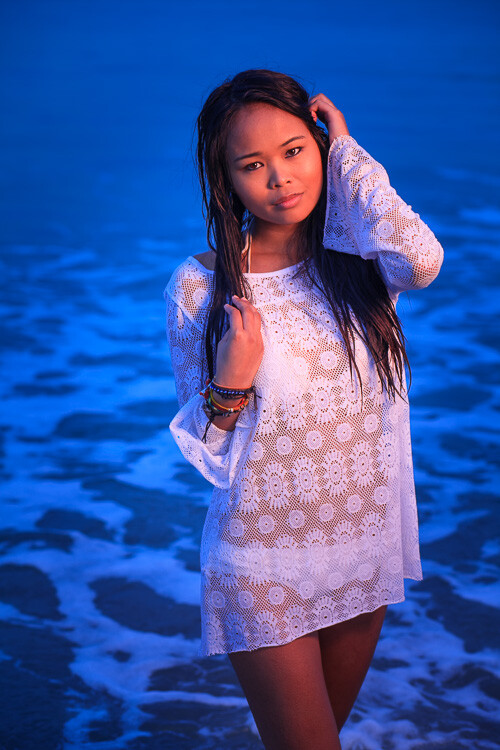
Don’t get me wrong. There will always be circumstances where it’s more important to get the photo than to worry about its aesthetic qualities. If you’re photographing a friend or loved one in the dark, it’s better to use the flash and capture the moment, however ugly the light, than not capture it all. But if you want to create beautiful photos, then you will want to either learn to use off-camera flash or make the most of the available light.

I made this photo at dusk using an off-camera flash with a softbox. There’s no way you can replicate this quality of the light in this image without the right equipment.
How to Get Consistent Results Shooting in Low Light

3. Use Image Stabilization

Image Stabilization lets you take sharp photos using longer shutter speeds than you could with a non-stabilized lens. This is useful to know if your photos tend to suffer from camera shake in low light.

There are two types of Image Stabilization. Canon and Nikon build it into their lenses. That means the technology only works if you have the right lens. As most kit lenses are image stabilized it is likely you own at least one image such lens you can use in low light.

Other manufacturers, like Olympus and Panasonic, place the image stabilization mechanism in the camera body. The advantage of this system is that it works with any lens. If you’re not sure how image stabilization works with your camera then check your manual for the details.

Most image stabilization systems give you a four-stop advantage. Let’s look at what that means in practice.

Let’s say you’re using an 18-55mm kit lens on an APS-C camera. Ideally, without image stabilization, you need a shutter speed of around 1/125 second to achieve a sharp image with a hand-held camera (some photographers may argue you could use a slower shutter speed). An image stabilization system that gives you a 4 stop advantage means you can drop the shutter speed to 1/8th of a second and still get a sharp image. That’s very helpful in low light.

For example, I made this photo in a dimly lit museum with a non-stabilized 18-55mm lens at 1/160 second, f5.6, ISO 1600. If the lens was image stabilized I would have had the option of using ISO 100 and 1/10th of a second, giving me a much cleaner image with less noise.

How to Get Consistent Results Shooting in Low Light

4. Don’t be afraid of high ISO

Most modern digital cameras give you excellent performance at high ISOs. It’s quite possible your camera is capable of giving great results at ISO 3200, 6400, or even higher. You won’t know until you try. This is another good reason for taking your camera off fully automatic. Now you can decide what ISO to use, rather than leaving it up to your camera.

The best thing to do is test your camera at all its high ISO levels to find your noise tolerance level. For example, you might find that ISO 6400 is the highest setting you’re comfortable using. Once you’ve decided this, you know the ISO range you can work with for your camera.

This photo is taken at ISO 6400, the highest ISO I’m comfortable using on my camera. I had to use the high ISO setting because the photo was taken indoors in low light.

Low light

5. Use a prime lens

If you don’t have one already then it’s worth considering buying a prime lens. For example, most 18-55mm kit lenses have a maximum aperture of f/5.6 at the 55mm end. But on a 50mm prime lens that maximum aperture could be f/1.8 (or even wider). That’s a difference of over three stops (eight times more light), which means that you can take photos in much lower light conditions.

The only caveat is that there is much less depth of field at wide apertures. But you can use this to your advantage by exploring the use of bokeh in your low light photos. I made this photo of a Chinese lantern, taken at night, using an 85mm lens set to f/2.

Low light

6. Use a tripod

A tripod comes in really handy for taking photos of landscapes and cityscapes in low light. All the methods listed so far, such as using a high ISO, Image Stabilization, prime lenses and so on, have disadvantages. Noise increases at high ISOs, wide apertures don’t give much depth of field, and even Image Stabilization has its limits.

The benefit of a tripod is that you can use your camera at its lowest ISO setting (giving good image quality), and a small aperture such as f/8 or f/11 (allowing for a greater depth of field).

Shutter speeds will slow right down at these settings. Again, use this to your advantage. Slow shutter speeds are great for landscape photography because moving parts of the landscape, like water, become a silky blur. With cityscapes, the light from passing traffic becomes long streaks of light.

A tripod also opens up techniques like long exposure photography (photos taken with shutter speeds between a minute and eight minutes long) and painting with light (using flash or torchlight to illuminate the scene during a long exposure).

Low light

I used a tripod to create this landscape photo, which needed an exposure of 30 seconds at f/8 and ISO 100. The water blurred during the exposure, which helps add mood and atmosphere to the photo.

Conclusion

The key to getting consistent results shooting in low light is understanding the limitations of your equipment and taking control of your camera to make it do what you need, rather than what it wants. With a bit of work and patience, you can learn to take great photos in low light. The benefit is that low light conditions are often beautiful. Most places and landscapes look beautiful at dusk. Shooting at these times will help you take moody photos.

Do you have any ideas for shooting in low light? Let us know in the comments!


If you enjoyed this article and would like to learn more about the creative side of photography then please check out my ebook Mastering Photography. It shows you how to take control of and be creative with your digital camera, no matter what your skill level!

The post 6 Tips for Getting Consistent Results Shooting in Low Light by Andrew S. Gibson appeared first on Digital Photography School.


Digital Photography School

 
Comments Off on 6 Tips for Getting Consistent Results Shooting in Low Light

Posted in Photography


It’s Alive! 14 Algae-Powered Inventions for Food, Light, Energy & Oxygen

04 Oct

[ By SA Rogers in Conceptual & Futuristic & Technology. ]

If we could just get beyond pesky hiccups like catastrophic climate change and wanting to obliterate each other with nuclear weapons, we humans could learn from our mistakes and create a future that’s actually cooler and more sustainable than anything we dreamed up during the 20th century. Making the most of microalgae, one of the most ancient and prolific organisms on earth, we could produce abundant clean energy and healthy foods while also reducing the amount of CO2 in the air and producing more oxygen. These designs show just how this symbiotic process could manifest in our lives.

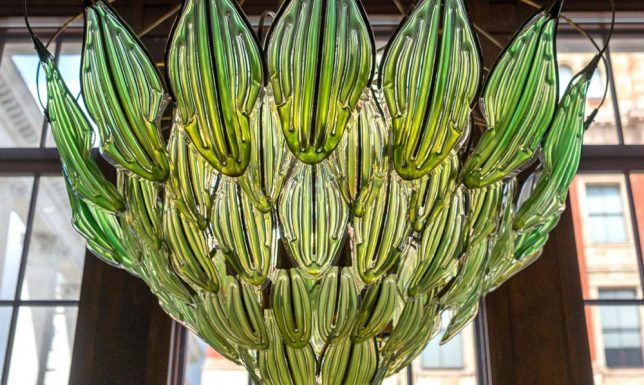
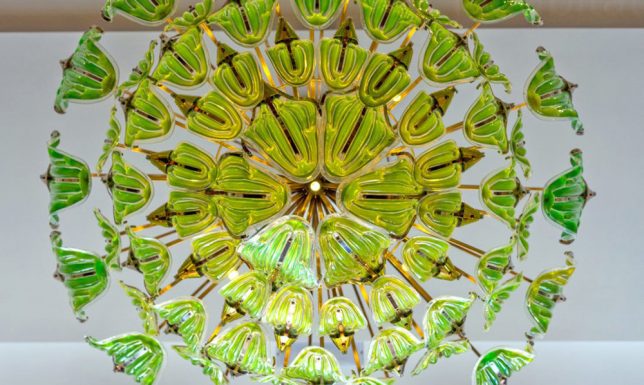
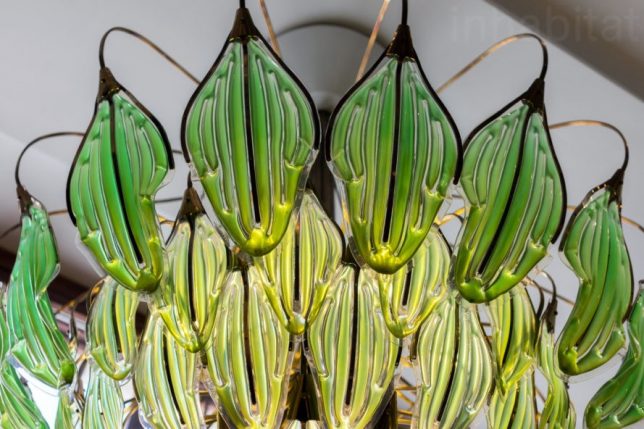
Living Chandelier Filled with Algae

Embedded with LED bulbs and sustained by daylight, ‘Exhale’ by Julian Melchiorri is a living chandelier with beautiful glass components filled with various shades of green algae. The glass ‘leaves’ take in CO2 from the room and release oxygen, too, making it a striking air purifier. Melchiorri is a designer and engineer, but he’s also a leading biochemical technology researcher, and he’s been working on his ‘artificial leaf’ concept for years.

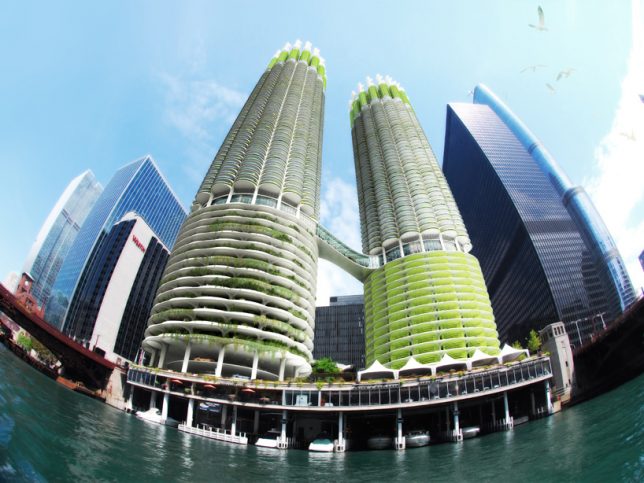
‘Algae Green Loop’ Proposal for Chicago’s Marina City Towers

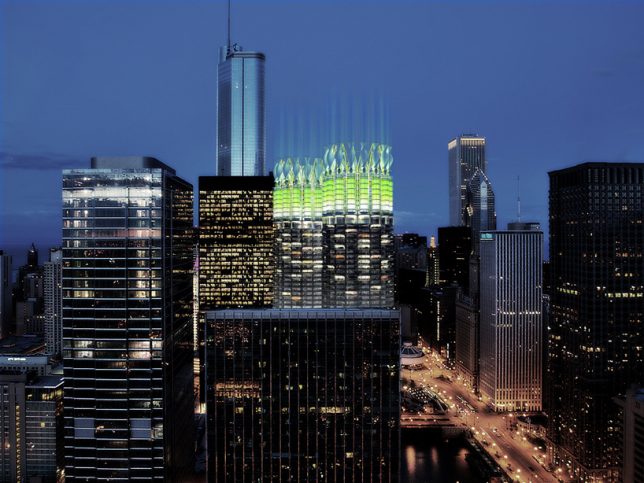
Architecture office Influx Studio imagines a dramatic makeover for the Marina City Towers in Chicago, retrofitting them to absorb CO2 through loops of bioreactors to help mitigate climate change. The closed-loop system sequesters carbon from the air, absorbs it through vegetal photosynthesis and produces its own energy through the same wind turbines that suck in CO2 and through the algae bioreactors that process it.

Photosynthetic Algae Furnishings

[vimeo128654962]

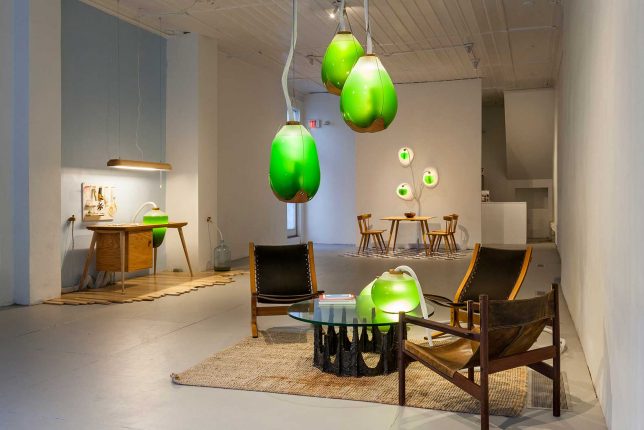
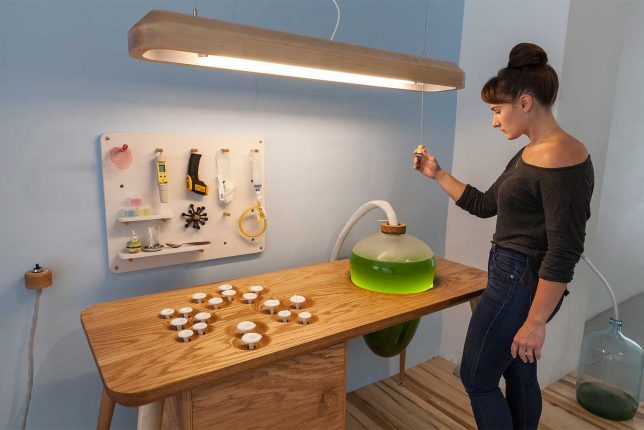
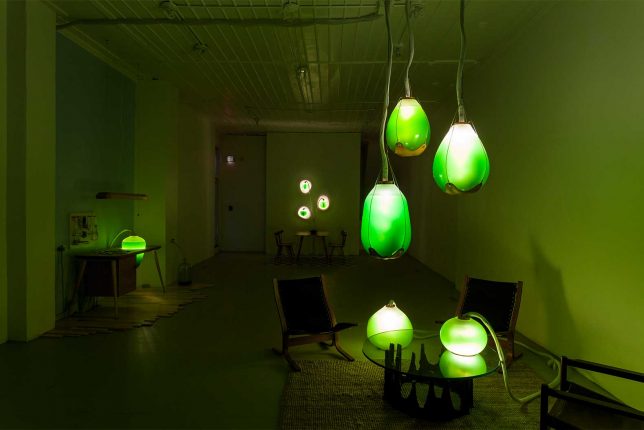
‘Living Things’ is a series of bio-powered furnishings exploring ‘symbiotic living,’ his which micro-algae help light up our homes. Presented in a series of vignettes, the project contains furniture and lamps that are both beautiful and beneficial. “The morphologies of hand-blown glass vessels function both as lighting and heating elements for the human occupants, and high functioning photobioreactors which provide heat, light, agitation, air supply nutrient and waste control to the living algae inside.”

World’s First Algae-Powered Building

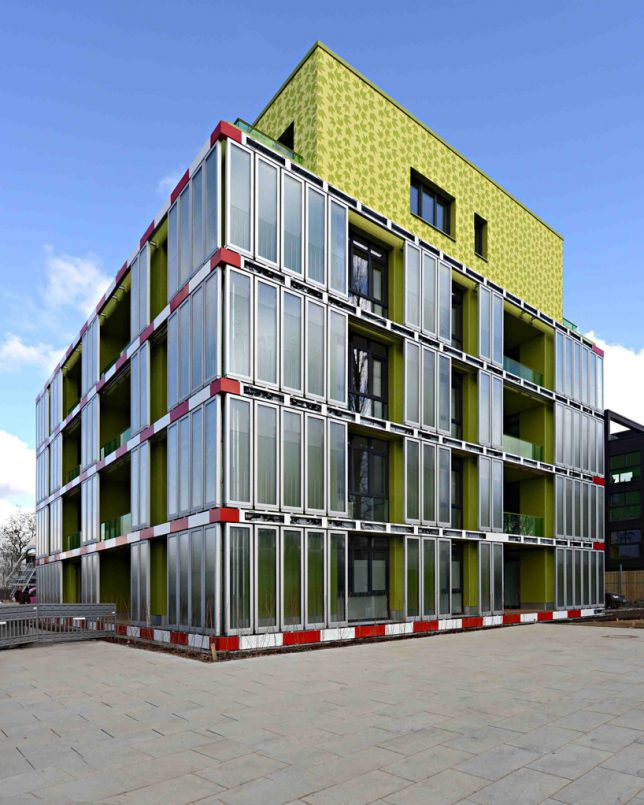
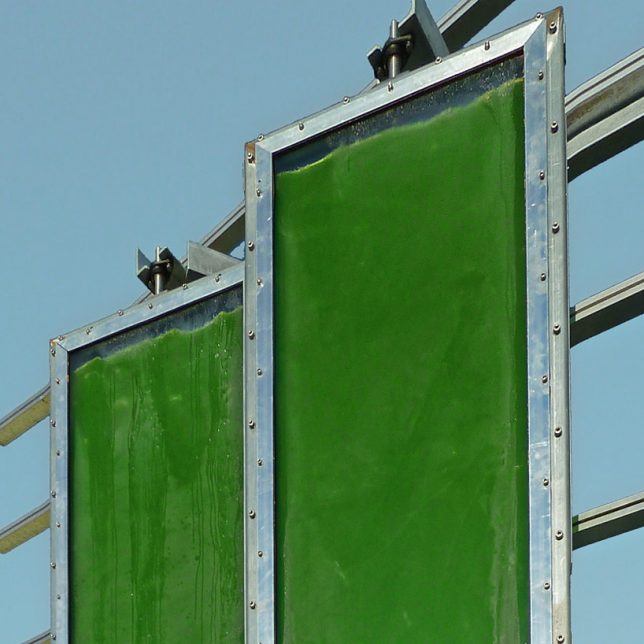
Lots of concepts tout the ability to power an entire building on algae, but have you ever actually seen one built? BIQ House in Hamburg, Germany by Austrian firm Splitterwerk features the world’s first iso-adaptive facade in the form of algae-filled glass panels shading the southeast and southwest faces of the building. The algae is sourced from a nearby tributary of the Elbe River and constantly changes color as it grows. The panes produce biomass as the algae multiplies, and reduce the amount of energy needed for cooling inside the building.

Living Portraits Made with Microscopic Algae

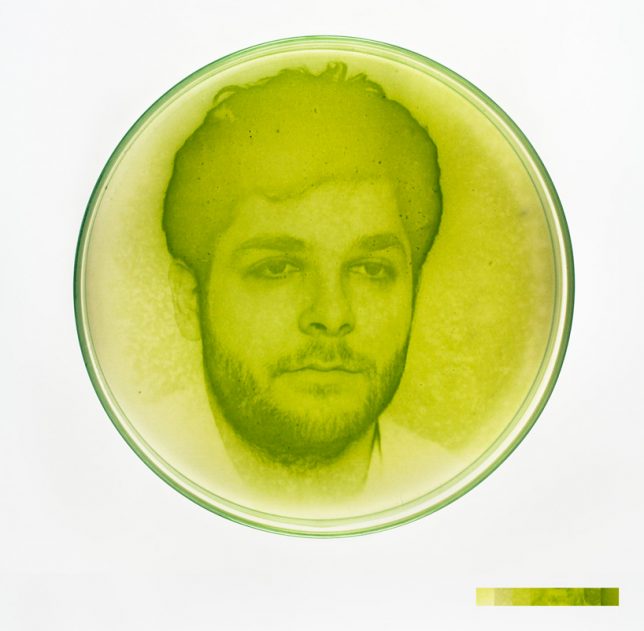
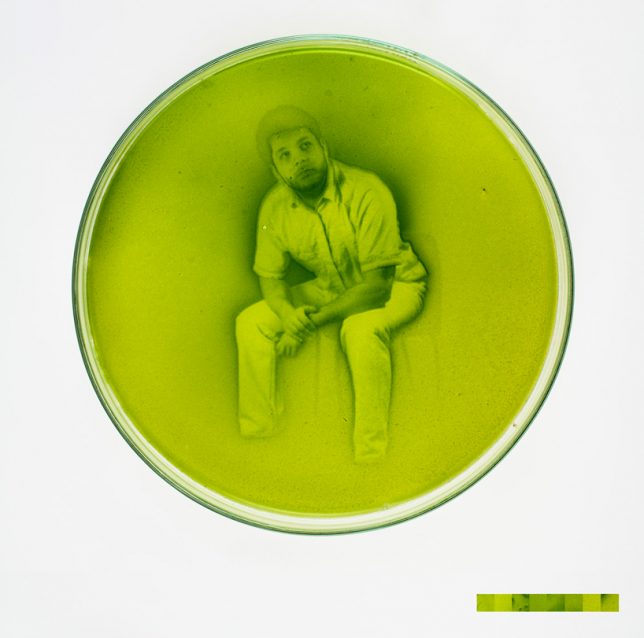
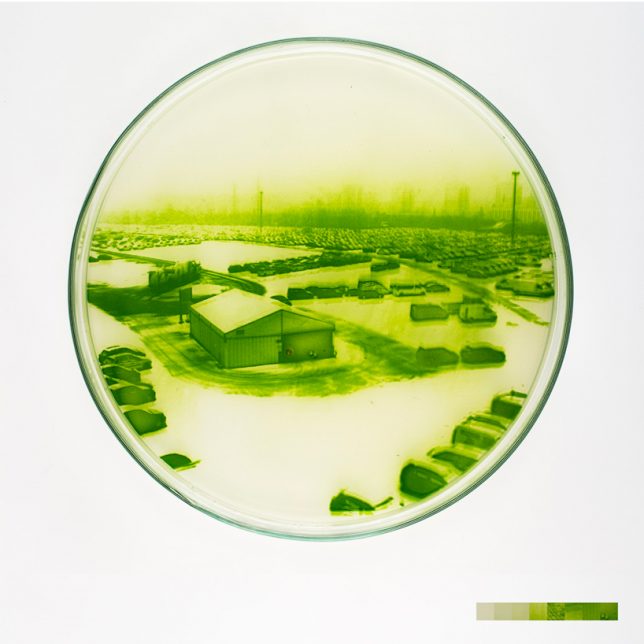
Living algae cultured in petri dishes clump together to form images in a living twist on traditional photography techniques. Artist and researcher Lia Giraud places a mix of chemical nutrients in the dish and exposes them to an image, and the cells react to the light and form solids of various densities, resulting in the different shades of green that produce the image.

Next Page – Click Below to Read More:
Its Alive 14 Algae Powered Inventions For Food Light Energy Oxygen

Share on Facebook


[ By SA Rogers in Conceptual & Futuristic & Technology. ]

[ WebUrbanist | Archives | Galleries | Privacy | TOS ]


WebUrbanist

 
Comments Off on It’s Alive! 14 Algae-Powered Inventions for Food, Light, Energy & Oxygen

Posted in Creativity


RevolCam adds three accessory lenses and an adjustable light to any smartphone camera

02 Oct
When we reviewed the Shiftcam for the iPhone 7 Plus earlier this year we found it to be one of the most user friendly and versatile lens attachments for the iPhone. The team behind Shiftcam has now returned to Kickstarter to launch a new multi-lens smartphone attachment: the RevolCam.
Like the Shiftcam the RevolCam adds wide angle, fisheye and macro lenses to your smartphone camera but lacks a tele option. On the plus side it adds a built-in mirror for selfies and a detachable and adjustable LED light, providing additional illumination in dim conditions. Instead of the Shiftcam’s slider mechanism it uses a revolving design to allow for lens swapping on the fly.
In contrast to the Shiftcam, which is device-specific, the RevolCam comes with a universal design and its makers promise easy and secure attachment to any smartphone via a clamp mechanism. This should also work on the main camera of dual-camera equipped devices.

If you can live without a tele-attachment the RevolCam looks like an interesting accessory for mobile photographers who like to expand the camera feature set using attachment lenses. You can currently secure one by pledging $ 29 plus shipping on the RevolCam Kickstarter page which also makes it an affordable option. Delivery is planned for November 2017.

Articles: Digital Photography Review (dpreview.com)

 
Comments Off on RevolCam adds three accessory lenses and an adjustable light to any smartphone camera

Posted in Uncategorized


Review of the new Spekular Modular LED Light System

01 Oct

I was fortunate enough to get hold of the new Spekular Modular LED kit from the people at Spiffy Gear a little bit earlier than most. So I’ve been using it for a couple of months now on everything from a personal portrait project to a product shoot of a whole load of shoes, and lots of other things in between.

In the box with the Spekular Modular LED kit

The kit comes in a handy carry case that keeps all of the gear together. You get four of the Spekular LED bars (I’m just going to call them bars, you might want to call them something else) and clips to join them together, along with a mounting connector that has a metal 1/4″-20 thread. This allows you to screw it onto a light stand, or as I’ve been doing, onto a tripod base-plate and using it on top of a tripod, which allows me to move the light where I need it. You get a multi-voltage power supply and a bit of documentation in the box, too.

Review of the new Spekular Modular LED Light System

The kit ships with a regular power supply and plugs in and is controlled very easily on one of the light bar units, with the power running from what would be 0% to 100% in step-less increments. There is also an external battery kit that you can pick up if you’re looking to use Spekular away from a power outlet.

Setting it up

Review of the new Spekular Modular LED Light System

The mounting bracket that is included simply slips along the back of any of the light bar units. You can adjust exactly where you’d like it to be connected to the unit, and then you simply connect it to a light stand or via a tripod plate or any other stand/magic arm with a 1/4″-20 connector.

Review of the new Spekular Modular LED Light System

Let us move swiftly on! Take a look at how the unit works and what it can do, according to the Spiffy Gear video below, and then we’ll get on with how well it worked for me in real-world situations!

Using Spekular in the real world

I’ve read a little of what others are saying around the web, a few people mentioned that they don’t like the specular highlights the kit gives, to which I’d say, “So set it up differently!

You can set the unit up as something that resembles a traditional rectangular LED panel, or you can set two kits up as a crazy epic star-like looking thing! As with any art/photography, the resultant look you’re after is subjective, and that’s fine! You can get seriously creative with this Spekular Modular LED kit, and that flexibility really impressed me.

Review of the new Spekular Modular LED Light System

Spekular for portraits

The first shoot I took the Spekular kit along to was one of my own. It’s a portrait series that I’m working on, based on men’s mental health. The Spekular kit was on a Kupo Click light stand slightly above and forward of my camera position.

It was only a test, but I was very happy with the results! (Yes, that’s a self-portrait below, I’m taking the photograph using Sony’s Play Memories with my A7R II).

Review of the new Spekular Modular LED Light System

Spekular for product shoots

The other main use I’ve had with the Spekular kit was on a spur of the moment product shoot for a friend. I needed to photograph 20 pairs of shoes for a website. This is something I’ve not done much of, but I was very interested to try out the kit and see if it could provide the results that were needed for this job.

The thing I found about using the Spekular kit was that it provided a really great quality of even light when positioned correctly. I used a Kupo C-Stand and positioned Spekular, set up in a square format, over the top and slightly forward of the product. This really cut down on shadows!

Review of the new Spekular Modular LED Light System

Yes, these shoes have wings!

Review of the new Spekular Modular LED Light System

Great, even light for products.

Review of the new Spekular Modular LED Light System

The shoes were photographed for a web-store, my friend was very happy – yay.

Each light bar puts out 14.5W of light which is kinda similar to a 150W halogen light. The lights have a 94+ CRI (CR-What? Read What CRI is here)

So, what’s the verdict?

Still not convinced? Here’s another video showing the Spekular LED light in use.

What did I like about the Spekular Modular LED light system? In two words, almost everything. The build quality is great, the unit stays level when attached from one side, it doesn’t twist like plastic units tend to do. I’d love to start using the kit with a battery pack to make it a little more portable.

One of the things I need to work on, but fixed very easily with Rosco Cinefoil ($ 34 for 25′ of the stuff) was the light spread. Naturally LED lights don’t tend to be super focused, so you need to find a way to shape them if that is the look you’re after. I found it very simple to do using flags or Cinefoil kind of shaped like barn-doors.

In my opinion, the Spekular kit is very good value compared to other options on the market considering what you get, how well it appears to be built (keep in mind I’ve only had the kit since July 5th), and how well it works.

Spiffy suggests that Spekular is “the Swiss army knife of LED lighting,” and I’d tend to agree! Well done!

Five Stars, Spiffy Gear, Five stars!

The post Review of the new Spekular Modular LED Light System by Sime appeared first on Digital Photography School.


Digital Photography School

 
Comments Off on Review of the new Spekular Modular LED Light System

Posted in Photography


Video Tutorial – How to Work a Scene to Find the best Light and Composition

23 Sep

In this short video tutorial, photographer Mike Brown takes you on a photo walk looking for images. Watch as he scans the scene and finds the best camera angle, waits for the right light, and frames the shot for the best composition.

Go on a photo walk and see how Mike goes about working a scene, before quickly snapping a photo and moving on. Take your time, look around. If you see something interesting explore the scene a little. Have patience as well.

Some key points you can learn from this tutorial include:

  • Sometimes you need to wait for the light to change.
  • Simplification is often a good thing.
  • Move around the scene, and put things in the foreground as well.
  • Use shadows for more creating more dramatic images.

The post Video Tutorial – How to Work a Scene to Find the best Light and Composition by Darlene Hildebrandt appeared first on Digital Photography School.


Digital Photography School
 
Comments Off on Video Tutorial – How to Work a Scene to Find the best Light and Composition

Posted in Photography


Video: The pros and cons of natural light vs off-camera flash

15 Sep

Photographer Manny Ortiz took to the woods with his wife and model Diana during golden hour to film a comparison video that many amateur photographers on up will find useful: natural light vs off-camera flash. What are the pros of each setup, why would you choose one over the other, and how can off-camera flash make natural light photos look even better? Manny dives into all of this while performing a live shooting demo.

The video starts with a quick demo where Manny alternates between shooting natural light and off-camera flash to illustrate how each style changes his settings and the final product. Then, once he’s finished, he breaks down the pros and cons of each style.

Here are a couple of before and after pictures Manny shared with us from his demonstration, so you can see the difference between his natural light only portraits and the ones augmented by off-camera flash:

$ (document).ready(function() { SampleGalleryV2({“containerId”:”embeddedSampleGallery_9493248343″,”galleryId”:”9493248343″,”isEmbeddedWidget”:true,”standalone”:false,”selectedImageIndex”:0,”startInCommentsView”:false,”isMobile”:false}) });

After the demo Manny discusses the reasons he shoots both natural light and off-camera flash, and when he chooses to shoot which style.

Traditionally a flash photographer, shooting natural light only is ‘liberating’ for Manny. He also appreciates the ability to stay mostly incognito when shooting on-location in a popular area—nobody wants to draw a crowd or unwanted attention during a portrait shoot.

On the other hand, flash photography gives Manny the option to create his own light when mother nature doesn’t cooperate or the time of day isn’t ideal. And since so many portrait photographers start out shooting natural light, properly using off-camera flash can help you to stand out from the crowd.

To hear more of Manny’s thoughts or see him in action, check out the full video above. And if you want to see more of his work, don’t forget to follow him on Instagram where he’s most active.

Articles: Digital Photography Review (dpreview.com)

 
Comments Off on Video: The pros and cons of natural light vs off-camera flash

Posted in Uncategorized