RSS
 

Posts Tagged ‘Lens’

How to Simulate Tilt-Shift Lens Effects Using Lightroom

24 Jun

We’ve all at one point been enamoured by the effects produced by tilt-shift or PC (perspective control) lenses.

Even in wide-angle shots, the extremely narrow field of focus transforms the scene into a surreal miniature world. It can be hard to decipher whether it’s actually a close-up of a tiny model scene, or the result of the visual trickery that a tilt-shift lens can produce.

Tilt-shift effect applied to a beach scene.

The tilt-shift effect can be used on more than city street scenes. Use your imagination and be creative!

Besides the nifty miniaturization effect, these high-end specialty lenses are imperative for professional architectural photography. Tilt-shift lenses are basically split into two, parallel to the lens, elements and enable you to tilt the front of the lens barrel in relation to the rear portion, or slide it parallel.

Without actually changing the physical location of the camera, these adjustments allow you to alter the perceived perspective. The most practical application of this effect is to eliminate certain types of distortion, especially the keystone effect.

The keystone effect refers to the convergence of parallel lines which occurs when a camera’s sensor is not parallel to them. You have seen this distortion a million times when the camera was pointed upward at a tall building. It looks as if the building is about to fall over backwards, and it creates the illusion that it is wider at the bottom and continually narrows to the top. The same thing happens with horizontal lines but is often less noticeable, or detrimental to the image.

Although tilt-shift lenses have other practical uses, these are the two that can be replicated effectively in post-processing: creating a miniature effect, and fixing certain kinds of lens distortion.

Eliminating Converging Lines Distortion

Correcting lens distortion in Lightroom (LR) is fairly straightforward with a couple of considerations to keep in mind. I’ll use a night shot of the Petronas Tower in Kuala Lumpur, Malaysia as an example.

1. Straighten first.

If the image you are working with has a distinct horizontal or vertical line which you know to be level or plumb, use the Straighten tool located within the Crop tool (keyboard shortcut R) to align the image before making any lens corrections.
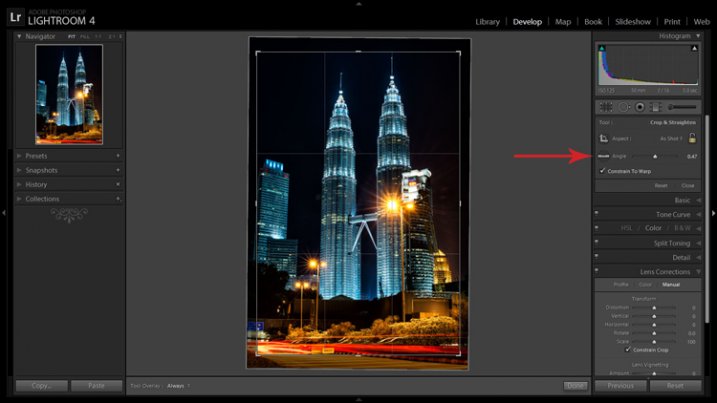
The Level tool can be found beside the Align slider or activated by holding CTRL key.

The Level tool can be found within the Crop panel beside the Align slider, or activated by holding CTRL key.

To align the image using a vertical line, it must be near the center of the image due to the distortion which you are about to fix. With the Crop tool active, you can either grab the Level tool located beside the Angle slider, or hold down the CTRL key and drag the cursor along the chosen line and LR will rotate the image to level or plumb.

Note: new in LR6 or LRCC is the Auto function of the crop tool which attempts to do this for you. Alternatively, the Rotate slider in Lens Corrections can be used with similar results.

2. Open the Lens Corrections panel and click on the Manual tab.
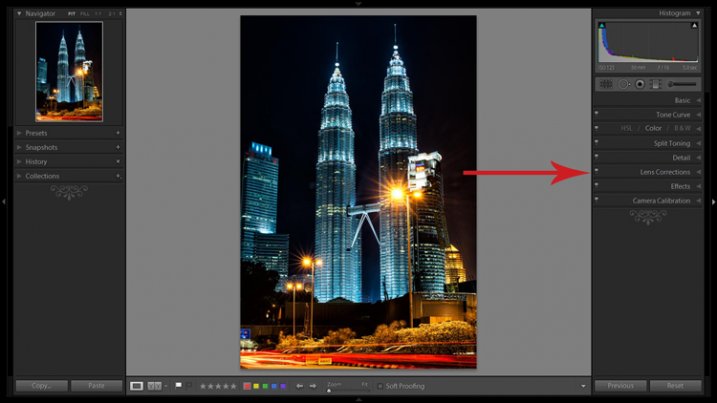
Distortion corrections are made in the Lens Corrections panel.

Distortion corrections are made in the Lens Corrections panel.

3. Check the Constrain Crop box.

Note: As is often the case in life, you don’t get something for nothing. When LR manipulates the image to fix these lines, it must also crop it. You can also crop it manually after you adjust the image, but it is easy to inadvertently leave a little gray strip somewhere along the edge of your image by not cropping it enough.

4. Adjust the sliders

There are several ways to adjust sliders: dragging the slider itself, clicking the name of the slider and using the +/- keys, clicking the value on the right of the slider and dragging the cursor left or right, clicking the value and entering the desire value or clicking the value and using the arrow keys to make micro adjustments. I recommend the latter for accuracy.

5. Show the grid

Hovering the mouse over any of the sliders will show a grid over the image to help guide your adjustment. For this image, a -18 compensation straightens the lines right up.
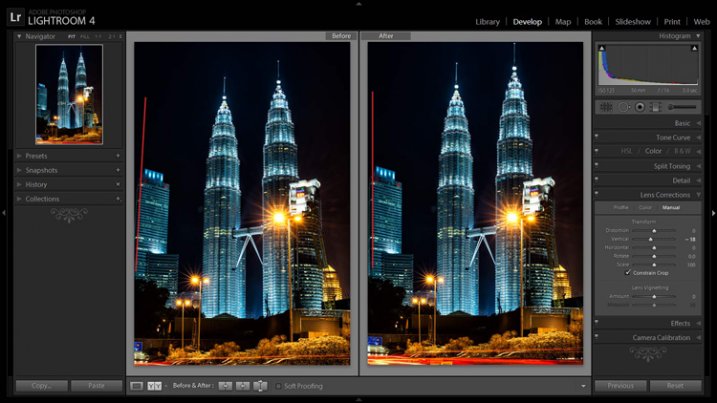
A before and after showing corrections for converging lines.

A before and after showing corrections for converging lines.

If you plan on shooting architecture and utilizing this feature instead of dropping $ 1,400 on a tilt-shift lens, it may benefit you to activate the crop tool (keyboard shortcut R) to get an idea of how much LR cropped your image. This will give you a point of reference while composing scenes in the future.

Creating a Miniaturization Effect

The tilt-shift effect of severely softening most of an image to isolate a small sharp strip can be simulated in post-processing very effectively. Although there are a couple of different ways to achieve this effect in Lightroom, I find the following to be the easiest and most effective.

Golden Gate Bridge with the tilt-shift effect applied.

The tilt-shift effect can add another level of interest to certain photographs.

Keep in mind that not every photo is a good candidate for this effect. You can find good advice about image selection in the article An Introduction to Tilt-Shift Photography.

1. Process the image as you normally would.

Boosting sharpening, contrast and saturation can help exaggerate the effect.

2. Activate and setup the Adjustment Brush (keyboard shortcut K).

Drag the Sharpening slider all the way down to -100. I also like to reduce Clarity which adds a bit of glow and exacerbates the effect.

3. Show the Mask Overlay box (keyboard shortcut O)

This will allow you to clearly see where the effect is being applied (shift+O will rotate through different mask colors, you may find red is better one image whereas green may work on another).

5. Adjust the brush settings

Setup such things as brush size, flow, etc. Spend a few minutes experimenting with different combinations of these settings to find what works best for your image. CTRL+Z (CMD+Z on Mac) is your friend here.

6. Blur most of the image less a small strip

Holding down the shift key while you click and drag the brush horizontally across your image will apply the effect in a straight line. The goal is to blur the entire image except for a small strip. Make one line across the upper boundary and one line across the lower boundary of the strip you wish to isolate. You can then release the shift key and paint in the remainder of the areas. The in focus strip should account for 20 per cent or less of the image area. If the strip is too big, the effect will be weak.
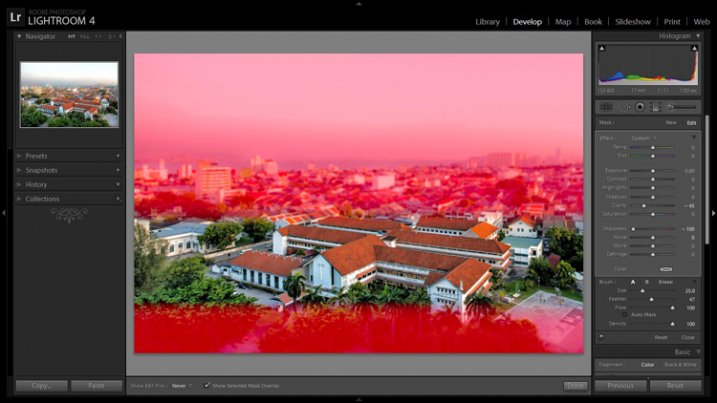
Holding down the shift key will keep the brush level to paint a straight line.

Holding down the shift key will keep the brush level to paint a straight line.

7. Repeat to increase the effect.

Repeating the previous step several times will compound the effect. To repeat the step, click on New at the top of the Adjustment Brush panel – this will remove the mask to reveal the most recently applied effects, and allow you to add a new pin (brush strokes) and repeat the process.
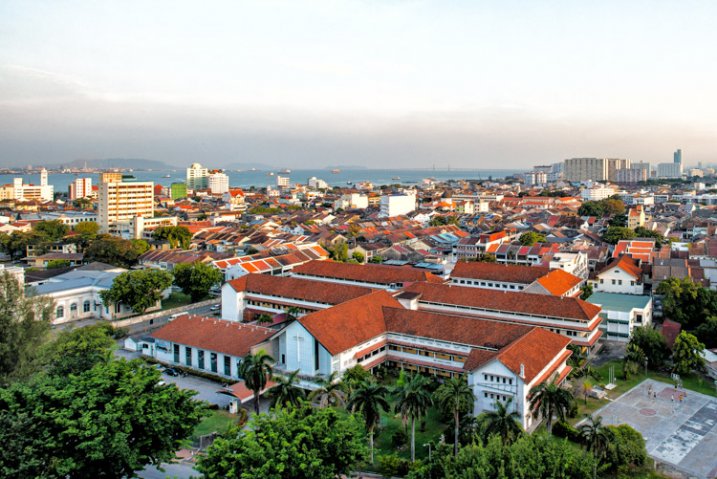
Before applying the effect to a photo of Penang, Malaysia.
Before applying the effect to a photo of Penang, Malaysia.

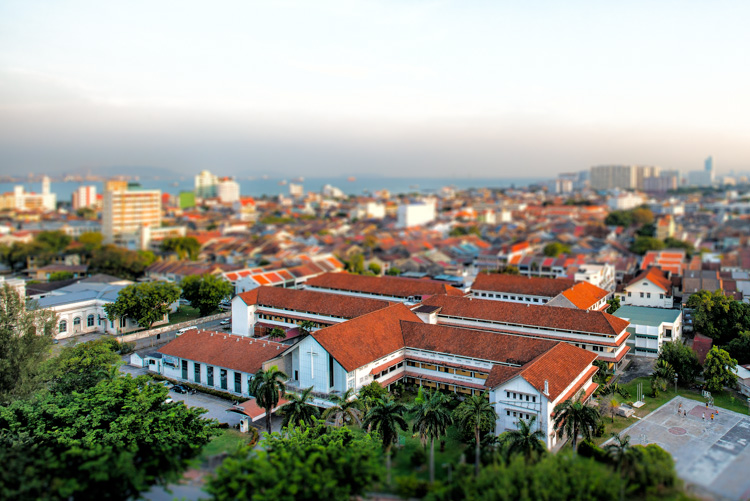
After application of the miniaturization effect.

After application of the miniaturization effect.

The effect can also be applied using the Graduated Filter tool but I find it ends up blurring the entire image to some extent and is less effective.

This is a starting point from which to experiment with the effect. Everybody’s tastes differ, so although the general process will remain constant, go crazy with the other variables and see what happens!

googletag.cmd.push(function() {
tablet_slots.push( googletag.defineSlot( “/1005424/_dPSv4_tab-all-article-bottom_(300×250)”, [300, 250], “pb-ad-78623” ).addService( googletag.pubads() ) ); } );

googletag.cmd.push(function() {
mobile_slots.push( googletag.defineSlot( “/1005424/_dPSv4_mob-all-article-bottom_(300×250)”, [300, 250], “pb-ad-78158” ).addService( googletag.pubads() ) ); } );

The post How to Simulate Tilt-Shift Lens Effects Using Lightroom by Jeremie Schatz appeared first on Digital Photography School.

Digital Photography School

 
Comments Off on How to Simulate Tilt-Shift Lens Effects Using Lightroom

Posted in Photography


Venus Optics launches Laowa 15mm F4, the world’s widest macro lens

24 Jun

Chinese lens manufacturer Anhui ChangGeng Optical Technology Company Limited has introduced what it describes as the world’s widest 1:1 macro lens. The Venus Optics Laowa 15mm F4 is designed for full frame sensor cameras and can focus down to just 12cm from the front element, and is equipped with a +/-6mm shift function for architectural work at normal focusing distances. Read more

Articles: Digital Photography Review (dpreview.com)

 
Comments Off on Venus Optics launches Laowa 15mm F4, the world’s widest macro lens

Posted in Uncategorized


The Winner of the 16-300mm Di II VC PZD Tamron Lens is . . .

18 Jun
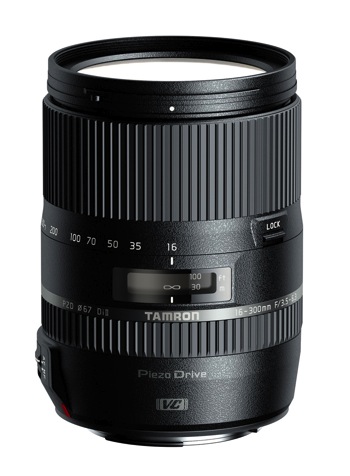
Tamron 16 300mm Di II VC PZD Macro 750

Tamron 16-300mm Di II VC PZD Macro

A HUGE Thank You to everyone who entered our recent contest to win a 16-300mm Di II VC PZD Macro Lens from our friends at Tamron. This was not actually a photography competition, but so many of you shared your beautiful photographs, we encourage you all to go back and scroll the comments section for some wonderful photos and links to reader pages/sites.

Yet again, the response was absolutely AMAZING with over 930 entries! But now, on to the winner! Drum roll – and the winner is:

The Tamron 16-300mm Di II VC PZD Macro goes to – Hasan! Congratulations!

His comment:

I like landscape and street photography… I spent a long time trying to decide which I like more… but my wife told me I am good in both 😀 so my website has both www.hasanodeh.com

I see this lens as a dream for my street photography… speed and discretion is the key to street photography… you have to be versatile. able to switch focal lengths instantly without changing lenses is an amazing way to make sure you get the best street images…. starting from environmental portraits all the way to close ups of a face of a 92 years old lady selling roses to young couples. The PZD will allow me to focus faster when the moment presents itself and the quite focusing system (along with the silencer mode on my camera) will make sure I do not disturb that magical moment as it happens. Also the vibration compensation would be amazing as shooting from a tripod is almost never an option for street photography… so a lens with a good VC is a god send.

To anyone reading this… Look at my website and get this…. I am self taught… and this is where it all happened… on DPS… just keep shooting and keep reading… It’ll be amazing if DPS gives a lens that let me take what I learned here to another level. thanks guys whether you chose me or not for your efforts on DPS.

We were all thrilled with the entries – you tugged at our heartstrings, made us laugh, made us smile, but most importantly, you made us keep wanting to do more of what we are doing; providing you quality information and guidance to become a better photographer. We were so pleased to see that you came from every part of the world, young adults to grandparents, and everyone in between. Thank you all for your entries!

Here is a special post from the winner of the Tamron 16-300mm Di II VC PCD Macro from our December, 2014 Contest:

I am not entering!!! I won one of these in December (THANKS DPS!!!!!) and I love love love the lens!!! For me, it takes so much stress out of getting the picture just the way I want to without a need to switch between lenses. It really freed me up as a photographer to think about things like composition and camera settings instead of handling the lenses. Wonderful feeling, and a wonderful lens. Thanks again! This picture was taken with it too, from a moving car – and I was READY!!!!

Vera Irwin Photo

Tamron Road Trip ImageFor those of you that didn’t win, Tamron has invited ALL dPS readers download their 2015 eBook Series!



You can find those HERE!

Tamron Rebates

For all of you residing in the USA, when you do purchase your 16-300mm Di II VC PZD Macro Tamron Lens, make sure to take advantage of the $ 100 Total Rebate, through June 21, 2015. If you’d prefer one of the other award winning Tamron Lenses, please make sure to take check out these additional Tamron Rebates*. Find additional information HERE.

728x90 Tamron Rebate Banner for Use

*Current rebate offers end June 30, 2015. US RESIDENTS ONLY.

The Winner will be emailed with details of how to collect their prize. Please make sure to look for our email. Thanks you again for all the wonderful submissions and to Tamron for sponsoring this competition.

Tamron logo

About Tamron

googletag.cmd.push(function() {
tablet_slots.push( googletag.defineSlot( “/1005424/_dPSv4_tab-all-article-bottom_(300×250)”, [300, 250], “pb-ad-78623” ).addService( googletag.pubads() ) ); } );

googletag.cmd.push(function() {
mobile_slots.push( googletag.defineSlot( “/1005424/_dPSv4_mob-all-article-bottom_(300×250)”, [300, 250], “pb-ad-78158” ).addService( googletag.pubads() ) ); } );

The post The Winner of the 16-300mm Di II VC PZD Tamron Lens is . . . by Darlene Hildebrandt appeared first on Digital Photography School.


Digital Photography School

 
Comments Off on The Winner of the 16-300mm Di II VC PZD Tamron Lens is . . .

Posted in Photography


Leica Q unveiled with 24MP full-frame sensor and fixed 28mm F1.7 lens

12 Jun

Leica has just introduced the Q (Typ 116), a full-frame compact camera with a fixed, stabilized 28mm F1.7 Summilux lens. It offers a 24MP CMOS sensor and a 3″ 1.04M dot touch-sensitive LCD. A built-in LCoS EVF offers an equivalent resolution of 3.68MP, and the Q skips a built-in flash but provides a standard hot shoe. Video recording at 1080/60p and built-in Wi-Fi are also offered. Read more

Articles: Digital Photography Review (dpreview.com)

 
Comments Off on Leica Q unveiled with 24MP full-frame sensor and fixed 28mm F1.7 lens

Posted in Uncategorized


dPS Writer’s Favorite Lens – the Nikon 70-200mm f/2.8 VR2

07 Jun

We all have favorites; colors, cars, movies, and dogs. For one reason or another, they grow on you and the more you’re exposed to it, the more partial you become.

When it comes to photographers, we have favorites too. Brands, camera bodies, software, and of course, lenses. I’m no different.

Over the years many lenses have passed through my hands. I have also had experience with a slew of other lenses through newspaper jobs and loaners from friends; everything from fisheyes to 400mm, Sigma to Zeiss.

Each new lens gets to be a favorite for a time – I call it the honeymoon phase. But to really work its way into your heart and truly be that solid go-to favorite, you have to have the lens for an extended period of time. You also need the opportunity to put it through its paces under a multitude of conditions.

70 200 by Jeremie Schatz  10

The lens that fits the bill for me is the Nikon 70-200mm f/2.8 VR2.

Now, I am fully aware that the quality of this lens has never been in question. It is, after all, Nikon’s flagship fast telephoto zoom – with a price tag to match. Let’s start with the bad news: it costs a pension, it’s the size of a small tree, it weighs as much as a newborn baby, and its minimum focusing distance is about a mile away.

For some photographers any or all of these reasons can easily make this lens a deal-breaker. The price is a non-issue if you are a pro. I paid over $ 2000 for mine more than four years ago and I wouldn’t flinch to do it again. The resale value stays fairly high as well, which may help enthusiasts justify it to themselves.

The size and weight (3.4 pounds); well, you have to pay to play. I’m a bigger guy so I don’t often have the same complaints about the size and weight of a pro body and lens setup, and actually find smaller cameras a bit awkward to use for extended periods of time.

One reason I don’t mind the size of the 70-200mm is because I find the long barrel gives me ample space to get a solid grip. This provides stability for hand-held shots as well as providing a good pivot point for panning shots.

70 200 by Jeremie Schatz  4

The longer barrel of the 70-200mm has space to get a solid grip which can help obtain sharper panning shots.

The minimum focusing distance is 4.6 feet which, in contrast to the 10.8 inches of my second go-to lens – the Nikon 17-35mm f/2.8 – seems absurd. Would I trade any of the 70-200’s other features for closer focusing? Not a chance.

Those are my justifications for tolerating this lens’ shortcomings.

So why is this the lens that spends most of its life hanging off the front of my camera? Performance is definitely a factor. This is the sharpest lens corner to corner, throughout the aperture and zoom range I’ve ever used. While capturing dangerously sharp images, it maintains very impressive contrast, color rendition, and saturation under any conditions.

70 200 by Jeremie Schatz  1

The front lens element coating reduces ghosting and flaring, and produces great contrast and saturation in challenging lighting conditions.

Even compared to the tried and true Nikon 80-200mm f/2.8 (which I have used extensively) that many still stand by and the subsequent VR1 model (which I have also owned), the VR2 with Nano coating blows them out of the water. Backlighting, cross lighting, or shooting right at the sun don’t even phase it.

Some maintain that with camera bodies’ ever-increasing high ISO performance, optical stabilization isn’t as necessary as it once was. Perhaps. However, even compared to the previous iteration of this lens, the VR feature makes a very noticeable difference. I have scored sharp images shooting at quarter-second exposures hand held. Paired with its ability to focus in pitch darkness, it almost feels like cheating.

Since I don’t get any commission for selling Nikon products, and performance is reason enough for anybody to use this lens, let me explain why this is the lens for me.

Photojournalism, sports and weddings are what I primarily shoot.

For photojournalism assignments it is imperative to carry at least a couple lenses. I can almost guarantee that no photojournalist in the last 10 years has walked out the door in the morning without a 70-200mm on one camera and probably something like a 24-70mm or a wide fixed lens on another body. If I had to head out into the unknown and could only bring one lens it would be the 70-200mm.

70 200 by Jeremie Schatz  8

A wider lens would have resulted in the planes looking tiny in the far distance. Being able to quickly zoom in and compress the scene can be very advantageous.

The 70-200mm is a no-brainer for sports. Although it is nice to have a second body with a wide lens, that camera spends 98% of the event unused, while the workhorse does its thing.

70 200 by Jeremie Schatz  6

The 70-200mm is a mainstay for sports photography. Being able to quickly zoom out to 70mm allowed me to grab this shot.

Another handy feature of this lens is its ability to be matched to a teleconverter. Dedicated career sports shooters mortgage their houses to buy a fast 300mm or 400mm lens. For the somewhat rare occasions where I can’t get as close to the action as I would like, I can compromise and use a 2x teleconverter. Yes, this leaves me with a f/5.6 maximum aperture and less overall sharpness, but it is a much smaller price to pay.

70 200 by Jeremie Schatz  5

Although image quality and aperture suffers, a 2x teleconverter turns the 70-200mm into a 140-400mm opening up a new range of possibilities.

Personally, I love this lens for portrait-type work as well. While 85mm and 105mm lenses are favorite focal lengths for portrait work, the 70-200mm has both of these lenses built-in essentially. Maybe not at a super fast aperture but I much prefer to have the added versatility.

70 200 by Jeremie Schatz  9

Although some may not consider it a dedicated portrait lens, the 70-200mm delivers creamy backgrounds and its focal length doesn’t distort facial features.

Even getting up close I will keep this lens mounted. I find 70mm to be wide enough that you don’t have stay too far from the action, while being able to get those tightly-cropped detail shots with creamy bokeh.

Another reason why I stick with a longer lens is that depending on what I’m shooting, I often prefer to stay away from the action. We have all heard someone say something like, “who needs a zoom lens when you have feet”. I have found that if you have to get too close to the action, you inevitably become part of it. My feeling is that in many cases a photographer’s responsibility is to capture an event unfolding and not distract or divert attention from it. It’s not a hard and fast rule, but one I adhere to as often as possible to maintain the fly-on-the-wall philosophy.

70 200 by Jeremie Schatz  2

Sometimes you can’t, or don’t want to, get too close to the action.

Everyone has an opinion, with reasons to support it, and those are mine. Anyone agree? Anyone think I’m full of it? If this is your go-to lens as well, what are your reasons?

googletag.cmd.push(function() {
tablet_slots.push( googletag.defineSlot( “/1005424/_dPSv4_tab-all-article-bottom_(300×250)”, [300, 250], “pb-ad-78623” ).addService( googletag.pubads() ) ); } );

googletag.cmd.push(function() {
mobile_slots.push( googletag.defineSlot( “/1005424/_dPSv4_mob-all-article-bottom_(300×250)”, [300, 250], “pb-ad-78158” ).addService( googletag.pubads() ) ); } );

The post dPS Writer’s Favorite Lens – the Nikon 70-200mm f/2.8 VR2 by Jeremie Schatz appeared first on Digital Photography School.


Digital Photography School

 
Comments Off on dPS Writer’s Favorite Lens – the Nikon 70-200mm f/2.8 VR2

Posted in Photography


SLR Magic unveils HyperPrime Cine 50mm T0.95 lens and Magic-Rangefinder Cine Adapter

04 Jun

SLR Magic has introduced its HyperPrime Cine 50mm T0.95 standard lens for Micro Four Thirds cameras. The HyperPrime Lens gives a 100mm equivalent focal length and offers a T0.95 maximum aperture, black anodized finish and weighs 620g/1.4lb. Also introduced is the SLR Magic-Rangefinder Cine Adapter with an integrated focus ring. Read more

Articles: Digital Photography Review (dpreview.com)

 
Comments Off on SLR Magic unveils HyperPrime Cine 50mm T0.95 lens and Magic-Rangefinder Cine Adapter

Posted in Uncategorized


Petzval 58 Bokeh Control Art Lens launched on Kickstarter

29 May

Lomography has launched its new Petzval 58 Bokeh Control Art Lens, the second lens it has introduced based on the Petzval optic invented by Joseph Petzval in 1840. This newest Petzval lens features Russian glass optics, is constructed by hand, and is offered in a brass finish. The lens results in photographs with a ‘swirly bokeh,’ and the strength of the effect can be controlled via a Bokeh Control Ring, a feature not available in Lomography’s existing 85mm Petzval. Read more

Articles: Digital Photography Review (dpreview.com)

 
Comments Off on Petzval 58 Bokeh Control Art Lens launched on Kickstarter

Posted in Uncategorized


Leica introduces its first ever F1.4 aperture 28mm lens for the M system

28 May

Leica has announced the forthcoming availability of its fastest ever 28mm lens for the M-system of rangefinder cameras. The Leica Summilux-M 28mm F1.4 ASPH will arrive in stores from June 22nd, and will be priced at £3975/$ 5950. Read more

Articles: Digital Photography Review (dpreview.com)

 
Comments Off on Leica introduces its first ever F1.4 aperture 28mm lens for the M system

Posted in Uncategorized


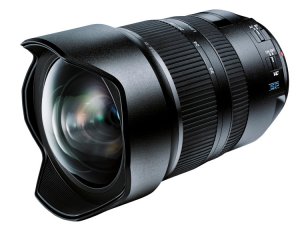
Tamron SP 15-30mm f/2.8 Di VC USD Lens Review

19 May

Tamron SP 15-30mm F/2.8

digitalphotographyschool-1-42

Background

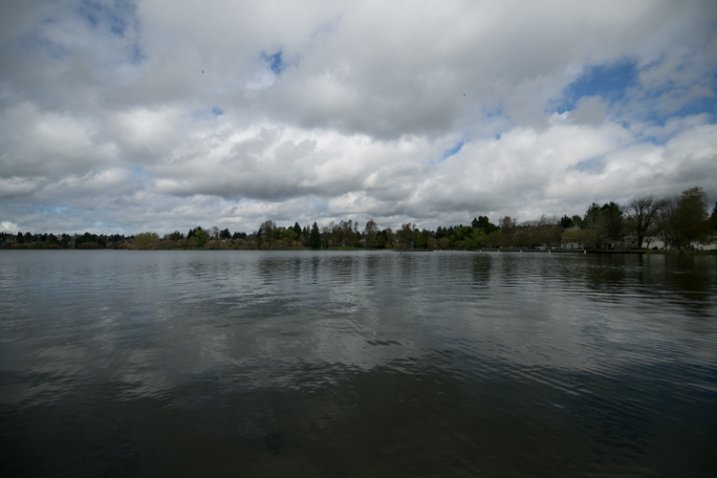
While I was at WPPI this past year I got to meet our illustrious managing editor Darlene Hildebrandt. We walked the expo floor for a bit and I was introduced to a number of people by Darlene. We talked with some of the people over at Tamron and had some of their snacks and coffee that they offered at their booth. One of the perks of writing for Digital Photography School is gaining access to new equipment and software for review. It was there at WPPI that I got to see the Tamron SP 15-30mm F/2.8 for the first time (to be perfectly honest, I didn’t even know it existed!). A few weeks later, a loaner lens arrived at my apartment in Brooklyn, and I spent the next week taking it to a wedding, a travel trip to Seattle, a portrait session with a ballerina, a shoot with a fashion blogger, a corset ball, and a yoga party. Here are some my thoughts in this mini lens review:

digitalphotographyschool-1-43

Tiffany the ballerina (@glitteringpointe) looking lovely on the other side of the Tamron SP 15-30mm f/2.8. Taken at 1/1000 of a second at f/2.8, ISO 250

What do all the letters and numbers mean?

This is a Tamron SP 15-30mm f/2.8 Di VC USD. Let’s define some of the named elements of this lens so we know what we are dealing with:

  • Tamron: A Japanese company manufacturing photographic lenses.
  • SP: Superior Performance. This is Tamron’s version of an L Series lens for Canon. These lenses have superior sharpness compared to their other lenses, as well as a larger maximum aperture and other elements that make it a cut above.
  • 15-30mm: This is sometimes referred to as an “ultra-wide” lens. These types of lenses can give you a very wide angle of view, and often have some distortion when at its most extreme focal length (15mm). These lenses are typically used for landscape photography, some event photography, and interior shots.
  • f/2.8: The lens has a maximum aperture of f/2.8, at whatever focal length you use within its range.
  • Di: Digitally Integrated. This lens is made for full frame cameras (but can also work on cropped sensor cameras as well).
  • VC: Vibration Compensation. This is Tamron’s version of IS (Image Stabilization) on a Canon lens and VR (Vibration Reduction) on a Nikon lens. There are motors inside the lens that will auto-steady the lens as you shoot at slower shutter speeds, allowing for you to get sharper images.
  • USD: Ultrasonic Silent Drive. A USD designation means the lens has faster, and noiseless focusing.

Basically this lens is a beast. It’s at the top of the food chain in terms of quality, build, and performance.

digitalphotographyschool-1-44

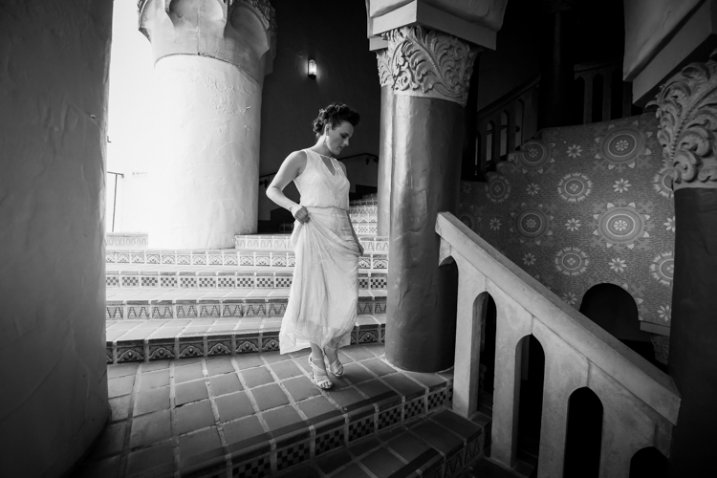
Tarisa the bride descending the spiral staircase at the Santa Barbara Courthouse. Taken at 1/640th at f/2.8, ISO 1000.

How it feels and performs

This lens feels like a tank. It is super solid, heavy, and durable. I had no worries about bringing it out in some weather in NYC (and Seattle) since it has lens coating and moisture resistant construction to keep water away (still – don’t drop it into a pool). The front end has an enormous bulbous lens element that looks impressive when on the camera.

As I used the lens throughout my various shoots there was one funny thing that I had to get used to, and that was that the direction that I twisted the lens to zoom in or out was opposite that of my Canon lenses. There was some “learnability” involved when using the lens.

One thing I like about wide angle lenses, and shooting with a wide open aperture at f/2.8, is the natural vignetting that occurs. I think it is moody, cool looking, and natural.

1/4000 of a sec at f/2.8, ISO 100, at 15mm. Notice the natural vignetting around the edges of this unedited photo.

1/4000th at f/2.8, ISO 100, at 15mm. Notice the natural vignetting around the edges of this unedited photo.

One area that I think the lens performed spectacularly was shooting in low-light environments, when I had to focus in the dark. I really noticed this because every other lens I use always ends up “searching” a bit in the dark before focusing, or it just doesn’t focus at all. So it was extremely satisfying pressing my focus button and having the lens lock in right away. There is nothing more embarrassing than telling people to wait a moment while you try to focus in the dark, then ending up with a blurry picture anyway.

digitalphotographyschool-1-48

Focusing in the dark was a breeze at this corset and gown ball.

My last observation was that this is a big, heavy lens. This is not a lens I would take traveling around the world. For this New Yorker, who doesn’t have a car and travels with everything on his back, I could definitely feel the weight of this lens throughout the day as I went up and down the stairs into subways, airports and gigs. For the rest of you non-urban travellers, throw this in your bag, put it in your car and you’ll be fine.

Sharpness

Although this is not something I normally notice on a lens, the Tamron SP 15-30mm is consistently sharp from edge to edge. Lack of sharpenss around the edges is a complaint heard often with regards to ultra wide lens. They perform fairly well in the center of the image, but tend to get a bit fuzzy as you move closer to the edges. You can see in the ballerina picture and the accompanying cropped in photos how consistent the lens is across the image (below). Again, another point in favor of the Tamron SP against the big names debate.

digitalphotographyschool-1-4 digitalphotographyschool-1-2

digitalphotographyschool-1-3

Pros and Cons of the Tamron SP 15-30mm f/2.8

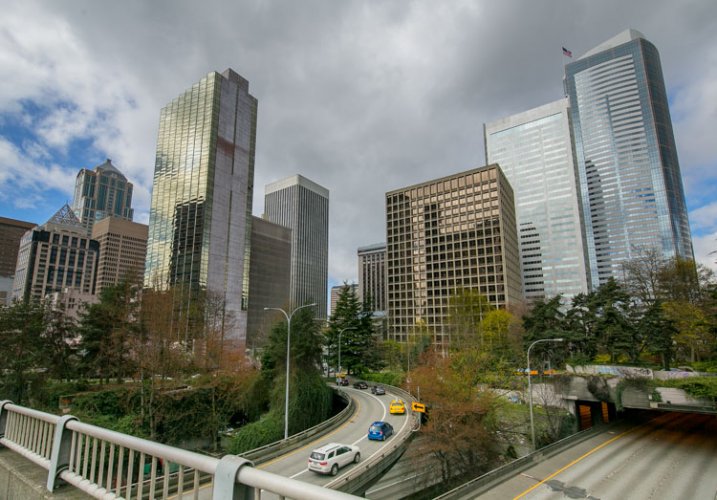
View of Seattle through the eyes of the Tamron SP 15-30mm f/2.8

View of Seattle through the eyes of the Tamron SP 15-30mm f/2.8

Pros:

  • Great low-light focusing ability.
  • Maintains aperture at f/2.8 all the way through its focal length range (I believe this is the only ultra-wide angle lens to do this with image stabilization).
  • It’s weather resistant.
  • It has a solid, durable body.
  • Price: This lens is about $ 400 cheaper than its Canon rival, the 16-35mm L f/2.8, almost $ 500 less than the Nikon version.

Cons:

  • It’s heavy.
digitalphotographyschool-1-45

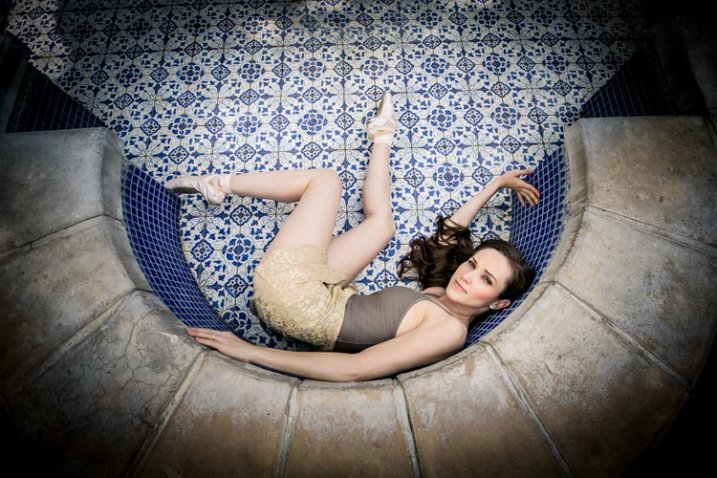
Tiffany the ballerina hanging out in an empty fountain. Taken at 1/400th at f/4.5, ISO 100, 15mm.

Overall Thoughts

This is really a great lens and Tamron is making a point to set itself apart from the competition by it being the least expensive lens with the widest aperture, fastest focus, while also incorporating image stabilization. I would definitely use this for interior photography all the time, and for great urban or natural landscapes. I would not bring this along for long travel trips abroad because of its size and weight.

On Amazon.com you can find the Canon mount here or the Nikon mount here.

digitalphotographyschool-1-50

googletag.cmd.push(function() {
tablet_slots.push( googletag.defineSlot( “/1005424/_dPSv4_tab-all-article-bottom_(300×250)”, [300, 250], “pb-ad-78623” ).addService( googletag.pubads() ) ); } );

googletag.cmd.push(function() {
mobile_slots.push( googletag.defineSlot( “/1005424/_dPSv4_mob-all-article-bottom_(300×250)”, [300, 250], “pb-ad-78158” ).addService( googletag.pubads() ) ); } );

The post Tamron SP 15-30mm f/2.8 Di VC USD Lens Review by Phillip Van Nostrand appeared first on Digital Photography School.


Digital Photography School

 
Comments Off on Tamron SP 15-30mm f/2.8 Di VC USD Lens Review

Posted in Photography


Town 30 Emissary camera bag features lens cap mount and customizable pockets

14 May

Toronto-based Town 30 has launched the Emissary Series camera bag on Kickstarter, where it is seeking funding for production of the photography-centric bags. The Emissary is geared specifically to photographers’ needs with attachable pockets, a removable laptop compartment, a locking mechanism inspired by film-advance levers and a lens cap mount. Read more

Articles: Digital Photography Review (dpreview.com)

 
Comments Off on Town 30 Emissary camera bag features lens cap mount and customizable pockets

Posted in Uncategorized