RSS
 

Posts Tagged ‘Learn’

Learn From The Masters: Adams To Meatyard

26 Jan

The Masters


Hey FashionPhotographyBlog.com readers!


Need some inspiration? Look no further! Here are a few of the Masters of Photography. Tried and true, these men have stood the test of time. I’m a firm believer that you can’t call yourself a photographer unless you study the history of the medium and have an understanding of the masters – who they are and what they did that sets them apart from the rest. In my opinion, this applies to all areas of life, so here’s a cheat sheet to those commonly referred to as “The Masters.”  Who they are, what they did (and why they’re so awesome). I’ll even make it easy for you – they’re sorted alphabetically.


Ansel Adams


Adams, an environmentalist and symbol of the American West, is best known for his black and white landscapes. Adams initially developed the “Zone System,” a technique of determining exposure, development and contrast, to help his students create optimal prints. This technique became indicative of Adam’s style and results in the images we all known and love. Ansel Adams shot using a large format camera and is a founding member of “Group f/64″ – a group of “Modernist” photographers that shared a sense of style characterized by sharp-focus (largely uncommon at the time).

The work of Ansel Adams featured on Fashion Photography Blog (FashionPhotographyBlog.com)


Richard Avedon


Most well known for his images of fashion and portraiture, Avedon became an icon in the later half of the 20th century. Avedon is the master of minimalism, known for well lit portraits in front of a white background. Using the large format camera to his advantage, Avedon would use the time it took to compose a shot to get into his subjects head and pull out emotions that typically aren’t photographed by anyone but Avedon.


Along with Avedon’s work for all the big fashion magazines and designers, he is known for his series, “In The American West,” where he traveled the rural American West with a portable studio and typically used a large format camera, the sun and a white background to create some of his most iconic images. If you ever have the opportunity to see an Avedon print in person, seize it! His prints are beautiful. You can get lost in them. Be sure to take notice of the depth of field and tonal ranges.


 The work of Richard Avdeon (Davima with Elephants) featured on Fashion Photography Blog (FashionPhotographyBlog.com)

 The work of Richard Avdeon (West) featured on Fashion Photography Blog (FashionPhotographyBlog.com)

From “In the American West”


Bernd & Hilla Becher


A married German photography team, Bernd and Hilla Becher are known for their series of structures arranged in grids, referred to as “typologies”. They come from a school of “straight” photography, which depicts a scene as objectively as possible.


The Becher’s have also left their mark on photography through their teaching. Mentors to some other big names in photography such as Andreas GurskyThomas Ruff and Thomas Struth (check them out!) they’re considered one of the biggest influences in the history of photography.


 The work of Bernd & Hilla Becher featured on Fashion Photography Blog (FashionPhotographyBlog.com)


Henri Cartier Bresson


Considered to be the father of modern photojournalism, Bresson is known for coining the term “the decisive moment”. Bresson is known for developing a unique style of street photography that has influenced photographers to this very day. Bresson was a believer of composing his images, in camera, not in the darkroom and was an avid user of Leica 35 mm cameras, shooting only black and white film.


The work of Henri Cartier Bresson (Hyeres) featured on Fashion Photography Blog (FashionPhotographyBlog.com)
The work of Henri Cartier Bresson (Gare) featured on Fashion Photography Blog (FashionPhotographyBlog.com)

William Eggleston


Eggleston is one of two fathers of color photography. He is known for his aesthetic which transforms ordinary, mundane subjects into something extraordinary – by elevating the color to be the true subject due to the simplicity of his tangible subject.

The work of William Eggleston featured on Fashion Photography Blog (FashionPhotographyBlog.com) 
The work of William Eggleston featured on Fashion Photography Blog (FashionPhotographyBlog.com)


Walker Evans


Evans is most well known for his work documenting the Great Depression for the Farm Security Administration. Evans’ finds success in the fact that his images are relatively “objective” – well, as objective as a photographer can be.

The work of Walker Evans featured on Fashion Photography Blog (FashionPhotographyBlog.com)


Robert Mapplethorpe


Mapplethorpe is known for his huge black and white images of flowers and nudes. The homoeroticism and sexual energy apparent in Mapplethrope’s work has evoked quite some criticism and controversy.


The work of Robert Mapplethorpe featured on Fashion Photography Blog (FashionPhotographyBlog.com)
 The work of Robert Mapplethorpe featured on Fashion Photography Blog (FashionPhotographyBlog.com)

Ralph Eugene Meatyard


Meatyard is famous for his somewhat haunting images of masked people, most commonly children.  According to Meatyard, he felt that all people are connected and when you don a mask, it removes any differences.  Consider his work somewhat of a commentary on connectivity and individuality.  Despite declaring himself a “dedicated amateur,” Meatyard had been noticed in serious photography circles.  Unfortunately he died of cancer before the age of 50, with only around 14 years of photography under his belt.

 The work of Ralph Eugene Meatyard featured on Fashion Photography Blog (FashionPhotographyBlog.com)


Stay tuned for part two of the Masters coming up soon!


– Alana


Did you find Alana’s post about the Masters of Photography interesting useful? Do you agree with the selection? Is there any that you would add as your inspiration? Please leave your comments below in the comment section. We would like to know what you thought about this post. If you enjoyed this article, don’t go away as Alana has another post with even more photographic masters just around the corner on FashionPhotograhyBlog.comIf you want more photographic inspiration, check our post “My Top 10 Favorite Photographers“.


IMAGE SOURCE: 

Feature image & images 1: courtesy of Alana Tyler Slutsky.


Fashion Photography Blog

 
Comments Off on Learn From The Masters: Adams To Meatyard

Posted in Uncategorized


Tumblr: Share Photos, Learn Lots, Make Friends

08 Jan

Imagine a community of talented photographers who constantly inspire and encourage each other.

Sounds pretty awesome, huh? Good news: it’s real!

More good news: it’s on Tumblr and it has an open spot with your name on it!

The growing world of photogs on Tumblr is eagerly waiting for you to come by and contribute some of your amazingness. So we’ve listed 5 ways to help you get started and make the most of your Tumblr-ful experience.

5 Ways To See and Be Seen on Tumblr 

(…)
Read the rest of Tumblr: Share Photos, Learn Lots, Make Friends (1,545 words)


© Taylor for Photojojo, 2015. |
Permalink |
No comment |
Add to
del.icio.us

Post tags:


Photojojo

 
Comments Off on Tumblr: Share Photos, Learn Lots, Make Friends

Posted in Equipment


How to Learn Your Camera’s Light Meter and Master Manual Mode

23 Dec

Most cameras have a few different shooting modes such as Automatic, Aperture Priority (A or Av), Shutter Priority (S or Tv), and Program. It’s not uncommon for people to take a majority of their photos in Automatic mode since it generally does a good job of getting decent results, though more advanced photographers will often use Aperture or Shutter Priority. Shooting in Manual, however, might seem intimidating and highly complex but once you understand a few basics it starts to make a lot more sense. Certainly you should have a working understanding of the three components of the exposure triangle: shutter, aperture, and ISO.

But in order to get the most out of your camera you will need to know how to use a simple, but incredibly powerful, tool that functions as the glue that binds everything together: the light meter.

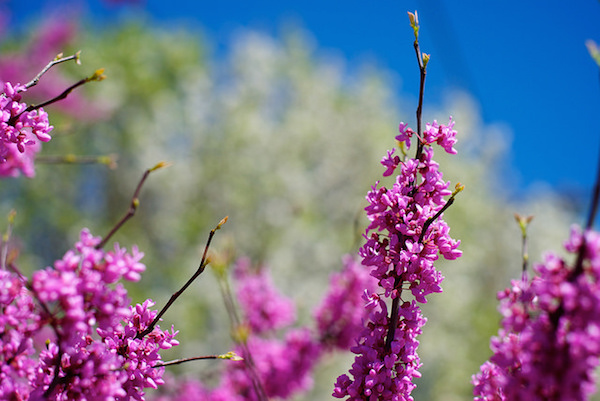
purple-flowers

Nestled quietly at the bottom of your camera’s viewfinder or Live View display is a small block of lines or bullets accompanied by a few numbers. You might also have noticed a little triangle moving back and forth, or some vertical hash marks appearing and disappearing from time to time, in a fashion that seems nonsensical or completely random. If these numbers and symbols make no sense at all, don’t worry, you are not alone. It can be a bit confusing to understand the light meter at first. But once you get the fundamentals you will probably find yourself growing much more confident in understanding how photography works. Maybe you’ll even venture out of Automatic and into Manual for the sheer amount of control you are able to have over your photos.

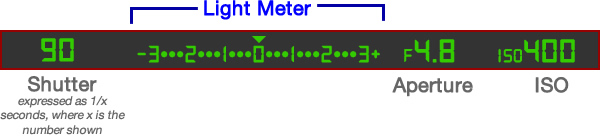
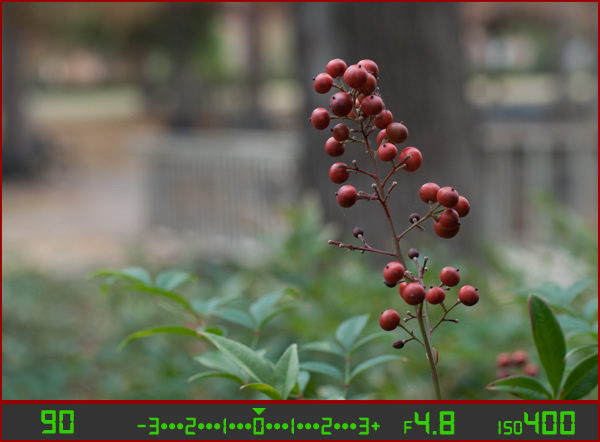
Before I get into the nitty gritty of the light meter itself, I want you to take a look at it in relation to the other data shown in your camera’s viewfinder. Note that this diagram is highly simplified and your viewfinder might look slightly different, or include other information, but all cameras (except some point-and-shoots) include the elements shown here.

light-meter-master

In this example the camera’s shutter is set at 1/90 of a second, the lens aperture is f/4.8, and the ISO is 400. The light meter is a readout that shows whether these values are going to result in a photo that is properly exposed – that is, a photo that is neither too light or too dark. The small triangle hovering over the zero in the light meter shows that the exposure is correct, and when the shutter button is pressed the picture will look fine.  But, I’ll show you a few pictures to see what happens as the camera’s exposure settings are changed. If you want to try this yourself you will need to have your camera in Manual mode, and I would recommend reading the rest of this article with your camera at your side so you can do a bit of experimenting on your own.

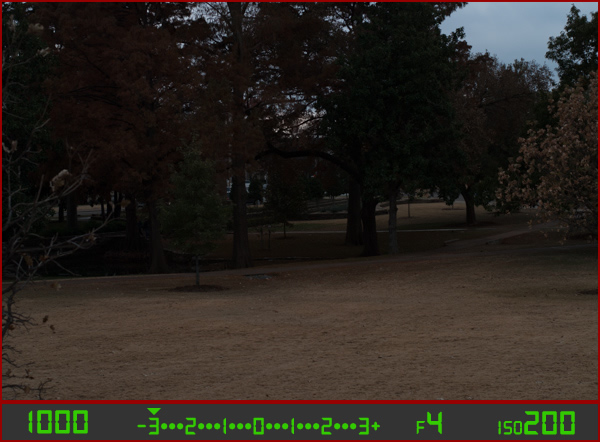
For my first shot, I’ll show you a photo that is underexposed and then illustrate how the camera settings can be adjusted to get the proper exposure. The values shown on these images are exactly what I used in my camera to get these shots, and nothing has been edited or retouched in Photoshop.

landscape-under

Here you can see that the shutter speed is 1/1000 of a second, the aperture of the lens is f/4, and the ISO is 200. The camera’s viewfinder displays this information along with the light meter, and note how the triangle has moved all the way over to -3 EV. (EV stands for Exposure Value, and technically this image is underexposed by three stops. Don’t worry about the technical jargon though! For now just follow along with the examples to see what happens when the exposure values are altered.

To get a properly exposed photo you are essentially trying to re-create what your eye already sees, but right now the light meter tells us that the photo will be way too dark. And indeed, the resulting photo turned out just how the light meter predicted: it’s so dark it looks like it was taken at night instead of mid-afternoon.

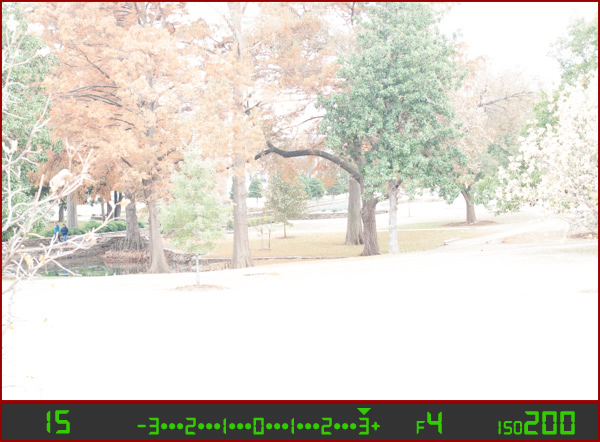
So what can be done to fix this? By adjusting the aperture, shutter, or ISO you can change the exposure settings with the goal of getting that little triangle to hover above the zero. Watch what happens when I change the shutter speed but I leave the aperture and ISO fixed at their present values:

landscape-over

By altering the shutter speed from 1/1000 of a second to 1/15 of a second, the photo is now too bright – exactly as the light meter said it would. It is overexposed by three stops, and the image is virtually unusable. Because the viewfinder itself does not change as the aperture, shutter, and ISO are adjusted, you have to rely on your light meter to tell you how bright or dark the image will be. And sure enough, the triangle is hovering above the +3, which tells us the photo will be too bright. Here is what a properly exposed photo looks like.

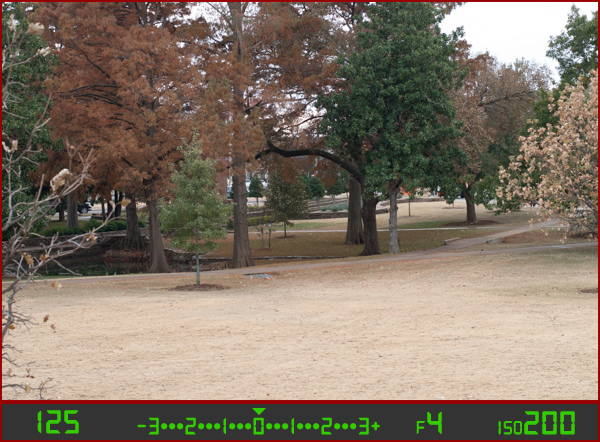
landscape-correct

Finally, a good picture! By adjusting the shutter speed to 1/125 of a second, I was able to get the triangle to hover above the zero, which means the photo would be properly exposed. Note that there is no one correct way to do this, and a proper exposure could have also been obtained by changing the aperture or ISO instead of the shutter speed, or a combination of all three. For instance, I could have left the shutter at 1/1000 and increased the ISO to get the same result.

Why bother with all this?

At this point you might be wondering why you would want to go to all this trouble when you can put your camera in Automatic mode and it will just take care of everything. The answer lies in the fact that you, not your camera, know exactly what kind of photo you want to take. Your camera does not know whether you are shooting landscapes, portraits, sports, starry nights, kids, pets, or anything else. All it sees is how much light is coming in, and it tries to adjust the shutter, aperture, and ISO to get that triangle to hover above the zero. But if you know how to control those values yourself, you can open up vast new areas of photographic creativity that Automatic mode can never do for you.

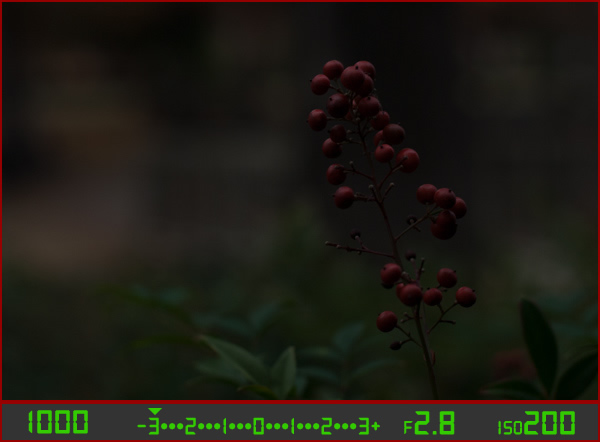
As another example, here is a picture of some berries, but again notice how it is underexposed by three stops.

berries-underesposed

There are several settings I could adjust in order to fix this, or I could just put the camera in Automatic mode. The problem with Automatic in this case is the camera does not know that I am looking at berries. It just sees light, and would attempt to adjust the shutter, aperture, and ISO to get a proper exposure even though it might not end up with the exact type of picture I want to take.

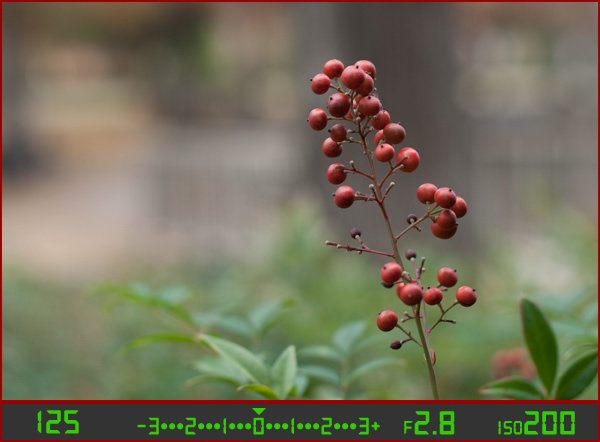
Because I shot in manual using the light meter as my guide I was able to get precisely the shot I was looking for. I knew that I wanted a shallow depth of field, which meant I should use a large aperture of f/2.8. I knew that an aperture of f/1.8 would be too wide for my taste, and a smaller value like f/4 or f/8 would not give me the nice blurry background I was hoping for. By leaving the aperture at f/2.8 and changing the shutter speed I got a properly exposed photo with a nice smooth background as you can see here:

berries-correct

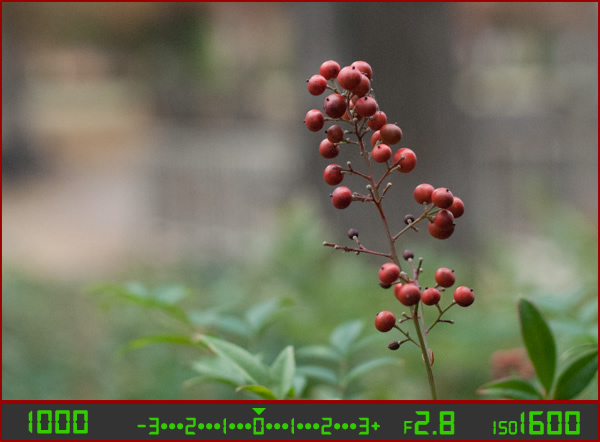
But what if I had changed the other values instead? Look what happened when I left the aperture and shutter at their original values from the underexposed photo (f/2.8 and 1/1000), and raised the ISO instead:

berries-correct-high-ISO

The end result is almost the same: a properly exposed photo (just like our light meter told us it would be, with the triangle hovering above the zero), but this image has much more noise and grain than the previous one. Notice how the tree in the background just behind the berries looks speckled and grainy instead of silky smooth, which is what usually happens at high ISO values. Thus, raising the ISO might not be the best way to get the image I want even though the photo itself is properly exposed.

So what about changing the aperture instead?

berries-correct-small-aperture

Once again the result is a photo that is properly exposed, but the depth of field is much wider – see how the background is not quite as smooth and blurry as before? Also, because the aperture was smaller I had to leave the shutter open longer at 1/90 of a second and even raise the ISO a bit in order to maintain a proper exposure.

Get the exact shot you envision

Shooting in manual and using the light meter as your guide is a good way to ensure that the image you see in your mind is exactly what you end up with when you click the shutter. If you are shooting fast-moving subjects like cars or sports, you would want to start with a fast shutter speed and adjust the other settings until you get that little triangle to hover above the zero. If you are taking portraits and want a shallow depth of field with nice blurry backgrounds, keep the aperture wide and change the shutter and ISO until the exposure is correct. It’s all about giving control back to you, the photographer, instead of letting your camera make the creative decisions for you.

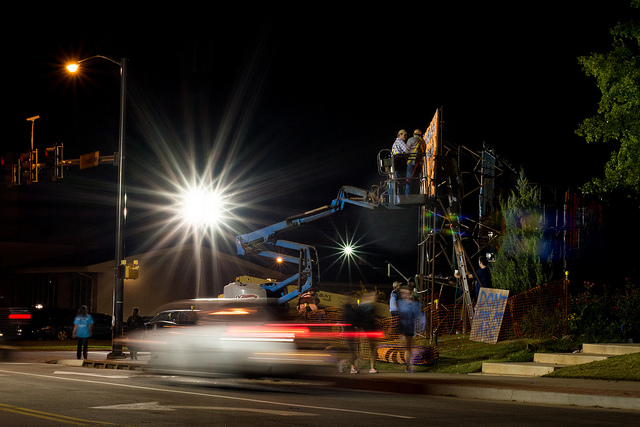
construction-lights

Shooting in manual was the only way to capture this photo. By reading the light meter while carefully adjusting my exposure settings I got precisely the shot I was aiming for. Camera settings: f/16, 1/3 second, ISO 800

Understanding the basics of the light meter is really just scratching the surface, though. Additional settings like your camera’s metering mode and the Exposure Lock function are even more tools you can use to take control over your photography and unlock your true artistic potential. Using manual mode and reading the light meter might seem like a complicated way to take photos, but remember that you know better than your camera what kind of picture you want to take. Once you know how to read your light meter and adjust your camera’s settings accordingly, you can open up a whole new world of creativity that has been right in front of you just waiting to be discovered.

Practice time

So now it’s your turn: grab your camera, put it in Manual mode, and hold the viewfinder up to your eye. Now start changing the aperture, shutter, and ISO values and watch what happens to the light meter. Is your image going to be overexposed? Lower the ISO, raise your shutter, tighten the aperture, or try a combination of all three. Is your image going to be underexposed? Do the exact opposite. The more practice you get, the easier it will be and soon you will feel much more comfortable shooting in a mode that might have seemed hopelessly confusing before.

Do you shoot in manual? If so, how did you get yourself off Automatic mode? Or do you actually prefer Automatic? Share your thoughts and experiences in the comments below.

googletag.cmd.push(function() {
tablet_slots.push( googletag.defineSlot( “/1005424/_dPSv4_tab-all-article-bottom_(300×250)”, [300, 250], “pb-ad-78623” ).addService( googletag.pubads() ) ); } );

googletag.cmd.push(function() {
mobile_slots.push( googletag.defineSlot( “/1005424/_dPSv4_mob-all-article-bottom_(300×250)”, [300, 250], “pb-ad-78158” ).addService( googletag.pubads() ) ); } );

The post How to Learn Your Camera’s Light Meter and Master Manual Mode by Simon Ringsmuth appeared first on Digital Photography School.


Digital Photography School

 
Comments Off on How to Learn Your Camera’s Light Meter and Master Manual Mode

Posted in Photography


Happy iPhone 6 Day! Learn Your Phone Phortune

10 Sep

iPhone 6 is cool …

But we’ve got our own magic!

Visit our shop on your phone and *shake* to get your phone phortune and win up to $ 10 off.

If there’s a new iPhone in your future, check out our photo accessories for your iPhone 6 or 6 Plus.

Check out these iPhone 6 Accessories (that work with other phones too)

(…)
Read the rest of Happy iPhone 6 Day! Learn Your Phone Phortune (156 words)


© laurel for Photojojo, 2014. |
Permalink |
No comment |
Add to
del.icio.us

Post tags:


Photojojo

 
Comments Off on Happy iPhone 6 Day! Learn Your Phone Phortune

Posted in Equipment


5 Lessons from Rihanna to Learn for Your Photography Brand

08 Sep

Rihanna is probably one of the world’s biggest pop stars right now. But along with her catchy songs and rough music videos, there is something else that gets her to the top of the music world. It’s unique marketing campaign. Today I’m going to talk about 5 lessons you can learn from Rihanna for your photography brand. Here you’ll get Continue Reading

The post 5 Lessons from Rihanna to Learn for Your Photography Brand appeared first on Photodoto.


Photodoto

 
Comments Off on 5 Lessons from Rihanna to Learn for Your Photography Brand

Posted in Photography


How to use Lightroom Develop Presets to Learn Processing Tips

24 Jul

Learn Lightroom from Develop Presets

In my previous article you learned how to create a vintage effect using Lightroom. I started by showing you some Lightroom Develop Presets you can use as a shortcut, and finished by demonstrating some techniques you can use yourself. The hidden message in the article was that one way to learn how to use Lightroom is to buy some Develop Presets (or download some free ones) and analyze them to see how they work. You can then apply the same techniques to your own photos, and even create your own Develop Presets.

Today I’m going to give you some tips on analyzing other people’s Develop Presets. I’m going to do it using some presets I downloaded from onOne Software. These are free presets that anyone can download and use themselves (just follow the link), so it is easy for you to follow along.

Preset: onOne Instantastic – Daisy

The Daisy preset, part of the onOne Signature Collection Presets (Vol. 2), gives an Instagram filter effect. There is a slight matte effect and a blue colour cast.

Learn Lightroom from Develop Presets

A. Original photo B. Daisy preset

Vibrance and saturation adjustments

This preset uses two techniques to create the colours. The first is applied in the Basic panel. The preset increases Vibrance to +20, and reduces Saturation to -20.

Learn Lightroom from Develop Presets

To understand the effect of these tweaks you need to know the difference between Saturation and Vibrance. Saturation affects all colours in the photo evenly. Reducing Saturation to -20 has a uniform effect on all the colours within the frame.

Vibrance, on the other hand, affects the least saturated colours in the photo the most. The net effect of decreasing Saturation and increasing Vibrance is that the strongest colours in the frame are desaturated while other colours are not desaturated nearly so much.

Learn Lightroom from Develop Presets

A. Vibrance 0, Saturation 0 B. Vibrance +20, Saturation -20

Tone Curve adjustments

The rest of the colour adjustment is carried out in the Tone Curve panel, with two adjustments to the blue and red Tone Curves. Here’s what the adjustments look like.

Learn Lightroom from Develop Presets

Raising the blue curve on the left creates a matte effect and a blue colour cast. Pulling the right hand side of the curve down adds yellow (the opposite of blue) to the highlights. This comparison shows the difference.

Learn Lightroom from Develop Presets

A. Blue curve lifted on left. B. Blue curve lifted on left and pulled down on right.

The red curve adjustments are also a subtle colour and tonal adjustment. Moving the bottom left corner to the right adds cyan and makes the shadows a little darker.

Moving the top right corner to the left adds magenta and makes the highlights a little brighter.

This comparison shows the difference the red Tone Curve adjustment makes. The difference is subtle, so you may have to look closely.

Learn Lightroom from Develop Presets

A. Blue Tone Curve adjustment only. B. Blue and red Tone Curve adjustments combined.

Preset: Nicolesy Matte 3

The Matte 3 preset, part of the Nicolesy Matte Presets for Adobe Lightroom 5 set, creates a subtle matte effect and a red colour cast.

Learn Lightroom from Develop Presets

A. Original photo. B. Matte 3 preset.

The Develop Preset does its work in the Tone Curve and Split Toning panels. Let’s take a look at each.

Tone Curve adjustment

The Tone Curve adjustment combines two adjustments in one to the RGB curve (the colour curves haven’t been touched). First, the bottom left corner has been moved upwards to create a matte effect. Second, the center of the RGB curve has been pushed gently upwards, making the mid-tones brighter. The net effect of this Tone Curve adjustment is to add a matte effect and make the mid-tones brighter at the same time. This comparison shows the difference it makes.

Learn Lightroom from Develop Presets

A. Linear Tone Curve. B. Adjusted Tone Curve.

Split Toning

The colour has been added to the photo using the Split Toning panel. The preset adds hot pink to the Shadows, and a luminescent green to the Highlights, with the Balance slider pushed to the right to give prominence to the green tone. This comparison shows the difference the split tone makes:

Learn Lightroom from Develop Presets

A. No Split Tone. B. With Split Tone.

Putting it all together

In my last article I wrote that buying Lightroom Develop Presets made by other people (or downloading free ones) is a shortcut to creating effects like these. One benefit of using other people’s presets is that you can take advantage of their knowledge and hard work and use the presets for yourself.

But the main advantage is that other people’s presets can introduce you to new and creative ways of processing your photos, using techniques that you may never have thought of by yourself. The real benefit comes when you take a close look at the settings altered by the preset and take the time to understand how they work. Your understanding of Lightroom will become deeper as you do, so that you can use these techniques in your own photos.

For example, in this article you have learned how to use the Tone Curve panel to create a matte effect and change the colours in your photos. You have also learned how to use the Split Tone panel in combination with a Tone Curve adjustment to create another type of matte effect. The rest is up to you.

Can you come up with ways to use these techniques creatively on your own photos? What Tone Curve adjustments can you make? What Split Tone combinations can you apply? Have fun, experiment and good things will surely follow.


Mastering Lightroom: Book Four – The Photos ebookMastering Lightroom: Book Four – The Photos

My new ebook Mastering Lightroom: Book Four – The Photos takes you through ten beautiful examples of photography and shows you how I processed them step-by-step in Lightroom. It explores some of my favourite Develop Presets and plug-ins as well as the techniques I use in Lightroom itself. Click the link to learn more.

The post How to use Lightroom Develop Presets to Learn Processing Tips by Andrew S. Gibson appeared first on Digital Photography School.


Digital Photography School

 
Comments Off on How to use Lightroom Develop Presets to Learn Processing Tips

Posted in Photography


Lessons you can learn from master photographers – Minor White, Ansel Adams, and Syl Arena

09 Jun

The reason I have put pen to paper (fingers to keys) is to share with you some simple tips and knowledge that can be gained from taking a look at some notable photographers. Some would even argue that these people are among some of the most creative and artistically idolized craftsmen who have ever captured light with a box. If you’re just starting out on your photographic journey these tips from some of the masters will hopefully help you along.

Minor White

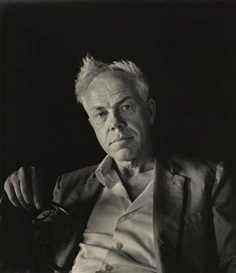
Minor White by Imogen Cunningham

Portrait of Minor White by Imogen Cunningham

Born during the summer of 1908 in Minneapolis, Minor White held jobs as a waiter, bartender, and even worked in military intelligence during World War II. He was a very spiritual man and his beliefs spilled over into his photography. Co-founder of Aperture magazine along with Ansel Adams and other notable photographers, Minor was also an early advocate of the Zone System pioneered by Adams and Fred Archer. An early practitioner of infrared photography, White ventured into an array of subject matter but his work with the small, and often overlooked scenes and objects, such as frost on glass and dilapidated structures remain some of his most acclaimed.

Lessons you can learn from Minor White:

Make photographs all the time, even if you don’t have a camera.

Minor said that he was “always mentally photographing everything as practice”. This is solid wisdom for any photographer of any skill level. Unfortunately, the realities of most of our lives limit the time we get to spend with a camera in hand. The good news is that our artistic mind is never absent. Think about which exposure would blur that passing train just right. What aperture would give me enough depth of field to put that entire table into focus? You’ll be more prepared next time when you have your camera handy.

Don’t overlook small objects and details.

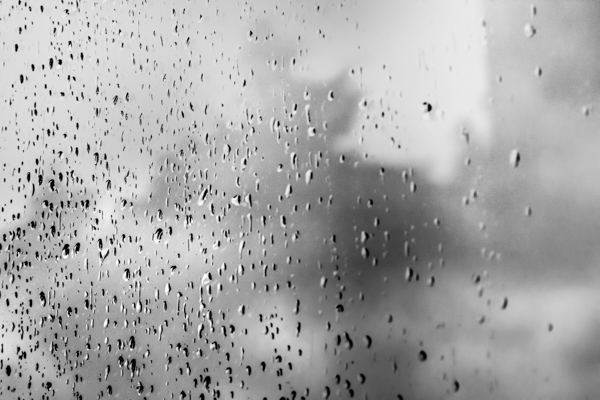
Some of Minors’ most celebrated works were of seemingly mundane or otherwise less than notable subjects. Be on the lookout for details and textures of things that you see every day. This is especially useful if you have an interest in abstract photos.

Drops of rain on my back door glass. Easily overlooked.

Rain on glass small

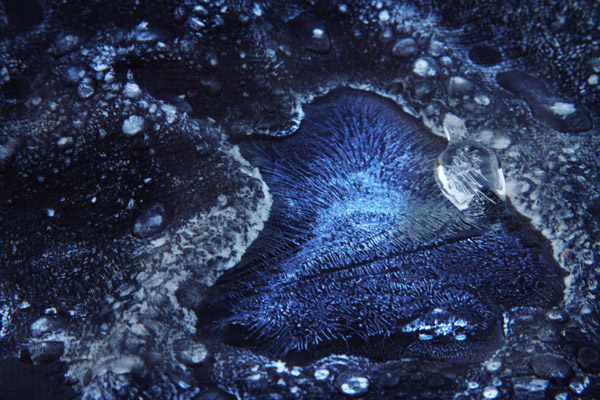
Simple occurrences made more interesting with a little creative thinking.

Ice on Firepit small 1

The early morning blue hour made this frost and ice on the cover of my fire pit look otherworldly.

Ansel Adams

Ansel Adams self portrait

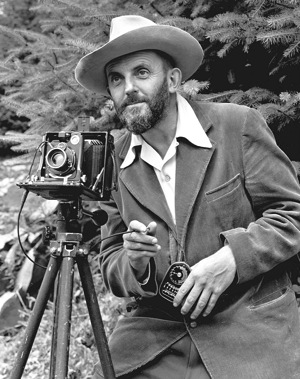
The portrait of Ansel Adams taken by J. Malcolm Greany around 1947

Chances are, you have heard at least something about Ansel Adams, even if that something is that he was a famous early photographer. It’s true, he is considered by more than a few to be one of the best photographers of the twentieth century. There have been volumes filled with the ins and outs of this photographic master. Born on February 20th, 1908 into a well established family in San Francisco, Ansel Adams discovery of photography was unplanned. Ansel was a gifted piano player. An exceptional piano player in fact, so exceptional that he was set to become a professional concert pianist until he decided to commit himself fully to photography. Honestly, the next sections could be titled “What can Ansel Adams NOT teach you?”. The man was such a force in the early days of modern photography that it almost seems unfair to point out only a few practices that will help you improve your own work. However, I have managed to list some basic tips from Ansel Adams that you can put into action in order to make you a better photographer right now.

Lessons you can learn from Ansel Adams:

Slow down

I’m sure you’ve heard this before and possibly have read about the importance of slowing down and making your photographs with more deliberate intentions. Our crushingly convenient modern era of virtually unlimited and relatively low cost film (i.e. digital photography) has lent itself to making us potentially sloppy in our shooting. We sometimes press the shutter button entirely too often in order to get a suitable image for processing. I will shamefully raise my hand and admit that I too am guilty of this spray and pray method of shooting, more so in my earlier photography days right after I made the leap from analog to digital.

I did myself a favor, that I also encourage you to do for yourself, and decided to take things more seriously. Ansel would consider all aspects of his composition: from the elevation and tilt of his camera, the perspective of his lenses, the cast of shadows, even the future effects of the wind on the clouds. There will be times when you are racing against a sunset or you will be trying to catch some specific or fleeting moment and at those times you must shoot quickly and intuitively. Usually, however, we rush for no perceivable reason and often overlook or forget small changes that can make or break an image. So the next time the muse slaps you across the face to make an image, calm yourself down and work the problem. Think about what it is you are trying to do. Put yourself into the correct mindset to make better images and you might find, strangely enough, that your images become better also.

Teach yourself to see the finished product before you make the exposure.

The act of seeing or visualizing is another subject that has been touted by the photographic community many times. Visualization is one of those things that really can’t be brought about by technical instruction in the traditional sense; meaning there are no classes on visualization. Ansel Adams himself remarked that visualization cannot be taught, it is be learned. Think about that concept.

It’s undeniably true that some people learn faster than others when it comes to visualizing finished prints. However, it is equally true that no one started out being able to see in their mind’s eye the final result of a photo. Like most things, it takes practice, as well as patience, and more than a healthy helping of sheer determination. When you begin to see the print before it is made, then really all that stands between you and your vision is the selection of techniques which, similarly, require just as much determination and commitment to master.

Use a tripod

To reiterate, please, use a tripod whenever and wherever possible. A tripod is one of the single most important tools you can use to increase the focal clarity and sharpness of a photograph. Minimizing camera shake and vibration is key to making crisp images, period.

Colorflowersmall

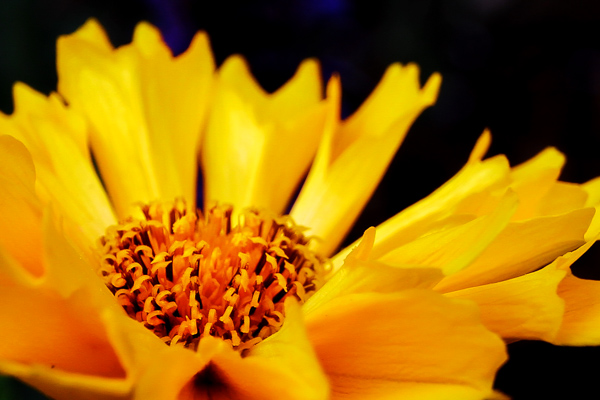
By using a tripod I eliminated the need to worry about vertical camera movement in the macro shot above. Ansel tells us that the ideal tripod is “a cubic yard of solid concrete with a 1/4″ X #20 bolt head sticking out of the top”. If you don’t have a huge block of cement lying around to attach your beloved camera to, then the next best thing is to obtain a quality tripod and use it.

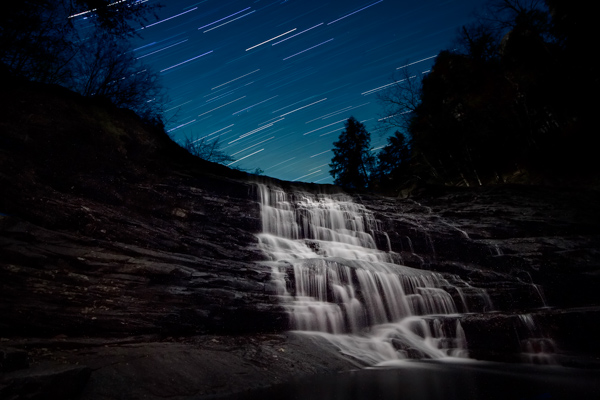
Having some way to keep your camera absolutely still is essential when working with long exposures like the image below.

Cane Creek Cascades Star Trail Color3

Exposure time: approximately forty seven minutes. This long exposure time would not have been possible without the use of a tripod.

Using a tripod (correctly) also forces you to, again, slow down and think about the photograph you are intending to make. dPS has a superb article on tripod employment that can be found here.

Syl Arena

Syl Arena

Photo by Vera Franceschi

Syl Arena, is a uniquely humble and genuine person, author, teacher, lecturer, and a speedlite Jedi. He is a magician of sorts when it comes to creating and moulding light. Syl currently resides on the west coast around San Luis Obispo, California. His biography is brief and barely mentions any notable achievements of which there are many. The lessons I learned from him actually lean more towards the philosophical than the technical. That being said, you will find this section contains no real insight from Mr. Arena concerning artificial light manipulation or photographic technique in general. For that I would highly suggest you check out his blog or his new Q&A site for loads of information.

My first introduction to Syl was through the gift of one of his books (thanks Mr. Veneman), “LIDLIPS: Lessons I didn’t learn in photo school“. In that book, this highly educated, highly skilled, highly successful, highly haired photographer simply and truthfully listed page by page the things he was never taught. They ranged from personal revelations on the photographic process to small background stories of some of his location shoots. He mentioned nothing about technique or gear really, just lessons from his life as a picture maker, unpretentious and sincere.

Lessons you can learn from Syl Arena:

Don’t be afraid.

Your limited gear, your perceived skill level, your lack of obvious subject matter, your lack of confidence, fear of trying something new; don’t be afraid of any of these things, or anything else for that matter. You will never have the all of the best gear so don’t let it worry you. Instead, learn to make the best use of what gear you have. You will never learn all there is to know about making photographs so learn what you can, where you can. Feeling like you’ll never get an image just right? You are your own worst critic, so don’t hide your work from the world.

Be inspired, not intimidated.

This is one of the hardest things to overcome, especially if you are just beginning to learn about photography. It’s easy to feel envious or even jealous of other photographers work. This can sometimes lead to convincing yourself that your work has no merit. Chances are, that image you’re envying and ogling over is a product of hard work, patience, diligence, determination, perseverance, and many other great words that the thesaurus can produce.

Viewing other artists work is one of the best ways to grow your own creativity.

Take the work as seriously as you want, but not yourself.

As you grow and learn as a photographer, remember that we all started out understanding absolutely nothing about photography; so keep that in mind the next time someone asks you a question about one of your photographs in a less than learned way. Most likely, you have learned something from someone who was nice enough to teach you. Please pay it forward.

Have you learned any lessons from other master photographers? Who is your mentor? Please share in the comments below.

The post Lessons you can learn from master photographers – Minor White, Ansel Adams, and Syl Arena by Adam Welch appeared first on Digital Photography School.


Digital Photography School

 
Comments Off on Lessons you can learn from master photographers – Minor White, Ansel Adams, and Syl Arena

Posted in Photography


10 Great Photography Lessons You Can Learn From a 2 Year Old

06 Jun

Child

Nowadays, fancy shmancy cameras can blast you with gazillion frames per second, but non of these can beat the time honored tradition of observation.

If there is one skill that has safeguarded my butt many times it’s the simple act of observing. If you don’t believe me, ask my wife. Observation is not only good when making images, it’s also good for insights. Well I’ve observed my son since day one, literally, and now that he is 2 years old, he is the one who is offering me great insights into photography.

I’ll make sure he never sees this article. Imagine when he’s 10 and says “You’ve learned so much from me at two, imagine how much more you can learn now that I am 10″. I’ll never hear the end of it. Anyway, here are:

10 great photography tips I’ve learned (and you can too) from my 2 year old, nicknamed Yoki

1) Be amazed at everything
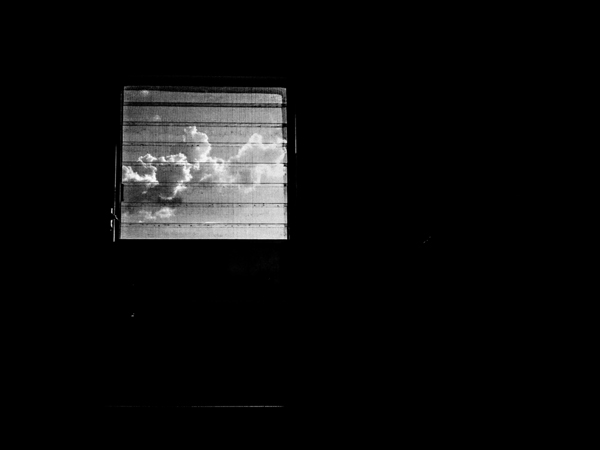
Bathroom window

I was outside a restaurant waiting for the rest of the family, it was raining. Laplwie! (“Rain” in french) Laplwie! Yelled my son. A woman walked in with an umbrella, my son bent his feet and pointed all exited “Bwella!!! Bwella!!!”

An oh-so-cute scene. But it got me wondering. I’ve probably seen a million and a half umbrellas yet look at this kid jumping up and down because of an umbrella. Both of our eyes saw the same thing but our mindset was different.

Humans are by nature creatures that get used to things. When it comes to photography, the location is only interesting after a few days, beyond that it’s boring. If you go out and shoot the same area over and over again, you know what I mean. To freshen things up, the solution is to either seek new locations or things to do – or see things in a new way.

In the first case the transformation is external, in the second case it’s internal. I keep the scene of my son and the umbrella in my mind to remind me to always see things in a new way. Every location eventually gets boring, shooting the same kind of pictures over and over again can get boring, so the solution is to see things in a different way.

There’s the true story of an old woman, she was going completely blind but had an operation that restored her sight. She talks about how much she loves doing dishes and looking at the beautiful colors of the bubbles that get formed when she puts in the soap. How many times do we loathe doing our dishes? What is to be learned from this lady?

If you feel your photography is boring, see things in a new way, always tell your mind to see things as if you see them for the first and last time. Yoki does so, and so does that woman who regained her sight. Light and life is beautiful everyday, but to appreciate it takes a conscious effort. There’s a nice saying I like “Everyday is a new day to a wise man”.

Every time I find myself saying Photography is boring (not often but it happens), I remind myself of my son and the rain. Speaking of which, do you notice how rain can transform a scene? The lower contrast between the sky and the rest of the earth? How reflections of the puddles create interesting shots? Or how the rain hitting the ground makes interesting shapes? Or how a window in a bathroom can be a symbol of being locked in? Or how…

2) Kids enjoy themselves because they are in the present
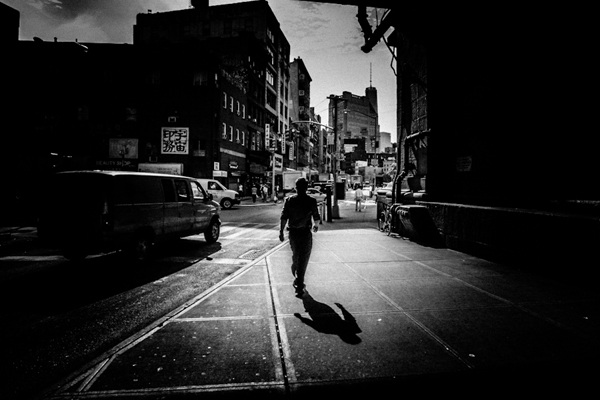
Dark man

I like watching Yoki play, especially with his blocks. He looks so happy. This got me wondering, why don’t photographers have this sort of joy? Isn’t it as simple as enjoying what you do? I observed him even more and looked for what he was doing that photographers were not doing.

The main thing is that kids enjoy what they are doing, all that they care about for the time being is playing with the toy. I’ve been out on the street thinking about what to do the next week, I’ve been on assignment while doing mental financial calculation – exactly what Yoki isn’t doing.

Can you walk a mile? How much less enjoyable would it be if I gave you two nice pieces of luggage to drag while you walk that mile? Unfortunately we do the same thing mentally when it comes to photography. We bring our “stuff” along when shooting and just like dragging real life luggage around, it diminishes the enjoyment of photography.

When shooting, be like a kid with a toy; focus on what you are doing and nothing else. Minor White was adamant about clearing the mind before the act of photography. I listen to music and zone out to zoom into photography. Find what works for you, the important thing is to be lost in what you are doing.

3) Kids enjoy themselves because they don’t care about being the best
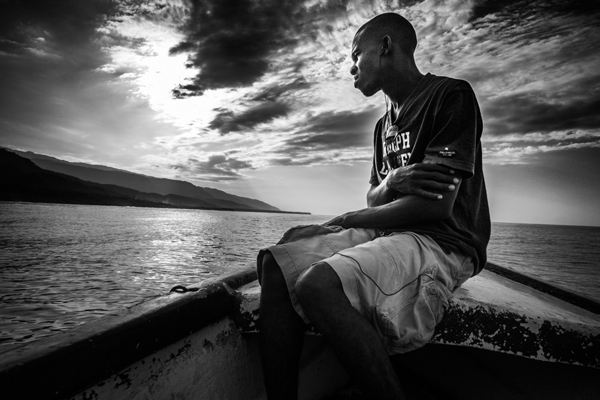
Haiti boat

From time to time Yoki comes in with something he’s done. Bravos, hugs and all around congrats are thrown his way. But you know what? I’ll continue doing so until he is older.

I remember doing my best for grades as a kid and all I could feel from my mom was how short I fell from top of the class. When kids are kids it’s all about doing their best, but as they grow older it’s all about how short they fall of being THE best. How can Yoki enjoy himself doing crafts if all that he thinks about is being better than somebody else?

What matters for kids is to do the best they can and enjoy what they do. That is also valid about photography, all that matters is that you do their best and enjoy making pictures. To enjoy your photography it’s all about enjoying what you are doing, as simple as it sounds. The moment you start ranking yourself is the moment you stop being content, because being in first place will be only thing that will matter at that point. Plus there’s always someone better than you, and someone better than them ad infinitum.

4) Kids enjoy themselves because they don’t care about comparisons
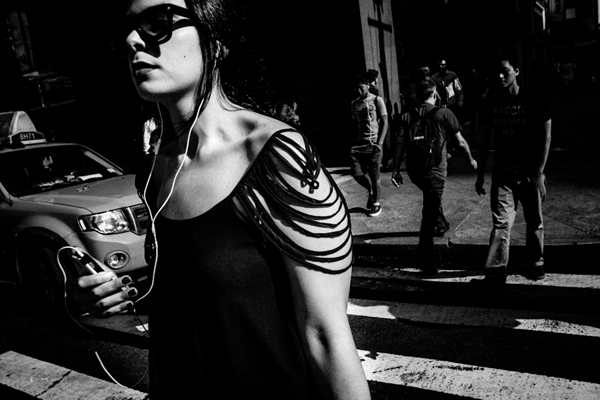
New york woman

I was watching my son finger painting. What came to mind was the fact that compared to how I can draw, his drawings are absolutely bad. But does he care that his dad can outdo him in drawing? No.

He’s too happy with his own stuff to even bother to compare with others. Take any photographer you respect, that person has another photographer they feel jealous of. But very few of them are genuine enough to admit that. When you tend to compare yourself with others, the answer to all this is do like children do – stop it, and focus on your own stuff.

When your work is your focus, everything others do might be better, but it sure won’t affect you. Photography is all about enjoying what you do and not about comparing to others all the while doing your best. Actually, I’ve found that the more you focus on your stuff the better you get. But, the more you compare the worst you get, because it sucks the life and joy out of photography. It’s all about loving what you do, and doing what you love.

5) Don’t get sidetracked
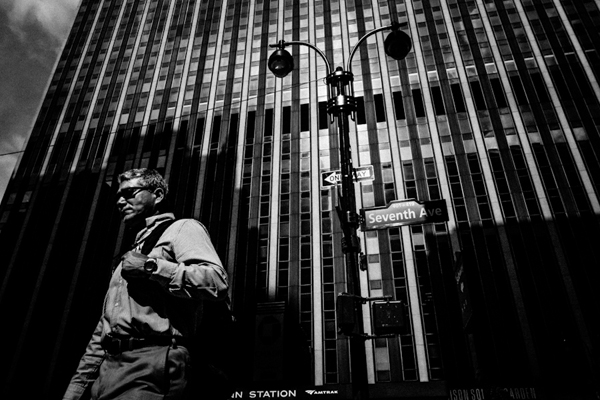
Penn station

One of the parenting tricks I have is to distract my son when I don’t want him to have something. If I don’t want him to use the computer, I pick up his alphabet phone toy and start playing with it. He never fails to forget about the computer. That taught me how easy it is to get sidetracked in photography.

One of the easiest traps of photography is the camera. So many get sidetracked by the camera that photography gets completely lost. I’ve been there, and lost 1000s of $ $ $ . I was addicted to the gear. But that’s a story for another time. If you find yourself googling for accessories instead of going out and making images, you might have a problem.

The second way to get sidetracked is by focusing on other’s photography, and that includes the Masters. I know a few folks that have such powerful photographs, yet instead of developing their own voice they continue copying another photographer’s work. Such a waste – they are distracted from their own photography by copying someone else.

You can also get sidetracked by being too much into the masters. Do you want to be known for knowing the masters, or known for actually making images? One thing that is rarely stated is that no matter how great the masters were, doing your work is more important because it’s your own work.

To recap: photography is not about having the most cameras, that only shows you’ve got plenty to spend. Photography is not about collecting photobooks, that only shows you appreciate art. Photography is about making photographs, that’s when you are a photographer.

If anything has a bigger place in your life than your own photography, you’ve been sidetracked.

6) Pattern recognition
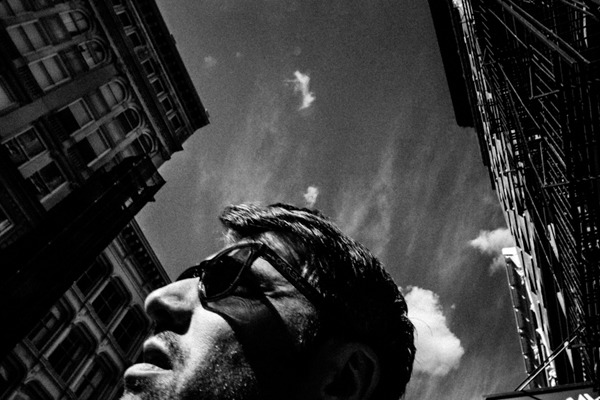
Man surreal

When Yoki was born, I resolved to always observe him, and more importantly to observe how he learns. I was fascinated by my son playing with a particular toy, this one called a shape sorter (see image right)
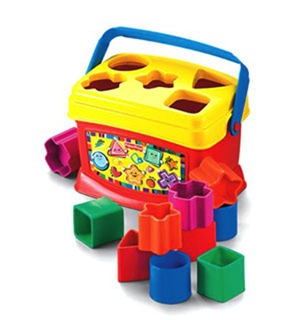
Shape sorter

How did his little brain work to put the shapes in the appropriate holes? The answer is patterns. The brain is wired to recognize patterns, so when Yoki took the star shape, his brain said “seek star shape” and ordered the eye to look around for that shape. When Yoki is out and starts saying letters and numbers, his brain is not really actively searching for the letters and numbers, the brain compares what he sees with the brain’s database of shapes and alerts itself that it’s a recognized pattern.

The first example is called the top-down mode (Where the brain actively seeks a pattern) and the second the bottom-up (where the brain is in a more receptive mode).

I was struck when I realized that photography on the compositional level was a huge, glorified “shape sorter” toy in real life. Here’s an illustration:
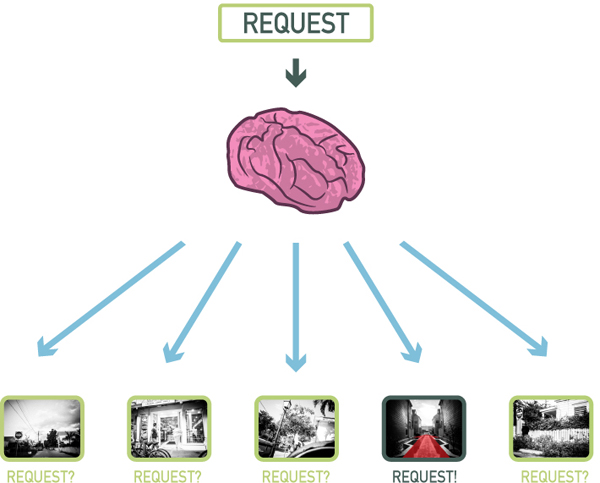
Top down

In my son’s mind the request was “seek star shape”. In my photographer’s mind, the request might be “seek vanishing point“. In the illustration above, I was on the street, but my brain only alerted me when it recognized the pattern I asked for (vanishing point). That is the top-down mode. It’s the process that happens when you are seeking a particular type of image. Here’s another illustration:
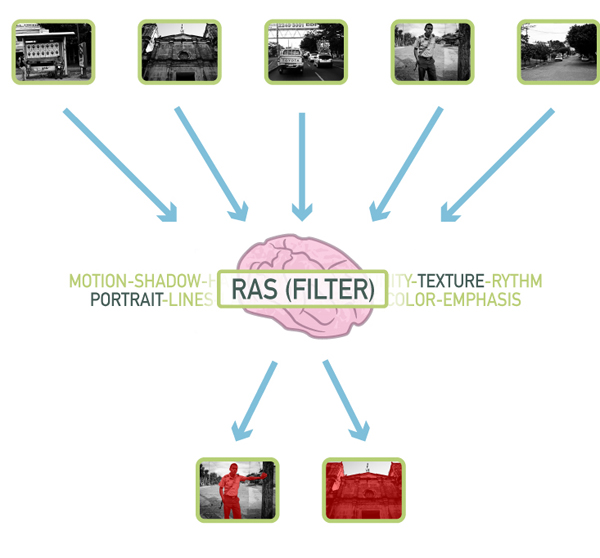
Bottom up

At the base of the brain there’s something called the Reticular Activation System (RAS), or as I like to call it the Really Awesome Secretary. A secretary’s role is to cut the fluff and only alert you when something is important, and that is what the RAS does. What’s important is relative and defined by each person.

What is important to my son Yoki? Letters and numbers, he’s going to see them everywhere, at least it’s going to appear to him that way. For me as a photographer what is important is what I want to see in my photographs. So I was in the streets not looking for anything in particular, but more than once my brain processed what my eye saw and it alerted me when it recognized a pattern (in the case above texture and portrait). That’s called the bottom-up mode.

It’s a frighteningly beautiful system that allows my son to play with his shape toys and me to recognize stuff when I am shooting.

7) You can’t recognize what you don’t know
Man haiti standing

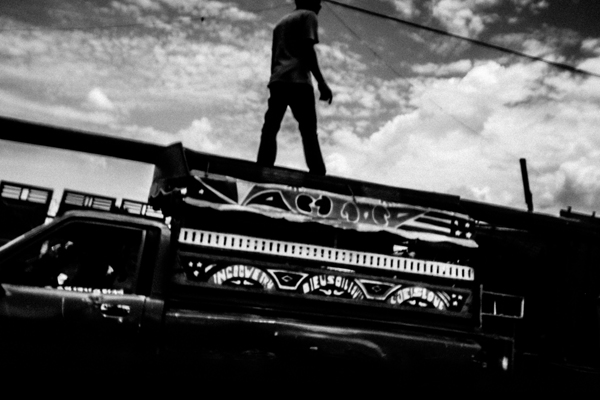
Pattern recognition has it’s limits though, you can’t recognize patterns that you don’t know. Take my son for example, he will cry out “Circle! Oval! Sqwawe.”, but it will be quite a while before I hear him say “Hexagon! Trapezoid! Pentagon.”.

His palette of patterns are limited: square, circle, oval, square, star, heart. My palette is much more expanded to include a bunch more. So in a scene where there is a square and a pentagon shape, he will see the square only, but I will see the square and the pentagon. It’s the same principle at work when two photographers see different things in the same location.

When people who don’t know photography see the kind of pictures that can be produced out of a regular scene, they immediately credit the camera. But fact is that the photographer recognized a good picture (trained to look for certain patterns) whereas the non-photographer (not trained to look for certain patterns) could not see anything. So what’s a pattern? It can be anything from certain compositional types (Golden ratio, etc.), shapes, color, types of pictures (landscape, portrait, etc.), themes that interest you (people, animals, etc.) and more.

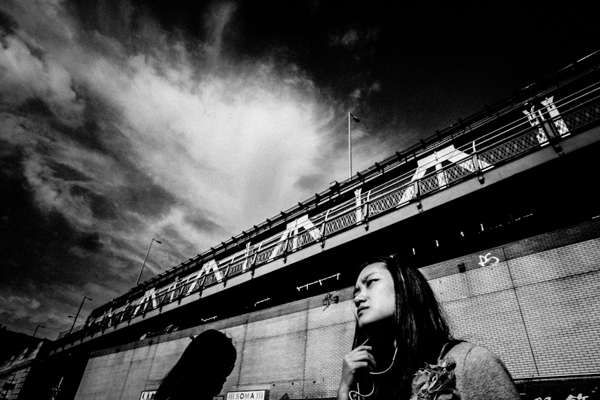
8) Everything is basic shapes
Under bridge

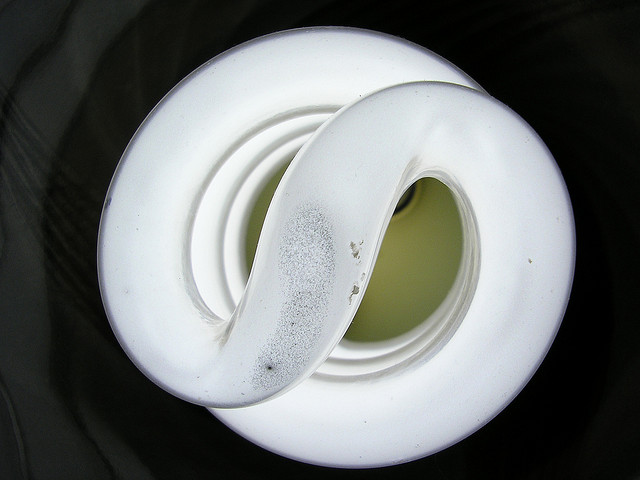
I was on my bed when the kiddo starts saying “S!” “S!” “The wetter S!” Hoho… I was sure he was seeing things because I never saw a prominent S in my room. But the kiddo was right, there was an S in the room, here it was:
By Mathew Bajoras

It was the light bulb. That reminded me how the world is like a glorified “shape sorter” toy. Absolutely everything visual can be broken down into line, shapes, space, color and texture.

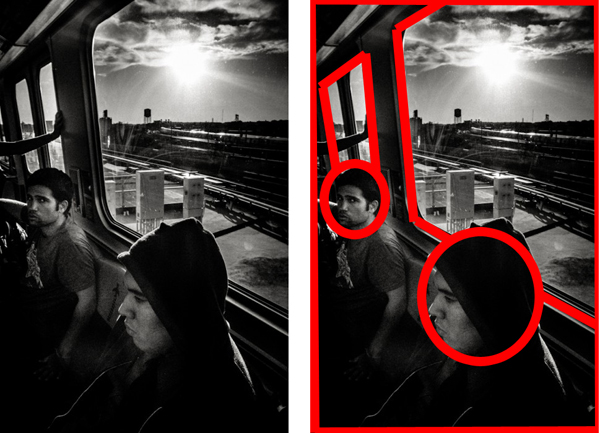
It’s something that painters and artists understand at a fundamental level; everything can be broken down into basic elements. As a graphic designer I also understand this at a basic level because you can break down designs into simple elements. Here’s an example with a shot I made:
Simple elements

All of a sudden a window is a trapezoid, and people’s heads are ovals. This is due to the Gestalt law of perception called “Pragnanz”. Simply stated it says that we perceive complex shapes as simple ones (a face as an oval for example). Yoki recognizing the “S” out of the light bulb always reminds me of that, so I look for basic, broad shapes in my photographs, and more importantly how to arrange them.

9) People are aware of the camera
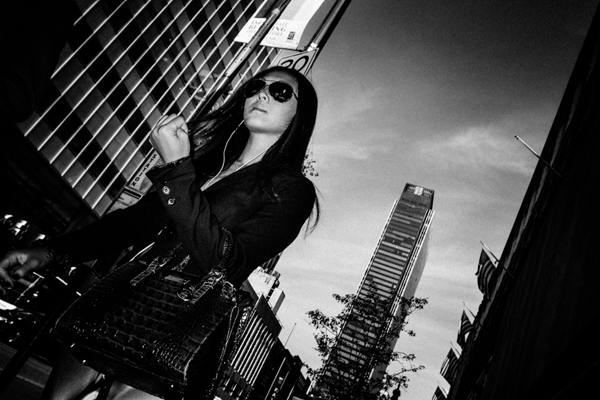
Lady power

My kid is not even five and he already knows to pose. It’s nuts. How does he know when the camera is up to strike a pose? Are we spoiling our genuineness by asking kids to say “Cheese”? I think so because it teaches kids to stop what they are doing to say cheese and look at the camera. But whatever the case, very early in life kids are aware of the camera. The result? Absolutely everybody in today’s world is aware of the camera.

That pretty much means no one is genuine when a camera is present. For pros this means you have to learn to relax your clients. For everybody else it means you have to be quick to get a genuine pose. The best moment is the split second before the person realize you are photographing them.

One interesting tidbit about the genuineness of the subject when faced with a camera, is that it is proportional to the type of camera. Pull out a point-and-shoot camera in the streets and people won’t care much, you’re probably a tourist in their minds. Pull out a double battery DSLR with 55-200 zoom and people will start acting differently. Pull out a Polaroid camera and people will react as if you are an “Artiste”.

People are conscious of the camera because they are conscious of their image, it’s ingrained since the start. If you can make people believe all you want is a snapshot, they won’t give you a second look. That, my friend is why I can only recommend a point-and-shoot lookalike for the streets.

10) Complacency hinders growth
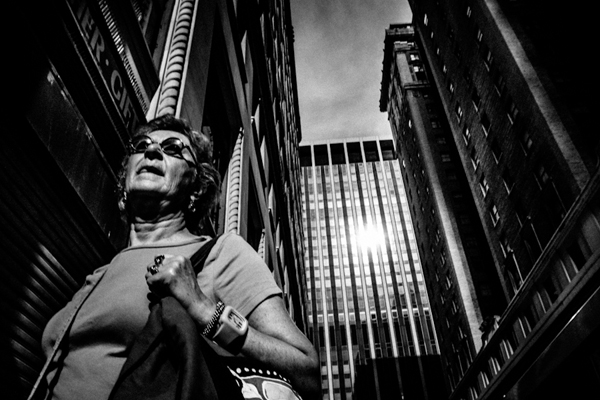
Older lady

What’s that? I asked pointing to a square in a book. “Square!!!” “Carré” (Square in French) my son said. Good I said, now what’s that? I was pointing a rectangle, he looked at it and then pointed to the square “Square!! Carré!!”. Yes but what’s that? I asked pointing at the rectangle once more. He pointed at the square once more and named it again. Instead of taking a risk at trying to name the rectangle he pointed at what he already knew.

I was quite surprised at what happened, not because of how my son reacted but because I saw myself in it. It’s easy to get complacent in photography, I sure did. It happens when you do something over and over again and don’t challenge yourself. I largely abandoned longer than 35mm focal lengths because of that. The best thing I ever did photographically is to get a 28mm because it’s much harder to deal with.

I could go out with a longer lens and not challenge myself, but I would not grow and I would become complacent. When Yoki did this with his shapes, it taught me to never become complacent and always challenge myself. I’ve grown so much when I decided to go wide angle. Try it, it will not let you make an image without a fight.

To each his comfort zone, for me it was always sticking to fast apertures at 50mm, for you it might be something else. Find where you are too comfortable photographically, then challenge yourself. It’s the trick that pole jumpers use, they put the bar higher every time.

Finals comments

I love my kid, and I love watching him. I love to see how he works and how he thinks. He’s learning from me hHopefully a good thing) but I am also learning a lot from him, as you can see from the 10 tips above. But that stays between me and you, ok?

Be yourself, stay focused and keep on shooting.

Have you learned any photography lessons from your kids? Please share any additional tips in the comments below.

The post 10 Great Photography Lessons You Can Learn From a 2 Year Old by Olivier Duong appeared first on Digital Photography School.


Digital Photography School

 
Comments Off on 10 Great Photography Lessons You Can Learn From a 2 Year Old

Posted in Photography


Sites to Browse – DVDs – Movies – Learn to Talk like Yoda

15 Apr

Talk like Yoda, you should read this tip about how you can.

“With scissors never run. Bookmark the MalekTips webpage, you should. Of the Force beware the Dark side.”

Advice like this can only be provided by the Jedi Master, Yoda. While it is doubtful you will ever learn how to wield a lightsaber like him, you can at least talk like him with the “Yoda-Speak Generator”. Simply type your comment into the box and press the “Convert to Yoda-Speak” button, and presto. Appear as if Yoda spoke it himself, your text will. Yes, hmmm….

Read more at MalekTips.
New Computer and Technology Help and Tips – MalekTips.Com

 
Comments Off on Sites to Browse – DVDs – Movies – Learn to Talk like Yoda

Posted in Technology


10 Highly Useful Photography Lessons You Can Learn Today From YouTube

14 Feb

It doesn’t matter if you are a beginner or a professional photographer: Learning and perfecting your technique will help you be a better one! Being a photographer is more than shooting and uploading pictures. As in almost any other profession, any good photographer should stay up-to-date with the market and master his skills. By searching for tutorials, you will get Continue Reading

The post 10 Highly Useful Photography Lessons You Can Learn Today From YouTube appeared first on Photodoto.


Photodoto

 
Comments Off on 10 Highly Useful Photography Lessons You Can Learn Today From YouTube

Posted in Photography