RSS
 

Posts Tagged ‘Learn’

Get Outside Your Photography Comfort Zone to Learn and Grow as a Photographer

06 Sep

As photographers, we usually start out photographing everything and anything. All subjects are game as we explore our new found passion. When we grow and get more serious about our craft, we often try to find our unique place in the industry. Our niche, our comfort zone, where we can specialize and make a name for ourselves.

This is a good thing! A photographer that has a unique niche is more memorable than a photographer that covers every subject. It’s better to be the dog portrait guy, or the black and white waterfall girl, than to be forgettable.

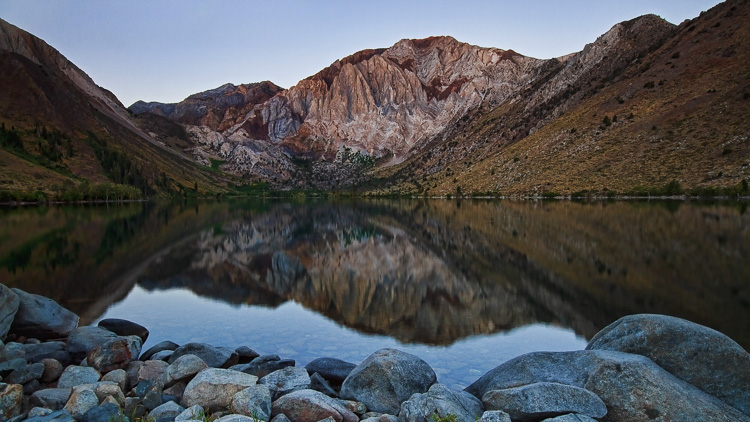
Convict Lake California by Anne McKinnell

One of my favourite things to photograph: water scenes at twilight.

But just because you’ve specialized in a particular area of photography doesn’t mean you can’t continue to explore your craft. There is much to be learned from photographing other things, and applying any lessons learned to your niche. In fact, there is much you can learn from photographing things that you specifically don’t like to shoot.

Get out of your photography comfort zone

So I challenge you to come up with a short list of things you don’t like to photograph, and then give them a try. Remember, you don’t have to be good at it. Don’t worry about trying to create a masterpiece. You’re not going to show these photos to anyone. But, by getting outside of your comfort zone and giving yourself the permission to play, you’re bound to learn something along the way.

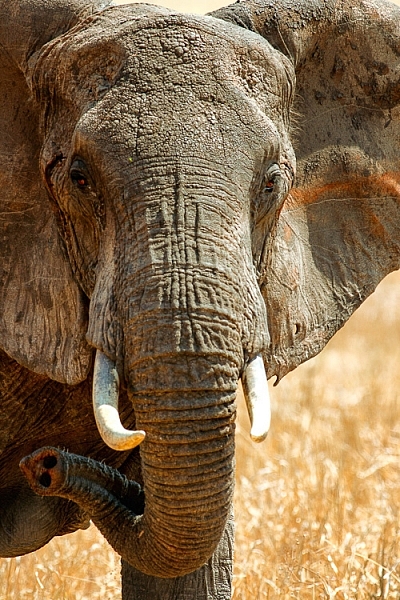
Elephant in Tarangire National Park, Tanzania by Anne McKinnell

Applying lessons learned about shadow and light in portrait photography to wildlife photography.

Afraid of portraits? Photograph one

For example, when I did this exercise, the thing on the top of my list was portraits. I’ve always been somewhat terrified of doing portraits! Also on my list was sports, cars, and architecture.

It was serendipitous when a friend of mine asked me to photograph her newborn. As the terror swept through me, I remembered my list and realized I should take the opportunity. Of course I advised her to hire a real newborn photographer since I had no experience in this area. But I still tried, and I made some images that were pretty good. But more importantly, I learned some things that I could apply to the areas of photography I was more interested in, like landscapes and wildlife.

Working inside was new to me and since I didn’t own any lights, I worked with natural light from the window. As I positioned my subjects around the room, I noticed how the light fell on their faces, and learned to pay very close attention to the direction of the light. I also noticed how important it was not to have any distracting things in the background, which also applies to many other areas of photography.

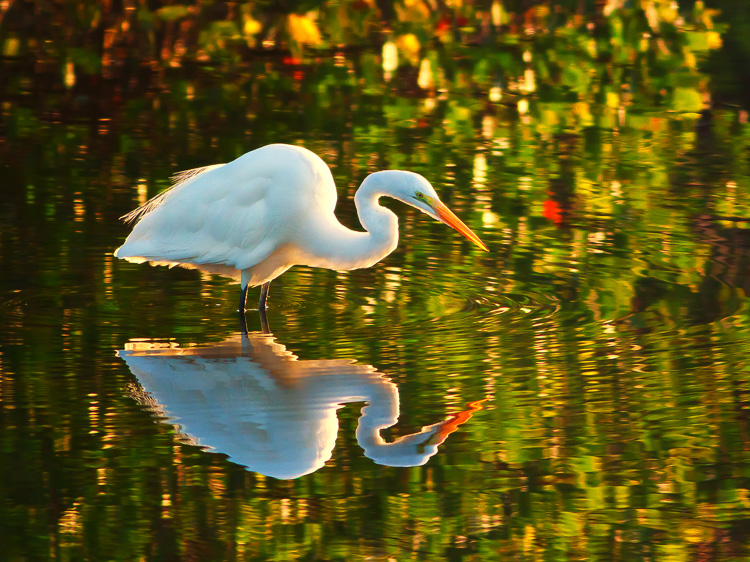
Great White Egret by Anne McKinnell

Using rim lighting and non-distracting backgrounds (learned doing portraits) in wildlife photography.

Try sports photography

The second thing on my list of things I wasn’t interested in photographing was sports. So I headed up to the local university where there is always something happening on a weekend, and found a rugby game to photograph.

I learned something very important that day. You see, I don’t know a thing about rugby, and it quickly became obvious that I couldn’t capture a special moment, because I had no idea when it was going to happen. I had to sit and watch, and try to figure out how the game worked, and only then did I have a chance.

I didn’t make any good images that day, but I sure learned a lesson that I apply to wildlife photography all the time. I sit and watch, and learn the behaviour of the animals before I try to photograph them. That way I can anticipate what is going to happen, and come away with a photograph that captures a special moment in time.

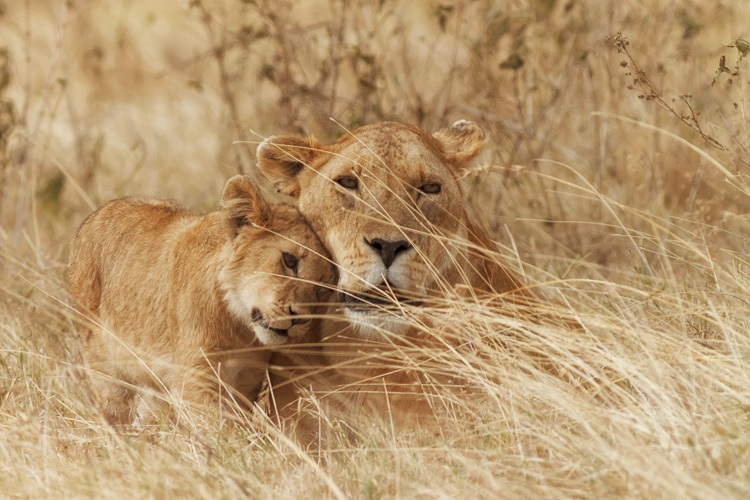
Lion and cub at Ngorongoro Crater, Tanzania by Anne McKinnell

Anticipating the special moments in wildlife photography.

How about architecture photography?

Another thing on my list at the time I did this exercise was architecture, but after playing with it for awhile I discovered a new passion. Now I love photographing architecture. One thing I learned is that most architectural subjects are inherently symmetrical, and while the rule of thirds works, symmetrical compositions work really well too. Now I apply this principle to other subjects that are inherently symmetrical as well.

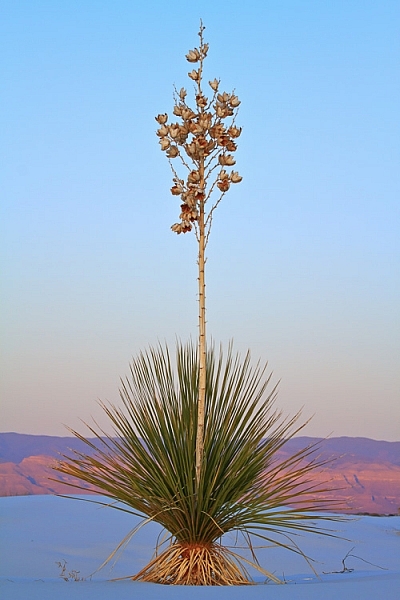
Yucca at White Sands National Monument, New Mexico by Anne McKinnell

Using a symmetrical composition in landscape photography.

Challenge yourself! Give yourself time to play! Remember that this is an exercise just for you, to help you explore your craft and grow as a photographer.

Exploring subjects is just one way to accelerate your photography learning curve. (It’s a great way of finding your niche too!) For more ways to speed up the learning curve, check out my eBook “8 Ways to Accelerate Your Photography.”

googletag.cmd.push(function() {
tablet_slots.push( googletag.defineSlot( “/1005424/_dPSv4_tab-all-article-bottom_(300×250)”, [300, 250], “pb-ad-78623” ).addService( googletag.pubads() ) ); } );

googletag.cmd.push(function() {
mobile_slots.push( googletag.defineSlot( “/1005424/_dPSv4_mob-all-article-bottom_(300×250)”, [300, 250], “pb-ad-78158” ).addService( googletag.pubads() ) ); } );

The post Get Outside Your Photography Comfort Zone to Learn and Grow as a Photographer by Anne McKinnell appeared first on Digital Photography School.


Digital Photography School

 
Comments Off on Get Outside Your Photography Comfort Zone to Learn and Grow as a Photographer

Posted in Photography


Don’t Delete Your Failed Images – Instead Learn from Your Mistakes with These Tips

28 Jul

I know you’ve done it. It’s okay to admit it. I’ve done it too! We all have! You’ve shot some terrible photographs.

Perhaps you shot the whole time in the wrong white balance, or you didn’t pay attention to shutter speed and everything is blurry. When this happens it’s incredibly disappointing. Frustrated and angry with yourself, you consider the experience a write-off, and delete the images. Then you head for the snack cupboard searching for some kind of solace.

But, everyone makes mistakes when they shoot, even professionals. There are times when we get excited and forget to check our settings, or make sure we are using the right lens for the right moment. It happens.

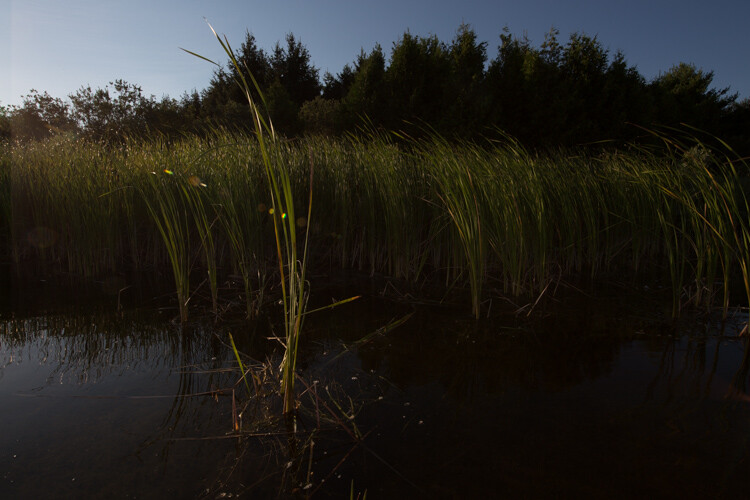
Image 1

We were canoeing and in my rush to get an image of a small bird I underexposed the shot.

These failures don’t have to be a complete waste though. There’s nothing negative about making mistakes. Willie Nelson once said, “Once you replace negative thoughts with positive ones, you’ll start having positive results.”

So with that in mind, start looking at every photograph you take, as a step forward. Don’t delete those mistakes right away. You can learn a lot about taking good photographs from the missteps you make. I’ve met some photographers who have created a special file for all of their failures. Then when they have a little bit of time, they peruse through the collection and reflect upon them. This type of exercise can help you grow as a photographer.

There are lots of ways to reflect on your images. Some people make mental notes about their images. Others like to use a written journal format. I know of a few photographers who use the keyword section in Lightroom to make notes. I’ve even seen a detailed scrapbook in which the photographer printed out his failures and scribbled notes beside each. Just be sure to pick a format that works for you. Regularly reflecting on your work is important.

To start you down the path here’s a list of questions that you can use to help you reflect on your images.

Reflection Tips

  • In the first few seconds of viewing the photograph, what was the first emotion you experienced? Why? Now let it go. Detach from the emotion and be critical.
  • Why do you consider this image a failure? Don’t analyze too much just scribble down the first thought that comes to your mind. Try to make this part of the analysis a stream of consciousness.
  • What were your goals or intentions when you shot this image? Why were you unable to meet those goals?
  • If you could turn back time and reshoot the image what would you do differently?
  • Think carefully about the image and come up with one key piece of learning that you can take away from this experience.

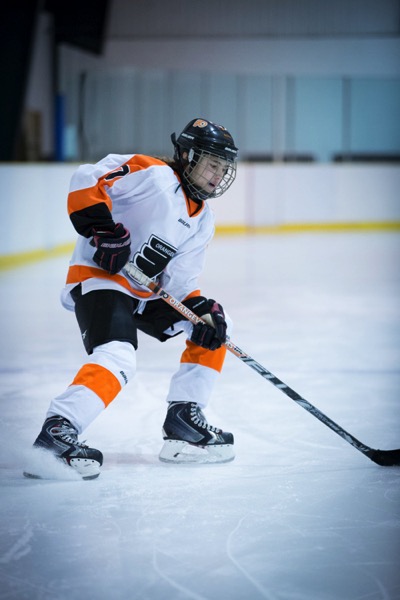
Now let’s practice your reflection skills. It’s not easy to analyze your own photographs; it can take some time to perfect. Let’s analyze some of my failures, and some successes.

View each image, and really look at it in a critical sense. You can use the guiding questions from above to help you. After you’ve finished your reflection, scroll down and take a look at my notes, see if you agree with my thoughts. Perhaps you noticed something different then I did.

Image 2

What did you come up with? Keep in mind there’s no right or wrong to this whole process. Some people might argue the image isn’t a failure. I personally, hate it.

Notes about the image

  • I cut off the hockey stick, it’s bad framing.
  • She’s looking down at the puck, there is no eye contact.
  • Loss of impact or connection with the viewer.
  • The edge vignette makes it too dark.

Ways to improve

  • Mark out the ice and give players a guideline for where to stop.
  • Remind players to look at the camera at all times.
  • Remove one complication by having kids skate without the puck (Photoshop the puck into the image in post-processing).

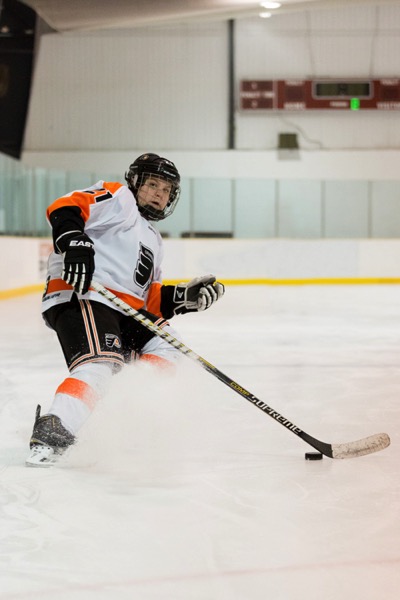
Image 3

Compare the shot above, with the previous image. It was taken in the same arena a few months later. Do you think there’s a difference? The framing is certainly better and he makes eye contact with the camera. Have I improved over the first shot?

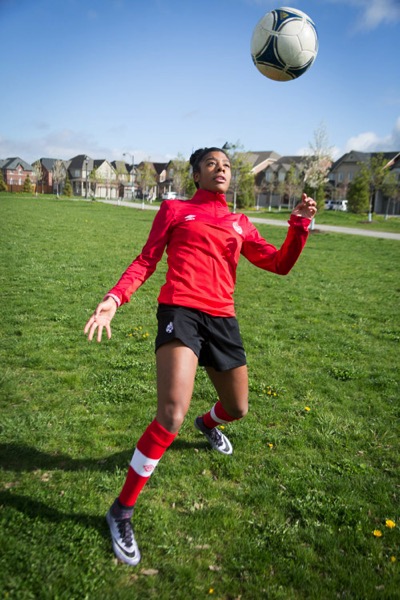
Let’s consider another mistake. This image was shot for a magazine article. Can you tell why it’s a fail?

Image 4

Notes about the image

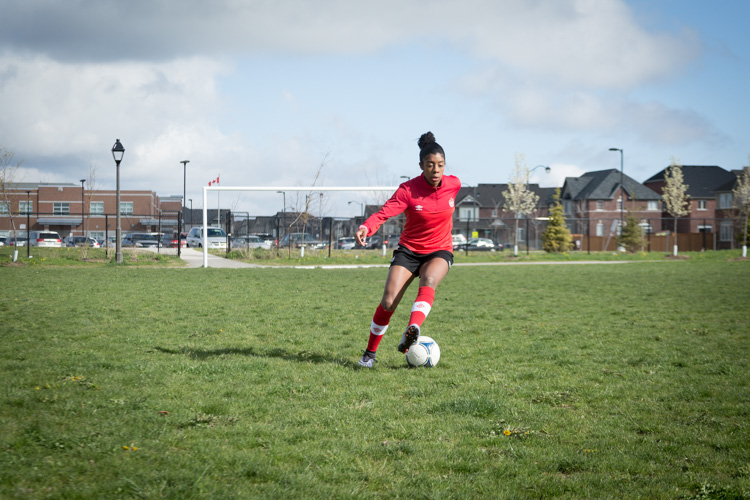
  • Her face is slightly out of focus.
  • The client wanted a unique angle for the shot but the focus is on the ball.
  • The houses behind in the background don’t suggest or support that we are on a soccer field.

Ways to improve

  • Ensure the focus is on the correct part of the scene by using back button focus.
  • Always take the time to set up the scene. Remember that the background is as important as the foreground.
  • Direct the player more to remain in a certain area.

Here’s the image the magazine chose to use for the article. You can see how the background gives this image more context than the previous shot.

Image 5

The more you reflect upon your images, the more you will grow as a photographer. If you find you are stuck in a rut, this kind of activity may just be a way to move forward. Coming back to images after a few days, or weeks, is always a good idea. By separating yourself from the image it will help you to analyze it more carefully.

I’ve posted a few more images here for you to reflect upon below. Once you’ve finished analyzing my work, try it on some of your own shots. Leave some examples in the comments below, and include your reflections.

Image 6

Image 7

Image 8

This is an opportunity to grow and become a stronger photographer. I expect that everyone who shares will be heartened by the fact that they are not the only ones to have taken a bad photograph. If you choose to reply to other people’s posts, please be kind and be constructive. This is all in the name of learning, we are not here to criticize each other.

Keep in mind, even geniuses have some failures!

“I have not failed. I’ve just found 10,000 ways that won’t work.” – Thomas Edison

googletag.cmd.push(function() {
tablet_slots.push( googletag.defineSlot( “/1005424/_dPSv4_tab-all-article-bottom_(300×250)”, [300, 250], “pb-ad-78623” ).addService( googletag.pubads() ) ); } );

googletag.cmd.push(function() {
mobile_slots.push( googletag.defineSlot( “/1005424/_dPSv4_mob-all-article-bottom_(300×250)”, [300, 250], “pb-ad-78158” ).addService( googletag.pubads() ) ); } );

The post Don’t Delete Your Failed Images – Instead Learn from Your Mistakes with These Tips by Erin Fitzgibbon appeared first on Digital Photography School.


Digital Photography School

 
Comments Off on Don’t Delete Your Failed Images – Instead Learn from Your Mistakes with These Tips

Posted in Photography


DEAL: Learn How to Take Beautiful Black and White Photos for just $6

10 Jul

NewImageToday is deal 4 of our mid year sale and you’re sure to love this one…

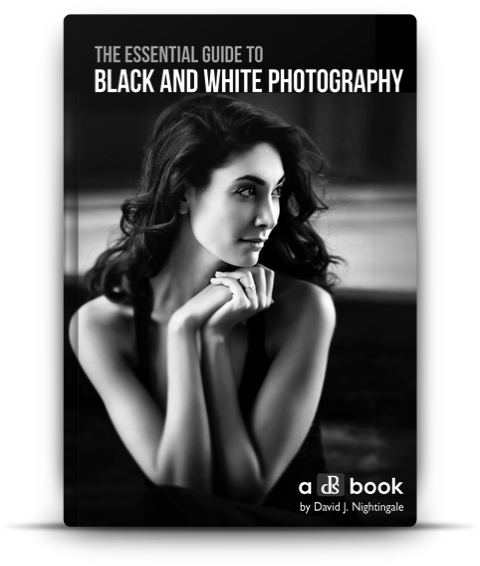
Our Essential Guide to Black & White Photography ebook – just $ 6!

We’ve never offered this best selling eBook at this price – so save 70% today only.

Grab your copy using this link: http://resources.digital-photography-school.com/summer/day4

Not only do black and white images have undeniable beauty, they can also bring added emotion, passion and drama to your photography portfolio. So if you’re looking to ramp up any of these things in your work, then this is definitely the deal for you.

Remember, each deal this week is open for 24 hours only. So get in early or risk missing out on this exceptional $ 6 price!

Snap it up here before it’s gone.

Note: as with all our eBooks this one comes with a money back guarantee. If you don’t find it suits your needs simply contact our support team within 60 days and we’ll refund your money – no questions asked.

googletag.cmd.push(function() {
tablet_slots.push( googletag.defineSlot( “/1005424/_dPSv4_tab-all-article-bottom_(300×250)”, [300, 250], “pb-ad-78623” ).addService( googletag.pubads() ) ); } );

googletag.cmd.push(function() {
mobile_slots.push( googletag.defineSlot( “/1005424/_dPSv4_mob-all-article-bottom_(300×250)”, [300, 250], “pb-ad-78158” ).addService( googletag.pubads() ) ); } );

The post DEAL: Learn How to Take Beautiful Black and White Photos for just $ 6 by Darren Rowse appeared first on Digital Photography School.


Digital Photography School

 
Comments Off on DEAL: Learn How to Take Beautiful Black and White Photos for just $6

Posted in Photography


How to Use Lightroom to Learn Composition in Photography

06 Jul

If you want more Lightroom help from Viktor, get 50% OFF his Four Seasons Lightroom Preset Collection, on now at Snapdeals (only until July 19th, 2016)

When you start learning about photography, the whole process can be overwhelming with its complexity. But, when you break it down into smaller pieces that you can tackle one at a time, you quickly realize that photography isn’t rocket science at all. By then, it’s only a matter of time before you understand the whole picture, and are comfortable with the different aspects and techniques.

Images Composition in Lightroom 01

I still find one aspect of photography is more challenging than the rest, however. That is composition, which is difficult to learn and even more difficult to teach.

Why? The main reason is because of its subjective nature. It is not easy to quantify composition. In other words, there is no right or wrong; everything is open to interpretation. As a result, learning and mastering composition is usually a long and gradual process.

I want to share with you an exercise that you can perform using Lightroom, in the comfort of your home, that can accelerate the composition learning cycle. This approach was incredibly helpful in building my comfort with, and understanding of composition, in my photography. I hope you find it useful too.

Images Composition in Lightroom 02

The way I approach composition today is different, compared to my approach five years ago. The reason for that is because of new publishing channels.

As a photographer who runs a popular blog dedicated to travel photography, I have multiple channels where I publish my photographs. It all begins on the blog, then moves to social media networks like Facebook, Instagram, G+, and Pinterest. Plus, I often prepare an extra version for printing purposes as well.

Typically, different publishing channels require different versions of the same photograph. For example, if the original photograph has a landscape orientation with the aspect ratio of 3 x 2, Instagram requires a square 1 x 1 version, and Pinterest requires a vertically oriented image. I might need a panoramic version for print.

Even though creating multiple versions of the same photo with meaningful composition takes more time and effort, I find this exercise is extremely valuable in learning and mastering composition in photography.

Exercise in a Real Life Scenario

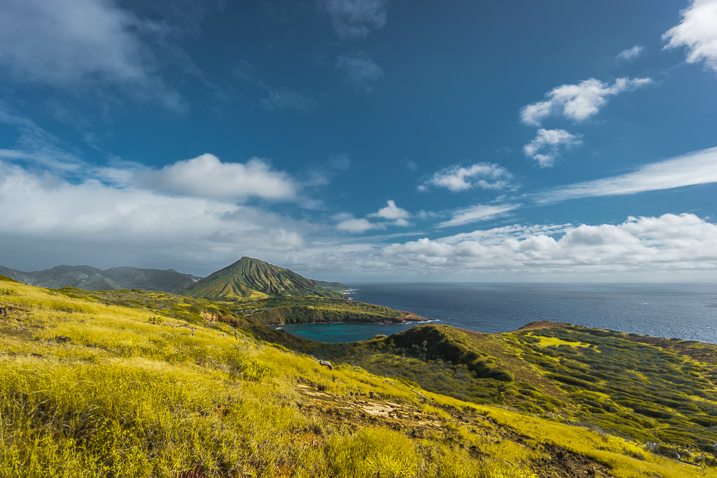
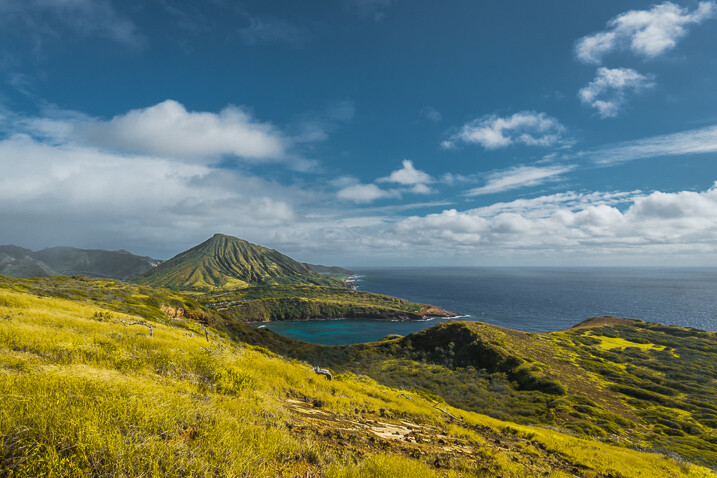
I took this photo just after the sunrise on O’ahu Island in Hawaii.

Images Composition in Lightroom 03

From the very beginning, I could see the potential of the scene and was confident that I would use it on my blog, and maybe even in my portfolio.

I intentionally took the shot of the scene wider than I would want for a regular 3 x 2 landscape composition. I left some room to have more freedom when creating different versions for publishing. I have no problem with cropping and trimming my photographs in post-processing, because 24 Mpx sensor on my Sony a6000 gives me enough pixels even for very aggressive cropping.

I started the editing process by applying few of my favorite presets from my Landscape collection, and when I was happy with the result I started working on composition.

Images Composition in Lightroom 4

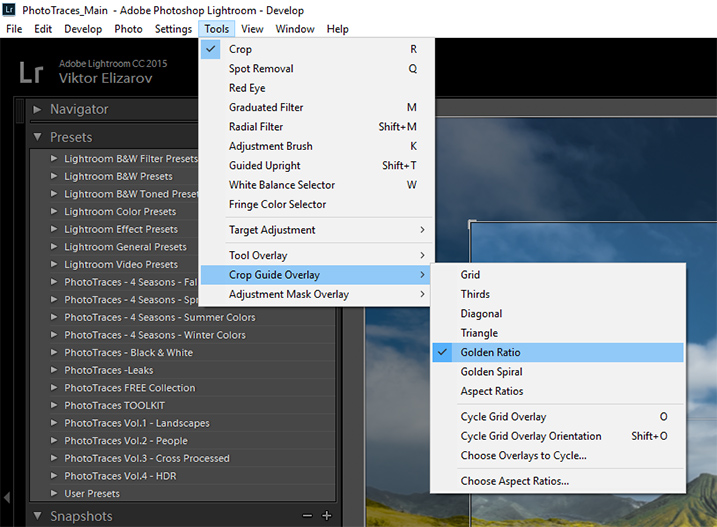
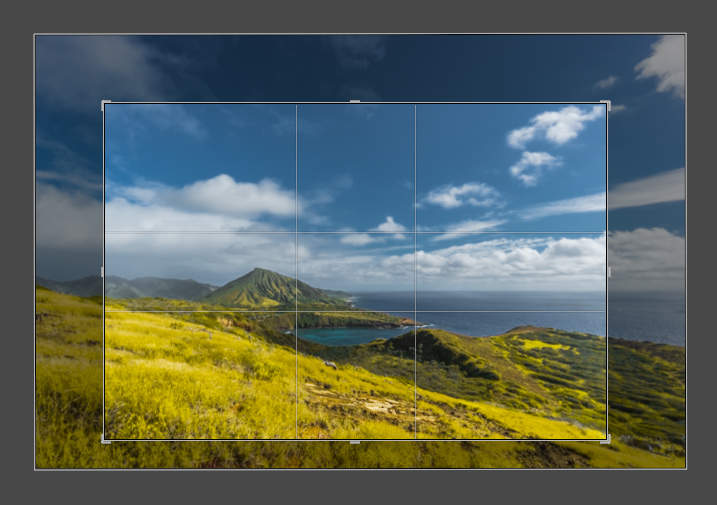
First, I set up the Crop tool Overlay options, setting it to Golden Ratio. I know that Thirds is the most popular option among visual guides, but I find that Golden Ratio helps me to create more balanced compositions.

Images Composition in Lightroom 05

You can also scroll through the various overlay options by repeatedly hitting the O key on your keyboard, until you find the one you want.

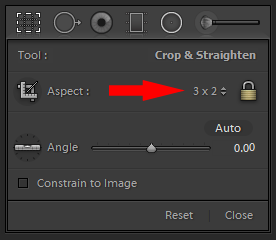
I set the aspect ratio to 2×3 and lock it.

Images Composition in Lightroom 06

I create my first version by simply making the composition tighter.

Images Composition in Lightroom 07

Images Composition in Lightroom 09

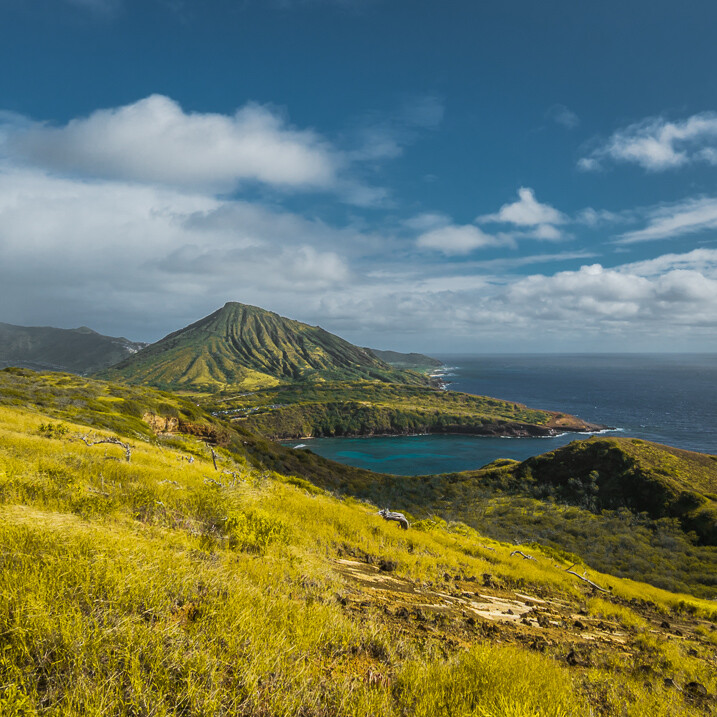
Version 1 – Aspect Ratio 3 x 2

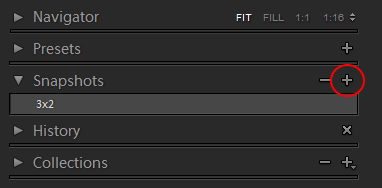
When I am happy with the result I use the Snapshot functionality of Lightroom to save my version as a new Snapshot, and name it 3 x 2.

Images Composition in Lightroom 08

Then, I move on to the next version.

Images Composition in Lightroom 10

Version 2 – Aspect Ratio 1 x 1 (Instagram)

Images Composition in Lightroom 11

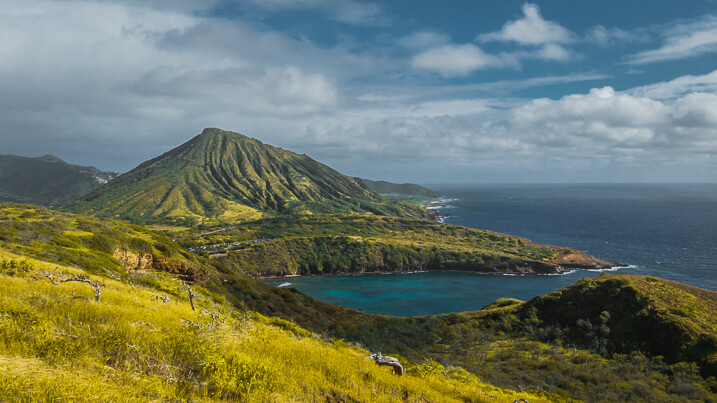
Version 3 – Aspect Ratio 2 x 1

Images Composition in Lightroom 12

Version 4 – Aspect Ratio 4 x 3

Images Composition in Lightroom 13

Version 5 – Aspect Ratio 16 x 9

Images Composition in Lightroom 14

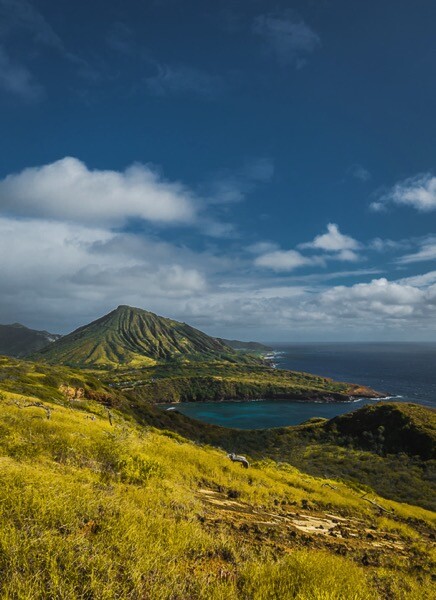
Version 5 – Aspect Ratio 3 x 4 (Pinterest)

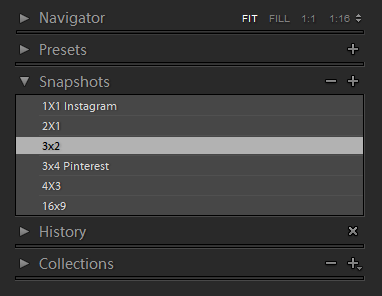
When I am done I have the Snapshot Panel filled with six newly saved versions (snapshots).

Images Composition in Lightroom 15

Another alternative is to use the Virtual Copy functionality for each version I create. bu I prefer the Snapshot panel, which makes Lightroom less cluttered.

Now, I can review each version by clicking on an individual Snapshot version, and if I am happy with the results, I am ready to start publishing.

Conclusion

The only way to learn composition in photography is to practice on a regular basis. I highly recommend the exercise I outlined above. Make a habit of creating at least two extra versions for each photograph you edit, one for Instagram and another for Pinterest. I can guarantee you it will help you to accelerate the process of learning.

If you want more Lightroom help from Viktor, get 50% OFF his Four Seasons Lightroom Preset Collection, on now at Snapdeals (only until July 19th, 2016)

googletag.cmd.push(function() {
tablet_slots.push( googletag.defineSlot( “/1005424/_dPSv4_tab-all-article-bottom_(300×250)”, [300, 250], “pb-ad-78623” ).addService( googletag.pubads() ) ); } );

googletag.cmd.push(function() {
mobile_slots.push( googletag.defineSlot( “/1005424/_dPSv4_mob-all-article-bottom_(300×250)”, [300, 250], “pb-ad-78158” ).addService( googletag.pubads() ) ); } );

The post How to Use Lightroom to Learn Composition in Photography by Viktor Elizarov appeared first on Digital Photography School.


Digital Photography School

 
Comments Off on How to Use Lightroom to Learn Composition in Photography

Posted in Photography


3 Ways to Simplify and Learn Photography Faster

30 Jun

It’s not always easy to be a photographer, seeing all of the great photo opportunities around us, and wanting to capture them all. Recently, I was working with a student of mine, and she wanted to know how to handle changing settings quickly from one situation to another.  Her example was trying to go from photographing landscapes, to trying to focus on a bird or other wildlife that may quickly enter the scene. While some seasoned photographers may be ready for a situation such as this, it’s certainly not easy, and for someone just learning, I would argue that it shouldn’t be attempted at all.
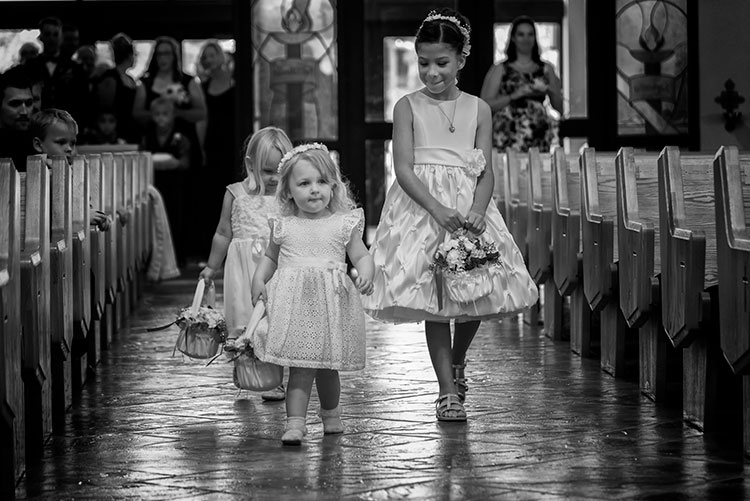
24-120mm. Shot at 120mm, 1/160, f/4, ISO 1400. Knowing how the lens behaves at both ends of the zoom, I knew I could use this lens for wide angle shots in close, but zoom in as the flower girl was coming down the aisle and still get an interesting shot.

24-120mm, shot at 120mm, 1/160, f/4, ISO 1400. Knowing how the lens behaves at both ends of the zoom, I knew I could use this lens for wide angle shots in close, but zoom in as the flower girl was coming down the aisle and still get an interesting shot.

While many of the camera manufacturers want to make photography sound easy (anyone remember “So advanced, it’s simple”?), the fact is, photography is a craft, that despite the advances in technology, takes some time to master. Different photographic situations call for different settings, different lenses, or even a completely different approach to the subject matter. If you’re a hobbyist with only one camera, it can be impossible to be ready for all of the possibilities as they happen.

So here are three ways to keep it simple while you’re learning photography, and stop the overwhelm.

#1 – Focus on one subject at a time

I’m a strong advocate for keeping things simple. First off, if you’re planning to photograph landscapes, wildlife, or portraits, stick with that one goal.  It is easy to get distracted by other subjects that come along. Those opportunities can seem like gold when they pop up, and they can be, but if you’re already set up to shoot a landscape photo at ISO 100, f/16 aperture, and 1/20th shutter speed, quickly switching to settings suitable for capturing a bird in flight is not an easy process. It will likely end in you being frustrated, capturing photos that don’t quite meet your expectations, or worse, don’t come out at all.

Even now, 20-plus years after beginning my photography career, I try not to do too much at once with a camera. I focus on what my goal was when I first decided to pick up the camera and head out. If I’m planning on photographing a landscape at sunset, that’s what I do. The only time I will try to be ready for two separate subjects, is when I have two cameras. For instance, if I’m photographing a landscape, but there are waterfowl nearby and I want to be ready for that, I have a second camera set up with a telephoto lens, so I can grab it and try and get the shot. Even this requires me to at least temporarily put my initial subject, the landscape, aside for a bit.
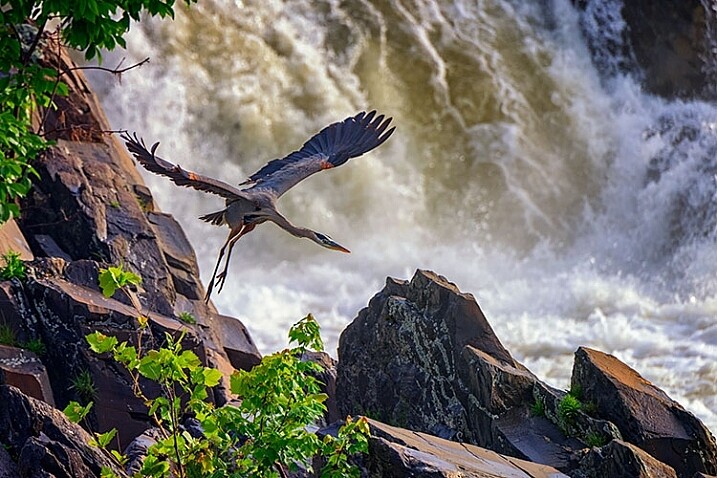
Wildlife image taken using a fast shutter speed and a telephoto lens.

This shot of the blue heron was taken with a 400mm lens, using continuous AF, and 1/1250 shutter speed.

The image of the waterfall (below), and the image of the great blue heron (above), were both taken at the same location.  However, for the shot of the waterfall, I needed to use a neutral density filter to slow down the exposure. There is no way I’d have been able to remove the filter, and be ready to photograph the heron, even if both shots could have been captured with the same lens. Not only would my shutter speed have needed to be drastically faster to stop the flight of the heron, I would also have needed to use continuous AF to capture its flight sharply, while I always use one-shot AF when photographing landscapes.

Knowing there may be wildlife nearby, I mounted a Nikon 80-400mm lens on one camera (on a strap on my shoulder), while I had a second camera with a shorter lens, set up on a tripod to capture the waterfalls. If I only had one camera, I would have needed to choose between one subject or the other, and then move on. Rare is the occasion when you can jump so quickly from one subject to a completely different one using only one camera.
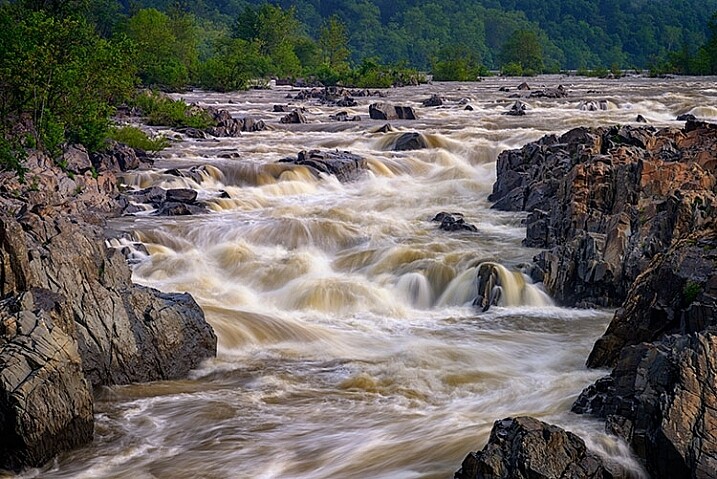
Landscape image using a slow shutter speed and wide angle lens.

This shot was taken with a 16mm lens, using one-shot AF, and a 0.6 second shutter speed.

If you’re working with only one camera, don’t try to do too much.  Pick one subject and work that until you feel you’ve accomplished what you wanted, then move on to another subject. Yes, it’s difficult to be set up to catch a sunset and watch a beautiful snowy egret land nearby and start fishing, leaving you itching to try and catch it, but chances are it will fly away again while you’re still fiddling with your settings. Meanwhile, the sun is still setting, the color is fading, and you’ve likely missed a shot or two there as well.

#2 – Use only one lens

Back when I took my first photo course in college, my professor was adamant that each student use only a 50mm lens. I didn’t understand why at the time, but I do now. It’s important to understand how your lenses behave, so you’ll know which one is right for the job. As photographers, many of us become gear collectors, always wanting another lens, to allow us to photograph the way we saw another photographer do it. But before you start collecting lenses, it’s important to recognize what each lens can do for you, and to truly understand that, you’ve got to use each lens extensively.
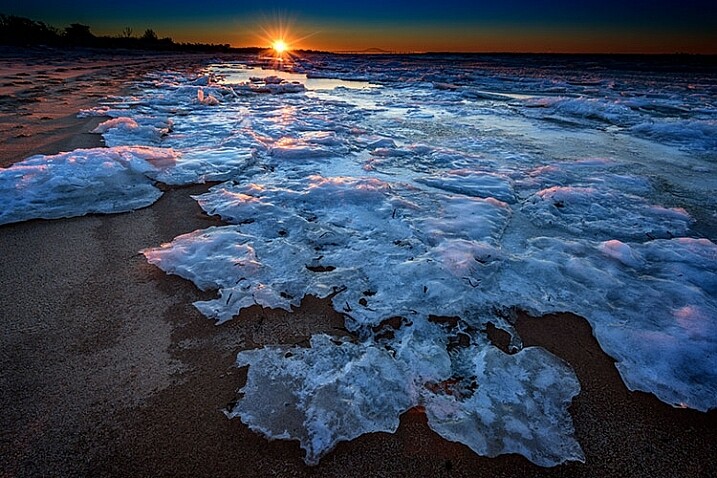
Wide angle lenses expand perspective.

Using a wide angle lens, I was able to emphasize the ice in the foreground, while pushing the bridge to the background at the top center of the frame.

I currently have seven camera lenses in my kit right now. At any given time, there may be four or five in my camera bag when I’m out photographing, depending on what my planned subject is, or what contingencies I want to be ready for. But, as usually happens, it’s rare that most of those lenses will see the outside of my bag once I get where I’m going. While each situation is different, I often find that one lens will usually handle what I want to do when I get to a location. So unless it’s one of those rare times when a situation calls for both a telephoto and a wide angle look, usually only one of those lenses gets mounted on the camera. While in the above example I broke this rule and used two cameras with two different lenses, that is not usually the norm for me.

When you pull your camera out of the bag next time and select lens to use, stick with that one lens. Really get to know it. If it’s a zoom, shoot at only one end of it. The next time you use it, use the other end. Learn how to make that lens really sing. Find out what it’s really good for, and what it’s not good at. Do this with every lens you own, if you own more than one. When it comes time to purchase new glass, you’ll have a much better understanding of where your kit comes up short, and what you need to buy. In addition, you’ll also be building on my first point, focusing on one subject. Too often, new photographers miss opportunities because they are busy changing lenses because they think they need one over another. If changing lenses is not an option, you won’t waste time with it, and can focus on making great photos with whichever lens you find on your camera.

Telephoto lenses compress perspective.

Telephoto lenses compress perspective. Want to make the sun or moon look really big in relation to a building or structure? Back away from your subject a bit and use a telephoto lens to compress the perspective and distort the size relationship.

In the two images shown above, the same bridge can be found in both, and both shots were taken from roughly the same spot. One was taken with a 16mm lens, and the other, with a telephoto lens at 290mm. Wide angle lenses expand perspective, emphasizing the foreground and pushing background objects back, while telephoto lenses minimize foreground and tend to flatten perspective. Using only one focal length will also help you to compose more effective images. Zooms can at times make you lazy. Zooming from a wide angle to a telephoto lens changes the image profoundly, and it’s important to understand what effect that can have on your image.

Telephoto lenses compress perspective, while wide angle lenses enhance it, and each perspective communicates something different to the viewer. There are reasons to use both wide and telephoto lenses, but only working with them extensively will help you recognize the situations where each is most effective.

#3 – Don’t accessorize
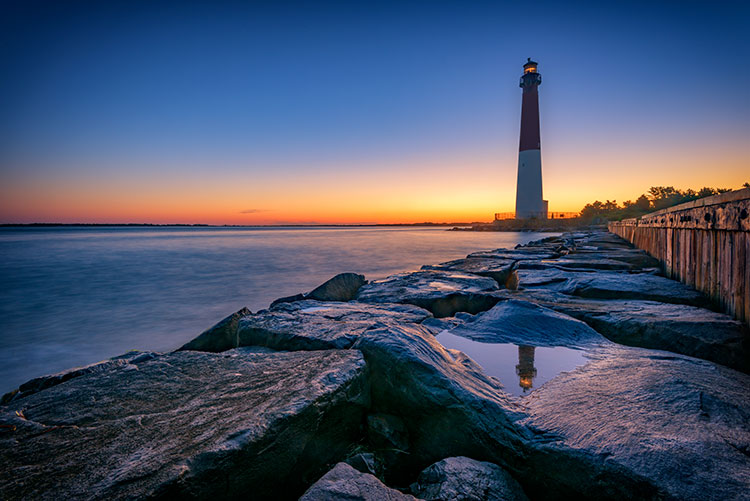
For the lighthouse image- Shot at 16mm, f/16, 15 seconds, ISO 64. I simplified my composition down to two elements, the reflection in the foreground, and the lighthouse in the background. Knowing the lighthouse would be there regardless of where I stood or how I zoomed, I focused on getting the reflection right, and letting the rest of the composition fall into place.

Shot at 16mm, f/16, 15 seconds, ISO 64. I simplified my composition down to two elements, the reflection in the foreground, and the lighthouse in the background. Knowing the lighthouse would be there regardless of where I stood or how I zoomed, I focused on getting the reflection right, and letting the rest of the composition fall into place.

One of the great things about digital photography, and today’s technology, is the many cool new tools available to help with your picture-taking endeavors. It’s great to be able to connect to a camera from your smartphone, and do things such as time lapse or long exposures, but often times, these accessories are one more thing that can go wrong, or distract you from actually taking photos.

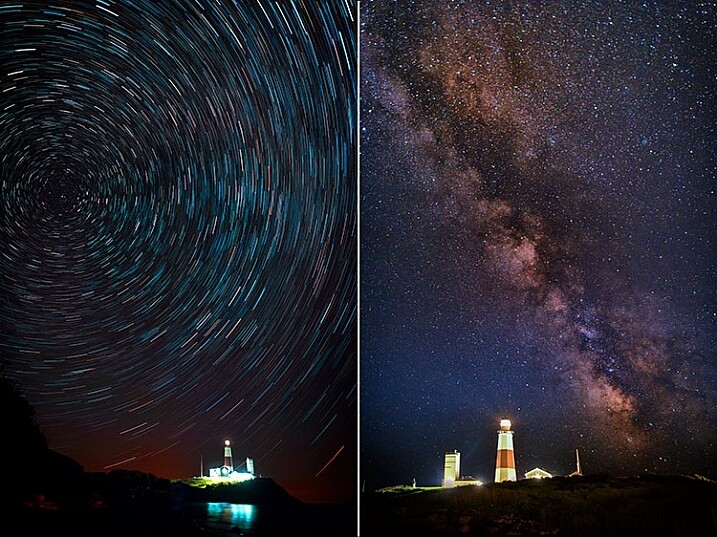
There are only three accessories that I use regularly. One is a time controller that plugs into my camera directly, second is a tripod, and finally, a set of neutral density and graduated neutral density filters, used to help control exposure. I didn’t even begin using the filters until a few years ago, more than 15 years into my photography career. Both images below used nothing more than a remote shutter release. In the case of the Milky Way image, on the right, I set my camera to manual for a 15 second exposure and used the remote release as I would the shutter button, simply to avoid touching the camera. For the image on the left of the star trails, while that becomes a bit more complicated in processing, in reality, it’s just a lot of 30-second exposures. I simply set my camera to continuous drive, and locked the shutter button on the remote down. Simple.
Minimize accessories

Even for images such as these, the only accessory I used was a time controller, with only the shutter button locked down.

It’s important, when learning photography, to focus on the basics – aperture, shutter speed, and ISO, and understand how they affect your images. It’s too easy to get caught up in all the bells and whistles and how cool they are, and forget that the end result is what matters. In my mind, if the accessory isn’t contributing in a way that affects the final image, then I don’t need to use it. I’m not saying that accessories are bad, or even unnecessary, but if you aren’t sure how to achieve a proper exposure yet, put off purchasing that shiny new toy, and really learn your camera.

I would even advise you to stay away from the special modes on your camera, such as HDR, or star trails mode (I do that manually in post-production), or multiple exposure mode. Yes, they can look cool, and do great things, but again, understanding the basics of exposure is paramount. If you don’t understand basic exposure, using the bells and whistles won’t help you make music.

I find that simplifying the process as much as possible helps me come away with the best images possible. What do you do to help simplify your photographic process?

googletag.cmd.push(function() {
tablet_slots.push( googletag.defineSlot( “/1005424/_dPSv4_tab-all-article-bottom_(300×250)”, [300, 250], “pb-ad-78623” ).addService( googletag.pubads() ) ); } );

googletag.cmd.push(function() {
mobile_slots.push( googletag.defineSlot( “/1005424/_dPSv4_mob-all-article-bottom_(300×250)”, [300, 250], “pb-ad-78158” ).addService( googletag.pubads() ) ); } );

The post 3 Ways to Simplify and Learn Photography Faster by Rick Berk appeared first on Digital Photography School.


Digital Photography School
 
Comments Off on 3 Ways to Simplify and Learn Photography Faster

Posted in Photography


Fly-by: Learn how to shoot the Milky Way from an airplane

24 Jun

Photographing the Milky Way from the ground can be challenging in itself, but photographer Ian Norman has taken the challenge to new heights. In a new video tutorial, he explains how he and his partner Diana Southern photographed the Milky Way from an airplane. 

Together, the couple make up the team behind Lonely Speck, a blog dedicated to astrophotography. They were on a flight to Budapest when they began to wonder if they could capture the Milky Way from the plane. Sure enough, after some trial and error outlined in the video above, they found it was possible. Ian explains in the tutorial how he layered multiple exposures in post-processing to reduce noise in his final images.

The results are pretty amazing. We know what we’ll be doing next time we get bored on an overnight flight. 

Articles: Digital Photography Review (dpreview.com)

 
Comments Off on Fly-by: Learn how to shoot the Milky Way from an airplane

Posted in Uncategorized


Learn Ansel Adams’ Biggest Secret for Stunning Photography – Visualization

22 Jun

Ansel Adams is the most widely known photographer in history, you don’t need to look very far to see one of his images. Would you like to know the whole key to Ansel Adams’ stunning photographs?

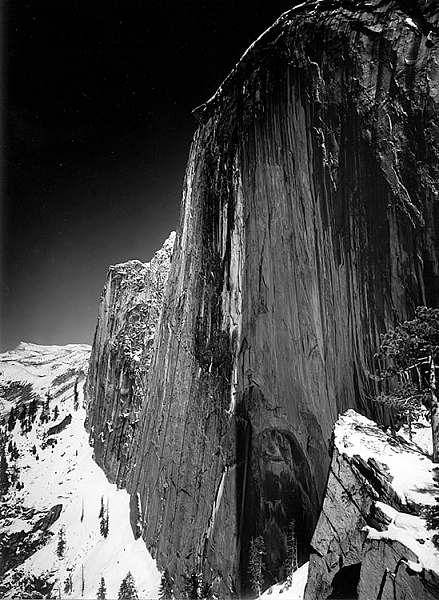
This is a photograph of half dome in Yosemite taken in 1927 by Ansel Adams

Monolith, The Face of Half Dome, by Ansel Adams (Image courtesy Ansel Adams Illumes and The Ansel Adams Gallery)

In this this video interview with his son, Michael Adams, you will hear about his breakthrough as a photographer, when he went from merely recording an image, to being an artist who interpreted the image to tell the story he wanted.

As you’ll hear, Ansel had his breakthrough when he climbed up to take a photograph of Half Dome, the iconic monolith in Yosemite, California. The moment he realized that the yellow filter just wasn’t going to convey what he saw and felt, he changed to a red filter which expanded the tones of the image and brought out the darkness of the sky, thereby creating the mood he had visualized.

Ansel said, the whole key lies in first visualizing the image you want, rather than just snapping away.

By first forming the image or idea in your mind’s eye, you can then set about to capture it. His son Michael summed it up with, “He knew what he wanted and he got what he wanted.”

These are Ansel’s’ key points that you can practice to continually improve your photography:

  • Look at the external event, and then visualize what you want it to look like, clearly and decisively.
  • Try to make the photograph of what you saw and felt.
  • Train yourself to see what the camera sees by comparing what you see, with what it looks like in the camera.
  • Practice your craft and do your homework so you can make the photograph you desire by going through these steps to capture what you visualized.
  • Placing the camera: Find the best point of view of the lens.
  • Make a proper lens selection.
  • Decide on your depth of field and set your aperture.
  • Control your exposure and later, the development.

As he said, with practice this becomes automatic and instinctive. Put Ansel’s advice into action and let me know your results in the comments below.

googletag.cmd.push(function() {
tablet_slots.push( googletag.defineSlot( “/1005424/_dPSv4_tab-all-article-bottom_(300×250)”, [300, 250], “pb-ad-78623” ).addService( googletag.pubads() ) ); } );

googletag.cmd.push(function() {
mobile_slots.push( googletag.defineSlot( “/1005424/_dPSv4_mob-all-article-bottom_(300×250)”, [300, 250], “pb-ad-78158” ).addService( googletag.pubads() ) ); } );

The post Learn Ansel Adams’ Biggest Secret for Stunning Photography – Visualization by Marc Silber appeared first on Digital Photography School.


Digital Photography School
 
Comments Off on Learn Ansel Adams’ Biggest Secret for Stunning Photography – Visualization

Posted in Photography


How to Use the Zone System to Learn about Metering and Exposure Compensation

16 Jun

When you first move off auto, you realize how much control you have over your camera. You get to choose the aperture, shutter speed, ISO, and be able to manually select the autofocus point, among many other things. In short you get control over everything!

You also get full control over the exposure, or brightness, of the image. You decide you where to set the exposure for each image – something that the camera does not always get correct. The reason the camera doesn’t get it right all the time is because the in-camera light meter doesn’t always know how the brightness level of the subject. What tricks the light meter is bright or dark tones.

So how do you take back control of the exposure, and compensate for the camera’s errors? The process of correcting your exposure is referred to as Exposure Compensation. For more on that read: How to Use Exposure Compensation to Take Control of Your Exposure. However, before you add any exposure compensation, you first need to know how much to compensate, and understand exactly what your camera’s light meter is doing. This is why learning how to meter is important. If you are unfamiliar with the term metering, it is the process of measuring light values.

The first thing to grasp when is how your camera’s light meter sees the world. Put simply, it sees everything in grayscale. This means that all your camera sees is a world of tones; a colourless world. It cannot differentiate trees from people, people from snow, etc. (Although more modern in-camera light meters will now also recognize colour, the same basic principles apply.)

The other critical element to know is that your meter wants to make everything middle-gray, commonly referred to as 18% gray. Remember that! Right it down! Keep it with you in your camera bag until it’s firm in your memory! It’s very important!

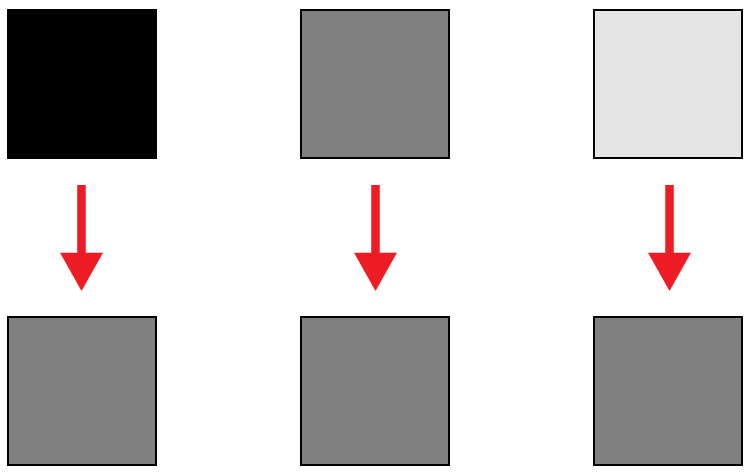
Everything you need to know about doing exposure compensation correctly hinges off 18% gray. If your scene has a lot of bright areas in it, such as snow or sand for example, your camera will want that to be 18% gray. If you’re photographing a person in dark clothing, your camera will also want to make that 18% gray. Your camera doesn’t know your subject is actually meant to be black, nor does it know that all of that white in the viewfinder is actually snow. Leaving your camera’s meter at zero, or Meter as Read (MAR), can cause your photo to be over or under exposed.

Here is an illustration of what your camera meter will do. Tones will end up 50% grey.

Here is an illustration of what your camera meter will do. All tones will end up 18% or middle gray.

So how does knowing how your camera will meter, help you to decide how much exposure compensation to apply? This is where knowing a little about the Zone System can come in handy.

What is the Zone System?

The Zone System was developed by the late Ansel Adams and Fred Archer. In essence, it was a system used to meter and continue on in the dark room when developing images. I’m not going to discuss the Zone System in its entirety – that could be something for a future article – but at its core, the Zone System will greatly help you decide how much exposure compensation to add or subtract.

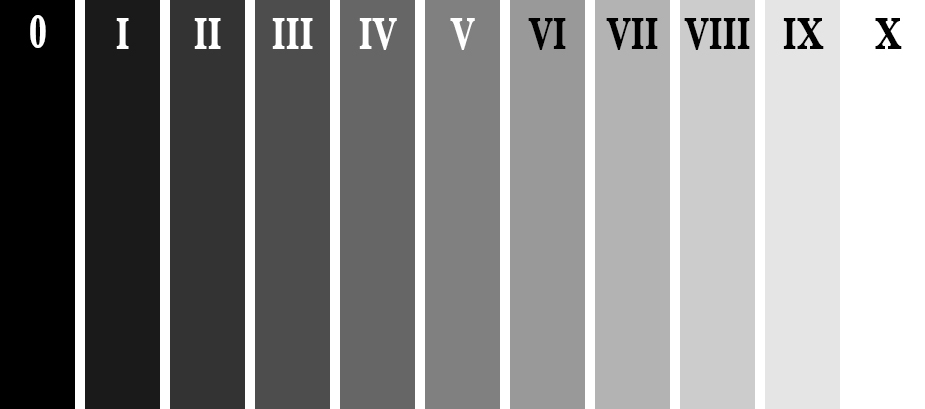
The Zone System

The Zone System

Above is an illustration of the Zone System. In it are 11 zones, denoted by Roman numerals. Here is a quick rundown of examples for each Zone:

  • Zone 0: Pure black, no detail. This is would be the edge of a negative film.
  • Zone I: Near pure black with slight tonality, but no detail.
  • Zone II: This is the first Zone where detail starts to show; the darkest part of the image where detail is recorded.
  • Zone III: Average dark materials.
  • Zone IV: Landscape shadows, dark foliage.
  • Zone V: Middle-gray, what your light meter sets to.
  • Zone VI: Average Caucasian skin tone.
  • Zone VII: Very light skin; shadows in snow.
  • Zone VIII: Lightest tone with texture.
  • Zone IX: Slight tone without texture, (e.g., glaring snow).
  • Zone X: Pure white with no detail. This would be light sources, or reflections of light sources.

This next piece of information is the other piece to the exposure compensation puzzle:

Each Zone is separated by exactly one stop of exposure.

Now that you have the information, how do you use it?! You know that you camera is metering for Zone V, or middle-gray, now consider your subject. How light or dark is it? If you were photographing a bride’s white dress, that would be very bright with texture; so going by the chart that would fall into Zone VII or VIII, which makes the exposure compensation required for correct exposure PLUS two or three stops (the difference between Zone V and where your subject should fall).

RV-02383-slideshow

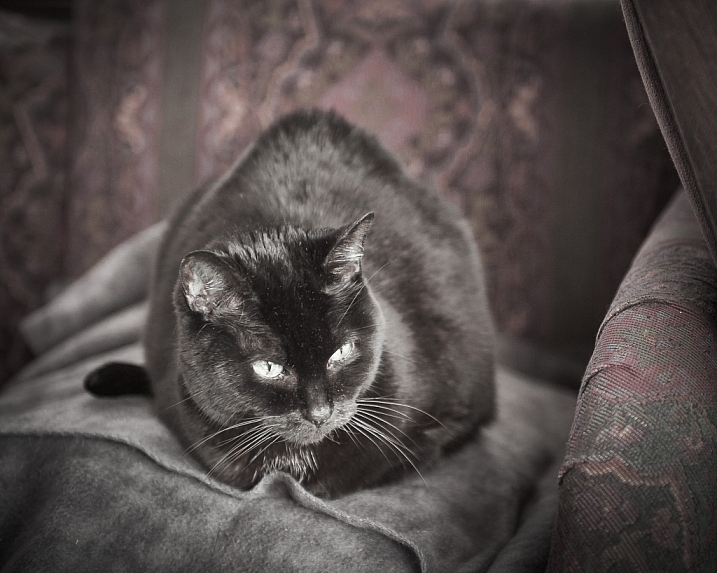
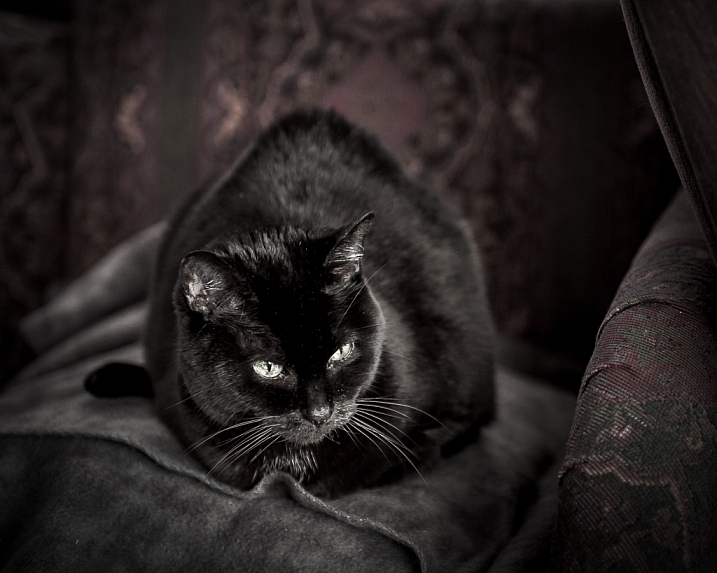
Shot at zero exposure compensation. Black cat is gray or Zone V.

RV-02383-slideshow (1)

Shot at -2 stops black cat is now black or Zone III.

As an experiment, try photographing a piece of plain white paper. First, make sure that there is no exposure compensation added – your meter should be in the middle. Take a photo. Next, add +2-stops of exposure compensation. This will bring your exposure to Zone VII. Then, take another photo. Notice the difference? The first image should be very close to middle-gray, or Zone V, where the last image should be bright white, but still show detail in the paper.

External Light Meters

Another tool that may be helpful to you, is an external handheld light meter. They work the same way as your camera’s light meter in that they meter for middle-gray, but they have the added advantage of being to reading what’s known as Incident Light: that which is falling on the subject, not reflected from it. Your camera’s meter is a reflected light meter; it reads the light that has been reflected or bounced off your subject. This may seem obvious, but there is a big difference between incident light and reflected light. Reflected light is greatly affected by tone – the darker your subject is, the less light that will be reflected, whereas the brighter your subject is the more light that will be reflected. However, the incident light – or light coming from the light source – will remain the same no matter what the tones are in your subject. By using an external light meter, you are reading the light directly from the source; unaffected by the tone of the subject.

However, do be careful when you are using an external light meter that you read the incident light from the subject’s position. You may be in the shade, for example, and your subject in the sun. If you were to read the incident light for your position,you would be getting a reading for the shade area, and not the sun, which is the light that’s falling on your subject!

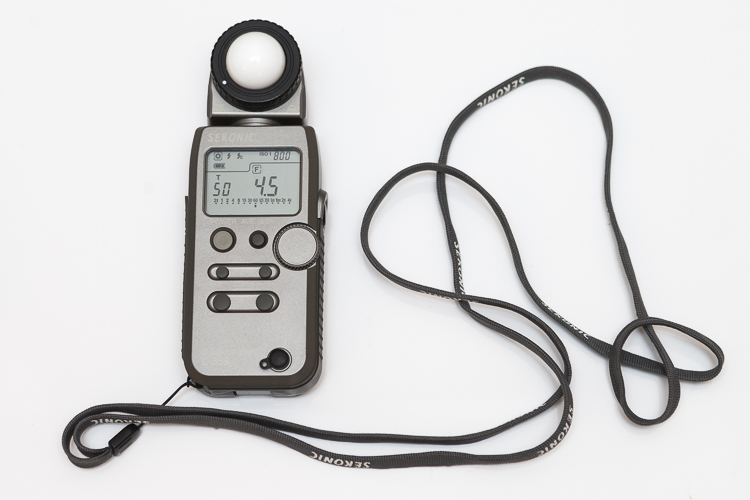
This is an external light meter. It's a Sekonic L-358, and is able to meter ambient light but also meter flash.

This is an external light meter. It’s a Sekonic L-358, and is able to meter ambient or natural light as well as flash.

Summary and application

Now that you know what your light meter is doing, and how to correct it with exposure compensation, you are on your way to getting more consistent and correct exposures.

Before you press the shutter button next time, do consider what the tones in your scene are like. Are there lots of brighter tones, or more darker tones? If your frame has more brighter tones, the exposure compensation will need to be more on the plus side to render them correctly. However, if there are more darker tones, your exposure compensation will be more toward the minus side of your meter. If you feel there are equal amounts of bright and dark tones, you may find that you don’t need to add any compensation at all.

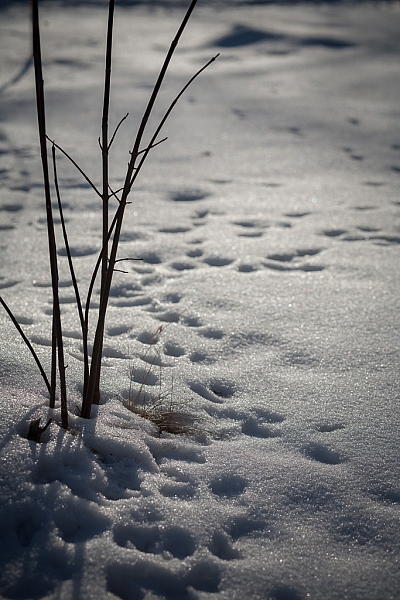
teaching-eg-028-slideshow

Snow shot at zero exposure compensation is gray, or Zone V.

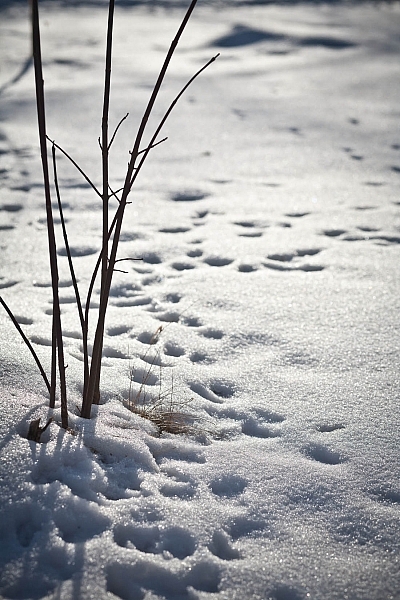
teaching-eg-028-blog1100

Snow shot at +2 is now white with detail or Zone VII.

If you’re ever unsure of how much exposure compensation to add or subtract, take a test shot at zero, or in the middle. This will help you decide the direction in which you need to go.

googletag.cmd.push(function() {
tablet_slots.push( googletag.defineSlot( “/1005424/_dPSv4_tab-all-article-bottom_(300×250)”, [300, 250], “pb-ad-78623” ).addService( googletag.pubads() ) ); } );

googletag.cmd.push(function() {
mobile_slots.push( googletag.defineSlot( “/1005424/_dPSv4_mob-all-article-bottom_(300×250)”, [300, 250], “pb-ad-78158” ).addService( googletag.pubads() ) ); } );

The post How to Use the Zone System to Learn about Metering and Exposure Compensation by Daniel Smith appeared first on Digital Photography School.


Digital Photography School
 
Comments Off on How to Use the Zone System to Learn about Metering and Exposure Compensation

Posted in Photography


An Exercise to Learn and Practice Shutter Speed at Home

13 May

Practice-shutter-speed-f11-1:60

One of the most important choices you make when taking a photograph is deciding what shutter speed to use. The shutter speed controls how much light comes into your camera, and how motion is recorded.

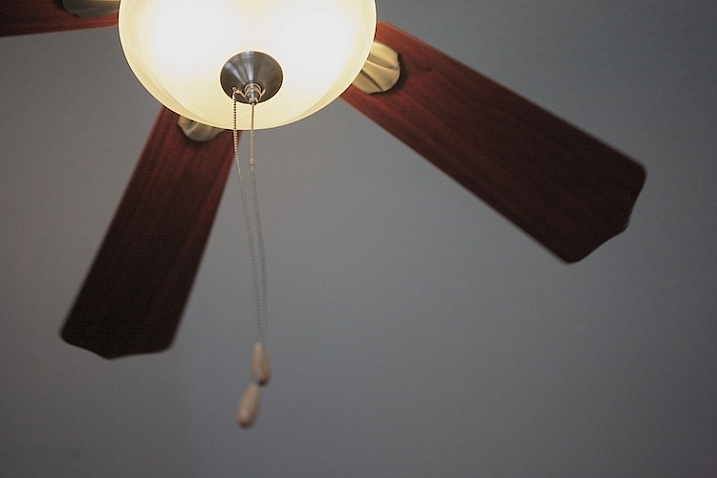
A faster shutter speed will freeze action and slower shutter speeds can create a blur. Both choices can produce great pictures. In this simple exercise that you can do at home with a ceiling fan, you will have the opportunity to practice setting your camera on different shutter speeds, and seeing how each affects motion in the image.

It’s best to do this during the day when there is some ambient light in the room. You might choose to shoot this with the ceiling lamp on or off, either will work. Or you might try both ways to see which you like better.

To get started, set your camera on shutter priority, or manual mode, and do a few test shots to check your exposure. Put your camera on a tripod for the most consistent results. I also chose to focus on the silver plate on the lamp of the ceiling fan to create consistency. It can be tricky in an exercise like this because your auto focus can get confused and focus on the ceiling, the blades, or the chain cord. (Note: you might try back button focus here, or use autofocus and then lock it or switch to manual).

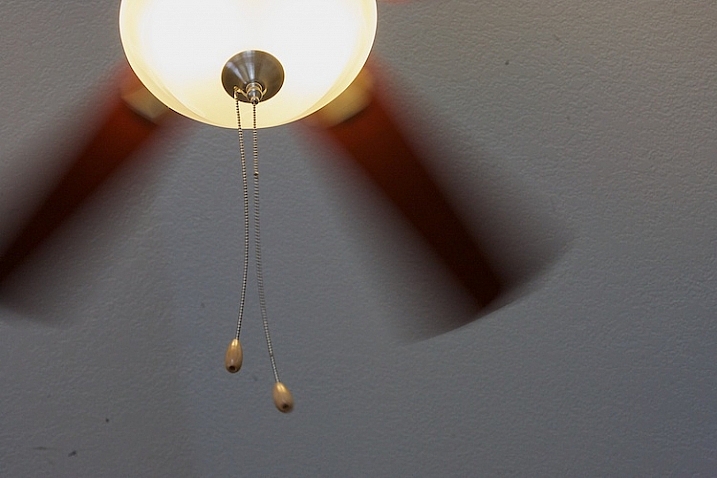
Practice shutter speed using a ceiling fan/

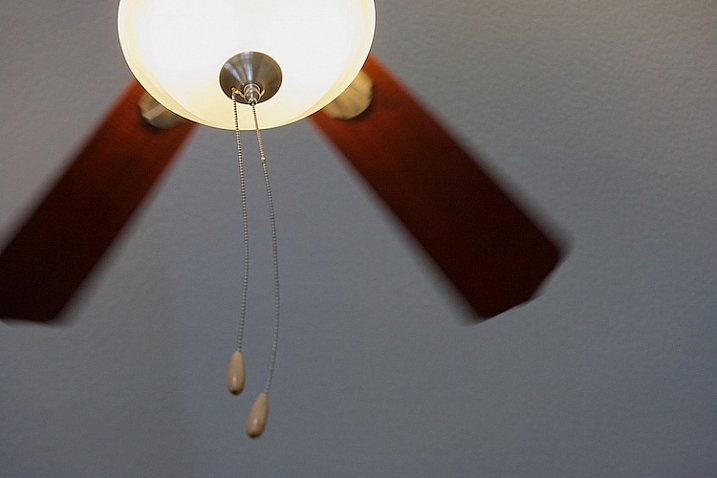
f/8 at 1/125th, ISO 1600.

Start your series at 1/125th of a second. Notice that I focused on the metal plate on the lamp, and how sharp it is. The blurring in the fan blades is caused by motion.  Also look at the chain. It’s sharp toward the lamp, but the focus gradually falls off as it gets toward the pulls.

Now slow your shutter speed down to 1/60th, and see what happens. If you are shooting in manual mode, remember that when you change your shutter speed, you must also change your aperture or ISO too.

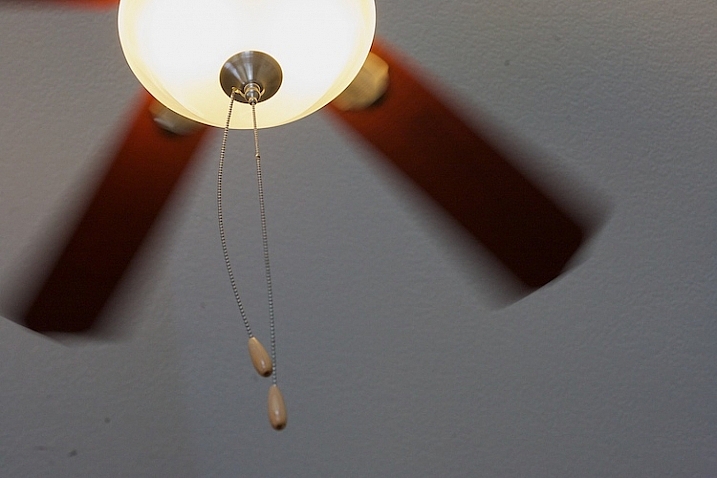
Practice shutter speed using a ceiling fan/

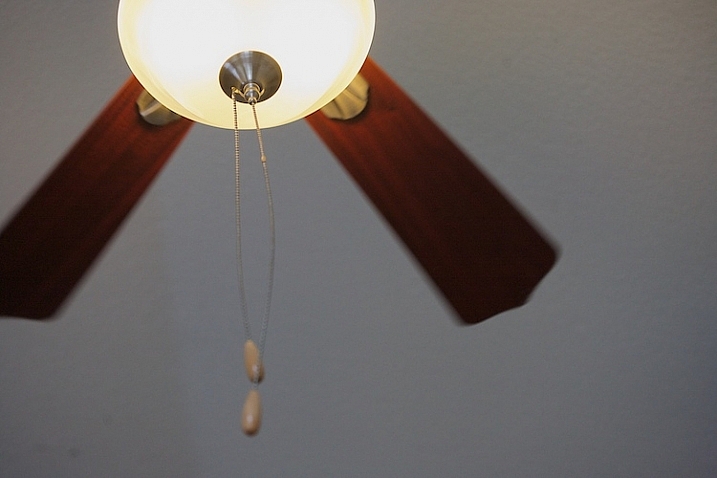
f/11 at 1/60th, ISO 1600.

Notice the blur in the blades at 1/60th. Next, look closely and you can also see that the pull chains show some movement. The depth of field is deeper as well, see how much is in focus between the metal plate on the lamp and the pulls.

Now, slow it down a little bit more.

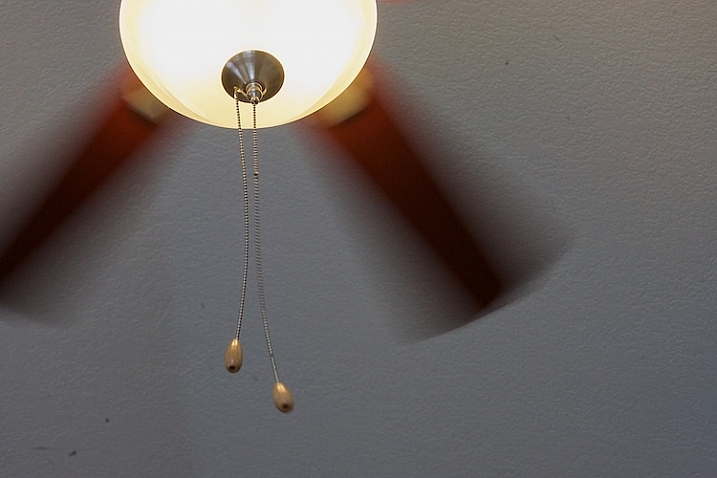
Practice shutter speed using a ceiling fan/

f/13 at 1/40th, ISO 1600.

What do you notice at 1/40th? The blades seem to be moving faster because of the blur, but nothing has changed with the fan. There is a greater depth of field also, much of the pull chain is in focus now.

Let’s slow it down even more.

Practice shutter speed using a ceiling fan/

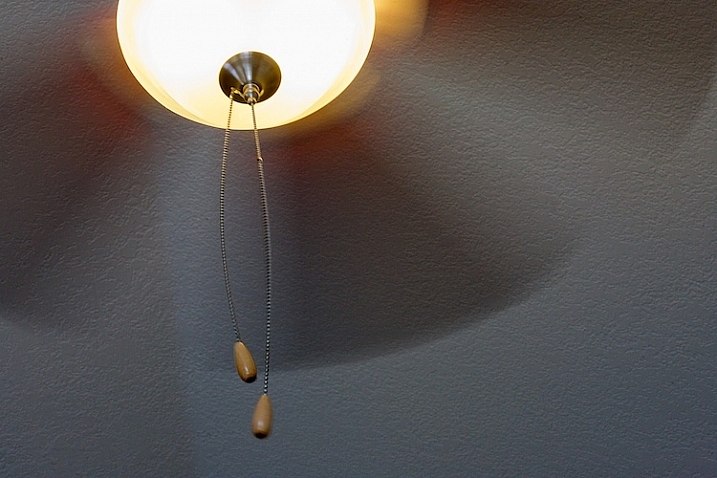
f/20 at 1/4, ISO 1600.

Now, at 1/20th, the blades have taken on a new look and the chain is more in focus. Let’s slow it down a little more and see what happens.

Practice shutter speed using a ceiling fan/

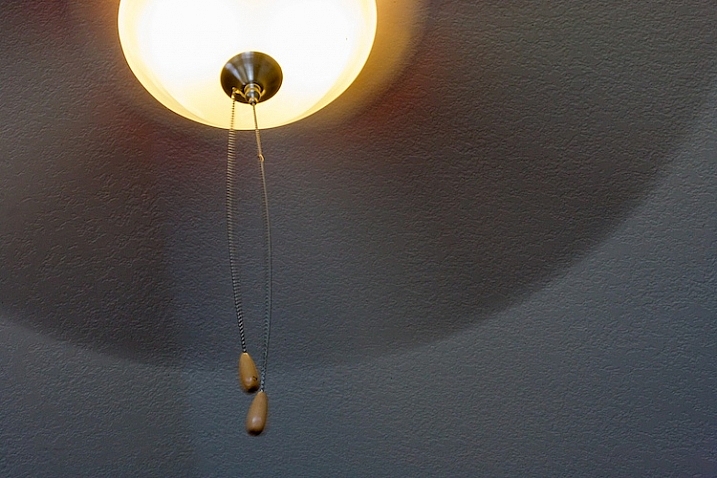
f/32 at 1/8th, ISO 1600.

At 1/8th of a second, the blades are almost indistinguishable, and note that the metal plate is not as sharp as in the other photos. Ceiling fans are seldom perfectly still when the fans are moving and you can see slight movement in the metal plate.

Now, let’s go back and speed things up. Try a shutter speed of 1/250th and see what happens.

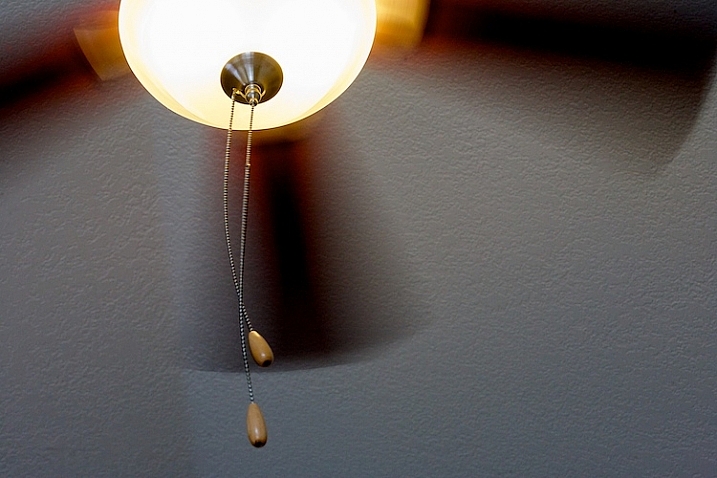
Practice shutter speed using a ceiling fan/

f/5.6 at 1/250th, ISO 1600.

Compare this to the first image, which was shot at 1/125th of a second. You can see that the blades still have motion, and notice the difference in the depth of field. At f/5.6, the chain is considerably more out of focus than at f/32.

Next, change your shutter speed to 1/500th.

Practice shutter speed using a ceiling fan/

f/4 at 1/500th, ISO 1600.

At 1/500th, the fan blades show motion. Now try 1/1000th.

Practice shutter speed using a ceiling fan/

f/2.8 at 1/1000th, ISO 1600.

At 1/1000th of a second, the fan blades are frozen. It’s almost as if the fan isn’t turning. Notice the difference in the depth of field. The pull chain is out of focus due to the narrow depth of field at f/2.8.

Here are a couple of real world examples of how you might apply this to your photography:

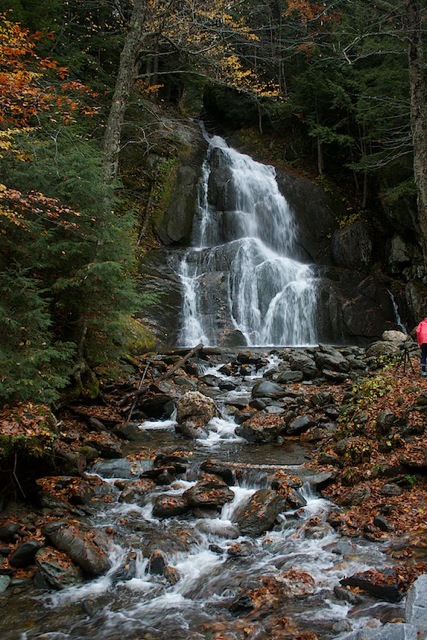
Shutter speed 1/30th - the water is partly frozen.

Shutter speed 1/30th – the water is partly frozen.

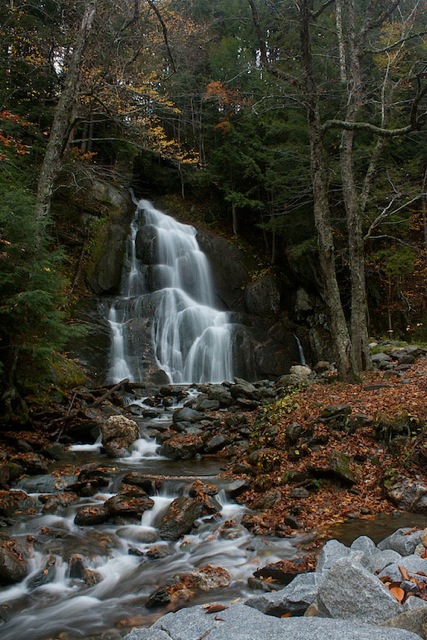
Shutter speed 1/2 second the water becomes silky and smooth

Shutter speed 1/2 second the water becomes silky smooth

You can also do this exercise by keeping your aperture consistent and changing your ISO. So what did you learn by doing this exercise? Give it a try and share your photos and what you learned below.

googletag.cmd.push(function() {
tablet_slots.push( googletag.defineSlot( “/1005424/_dPSv4_tab-all-article-bottom_(300×250)”, [300, 250], “pb-ad-78623” ).addService( googletag.pubads() ) ); } );

googletag.cmd.push(function() {
mobile_slots.push( googletag.defineSlot( “/1005424/_dPSv4_mob-all-article-bottom_(300×250)”, [300, 250], “pb-ad-78158” ).addService( googletag.pubads() ) ); } );

The post An Exercise to Learn and Practice Shutter Speed at Home by Vickie Lewis appeared first on Digital Photography School.


Digital Photography School
 
Comments Off on An Exercise to Learn and Practice Shutter Speed at Home

Posted in Photography


4 Steps on How to Read Images and Learn to Replicate the Results

18 Apr

Earlier, I wrote an article called: why asking what camera settings were used may not be as helpful as you think, and in it, I touched on the concept of reading an image.

Learning to read images – from a technical perspective and not a conceptual one – is something that I believe all photographers must be able to do, as it allows you to get a rough guide on what settings may have been used to create an image. They won’t be the exact settings; but you’re most likely not going to have the exact same lighting environment as what a particular photo was taken in.

Shallow Apeture 1

A wide aperture was used her to achieve a shallow depth of field.

Dive in to read an image

To begin reading images you must have, at the very least, a good understanding of aperture, shutter speed and to a lesser extent, ISO. You’ll want to understand how these things affect the image in different ways. For example, if you saw an image with a lot of motion blur, you would know from your understanding of shutter speed that a slower shutter speed was used.

As you become more proficient with lighting and off-camera flash, you can even read how the subject was lit with artificial lighting, and begin to replicate how it was done. But don’t worry! This article will be focussing on the three major aspects of photography exposure (aperture, shutter speed and ISO) to help you begin your journey to reading images.

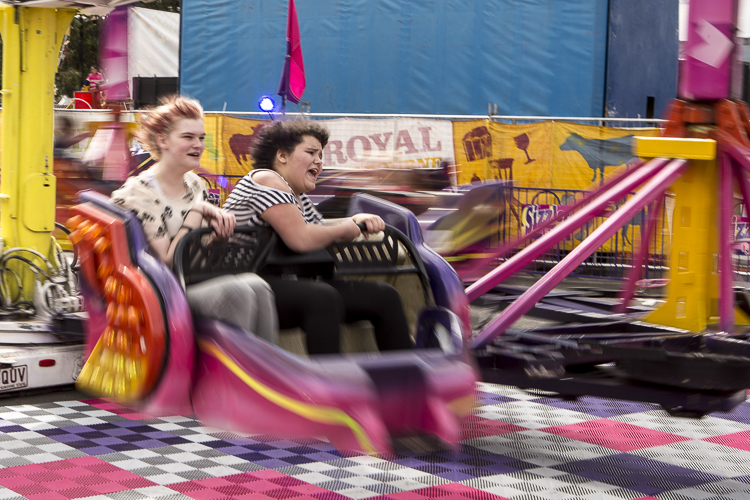
Slow Shutter 2

What shutter speed was used here – a fast or slow one?

Step 1: Shutter Speed – Fast or Slow?

I find that determining whether a fast or slow shutter speed was used first, can help greatly when it comes to determining aperture and ISO later. The first thing you will want to ask yourself when assessing shutter speed is; was it fast or slow? This can be decided by how much, or how little, motion blur is present in the image, as that is what shutter speed controls.

If everything in the image is pin sharp, and there is absolutely no motion blur at all, then a fast shutter speed would have been used. However, if there is a lot of motion blur, then a slow shutter speed was used.
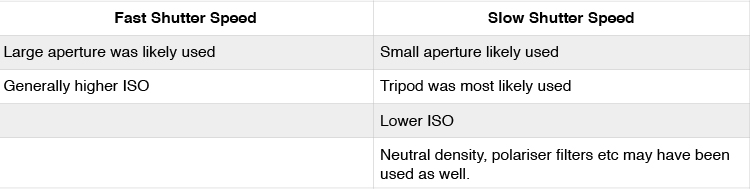
Here are some points that you can take out of knowing if the shutter speed is fast or slow:

Shutter Speed Table

But how fast is a fast shutter speed, and at what point does the shutter speed become slow? To answer this, think of your shutter speed in relation to your subject’s speed. For example, when photographing sports or other fast action, you may find using a shutter speed of 1/1000th is required to freeze your subjects. This is because your subjects are moving quite fast. However, if you were to photograph people walking down the street, you would not need the same shutter speed, as your subjects are not moving as fast.

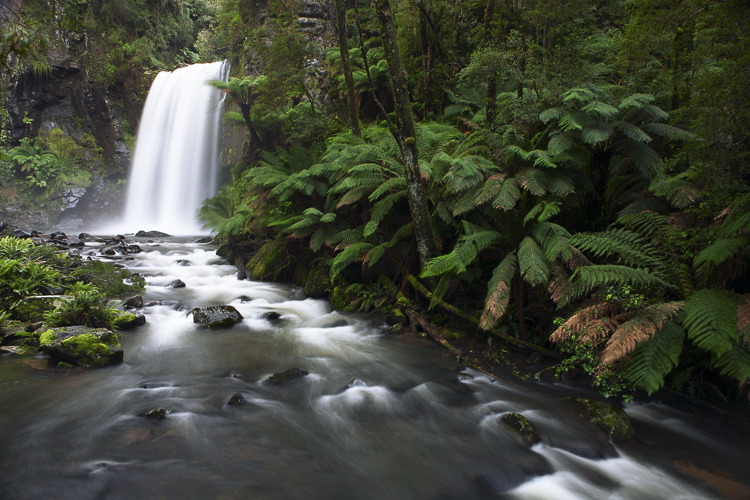
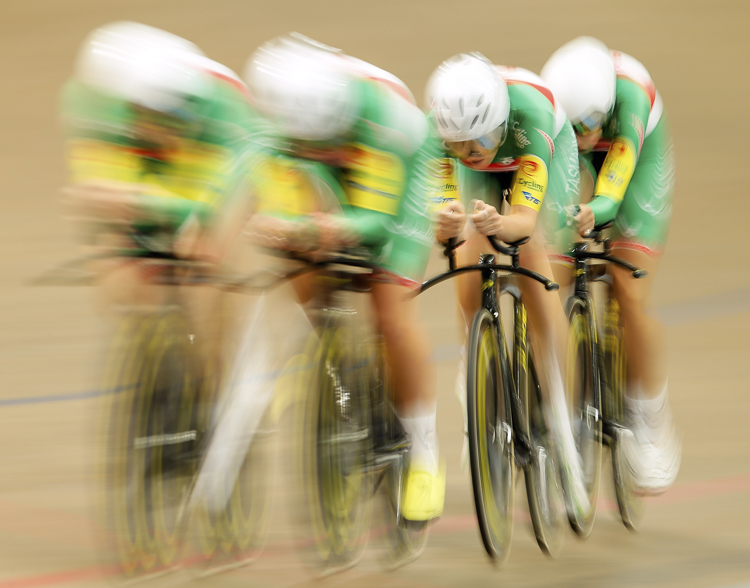
Below are examples of slow and fast shutter speeds. Notice the presence of motion blur in the images where a slower shutter speed was used, but action is frozen with a fast shutter speed. In images that will use a slow shutter speed, it is often recommended you use a tripod to stabilize your camera, and prevent camera shake.

What isn’t important is knowing the exact shutter speed; that is something that you will be able to experiment with to get the results you want. All you are doing here is identifying if a slow or fast shutter speed was used, to give you a starting point.

Slow Shutter 3

A tripod was used when taking this photograph to prevent blur that can be caused by camera shake. The shutter speed was 3.2 seconds.

Slow Shutter 4

The reason there is one rider sharper than the others in this frame, is because even though all riders are moving at the same speed, the rider who is sharpest is moving slower, relative to where I was positioned taking this photograph. The shutter speed used here was 1/6th.

Fast Shutter 2

Notice how everything is sharp in this image, and there is no blur? This means that a fast shutter speed was used (in this case 1/2000th), and because the subject is quite fast, a faster than normal shutter speed was needed.

Fast Shutter 1

Again, notice how everything is sharp and there is no blur? This means that a fast shutter speed (1/1250th) was once again used.

Step 2: Aperture – Large or Small?

In step one I mentioned that determining whether a fast or slow shutter speed was used first, can greatly help you in determining the aperture. Here’s why. If you are familiar with the exposure triangle you will know that in nearly all cases when a fast shutter speed is used, it is associated with a large aperture (small f-number). Conversely, the slower the shutter speed, the smaller the aperture becomes. So if you see a photo that has motion blur present, it is highly likely that the photographer used a smaller aperture; or if you see a photo where moving objects are frozen, the photographer has most likely used a larger aperture to enable a faster shutter speed.

Another way you can determine the aperture is by looking for bokeh, or subject isolation. The more bokeh that is present in the image, the more the subject is isolated. To achieve this, the photographer would use a larger aperture. On the other hand, if everything in the image is in focus, then the photographer employed a smaller aperture to increase their depth of field.

Small Aperture 1

Everything in this photograph is in focus, which would mean that a small aperture (larger f-number; like f/11 in this image) was used to increase the depth of field.

Shallow Aperture 2

Notice how the background in this image is blurred out a lot, and the subject is very isolated? This is a sign that a larger aperture (small f-number; in this example f/3.5) was used to decrease the depth of field.

Step 3: ISO

ISO is one of the parameters that isn’t so important in determining what settings may have been used when reading an image. Use ISO to get the settings that you need to use, to create the shot you want. For example, if you want to use the slowest shutter speed you can, set your camera’s ISO to its lowest setting. Conversely, if you want to use a very fast shutter speed, you may find that you have to increase your ISO.

Step 4: Focal Length

Focal length is something that is often overlooked in images, but it is a very important element indeed. It does more than simply allow a photograph to add more in the frame, or zoom in closer. Different focal lengths evoke different emotions in the viewer when looking at an image. For instance, if a wide angle lens was used, it places the viewer in the scene and can make them feel like they were there; whereas a longer focal length places the viewer further away from the subject, and evokes a more voyeur emotion.

The great thing about focal length is that it is quite easy to distinguish approximately which one was used. To make it simpler, breaking down focal lengths in to three groups can help greatly.

  • Wide: <50mm (i.e. 14-50mm on full frame, 10-35mm on cropped or APS-C sensor)
  • Normal: ~50mm-85mm (35-56mm cropped sensor)
  • Telephoto: 85mm+ (130mm+ on cropped sensor)

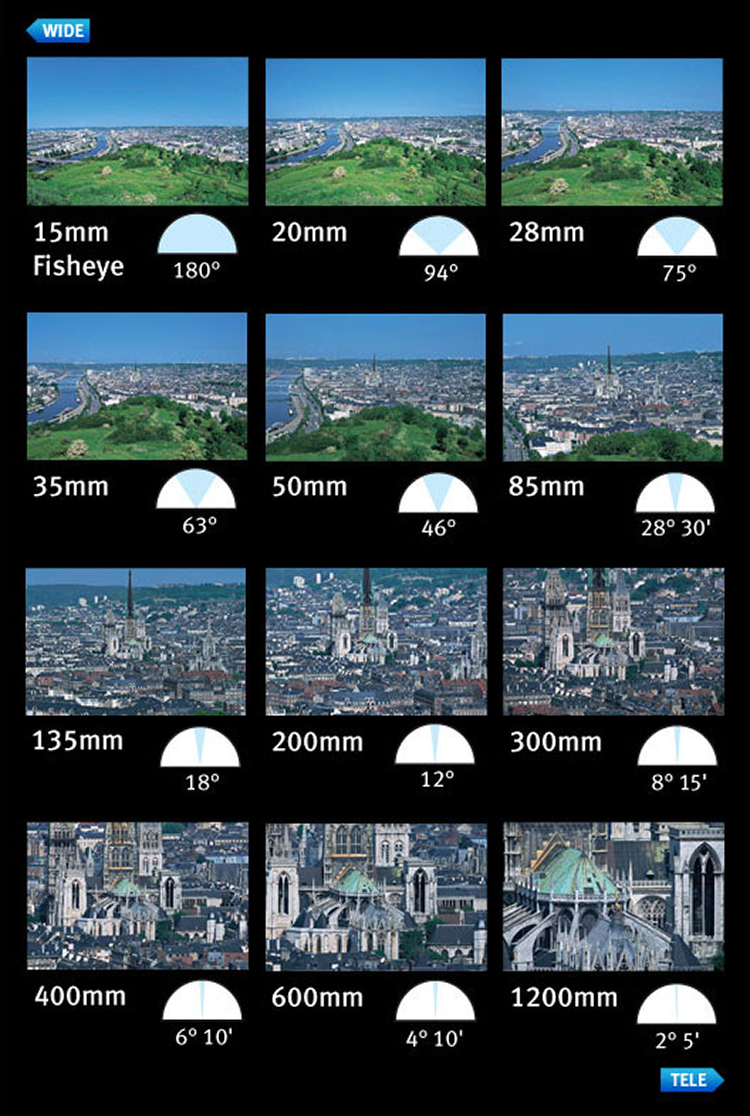
You can use the presence of compression to distinguish the different types of focal length. A wide angle lens accentuates the foreground and increases distances in the frame, as well as having a very wide field of view. This effect increases as the focal length decreases – or gets wider. On the other end, a telephoto lens will give you much more compression, and make distances in the frame look shorter. Their field of view will decrease, and the affects of aperture, particularly larger apertures, will be more pronounced. That’s why f/2.8 at 16mm looks different than f/2.8 at 200mm, if your subject is kept the same size in the frame.

Here is a small table with examples of the same scene photographed from the same point, but with different focal lengths.

Image courtesy of Canon

Image courtesy of Canon

Now you have had a quick introduction on how to read images. Remember, knowing the exact settings is not important, but knowing how to get an approximate guess is better than not knowing anything at all! With experience, you will become more proficient at reading images, and will be able to guess with more precision. The more you understand aperture, shutter speed, and ISO, the better you will be at reading images.

Along the way, you will also learn that different genres within photography use a different set of settings. For example, most landscape photographers will use smaller apertures, lower ISOs, and slower shutter speeds; whereas sports shooters for instance, will generally use higher ISOs, larger apertures, and faster shutter speeds.

googletag.cmd.push(function() {
tablet_slots.push( googletag.defineSlot( “/1005424/_dPSv4_tab-all-article-bottom_(300×250)”, [300, 250], “pb-ad-78623” ).addService( googletag.pubads() ) ); } );

googletag.cmd.push(function() {
mobile_slots.push( googletag.defineSlot( “/1005424/_dPSv4_mob-all-article-bottom_(300×250)”, [300, 250], “pb-ad-78158” ).addService( googletag.pubads() ) ); } );

The post 4 Steps on How to Read Images and Learn to Replicate the Results by Daniel Smith appeared first on Digital Photography School.


Digital Photography School
 
Comments Off on 4 Steps on How to Read Images and Learn to Replicate the Results

Posted in Photography