RSS
 

Posts Tagged ‘Landscape’

5 Tips for Setting the Focus in Your Landscape Photography

18 Jul

In many types of photography the question of where you should set your focus is pretty simple. For example, in portrait photography, there is one simple rule: focus on the eyes. When the eyes aren’t on the same plane of focus, focus on the near eye. End of story.

It is pretty simple with other types of photography as well. In wildlife photography you focus on the animal. In fact, in any type of photography where there is a clear subject, you always focus on that subject. That’s not to say it is always easy, but at least it isn’t difficult to figure out.
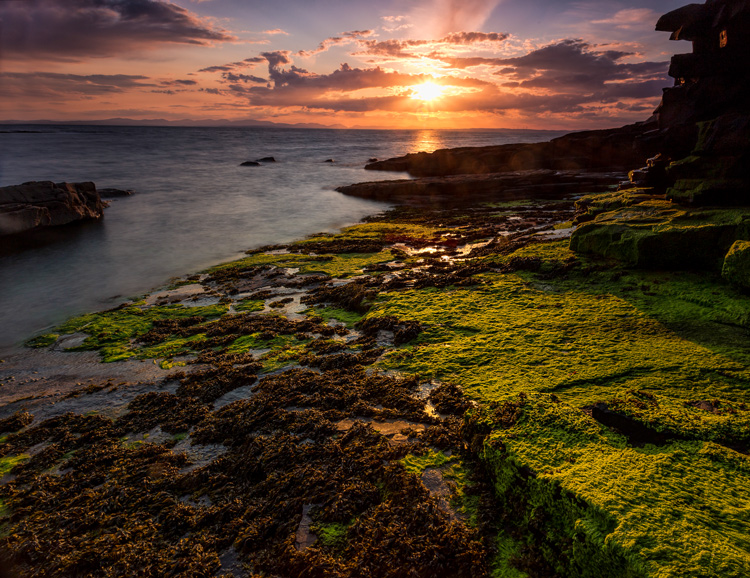
Mullaghmore

Foreground sharpness is paramount in many landscape photos.

But what about landscape photography where you are generally capturing more of a scene than a solitary subject? Where do you focus to ensure that everything in the scene is as sharp as possible? The answer isn’t always so clear. Therefore, in this article, we’ll cover some tips for helping you know where to set the focus.

Tip 1: Don’t Just Set the Focus at Infinity

Again, oftentimes in landscape photography, you are trying to capture a scene rather than a solitary thing. Many times, the scene you are trying to capture is far away from you. Most lenses have a range of focus values, and once you get beyond a certain distance (often 20-30 feet, or 8-10 meters) the focus is set at infinity. Everything beyond that point will just be infinity. Therefore, if you are taking a picture where most things in the frame are far away, it might seem that you should just set the focus at infinity. If you are using autofocus (and most of us are), you might be inclined to set the focus using something that is very far away from you.

If everything in the frame is truly at infinity, then setting the focus at its maximum distance is not a horrible idea. If there is nothing close to you, then there is just no need to do anything else, you don’t need to overly complicate things. But more commonly there are aspects of the scene that are closer to you than infinity. Where do you set the focus then?
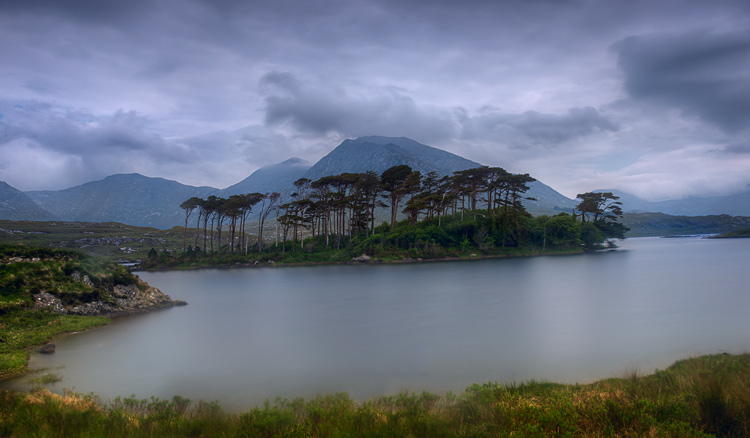
Derryclare

You can get into hyperfocal distance (we’ll talk more about that in a minute) and make this as technical as you want. But often your time is precious when you’re out shooting. The light is changing and things are moving. You can get a pretty good sense of things without resorting to calculations. As a result, consider this rule of thumb: set the focus at infinity and then just turn it back a little bit. The obvious question is what is, how do you define a little bit, and I’m afraid I don’t have a good answer for you. It will vary from lens to lens, but will usually be about a 5-10° turn or just to the highest distance number printed on the lens (if your lens has these numbers).
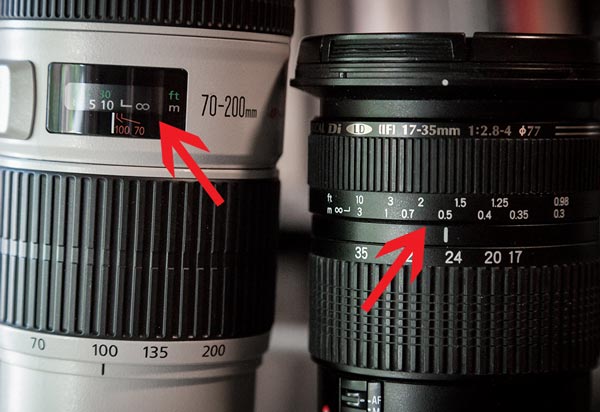
focus-ring-distance-600px

Why would you want to do that? Because of the depth of field that will be in your picture (more on depth of field below). Since you are taking an outdoor photo, you will probably not be shooting wide open, or even with a large aperture. So, there will likely be some depth depth of field involved. It doesn’t necessarily have to be a large depth of field, but the point is that it gives you some leeway. By pulling the focus forward, that leeway will still get everything out to infinity in focus. It will also get things a little closer in focus as well.

Tip 2: Try Focusing a Third of the Way into the Picture

Many pictures are ruined because the foreground is not sharp. It happens all the time. Therefore, if you have something in your scene that is close to the camera, focus on it. If the ground is prominent in your picture, set your focus close to you. Make sure that foreground is in focus. Often you will set the focus only a few feet in front of you.

But wait a second, you might ask, what about my background? Won’t it be out of focus or blurry? Probably not. If you’re using your wide-angle lens (and if you are taking a outdoor photo that has a discrete foreground, then you probably are) you will have a wide depth of field, even at moderate to large apertures.
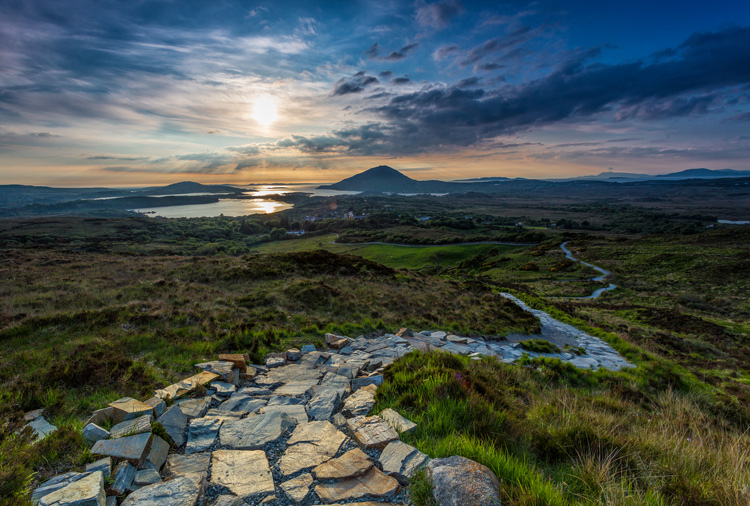
Connemara

A sharp foregound focus furthers the viewer’s sense that they can walk into the picture.

Tip 3: Focus on the Subject Matter

Let’s not lose sight of the obvious though. When you have a definite subject or center of interest in your photo, just focus on that. It is the most important part of your picture and you absolutely need it in focus. Don’t worry about your foreground, don’t worry about your background. Just make sure the subject is in focus. Frankly, if there is a little fall-off in sharpness from your subject, that will probably not be such a bad thing.
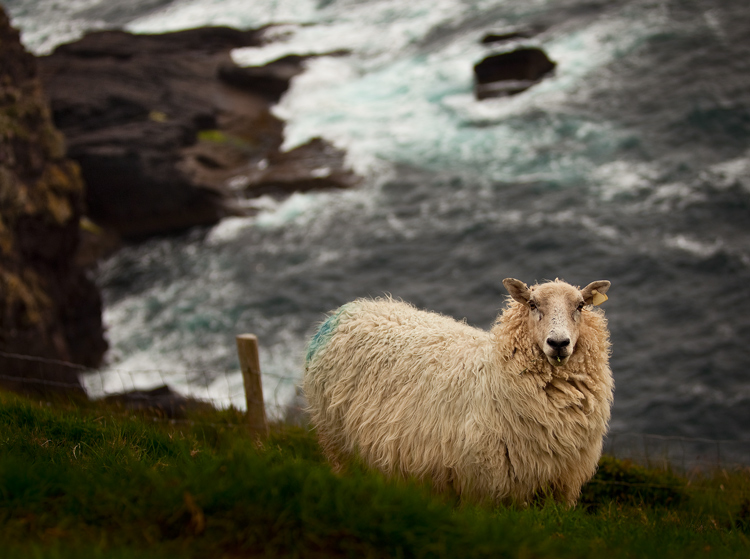
Dingle-Sheep

Sometimes you just want a definite subject in focus, and having the background start to blur out is just fine, as in this image of a sheep.

Tip 4: Watch the Aperture

There are no free lunches in photography. You probably already know that by using a smaller aperture to get a larger depth of field, it will cost you light. The smaller aperture lets in less light so you will have to use a longer shutter speed (risking blur if you aren’t using a tripod) or raise the ISO (risking digital noise in your picture). But the smaller aperture will also lead to something called diffraction, particularly in cameras with smaller digital sensors. Therefore, just using the smallest aperture possible isn’t always the answer. You cannot just set your focus anywhere and rely on a super-wide depth of field to save you.

There are two ways around this issue though, which we’ll talk about next.
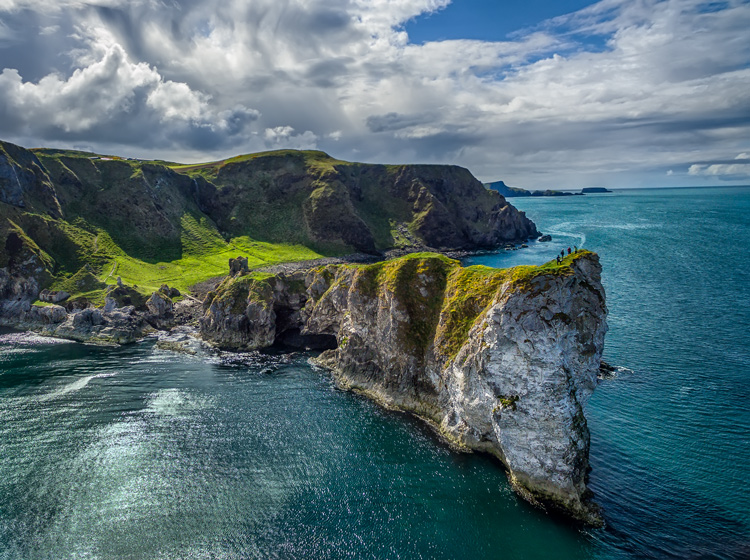
Kinbane-Head

With everything in the shot at a distance of infinity (30 feet or more), I did not need a wide depth of field to keep everything in focus.

Tip 5: Know Your Hyperfocal Distance

Hyperfocal distance is just a fancy name for determining how close you can set your focus, and still keep your background acceptably sharp. There are apps and calculators that will tell you this distance depending on your aperture, sensor size, and focal length. For a full explanation of hyperfocal distance along with some charts and links to apps that will calculate it for you, check out How to Find and Use Hyperfocal Distance for Sharp Backgrounds .

An example will illustrate the point made above about backgrounds tending to remain sharp when you are using wide angle lenses. If you’re using a 16mm lens on a full frame camera, and shooting at f/11, your hyperfocal distance is only 2.5 feet. That means you can set the focus on a point just in front of you, and keep everything behind that point sharp.

Knowing the hyperfocal distance will often liberate you to set the focus point quite close, in order to maintain sharp foregrounds in your picture. It also means you often don’t need to use the smallest aperture your lens offers, so you can avoid the effects of diffraction.
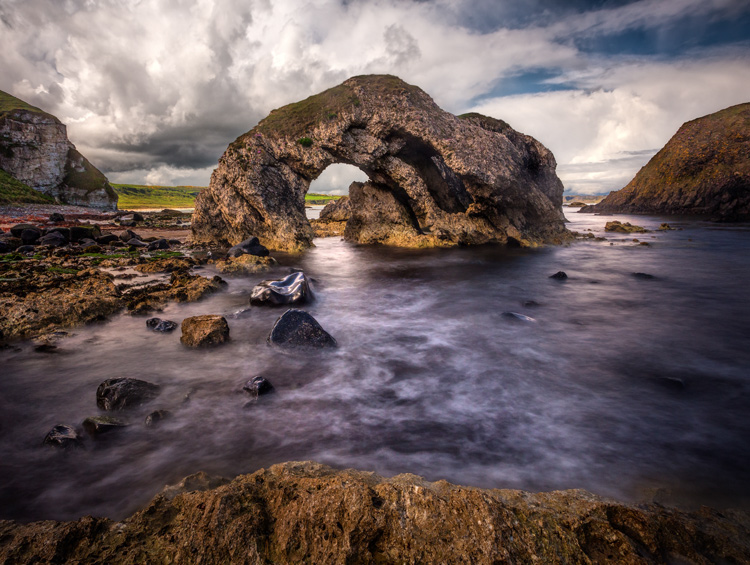
Ballintoy-Arch

Tip 6: Consider Focus Stacking

When the methods above won’t work for you, or you just need to make sure absolutely everything in the photo from front to back is tack sharp, you may want to consider focus stacking. Here you take multiple pictures of the same scene using different focus points.

Start by setting the aperture of your lens where it is sharpest (also called the sweet spot – if you don’t know, that is usually in the range of f/5.6 – f/8). Take a shot with the focus set close to you, then repeat the process, gradually setting the focus point farther and farther away with each shot. Later you blend your pictures in Photoshop (for more about how to do that check out Maximizing Depth of Field Without Diffraction).

This method is not a cure-all. It obviously won’t work with moving subject matter. In addition, it can be tedious, and you risk slightly moving the camera since you have to twist the focus ring between shots. Still it can be a powerful tool for maintaining focus and sharpness throughout your entire picture.

Setting the Focus Summary

No rule is going to cover every situation when it comes to focus. As with many aspects of photography, you’ll just have to use your own judgment in the field. Hopefully, as you do so, these tips will help you nail the focus and keep the picture tack sharp where it matters.

This week we are doing a series of articles to help you do better nature photography. See previous articles here:

  • 3 Habits Every Outdoor Photographer Should Develop to Avoid Missing Shots
  • 5 Tips for Better Nature Photography
  • 27 Serene Images of the Natural World
  • Weekly Photography Challenge – Nature
  • 10 Ideas for Photographing Nature in your Backyard
  • 6 Tips for Capturing Character and Personality in Wildlife Photography

googletag.cmd.push(function() {
tablet_slots.push( googletag.defineSlot( “/1005424/_dPSv4_tab-all-article-bottom_(300×250)”, [300, 250], “pb-ad-78623” ).addService( googletag.pubads() ) ); } );

googletag.cmd.push(function() {
mobile_slots.push( googletag.defineSlot( “/1005424/_dPSv4_mob-all-article-bottom_(300×250)”, [300, 250], “pb-ad-78158” ).addService( googletag.pubads() ) ); } );

The post 5 Tips for Setting the Focus in Your Landscape Photography by Jim Hamel appeared first on Digital Photography School.

Digital Photography School

 
Comments Off on 5 Tips for Setting the Focus in Your Landscape Photography

Posted in Photography


DPReview is partnering with USA Landscape Photographer of the Year 2016

16 Jul

$ (document).ready(function() { SampleGalleryV2({“containerId”:”embeddedSampleGallery_3908548057″,”galleryId”:”3908548057″,”isEmbeddedWidget”:true,”standalone”:false,”selectedImageIndex”:0,”startInCommentsView”:false,”isMobile”:false}) });

USA Landscape Photographer of the Year was founded in 2013 by Charlie Waite, one of the world’s most respected landscape photographers, and this year, the competition is bigger than ever. With a top prize of $ 15,000, the contest spans five main categories, ‘Environmental Value’, ‘My USA’, ‘Black & White’, ‘Classic View’, and ‘Urban’. 

In addition to these five categories, DPReview is partnering with the competition to create a new award – ‘Life in the Landscape’, which will be judged by DPReview’s editors and writers. An additional special award, ‘Wild Landscape’ is sponsored by Future Publishing.

The competition is divided into two main classes –  the USA Landscape Photographer of the Year Award and the Young USA Landscape Photographer of the Year Award. To enter Young USA Landscape Photographer of the Year, you must be 18 or under on the closing date of September 15, 2016. There are 7 categories within each of the two classes and up to 20 images may be entered across some or all of these categories, and photographers can enter the same image in more than one category and / or special award.

To enter a single image costs $ 10, while $ 30 allows you to enter up to 5 images, and $ 45 allows you to enter up to 20 images. Entrants for the Young USA Photographer of the Year Award pay a flat fee of $ 10 for up to 20 images.

For more information about the USA Landscape Photographer of the Year Award, visit www.usapoty.com.

Articles: Digital Photography Review (dpreview.com)

 
Comments Off on DPReview is partnering with USA Landscape Photographer of the Year 2016

Posted in Uncategorized


DEAL: How to Take Your Landscape Photography to the Next Level

12 Jul

It’s Day 6 of our 7 Day Mid Year Sale, and for the next 24 hours you can grab a copy of The Complete Photography Tutorial Ebook by Richard Schneider at 61% off.

NewImage

Richard’s guide normally sells for US$ 99. But he’s made it available to the dPS community for just US$ 39, today only.

At over 250 pages, this may be the most in-depth ebook on how to capture amazing photography anywhere whether it be countryside landscapes or cityscapes!

It also comes with bonus Lightroom Presets to help you make your photos pop.

Richard has worked as a photography educator for over 10 years, as well as a pro landscape photographer.

He wrote The Complete Photography Tutorial Ebook to help people learn the core concepts of photography quickly and avoid the same mistakes he made.

Now you can learn everything you need to get started and capture your own stunning photos.

Grab your copy today for just US$ 39 – 61% off.

But remember this offer only lasts for 24 hours.

googletag.cmd.push(function() {
tablet_slots.push( googletag.defineSlot( “/1005424/_dPSv4_tab-all-article-bottom_(300×250)”, [300, 250], “pb-ad-78623” ).addService( googletag.pubads() ) ); } );

googletag.cmd.push(function() {
mobile_slots.push( googletag.defineSlot( “/1005424/_dPSv4_mob-all-article-bottom_(300×250)”, [300, 250], “pb-ad-78158” ).addService( googletag.pubads() ) ); } );

The post DEAL: How to Take Your Landscape Photography to the Next Level by Darren Rowse appeared first on Digital Photography School.

Digital Photography School

 
Comments Off on DEAL: How to Take Your Landscape Photography to the Next Level

Posted in Photography


Deal 3: Save $401 on The Complete Landscape Photography Pack

10 Jul

It’s Day 3 of our Summer Sale and if you’re interested in the art of landscape photography – this offer is for you!

Day 03 fb ad
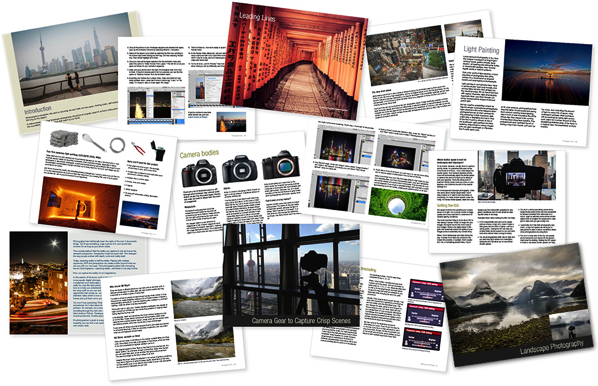
InFocus Deals are offering dPS subscribers their Complete Landscape Photography Pack with a massive 89% discount!

For US$ 49 you’ll get US$ 450 worth of learning materials in The Complete Landscape Photography Pack – a mammoth savings of US$ 401!

Take a look at what’s in this amazing Landscape Photography pack:

Get full details of the bundle over at the InFocus Deals Page

This bundle is huge and will help you improve your Landscape Photography for sure!

But of course, as with all our deals this week, an offer this fantastic can’t last forever.

So, don’t miss out. Lock in the unbeatable savings of US$ 401 today.

googletag.cmd.push(function() {
tablet_slots.push( googletag.defineSlot( “/1005424/_dPSv4_tab-all-article-bottom_(300×250)”, [300, 250], “pb-ad-78623” ).addService( googletag.pubads() ) ); } );

googletag.cmd.push(function() {
mobile_slots.push( googletag.defineSlot( “/1005424/_dPSv4_mob-all-article-bottom_(300×250)”, [300, 250], “pb-ad-78158” ).addService( googletag.pubads() ) ); } );

The post Deal 3: Save $ 401 on The Complete Landscape Photography Pack by Darren Rowse appeared first on Digital Photography School.


Digital Photography School

 
Comments Off on Deal 3: Save $401 on The Complete Landscape Photography Pack

Posted in Photography


Fighting the elements: Landscape photography in Antarctica

03 Jul

$ (document).ready(function() { SampleGalleryV2({“containerId”:”embeddedSampleGallery_0745152892″,”galleryId”:”0745152892″,”isEmbeddedWidget”:true,”standalone”:false,”selectedImageIndex”:0,”startInCommentsView”:false,”isMobile”:false}) });

When most photographers want a new accessory or piece of gear to help them get a shot, they can usually pick it up at a local store or online. But when you’re a photographer living in Antarctica, you have to be a little more resourceful.

Josh Swanson has spent 16 seasons working in Antarctica and photographing its landscapes. Starting with a disposable film camera and now shooting with a Nikon DSLR, Swanson has learned the ins and outs of shooting panoramas in one of the most unforgiving environments on earth.

For example, when he began running into issues with elements in his panoramas not aligning correctly, he discovered that a specialized bracket would help sort things out. He tells Resource Travel, ‘…being on the ice I was not able to get one (planes don’t regularly arrive during the winter which means no mail service). I ended up just building one. It worked for the season, although I later replaced it with a manufactured one for that had degree increments etc. for faster more accurate pans.’

As you’d expect, he’s also had trouble with LCDs freezing and battery life plummeting in the cold weather. He tells Kira Morris, a fellow photographer and former Antarctic resident, all about it over at Resource Travel. 

Articles: Digital Photography Review (dpreview.com)

 
Comments Off on Fighting the elements: Landscape photography in Antarctica

Posted in Uncategorized


4 Mistakes Beginning Landscape Photographers Make

23 Jun

Even the most famous photographers started out as beginners. Nobody is a master after day one, and learning is a big part of the process. However, nobody likes to appear as a beginner or an amateur, we all want to create images that looks more professional than just a snapshot.

There are certain mistakes that makes it very obvious that you’re a beginner, and if you want to gain some exposure online, these mistakes might turn people away. Here are four mistakes beginning landscape photographers make and you can can avoid them.

An example of when a spirit level is important to see if the horizon is straight.

An example of when a spirit level is important to see if the horizon is straight.

Mistake #1 – Uneven or crooked horizon

In many photographers’ opinions, there are few things more annoying than viewing landscape images with a uneven or crooked horizon. I see so many images with great potential that are ruined because of this issue. The reason we find this annoying is that the composition is severely weakened with an uneven horizon. Instead of using the composition to lead the eye towards the subject, the horizon will grab your attention and lead the eye straight out of the image.

I know many photographers struggle, or simply forget, to straighten it. This may be because they are so excited to capture the image that they forget to look at it (hi mom!) or because they just don’t know how. Still, straightening the horizon is a huge step towards improving your landscape photography.

Luckily there are a few simple tools to fix this problem, both in the field and in the post-production stage.

In the field: Use a spirit level

If you’ve ever done any sort of construction, this should be a tool you likely know well. But did you know it’s also a highly valued tool amongst photographers?

IMG_7941

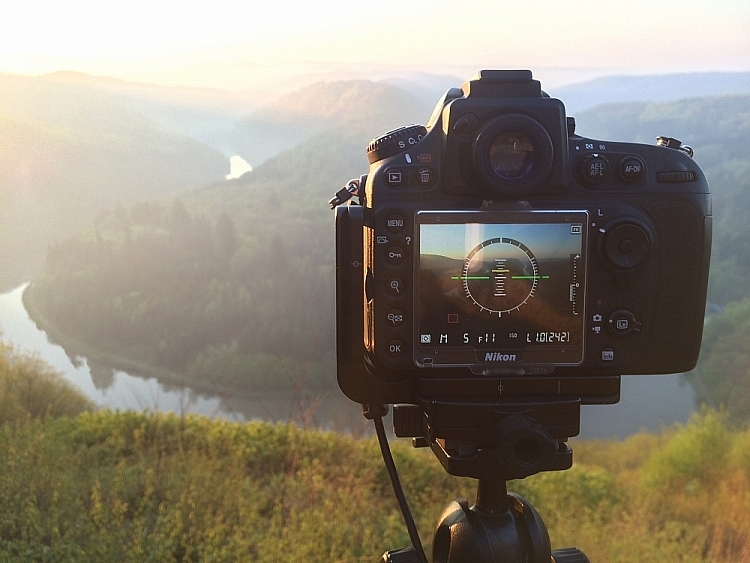
It’s becoming more common, even for mid price-range cameras, to have a built-in spirit level. Nikon names it Virtual Horizon, and Canon has the Electronic Level. Personally, I use the Virtual Horizon for all my compositions when the camera is mounted on a tripod (which is 99% of the time). This tool shows you a spirit level on the camera’s LCD screen, so you need to be working in Live View. Note: Keep in mind that using Live View will drain your battery much quicker.

Even though a Virtual Horizon or Electronic Level is becoming more common, there are still many cameras that don’t have this feature, and there are those who prefer the old school method: using a spirit or bubble level on top of the camera. This small and handy tool can be found in most photography stores, and shouldn’t cost more than a few dollars (see photo right).

In post-production: Fix it in Adobe Lightroom

spirit-level-LRIf you weren’t able to get a straight horizon in the field, there’s also a easy method to fix it in post-production.
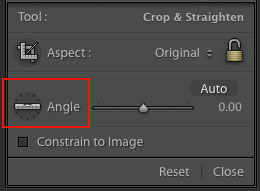
Adobe Lightroom has a great tool called Straighten. You can find this by going into Develop  > Crop Tool (the keyboard shortcut is R). You then see a spirit level followed by the word Angle (outlined in red on the right).

There are three methods to easily straighten your shot using the crop tool:

  1. Click Auto and see how Lightroom does at straightening the image. It usually does a pretty good job so try that first, you can also undo it if it’s not right and try the other methods.
  2. Select the spirit level and drag a line along the horizon. Adobe Lightroom will then automatically straighten the image according to the data you gave it.
  3. Manually insert amount of straightening you need, or drag the point back and forth until you’re pleased.

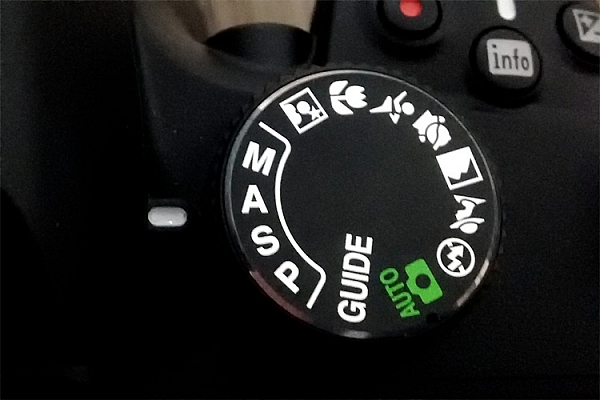
Mistake #2 – Being stuck in Automatic Mode

Mode DialWhile Automatic Mode may have its benefits for those who just bought their first camera, the sooner you stop using it the better. I always recommend mainly using Manual mode, even though both Shutter Priority and Aperture Priority are acceptable for beginners.

There are several reasons you want learn how to manually control the camera, and understand how the settings work together. Even though the camera does a decent job exposing the image correctly, it doesn’t take the image quality into consideration. In other words, the aperture and ISO will rarely be optimum if you wish to get a sharp result.

I know it may seem scary in the beginning, and I still remember how I tried to understand the basics when I was starting out, but I guarantee you it’s worth the extra effort. When you can use the ideal settings, the final result will be much better.

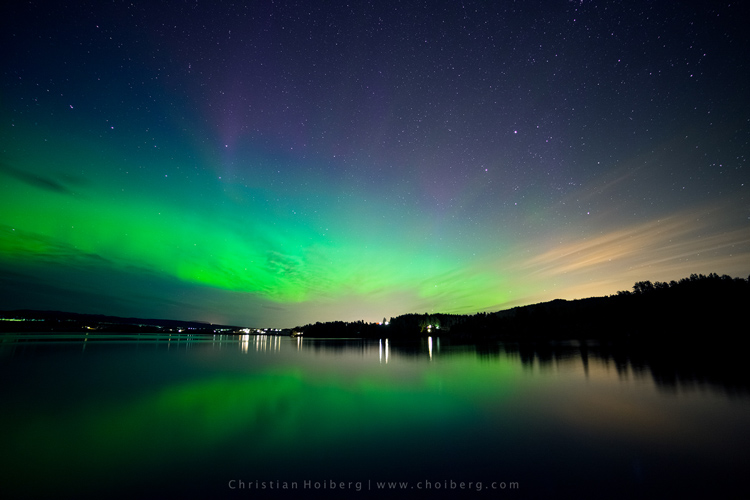
It would be nearly impossible to get an image like this in Automatic Mode

It would be nearly impossible to get an image like this in Automatic Mode

Mistake #3 – Not using a tripod

Besides the camera itself, a tripod is the most important tool for landscape photography. While some may complain that it’s not practical to travel with, trust me when I say –  there’s an ocean of opportunities when you begin using a tripod.

Not only will your images become noticeably sharper, you will also be able to do certain techniques that aren’t possible without a tripod (such as long exposure photography). Let’s look at some of the advantages of using a tripod for landscape photography:

  • You’re able to achieve longer exposures without getting blurred images.
  • You don’t need to use a high ISO to keep the image sharp. Keep the ISO low and use a longer shutter speed instead.
  • You can carefully make your composition and keep it for many images.
  • Since the camera stays in the same spot you can take multiple images and stack them later (for things like: HDR, time-lapse or techniques to remove people).
  • You’re able to keep the image straight by using Live View, and carefully adjusting the tripod.
  • The amount of motion is reduced so your images become sharper.
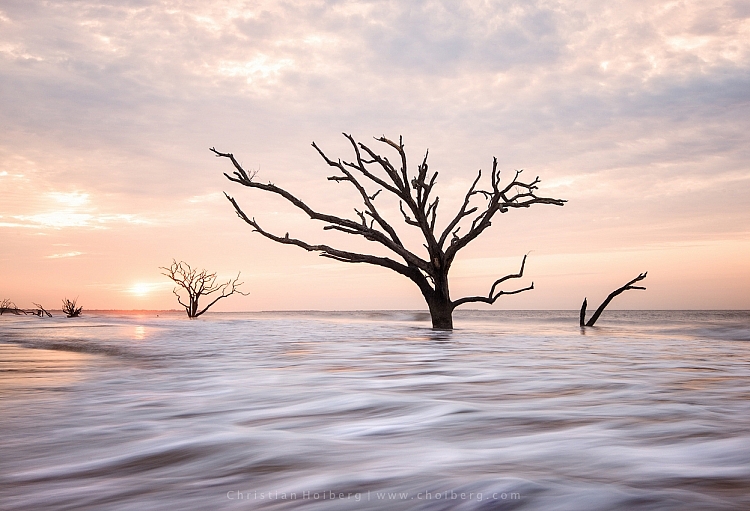
Using a tripod makes it possible to have a longer shutter speed

Using a tripod makes it possible to have a longer shutter speed to make images like this.

You don’t need to blow your wallet on the most expensive tripod on the market, but I do recommend getting something that’s more durable than the $ 20 one at the electronics shop. A solid tripod will last for a long time and might save you money in the long run. A sturdy tripod is more flexible to work with, and it’s still gonna do a good job even in windy conditions.

Mistake #4 – Shooting during the daytime

I know I might start some discussion with this point, but good landscape images are not taken during daytime. In landscape photography, light is everything.

You might have heard about the Golden Hour, at times referred to as the Photographer’s Hour. The time around sunrise and sunset is when the sun’s position in the sky is ideal for photography. The low light gives a soft and golden glow to the landscape.

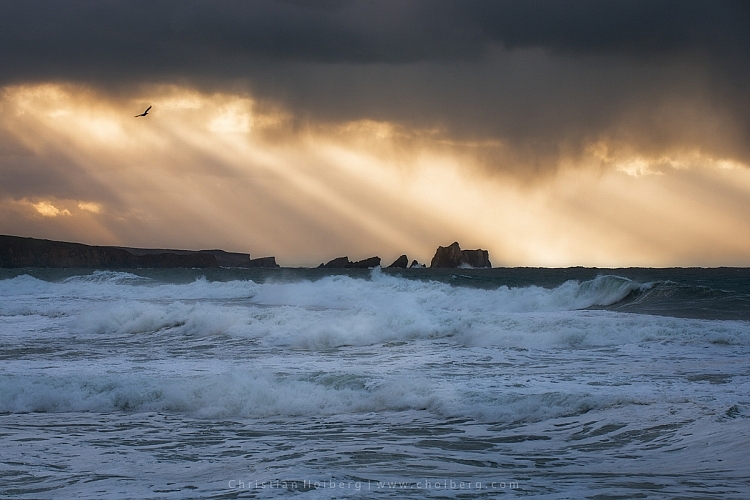
Bird flying through a stormy sunset at Liencres, Cantabria.

Bird flying through a stormy sunset at Liencres, Cantabria.

During midday the light is harsh, and very few images looks good in these conditions. If you want to improve your landscape photography you need to go out and photograph during sunrise and sunset. Daytime is perfect for scouting locations or sleeping.

As always, there’s a few exceptions to the rule:

  • Commercial travel photography: If you’re photographing for tropical hotels and resorts, they do need sunny pictures, as this is what attracts tourists.
  • Cloudy days can be okay for photographing waterfalls.

Read also: 5 Reasons Why Bad Weather Days are the Best Times for Photography and 5 Ways to Create Dramatic Landscape Photos at Midday for other ideas.

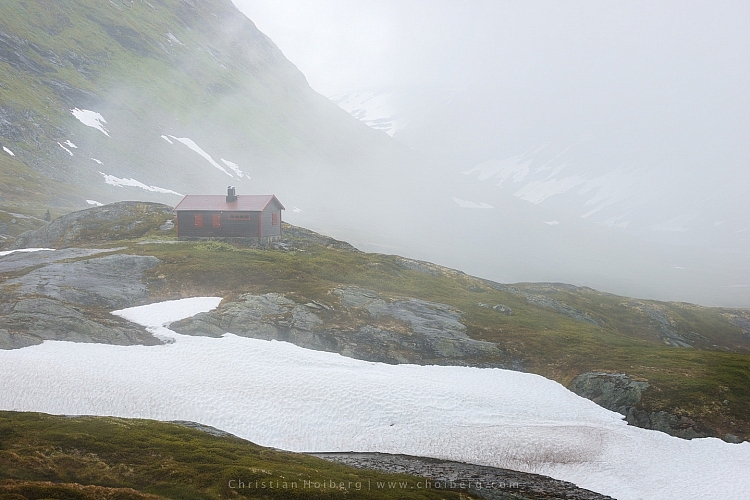
Jotunheimen-Cabin-Fog

An example of when shooting during daytime works

Are you guilty of these four landscape photography mistakes? Have you made any other mistakes that had a negative impact on your photographs? Please share your thoughts in the comments below.

googletag.cmd.push(function() {
tablet_slots.push( googletag.defineSlot( “/1005424/_dPSv4_tab-all-article-bottom_(300×250)”, [300, 250], “pb-ad-78623” ).addService( googletag.pubads() ) ); } );

googletag.cmd.push(function() {
mobile_slots.push( googletag.defineSlot( “/1005424/_dPSv4_mob-all-article-bottom_(300×250)”, [300, 250], “pb-ad-78158” ).addService( googletag.pubads() ) ); } );

The post 4 Mistakes Beginning Landscape Photographers Make by Christian Hoiberg appeared first on Digital Photography School.

Digital Photography School

 
Comments Off on 4 Mistakes Beginning Landscape Photographers Make

Posted in Photography


The Winner of $1000 from our 101 Landscape Lightroom Presets Competition is….

19 Jun

Recently we launched 101 Landscape Lightroom Presets product. As part of the launch we put everyone who purchased a copy into the draw to win $ 1000 in camera gear. Those who purchased the bundle (101 Lightroom Presets and 101 Landscape Lightroom Presets) received 2 entries.

The winner of this competition is Terrence Jones

Congratulations – we’ve just emailed you with details of how we’ll get you your prize and can’t wait to see what you buy!

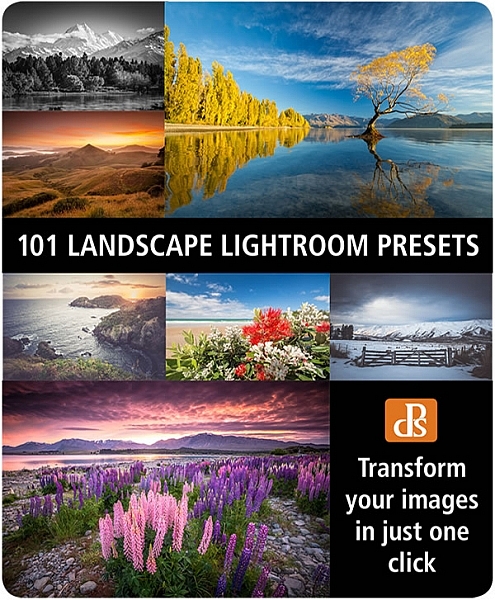
landscape-lightroom-presets

Thanks everyone else for picking up a copy of the the presets packs – we’ve received some amazing feedback and appreciate you supporting dPS with your purchase.

googletag.cmd.push(function() {
tablet_slots.push( googletag.defineSlot( “/1005424/_dPSv4_tab-all-article-bottom_(300×250)”, [300, 250], “pb-ad-78623” ).addService( googletag.pubads() ) ); } );

googletag.cmd.push(function() {
mobile_slots.push( googletag.defineSlot( “/1005424/_dPSv4_mob-all-article-bottom_(300×250)”, [300, 250], “pb-ad-78158” ).addService( googletag.pubads() ) ); } );

The post The Winner of $ 1000 from our 101 Landscape Lightroom Presets Competition is…. by Darlene Hildebrandt appeared first on Digital Photography School.


Digital Photography School

 
Comments Off on The Winner of $1000 from our 101 Landscape Lightroom Presets Competition is….

Posted in Photography


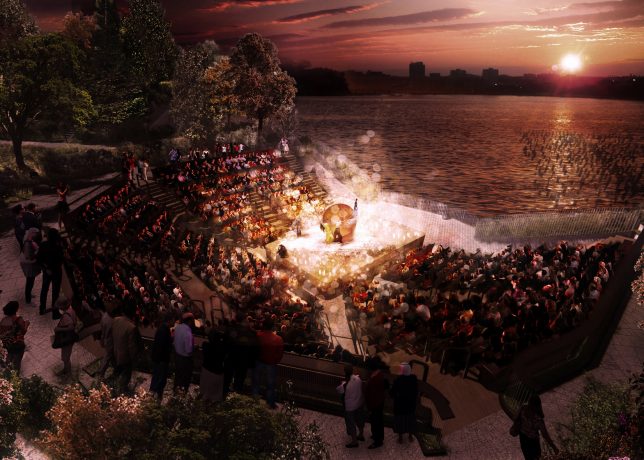
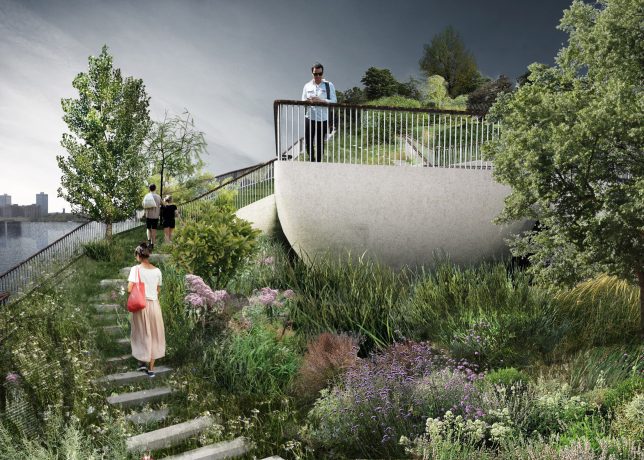
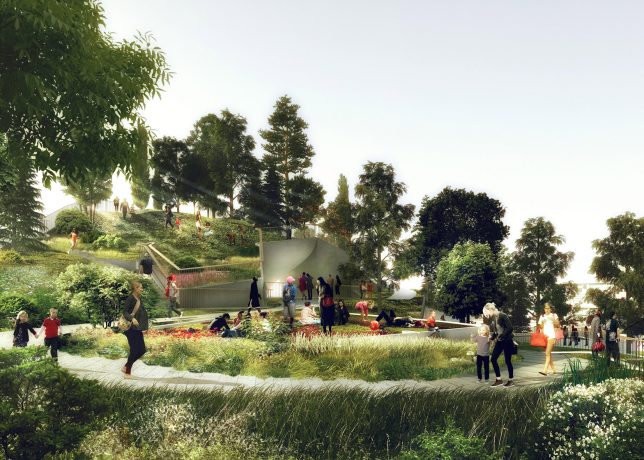
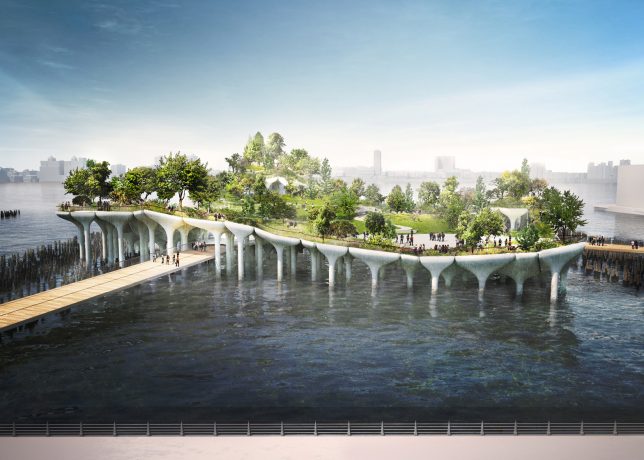
Pier Park: Undulating Landscape to Hover Over Hudson River in NYC

30 May

nyc floating park

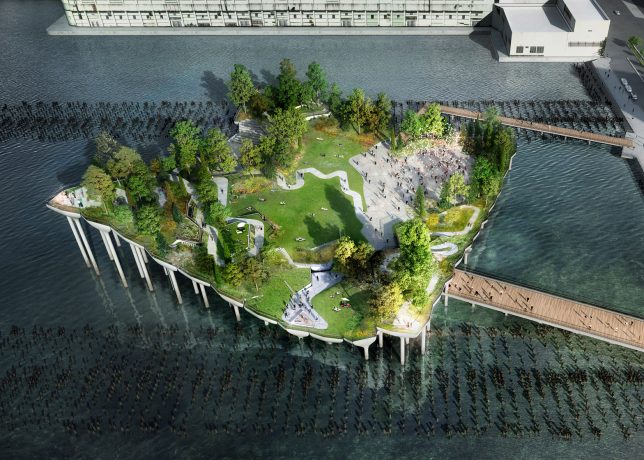
Following the success of the hovering High Line, an elevated park set on re-purposed rail tracks, New York City aims to pull off another park space in an unused space, this time at Pier 55 floating along the waterfront near the Chelsea endpoint of the High Line.

pier park

pier gardens

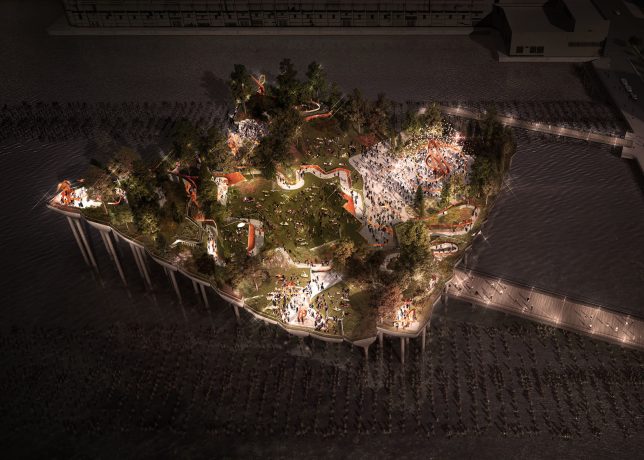
Designed by British architect Thomas Heatherwick, also behind a garden bridge project for London, the park will be supported on pier-like columns that branch out to hold up the green space above. This new park is as spread out and open as the High Line is linear and streamline, also offering experiences at different elevations compared to its relatively flat cousin.

pier wandering

pier pressure

“The pier will be a place of discovery, where visitors can wander and wonder, finding something new around every corner: places to lounge, eat lunch, or just lie in the grass,” said Heatherwick Studio. With its open spaces and various levels, the park is well-suited to hosting events and performances in the open air.

pier deck

pier space

pier side

The project is being funded by Barry Diller and Diane Von Furstenberg, who have pledged personal money and set up a non-profit to fund it. After a series of lawsuits and delays, the architects have now been given the go-ahead by the US Army Corps of Engineers and Hudson River Park Trust.


WebUrbanist

 
Comments Off on Pier Park: Undulating Landscape to Hover Over Hudson River in NYC

Posted in Creativity


Which Filters Should You Use for Landscape Photography

19 May

Which filter should you use – if any – for Landscape Photography? It’s a question we hear all the time and one we’ve written about in our archives (we’ll link to some of our posts below) but today we came across this short video from Joshua Cripps where he tackles the question and shows some shots of images taken with the filters – to show what impact they have.

Find more from Joshua at his site here.

Further Reading on How to Use Filters in Your Landscape Photography

  • How to do Dreamy Landscape Photography with a Neutral Density Filter
  • Beginner’s Guide to Buying Filters
  • Polarizing and Neutral Density Filters: Essentials for Landscape Photography
  • Using Graduated Neutral Density filters for Landscape Photography
  • How to Use a 10 Stop Neutral Density Filter to add Drama to the Sky

Check out our Brand New Landscape Lightroom Presets

NewImage

googletag.cmd.push(function() {
tablet_slots.push( googletag.defineSlot( “/1005424/_dPSv4_tab-all-article-bottom_(300×250)”, [300, 250], “pb-ad-78623” ).addService( googletag.pubads() ) ); } );

googletag.cmd.push(function() {
mobile_slots.push( googletag.defineSlot( “/1005424/_dPSv4_mob-all-article-bottom_(300×250)”, [300, 250], “pb-ad-78158” ).addService( googletag.pubads() ) ); } );

The post Which Filters Should You Use for Landscape Photography by Darren Rowse appeared first on Digital Photography School.


Digital Photography School

 
Comments Off on Which Filters Should You Use for Landscape Photography

Posted in Photography


Transform Your Landscape Photography in a Click with our New Lightroom Presets (60% off Today)

12 May

NewImageDo you take landscape photos? Are you a Lightroom* user? Do you need a little help to lift your landscape shots to the next level?

Today we’re excited to announce the launch of our all new Adobe Lightroom® presets bundle: 101 Landscape Lightroom presets.

With our new presets pack, transforming your landscape shots is a breeze.

And for a limited time, the pack can be yours for the special introductory price of just USD $ 20 (that’s 60% off).

Check them out here.

In this massive pack of 101 presets you’ll get these 6 collections to suit all scenery seasons:

  • Spring / Summer collection
  • Fantastic Fall
  • Wonderous Winter
  • Stunning Black & Whites
  • Creative Horizons
  • Mono Toned
  • Plus you get a bonus Toolbox collection with 29 presets designed to be stackable for making simple adjustments.

Created by professional landscape photographer Sarah Sisson (co author of our best selling eBooks Living Landscapes which is all about how to take great landscapes and Loving Landscapes which is a guide to post processing landscapes), she’s done all the hard work for you so you can get the perfect edit for every photo without the fuss.

Simply apply the effect and adjust as desired… It’s that easy!

You’ll save a whole heap of processing time, while giving your images an instant “pop”. See Sarah demonstrate in the video below.

101 Landscape Lightroom Presets from Digital Photography School on Vimeo.

Transform your photos in just one click. Pick up our 101 Landscape Lightroom Presets today – while we’re still offering it at the introductory price.

*Please note: a copy of Adobe Lightroom is required to use these presets.

Also: Haven’t used presets before? No worries. Full instructions are included in the pack.

googletag.cmd.push(function() {
tablet_slots.push( googletag.defineSlot( “/1005424/_dPSv4_tab-all-article-bottom_(300×250)”, [300, 250], “pb-ad-78623” ).addService( googletag.pubads() ) ); } );

googletag.cmd.push(function() {
mobile_slots.push( googletag.defineSlot( “/1005424/_dPSv4_mob-all-article-bottom_(300×250)”, [300, 250], “pb-ad-78158” ).addService( googletag.pubads() ) ); } );

The post Transform Your Landscape Photography in a Click with our New Lightroom Presets (60% off Today) by Darren Rowse appeared first on Digital Photography School.


Digital Photography School

 
Comments Off on Transform Your Landscape Photography in a Click with our New Lightroom Presets (60% off Today)

Posted in Photography