RSS
 

Posts Tagged ‘know’

The Q Button – What Every Canon DSLR Photographer Needs to Know

09 Dec

Cameras can be super complex these days. Buttons, knobs and switches are everywhere. How can you remember what all of them do and where to begin? Well, Canon has given you a secret button to use that allows you to access all of those most important functions within your complex machine. Perfect, where is this secret button you ask? It’s right on the back of your camera marked with the letter Q. It’s not really a secret, it’s just under utilized.

COVER IMAGE

The Q Button

What does Q stand for? Quick. The button makes navigating just that. Using the button gives you quick access to all of the major functions that you need. Let’s go through some of those functions so you can see how easy it is use your camera. Grab your Canon and let’s try it out.

How to use it

Go ahead, give the Q button a press while watching the LCD screen on the back of your camera. As you see it highlights one of your current settings. Depending on your Canon model this may light up the current selection in a blue/green color or it may outline it with an orange box. Next you can cycle through your settings by using the directional pad located around your SET button. Simply highlight the setting you want to change and then you have a couple of options.

First, and easiest, is to roll your settings dial while it is highlighted. This will cycle through your options for that particular setting. Your second choice is to push the SET button while a setting is highlighted. This will lead you to a more detailed screen showing all of your options for that setting.
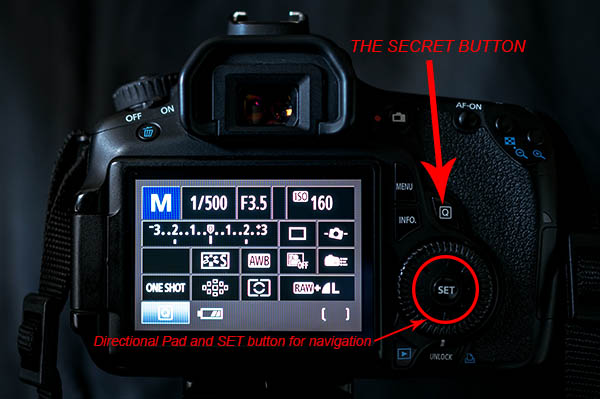
The Secret Button

Canon also made things easy by providing a description of each option at the bottom of the LCD as you scroll through. At first it will be more beneficial to use the second option so you become familiar with what settings are available, and what the symbols mean. Once you get that down, using option one to zip through the settings is a breeze.

As a beginner it can be really helpful using the LCD screen and the Q button so you can see everything about the exposure and settings right in front of you. When you depress the shutter button half way the current exposure reading will be displayed on the meter on your LCD. This makes it really easy to adjust your settings while seeing how each element of exposure (aperture, shutter speed and ISO) is affecting the meter.

Some of the settings you will adjust most are ISO, exposure bracketing, white balance, focus type, focus point and drive mode. When you use these techniques they each can be adjusted in seconds!
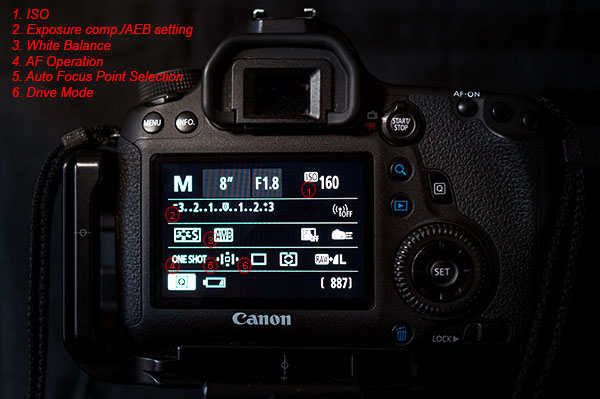
Visual Guide

The Q button is particularly useful when you are bracketing exposures for HDR. Press it and highlight the Exposure Compensation/AEB setting. Now spin your settings dial to the right and watch as the light meter changes to three lines in lieu of the typical single line. Set the lines as far apart as you want your bracket to be (i.e. -1, 0, +1 or -2, 0, +2). Last, use the directional pad to highlight the Drive Mode setting. Again scroll to the right until you reach the Self-timer (2 seconds/remote setting). Now, once you fully press the shutter button your camera will wait two seconds and then take all three exposures that you set. It’s as simple as that.
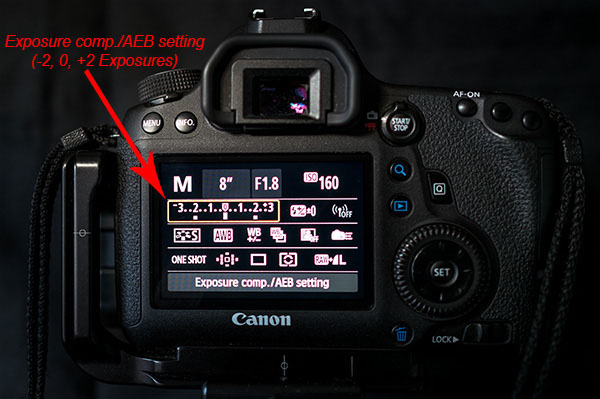
Exposure comp

As the light, and your shooting situation, changes your white balance settings need to be adjusted. You typically don’t find a special button for this important setting. Once again the Q button makes your life easy. As you scroll through the options you will see some simple pictures for each WB setting. A sun for sunny, a cloud for cloudy, a lighting bolt for flash, etc. Sometimes it is easier to see what your options are by looking at a picture. If not, Canon still gives you the description of the WB setting.
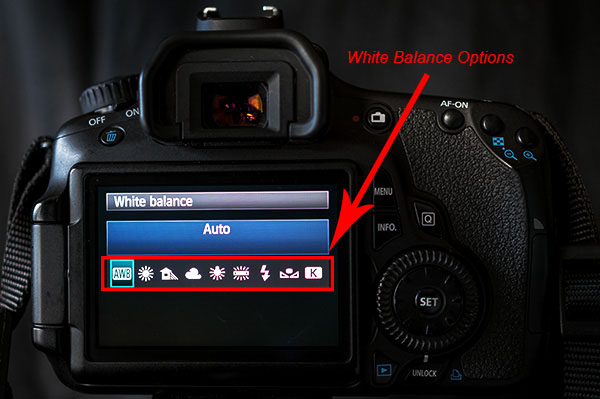
White Balance

Next up is the Auto Focus Point Selection. This is seriously one of the hardest functions to find on most cameras. Again, made easy by Canon. Press the Q and then use the directional pad to navigate to the AF Point Selection. Spin that dial and watch as the points spiral around to each individual focus point at your will.

Do you switch between shooting action and still subjects often? If so you may find yourself digging through the menu to find your Single and AI Focus options and the Drive Modes. Simply press the Q button and move over to the AF Operation. Roll your dial and you can choose ONE SHOT, AI FOCUS or AI SERVO. Then you can navigate over a couple of settings to the Drive Mode and choose between Single, Continuous Shooting or Timer Mode.
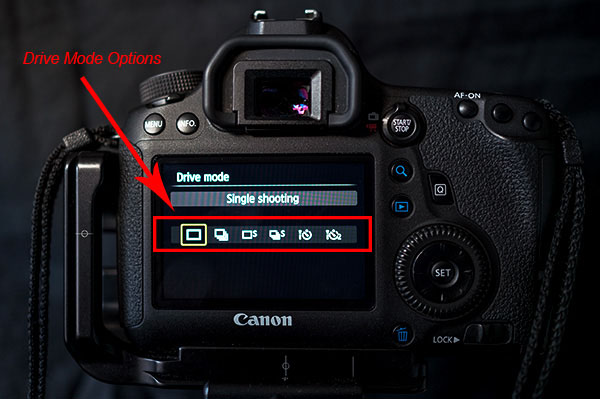
Drive Mode

Some Canon models are equipped with an internal level that is accessible from the Q menu. This is really helpful when you are shooting landscapes on a tripod. When in the menu highlight the Electronic level. Press the set button and a level looking like it belongs in the cockpit of an airplane shows up on the LCD. Tilt your camera from side to side and watch how the level changes. When your camera is horizontally level the line will turn green. This can definitely save you some time and heartache in post-processing when trying to make your horizon lines straight. It takes the guess work out of it for you.

As you can see the Q button is the most powerful and useful button on your camera. Navigating through those complex menus are over. Once you use the secret button you will begin to wonder why any of the other buttons even exist, with the exception of the shutter of course. Go ahead and feel free to start spreading the secret. Have fun!!!

googletag.cmd.push(function() {
all_slots.push( googletag.defineSlot( “/1005424/_dPSv4_mob-all-article-bottom_(300×250)”, [300, 250], “pb-ad-78623” ).addService( googletag.pubads() ) );
} );

googletag.cmd.push(function() {
mobile_slots.push( googletag.defineSlot( “/1005424/_dPSv4_mob-all-article-bottom_(300×250)”, [300, 250], “pb-ad-78158” ).addService( googletag.pubads() ) );
} );

The post The Q Button – What Every Canon DSLR Photographer Needs to Know by Jack Thatcher appeared first on Digital Photography School.


Digital Photography School

 
Comments Off on The Q Button – What Every Canon DSLR Photographer Needs to Know

Posted in Photography


Ten things you need to know about the Sony Alpha 7 II

28 Nov

Sony announced the Alpha 7 II last week relatively quietly, introducing a new member to its full-frame mirrorless family. The a7 II brings 5-axis in-body stabilization to a full-frame camera for the first time, claiming 4.5 stops in shake reduction. Other updates include improved ergonomics – you can see these for yourself in our hands-on overview of the a7 II. Here’s what you need to know about Sony’s newest Alpha camera. Read more

Articles: Digital Photography Review (dpreview.com)

 
Comments Off on Ten things you need to know about the Sony Alpha 7 II

Posted in Uncategorized


Getting to Know Your New Camera

25 Nov
Get to know your new camera

With my new camera I can set Film Simulation to black and white and the camera gives me a black and white view in the electronic viewfinder. I can also select the square format and see a square image. This is a great aid to composition. Finding and using helpful features like this is part of getting to know your new camera.

I recently purchased a new camera and the process of learning to use it has been a good reminder of just how long the process can take. My new Fujifilm X-Pro 1 is a very different machine from the Canon EOS digital SLRs I’m accustomed to using, and it’s taken me a while to find my way around the layout and menu.

Based on my experience, here are some tips for getting to know your new camera. Most of these will apply if your new camera is from the same manufacturer as one you already own.

Read the manual

This one’s fairly basic – you can learn a lot about your camera from its manual. Even if your approach is to learn by using the camera, there are still times when you need to look up things you can’t figure out yourself. You could also buy a book or ebook about your specific camera. These are usually written by photographers who know the camera well and give plenty of tips for getting the most from it, including things not mentioned in the manual.

Shoot at high ISOs

Newer cameras have fantastic high ISO performance and it’s worth spending some time shooting in low light at your new camera’s high ISO settings. Then look at the results on your computer to determine the highest ISO setting you are happy to use. Remember, the amount of noise you will see depends as much upon your subject as the camera. If your subject contains lots of textured surfaces or light tones you’ll see less noise than if it contains dark tones or large areas of sky.

Get to know your new camera

This photo was taken at dusk at ISO 6400 on my new camera.

Get to know your new camera

This is a 100% magnification view (taken from the bottom of the previous image). You should look at your high ISO photos at 100% magnification to see how noisy the image is. Only you can decide which settings have too much noise.

Shoot in tricky lighting situations

The aim of this exercise is to learn how your camera’s meter reacts in different lighting situations. While metering modes such as centre-weighted and spot metering should work in much the same way on most cameras, you may find a larger difference in the way that evaluative metering* modes work.

Evaluative metering is where your camera takes exposure readings from multiple areas of the frame (usually weighted in priority towards the active autofocus point) and then decides on the appropriate exposure according to a formula known only to the manufacturer. If the maker of your new camera uses a different formula to the maker of your old one, then both cameras may give different exposure readings for the same subject. Therefore it’s helpful to take some photos in tricky lighting situations to learn how your new camera copes with each of them.

*Evaluative metering is the term used by Canon and Sigma. The same mode is called Matrix metering by Nikon, Multi segment metering by Sony and Pentax, Multi metering by Fujifilm and digital ESP metering by Olympus.

There are three basic scenarios that can give your camera problems:

Backlighting: With backlit photos, you need to decide whether you want to expose for the subject (burning out the background), the background (turning the subject dark) or somewhere in between. Only you can decide, and your camera’s evaluative metering may be weighted towards one option or the other. Test your camera with some backlit subjects to see how it reacts. Another function of this test is to learn how well your camera’s sensor renders blown out highlights.

Subjects with predominantly light tones: Cameras tend to underexpose this type of subject. Experiment with exposure compensation to see how much you need to increase the exposure when taking photos of light toned subjects.

Subjects with predominantly dark tones: Cameras tend to overexpose this type of subject. While this type of subject isn’t as common as light toned subjects, if you come across one you can experiment to see just how much you need to adjust the exposure compensation dial to make up for the camera’s tendency to underexpose.

These last two concepts are explained in more detail in my article Why Your Camera’s Meter Gets Exposure Wrong.

Get to know your new camera

This is a good example of a dark toned subject that may fool your camera’s meter into overexposure. The only way to see how your camera responds is to test it.

Find the limits of your camera’s autofocus

One of the biggest differences between various cameras is autofocus. Every manufacturer approaches autofocus differently. Some cameras are designed to focus accurately on fast moving subjects, some are not. Some cameras have more autofocus points than others. Some cameras use phase detection autofocus, some use contrast autofocus, some use a combination of both.

The best way to learn about the autofocus system on your camera is to start by reading the manual, then searching online for good articles written by photographers using your specific model.

Then test your camera. How do you switch between autofocus modes? How do you move from one autofocus point to the other? How reliable is your camera when taking photos of moving subjects? You will only learn these things by testing and using your camera.

Get to know your camera’s menu

If your new camera is made by a different manufacturer than your old one, the menu system will be different. You need to spend time familiarizing yourself with the menu, and the functions that are relevant to the types of photography you do. Otherwise you may find yourself in the field searching for a certain setting and missing the opportunity to take a photo as a result.

Get to know your new camera

The menu on my new camera is completely different from that on the EOS cameras I’m accustomed to using. Until you’re familiar with a new menu system, it may take you much longer to find certain settings.

Familiarize yourself with your camera’s layout

Take some time to learn where all the buttons are on your camera. Do any of them have functions that are not immediately obvious? For example, on my X-Pro 1 it took me ages to work out how to activate Live View (there isn’t a button labelled Live View). Ideally, you should be able to find your way around all the important buttons and dials with your eyes closed, so you can use your camera without thinking when you take photos. Naturally, this level of familiarity takes time.

Get to know your new camera

The dials and buttons on my new camera are also very different from those on my EOS cameras.

By the way, if you bought a new lens with your new camera, you may also find my article Getting to Know Your Lenses useful.

Your turn

This is not an exhaustive list of ways to get to know a new camera, but it’s a good start. What other suggestions can you make, based on your own experience? Please let us know in the comments.


Mastering Photography

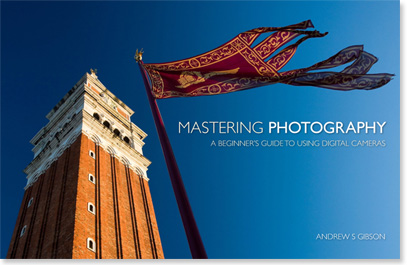
Composition and lineMy latest ebook, Mastering Photography: A Beginner’s Guide to Using Digital Cameras introduces you to digital photography and helps you make the most out of your digital cameras. It covers concepts such as lighting and composition as well as the camera settings you need to master to take photos like the ones in this article.

The post Getting to Know Your New Camera by Andrew S. Gibson appeared first on Digital Photography School.


Digital Photography School

 
Comments Off on Getting to Know Your New Camera

Posted in Photography


Five Things You Need to Know Before Starting a Pet Photography Business

02 Oct

Pet photography is a fast growing and super fun genre of photography, and it’s awesome to see so many people wanting to celebrate animals and the role they play in our lives! But how do you turn your passion for animals and photography into a thriving and successful business? What do you need to consider before setting up your business? Today I’m sharing the knowledge I’ve gathered over the last three years to help you prepare yourself for what is the best job in the world.

Image Nine

#1 Do you really love animals?

Pet photography is messy, dirty, and at times incredibly frustrating work. You need to be comfortable with being jumped on by Great Danes, pawed by pugs, and scratched by cats. You need to be happy crawling through the mud, and bending and stretching at weird angles.

Image Six

This was shot lying on the wet ground on a freezing cold morning – but totally worth it!

You also need to be exceptionally patient. Often at the start of a shoot your subject will spend about half an hour running around like crazy, and jumping all over the place before finally calming down enough for you to photograph. You also need to accept that you will never have that much control over your subject – try telling a puppy to sit still and tilt his head 45 degrees!

At some point, your camera equipment will get covered in drool, your shoes will get peed on, and you will end up ruining several pairs of pants. So if you don’t really, truly, love animals, you are going to find the whole process miserable and give up very quickly.

#2 Is there a market for it?

I am lucky enough to live in a city (Melbourne, Australia) that has the highest rate of dog ownership in the country. People here absolutely adore their pets. There are high-end pet stores, hundreds of dog friendly cafes and parks, and so many Pet Expos that I have lost count. But that’s not always going to be the case for your area, so do your research. Some good things to find out are:

  • What’s the rate of pet ownership? Your local council is a good resource.
  • What is the general attitude towards pets? Do people see dogs as “just dogs” or are they part of the family or substitute children?
  • Are there lots of pet friendly cafes, restaurants, and parks? What are the pet shops in your area like? Do they sell just the basics or are they a bit fancier?
Image One

Kimbo is most definitely part of the family.

It’s also a good idea to factor in things like the amount of disposable income the average pet owner has, and the general cost of living. One really handy tip – if the area you are in isn’t particularly pet friendly, focus your marketing on areas further afield.

#3 Do you have the right equipment and know how to use it?

Pet photography is similar to sports and wedding photography in the sense that if you miss a moment, it’s not likely to be repeated. We all know that equipment doesn’t make the photographer, but at a minimum you want to have a DSLR, prime lenses that autofocus (the 50mm f/1.4 is a great place to start), a good quality zoom lens, high-speed memory cards, and an speedlight you can use off-camera if necessary.

Image Two

Proof that with the right equipment, you can make it look as if a puppy is standing still.

Get to know your equipment back to front before you start charging for your work. Figure out how to change your shutter speed, aperture, and ISO without looking, and know how to change your lenses quickly. Some of the best shots come without warning, and if you’re staring at your camera wondering why something isn’t working, you’ll miss the shot.

As you know, practice makes perfect, and the only way to get really good at photographing pets and knowing your equipment is to find the most badly behaved animals you can and shoot, shoot, shoot. There’s no point in using well behaved, well trained dogs, because there are so many that aren’t. You know the friend who has a dog that jumps all over the furniture and runs in circles constantly? The friend with the cat who hates everyone? Practice with these sorts of pets and your camera will become like an extension of you before too long.

#4 What’s your style?

You know you’ve made it as a photographer when people can pick out your work from a line up. Having a distinct style is so important for setting you aside from the crowd. Here are some things to consider to help you find your style:

Are you a natural light or a studio photographer?
Do you like clean, clear backgrounds that don’t distract from the pet, or do you like contrasting backgrounds that add to the photo?
Do you like posed shots or natural?
How do you feel about styled shoots? Using props?
Do you want a soft or high contrast feel to your shots?
Do you like obvious post production or a more subtle approach?
Do you want to incorporate the pet owners in the shots?

When I started my business, I saw a gap in the market for really beautiful, shallow depth of field shots of pets. I also happen to love shooting with my lenses wide open, so that became my style. It has been refined over the years, but people hire me because they want beautiful, close up, emotive shots with a sense of warmth and humour to them. I only shoot in soft natural light, no direct sun, and I don’t do high action shots such as agility shows. I also very rarely photograph people with their pets, because it’s not my thing.

Image Four

Props can be an awesome way to bring a bit of humour to your shots.

Remember – do what you love and what feels good for you. Copying another photographer’s style is a waste of time and won’t help you grow.

#5 How are your animal handling skills and knowledge?

This is such an important thing to consider before you start your business. Safety (both yours and your subject’s) is extremely crucial. At best, you can be opened up to a law suit, at worst, you could seriously injure or kill someone’s pet.

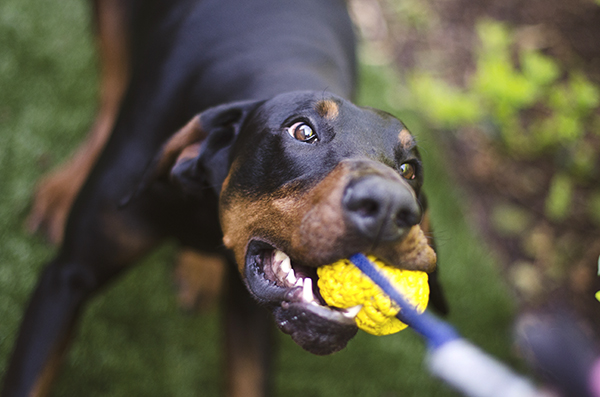
Image Eight

When you’re dealing with 40 kilos (88 pounds) of Doberman, you want to be confident with your animal handling skills.

Be honest with your skill level. For example, I have grown up and volunteered around cats my entire life, and I’m very comfortable with them. I also know their body language, signs of stress, and how to play with them properly. But I didn’t know nearly as much about dogs. I volunteered for a shelter walking dogs, taking photos, and doing general handling, which helped me a huge amount. I also did some basic dog handling courses, as well as reading up on different breeds and their personalities. I’m now at the stage where I’m 100% comfortable dealing with all breeds and sizes of dogs.

Image Three

Ellie is fourteen years old, so I was very mindful of her range of mobility. She was happiest lying on her bed, so I shot around this rather than forcing her to stand up.

Even if you grew up with dogs, it’s a great idea to read up on the different breeds and their traits. This will help you so much when you are shooting, and by knowing what makes a certain breed tick you’ll be able to produce some great pictures.

Image Five

Ralph and Gidget were on lead for this session, and the leashes were removed later in Photoshop. We had so much more fun knowing that there wouldn’t be any unforeseen accidents.

Unless you’re shooting in a fenced in, off-lead area, it’s better to be safe than sorry and keep the dog on a long lead. That way you avoid any accidents, and you can always edit leads out later in Photoshop (a big secret of pet photographers). Never, ever force a dog or cat to do something physically uncomfortable.

Lastly, one final safety tip – always talk to the owner BEFORE you start shooting. Find out as much as you can about their pet. That way, if certain things terrify or stress them, you know what to avoid. Always check for food allergies before offering treats!

Image Seven

Did someone say treats??

I hope that this article has given you some things to consider – and most importantly, don’t forget to have fun!

The post Five Things You Need to Know Before Starting a Pet Photography Business by Erin McNulty appeared first on Digital Photography School.


Digital Photography School

 
Comments Off on Five Things You Need to Know Before Starting a Pet Photography Business

Posted in Photography


8 Things You Should Know if You are Dating a Street Photographer

24 Sep

Let’s face it, photographers are a breed of their own. Street photographers may belong to an even more extreme category… so here are eight things you should know if you are dating a street photographer:

#1 You cannot walk where you want on your own

No matter which side of the street your favorite shops or restaurants are, you will be required to walk on the side that offers the best dappled light, long shadows, reflections, backdrops, etc. You may also occasionally be used as a decoy to approach a situation inconspicuously.

Date night often means going downtown and it's also my opportunity to explore areas I would go on my own. We have fun, even if I'm the only one with a camera! ©Valérie Jardin

Date night often means going downtown and it’s also my opportunity to explore areas where I would not go on my own. We have fun, even if I’m the only one with a camera!   ©Valérie Jardin

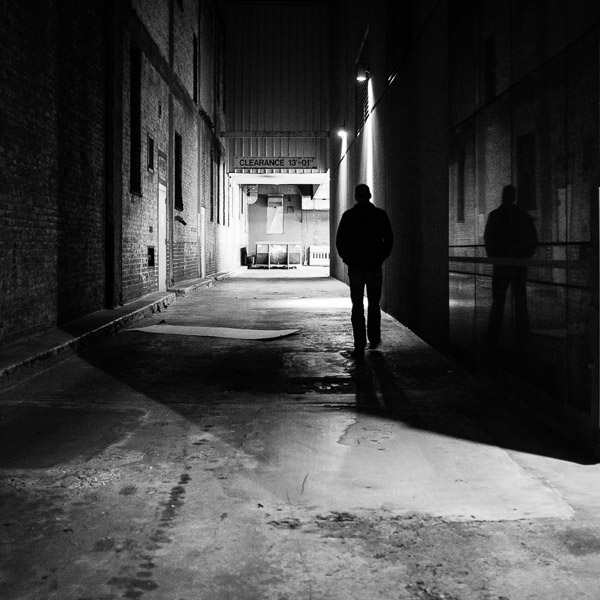
#2 You may visit a lot of back alleys

If you and your partner are on a shopping spree, you may often be required to exit a building through the back door. Back alleys hold secrets, interesting subjects and magical light that are too good to pass.

#3 Good luck having a romantic night just the two of you (without a camera)

Unless your street photographer date is blindfolded, you will rarely have a romantic night out in the city without a camera. Yes, we live and breathe street photography. The camera is an extension of ourselves. The temptation is too great and you might as well let us grab a shot or two to prevent mood-breaking frustration.

#4 Do not expect to have your date’s full attention

You will have a hard time spending an evening in public gazing into each other’s eyes. A street photographer is conditioned to be on constant alert to notice every gesture, expression and lighting in the immediate radius, with or without a camera. Hey, you knew all along you were dating a photographer…

#5 You can expect to meet lots of new people

Expect to stop often and talk with strangers of all walks of life, at any moment and on any given day. This can happen unexpectedly in the subway, at the bus stop, in the cab, at the coffee shop or while you are waiting to cross the street. Just know that the street photographer who shares your life has a keen eye at spotting interesting people from a mile away!

#6 You may temporarily lose your date at a moment’s notice

I must admit, I had an ulterior motive when I suggested that we go for an evening walk over a bridge, down next to a highway so I could get this shot... ©Valérie Jardin

I must admit, I had an ulterior motive when I suggested that we go for an evening walk over a bridge, down next to a highway so I could get this shot…   ©Valérie Jardin

Do not worry if your street photographer takes off in a hurry in the middle of a conversation. The right subject may be entering the perfect backdrop for the shot of a lifetime. Or maybe an interesting person just passed you on the sidewalk and your street shooter now needs to run the other direction, well ahead of the subject, to find the best way to frame the shot.

#7 You’ll need to have patience

Bring a book! Setting a stage and waiting for the story to develop may very well be your partner’s favorite pastime. This can take a few minutes, or a few hours…

#8 Your vacation destinations will be predetermined for you

If your significant other is a street photographer, do not be surprised if your next vacation destination has an ulterior motive. We much prefer to walk the streets of a large city than to lie on the beach of an exotic island.

Vacation on the beach? Sure, as long as it's not too isolated and there are people to photograph! ©Valérie Jardin

Vacation on the beach? Sure, as long as it’s not too isolated and there are people to photograph!   ©Valérie Jardin

Conclusion:

Street photographers are not the easiest people to live with. Honestly I’m not sure I’d want to live with me if I wasn’t a photographer. We require a lot of patience. If you love one, don’t think for a second that you will be able to keep him/her away from that camera for more than a few hours. Be generous, give the street photographer in your life some time to pursue their passion on their own or with like-minded people. After all, wouldn’t you rather do your own things too? Look at it this way: We are the way we are because we have a true passion for people, it’s not such a bad thing.

Blue hour by the lake? At the very least I'll get a shot of my drink, or his... Sometimes both.  ©Valérie Jardin

Blue hour by the lake? At the very least I’ll get a shot of my drink, or his… Sometimes both.
©Valérie Jardin

If you read this article, you’re probably a photographer. Please share with the non-photographer in your life. And if you plead guilty to any of the above, please share your experience.

The post 8 Things You Should Know if You are Dating a Street Photographer by Valerie Jardin appeared first on Digital Photography School.


Digital Photography School

 
Comments Off on 8 Things You Should Know if You are Dating a Street Photographer

Posted in Photography


Twice as good? What you need to know about the Canon EOS 7D Mark II

23 Sep

Five years is a long time in the camera world, but that’s how long Canon’s EOS 7D was on the market – buoyed by a midlife firmware update that kept it impressively competitive against APS-C offerings from other manufacturers. Canon has not been idle in the past few years, it seems, and the new EOS 7D Mark II is a huge upgrade over the original 7D, offering improvements to every aspect of its feature set. We got hands-on with a pre-production sample recently. Click through to see more.  

Articles: Digital Photography Review (dpreview.com)

 
Comments Off on Twice as good? What you need to know about the Canon EOS 7D Mark II

Posted in Uncategorized


Nikon D750: What you need to know

17 Sep

The D750 is Nikon’s latest full-frame DSLR, and sits between the D610 and D810 in the company’s FX format lineup. With specifications in common with both cameras, the D750 may be of interest to anyone considering stepping up to full-frame from one of Nikon’s APS-C format models. As well as our detailed first impressions review we’ve prepared a quick ‘cheat sheet’, telling you everything you need to know about the new camera. Click through to read more.

Articles: Digital Photography Review (dpreview.com)

 
Comments Off on Nikon D750: What you need to know

Posted in Uncategorized


Everything You Need to Know About Lightroom and Colour Space

03 Sep
Lightroom and colour space

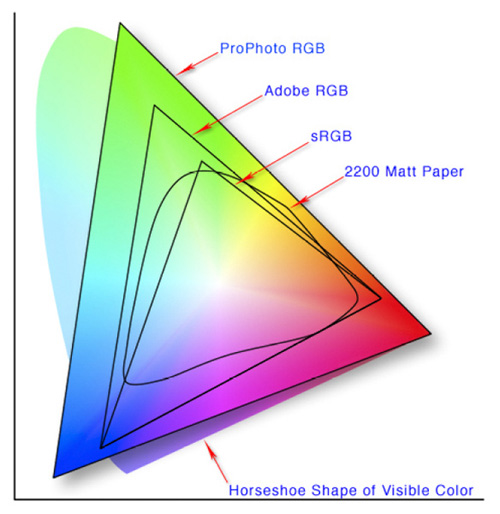
This diagram shows the three colour spaces that Lightroom works with. Photo from Wikipedia

One of the key differences between Lightroom and Photoshop is their approach to colour management. In Photoshop, once out of Adobe Camera Raw, you can go to the Colour Settings menu option and tell Photoshop in which colour space you want it to work.

How Lightroom works

Lightroom works differently. When processing Raw files, Lightroom uses the ProPhotoRGB colour space the whole time, and there’s nothing you can do to change it. The benefits of this method are:

  • Less colour information is lost during the processing stage. ProPhotoRGB is the largest colour space, so it is the optimum one to work in.
  • You can export multiple versions of the same photo, each with a different colour space, if you have need to do so.
  • If future output devices (monitors, printers etc.) support ProPhotoRGB (they don’t at the moment) then your photos will be ready for them.
  • Colour management is greatly simplified. You don’t have to make any decisions about what colour space to work in until you export your photos. This is the biggest advantage of all.

How Lightroom manages colour

When processing Raw files, Lightroom (and Adobe Camera Raw in Photoshop) uses its own colour space based on ProPhoto RGB. It provides a large colour gamut to work with the wide range of colours that digital sensors are capable of recording.

Note: Gamut is the term used to describe the range of colour values that fit in a colour space.

Exporting photos in Lightroom

When you export a photo in Lightroom it gives you the choice of three colour spaces.

ProPhotoRGB: ProPhoto RGB is the largest of the three. It roughly matches the range of colours that a digital camera sensor can capture.

Adobe RGB (1998): Adobe RGB (1998) is smaller than ProPhoto RGB, but larger than the next choice, sRGB. It roughly matches the colour gamut of CMYK printers used to print books and magazines.

sRGB: sRGB is the smallest colour space of the three. It represents the colour space that most monitors are able to display.

Comparing colour spaces

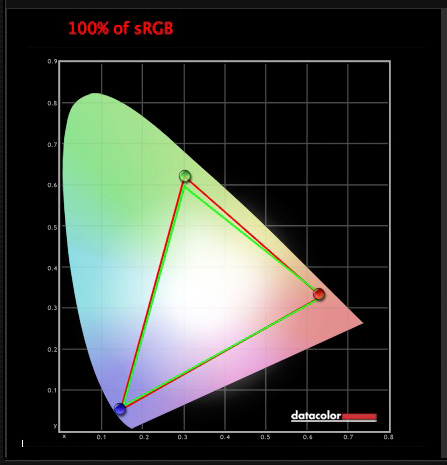
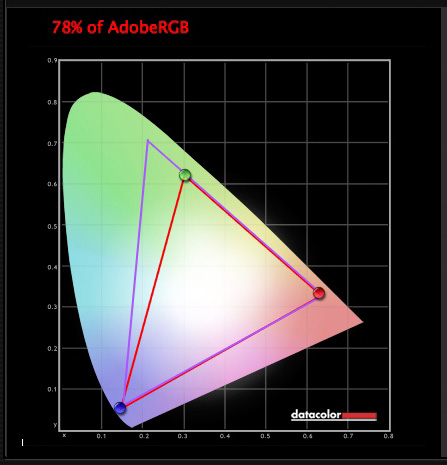
These two graphs show how the colours my monitor is capable of displaying, compared to the sRGB and Adobe RGB colour spaces.

Lightroom and colour space

The green triangle shows the sRGB colour space, the red one shows my monitor’s colour gamut. The two are nearly identical.

Lightroom and colour space

The purple triangle shows the Adobe RGB (1998) colour space, the red one shows my monitor’s colour gamut. My monitor can’t display all the colours within this colour space. Only a select few high end monitors can display all the colours within the Adobe RGB (1998) colour space.

This diagram compares the ProPhoto RGB, Adobe RGB (1998) and sRGB colour spaces. You can see that ProPhoto RGB is the largest.

Lightroom and colour space

Photo from Wikipedia 

Keeping it simple

Armed with this knowledge, here’s a guide to which colour space you should select when exporting your photos:

sRGB: Use when exporting photos to be displayed online, printed at most commercial labs, or printed with most inkjet printers. In short, if in doubt, use sRGB.

Note: Lightroom’s Web module automatically sets the colour space of exported files to sRGB.

Adobe RGB (1998): Use only if requested. If you’re not sure, ask. If you’ve been asked to submit photos to a magazine, for example, then ask them which colour space is required. It will probably be Adobe RGB (1998). Submitting photos to a stock library? Again, it will probably be Adobe RGB (1998). It’s the colour space most likely to be used for commercial purposes.

You would also use this colour space if you have an inkjet printer that utilizes the Adobe RGB (1998) colour space, or you are using a lab that accepts and prints photos with that profile.

ProPhoto RGB: Use when exporting a photo file to be edited in another program such as Photoshop or a plug-in. The file should be exported as a 16-bit TIFF or PSD file. There is little point in using the ProPhoto RGB colour space with 8 bit files, as they don’t contain enough bit depth to utilize the full colour range.

Note: If you import a JPEG or TIFF file into Lightroom, it uses the file’s embedded colour profile. If there is no colour profile attached, it assumes that it’s an sRGB file. If you choose an alternate colour space when you export the file, Lightroom converts it.

Colour spaces and compression

The reason that Lightroom uses a version of the ProPhoto RGB colour space, is that it is doesn’t compress the colours captured by your camera’s sensor.

When you export a photo, if you select either the Adobe RGB (1998) or sRGB colour space, Lightroom compresses the photo’s colours to match the chosen profile. That’s why selecting colour space is best left for as close to the end of the post-processing workflow as possible.

While Lightroom does its work within its version of the ProPhoto RGB colour space, your monitor isn’t capable of displaying all those colours. Instead, your computer’s operating system uses the monitor profile to convert the colours to ones that your monitor is capable of displaying.

Note: All monitors have a colour profile, regardless of whether they have been calibrated. But your monitor will only display colour accurately if it has been properly calibrated. You can learn more about the calibration process in my article How to Calibrate Your Monitor With the Spyder 4 Express.

Exporting photos with Lightroom

To export a photo in Lightroom, select the photo (or photos) you want to export, then go to File > Export. You can do this from any module (use the Film Strip to select multiple photos if you are not in the Library module’s Grid View).

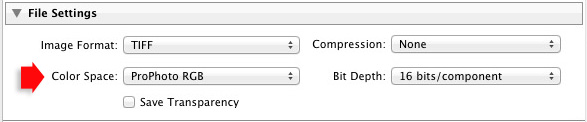
Go to the File Settings section of the Export window and set the required colour space. If you select the ProPhoto RGB colour space set Bit Depth to 16 bits/component.

Lightroom and colour space

Transferring photos to Photoshop

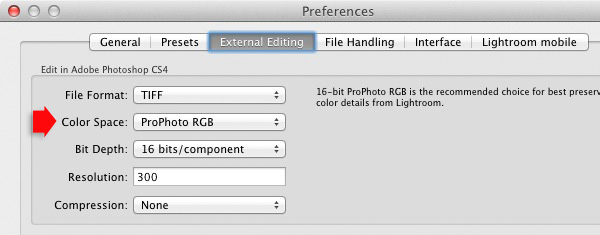
To open a photo in Photoshop, right-click on the photo and select Edit In > Edit In Adobe Photoshop. Photoshop opens the photo using the colour space indicated in Lightroom’s preferences.

To adjust this setting, go to the External Editing tab in preferences, and set Color Space to ProPhoto RGB. You can choose another colour space if you wish, but ProPhoto RGB is definitely the best one to use.

Lightroom and colour space

Opening photos in plug-ins

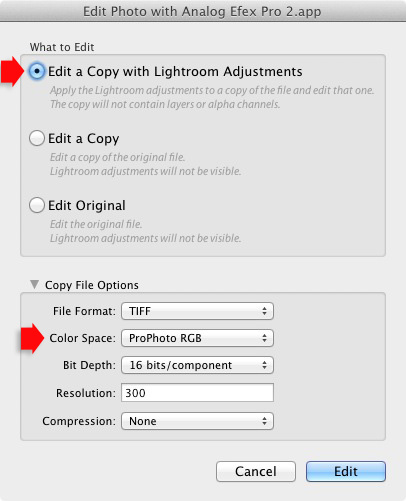
To export a photo to a plug-in, right-click on the photo, go to Edit In and select the plug-in you want to use to open the photo.

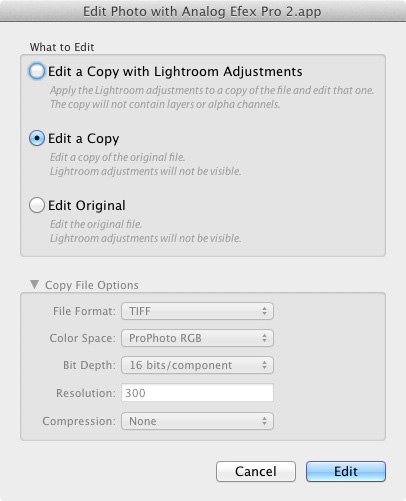
In the Edit Photo window, if you select Edit a Copy with Lightroom Adjustments (the only option available if you are exporting a Raw file) you will be able to select which colour space you want to use. Again, go with ProPhoto RGB for the best results.

Lightroom and colour space

If you are exporting a JPEG or TIFF file, Lightroom gives you the option of selecting Edit a Copy or Edit Original in the Edit Photo window. If you do so, the option to select a colour space is greyed out and Lightroom opens the photo in the plug-in using the embedded colour profile.

Lightroom and colour space

But if you select Edit a Copy with Lightroom Adjustments, you can select any colour space and Lightroom will convert the photo to that colour space when it opens the photo in the plug-in.

Conclusion

Confused? I hope not, because colour management in Lightroom is really very simple. It’s essential to calibrate your monitor, but after you’ve done that Lightroom takes care of all colour related issues for you until you export your photos. Then, it’s just a matter of selecting the appropriate colour space.

If you have anything to add to the article, or any questions, please post it in the comments.


Mastering Lightroom: Book Four – The Photos ebookMastering Lightroom: Book Four – The Photos

My new ebook Mastering Lightroom: Book Four – The Photos takes you through ten beautiful examples of photography and shows you how I processed them step-by-step in Lightroom. It explores some of my favourite Develop Presets and plug-ins as well as the techniques I use in Lightroom itself. Click the link to learn more.

The post Everything You Need to Know About Lightroom and Colour Space by Andrew S. Gibson appeared first on Digital Photography School.

Digital Photography School

 
Comments Off on Everything You Need to Know About Lightroom and Colour Space

Posted in Photography


20 More Photography Tips Every Travel Photographer Must Know

21 Aug

Pick up Oded’s new SnapnGuide (a dPS sister company) Snapn Travel here for only $ 7, a lifetime of travel memories in a snap. Traveling is fun and rewarding, but sharing memories of your journeys with friends, family, and the world through your own beautiful images can be even better.

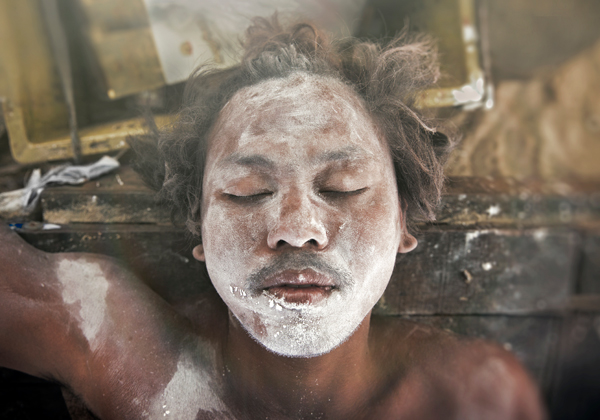
Traveltips Georgia 2

Georgia (the country)

Here are 20 more tips for great travel photography:

(You can read Part One 20 Photography Tips Every Travel Photographer Must Know here)

Before you go:

1. Make the visual decisions

For most of us, deciding where and when to go is based on many decisions, not necessarily related to photography. But there are some small decisions you can make to turn an ordinary trip into a photo-worthy one. For example, let’s say you are going on a business trip. You can squeeze a few hours of photographing between meetings. But a much better option would be to take a day or two off and spend this extra time photographing on location.

Or when planning your next family vacation, add a little visual research before the trip. Is there a nice festival or a market worth visiting at your destination? Is there something unique like an interesting ethnic group or unusual landscape that’s worth documenting? These small visual decisions can make a huge difference in your photographic experience during your trip.

2. Build a shot list

A “shot list” is a term from the movie industry. It’s a list of shots that are planned for a specific day. Want to come back home with better travel photography results? Then the shot list is your tool for the job.

Traveltips thailand 2

Thailand

First, make a list of visual ideas as your “I won’t come home without” image list. Combine the iconic images with more creative ideas. For example, if you’re going to Paris, don’t skip the Eiffel tower. As a true symbol of Paris, it should be on your list. But make sure to add creative visual ideas, such as boutique wine shops, farmers markets, or anything to your liking. The shot list is there to help you, not restrict you. When you’re on the road, with so many new sights and smells competing for your attention, the shot list will keep you organized and be a continual inspiration for creating the next shot.

3. Smart gear choice

Don’t take all of your equipment with you! Match the gear to the destination. Do you really need that flash on the beaches of Thailand? Or that 50 mm prime lens for the safari trip to Tanzania? Choose wisely and you’ll worry (and carry) a lot less.

4. Photo boot camp

If you’re not making images on a daily basis, it will probably take you a few days on location just to “get in shape”. Get a jump-start by warming up at home by creating a daily photography routine at least one week before departure. This will make sure you’re at your best as soon as you step off the plane.

Traveltips thailand 1

Thailand

5. Coordinate expectations

Apart from our photographer’s “hat”, we all wear other hats, such as “father,” “spouse,” or “friend”. When traveling with others, we must wear many other “hats”. You must coordinate expectations with your travel partners to make sure the importance you’re placing on your photography during the trip won’t cause problems. Think and plan together about places you all can visit that would be great for even those who don’t take pictures: vantage points with scenic views, colorful markets, religious centers, etc.

When you get there

6. Location scouting

This is another movie industry term. It means that before even taking out your camera, it is wise to get familiar with your surroundings. Take at least a few hours to learn the area. Understand if there are any interesting places around your hotel, visit one or two places that are on your shot list and adjust it accordingly.

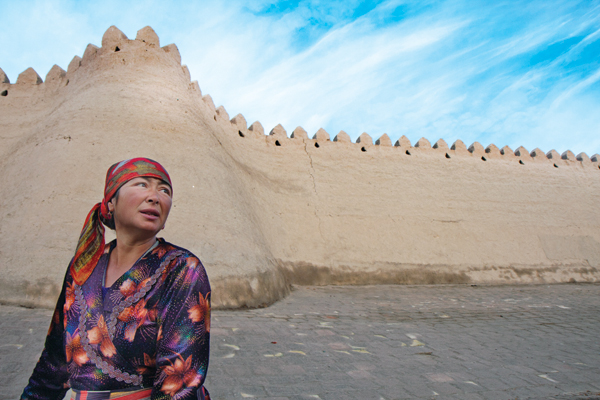
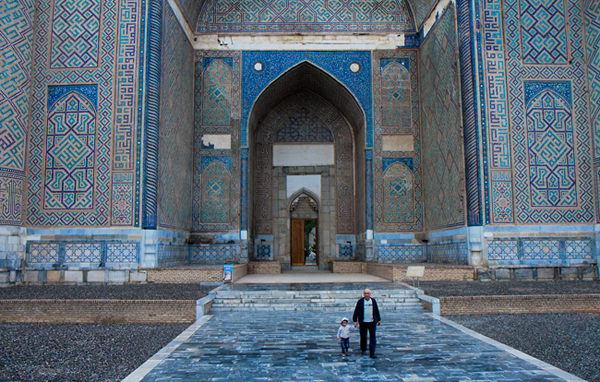
Traveltips Uzbekistan

Uzbekistan

7. Get up early

Yes I know, this one is a crazy ratings downgrade. But hey, travel photography is not for the lazy! The most precious thing on a trip is your time. Do not waste the hours of golden light of morning (or afternoon) on sleeping. Especially if you are traveling with non-photographers, it’s your time to do your best shots. You can save sleeping in for weekends at home.

8. Markets first!

Colors, food, local people, culture; markets are a photographer’s paradise. It’s always better to visit open markets (for the daylight) rather than covered ones. Some of the best markets I visited happen only once a week, be sure to be there.

Traveltips china

China

9. Diversify your shoots

You took a landscape photo with a wide lens? Excellent, now do it again with a telephoto lens.

You’ve got the main square in daylight? Wonderful! Come back at night with a tripod and shoot long exposures. Make the most out of your once-in-a-lifetime trip as your diversify your shoots and portfolio.

10. Get out of your comfort zone

We all have places that are less comfortable for us, but visiting a new place is an excellent opportunity to get out of your comfort zone. Do you not have the courage to approach strangers in the street in order to take their portrait? This is an excellent opportunity. You might be surprise how easy and fun it is to do this with strangers.

Traveltips thailand 3

Thaliand

11. Go iconic – but from a different point of view

We all know how Times Square, The Taj Mahal, and the Eiffel tower look. Don’t come back with the same, “we’ve seen it all before” images. You don’t have to skip those iconic places, they usually are truly worth the visit. But think of new and fresh ways to feature them. Try using a fish-eye lens, creative editing process, or reflections – the sky is the limit.

Traveltips Uzbekistan 2

Uzbekistan

12. Get inspired!

When I’m on a photography assignment, I always try to pay a short visit to a local gallery. Yeah, it sounds bit snobbish, but seeing the photography, paintings, or any other local art forms acts as a huge inspiration for my travel photography. We all want to create different and unique images. This is great way to do just that.

13. Setting a trap

I love this technique. Instead of jumping from place to place, looking for interesting subjects to photograph, I suggest to stay put and start building your frame with the background. Find an interesting vantage point on the street. You can even do this sitting at a sidewalk café. Establish your frame by determining the composition and exposure setting. Then wait for something interesting to enter your frame.

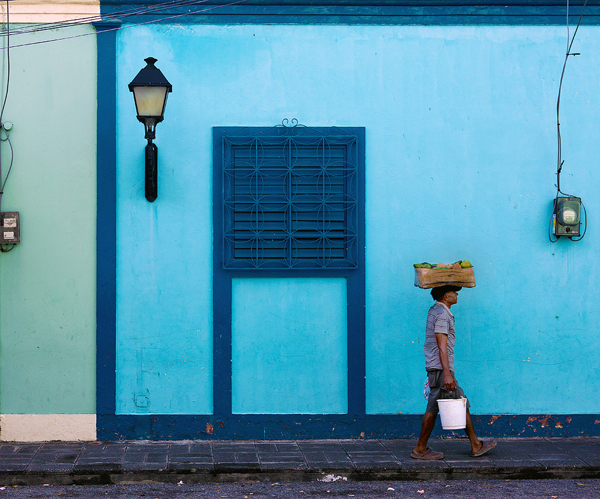
Traveltips Dominican Republic 4

Dominican Republic

14. Join forces with a local

From experience, in travel photography, there is nothing like working with a local photographer. Use a social platform (Facebook, Flickr, couchsurfing) and find a local photo enthusiast like yourself, who can show you all the best places to photograph. Of course, there are always risks when meeting strangers from the internet. Use your common sense and don’t meet them somewhere secluded at first.

Coming back home

15. Backup

I cannot stress how important this tip is. Don’t wait until it’s too late. Laptop, hard drive, cloud storage, you name it. Backup your images on more than one source.

16. Clean your gear

Before you store your stuff, you should clean it. Sea salt, sand, or even just fingerprints on the lens, can damage your gear. Keep your equipment in good shape and you will enjoy it for many years.

Traveltips Kyrgyzstan 3

Kyrgyzstan

17. Have a successes and misses notebook

In the past, I was recording a notebook of all my “almost got it” frames. Those fuzzy, overly bright, and “what the heck is this thing in the background” images.

I kept this notebook in order to learn how to not repeat my mistakes (and because we photographers like to be angry at ourselves from time to time). Then, I realized that it is just as important to understand why I failed as it is to understand why I succeeded. So, even today, after every assignment, I write ten things to keep and ten things to work on until the next trip.

18. Rest from it

I know it’s tempting, but resist the urge to filter, edit, and post-process your images the minute you get home. Give yourself at least a week before you do so. We tend to emotionally connect to our images, usually by the degree of investment and hard work we put into creating them. Give yourself time to disengage yourself from the experiences of your journey. This will help you see your images with less bias.

Traveltips laos 2

Laos

19. Get feedback

After learning from your successes and mistakes by yourself, use the help of someone else. Choose a friend, (preferably one with tact) and get his/her opinion on the images. It doesn’t matter if they’re a photographer or not. They should be honest, sincere and non-competitive with you.

20. Get it out to the world

Now, after resting from it, seeing it again with a new perspective, and hearing someone else’s advice, it’s time to get your art out to the world.

Choose up to 15 photos (not more). It is important to pay careful attention to the opening and closing images. Each image must stand on its own and together as a set. Add some text and post it to the world.

Note: the author would like to thank Nicholas Orloff for his help in writing this article.

Traveltips India

India

The post 20 More Photography Tips Every Travel Photographer Must Know by Oded Wagenstein appeared first on Digital Photography School.


Digital Photography School

 
Comments Off on 20 More Photography Tips Every Travel Photographer Must Know

Posted in Photography


Nikon D810: What You Need to Know

27 Jun

Nikon’s new D810 replaces two models, the D800 and D800E. It brings a number of refinements, some of which are minor, but some that are potentially very significant. The D810’s specification sheet is enormous and it’s easy to miss things – in this article we’re cutting through the PR jargon and breaking out the D810’s main selling points. Click through to read more

related news: Digital Photography Review (dpreview.com)

 
Comments Off on Nikon D810: What You Need to Know

Posted in Uncategorized