RSS
 

Posts Tagged ‘inside’

Living Light: Human Figures Dance Inside 3D-Printed Zoetrope

02 Jul

[ By SA Rogers in Drawing & Digital. ]

zoetrope gif main

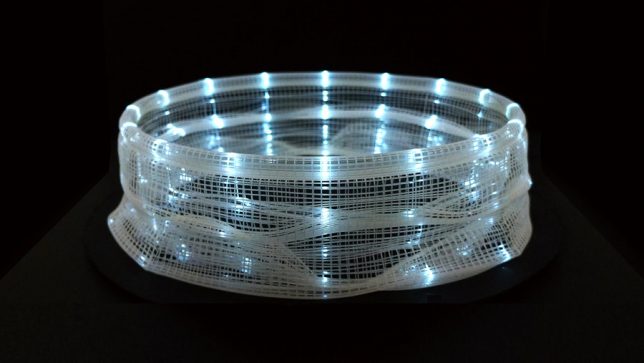
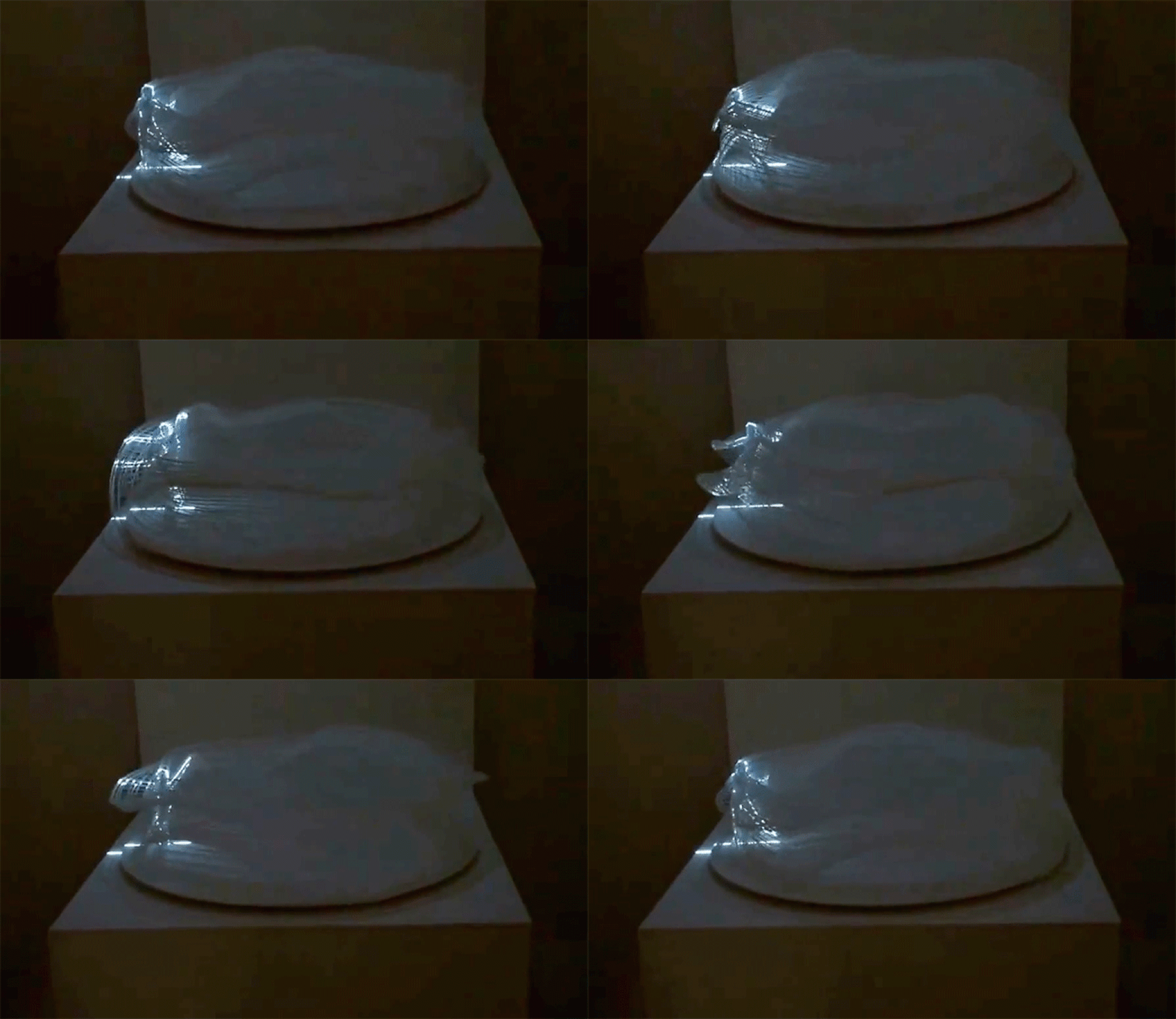
All it takes are a few highly focused beams of light and a spinning zoetrope to make a human figure spring to life, walking or even dancing in a barely-visible translucent circle. ‘Process and WALK’ explores the relationship between time and movement, taking a two-dimensional image of a person and applying it to a three-dimensional object. In effect, the person’s movements are stretched out to take up the entire circle, each fraction of an inch containing its own particular shifts of the arms and legs.

zoetrope gif 2

zoetrope light 2

Artist Akinori Goto lays out the whole process in the video above, showing how he transforms a animation of a person walking into a 3D axis that can then be translated into data for a 3D printer. The result looks like no more than a warped piece of plastic mesh, with no discernible shapes embedded within it. Place it on a turntable and it still won’t look like much – until beams of light highlight just one segment of the edge.

zoetrop gif 1

Once that happens, the walking figure appears. Every few seconds, the illuminated figure seems to multiply, sending additional figures to other points along the zoetrope. It’s simple and complex at the same time, pairing a pre-film animation device that’s been in use for centuries with cutting-edge small-scale manufacturing technology

Share on Facebook


[ By SA Rogers in Drawing & Digital. ]

[ WebUrbanist | Archives | Galleries | Privacy | TOS ]


WebUrbanist

 
Comments Off on Living Light: Human Figures Dance Inside 3D-Printed Zoetrope

Posted in Creativity


Mystery science theater: A look inside the Samsung NX3000

19 Jun

A peek inside the Samsung NX3000

When it was introduced in May 2014, the Samsung NX3000 didn’t exactly make waves in the camera industry. But it did provide an attractive 20MP sensor, articulated 3″ LCD and plenty of connectivity for a reasonable $ 520 all wrapped up in a super slim rangefinder-style ILC. Being curious about these kinds of things, we wanted to see how Samsung managed to wedge all of that tech into such a slender frame, and thanks to iFixit we can sit back at a safe distance and see how it’s made.

A peek inside the Samsung NX3000

Before proceeding with the disassembly, the camera battery must be taken out.

A peek inside the Samsung NX3000

If iFixit’s disassembly guides have taught us anything, it’s that cameras are held together with a metric ton of tiny screws. Not surprisingly, there are considerably fewer on the NX3000. Disassembly of the lens mount starts with the removal of four 7.3mm Phillips screws.

A peek inside the Samsung NX3000

With a few screws on the bottom, sides and hotshoe removed, the back panel can be eased away from the body…

A peek inside the Samsung NX3000

…And with a ribbon cable disconnected, the panel can be completely removed to reveal a cool blue motherboard.

A peek inside the Samsung NX3000

A pair of tweezers can be used to pluck the tripod mount right out of the camera.

A peek inside the Samsung NX3000

There are several ribbon cables to be removed before the sensor is free, but we think this is the coolest looking one.

A peek inside the Samsung NX3000

…And here’s the sensor module.

A peek inside the Samsung NX3000

With a couple more ribbon cables removed, the motherboard is ready to go too.

A peek inside the Samsung NX3000

The top panel can be freed with only a few more pieces to go.

A peek inside the Samsung NX3000

The button panel is one of the last pieces to be removed from the shell of the camera, also a striking blue color.

A peek inside the Samsung NX3000

And there you have it, the Samsung NX3000 inside and out.

Articles: Digital Photography Review (dpreview.com)

 
Comments Off on Mystery science theater: A look inside the Samsung NX3000

Posted in Uncategorized


iFixit takes a look inside the Olympus PEN E-PL7

11 Jun

Inside the Olympus PEN E-PL7

The Olympus PEN E-PL7, like its Micro Four Thirds peers, is a pretty impressive little piece of engineering. It houses a 16MP Four Thirds sensor and a 3″ LCD that flips up 180-degrees. It accepts Micro Four Thirds lenses and ships with a pocket-sized external flash. Being curious types of people, we wanted to know how Olympus squeezes everything into a camera of the E-PL7’s size. Thankfully, there’s iFixit. Their disassembly guide gives an up-close look at what’s inside the camera – and you don’t have to void your warranty in the process.

Inside the Olympus PEN E-PL7

This disassembly starts the way so many projects do: with a screwdriver. Screws are removed from the bottom plate and sides of the camera.

Image via iFixit

Inside the Olympus PEN E-PL7

With some screws removed from the lens mount, this inner ring is revealed and carefully removed.

Image via iFixit

Inside the Olympus PEN E-PL7

With even more screws gone a pair of tiny springs can be taken out of the mount.

Image via iFixit

Inside the Olympus PEN E-PL7

Removing even more screws makes it possible to gently pull the chassis apart, but not quite all the way with a ribbon cable connecting the two pieces. 

Image via iFixit

Inside the Olympus PEN E-PL7

A camera divided. Highlighted in red is the ZIF connector keeping the ribbon cable attached to the motherboard.

Image via iFixit

Inside the Olympus PEN E-PL7

With the cable disconnected, the camera can be handled one half at a time.

Image via iFixit

Inside the Olympus PEN E-PL7

Here’s another look at the motherboard, with even more ribbon cables attached.

Image via iFixit

Inside the Olympus PEN E-PL7

Up top, the plate that holds the mode dial and shutter release can be removed once one more screw is out of the way. 

Image via iFixit

Inside the Olympus PEN E-PL7

…And with some ribbon cables disconnected, the sensor comes free of the camera body too.

Image via iFixit

Inside the Olympus PEN E-PL7

 E-PL7’s 16MP sensor lies 

Here’s a front view of the E-PL7’s 16MP sensor. 

Image via iFixit

Inside the Olympus PEN E-PL7

The camera is looking quite empty at this point. Here’s a sense of how small that motherboard is.

Image via iFixit

Inside the Olympus PEN E-PL7

…And with a few last cables disconnected and screws removed, the E-PL7 disassembly is complete.

Image via iFixit

Articles: Digital Photography Review (dpreview.com)

 
Comments Off on iFixit takes a look inside the Olympus PEN E-PL7

Posted in Uncategorized


Take a closer look inside Canon’s impressive EF 200-400mm F4L IS

11 Jun

Canon has posted a video showing its massive EF 200-400mm F4L IS USM Extender 1.4 X reduced to its component parts.

The Canon 200-400mm is an impressive lens. This hefty telephoto uses no fewer than 33 elements arranged in 24 groups, including Fluorite and Ultra-Low Dispersion glass, and features a built-in 1.4X teleconverter. Canon’s stop-motion video is rather charming, and makes a nice change from the computer-generated exploded imagery that we’re used to seeing. 

Articles: Digital Photography Review (dpreview.com)

 
Comments Off on Take a closer look inside Canon’s impressive EF 200-400mm F4L IS

Posted in Uncategorized


Univers-Sel: Salt Labyrinths Swirl Inside 13th Century French Castle

26 May

salt labyrinth 1

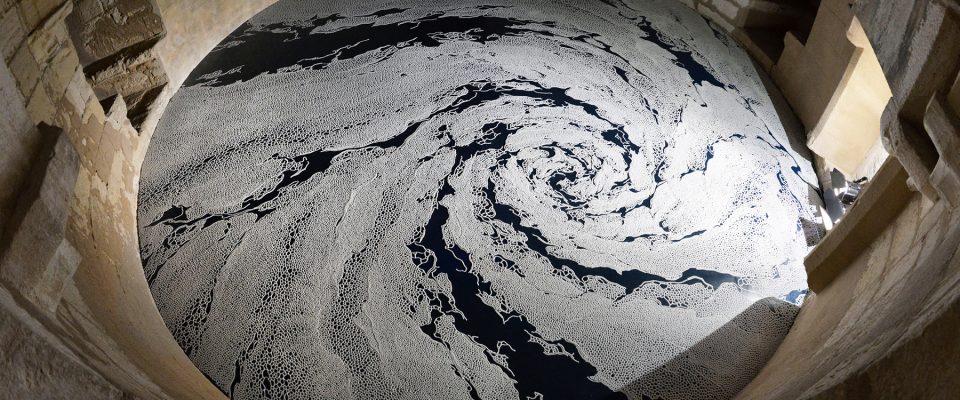
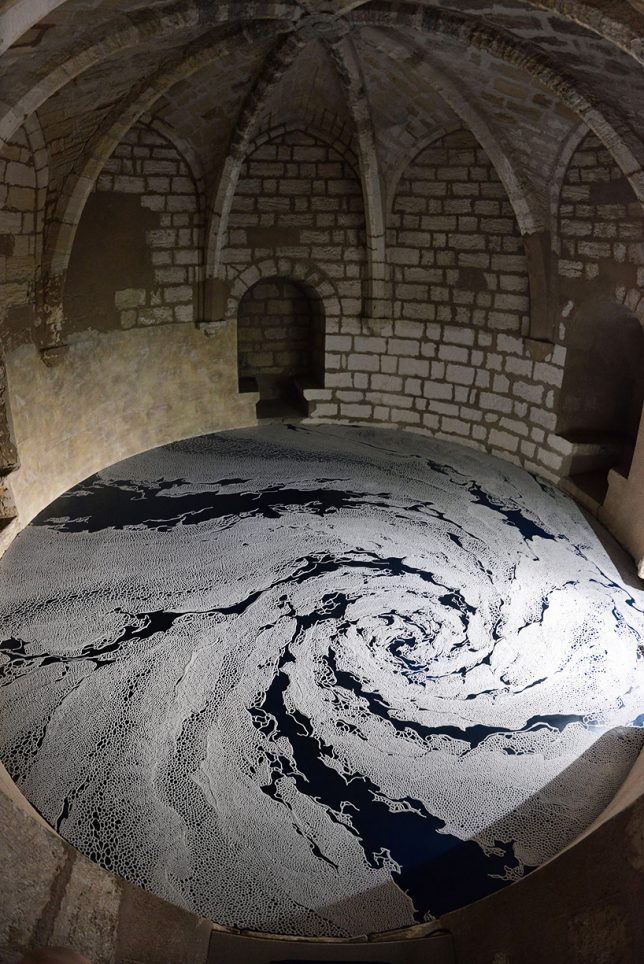
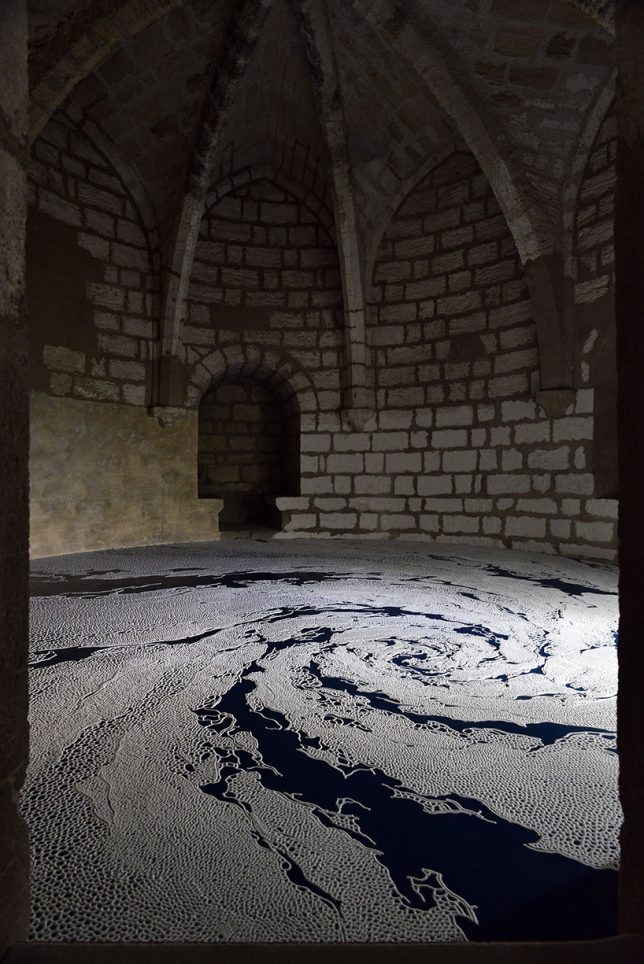
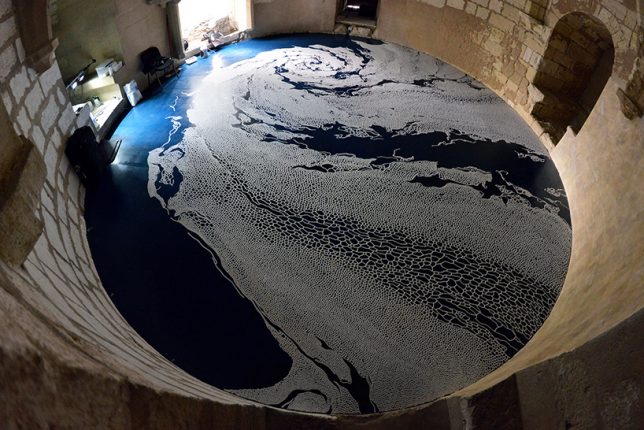
Gazing down at foamy-looking swirls of white on black from a niche in an ancient castle, you almost feel as if you’re an astronaut watching a hurricane form above the ocean on the distant Earth. These cellular arrangements form tentacular appendages of varying opacity, meeting in the center to create a vortex effect. They are, in fact, made of salt, with each grain symbolizing a memory or a moment in time. Artist Motoi Yamamoto installed ‘Floating Garden’ and ‘Labyrinth’  within the castle tower at Aigues-Mortes in Southern France for an exhibition called ‘Univers’ Sel,’ on display through the end of November.

salt labyrinth 2

The hurricane-like swirl of ‘Floating Garden’ is a motif commonly used to represent life, death, resurrection and rebirth in East Asia. To create it, Yamamoto started in the center of the black-floored space, shaking a container of salt in a calculated rhythm to produce just the right pattern, working for 45 hours over 5 days.

salt labyrinth 3

salt labyrinth 4

Within the ramparts, a labyrinth unfolds. Would you be able to wind your way from the outer edges of the pattern to the piles of salt that lie at the end? You’ll never find out, because to attempt it would mean destroying the work, with its intricately placed salt lines sensitive to the slightest movement. Like the sand mandalas of Tibetan monks, these salt sculptures are meant to exist temporarily, as vulnerable and ephemeral as human bodies moving through the hazardous world.

salt labyrinth 6

salt labyrinth 7

salt labyrinth 8

Both pieces are a continuation of series of the same names. The artist began working with salt as a medium after the loss of his sister to brain cancer at 24 years old, in rumination on time, transcendence and the notion of death. The salt structures act as an interstitial medium between our time and space within our physical world and whatever mysteries lie beyond.

salt labyrinth 5

“Drawing a labyrinth with salt is like following a trace of my memory,” says Yamamoto. “Memories seem to change and vanish as time goes by. However, what I seek is the way in which I can touch a precious moment in my memories that cannot be attained through pictures or writings. I always silently follow the trace, that is controlled as well as uncontrolled from the start point after I have completed it.”


WebUrbanist

 
Comments Off on Univers-Sel: Salt Labyrinths Swirl Inside 13th Century French Castle

Posted in Creativity


X-ray: iFixit looks inside the Fujifilm X-M1

22 May

iFixit looks inside the Fujifilm X-M1

We’re curious people at heart, and we like to know what’s going on inside of our prized electronic possessions. But taking screwdriver to camera isn’t a wise idea if you want to keep you gear functioning with a valid warranty. Thankfully, the folks at iFixit help satisfy our curiosity with their disassembly guides. So let’s enjoy a look under the hood of the Fujifilm X-M1 – from a safe distance, shall we?

iFixit looks inside the Fujifilm X-M1

With the lens and battery removed, the project may begin by pulling back the faux-leather covering on the camera body to access some screws.

Image courtesy of iFixit

iFixit looks inside the Fujifilm X-M1

More screws await under the lens mount…

Image courtesy of iFixit

iFixit looks inside the Fujifilm X-M1

…and with the hot shoe cover and a few more screws gone, the back of the camera is free.

Image courtesy of iFixit

iFixit looks inside the Fujifilm X-M1

What’s heard but never seen? The speaker inside your camera! You knew it was there. This is what it looks like.

Image courtesy of iFixit

iFixit looks inside the Fujifilm X-M1

Behind the LCD you’ll get a glimpse of the motherboard, veiled by a plastic covering.

Image courtesy of iFixit

iFixit looks inside the Fujifilm X-M1

Here’s a clear view of the motherboard underneath, with Fujifilm’s image processor in plain sight.

Image courtesy of iFixit

iFixit looks inside the Fujifilm X-M1

And here’s the back of the sensor assembly, just underneath the motherboard.

Image courtesy of iFixit

iFixit looks inside the Fujifilm X-M1

There’s not a whole lot of camera left to disassemble at this stage, and the top plate can be removed cleanly with the appropriate ribbon cable disconnected.

Image courtesy of iFixit

iFixit looks inside the Fujifilm X-M1

Here’s a look at the LCD and its articulated arm away from the camera body.

Image courtesy of iFixit

iFixit looks inside the Fujifilm X-M1

And there you have it, the inner workings of the X-M1 laid out neatly for inspection.

Image courtesy of iFixit

Articles: Digital Photography Review (dpreview.com)

 
Comments Off on X-ray: iFixit looks inside the Fujifilm X-M1

Posted in Uncategorized


Inverted Umbrella: Drip-Free Design Turns Canopy Inside Out

21 May

[ By WebUrbanist in Design & Products & Packaging. ]

umbrella double canopy layer

Like tableware or sliced bread, the umbrella is the subject of many reinvention attempts but few approach the sheer cleverness and ingenious simplicity of this design solution, which tackles drips, winds, crowds and compactness in one product.

inverted umbrella design

Created by engineer and inventor Jenan Kazim, the KAZbrella solves the core everyday issue of umbrellas bringing water into your home or vehicle, while also making them easy and safe to open in crowds as well as resistant to high winds (able to pop out then back into shape without breaking). When the umbrella is closed, a strap around the top seals the water inside, keeping it from dripping.

umbrella dry wrap

umbrella inversion process

“The patented design includes a string and pulley mechanism that allows the frame to open the opposite way to a traditional umbrella, though the action of pushing the slider up until the upper latch is engaged remains the same. It still looks and functions like a traditional umbrella when open, but when closed the spokes fold in so they point away from the handle and the outer surface is hidden inside.”

umbrella everyday use

inside out umbrella

umbrella in crowd

The KAZbrella also employs materials for lightweight durability, from its fiberglass spokes and aluminum frame to its double layer of woven polyester. It can be opened and closed through smaller gaps than its ungainly cousins, making it easier to keep dry while entering or exiting spaces. It can then be set down against a wall, in a stand or on your car seat without getting things wet.

Share on Facebook


[ By WebUrbanist in Design & Products & Packaging. ]

[ WebUrbanist | Archives | Galleries | Privacy | TOS ]


WebUrbanist

 
Comments Off on Inverted Umbrella: Drip-Free Design Turns Canopy Inside Out

Posted in Creativity


Under the hood: A look inside the Panasonic Lumix DMC-LX100

08 May

A look inside the Panasonic Lumix DMC-LX100

Panasonic’s LX100 is an ambitious little camera. It steps right over the 1″ sensor compact class with a 16MP Four Thirds sensor (though only 12.7MP is truly available), a 24-75mm equiv. F1.7-2.8 lens and 4K video recording. It all added up to a very favorable score and a gold award when we reviewed the camera. Now, thanks to the folks at iFixit, we can take a look at what’s inside the LX100 without ever picking up a screwdriver. 

A look inside the Panasonic Lumix DMC-LX100

Removing the battery is a first and very important step. 

A look inside the Panasonic Lumix DMC-LX100

After removing plenty of screws from the body of the camera, removing this metal piece from the hotshoe reveals yet another set of screws.

A look inside the Panasonic Lumix DMC-LX100

A spudger is the best tool for this job – with all of the screws out of the way the back of the chassis can be pried away from the camera body.

A look inside the Panasonic Lumix DMC-LX100

Here’s a view of the back panel with the cover out of the way. The motherboard lies just below the buttons seen here.

A look inside the Panasonic Lumix DMC-LX100

To get to the motherboard, the LCD needs to be removed. Here, the silver metal backing is pried away with a spudger. A ribbon cable also connects the screen to the rest of the device and is carefully removed.

A look inside the Panasonic Lumix DMC-LX100

With the LCD gone, the motherboard and its related ribbon cables are visible.

A look inside the Panasonic Lumix DMC-LX100

A couple more screws out of the way and the EVF pops right out. In that housing is an XGA 1024×768 panel.

A look inside the Panasonic Lumix DMC-LX100

Next goes the motherboard, which is gently pried back and pulled away from the camera.

A look inside the Panasonic Lumix DMC-LX100

Next to go is this copper plate. On the other side we’ll find the lens, but only after the next batch of screws is removed. 

A look inside the Panasonic Lumix DMC-LX100

No fewer than four different sized screws, from 4mm down to 3.1mm are used here. 

A look inside the Panasonic Lumix DMC-LX100

With the last (well, almost last) screws out of the way the lens casing is free…

A look inside the Panasonic Lumix DMC-LX100

…and then the lens can be removed as well. 

A look inside the Panasonic Lumix DMC-LX100

The top panel is ready to go too…

A look inside the Panasonic Lumix DMC-LX100

…and we can see what goes on under the dials and shutter release up there.

A look inside the Panasonic Lumix DMC-LX100

And there you have it, the LX100 in all disassembled. 

Articles: Digital Photography Review (dpreview.com)

 
Comments Off on Under the hood: A look inside the Panasonic Lumix DMC-LX100

Posted in Uncategorized


Dr. Seuss Tower: Get a Look Inside Precariously Stacked Cabins

08 Apr

[ By Steph in Architecture & Houses & Residential. ]

Screen Shot 2016-04-08 at 11.43.12 AM

The mysterious eight-story stacked cabin house spotted among the trees in a remote area of Alaska is even cooler than previously thought, now that filmmakers have caught up to creator and self-described “frustrated architect” Phillip Weidner. In a two-minute documentary by Great Big Story called ‘We’re Not in Whoville Anymore,’ Weidner calls his Frankenstein creation ‘Goose Creek Tower,’ and reveals his motivation for building it, along with a few of its most notable features.

Screen Shot 2016-04-08 at 11.42.26 AM

Screen Shot 2016-04-08 at 11.42.43 AM

“I like building. I just designed it out of my head, we didn’t have blueprints. We drew it out on cardboard, plywood, just as we were going. I started to build a 40 by 40 scribed log cabin, and I realized I could put pillars on top and put another house on top of the house. And I just kept going. We got to 185 feet and we stopped because two hundred feet is federal airspace.”

Screen Shot 2016-04-08 at 11.57.29 AM

Screen Shot 2016-04-08 at 11.42.52 AM

Previously, we got a look at the outside of the structure overlooking Mount McKinley and the Denali National Park via Alaska Aerial Footage, which captured a dizzying video of its full height against the snowy landscape.

Screen Shot 2016-04-08 at 11.57.50 AM

Screen Shot 2016-04-08 at 11.57.41 AM

Screen Shot 2016-04-08 at 11.58.03 AM

The tower remains pretty bare-bones, with all of the framing complete but no windows or finished surfaces. There are even more levels than you can see from the outside, as the interior winds from one split-level platform to the next. Weiner, a former attorney, reveals that a hidden escape tunnel at the basement level leads to a safe room.

Screen Shot 2016-04-08 at 11.58.34 AM

Screen Shot 2016-04-08 at 11.58.57 AM

Screen Shot 2016-04-08 at 11.59.53 AM

“I wanted to be able to see,” says Weidner. “And that’s the reason I went up. You could see for at least three hundred miles. And of course when the northern lights are out, you can really see ‘em. I hope that Goose Creek Tower will inspire other people to do worthwhile things, not just in building but whatever they do with their life. And every time I go up there, it’s a different experience. It kind of gives you a sense of the enormity of the universe.”

Share on Facebook


[ By Steph in Architecture & Houses & Residential. ]

[ WebUrbanist | Archives | Galleries | Privacy | TOS ]


WebUrbanist

 
Comments Off on Dr. Seuss Tower: Get a Look Inside Precariously Stacked Cabins

Posted in Creativity


CP+ 2016: A look inside the G Master lenses at the Sony booth

27 Feb

CP+ 2016: Sony stand report and G Master action

Earlier this year, Sony announced a trio of new lenses dubbed G Master, which include the Sony FE 24-70 F2.8 GM, the Sony FE 70-200 F2.8 GM and the Sony FE 85mm F1.4 GM. These three lenses helped to fill noticeable gaps near the higher end of Sony’s lens lineup.

And, no, we didn’t Photoshop in that gap in the lens lineup above just to make a point.

CP+ 2016: Sony stand report and G Master action

The G Master lenses are chock-full of new and advanced technologies meant to maximize image quality, autofocus speed and accuracy, durability, and bokeh. Let’s take a look inside…

CP+ 2016: Sony stand report and G Master action

Here’s the 24-70mm F2.8 GM lens cut in half. This lens comprises 18 elements in 13 groups, and features three aspherical elements, including an extreme aspherical (XA) element – more on that later. An ED (extra low dispersion) and Super ED glass element help minimize chromatic aberration while maintaining high resolution and bokeh characteristics. We believe it – our initial samples show very well-controlled chromatic aberration, and bordering on eye-popping sharpness even on a 42MP sensor, when shooting this lens wide open.

A 9-bladed aperture helps confer a circular shape to out-of-focus highlights, but it’s the autofocus system in this lens that most excites us. A Direct Drive SSM (super sonic wave motor) positions a relatively small group of focus elements accurately and quickly, and when we say quickly we mean with nearly unprecedented speed for this type of lens. We’ve become fans of Direct Drive SSM for AF ever since we saw the speed it confers in the FE 35mm F1.4. Focus, including continuous tracking, is nearly instantaneous on this 24-70 GM, which is fairly unexpected considering its counterparts in the DSLR arena. Focus is also both smooth and quiet, making it a great lens for video as well as stills.

CP+ 2016: Sony stand report and G Master action

The new XA (extreme aspherical) element is claimed to reduce aberration and deliver high resolution throughout the entire zoom and aperture range, across the entire frame. Sony claims to have achieved this via extremely high surface precision, maintained to within 0.01 micron tolerances. This should help reduce imperfections that can lead to onion-ring bokeh, typically an issue with aspherical lenses. 

And speaking of high precision, Sony claims to iterate their internal development of optical design by looking at actual lens MTF performance at 50 lines/mm. That doesn’t mean the lens only resolves to 50 lines/mm, it means that Sony’s threshold for acceptable performance in designing these lenses is quite high. Judging from the sharpness wide open on an a7R II, we’re inclined to believe it’s working for Sony.

CP+ 2016: Sony stand report and G Master action

Sony has also recently announced the FE 85mm F1.4 GM, shown here cut in half. This lens comprises 11 elements in 8 groups, and features a new XA (extreme aspherical) element as well as three ED (extra low dispersion) elements that help optimize both resolution and smooth transitions to out-of-focus areas. It’s also got a ‘Nano’ anti-reflective coating on its front element to reduce flare and ghosting, particularly useful for maintaining contrast in backlit portraits. 

The 85mm GM lens utilizes a ring drive SSM (super sonic wave motor) to drive the lens’ large, heavy focus group. In other words, this lens is much like some of its DSLR counterparts in terms in focusing speed – very fast, but not quite as fast – in our initial impressions – as Sony’s own Direct Drive SSM combined with a relatively small focusing group in the 24-70mm F2.8 GM. Two position sensors support accurate positioning of the focus elements, which should ensure accuracy of focus.

CP+ 2016: Sony stand report and G Master action

Particularly nice is the 11-blade circular aperture in the 85mm F1.4 (and 70-200mm F2.8) GM lenses. The more blades you have, the more circular the aperture remains even when stopped down significantly – especially with the curved blades typical of almost all lenses today. Most modern lenses have between 7 and 9 blades these days, with 9 blades being reserved more pro-level lenses. 11 takes it a step further and, indeed, the opening retains a circular, less polygonal shape as you stop down (here it is in action). This should ensure circular out-of-focus highlights and increased quality of bokeh, even at smaller apertures.

And why go from 9 to 11 blades, skipping 10? Odd numbers of aperture blades are generally better for their more favorable sunstar rendition, creating sunbursts with twice the number of rays as aperture blades when stopped down. Even-numbered designs only create sunbursts with as many rays as aperture blades, so while a 10-blade aperture would produce 10-ray stars, an 11-blade aperture would produce 22-blade stars. Of course, longer focal lengths and circular aperture designs are less prone to creating sunstars at all – and we have no idea if this was the actual thinking behind the choice – but it’s still nice to see the general trend toward odd numbers of aperture blades.

CP+ 2016: Sony stand report and G Master action

Pictured here is the new FE 70-200mm F2.8 GM OSS telephoto zoom lens Sony recently announced, cut in half of course. This lens, like the 24-70mm GM lens, features XA, Super ED, and ED glass elements to help achieve high resolution and desirable bokeh characteristics. It’s got 23 elements in 18 groups. A ‘Nano’ anti-reflective coating ensures reduced flare and ghosting. An additional fluorine coating to the front of the lens help keep it clean, and the lens is dust and moisture resistant.

OSS (Optical Steady Shot) is built into the lens, despite the availability of IBIS in a7-series cameras, because for longer focal lengths, it’s beneficial to do a certain amount of the stabilization in-lens, because of how much the sensor would have to move to compensate for even slight angular displacements. The two systems – OSS and IBIS – theoretically work together to provide even more effective stabilization than any one method might provide.

CP+ 2016: Sony stand report and G Master action

The autofocus system on the FE 70-200mm GM OSS is quite intriguing: it’s a floating focus system, which sees its debut in an ? lens. This floating system design contributes to its impressive minimum focusing distance of 0.96m, and also helps control aberrations that might otherwise be problematic when focusing at close distances. 

Pictured on the left is the more traditional ring-drive SSM motor that’s required to drive the large, heavy glass elements typical of this type of lens. The double linear motor of this system, pictured on the right, allows for effective ‘wobbling’ actuation (typically used in contrast-only AF), which is useful when shooting video. The entire focusing mechanism is also very quiet – and smooth – which ensures AF performance is optimized for both stills and video shooting. 

The 70-200mm F2.8 GM OSS lens also functions with Sony’s newly announced 1.4x and 2x teleconverters, which may somewhat make up for the lack of longer telephoto lenses (for the time being anyway).

CP+ 2016: Sony stand report and G Master action

Lifting our heads back up from the tech demos and turning our attention to other things (wait, where’d Rishi go?), we see that in typical trade-show form, Sony’s provided some subject matter for eager attendees to test the latest tech. But if you were to show up to CP+ hoping to capture some model mayhem using the new GM lenses, you’d have to make do with the 85mm F1.4 GM, the only new GM lens available in front of this display.

And don’t worry, if you’re already missing the lens-cut-in-half thing, you can get your fix when our Editor Barney returns with many more things cut in half later this week. Like nicely packed, and then cut in half (naturally) sandwiches.

CP+ 2016: Sony stand report and G Master action

At first glance, the 85mm F1.4 GM looks a little unwieldy on an a7-series camera, but in hand, the pair balance remarkably well. The lens has a pleasingly solid heft to it without feeling too front-heavy. At 820g, it’s significantly heavier than, say, Nikon’s counterpart (595g), but our initial impressions are that the sharpness wide open – even off-center – and lack of chromatic aberration might make the weight more than worth it.

CP+ 2016: Sony stand report and G Master action

Beyond the price of a CP+ admission ticket, there’s no charge to try out the new 85mm F1.4 GM – but to get one of your very own, you’ll need $ 1800 when it goes on sale in March. Also of note for video shooters is the ability to de-click the aperture dial for smoother operation.

CP+ 2016: Sony stand report and G Master action

Although you’re a little ways away from the real models, you can try out the FE 24-70mm F2.8 GM on some beleaguered Sony reps behind the counter. And though it appears a bit hefty on the smaller a7-series bodies, it balances well – particularly if you have a vertical grip attached. At 886g, it’s not unreasonably heavy, and the extra heft may be well worth it anyway – our preliminary impressions are that this is the sharpest 24-70mm zoom (particularly wide open) we’ve ever seen.

It will be available in March for $ 2200.

CP+ 2016: Sony stand report and G Master action

Last up is the FE 70-200mm F2.8 GM. As you can probably tell from this image, the lens itself isn’t overly large, but it’s definitely got some weight to it. At 1480g, it’s around the weight of Canon’s equivalent lens, which means you’ll really want a grip on an a7-series camera to balance the weight well. The FE 70-200mm F2.8 GM OSS will be available in March, and the price is still TBD.

Overall, the G Master lenses appear to be solid additions to Sony’s FE lens lineup, potentially addressing the need for professional-level lenses for the system. We’ve shot a few shots with these lenses on a 42MP a7R II, and it’s clear from the sharpness and chromatic aberration results, as well as AF speeds, that Sony is clearly targeting professionals, and high-end enthusiasts, with these lenses. And we expect them to compare favorably against even the best counterparts offered by the stalwarts in the industry. We’ll reserve judgement until we’ve had time to do more rigorous, side-by-side testing, but for the time being, it’s safe to say we’re very impressed.

Articles: Digital Photography Review (dpreview.com)
 
Comments Off on CP+ 2016: A look inside the G Master lenses at the Sony booth

Posted in Uncategorized