RSS
 

Posts Tagged ‘inside’

Master drone pilot captures video while flying around, inside, and under a moving train

25 Sep

Absolutely, positively never try this yourself. By all accounts, this flight was highly illegal and DPReview in no way condones this activity.


If you’re at all plugged into the world of drone news, you’ve probably seen this video floating around the past week. Captured by master First Person View (FPV) drone pilot Paul Nurkkala, it shows his “flight of the year” in which he flies around, inside, onto, and under a moving train… barrel rolls included.

Nurkkala captured the video using his custom built drone, which is equipped with a GoPro Hero5 Session and piloted from afar using special FPV goggles.

The video has split the internet into two predictably conflicted camps. The first thinks it’s just the coolest footage to ever come out of a drone, because Nurkkala is clearly such a talented pilot. The second is infuriated that he would do something so obviously illegal, post the results online, and receive so much praise and adulation (and so many views… at last count his 5-day old YouTube video had accrued nearly 850,000 views).

No judgement if you find yourself both entertained and a little bit annoyed/angry while watching the video.

Articles: Digital Photography Review (dpreview.com)

 
Comments Off on Master drone pilot captures video while flying around, inside, and under a moving train

Posted in Uncategorized


Haunting photos from inside the wrecked cruise ship Costa Concordia

09 Jul

In August of 2014—two years and seven months after the cruise ship the Costa Concordia sank off the coast of the Tuscan island Giglio, claiming 32 lives—photographer Jonathan Danko Kielkowski swam aboard to document what was left.

At that point, the ship had only recently been raised from the bottom of the ocean, having spend two and a half years partially submerged—a home for sea life and wild superstitions about how its sinking was some sort of omen. After all, it did sink almost exactly 100 years after the Titanic.

But Kielkowski wasn’t going there to document fantasy. He wanted to capture raw, abandoned, decrepit reality.

To his credit, when the ship arrived in Genoa to be scrapped, Kielkowski tried to get a permit and capture the photos legally. But a permit was impossible to acquire, and after being turned back by the Coast Guard once, he tells DIYP he finally succeeded in swimming to the ship in the dark, camera gear and clothes towed along in a small rubber dinghy.

He got in, set up, and once the sun came up he got to shooting. Using his Canon 5D Mark II with a EF 16-35mm F2.8 attached and a small, sturdy tripod, he wandered around the wreck for 6 hours and captured some 500 photos.

“It was pitch black inside the wreck and most parts of the ship had no lights installed at that time,” he wrote in response to one photographer’s criticism, explaining how the photos were captured. “The expose time for most of the images is well over 5 minutes.”

Technique aside, for Kielkowski, those photos provide a distant echo of the nightmarish fear 4,000 passengers must have felt as they tried to evacuate a sinking ship.

The photos above and many others besides were eventually collected into a photo book, Concordia, published by White Press. To learn more about or order the book, visit this link. And if you’d like to see more of Jonathan’s work, visit his website or give him a follow on Facebook and Instagram.


All photos © Jonathan Danko Kielkowski, used with permission.

Articles: Digital Photography Review (dpreview.com)

 
Comments Off on Haunting photos from inside the wrecked cruise ship Costa Concordia

Posted in Uncategorized


Culinary Arts: Rock Candy Geodes Hidden Inside Huge Chocolate Shells

13 Apr

[ By WebUrbanist in Art & Sculpture & Craft. ]

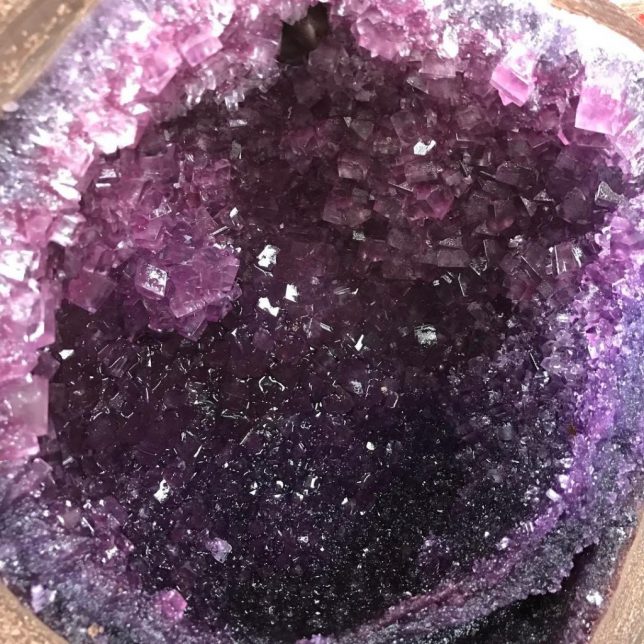
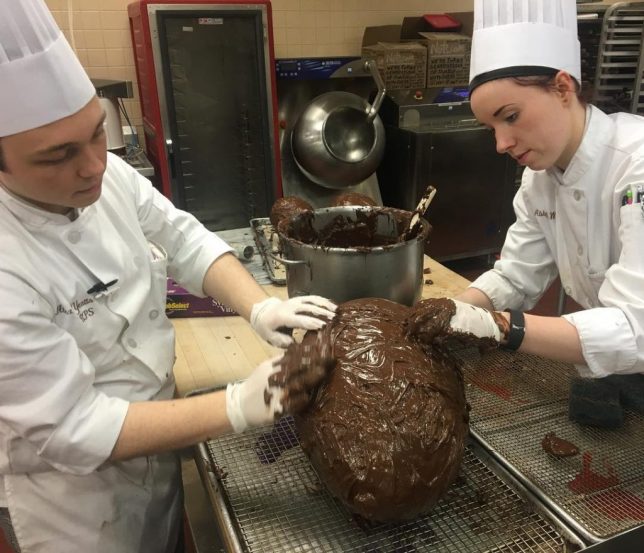
Just like the dull rocks that often reveal geode formations in nature, one would not expect to find such a sweet surprise inside what look a bit like giant Easter eggs (or perhaps dinosaur droppings).

As a final thesis project for the Culinary Institute of America in New York, Alex Yeatts and Abby Lee Wilcox spent months crafting these monstrous treats.

After 6 months of hard work @alex.yeatts and I cracked open our chocolate geodes!!! I am so thankful to have had this experience. #proud2bcia #chocolate #geode #foodart #chefstalk #candy #bakerylife #confectionery #foodie #foodporn #cny #pastry #buzzfeast #geodecake

A post shared by Abby Lee Wilcox (@abbyleewilcox) on

Orange-red and purple crystals inside look remarkably natural, particularly the latter (resembling typical amethysts). While hardly healthy, one could imagine subsisting on these gigantic desserts indefinitely.

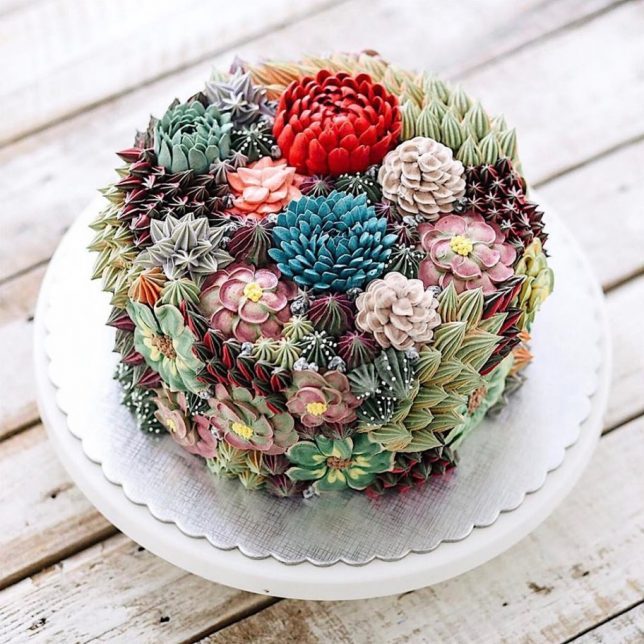
In a similar vein (treats imitating nature), the “flower cakes” (and cupcakes) of Iven Kawi are stunning works of culinary art, so lifelike one could imagine being pricked by the needles on cacti or grind one’s teeth on the sandy landscapes (via Colossal).

Share on Facebook


[ By WebUrbanist in Art & Sculpture & Craft. ]

[ WebUrbanist | Archives | Galleries | Privacy | TOS ]


WebUrbanist

 
Comments Off on Culinary Arts: Rock Candy Geodes Hidden Inside Huge Chocolate Shells

Posted in Creativity


Inhabited Ruin: Modern Home Hidden Inside Abandoned Masonry Shell

07 Apr

[ By WebUrbanist in Architecture & Houses & Residential. ]

inhabited ruin

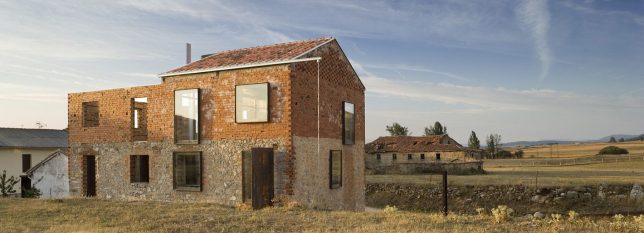
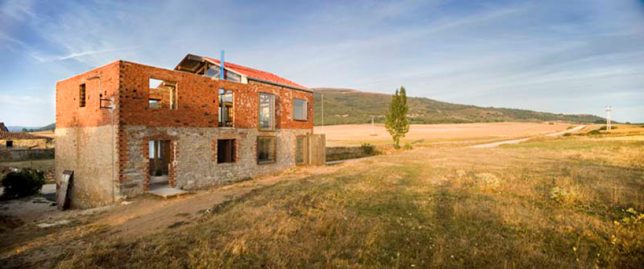
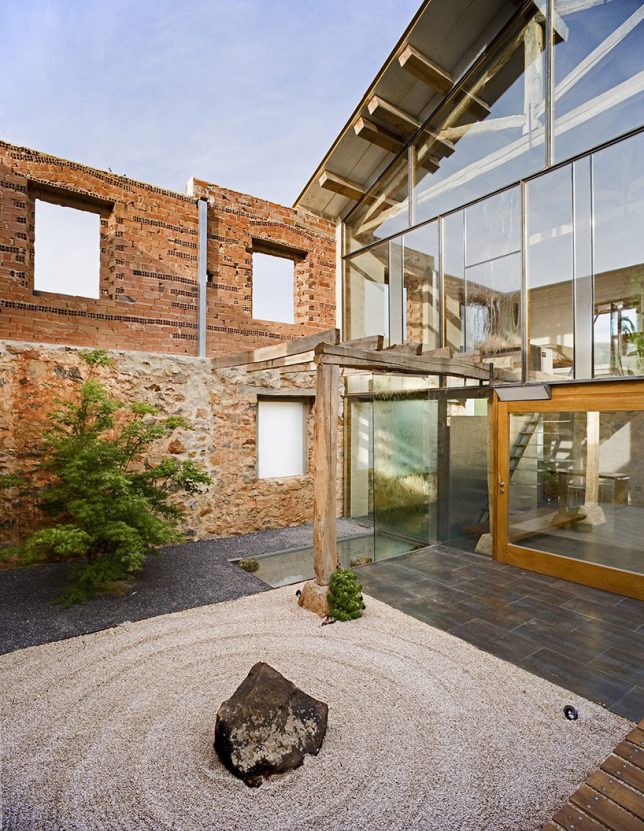
When the architect of this remarkable remodel was hired to create a new home for his clients, a derelict building on the site caught his eye and turned out to be the focal point of a marvelous design project.

ruin exterior

ruin side

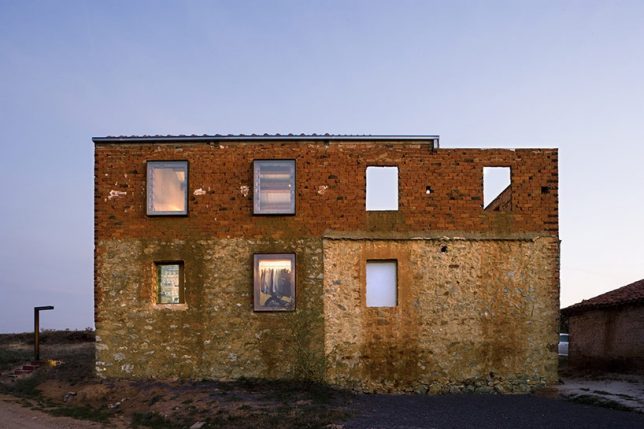
Estudio Castillo Oli (images by Angel Baltanas) balances old and new in this hybrid project, inserting a contemporary dwelling into a stone-and-brick shell on the site.

window glazing

ourtyard inside

Part of the existing structural remnants were retrofit with modern windows and a roof to create interior spaces for the home while the rest were left up as a kind of fence for a semi-private exterior courtyard.

inner workings

view above

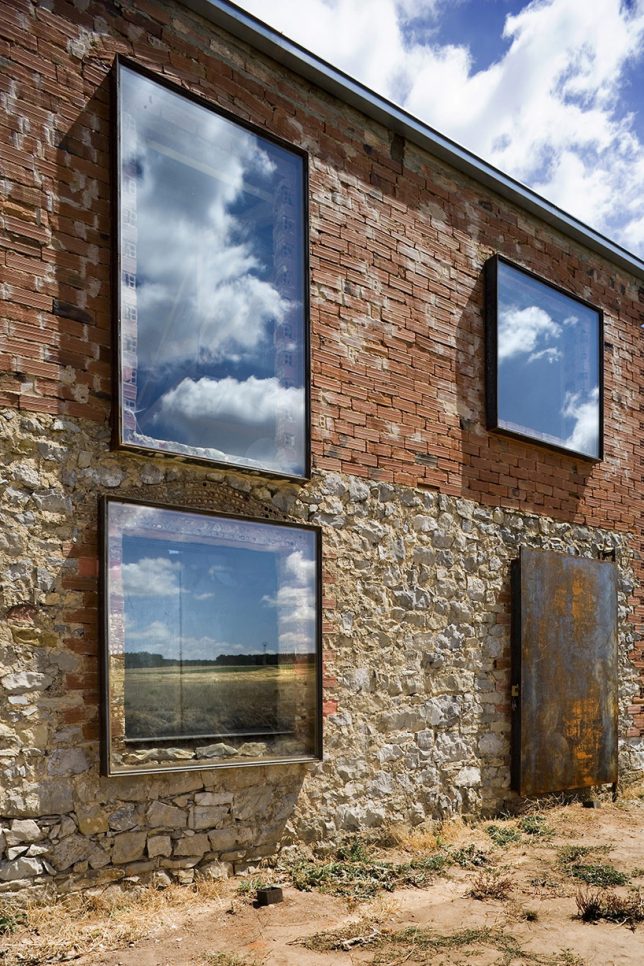
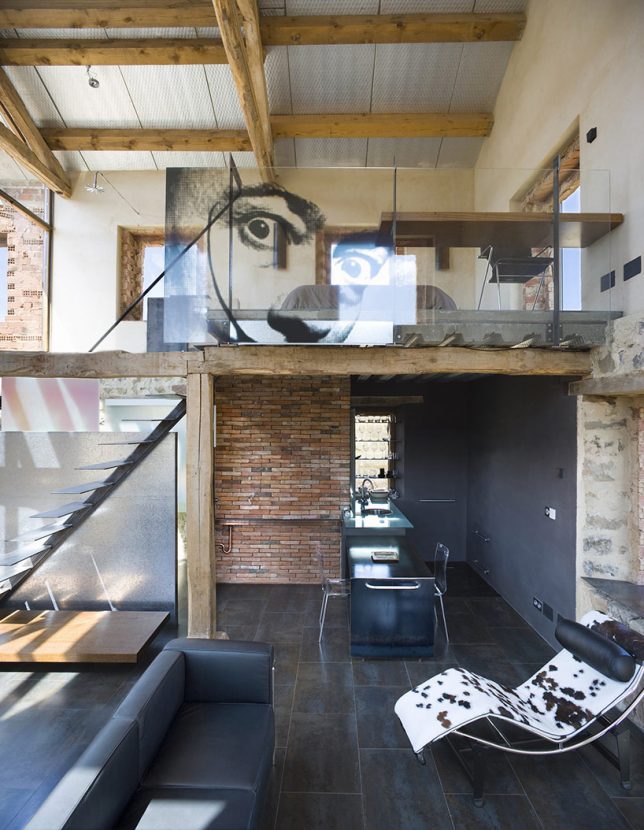
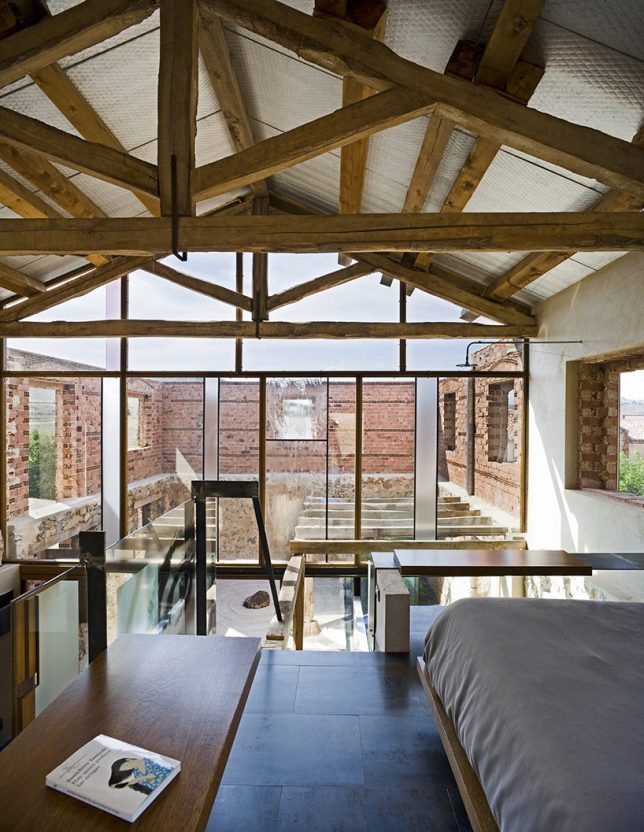
New ceramic tiles and timber framing matches the existing context while steel and glass add a modern touch. A glass wall between inside and outside spaces reduces the sense of separation between them.

window detail

timber modern

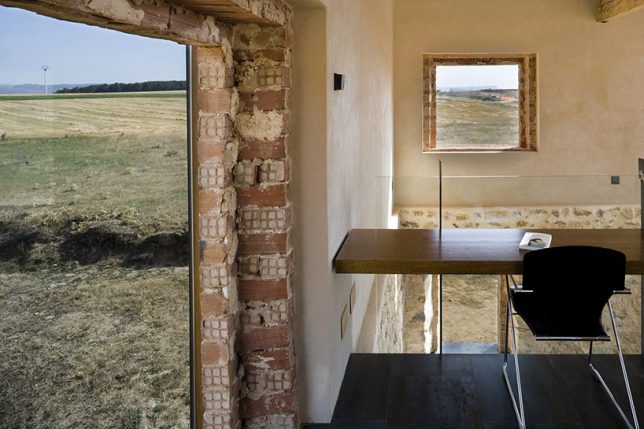
Inside, new walls are pulled back from window openings to reveal the old structure. Glass and trim likewise give space to old openings, preserving what was there. The net result is a gorgeous, rich and complex mixture of aged elements and new, creating something with a sense of time but also fit for modern living.

Share on Facebook


[ By WebUrbanist in Architecture & Houses & Residential. ]

[ WebUrbanist | Archives | Galleries | Privacy | TOS ]


WebUrbanist

 
Comments Off on Inhabited Ruin: Modern Home Hidden Inside Abandoned Masonry Shell

Posted in Creativity


Teamlab Jungle: Step Inside a Massive Musical Instrument Made of Light

17 Feb

[ By SA Rogers in Art & Installation & Sound. ]

teamlab jungle light vortex

Anyone who visits ‘Music Festival, TeamLab Jungle’ this summer will get to immerse themselves in a space made of light, interacting with moving beams to help produce collaborative crowd-sourced music. ‘Light Chords’ is one of three ‘4D’ light-based installations the Japanese interdisciplinary group has planned for the event, all of which represent a unique intersection of art, design, technology and nature.

teamlab jungle light chords

teamlab jungle

‘Light Chords’ aims to create the sensation of being inside a massive musical instrument, touching the ‘strings’ to produce a sound and hearing it reverberate all around you. The beams of light rise into the sky when touched and then settle back down to be activated again.

teamlab jungle day

teamlab jungle light vortex 3

The second 4D space, Light Vortex, places visitors at the center of a surreal light show that bends and stretches around the space, while ‘Light Cave’ builds complex light-based architecture over attendees’ heads.

teamlab jungle vortex

teamlab jungle light vortex 4

Known for their use of illumination as an artistic medium and for a focus on interactivity, TeamLab brings their ‘Music Festival’ to various cities and spaces each year, with different experiences to be had by day and by night. Before dark, TeamLab Jungle is designed as a music festival for families, while after dark it becomes more like a dance party with BACARDÍ-sponsored bars.

Share on Facebook


[ By SA Rogers in Art & Installation & Sound. ]

[ WebUrbanist | Archives | Galleries | Privacy | TOS ]


WebUrbanist

 
Comments Off on Teamlab Jungle: Step Inside a Massive Musical Instrument Made of Light

Posted in Creativity


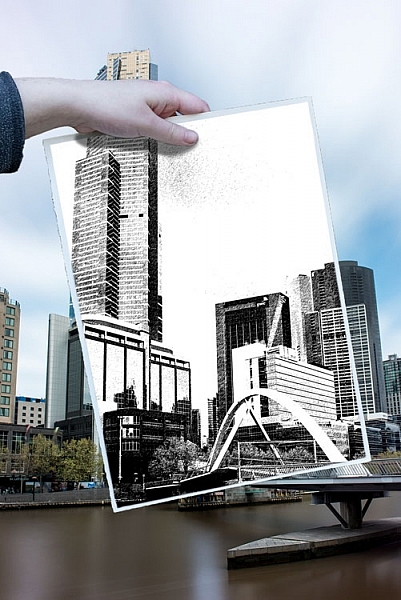
How to Make a Sketch Inside a Photograph

25 Oct

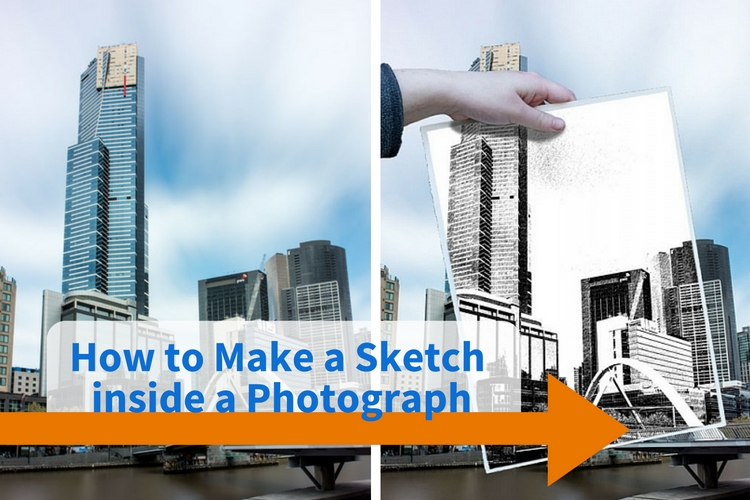
This is one of those tutorials that’s great to play around with, maybe do it once or twice. But in the end, the thing they are great for is that they always teach you something. It may not be much, but it might help you think in a different way, or learn a skill you didn’t know about. This one is about how to make a sketch inside a photograph.
how-to-make-a-sketch-inside-a-photograph


This is a simple tutorial that can help you learn how to use layers, and combine images. There are so many things you can do with layers, but  in this example, we are going to work on putting a drawing of a scene in front of the photograph. Of course, it isn’t a real drawing, but one that is created from the image using the artistic filters in Photoshop.

The image

Deciding which image you are going to use can be harder than you think. It could take a while to find one that will work well, one with lots of contrast is good. You want an image that will stand out when you put the drawing over the top of it.
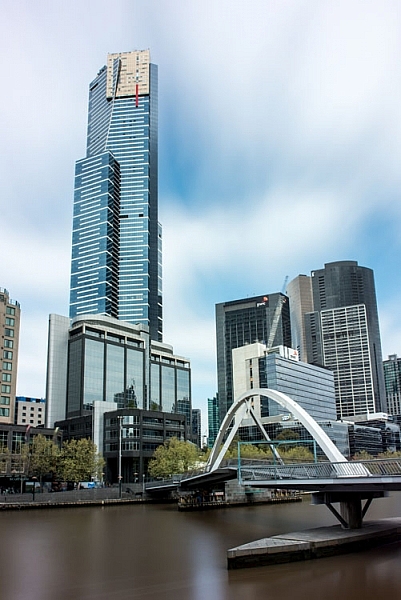
How to Make a Sketch inside a Photograph

Open the image and process it normally to get it ready. If you have several layers flatten or merge all of them, and copy that new merged layer so there are two. To copy the layer press Ctrl/Cmd+J.

Turn off the top layer by clicking on the eye icon next to the thumbnail. That will make it disappear, or turn off temporarily.
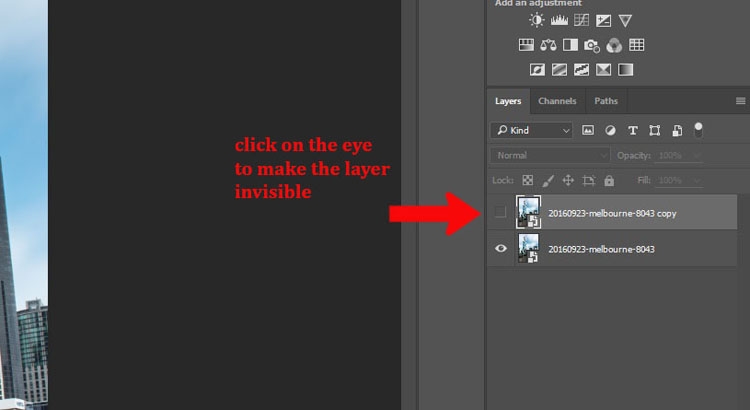
How to Make a Sketch inside a Photograph - hide layer

Click the bottom layer to select it as the one that you will change into a drawing.

Making the drawing

Go up to the Main Menu and click Filters > Filter Gallery, or use the keyboard shortcut Ctrl/Cmd+F.
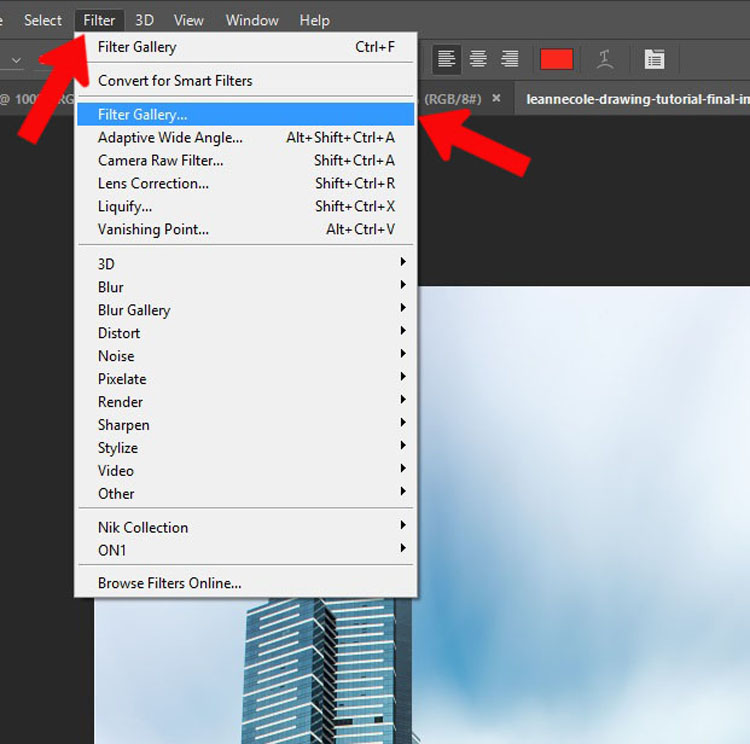
How to Make a Sketch inside a Photograph - filter gallery

If you can’t bring up the Filter Gallery or click on it in the menu, it may be because your image is either 16 or 32 Bits, so you will need to change it to 8 Bits.

To change the image to 8 Bits select from the top menu bar: Image > Mode > 8 Bits/Channel. You should now be able to use the Filters Gallery.
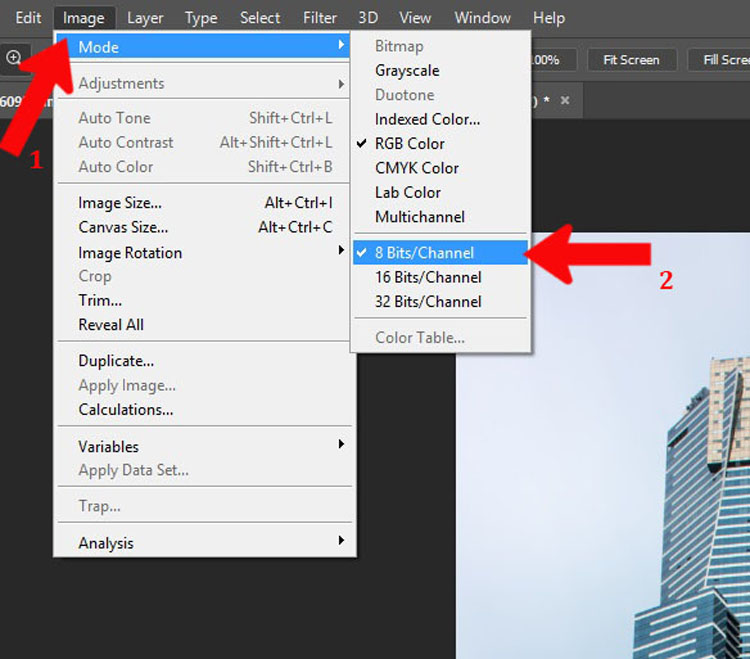
How to Make a Sketch inside a Photograph - 8 bits

There are loads of options in the gallery to give you an artistic look. Select the one you like. For this example, I used the Graphic Pen found in the sketch section. If you don’t like any of the ones that Photoshop has to offer, you can look for artistic actions (google search) that may give you a better drawing.
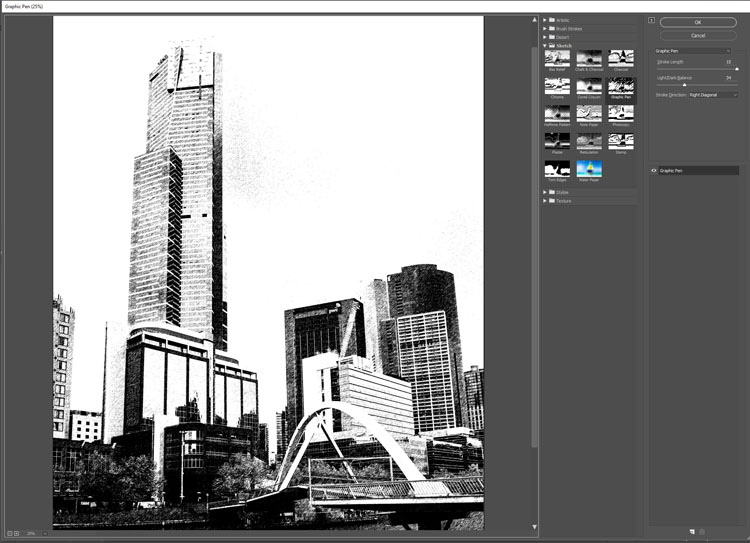
How to Make a Sketch inside a Photograph - sketch filter

Adding the hand

I took several images of my daughter holding a piece of paper. It’s good to get a large variety, and if you have the time, shoot in different lighting conditions as well.
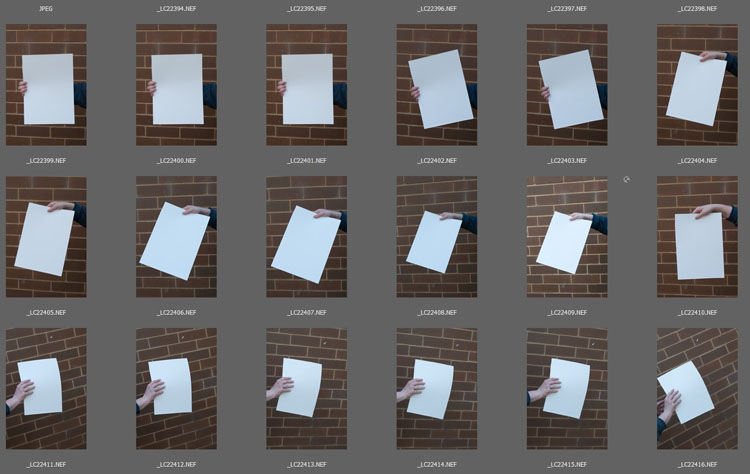
How to Make a Sketch inside a Photograph - hands

Choose an image of the hand holding the paper. Open it in Photoshop and use the Quick Selection tool to select the hand and paper. It doesn’t have to be exact, as long as everything you need is selected. Once you have the hand on the image you can fine-tune it.
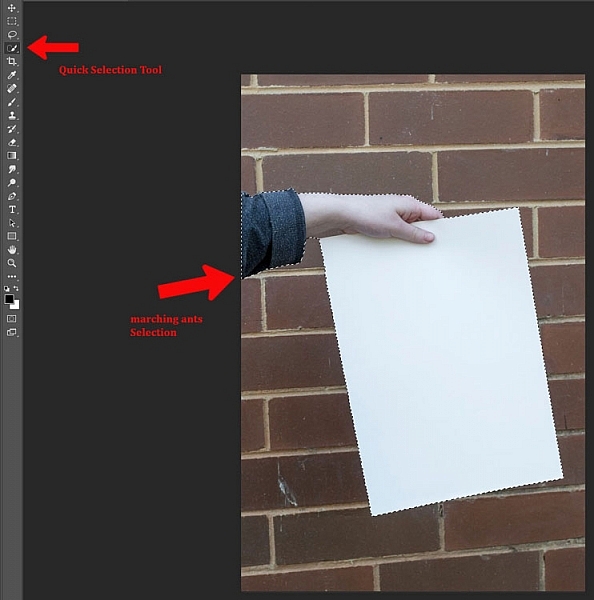
How to Make a Sketch inside a Photograph - selection of hand and paper

Press Ctrl/Cmd+C, then Ctrl/Cmd+V. This will copy and paste the selection onto a new layer (in the same document). However, if you go back over to your original image and pressCtrl/Cmd+V it will paste the hand onto your image as a new layer. Use the move tool, the top one in the tool bar.
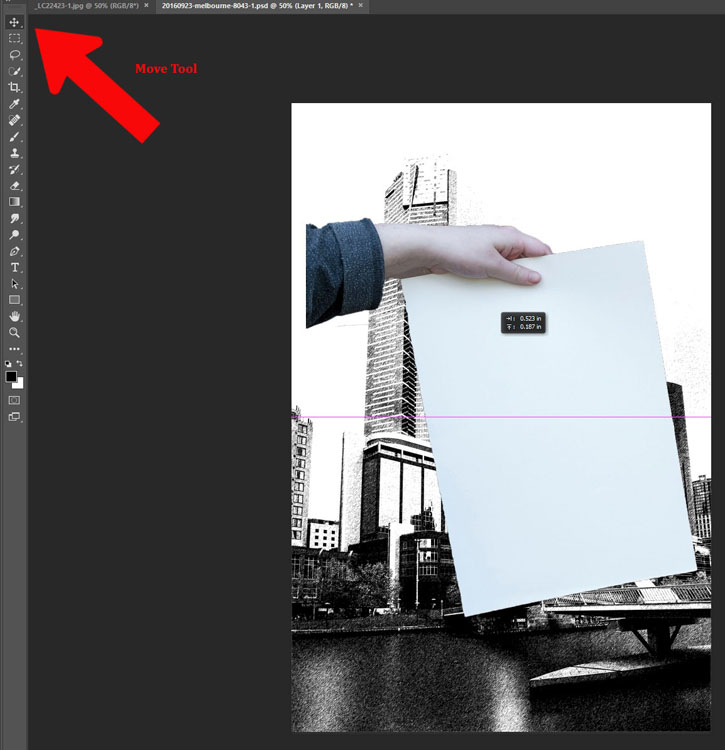
How to Make a Sketch inside a Photograph

Size and position the hand

If you are lucky the hand will be the correct size, however, if it isn’t you may have to resize it. You might also have to change the angle. Free transform will allow you to do that, press Ctrl/Cmd+T to activate it. If you click on the corners you can make it bigger or smaller (hold Shift down to keep the proportions the same!). If you hover around the corners you will see a small curve appear with arrows on either end, this will allow you to rotate it to the desired angle.
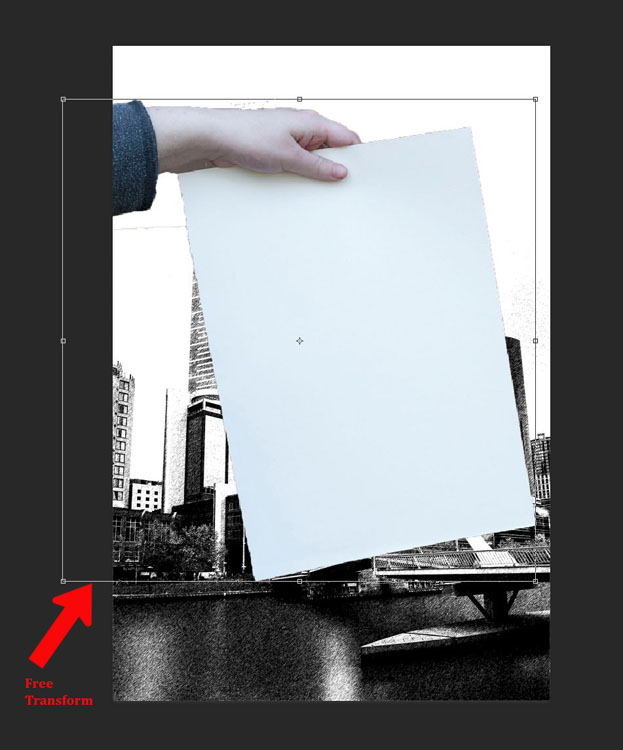
How to Make a Sketch inside a Photograph - transform tool

The hand looks a little odd because it needs a shadow. Take note of your original image and how the shadow was placed. You also need to look at the main image, it will look a bit off if the light is coming from a different direction than the image of the hand.

Creating the drawing on the paper

To get the image on the piece of paper you need to ensure the layer that is the photograph is still not visible. It should still be invisible from when you did the drawing.

Add a mask to the layer with the hand and paper. At the bottom of the layers panel click on the mask icon, looks like a white rectangle with a round black circle in it. It should be down in the bottom right corner.

Next, make sure the layer mask is selected. If there are white lines around the outside of the mask (not the image thumbnail, it means the mask is selected.

Select the Brush Tool and make sure the foreground colour is set to black. Go down the tool bar and find the foreground and background colours. If white is on top click on the arrow above it to make it black (if other colors are showing hit D on your keyboard to set to the defaults of black and white).
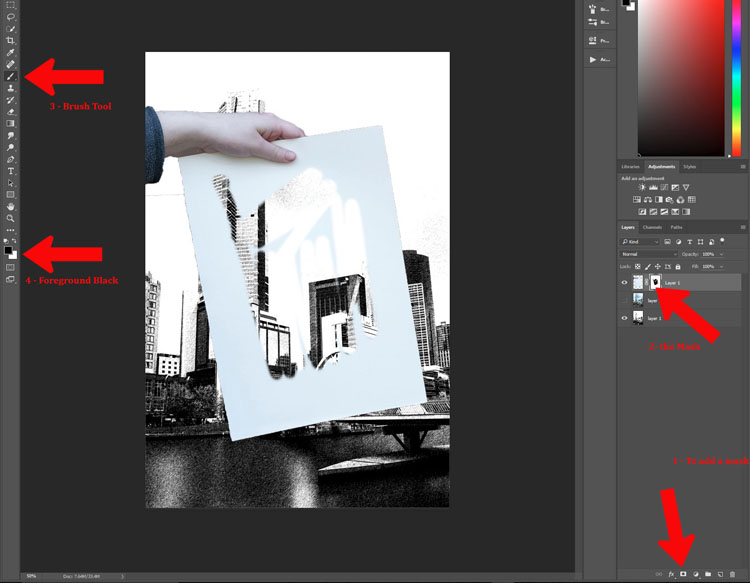
How to Make a Sketch inside a Photograph

You could mask out the whole sheet of paper, or leave an edge around the image. For this tutorial, I left a border intentionally. Once you think you have gotten the whole image, press Alt (PC) or Option (Mac), and click the mask. You should then be able to see what you have masked – the black areas are the mask, so make sure there are no white spots left. Brush over any white bits and remove them. If you realize that you are painting white, then the foreground color is wrong. Press X and it will reverse the color so you can go back to painting with black.
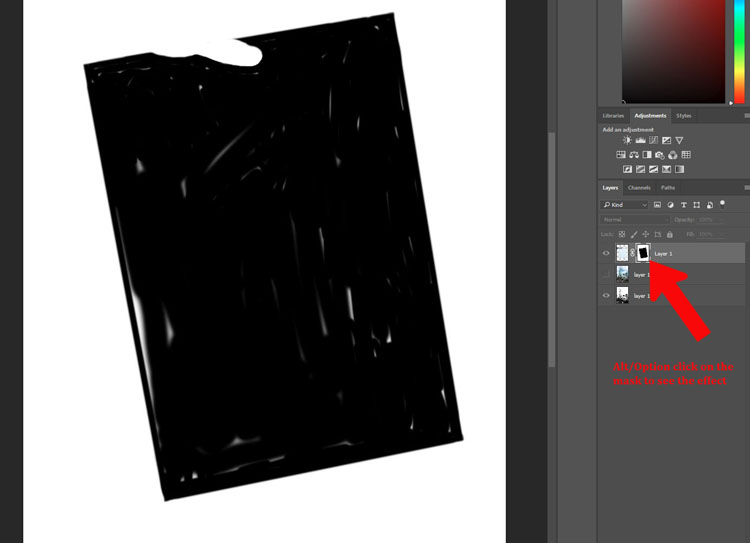
How to Make a Sketch inside a Photograph

Putting the photograph back

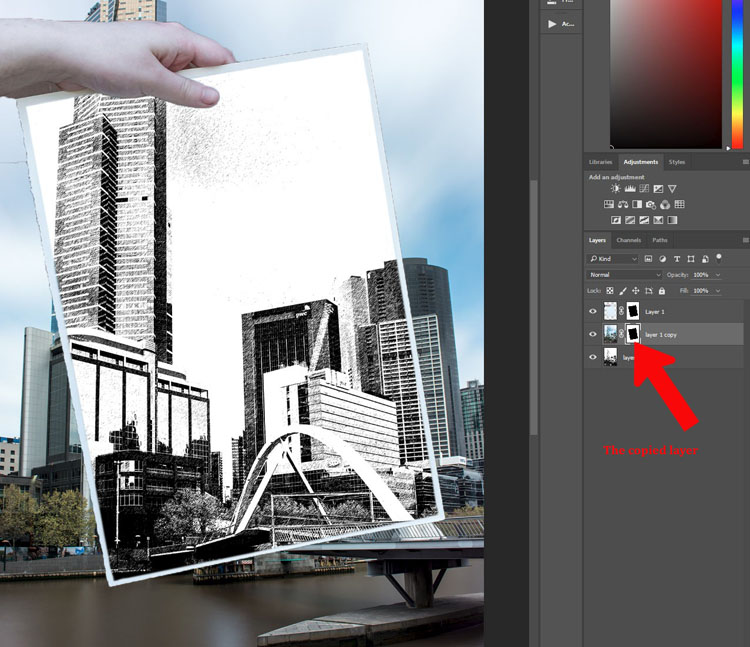
Once you have the drawing showing through the paper, you need to make the photograph appear again. Click on the eyeball icon next to the image so it is visible. You will notice the whole drawing has disappeared, it is now behind the photograph. You will need to do another mask so you can see the drawing on the paper again.

The beauty of this image is that you can use the same mask that you used for the paper layer.

If you go to the layer mask that you used to show the drawing, press Ctrl/Cmd and click on the mask you will see it make a selection (marching ants around the selected areas). Press Ctrl/Cmd+C, to copy that selection. Then, make sure the photograph layer is selected and click the layer mask icon to create a new one. You should get a new layer mask the same as the other one. (Alternately you can click and hold Alt/Opt, and grab the layer mask from the paper layer and drag it over to the image layer. That will copy the same mask over for you).
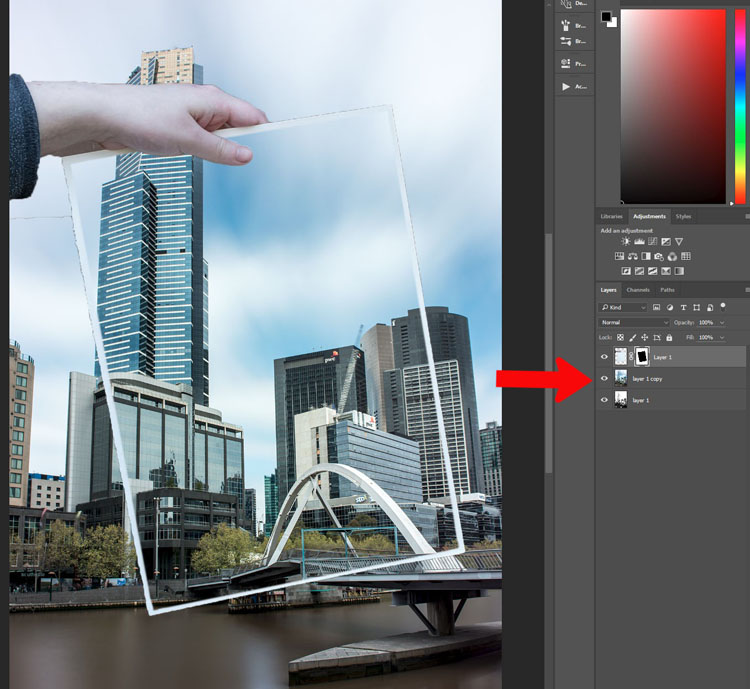
How to Make a Sketch inside a Photograph

How to Make a Sketch inside a Photograph

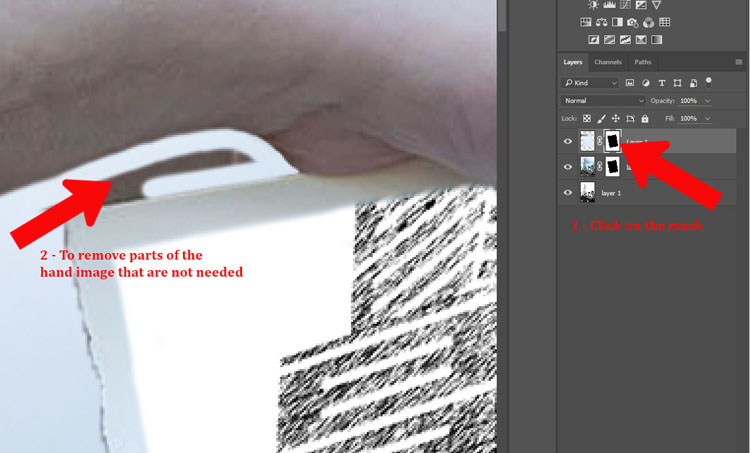
It is time to remove the parts that don’t really belong. You can use the mask that you had for the hand layer. Use your brush tool and remember to make black the foreground colour. You can now mask out the parts of the hand that you didn’t mean to select when you did the quick selection (zoom in close, you can also use the refine edge function).
leannecole-drawing-tutorial-13

Fine tuning

The hand can look a little weird, so next you need to add a shadow that the hand would have created. This will make it more believable looking.

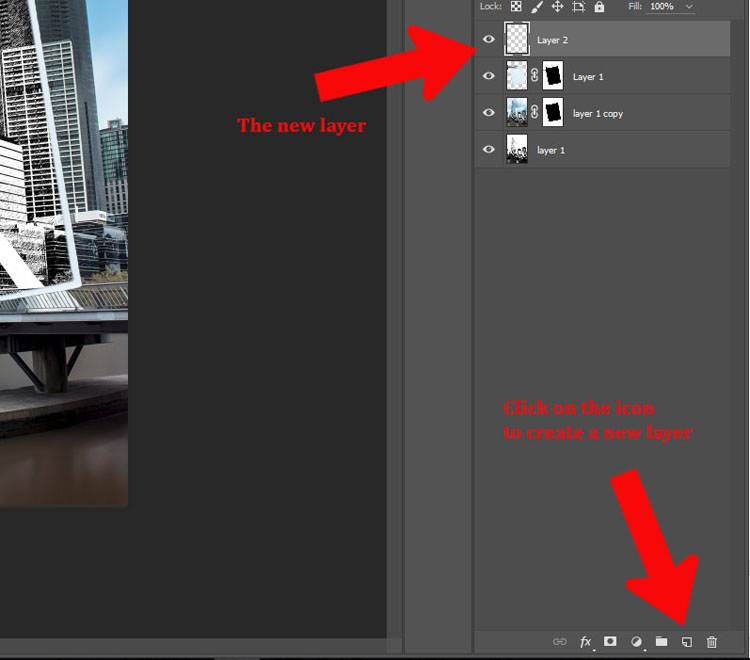
Add a new layer by clicking the icon at the bottom of the layers panel. It is the square outline with the folded corner, usually located next to the trash can. Alternatively, you can go to Menu > Layer > New Layer.
How to Make a Sketch inside a Photograph - new layer

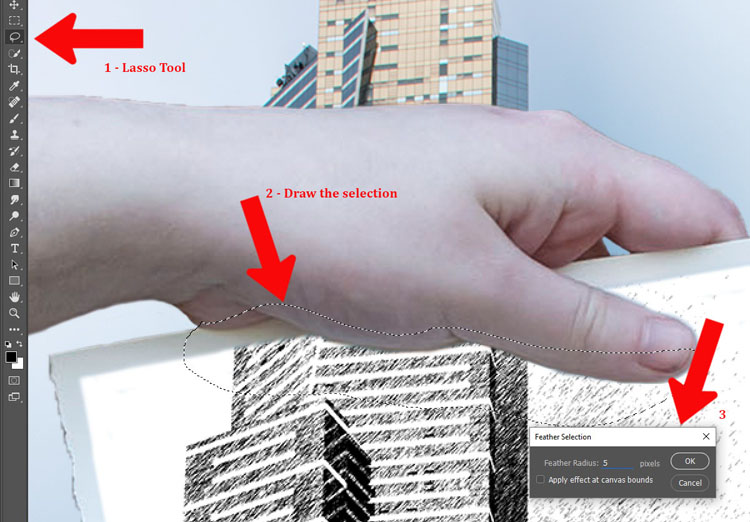
You will need to use the lasso tool. It is also helpful to zoom in so you can see what you are doing. The zoom tool is also in the tool panel, or you can press the letter Z which will make it appear. Click the image to zoom in, or to zoom out press the Alt or Option key and click the image. (Note: Press B to get the brush back.)

On the new layer, draw under the hand with the lasso tool to get the shadow. You don’t have to be exact as it is not going to be really dark. Go up to Menu > Select > Modify > Feather. In the popup window enter the amount of feathering you want. 5 pixels was the setting selected for this image. Alternatively you can press Shift+F6.
How to Make a Sketch inside a Photograph

Add in the shadow area

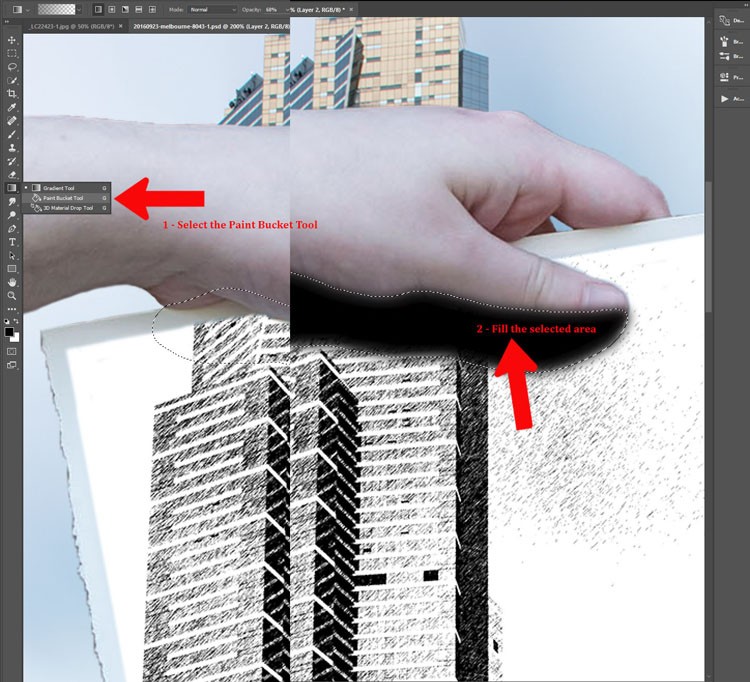
Fill the selected area with black using the Paint Bucket Tool. Make sure that the foreground colour is black.
How to Make a Sketch inside a Photograph

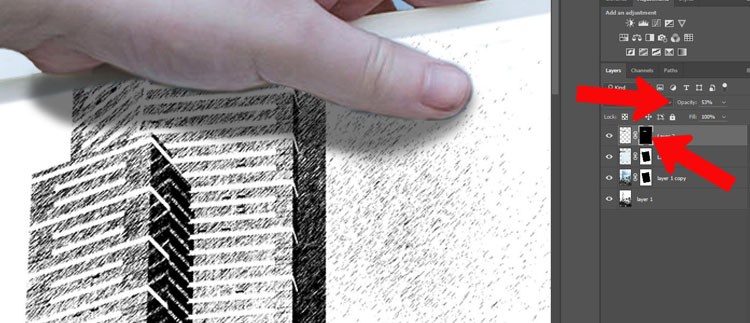
You may need to add a mask to remove any parts of the hand that you don’t need. You can also change the opacity of the layer so the shadow isn’t as dark. The opacity slider is located at the top of the layers panel near the blending modes. Adjust to where you think the shadow looks natural.
How to Make a Sketch inside a Photograph

To deselect hit Ctrl/Cmd+D.

How to Make a Sketch inside a Photograph

The image is now done.

Conclusion

I don’t know how many of these you would do, but some of the techniques used to create it can be used for many other things. Try doing this tutorial a few times, then see how you can use some of the processes in different ways. Don’t forget to share your images so we can see what you have done.

googletag.cmd.push(function() {
tablet_slots.push( googletag.defineSlot( “/1005424/_dPSv4_tab-all-article-bottom_(300×250)”, [300, 250], “pb-ad-78623” ).addService( googletag.pubads() ) ); } );

googletag.cmd.push(function() {
mobile_slots.push( googletag.defineSlot( “/1005424/_dPSv4_mob-all-article-bottom_(300×250)”, [300, 250], “pb-ad-78158” ).addService( googletag.pubads() ) ); } );

The post How to Make a Sketch Inside a Photograph by Leanne Cole appeared first on Digital Photography School.


Digital Photography School

 
Comments Off on How to Make a Sketch Inside a Photograph

Posted in Photography


Crate Core: Shipping Container Tower Hidden Inside a Carriage House

30 Sep

[ By SA Rogers in Architecture & Houses & Residential. ]

shipping-container-house-1

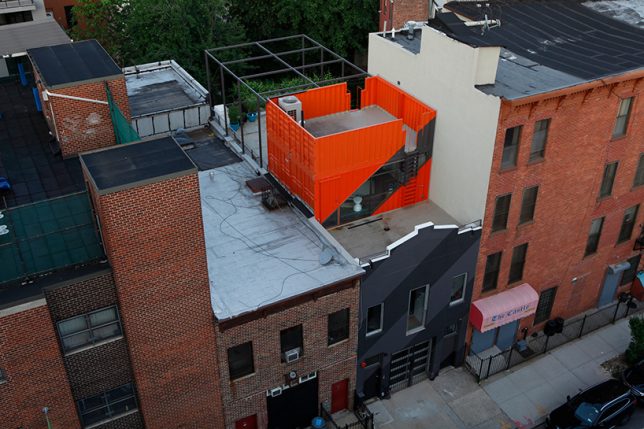
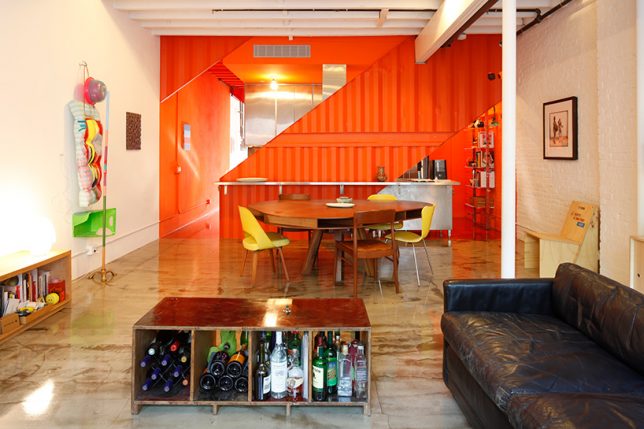
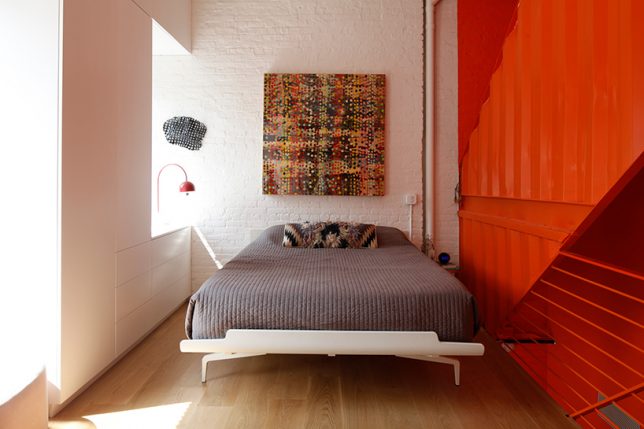
When glimpsed from above, this stack of vivid orange shipping containers on a Brooklyn rooftop looks like an add-on structure, but it doesn’t end where the original house’s roof begins. It continues straight through the building, all the way to the ground floor, creating a sort of house-within-a-house to subdivide the space in dynamic new ways. The four reclaimed crates that can be seen from higher floors of neighboring buildings are just the penthouse portion, which opens onto a connected rooftop patio.

shipping-container-house-2

shipping-container-house-3

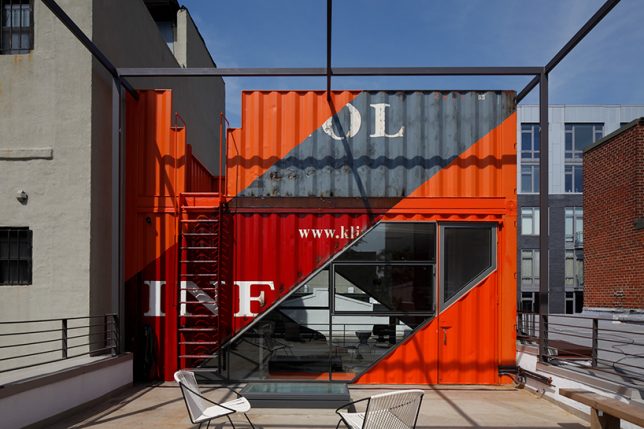
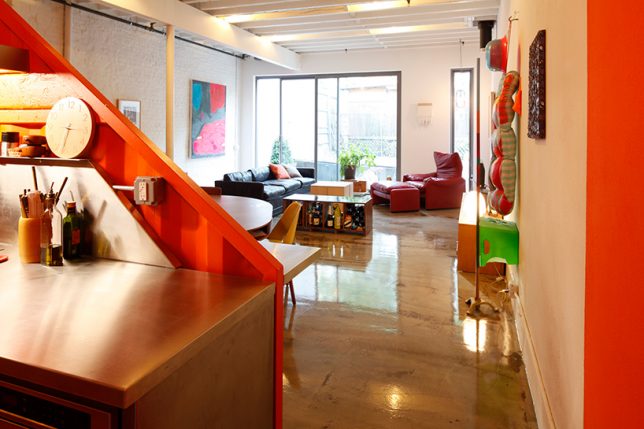
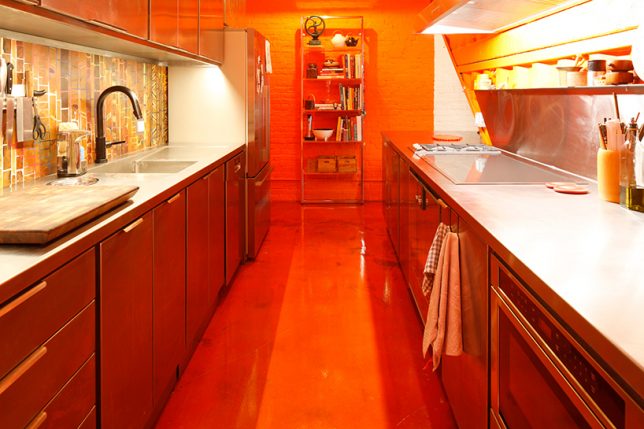
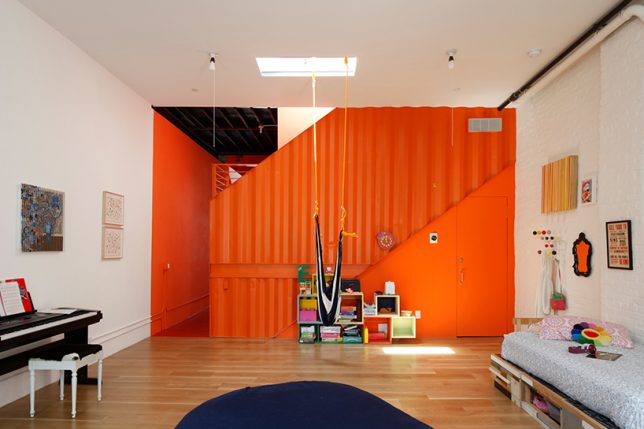
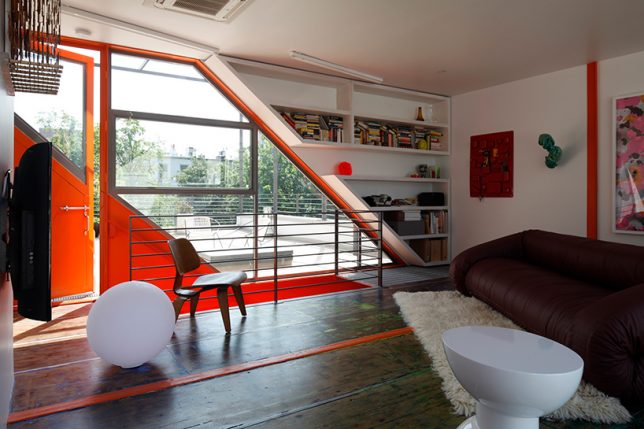
Designed by LOT-EK, the crate creation reinvigorates the 1930s carriage house, separating the kitchen from the living area on the ground floor and acting as a staircase and room divider on the second level. The containers are cut diagonally to let light pierce through the home from the front to the back.

shipping-container-house-4

shipping-container-house-5

shipping-container-house-7

Placement directly in the center of the building effectively slices the living space into thirds, creating new rooms, like the master bedroom in the back of the intermediate level and the children’s room in the front. On the penthouse level, the same diagonal slices that can be seen below are filled in with glass to frame views of the treetops and other buildings on the block.

shipping-container-house-8

shipping-container-house-9

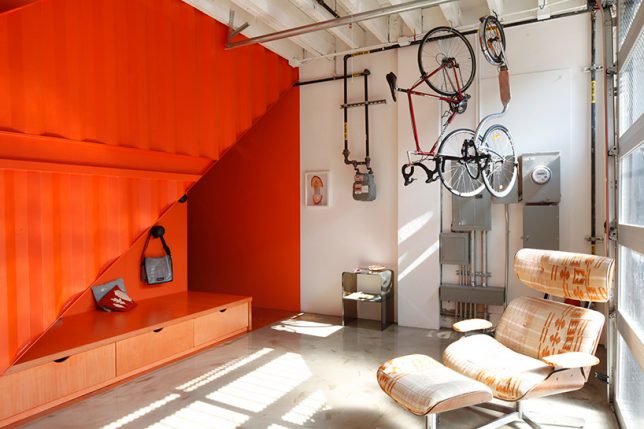
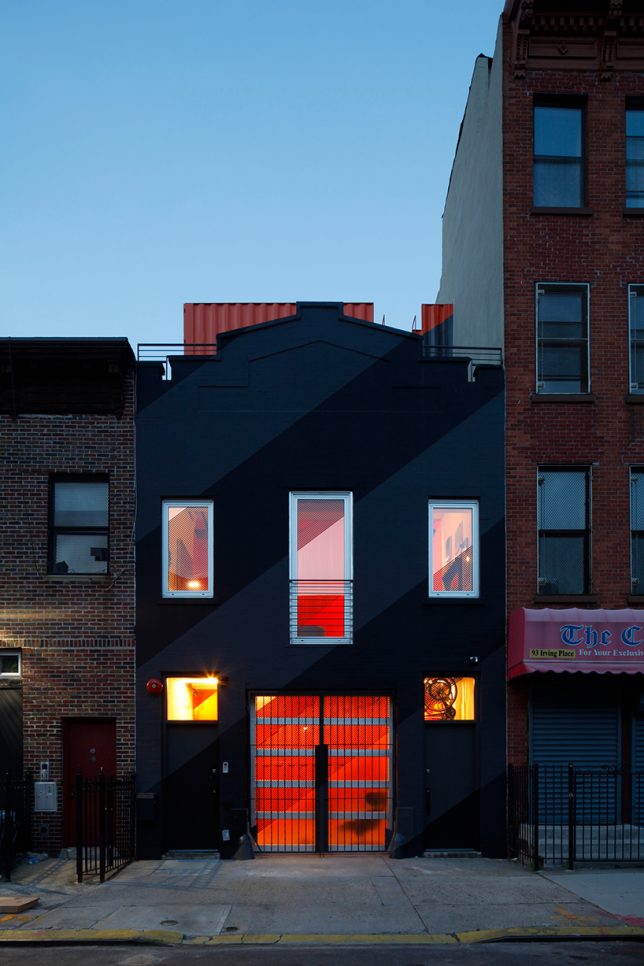
When standing at street level, you can just barely see the corrugated orange metal sticking up beyond the matte black facade of the home, but the neon color and diagonal lines of the crates are definite attention-grabbers through the glass garage door.

shipping-container-house-10

shipping-container-house-11

Check out 9 more architectural shipping container creations by LOT-EK.

Share on Facebook


[ By SA Rogers in Architecture & Houses & Residential. ]

[ WebUrbanist | Archives | Galleries | Privacy | TOS ]


WebUrbanist

 
Comments Off on Crate Core: Shipping Container Tower Hidden Inside a Carriage House

Posted in Creativity


The Lantern: Dementia Villages Replicate Small Towns Inside Big Boxes

13 Sep

[ By WebUrbanist in Architecture & Houses & Residential. ]

main street usa

Complete with a Main Street, a barber shop and hardware store, this town-in-a-box is designed to make elderly patients with memory loss feel at home in a surrealistic interior setting.

natural square

The Lantern operates a series of such “villages” in Ohio, each looking as much like a movie set as a walkable small town or historic suburb, complete with fake grass, cafe tables and street lamps.

main street

the village

Cute homes are accented with porches and rocking chairs while a high-tech ceiling overhead projects bird sounds and features a high-tech sky display that shifts over the course of the day (and night).

front porch

village interior

The dwellings and other buildings are draw inspiration from the 1940s – in other words: they are made to look like the same places the people living here grew up in.

dining hall

side hall

CEO Jean Makesh got his idea to develop this set of facilities while working as an occupational therapists in less-inviting facilities. His core vision involved using biophilic design to support normal and active lifestyles that would minimize habit disruption and transition anxiety for incoming residents.

It would be too easy to draw comparisons between this place and science-fictional film dystopias, but the reality is that for most residents this assisted-living facility is much homier than a stark white hospital-style complex.

no exit

dimentia town

A similar-but-outdoor complex in Holland has also been developed along the same lines, containing residents with controlled exits and disguised staff while providing the illusion of an open town through shops and streets.

Share on Facebook


[ By WebUrbanist in Architecture & Houses & Residential. ]

[ WebUrbanist | Archives | Galleries | Privacy | TOS ]


WebUrbanist

 
Comments Off on The Lantern: Dementia Villages Replicate Small Towns Inside Big Boxes

Posted in Creativity


Harder than it looks: LensRentals gets inside the Canon EOS 5D IV

10 Sep

LensRentals gets inside the Canon EOS 5D IV

Canon’s new EOS 5D IV is a formidable bit of hardware, boasting a 30MP full-frame sensor and 4K video. Our friend Roger Cicala over at LensRentals.com has taken one apart to see how it works. His verdict? It’s harder to disassemble than you might expect…

LensRentals gets inside the Canon EOS 5D IV

Lensrentals.com, 2016

We love it when LensRentals takes cameras to bits for two reasons. First, we’ve always wanted to see what these things look like on the inside, and second, it’s not the kind of thing that our friends at the major camera manufacturers would ever let us do. 

The screwdrive-happy nerds at LensRentals enjoy opening up Canon cameras particularly, it seems, because in Roger’s words ‘the engineering is always nicely laid out and usually pretty’. Ok then. 

LensRentals gets inside the Canon EOS 5D IV

Lensrentals.com, 2016

The 5D IV, however, seems not to be a typical Canon camera in that it proved very difficult to get into. According to the crew at LensRentals, ‘Until now Canon cameras have all been pretty straightforward in their disassembly: you take out screws, that part of the case comes off, repeat for another part of the case’. 

With the 5D IV, on the other hand… ‘to take off any part of the shell, other than the back assembly, you have to take off most of the shell because Canon has added lots of plastic pegs and latches to the various parts of the shell, making it much more interlocking than in previous cameras’. 

LensRentals gets inside the Canon EOS 5D IV

Lensrentals.com, 2016

Part of the reason for the additional latches could be to improve the durability and weather-sealing of the camera, which as you’d hope features ‘lots of foamed seals along doors and joints’

This view shows the inside of the 5D IV’s rear shell. According to Roger, ‘Inside it looks very much like other Canon back covers. There are aluminum shields over the button panel and LCD. The flexes running to and fro over the LCD are more complex than other Canons because of the extra processing for the touch screen.’

LensRentals gets inside the Canon EOS 5D IV

Lensrentals.com, 2016

This is the main LCD flex, which is unusually large. In Roger’s words ‘almost a circuit board’. 

LensRentals gets inside the Canon EOS 5D IV

Lensrentals.com, 2016

From the back, Roger found a couple of interesting things, looking at the EOS 5D IV: ‘First, there are more flexes connecting to the main PCB than most other models. Second, we were very pleased to see a thick, stiff, sheet of rubber covering the back of the PCB’.

LensRentals gets inside the Canon EOS 5D IV

Lensrentals.com, 2016

The EOS 5D IV benefits from the redesigned mirror assembly we first saw in the EOS 5DS/R, and here’s the mirror motor, tucked away to the left of the lensmount.

LensRentals gets inside the Canon EOS 5D IV

Lensrentals.com, 2016

Here’s the EOS 5D IV’s top assembly. And this is as far as Roger is prepared to go, because ‘we’ve learned from long, painful experience not to take these apart unless we absolutely need to. In general, if something is wrong with the top assembly, you just replace the top assembly’. 

LensRentals gets inside the Canon EOS 5D IV

Lensrentals.com, 2016

This is the EOS 5D IV’s main PCB. Unusual, because ‘there are a lot, a whole lot, of flexes connected to the board from every direction. They are thicker and more complex than previous cameras and a lot end up in thick ‘press in’ connectors instead of simple flex cables.’

LensRentals gets inside the Canon EOS 5D IV

Lensrentals.com, 2016

‘Underneath where the PCB was we now see the circuit board of the image sensor, and to the right of that the CF card assembly’.

LensRentals gets inside the Canon EOS 5D IV

Lensrentals.com, 2016

What did Roger and his team learn from taking the EOS 5D IV apart? 

  • ‘The weather sealing on the Canon 5d Mark IV appears pretty robust’
  • The multiple pins, clips and screws that hold the camera together might improve weather-resistance but make it ‘kind of a pain to get into’.
  • The extra technology inside the EOS 5D IV mean that ‘there are more chips, and more and heavier connectors moving electrons from board to board than even the Canon 5Ds cameras have’.
  • ‘there’s more air inside this camera than we’re used to seeing. […] In other words, this camera probably could have been a bit smaller but Canon wanted to keep the form factor the same.’
  • ‘Construction is at least as robust as the recent 5 series releases and better than the Canon 5D III’.

You can read the full tear-down, with Roger’s usual detailed analysis and plenty of additional images at LensRentals.com.

Articles: Digital Photography Review (dpreview.com)

 
Comments Off on Harder than it looks: LensRentals gets inside the Canon EOS 5D IV

Posted in Uncategorized


Dodging, burning… microwaving? A look inside Ansel Adams’ darkroom

09 Jul

In a recent interview with Marc Silber of Advancing Your Photography, Ansel Adams’ son Michael gives a tour of his father’s darkroom.

The basics are all there, but by and large, they were designed by Adams for the space he was in. Sure, the dodge-and-burn stick is literally a stick with some cardboard taped to it, but the enlarger and wall mount are both on a custom-built track, and can be moved independently toward or away from each other depending on Adams’ needs. The light source in the enlarger is actually 30 individual light sources, each with its own switch for the utmost control over a negative’s illumination.

My favorite part? When Michael details how his father tested exposures with a new image. It’s pretty standard up until the end, when he says that Adams would routinely microwave the test print – it would dry faster that way, and the best way to ascertain the correct exposure is with a dry print. The more you know!

It’s a fascinating look back into the world of film and physical prints, and a reminder that creativity and control don’t necessarily require the fanciest equipment money can buy. 

Articles: Digital Photography Review (dpreview.com)

 
Comments Off on Dodging, burning… microwaving? A look inside Ansel Adams’ darkroom

Posted in Uncategorized