RSS
 

Posts Tagged ‘Images’

A Set of Brown Tone Images

01 Nov

The time of year is upon us when things turn brown up here in northern part of the world. Leaves turn yellow and then brown. Grass changes from green to beige as nature prepares for winter. You may consider brown a boring color and one that isn’t very photogenic or interesting. But there is a lot of nuance and varying tones in browns. Let’s see what’s possible.

Set of brown tone images:

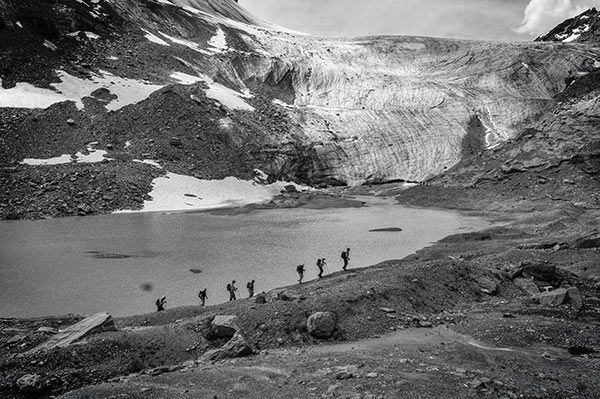
Photograph On the top of the world by aranka delina janné on 500px

On the top of the world by aranka delina janné on 500px

Photograph Boxing Bear by Olav  Thokle on 500px

Boxing Bear by Olav Thokle on 500px

Photograph House of Furballs by Alex Greenshpun on 500px

House of Furballs by Alex Greenshpun on 500px

Photograph Talk to the Paw by Holly Kuchera on 500px

Talk to the Paw by Holly Kuchera on 500px

Photograph Alpine Autumn Dusk by Stefan Hefele on 500px

Alpine Autumn Dusk by Stefan Hefele on 500px

Photograph Bourbon by Darcy Evans on 500px

Bourbon by Darcy Evans on 500px

Photograph Daisy by Darcy Evans on 500px

Daisy by Darcy Evans on 500px

Photograph [ ... snæfellsnes autumn ] by D-P  Photography on 500px

[ … snæfellsnes autumn ] by D-P Photography on 500px

Photograph Shadows of the su by Christian Wig on 500px

Shadows of the su by Christian Wig on 500px

Photograph Deadvlei by Thierry Hennet on 500px

Deadvlei by Thierry Hennet on 500px

Photograph Desert by Reza Eqbali on 500px

Desert by Reza Eqbali on 500px

Photograph The Sewing Room by Cindi Ressler on 500px

The Sewing Room by Cindi Ressler on 500px

Photograph Baby Wallaby by Joana Senn on 500px

Baby Wallaby by Joana Senn on 500px

Photograph In The Spotlight by Joni Niemelä on 500px

In The Spotlight by Joni Niemelä on 500px

Photograph Eye Candy by Aaron Yeoman on 500px

Eye Candy by Aaron Yeoman on 500px

Photograph Single Bed by Jose  Vazquez on 500px

Single Bed by Jose Vazquez on 500px

Photograph Rotting Jalopies by Todd Klassy on 500px

Rotting Jalopies by Todd Klassy on 500px

Photograph A glimpse into the past by K.C. Jones on 500px

A glimpse into the past by K.C. Jones on 500px

Photograph Buddha's head in tree's roots (Bodhi tree) at Wat Mahathat, Ayut by SimplySiri  on 500px

Buddha's head in tree's roots (Bodhi tree) at Wat Mahathat, Ayut by SimplySiri on 500px

Photograph S A H A R A  by Boyer Jean marie on 500px

S A H A R A by Boyer Jean marie on 500px

Photograph sepia crayon by kak tuss on 500px

sepia crayon by kak tuss on 500px

Photograph Brownie by Fionac on 500px

Brownie by Fionac on 500px

Photograph The Photographer by Maria Gvedashvili on 500px

The Photographer by Maria Gvedashvili on 500px

Photograph Brownie Cupcake... by Hooman Mesri on 500px

Brownie Cupcake… by Hooman Mesri on 500px

Photograph Chocoholic by Anide Photography on 500px

Chocoholic by Anide Photography on 500px

Photograph { Brownies } by cynthia cliche on 500px

{ Brownies } by cynthia cliche on 500px

Photograph Burgundy Goliath Birdeater  by Milan Zygmunt on 500px

Burgundy Goliath Birdeater by Milan Zygmunt on 500px

Photograph Hornbeam leaf by Maciej Figiel on 500px

Hornbeam leaf by Maciej Figiel on 500px

Photograph Common Buckeye on Verbena by Karen Hernandez on 500px

Common Buckeye on Verbena by Karen Hernandez on 500px

Photograph Parasol mushroom (Macrolepiota procera) in the forest by Jancsi Farkas on 500px

Parasol mushroom (Macrolepiota procera) in the forest by Jancsi Farkas on 500px

Photograph Goat's beard 4 by Margo B. on 500px

Goat's beard 4 by Margo B. on 500px

Photograph Hidden in the leaves by Dan LeFebvre on 500px

Hidden in the leaves by Dan LeFebvre on 500px

Photograph Gentleness by Tomasz Wieczorek on 500px

Gentleness by Tomasz Wieczorek on 500px

Photograph old suitcase by Naeema on 500px

old suitcase by Naeema on 500px

Photograph Freshly baked bread by Natalia Klenova on 500px

Freshly baked bread by Natalia Klenova on 500px

Photograph ?????? by Natalia Lisovskaya on 500px

?????? by Natalia Lisovskaya on 500px

Photograph Steaming coffee by Károly Nagy on 500px

Steaming coffee by Károly Nagy on 500px

Photograph House by Justine Carlyle on 500px

House by Justine Carlyle on 500px

The post A Set of Brown Tone Images by Darlene Hildebrandt appeared first on Digital Photography School.


Digital Photography School

 
Comments Off on A Set of Brown Tone Images

Posted in Photography


4 Reasons to Capture Images of You and Your Child Together Right Now

30 Oct

102

1. You Need to Document That You Were There

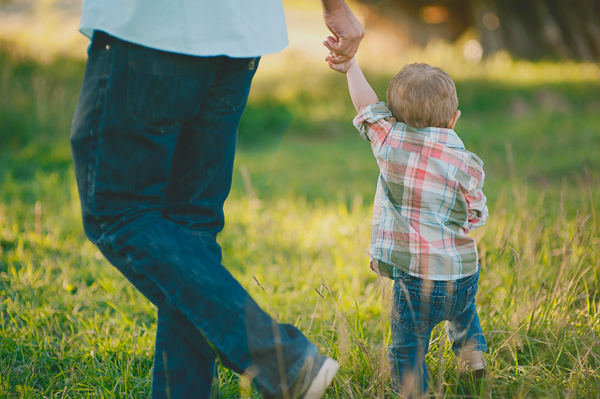
I get it, I do. You’re the one behind the camera. You’re the one taking the photo of that adorable little smile. You’re the one documenting that you spent a day at the park together. Someone’s got to do it, right?

Sometimes you have to get on the other side of the camera, and let someone else be the photographer for a minute. Even if you weren’t planning on being in photos that day, just do it. It doesn’t matter if your hair is perfect. It doesn’t matter if you wore the most flattering outfit. It doesn’t matter if you meant to lose five pounds first. Just get in there.

164

When your kids look back at photos years later, don’t you want them to remember the fun times you had together, instead of wonder if you were even there, since you don’t appear in ANY photos? Don’t you want to remember yourself as a young mother with a brand new baby, or a father that loved to play football with your kids? You may think that you’ll remember how things were, but the fact is, you won’t remember everything. These photos showing that you were THERE will mean everything to you and your kids later.

191

2. Once Upon a Time Your Kids Were Small

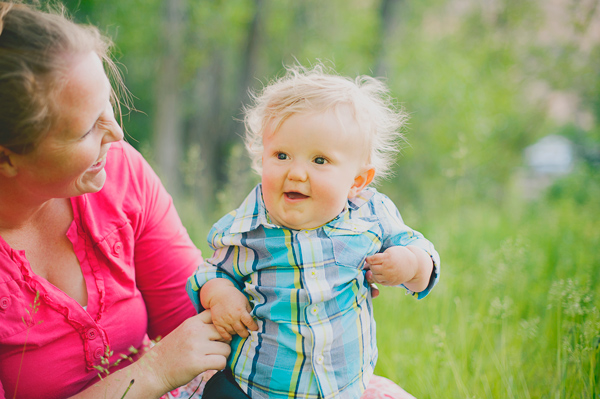
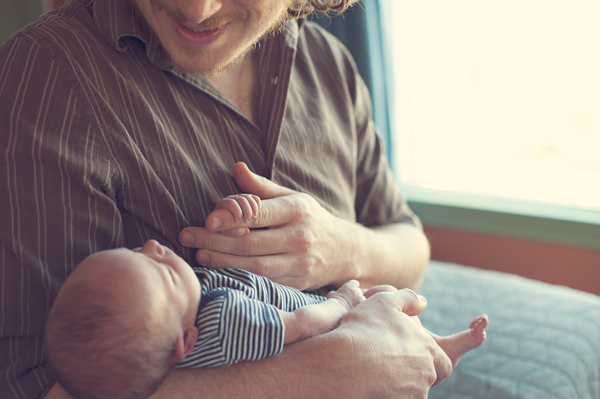
One day that baby boy you’re holding in your arms is going to tower over you. He’ll have big man hands, and his voice will be deep and strong. You’ll have a hard time believing that there was a time when his teeny fingers couldn’t even wrap all the way around your fingers. Make sure to capture the little details. Those little faces, hands, and feet are so adorable when contrasted with a parent’s hands.

194

You might have days where you wonder if this kid ever even thought you were cool, or wanted to be around you, and honestly, you’ll probably have days where you wonder if you want to be around them. These photos that prove that your kid once thought that you hung the moon will then become even more meaningful. Nostalgia is a wonderful thing to warm your heart and strengthen your bonds.

175

3. You Have Fun Together

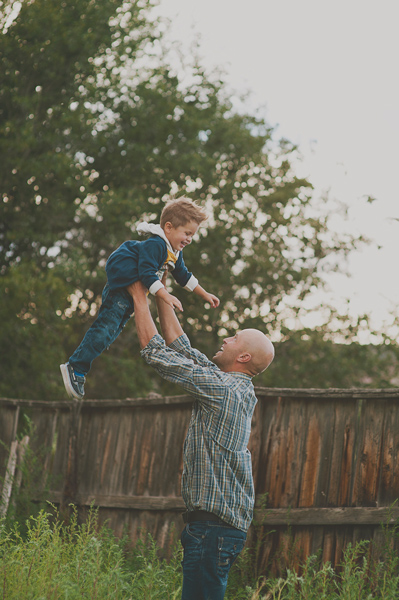
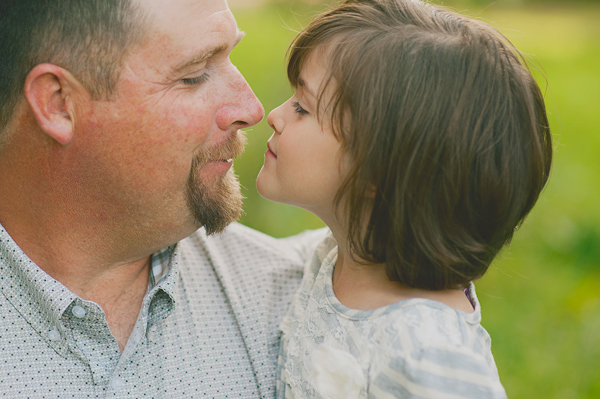
You know those things that you do together that are just between the two of you? Maybe it’s eskimo kisses, tossing your child in the air so they can feel that sensation of flying for just a moment, or exploring new things together. Those special things you do together will change through the years. How much fun would it be to have all of those bonding memories captured to look back on, and remember how your child grew and changed as the years flew by?

168

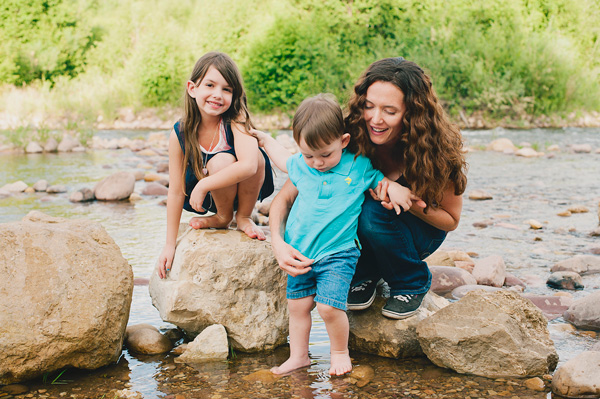
Capturing your fun times together can be as big as taking photos of the two of you together on a ferris wheel, or with the classic car you restored together; or they can be as small as a special high five you always give each other. When you document these things with your kids, it shows them that they are a big part of your life, and the things you do together are as important to you as they are to them.

169

4. You Love Each Other

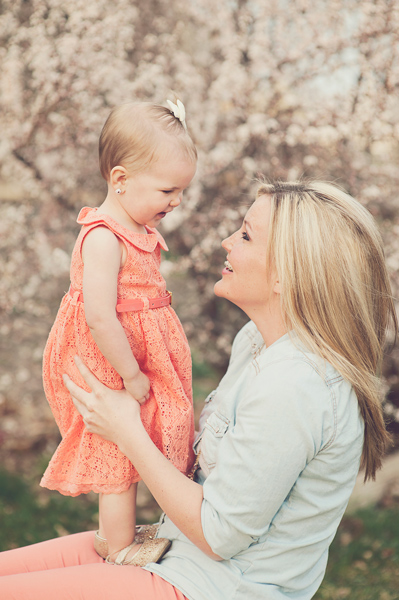
Yes, this is perhaps the most important reason to get photos with you and your child together. You love each other. Your relationship is one of the most important relationships either of you will ever have in your life. A picture is worth a thousand words. Imagine how much a photo of you looking at your infant child with complete fascination and adoration will mean to that child when she is grown. Imagine how much you will treasure a photo of your child gazing up into your eyes with absolute trust. Saying “I love you” means so much, but a photo is a lasting reminder of that love.

190

I hope these four reasons will encourage you to be in more photos with your children. You will never ever regret these precious moments captured forever.

The post 4 Reasons to Capture Images of You and Your Child Together Right Now by Melinda Smith appeared first on Digital Photography School.


Digital Photography School

 
Comments Off on 4 Reasons to Capture Images of You and Your Child Together Right Now

Posted in Photography


Not Photoshopped: Distorted Images are Actually 3D Objects

30 Oct

[ By Steph in Art & Sculpture & Craft. ]

Robert Lazzarini 2

This skull is a three-dimensional object that you can hold in your hand, not an image that has been stretched and distorted in Photoshop. It’s one of many visually confusing sculptures by Robert Lazzarini, created in his Brooklyn studio after hours upon hours of research. Lazzarini often smashes objects to see how they change and fall apart before he goes about the process of distorting them with computer modeling and fabricating them anew.

Robert Lazzarini 1

Robert Lazzarini 4

Using bone dust to create his skulls, wood and steel to produce hammers and other materials that are appropriate for recreating the originals, Lazzarini painstakingly crafts each item in an altered form. Previously working with more free-form alterations manually, he now sticks to math for the most accurate results possible, with every detail in scale.

Robert Lazzarini 4

Robert Lazzarini 5

Robert Lazzarini 3

“In terms of subject matter, it’s representational, so people think it’s a type of Pop art,” Lazzarini told Blouin Art Info. “In some ways it is, but I think it really hinges more profoundly on the aftermath of Minimalism… One of the main problems of sculpture for me is its static nature. This kind of animation” [when the object changes as you walk around it] “for lack of a better word, gives the sensation that there’s activity where there really isn’t. It relates back to corporeally navigating something to understand it.”

Share on Facebook


[ By Steph in Art & Sculpture & Craft. ]

[ WebUrbanist | Archives | Galleries | Privacy | TOS ]


WebUrbanist

 
Comments Off on Not Photoshopped: Distorted Images are Actually 3D Objects

Posted in Creativity


Sony develops sensor capable of rendering color images at 0.005 lux

27 Oct

Sony has introduced a new CMOS sensor, calling it the highest sensitivity sensor of its kind. Developed for automotive use, the new chip can capture color images in light conditions down to 0.005 lux. The sensor is 1/3-inch type with 1.27 effective megapixels, and supports a Wide Dynamic Range system that uses extended exposure times rather than using multiple exposures. Read more

Articles: Digital Photography Review (dpreview.com)

 
Comments Off on Sony develops sensor capable of rendering color images at 0.005 lux

Posted in Uncategorized


Spooky Images to Scare you for Halloween Week

26 Oct

Are you scared yet? You should be – because this collection of images is straight out of a horror movie, designed to give you the creeps, make your skin crawl and keep you up at night!  Oooooh scary!

In honor of All Hallow’s Eve coming soon I thought it would be appropriate to see a few scary images. Enjoy, if you dare!

(These first few images are by my friend Renee Robyn, she has some masterful spooky images)

Photograph Magicked by Renee Robyn on 500px

Magicked by Renee Robyn on 500px

Photograph Survivor by Renee Robyn on 500px

Survivor by Renee Robyn on 500px

Photograph Kanína by Renee Robyn on 500px

Kanína by Renee Robyn on 500px

Photograph Lexx by Renee Robyn on 500px

Lexx by Renee Robyn on 500px

Photograph Raziel by Renee Robyn on 500px

Raziel by Renee Robyn on 500px

Photograph Titan by Chris Fletcher on 500px

Titan by Chris Fletcher on 500px

Photograph Exit Planet Dust -Escape from the "Undead" by The Fotokraft on 500px

Exit Planet Dust -Escape from the “Undead” by The Fotokraft on 500px

Photograph The dead Countess by Rebeca  Saray on 500px

The dead Countess by Rebeca Saray on 500px

Photograph Happy Halloween! by Rebeca  Saray on 500px

Happy Halloween! by Rebeca Saray on 500px

Photograph Little vampire by Manuela Kulpa on 500px

Little vampire by Manuela Kulpa on 500px

Photograph TheCrow by D?nu? Antoche on 500px

TheCrow by D?nu? Antoche on 500px

Photograph 2013 Pumpkin by Max Ellis on 500px

2013 Pumpkin by Max Ellis on 500px

Photograph She's coming for you.. by Mattia Bonavida on 500px

She’s coming for you.. by Mattia Bonavida on 500px

Photograph Music Lessons by Andy Orozco on 500px

Music Lessons by Andy Orozco on 500px

Photograph Spooky Halloween to everyone by IgoRAW  on 500px

Spooky Halloween to everyone by IgoRAW on 500px

Photograph At the wizard... by Anatoly Che on 500px

At the wizard… by Anatoly Che on 500px

Photograph Ghostly Glow by Alan Borror on 500px

Ghostly Glow by Alan Borror on 500px

Photograph Halloween is Near by Phil Koch on 500px

Halloween is Near by Phil Koch on 500px

Photograph The Possession by Robert Armstrong on 500px

The Possession by Robert Armstrong on 500px

Photograph haunted house by Jörg Barthel on 500px

haunted house by Jörg Barthel on 500px

Photograph Lost Amongst the Stars by Lijah Hanley on 500px

Lost Amongst the Stars by Lijah Hanley on 500px

Photograph The Haunted Victorian Mansion by Frank Grace on 500px

The Haunted Victorian Mansion by Frank Grace on 500px

Photograph Moonlight by Zoltan Toth on 500px

Moonlight by Zoltan Toth on 500px

Photograph Haunted House by Dohotariu Mihai on 500px

Haunted House by Dohotariu Mihai on 500px

Photograph ghost rider :) by Adrian Sommeling on 500px

ghost rider :) by Adrian Sommeling on 500px

Photograph Hell and Heaven by Dr. Prem Sundar on 500px

Hell and Heaven by Dr. Prem Sundar on 500px

Photograph Conspire Dangerously by Paolo Giraudo on 500px

Conspire Dangerously by Paolo Giraudo on 500px

Photograph Revenge by Cleon Santos on 500px

Revenge by Cleon Santos on 500px

Photograph Ghost Rider by Ravikanth Kurma on 500px

Ghost Rider by Ravikanth Kurma on 500px

Photograph Dark Stormy Place by Aaron J. Groen on 500px

Dark Stormy Place by Aaron J. Groen on 500px

Photograph Come play with us... by Marta Borreguero on 500px

Come play with us… by Marta Borreguero on 500px

Photograph Damned by Johan Lennartsson on 500px

Damned by Johan Lennartsson on 500px

Photograph From the darkness it came by Chris Fletcher on 500px

From the darkness it came by Chris Fletcher on 500px

Last of all – a classic, by the legend himself.

The post Spooky Images to Scare you for Halloween Week by Darlene Hildebrandt appeared first on Digital Photography School.


Digital Photography School

 
Comments Off on Spooky Images to Scare you for Halloween Week

Posted in Photography


Weekly Photography Challenge – Spooky Images for Halloween

25 Oct

If you want to see some scary images head over to my earlier collection of spooky images here.

This is the week of all the spooks and goblins so I though it would be fitting to see some scary images too. What do you consider spooky or creepy? It might be a big hairy spider, or maybe a ghostly double image, or perhaps some deep shadows in a hidden alleyway. Whatever it is, it’s your turn to photograph it and show me something that will make me have the chills.

Let’s see some examples:

Delta

By Delta

Hartwig HKD

By Hartwig HKD

Kevin Dooley

By Kevin Dooley

Alice Popkorn

By Alice Popkorn

Jesse Draper

By Jesse Draper

Liz West

By liz west

You get the idea. Now it’s your turn.

Weekly Photography Challenge – Spooky Images

Try and think about this one not so literally. I’ve done some photo competition judging and something similar was the theme for one category. I saw a lot of images trying too hard to be scary. Think subtle. We don’t need to see blood and guts to be scared. Less is more. A simple, dark, moody image of a creepy looking alley or lane-way could be all that’s needed. How about doing some double exposures at night using flash to create some ghosts, or just long exposures on a busy street to catch all the moving people at night. If you have some ideas share them here, then go shoot it and share the images too.

Share your spooky photos

Simply upload your shot into the comment field (look for the little camera icon in the Disqus comments section as pictured below) and they’ll get embedded for us all to see or if you’d prefer upload them to your favourite photo sharing site and leave the link to them. Show me your best images in this week’s challenge.

Here are a few more images to scare you!

Yamabxl

By Yamabxl

JayRaz

By jayRaz

Howard Ignatius

By Howard Ignatius

Tommy Clark

By Tommy Clark

Jorge Mexicano

By Jorge Mexicano

Slworking2

By slworking2

The post Weekly Photography Challenge – Spooky Images for Halloween by Darlene Hildebrandt appeared first on Digital Photography School.


Digital Photography School

 
Comments Off on Weekly Photography Challenge – Spooky Images for Halloween

Posted in Photography


Dodging and Burning to Create More Effective Black and White Images

16 Oct

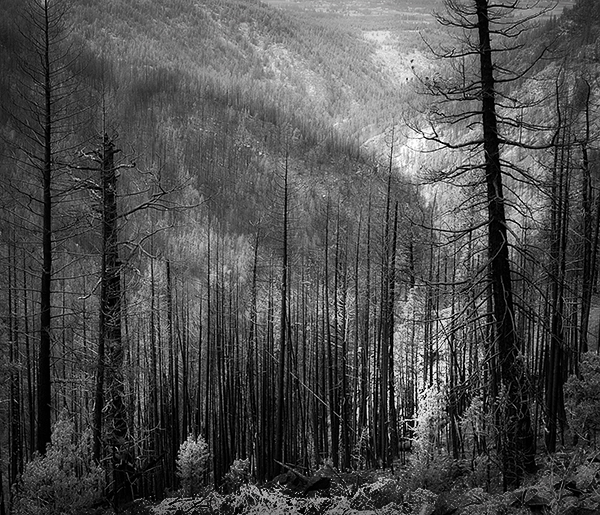
With the huge assortment of software and plugins you have at your disposal these days, the photo processing technique of burning and dodging is practically ancient. It was (and still is) one of the most common ways of enhancing film images in the darkroom, and everyone from Ansel Adams to Imogen Cunningham used it.
myra2

They used it because it is powerful and simple and still is to this day. With all the complicated plugins and post-processing procedures you have at your disposal, you won’t get any better bang for the buck than creative dodging and burning.

This tutorial with show you  how I do dodging and burning in Photoshop, for black and white images. I’ll save another article for you about using the technique for your color images. First, though, let’s make sure we all know what dodging and burning is.

WHAT IS DODGING AND BURNING?

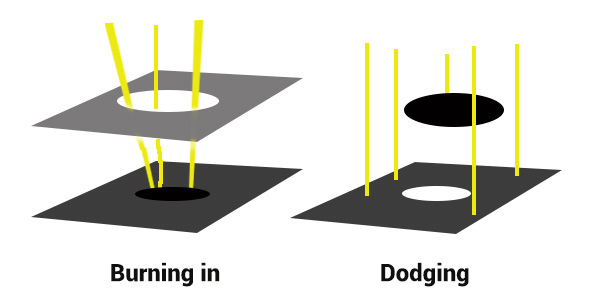
Originally, dodging and burning was used in the traditional darkroom, to retouch film to enhance highlights, and deepen shadows on photographic prints. Photographers used simple darkroom tools to either allow more light from the developer machine to reach certain parts of the light sensitive photographic paper. This was known as “burning in” which made these parts of the photo darker. The photographer could also dodge the light – hold it back from the paper – allowing that part of the photo to remain less developed or lighter than the non-dodged area.

Using this method, photographers or retouch artists could control with great accuracy the developing process to ensure that their prints displayed the full range of tonal values needed to make the photograph pop.
Darkroom Burning and Dodging digram

Darkroom burning and dodging: allowing more light to pass, or holding light back.

WHY YOU SHOULD DODGE AND BURN YOUR DIGITAL PHOTOS

So what has an ancient darkroom technique got to do with your photography? Plenty! Dodging and burning can add a whole new level of depth to your images. With Photoshop it’s simple.

Here are some compelling reasons to incorporate dodging and burning into your digital photography post-processing workflow:

  • To create more dimensionality, make things pop out at your viewers, and make others recede into the shadows.
  • To draw your viewer into your image. Our eyes are programmed to follow the light, and the lightest, brightest parts of your photo are where you want to direct viewers. Some creative dodging and burning will help get their eyes where you want them to go.
  • To isolate the subject.
  • To minimize distracting backgrounds.
  • To turn the lights on, in a photo – if you need some creative lighting after your shot, dodging and burning can help.
  • To make things more dramatic and moody – enhance the shadows to darken things down.
  • Add a vignette to keep the viewer’s eye in the image.

Dodging & Burning adds dimension.

Dodging and burning add dimension.

The three dimensionality of the circle on the right was created purely by dodging and burning a copy of the one on the left. As well, it is super easy with the technique you’re about to learn. As with most things in Photoshop there are many ways to accomplish the same goal, and each have their advantages and drawbacks. I prefer this way because it gives you a huge amount of control and flexibility. It’s drop dead simple, and non-destructive.

Let’s look at  before and after shots so you can see  the difference between nothing, and selective dodging and burning.
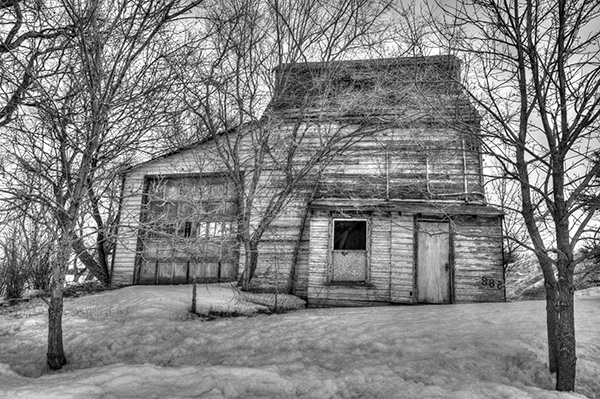
Before Dodging and Burning

Before dodging and burning, the image is flat and has no center of interest.
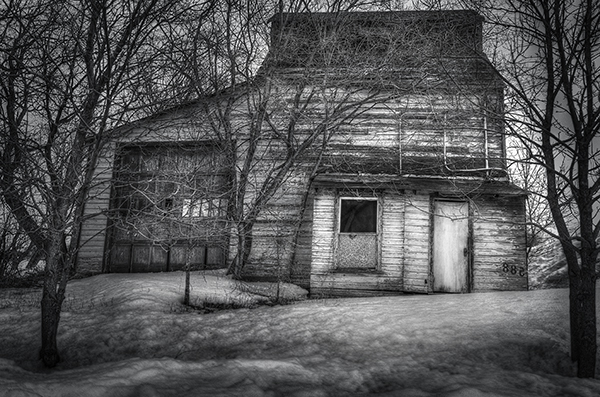
Final Image, with Burning and Dodging applied - exaggerated for effect.

Final image, with dodging and burning applied – we are drawn by light to the door.

The second image has more drama, more of a moody feel. The snow has texture and dimension, and the small door and window are the clear center of interest. Nothing was changed in this photo other than adding tonality by dodging and burning. The look has been exaggerated so you can see the changes, normally dodging and burning is more subtle than this example. Although you can get quite dramatic results if that’s the mood you’re going for.

USE THE BEST TOOLS FOR THE JOB

toolsYou may have noticed in Photoshop’s Toolbar, a couple of tools called Dodge and Burn. Forget about them. I don’t use  these for my dodging and burning. I like to have more control when I work on my images. So instead of the pre-made tools I create my own using layers and the brush tool. It becomes artistic like creating a painting, and you have more freedom to be flexible.

Using layers give you the flexibility to change opacity, and to group your different layers into folders. You can then selectively turn on layers to see how your work is progressing.

HOW TO DO DODGING AND BURNING

Dodging – adding more light:

  • Create a new layer. Switch the blending mode to Color Dodge, and rename this layer Dodge. You may end up having many dodge layers, so name it something more descriptive, door dodge or tree dodge.
  • Select a pale gray color from the toolbox palette, initially this color will be light, for example #bcbcbc, or 188,188,188 on the RGB scale. This color determines the main intensity of the dodge, or how bright it will be.
  • Select a soft brush at a size suitable for the area you want to bring out or emphasize.
  • Initially set the Opacity and Flow of the brush to about 20% each.
  • Brush on the new layer and instantly see the light colors start to POP. If there’s too much, you can either reduce the opacity of the layer, or reduce the opacity and flow of the brush itself.
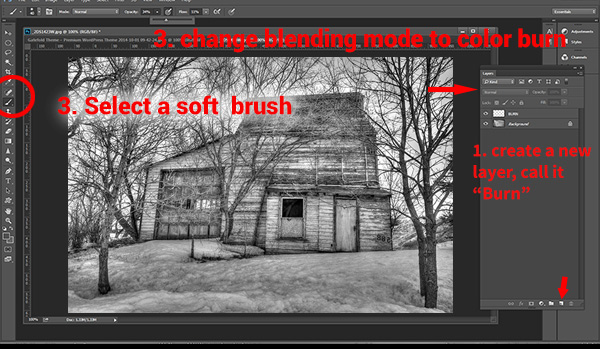
step1

Once you have an intensity you like, brush dodge segments of the image – the door for example. If you move to another part of the image use a new layer for that area or element. You do this because you may want to adjust the intensity by changing the opacity of the layer, or the brush, or even change the color to a lighter or darker shade of gray.

Finally create a Layer Group – click the little folder icon in your layers palette. Move all your Dodge layers into one Group. Name the group Dodge. This allows you to instantly turn off all the “lights” to see before and after. Did you go overboard too much, should you do more, or is it just right? Being able to turn all the dodging off with one click will help you decide.

Where and what to dodge:

You want the lightest parts of your image to lead the viewer’s eye to your subject. Can you create a pathway of sorts with a dodged or brighter leading line, a bright path that the eye can easily follow? Alternately you can also make leading lines darker by burning. Leading lines don’t always have to be bright.

Dodge (and burn) places with texture, to add that three dimensionality, to make the texture really stand out. Try dodging the subject a bit, just a subtle brushing with a gentle opacity to add some brighter tones relative to the rest of the image. Does it pop out a little more now?

You’ve finished dodging for now, next let’s go over to the dark side!

Burning – creating darkness:

Next you’ll do the exact same process for burning. I suggest starting with the exact same color and opacity settings too. Simply create a new layer and set the blending mode of Color Burn, and name the layer Burn.

Once again, if you need more drama, you can change the color of the brush, or change the opacity and flow of the brush or the layer. You can add more layers if needed, duplicate a layer to instantly double the amount of darkness.

This method is quick and intuitive, and if I feel that you’ve gone too far, you can turn off a few layers to hide their visibility in the image. I suggest you make a Layer group for the Burn layers as well.

You can even create another Layer group called D&B (for dodge and burn) and put the the other groups inside. Just ctrl+click to select them and drag them over top of the D&B layer. Now you’ll be able to see the total before and after view with one click. Off and on – good or not? More work needed or done?

SEEING THE BIG PICTURE

Once you’ve brushed in the areas that you want and think you have all the burning and dodging done, you can burn a vignette around the edges of your image to keep the viewer’s eye from leaving. It’s like framing your photo with a bit of darkness, so the eye stays on the brightness.

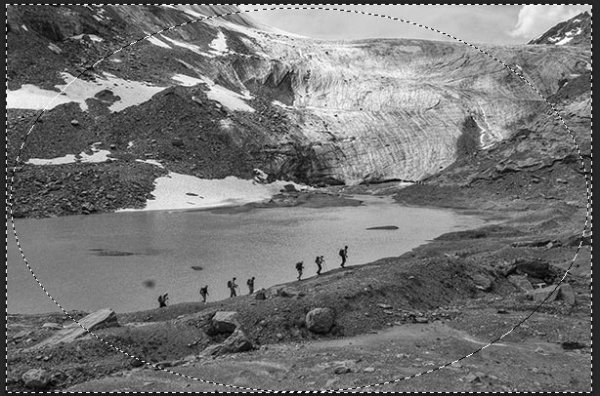
All  you need to do here is create (yes) another layer and use the elliptical marquee tool, with a feathering setting of at least 50 pixels. On the new layer drag out the circle so it touches the edge of your frame. To add darkening to just the edge of the image to create the vignette, go to the top menu in Photoshop and click on Select>Inverse. This will now let you fill the area OUTSIDE the selection.

In the Tools Box, select the same grey color you used for the initial burning of your image as your foreground color, then hit Alt>Backspace on your keyboard to fill that selection with color.  Set the layer blending mode to Color Burn. You may have to decrease the opacity of this layer a bit depending on the tones in your image.  This vignette should be pretty subtle, it’s not meant to be a frame, just a very slight darkening to keep your centre of interest a few tones brighter, to keep the viewers’ eye in your frame.
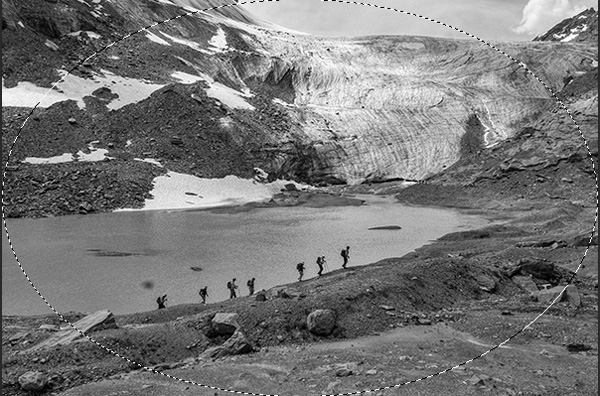
marquee

Initial selection

Selection inverted
Selection inverted

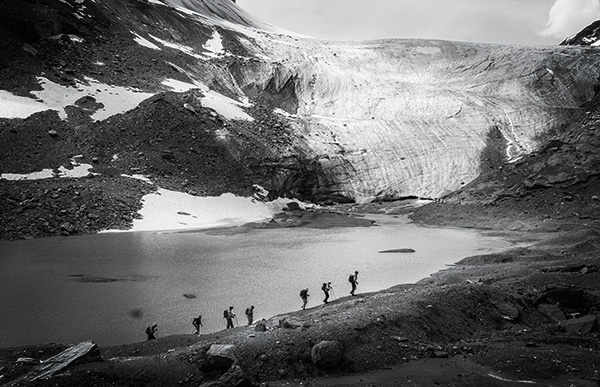
Vignette added

Vignette added

_2DS2932VV

FInal image

I’ve made a short screen capture video showing my technique for dodging and burning you can watch below if you prefer to follow along:

Once you give this method a try, you’ll see how easy it it and how you can achieve dramatic effects with a few quick steps. You have full control of the look and style of your image, and you can revert your steps at anytime to adjust if needed.

If you have alternate methods for dodging and burning let me know why you like them, and also what challenges they create for you. If you’d have any dodged and burned images you’d like to share, please do post them here. Inspire us!

The post Dodging and Burning to Create More Effective Black and White Images by Alex Morrison appeared first on Digital Photography School.


Digital Photography School

 
Comments Off on Dodging and Burning to Create More Effective Black and White Images

Posted in Photography


How to Add Blur to Your Images for the Right Reasons

16 Oct

Bycicle Blur

Blurring is a Tool, Not a Gimmick

Adding blur or movement to a photo just for the sake of it is the same as a magic trick; razzle-dazzle but without purpose. Using a blur effect makes sense when you actually wants to say something specific with the photo. Sometimes it’s to create a sense of speed, and sometimes it’s to add an ethereal, soft kind of ambiance to the shot, but it’s not something to use just because.

Monks  before lunch

Know What You Want to Convey

Although it’s true that sometimes a random or accidental shot yields good fruit, more often than not, there is a better chance of taking a great photo if you think about the setup beforehand. Adding blur is a great option but should be used sparingly and always planned for. Take a look at your scenario and think about what you want from it; motion, speed, a little ethereal mystery? Achieving each of these in a photo takes a different attack, so plan ahead before taking the shot.

Hard versus Soft, Blurry versus Sharp

Taking good photographs means understanding contrast; light versus dark, soft versus sharp edge, focusing on the foreground or the background, etc. As for blurring, it always comes out best if the blur tool is only used on part of the photo. That way, the clearer, sharper part of the image is in contrast to the blur, and it’s this contrast that conveys the sense of speed.

Bycicle Blur 2

It’s All Right to Make Mistakes!

Iteration is fine. Much like athletes and sketch artists need to warm up, taking several test shots, playing around with speed and f-stops is a great way to prepare for your final photo. Use these shots to find your direction, see what each exposure brings. As stated before, a good blurry picture requires some planning – so take the time to plan. The digital age of photography and instant viewing has given us a great boon in terms of being able to experiment in a trial-and-error sort of way, so you can calmly view and sort out what exactly you intend to do.

Floating Monk

Choose the Best Speed

The main photographic technique for blurring is to use a slow shutter speed. Depending on the speed of the object or subject, as well as its relative direction or angle to you and your camera, you will need to play with your shutter speed. If someone is walking in a straight line, facing you, the speed needed in order to create the idea movement will be slower, perhaps 1/8 of a second. If the same person is walking form left to right perpendicular to you, you will need a faster speed, perhaps a 1/20th.

Taking still shots of subjects that are sitting, standing, etc, your speed can be as low as ¼ of a second.

Even if you are shooting at this speed, a still shot might not show the motion at all, if the subject doesn’t move. Usually for standard walking shots on the street the speed will be between 1/8 and 1/15.

Again, the mantra to remember is that different scenarios call for different things. Devotees bathing at Varanasi, someone taking their time walking through a gallery, or a cyclist in mid-race will all need vastly different shutter speeds. As well, you have to determine the degree of movement you want to portray.

In the case of the devotees in Varanasi, I did not want to reflect speed, so much as mystery, a very slight sense of motion, as if it were a dream.

Early Morning Bath

For producing a sense of mass motion, and by this I mean, small crowds strolling around galleries for example, you will sometimes need to use open exposure. This means letting people blur the image by moving, because it will create a contrast with anything that remains still.

Take Care With F-Stops and ISO

Remember that speed is only one of the three factors involved in correct exposure. The other two factors are aperture (f-stops) and ISO. My advice is to set the camera on shutter priority, (possibly “S” for your camera) and let it adjust the f-stop. See if the latter suits you, and adjust the ISO accordingly.

Monks before lunch 2

Don’t Leave Everything to Luck

Certainly, if there’s one time when you need a little bit of luck, it’s when capturing something in motion.

You should always plan and set yourself up if you want the best chance to get a lucky shot, especially when you want to work with something so unpredictable as motion-based shots. Normally, I get myself situated in my chosen venue and take picture after picture at all different speeds. It’s not unusual for me to glance at my watch and realize I’ve been in the same spot for over half an hour. But with one eye on the camera and the other on the scene in front of me, I’ve got a good view for when luck happens my way, as long as I have the patience and dedication to wait for it.

Tuc Tuc Blur

The post How to Add Blur to Your Images for the Right Reasons by Harry Fisch appeared first on Digital Photography School.


Digital Photography School

 
Comments Off on How to Add Blur to Your Images for the Right Reasons

Posted in Photography


Wildlife Photographer of the Year releases images from winners shortlist

11 Oct

Britain’s Natural History Museum has disclosed four of the winning images from the shortlist of the Wildlife Photographer of the Year competition. With a judging panel chaired by Jim Brandenburg, the competition attracted almost 42000 entries from 96 countries this year, and 100 of the best images will form a touring exhibition that the museum says will visit six continents. See gallery

Articles: Digital Photography Review (dpreview.com)

 
Comments Off on Wildlife Photographer of the Year releases images from winners shortlist

Posted in Uncategorized


An Assortment of Shadow Images

10 Oct

It’s fall in the northern hemisphere. The sun is lower in the sky and dusk is earlier and earlier. Time to get out warmer clothes and pack away the summer ones. But the low sun and early dusk makes for some great opportunities to capture long shadows.

I’ve rounded up a few shadow images that I thought were particularly good to inspire you. Enjoy!

Photograph Encounters of the Third Kind by Fabio Secchia on 500px

Encounters of the Third Kind by Fabio Secchia on 500px

Photograph Aerial view from the bridge by Sergio Murria on 500px

Aerial view from the bridge by Sergio Murria on 500px

Photograph Light & Shadows ~ Black & White by Lucinda Walter on 500px

Light & Shadows ~ Black & White by Lucinda Walter on 500px

Photograph Shadow by Joseph Saadeh on 500px

Shadow by Joseph Saadeh on 500px

Photograph Light and shadow by Ricardo  Domínguez Alcaraz on 500px

Light and shadow by Ricardo Domínguez Alcaraz on 500px

Photograph Fast Runner by Claus Tom Christensen on 500px

Fast Runner by Claus Tom Christensen on 500px

Photograph Handyman by Josef Sieberer on 500px

Handyman by Josef Sieberer on 500px

Photograph [shadow dancer] by Julia Borodina on 500px

[shadow dancer] by Julia Borodina on 500px

Photograph The Lonely Chair by Sam Root on 500px

The Lonely Chair by Sam Root on 500px

Photograph Light of Hope by Carlos Gotay on 500px

Light of Hope by Carlos Gotay on 500px

Photograph Together again by Roberto Pireddu on 500px

Together again by Roberto Pireddu on 500px

Photograph Wheels by Kah Kit Yoong on 500px

Wheels by Kah Kit Yoong on 500px

Photograph Walking among the trees by Soumaya Dakhissi on 500px

Walking among the trees by Soumaya Dakhissi on 500px

Photograph Spotted by Laurence Penne on 500px

Spotted by Laurence Penne on 500px

Photograph Untitled by Maurizio Lattanzio on 500px

Untitled by Maurizio Lattanzio on 500px

Photograph Shadow B&W by Kr!shna ~ Ang!ra on 500px

Shadow B&W by Kr!shna ~ Ang!ra on 500px

Photograph new day new life by sirena lavetii on 500px

new day new life by sirena lavetii on 500px

Photograph Morning sun by Birgit Pittelkow on 500px

Morning sun by Birgit Pittelkow on 500px

Photograph Never-ending bricks by relux  on 500px

Never-ending bricks by relux on 500px

Photograph The Shadow by Marc Braner on 500px

The Shadow by Marc Braner on 500px

Photograph Cave Exploration by Erik Ahlbrecht on 500px

Cave Exploration by Erik Ahlbrecht on 500px

Photograph Shadow Play by Annie Weibull on 500px

Shadow Play by Annie Weibull on 500px

Photograph Selfportrait by Sergey Krotov on 500px

Selfportrait by Sergey Krotov on 500px

Photograph Afraid of the Dark by Gabriela Ferreira on 500px

Afraid of the Dark by Gabriela Ferreira on 500px

Photograph Untitled by Frank van Es on 500px

Untitled by Frank van Es on 500px

Photograph Shadow selfie by Valdi Sker on 500px

Shadow selfie by Valdi Sker on 500px

Photograph I, Me, Myself by Balasubramani Pillai on 500px

I, Me, Myself by Balasubramani Pillai on 500px

Photograph my shadow by Mario Mancuso on 500px

my shadow by Mario Mancuso on 500px

Photograph The Katydid Redux by Steve Passlow on 500px

The Katydid Redux by Steve Passlow on 500px

Photograph A Little Spy by Mostafa Ammar on 500px

A Little Spy by Mostafa Ammar on 500px

Photograph Which Is Me ? by Nasser Osman on 500px

Which Is Me ? by Nasser Osman on 500px

Photograph Shadow Puppet Show by Photos of Thailand .... on 500px

Shadow Puppet Show by Photos of Thailand …. on 500px

Photograph Man Rays by Stefano Corso on 500px

Man Rays by Stefano Corso on 500px

Photograph Shadow of a Prima Ballerina by Andrew Buay on 500px

Shadow of a Prima Ballerina by Andrew Buay on 500px

Photograph Shadow dancers by Valéry Joncheray on 500px

Shadow dancers by Valéry Joncheray on 500px

The post An Assortment of Shadow Images by Darlene Hildebrandt appeared first on Digital Photography School.


Digital Photography School

 
Comments Off on An Assortment of Shadow Images

Posted in Photography