RSS
 

Posts Tagged ‘Images’

28 Curious Images of Feet

07 Aug

This week for an image collection I bring to you – FEET!

What can you tell about the person, their life, and their emotions by looking at their feet? What do these feet tell you?

If the eyes are the windows to the soul – what do the feet tell us?

Photograph Tiny Feet by Lisa Holloway on 500px

Tiny Feet by Lisa Holloway on 500px

Photograph "They say stay in the lines, but there's always something better on the other side." (John Mayer) by Anita Vela on 500px

“They say stay in the lines, but there’s always something better on the other side.” (John Mayer) by Anita Vela on 500px

Photograph Splash ! by Joan  Le Jan on 500px

Splash ! by Joan Le Jan on 500px

Photograph Feet by Marc Braner on 500px

Feet by Marc Braner on 500px

Photograph In safe hands by Ron Schilling on 500px

In safe hands by Ron Schilling on 500px

Photograph Nogi , nogi... by Ewa Frye on 500px

Nogi , nogi… by Ewa Frye on 500px

Photograph movement by kip garik on 500px

movement by kip garik on 500px

Photograph Além by Fabio Stachi on 500px

Além by Fabio Stachi on 500px

Photograph Baby feet by Bart Vaelen on 500px

Baby feet by Bart Vaelen on 500px

Photograph armonia by  GrenOuille   on 500px

armonia by GrenOuille on 500px

Photograph Twin by Manuel Orero on 500px

Twin by Manuel Orero on 500px

Photograph Happy feet by Tatiana Avdjiev on 500px

Happy feet by Tatiana Avdjiev on 500px

Photograph Marie by Laurent KC on 500px

Marie by Laurent KC on 500px

Photograph Bath IV by Pepe Pont on 500px

Bath IV by Pepe Pont on 500px

Photograph Octopus by Michaël Fournier on 500px

Octopus by Michaël Fournier on 500px

Photograph Talk to the Paw by Holly Kuchera on 500px

Talk to the Paw by Holly Kuchera on 500px

Photograph i have cleaned my paws by Dave Binyon on 500px

i have cleaned my paws by Dave Binyon on 500px

Photograph Here I am! by Zuzia Paluch on 500px

Here I am! by Zuzia Paluch on 500px

Photograph foots and ball... by Partha Das on 500px

foots and ball… by Partha Das on 500px

Photograph || Dribbler || by Souvik Metia on 500px

|| Dribbler || by Souvik Metia on 500px

Photograph Gymnastic foot by Luigi Fardella on 500px

Gymnastic foot by Luigi Fardella on 500px

Photograph 2. Position by Jean Claude  Castor on 500px

2. Position by Jean Claude Castor on 500px

Photograph Beach Volleyball Sand Feet Jump by Jamie Roach on 500px

Beach Volleyball Sand Feet Jump by Jamie Roach on 500px

Photograph 'Foot'ball by Mattia Pasotti on 500px

‘Foot’ball by Mattia Pasotti on 500px

Photograph Cool man wearing roller skating shoes by fabio_barstar on 500px

Cool man wearing roller skating shoes by fabio_barstar on 500px

Photograph Wet feet :) by Bram Linderman on 500px

Wet feet :) by Bram Linderman on 500px

Photograph Bird tracks in sand of a beach crossing human footprints. by Maciej Bledowski on 500px

Bird tracks in sand of a beach crossing human footprints. by Maciej Bledowski on 500px

Photograph Sandals on the Beach by Ben North on 500px

Sandals on the Beach by Ben North on 500px

googletag.cmd.push(function() {
tablet_slots.push( googletag.defineSlot( “/1005424/_dPSv4_tab-all-article-bottom_(300×250)”, [300, 250], “pb-ad-78623” ).addService( googletag.pubads() ) ); } );

googletag.cmd.push(function() {
mobile_slots.push( googletag.defineSlot( “/1005424/_dPSv4_mob-all-article-bottom_(300×250)”, [300, 250], “pb-ad-78158” ).addService( googletag.pubads() ) ); } );

The post 28 Curious Images of Feet by Darlene Hildebrandt appeared first on Digital Photography School.


Digital Photography School

 
Comments Off on 28 Curious Images of Feet

Posted in Photography


Updated Kodak Moments app lets you share, edit and print your images

04 Aug

An update to the Kodak Moments app makes it a one-stop-shop for editing, sharing and printing, eliminating the need for a separate app to send images to Kodak’s Picture Kiosks. Read more

Articles: Digital Photography Review (dpreview.com)

 
Comments Off on Updated Kodak Moments app lets you share, edit and print your images

Posted in Uncategorized


28 Timeless Images of Time-worn Old Cars

01 Aug

Antique, old, rusted, archaic, crumbling, ancient, and time-worn – all words that could describe vintage vehicles. Some are in better condition than others, some in running order, others put out to pasture.

Photographers love to shoot crumbling subjects. I hope you enjoy these images of old cars:

Photograph Plymouth by Aaron J. Groen on 500px

Plymouth by Aaron J. Groen on 500px

Photograph Old memories by László Gál on 500px

Old memories by László Gál on 500px

Photograph Old Metal by Meagan V. Blazier on 500px

Old Metal by Meagan V. Blazier on 500px

Photograph P L Y M O U T H by Liban Yusuf on 500px

P L Y M O U T H by Liban Yusuf on 500px

Photograph Rusted Car in Flowers by Lidija Kamansky on 500px

Rusted Car in Flowers by Lidija Kamansky on 500px

Photograph Racing through the streets of Havana by Mikko Palonkorpi on 500px

Racing through the streets of Havana by Mikko Palonkorpi on 500px

Photograph Old Blue Car by Giancarlo Bisone on 500px

Old Blue Car by Giancarlo Bisone on 500px

Photograph Spacecraft by Tasos Koutsiaftis on 500px

Spacecraft by Tasos Koutsiaftis on 500px

Photograph The Eye by Sotiria Alexandri Schijvenaars on 500px

The Eye by Sotiria Alexandri Schijvenaars on 500px

Photograph Vespa & Fiat by Emmanuel Hatas on 500px

Vespa & Fiat by Emmanuel Hatas on 500px

Photograph Look into my eyes by Mark U on 500px

Look into my eyes by Mark U on 500px

Photograph Old rusty car by Yauheni Patsiomkin on 500px

Old rusty car by Yauheni Patsiomkin on 500px

Photograph Vergessen by Alan Lopane on 500px

Vergessen by Alan Lopane on 500px

Photograph The Ghost Town by Indigo Verse on 500px

The Ghost Town by Indigo Verse on 500px

Photograph old car by Matteo Pecchioli on 500px

old car by Matteo Pecchioli on 500px

Photograph Recycle by Ten:Dead:Pixels  on 500px

Recycle by Ten:Dead:Pixels on 500px

Photograph Rotting Jalopies by Todd Klassy on 500px

Rotting Jalopies by Todd Klassy on 500px

Photograph Beetle by ????? ???????? on 500px

Beetle by ????? ???????? on 500px

Photograph The aurora taxi by Ingrid Kjelling on 500px

The aurora taxi by Ingrid Kjelling on 500px

Photograph Dick Tracy´s by Oscar Mazza on 500px

Dick Tracy´s by Oscar Mazza on 500px

Photograph Helpless by DeVaughn Squire on 500px

Helpless by DeVaughn Squire on 500px

Photograph Eyes by Dave Linscheid on 500px

Eyes by Dave Linscheid on 500px

Photograph untitled by Mikko Erholtz on 500px

untitled by Mikko Erholtz on 500px

Photograph old police car by Michel Bellemare on 500px

old police car by Michel Bellemare on 500px

Photograph Old Caddy by Arkadiusz Ziomek on 500px

Old Caddy by Arkadiusz Ziomek on 500px

Photograph Old car racing by Sergey  Lebedev on 500px

Old car racing by Sergey Lebedev on 500px

Photograph Menara Car by Soufiane BOUDIR on 500px

Menara Car by Soufiane BOUDIR on 500px

Photograph Autoskulturenpark in Mettmann by Adam Zborowski on 500px

Autoskulturenpark in Mettmann by Adam Zborowski on 500px

googletag.cmd.push(function() {
tablet_slots.push( googletag.defineSlot( “/1005424/_dPSv4_tab-all-article-bottom_(300×250)”, [300, 250], “pb-ad-78623” ).addService( googletag.pubads() ) ); } );

googletag.cmd.push(function() {
mobile_slots.push( googletag.defineSlot( “/1005424/_dPSv4_mob-all-article-bottom_(300×250)”, [300, 250], “pb-ad-78158” ).addService( googletag.pubads() ) ); } );

The post 28 Timeless Images of Time-worn Old Cars by Darlene Hildebrandt appeared first on Digital Photography School.


Digital Photography School

 
Comments Off on 28 Timeless Images of Time-worn Old Cars

Posted in Photography


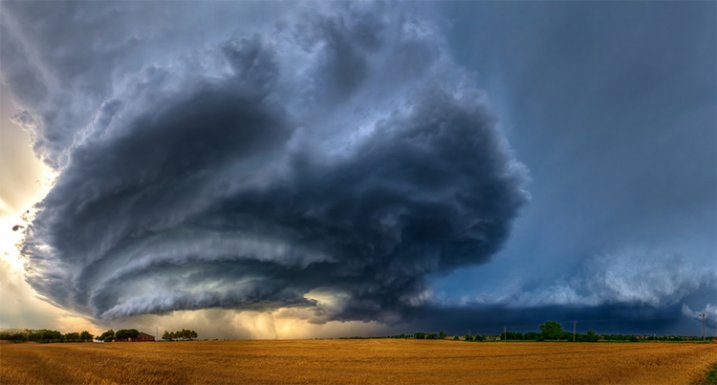
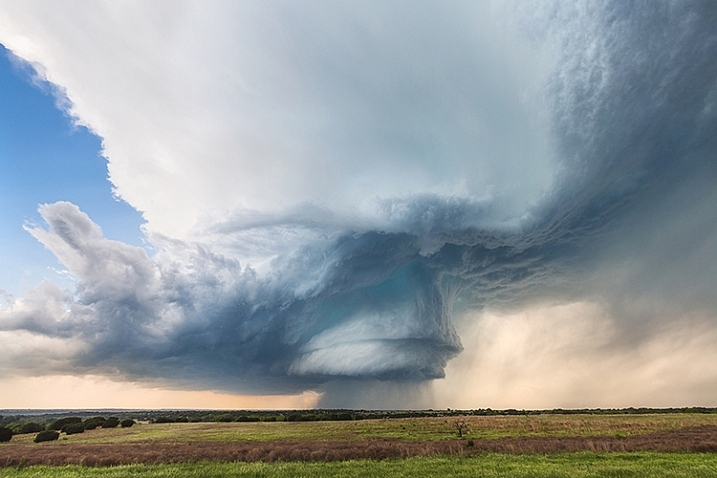
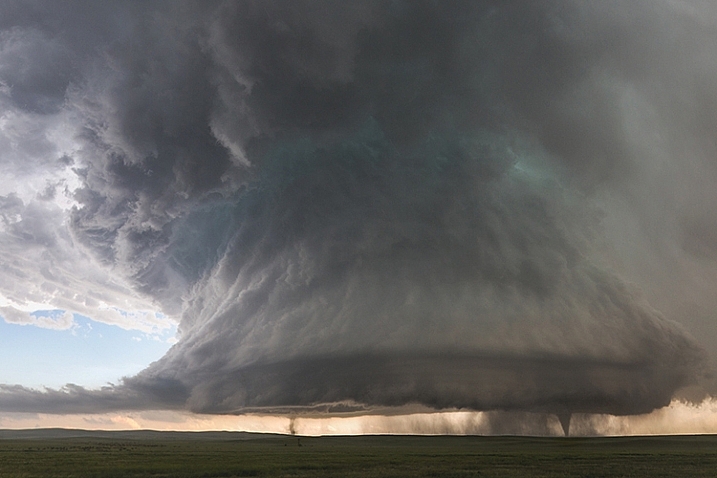
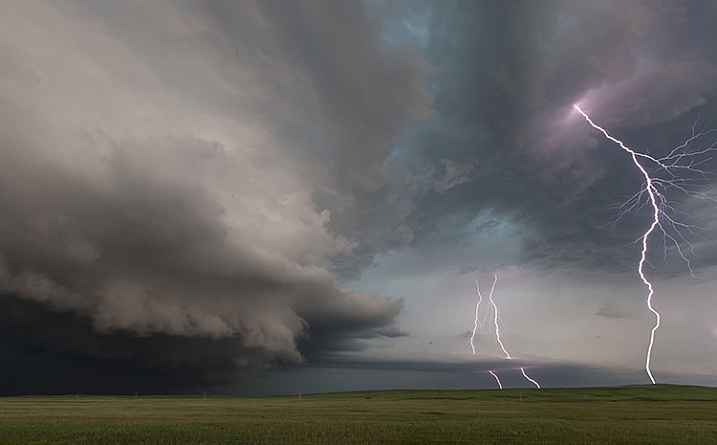
5 Incredible Storm Photographers and Their Best Images

30 Jul

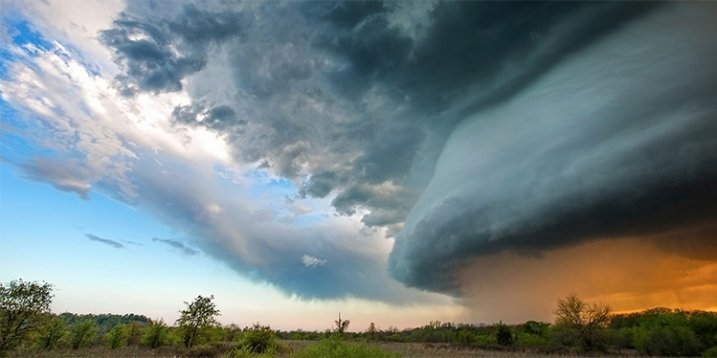
I’ve been a landscape and travel photographer for nearly six years now. While I will always love standing in front of an amazing landscape at sunset, nothing on earth can compare to the feeling I get when standing in front of a massive supercell with 40-50mph winds at my back, watching it twist and churn, as it tries to lower itself to the ground. It’s the most intense and pure mixture of awe, fear and respect for mother nature that I’ve been able to find to this day.

henrietta-storm-james-brandon

© James Brandon. Henrietta, TX Supercell

ranger-tx-supercell-james-brandon

© James Brandon. Ranger, TX Supercell

I’m just now wrapping up my third season of chasing these incredible storms (you can check out some of my storm images above) and over the past three years I’ve been fortunate to meet some incredible chasers; some of whom are even better photographers. So here’s a collection of four of the best chaser photographers out there (along with a few of their best images). Be sure to check out their websites and links to see more of their amazing work!

Mike Mezeul II

Mike has become one of my best buds over the past few years, we even lead workshops around the world together now (you can find more info on that through the link to my site in my bio). He took me on my first chase and to this day I chase with him about 99% of the time. He’s been doing this stuff for upwards of 15 years now, and is just as good at putting us in position for a storm to develop, as he is at photographing them. In fact, the last time we chased we drove out to west Texas and he put us within 30 minutes of storm that exploded into a supercell.

Check out more of Mike’s work at his website and be sure to follow him on Instagram as well!

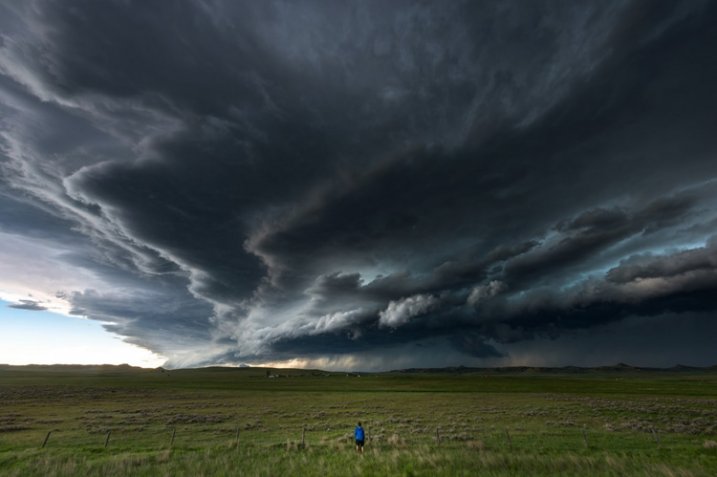
storm-chasing-article-4

A storm chaser stands in front of an approaching supercell thunderstorm just north of Gillette, Wyoming in May of 2014. © Mike Mezeul II

"Ardmore Supercell" © Mike Mezeul II

“Ardmore Supercell” © Mike Mezeul II

“A tornadic supercell thunderstorm sweeps across the plains at sunset near Ardmore, Oklahoma.”

storm-chasing-article-5

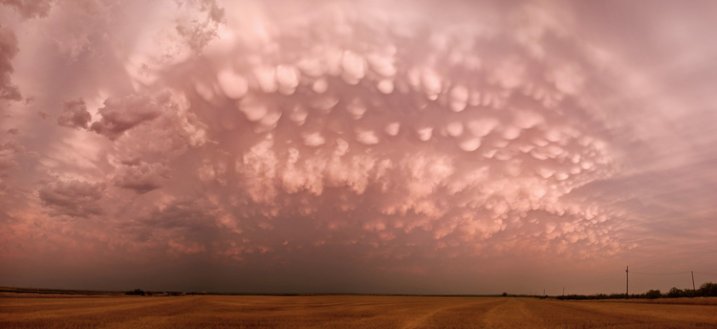
“Pink Mammatus” © Mike Mezeul II

“Mammatus clouds glow a vibrant pink over west Texas after severe weather rolled through the area.”

storm-chasing-article-13

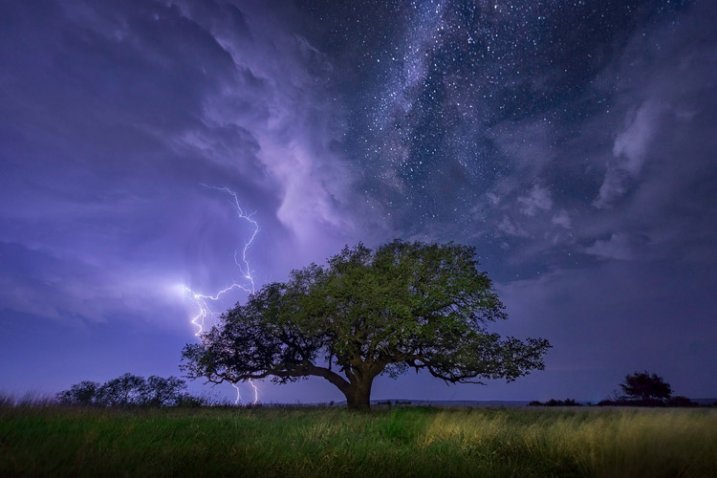
“Awakening” © Mike Mezeul II

“A cloud-to-ground lightning bolt strikes over Albany, Texas as the Milky Way shines above.”

Mike Olbinski

I’ve known Mike online for about the same time as I’ve been a professional photographer. We met back in the HDR Days, and I remember being amazed when he got into storm photography. Then, one of his images of a haboob decsending on Phoenix went absolutely viral overnight and he was officially on the map as a storm photographer. But that wasn’t it, he hit gold again a couple years later with his Booker, TX timelapse which you’ve likely seen on TV and even movies. Coincidently, I just met Mike in person for the first time a few weeks ago while out chasing in west Texas. He’s an incredibly nice dude and fantastic photographer. I’ll be joining him soon to photograph Monsoon season in his home state of Arizona. Can’t wait!

Check out Mike’s work at his website and on 500px and read his article here on dPS: How to Photograph Lightning – the Ultimate Guide

storm-chasing-article-9

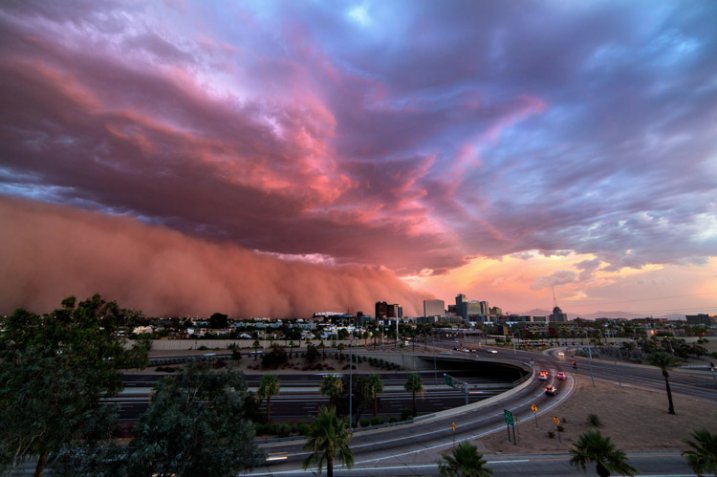
“Phoenix Haboob” © Mike Olbinski

“A gorgeous dust storm and low level clouds roll into downtown Phoenix on July 3rd, 2014. Always amazing to see a scene like this, but toss in a little sunset color and it blew my mind.”

storm-chasing-article-12

“Storm of the Apocalypse” © Mike Olbinski

“A view of the Booker, Texas supercell which was one of the most amazing sights I have ever seen. You can see the crazy timelapse of this storm below.”

storm-chasing-article-11

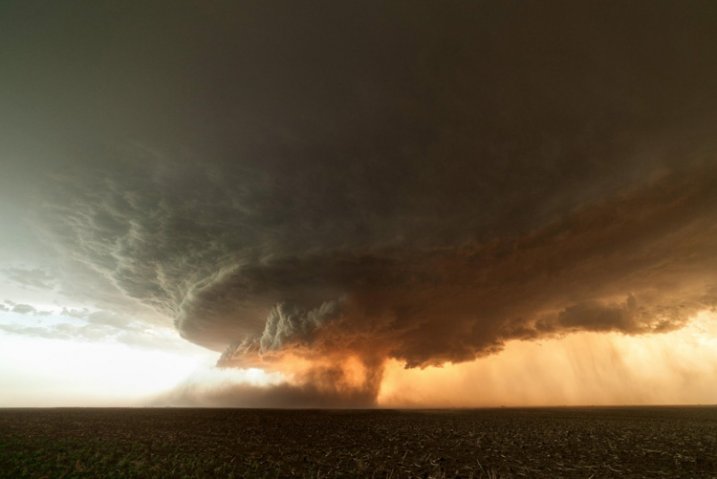
“Alanreed Supercell” © Mike Olbinski

“This storm earlier spawned a brief tornado near Groom, Texas. It moved to the east/northeast across the rolling farmlands…I caught up to it once again here just north of Alanreed. The hail core and structure was magnificent to behold.”

Marko Korosec

Marko is an incredibly talented photographer and chaser from Slovenia. I was turned on to his work through a friend, and when I began scrolling through his images on 500px, my jaw began to drop lower with every image. He seems to be on just about every major photogenic storm there is, and that’s a feat in and of itself. Capturing these storms as well as he does is a whole other feat. I haven’t met Marko in person yet, but I’m sure it’s only a matter of time before we run into each other out on the road beneath a storm.

You can follow Mark on his website and 500px.

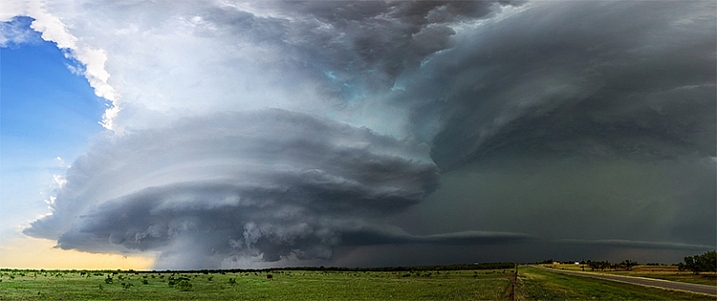
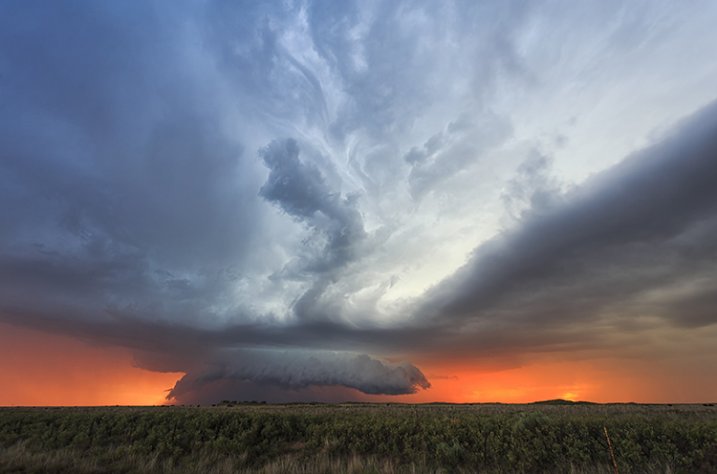
"Sunset Supercell " © Marko Korosec

“Sunset Supercell ” © Marko Korosec

“Nicely striated supercell at colorful sunset near Bledsoe, New Mexico on May 29th, 2015″

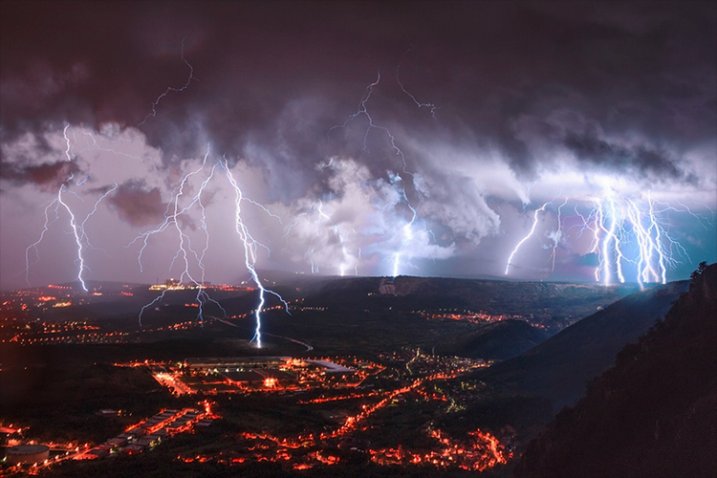
"Electric Night" © Marko Korosec

“Electric Night” © Marko Korosec

“A lightning barrage during the cold frontal passage over the city of Trieste, Italy on October 14th, 2014.”

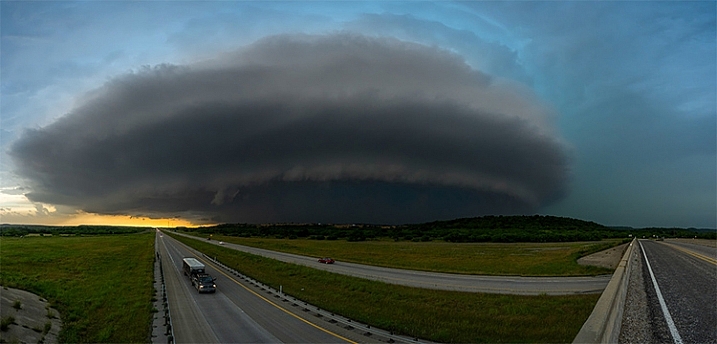
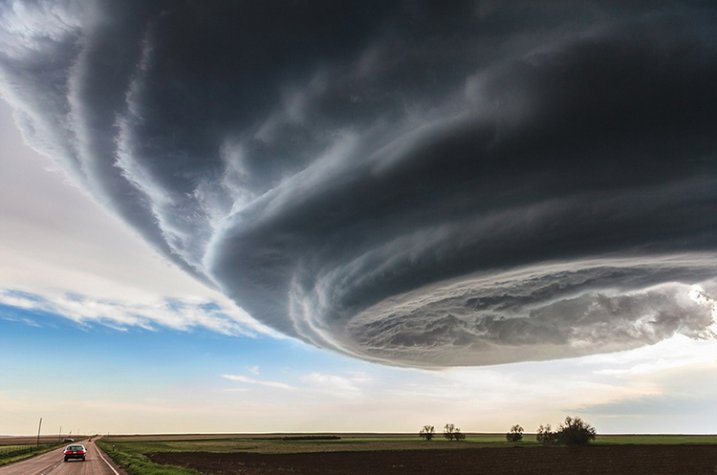
"Independence Day" © Marko Korosec

“Independence Day” © Marko Korosec

“Spaceship shaped supercell storm near Julesburg, Colorado on May 28th, 2013″

James Langford

I met James Langford out on the road during one of my first chases with Mike and have since run into him while chasing several times. James is just an all around nice dude. If he’s not chasing on his own, he’s usually “now-casting” (forecasting for a chaser from home) for someone who is. He’s got an incredible collection of storm images as well as some jaw-dropping time-lapses.

You can follow James at his website and Facebook.

langford-1

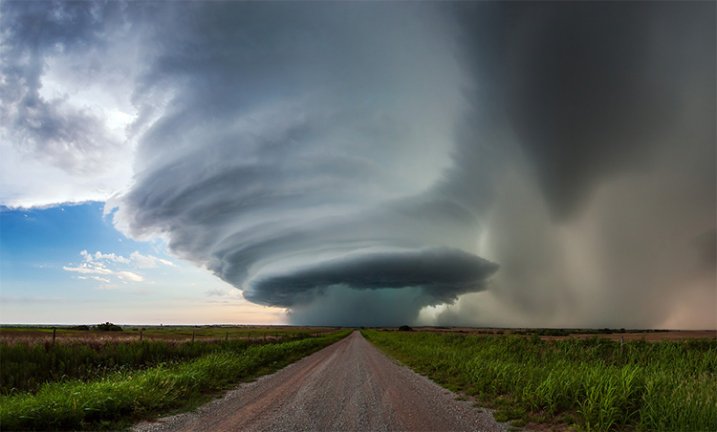
“Perfect Symmetry” © James Langford

“This was captured in western Oklahoma. Experiencing the power and beauty of thunderstorms is something that is really hard to translate into images.  This particular storm was one of the most beautiful I had ever seen.  It moved very slowly the whole time we photographed it, and the structure and colors were incredible.”

langford-2

“The Beast” © James Langford

“Capture near Piedmont, Oklahoma, this incredible storm in Central Oklahoma had hail the size of grapefruits and a small tornado around the time this image was created.  I’ve never seen structure and colors quite like this and it ranks as one of my favorite images of all time.”

Kelly DeLay

I met Kelly a couple of years ago through Mike Mezeul. He had a great 2015 season capturing both the Hico supercell and the twin tornadoes in Colorado that went pretty viral. You can view more of his work at his website Clouds365.com and his 500px page.

© Kelly DeLay. Hico, TX Supercell

© Kelly DeLay. Hico, TX Supercell

“Visually, has to be one of my favorite storms ever. This was a very discreet storm and as you can see the rotation was quite evident. The hail core was quite impressive as well, producing baseball sized hail that knocked out a few storm chaser’s windshields.”

© Kelly DeLay. Sister tornadoes - Simla, Colorado

© Kelly DeLay. Sister tornadoes – Simla, Colorado

“My most favorite image of my career. I did describe it as a “shot of a lifetime”. For years I wanted to capture a discreet supercell (no other storms around) with a tornado underneath. I was very surprised to see not just one, but two tornadoes both spinning in the opposite direction.”

© Kelly DeLay. Belle Fourche, South Dakota

© Kelly DeLay. Belle Fourche, South Dakota

“The lightning field was so intense preceding the core, you would see a flash nearby and immediately hear a BOOM. Thats close! Feeling a little safer near Belle Forche, South Dakota I got out and captured a few shots. Again, all you would see is a quick flash. Amazed to look at the back of my screen to see this.”

For more storm photography see:

  • 7 Things I’ve Learned from Photographing Storms
  • How I Shot And Edited It – Stars, Storm and Basecamp, Nepal
  • 33 Blustery Bad Weather Images
  • How to Photograph Lightning – the Ultimate Guide

googletag.cmd.push(function() {
tablet_slots.push( googletag.defineSlot( “/1005424/_dPSv4_tab-all-article-bottom_(300×250)”, [300, 250], “pb-ad-78623” ).addService( googletag.pubads() ) ); } );

googletag.cmd.push(function() {
mobile_slots.push( googletag.defineSlot( “/1005424/_dPSv4_mob-all-article-bottom_(300×250)”, [300, 250], “pb-ad-78158” ).addService( googletag.pubads() ) ); } );

The post 5 Incredible Storm Photographers and Their Best Images by James Brandon appeared first on Digital Photography School.


Digital Photography School

 
Comments Off on 5 Incredible Storm Photographers and Their Best Images

Posted in Photography


How to Make Creative Images with a $12 LED Light

22 Jul

Photography is all about the light. As photographers, our aim is to capture and control the amount of light hitting the camera’s sensor to perfect a good photo.

When photographers talk about light, you will hear terms mentioned such as ambient, which is natural light. Note this type of light is always changing, it doesn’t remain constant. Split, Rembrandt, and Butterfly are some of the classic lighting patterns used for portraiture in a studio setup.

torch-shining--against-wall

A LED torch with a paper snoot.

One of my favorite basic setups when I shoot outdoors is when the day is overcast (dull), which makes the light act like one big soft diffuser. The ambient light provides my main source of light (key light) and I use a white, silver, or gold reflector to act as fill.

This is in sharp contrast to shooting in a studio where artificial lights are used. The choice and range of lights will depend on whether you use flash or continuous lighting. The main advantage to this kind of setup is that you have complete control over the lighting, plus it doesn’t rain!

The best method I find in learning about lighting, be it natural or artificial, is to experiment. Recently, I was flipping through a camera magazine when this product caught my eye – The Ice Light 2 by Westcott. It stood out for two reasons: The concept and the price. I really liked the Stars Wars light-sabre appeal to it. It’s different, and has that wow factor, as does the price. It’s not cheap.

This is not a review of the Ice Light, but it did give me some inspiration for an idea. For less than $ 12.00 USD, I purchased this LED light which, surprisingly, has 140 lumen. I set myself a challenge to see how effective this light source could be when used for photography.

Torch-in-hand

A small but powerful LED torch light.

How did I test it? I took some shots outdoors, as well as indoors, just to get some variety and scope to this project.

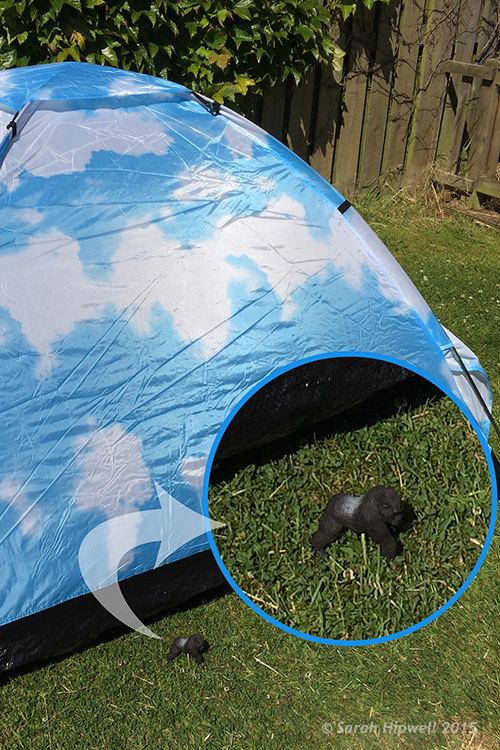
For my initial shots, it was 10:30 p.m. at night, not quite dark, but dusky. I went to a little park near where I live, placed the torch horizontal in the grass, and had the toy plastic Gorilla in a grassy verge, roughly a couple of feet away. I had the aperture at f/2.5, the ISO at 400, and the shutter speed at 1/50th.

Gorilla-in-grass

A toy plastic gorilla in the grass.

Nearer home and again outside, I place this Lego figure on a garden wooden chair with slats. I had the torch underneath standing vertically. Just by moving my camera rather than the light, I was able to get a bit of flare that really added drama to the shot.

Lego-girl-figurine

Cool Lego girl figure.

Torch-under-chair

I placed the torch upright under a garden chair with slats.

Back indoors, I had my daughter hold the torch with paper wrapped around the end to form a snoot.

torch-with-paper

Using plain white printing paper wrapped around the torch to form a snoot.

I got her to move the torch around until I was happy with the light. I really liked the catchlights. The camera settings were: Aperture f/4.5, shutter speed 1/30th, ISO at 800, the focal length was 44mm.

Amy-faraway-look

Interesting catchlights from the torch with a white paper snoot.

Amy-reading-book

The torch was placed in the centre of the book facing towards the camera.

I had the idea brewing for some time of trying to get that shot lit from the inside of a tent; the one that is ubiquitous in great landscape shots. I had a lot of fun doing this shoot, and would highly recommend you try to do the same! The plan was to have my daughter inside and get a nice silhouette of her against the wall of the tent. It didn’t go to plan, which was fortunate for me.

As a last resort, I got my plastic gorilla figurine and placed him inside the tent with the torch lying horizontal on the floor of the tent, only about 6 inches behind him. I was well chuffed (pleased) with the final result. It was even better than I had envisioned; especially as the gorilla is only 3.5 inches tall. I did have the camera on a tripod as it was dark. The settings were: ISO 800, aperture f/4, shutter speed 1/8th, and focal length was 40mm.

gorilla

Fun with a toy gorilla inside a tent with a torch.

Gorilla-scale-to-tent

The gorilla is only 3 and half inches tall, small relative to the size of the tent.

Conclusion

To be honest, I wasn’t expecting this project to yield the results that it did. It has been the best $ 12.00USD that I’ve spent in a long time. It is now another must item to have in my camera bag.

What non-photography light sources have you used in your photography? Please share in the comments below.

googletag.cmd.push(function() {
tablet_slots.push( googletag.defineSlot( “/1005424/_dPSv4_tab-all-article-bottom_(300×250)”, [300, 250], “pb-ad-78623” ).addService( googletag.pubads() ) ); } );

googletag.cmd.push(function() {
mobile_slots.push( googletag.defineSlot( “/1005424/_dPSv4_mob-all-article-bottom_(300×250)”, [300, 250], “pb-ad-78158” ).addService( googletag.pubads() ) ); } );

The post How to Make Creative Images with a $ 12 LED Light by Sarah Hipwell appeared first on Digital Photography School.


Digital Photography School

 
Comments Off on How to Make Creative Images with a $12 LED Light

Posted in Photography


3 Useful Photoshop Techniques for Making Images Exposure Corrections

20 Jul
Title-correct-exposure

Using a Curves Adjustment Layer with the Blend Mode set to Screen to correct exposure in Photoshop.

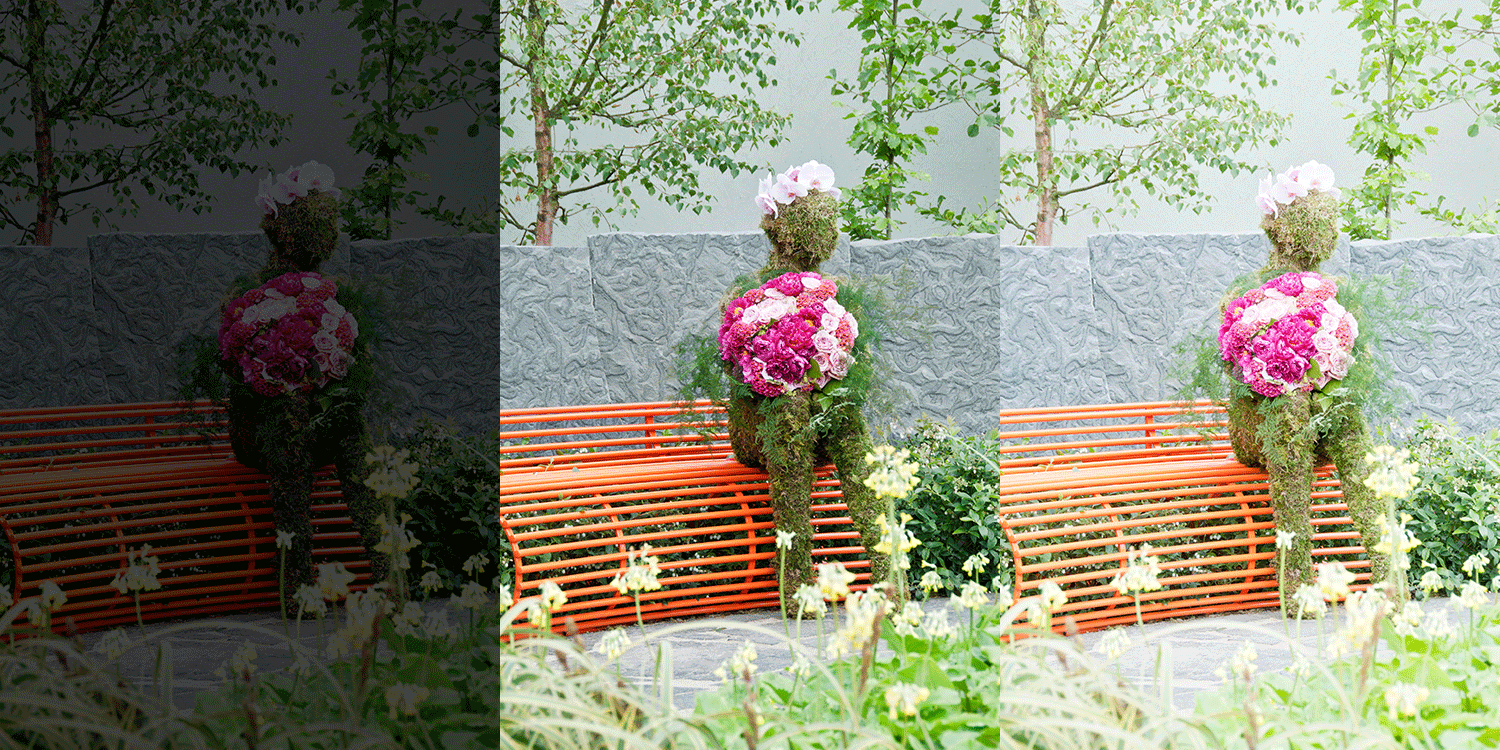
In general, where images are too dark, this is referred to as underexposed. Conversely, images that are too light are overexposed. Photos taken on sunny days are prone to being overexposed.
exposure

An animated gif to illustrate a correct exposure, an underexposed shot and an overexposed one.

In an ideal situation, the aim is to try and get the correct exposure in-camera. In doing so, less time will be spent in front of your computer post-processing.

In this article, I will describe how to easily correct photos that are underexposed (photos that are too dark) and overexposed (photos that too light) using Adjustment Layers and Blend Modes in Photoshop. I will then describe how the Dodge and Burn tools work to target specific areas to brighten or darken your image.

The following techniques are not new, but have been around for quite some time in Photoshop. The methods are still very effective, quick and easy to do.

  • Overexposed photos – Blend Mode: Screen with Curves Adjustment Layer.
  • Underexposed photos – Blend Mode: Multiply with Curves Adjustment layer.
  • Dodge & Burn tools – New Layer above the image filled with 50% gray – Blend Mode: Overlay/Softlight.

Read:  The First 3 Photoshop Blend Modes You Need to Understand

All of the images I used in this article are the jpegs straight out of the camera, completely unedited. I want to demonstrate how effective these techniques are when applied.

Correcting Overexposed Images
Becky-overexposed

A typical washed-out look from an overexposed photo.

As you can see, from the first overexposed shot. The subject has that washed-out look. The subject is overexposed by a stop and a half. I applied a Curves Adjustment Layer and changed the Blend Mode to Multiply. Straight away, the contrast of the image has dramatically increased.

Becky-curves-multiply

The result is quite dramatic when the Curves Adjustment Layer (with Multiply blend mode) has been applied, but there is a noticeable change in color shift.

The Multiply Blend Mode can cause a shift in color, but this is easily remedied. To adjust the color balance, go to the Properties panel (CS6) and choose the channel you want by clicking on the menu left of the Auto button. In this case, the color was too cool, so I adjusted the three channels (Red, Green and Blue) to get the result I wanted.

Becky-correct-exposure

The color balance has now been modified by adjusting the red, green and blue channels in the the properties panel for the Curves layer.

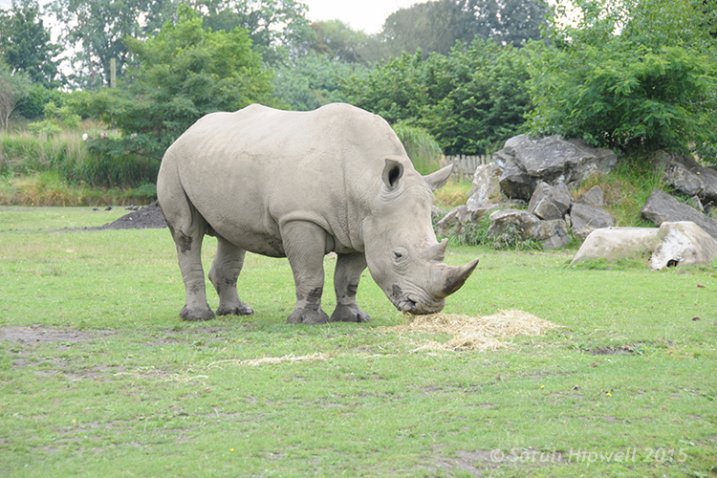
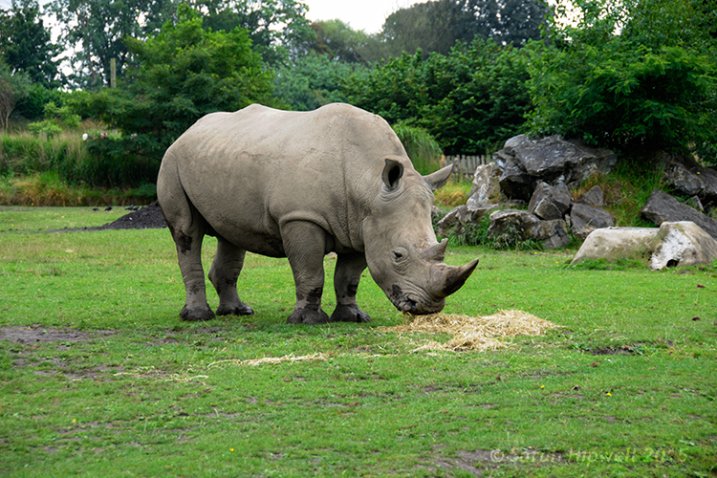
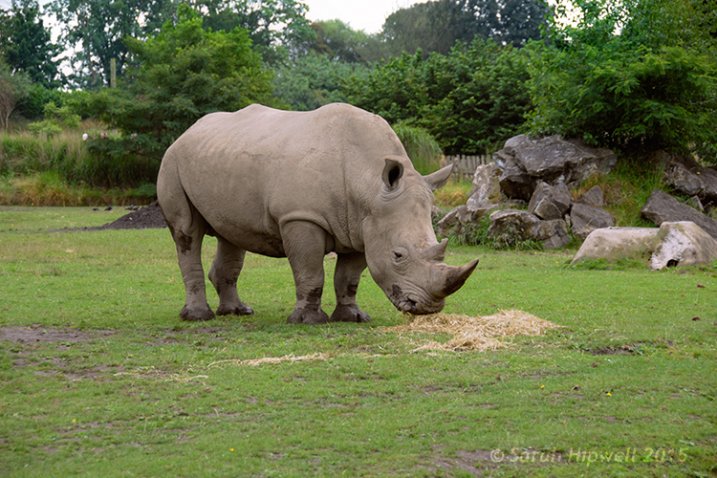
In the image of the Rhino below, when I applied the adjustment layer and changed the Blend Mode to Multiply, the effect caused a color shift to green, and the intensity of the effect was too dramatic. I adjusted the color balance by choosing the green and red channels in the Properties panel. I then reduced the Opacity to 55% of the layer to further fine-tune the image.
Rhino-underexposed

Overexposed photo of a Rhino taken at Dublin Zoo.
Rhino-curves-multiply

A Curves Adjustment layer with the Blend Mode set to Multiply.
Rhino-correct-exposure

I reduced the Opacity of the Curves Adjustment Layer as the effect was too much. I then adjusted the color balance by tweaking the red, green and blue channels.

Correcting Underexposed Images

Underexposed shots are typical when working outdoors on sunny days. Usually, the background is properly exposed but your subject is silhouetted. Similarly, if the background is washed out but your mode/subject is exposed correctly.

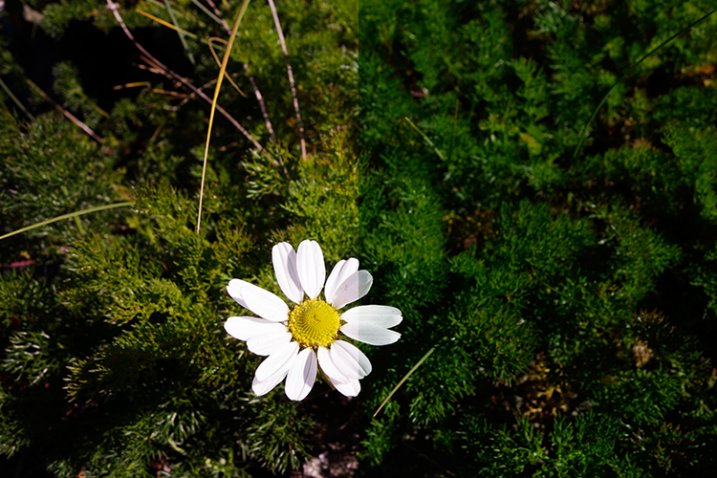
For example, the photo of the flower was taken at the beach on a very sunny day. I focused and exposed for the flower, which meant the background was way too dark. I applied a Curves Adjustment Layer and changed the Blend Mode to Screen. The shadows became lighter, but I duplicated this layer again as I wanted more detail in the shadows. (In most cases, this effect of using the one Adjustment Layer is enough but if your photo is very washed out, or very dark, you may need to duplicate the Adjustment Layer and adjust the opacity accordingly.)
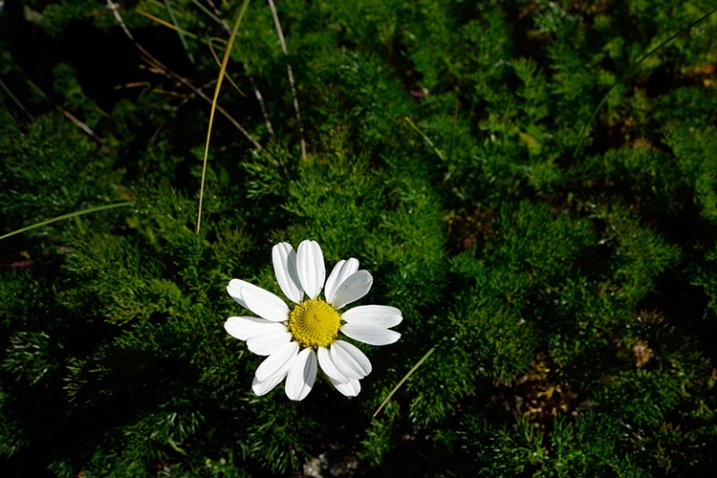
flower-underexposed

An underexposed flower in green foliage.

I reduced the opacity of both layers and added a mask to bring back the highlights on the flower’s petals. Similar to the Multiply Blend Mode, the Screen Mode can cause a shift in color. In this instance, the photo had too much green. Similar to the photo above, I was able to adjust the color balance in the Properties panel and chose the green channel to modify the color balance.
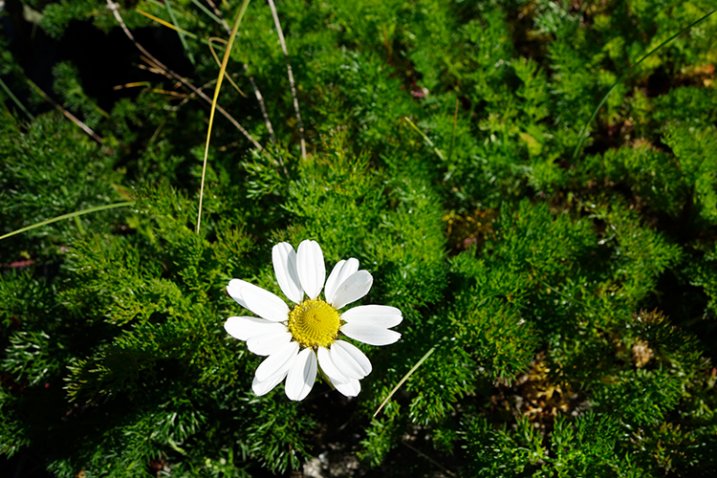
flower-curves-screen

Two Curves Adjustment Layers were applied to this photo. I wanted to bring out more detail in the shadows.
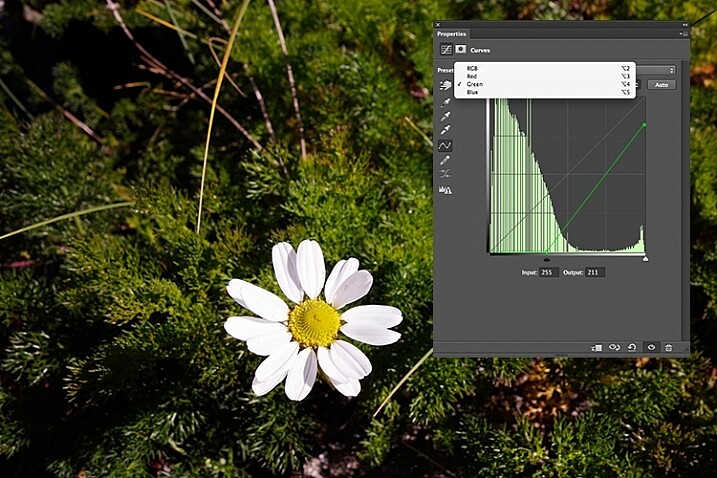
flower-changing-to-green-channel

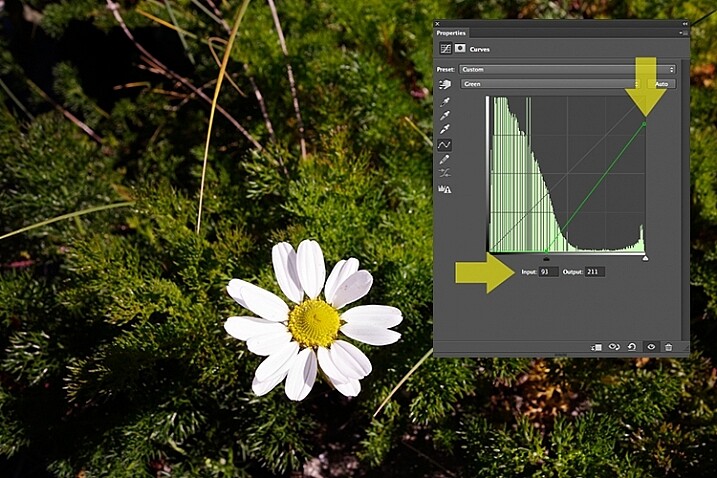
flower-input-output-sliders

By going into the different channels, it’s easier to target the specific colour that needs adjusting. In the image of the flower, I wanted to reduce the green colour. So by clicking on the top right point of the graph (output) and dragging it down. I then moved this Input slider to the right to bring in some magenta. As this an adjustment layer, you can play around with each of the colour channels and experiment using the input and Output sliders in an non-destructive way.
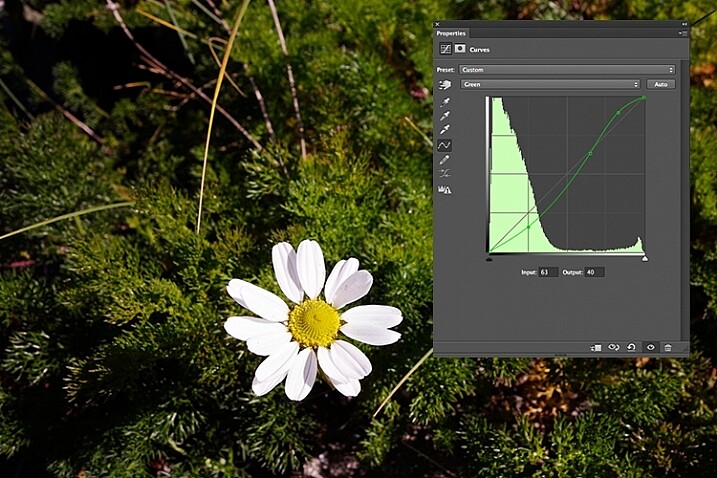
flower-green-channel-S-curve

A more accurate way would be to plot different points on the grid to get that classic S shape, which is what the Curves Adjustment is know for.
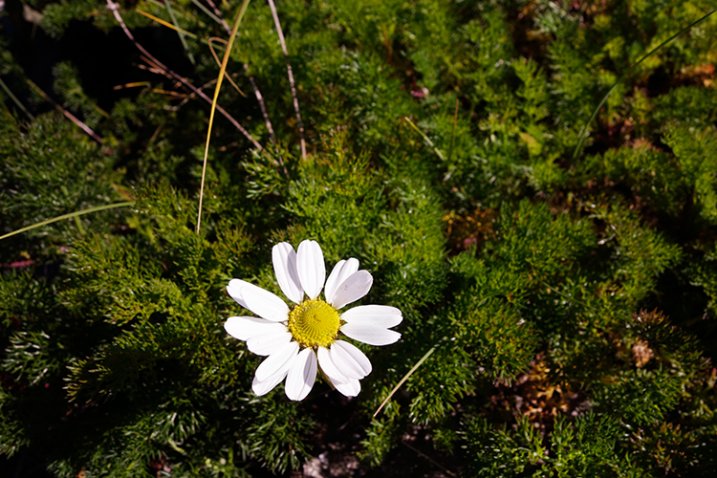
flower-correct-exposure

Opacity was reduced on each of the two Curves Adjustmnet layers. The green channel was adjusted to modify the color balance.

The shot of the hippo below was taken at Dublin Zoo and the day was quite overcast. As before, I added a Curves Adjustment layer and changed the Blend Mode to Screen. I then adjusted the red, green and blue channels to correct the color balance. I reduced the opacity on the Adjustment Layer only slightly.
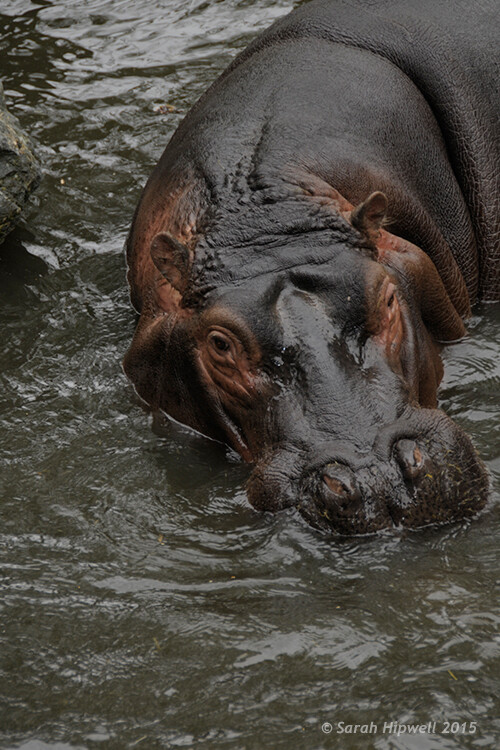
Hippo-underexposed

A underexposed shot of a hippopotamus taken at Dublin Zoo
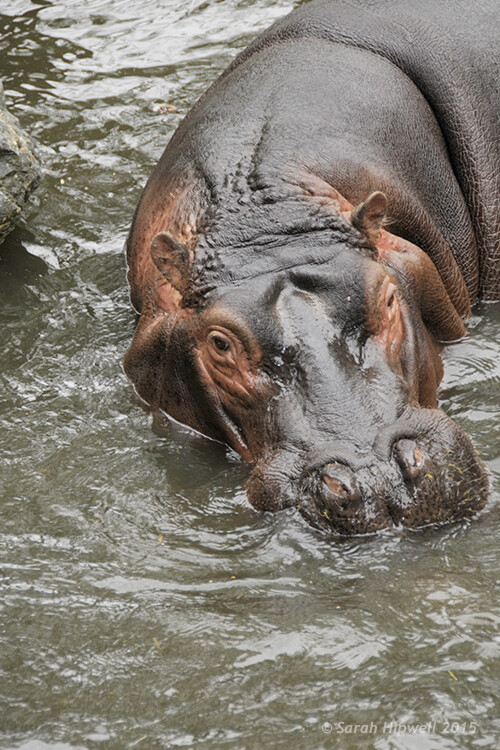
Hippo-curves-screen

A Curves Adjustment layer with the Blend Mode set to Screen.

The shot of the Hippo was taken at Dublin Zoo and the day was quite overcast. As before, I added a Curves Adjustment layer and changed the Blend Mode to Screen. I then adjusted the red, green and blue channels to correct the color balance. I reduced the opacity on the Adjustment Layer only slightly.
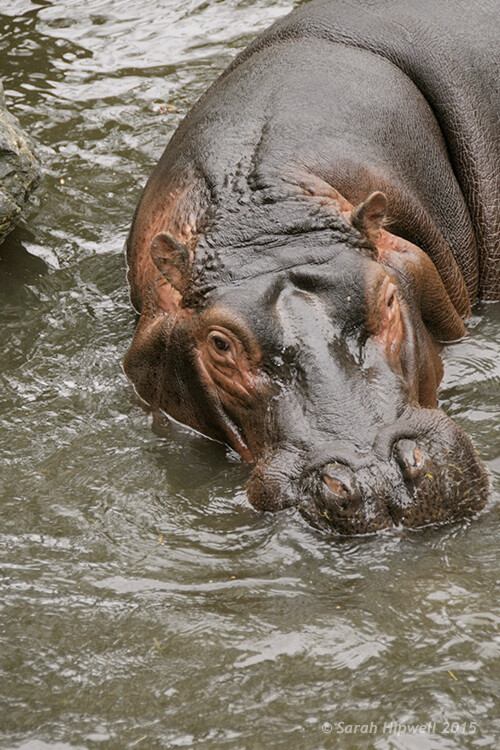
Hippo-correct-exposure

The Opacity was only slightly reduced for this image but the color balance again had to be adjusted in all the channels.

So by using an adjustment layer and changing the Blend Mode to Multiply or Screen, overexposed and underexposed shots can be easily fixed in a few steps. But what if specific areas of your image only need the exposure corrected?

Dodge and Burn

The Dodge tool lightens and the Burn tool darkens specific areas of your photo. This is why the Dodge and Burn tools are really useful if you don’t need to apply a global exposure correction.

I use these tools a lot in my workflow, it can create highlights in hair. When I shoot headshots, the eyes are important and the Dodge and Burn tools can also really enhance eyes and make them sparkle. Other forms or parts of the body can also be accentuated and given more depth by using these tools.

However, the Dodge and Burn tools, if used directly on a image, work in a destructive way. So to use these tools non-destructively, you will need to create a new blank layer above the image that you are working on, fill it with 50% gray and change the Blend Mode to Overlay or Softlight.
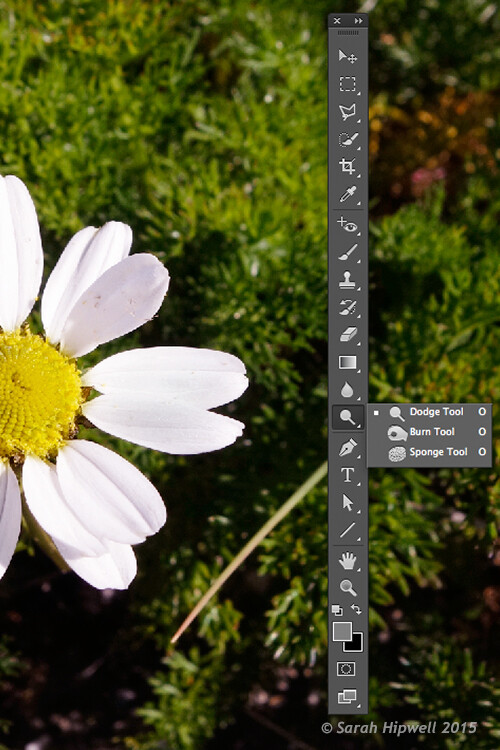
Dodge-Burn-tools

Where to locate the Dodge and Burn tools in Photoshop.

Before you begin, use a brush with the hardness set to soft (0-30). In the Tools Options Bar, make sure that you set the Range to Midtones, Exposure is set to low (8-10%) and that the Protect Tones is checked, as shown below.

Midtones+Exposure+Protect-Tonespsd

Set the Range to Midtones. Keep Exposure at a low setting. Make sure the Protect Tones box has been checked.
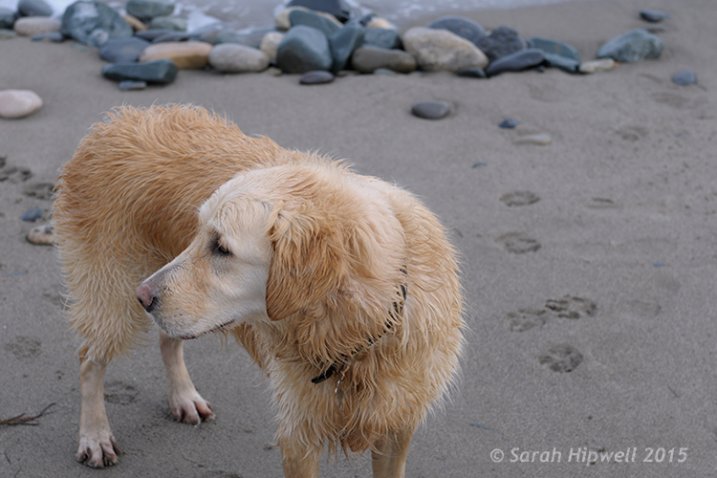
dog

In this photo of the dog, I want to create some highlights on the dog’s fur. Well, fur is like hair!
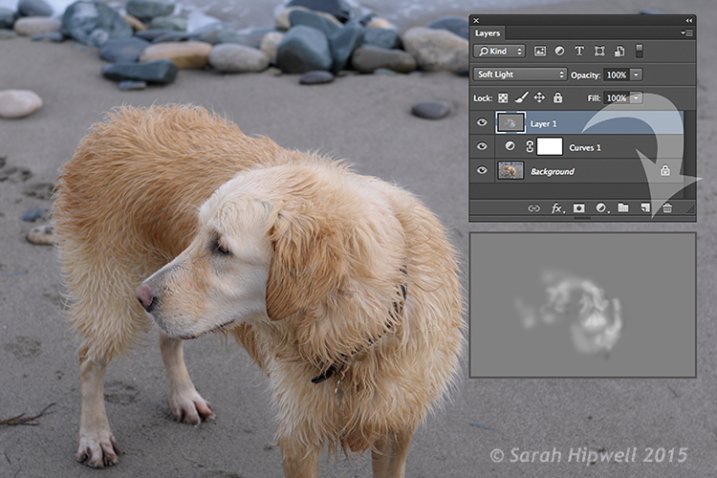
Dog-dodge-burn

You can see the difference in what a little dodging can do in this image of the dog with the photo above.

If you feel that you have overdone either the Dodge or the Burn tool, just lower the opacity of the layer.
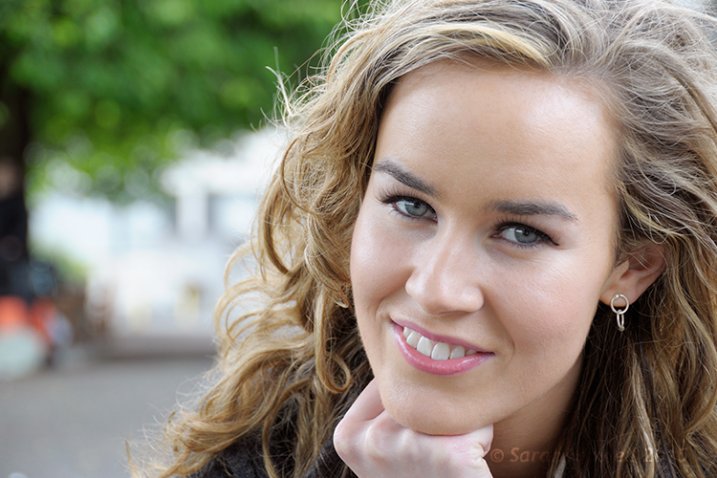
Lisa

Lisa, before any Dodging or Burning has been applied to the image.
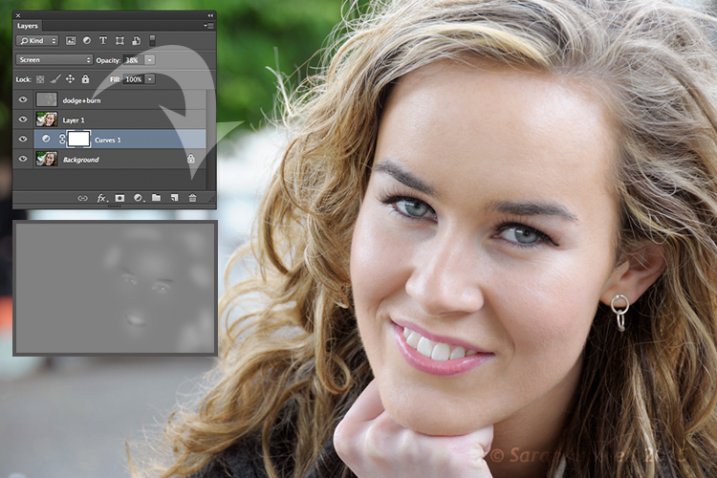
Lisa-dodge-burn

Just a little dodge and burn can make a difference to your photo.

Even subtle differences can enhance your images. In this image of Lisa, I applied some dodging to her eyes, I used the Burn tool to emphasize her lips. I then added a bit more dodging to the face and hair.

I hope you find these techniques useful? Maybe, you have some of your own? If so please share in the comments below.

googletag.cmd.push(function() {
tablet_slots.push( googletag.defineSlot( “/1005424/_dPSv4_tab-all-article-bottom_(300×250)”, [300, 250], “pb-ad-78623” ).addService( googletag.pubads() ) ); } );

googletag.cmd.push(function() {
mobile_slots.push( googletag.defineSlot( “/1005424/_dPSv4_mob-all-article-bottom_(300×250)”, [300, 250], “pb-ad-78158” ).addService( googletag.pubads() ) ); } );

The post 3 Useful Photoshop Techniques for Making Images Exposure Corrections by Sarah Hipwell appeared first on Digital Photography School.


Digital Photography School

 
Comments Off on 3 Useful Photoshop Techniques for Making Images Exposure Corrections

Posted in Photography


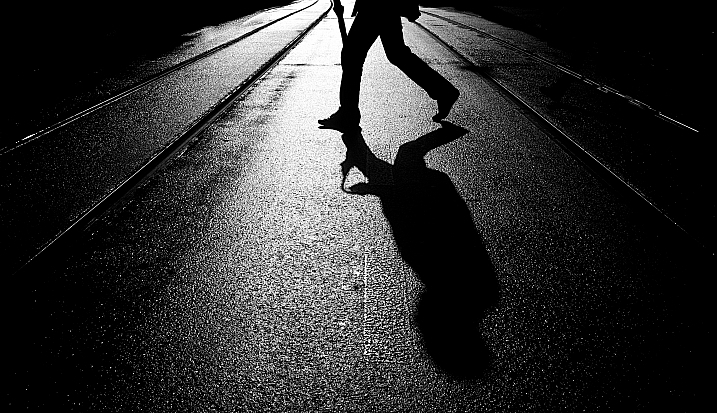
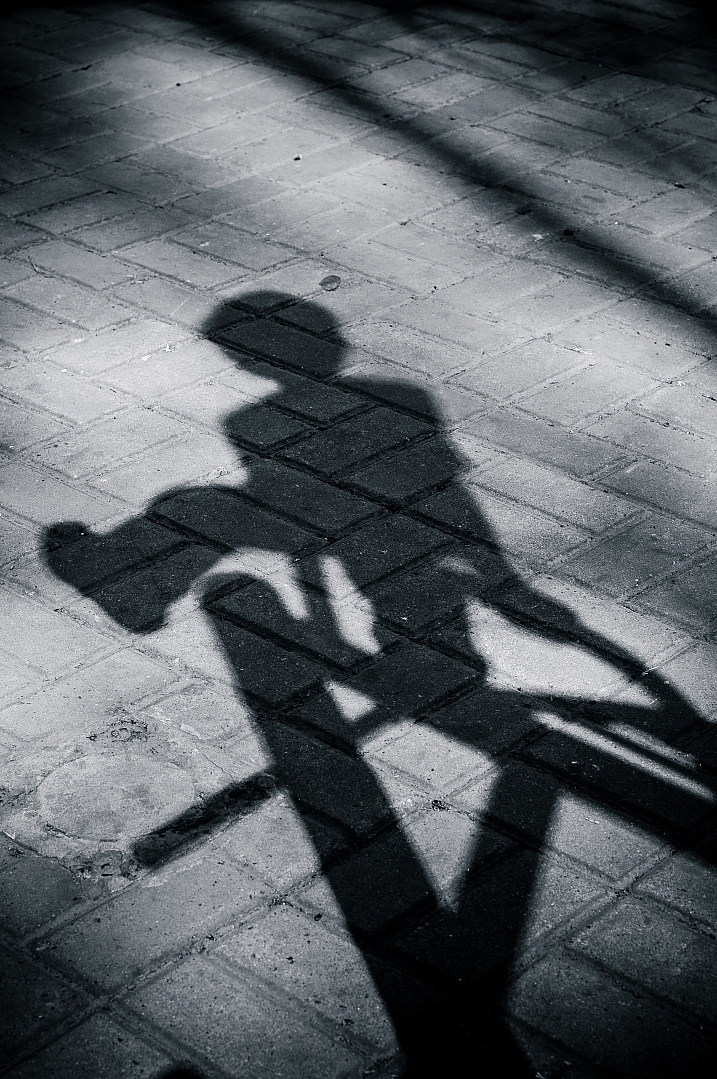
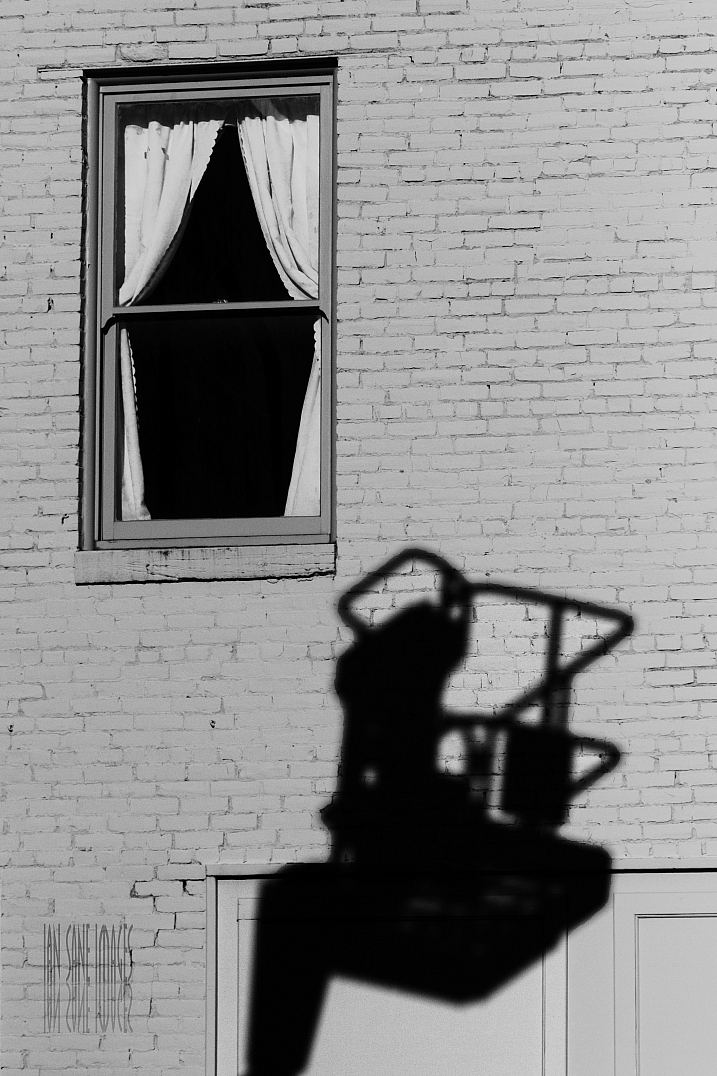
24 Dark and Mysterious Shadow Images

17 Jul

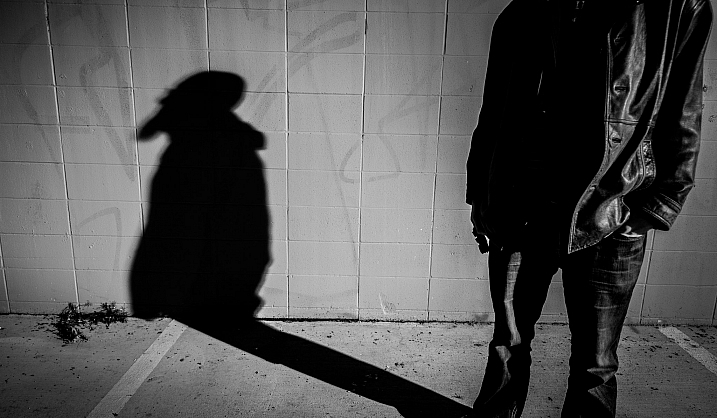
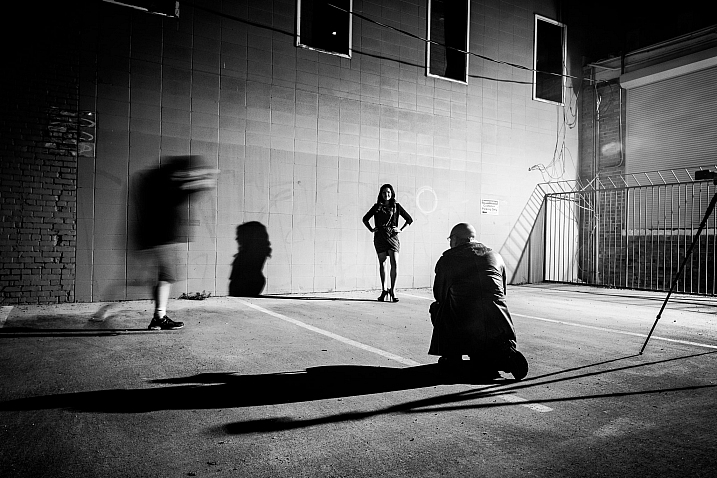
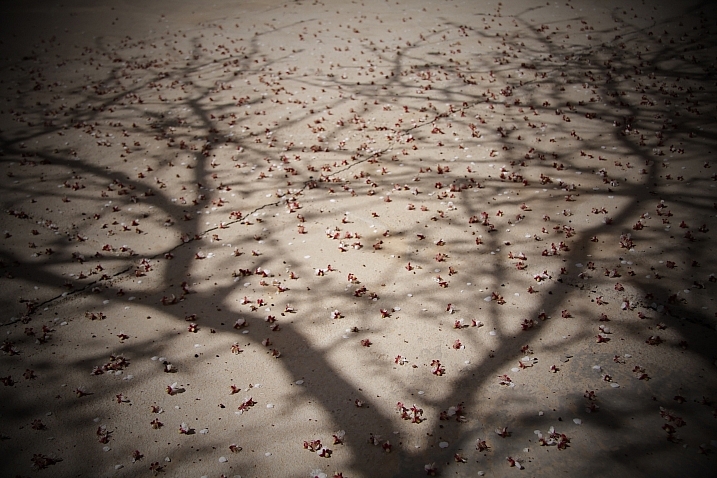
Light and shadow are key in photography. You cannot have one without the other, and how light is used in the image set the tone and mood of it. Images with high contrast, and strong shadows can be very dramatic.

Have a look and see if you agree that these shadow images have a certain mystique about them.

I’ll start off with a few of my own images taken on a “shadows” themed photo walk a couple years ago:

Darlene Hildebrandt

By Darlene Hildebrandt

Darlene Hildebrandt

By Darlene Hildebrandt

Darlene Hildebrandt

By Darlene Hildebrandt

Hapal

By hapal

Magdalena Roeseler

By Magdalena Roeseler

Bryon Lippincott

By Bryon Lippincott

Ian Sane

By Ian Sane

Photograph O O by Jianwei Yang on 500px

O O by Jianwei Yang on 500px

Photograph Round shadows by Junichi Hakoyama on 500px
Round shadows by Junichi Hakoyama on 500px

Photograph Living Shadows by Jorge Pena on 500px

Living Shadows by Jorge Pena on 500px

Photograph Lead or Follow? by Krystian Olszanski on 500px
Lead or Follow? by Krystian Olszanski on 500px

Photograph Afternoon Shadow by Joe Josephs on 500px

Afternoon Shadow by Joe Josephs on 500px

Photograph Untitled by Spyros Catramis on 500px

Untitled by Spyros Catramis on 500px

Photograph shadows of people by Mister Mark  on 500px

shadows of people by Mister Mark on 500px

Photograph They also get along by Ignasi Jansà on 500px

They also get along by Ignasi Jansà on 500px

Photograph Love by Candle Light by Ticknor Photo on 500px

Love by Candle Light by Ticknor Photo on 500px

Photograph Salsa Shadows by Joan Herwig on 500px

Salsa Shadows by Joan Herwig on 500px

Photograph Shadow dancing by Didier Vanspranghe on 500px

Shadow dancing by Didier Vanspranghe on 500px

Photograph dancing with lights by nave aviani on 500px

dancing with lights by nave aviani on 500px

Photograph ????? by umedust ?? on 500px

????? by umedust ?? on 500px

Photograph Shadowdance by Alex Noriega on 500px

Shadowdance by Alex Noriega on 500px

Photograph Protector ! by Mardy Suong Photography on 500px

Protector ! by Mardy Suong Photography on 500px

Photograph 58/365  Bottle Neck by Monika Bigelow on 500px

58/365 Bottle Neck by Monika Bigelow on 500px

Photograph Fork Shadow by Michaël Luitaud on 500px

Fork Shadow by Michaël Luitaud on 500px

googletag.cmd.push(function() {
tablet_slots.push( googletag.defineSlot( “/1005424/_dPSv4_tab-all-article-bottom_(300×250)”, [300, 250], “pb-ad-78623” ).addService( googletag.pubads() ) ); } );

googletag.cmd.push(function() {
mobile_slots.push( googletag.defineSlot( “/1005424/_dPSv4_mob-all-article-bottom_(300×250)”, [300, 250], “pb-ad-78158” ).addService( googletag.pubads() ) ); } );

The post 24 Dark and Mysterious Shadow Images by Darlene Hildebrandt appeared first on Digital Photography School.


Digital Photography School

 
Comments Off on 24 Dark and Mysterious Shadow Images

Posted in Photography


Examples of Perspective Change for More Dynamic Images

08 Jul

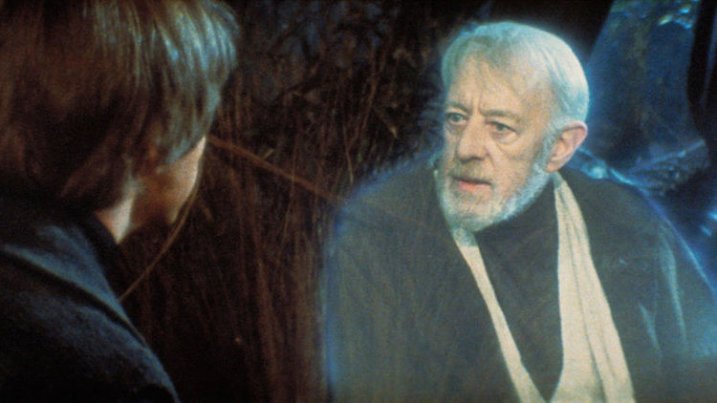
There’s a line in Return of the Jedi that has always struck me as particularly insightful, especially considering its inclusion in a movie filled with a two-ton slug-shaped bounty hunter and a planet full of fighting teddy bears. In a conversation with his former mentor Obi-Wan Kenobi, newly-minted Jedi Knight Luke Skywalker asks his sensei if Darth Vader is indeed his father. When Obi-Wan confirms the awful truth, Luke asks why his teacher had formerly lied to him, telling him instead that Darth Vader “betrayed and murdered your father.”

Luke Skywalker and Obi-Wan Kenobi discussing the importance of perspective.

Luke Skywalker and Obi-Wan Kenobi discussing the importance of perspective.

“What I told you was true,” Kenobi calmly replies, “from a certain point of view.” Incredulous, Luke balks at this assertion and wonders aloud how his mentor can claim such a relativistic stance on what is, in his mind, clearly a black-and-white issue. With a dose of characteristic zen Kenobi explains to his pupil, “Luke, you’re going to find that many of the truths we cling to depend greatly on our own point of view.”

Perspective and Photography

Without wading too deep into philosophical waters I just want to point out that this concept, also known as perspective, is critically important in photography, as well as cinematic space operas. Learning to shoot photos from different perspectives is a way of not only shaking up the status quo, but injecting new life into what might otherwise be dull, boring, or entirely pedestrian pictures. To illustrate how perspective changes can radically alter a picture, here are three examples that will hopefully give you an idea of some things to try if you want to breathe new life into your own photography.

Perspective in Nature

grass-full

Not a very photogenic location unless you look at it from a few different perspectives.

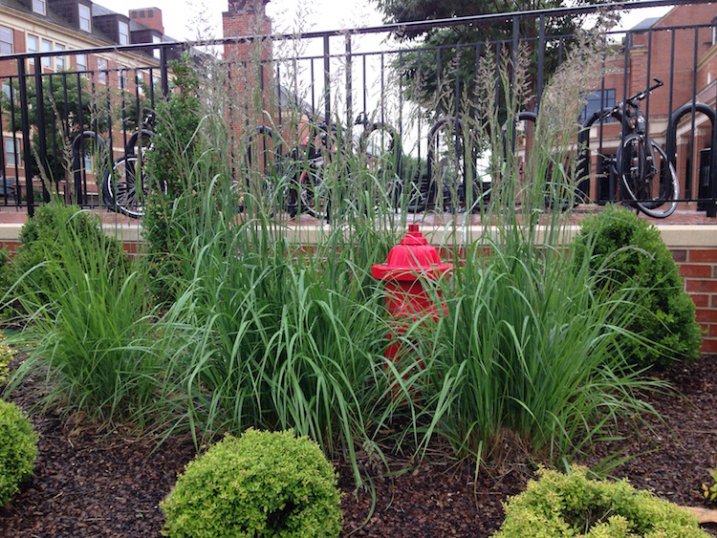
This is a fairly common scene you might find in any city: a fire plug with some tufts of grass sprouting clumps of purple seeds. It may not seem all that special, and indeed it’s the kind of scene I would probably pass by in pursuit of a more interesting picture. Look what happens with just a bit of perspective change, though:

grass

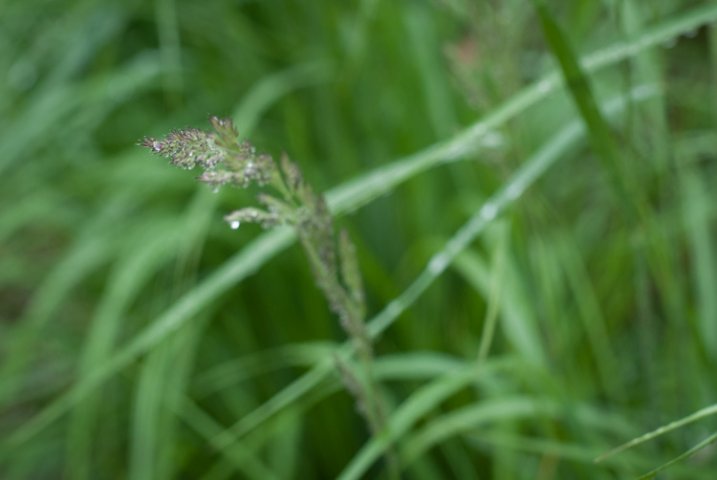
Looking down and focusing on one strand of grass yields an entirely different picture.

By getting up close with one of the stalks of grass and focusing on its purple seeds dripping, and slightly bent with fresh rain, I now have an entirely new picture of the same exact scene. This little perspective change results in a photograph that is much more intimate and reveals details that were invisible in the initial photo. Background elements such as the out-of-focus grass still give the impression that this stalk is part of a much larger scene though we also lose a few things too: the bicycles and other buildings are gone, which means the picture is much more isolated than the first one and lacking a larger context. Neither picture is inherently better, but both are quite different, even though they contain the same subject. One final perspective shift results in an entirely different picture yet again.

grass-building

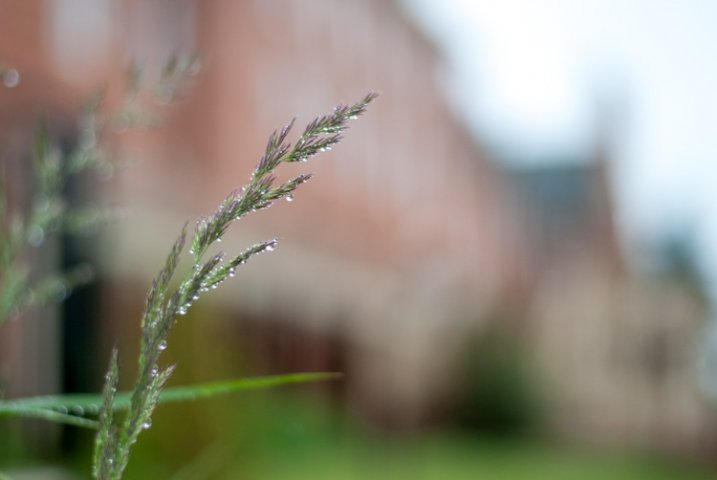
Re-framing the same piece of grass makes for a new, and much more interesting image.

Now the same stalk of grass as the previous version (literally the exact same one and not a different piece of grass on the same plant) is given an entirely new context and the picture here is quite different. It has a much more urban feel with brick buildings instead of green grass in the background, and it feels more majestic and powerful overall. To get this picture I had to get out of my comfort zone a little by kneeling down and contorting my body, but the extra effort resulted in a photo that I like quite a lot. Perspective changes like this can add entirely new dimensions to a picture, and even change its whole meaning, and all it takes is a few seconds of extra work before you click the shutter.

Perspective in Architecture

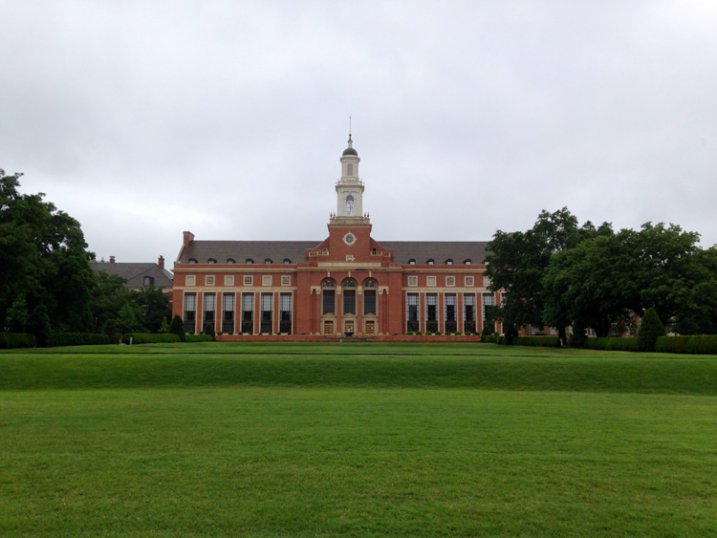
For another example of how perspective can alter a picture here’s a shot I took of the Edmon Low Library on the campus of Oklahoma State University in the midwest United States:

library-far

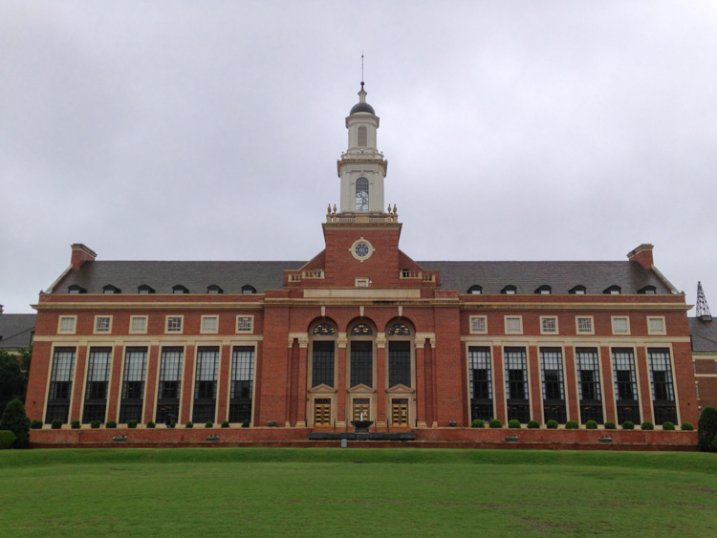
This perspective shows the Low Library within a larger context, sitting between trees and at the end of a grassy open mall.

It’s an interesting shot but virtually identical to hundreds if not thousands of other pictures you might find on a simple Google Images search. Watch what happens when I change perspective just a bit by walking closer:

library-medium

This perspective isolates the library itself, and imparts a feeling of scale and grandeur on the viewer that was missing in the first shot.

To get this picture I walked about a hundred yards down the lawn which isolated the building from its environment, and now the picture is much more constrained: it’s about the building itself, not the building in relation to the surrounding campus features. The picture is similar but subtly different, and its overall meaning has been changed by taking a very short walk (and as a bonus, getting a bit of exercise in the process). Watch what happens with one final change in perspective:

library-close

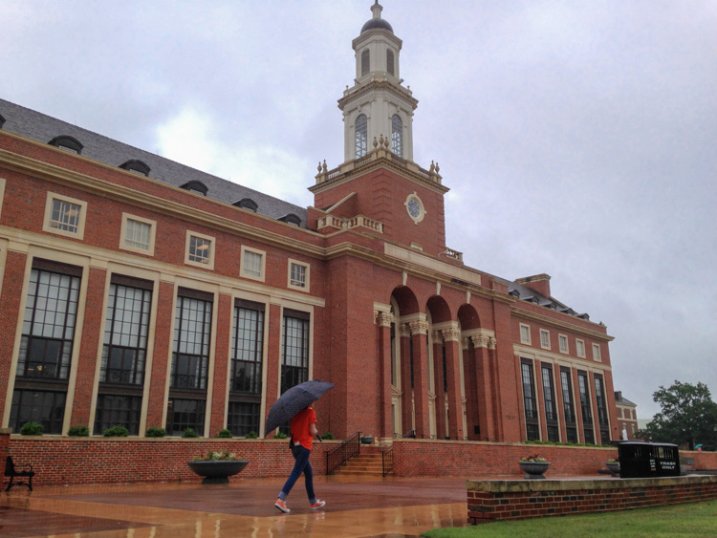
Finally we see the same building, on the same day, but in a much more dynamic and interesting context.

It’s still the same library, but the picture has changed dramatically from the first shot. Instead of a static image of a building surrounded by green spaces, this now shows the library in a whole new context. The imposing bell tower looms large over the veranda, and the student walking past adds a new dynamic element, to what was formerly a rather boring picture. Showing the building from this angle as it recedes into the background, illustrates how it is part of a much larger campus, and overall I find this a much more interesting image.

Working with People

Looking at buildings and nature is one thing, but changing perspective when taking pictures of people can blow the doors wide open when it comes to creating pictures that are new, interesting, and much more impactful. To illustrate this, here are a few photos of my nephew skipping rocks at the beach on a recent family vacation.

My nephew practicing his rock-skipping technique.

My nephew practicing his rock-skipping technique.

There’s nothing particularly wrong with this photo but there’s nothing especially interesting about it either. To get this picture I stood on the beach with my camera while he skipped rocks, and did put in much effort to take perspective into account. It’s a decent snapshot that more or less captures the scene, but watch what happened when I changed my perspective:

photography-perspective-skipping-rocks-front-side

The same scene as above, but far more interesting with the background activity and low angle of view.

The scene has been drastically improved simply by walking 20 feet down to the beach, and crouching down to my nephew’s eye level. There’s now a sense of action and movement, and you can also see the intense concentration on the boy’s face as he winds up to skip a rock. In addition to these alterations you now have a sense of context; you see where the subject is in relation to his surroundings. By changing perspective I am able to show the rest of the beach, which includes some of his cousins and my brother having fun in the background. Here’s one final perspective change that alters the picture even more:

photography-perspective-skipping-rocks-front

That rock went sailing, and skipped a half dozen times.

This one is all about my nephew with nothing else except the beach to provide a sense of context and is, in my opinion, the best of the bunch. You see him alone, along with the same intense expression as in the previous photograph but without any distracting background elements. To get this picture I waded into the water and crouched down until my camera was just a few inches above the surface. It was more difficult to get this shot, and certainly would have been easier if my camera had an articulating LCD screen, but the payoff was well worth it. Compare this to the initial shot, and you will see a massive difference just from a little work on my part to change perspective.

Hopefully these examples give you a few things to ponder the next time you are out with your camera. It takes a little more work to shoot things from different perspectives, but you may find yourself with new creative possibilities and new ways of looking at your subjects and the world around you.

What are your favorite tips and tricks for finding and exploring new photographic perspectives? Share your thoughts in the comments below.

googletag.cmd.push(function() {
tablet_slots.push( googletag.defineSlot( “/1005424/_dPSv4_tab-all-article-bottom_(300×250)”, [300, 250], “pb-ad-78623” ).addService( googletag.pubads() ) ); } );

googletag.cmd.push(function() {
mobile_slots.push( googletag.defineSlot( “/1005424/_dPSv4_mob-all-article-bottom_(300×250)”, [300, 250], “pb-ad-78158” ).addService( googletag.pubads() ) ); } );

The post Examples of Perspective Change for More Dynamic Images by Simon Ringsmuth appeared first on Digital Photography School.


Digital Photography School

 
Comments Off on Examples of Perspective Change for More Dynamic Images

Posted in Photography


Instagram stores higher resolution images

07 Jul

After its recent app update it seems Instagram has further improvements up its sleeve – the mobile image sharing platform has started storing higher resolution images on its servers. In the app and on the web interface images are still displayed at the smaller 640 x 640 pixel size, but a look at the website source code reveals that images are now actually stored at 1080 x 1080 pixels. Read more
Articles: Digital Photography Review (dpreview.com)

 
Comments Off on Instagram stores higher resolution images

Posted in Uncategorized