RSS
 

Posts Tagged ‘Image’

CGI vs. Photography – The Great Image Debate

31 Jul

As photographers we are now being faced with a new type of image revolution. It’s one that is so serious it could change the way that images are created, bought and sold. So what is better a real or CGI image? This new revolution threatens the very professional photographic industry that each of us aspire to be a part of. Continue Reading

The post CGI vs. Photography – The Great Image Debate appeared first on Photodoto.


Photodoto

 
Comments Off on CGI vs. Photography – The Great Image Debate

Posted in Photography


5 Important Components of a Powerful Image

27 Jul

A Contribution by Mitchell Kanashkevich – author of Powerful Imagery.

Quite often people have asked me: “What are the components of a powerful image?” I gave the question a lot of thought and decided that there’s so much in it that a whole eBook could be written on the topic, which is exactly what I did, with lots of practical examples to illustrate the points. This post is something of a sneak peak and an overview of some of the most important components that make up a powerful image.

1. Subject

Most would agree that a powerful photograph needs a subject that resonates with us for some reason. The kind of thing that makes us say “Wow!” or “I want to know more!” or “Isn’t that beautiful!”.

Woman smoker

This woman’s wrinkled face, full of character and stories is one example of a strong or special subject that resonates with the viewer.

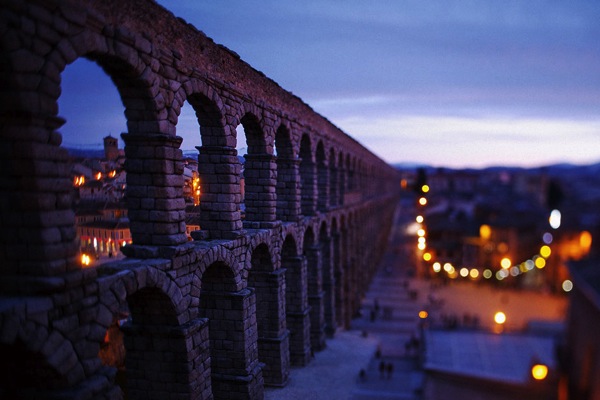
Segovia Aquaduct

The beautiful aqueduct in Segovia, Spain is a completely different, yet also powerful example.

I’m not saying that an obviously special subject is an absolute must to make a powerful photograph. We can photograph more subtle things that might not usually stand out in everyday life and make them look amazing in photographs. It’s also true that a special subject alone doesn’t make a powerful image. I am however going to put things in perspective. A special, captivating subject is definitely a good start. Ultimately, even a badly executed photograph of that special subject will, to at least some extent interest the viewer, while a masterfully executed image of something that nobody finds interesting might not do the same.

2. Strong Composition

What makes a strong composition? It’s not necessarily a framing which strictly follows the rule of thirds, or any other of the usual rules for that matter. The rules help, but they’re a means to a bigger aim, which is to make it clear what the image is about–what you are trying to communicate. Before anything else it is important that everything that does’t matter to what you’re trying to communicate is framed out, then we can think about how to position all that does matter within the frame for maximum impact. This is where the rule of thirds, use of geometry and all the other compositional theories come in.

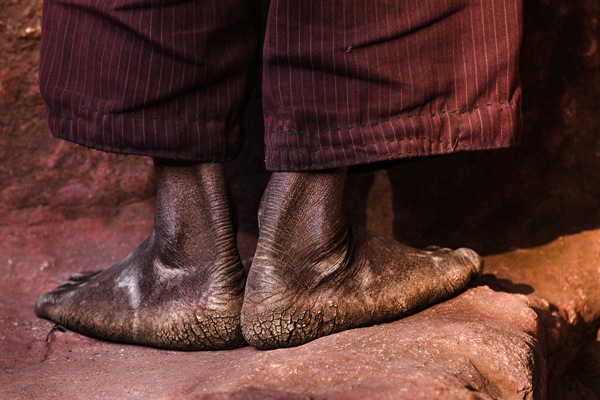
Pilgrim Feet

The image above is a good example of framing out everything that doesn’t add to the story. The story is about a pilgrim’s physical sacrifice to make the journey to the sacred town of Lalibela, Ethiopia.These are feet that have walked a lot of miles. To communicate effectively, a minimalist approach was the best one, I got in very close to the feet with a long zoom lens and framed absolutely everything else out. Imagine if I had something else in the image, we’d be distracted from the main story and as a result the impact wouldn’t be the same.

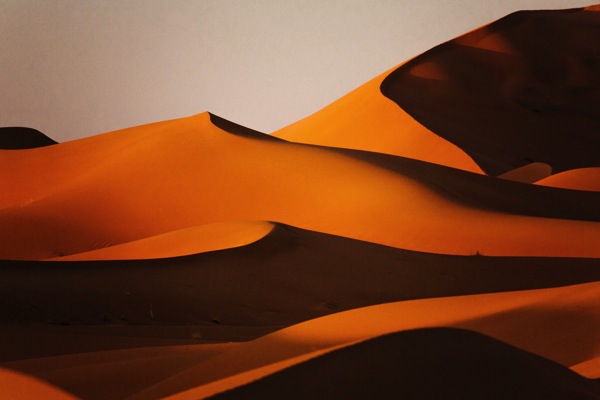
Desert Geometry

This image is about the beauty of the geometry in the landscape. Again, to make it abundantly clear that this is what I’m trying to communicate, I composed the photograph in such a way that the curves and triangles dominate the frame. Everything that doesn’t say geometry or that breaks up the rhythm is excluded. The curvy lines lead the eye around and through the photograph and that’s what makes the composition work.

And so, all in all a strong composition is one that makes it clear what it is you, the photographer are trying to communicate. No matter whether the subject is a pilgrim’s worn out feet, or curvy sand dunes.

3. Moment

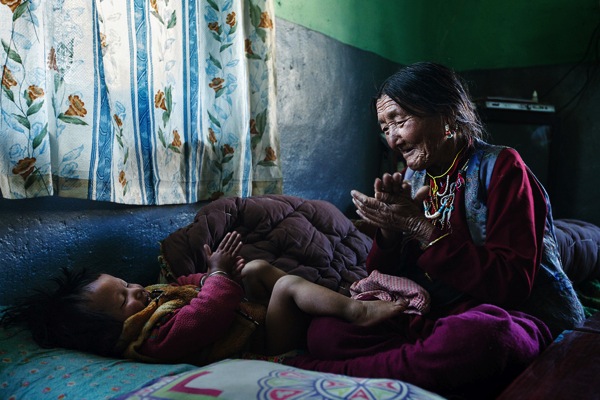
Granma and Child

Capturing a moment can mean a few things – capturing an expression (a smile for example), or the wind blowing and moving the trees, or it can be a tender moment, like the one between the grandmother and her grandaughter in in the photo above.

Stork Building a Nest

A moment can be that of an action frozen in time, like this stork bringing a twig to build a nest.

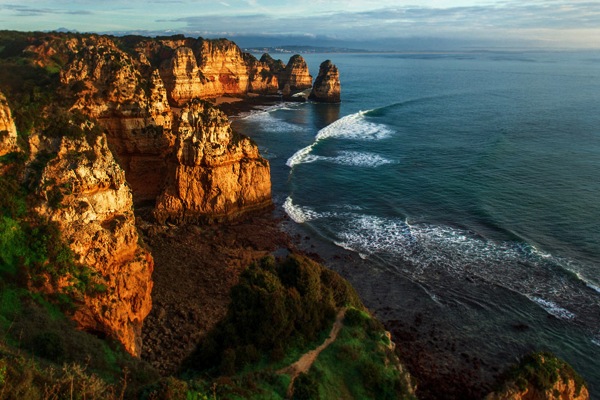
Beautiful Seaside

Of course a moment can also be an instance during the day, for example an instance during the golden hour, when the light from the setting or rising sun makes everything look warm, vivid and generally more beautiful. What makes the photograph above powerful is the fact that I captured it at that moment. The landscape looks beautiful and lively. The same photo at a different moment could produce a much lesser result.

To conclude on this point, capturing a moment which is somehow special or different from what most of us consider mundane definitely contributes to the creation of a powerful image.

4. Light

Light needs a further, more detailed mention in this post. It can be crucial to creating a powerful image. Light is capable of creating a strong sense of mood, it can add to the story and, it can even become a subject in its own right, which often leads to dramatic, powerful images.

Ethiopian Kitchen

This image of Ethiopian women cooking in a traditional kitchen is a good example of light adding a strong sense of mood to the photograph. It also adds to the story by accentuating the smoky conditions in the kitchen. The image would be decent without the light beam, but with it, the photograph goes to another level, where we not only see, but feel what we see to an extent.

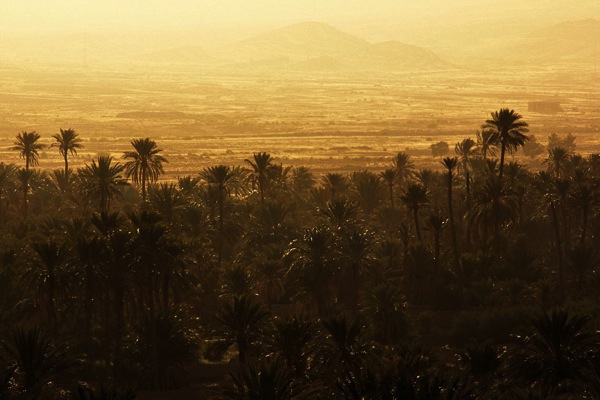
Moroccan Landscape

In this landscape from Morocco you could say that the trees and the hills in the background are the subject, but, the light and its’ effect is equally prominent, hence, this is an example of light actually becoming a subject in its own right. An image of the trees and the hills in a different lighting scenario would not have nearly the same impact as it does when the light is so distinct and prominent that it becomes a subject itself.

Editors Note: for a comprehensive exploration of the topic of light check out Mitchell’s best selling eBook on Natural Light.

5. Emotional Impact

Emotional impact is probably the main factor that makes an image powerful, but, it isn’t something that’s always obviously tangible. It’s sometimes hard to pin-point exactly what causes the emotional impact. It can be that the subject captures you, or that the light really sets a strong mood, or, that the moment captured is fascinating, maybe even rare. Of course, it can be a combination of all the factors I’ve mentioned here and this makes for truly powerful imagery.

You can learn more about making Powerful photographs with Mitchell’s new eBook “Powerful Imagery” released through Eyevoyage, currently on sale with our sister site SnapnDeals.

Mitchell is a travel/documentary photographer. He has an online project called Eyevoyage – a site for anyone interested in travel photography and improving their travel photos. You can learn more about making Powerful photographs with Mitchell’s new eBook “Powerful Imagery” released through Eyevoyage, currently on sale with our sister site SnapnDeals. To further your learning visit Eyevoyage Facebook page.

Post originally from: Digital Photography Tips.

Check out our more Photography Tips at Photography Tips for Beginners, Portrait Photography Tips and Wedding Photography Tips.

5 Important Components of a Powerful Image


Digital Photography School

 
Comments Off on 5 Important Components of a Powerful Image

Posted in Photography


First image samples from Nokia’s 41MP Lumia 1020

13 Jul

600-nokia-lumia-1020-pro-17.jpg

Nokia has released some images showing off the photographic capabilities of the Lumia 1020 smartphone it announced yesterday, and the results have us eager to try out the 41-megapixel model ourselves. Check out the results for yourself over at connect.dpreview.com. 

News: Digital Photography Review (dpreview.com)

 
Comments Off on First image samples from Nokia’s 41MP Lumia 1020

Posted in Uncategorized


How To Improve an Image with 2 Steps in Photoshop Using Screen Mode

03 Jul

A Guest Post by Sergey Sus/

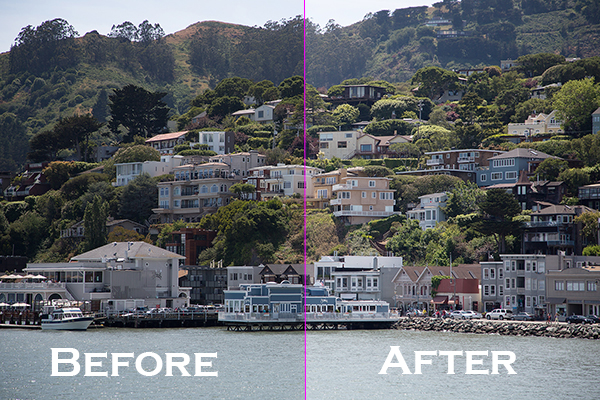
Before after

Wanted to share a very simple way for improving a photo without having to change the exposure. I use this method quite often and sometimes even after adjusting exposure.

The image is of a small hillside town in North California called Sausalito taken while on vacation.

Here the SOOC (straight out of the camera) image before any adjustments are applied or any cropping. It is just a bit under exposed and very flat looking.

Img sooc

Certainly there are many ways to brighten a photo in Photoshop like using Curves, Levels or Shadow layers. For this tutorial, we will be using a duplicate layer and then change the overlay to Screen mode to brighten up and give it a bit of a punch. I’ve seen many professional photo retouchers use this technique on both landscape and portrait photography as a starting point for retouching. This method works really well on jpgs as well!

1. Open image in Photoshop. Then duplicate layer by pressing Ctrl+J (Win) / Command+J (Mac)

Img dup layer

2. Change blend mode to Screen and and then set Opacity to 50%.

Img screen

Starting out with Opacity set to 50% and adjusting the slider for more or less brightness. For this image the opacity is about right at 50% for my eyes. See how this new layer in Screen mode added a subtle contrast and brightness.

Img ps screen

Give this technique a try even if the image is not under exposed as it will brighten up overall highlights and will slightly increase perceived contrast. Make sure to experiment with different opacity values for different looks. Here is the final image cropped and with a bit more processing – how I remember Sausalito looking that day.

Img final

Let me know in the comments how this has worked for you or if you have questions.

Sergey Sus is a Los Angeles based photographer telling telling real stories, individual, professional and family. Problem solver, artist and teacher. His work can be found on http://www.sergeys.us/.

Post originally from: Digital Photography Tips.

Check out our more Photography Tips at Photography Tips for Beginners, Portrait Photography Tips and Wedding Photography Tips.

How To Improve an Image with 2 Steps in Photoshop Using Screen Mode


Digital Photography School

 
Comments Off on How To Improve an Image with 2 Steps in Photoshop Using Screen Mode

Posted in Photography


Mobile news for photographers: HTC One, Sony Xperia Z, image apps

15 Jun

Screen_Shot_2013-06-14_at_3.18.56_PM.png

Week in Review: From our full reviews of the HTC One and Sony Xperia Z cameras, to a do-it-yourself smartphone stand/tripod-mount/lens-mount case to an assortment of image-centric apps, we’ve rounded up a week’s worth of can’t-miss stories for mobile photography enthusiasts. Click through to connect.dpreview.com to catch up.

News: Digital Photography Review (dpreview.com)

 
Comments Off on Mobile news for photographers: HTC One, Sony Xperia Z, image apps

Posted in Uncategorized


Why Aren’t Search Engines Making Better Use of Their Social Networks for Image Search?

06 Jun

One thing I’ve noticed more and more over the past few years is what a poor job traditional image search engines do vs. social networks.

By using social information around photos (likes, faves, comments, +1s, etc.), social networks typically produce much superior image search results than traditional image search.

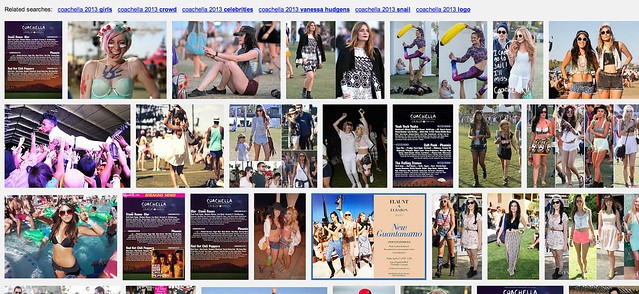
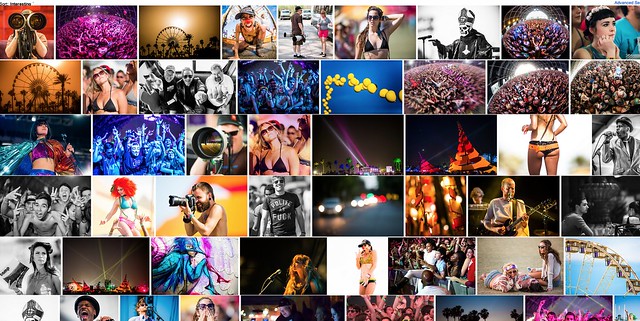
Take this search of Coachella 2013 for example.

Screen Shot 2013-06-05 at 10.45.53 AM
Yahoo Image Search: “Coachella 2013″

Screen Shot 2013-06-05 at 10.46.24 AM
Google Image Search: “Coachella 2013″

Screen Shot 2013-06-05 at 10.47.28 AM
Flickr Image Search: “Coachella 2013″

The first image comes from Yahoo (or is it Microsoft these days, I can’t keep it all straight). It’s not very good. It shows too many images of just the lineup vs. actual fun interesting photos of the event itself.

Google’s image search results are better, but still not as good as many of the images I find on social networks.

Now I may be biased (as I shot this particular event) but I think Flickr’s search results are *far* better than either Google or Yahoo Image search.

I’m working on a project right now to photograph the 100 largest American cities. When I’m researching things to photograph in these cities I almost always go first to Flickr (because it’s the largest database of highly organized quality photos on the web). I will also look at Google+ too, sometimes. Google+ doesn’t have as many high quality images in the total database as Flickr, yet, but I find some pretty good stuff there sometimes still. Most of Flickr’s advantage here over Google+ just has to do with the fact that they are older and have more images indexed.

Lately I’ve also played around with graph search on Facebook for images — I haven’t been very impressed there at all though.

The one place I hardly ever go is to the actual Google or Yahoo image search engines — because the results are so inferior.

Here’s what I don’t get: *why* are the results at Yahoo and Google Image search inferior? Google and Yahoo have access to proprietary internal social data around photos in their social networks, why isn’t that coming through better in the signal for high quality images.

On my example search using Coachella 2013, not a single Flickr photo appears on Yahoo’s first page image search and not a single Google+ image appears on Google’s first page image search.

Shouldn’t these search engines be better mining organically and socially ranked superior content? It’s not that these engines don’t index it, they do, it’s just not ranking well.

Beyond just better image search, Google and Yahoo *should* have another significant incentive to better include their social images into image search.

All things being equal, assuming you could improve image search results, wouldn’t you want to drive more traffic to your own internal social network, rather than to some unrelated destination — and wouldn’t you want to reward the best photographers on your social network with more traffic vs. some random SEO rigged site somewhere?

Why aren’t image search engines doing a better job with social?

Another added benefit to driving image search traffic to your social network, is that the presentation there is usually better, more uniform and consistent. When I’m tempted to go further on an image from Yahoo or Google, I may end up at some odd sized photo, in some odd format. With a G+ or Flickr result I get a strong consistent image experience that I’m familiar with.

As an unrelated topic dealing with image search on Flickr — the best social image search on the web today — Flickr needs to give us the ability to block certain users from our search results. Many popular photographers will pollute image search on Flickr by falsely tagging things that are not in their popular photos, just to try to garner traffic.

Take this search on Flickr for dog for example. So many of the first page results are not photos of dogs at all. Flickr should allow us to block certain users from our search results in order to better refine them. When we block people from our search results, this should also be a signal to Flickr that this user should rank much worse in search. If users get the message that they will be penalized for purposely mistagging their photos, they will be less likely to try and game the system this way, resulting in better image search on Flickr for all of us.


Thomas Hawk Digital Connection

 
Comments Off on Why Aren’t Search Engines Making Better Use of Their Social Networks for Image Search?

Posted in Photography


Getting The Image You See In Your Head: Blending vs HDR

18 Apr
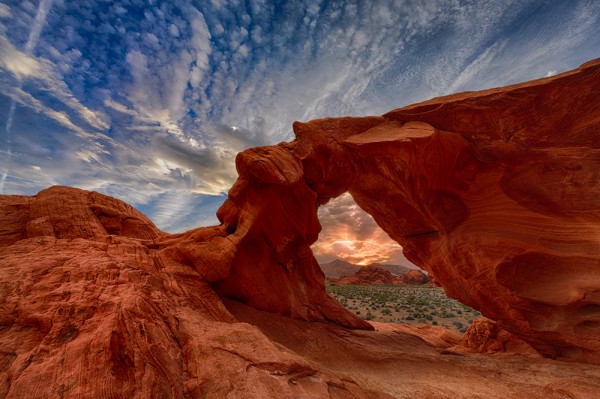
This shot is an HDR shot blended from 6 bracketed shots.  Each shot is one stop different from the next. The exposures range from -2 through +3. Aperture was set to f/16. The shutter speed ranged from 1/125 at -2, to 1/4 at +3.

This shot is an HDR shot blended from 6 bracketed shots. Each shot is one stop different from the next. The exposures range from -2 through +3. Aperture was set to f/16. The shutter speed ranged from 1/125 at -2, to 1/4 at +3.

Often times when I’m photographing landscapes, the image the camera sees versus the image in my head are quite different.  Sometimes that image in my head doesn’t mesh with what the camera capture, because the dynamic range is far too great.  The contrast between the highlights and shadows is just too great.  Such was the case with this shot I took a week ago of Arch Rock in Valley of Fire State Park in Nevada.

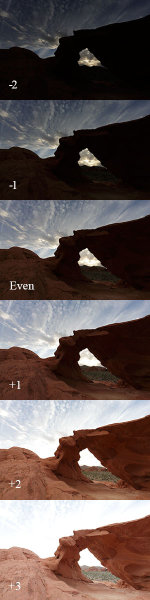
These are the six shots I used for the HDR blend. I also used the even exposure, and the +2 exposure, for the two image manual blend I did in Photoshop.

These are the six shots I used for the HDR blend. I also used the even exposure, and the +2 exposure, for the two image manual blend I did in Photoshop.

With the sun setting directly behind it, exposing for the sky would have rendered the rock a silhouette.  This may have been fine had I intended a silhouette shot- which I did capture and intend to use. But ultimately I wanted some detail in the rock, I wanted detail in the sky, and I wanted to maintain the drama of the spectacular desert sunset that I was witnessing.  Because of the way the landscape was laid out before me, graduated neutral density filters were not going to work for this shot.  If I wanted to bring down my highlights and keep detail in the shadows, I was going to have to either blend two shots, or use an HDR program to get the result I was looking for. HDR stands for High Dynamic Range, meaning an image where the range of tones is higher than what the camera can accurately record.

I really wasn’t sure which processing technique would give me the best results.  And sitting there in the desert, I didn’t want to place any bets on it.  So I bracketed my shots using the auto exposure bracketing mode on my EOS-1D X.  I shot in Av mode, at f/16, with the EF 14mm f/2.8L II lens. I bracketed for 7 exposures, but ended up only using six. The -3 exposure really didn’t add anything to the HDR, so that was dropped from my processing.   I use Nik HDR Efex Pro 2 for my HDR processing to blend the exposures, and then finish in Photoshop, adjusting color, saturation, etc.  Nik HDR Efex Pro offers a variety of presets, but I always try to keep the HDR processing fairly subtle. I don’t like the over the top look that some get, but I do like the image to pop a bit. I try to minimize any halos, and keep the tones fairly smooth.

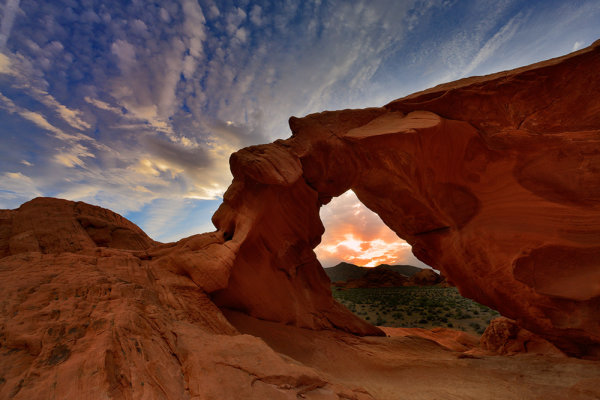
Before I processed the HDR image, I also tried a simple two shot blend in Photoshop. I first processed the even exposure and adjusted for color and saturation.  Then, I took the +2 exposure, and processed in the same way, dropping that image on a new layer in photoshop over the even exposure. I then apply a layer mask to the +2 layer, and paint the entire mask black to hide the layer.

Then, using white, I painted the arch back in to reveal the arch at +2 against the sky at even exposure. This takes a lot of patience since with the exposure difference, it’s very easy to see halos if the masking isn’t done carefully. One way to ease the transition is to run a gaussian blur filter on the mask to soften the edges. How much will depend on what the mask is like. You may need to run the gaussian blur more than once to get it just right.

Looking at the two images, the HDR blend seems to have a smoother transition from lights to darks, as well as a richer overall look. I know there is a lot backlash against HDR, and I understand it’s not everyone’s cup of tea. But I believe in using any tool available in order to express what I felt when I looked upon the scene as it happened.  Every scene will be different, and will lend themselves to different processing techniques. Understanding what techniques are available to you can help you overcome the shortcomings of technology and allow you to express your creativity to the fullest.

This shot was done by blending an even exposure with a shot exposed at +2.  The +2 exposure was masked off in Photoshop so only the areas I needed to show through did.

This shot was done by blending an even exposure with a shot exposed at +2. The +2 exposure was masked off in Photoshop so only the areas I needed to show through did.


Post originally from: Digital Photography Tips.

Check out our more Photography Tips at Photography Tips for Beginners, Portrait Photography Tips and Wedding Photography Tips.

Getting The Image You See In Your Head: Blending vs HDR


Digital Photography School

 
Comments Off on Getting The Image You See In Your Head: Blending vs HDR

Posted in Photography


The Secret of Creating a Strong Image – 5 Tips for Creating a Story in Your Image

18 Apr

Article and photos by Oded wagenstein.

In an era when we are drowning in images and lots of people and talents are competing for the viewers’ eyes or the magazines’ attention, have you ever wondered what makes you have a longer look at an image?

Is it the person that was photographed? Perhaps a certain color or an angle?

What is the secret of the photographers that mange to get their work published on magazines and newspapers? What is the secret of taking a strong image that lasts?

1.jpg

The secret of all strong images is their ability to provide the viewer a story .

Since the dawn of time, People gathered around the fire and shared stories with each other.

It doesn’t matter what subjects you like to shoot. If you want to become a good photographer, you have to be a good storyteller first. An image with a story, one that evokes emotion and curiosity will rise above other images and catch the viewer’s attention.

So what is the stuff of which “visual stories” are made from?

In most cases it is an emotion that the image creates. It can be empathy, curiosity or even negative emotions such is anger.

Even if you are dealing with macro or landscape photography it is better to have an image that tells a story. However, the best way for me to get a story is with people photography, as people are a large “pool” of stories and emotions.

Here are 5 tips for finding your “visual story” in Travel photography before departure, and on the road:

1. Preparation needed

The thing that makes the difference between an amateur and a professional in almost every field is usually preparation.

A professional photographer will start working even before leaving home, while an amateur photographer will wait for things to happen in front of their eyes in the field. Professionals will gather information that will help them exceed the potential of getting those photogenic stories on the road in minimum time and by doing so, increase the amount of good strong images.

2.jpg

What are the things that are worth checking before going to shot on a trip for example? Here are some classic examples:

Will there be any festival or photogenic event during your stay? Festivals are a great place for finding stories. Is there any taboo related to photography or culture in general in the country you are going to visit, that you must know? For example, the hill tribes that can be found on the mountains of Asia (as the woman from the Karen tribe in photo number 2) mostly believe that taking their photo would also take their soul. And trust me, the custom officers in your home country would not like the “soul” attached to your camera.

The best thing you can do to get this kind of information is to get the advice of a photographer who has already been there. Online photography forums would love to help you with that.

Want to take your photography to the next step? – Take a journey deeper into the place and read a little bit about the culture and history, prior to arrival.

The best tip someone has given me is to learn a few words of the local language. Locals appreciate people who try to speak their language (even if they laugh at them a bit at first)

Learning “Hello”, “Thank you” and ” may I take your photo?” will do wonders to your story telling images.

2. Getting closer

3.jpg

Taking photos of people from a distance with telephoto lens may be safer and will not ruin the spontaneity of the story, but there’s nothing like the narrative and emotional quality of close-ups in people photography.

Sometimes I want to photograph people from just a few inches away and still keep the spontaneity and intimacy.

What do I do? – I look for this moment in which the person returns to routine activity, after creating a bit of a connection with them and letting them understand that my camera and I don’t have any bad intentions.

I never approach people while the camera is hanging from my neck. It is threatening and may result in negative responses from the locals.

After greeting the person (in their language) I sit with them for a while, let them get used to my camera and me and only later I begin taking photos

Never ever forget- people don’t like to feel they are on a show for you. Always treat them with respect. The best way to do so is with the help of a local. So go to the next Section

3. Best ice breaker

4.jpg

Professional photographers use a fixer, which is a local who knows their needs as photographers and helps them to get around.

You can use a fixer, but you can also find your “fixer” in a much more interesting way and for free, in most cases. You can connect with local at your age in advance to your visit on the basis of “culture exchange”. The local will help you get to the best places and will also recommend which places to avoid. They will speak for you in their local language and will be the best “ice breaker”. All you have to do is be polite but it won’t hurt to bring your host something for your own country, like postcards or a unique product related to your place.

If you can find a photography student to be your fixer, it can be an exciting experience for both of you.

Hanging with a local as a friend or with a professional fixer does not give exemption from the previous section of “getting closer”.

4. The Stories generators

5.jpg

Feeling lost? Feeling unpleased with the photos you took? You can always try to visit a “story generator”. It can be anywhere that people Gather: a market, a central square or a festival. Just be alert and keep your eyes open and the stories will simply appear before your eyes.

The best tip for finding a “story generator” place is just to go to the places that interest you. It could be a church, a busy street, a quiet beach or even an abstract shooting of a building. Go with your passion and you will find your stories.

5, Last one for the road – get lost

We talked about the preparations and the work needed for good story finding, but sometimes all you need is to leave the tour guidebook in the hotel room and just go outside to walk the streets and roads looking for the unexpected.

Some of my best stories and photos came to me with this way of traveling.

Don’t forget to check with the locals or your fixer about the places that should be avoided and always, but always, check the time of your last ride home.

Oded Wagenstein is a travel photographer. His photographs were published on numerous magazines and websites world wide.

He is known for his intimate culture portraits. In his works he put the emphasis on understanding the culture and achieving good relationship with the person being photographed pre-shooting.

You can join his Travel photography group on Facebook and continue to discuss on travel and people photography:

Post originally from: Digital Photography Tips.

Check out our more Photography Tips at Photography Tips for Beginners, Portrait Photography Tips and Wedding Photography Tips.

The Secret of Creating a Strong Image – 5 Tips for Creating a Story in Your Image


Digital Photography School
 
Comments Off on The Secret of Creating a Strong Image – 5 Tips for Creating a Story in Your Image

Posted in Photography


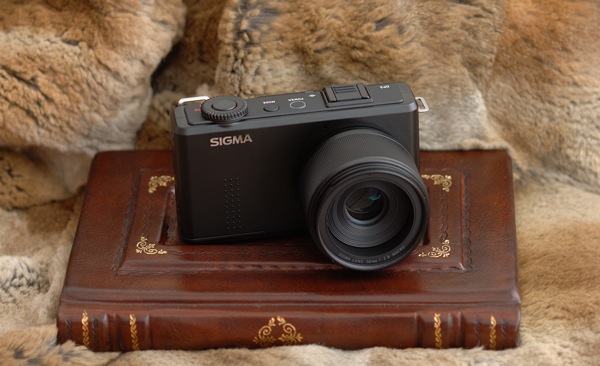
Sigma’s DP Merrill Cameras Compared – World-Beating Image Quality In Compact Bodies

07 Apr

Sigma, known mainly to photographers for their affordable lenses, recently caused quite a stir among discerning photographers. How? By building three compact cameras around the incredible sensor taken from the SD1, which initially cost $ 10,000. The image quality is simply incredible, and the cameras themselves are small, light and unobtrusive. For photographers seeking the best possible image quality on a budget, they’re unmatched.

Photo1

But there are lots of compromises. Foremost among them is battery life. The small batteries don’t last long so you’ll need to buy spares. Fortunately, they’re cheap. Second compromise; usability. It’s pretty good for a compact camera, and the controls are well laid out for photographers, but there’s some shutter lag, the auto-focus can’t match dSLRs and the huge RAW files take a while to write to the card.

The main compromise we’ll deal with is focal length. Each DP Merrill camera is essentially identical except for the length of the fixed prime lens.

  • The Sigma DP1m has a 19mm lens; equivalent to a 28mm wide-angle on full frame.
  • The Sigma DP2m has a 30mm lens; equivalent to a 45mm standard lens.
  • The Sigma DP3m has a 50mm lens; equivalent to a 75mm short telephoto.

All three lenses have a maximum aperture of f2.8 and a minimum aperture of f16. In my opinion (and not just mine), they are some of the best lenses ever made, including Leica and Zeiss.

In use, being restricted to a single focal length changes the camera entirely. This comparison therefore focusses on which of the Sigma DP series will be right for you. For the cameras themselves, I highly recommend Michael Reichmann’s review at Luminous Landscape.

I’ve used all three cameras for a variety of genres. Now comes time to choose.

Photo2

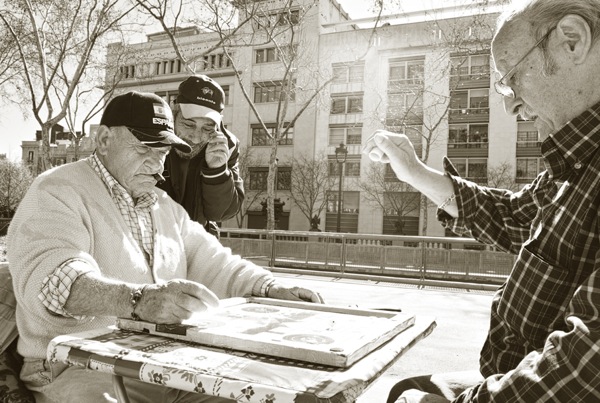
The Sigma DP1m is very convenient if you want amazing image quality in a tiny package. I was able to take photographs that I otherwise couldn’t have made. This is because it doesn’t look like a serious camera and it’s effectively silent in use. Professional photographers, especially those working where cameras are unwelcome, will appreciate this. Compared to carrying a Nikon pro-body with a wide-angle lens, it’s very much smaller. However, I missed photographs due to the shutter lag and the corners a bit softer than the other two DP cameras.

Photo3

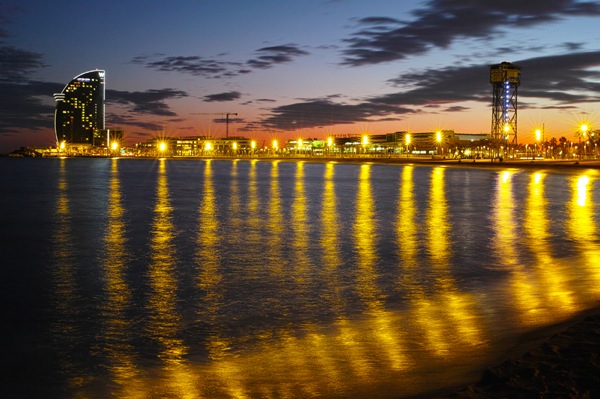
The Sigma DP3m is specialised. I found a 75mm equivalent lens a bit long in use as an everyday camera. However, it is a pocket portrait monster, delivering incredibly sharp files with beautiful bokeh. It’s also got an amazing macro capability which, while not a true 1:1 reproduction, gets close enough for most applications. And there’s no noticeable distortion. The Sigma DP3m really excels when you fuss about and stitch images. 14.85 megapixels is enough for most applications, but if you want to print enormous files, you can increase the image resolution by making mosaics from multiple pictures using software that can stitch panoramas. Because the image quality is so amazing at a 100% level (because it’s not interpolated like a Bayer sensor), the files can be that much better, rivalling medium format cameras worth tens of thousands. For me, this is the niche use the DP Merrill series excels for. I can carry a tiny compact camera, a few cheap batteries and a lightweight CF tripod when I’m doing fine art photography and create the most amazing results.

Photo4

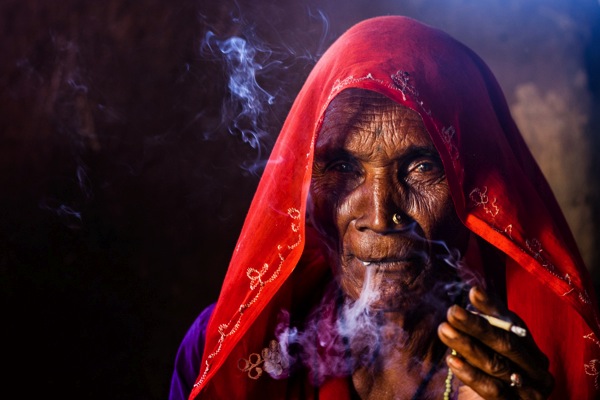
The Sigma DP2m is a bit of a compromise. I’d recommend getting both the Sigma DP1m and the Sigma DP3m; they work very well together as a pair. But if this isn’t an option, the DP2m is your camera. It’s neither too wide-angle nor too telephoto. You can stitch images if you choose as there’s no real distortion, but the standard-lens approach works well for a range of subjects. The important thing is that you get access to that incredible X3 Foveon sensor. Download some Sigma DP Merrill sample images here; they speak for themselves.

Ben Evans teaches Barcelona Photography. Learn the most important things about photography in one hour for (and for less than the price of a lunch) with the best-selling ‘Photography: The Few Things You Need To Know’ Audiobook – www.GreatBigBear.com/Audiobook

Post originally from: Digital Photography Tips.

Check out our more Photography Tips at Photography Tips for Beginners, Portrait Photography Tips and Wedding Photography Tips.

Sigma’s DP Merrill Cameras Compared – World-Beating Image Quality In Compact Bodies


Digital Photography School

 
Comments Off on Sigma’s DP Merrill Cameras Compared – World-Beating Image Quality In Compact Bodies

Posted in Photography


Color Correction: How to Salvage An Image With Defective Color in 10 Minutes

23 Mar

Have you ever taken a photograph of something beautiful only to later find that the resulting image lacks the vivid colors and energy that were present in-person? Fortunately, Photoshop offers a plethora of color correction tools that can help you salvage images with defective color. This guide will teach you how to utilize Photoshop’s color correction tools so that you Continue Reading

The post Color Correction: How to Salvage An Image With Defective Color in 10 Minutes appeared first on Photodoto.


Photodoto

 
Comments Off on Color Correction: How to Salvage An Image With Defective Color in 10 Minutes

Posted in Photography