RSS
 

Posts Tagged ‘head’

That’s No Moon: Artists Launch Huge Human Head Balloon

11 Jan

[ By Steve in Art & Installation & Sound. ]

ojisora_human_head_balloon_Japan_main
A bizarre art installation based on a dream saw a 50-ft tall balloon become a bizarre “Man In The Moon” as it rose above the streets of Utsunomiya, Japan.

ojisora_human_head_balloon_Japan_1

ojisora_human_head_balloon_Japan_2

Residents of Utsunomiya, a smallish city roughly 60 miles (100 km) north of Tokyo, Japan, experienced the shock of their lives on the evening of December 13th, 2014 when they espied the full moon rising over the horizon.

ojisora_human_head_balloon_Japan_19

ojisora_human_head_balloon_Japan_20

ojisora_human_head_balloon_Japan_21

No doubt dozens of necks suddenly snapped in a group double-take as residents suddenly realized that’s no moon… it’s the enormous inflated head of one of their neighbors!

ojisora_human_head_balloon_Japan_3

ojisora_human_head_balloon_Japan_4

Give credit to Japanese art trio Me (in collaboration with the Utsunomiya Museum of Art) for the uniquely unusual “Ojisora” project, an artistic effort spanning over two years from conception to realization. Its origin rests with one of the three artists, Haruka Kojin (above, right), who as a junior high school student dreamed of an old man’s grossly enlarged and disembodied head floating over town and country .

ojisora_human_head_balloon_Japan_6

ojisora_human_head_balloon_Japan_5

Upon awakening from her dream, Kojin quickly sketched her recollection and then just as quickly forgot about it. Many years later, she came across her sketch and wondered… was there some way to recreate her dream in real life? After consulting with her two co-artists and with the support of the Utsunomiya Museum of Art, Kojin took the first step towards realizing – and sharing on a mass scale – her odd dream from so many years before.

Next Page – Click Below to Read More:
Thats No Moon Artists Launch Huge Human Head Balloon

Share on Facebook


[ By Steve in Art & Installation & Sound. ]

[ WebUrbanist | Archives | Galleries | Privacy | TOS ]


WebUrbanist

 
Comments Off on That’s No Moon: Artists Launch Huge Human Head Balloon

Posted in Creativity


Tips for Photographing Head Shots

13 Oct

I’m always amazed when I take professional head shots how every photo shoot presents different challenges. That’s the beauty, and sometimes frustrating part of being a photographer. No shoot is the same.

When you have a model as the subject in front of your lens, being able to nail that shot will be a lot easier. What do I mean by easier? Models know how to pose and appear more relaxed in front of the camera than others. Straight away, you can concentrate on taking photos with little or minimal direction of your model.

Didi

Each photographer has their own unique style and methods when taking head shots. But like any genre of photography, the methods used will differ within each speciality. In landscape photography, a wide angle lens is a must and shooting with a small aperture(f/16), plus you are outdoors. Whereas shooting head shots is normally done in a studio with continuous or strobe lighting using a portrait lens.

Technical bits:

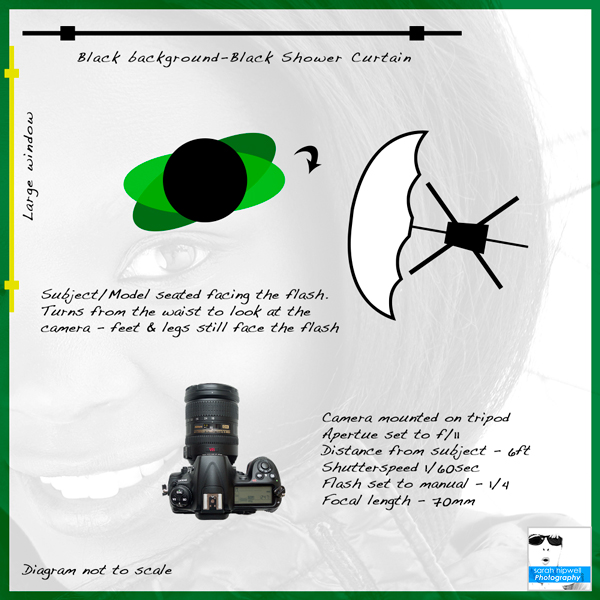
My favourite focal length for head shots is 70mm lens on a cropped sensor (Nikon 1.5x) so the equivalent is a 105mm on a full frame sensor. A tripod is essential for studio work, and Lighting is key. They are many different setups depending on how you want to shoot your model and how many lights that you have. The background should be neutral if possible (e.g. white, grey, black). Please see the description below for how to practice head shots in your home.

Tips:

  • Play some music on low in the background to create a chilled atmosphere.
  • Your skill at interacting with people will be key in nailing the shot.
  • Get your subject to blink 10 times quickly. This is a fun way to get them to relax and it also creates fluid on the eye to get better catchlights. This is where the light source such as a beauty dish or umbrella causes a specular highlight in the subject’s eye. There are tutorials online for adding catchlights in post-production but I prefer to catch them in camera.
  • Get your subject to lick their lips. This really only applies to male subjects as they don’t normally wear lipstick. Similar to above, it causes specular highlights on the lips.
  • Tilting the head at an angle provides for a better composition. Normally, I would only get female subjects to tilt their heads. I did a corporate shoot awhile back and asked one of the guys to tilt his head and I felt it worked.

Corporate headshot

  • Talk to your subject throughout the shoot by directing them, as opposed to talking incessantly. Most people who are posing for a head shot do not know what to do. This is key as a portrait photographer to be able to instruct without ordering.
  • Tell your subject beforehand to dress in neutral clothing, avoid fussy or very patterned garments or too many layers. As in the case of Michael’s headshot, I got him to remove his waist jacket.

Animated

  • Similar to exercise, warming-up is important. This is where you can have some fun and get as many different expressions as possible. This will hopefully help to capture the shot. Usually, I get my best shots towards the end of the session.
  • Get your subject involved. Show them the shots, ask them for feedback.
  • Give as much direction and positive feedback as possible, for example use comments such as – hold that expression, great smile, excellent, now, I want you to turn a little more this direction – and so on. Use your hands to direct which way you want your model or subject to move, this avoids that left or right confusion.
  • Being comfortable and interacting with others is vital as a portrait photographer. Don’t be afraid to get your subject to talk to you while you photograph them. This gets rid of that mouth-closed-jammed-shut-look. This worked a treat for Michael’s shot.

Black and white headshot

Personally, I tend to work fast as I know most people’s span of attention for a photo shoot is limited before boredom sets in. There is nothing worse than seeing that bored expression on someone’s face reflected back at you on screen. Also no amount of photoshop can replicate someone’s expression or essence. I feel you have to master this technique in camera.

Easy headshot setup at home using one light off-camera

This setup can be easily done in your house beside a large window using one flash (speedlight) on a light stand. Have your subject sit facing towards the flash.

Headshot setup at home

Get the subject to turn from the waist towards the camera, so that their legs are still facing towards the flash. This will mean your subject’s form will not be square to the camera and their posture will be straighter. This makes for a more flattering pose. The eyes are the key feature to portrait shots. So they must be in sharp focus, and preferably have catchlights.

Conclusion:

Didi

I chose the photo of Didi as one of my favourite professional head shots for the following reasons. I was outdoors, which is always more challenging. The light is always changing and I was at the mercy of the weather (unlike a studio setting where the lighting is constantly the same and it doesn’t rain).

Just before I took this shot, it had started to rain – a light drizzle. I gave my jacket to Didi as she began to feel chilly. This was at the end of a long session. I got her to hold the white translucent umbrella that I brought with me. This was not for the rain but to block out the distracting background and it helped to bounce the natural light around her aided by the shiny material of the jacket – a sort of rim light. Her expression speaks for itself – she was happy and warm!

Do you have a favourite headshot or any other tips you’d like to share? Please do so in the comments below.

The post Tips for Photographing Head Shots by Sarah Hipwell appeared first on Digital Photography School.


Digital Photography School

 
Comments Off on Tips for Photographing Head Shots

Posted in Photography


Vanguard releases new Alta CA tripod kits with pistol-grip head

27 Jul

Tripod and bag manufacturer Vanguard has launched a new range of tripods that are fitted with the company’s latest pistol grip style GH-30 head. The aluminium Alta CA leg-set comes in three or four-section options to achieve maximum heights of either 1565mm (61.6in) or 1550mm (61in) though both models are designed to carry a payload of up to 11lbs (5kg). Click through for more information.

Articles: Digital Photography Review (dpreview.com)

 
Comments Off on Vanguard releases new Alta CA tripod kits with pistol-grip head

Posted in Uncategorized


Head Light: Popup Wall Lamp Has Horns that Glow in Shadows

18 Jul

[ By WebUrbanist in Design & Fixtures & Interiors. ]

light and dark headlight

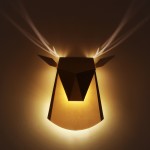
A classy alternative to hanging animal parts, this deer head wall lamp started as a design concept, went viral as a prototype and has just been funded for full production via a successful crowdfunding campaign.

popup lighting design

owl lamp pop up

peacock lamp pop up

This particular popup lighting design is the first in a series of pieces that combine abstracted animals (including an owl and a peacock) and minimalist home lighting design – a sort of modern (and less morbid) take on faux taxidermy.

popup dear head light

deer head light pair

pop up light night

Chen Bikovski is a Tel Aviv-based designer exploring the relation of light and space. “Since I was a child, I was fascinated by Pop-up books…The excitement before turning a page, a simple pull that uncovers a whole new world. I loved how the story came to life, how the books created a fantasy world that flew off the page. The magic, the excitement, the naiveté…”

dear head light design

pop up lighting

dear head light in room

Named ‘Promising Young Designer of 2012,’ Chen’s work is presented in prominent galleries and featured in leading design publications. “The idea behind Popup Lighting was to create a permanent light fixture that would bring a magical ambiance to any space. A multi-dimensional light that would inspire the senses and ignite the imagination.”

Share on Facebook


[ By WebUrbanist in Design & Fixtures & Interiors. ]

[ WebUrbanist | Archives | Galleries | Privacy | TOS ]


WebUrbanist

 
Comments Off on Head Light: Popup Wall Lamp Has Horns that Glow in Shadows

Posted in Creativity


eMotimo TB3 Review – Robotic Tripod Head and Time-lapse Movie

02 Jul

I’d forgotten all about my childhood dreams of achieving world domination using my very own robot army until I switched on the TB3 from eMotimo. As soon as I synched up the wireless remote and started panning and tilting this robotic tripod head, I was transformed into a grinning 8 year old boy who believed he could do anything.

I expect that the eMotimo exhibit at trade shows is usually ringed by a troupe of grinning time-lapse photography nerds like myself, who just realized they stumbled upon a truly legendary tool for photographic creativity.

My example footage

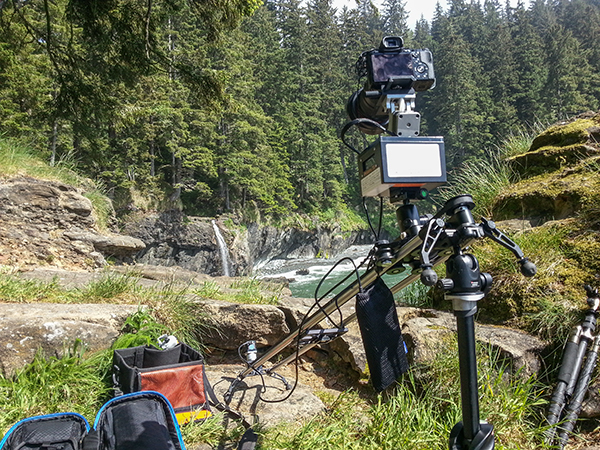
The short time-lapse movie above was made entirely using the TB3 with my Sony A7R Camera mounted on the Rhino Slider Pro 4ft. What started out as a couple of quick test shots turned into a fully fledged trailer when I realized what I could achieve with the TB3. Once I stuck it on a slider, things got awesome real quick.

What does the TB3 do?

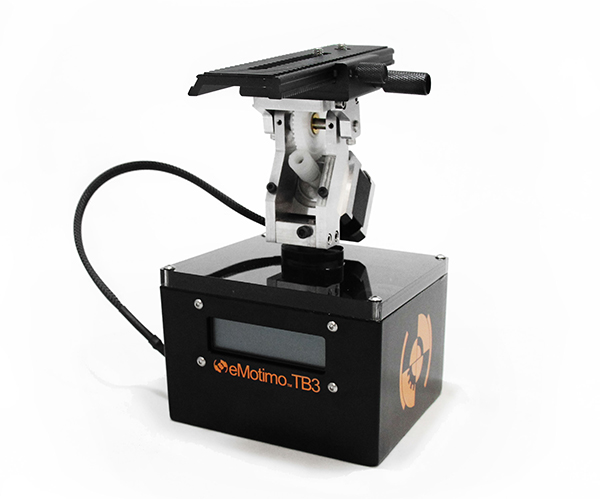
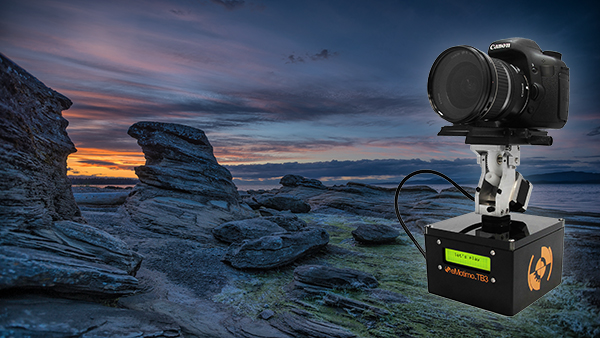
Emotimo TB3 Review

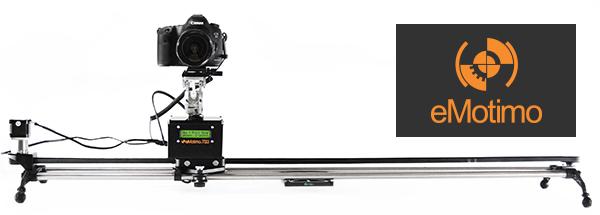
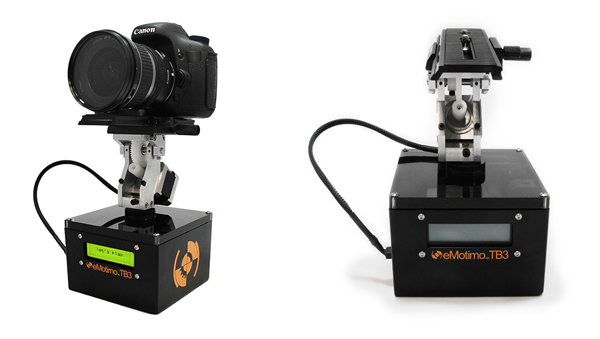
Pictured on the left with a Canon DSLR

For those of you who have no idea what’s so great about a device like this, let me throw the term ‘Motion Control’ at you. If you want to shoot videos or time-lapse movies that offer the viewer a more captivating perspective than just a plain old dolly/slider shot, you’ll be wanting one of these TB3′s.

The TB3 from eMotimo allows you to add high production values to your footage by moving your camera along two axes while shooting. It can pan AND tilt all at the same time. Combine this device with a slider and you’ve got yourself a powerful three axis rig for making fascinating cinematography and time-lapse photography. Your footage will appear to have been shot with a camera that magically floats through the air.

Motion Control Timelapse- TB3 Review

The TB3 shown here with a Canon DSLR and a Rhino Slider Pro 4FT.

Create multi-gigapixel panoramic photos

It’s not just about time-lapse and video. The TB3 also allows you to take multi-gigapixel images such as panoramas. For landscape shooters who want wall-filling image resolution, this feature is a major bonus. When you add in the awesome time-lapse and video shooting capabilities, you’re getting a lot of functionality for just under a $ 1000 USD.

Programming interface

Programming the movement of the TB3 requires a small learning curve. The interface is a very basic LCD screen with abbreviated titles and you navigate through this by using the included remote control joystick. It takes a while to get used to but if you’ve ever used a video game joystick you’re already half way there.

Emotimo TB3

Two-point or three-point movement and reverse moves

You can decide how many points of location your film sequence will have. If you want a simple A to B movement you select a two-point move. You tell the TB3 where you’d like to start and where you’d like to end, and the TB3 fills in the blanks.

With a three-point move you can get more creative by adding a less obvious direction to your movement. You could even program the TB3 to go into reverse after you’ve reached point two, or point the camera in the opposite direction, whatever you like. This is great for taking your audience on an unpredictable ride through your scene.

‘Reverse’ moves come in really useful when you’re using a slider and need to save valuable battery life by cutting out the ‘return to start’ move that the TB3 has to do once you’ve programmed in your move. You basically work backwards and tell the TB3 to start shooting from your last position. This is essential when doing vertical ‘jib’ shots on a slider which sucks a LOT of battery power.

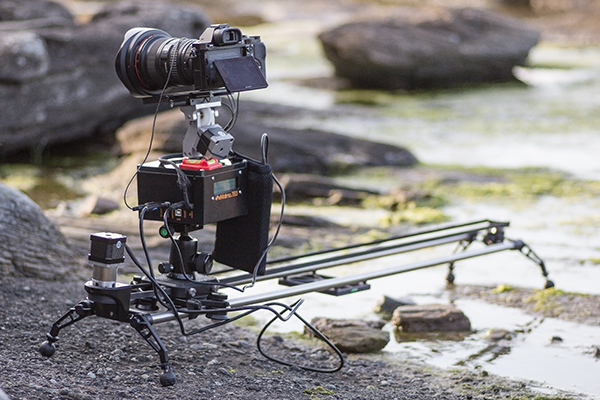
The TB3 by eMotimo

At the beach shooting a Timelapse sunset with the TB3 from eMotimo on a Rhino Slider.

Ramp

When I first saw the word ‘Ramp’ in the interface I thought it referred to Bulb ramping or ‘Bramping’ for time-lapse, but it actually refers to the degree of acceleration used when the TB3 moves to its start and end points. This is a really cool feature as it gives your camera motion a very smooth, but dynamic movement, as the TB3 gradually speeds up and then slows down to its end point. Most of the scenes in my video feature a ramp setting of 70.

Lead in-out

Another great feature of the TB3 is that you can specify a static ‘no movement’ period to either end of your shooting sequence. This is great if your sequence ends and you then fade up some titles in your video but want to keep the movie playing in the background.

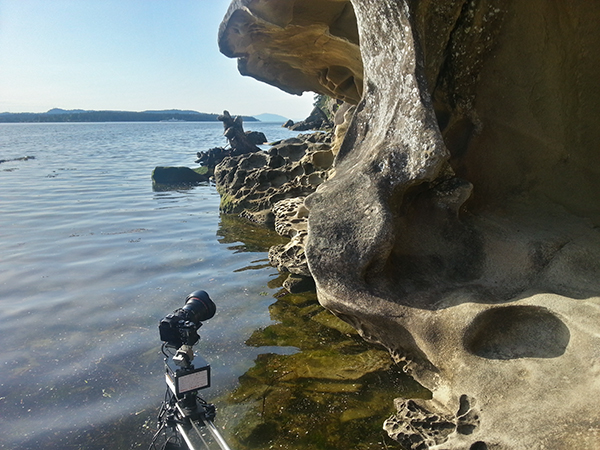
Emotimo TB3 shooting a timelapse

Smartphone shot. The TB3 almost going for a swim while shooting a time-lapse at Jack Point, Nanaimo (Canada).

Build quality

This is a sturdy unit. It kind of looks like something you’d expect to find under the skin of a young Arnold Schwarzzeneger during his debut as the world’s favourite cybernetic assassin. It’s built for functionality, not looks, and I expect it will appeal to the gadget geek in all of us due to its no nonsense appearance.

As well built as the TB3 is, I wouldn’t want to drop it. There are lots of exposed moving parts so it’s best to handle it with the care and attention it deserves. Encasing it in rubber would perhaps give it more protection but would add more weight. The interface cable that connects the moving parts to the brain of the unit could be more rugged as it’s already started to fray after light use.

Rugged Build Quality on the TB3

Smartphone shot. Semi-vertical jib style shots like this require more battery power so the TB3′s reverse 2-point move helped save me a little battery life.

Weight and size

Lets face it, if you’re doing serious time-lapse movies or cinematography, you long ago accepted that you’d be lugging heavy gear around. The TB3 isn’t that heavy in itself but it’s yet another bag to carry along with your camera bag, tripod(s) and slider. For what this gadget does, I think they’ve packed a lot of tech into a relatively small device but I can’t wait to see a ‘Sonyfied’ future version that won’t add to my chiropractor bills. Till then, just deal with it.

Battery pack required

Yet another essential accessory for the time-lapse and video shooters – the external battery pack. eMotimo were kind enough to lend me the ‘Anker Astro Pro’ battery pack which powers the TB3 and many other devices such as your phone and camera. Although this adds yet more weight to carry, it’s great to know that when my Sony A7R battery inevitably lets me down (which it does daily), the battery pack will allow me to recharge in the field.

Shooting a timelapse with the Emotimo TB3

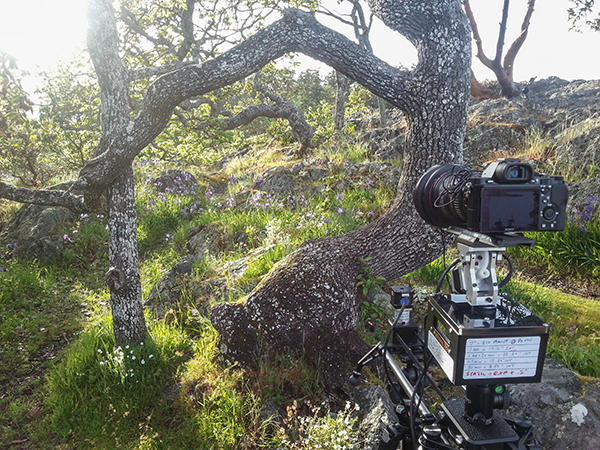
Smartphone shot. You can see I’ve written down all my interval settings for the 7 second sequences featured in my film.

Compatibility

The TB3 is compatible with most major camera systems but as you’d expect, the best compatibility is reserved for the two major giants Canon and Nikon. I’m a Sony shooter so this posed somewhat of a problem for my plans to shoot the time-lapse movie shown above. eMotimo managed to get around this problem by providing a simple IR (infrared) transmitter cable that I taped to the IR receiver port on my Sony A7R. Not as slick as the Canon/Nikon cabled version but it did the job. I’d like to see a wired solution from eMotimo pretty soon though as it looks like Sony is starting to gain traction with their new range of cameras.

For time-lapse shooters that use advanced bulb ramping devices like the ‘Promote Control’, you’ll be glad to know that this can be integrated with the TB3. eMotimo also provides motor accessories for various popular sliders so you have some different options for the 3-axis motion control shown in my example video.

Waterfall timelapse with the TB3

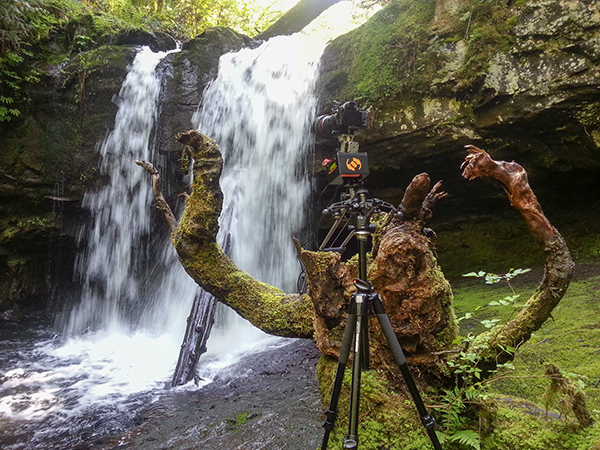
Smartphone shot. My favourite angry tree stump gets the time-lapse treatment with the TB3 carefully balanced on the stump.

Things I love about the TB3

  • Super smooth motion – this really is the most important part of any motion control device. It may not look like it in my video, but before the dreadful internet compression butchered my film, I can assure that the footage is buttery smooth. Not all motion control devices are made equal and eMotimo have totally nailed this most essential aspect.
  • Rugged, no-nonsense construction. I filmed time-lapse sequences in all kinds of weather, even heavy rain. The TB3 handled it all with indifference.
  • The cool little sound effects that it makes while you pan/tilt the head using the joystick.
  • Tech support – eMotimo is a small company in San Francisco with a very hands-on approach. All of my foolish newbie questions were answered with patience and resolved quickly.
Forest timelapse movie

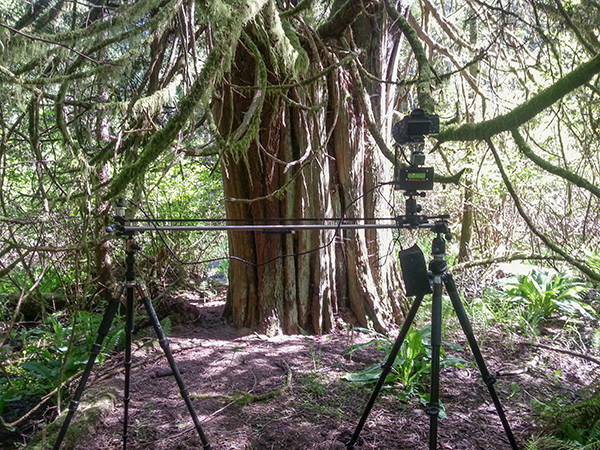
Smartphone shot. I found that hanging the battery pack off the slider caddy gave the best results.

Things I don’t love about the TB3

  • The carry case seemed like an afterthought. It doesn’t fit very well and I was forever worried about accessories falling out. I’d rather buy a larger all-purpose camera bag and put the TB3 in that.
  • The programming procedure could be more accommodating. The TB3 has a cool ‘repeat/reverse’ function that you can set off immediately after your time-lapse sequence is finished. Sadly, I couldn’t figure out a way to edit the settings, which is essential after the sun has gone down and the light has changed. Maybe a firmware update could fix this?
  • The ‘Fotomate’ mounting plate onto which you attach your camera was a little fiddly.

Emotimo TB3 Review

Would I buy the TB3?

Absolutely. The TB3 has enjoyed something of a cult following among the rockstar time-lapse and DLSR video shooters. It’s not just because eMotimo were there during the early years of the time lapse video phenomenon, it’s because they make a very versatile and rock solid product. When you factor in the sub $ 1,000 price point and the awesome tech support, I really don’t see any other contenders.

My star rating

Our rating system doesn’t allow for a 4.9 so I’m forced to give the TB3 5 stars. I could have given it 4.5 stars but that just wouldn’t be enough. If eMotimo can fix my two main gripes of having a better carry case and some form of improvement on the Fotomate mounting plate, the TB3 would be perfect and fully deserving of 5 glorious shining gold stars.

Want some time-lapse tips? Try these:

  • Timelapse Photography Tutorial: An Overview of Shooting, Processing and Rendering Timelapse Movies
  • Capturing the Northern Lights in Timelapse Video
  • Discover the Wonder of Time-Lapse Photography

The post eMotimo TB3 Review – Robotic Tripod Head and Time-lapse Movie by Gavin Hardcastle appeared first on Digital Photography School.


Digital Photography School

 
Comments Off on eMotimo TB3 Review – Robotic Tripod Head and Time-lapse Movie

Posted in Photography


Syrp Genie Robotic Tripod Head Review

16 May

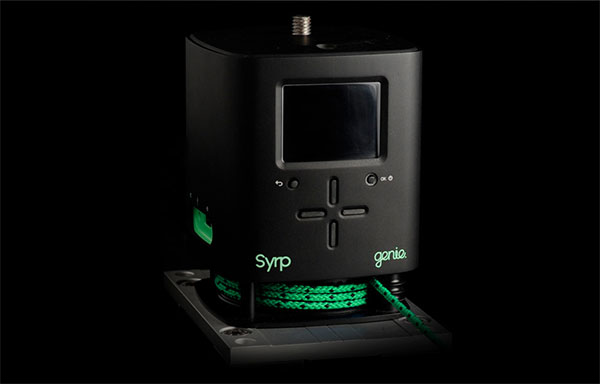
If you’re in the market for an ultra portable robotic tripod head that pans and tilts and is super easy to setup, you’ll be wanting to take a look at the Syrp Genie. The guys at Syrp have done their Kickstarter backers proud with a solid product that looks as good as it performs.

While it can’t pan and tilt at the same time, the Genie has a little trick up its sleeve to add an extra layer of motion control to its arsenal.

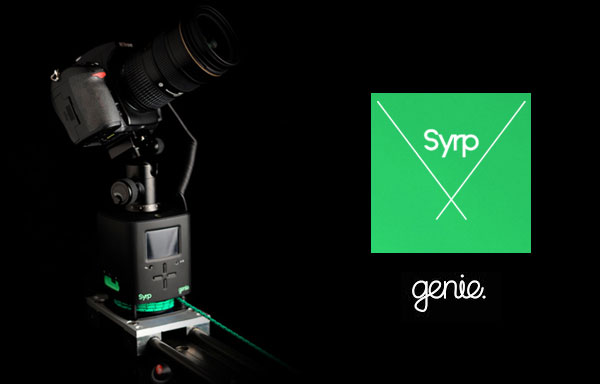
When you want to put the Genie on to a slider you won’t need any extra motors or cables to get things moving. The Genie comes complete with the linear accessory which utilizes a thin yet strong rope which you attach to either end of your slider. The motor inside the Genie will then pull the unit along the slider to add production value to your video recordings or time-lapse footage. You could even put the genie on a skate board or cart and then attach the ropes to trees or fences while it pulls itself through your scene.

While this might not be the most advanced method of motion control, you’ve got to love the sheer simplicity of the Genie, and with its built-in battery it really takes up very little space in your camera bag. If you’re off on a long haul flight and don’t relish the idea of packing lots of complex toys, you’ll appreciate the compact form of this device.

Syrp Genie Review - Gavin Hardcastle

Build Quality

I was really impressed with the build quality of the Genie and its accessories. The packaging was like something you’d expect from Apple and everything has a solid, ruggedness about it that feels reassuring. I had some problems with the battery on the first unit that I received so Syrp promptly replaced it and the second unit had no problems with the battery lasting as advertised.

Ease of Use

The Genie is about as easy as it gets. Time-lapse photographers will love the presets and how the time calculations are adjusted based on your input. The interface is really easy to navigate and pretty intuitive. I only had to refer to the manual on a couple of occasions. Setting up a panning shot is pretty easy but I found the tilt shots more of a challenge to get things lined up with the horizon and also struggled a little with the ball head that Syrp kindly included. Once you’ve done it a few times it gets easier.

Syrp Genie Motion Control Review - Gavin Hardcastle

Accessories

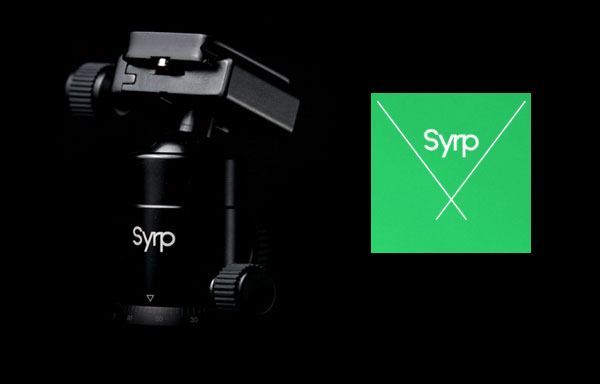
My first impression of the ball tripod head that Syrp included was that it might not be up to the job. After putting it to some serious stress tests it turned out to be a very sturdy little head that can handle a lot of weight and some hefty abuse.

Syrp Genie Review Ball Head

The infra red transmitter stalk is a really cool addition for time lapse photographers who don’t fit into the Canon/Nikon mold and can’t connect up to the Genie with a cable. The IR transmitter plugs into the Genie and then sticks out of the side like one of those gooseneck desk microphones. The idea is that you point it at the IR receiver on your camera and it triggers the camera for time lapse shoots. I shoot with a Sony A7R so this was essential for me. I just wish the IR transmitter was a couple of inches longer so that I didn’t have to strap it to my lens with an elastic band. Anyway, it works and is much easier than fiddling about with a long IR cable.

The rope that you use for linear motion on sliders is really good quality and you can order different lengths to suite your needs.

Tech Support

I found the tech support from Syrp to be pretty quick and effective. When I had any big problems they jumped on it quickly and were patient when I was just being thick and didn’t get how things worked. I get the impression that even if I wasn’t a writer for dPS, I’d still get taken care of well.

Is it Worth the Price?

This is a tricky one and it really depends on your needs. Currently priced at $ 890 USD, the Genie cannot pan and tilt at the same time. It can only pan, tilt or slide. There are other robotic ‘motion control’ heads out there that offer more functionality for around the same price, but it’s kind of unfair to compare the Genie to more advanced units because they don’t have the built in battery and they require motor accessories in order to slide. With that in mind your decision to buy the Genie might come down to its two greatest features – simplicity and portability.

The Results

Here’s some quick and rough test footage that I shot with the Genie straight out of the box. Please watch at 1080p.

I am a confessed pixel peeping perfectionist. A snob of the worst kind when it comes to image quality and the finished product of a shoot.

My main use of the Genie was for shooting time-lapse sequences and I have to say that the results I got were not as smooth as I’ve had with other devices on the market. I don’t know if this can be fixed with a firmware update or if it’s down to a mechanical limitation of the Genie design. That being said, whether or not my obsessive ‘buttery’ motion requirements would make much of a difference once a finished video is butchered by the compression ogre from Vimeo or YouTube remains to be seen.

I suspect that for most time-lapse and video shooters, the motion of the Genie will be more than sufficient. I’m just a picky bugger.

Things I Love

  • Portability
  • Ease of use
  • The Preview Function (others could learn from this)
  • Build quality
  • Built in battery

Things I Don’t Love

  • Can’t pan and tilt at the same time
  • Not the smoothest results for time-lapse
  • The little bit of ‘play’ that makes the first few frames of your time lapse completely static. You can see this in the second clip of my test footage video above.

All in all, the Genie is a really cool product that I feel is ideal for time lapse beginners and budding cinematographers. When you factor in the portability and the ease of use, the Genie comes in at a very fair price point with excellent build quality. Time-lapse shooters that are looking for something more advanced will have to spend a little more to move up to the next level of production value. I give the Syrp Genie 4 out of 5 stars.

More time-lapse tips and info here:

  • Time-Lapse Photography Equipment Guide to Getting Started
  • Discover the Wonder of Time-Lapse Photography
  • 10 Pro Motion Control Time-Lapse Tips

The post Syrp Genie Robotic Tripod Head Review by Gavin Hardcastle appeared first on Digital Photography School.


Digital Photography School

 
Comments Off on Syrp Genie Robotic Tripod Head Review

Posted in Photography


Step By Step How to Do a Head Shot on a White Background

14 May

Today you are going to come ride along with me as I shoot head shots for a client in San Diego, California. I was hired by a company to create simple head shots of their instructors in the San Diego area.

There is a very big market for head shots and quite a few people want them shot on a white infinity backdrop. There are many ways to do this but I’m going to take you along on a shoot with me and show you how I do it:

Step by step how to do a head shot on a white background

Digital-Photography-School-Steven-Head-Shot-Thumbnail

First off, what is a seamless backdrop?

It’s a giant roll of paper – thats it! I used an 8-foot long roll in ‘alpine white’ color. Again, it’s just a big white roll of paper. When properly lit, this roll of paper gets ‘blown out’ or overexposed, so it appears as a perfectly white void on which your subject sits/stands in the middle. This white void makes the viewer focus on your subject rather than a cluttered background.

Setting up the seamless backdrop

As you can see in the animated GIF below, I start by finding an open area at least 8 feet wide. This is easier to set up with two people, but on this corporate shoot it was just me.

To make this easier to set up by yourself just lay the roll of paper on the ground and position the light stands on either side of the end of the roll of paper at their lowest height. Make sure the paper is set to unroll from underneath the back of the roll ,and not over the top and front of the roll.

When you pull from the back of the roll the natural curl of the paper will let the paper roll straight to the floor then curl toward your camera  into the room. This will provide a smooth curved transition from the vertical roll of paper into the floor and toward you so the background and floor will appear seamless. If the paper is pulled from overhand when it hits the floor it will want to curl backwards toward the back of the room. This won’t create seamless transition as you pull the roll into the room.

Run the cross bar through the center of the paper roll – the cross bar will stick out about 2 inches on either side of the roll. The cross bar has 2 slots at each end and the light stands have two vertical screws. Lift up the roll and place these two slots into the two vertical screws and then screw in the included wing nuts to secure the roll onto the light stands.

Raising the seamless backdrop

Now that we have the paper roll secured on the light stands at their lowest height, it’s time to raise it up. The light stands have two sets of clamps and two sets of vertical poles that raise up. With two people you can simply raise the paper roll at the same time to the desired height and lock the clamps down to secure the paper roll at your desired height. With only one person you have to slowly raise one side, then the other, until you get the roll to the desired height. Check out the GIF below and try not to laugh at the CEO jumping in during setup.

Digital-Photography_School

Unrolling the backdrop

Now that we have the bar to the height we want it, we can unroll the backdrop. I always keep little clamps on each end of the roll to keep it from unrolling on its own. Unclamp the little A-clamps on either side of the paper roll and slowly pull the roll down. If you don’t pull slowly the roll can gain momentum, unroll really fast, and go much further than planned! Since we were only doing head shots I just pulled the backdrop down to the floor. Once the roll is at the desired length clip the A-clamps back in place to keep the roll from unrolling further on its own like you see below.

seamless backdrop, studio lights, corporate headshots

Lighting the shoot

The way to make lighting easy is to light in layers, one step at a time. In this case I’m going to light the backdrop first. Once I get that done I’m going put a subject in front of the backdrop and light them separately. Once that is lit correctly we are ready to rock!

Lighting the backdrop

Now that the backdrop is set up properly we want to light it so that it appears solid white. I placed an Alien Bees 1600 studio strobe 3 feet away from the backdrop on the left side and angled it to shoot across the backdrop. The light had a reflector on it to contain the direction of the light. This will make the light rake across the middle of the backdrop to light it up white.

Dialling in the camera settings

I set my camera to f/8 aperture as it’s a good middle ground depth of field to start. The studio lights will give me all the light I need so I set the ISO low at 200. I then set the shutter speed to 1/160 which is the maximum shutter speed sync my camera allows. In this room a 1/160 shutter speed is fast enough that none of the lights on the ceiling would register – essentially I’m killing any ambient light in the room so the only light that shows up in the photo is from the studio strobes.

I take a guess and set the studio strobe light at 1/4 power. I do a quick test at f/8, ISO 200, 1/160 shutter speed and get this:

corporate headshots, white seamless backdrop, studio strobes, lighting setups

Looks pretty good to me! You can see the area closest to the light is perfectly blown out white, but as you move to the right the light is becoming weaker and the white backdrop appears more grey. Because the light is weaker on the right side it’s also showing the wrinkles in the paper. Because I’ll be placing people several feet in front of the light stand and zooming into the middle of the backdrop I’m not concerned with the right side of the backdrop. If I were shooting a wider shot I would add another light on the right side of the backdrop to light up that side, but that isn’t necessary for this shoot.

Lighting the subject

Now that we have the backdrop dialled in it’s time to light the next layer – the subject. I place an Alien Bees 800 studio strobe to the right of the backdrop, about six feet in front of the first light. I put an umbrella on the light which spreads the light out (diffuses it) as it passes through the umbrella and gives it a nice, soft appearance. I set the light at 1/4 power, at a 45 degree angled downward, and raised to about 8 feet high to test it out.

I step in front of the backdrop like the goofball that I am and get this:

studio lighting, seamless backdrop, corporate headshots

The backdrop still looks good, but I (the subject) am overexposed. This means the umbrella light is too strong. I reduce the power from 1/4 power to 1/8th power, have the CEO grab two nearby Nerf guns, step back in for a test, and get this:

seamless backdrop, studio lights, corporate head shots

Looking much better!

The light hitting the white background is bouncing onto the back of the subject and wrapping around his body too much. To correct this I need to move the subject a few feet toward the camera so the light bouncing off the background falls off before it reaches him. When I do this I also need to move the umbrella light the same distance toward the camera to keep the same exposure.

I also want more room to the right to compose my subjects so I move the umbrella light two feet camera-right, and one foot toward the camera. I then have the subject move two feet camera-right and one foot toward the camera so the background light won’t reach the subject as much.  I take another test and get this:

seamless backdrop, corporate headshots, digital photography school, seamless backdrop

This looks great to me. The background layer is blown out white, the subject layer is properly exposed, and as a bonus just enough light is bouncing off the backdrop to give some backlighting to the subject. Here is a closer crop to see what we are working with:

studio lights, seamless backdrop, corporate headshots

The only thing I should do to improve this is have the subject turn his body to face the umbrella so there isn’t so much shadow on the camera-left side.

Positioning the subject

headshot, seamless backdrop

The client wanted simple head shots of their instructors for use on their website profiles. I had the subject stand in the same place, square up their shoulders to face the umbrella light, and smile. You’ll notice that the umbrella placed up above the subject and pointed down at 45 degrees leaves a nice catch light (the white reflection of the light) in the top right corner of the subject’s eyes. When you can place a catch light at the ten or two o’clock position (like on an analog clock) in the subject’s eyes it brings them to life. Here is what we end up with:

 Quick positioning tip

To keep everything consistent, place some tape on the floor where you want people to stand. I didn’t have any tape with me but I did have an extra umbrella. I simply placed the umbrella at a diagonal angle and told the subjects to place their toes against the umbrella. This squared them up with the light so each portrait was consistent.

Wrapping it up

Overall it was a very quick setup, shoot, and breakdown. We shot 45 different instructors in about 45 minutes! Once everything was dialled in we just photographed one instructor after the next. The shoot was fun, the client was happy, and the instructors loved their head shots!

Digital-Photography_School-Portaits

Would you like to see more real shoots?

Did this post help you and did you enjoy seeing some behind-the-scenes info on real client shoots? If so sound leave me a comment below. If it would help I’d love to start sharing more live client shoots to show everyone how they come together!

For more portrait tips using a white background see these articles on dPS:

  • 4 Tips for a Perfect White Background in High Key Photography
  • White Seamless – Studio How-To
  • Awash In Light: High Key Portraiture

The post Step By Step How to Do a Head Shot on a White Background by Mike Newton appeared first on Digital Photography School.


Digital Photography School

 
Comments Off on Step By Step How to Do a Head Shot on a White Background

Posted in Photography


A Turn of the Head – Creating More Compelling Bird Portraits

09 Dec

The last time I counted, there were about seventy two quadrillion photos of birds on the internet. Therefore, if you’re dedicating your time to try to stand out as a bird photographer, there is a ton of competition out there. However, there is one thing that you can try to incorporate in your photos that will at least have them stand out a little bit.

Creating More Compelling Bird Portraits

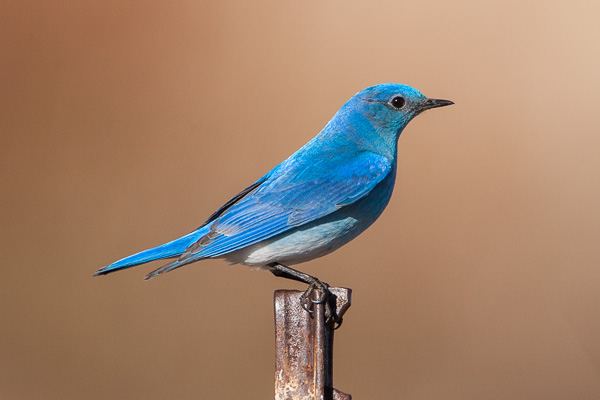
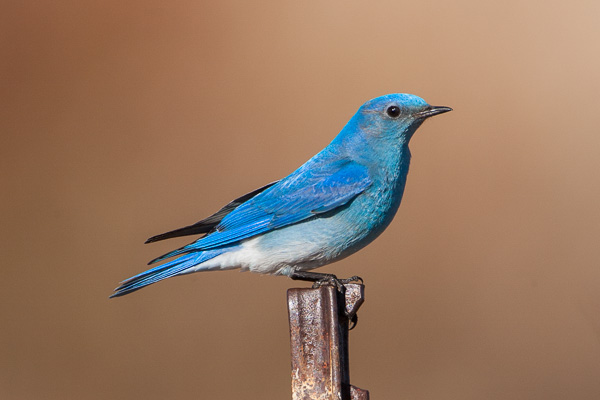
Wait for the turn of the head. Sounds pretty simple doesn’t it? It sounds simple, but achieving it is often a bit trickier. Many bird species have their eyes placed on opposite sides of their heads. When photographing birds without their heads slightly angled towards the viewer, the images tend to lack a bit of intimacy. Consider the following two images of a Mountain Bluebird. In the first image, the bird’s head is angled away from the viewer, while the second image features the bird’s head angled just slightly towards the viewer.

Mountain Bluebird looking away from the viewer

Mountain Bluebird looking away from the viewer

Mountain Bluebird looking toward the viewer

Mountain Bluebird looking toward the viewer

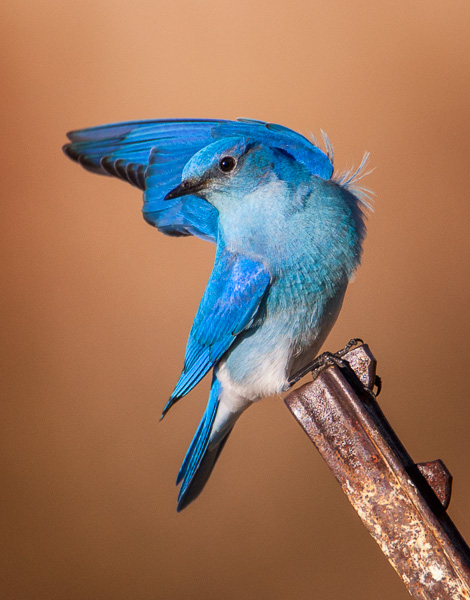
I’ll bet that for most of you, the second image is more compelling just because of that eye contact. Sure the perch is somewhat ugly (it’s the post used to mount the bird box above the ground), but even with an ugly perch, the second image is more compelling. Then if you’re patient, even with an ugly perch, you can still get a compelling image out of it, slight head turn included.

Mountain Bluebird posing pretty

Mountain Bluebird posing pretty

What to look for – subtle differences are huge

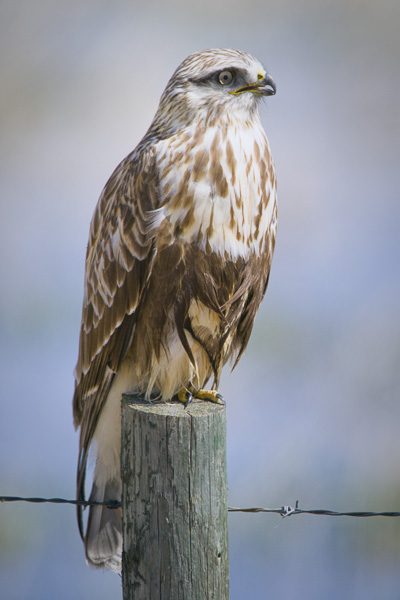
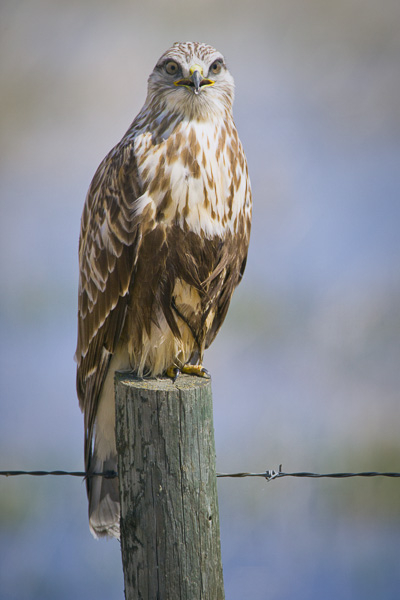
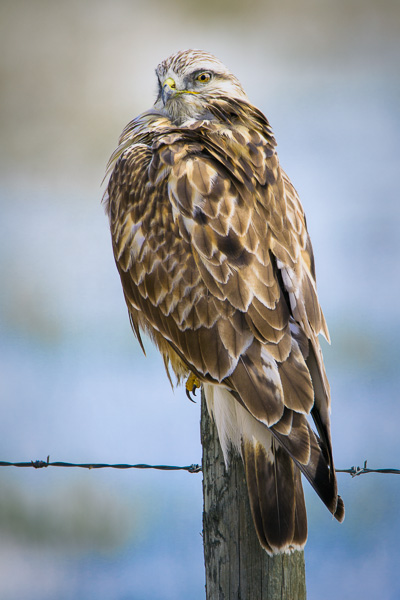
Consider the following three photos of a Rough-legged Hawk.

Rough-legged Hawk looking away from the viewer

Rough-legged Hawk looking away from the viewer

© Paul Burwell Photography - Rough-legged Hawk looking directly at the viewer

Rough-legged Hawk looking directly at the viewer

© Paul Burwell Photography - Rough-legged Hawk with the sexy over the shoulder look towards the viewer

Rough-legged Hawk with the sexy over the shoulder look towards the viewer

In the first image, the bird is looking away from the viewer. In the second, he is looking straight on to the viewer, while the third image has my preferred head-turn. In my opinion, in terms of a compelling image, it isn’t even a close comparison. The perch still isn’t ideal (although this is the typical place we find these birds where I live), but the third pose with the head-turn makes that image into a keeper for me.

Patience or initiative gets the head turn

So, is it just a matter of patience and waiting for the preferred head-turn? Sometimes that is true. Other times I try to “encourage” my subject to look my way. How do I accomplish this? I imitate the squeak of a mouse. I purse my lips together and suck in air through my teeth to produce an irritating squeaking sound. Sometimes, not always, but some times, the bird is curious enough to look my direction.

I know of some photographers who prefer to use the “machine gun” approach where they just hammer-down on the shutter button, essentially shooting a slow frame-rate movie.  Occasionally they’ll catch the bird with its head in the preferred position.  I personally don’t favour that approach, but would rather just wait for the appropriate moment and cut down on my post-processing work once I get home.

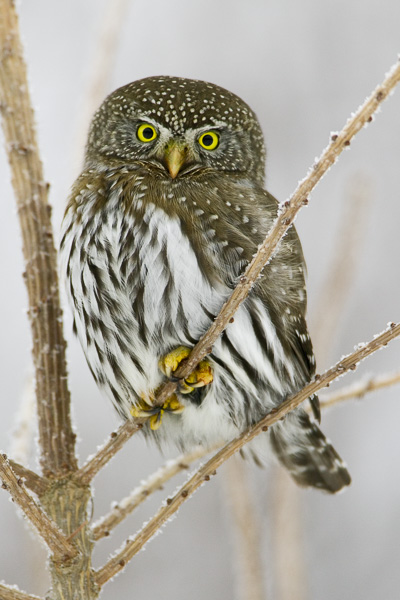
In terms of the bird looking head-on into the camera, that can occasionally work, but for most birds it just isn’t their best angle. There are definitely exceptions to that and owls are the first bird that springs to mind. Consider this image of the tiny Northern Pygmy Owl for example.

© Paul Burwell Photography - Northern-Pygmy Owl looking frosty

Northern-Pygmy Owl looking frosty

Here are a couple more images to consider:

© Paul Burwell Photography - www.bsop.ca

Ruddy Duck Drake looking towards the viewer

© Paul Burwell Photography - www.bsop.ca

Ruddy Duck Drake looking away from the viewer

I made these two images of the Ruddy Duck just seconds apart. In the first image, the bird looked my way due to my incredible squeaking ability, while in the second, his patience expired and he was off to find his girl friend.

The following two images of a White Breasted Nuthatch also illustrate the point. In both images, the birds are in their traditional upside-down pose on the side of a tree. The difference between the images is that in the first the bird is looking slightly away from the viewer while in the second exhibits that classic slight head-turn towards the viewer that I strongly favour.

© Paul Burwell Photography - www.bsop.ca

White-breasted Nuthatch looking away from the viewer

© Paul Burwell Photography - www.bsop.ca

White-breasted Nuthatch looking towards the viewer

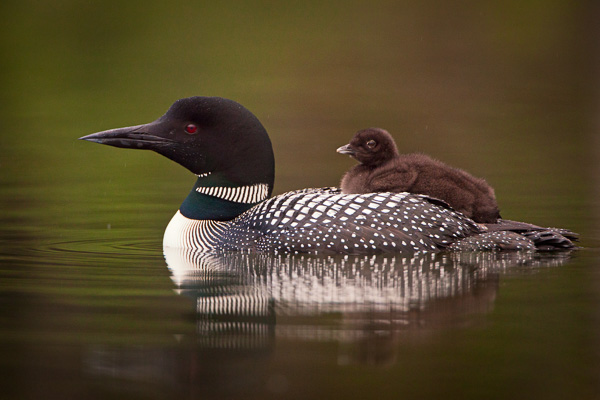
The last two images I present for your consideration are these two images of a Common Loon carrying a chick on its back.

© Paul Burwell Photography - www.bsop.ca

Common Loon carrying a chick on its back with both birds looking away from the viewer

© Paul Burwell Photography - www.bsop.ca

Common Loon carrying a chick on its back with both birds looking towards the viewer

In the first image, both adult and baby are looking away from the viewer. It’s a nice image but lacks a bit of intimacy.  Whereas the second image features both birds looking towards the viewer. The second image is a result of the large goofy photographer, with his lens perilously positioned inches above the water, from an unstable boat squeaking his heart out. For me, there is no comparison between the two images; the second wins easily.

Therefore, the next time you’re out in pursuit of some bird images that might rank in the top thirty-six quadrillion instead of the bottom, look for the opportunity to capture those birds with their heads slightly turned towards you. Whether you achieve it through patience or “the squeak”, I’ll bet you’ll find your images a bit more compelling.

Post originally from: Digital Photography Tips.

Check out our more Photography Tips at Photography Tips for Beginners, Portrait Photography Tips and Wedding Photography Tips.

A Turn of the Head – Creating More Compelling Bird Portraits

The post A Turn of the Head – Creating More Compelling Bird Portraits by Paul Burwell appeared first on Digital Photography School.


Digital Photography School

 
Comments Off on A Turn of the Head – Creating More Compelling Bird Portraits

Posted in Photography


Robert Capa speaks for himself: ‘The camera was far above my head’

02 Nov

capa100_9.jpg

‘If your pictures aren’t good enough, you aren’t close enough’, said famed photographer Robert Capa. He was certainly close enough to take his iconic ‘Falling Solider’ photograph during the Spanish Civil War. In a recently discovered radio interview from the 1940s, Capa explains how he took the photo that many have since alleged was staged. Learn more
News: Digital Photography Review (dpreview.com)

 
Comments Off on Robert Capa speaks for himself: ‘The camera was far above my head’

Posted in Uncategorized


Talking Windows: Trains Deliver Ads Directly into Your Head

26 Oct

[ By Delana in Conceptual & Futuristic & Technology. ]

marketing through bone conduction ads

Television, radio, the internet, billboards, newspapers, magazines, malls, supermarkets…wherever you are and whatever you’re doing, it’s highly likely that at least a few  companies are trying to market their products to you every moment. A quiet train ride and a nice nap used to be a welcome escape from the cacophony of consumerism, but soon even your commute-time nap may be filled with the sounds of advertisements.

bone conduction train ads

The German branch of ad company BBDO has tested a form of bone conduction technology on a train between Munich and North Rhine-Westphalia. When a commuters rest their heads against a window, hoping to catch a few winks before getting to their destination, ads which were previously inaudible suddenly begin playing inside their heads.

The technology works by using high-frequency transmitters to send sounds through the train’s windows. If you aren’t touching the window you can’t hear the ads at all. But lean your head against the window and the sounds are loud and clear, having been transmitted through your skull and directly to your inner ear. It’s the same concept that makes bone-conduction headphones and hearing aids work.

talking train window advertisements

Although BBDO has no current plans to actually put the technology into use, the fact that it was tried out successfully may mean that this type of marketing will soon be used on a wider scale. We have a feeling commuters would object to the practice of advertisements invading their sleep, but if trains played relaxing music or important travel information in this manner it would be much easier to get behind the idea.

Share on Facebook


[ By Delana in Conceptual & Futuristic & Technology. ]

[ WebUrbanist | Archives | Galleries | Privacy | TOS ]


WebUrbanist

 
Comments Off on Talking Windows: Trains Deliver Ads Directly into Your Head

Posted in Creativity