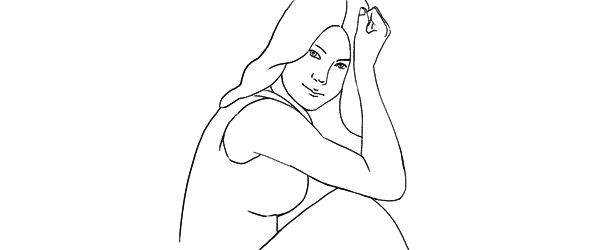
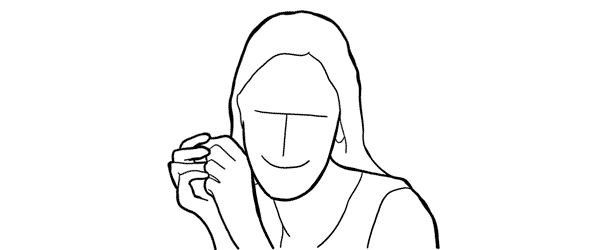
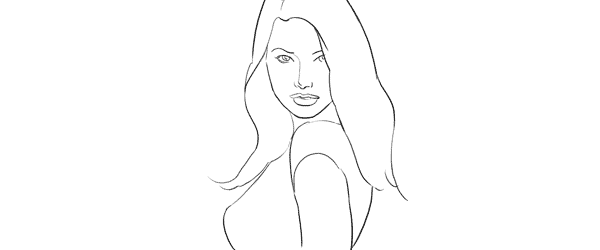
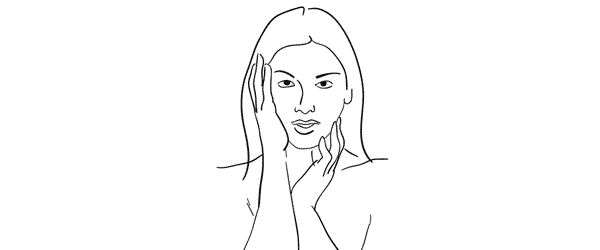
RSS
 

Posts Tagged ‘Guide’

Light that Fire: A Guide to Finding Photo Inspiration at the Library

01 Aug

Dear Mr. Dewey,

Please point me in the direction of the photography books.

Thank you.

Love, A photographer in need of a little inspiration.

If dust is settling on your camera and your creative juices need some stirring, the library is a great place to explore photographers and books on photography that’ll light that photo bug inside you. It’s always in there… sometimes it just needs a a little push in the right direction.

Learn some super simple tips on finding the photo books in your library and what to do once you’ve found them.

If you’ve got yourself a free afternoon, strap on your sneakers and head to the library to peruse the photo books and get inspired!

Find Photo Inspiration at the Library

p.s. We’re looking to re-invent what/how/where we publish online, and we’re seeking one amazing Editorial & Community Lead to lead the charge.

GETTING STARTED

Find your local library.
before
This is a handy website to discover where to locate the library in your hood.

Walk into the library and breath in the musty and awesome smell that is special only to a public library.

Lots of people have been in this institution and many of them have come out of it knowing something they didn’t when they walked in. Or they went in, used the restroom, and left.

But not you! You are going in to be inspired by photography and all of the wonder that comes along with looking at a photograph in print.

What’s great about the library is that you have access to all kinds of photo catalogs that aren’t available online.

You are part of this storied piece of public learning now.

Go forth brave photographer. Inspiration is now shooting out of your fingertips.

DO A LITTLE DIGGING

before

Thanks to Melvil Dewey and his Dewey Decimal System there is a super simple way to find the photo books in most libraries.

When at the library head straight to the stacks labeled 770.

All nonfiction books have a 3 digit number in front of them that corresponds with their subject matter. The 700 section of the library is The Arts section. All photo books start in the 770 section of the library. Anything with the numbers 770-779 on the binding is a photography book.

If you happen to be in a library that uses the Library of Congress system, then you’ll find the arts in section N.

Once at the photo stacks it’s pretty darn fun to run your hand over the books and see a name or binding that strikes your fancy.

Pull some books off of the shelf and find a cozy place to peruse what you just picked out.

A GOOD PLACE TO START

before

If you like to have a little more direction when you are searching for books here are some awesome books to look for.

Names of Photographers to Look for at the Library

  • Wegee (aka Arthur Fellig)
    Scandal! Intrigue! Awesome black and white photographs from a man who beat the police to the scene of many a crime!
  • Lee Friedlander
    Magic street photographs, idiosyncratic landscape photos, and bizarrely awesome self-portraits.
  • Francesca Woodman
    Beautiful and sad stories told through images of the artist herself. If you love taking self-portraits, take a look at Ms. Woodman’s poignant images.
  • Since there are so many amazing photographers out there, here’s a starting list of 100 of the most influential photographers of all time.

 Books on Photography

  • The Photographer’s Eye by John Szarkowski
    A formative guide to the visual language of photography.
  • The Flame of Recognition by Edward Weston
    A fascinating glimpse into the life of a photographer who was constantly on the lookout.
  • The Education of a Photographer edited by Charles T. Traub, Steven Heller, and Adam B. Bell
    A great collection of essays about what it means to be a photographer now.

How-to Photo Books

  • Photography by Barbara London, John Upton, and Jim Stone
    This book guides you to be your own photo teacher!
  • The Art of Photography: An Approach to Personal Expression by Bruce Barnbaum
    Barnbaum explains photography in a way that won’t leave you saying “what?!!”
  • Image Transfer Workshop: Mixed Media Techniques for Successful Transfers  by Darlene Olivia McElroy and Sandra Duran Wilson
    Learn how to turn your photos into fun mixed media pieces.
  • Photojojo!: Insanely Great Photo Projects and DIY Ideas  by Amit Gupta and Kelly Jensen
    Lots of DIY ideas to help you inspire yourself and others with photo projects. From your favorite photo people: us!

Magazines Have Photos, Too!

Books aren’t the only sources for your photo research.

Magazines are full photos, and the amazing thing about the library is that they’re subscribed to basically every magazine ever.

Exploring magazines will introduce you to photography besides the kind you’ll find in the Arts section of the book stacks. You’ll see nature photography, fashion photography, interior design, and portraiture.

Magazines are also a great place to discover emerging photographers. PDN Magazine in particular does a fantastic job of featuring up and coming photogs.

Some more awesome magazines to check out: National Geographic, PDN, Vogue, American Photo, Kinfolk Magazine, Popular Photography, B&W, Wallpaper, Time, Vanity Fair.

TAKE NOTE

beforeBring a notebook, sketchbook or your phone to the library with you.

While you are joyfully perusing the books you’ve picked off the shelves take notes on photographers, photo tips, or quotes.

Write down words that come to you while looking at photographs. You don’t have to get crazy or put pressure on yourself… free associate as you flip pages. This is all for the joy of photography.

If a photo really grabs your attention write down what you are feeling as you look at the photo. Why did this one photo jump off of the page and into your heart?

Remember how you felt when you looked at the specific image while you are out taking your own beautiful photographs.

When you find you are in need of a little inspirational kick in the pants you can look through your notes and see what inspired you.

YOU CAN TAKE IT WITH YOU

Start  an inspiration archive by designating a folder or binder for all things photography.

We feel it important to note that this is a compilation of things you love and is only for personal reference. We don’t believe in stealing artwork or infringing on copyrights.

Once you’ve found something that strikes your fancy make some photocopies of images that you really love and put them in your binder. You can categorize them into sections, like street photography, portraiture, or landscape. Think of it as a Pinterest board, but for your eyes only.

You can also put the notes you have taken in the binder as well.

Organize the images by photographer’s name, subject matter, however you like to look at later and get inspired whenever you are feeling a creative lull.

Related posts:

  1. World Photography Day — Ideas & Inspiration to Celebrate All Things Photo Do you remember the first time you held a camera?…
  2. DIY: Make Crazy Detailed Light Paintings with Photo Light Stencils Extra photos for bloggers: 1, 2, 3 Ever tried painting…
  3. A Healthy Dose of Photo Inspiration — George Lange’s 2006 Photo Flipbook Every so often, we run across photos that make us…


Photojojo

 
Comments Off on Light that Fire: A Guide to Finding Photo Inspiration at the Library

Posted in Equipment


Living Landscapes: A Guide to Stunning Landscape Photography

24 Jul

Landscapes coverToday I’m very excited to announce the launch of an eBook that we’ve been working on all year at dPS HQ. It is called Living Landscapes: A Guide to Stunning Landscape Photography – an eBook authored by New Zealand Landscape Photographers Todd and Sarah Sisson.

The eBook We Just Had to Release

Before this release we’ve built up a library of 12 dPS eBooks but the one request we keep getting from readers has been for a Landscape Photography guide.

I’ve long wanted to publish one as Landscape Photography was my own first love but have been waiting for just the right photographer to author the eBook.

I’m glad I waited because at the beginning of last year I stumbled on a Google Hangout with Trey Ratcliff which Todd Sisson. I was impressed with Todd for a couple of reasons.

Firstly his photos were gorgeous – I got lost for a good hour or so looking through his portfolio.

Secondly Todd was a great communicator. He was funny, personal and even on that short Google Hangout I learned a thing or two about shooting landscapes.

Todd and I began to talk about a potential collaboration on this eBook last year and as a result of that initial conversation he guest posted here on dPS with a post called Composing Dynamic Landscape Images. That post was our 3rd most popular post on the site in 2012 and helped hundreds of thousands of people improve their Landscape photography.

This showed us the need for a more comprehensive guide to shooting landscapes and so Todd – and his wife Sarah who is also an accomplished landscape photographer – began to work on creating this guide.

Informative and Inspiring – You’ll Love It!

The result is a gorgeous eBook filled with some amazing photography – it is going to inspire you – but also some really practical tips from Todd and Sarah.

They write this guide in a very down to earth and personal way which will be accessible to those just starting out but also helpful to those who’ve been shooting landscapes for years.

What You’ll Discover in this 130+ page eBook

Here’s some of what you’ll find in Living Landscapes:

  • How to simplify the process of making engaging and technically proficient landscape images.
  • How to overcome the unique challenges that landscape photography presents.
  • The 4 landscape fundamentals that turn bland into beautiful.
  • Workshops and guided tours of some amazing landscape images.
  • A straight forward explanation of the gear you need.
  • Landscape specific post-processing techniques.
  • Advanced tips and techniques specific to the following landscape photography topics: mountains, water, bush and forest, black and white and panoramic stitching.

Grab Your Copy Today and Save 33%

I LOVE this eBook and am so excited to practice what I picked up in it in an upcoming family trip. I’m also looking forward to seeing the images that our readers take as a result of reading this eBook.

Living Landscapes is available for you to purchase and download right now at the special Early Bird Price of $ 19.99 – a 33% discount on it’s regular price.

Want more information about this eBook? Get the Full Lowdown Here. Or grab your copy by hitting the ‘download it now’ button below.

download_it_now_landscapes

// < ![CDATA[ // < ![CDATA[ // < ![CDATA[ // < ![CDATA[ // < ![CDATA[ // < ![CDATA[ function EJEJC_lc(th) { return false; } // ]]>

Post originally from: Digital Photography Tips.

Check out our more Photography Tips at Photography Tips for Beginners, Portrait Photography Tips and Wedding Photography Tips.

Living Landscapes: A Guide to Stunning Landscape Photography


Digital Photography School

 
Comments Off on Living Landscapes: A Guide to Stunning Landscape Photography

Posted in Photography


Posing Guide for Photographing Women: 7 More Poses to Get You 21 Different Photos [Part III]

20 Jul

A post by Kaspars Grinvalds from Posing App.

This is the third article in the series. You may want to look at the previous ones here: 7 standing poses [Part I] and 7 sitting poses [Part II].

Let’s move on with 7 lying down poses for women. And again I’ll briefly try to describe the process, how I tried to slightly adjust these poses in order to get three different photos for each pose.

Pose 1

Pose1

Very simple pose to start with. After getting the model into initial position, ask her to raise the upper body as high as she comfortably can.

7poses3 1

Photo 1: The first picture is the result of recreating this simple pose. Notice that you should shoot from very low angle, nearly from the ground level.

Photo 2: With such a basic pose as this one, you always have different options to variate – different hand placements, head tilts, eye directions and face expressions. In this shot the only difference is hand placement and slightly lowered upper body.

Photo 3: And I continued by asking the model to lower down even more. Notice that tighter crop is also a nice option to differentiate your shots.

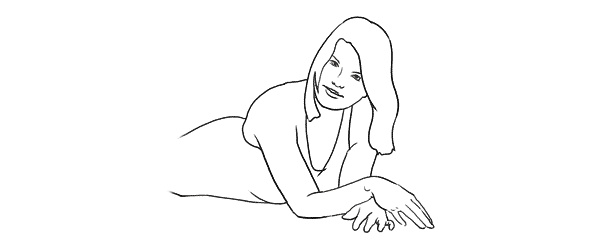
Pose 2

Pose2

Very similar pose as the first one, but this angle is better for including longer model’s body line in the frame. And notice that one of the model’s legs is bent in the knee. This helps to raise her bum up for a better looking body shape.

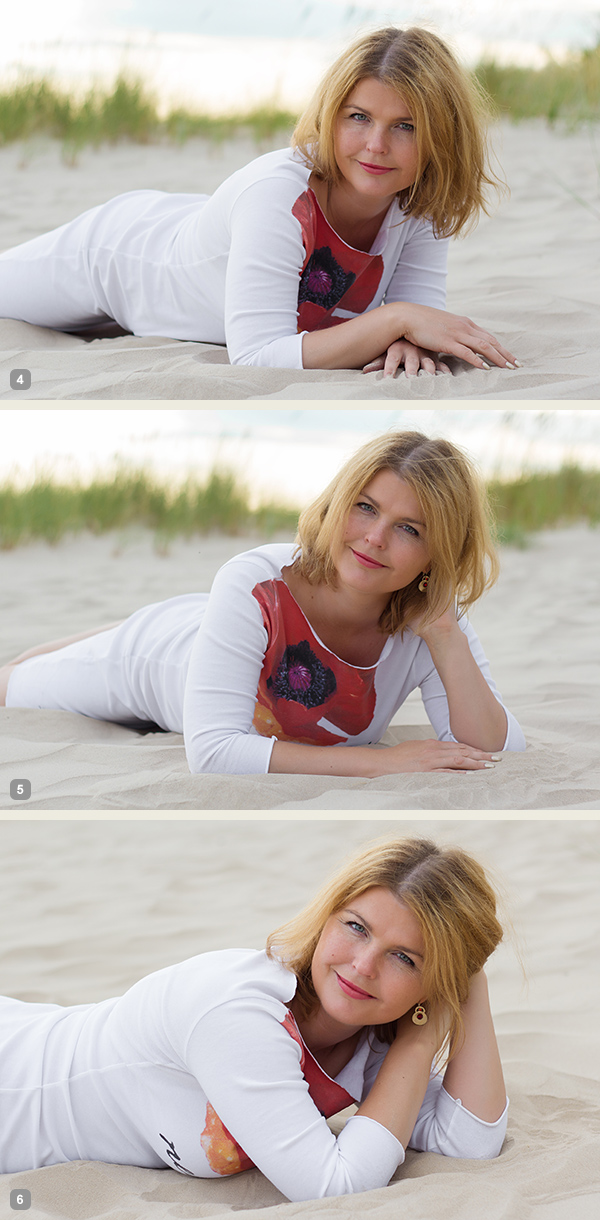
7poses3 2

Photo 4: If you compare this shot with the first one, you will notice that it is nearly the same pose, but the changed angle gives different look to the image.

Photo 5: And again I continued with different hand placement. Note that hand doesn’t support the head, it actually doesn’t support anything, it’s just placed in the hair.

Photo 6: And one more hand placement variation and tighter cropping.

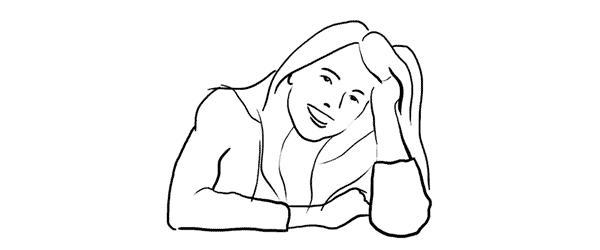
Pose 3

Pose3

Another very similar pose to the previous ones, the main difference again is the shooting angle – right from the front. At this point the model hasn’t even moved from the initial position, it’s the photographer who moves gradually around her.

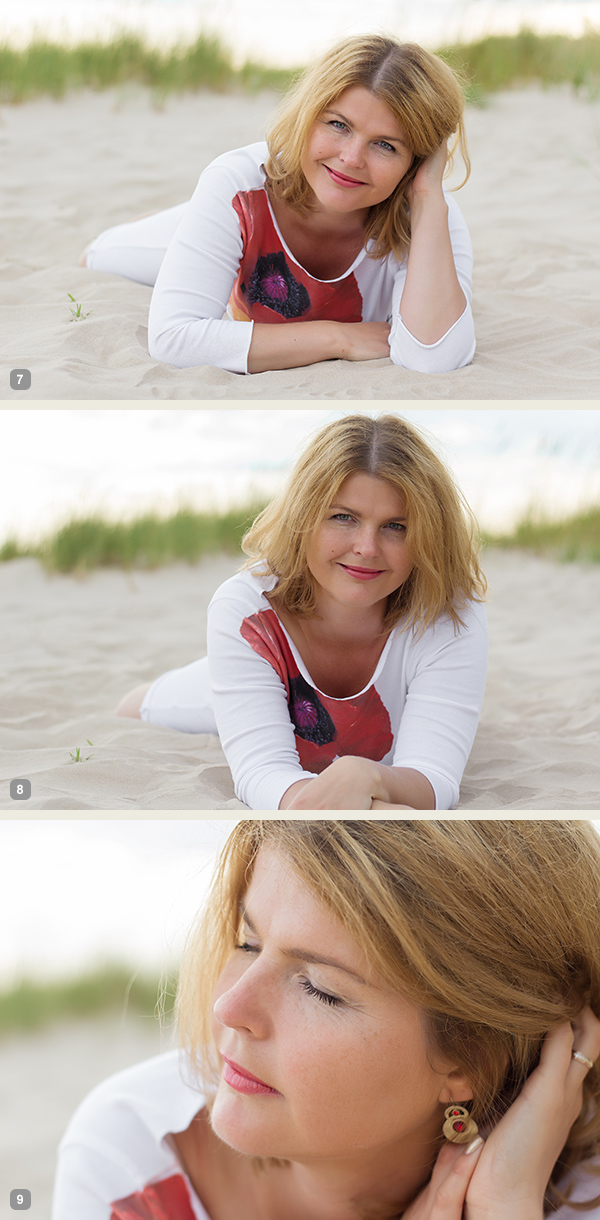
7poses3 3

Photo 7: Here the model already started to repeat the gestures from earlier shots. Don’t be afraid to take these nearly similar poses as these minor variations might be invaluable when selecting the final choice of images in post production.

Photo 8: The variations with both hands stretched in front.

Photo 9: And close-up crop again, but this time with the eyes closed.

Pose 4

Pose4

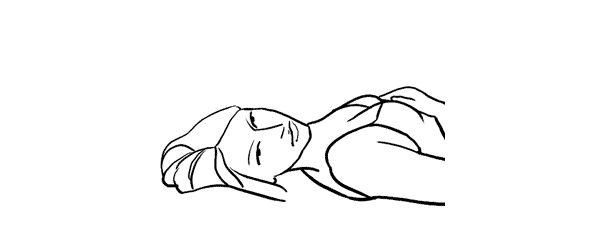
We continued with the next easy and straightforward lying down pose.

7poses3 4

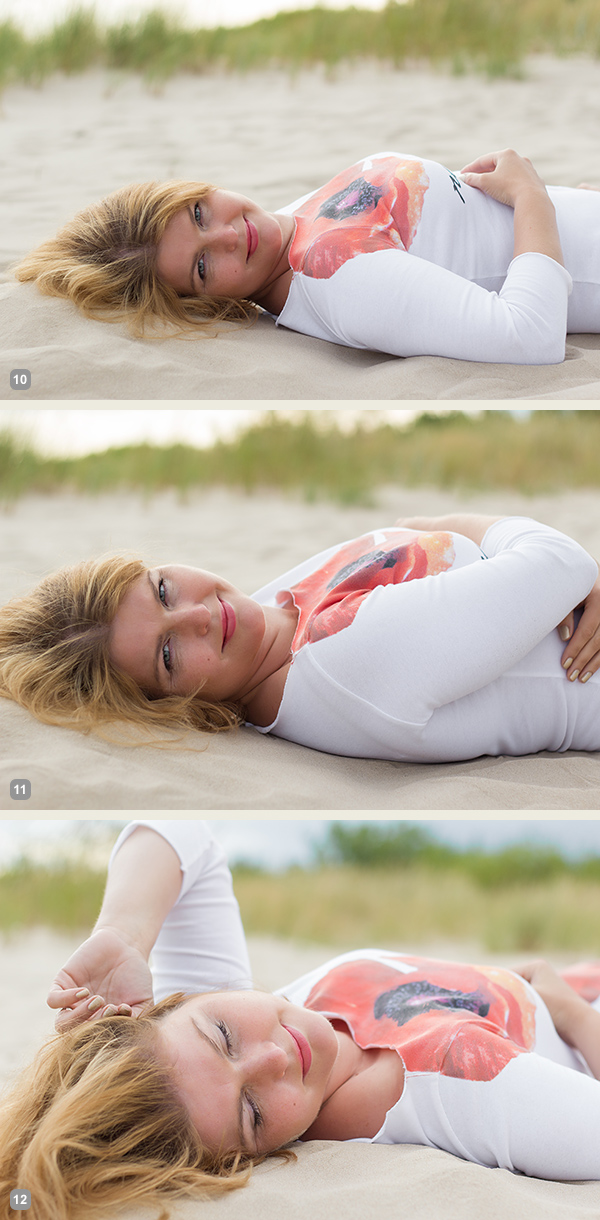
Photo 10: An easy to describe and really easy to execute pose.

Photo 11: Again, only couple of options to change here. Arms could be connected under the breast line as in this example. The arms could also be stretched back behind the head for another variation.

Photo 12: And in this photo the model tried to achieve kind of dreamy look with eyes closed and hands placed asymmetrically.

Pose 5

Pose5

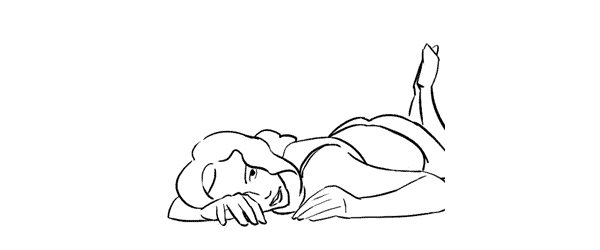
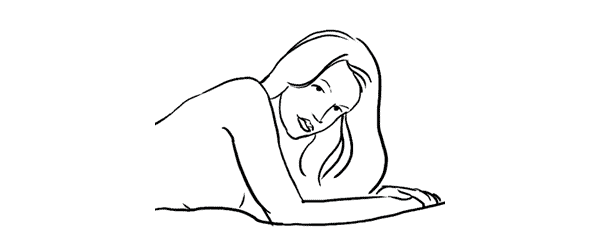
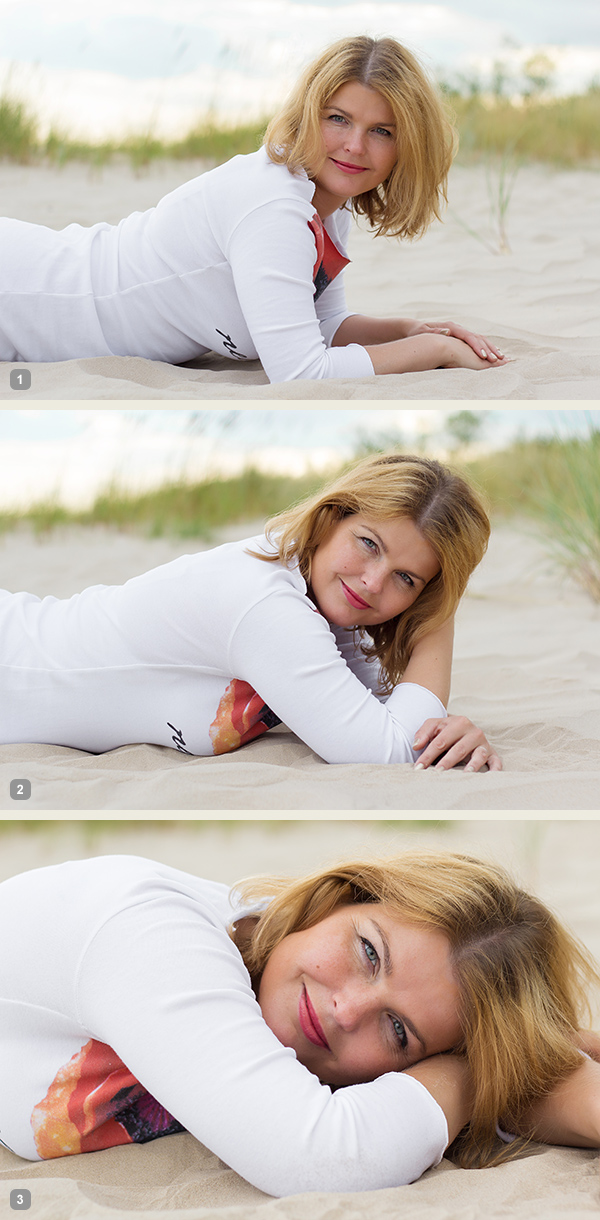
Lying down very low. Works very good as well for close-up portrait shots.

7poses3 5

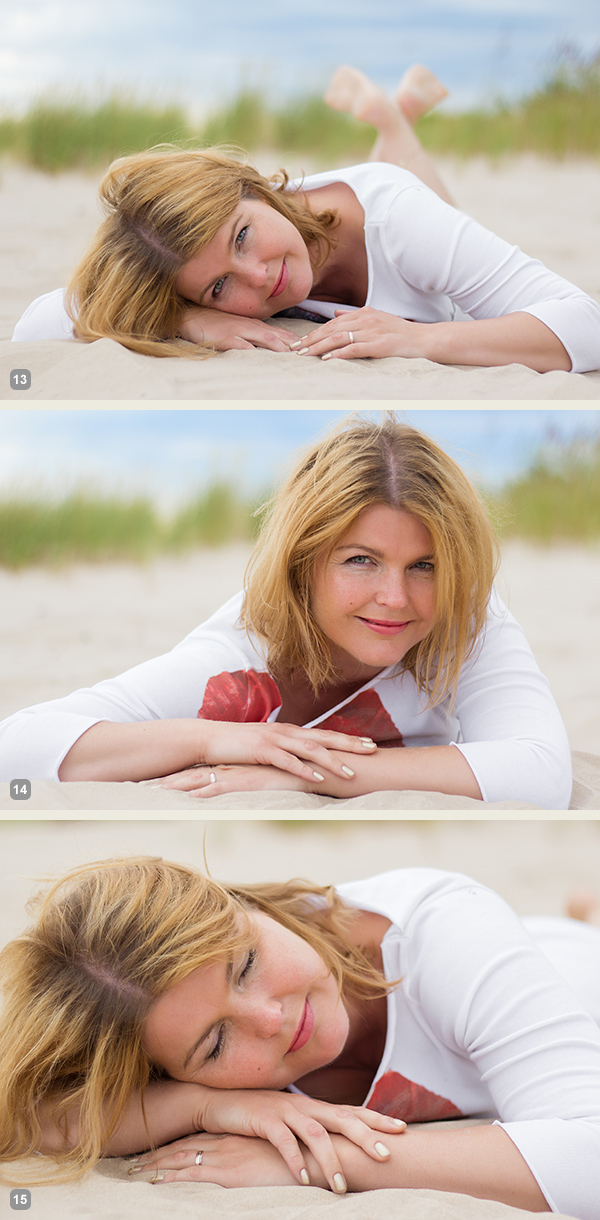
Photo 13: As my model was lying on the sandy beach, I asked her to support the head on the hand, but in other settings the head might as well touch the ground.

Photo 14: Here I asked the model to raise the head higher and keep the hands placed asymmetrically.

Photo 15: And the next variation was sleeping pose with eyes closed.

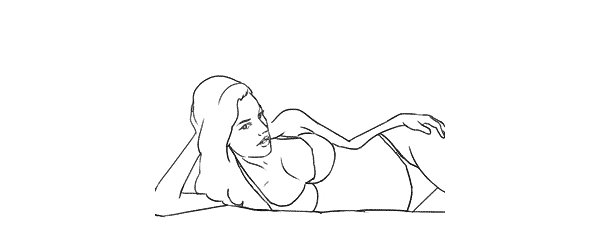
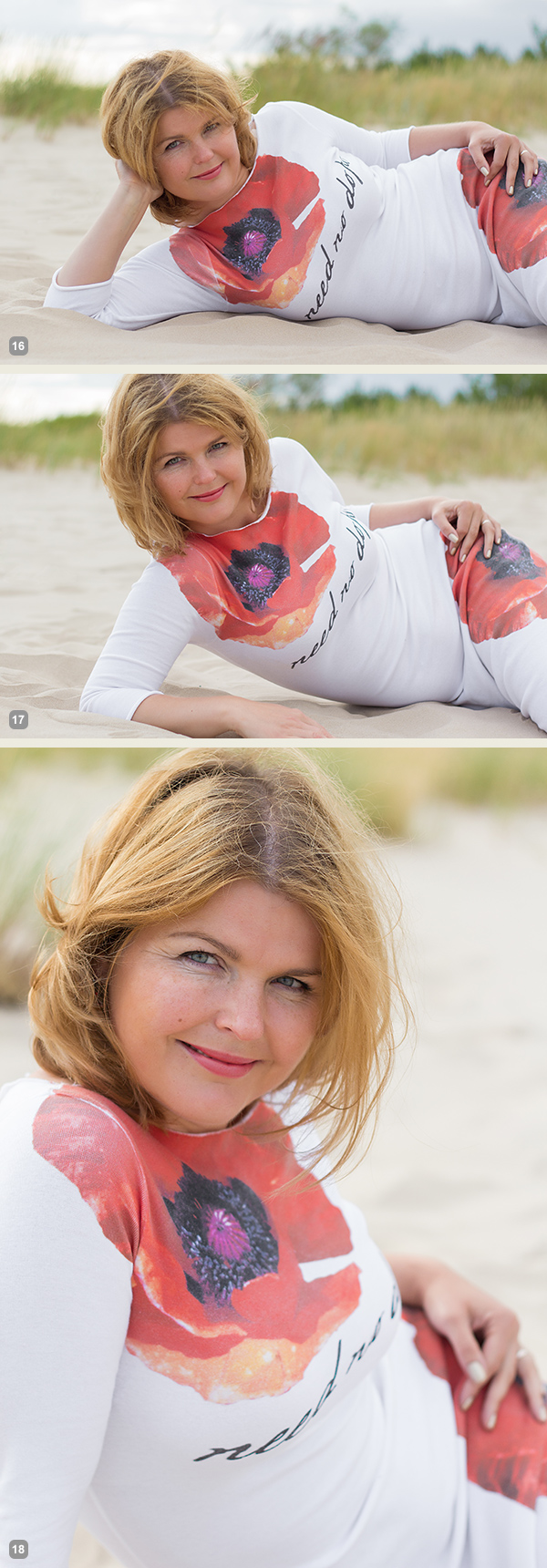
Pose 6

Pose6

Lying down on the side. Couple of points to check. The left leg is crossed over the right. The left arm is rested on the hip and partly hidden behind the body. The right hand is placed under the head but it supports it with only the tips of the fingers. If the model’s head would be fully supported by the hand the pose would just indicate tiredness.

7poses3 6

Photo 16: Following the previously described instructions, the model easily recreated the sample pose.

Photo 17: Here basically only the right hand’s placement is different. And placing it down on the ground instantly raises her upper body higher.

Photo 18: From there she straightened the supporting hand and raised the body even more higher.

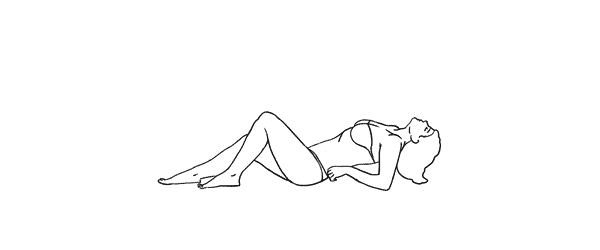
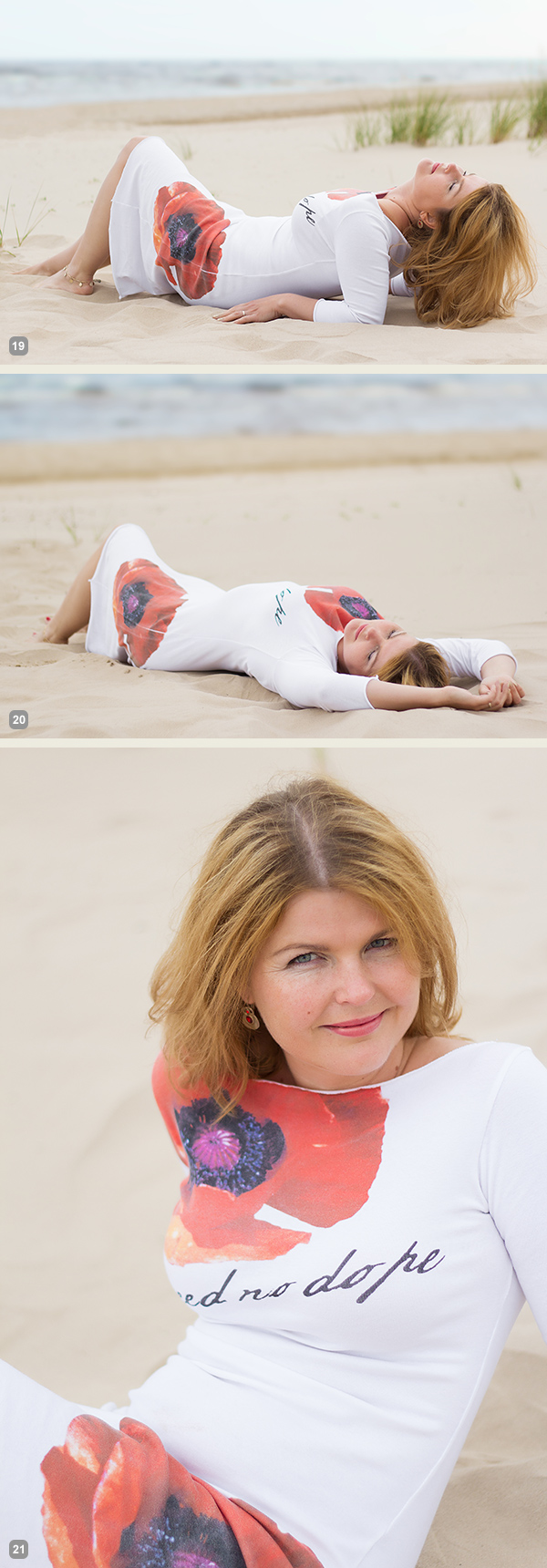
Pose 7

Pose7

And finally a bit more demanding pose. The biggest challenge for the model is to keep an air of relaxation. Ask her to fold her head back as far as possible while slightly facing it to the camera. And this posture for sure works best with eyes closed.

7poses3 7

Photo 19: If the model can manage to look relaxed, the results will be rewarding.

Photo 20: This pose is a nice variation to the previous one as it’s far more simple for the model to recreate.

Photo 21: And here I asked the model to raise higher up and took the shot from above.

So, together with the previous articles – 7 standing poses [Part I] and 7 sitting poses [Part II] – you now have lots of poses to choose from. For more variation and a more dynamic result I would suggest to choose a few from each article and mix them in a single shoot. You will very soon discover that even a small number of starting poses is more than enough to have a great, productive session.

All of these illustrations and many more posing samples are available on Posing App for your mobile devices.

Kaspars Grinvalds is a photographer working and living in Riga, Latvia. He is the author of Posing App where more poses and tips about people photography are available.

Post originally from: Digital Photography Tips.

Check out our more Photography Tips at Photography Tips for Beginners, Portrait Photography Tips and Wedding Photography Tips.

Posing Guide for Photographing Women: 7 More Poses to Get You 21 Different Photos [Part III]


Digital Photography School

 
Comments Off on Posing Guide for Photographing Women: 7 More Poses to Get You 21 Different Photos [Part III]

Posted in Photography


Buyers’ Guide: Best DSLRs and ILCs for under $1000

29 Jun

dslrbargains.jpg

Good-quality DSLRs and interchangeable lens cameras (ILCs) typically provide plenty of manual controls, comfortable ergonomics, and support a legacy of lenses for years to come. But Old or new, getting hold of a quality digital camera still requires you to put down a decent chunk of change. In this article we’re going to look at ten of the best DSLRs and ILCs available for under $ 1,000. We’ve included current cameras that we really like, and last-generation bargains, too. Click through for a link to the full article.

News: Digital Photography Review (dpreview.com)

 
Comments Off on Buyers’ Guide: Best DSLRs and ILCs for under $1000

Posted in Uncategorized


A Guide to Shooting Outdoors in Low Light Conditions

22 Jun

A Guest Post by James Farley.

1

Shooting in low light as for many other forms of photography requires a bit of thought beforehand in order to get the most from the time you have, first and foremost will be making sure you have the right equipment with you.

Besides your camera and lenses, top of the list of things you will need will be a tripod, sturdier the better as exposures can get up to 30 seconds and sometimes even longer which is where even the slightest vibration or movement of the camera can ruin a shot.

2

Other items that you can get by without but if you have them will be very helpful include:

  • Remote release, these come in many forms, infra-red/wired/wireless, I’ve used all of them at some point or another and would now always opt for a wireless trigger, can be inexpensive and give you a good mix of reliability and range.
  • ?There are now also apps that you can use on your smartphone with a suitable cable that act as a release and can offer some great features above and beyond being a simple trigger, one I’ve used that is worth a look is called TriggerTrap

  • A torch – trying to get your camera to autofocus in very low light can be a right headache at times, shining a torch on your desired area of focus will allow it to lock on quickly (but remember to switch to manual focus when it has!)
  • ?Also useful for changing settings on camera and just generally seeing your way around!

  • ND Grad filters – by no means essential, but if still a bit of colour in the sky these can be helpful to ensure things in foreground are correctly exposed, particularly if already in shadow when beginning to shoot.
  • Warm clothes! Depending on where you are in the world, it can get very cold very quickly as it goes dark, nothing worse than standing round shivering as your 60 second exposure ticks very slowly by!

3

Personal safety is also very important to mention if you are out to shoot in limited light conditions, ideally take someone along with you, not least to give you someone to talk to, can get very boring waiting for long exposures to finish!, or at least tell someone where you plan to go and what time you expect to return. Carry a mobile phone and try not to make it obvious you have valuable equipment with you where possible.
You will probably already have locations in mind that are suitable for low light photography, I tend to find that cities offer the best opportunities and will set out with the intention of shooting specific buildings from various viewpoints, and then improvise as the night progresses and other things present themselves.

4

Artificial lighting can greatly enhance a dark scene, and if you use a narrow aperture, f/16 for example you should capture lights with a starburst effect to add some drama to the image.

Once you have found the composition you like the look of, set your tripod up ensuring it’s not in the way of others, if it has a bag hook as some do then hang your camera bag from it to give you a bit more stability.

Compose the scene in your viewfinder and use the torch as mentioned if needed to focus, then switch to manual focus which will stop the lens from ‘focus hunting’. At this point I will wait for any moving light sources such as vehicles to leave the composition so I can check the settings selected by the camera before then plugging these into the cameras manual mode to ensure they do not change when shutter is triggered.

5

If the scene is very dark, it may be the case that your camera cannot meter it sufficiently well to give a correct exposure (DSLR’s generally will not automatically select an exposure longer than 30 seconds), if this is the case, you will need to go into manual mode, choose your aperture and then select the cameras ‘Bulb’ mode which will open the shutter when you use the remote release, and keep it open until you press it again, this is where guesswork comes into it, you will need to try out some exposure times until the image is sufficiently exposed, use the histogram on back of camera to give you some idea of how far under/over your exposure is.

Longer exposures can also produce ‘noise’ within an image, similar to when using higher ISO’s, to reduce this most DSLR’s will have some sort of ‘long exposure noise reduction’ setting somewhere within the menu system, if you turn this on when you have taken your image, the camera will then close the shutter and take a similar length exposure. You won’t see this second exposure and it doesn’t get saved to your memory card, but the camera will use it to subtract any hot pixels showing from your original image which can greatly reduce noise, can get annoying though as every exposure will then take double the time to capture!

White balance can be tricky in low light with all kinds of artificial light spilling across your scene, for this reason I would suggest shooting in RAW to give you the flexibility to adjust this later, plus it will capture more detail in the image which can sometimes be an issue in very dark areas.

Don’t let rain put you off either, wet surfaces can look brilliant as light bounces off them!

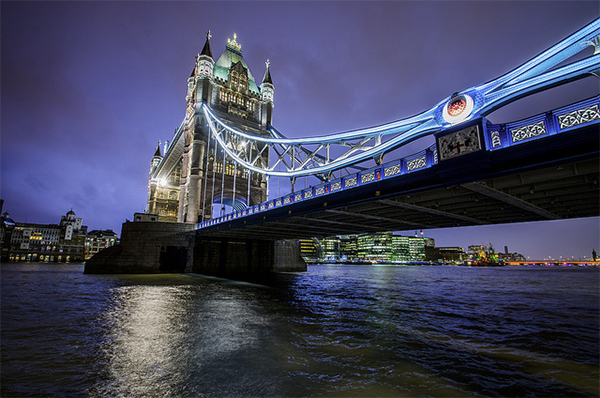
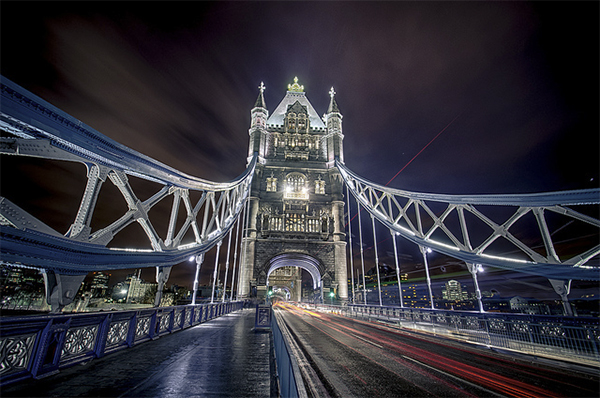
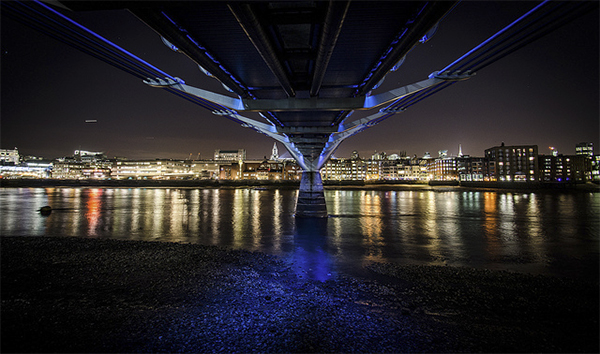
And if you are feeling really creative, timelapse sequences can look fantastic as the light slowly disappears, this clip was made from about 140 photographs taken on Tower Bridge in London.

Now just grab your coat and get out there!, love to see what you get if you’d like to share some links in the comments below.

James Farley is a semi professional photographer in the UK covering a wide range of genres, recently including wedding photography, and a self confessed ‘kit geek’.
More of his work can be found on Facebook and at www.jamesfarley.co.uk

Post originally from: Digital Photography Tips.

Check out our more Photography Tips at Photography Tips for Beginners, Portrait Photography Tips and Wedding Photography Tips.

A Guide to Shooting Outdoors in Low Light Conditions


Digital Photography School

 
Comments Off on A Guide to Shooting Outdoors in Low Light Conditions

Posted in Photography


Posing Guide for Photographing Women: 7 More Poses to Get You 21 Different Photos [Part II]

21 Jun

A post by Kaspars Grinvalds from Posing App.

If you haven’t read the first article in this series, I would kindly recommend you to start with Posing Guide for Photographing Women: 7 Poses to Get You 21 Different Photos – Part I where we started with 7 standing poses.

Let’s continue this time with 7 sitting poses for female subjects and their possible variations in order to get at least three different shots for each pose.

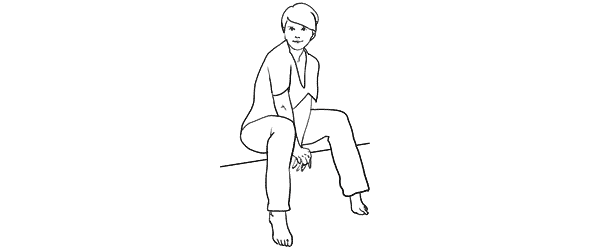
Pose 1

Pose1

Nice and simple pose to start with. Ask your model to sit comfortably with knees placed together. One hand relaxed on the knees while the other hand placed near the neck. And remind her to straighten the spine.

7poses2 1

Photo 1 – This basic starting point provides you with many different choices to continue with. But in the very beginning you may want to just test different shooting angles and heights and check what works best for your model.

Photo 2 – After I got the first shot similar to the sample, I asked the model to lower both arms and rest them on the knees.

Photo 3 – And finally I returned to the initial pose and took a close-up portrait shot.

Pose 2

Pose2

Another easy pose with hands placed together between the legs. Notice that arms should not be completely straightened, rather slightly bend at the elbows. Also in the sample pose it is illustrated that toes should be straightened in order to raise the knees slightly up.

7poses2 2

Photo 4 – The model easily recreated the sample pose and we could move on with some variations.

Photo 5 – This shot is exactly the same pose just taken from a side. Minor change but already different result.

Photo 6 – And again one more close-up portrait shot but this time the model is looking down her own body.

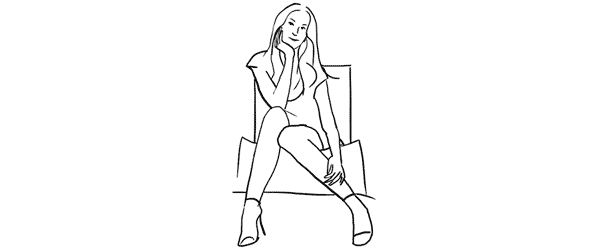
Pose 3

Pose3

Another very simple pose with one leg crossed over the other. And I have to say here that including the legs in the frame can be challenging because it doesn’t work with all body types. If your model is curvy, consider framing closer comps (for example as in photos with the previous pose).

7poses2 3

Photo 7 – My model was with slim body type, nice legs and stylish shoes, so I chose to go for a full height frame.

Photo 8 – In exactly the same manner as with the previous sample I simply took this shot from a different angle. The model didn’t change anything, just turned her head to the camera.

Photo 9 – After that we repeated the already tested posture with one hand close to the neck. This hand movement is a very nice variation and works in many posing scenarios.

Pose 4

Pose4

This pose however is even more demanding than the previous one because it is all about the legs and thus there is no point of cropping them out. And nice shoes are a must.

7poses2 4

Photo 10 – Recreating it isn’t hard as the pose is fun and creates nice and playful mood to the photo.

Photo 11 – Here the model is looking down and kind of fixes her shoe. Very subtle changes but completely different photo.

Photo 12 – And once again the same pose but taken from a side creates one more variation.

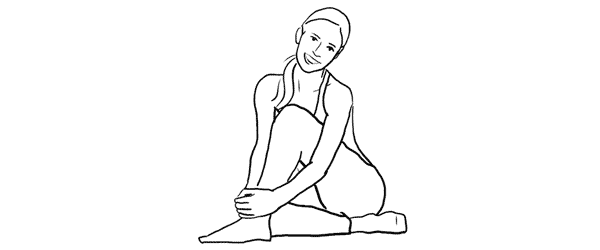
Pose 5

Pose5

Simple and easy pose for the model sitting on the ground. And to my mind, in contrast to the previous on the chair poses, sitting on the ground works better barefoot.

7poses2 5

Photo 13 – The pose is kind of very natural and is easy to recreate. And as a result the model looks really relaxed.

Photo 14 – After recreating the initial pose, different hand placement options are available. Here for example the model raised them and connected on the knee.

Photo 15 – Only two minor adjustments to the initial pose were made here. Putting one hand up in the hair and slightly curving upper body part to the side. This also lowers the raised knee. The result is another friendly and natural looking pose.

Pose 6

Pose6

Another easy sitting on the ground pose. Very suitable for different close-up portrait shots.

7poses2 6

Photo 16 – While sitting in the initial pose try making two different versions with only the front arm and then with both arms raised on the knees. Both versions works well.

Photo 17 – A slight hand placement variation. This variation works very well for tight crops.

Photo 18 – And don’t be afraid to be spontaneous from time to time. This photo was just an improvisation on the go while sitting in the initial pose.

Pose 7

Pose7

And finally I purposely chose also one simple portrait pose for the sitting samples. Despite the fact that only face is visible in the frame, it’s more comfortable for the model to recreate it while being seated.

7poses2 7

Photo 19 – Here I tried to illustrate the previous statement and showed the sitting position. You may visualize how it would work cropped only around the face.

Photo 20 – Keeping the “portrait with hands around the face” concept in mind, try different variations by moving hands around and making different head tilts.

Photo 21 – In order to achieve the most natural postures in the image ask the model to really move hands around. In this particular example she moved her hand through her hair and I made several shots and afterwards chose the best hand position.

So, this was a process of using 7 sample poses as the starting point to create 21 different photos. I encourage you to try this approach to posing your subjects in a similar workflow and most probably you will find your own and even better ways to achieve some great results.

All of these illustrations and many more posing samples are available on Posing App for your mobile devices.

Kaspars Grinvalds is a photographer working and living in Riga, Latvia. He is the author of Posing App where more poses and tips about people photography are available.

Post originally from: Digital Photography Tips.

Check out our more Photography Tips at Photography Tips for Beginners, Portrait Photography Tips and Wedding Photography Tips.

Posing Guide for Photographing Women: 7 More Poses to Get You 21 Different Photos [Part II]


Digital Photography School

 
Comments Off on Posing Guide for Photographing Women: 7 More Poses to Get You 21 Different Photos [Part II]

Posted in Photography


15 June, 2013 – LuLa’s Advanced Guide to Lightroom 5 Now Available

15 Jun

We have just published our Advanced Guide to Lightroom 5. This "live" video tutorial, with Jeff Schewe, Michael Reichmann and Adobe’s Eric Chan provides an in-depth explanation at all of the new features in Adobe Lightroom 5.

You’ll find a comprehensive Table of Contents here, and you can click directly on this link to purchase. No waiting, no taxes – available immediately to anywhere in the world.

Our Advanced Guide to Lightroom 5 is available for an introductory period at just US $ 19.95, a 20% discount over the regular price.


The Luminous Landscape – What’s New

 
Comments Off on 15 June, 2013 – LuLa’s Advanced Guide to Lightroom 5 Now Available

Posted in News


Video Guide: Smartphone vs Digital SLR

14 Jun

newas.jpg

We’ve just posted the first in what we hope will be an ongoing series of short videos aimed at the novice photographer. In this first segment our hosts Jordan and Mark compare the results from a smartphone and an entry-level digital SLR in everyday shooting conditions such as low light, moving subjects and the challenge of capturing a flattering informal portrait. In future spots we’ll be covering more practical shooting advice and diving into creative techniques in an effort to help beginners choose the right gear. Click on the thumbnail to watch the video right here on the homepage.

News: Digital Photography Review (dpreview.com)

 
Comments Off on Video Guide: Smartphone vs Digital SLR

Posted in Uncategorized


13 June, 2013 – The LuLa Guide to Lightroom 5 is Coming

13 Jun

We’re just completing the final editing of our brand new Advanced Guide to Lightroom 5. Only a few more days until it’s available.

In the meantime, you can watch the opening chapter.


The Luminous Landscape – What’s New

 
Comments Off on 13 June, 2013 – The LuLa Guide to Lightroom 5 is Coming

Posted in News


Women Posing Guide in Action: 7 Sample Poses – 21 Different Photos

04 Jun

A post by Kaspars Grinvalds from Posing App.

Previously published articles in the Posing Guide series contained hand illustrated posing samples as a guide or reference during your photo shoots. Based upon feedback and questions I received about these guides, I wanted to describe the process in a little more detail and show some real photos created while using these posing techniques.

I’d like to begin by stating once again – the main purpose of using posing samples is only to get your model into some starting point. That’s it. You don’t need to (and quite often you wouldn’t be able to) precisely recreate even the simplified illustrated pose.

This will be a three part series looking at standing, sitting and laying down poses for female models. For the the first article I chose seven sample standing poses and by slightly adjusting each pose I got 21 different photos. Now, let’s take a look at this process.

Pose 1

Pose1

It is a good idea to start your photo shoot with some very basic, easy pose. That’s why I chose this one to begin with. It’s easy to describe and easy to understand – “portrait shot from a side”. So you might start with saying to your model “Ok, turn with your side towards me, turn your head to me and look right over the shoulder at the camera. Straighten your spine and keep hands loose by sides.”

7poses 1

Photo 1 – With these instructions you should get something like the first picture. The next thing without changing the pose, is to “find” the face expression you’re looking for. You may want to try moving from very subtle smirks to stronger smiles or even laughter. And once you have the expression (or different ones) you’re after, tell and show it to the model. Thereby it will be easy for the model to learn and repeat it.

Photo 2 – After I got the simple and kind expression I was looking for, I slightly changed my position and asked the model to keep looking back over her shoulder to the camera. Exactly the same pose, just taken from another angle and you already have a slightly different photo.

Photo 3 – Also many different looking directions and head tilts are possible. In this particular example I asked the model to look back down her body. This look works very well in many posing situations, creating yet another variation just by slightly adjusting the starting pose.

Pose 2

Pose2

Seeing this sample illustration you should grab only the basic idea – “portrait shot with hands around the face”. That’s all you need for playing around with initial sample pose. Eventually you will come up with some nice variations of your own.

7poses 2

Photo 4 – Before getting to the hands, ask the model to stand facing the camera and support her body weight on just one leg. This instantly curves her body and her shoulder line is shifted. After that ask her to gently move her hands around the face and in the hair. Generally look for asymmetrical hand placements, but as you can imagine – many variations are possible.

Photo 5 – In this shot the only difference is slight tilting of the head and putting one hand behind the hair.

Photo 6 – To differentiate the look and feel, I once again asked the model to look down her own body and cropped tighter around the face. And again with only minor adjustments from one pose we’ve got 3 different photos.

Pose 3

Pose3

Another easy pose with very simple idea – “hands connected on the chest”. Notice that hands are not really “crossed”, but “connected”. Also you should warn your model not to grip them too tight or press upper arms against the body. Simply put, the posture should feel comfortable and subtle.

7poses 3

Photo 7 – Before taking this shot, I showed the model the sample illustration and she tried to recreate it. This is as close as you usually get if you recreate the sample pose.

Photo 8 – The outlines don’t and won’t match perfectly. In this particular example I took a shot from higher angle aiming slightly down because I saw that this angle works better for the model.

Photo 9 – Another simple way of transforming the pose is simply mirroring it the other way around. And to even more differentiate it from the first shot, I asked the model to lean against a wall.

And then I moved closer and took a head shot for just another variation of the same pose.

Pose 4

Pose4

This simple pose is again self-explanatory – “the model turned to the side with one hand on the waist”. That’s all I tried to recreate.

7poses 4

Photo 10 – Here I started straight away with mirroring the sample pose because this was the better looking side for my model. Remember that it is different for each person. If you are not sure, take both variations and ask your model which one she prefers.

Photo 11 – From side view I followed to 45 degree position and asked the model to keep looking to the camera.

Photo 12 – Lastly, I just moved farther away for wider frame. The same pose, but these minor variations provide you with greater choice of images to select from in post.

Pose 5

Pose5

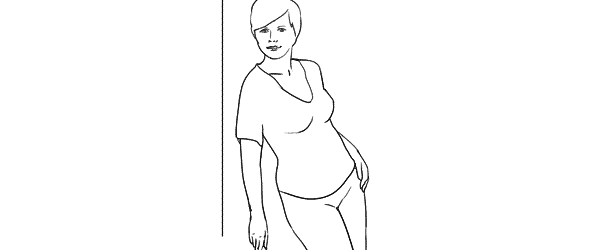
This pose provides simple yet elegant at the wall concept – “standing at the wall with hands behind the back”.

7poses 5

Photo 13 – Start with asking your model to support herself at the wall with her back. After that the first thing to take care of is shifting her body weight on one leg with the other crossed over it. Even if the legs are not visible in the frame, it is critical for forming the model’s body in S shape. Then ask her to place her hands behind her back asymmetrically. Finally ask her to lean forward slightly away from the wall with her upper body part.

Photo 14 – As usual I tried changing my shooting angle and took the next shot more from a side.

Photo 15 – And I continued to experiment with slightly different hand placement and head tilt. These images might be very similar, but most probably your subjects will be grateful for this kind of choice.

Pose 6

Pose6

Another at the wall pose but this time with the model facing the wall. Easy to describe and recreate. Both hands are gently placed on the wall right in front of her just below the breast line.

7poses 6

Photo 16 – With the previous instructions the model easily achieved the described pose. And again I chose mirroring the sample illustration which already is one variation for any pose.

Photo 17 – Here I changed the shooting angle nearly parallel to the wall and cropped for a portrait shot.

Photo 18 – Finally the model changed the hand placement asymmetrically for just another variation.

Pose 7

Pose7

This is a bit more challenging pose than the previous ones, so definitely some guidance for the model is required in order to recreate it.

7poses 7

Photo 19 – The trick for the model here is to stand slightly off the wall and support herself against the wall with the front shoulder only. Front hand is loosened by the wall. After that the model should support the body weight on the outer leg, kicking the hip out with the inner leg crossed over. The back arm rests on the hip and the elbow is pulled behind her back.

Photo 20 – After managing the starting pose I started to variate it. Here I moved closer for tighter crop and asked the model to lean slightly forward along the wall.

Photo 21 – And finally I asked the model to turn sideways, supporting against the wall with both shoulders. And to further differentiate the shots I asked her to look down her body.

So, that’s it. Out of 7 sample poses we managed to get 21 different shots. And as you can easily imagine, even these are only samples, adjustments and variations are indeed endless.

All of these illustrations and many more posing samples are available on Posing App for your mobile devices.

Kaspars Grinvalds is a photographer working and living in Riga, Latvia. He is the author of Posing App where more poses and tips about people photography are available.

(function(d){
var f = d.getElementsByTagName(‘SCRIPT’)[0], p = d.createElement(‘SCRIPT’);
p.type = ‘text/javascript’;
p.setAttribute(‘data-pin-hover’, true);
p.async = true;
p.src = ‘//assets.pinterest.com/js/pinit.js’;
f.parentNode.insertBefore(p, f);
}(document));

Post originally from: Digital Photography Tips.

Check out our more Photography Tips at Photography Tips for Beginners, Portrait Photography Tips and Wedding Photography Tips.

Women Posing Guide in Action: 7 Sample Poses – 21 Different Photos


Digital Photography School

 
Comments Off on Women Posing Guide in Action: 7 Sample Poses – 21 Different Photos

Posted in Photography