RSS
 

Posts Tagged ‘Guide’

A Step By Step Guide to Making Your First Panorama Photo

08 May

Image 4

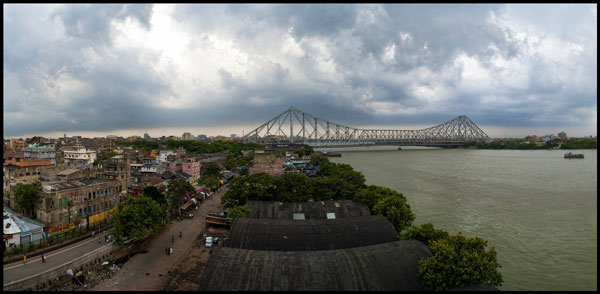
While visiting an art gallery or a photography exhibition, at times you may have noticed certain landscape photographs have extremely elongated fields of view. They seem quite impossible to have been photographed with a standard camera. If you wonder how such elongated photographs are made, you are not alone. I had my first encounter with a panoramic image of the Himalayan mountain range being displayed at Das Studios in Darjeeling, a Himalayan resort town in West Bengal, India. That photograph had a huge impact on me and it led me to searching for ways and means to photograph panoramic images.

During my initial search I figured panoramas were probably made with highly specialized cameras and lenses. But, to my surprise I found that panoramic photographs can be made with any kind of camera at your disposal. All you need is a camera, preferably one capable of shooting in Manual mode. Yes, with certain cameras and Smartphones you can get Apps for recording a panorama in a sweep but I never found the results quite satisfactory. Shooting your own panorama gives you the creative freedom and a sense of satisfaction.

How to shoot a panorama

A panorama is a combined set of individual photographs, in which two adjacent photographs have at least 20% overlapping areas. These two, or more, overlapping photographs are “stitched” with the help of software to produce extremely elongated fields of view. The overlapping is required as the software is able to understand the common areas in two adjacent photographs and hence can eliminate duplication of a scene by stitching the same into a single photograph.
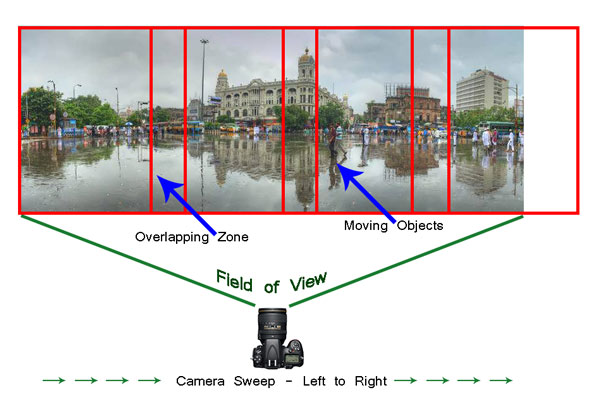
Image 1

Before shooting a panorama, you need to plan out well. Here is a list of guiding factors for creating your own panorama.

#1 Shoot in Manual Mode

Since a panorama is shot over a large field of view where lighting conditions can be different, it is imperative to shoot in Manual mode with Manual Focus. This will ensure all the photographs shot have an exact exposure value and focus throughout all the images. Shooting in Automatic, Program or Semi-Automatic modes (like Shutter priority or Aperture priority) will result in different exposure values for each photograph, which in turn may cause the final merged photograph to have varied exposure and color casts in different parts of the photograph.

#2 RAW or JPEG

While you generally want to shoot in RAW, it is preferable to switch to JPEG for panoramas. Shooting in RAW is absolutely fine, but since the photographs will not be edited individually (we will see this at a later stage) and to reduce shutter lag, shooting in JPEG is preferred. A word of caution – as we will be shooting in JPEG make sure the exposure values are correctly adjusted.

#3 Tripod or handheld?

If the weight of your tripod is not a factor, carrying it is always preferable. However on a bright day you can very well rely on your own hands. A steady posture, or using your camera bag or any sturdy object available to rest the camera on, will save you the weight of carrying a tripod.

#4 Horizontal or vertical

We are generally accustomed to shoot in Landscape (horizontal) mode. Shooting in Landscape is fine but the resulting panorama will be short in height, since Landscape photographs will be stitched together. Additionally, during the stitching process there will be a lot of redundant or blank areas (you will see later during the post-processing) which need to be cropped out. This will further reduce the height of the panorama. To overcome this issue you may choose to shoot the panorama in Portrait (Vertical) mode. This will help in achieving a greater image height which can be cropped out as per requirement, say for printing or aesthetics.

#5 Be fast

Be very quick in shooting since light conditions change fast. Additionally if you are shooting a cityscape, a populated beach or a scenario where there is movement, be cautious. If you are not shooting fast enough, you will find moving objects (e.g., people, cars, bikes) will be duplicated across the frames. You would not want to see the same object twice across the panorama.

# 6 Plan it out well

Stand at the selected spot and plan the number of shots in advance. This will help you in keeping a control of the number of shots rather than shooting randomly. Be sure to do a mock round without actually shooting.

When you are ready, start shooting from left to right. Make sure you have at least 20% overlapping areas in two consecutive photographs. An visual estimate will suffice. Look through your viewfinder and shoot. Do not look at the individual photographs on your LCD screen until you finish shooting. Before leaving the scene turn on the LCD screen and review the photograph series. If you are not happy, shoot again.
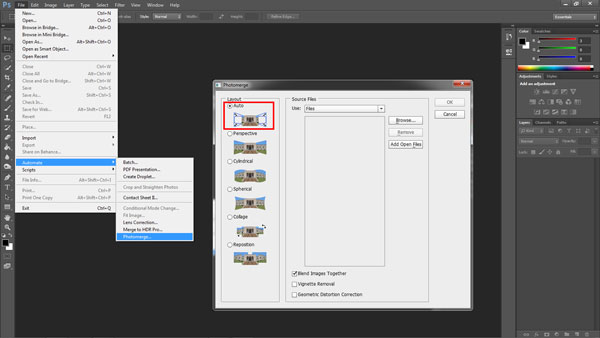
Image 2

Stitching your panorama

The sext step is stitching your panorama. There are plenty of panoramic stitching software available on the internet. I will put a list of links to some of the best software at the end of this article. The stitching process is similar across software but as of now we will use the standard photo editing tool – Adobe Photoshop. The stitching process in Adobe Photoshop is fully automated.

Since you may have shot more than one panorama series, for the purpose of identification it would be easier to store each series in a separate folder. You may have shot in JPEG or RAW but make sure you do not edit individual photographs.

Steps to stitch a panorama:

  1. Open Photoshop
  2. Click File > Automate > Photomerge
  3. “Auto” is the default Layout option. Photoshop analyzes the source images and applies either a Perspective, Cylindrical, and Spherical layout, depending on which produces a better Photomerge. Choose “Auto” if it is not selected by default.
  4. Check “Blend Images Together”
  5. Next Click “Browse” and locate the separate Folder where you have put in your panorama series. Select the series and click “Ok”
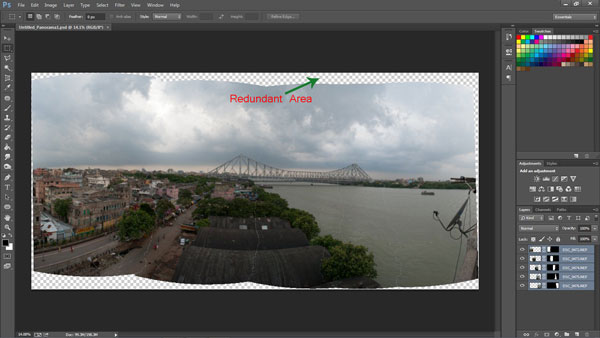
Image 3

  1. Depending on the number and size of the photographs, it may take a while for Adobe Photoshop to stitch together the images.
  2. After the stitching process is completed you will find a roughly shaped panorama (with a few redundant spaces). Refer to the image above
  3. Right click on a Layer in the Layers panel and click Merge Layers
  4. The next step is to use the Crop Tool to trim out the redundant portions of the panorama
  5. After the final touches you are done with your very own first panorama
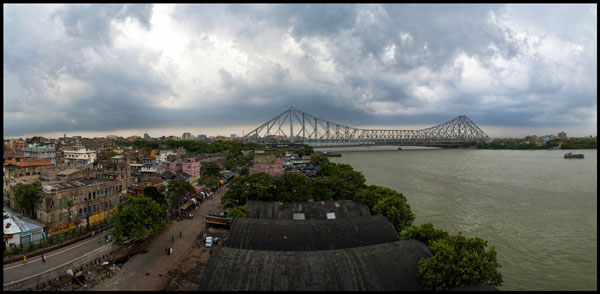
Image 4

Links to panorama stitching software:

  • AutoStitch
  • pTGui
  • Hugin
  • Autopano
  • Microsoft Image Composite Editor

If this is the first time you are creating your panorama, I would love to receive your feedback or to share your panorama in the comments below.

The post A Step By Step Guide to Making Your First Panorama Photo by Soumya Shankar Ghosal appeared first on Digital Photography School.

Digital Photography School

 
Comments Off on A Step By Step Guide to Making Your First Panorama Photo

Posted in Photography


Putting Personality Into Your Pictures: A How-to Guide

05 May

What makes a great photograph? There a hundreds of fundamentals – from lighting to image structure, depth, color, personality and composition. Mastering the art of photography is what evokes emotions and makes people’s jaws drop when they see that image. Art is not what you see, but what you can make others see – Edgar Degas. Adding, revealing and capturing Continue Reading

The post Putting Personality Into Your Pictures: A How-to Guide appeared first on Photodoto.


Photodoto

 
Comments Off on Putting Personality Into Your Pictures: A How-to Guide

Posted in Photography


Versatility – Your Guide to Shooting Great Travel Photography

05 May

Professional travel photographers realize that the key to their business is versatility: to be able to shoot all styles of photography, and to consistently capture great shots even under very trying conditions. To be a strong assignment photographer you must identify your weakness and then work on it.

Instead of concentrating on what you shoot well why not break out of your comfort zone and try something more challenging? Some of the most experienced photographers from The WideAngle network give us their insights into a few of the specialized fields of travel photography.

DPS1 DALE MORRIS

Image by Dale Morris

PHOTOGRAPHING WILDLIFE

British born wildlife photographer Dale Morris has built a reputation as one of the most widely published photographers in South Africa. His background as a trained naturalist allows him to capture aspects of the natural world that many photographers would miss.

I’m a firm follower of the philosophy that wildlife photography is not only about getting a great image but equally about taking time out to observe, and more importantly, really enjoy the experience of being in the company of wild animals. It helps to understand that every animal stands at the center of its own concentric set of invisible circles and if something unusual (a photographer for example) steps across the outermost boundary, the animal will react (usually by becoming more alert to your presence). Move across the next circle in the set too soon and an imaginary alarm is triggered. You are now running the risk of eliciting a flight or fight response. An animal’s rear end vanishing post-haste over the horizon rarely makes for a good photo, nor does a trampled and gored camera. Move slowly and in a non-threatening manner. The secret to wildlife photography is patience, empathy, awe and a true appreciation for your subject matter.

SHOOTING MOVEMENT

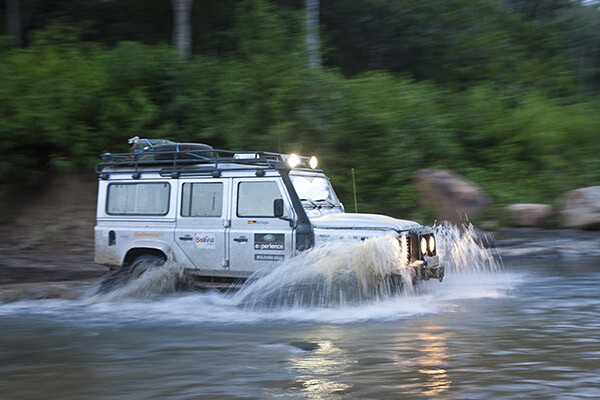
Craig Pusey is a dedicated motoring and expedition photographer, who’s never scared to go the extra mile for a shot. You might see him scaling an Indonesian volcano or lying face down in an Andean stream just to get the perfect angle.

DPS2 CRAIG PUSEY

Image by Craig Pusey

The perfect panning shot takes practice. For people and animals moving perpendicular to you, aim to keep your shutter speed between 1/15th and 1/90th of a second to get a bit of blur. For faster things, like cars or galloping horses, set a speed of between 1/60th to 1/125th. Try to focus just ahead of the moving object and if you have the opportunity shoot a trial pan before your subject even arrives. (This will check exposure and focus but also make sure that no obstacles are going to get in the way of your pan…it also limbers you up!).

It’s best to start with a higher shutter-speed and then work down, but it’s also dependant on distance from you to the subject. The farther away, the lower your shutter speed will need to be to show the effect of panning. With practice you can shoot slower, and will be better be able to judge the object’s speed.

SHOOTING ARCHITECTURE

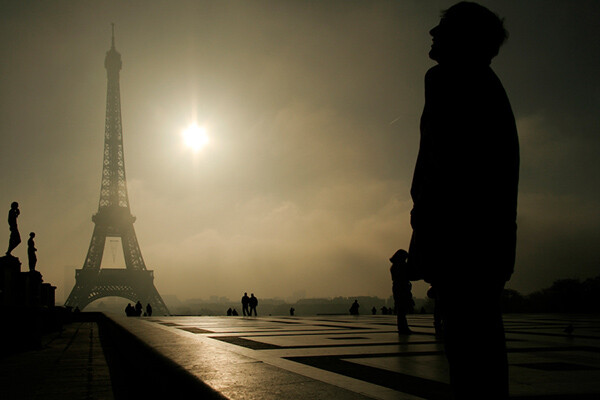
Laurence Garçon is an experienced Parisian artist, publisher and assignment photographer. She has travelled widely but has retained an unshakeable love affair with her hometown and is recognized as one of the city’s most visionary photographers.

DPS3 Laurence Garcon Misty Morning

Image by Laurence Garçon

Firstly, be aware of the highlights. Play with the speed and the aperture of your camera to avoid over-exposing sunlit walls, etc. Secondly, try to frame a composition that will best display the building. Be prepared to wait a while for something to happen (a passer-by, a vehicle): this could be the element that will be capture the soul of the quarter. Be aware that, in some countries you may need specific permission to photograph some particular buildings (especially airports, military buildings, ministries, embassies, sometimes even bridges). If you plan to publish your photograph of a single (isolated) contemporary building, try to always mention the name of the architect.

PHOTOGRAPHING INDIGENOUS PEOPLE

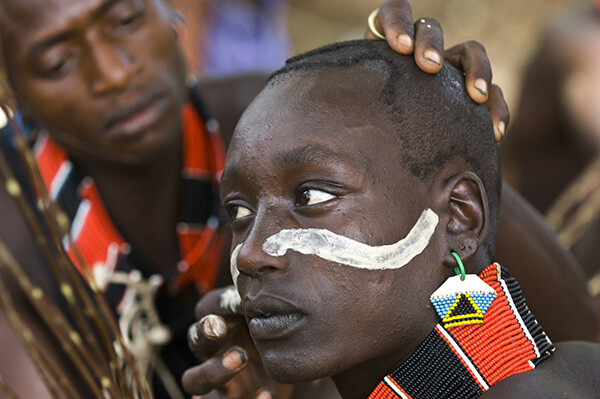
Axel Fassio left his home in Italy to travel the world (everywhere from Antarctica to Iceland) on assignments. In 2013 he won a first prize at PX3 Prix de la Photograhie Awards in Paris and a 3rd at the International Photographic Awards. He’s currently based in Nairobi.

DPS4 Axel Fassio

Image by Axel Fassio

Ideally, if time allows you should approach a community without a camera and hangout a bit, getting to know the elders and playing with the children. The last thing you would want to do is have to rush to take pictures. Resulting images would lack of spontaneity. A few hours are enough to create a basic ‘relationship’ within the community and the resulting images will benefit hugely.

If your time is limited, always contact the elders and ask permission to take photos. A money arrangement is common when time is tight but it’s not desirable. Negotiating to pay for each images tends only to produce aggressiveness among the people, bad memories for you and usually this shows in the shots.

Longer zoom lenses can be used to “steal” candid portraits and a wide-angle held at waist level often has the effect of bringing the viewer more intimately into the scene. It is always better to avoid clearly aiming at a person unless he/she is very comfortable and is agreeable to being photographed. In this case, a medium-length zoom is perfect for portraits.

DPS5 Wylie Maercklein

Image by Wylie Maercklein

SHOOTING PORTRAITS

Wylie Maercklein is an experienced Texas-based photographer and videographer with a specific talent for powerful portraits.

Portraits are similar to other action shots to me, in that you’re just waiting for the right moment. With a group, that moment is something larger – an externalized emotion. An action. With an individual portrait, it’s an internalized thing – it’s the moment when their defences drop just a little and you see something living behind their eyes.

LOW LIGHT AND NIGHT PHOTOGRAPHY

British photographer Jonathan Perugia has built a reputation as one of the most prodigiously published assignment photographers in the business. In addition to his freelance work he leads photography holidays with Authentic Adventures.

I love the way cities look after sunset, so I shoot a lot in low light. If you want to really explore this kind of photography, then adding a fast prime lens to your collection (if you use a DSLR) is invaluable. I use the Canon 50mm f/1.4, which is pretty good value. Another invaluable bit of kit is a tripod. Go for something as sturdy, but as light, as you can afford. Carbon fibre is ideal. Try to avoid anything flimsy. There are some good mini tripod options too, with bendy legs that will hook around a handrail at a push. Generally I avoid using flash, so I’m often at high ISOs. I recommend testing or researching your camera to see how high it will go without too much noise.

DPS6 Jonathan Perugia

Image by Jonathan Perugia

For cityscapes, the best time to shoot is the period after sunset but before dark, when there is still colour in the sky. On a clear night you can get fantastic electric blue skies with all the city lights illuminated. Note that the brighter electric lights will start to blow out as the sky gets darker, so you may want to choose your frame accordingly. If there are no bright lights in the shot, you can use longer shutter speeds to get colour out of a sky that appears dark to the naked eye. Cloudy skies reflect street lights and can look quite surreal. This is the perfect time to do classic long exposure traffic shots with streams of light from the car lights. Smaller apertures give points of light a kind of starburst effect that looks more natural than starburst filters. You’ll notice that you can start shooting into doorways, shops, windows that wouldn’t work in daylight when the light outside is much brighter than inside.

Experiment and enjoy the different effects and colour casts you get after dark – even ‘painting with light’ with long shutter speeds and no tripod. Look for pools of light from street lamps, windows, street stalls.

SHOOTING LOCAL CEREMONIES

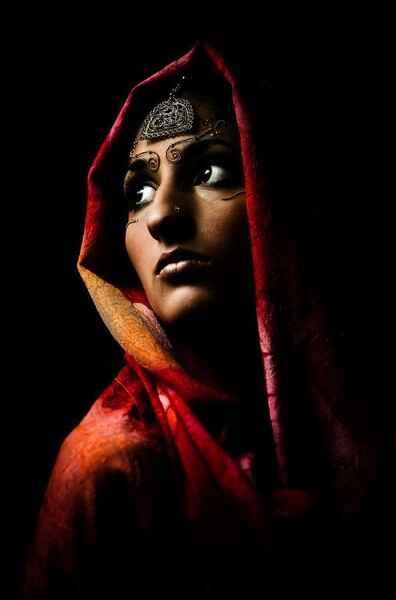
Ingetje Tadros is a Dutch-born photographer who emigrated to Western Australia. She spends much of each year on assignment in various parts of Asia.

DPS7 Ingetje Tadros

Image by Ingetje Tadros

While shooting ceremonies pay close attention to your choice of lens. Personally I like the 35mm prime as I like to be close and look for little moments. But, I also find it important that people feel comfortable with my presence and you need to be aware of personal space. When rituals are taking place it’s important to be aware what the rules are and specifically to know where you should and shouldn’t stand. Take your time and don’t just go in snapping. Try to limit use of flash to an absolute minimum as you should be as unobtrusive as possible.

Do you have any tips on versatility? How do you approach travel photography? Please share in the comments below.

The post Versatility – Your Guide to Shooting Great Travel Photography by Mark Eveleigh appeared first on Digital Photography School.

Digital Photography School

 
Comments Off on Versatility – Your Guide to Shooting Great Travel Photography

Posted in Photography


Time-Lapse Photography Equipment Guide to Getting Started

04 May

Currently for a limited time only get the Stage R Versatile Motion Control for Timelapse and Film and get FREE eBook – on now at SnapnDeals!

“Never forget that all the great photographs in history were made with more primitive camera equipment than you currently own.” – Brooks Jensen

No doubt that first time you said “Hey, wouldn’t it be fun to dabble in DSLR photography? You know, just as a hobby.” Your financial counsellors, or your spouse for that matter, broke out in budget busting hives.

There probably isn’t a more gear focused group of enthusiasts out there, but don’t worry, taking that step into time-lapse photography doesn’t require much gear to begin – and the extra gear that can really take your time-lapse to the next level is more affordable and easier to use than ever before.

Whether you are a brand new time-lapse photographer or an experienced shooter looking to unleash full creativity with time-lapse motion control, this article will provide a launch pad for your next steps into one of the most emotionally connecting, and at the same time freeing, creative photographic endeavours.

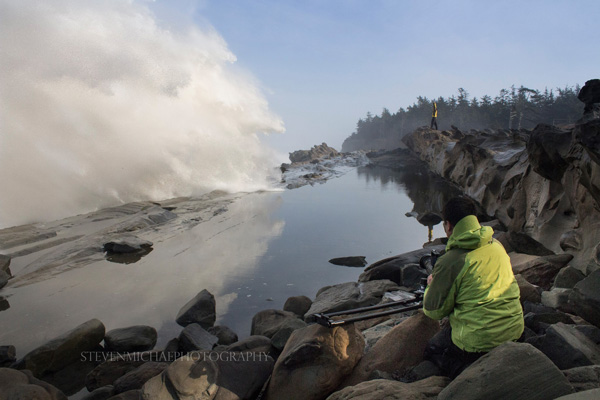
Steven Michael Photography 600

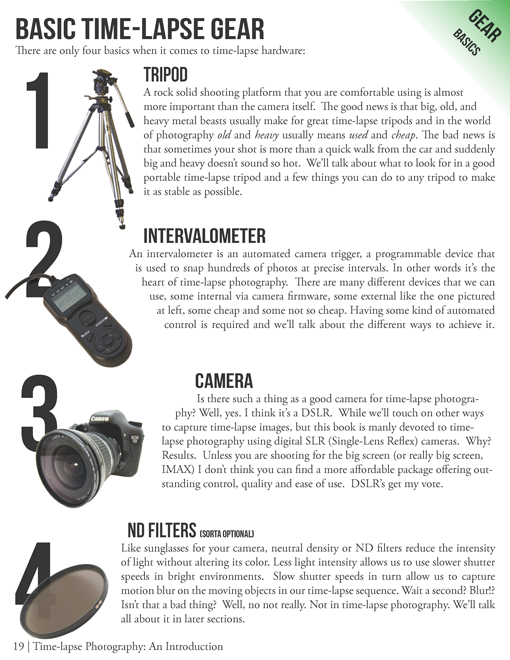
Your minimum gear checklist for time-lapse photography

Chances are good if you’re already a DSLR shooter you almost have everything you need to get started. These four things are essential.

  1. A tripod
  2. An intervalometer
  3. A Camera
  4. An ND filter

timelapse-gear.png

A closer look at a good time-lapse support system

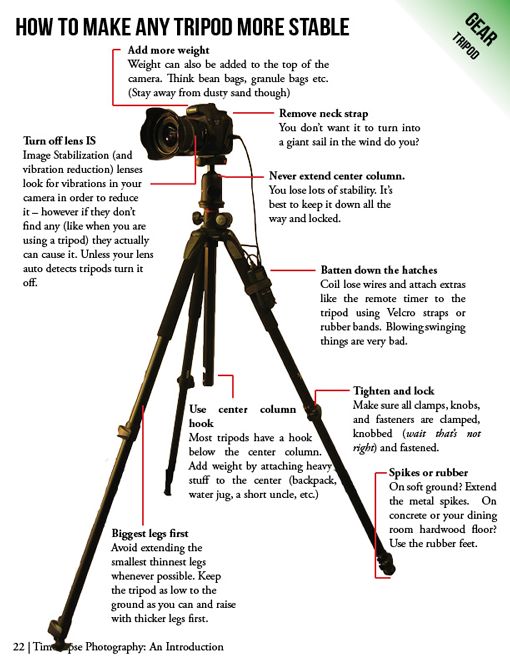
Rock solid stability (or precise controlled movement) is just about the most important and most essential component for good time-lapse photography. Keep in mind a good tripod that meets your needs will outlast several cameras so consider budgeting a little more time and possibly cash to this category.

  • Consider the materials used – weight and strength
  • Check the load weight – avoid sagging and flexing
  • Height – eye level without using the centre column
  • The right tripod head for your work – ball heads versus pan and tilt

timelapse-tripods.png

Unleashing your creativity with advanced time-lapse equipment

Time-lapse photography is benefiting from a dramatic flow of new ideas. The level of innovation, especially over the last few years, is incredible. Not only are we quickly fixing problems that have plagued photographers for years, but advanced camera controls and processing tools that used to be cost prohibitive, are now becoming affordable for the most basic hobbyist.

Advanced camera exposure control

The Timelapse+ can operate as a universal intervalometer for nearly any camera that supports a remote shutter release, and IR remote, or USB tethering. Bulb-ramping is its claim to fame. The Timelapse+ can perform keyframe-based, guided, or fully automatic bulb ramping – and for cameras supported by USB control, the Timelapse+ can also seamlessly integrate ISO control to smoothly ramp across a wide exposure range, making the “holy-grail” transition from day-to-night or night-to-day easier to achieve. Extended and long-exposure HDR sequences are also made easy with the Timelapse+.

Simple and powerful advanced time-lapse sequence rendering with LRTimelapse:

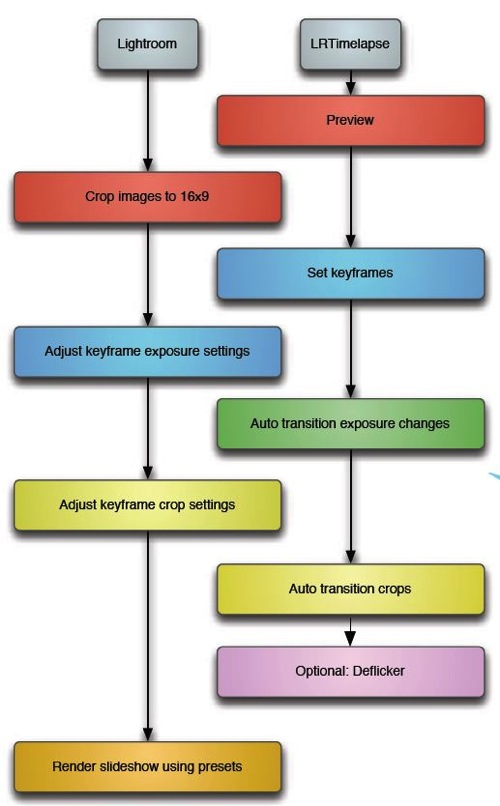
In a nutshell LRTimelapse takes changes and corrections you make in Lightroom and then smoothly applies them throughout the entire time-lapse sequence. By altering either the first and last image, or several images throughout the sequence, LRTimelapse can quickly fade the changes we need to only the parts we want. Deflickering can also easily be accomplished in the exact same way by flattening out big exposure jumps.

Here’s a simple workflow for editing timelapse images and rendering a movie using Adobe Lightroom and LRTimelapse.

Lrtimelapseworkflow

Advanced motion control

The last few years have shown incredible advances in the field of manual and controlled camera movement, so much so that the
average photographer can now afford motion control devices that were once only available to big budget productions. We’re talking precise, rugged and lightweight panning (left and right), tilting (up and down), and dolly movements with simple controls, such as a smartphone app, that make setup easy and intuitive. Control over motion and time combined with an interesting subject can produce what I believe to be an awesome trifecta of emotion eliciting imagery – some of the most engaging and lasting photography you’ve seen.

Yosemite HD II, an incredible example of time-lapse and motion:

Dolly motion shots can add multiple points of interest by highlighting components of a scene’s unchanging foreground and the larger time-altered background. The movement shots in the wave video move the camera along the jagged rocks, while the waves are slowed in the background. Some of the most popular time-lapse clips feature this kind of extreme moving contrast in many shots too. By moving the camera slowly from left to right on a horizontal track, or flipping the track system almost vertically to instead change the elevation of the camera, we can highlight stationary foreground objects in incredible ways.

The next two axes of movement can be accomplished by camera rotation – aptly named a motorized panning and tilting head. Then combining panning and tilting on a camera slider to achieve 2, or 3 axis of movement simultaneously can dramatically elevate the interest level in a shot.

zion 3axis motion control

2 axis motion control

Do you think advanced time-lapse work should be left to the pros?

Eric Warren of Matadornetwork.com posed a related question:

“Pros are the guys you call when you want to put a time-lapse in your car commercial. And while we tend to put pros up on a pedestal, they are often bogged down by their clients’ needs. Most commercial advertising doesn’t push the envelope of an art form.

That job often falls to the independent artists, building their own equipment, and often not [caring] about whether their work is going to sell. Not that I want to be too demanding here, but I want to see something mind-blowing. Either something I’ve never seen before or something familiar, shown in a new way (one thing time-lapse excels at.) ….

Consider this a call to all you independent filmmakers out there ready to push the limits of one of the most striking visual art forms.”

Time-lapse has a way of slowing the world for the photographer while at the same time accelerating it for everyone else. Shooting time-lapse alters the way you think, it challenges your view of the world and teaches you things about our world you can bring back and share with everybody else.

Get out and start shooting. Render some footage and break some rules. Most importantly know that you are not alone. The time-lapse community is more connected today than ever before. You have friends all over the world ready to help you get the shots you imagine.

Currently for a limited time only get the Stage R Versatile Motion Control for Timelapse and Film and get FREE eBook – on now at SnapnDeals!

The post Time-Lapse Photography Equipment Guide to Getting Started by Ryan Chylinski appeared first on Digital Photography School.

Digital Photography School

 
Comments Off on Time-Lapse Photography Equipment Guide to Getting Started

Posted in Photography


A New Photographer’s Guide to Composition

16 Apr

Recently I wrote a New Photographer’s Guide to Camera Settings. Once you become comfortable with your camera settings, the next step is to learn the rules of good composition and design for your photography.

So here are the 10 most important tips to take into account when framing your scene. Your guide to composition.

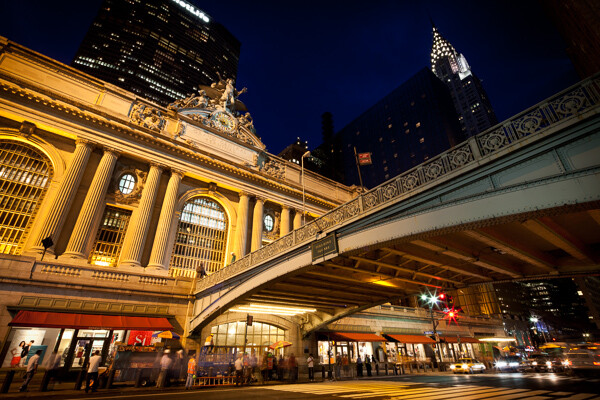
Grand Central and Chrysler Building, NYC.

Grand Central Terminal and Chrysler Building, NYC

#1 How will the viewer’s eyes flow through the scene?

I prefer to think about composition as if it is a game to please the eyes, and if you want to please the eyes, they need something to do and somewhere to go. When creating an image you want to think about the path that the viewers eyes will take through the scene, and whether this will be a fluid path or a jarring path.

  • Fluid Path – an image with leading lines, such as a road or stream, or an image with a foreground, middle ground, and background, which leads your eyes gradually from one level to the other.
  • Jarring path – an image with multiple, well spaced subjects for the eyes to bounce around between. Since there would be no lines leading between the objects in this type of image, they must be well spaced within the scene.

If you look at the photo above, the eyes are led directly to the Grand Central statue in the top left one third line in the scene, particularly because most people read from top to bottom and left to right.   The eyes are then led over to the Chrysler Building Spire and down to the detailed bridge.  These three elements make a triangle shape to lead the eyes through, however, the bridge acts as a very important element of the composition, keeping the eyes from leaving the scene and leading them back into the image, where they can either head up towards the statue or down to the people and cars on the street.

#2 Watch the Edge of your Images

Continuing from tip #1 above , for an image to feel balanced the edges of the image should be balanced. The eyes have a natural tendency to want to fall off an image through its edges. By putting elements in the corners you stop and catch the attention of the eyes, pushing them back into the scene. This is why landscape images often have small branches of trees or foliage in the top corners of the sky, and why vignetting is commonly used.

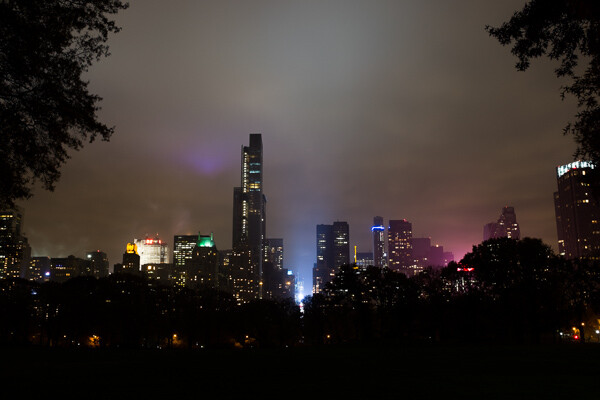
Central Park South, NYC.

Central Park South, NYC

Notice the branches in the top corners that function to keep the eyes in the frame. The corner elements often work even more effectively when only part of them is showing.

#3 Rule of Thirds Versus Centered Images

The rule of thirds is more of a suggestion than a rule. I’ve seen people take it to the extreme, but there are so many instances where a centered or different composition is preferable.

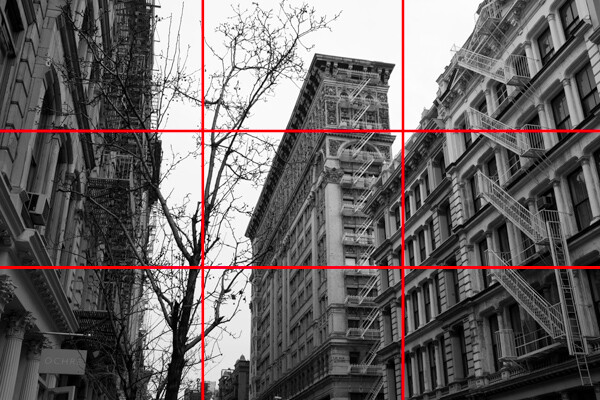
The rule of thirds refers to placing your main subject, or subjects, at one of the four one-third intersections in your photo, which you will notice in the second image below. This feels more pleasing to the eyes and it also allows you to simultaneously focus on a foreground subject on one side, while having a significant amount of space for an interesting background to balance out the scene.

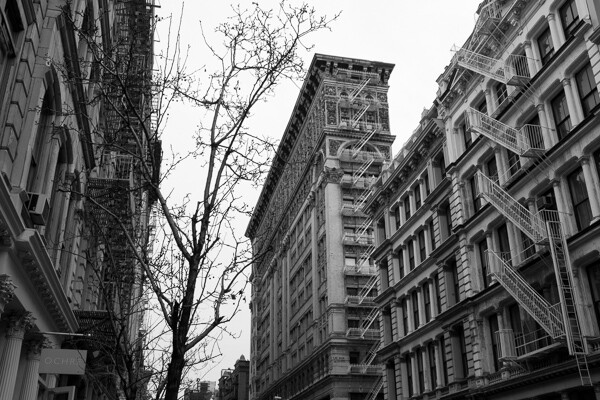
Silk Exchange Building, NYC.

Silk Exchange Building, NYC

Rule of Thirds.

Rule of thirds

In the above photo, while not exactly on the one third line (it’s not a rigid rule), you can see the building is balanced out by the tree on the corresponding one third line. The buildings on the each edge act as leading lines and have the added purpose of acting as edge frames to keep the eyes within the scene.

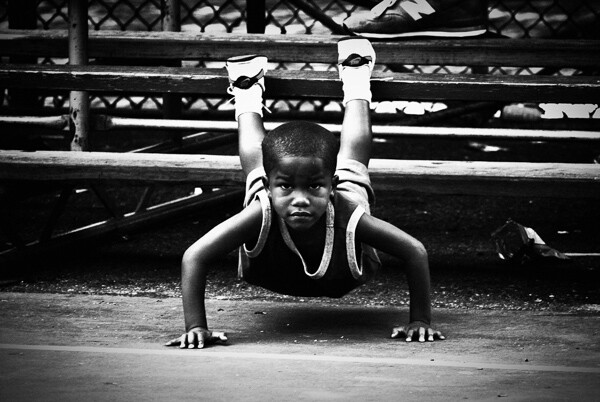
However, don’t be afraid of placing your main subject in the center. A centered subject can block everything else out of the scene and make you focus only on the most important element. This works especially well with a strong facial expression or look in the eyes. In addition, this works for symmetrical scenes, which can feel extremely balanced.

Rucker Park, NYC.

Rucker Park, NYC

#4 Horizontal – Vertical or Skewed

Whether to capture an image horizontally, vertically, or slightly skewed is always a tough decision. There are many reasons to photograph both horizontally and vertically, however I often find that photographers have a tendency to rely more on one format.

Horizontal images often feel more natural to look at because they mimic the way that our eyes see the world. They also allow you to to fit more elements into your image and they provide an easier format for the eyes to flow through the image.

A vertical format can be beneficial when you want to get in closer and focus on a single subject or a tight area. It is a way to simplify your photo and get rid of any elements that might take attention away from your main subject.

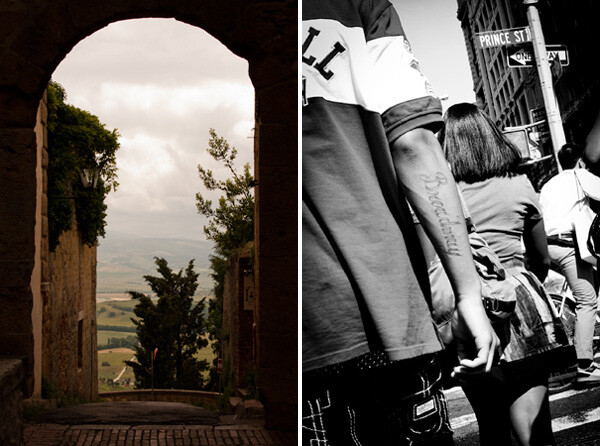
When you are creating a horizontal or vertical image you want to make sure that your lines are straight.  If they are slightly off, the image will not feel balanced. However, sometimes you will want to skew your subjects at an angle. Skewing your subjects so the scene is neither horizontal nor vertical adds interest and energy to the photo. It promotes a spontaneous feeling and the lack of balance can actually be a pleasing to the viewer.

4-vertical_vs_skewed2

Tight, classic, vertical shot vs. energetic, skewed, detail shot

#5 Triangles and the Number Three

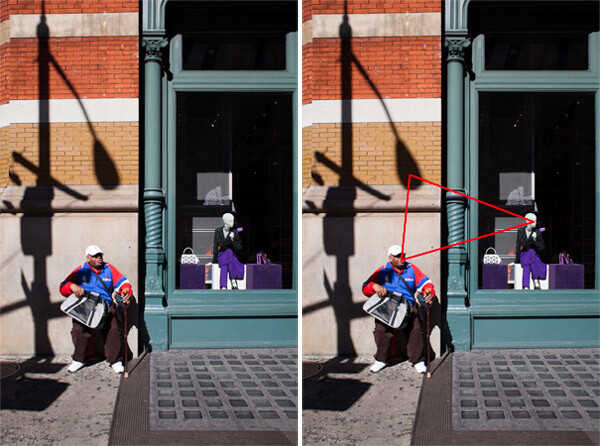
The triangular shape can be very important to good composition in photography. This does not refer to having the actual shape in an image but a relationship between three objects that create a triangle within the scene.

As long as the three objects are able to balance each other out, this is pleasing to the eyes because it creates a constant path through the scene.

5-Prada_Store2

Prada store, SoHo, NYC

#6 Perspective

The height from which you shoot can be a significant factor in how your images appear. If you want to emphasize height and power in a scene, get low to the ground and tilt the camera slightly up. People will look more important and prominent, and objects like trees or mountains will look even larger.

Shooting from a high camera angle on the other hand makes everything feel smaller and diminished in power. If the shooting height becomes extreme enough the image can even tend to take on an abstract and graphic feeling.

When photographing people, always pay attention to the camera angle.  Sometimes raising or lowering the camera slightly can make a big difference.

#7 Minimalist Versus Maximalist

Minimalist refers to keeping a photograph very simple, such as an image with a single subject and a pleasing and calm background. This can create a very powerful and graphic design.  There is power in the simplicity.  Valerie Jardin, recently wrote a good article on minimalist photography.

Maximalist on the other hand refers to a chaotic image, with a lot of elements competing with, and playing off of each other. However, within the chaos there is balance. This type of image is very hard to create in a balanced way, but when it works it can be a delight for the eyes that allows a viewer to explore through the scene.

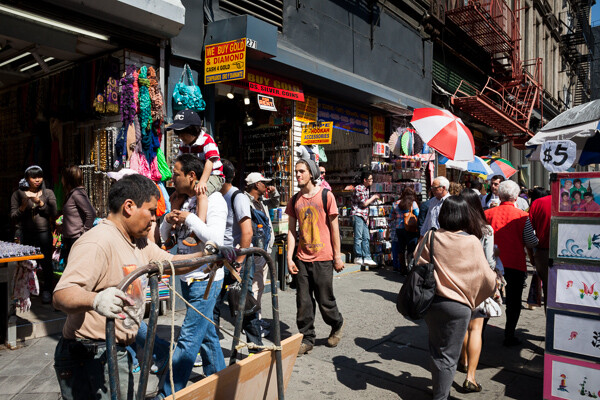
Canal Street, NYC.

Canal Street, NYC. Balance in the chaos

The image above would not work if the subjects were not all spread out evenly throughout the scene.

#8 Color

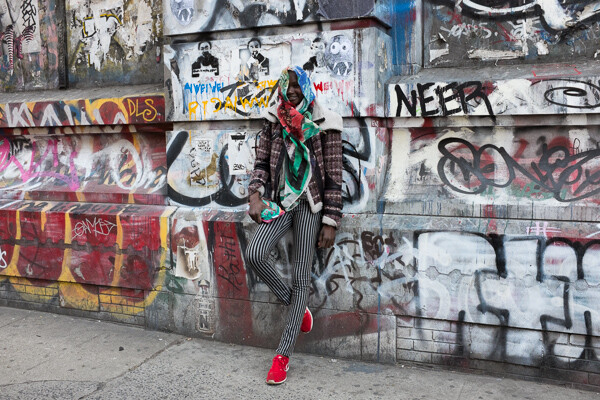
Color is a vital aspect of design. A strong color on your main subject can add extra emphasis, while a strong color in an insignificant element can ruin the balance of a photo.

There is a large trend these days towards strong and unrealistic colors in photography, similar to the movies or on instagram. Strong colors do a better job of catching our attention at first, but muted colors can be just as interesting and create just as much of a mood as strong colors, if not moreso.  Explore desaturating your images slightly.

Each color has its own properties and ability to create mood within an image. A red tint can add a warm and energetic feeling to a photo, while a blue tint can make a scene seem either calm or cold and sterile. As portrait photographer Dan Winter’s states, “Green is an inherently calming and inviting color, and is tied to our natural surroundings.” Winters uses green for many of his portraits.

Here are some ways that colors can play off each other to add balance:

  • Complementary colors (colors on the opposite side of the color wheel)
  • Analogous colors (colors next to each other on the color wheel)
  • Different colors in similar shades
  • The same color in different shades
Spring and Bowery, NYC.

Spring and Bowery, NYC

#9 Getting Close and Filling the Frame

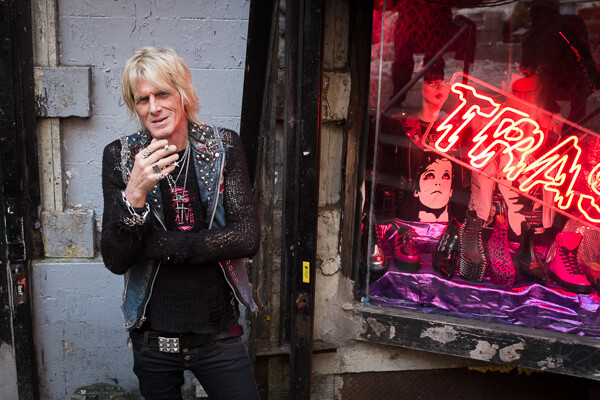
This is a very important concept. Figure out what is significant in the frame, get close, and only capture that. Cut everything else out and envelope the main subject. If the most interesting part of a person is their eyes, then capture the eyes up close.

Shop Owner, Trash and Vaudeville, NYC.

Shop Owner, Trash and Vaudeville, NYC

#10 Uniqueness and Breaking the Rules

Learn these rules and practice them, but keep in mind that sometimes you must break the rules. Be unique whenever possible. There is nothing more pleasing to the eye than something that is different.

Do you have any additional tips you’d like to add to this list? Please share in the comments, with example images if you have some.

The post A New Photographer’s Guide to Composition by James Maher appeared first on Digital Photography School.

Digital Photography School

 
Comments Off on A New Photographer’s Guide to Composition

Posted in Photography


Guide to Creative White Balance for Landscape Photography

16 Apr

If you’ve been using a digital camera for any length of time, you’ve probably heard about White Balance. You may still be wondering exactly what it is, and how to use it; or you may be using it right now and be wondering how it can possibly be something “creative”.

Creative white balance landscape photography

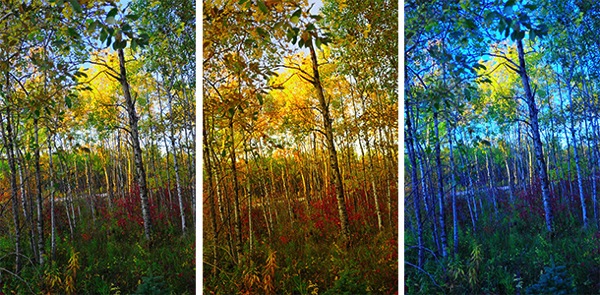
Different white balance settings create different looks

I’m going to show you some of my techniques for using White Balance to creatively enhance your landscape photography and with a few simple steps you can unlock the remarkable power of creative White Balance. Don’t worry, this is not a technical discussion, there are lots of references about that aspect of White Balance online. This article explains a simple shooting technique you can start using right now.

The Color of Light

Creative white balance landscape photography daylight

Daylight setting

Have you ever taken photos in an office, and been dismayed to see that your results had a sickly green cast to them? Or taken photos under cloudy, lifeless, skies only to see your images appear cold, flat and a little blue?

This happens because light comes in a variety of colors. The reasons for these colors is a result of wavelengths of light and the light spectrum. But we’re not going to get into this too deeply here. Just know that all light has different colors, and even the sun has different colors at different times of the day. Every landscape photographer knows about the “sweet light” or the “magic hour” – the times around sunrise and sunset when the color of the light is perfect for photography.

The crazy thing is that your eyes usually adjust to compensate for these color shifts, especially the subtle ones, so you won’t necessarily perceive these color differences, and in some cases your eyes are not as sensitive to color shifts as are the sensors in your camera. So you snap that office photo and the result isn’t as great as you had expected. Because of the color, those fluorescent bulbs cast a green pall over everything but you didn’t see it because your eyes “adjusted” the color for you.

This is where your White Balance settings play an important role in correcting potential problems by adjusting the color of the light in the camera. It is really important when you’re taking images of people, because the skin tones will be unattractive and far from natural looking.

But, if you are a landscape photographer, armed with the knowledge that light has color and your camera has a tool that can change the color of light, you can use this knowledge to do more creative landscape photography.

White Balance for Landscape Photography

Creative white balance landscape photography hicolour fluorescent daylight

Fluorescent setting

I shoot a lot of landscapes, in fact I pretty much ONLY shoot outdoors. Thankfully I almost never have to deal with those ugly green fluorescent lights. But what I do deal with are sunsets, sunrises, autumn colors, mountains, flowers, etc. – all those good things we find in nature.

I noticed that sometimes my sunset images just didn’t pack the punch the way I SAW it at the location. Sure, I could go back to my computer and make adjustments. Or, without degrading any pixels, I could punch up my images in camera by purposely fooling it into using a different White Balance. In other words I don’t use White Balance to correct color casts, I use it to ADD color casts! I deliberately use the “wrong” White Balance setting.

Landscapes created at sunset or sunrise, snow and winter scenes, and those with night sky dominating lend themselves well to creative White Balance techniques.

Sunsets can become more warm, or more soothing, with violet overtones if you use the Cloudy White Balance setting. Autumn foliage pops with yellow and orange when you use Shade as your White Balance! The Aurora Borealis (Northern Lights) becomes a rich alien green, rolling through a deep royal blue sky, by changing your White Balance setting to Incandescent or Tungsten. Please note, that you use these settings regardless of actual light colour.

Creative white balance landscape photography hicolour fluorescent daylight

Fluorescent daylight camera setting

Creative white balance landscape photography customA3 M3

Custom white balance setting A3 M3

Creative white balance landscape photography auto

Auto white balance setting

Creative white balance landscape photography direct sun

Daylight white balance setting

Creative white balance landscape photography shade

Shade white balance setting

How to use Creative White Balance

To use creative White Balance, there are just a few things to understand about using White Balance in general.

Since White Balance is designed to correct color casts, the setting on your camera will compensate, or change the light, to be the opposite of the shooting situation. In other words, incandescent lights are too warm (orange), so changing your White Balance setting to Incandescent or Tungsten will add a blueish tinge. The light in the shade is blueish, so changing the White Balance setting on your camera to Shade adds warmth, orange and red.

To get creative with White Balance you’ll need to find the dial or menu for changing your White Balance settings. Most cameras have presets for Flash, Shade, Cloudy, Incandescent (Tungsten), Fluorescent, Sunny (or Daylight), and Auto.

Look for the ICONS – a cloud (cloudy), a house (shade), a sun (full sunlight), a fluorescent bulb – long and skinny (fluorescent), an old school light bulb (incandescent or tungsten), a lightning bolt (flash), and AUTO or A for automatic.

Next you’ll need to know how to set your White Balance for a specific type of shot. The best way is to experiment by trying all of your White Balance settings for the same scene. So if you want to ramp up your warm colors, say in an autumn scene or sunset, change your White Balance to Shade, Flash, and Cloudy! Compare your results.

Shooting the night sky or the Aurora Borealis, change to Tungsten or Incandescent to make the colors cooler, make that Aurora really pop! The added blue tones give the night sky a rich royal blue tone, while the green light of the Aurora turns an eerie alien glowing green.

Here’s a handy chart I made for you – so you can literally “dial it in”. All you need to do is change your settings according to the type of landscape scene, using the chart. This will give you a great place to start.

Chart

Supercharge your Creative White Balance

Depending on your camera, you may also be able to fine tune and supercharge your custom White Balance once you find one that provides the boost you like.

In Nikon DSLRs you may see this graph that enables you to make your own custom White Balance presets. It’s typically in your shooting menu under the White Balance tab. Consult your camera manual to see if your camera has this option, and how to apply it.

2customWB1

1customWB

Custom white balance in camera

By selecting a specific color balance presets, you can ramp up the warmth and impact for sunrise and sunset, as well as boost the coolness for winter snow landscapes.

Easy Experimentation

If you shoot RAW, and can’t switch White Balance in the field, you can also easily adjust your White Balance in post-production. Lightroom, Photoshop, Nikon Capture and most other image editing programs have a RAW White Balance setting. Nikon shooters note that you’ll get the best results adjusting RAW [NEF] White Balance if you use Nikon Capture, as Nikon encrypts its White Balance “formula”. Other software can only read parts of the White Balance data so your results may not be as high impact as they could be.

If you have some landscape sunset or sunrise shots on your computer, give creative White Balance a try right now. Here are few of my Lightroom White Balance edits so you can see how much control you have over the drama and mood of your lighting.

Creative white balance landscape photography auto

Auto white balance in Lightroom

Creative white balance landscape photography cloudy custom

Cloudy custom white balance in Lightroom

Creative white balance landscape photography auto adjustments 2

Auto white balance adjustment in Lightroom

Creative white balance landscape photography auto adjustments3

Auto white balance adjustment in Lightroom

Do you have some other tips you can share on using White Balance creatively? Please tell us about them in the comments below and share your images as well.

For some other landscape photography tips try some of these articles:

  • 5 Steps to Help you Take Better Landscape Photos
  • 10 Most Common Mistakes in Landscape Photography – and How to Overcome Them
  • So you Want to Shoot Landscapes? [Top 12 dPS Landscape articles from 2013]
  • Living Landscapes – A Guide To Stunning Landscape Photography – a dPS ebook
  • Loving Landscapes A guide to landscape photography workflow and post-production – a brand new dPS ebook by the authors of Living Landscapes

The post Guide to Creative White Balance for Landscape Photography by Alex Morrison appeared first on Digital Photography School.

Digital Photography School

 
Comments Off on Guide to Creative White Balance for Landscape Photography

Posted in Photography


A Guide to Landscape Photography Workflow and Post-Processing

15 Apr

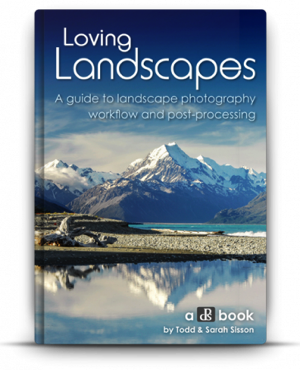
NewImageToday is an exciting day at dPS HQ because we’re releasing an eBook that has been asked for many times by readers – LOVING Landscapes, a Guide to Landscape Photography Workflow and Post-Processing by Todd and Sarah Sisson.

Early in 2013 we looked at our growing library of photography eBooks and realised that we had a big hole to fill – we were yet to publish a Landscape Photography eBook.

We began the hunt for a photographer to create a guide.

After much searching we came across the photography of husband and wife team Todd and Sarah Sisson and fell in love with their images. We began to talk to Todd about creating an eBook with us and mid last year released a guide to Landscape photography called LIVING Landscapes.

The eBook was a huge success and became one of our fastest selling eBooks ever.

That first eBook from Todd and Sarah received some amazing reviews and we still get positive feedback about it almost a year later. But alongside the praise was a request – a request for a guide to post processing landscape photos.

While the first eBook touches on some post production techniques it was not the place for comprehensive teaching on the topic – so… we began to talk with Todd and Sarah about a followup eBook that explored the topics of Workflow and Post Processing.

What they produced in LOVING Landscapes is pretty amazing. Inside you’ll find over 200 pages of practical information that leads you through 12 chapters of advice to help you bring the images that you take to life with a little post processing love.

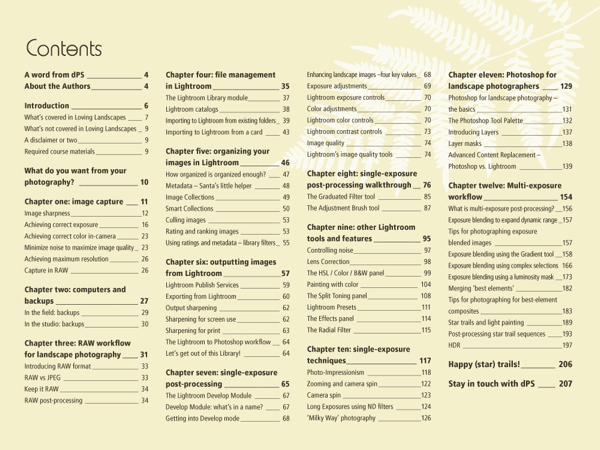
Here’s the table of contents which will give you a feel for what’s covered.

NewImage

What I LOVE about this eBook is that it is packed with heaps of actionable information that you can apply immediately to the photos you’ve already taken.

Alongside that information are inspirational examples of the techniques in practice.

You’ll come away not only inspired but informed and ready to apply what you’ve learned.

NewImage

An Ideal Companion Bundle or a Great Standalone Guide

With the launch of Loving Landscapes we now feel like we’ve got a great complete guide to both ‘taking’ and ‘processing’ beautiful landscapes.

These eBooks are designed to be useful separately if you’re just interested in one of those topics – but together they also make an incredibly comprehensive guide through the whole topic of creating beautiful landscape images.

Grab Your Copy Today and Save 33%

Our Loving Landscapes eBook will retail for $ 29.99 but as a limited time Early Bird Special you can pick up a copy today for just $ 19.99 USD (33% off).

If you want to pick up both Living Landscapes and Loving Landscapes eBooks together you can bundle them together today for the special price of just $ 39.99 (normally $ 59.99 so today it’s also 33% off).

Want more information about this eBook? Get the full lowdown here.

The post A Guide to Landscape Photography Workflow and Post-Processing by Darren Rowse appeared first on Digital Photography School.

Digital Photography School

 
Comments Off on A Guide to Landscape Photography Workflow and Post-Processing

Posted in Photography


Sony RX10 added to enthusiast compact buying guide

02 Apr

RX10.jpg

We just added Sony’s RX10 to our enthusiast compact camera buying guide and also updated our aperture comparison chart with Canon’s PowerShot G1 X Mark II. While image quality in this class won’t compete with a good mirrorless camera paired with a good lens, they pack enough features that should satisfy serious photo enthusiasts. Many cameras in this range make an excellent choice as a more portable second camera, or as a single do-it-all option. See how the RX10 ranks

News: Digital Photography Review (dpreview.com)

 
Comments Off on Sony RX10 added to enthusiast compact buying guide

Posted in Uncategorized


A New Photographer’s Guide to Camera Settings

29 Mar
Folegandros, Greece.

Folegandros, Greece – 24mm focal length at f/11

Without experience, looking at the endless functions and dials on a camera can seem daunting, and it is at first, especially with many of the newer digital cameras that have about 5,000 functions (I’m looking at you Nikon).

Luckily, you only have to learn the major functions at first to significantly improve your photography. It might take a few reads through the content below, but it does not take long to learn the most important abilities of your camera to significantly improve your photography.

Depth of Field

Before we delve into the settings, you first need to understand depth of field. The term refers to the area in front of, and behind the subject, that the camera is focused on that is acceptably sharp. We use the term acceptably sharp because as you get further from the object you are focusing on, the sharpness gradually declines.

Another way to think of depth of field is as a range of sharpness. A shallow depth of field refers to a small range of acceptable sharpness, while a deep depth of field refers to a large range of acceptable sharpness in an image.

Venice, Italy.

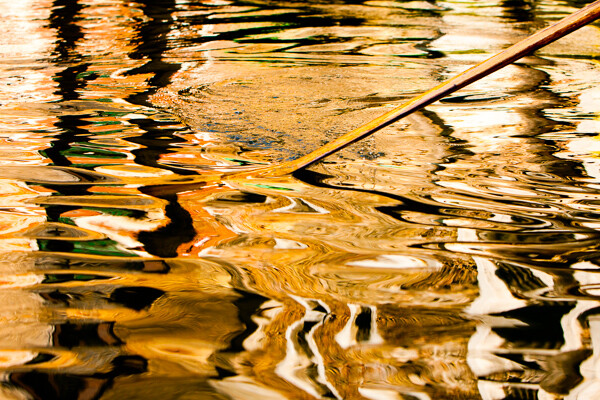
Venice, Italy – 70mm focal length at f/5.6. This image has a fairly shallow Depth of Field; the oar and wave are sharp, while the rest is out of focus.

When standing at the same distance away from your scene, there are three ways to alter the depth of field:

  1. Changing your aperture setting
  2. Changing the focal length on your camera (i.e. 24mm versus 200mm lens) will give you the appearance of more depth of field.  Technically, this is an optical effect due to the magnification, but it will create the appearance of more depth of field.
  3. Changing the focus distance. Focusing on a closer subject will give you less depth of field than focusing on a subject at a distance.

Focal Length (wide-angle versus telephoto)

Changing your focal length alters the relationship in size between the foreground objects and the background objects. It also affects the appearance of depth of field due to the change in magnification.

Wide angle:   a wide angle lens (i.e., 28mm) will make foreground subjects larger in comparison to the background. This allows you to have a main subject that is prominent in the foreground while simultaneously fitting in more of the background, since it is proportionally smaller. When standing at the same distance from your subject, there is the appearance of more depth of field throughout the frame with a wide angle lens than with a telephoto lens when the same aperture is used.

Folegandros, Greece

Folegandros, Greece – 24mm focal length at f/11. Notice the size of the foreground stones in relation to the middleground stones.

Telephoto:  a telephoto lens will compress and tighten the view. The longer the focal length, the larger the background objects will appear in comparison to the foreground objects. This makes the background objects look closer to the foreground objects than with a wide-angle view.

While not a steadfast rule, portraits are often thought to be more flattering when a slightly telephoto lens is used (around 80mm to 120mm), which will compress a person’s features. If you photograph someone with a large nose at close distance with a 17mm lens, that nose will look gigantic when compared to the subject’s ears.

Florence, Italy.

Florence, Italy – 170mm focal length at f/6.3

ISO

Before you learn about the Aperture and Shutter Priority modes, you need to understand ISO. The ISO setting is a way to change the sensitivity of your camera’s sensor to light.

ISO is the first setting you should set when you walk out the door and you should always be aware of what it is set at. Practice altering it, because once you get familiar with ISO you will change it constantly.

A lower ISO number (100, 200, or 400) means that the camera sensor will not be as sensitive to light but the quality of the image will be to the best of the camera’s ability. Low ISO images will have little to no digital noise. The best times to shoot with a low ISO are in strong daylight, when using a tripod, or when using studio lights.

A high ISO number (800, 1600 or 3200) means that the camera sensor will read more of the light, but the tradeoff is that the images will have digital noise. Higher ISOs are generally used when the light is not ideal and one does not have a tripod. You should review your camera’s ISO abilities to find the upper limit that you are comfortable using. Higher end cameras typically have a stop or two more ISO ability than entry level cameras.

East Village, NYC.

East Village, NYC ISO 3200. – grainy, but beautiful

The key here is to not be afraid to raise your ISO. Its capability has improved so much that many cameras can shoot at ISO 800, 1600, and 3200 or even higher for some. It is much better to have the ideal shutter and aperture settings when creating an image than having the ideal ISO setting. Grain is beautiful, while bad aperture and shutter settings are not.

Once your ISO is set, you will then have to figure out whether you want to shoot in Aperture Priority or Shutter Priority mode.

Aperture Priority (A/Av)

The aperture is the hole in the lens that allows light to enter the camera. The term f-stop (i.e. f/2.8, f/3.5 … f/16) is a number that refers to the size of the aperture opening, where f/2.8 is a much larger opening than f/16. Using Aperture Priority Mode will allow you to alter your f-stop and the camera will then use its internal light meter to choose a corresponding shutter speed to expose the scene correctly.

A “smaller” aperture (which refers to a larger number, such as f/16) will allow for a deeper depth of field in a scene but will allow less light to enter the camera.

Montalcino, Italy.

Montalcino, Italy 28mm focal length at f/14.  The small aperture yields a deep depth of field.

The photo above is an example of this type of deep depth of field, which occurs with a small aperture. The chimney in the foreground is perfectly sharp and both the mid-ground and background are very sharp.

A “larger” aperture (which refers to a smaller number, such as f/2.8) will create a shallow depth of field (with more bokeh, or out of focus blur) and will allow more light to enter the camera.

63mm Focal Length at F2.8.

63mm focal length at f/2.8 in a dark setting. The large aperture yields a very shallow depth of field.

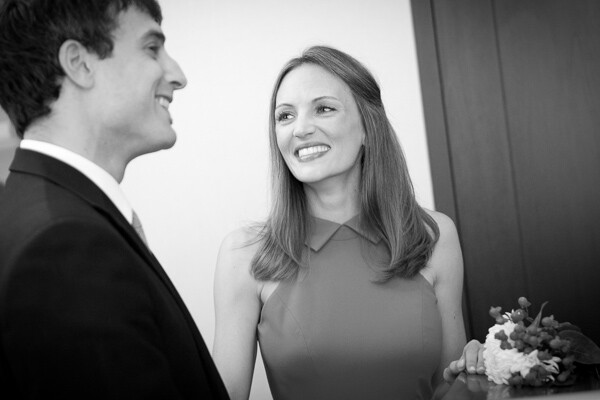
The primary reason to shoot in Aperture Priority mode is to control your depth of field and it is a common way of shooting for portraiture and for event and wedding photography, especially in situations where the events are held in venues with low levels of light.

While the above photograph looks bright, it was taken in a fairly dark room. Because it is shot at f/2.8, only the bride’s eyes are perfectly sharp. When photographing with a shallow depth of field, always make sure the most important element is in focus.

Shutter Priority (T/Tv)

Shutter speed is the speed at which the camera’s shutter opens and closes to allow light to reach the sensor or film. Using the Shutter Priority mode will allow you to set your ideal shutter speed, while the camera will pick a corresponding aperture to expose the scene correctly.

A faster shutter speed (a smaller fraction, such as 1/320th of a second) will allow less light to reach the sensor but will freeze your subject’s motion or offset the camera shake when your camera is handheld. 1/320th and faster is an ideal setting to freeze motion in people.

SoHo, NYC.

SoHo, NYC 1/320th of a second with an 80mm focal length

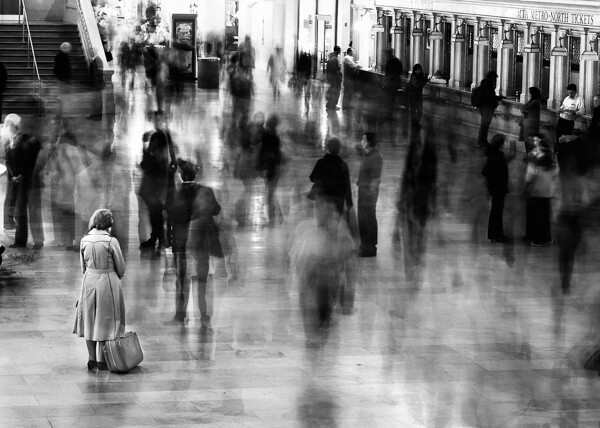
A slower shutter speed (a larger fraction, such as 1/8th of a second) will allow more light to reach your sensor and, if slow enough, will create blur in an image. Depending on the rate of motion of your subject, anywhere from approximately 1/30th to 30 seconds and more will introduce noticeable motion blur. A tripod is recommended when introducing blur into your scene, although it is possible to handhold the camera and achieve a sharp background and blurred subject if the subject is moving fast enough.

Grand Central, NYC.

Grand Central, NYC 6 seconds at f/8. The woman is sharp because she remained motionless.

*Important:  to offset blur caused by handheld camera shake, the shutter speed must be at least 1 over the focal length. So if your focal length is 100mm, your shutter speed should be at least at 1/100th of a second. Add some leeway into that rule when you can, so 1/125th or 1/160th at 100mm will be safer. When using cropped sensors (such as APS-C or micro-4/3rds), the real focal length is the important number. If your APS-C camera sensor has a 1.6x crop, a 100mm lens will have the equivalent of 160mm view, leading you to need at least 1/160th of a second to achieve sharpness.

The main reason to shoot in Shutter Priority is to freeze or introduce motion into your scene. I use this mode primarily when traveling, exploring, at dusk when I’m handheld and the light is low, or shooting street photography.

Manual Mode (M)

Manual mode allows you to set the shutter, aperture, and ISO settings without the camera’s interference. This is a difficult way to shoot because you need to know the strength of the light to set your camera accordingly, but even if you do not want to photograph this way it can be worth practicing in manual mode to help you better understand light.

Manual mode is ideal when you use a tripod and have the time to fine tune the exposure. It is also good in situations where the lighting is consistent, such as on overcast days, photographing indoors, or when using strobe lights or flashes.

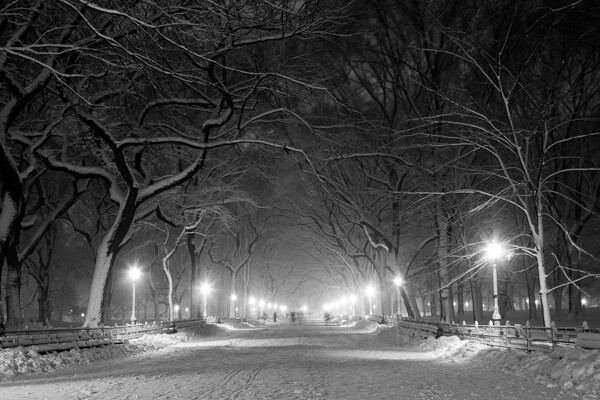
Poets' Walk, Central park, NYC.

Poets’ Walk, Central Park, NYC 15 seconds at f/11, ISO 100. 28mm focal length on tripod.

However, the Shutter Priority and Aperture Priority modes are very important to use, particularly in situations where the lighting is variable. On a sunny day where you are shooting both into and away from the sun, it is beneficial to use these modes because it is usually not practical to continually change your manual settings every time you alter your direction. Let the camera do some of the work.

Exposure Compensation (+/-)

Exposure compensation is the +/- mode on your camera that is used when you are in the Aperture or Shutter Priority modes. Increasing the exposure to the plus side will brighten a photo and decreasing it towards the minus side will darken a photo.

This is especially helpful when you are in an overly bright or dark situation that can fool the camera’s light meter, such as a scene with a lot of bright sky or a scene in a dark alleyway. The camera will read these levels and try to turn these overly bright or dark situations into gray. We typically do not want that.

When capturing a bright scene, cameras will read all the bright areas and calculate that it needs to darken the photo to achieve the correct exposure. You would need to raise the exposure compensation to offset this. When photographing in a dark alleyway, cameras will try to brighten the blacks to gray, leading you to need to offset this by lowering the exposure compensation.

Cortlandt Alley.

Cortlandt Alley, NYC – The camera’s light meter slightly overexposed the image

Cortlandt Alley.

Cortlandt Alley, NYC –  Correctly exposed

Bonus – White Balance

Focus on the above settings first, but once you feel comfortable with them, the next step is to study up on white balance.

The post A New Photographer’s Guide to Camera Settings by James Maher appeared first on Digital Photography School.

Digital Photography School

 
Comments Off on A New Photographer’s Guide to Camera Settings

Posted in Photography


A Buyer’s Guide to Canon Normal and Telephoto Lenses

03 Mar
Canon 400mm lens

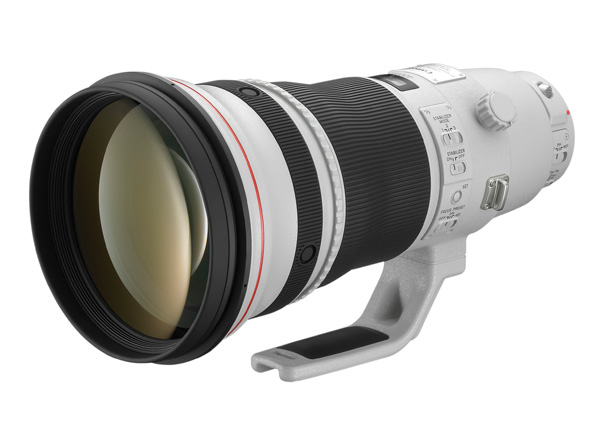
Canon EF 400mm f2.8L IS II USM lens

Andrew S. Gibson is the author of Understanding Lenses Part II: A Guide to Canon Normal & Telephoto Lenses, on 40% now at Snapndeals for a limited time only.

With so many lenses to choose from, it’s little wonder that photographers become confused about which option is the best. In this article I’m going to take a look at some of Canon’s best or most interesting normal and telephoto lenses, to give you a head start when it comes to understanding just what Canon offers in this part of their lens range.

But first, let’s take a quick look at the state of Canon’s lens line-up. I have no inside knowledge about which lenses Canon may introduce this year, but I do see a couple of emerging trends.

Trends in Lenses

The first is that Canon is not afraid to take an old lens and update it with a newer version. Good recent examples are the new EF 24mm and 28mm f/2.8 IS USM lenses. Both replaced older versions and included an Image Stabilizer (IS) which the previous models didn’t have.

The second trend is that newer lenses tend to be more expensive than the ones they replace. This is reasonable, as the newer lenses are better quality. If a new lens comes out and it seems expensive, you can be patient and wait a year or so for the price to drop if you don’t need it urgently. The two wide-angle lenses mentioned above have dropped in price by over 30% since their release.

That does mean it is possible that Canon will replace some of their aging normal and telephoto lenses in the near future. If you’re thinking about buying one and are worried about this, it’s up to you to decide how badly you need the current version. While the rumour websites like to speculate about forthcoming lenses, and are sometimes accurate, you never really know what will happen as Canon keep the details of new releases under wraps until the official day of release.

A good example of this is the EF 50mm f/1.4 lens. Some rumours sites are saying this is due for an update. But if this is true, and how far in the future it will happen, no-one really knows. Plus the replacement is likely to be more expensive than the current 50mm f/1.4 lens (but it may have IS). In the end, it’s up to you, but my advice is don’t spend too long waiting for new lenses – you could be waiting a long time.

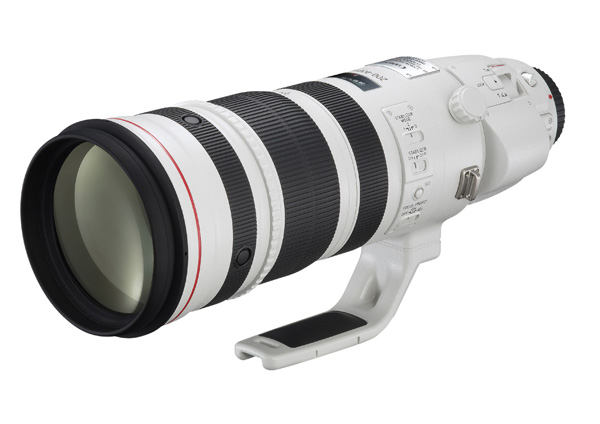
Canon EF 200-400mm f/4L IS USM – the beast!

Canon 200-400mm zoom

Canon EF 200-400mm f/4L IS USM Extender 1.4x– only about $ 12,000 USD!

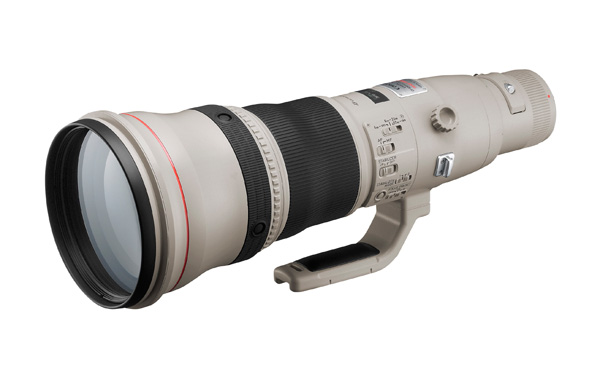
Let’s start off with this beast. It’s fun to speculate who would buy such an expensive lens. A professional sports photographer? Agencies like Getty or Reuters? This L series, super telephoto zoom, comes with a built in 1.4x extender (the only Canon lens to do so), a four stop Image Stabilizer, and a fixed f/4 aperture throughout the zoom range. It weighs over three and half kilos (7.9 pounds), but is not Canon’s heaviest lens. That honour belongs to the Canon EF 800mm f/5.6L IS USM lens (below), which weighs four and half kilos (9.9 pounds) and is another option for those of you with $ 13,000 to spend on new glass.

Canon 800mm lens

Canon EF 800mm f/5.6L IS USM Super Telephoto Lens for Canon Digital SLR Cameras

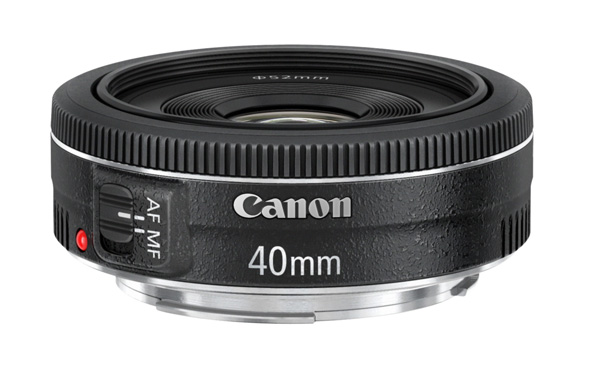
Canon 40mm f/2.8 STM

Canon 40mm pancake lens

Canon EF 40mm f/2.8 STM Lens

At the other end of the scale is one of Canon’s lightest, smallest and least expensive lenses. This 40mm pancake lens delivers excellent image quality, and excellent value for money. However it doesn’t have IS or a distance scale on the lens, features which may be important to some people.

How does this lens give such excellent quality for such a low price? It contains just six optical elements that measure little more than a centimetre across (0.4″). They are cheaper to manufacture than the larger elements found in Canon’s other lenses, and the result is a lower price.

This focal length is a short telephoto on an APS-C camera or a normal lens on a full-frame camera.

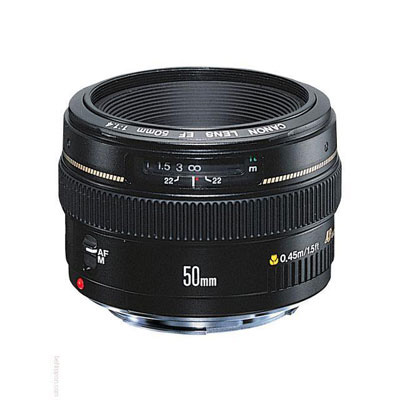
Canon 50mm f1.4 USM

Canon 50mm f1.4 lens

EF 50mm f/1.4 USM

Canon users aren’t lacking for choice when it comes to 50mm lenses. Canon makes four models, including the 50mm f/1.8, the 50mm f/1.2L and 50mm f/2.5 macro. But my favourite is the EF 50mm f/1.4 USM. It’s a third of the price of the more expensive L series 50mm lens, but has better autofocus and smoother bokeh than the f/1.8.

50mm lenses make great portrait lenses on APS-C cameras and deliver value for money in terms of image quality and versatility. You can use a 50mm lens with extension tubes or close-up lenses for close-up photography, or with a reversing ring on a longer lens for macro photography.

Read more about 50mm lens in my article Nifty Fifties – Why I Love 50mm Prime Lenses.

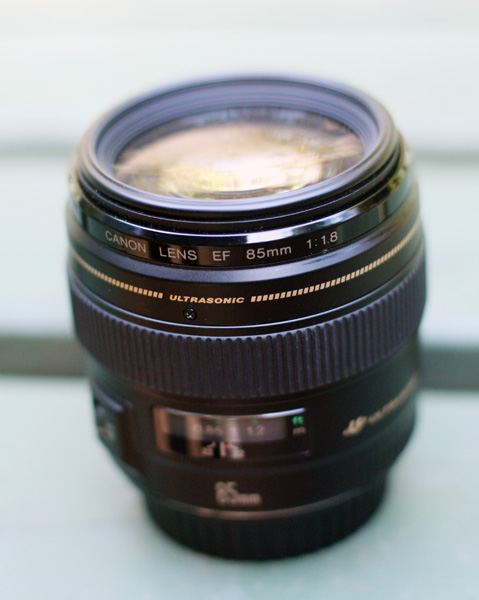
Canon 85mm f/1.8 USM

Canon 85mm lens

Another of my favourite lenses is the 85mm f/1.8. It’s an ideal portrait lens for owners of full-frame cameras. It’s also great for close-up photography with the addition of a 500D close-up lens. It’s a shame it doesn’t have IS, but that would push the price up. If you have deep pockets you can also consider the EF 85mm f/1.2L II USM lens, but bear in mind the wide f/1.2 aperture means it has a large front element (to let in the more light) and that makes the lens heavier and slower to autofocus.

Read more about this lens in my article How a Humble 85mm Lens Became My Favourite.

Canon 70-200mm zooms

Canon 70-200mm zoom lens

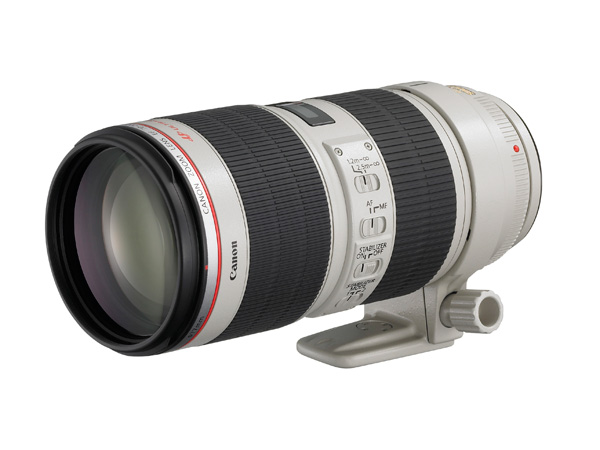
EF 70-200mm f2.8L IS II USM

Canon has four 70-200mm zoom L series lenses. Two of these have maximum f/4 apertures and cost less. The other two have maximum f/2.8 apertures. For each aperture setting there is both a non-IS and an IS model. This gives you plenty of choice, for what is a very versatile focal length. The EF 70-200mm f/4L USM lens is Canon’s cheapest L series lens and a great option for anyone wanting to experience L series quality on a low budget. The EF 70-200mm f2.8L IS II USM (above) is the most expensive and comes with a collar so you can mount it on a tripod.

Canon 70-300mm f/4-5.6L IS USM

Canon 70-300mm zoom lens

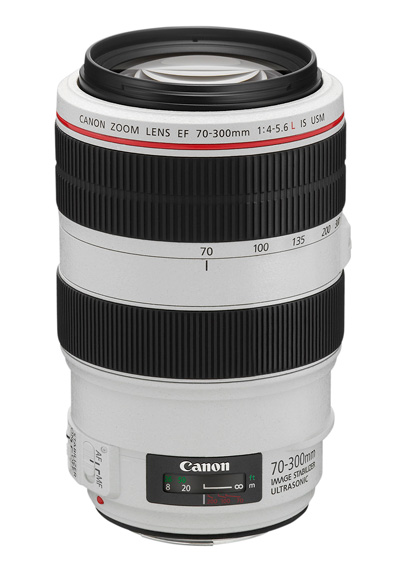
Canon EF 70-300mm f/4-5.6L IS USM UD Telephoto Zoom Lens for Canon EOS SLR Cameras

If 200mm isn’t long enough for you then Canon’s trio of 70-300mm zooms may appeal. The only drawback of these lenses is the variable aperture, but it’s hard to avoid this along such a long focal length range. The EF 70-300mm f/4-5.6L IS USM is the most recent model, but also the most expensive. The EF 70-300mm f4/-5.6 IS USM lens is the least expensive and ideal for those on a tight budget.

The EF 70-300mm f/4-5.6 DO IS USM lens is an interesting alternative. DO stands for Diffractive Optics. The construction of the lens elements in DO lenses means they are smaller and lighter than their non-DO equivalents, making this a good option for photographers concerned with size and weight. In every other respect DO lenses are equivalent to L series lenses. Will Canon make more DO lenses in the future? I hope so, because they are a great idea. The only other DO lens in Canon’s range is the EF 400mm f/4 DO IS USM.

Hopefully that has given you a good overview of some of Canon’s more notable normal and telephoto lenses. It’s impossible to include every model, let alone those made by other manufacturers, but that’s where you come in. What normal or telephoto lenses have you purchased? How have they performed and what would you recommend? Let us know in the comments.


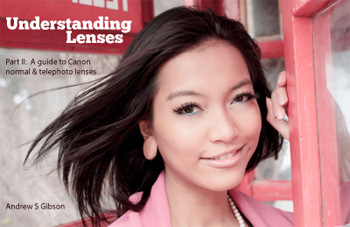
Understanding Lenses Part II: A Guide to Canon Normal & Telephoto Lenses

Understanding Lenses ebookMy ebook Understanding Lenses Part II will teach you how to get the most out of Canon’s normal and telephoto lenses. It contains a buying guide, takes a deep look at aperture and bokeh, and shows you how to focus accurately with telephoto lenses. It’s offered for a special price now on 40% off at Snapndeals for a limited time only.

The post A Buyer’s Guide to Canon Normal and Telephoto Lenses by Andrew S. Gibson appeared first on Digital Photography School.

Digital Photography School

 
Comments Off on A Buyer’s Guide to Canon Normal and Telephoto Lenses

Posted in Photography