RSS
 

Posts Tagged ‘Guide’

23 October, 2014 – Arches National Park – A Quick Guide To Photography

25 Oct


The National Parks in the US offer a wide variety of photographic opportunities for the landscape photographer.  There is so much to see and photograph, and all of these great parks have something unique to see.  This is the second of a continuing series of National Park Quick Guides by QT Luong.  In his previous guide QT described all the good location in Acadia National Park.  Today QT takes us to Arches National Park, which is one of the most famous parks for photographers.


The Luminous Landscape – What’s New

 
Comments Off on 23 October, 2014 – Arches National Park – A Quick Guide To Photography

Posted in News


Optics Matter — Camera and Lens Guide for the New Canon DSLR Shooter

15 Oct

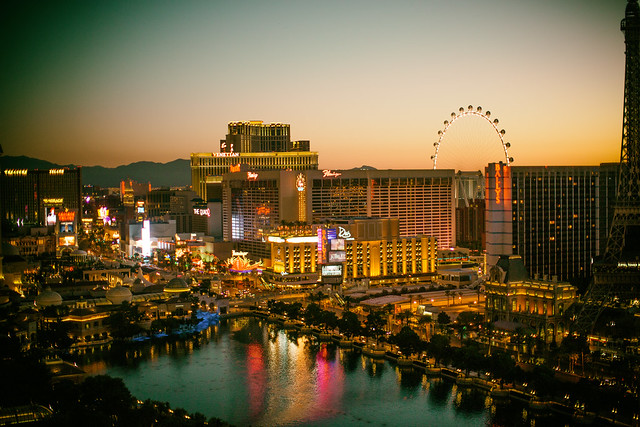
Waking Up With You in Vegas

Last month I spent four glorious days shooting the lights and sights of fabulous Las Vegas. As always, I packed my camera bag full of my favorite lenses and other accessories. I haven’t done a “what’s in my bag,” type post in a while, so I thought I’d use this trip to talk about what camera/lens combinations I used on this trip and why.

In today’s day and age, I hear many photographers talk about ditching their DSLRs for other sorts of setups. I am not one of those photographers. Simply put, I believe that optics matter. I believe that there are things you can do with a DSLR and lens that simply cannot be done as well with other setups. There are unique qualities and characteristics of a well made piece of glass that cannot be replicated with micro compact software based algorithms.

The light going through the glass is primary and fundamental in my opinion, and I refuse to give up the high quality I demand for the convenience of something tiny that I can fit in my shirt pocket, text my friends with or strap to my helmet.

Each photographer must find their own way when it comes to what works best for them, but for me the glass is what matters most of all and there is just no substitute for high quality Canon lenses.

I’ve been shooting Canon digital SLR cameras for over 10 years now and it’s the lenses that allow me to get the shots that I need to get and that allow me to accomplish what I need to accomplish photographically speaking. Like everyone else these days, I’ll snap off mobile shots and post them to Instagram, but what I feel is my more important body of work comes from my DSLR.

To start with, I’ll inventory what I brought with me on my recent Las Vegas Trip — what’s in my bag:

1 Canon EOS 70D camera body
1 Canon EOS 5D Mark III camera body
1 Canon EF-S 18-135mm f/3.5-5.6 IS STM lens
1 Canon EF 135mm f/2L USM lens
1 Canon EF 50mm f/1.2L USM lens
1 Canon EF 100mm f/2.8 Macro USM lens
1 Canon EF 8-15mm f/4 Fisheye USM lens
1 Benro Carbon Fiber Tripod
1 Sandisk 64GB SDXC Extreme Pro Flash Memory card
1 Sandisk 32GB SDHC Extreme Plus Flash Memory card
1 MacBook Pro
1 Drobo Mini

All of my camera gear fits comfortably into my LowePro CompuDaypack bag. I keep the MacBook Pro in the hotel room and it is where I dump my photos to at the end of each day of shooting. The Drobo Mini is used as backup, so that I always have two copies of my image files before clearing off my memory card. It easily fits in the hotel room safe, while I am out shooting during the day and night and connects via Thunderbolt so backup copies are quickly made.

So this is my system, but what’s right for you may be a different story.

The number one question I get from people on social networks is, “what camera should I buy?” The advice I give is pretty much always the same — some sort of Canon DSLR set up, depending on your budget.

Part of why I recommend Canon, is because that’s the gear that I love, use and know. I am simply blown away with the high quality I personally get out of the system. For the life of me, I cannot imagine living without the crisp, sharp perfection of my EF 135mm f/2L USM lens (my favorite lens).

While there are other systems out there, this is the system that I’ve adopted and mastered. It does a remarkable job of getting me the images that I want and need.

There are lots of other reasons why I recommend Canon as well though.

When you are a new DSLR user, I believe one of the best things you can do is try lots of different lenses. Because there are more DSLR Canon shooters out there than any other kind, I find that borrowing friends’ lenses is a great way to stretch your experience, then learn and try new approaches.

Over the years I’ve lent my own lenses on photo walks to hundreds of different people and am always pleased when someone gets to try one of mine out. Likewise when I’m out shooting, I always like running across a different Canon lens and being able to swap with a friend for a few hours to try something new. Chances are if you are going to get into photography you will end up with photographer friends, and chances are that more of them will be shooting with a Canon DSLR system than any other.

For example, this past year at Coachella I shot with some very serious high end professional lenses that my pal Robert Scoble got from a lens rental site, the Canon EF 200mm f/2L IS USM and the Canon EF 400mm f/2.8L IS II USM.

If I wasn’t a Canon shooter, the fact that my buddy Robert Scoble brought those really nice lenses would have been worthless to me. As it was though, I was able to borrow these great lenses just like Robert was able to borrow my EF 8-15mm fisheye lens too to get some awesome crowd shots.

Canon’s range of lenses is remarkable and unmatched. There is a reason why the pros primarily shoot Canon. Even if you can’t afford many of the most expensive professional grade lenses, you can borrow them or even rent them from many places online. Their line up is unmatched, which is optimal for expanding your work with new lenses or renting specialty lenses from time to time.

Another positive about Canon is their great service and support. Many times I’ve sent my Canon bodies in for cleaning, my overworked lenses in for minor repairs, the service has always been quick and top notch. Although I’m more self taught and don’t have as much patience for training and education, Canon does have some great resources for the new DSLR user with the Canon Live Learning Center and Canon Live Learning.

These days I usually recommend new users go one of two ways when they want to take the next step with their photography and invest in a DSLR system.

For those on a bit tighter budget, I recommend getting the Canon EOS 70D Digital SLR Camera with the EF-S 18-135mm STM Lens. This is a perfect starter combo and runs around $ 1,500. While there are other cheaper Canon set ups, I think the EOS 70D provides significantly better quality for a little bit more in cost. This camera holds its value well and is a great camera to learn on. If you decide you want to spend more, you can always sell it back on eBay or somewhere else and upgrade to my next recommendation, the Canon EOS 5D Mark III.

The Canon EOS 5D Mark III, is the camera that I personally use the most. It is the workhorse of digital SLRs. It is the best camera I have ever owned. It also costs around $ 3,400 for the body alone though — so this camera is either for people who have that sort of money to spend, who are very committed to honing their DSLR skills (and maybe even selling photos to offset the cost), or who have tried another Canon system, like the EOS 70D and are ready to take the next step up.

Over the course of the next few weeks, I am going to give more detailed reports on the gear that I use in 5 different blog posts, one on the EOS 70D EFS 18-135mm STM lens set up for starters, and then one each on the four professional grade lenses I took on my Vegas Trip. I’ll provide photographic examples from these different set ups and talk about why I would recommend you consider each.

Although I’ve written several “what’s in my bag” type posts before, by way of full disclosure, I want to disclose that part of the reason for my writing this post now is because Canon recently contacted me about working closer with me as a Canon photographer. They have agreed to sponsor this post and I’m receiving compensation from them.

While I’ve turned down many sponsored type posts from other products in the past, because I’ve been such a passionate Canon user for so many years prior to being approached, I had no problem saying yes to this sort of arrangement with them. When I love a product I’m happy to endorse it. It’s exciting to me to be working closer with Canon and especially exciting to me that Canon is interested in the various social networks and what social photographers working on the web are doing today.

I’m also very open to this post being a conversation about the current state of photography gear — so feel free to give your own input on what works best for you and why. I’m happy to consider your input and also to answer any questions you may have about my gear or recommendations from my perspective.


Thomas Hawk Digital Connection

 
Comments Off on Optics Matter — Camera and Lens Guide for the New Canon DSLR Shooter

Posted in Photography


A Beginners Guide to Seascape Photography

13 Oct
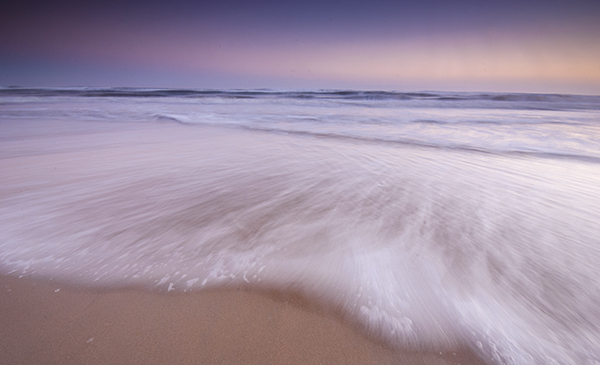
A somewhat abstract seascape scene, the movement of the water makes the image dramatic

A somewhat abstract seascape scene, the movement of the water makes the image dramatic

Seascapes are often seen as a subset of landscape photography. This is true, but I feel that seascapes have their own specific techniques that need to be thought about when you are shooting a scene. The typical sea scene could be a warm sandy beach, blue sky and some palm trees. That is generally the kind of image I try and avoid. For something more dramatic, you may want to try to shoot at sunset and try and capture something unique, rather than a typical postcard shot. When you get it right, your seascape scene should be breathtaking and exciting to look at. It should show the scene, but not look like the kind of shot that anyone could have shot. That means, you may have to scout for some unique or unusual vantage points along the coast.

Safety first please

Seascape photography can be dangerous. Very often you will be hiking over slippery and sharp rocks, the tide may be rising and the waves might be coming in closer and closer. Always be aware of your surroundings and be careful to observe what is happening around you. On more than one occasion, I have been trapped on a rocky outcrop with nothing but wild sea around me. Getting back onto dry land was a relief and an ordeal on those occasions. I have also been completely soaked by freak waves at times and almost lost my camera into the water more than once. So yes, seascape photography can be a little dangerous, but the results are well worth it. The first rule is always, safety first. If possible, go out with a fellow photographer so that there are two of you to help each other if necessary. So, with that disclaimer out of the way, here are some tips on how to set up to get some great seascape images.

Location considerations:

1. Tide

If you don’t know the tidal movements or the tidal range, it’s a good idea to find out. Most coastal towns will have a tide table or chart available, this is important information to know before you go out on your shoot. You can also simply Google “tide table for (city or town)” and all the tide times and measurements should be there. This is important because you may scout a location at low tide, only to return at high tide and find that the rock you were planning to stand on is now submerged under water. Also, the tide can affect the water movement and wave size. If it is high tide, there may not be as much water movement as you would like. It is also a good idea to chat with local photographers or fishermen to find out how the tide is moving.

The incoming tide trapped me on this rocky outcrop

The incoming tide trapped me on this rocky outcrop

2. Weather

Most coastal areas can be unpredictable from a weather perspective. A storm can roll in pretty quickly over a coastal town. Be sure to check the weather forecast for three or four hours before you plan to shoot, and an hour or two after you plan to end your shoot. Sometimes the weather and particularly the wind, can cause the conditions to become difficult to shoot in. One of my favourite apps on my iPhone is Accuweather. I use it often when I am in a location that I am unfamiliar with. It is very easy to use and has been about 90% accurate whenever I have used it.

3. Location

You need to decide where you want to shoot. Do you want to shoot from the beach, the rocks, or the elevated cliff? This will determine what kind of personal gear you will need to take with you (hiking boots, long pants, etc.) It is also a good idea to pack an extra sweater or rain jacket as it could become wet or cold very quickly. Be sure to look at where the sun will be setting. There is nothing more frustrating than being in the shadow of a headland with 80% of your scene in shade as the sun goes down. Remember to look out for channels where the sea water may run up into. These channels and gullies along a rocky coastline can be very dangerous as the water may recede when the tide is out, but as the tide comes in, they may be impossible to cross. If you cross the gulley in low tide and try to return at high tide, you may be trapped as the water could be too deep to cross over.

Magnificent light and moving water makes for a great image

4. Lighting

It is easy to forget your headlamp or flashlight when you are walking along the beach in the warm sunlight. You may be at your location until way after dark and when you decide to return, you will realize that it is pitch dark and the path back has changed because the tide has come in. Don’t forget to carry your headlamp or flashlight with you whenever you do any kind of landscape photography, but especially when you do seascape photography. I have been lost on a rocky coastal outcrop a few times and it is more than a little scary. Fortunately, I always carry my headlamp in my camera bag, no matter what, so that has helped me find my way back to the road or my car.

Photography considerations:

1. Shutter speed

Depending on the seascape scene you are shooting, you will have two choices. You can freeze the movement of the waves or you can blur the movement of the water. If you are shooting a seascape scene that includes rocks in the foreground and the water rolling over the rocks, then you may want to blur the water. This will give the water that soft silky effect and the images will look somewhat surreal. To slow things down even further you could use a neutral density filter to make the exposure time even longer. This will have the effect of really softening the water to the point that it may look misty. Depending on what your vision is for the shot, you need to decide how soft you want the water to be. To freeze the action of the water, you will need to be shooting at 1/1000th or faster. I find that freezing the action of the water is not always as dramatic as softening it. Being able to freeze the action is useful if you are shooting surfing or some other water sport.

2. Aperture

As with landscape photography, you will want to have everything from the foreground to the background in focus. That means you will need to be using an aperture of f/8 or smaller. This will also allow you to slow the shutter speed down, and get some soft water in your scene. Make sure that you focus your camera once you have decided on your scene and composition, then switch your camera to manual focus. That way, when the light begins to fade, your lens won’t be hunting to find a focus point.

Look for reflections in a seascape scene

Look for reflections in a seascape scene

3. Colour or black and white

Seascapes can work very well in black and white. You should shoot your images in colour and convert them afterwards in Photoshop or Lightroom. Both of these image editing suites have great black and white conversion tools and you will be able to make numerous adjustments to your image afterwards. If you shoot in black and white however, you can never get the colour back into the scene. You may try the image in black and white and realize it works better in colour, so be sure to keep shooting in colour.

4. Tripod

You will need a tripod to shoot seascapes effectively. You may be shooting after the sun has set and there is no way you could hold your camera still to get a great shot. Sharpness is key in a good seascape. Portions of your image will be blurred (water) but other parts of the image should be tack sharp (rocks, clouds, etc.) So be sure that everything is very sharp by using a tripod and a cable release if possible. Be aware if you set your tripod up on the sandy shoreline. As the sea comes in, it may cause your tripod to move or sink as the sand may not be firm enough to keep your tripod perfectly still. Always check your image afterwards to be sure that you have the rocks and clouds sharp.

A tripod will be necessary in low light conditions

A tripod is necessary in low light conditions

Subject matter

There are no shortage of scenes to shoot in a seascape scene. Some of the following are ideas to look out for on any beach:

  • Lighthouses – Always fun to shoot and if possible, shoot them in the early evening when the light first comes on.
  • Rocky outcrops – Moving water and rocky beaches make for great seascape images.
  • Reflections – if the tide is moving out on a flat beach, you can capture some amazing reflections of the sky on the shiny beach sand.
  • Colour of light – If you expose properly you can have a warm sky and the blue water in one image. This makes for a beautiful scene.
  • Storms – This is a little more tricky, but sometimes shooting a raging storm over the sea can make a fantastic shot.

If you live near the sea or are planning to visit the seaside, then try your hand at this genre of photography. The results can be very satisfying and you will be astounded how easy it is to produce consistently good results, once you know how. The important thing is to be sure that you are safe and aware of your surroundings at all times. Don’t be afraid to venture out to try this type of photography, it is a lot of fun and it is worth it for sure.

Good foreground interest will anchor the scene

Good foreground interest will anchor the scene

The post A Beginners Guide to Seascape Photography by Barry J Brady appeared first on Digital Photography School.


Digital Photography School

 
Comments Off on A Beginners Guide to Seascape Photography

Posted in Photography


Photography Branding: Pinterest Marketing Guide for Newbies

13 Oct

Pinterest has grabbed the attention of many social media marketers and for good reason. The image sharing site has gathered millions of fans since its debut two years ago. With Pinterest you can easily share photos you’ve found around the web and interact with people from all over the globe. I previously wrote on Photodoto about Pinterest photography boards worth Continue Reading

The post Photography Branding: Pinterest Marketing Guide for Newbies appeared first on Photodoto.


Photodoto

 
Comments Off on Photography Branding: Pinterest Marketing Guide for Newbies

Posted in Photography


Photographer’s Guide to iPhone 6: Capabilities, Tips & Gadgets

08 Oct

After many months of waiting, the iPhone 6 and its big brother, the iPhone 6 Plus, have finally arrived! Apple made the decision to keep the 8-megapixel sensor for the iPhone 6 iSight camera, despite other smartphones which have up to 20-megapixel cameras. However, the iPhone 6 camera is not the same as the one you’ll find in the iPhone Continue Reading

The post Photographer’s Guide to iPhone 6: Capabilities, Tips & Gadgets appeared first on Photodoto.


Photodoto

 
Comments Off on Photographer’s Guide to iPhone 6: Capabilities, Tips & Gadgets

Posted in Photography


How to Photograph Lightning – the Ultimate Guide

07 Oct

If someone told me I could only take pictures of one thing for the rest of my life – I’d think about it for awhile, and then choose lightning. Luckily I live in reality and no one will ever say that to me, but it does speak to how passionate I am about photographing this stuff.

I’m a storm chaser at heart, so I love everything about weather. It would be difficult if I couldn’t also capture awesome dust storms, supercells, flash floods and whatever else might happen out there. But lightning – I love lightning.
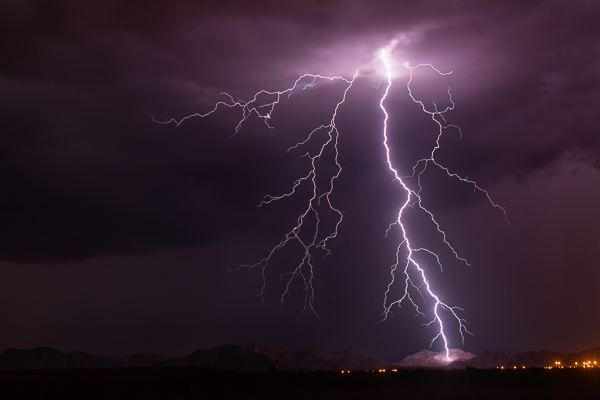
MountainSide

“MountainSide” – Buckeye, Arizona – 50mm, ISO 100, f/8.0, 20 sec

The Adrenaline Rush

What is it about lightning? I’ve lived in Arizona my entire life and I grew up loving our summer monsoon season. One of my early memories as a kid was sitting on our back porch with my dad and being blinded by a strike hitting the field behind our house. I still remember being blinded for a few seconds. It was that close and that intense.

Arizona is a fantastic venue to capture lightning. We get a lot of high-based storms, which means you tend to see more of the strike. Our landscape is beautiful, from deserts and cacti, to rolling grasslands and the Grand Canyon. I once met a guy in Tucson who was spending two whole weeks in Arizona solely to photograph lightning, and he was from Germany!

Trying to capture lightning is an adrenaline rush. It’s addicting. You can look at the back of your camera and know you just caught an epic bolt, but still not be satisfied, or maybe that’s just me. It’s never enough. I want more. More and more.
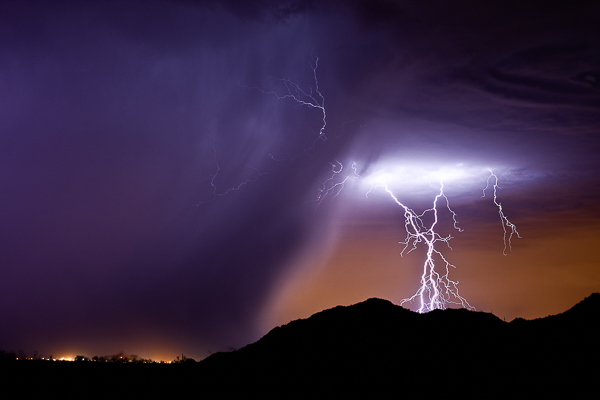
PurpleRain

“Purple Rain” – Highway 347, AZ 50mm, ISO 200, f/6.3, 25 sec

Lightning is freaky. You want to get close, but not too close. The closer the better – sometimes. Suddenly it gets quiet and you realize a storm just built up right over your head and a strike from nowhere makes you double-check your shorts. I am usually out in the middle of nowhere, late at night, and there is something crazy spooky about seeing an entire landscape get lit up in the blink of an eye.

What makes lightning fun to photograph is the uniqueness of it all. No two bolts are the same. You never know what you’ll end up with. Plus, if you are all alone out there, no one else can have the same image as you do.

Finding the Storms

This is in reality the hardest part of photographing lightning. You may worry about your settings and lenses and all that, but if you do this for a while, that all becomes second nature. Finding the storms is the difficult task. You may live in a part of the United States, or even the world, where lightning just doesn’t happen much, if at all. But if it does, then you have to learn the patterns and watch the forecasts to be prepared.

The best way to do that here in the U.S. is to bookmark the webpage of your local National Weather Service, which you can find on NOAA.gov. Their pages have links to radars where you can track the storms. If you want to really get intense, grab a copy of RadarScope (iOS or Android) to have it on your Smartphone anytime you want.

If you don’t have lightning in your area, you may want to invest in a storm chasing tour, or vacation somewhere like Arizona during the summer.
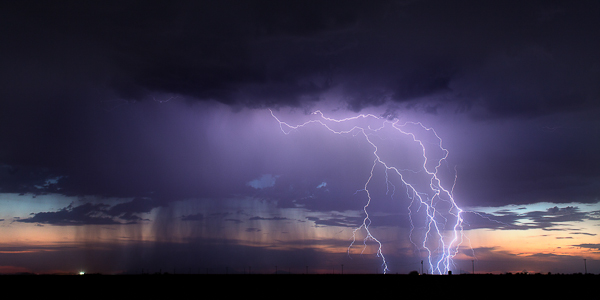
BUckeye

“Buckeye” – Buckeye, AZ – 50mm, ISO 160, f/10, 8 sec

Tools You Need

Okay, these next few sections are what you really care about anyways, so let’s get to it. Tools, meaning things you need to capture lightning.

The fact is, I started out with a little point and shoot that took three shots per second. I actually caught a crazy strike with it on my third or fourth time out, and that’s what really got me hooked. So you can literally capture lighting with basic cameras if you want to depend on luck. There are even apps for your Smartphone.

But if you want to eliminate as much luck as you can AND capture mind-blowing, jaw dropping images – you’ll likely want to upgrade your tools. You don’t have to go crazy though. Here’s the basic list of what you need:

  • A DSLR, SLR or any camera that lets you control the length of your exposure.
  • Lenses of course. Varying focal ranges are a must, although I’m a fan of primes.
  • A tripod – the sturdier the better.
  • A wireless shutter release or intervalometer.

That’s really the essentials. You don’t need the most expensive equipment either. Basic DSLRs are a good starting point. My first upgrade from the point and shoot was a Canon Rebel XSi. It did the job for about a year, but I knew I wanted to go full frame eventually.
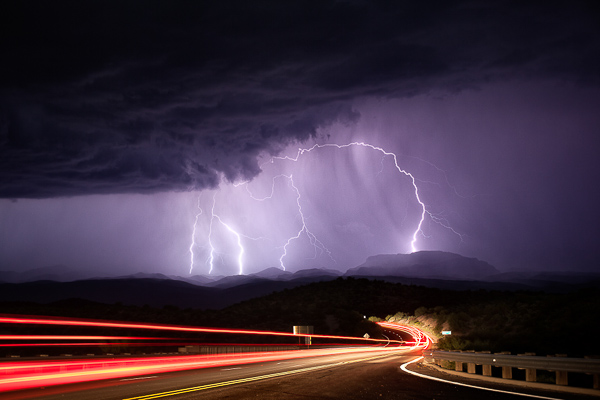
Mammoth

Mammoth, AZ – 50mm, ISO 200, f/6.3, 25 sec

I use Canon products, specifically a couple of 5D Mark III’s and a Mark II as a backup. The lenses I carry on a storm chase:

  • Rokinon 14mm f/2.8 (mostly for time-lapse photograph, but also for big landscape shots)
  • Canon 16-35mm f/2.8
  • Canon 17-40mm f/4.0
  • Canon 35mm f/1.4
  • Canon 50mm f/1.2
  • Canon 135mm f/2.0

Your tripod just needs to sturdy and heavy duty. When you are shooting during a thunderstorm there will usually be wind issues. I’ve had tripods get blown right over by a strong gust of wind. I haven’t spent as much on tripods as I do on camera gear and time-lapse tools, but I use Manfrotto legs and heads. If you can afford it, upgrade to a tripod that has independent legs and a steadier base, that will allow you to shoot with a wider stance.

Finally, you will need some kind of external shutter release. It can be anywhere from your basic wired cable release, all the way up to a wireless intervalometer. I personally like the wireless intervalometers because you can control your camera from inside the car where you are safer than standing outside during a lightning storm. I also love the wireless ones because the cabled ones can get tangled in your tripod legs if you are packing up in a hurry. They are are just easier to use.

A Little About Lightning Triggers

Another external control for lightning photography is a lightning trigger. The brilliance of one of these triggers is that it senses the flash of lightning and automatically fires the shutter on your camera. You can comfortably put it on your camera, day or night, and sit back in your car and let the trigger do all the work.
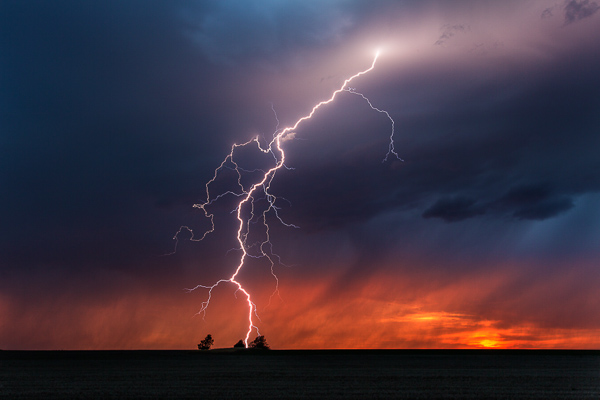
Kansas

Scott City, KS – 33mm, ISO 100, f/16, 2 sec, lightning trigger

The tough part about lightning triggers is finding one that is reliable. I’ve had three different ones and it took until I bought one of the most expensive (The Lightning Trigger IV) for me to feel like I found one that works. I’ve had a few of the $ 100-200 variety and they don’t always trigger from a flash of lightning. That’s kind of the point right? So to me, if you can save up for a good one, it’s worth the price instead of spending $ 100 two or three times trying to find one that works.

My opinion on lightning triggers is that they are good during the day, but become less useful the darker it gets. Most photographers like to use a trigger because it helps for shooting daytime lightning, and it also saves your shutter. During the day, you could either take a ton of photos in a row and hope to get lucky, or you could use a trigger. The triggers works then. Great invention.
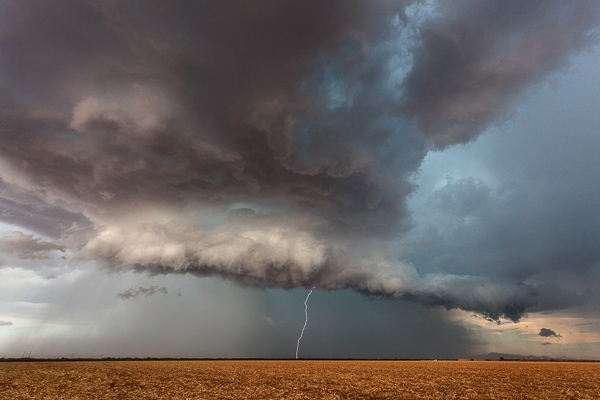
RedRock

Red Rock, AZ – 17mm, ISO 400, f/8.0, 1/160th, lightning trigger

There is also an argument that it can save your shutter at night too. But whenever I’m out shooting lightning, there is enough flashing going on that my trigger is going to keep firing over and over anyways. The anatomy of a lightning bolt is that there are parts of it that could be missed if you wait for a trigger to fire your shutter. I’d much rather increase my odds of a capturing the entire lightning bolt by doing 15-25 one second exposures over and over. Once the sun goes down and I can start getting two or three second exposures, I take off the trigger and use the intervalometer. But that’s just me!
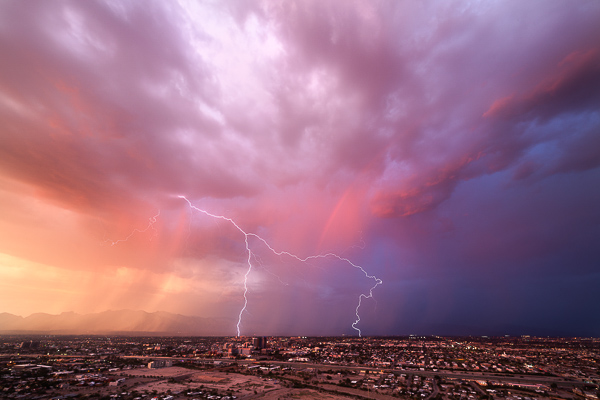
TucsonSunset

Tucson, AZ – 14mm, ISO 50, f/16, 2 sec, time-lapse capture

During the day, since I love to do time-lapse, I’ll actually get lucky enough to capture bolts just from that, without a trigger. Taking shots every one or two seconds allows you to record a sweet time-lapse and also hopefully snag a few lightning strikes. This has happened to me countless times. I’ve even captured a few with an even longer interval on the time-lapse. You might give it a try if you are interested in time-lapse at all.

Camera Settings

People ask me all the time “What are good settings for taking lightning photos?” and the answer is that it varies just like anything else in photography. But there are some good guidelines to get you started.

For daytime lightning, you want to do your best to to have as slow of an exposure as you can, which might mean f/16-f/22 and maybe a neutral density filter. I personally don’t like ND filters for this kind of photography because when I’ve used them in the past, they tend to wash out the lightning a little, but it’s something to at least try. You might slap an ND filter on, increase the ISO to 200, and hope that helps the bolt show up a bit more intensely. Daytime lightning is tough regardless. The best results are usually when it’s really dark with heavy clouds, without much sunlight. The strikes are going to show up a lot better against a dark background.
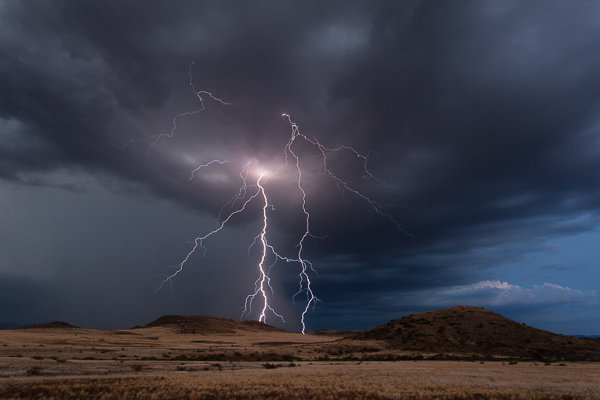
CampVerde

Camp Verde, AZ – 23mm, ISO 100, f/18, 6 sec

Nighttime is a whole different ballgame. There are lots of things that can alter your settings. Are you in the city? Complete and utter darkness? Is there a full moon? Are the bolts coming in fast and furious, or spaced minutes apart? Is the lightning a only a few miles, or 25 or more mile away?

Here are some situations and common settings to use as the sky darkens on a night out chasing storms:

  • Dusk/sunset: f/10-16, 2-10 seconds, ISO 200. You might raise your ISO even more because the sky still has some light in it and you want the lightning to really stand out.
  • Blue hour – as it gets darker, you will open up your aperture and maybe increase your shutter speed.
  • Once it gets dark, your ISO becomes more important. The lightning flash against a dark sky means you don’t need as high of an ISO or you risk blowing out your bolt.
  • After dark in the city – narrower aperture yields better results with city lights, so you might be shooting at f/10-16 even after dark. The shutter speed would depend on how bright the lights are; same with the ISO. Usually in the city I like 10-15 second exposures.
  • After dark, away from light – wider apertures – typically f/5.6-f/8. You’ll want to drop your ISO to 100 to make sure you don’t have blown out shots. If it’s really dark, you may want longer exposures, 20-30 seconds.
  • After dark, but lots of ambient light, for example, a full moon – shorter exposures to reduce motion in the clouds if you don’t want that.
  • Close lightning – narrower aperture, low ISO.
  • Far away – varied aperture, maybe higher ISO so the bolts show up better.

The bottom line is none of this is set in stone. You have to get out there and practice to learn the best settings for you and what you like.
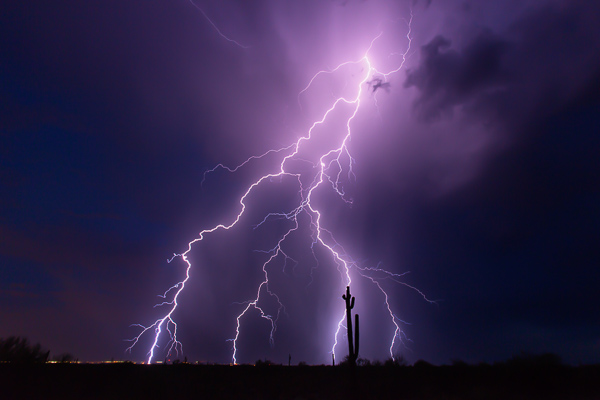
SaguaroBolt

“Saguaro Bolt” – Wickenburg, AZ – 16mm, ISO 200, f/11, 10 sec

The Biggest Things to Watch for:

•Don’t blow out your lightning. Sometimes bolts are so bright that there is nothing you can do about it. But when you realize the strikes are so intense that you are blowing stuff out, narrow your aperture or drop the ISO.
•Don’t let your lightning be too dark. Ah the other side of the coin. If your aperture is too narrow and your ISO too low, that distant lightning may not be so bright and vivid. It will require a lot of post-production, and might result in excess noise if you have to increase your exposure to make it look good. You are also probably not going to get a lot of the surrounding clouds and landscapes unless the bolt is very bright. You want to make sure you still have a good exposure so you get details in the clouds and landscape if you can.
•Cloud ghosting. If you are taking really long exposures for lightning (25 seconds or longer), you will risk seeing ghosting in your clouds as they get illuminated by different strikes over the course of your shot.

Focusing

I could have included focusing in the above section, but I find it so important that I wanted to put extra emphasis on it. The biggest, most common mistake I see in lightning photography is out of focus images (close second is blown-out lightning). This seems to be the toughest thing to learn how to do correctly.

I include myself in that! Even this past summer I was excited about some lightning images only to get home and realize they were out of focus. We all mess this up.
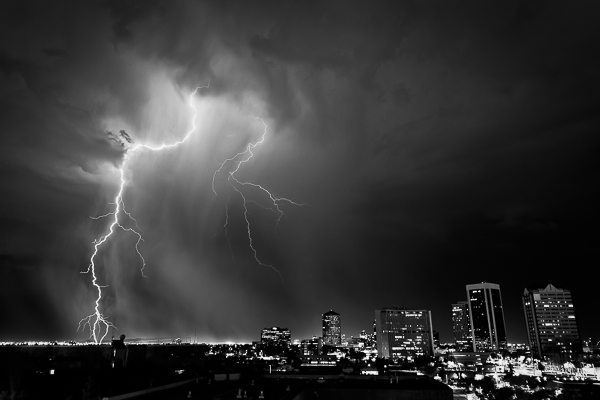
DowntownPhoenix

Phoenix, AZ, ISO 200, 26mm, f/8.0, 15 sec

I think the biggest reason for this is that ofter we rely on the “infinity” setting on our lenses. While some lenses have a hard stop for infinity (I am definitely not well versed in many lenses other than Canon), most of them don’t. Even if it does have a hard stop, is that actually perfect?

The best way to focus at night:

  • Autofocus on distant city lights if you can. I find this to be the most reliable way at night. Sometimes the moon is out which is another good way.
  • If there aren’t enough lights to focus on, then Live View is your next best method. Use Live View, zoom in (on the screen only not with your lens) to anything you can – even if it’s a single light on the horizon, and manually focus on it.
  • If all else fails, use infinity. But once you get a lighting strike on camera, check to see if it’s in focus. If not, adjust.

Remember, the wider your aperture (like f/5.6), the tougher the focusing. For example, you could focus on lights that are only a mile away, but the bolt lands five miles away and it might be slightly soft. A narrower aperture really does help with this issue. Once for me, it was so completely dark, I chose to focus on an incoming truck’s lights about a half mile down the road. Turns out, the lightning 10 miles away was out of focus. I cried – a little.
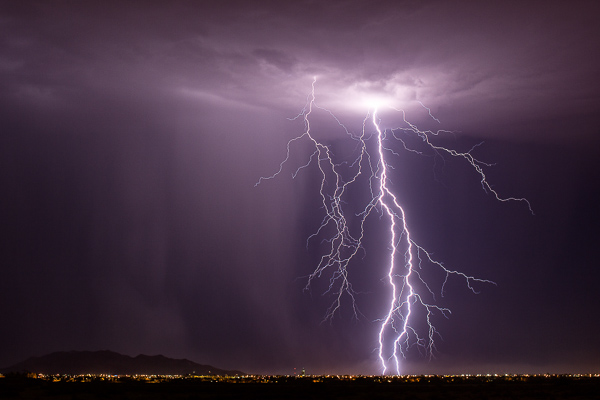
CasaGrande

Casa Grande, AZ – 50mm, ISO 125, f/9.0, 25 sec

Another tip, which I’ve never done myself, is that when you find that perfect infinity spot at say f/8-f/10, put a little scratch on your lens with an X-Acto knife, or a thin line with a paint pen, and just line it up whenever you need it.

Last but definitely not least – if you don’t have back button focus set up on your camera, then you will need to set your lens to manual focus. You don’t want to go through all the work of focusing on distant lights with Live View, only to take your first shot and have your camera try and focus in the dark! Your absolute best solution here to is look up back button focus on dPS. From landscape to wedding and portrait photographers, this is a must.

Practice, Stay Safe and Have Fun!

All my advice is based on my experience. You may find different opinions or thoughts elsewhere, or you might even have your own methods. That’s okay. Figuring out what works best for you is how photography works in general.

The best advice I can give you though, is to practice. You may not have much lightning where you are, so perhaps plan a trip somewhere (like Arizona) where you can spend a few weeks just shooting lightning every chance you get.
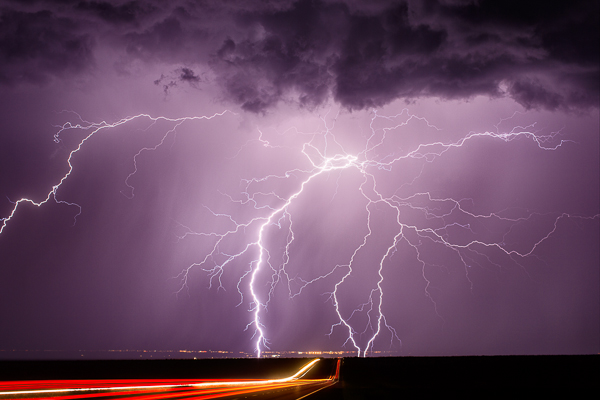
Whetstone - (Highway 90 near Whetstone, AZ 50mm, ISO 100, f/5.6, 25 sec)

Whetstone – (Highway 90 near Whetstone, AZ 50mm, ISO 100, f/5.6, 25 sec)

Like anything in life, practice makes you better. You can read this article and totally have a good idea of what to do, but actually being out there, in the moment, is a different story. I’ve done this enough that I can pull up to a spot and pretty much know my settings before I pull the camera out of the bag. But there are still times when I’m not quite sure and need to take a few practice shots. Not all situations are the same, so you will slowly learn the right settings for each scene.

Please stay safe! In the last three months, I’ve had lightning strikes hit within 75 feet of me. Yikes. It’s scary for sure. Do this knowing the closer you get, the more risk you run of getting hit. Two storm chasers have been struck by lightning this year. It’s a real danger.

But have fun. There is nothing like capturing an amazing strike on camera. I wish you the best of luck.

The post How to Photograph Lightning – the Ultimate Guide by Mike Olbinski appeared first on Digital Photography School.


Digital Photography School

 
Comments Off on How to Photograph Lightning – the Ultimate Guide

Posted in Photography


DSLR Camera Buying Guide 2014 for Newbies and Pros

03 Oct

When it comes to buying a new digital camera, most beginners find it difficult to choose the best DSLR camera for photography. This article highlights some of the best professional cameras of 2014. It provides a round-up of the best digital cameras with DSLR technology that caters to the requirements of beginners as well as professional photographers. Let’s look at Continue Reading

The post DSLR Camera Buying Guide 2014 for Newbies and Pros appeared first on Photodoto.


Photodoto

 
Comments Off on DSLR Camera Buying Guide 2014 for Newbies and Pros

Posted in Photography


New: The dPS Guide to Portrait Post Production and Workflow

02 Oct

Our Exciting News in a Nutshell

Today I’m excited to announce the launch of a brand new eBook – Portraits: After the Shot – a Guide to Portrait Post Production and Workflow by Gina Milicia.

It’s available for a limited time with an early bird bonus of a collection of great Lightroom and Photoshop presets. Get your copy here.

The Story So Far

  • In January 2013 we released our first Portrait Photography eBook by Gina Milicia – Portraits: Making the Shot – a fantastic overview of taking beautiful portraits with soul.
  • In September 2013 we released Gina’s second eBook – Portraits: Lighting the Shot – a guide to lighting portraits with both natural and artificial light.
  • In January of this year we added to Gina’s library of eBooks with a 3rd – Portraits: Striking the Pose – an eBook all about working with your portrait subjects to get natural looking portrait poses.

Portraits ebooks

To say Gina’s first 3 eBooks have been popular would be a gross understatement. They’ve each outsold the previous one and have received fantastic reviews from many of our readers.

But we’re not finished yet. So far Gina has focused her eBooks on taking beautiful portraits. Here at dPS we’re big believers in getting the best photo you possibly can in-camera – but we also know there’s a lot you can do after you take the shot.

It’s for this reason that we’ve been working with Gina over the last 6 months on a new edition to this wonderful little collection of eBooks and today can introduce to you… Portraits: After the Shot

Portraitspostproduction

This eBook is all about giving you the confidence and skills to work with the portraits you take and bring them to life using the wonderful tools available to us today.

Inside Portraits: After the Shot you’ll discover topics such as:

  • The fundamental rules of portrait post processing
  • How keeping your processing simple can be much more profound
  • How to develop your own post processing style
  • All the gear you’ll need to support your processing
  • Storage and backup solutions
  • Detailed run though of Ginas exact workflow
  • Lightroom fundamentals and shortcuts
  • Lightroom ‘go to’ recipes
  • Photoshop essentials and recipes

There’s much more too.

See the full table of contents, some screenshots from the eBook and learn more about the early bird bonus here on our Portraits: After the Shot page.

For those of you who’ve not invested Gina’s previous eBooks you’ll also find a great bundle deal that gets you 38% off the full collection!

The post New: The dPS Guide to Portrait Post Production and Workflow by Darren Rowse appeared first on Digital Photography School.


Digital Photography School
 
Comments Off on New: The dPS Guide to Portrait Post Production and Workflow

Posted in Photography


1 October, 2014 – Guide To The Fuji XT-1

02 Oct


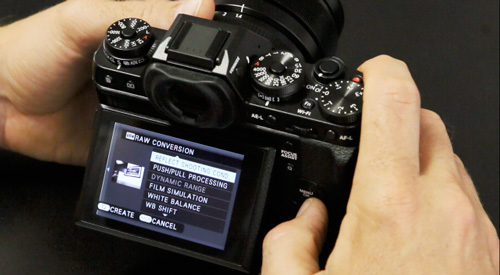
Luminous-Landscape pioneered instructional videos years ago with the very successful Lightroom Tutorials.  Now, LuLa takes the same format and applies it to the operation of popular cameras.  Our first in a series of Camera Guide Tutorials we introduce today – Lu-La’s Guide To The Fuji XT-1.  This new tutorial is 3 hours in length and covers all aspects of the set-up and use of this popular camera.  Kevin Raber, LuLa’s publisher along with Jarrid Spicer of Roberts Camera in Indianapolis, Indiana walk you through the process. 

The LuLa Guide To The Fuji XT-1 is available now for LuLa Video Subscribers as well as an individual download for $ 29.95.  There are 14 videos totaling three hours.  Each video has chapter markers to quickly access the control or menu item you may be interested in.  There is also a PDF available with all the chapters listed.


The Luminous Landscape – What’s New

 
Comments Off on 1 October, 2014 – Guide To The Fuji XT-1

Posted in News


Guerrilla Moss Graffiti: 8-Step DIY Guide to Green Wall Art

30 Sep

[ By WebUrbanist in Art & Street Art & Graffiti. ]

moss graffit artwork examples

Seed bombs and shotgun shell sprouts are not the only weapons in a guerrilla war for urban gardens and green street art – moss is a great material that can be rapidly adapted and deployed to make statements on city surfaces as well.

moss wall art making

Indeed, using mosses allows artists to go above and beyond the ground, shifting from horizontal to vertical spans for a different look and added visibility. And, as it turns out, creating moss wall art is not as difficult as you might guess – do-it-yourself directions are shown in detail below.

moss art recipe process

First, you have to gather some moss, naturally, which you can then mix with water-retention gardening gel and some buttermilk then blend together for a few minutes to form a gelatinous substance.

moss graffiti guide steps

Shift your creation into a portable container then select and paint it onto a surface of choice – if the area will not be exposed to moisture, you may want to come back by and spray on some water from time to time.

anna garforth grow moss

Remember, too, that there are many ways to take this process further and create additional kinds of green artwork, mossy or otherwise.

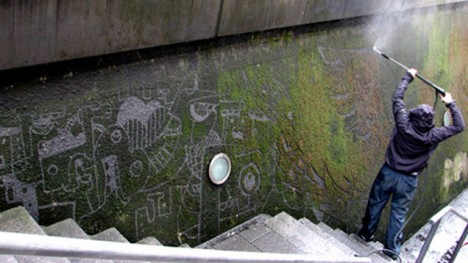
moss graffiti removal subtraction

Meanwhile, if you find a surface already mossed over thanks to time and nature, selectively erasing sections of growth can be a fun form of expression as well.

Share on Facebook


[ By WebUrbanist in Art & Street Art & Graffiti. ]

[ WebUrbanist | Archives | Galleries | Privacy | TOS ]


WebUrbanist

 
Comments Off on Guerrilla Moss Graffiti: 8-Step DIY Guide to Green Wall Art

Posted in Creativity