RSS
 

Posts Tagged ‘Good’

Dispelling the Myth of Good Light and Bad Light

24 Jul

There is no such thing as bad light, there is just light. Take advantage of every situation.

20131206 Bagan 563b

Photography is all about the light. In fact, if there is no light hitting the sensor, there is no photo. Different times of the day, or weather conditions, can create different moods and situations. As you probably know, you can achieve amazing and compelling results by shooting in the early morning, or from late afternoon well into twilight. This is known as the golden hour and the blue hour, respectively.

Coral Gables City Hallb

However, there is no such thing as good light or bad light, there is just light. It is not always possible to shoot under ideal conditions, especially when traveling. Yes, you can wake up early; yes, you can skip dinner or eat it later. But what are you going to do the rest of the day or if there is bad weather? If anything, when you are on tour, chances are you’ll be wandering around at midday, in overcast conditions or even in the rain. Here are some tips and examples you can follow to make the most of the situation under any kind of weather or light conditions.

Tips for using any kind of light to make great photos

High sun, midday light

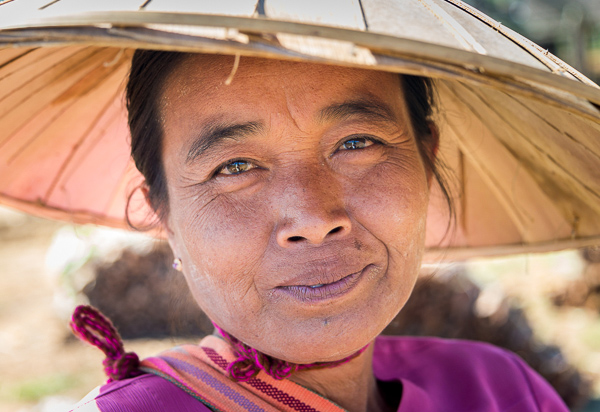
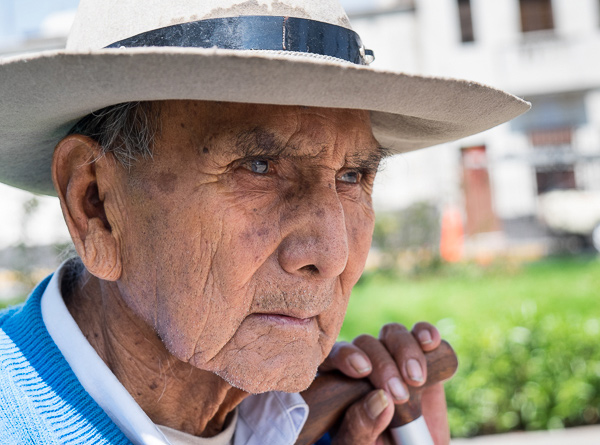
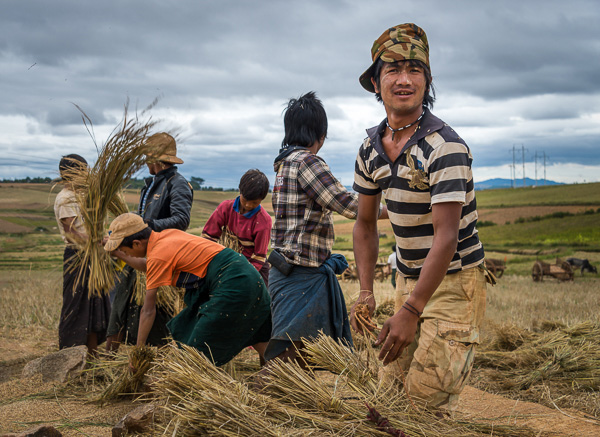
In most cases you’ll be out exploring places during the daytime under midday light. This is not an ideal situation. Direct, harsh sunlight creates hard shadows that are not very flattering. Taking portraits of locals is one of the best ways to capture the essence of places; if you’re going after this, you can try to move your subject into the shade. If they are wearing a hat, you can also position them in a way where their face is under the brim. The key for this is to come close enough to the person and compose your shot right into them. Alternatively, use an off-camera flash to fill the shadows and compensate for the brightness in your background.

20131212 Inle Lake 535b

20140410 Arequipa 267b

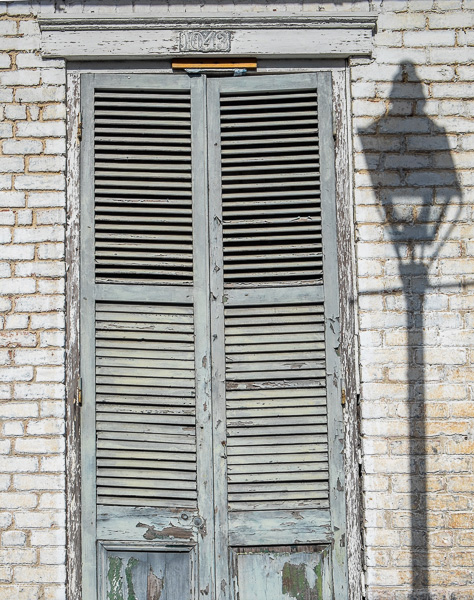
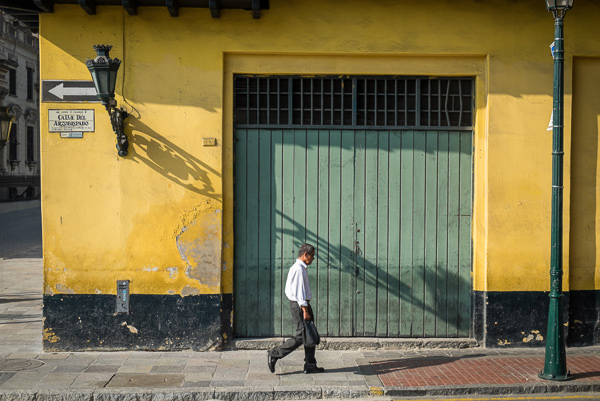
If you are looking for street scenes or iconic locations, you can always use the hard shadows created by the direct sunlight to your benefit and arrange the image in a way that helps to create a compelling composition. You may have to wait for the right moment, waiting for someone to walk into your scene or simply using the shadow element intentionally as part of your photograph.

20140222 untitled 0063b

20140402 Lima 108b

Clouds in the sky, overcast light

Granted, this is not an ideal situation either; however, there is much you can do. In this case, contrary to the high sun, you have a very soft light. This is great for shooting portraits. The light will be even and very soft; throw in some stormy clouds and the effect could be very dramatic. Again, get close to your subject.

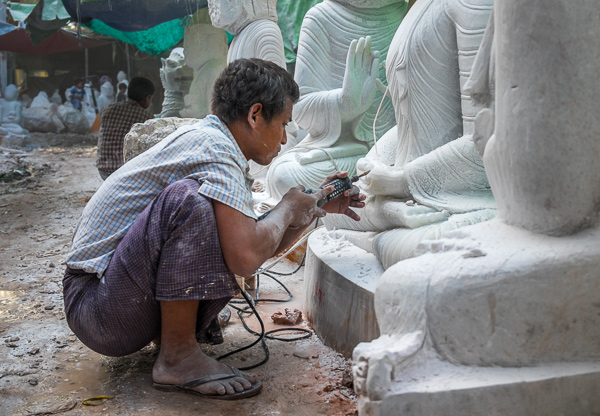
Another technique is to avoid the sky. Look for locations and activities for which the sky is not an important element and simply avoid shooting it. A good example for this is local markets or similar indoor activities. By the way, local markets are fun to shoot, and moreover, they’re an excellent way to connect to and experience local culture.

20131211 Inle Lake 13b

20131208 Mandalay 362b

Nevertheless, you can also work with landscape and exterior photos during these conditions. In fact, there are some places where it’s almost impossible to avoid. Due to local weather characteristics you may find that during certain seasonal periods you’ll encounter misty mornings, stormy afternoons, and so on. Go ahead and shoot it. What better way to capture a region the way you see it, the way you feel it?

20140402 Lima 56b

Rainy days

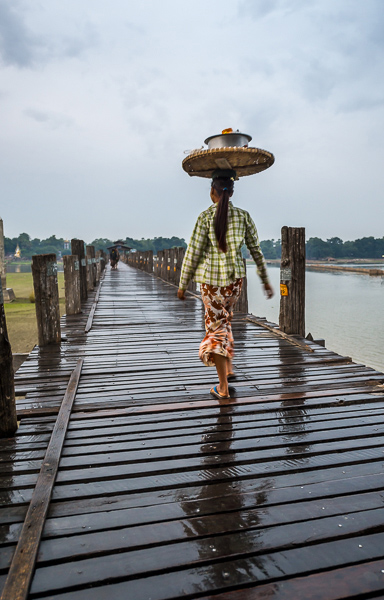
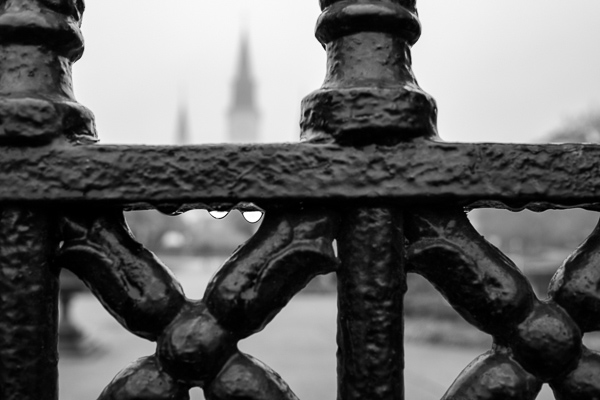
This is the time when most photographers stay inside, but I’d strongly suggest you get out there. It can seem a little bit scary, we tend to overprotect our gear, but with some preparation there is nothing to fear and you’ll get fantastic results. When it starts to rain, good photographers head outside. Downpours bring life, a different look; in certain cases, some areas are just magical in the rain. Think about shooting reflections, ponds, and playing with water drops. The possibilities are endless and you’ll definitely love it.

20131209 Mandalay 772b

20140223 untitled 0022b

As you can see, good light, bad light, is just a myth. There are certainly ideal situations where you can achieve exceptional photos, but it is not always possible to be out during perfect circumstances. So go ahead and take advantage of every condition, try to think how you can leverage and play it to your convenience. In the end, photography is fun, and great images can be obtained under almost any condition.

The post Dispelling the Myth of Good Light and Bad Light by Daniel Korzeniewski appeared first on Digital Photography School.


Digital Photography School

 
Comments Off on Dispelling the Myth of Good Light and Bad Light

Posted in Photography


5 Photoshop Tools to Take Your Images from Good to Great

03 Jul
Seascape image - Before and After image editing

Seascape image – Before and After image editing

We hear it all the time, “That photo has been Photoshopped”. Sometimes it sounds like the photo has caught a disease or that Photoshop is some undesirable effect that has been added to the image. Photoshop is the KEY to making your good images look spectacular. Yes, I said “good” images. Photoshop is not about fixing mistakes or trying to rescue a bad shot. It is more about refining your images and making them look amazing without overdoing it. Photoshop is a fantastic tool when it is used effectively but can be your enemy when you overdo it. Depending on what you want to achieve with your photos, this quick guide to five Photoshop tools will help you adjust your exposure effectively and make the colour really pop out of your image.

NOTE: the examples in this article simply show you how to make the adjustments on a separate layer. You could also use an adjustment layer which gives you much more control over the adjustment. The only tool that can’t be used with an adjustment layer is Shadow and Highlights. I will go into more details about adjustment layers in upcoming articles, for now, if you follow these guidelines, your images will look compelling and rich without looking overdone.

1. Shadow and Highlights Tool

This tool will be used to get more detail in the shadow areas of your image. Modern cameras can capture lots of detail, but depending on the light in the scene you are shooting, the shadows may be a little dark. The Shadow and Highlights tool will bring back some of the details in those areas.

Open your image in Photoshop and go to:  IMAGE > ADJUSTMENTS > SHADOW AND HIGHLIGHTS.

Finding the Shadow and Highlights tool

Finding the Shadow and Highlights tool

The tool will pop up and you will see this (as shown below), if you don’t see all these sliders, click “more options” to expand the box. You will use this tool to bring detail back into the shadows and you won’t be making any adjustments to the highlights. I find that the highlights part of this tool does not do a really good job, so I don’t use it at all.

Making adjustments to the Shadows in the image

Making adjustments to the Shadows in the image

The best way to work with the tool is to slide the Amount slider under the Shadows box to about one third across (33%). Then slide the Tonal Width slider to directly under the Amount slider. Lastly  bring the radius slider to directly under it. In most cases, you will want to have these sliders directly under each other (see screenshot below right).

shadows-highlightsThe important thing to remember here is to make the adjustments and take careful note of your image has been affected. Click on the preview button on the right hand side of the tool (you can do this with all the tools in this article) to see the “before and after”. You will be able to see at a glance how your changes are working. If you need to extract more detail from the shadows then slide the Amount slider to the right even more but make sure you line the other two sliders underneath it.

The amount that you decide to adjust the shadows is up to you. Be careful not to overdo it. Once you start seeing a “glow” around certain parts of your image, you may have gone too far. This glow is often referred to as a halo which can be avoided by watching carefully how your adjustments are affecting your image. If you see them appearing, simply drag the sliders back to the left until they disappear. Once you are happy, click OK.

2. Levels Tool

With your image open and the shadows adjusted, you will now adjust the overall exposure in the scene. If your image is a little over or under exposed, the levels tool can fix that. Go to: IMAGE > ADJUSTMENTS > LEVELS on the menu bar (or using the keyboard shortcut Command/Control+L). You will see the LEVELS dialogue box pop up and it will have a graph in it. This graph is called a histogram.

histogram

A histogram is simply a graphical representation of the pixels in the scene. If the graph is pushed over to the left side it means that your image has more darker tones in it, if the graph is over on the right side it means that your image has more brighter tones. There is no right or wrong histogram, it is simply a representation of the light in your scene. There are some great articles about histograms on the dPS site, so if you want to learn more about them, click on one of the links above.

Using the Levels tool to enhance the exposure and boost contrast

Using the Levels tool to enhance the exposure and boost contrast

The important thing to remember when working with levels is to make sure you don’t adjust your image so much that it causes the image to become under or over exposed. Thankfully, Photoshop gave us a way to see if that is happening, which I will explain shortly. Firstly, you will notice there are three sliders on the bottom of the histogram. The slider on the right is white (adjusts highlights) the slider in the middle is grey (adjusts mid tones) and the slider on the left is black (adjusts shadows). The levels tools will help adjust contrast and colour in your image. You can start the process by clicking and dragging the white slider in (move it to the left) to touch the edge of the histogram. Do the same for the black slider (drag it to the right). Your image will already look better.

Using the ALT key to see where the highlights are being overexposed

Using the ALT key to see where the highlights are being overexposed

Then you can move the middle slider to the right or the left to see which works better. Small changes always work best, so don’t make extreme changes on each slider. If you want to see how your adjustments are affecting your image, hold down the ALT key (PC) or OPTION key (Mac) while you click on the white or black slider. When you click ALT and hold down the white slider, the image will go black. As you slide to the left, you will see some red areas in your image (see above). When you see this, Photoshop is showing you which parts of the image will be overexposed, or clipped. The opposite is true for the the black slider. If you hold down ALT and click on the black slider, the screen will go white and as you slide to the right, the areas that come up on the screen will be underexposed, or clipped. It is a good idea to use this function if you are not sure if you have overdone your adjustments in Levels.

3. Colour Balance

This is a good tool to use to change the overall colour in the image. If your image is too blue and want you want it to be warmer, then you can do that by pulling up the red tones. Also, if your image has an undesirable colour cast, maybe the overall colour of the scene seems too green, then you can correct that by using this tool. The colour balance tool is found in the top menu bar under IMAGE > ADJUSTMENTS > COLOUR BALANCE (or using the keyboard shortcut Command/Control+B).

color-balance

Once the dialogue box is open, you will see three sliders (as above). The sliders represent the visual colours in the image, and are set in the middle by default. By moving them to the left or the right you will be able to change the colour in the image. The top slider affects Cyan/Red, the middle slider works on Magenta/Green and the bottom slider is Yellow/Blue. The colour will change according to which slider you choose and how far left or right you move it.

Note: you can also choose which area of your image to affect as in the Shadows, Midtones or Highlights but selecting the appropriate button in the Tone Balance section below the sliders.

You will want make small adjustments here too. A big adjustment can make your image look over saturated with a particular colour and that will look unnatural. The idea is to enhance your image by boosting certain colours in the scene. So, if you have a sunset image (as below) you may want to boost the reds, yellows and magentas. That will make your image look warm and will give the scene some colour boost.

Using Colour Balance to boost the colours in the image

Using Colour Balance to boost the colours in the image

4. Hue and Saturation

One of the most powerful colour tools in Photoshop is the Hue and Saturation tool. To open it go to: IMAGE > ADJUSTMENTS > HUE/SATURATION (or using the keyboard shortcut Command/Control+U). This tool can be used very effectively to adjust all the colours in your image. When you open the tool, you will notice that there are three sliders again, namely Hue, Saturation and Lightness.

hue-saturation

Hue means colour, this is not used very often as it will reassign the colours in your image, what you want to use this tool for is saturation. Saturation controls the richness or intensity of the colours in your image. Above the three sliders you will see a drop down box called Master. If you click on this, you can choose the colours that you want to saturate. This gives you very fine control over each colour in your image. You can select each colour individually and adjust it according to your preference. You may want to saturate the reds and yellows more than the blues, as an example, this tool allows you to do that. It is good to know that you are not adding colour to your image, you are saturating the colours that are there. Again, incremental adjustments are key. Don’t overdo it, small adjustments throughout this process will make your image look more natural and more dramatic

Getting the most out of the Hue and Saturation tool by saturating colours by channel

Getting the most out of the Hue and Saturation tool by saturating colours by channel

5. Vibrance

vibranceThe vibrance tool is found under IMAGE  > ADJUSTMENTS > VIBRANCE (no shortcut). It effectively saturates colours that are not completely saturated. This is a good finishing touch to your image editing to make sure your image gets a final boost. There is no real guideline as to how much you should adjust on this tool, but be aware of how it is affecting your image. Once this step is complete, your image should look remarkably different and if done correctly, the viewers won’t be saying those dreaded “Photoshopped” words.

The final step, boosting the vibrance to get that extra pop in the image

The final step, boosting the vibrance to get that extra pop in the image

In Conclusion

These five tools will help you make your good images spectacular. The important thing to remember in Photoshop is to make adjustments incrementally. As you can see from this process you slowly and incrementally make changes but the overall effect is dramatic without looking overdone. There are many other tools in Photoshop that can add even more enhancement to your images (I will be doing articles on those over the next few months) but start with these and get comfortable with how they work. To summarize, in Photoshop, slower is better and many small adjustments make a more dramatic impact on your image than a few large adjustments. Enjoy and experiment and as always, let me know what you think in the comments below.

The post 5 Photoshop Tools to Take Your Images from Good to Great by Barry J Brady appeared first on Digital Photography School.


Digital Photography School
 
Comments Off on 5 Photoshop Tools to Take Your Images from Good to Great

Posted in Photography


Good to go: Living and shooting with the Fujifilm X-E2

05 Feb

Vaction-SM.jpg

As part of our forthcoming review, we’ve been shooting extensively with the Fujifilm X-E2. Reviews Editor Richard Butler used the camera on his recent vacation and has written about his experience living with it during that time. It’s a small camera that offers a high level of direct control, but does that make it the perfect traveling companion? Read our Fujifilm X-E2 shooting experience to find out

News: Digital Photography Review (dpreview.com)

 
Comments Off on Good to go: Living and shooting with the Fujifilm X-E2

Posted in Uncategorized


Some Photography Education Deals Are Too Good Not To Mention

08 Jan

Olmstead Point Star Trails, Yosemite National Park

Over $ 1200 of Photography Education Resources for $ 89

This week there is a 5 day sale (4 days remain) of an amazing treasure trove of photography education material including over 12+ eBooks, 12 collections of Presets & Actions, 12 Videos/Courses and nearly a dozen discounts to a variety of photography services. If that weren’t enough 10% of every sale is going to a variety of charities.

Start your week and year right by checking this out.

Be sure to act soon as the The Complete Photography Bundle discount ends 1/10/14 at noon EST.

Copyright Jim M. Goldstein, All Rights Reserved

Some Photography Education Deals Are Too Good Not To Mention

The post Some Photography Education Deals Are Too Good Not To Mention appeared first on JMG-Galleries – Landscape, Nature & Travel Photography.


Related Stories

  • Some Photography Education Deals Are Too Good Not To Mention – Enclosure
  • Best Photos of 2013 by Jim M. Goldstein
  • Best Photos of 2013 by Jim M. Goldstein – Enclosure


JMG-Galleries

 
Comments Off on Some Photography Education Deals Are Too Good Not To Mention

Posted in Equipment


5 Good Photography Habits to Start Today

10 Dec

Last week I talked about Five Bad Photography Habits to Quit! Today, I want to talk about five good photography habits you want to start today.

1. Shoot every day

gracie-may-photography-18

Those 365 projects are magical. They encourage participators to take at least one shot every single day. Shooting every day is a really great habit for all photographers. Here are some of the benefits of this habit:

  • You will excel in your capabilities
  • You will start to see the world photographically and frame scenes with your mind’s eye
  • You will be recording your life. This doesn’t always seem important at the time, but later on, you’ll look at those shots and be like “hey, I forgot about that!”

Those are just a few reasons that shooting every day is a great habit to get into. Further reading: Consider starting into a Photography Project 365 this New Year

2. Leave your camera at home

It seems kind of contradictory to habit #1, but leaving your camera at home can be a great habit to get into, especially for parents. I knew I’d overstepped my boundaries when my kids started saying, “Mom, you’re not bringing you camera are you?” I learned to harness the power of my phone’s camera to record memories without intruding on those moments with my massive SLR. Additionally, SLRs can be really impractical, and dangerous. I’m surprised my kids haven’t had concussions from some of the times I’ve bent over and hit them in the head with my camera!

Learning to harness the power of your device camera can be really liberating. Further reading: iPhone Photography

3. Keep notes

By Geek Calendar

Start keeping notes with your ideas, inspirations, color schemes…anything! I keep so many notes in my phone with ideas and inspirations. There are a few different ways to do this.

  • You can make a physical notebook with written notes and images torn out of magazines
  • Pinterest is an amazing (and addictive) resource for compiling photography ideas. Props, poses, locations, etc.
  • I personally love the app Evernote for keeping my notes easily accessible across all my computers and devices

This can be a great habit to keep you inspired or give you somewhere to start when you find yourself with time on your hands but nothing in your head.

In addition to keeping notes for inspiration, keeping records from shoots is a great habit that will really pay off. This can mean many things like:

  • Keeping detailed records of shoots with location information, info about the time of day, season, camera settings used, lighting set up, tips to remember for next time (like ‘the parking wasn’t free’)
  • Keeping records while editing is one thing that I’ve regretted not doing many times. When you’ve nailed an edit, keep a record of the steps you took or the resource you used (Photoshop actions, Lightroom presets, etc) so you have something to refer to next time you edit or if someone asks, you how you did it. When working with actions in Photoshop, I often leave an unflattened version saved as a Photoshop file (.PSD) to refer to later.

4. Backing up

By Jeremy Derr

One of the best possible habits you can start – like yesterday – is backing up your computer religiously. Many  photographers have had their entire history lost because they didn’t back up their hard drives. A few ways you can do this:

  • Back up to physical hard drives using a disk cloning program or an automated system you don’t need to think about. However, this doesn’t protect against theft, destruction (water spill!) or other disasters. You also need to backup in a way that keeps your files away from your computer or even your home/office.
  • You can use a wireless hard drive like Apple’s TimeMachine to zoom your files to an area in your home that isn’t attached directly to your computer.
  • You can backup using online cloud storage. This can be as simple as utilizing Dropbox to drop your files off for safekeeping. But two words of caution: 1.) If you have an absolutely huge amount of files (as in terabytes) DropBox won’t be enough unless you want to pay. However, any service that allows you this much storage will charge you. 2.) If your internet service has an upload limit, be careful. When you do your first big file dump (like a wedding or shooting for a whole day) you may hit your limit and get penalties. These days, most internet providers no longer have these restrictions, but some (like mine) still do so it’s worth checking.
  • You can backup to disks. I’ve burned most of my older files to BluRay as a third mechanism for protecting my files.

In short, find whatever ways you can to keep your files completely safe. You’ll be thankful you did if something happens.

5. Look at photography

I’m amazed about how many photographers can’t name photographers they love most or photographers who have inspired their work. This begs me to ask…are you looking at photography? Do you think any musicians draw a blank when asked what music they draw their influences from? Or painters? Or writers? What goes in, comes out. You must must must get into the habit of soaking up imagery on a regular basis. Become a fan of photography – not just making it, but enjoying it. Visit exhibits. Read books. Scan the web. Some tips for viewing photography:

  • Don’t only view the genre(s) that you like to make. Just because you like taking portraits, that doesn’t mean you can’t become a fan of a great landscape photographer.
  • Don’t be afraid to copy. Photography stands alone in so many ways but it doesn’t have to. One way is that we’re afraid to admit what photographers inspire our work because we think that in saying this, we’re saying that we think we’re like them. This isn’t true in photography any more than in the music industry or any other art form. Another way we stand alone is that we’re afraid to copy. Because of the internet and the pervasiveness of intellectual theft, we’re afraid to experiment with copying. Now, I’m not talking about plaigarism or peddling someone else’s ideas as your own. Further reading: 15 tips for copycatting your way to success.
  • Learn to read images. When you view a piece, stop for a moment and really soak it in. This can be hard these days when we’re chasing content faster than ever before. But stop, breathe and enjoy. Further reading: how to read a photograph

Also, viewing photography can be a great substitute when you’re not in a position to get out and shoot or when in a rut.

These have only been five habits and I’m sure there are many more! What helpful habits do you have?

Post originally from: Digital Photography Tips.

Check out our more Photography Tips at Photography Tips for Beginners, Portrait Photography Tips and Wedding Photography Tips.

5 Good Photography Habits to Start Today

The post 5 Good Photography Habits to Start Today by Elizabeth Halford appeared first on Digital Photography School.


Digital Photography School
 
Comments Off on 5 Good Photography Habits to Start Today

Posted in Photography


Hello Good Buy: Black Friday Outside The Box

24 Nov

[ By Steve in Design & Guerilla Ads & Marketing. ]

Black Friday
Black Friday, the busiest shopping day of the year, marks the unofficial start of the annual Christmas shopping season in a big, bad, bargain-hunting way!

A History Of Hysteria

Black Friday history(images via: Carter BloodCare and Market Oracle)

Black Friday may be a very modern socioeconomic phenomenon but it has a long and convoluted history dating back to September 24th, 1869 when plunging gold prices triggered a stock market panic… hold on, that may not be the Black Friday we’re discussing here.

Black Friday infographic(image via: FatWallet.com)

Fast forward to 1966 when the Philadelphia Police Department, dreading the approach of yet another chaotic post-Thanksgiving shopping frenzy, dubbed the infamous event Black Friday. Within a decade the term was being applied to similar shop-a-paloozas busting out all over the USA, Canada, the UK and more!

Black Friday history(images via: The Truth About Cars and Brenternet)

By 1980, retailers began to use Black Friday as a convenient term for the point where red ink turned to black: losses to profits, in other words. It took a while for both sides of the economic equation to get in sync over Black Friday, however, but when they did some good things happened. In 2003, Black Friday officially grabbed top billing as the Busiest Shopping Day of the year and although it slipped to second place in 2004, Black Friday’s been King of the Hill ever since. No offense, Hank.

Lines & Tents & Buyers, Oh My!

Black Friday lineup(images via: Visit Minot and Now Public)

Unlike the more recent emergence of Cyber Monday, Black Friday makes itself apparent by the appearance and behavior of the people doing the actual shopping. Up close and personal, take no prisoners, in your face shopping the likes of which the world has never witnessed! Thanks to teh intarwebs, we all can witness these aspects vicariously beginning with the long (in length and in time) lineups snaking down the streets outside various big box stores.

Black Friday lineup Target(images via: Jabeta, Examiner and 999ThePoint)

Stoked by advertising on television, in newspaper flyers, on the radio and online, shoppers eager not to let those juicy bargains slip through their fingers stake out prime spots outside their targeted stores (possibly including Target).

Black Friday lineup(image via: Citizenside)

Whether in rows of tents or standing in single file, Black Friday shoppers are a remarkably orderly bunch for the most part. All that changes once the doors open, however, then it’s every man, woman, child and cat for themselves.

Rush OWWer

Black Friday opening rush stampede(images via: Jabeta, Business Insider, Goodlawd and Times Newspapers Limited)

Stampedes not seen since the great cattle drives of the 19th century or the great Hindu festivals of the 20th burst into fluid motion as each store’s official Black Friday opening hours strike, and if you were lucky enough to be among the first in line outside you’d better not be unlucky enough to trip and fall once the human avalanche gathers steam and begins its unstoppable roll. In such situations people easily lose their heads, not to mention their wigs.

Black Friday opening stampede Wal-Mart(images via: Mental Floss, Long Island Newsday and NY Daily News)

Shoppers aren’t alone in looking danger in the eyes once the doors swing open – store staff attempting to ensure safety for all by directing the flow often find themselves in the wrong place at the wrong time. The most well-known and certainly most tragic such incident took place at a Valley Stream, NY WalMart store on November 28th of 2008 just after 5:00AM.

Black Friday WalMart(image via: StarzLife)

As the store doors opened, hundreds of cold, impatient and uncaring shoppers busted the entrance door right off its hinges in their desperate search for bargains. One 34-year old Wal-Mart employee was unable to avoid the furious flood of shoppers and was trampled to death.

Next Page – Click Below to Read More:
Hello Good Buy Black Friday Outside The Box

Share on Facebook


[ By Steve in Design & Guerilla Ads & Marketing. ]

[ WebUrbanist | Archives | Galleries | Privacy | TOS ]


WebUrbanist

 
Comments Off on Hello Good Buy: Black Friday Outside The Box

Posted in Creativity


I’d Plus One That! Why I Think Google’s Shared Endorsements Are a Good Thing for Social Media, Influencers and Consumers

12 Oct

Are You On Google+ Yet?  If You're Not You Should Be

There’s been a lot of talk today online about the upcoming change in Google’s TOS that will allow them to begin selling ads with your endorsement of various products and services on the web. I’ve seen different reactions from some people who dislike this idea and others who are largely apathetic about it.

Because Google gives everyone an opportunity to opt out of shared endorsements, it’s easy to dismiss a lot of the criticism by simply pointing folks to how easy opting out is. Some people are very anti-advertising though and certainly this new advertising channel will naturally be met by some with healthy skepticism. It’s also worth noting that these ads are not going to appear on Google+. Google+ will remain ad free. The new ads simply will use Google+ data to advertise in places where Google is already advertising, like search.

Personally speaking, for myself, I embrace change. In general I’d rather see more change, than less. I think change represents innovation (usually) and I probably tend to look for the positive in change rather than the negative. I’m a glass half full sort of guy when it comes to change.

I think most of us see how today’s announced change in the TOS is good for businesses who advertise. Personal endorsements by our friends are incredibly powerful motivators. Ads which feature personal endorsements by people we know, trust and respect, will be far more effective than other ads that an advertiser might come up with.

I think we can also see where this new product would be good for Google. Google gets paid by the click. If they can run ads that produce way more clicks and are more effective, it would seem to stand that they can make more money selling ads. The more clickable an ad the more revenue per page view it represents.

The last part of this equation though is the user, and I think a lot of people are trying to figure out if this is a good, bad, or indifferent thing for the user.

My opinion is that this is a good thing for the user and here’s why.

1. I believe that this change will push brands, products, services, businesses, etc. to allocate more of their marketing budgets towards social media and social media influencers than in the past. It’s ridiculous to me how much money companies like Canon and Nikon and other old brands, that just don’t get it, spend on things like tired old photography magazines and traditional print media vs. social media.

Social media is the future. By increasing the value of our possible endorsements through advertising buys, companies will spend more time, effort and money to court social influencers.

My favorite lens is the Canon 135 f/2. I love that lens so much. By allowing Canon the opportunity to buy that love in the form of a Google ad and promote it, that gives Canon a more powerful incentive to work with me to be more public about my love for this lens. I love lots of other things too. I’m not shy about telling folks when I like something. I had dinner last night at A 16 in Oakland, and it rocked. I like to spread the good word.

I predict that individuals with large followings on G+ will increasingly be seen as potential partners for brands whose products they use. If you consider yourself a social media type, this will be one more important reason why you’ll want to devote time to building out your presence on G+.

There will be a risk of course that some influencers will be bought off by brands for positive endorsements, but I think most of the time this stuff is pretty easy to sniff out. It’s the true, authentic, natural posts (available for purchase after the fact as ads) that will be most valuable. I bet brands spend more time showing us their cool new tech and products as the value of these ads become apparent and more of their budgets are spent on promoting products to G+ users.

2. When a company buys an ad with your endorsement, this is one more place that your social media footprint is shared on the web. I’m not sure if the endorsements will actually link back to your profile or the actual product review itself, but as I’ve seen it, it will at least include your name and your avatar.

One of the reasons why I never change my avatar is that I believe having a strong avatar that is consistent over the years with your brand helps you build recognition. When I see Robert Scoble’s avatar, I immediately know that it is him — I’m biased of course because I took the photo Robert uses for his avatar. :)

Even faster than I can read Robert’s name, I know it’s him.

When Facebook first started showing brands that your friends liked, Robert jumped right on that bandwagon. For about 2 months every time I logged into Facebook, I was seeing another brand that Robert liked. Were the brands paying Facebook for that? Probably. But it also constantly reminded me of a good friend and also linked back to him in the like. I have to admit that I ended up liking a lot of the same brands Robert did, when it was something I really liked.

3. Knowing that one of my friend’s has endorsed a product helps *me* make buying decisions. Let’s say I’m in the market to buy a new filter for my camera. Wouldn’t it be a positive for me to know that another photographer I respect (like Joe Azure) seems to like his Lee Big Stop Filter? Isn’t that a lot better than just a generic ad? Especially if I see a lot of my friends endorsing one product, this may be a good signal to me that this product is worth checking out more than others.

I saw a report earlier today that said that by 2014 10-15% of online reviews will be fakes. With all the fake reviews and astroturfing out there, I’m more inclined to trust the word of a friend on a product or service, than a stranger.

This is why I don’t really use yelp anymore. Every time I go to yelp I wonder if the review I’m reading is legit or whether or not someone from India or China has been paid to write it up and give it a five star rating. When I was recently in New York City, rather than rely on a service like Yelp to figure out where to eat, I instead relied on my good friend Daniel Krieger, whose opinion I respect and know I can trust. Would a five star dinner recommendation for a new restaurant in the form of a Daniel Krieger advert get my attention? You bet it would. As a consumer, this is a win for me.

Certainly there may be things that go wrong with the implementation of all of this. What if I’m not really endorsing something but my endorsement is slapped on it? Some of this will likely have to be worked though. As far as the general idea of shared endorsement goes though, I think I like it.

Oh, and by the way, if you were wondering whether or not those sea salt and vinegar chips in the dark blue bag by Kettle Chips were the BEST CHIPS IN THE ENTIRE WORLD? Yep, they pretty much are — and if Kettle Chips wants to send a few bags of those over to our place, my daughters and I would totally be down with that. ;)


Thomas Hawk Digital Connection

 
Comments Off on I’d Plus One That! Why I Think Google’s Shared Endorsements Are a Good Thing for Social Media, Influencers and Consumers

Posted in Photography


Can computer corrections make simple lenses look good?

30 Sep

lenses2.png

Modern lenses tend to be large and expensive, with multiple glass elements combining to minimise optical aberrations. But what if we could just use a cheap single-element lens, and remove those aberrations computationally instead ? This is the question scientists at the University of British Columbia are asking, and they’ve come up with a way of improving images from a simple single element lens that gives pretty impressive results. Click through to read more.  

News: Digital Photography Review (dpreview.com)

 
Comments Off on Can computer corrections make simple lenses look good?

Posted in Uncategorized


More of a good thing: Sony Cyber-shot DSC-RX100 II review posted

24 Sep

rx100ii_news.jpg

We’ve just posted our full review of the Sony Cyber-shot RX100 II. Following on the success of the RX100 is no easy feat, but just the same the RX100 II does so with a new BSI CMOS sensor. Also new to this model is an accessory port/hotshoe, Wi-Fi connectivity with NFC, and a tiltable display. Did Sony make a good camera even better? Click through to read our full analysis.

News: Digital Photography Review (dpreview.com)

 
Comments Off on More of a good thing: Sony Cyber-shot DSC-RX100 II review posted

Posted in Uncategorized


How Good Are Your Photoshop Skills?

18 Sep

Photographers who want to improve their landscape photography, to pick up some new wedding photography techniques, or to learn how to shoot children are spoilt for choice. Search on Google for a “photography workshop” and you’ll get more than 67 million results. Whatever kind of photography you want to practice, from snapping models to capturing pets and creating portraits you can always find someone willing to teach it.

Search, though, for a “Photoshop workshop” on Google and you’ll get fewer than 19 million results. That might still make for a pretty big choice but it’s less than a third of the educational content aimed at teaching photography skills even though the size of the demand should be the same. Regardless of what you want to shoot, just about every kind of image and every photography specialty will require a good understanding of image editing and post-production.

One reason that Photoshop classes are so much rarer than photography classes may be that while the need may be the same, the apparent demand for the classes is lower. Learning to take pictures is fun; learning to improve the white balance or remove red-eye not so much. Sitting at a keyboard and choosing tones from a piece of software is certainly a lot less romantic than directing models or even swishing chemicals under the red light of a darkroom.

But the skills are just as essential. Even if they don’t want to change their pictures too much once they’ve taken them, even the best photographers and the most experienced professionals have to spend some time adjusting their images before they submit them. And if they don’t, it’s only because they outsource the work to assistants who can charge a premium for their digital skills.

Learn How to Mix Your Colors

Fortunately, learning those skills has got easier. MCP Actions is one of a number of companies that help people get to grips with Adobe’s over-complicated editing suite. The company started in 2006 providing Photoshop training and selling prepared actions to simplify the editing process, initially for online businesses that needed to upload images. Jodi Friedman, the company’s founder, soon found that photographers also wanted to learn how to edit their photos so she added the image-makers themselves to her mix of customers too.

“Now all my customers are photographers – either hobbyists or professionals.”

The classes are held online through GoToMeeting.com and take place either as one-to-one tutorials or in groups of between five to fifteen students. Altogether, Jodi believes that “a few thousand” people have taken part in her online classes, and “hundreds of thousands” have watched her video tutorials. The customers, she says, range from new hobbyists to experienced photographers and from teens to grandmothers. Although the subjects covered in the class are broad and include lessons on using curves and newborn photography, as well as workshops on elements, the most popular topic by far is color fixing. Those classes are also among the lowest priced workshops at $ 99.95 for a two-hour live session.

About 85 percent of Jodi’s students are women, though, a surprising dominance that may suggest that men are missing out. It’s possible that Jodi’s marketing is focused on women and it could be that men are more comfortable with a big Photoshop manual and self-learning. But it’s also possible that too many photographers are still seeing photography as starting and ending with the camera.

Wedding Photographers Are Really Wedding Photo Adjusters

In fact, according to at least one survey, professional wedding photographers should more accurately describe themselves as professional wedding image editors. More than 28 percent of their time is spent “editing photos” and completing “other computer tasks,” work that takes up the largest part of their day. Just 12 percent of their workday is actually spent taking pictures. Those proportions may be different in other specialties but they’re unlikely to vary by much.

Photographers who fail to get to grips with the software side of picture-taking are ignoring the work that they’re likely to be doing the most.

There are alternatives to taking online courses though. Even Jodi Friedman admits that there’s nothing wrong with learning from books. (Although she stresses that some of her customers can pick up in an hour or two what it would take them months to learn from a book or a college course.) Outsourcing is also an option. If you’re not in a position to hire an assistant, you can find plenty of freelancers — often photography enthusiasts with digital skills — willing to do the basic editing for you. ProImageEditors.com, for example, charges wedding photographers from 13 cents to 19 cents an image for adjusting exposure, white balance, highlight recovery and fill light. They say they’ll even crop and straighten if needed.

But however tedious basic image editing might feel, not all photographers are willing to outsource such an important part of the image-making workflow, especially to companies outside their own studio. Wedding photographers, in particular, tend to want to keep control of the process themselves, ensuring that the product meets the standards they want to keep and leaving room for some creativity even during image adjustment.

For today’s photographers — both professional and enthusiasts — time in front of the camera is even more important than time behind the lens. It might even take up a greater part of the day than old-fashioned darkroom development and while it’s not likely to be the most interesting part of being a photographer, it is important and it is worth knowing well.

And once you know it, not only will you be able to edit faster, cut back on the time in front of the monitor and give yourself more time at the tripod, you could also find that you enjoy it — and that you want to charge classes of students a hundred bucks each for a couple of hours of tuition.


Photopreneur – Make Money Selling Your Photos

 
Comments Off on How Good Are Your Photoshop Skills?

Posted in Equipment