RSS
 

Posts Tagged ‘Getting’

Using Low Key Lighting in Your Portraits: Getting Moody On the Down Low

26 Jan

So you’ve been shooting for a while and you want to add a little more visual oomph to your shots, why not try a little low key? Low key lighting is a classic technique, a la where you use shadow and high contrast to show the shape of your model. Making the background dark can be super complicated or super Continue Reading

The post Using Low Key Lighting in Your Portraits: Getting Moody On the Down Low appeared first on Photodoto.


Photodoto

 
Comments Off on Using Low Key Lighting in Your Portraits: Getting Moody On the Down Low

Posted in Photography


Getting to Know Your New Camera

25 Nov
Get to know your new camera

With my new camera I can set Film Simulation to black and white and the camera gives me a black and white view in the electronic viewfinder. I can also select the square format and see a square image. This is a great aid to composition. Finding and using helpful features like this is part of getting to know your new camera.

I recently purchased a new camera and the process of learning to use it has been a good reminder of just how long the process can take. My new Fujifilm X-Pro 1 is a very different machine from the Canon EOS digital SLRs I’m accustomed to using, and it’s taken me a while to find my way around the layout and menu.

Based on my experience, here are some tips for getting to know your new camera. Most of these will apply if your new camera is from the same manufacturer as one you already own.

Read the manual

This one’s fairly basic – you can learn a lot about your camera from its manual. Even if your approach is to learn by using the camera, there are still times when you need to look up things you can’t figure out yourself. You could also buy a book or ebook about your specific camera. These are usually written by photographers who know the camera well and give plenty of tips for getting the most from it, including things not mentioned in the manual.

Shoot at high ISOs

Newer cameras have fantastic high ISO performance and it’s worth spending some time shooting in low light at your new camera’s high ISO settings. Then look at the results on your computer to determine the highest ISO setting you are happy to use. Remember, the amount of noise you will see depends as much upon your subject as the camera. If your subject contains lots of textured surfaces or light tones you’ll see less noise than if it contains dark tones or large areas of sky.

Get to know your new camera

This photo was taken at dusk at ISO 6400 on my new camera.

Get to know your new camera

This is a 100% magnification view (taken from the bottom of the previous image). You should look at your high ISO photos at 100% magnification to see how noisy the image is. Only you can decide which settings have too much noise.

Shoot in tricky lighting situations

The aim of this exercise is to learn how your camera’s meter reacts in different lighting situations. While metering modes such as centre-weighted and spot metering should work in much the same way on most cameras, you may find a larger difference in the way that evaluative metering* modes work.

Evaluative metering is where your camera takes exposure readings from multiple areas of the frame (usually weighted in priority towards the active autofocus point) and then decides on the appropriate exposure according to a formula known only to the manufacturer. If the maker of your new camera uses a different formula to the maker of your old one, then both cameras may give different exposure readings for the same subject. Therefore it’s helpful to take some photos in tricky lighting situations to learn how your new camera copes with each of them.

*Evaluative metering is the term used by Canon and Sigma. The same mode is called Matrix metering by Nikon, Multi segment metering by Sony and Pentax, Multi metering by Fujifilm and digital ESP metering by Olympus.

There are three basic scenarios that can give your camera problems:

Backlighting: With backlit photos, you need to decide whether you want to expose for the subject (burning out the background), the background (turning the subject dark) or somewhere in between. Only you can decide, and your camera’s evaluative metering may be weighted towards one option or the other. Test your camera with some backlit subjects to see how it reacts. Another function of this test is to learn how well your camera’s sensor renders blown out highlights.

Subjects with predominantly light tones: Cameras tend to underexpose this type of subject. Experiment with exposure compensation to see how much you need to increase the exposure when taking photos of light toned subjects.

Subjects with predominantly dark tones: Cameras tend to overexpose this type of subject. While this type of subject isn’t as common as light toned subjects, if you come across one you can experiment to see just how much you need to adjust the exposure compensation dial to make up for the camera’s tendency to underexpose.

These last two concepts are explained in more detail in my article Why Your Camera’s Meter Gets Exposure Wrong.

Get to know your new camera

This is a good example of a dark toned subject that may fool your camera’s meter into overexposure. The only way to see how your camera responds is to test it.

Find the limits of your camera’s autofocus

One of the biggest differences between various cameras is autofocus. Every manufacturer approaches autofocus differently. Some cameras are designed to focus accurately on fast moving subjects, some are not. Some cameras have more autofocus points than others. Some cameras use phase detection autofocus, some use contrast autofocus, some use a combination of both.

The best way to learn about the autofocus system on your camera is to start by reading the manual, then searching online for good articles written by photographers using your specific model.

Then test your camera. How do you switch between autofocus modes? How do you move from one autofocus point to the other? How reliable is your camera when taking photos of moving subjects? You will only learn these things by testing and using your camera.

Get to know your camera’s menu

If your new camera is made by a different manufacturer than your old one, the menu system will be different. You need to spend time familiarizing yourself with the menu, and the functions that are relevant to the types of photography you do. Otherwise you may find yourself in the field searching for a certain setting and missing the opportunity to take a photo as a result.

Get to know your new camera

The menu on my new camera is completely different from that on the EOS cameras I’m accustomed to using. Until you’re familiar with a new menu system, it may take you much longer to find certain settings.

Familiarize yourself with your camera’s layout

Take some time to learn where all the buttons are on your camera. Do any of them have functions that are not immediately obvious? For example, on my X-Pro 1 it took me ages to work out how to activate Live View (there isn’t a button labelled Live View). Ideally, you should be able to find your way around all the important buttons and dials with your eyes closed, so you can use your camera without thinking when you take photos. Naturally, this level of familiarity takes time.

Get to know your new camera

The dials and buttons on my new camera are also very different from those on my EOS cameras.

By the way, if you bought a new lens with your new camera, you may also find my article Getting to Know Your Lenses useful.

Your turn

This is not an exhaustive list of ways to get to know a new camera, but it’s a good start. What other suggestions can you make, based on your own experience? Please let us know in the comments.


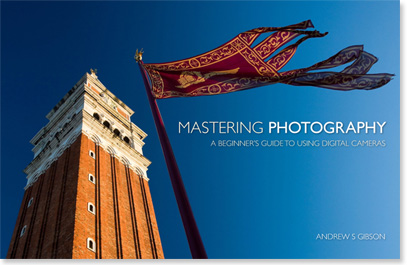
Mastering Photography

Composition and lineMy latest ebook, Mastering Photography: A Beginner’s Guide to Using Digital Cameras introduces you to digital photography and helps you make the most out of your digital cameras. It covers concepts such as lighting and composition as well as the camera settings you need to master to take photos like the ones in this article.

The post Getting to Know Your New Camera by Andrew S. Gibson appeared first on Digital Photography School.


Digital Photography School

 
Comments Off on Getting to Know Your New Camera

Posted in Photography


10 Tips for Getting the Most Out of Ello

24 Nov

10 Tips for Getting the Most Out of Ello

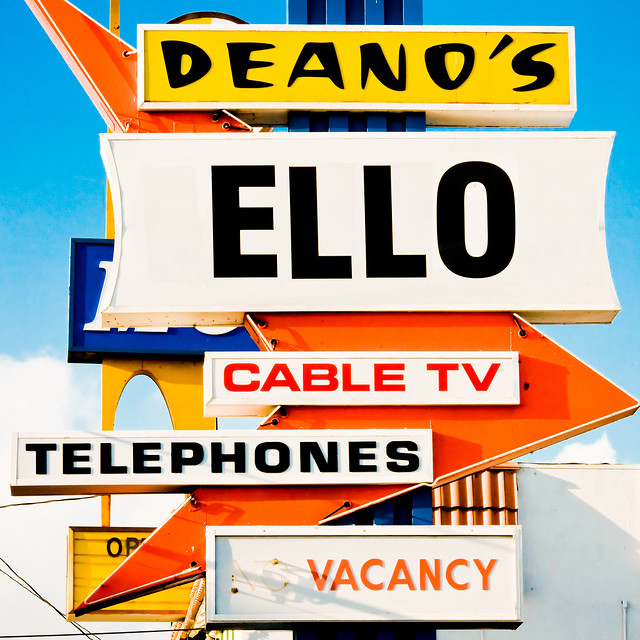
Ello is the most exciting new social network to appear in years. It’s a vibrant place full of interesting thinkers and artists — I spend more time on Ello than any other network right now. Every day new and interesting people are signing up, plugging in and joining. Although Ello is a social network like many others, it is also unlike many others as well. Ello has it’s own way of organizing things and after spending a few months on the site I thought I’d share some best practices for getting the most out of Ello.

1. NSFW. As a community with a lot of artists as early members, Ello seems to have a healthy tolerance for all forms of expression, including fine art nudes and other adult oriented material. I’m a big fan of the human body as form and expression and think this is great.

You won’t be bounced off Ello or censored (like Facebook) because you express the beauty of the human body in your art. If this sort of work is your thing, then Ello asks that you set your account as NSFW. I’m guessing that if you don’t do this voluntarily, they can/will do it for you.

Similarly, it is up to you whether or not you want to *see* this sort of work on Ello.

These are two independent settings.

So there are two things for you to consider. Do you want to see NSFW content AND do you yourself in fact post NSFW content. A lot of people get this setting wrong. They check NSFW for both when they produce work that is entirely SFW. Be sure to understand the distinction and manage your settings (you can do that here: https://ello.co/settings) accordingly.

If you are not posting nudes or other adult oriented materal, then make sure the “post adult oriented content” button is checked no. You can still check yes that you want to view it, but more people will see your stuff if you manage this setting correctly.

2. Don’t overshare. I see a few people posting 10, 15, 20 photos in a row on Ello. Most people won’t want to see 20 of your photos in a row. They want variety. They want to see other stuff by other friends too. If you overshare, there is a very good chance that people will move your account into their noise bucket and a lot less people will see your work. The right number of items to share on Ello per day is probably a matter of personal opinion, but realize that every time you post you give people an option of moving you into the noise bucket where your work will be much less (if at all) visible to them going forward.

I’d say anything over 4 or 5 posts a day on Ello is probably too much and starts to feel spammy. Save your very best work for Ello and self edit a bit more. I probably post 1 – 3 images there a day depending on the day. That might even be too much.

3. Quality counts. Never has quality been as important. Again, people can easily move you into the noise category so consider that in what you post. Post your best work for others to see. Nothing makes me want to move someone to noise like thoughtless, mediocre work.

I probably sound like a broken record with my dislike for watermarking and signatures, but on Ello it’s more important than other places to avoid these distasteful aesthetically displeasing nuisances. If you put ugly watermarks and signatures on your photos people will move you to noise (if they follow you at all) and your work will not be seen. Even your best friend might do this and you will never know. So put your best foot forward and only share what you consider to be your highest quality content.

4. Be social. Ello is a *social* network, so be social. I see people already complaining that it doesn’t feel like they are getting enough attention on Ello. You shouldn’t expect to just post content and have people flock to your brilliant work. You need to engage with others. The best way to do this is to participate in conversations on other people’s posts. Find some interesting people who are engaging on the site and jump into conversations that you find. Ello is a place best served by meaningful, articulate dialog. Offer up considered thoughtful contributions to other people’s work and I think you’ll make friends fast there. Lurk and you will be alone.

If you are new and are looking for some interesting and engaging people you may find some here. Also, don’t forget about the invite button. Do you know some really great people who should be on ello? Then make sure you send them an invitation to your new party. Inevitably people will start saying that “none of their friends,” are on Ello. This is your fault. It’s up to you to get them here. It’s also up to you to make new friends. :)

Post about Ello on your other networks and encourage people there to come join you. Tweet, FB, G+, Flickr, etc. letting people know that you are hanging out there and offer to get an invitation to anyone who wants one.

5. “I think everybody should be nice to everybody.” — Andy Warhol It goes without saying that you should be nice to others. This is one of the most important things that Andy Warhol ever said. Especially on Ello where there is not only a block function, but also a noise feature, people who are antisocial assholes will quickly be marginalized out of the experience. Being nice does not mean being bland, uncontroversial and boring. It just means that when you disagree with others, try to do it as respectfully as possible. Don’t personally attack people. Rise above that. Great ideas can be discussed on Ello and people can disagree on things, but respect is the key.

6. Be visible. Make sure you have an avatar, a profile, and links to your other sites as the *very first thing* you do when you join Ello — then add some interesting content of your own. You only get one chance to make a strong first impression. When someone new follows me, a lot of the time I’ll go look at who they are by clicking on their profile link. If I’m taken to a blank page with a blank avatar and minimal description, I probably will not follow them back or engage with them. On the other hand if I find a thoughtfully written profile, links to other places where I can check out your work, and some compelling content already uploaded to your Ello account, I just might try to make friends by adding you back.

7. Be active. If you want to get the most out of Ello, you should consider making a meaningful contribution to the site. Especially after you first join you should plan on spending some time on the site every day. Post content yourself daily, but also participate in posts by other people every day, and this means more than just typing “nice photo.” If you post a few photos and then disappear for a week, when people look at your account you’ll be passed over as a dead account.

8. Understand Ello’s advertising position. Ello does not have ads on the site. Also, they don’t profile you and sell your personal data to advertisers (like they do on Facebook). This does not mean that brands are not welcome on Ello though, they are. They just won’t be able to advertise to people by paying Ello. Brands may not fully understand this and think that they need to stay away. One of Ello’s founders Paul Budnitz spells this position out clearly here:

“Because Ello doesn’t have ads, the only way for brands to be on Ello effectively is to post interesting things that people want to see.

Another way to say it is, the worst way to for a company to use social media is to advertise, because that is essentially paying money to show us things that we don’t want to see. Brands are welcome join Ello, but if their content sucks, nobody will want to follow them.”

Budnitz’s own company Budnitz Bicycles has a brand page on Ello. And you know what, it features kick ass beautiful artistic quality photographic works of their bicycles. That’s a pretty good example of how you should think about Ello if you are a brand. Just because the anti-advertising ethos runs strong on Ello, this doesn’t mean your business/company/brand should not be there. It just means you are going to really have to work to get people’s attention by providing them interesting content and not typical advertising crap.

9. Watch your activity. Click on the little lightning bolt frequently on Ello. Are new people following you? Go check them out. Did someone make a meaningful comment on a photograph of yours or ask a question? Go respond to them. Did someone mention you in one of their posts somewhere else on Ello, then acknowledge that and go say hi back. It’s important that you use this tool regularly. While you may not be able to get back to everyone who mentions you or look at everyone who adds you as a contact, be sure to spend time on your activity when you can and participate.

10. Understand and respect both imagery and text. Are you a writer? Consider adding an interesting photo to your post (or borrowing one from an image creator with attribution and permission). This will make things more interesting than just a wall of text.

Are you a photographer? Consider using the strong text function on Ello as a way to tell people more about you and your work. I’m sharing more about myself personally on Ello than I ever have on any network. When I post a photo, frequently, I write about where I was when I took it, how I made it, what my feelings are/were around the image. And I use my space on Ello as a sort of personal diary through text just as much as a visual diary through my imagery of America.

A lot of people don’t get Ello yet. Many never will. It’s so early for Ello, but I do believe that Ello has the potential to become the most substantial social network going forward — bigger and more important than Facebook or Twitter or Google+.

Being early there, you have an opportunity to participate in shaping this important new community — what it will be today and what it ultimately will become.

You can find me most days on Ello here. :)


Thomas Hawk Digital Connection

 
Comments Off on 10 Tips for Getting the Most Out of Ello

Posted in Photography


Getting Creative With Topaz Impression

26 Oct

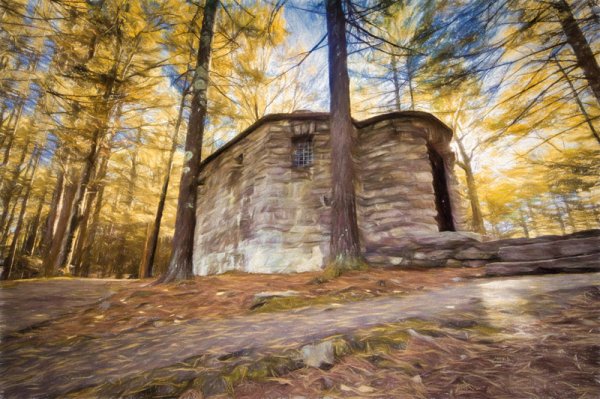
Topaz Labs recently released a new standalone image processor called Topaz Impression and I wanted to show you how it works and the kinds of things you can create with it.

However, I should make it very clear up front, that this is not a standard keep it real kind of image processor, so if you cringe at the thought of image manipulation you may want to turn away now.

getting-creative-with-topaz-impression

What is Topaz Impression?

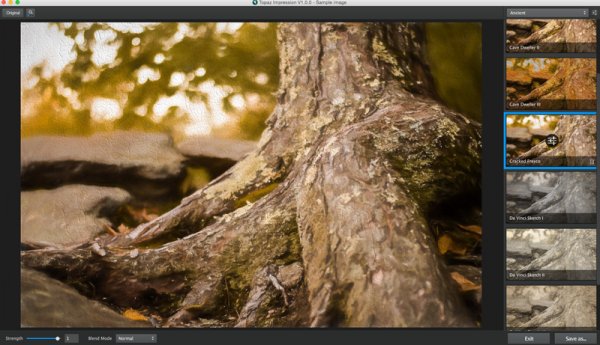
On the surface Topaz Impression is a digital image processor which allows you to take any photograph and convert it into something that resembles painted or drawn art. If this sounds familiar you might be thinking of their other product, which is a plugin called Topaz Simplify (which I covered in a past article here on DPS Create Art with your Photos Using Topaz Simplify), and it does provide some similar functionality, but works in a different manner.

The basic difference is that Simplify works by removing or softening the details and edges within a photograph that you present to it, while Impression works by creating different brush strokes based on the customizations that you choose.

basicUI

The other great benefit of Topaz Impression is the user interface, which is fairly intuitive and easy to navigate, while still being fairly powerful in terms of the customization options you have available to you – in comparison Simplify’s interface can be kind of cumbersome to use.

Finding Your Way Around Topaz Impression

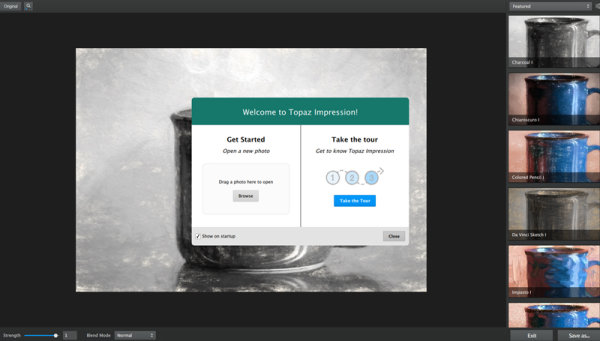
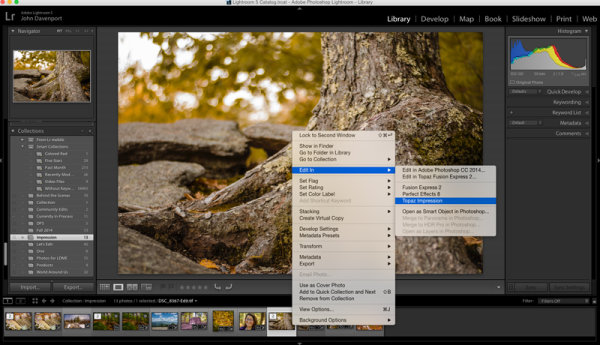
As I mentioned, one of the great things about Impression is that it’s fairly simple to use. Impression’s user experience is built on the idea of starting with a preset and then customizing that further to suit the needs and vision of the artist. A basic workflow would look something like this:

Pop in an image

import-image

You can do this either by choosing “Edit In Topaz Impression” from your Lightroom library or, as seen further above, you can simply uploading a photograph directly into Impression from your computer’s hard drive.

Select a preset you like

select-preset

There are a handful of presets to choose from in a variety of categories: Ancient, Impressionistic, Modern, Painting, Pencil, Charcoal & Pastel, and of course you can create your own as you work with the platform and find that you prefer certain tweaks over other ones.

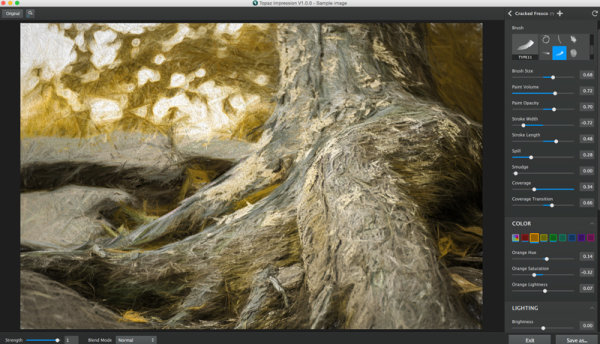
Modify to your liking

customize

Like any good digital photo editor you have the ability to modify the chosen preset to suite the image you’ve uploaded. This is where Impression really can come to life. As you can see in the screen capture above, the preset has been changed in a number of ways to create an image that is drastically different than the preset I’d selected.

More on Customization Inside Topaz Impression

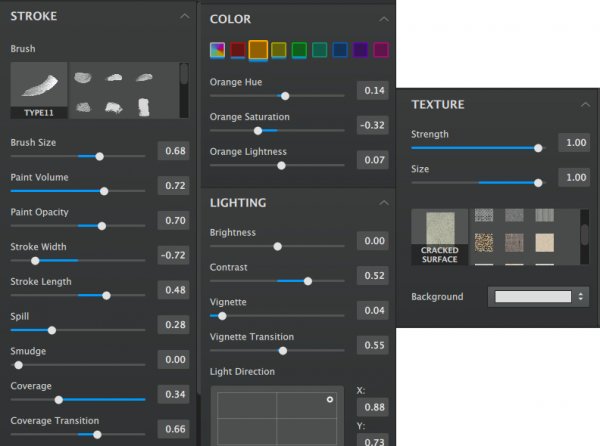
The customizer in Topaz Impression is where the magic happens. Inside the customizer you have a number of controls available to you, from 14 different types of brush strokes to multiple preloaded textures.

You have the ability to control things like the size of the brush, the amount and opacity of the ‘paint’ that’s making up your image, the width and length of your stroke, and spill, smudge and coverage give you even more creative control over the look of the image.

customization-tools

However, you don’t just control the way the brush strokes are presented, but Impression also lets you control how the various colors of your image are displayed. From a basic global setting, to selectively adjusting the various tones that make up your image you have the ability to get fairly specific with your modifications here.

One other interesting aspect of Impression is that it gives you the ability to control the direction of your lighting. Of course this can’t control what’s happening inside your photograph, but rather, it controls the way the lighting effects the textures that you’ve applied to the painting allowing you to match this up with the lighting inside your photograph.

A Few Feature Requests and Suggestions

This is version 1.0.0 and I’m sure the people at Topaz have plans to build out Impression in the future, but there are a few things missing that I’d personally like to see included in future versions.

  1. Local Adjustments – At the moment there’s no way to go about modifying on a local level. This does keep the interface and customization options easy to learn and use, but limits what you can do in a way.
  2. Custom Brushes/Textures – At the moment you’re stuck using the ones that Topaz has provided with the platform. I’d like the ability to create and/or upload our own brush strokes.
  3. Undo/History – At the moment all that is available to you is a one button reset button which will take you back to square one. I’d like the option to be able to undo iterative changes, or better yet, a history option similar to Lightroom.

Topaz Impression in Action

Here’s a quick look at Topaz Impression in action. If you want to skip the Lightroom part just jump to the 5:30 mark in the video:

Overall Thoughts

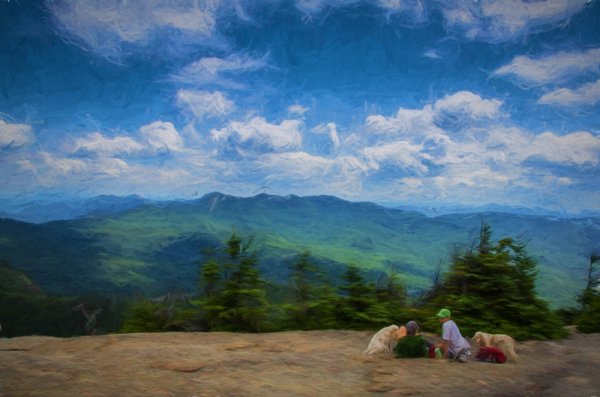
As I said at the start of this article – Topaz Impression is a program for those willing to put their photography through a digital manipulation workout – but it is quite fun. I think it’s a great start and could become an interesting niche style for some photographers out there, however with it’s present iteration being a bit lacking in terms of local adjustment capabilities or the freedom to at least apply our own textures within the program, it leaves a little to be desired.

getting-creative-with-topaz-impression-2

after-topaz-impression

Have you used Topaz Impression? What have you thought about it? Maybe share some of your before and after images below.

And if you’re interested in trying it out for yourself Topaz does offer a 30 day trial so you can see how it works before you buy.

The post Getting Creative With Topaz Impression by John Davenport appeared first on Digital Photography School.


Digital Photography School

 
Comments Off on Getting Creative With Topaz Impression

Posted in Photography


Photokina 2014: Fujifilm interview – ‘Over the past few months I’ve been getting more confident’

25 Sep

DPReview attended the Photokina trade show last week in Cologne Germany, and as well as stand reports and hands-on looks at the major new products we also sat down with executives from several of the major camera manufacturers. In this interview, we speak to Toshihisa Iida, Senior Manager of Sales & Marketing in Fujifilm’s Optical Device & Electronic Imaging products division. Click through to read more

Articles: Digital Photography Review (dpreview.com)

 
Comments Off on Photokina 2014: Fujifilm interview – ‘Over the past few months I’ve been getting more confident’

Posted in Uncategorized


Getting Started Guide to Macro or Close-Up Photography

22 Aug
Close up photos of flowers can make for interesting colours and shapes

Close-up photos of flowers can make for interesting colours and shapes

There is something magical about seeing a subject up close and personal. This opens up a whole new world of options for you as a photographer. Close-up photography, or macro photography, can be a very rewarding form of photographic expression. The great thing about it is that you can do this from your basement at home, if necessary. Of course you can, and should, go outdoors too and setup shots in a forest or at the sea, but you can also setup shots of everyday subjects and shoot them up close.

Think of an old watch, a flower or even some food items that could be shot on your kitchen table. The shapes, textures and colours come to life in the world of macro photography, but it can be tricky and fidgety. Sometimes beginners are put off by this aspect and assume they need specialist skills to make close-up images. This is not necessarily true. Like any other aspect of photography, you need to understand how your camera works, and work within the limits of the equipment you have. Do you NEED to have a macro lens? In short, no. There are a few other cheaper options that you can experiment with before investing in a macro lens. Let’s take a look at how you can get going in close-up photography. This is really an introduction article, and I will be putting together some more detailed articles on the various aspects of macro photography, but first, let’s start with the basics.

Sometimes overexposing or underexposing can add to the image

Sometimes overexposing or underexposing can add to the image

1. Get as close as you can

This sounds obvious, but try it. Set your camera up on a tripod, choose a subject (anything will do really) and get your camera up close to the subject. Switch your camera to Manual focus. You can try autofocus, but generally you will be able to focus a little closer on manual focus. If you are using manual focus, the tripod will be important. There is nothing worse than trying to get your subject in focus when you are off balance, or you keep moving, so use the tripod. Once you have your subject in clear focus, look at the composition, just as you would with any other image. Use the various composition guidelines to put your image together and take the shot.

This is just the beginning, you will find that you will make minor adjustments and shoot another shot and so on. I find that when I do close-up or macro photography I get lost in this small world of intimate details. When you look through the viewfinder, try and visualize it as a small world or a small landscape scene. Pretty soon you will find that you will be totally swept up in it and that is the fun part.

Getting in close will help to isolate the subject and throw the background out of focus

Getting in close will help to isolate the subject and throw the background out of focus

2. Do I need a macro lens?

To do some great close-up shots, you won’t need a macro lens. You can use almost any lens to make close-up images. Bear in mind that each lens has a minimum focusing distance. This can range from a few centimetres (1-3″) to half a meter (20″) depending on the lens. Telephoto lenses will have a longer minimum focusing distance, while medium range lenses (24-70mm) will have a closer focusing distance. The difference between macro lenses and non-macro lenses is that a macro lens has a much shorter focusing distance (30cm/1 foot or closer) in most cases.

Also, a macro lens has a magnification ratio of 1:1. What that means is that the lens can reproduce the subject onto the sensor at it’s actual life size. So if your subject is 20mm in size and it is captured as 20mm on the sensor, that means it has a 1 :1 ratio.  Some lenses can only reproduce a 1:2, or 1:3, ratio which means that the subject will be half the size or less, on the sensor, relative to the size of the subject. I would suggest that you try close-up photography with the range of lenses you have. See which one works best. Prime lenses are usually a good place to start as they have great clarity and sharpness. I used my 50mm f/1.8 for a long time before I invested in a macro lens. Once you feel that you are limited by your lenses or that you think macro photography is a genre you want to expand on, only then consider buying a macro lens.

This image was shot with an old 70-300mm lens at F4

This image was shot with an old 70-300mm lens at f/4

3. What can I photograph?

The beauty of close-up photography is that – when one properly, a shot of a cup of coffee can be fascinating.  Suddenly the pattern in the latte cream looks amazing, the bubbles and cup shape become very intriguing. We very rarely look at everyday subjects up close and when we do, they can be really interesting. The same is true for flowers, an aged piece of wood, electronic goods, even a knife and fork, just about anything can become a subject for macro photography.

Some of the more challenging subjects are those that move. Subjects like insects, flowers, leaves, grasses and any other subject that is outdoors. For these, you will need more patience and better timing. Photographing a close up of a flower on a windy day will be really tough. If you want to do macro photography outdoors, maybe start off doing it on a windless day or in a sheltered area. Alternatively, you could go and buy some cut flowers and set them up in a vase, setup the shot and take a few images. The controlled environment of the flowers in a vase will make things much easier. Insects are even more challenging. They sit still for very short periods and move very quickly.

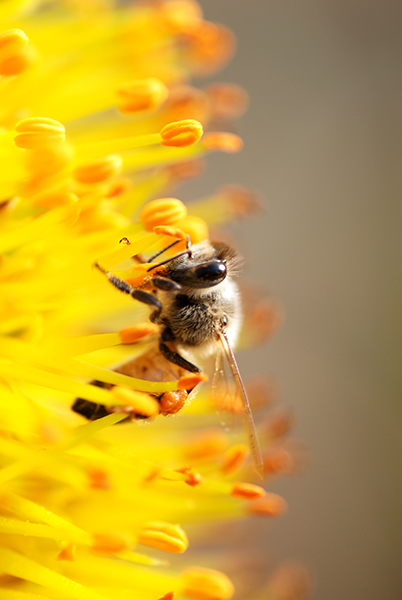
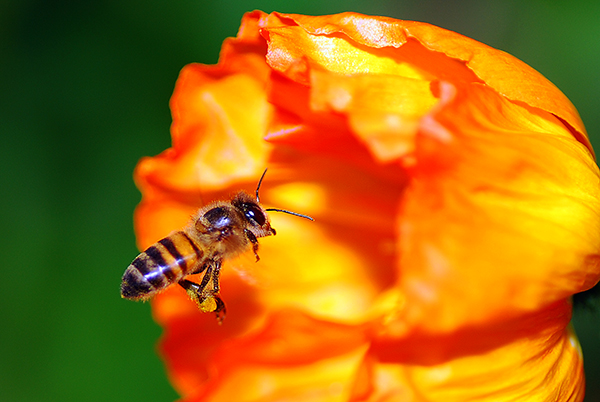
The name of the game to get good insect macro shots, is to be patient. To get some honeybee images in the past, I have set up my camera on a flower and attached my cable release. I then manually focused the lens to the flower and simply waited until a bee or another insect was in the right place and snapped off a few shots. Generally one in ten shots were usable and I was pretty happy with that, but they take time and patience.

Be patient and set up your shot beforehand when shooting insects

Be patient and setup your shot beforehand when photographing insects

4. Where to from here?

I found that I really enjoyed close-up photography. Once I got into it, I spent many hours trying to get some unusual images of flowers or insects. You may find this too. Get your tripod, cable release, choice of lens and set up a scene either indoors or outdoors. Get in a close as you can and start working with the scene. Change your depth of field until you are happy with what is in focus and what is out of focus. If you are using a macro lens, be careful about shooting with a very shallow depth of field. F/2.8 will mean that a VERY thin sliver of your scene is in focus, and that can be difficult to work with at first. Start at f/8 and work from there.

Experiment with different exposures, sometimes a slightly overexposed macro scene can look good, so play around with that. Above all, have some fun. Use it as an exercise in learning more about photography, and try and get some dynamic images too! In a future article, I will go into more details about settings and exposure modes. In the mean time, start shooting some close up images and let’s see how things look.

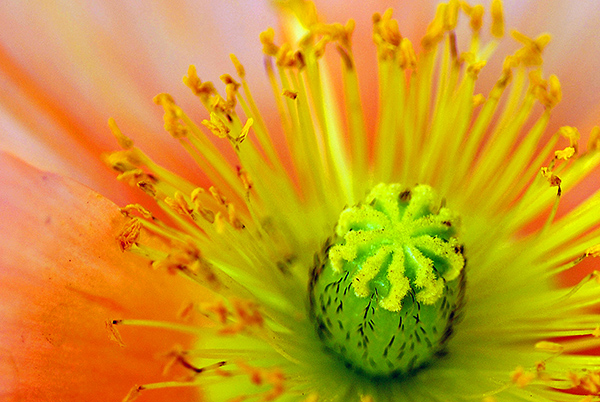
A close up of a poppy flower, the details are what is mesmerising!

A close-up of a poppy flower, the details are what is mesmerising!

For more information on macro or close-up photography check out these dPS article:

  • Equipment for Macro Photography – Video Tips
  • 6 Tips for Near-Macro Photography with a Telephoto Lens
  • How to Focus-Stack Macro Images using Photoshop
  • The Wonderful World of Macro Lenses: Close-Up Photography Lesson #4
  • Reverse Lens Macro: Close Up Photography Lesson #3
  • Extension Tubes: Close Up Photography Lesson #2
  • Getting Up Close with Close-Up Lenses

The post Getting Started Guide to Macro or Close-Up Photography by Barry J Brady appeared first on Digital Photography School.


Digital Photography School

 
Comments Off on Getting Started Guide to Macro or Close-Up Photography

Posted in Photography


Tables turned: Photo series depicts children getting the better of their nightmares

09 Aug

Photographer Laure Fauvel’s series ‘Terreurs’ turns an age-old rivalry on its head. The retouched photos depict children fighting back – and winning by the looks of it – against the monsters that typically terrorize them in the night. Children wielding toy weapons keep the nightmarish creatures cowering in closets and under beds with fearful expressions. See gallery

Articles: Digital Photography Review (dpreview.com)

 
Comments Off on Tables turned: Photo series depicts children getting the better of their nightmares

Posted in Uncategorized


Getting off the ground: Cheap drones for photography

03 Jul

With the popularity of drone photography ever increasing, curious hobbyists may be looking for a way to try it out without spending a lot. It’s not the most expensive hobby you could pick, but $ 1000 for a DJI Phantom II and a GoPro Hero3+ is about the same cost as a mid-range camera and lens. Low-cost drones with built-in cameras seem like a great option for the curious. But do the price benefits outweigh the inevitable image quality and usability tradeoffs that come with a cheaper quad? Read more

related news: Digital Photography Review (dpreview.com)

 
Comments Off on Getting off the ground: Cheap drones for photography

Posted in Uncategorized


Getting Your Foot in the Door as a Freelance Assignment Photographer

23 Jun

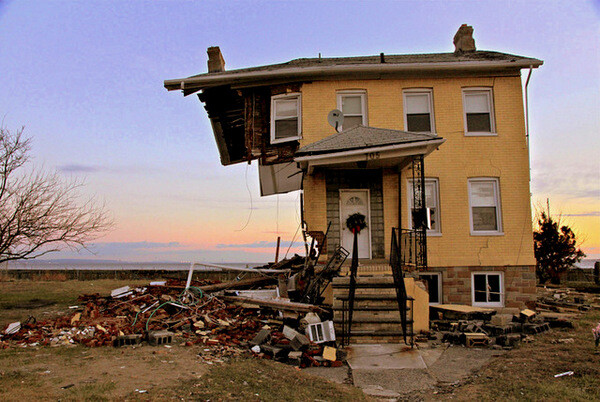
Hurricane Sandy

One of the biggest changes photography has seen over the last 10 years is in photojournalism and documentary photography. Some will see this change as good while others will see this change as bad. The improvements made to consumer DSLR cameras, lenses and editing software have opened the doors for many photography hobbyists to engage in documentary photography.

Gone are the days when having a good camera and access to a darkroom separated the professional photographer from the amateur photographer. The playing field has been levelled and it is open season for anyone to take part. Within this new landscape there is an abundance of opportunities for you to possibly earn a little extra cash by taking photos for your local paper, magazines or online news outlets.

The assignments will always vary. You may be asked to cover a government meeting or the opening of a new business. You may be taking pictures for a human interest story about a unique person in your town. You could be asked to cover a local high school football game or be asked to rush to the scene of an accident. You may find yourself taking pictures of a festival or a gala dinner featuring some movers and shakers.

Police Car

Below is a list of tips that will help you be a better assignment or documentary photographer, and possibly get your foot in the door to get some jobs.

PRACTICE. KNOW YOUR GEAR.

In many regards, photography starts with the gear. It is important to know the limitations of your equipment. It is equally important to know the areas in which your equipment performs well. No matter what camera and lens you are working with, your equipment will have limitations. Don’t spend time wishing for, or wanting a different lens or camera. Use what you have to the best of its ability. A better lens in some warehouse, is not going to help you now.

ASK QUESTIONS OF YOUR ASSIGNMENT EDITOR

As an assignment photographer you should be prepped before you go out by the editor of the publication, or the writer of the story. If you have any questions, ask them! I have never had an assignment editor react poorly to me asking questions about a piece they are asking me to cover.

Ignorance can be overcome by asking questions. Overcoming stupid is more challenging. Don’t be stupid. If you are not clear about what is expected of you, ask questions until you and your editor are on the same page.

WHO? WHAT? WHEN? WHERE? WHY? HOW?

Speaking of questions, do your pictures answer the ones above? Try to take pictures that answer as many of these questions as possible. While it will be very challenging to capture one picture that addresses all of them, shoot with the idea that your pictures are answering as many as possible.

Blueberry Season

DO YOUR OWN RESEARCH

After you have asked the necessary questions of your assignment editor, do your own research on the subject. This will help you develop ideas, understand how events may unfold, or which images will be more important than others. Don’t expect your editor to tell you exactly what picture to get. They are hiring you, in part, because of your vision. Conducting a little research before you go out will help you find your vision.

COME WITH AN IDEA IN MIND

After researching your subject, think of shots that you want to capture and work toward those pictures when you are in the field. But don’t knock yourself too much if you don’t get “the” picture you wanted. Documentary photographers have little (or no) control over what happens. Come with an idea that will keep your mind centred, but be prepared to adjust your ideas accordingly as the events unfold before you.

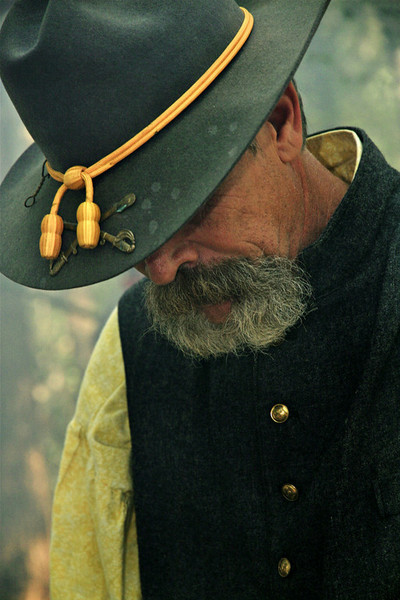
Civil War

START BY PLAYING

Once you arrive, begin by playing with your exposure settings and shooting styles. This will ensure that you, and your camera, are properly set up when the moment arrives. In the same way athletes warm up before a race or a game you need to begin by getting your mind and your gear in proper condition before the event begins.

BE INVISIBLE

Remember, you are there to document what others are doing. The story is not about you. Do what you can to stay out of the way to allow events to unfold naturally. If you are too intrusive your subjects will not relax and you will not be documenting natural events. Stay out of the way and let events unfold in front of you.

TIGHT. MEDIUM. WIDE.

Take wide, medium and tight shots of what you are covering. As an example, if you are covering a town hall meeting be sure to get a wide shot that shows all of the filled, or empty chairs, in the room. A medium shot may be a waist-up shot of someone at the podium. A tight shot would be a head shot of someone expressing emotion as they discuss the subject of the meeting or as they listen to the presenters speak.

Westville Meeting

FOCUS

Proper focus is critical in all photography. It is essential in documentary photography and photojournalism. Your focal point tells the viewer what they should be looking at. If you are still taking pictures at that town hall meeting you can have two very different pictures of someone at the podium if one picture is focused on the speaker and another picture is focused on all of the microphones that the presenter is speaking into. One picture shows who was talking and the other picture shows how many people (news outlets) were there to cover the event. Each picture has its own meaning and that is derived from the focal point.

ANTICIPATE

I make a lot of sports analogies when talking about documentary photography because, in many regards, photojournalism and documentary photography is a sport. Just as a quarterback has to read the defence as he stands behind the centre, a documentary photographer has to have his eyes and attention in several places at once. By keeping a constant vigil on your surroundings you will see a picture developing in the same way a quarterback sees a play developing. The great ones always seem to be a few seconds ahead of the action.

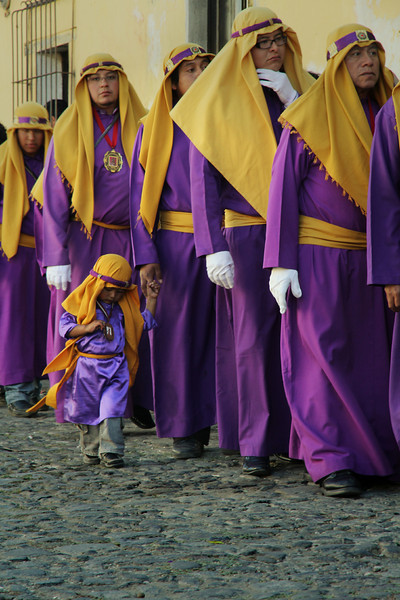
Semana Santa

BE PROFESSIONAL

A professional attitude will help to guarantee two things. One, it will help to ensure that those around you understand that you have a job to do and they will permit you to do your job as long as you maintain a professional demeanour. The other thing a professional attitude will bring to you is another assignment. If word gets back to your editor that you were forcing people to behave in a certain way or that you interfered with the event to get a shot, you may not get another chance to work for that editor again because you have embarrassed them (and yourself) in your attempts to get a great picture.

BACK UP YOUR WORK

Once you get back home or to the office, back up your pictures. It doesn’t matter if you put them on a second hard drive, upload them to the cloud or put them on a disk. Make sure that you have copies of your pictures in more than one place in the event that the originals become damaged, destroyed or lost.

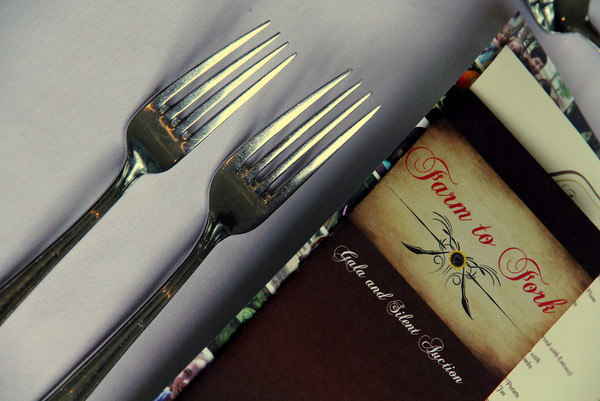
Farm to Fork

CAPTION YOUR PHOTOS

Your job as an assignment photographer doesn’t end when you back up your pictures. More times than not you will be asked to caption your photos. Your assignment editor will have no idea of the names of the people in your pictures. It will be up to you to write a brief description for each picture you are turning in. An easy way to do this is to answer the questions, who, what, when, where and why when making captions. “How” may not always be relevant.

DON’T OVER EDIT YOUR PICTURES

If you are asked to turn in edited pictures, don’t over-edit your work. Photojournalism and documentary photography are about the real world. In a strict sense you should only adjust the contrast of your picture. Some news outlets shun adding too much color and all news outlets shun the removal or addition of elements into a picture.

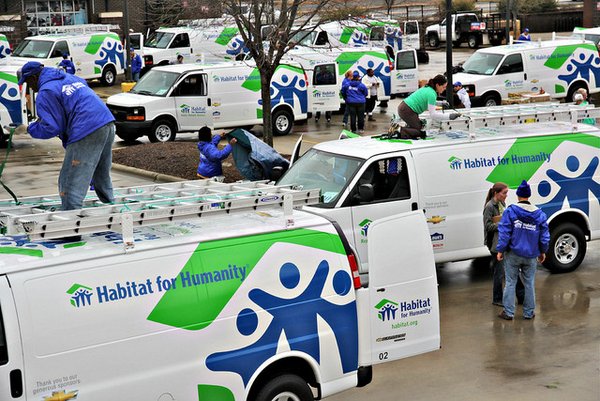
Habitat Vans

BE EASY TO WORK WITH

Being easy to work with is incredibly important in today’s freelance assignment photography landscape. It is becoming easier and easier to take quality pictures with less than professional equipment. Photographers are becoming very replaceable as there are more and more people with photo skills itching to get a little credit and maybe even a little money. Make sure you have an easy payment process. Make sure it is easy to get in touch with you, and that you respond quickly to emails and phone calls. Make sure you are open to your editor’s suggestions and that you are willing to go the extra mile to make them happy. Make it a no-brainer for them to rehire you because there are more photographers behind you just waiting for their chance.

This is a great time to get your foot in the door as a freelance assignment photographer. It’s not easy work and it’s not always sexy. But with hard work, a good eye, a professional attitude and determination you can find yourself on a short list of photographers that assignment editors want to use again and again.

The post Getting Your Foot in the Door as a Freelance Assignment Photographer by Scott Umstattd appeared first on Digital Photography School.


Digital Photography School

 
Comments Off on Getting Your Foot in the Door as a Freelance Assignment Photographer

Posted in Photography


Levitation Photography 7 Tips for Getting a Great Image

11 Jun

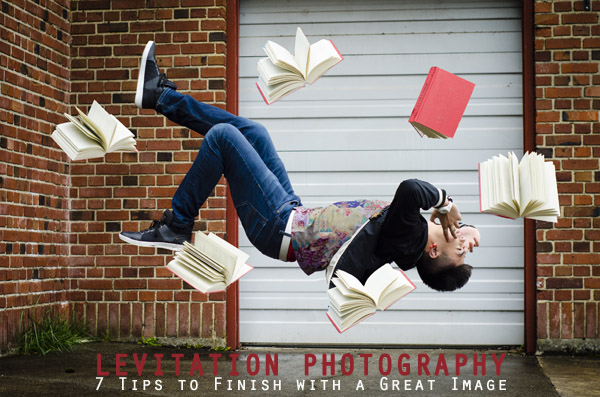
Image1

Levitation images are magical! They draw the viewer in and make them think about what’s not quite right. If you search the internet for levitation photography, you will find amazing examples. However, levitation photography hasn’t become wildly popular yet. I assume it’s because levitation photography looks really difficult. I think most people would be surprised to learn that in its most basic form, it’s just compositing two or more images in editing software.

Like most portrait photographers, I shoot what I’m good at, and mostly stay inside my little portrait box. Recently, I decided I needed to get my creative juices flowing again and get out of my comfort zone. Levitation photography caught my eye. I learned the basics of how to create such images from posts like this: How to Shoot a Mysterious Levitation Photo.

My first levitation experiment was rough, to say the least. I knew the basics of how to accomplish a levitation photograph, but the images turned out mediocre. The best part though, was coming home after the shoot and writing down all the things I had learned to make my levitation images better for the next time. Below, you’ll see the lessons I learned, so you don’t have to learn the hard way.

Preparing for the Shoot

Tip #1 – Gather Your Equipment

In order to create a levitation photograph, you must have: a camera (that has manual focus capabilities), a tripod, a willing model, a strong fan (if your model has medium to long hair), and something to prop your model up (a stool, chair, or ladder). If you have a camera remote, bring that along too.

Tip #2 – Tell Your Model What to Wear

Clothing can make or break a levitation image.

  • Solid color clothing is best. Prints and patterns can make it difficult if you need to clone out certain parts of clothing or liquefy fabric.
  • Tell your model not to wear a jacket or sweater. Anytime the model lays upside-down, or sideways, the garment should be hanging down. But if he/she is laying on a stool, the jacket won’t be able to naturally hang leaving the image looking less realistic.
  • If you’re going for a feminine levitation shot, long dresses, skirts, or extra flowing fabric can help create the look you’re going for.

Tip #3 – Shoot on a Cloudy Day

Sun and harsh shadows have the potential to create a lot of extra work for you in post-production. Editing out the stools and ladders, yet keeping a realistic shadow of your subject can turn into a job for Photoshop experts.

During the Shoot

Tip #4 – Shoot from a Low Angle

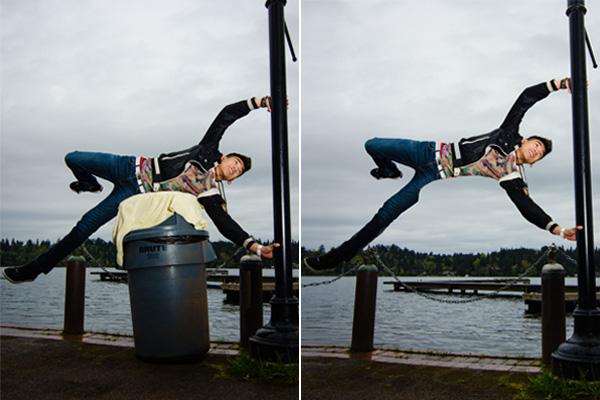
You will want to shoot from a low perspective to give the illusion that your subject is high in the air. However, be mindful of how low you are. If you are lower than the prop your model is standing/laying on, the prop will block parts of his/her body. It is safest to shoot in line with the top of the prop your model is on. Having your model situated at the very front of the prop will also lessen the chance of cutting into the body.

Image2

When I erased the garbage can, parts of the model’s body looks like it went missing since it was hiding behind the garbage can.

Tip #5 – Always Photograph the Empty Background

When preparing to photograph the frames that will create your final levitation image, follow these steps.

  1. Set up your shot with your model in the frame.
  2. Plan the angle you are going to shoot from and set up your camera on the tripod.
  3. When your model is in place, choose the focus point on your subject.
  4. Set your camera to manual focus and don’t touch it!
  5. Take the different shots suggested below, in Tip #6, without moving your focus point or your camera.
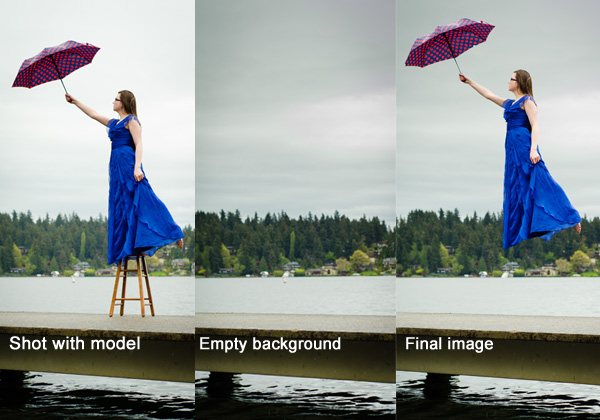
  6. After you’re sure you’ve captured all the images you need with your model and props, remove EVERYTHING from the scene. Photograph ONLY the empty background. This is the most important image you will take.

Image3

Tip #6 – Take Multiple Shots to Create One Image

The most basic levitation image is a composition of two or more frames. At the bare minimum, you will need at least a shot of the background and one of the model in that background.

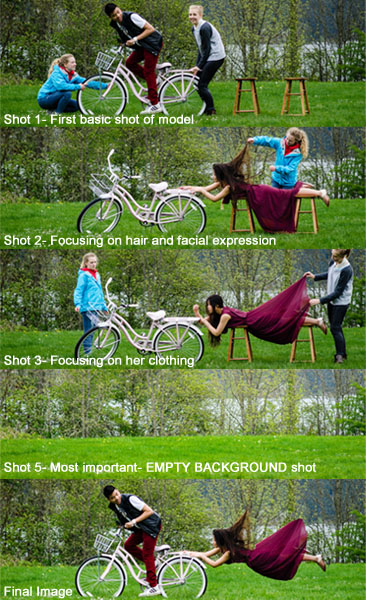
Most great levitation images use a few more frames to add interest and make the final image more provoking. Here is a list of some shots you might want to take all without changing the focus and position of the camera:

  1. Model on the prop(s) – the focus of this shot is on what the arms, legs, and body are doing.
  2. Hair and facial expression – the focus of this shot is to capture the models expression and hair moving like it would naturally if the model was really in that position (floating straight up, blowing behind her, etc.). *Hair dryers and small fans are not strong enough to propel hair in specific directions. The longer and heavier the hair, the more powerful the fan needs to be.
  3. Clothing – the focus of this shot is to capture the movement of the clothing (if needed). If your model is being pulled one direction, what direction should the loose fabric be moving?
  4. Additional props – the focus of this shot is to photograph any extra props you want in the picture (if desired).
  5. Empty background – see Tip #5 above to learn more about the importance of this shot.
Image4

Shot 2 is a perfect example of how a strong fan would have made the shot more realistic with her hair blowing behind her instead of being held up by an assistant. We did not need to photograph additional props for this image, therefore, we did not do a “Shot 4″ for this composition.

After the Shoot

Tip #7 – Putting the Images Together

Many levitation photographers use Adobe Lightroom and Photoshop to create their final images. Regardless of your software choice, it is recommended to first color correct the series of shots so they are all the same. Lightroom has a great “sync” feature to make sure the exact same settings are applied to the entire series of images.

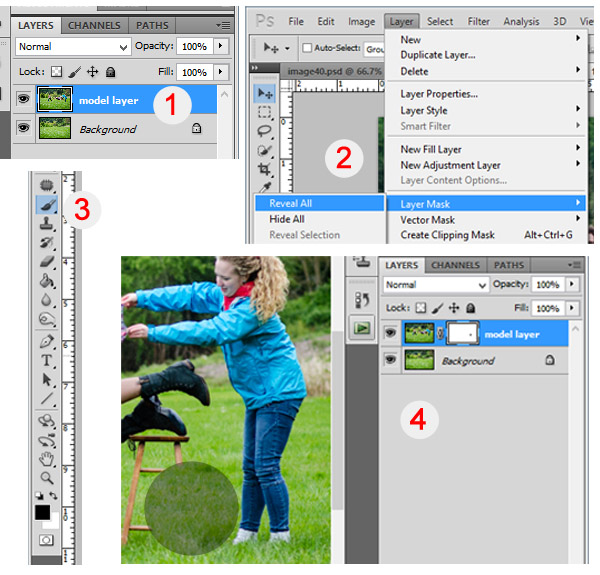
Next, open the images in an editing software like Photoshop. Start with the empty background image. Next, add in the main image of your model as a layer with a “Reveal All” mask. Simply use a black paintbrush on the mask to remove the props supporting your model. The end of this article describes each step in more detail. Repeat those steps for each frame you’d like to add. Finally, you can merge your layers and put the finishing touches on your final image. Then voila, you have a gorgeous piece of levitation art.

Image5

1 – Empty background shot is the bottom layer, with the model image above it. 2 – Select the model image and go to “Layers”> “Layer Mask” > “Reveal All”. 3 – Select the paintbrush, make sure it is black. 4 – Simply brush over the props that you don’t want to show in the final image.

Creating levitation images lets your fantasies become “realities”. Don’t let the laws of physics prohibit you from creating true art For more inspiration, search 500px.com for levitation images. You’ll be amazed.

Your Turn

Have you tried creating a levitation photograph? What was your experience? Do you have any additional tips that would help those getting started? Let us know in the comments. Also, feel free to include a link in the comments to your levitation work. We’d love to see what you create!

The post Levitation Photography 7 Tips for Getting a Great Image by Danielle Ness appeared first on Digital Photography School.


Digital Photography School

 
Comments Off on Levitation Photography 7 Tips for Getting a Great Image

Posted in Photography