RSS
 

Posts Tagged ‘Getting’

Getting Landscapes Sharp: Hyperfocal Distances and Aperture Selection

26 Feb

An important element of landscape photography is ensuring that all of the key elements within your composition are sharp.  This can often include foreground objects that are a matter of meters from your camera as well as background elements that can be kilometres away.  Therefore, to achieve this, you need to ensure your depth of field is large enough to render everything of interest, suitably sharp.
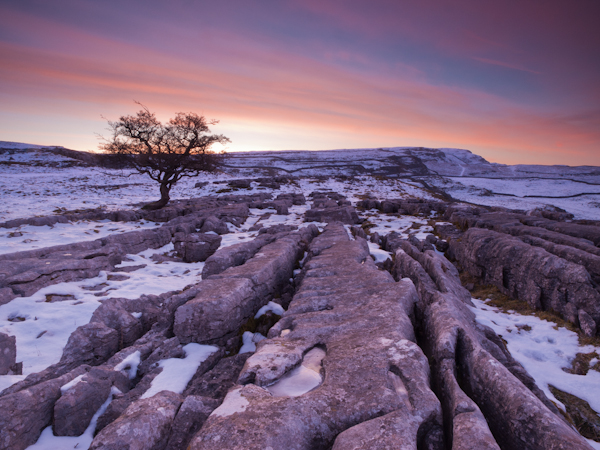
Sunrise over the limestone pavement

In this scene it was important to capture everything from the frozen puddle in the foreground, to the hills in the background, in sharp focus

When you focus on an individual point within your landscape, you are in fact creating a plane of focus that lies parallel to the sensor.  Everything in front of, and behind, that plane is technically not in focus, however there is a region within which objects will appear acceptably sharp – that is the depth of field.  For instance, in the scene below the camera has been focussed on a rock.  Therefore, the plane of focus lies parallel to the sensor across that rock and the limits of acceptable sharpness, that form the bounds of the depth of field, lie in front of, and behind, that plane.

Hyperfocal Distance Diagram 1

A theoretical example showing the depth of field for a given focal length, aperture and point of focus. The depth of field will always extend one third of the distance in front of the focal plane, and two thirds of the distance behind it.

In the diagram above, the depth of field is not sufficient to capture all of the trees within the range of acceptable sharpness, i.e. they will appear out of focus.  However, the depth of field can be easily manipulated to extend as far as you wish as it is controlled by a number of factors, namely: focal length, aperture and distance to the focal point. (I’m not going to include sensor size here as, after the purchase of your camera, it is not subject to user control; however it does not hurt to appreciate that the depth of field is inversely proportional to sensor size meaning that different cameras have different capabilities with respect to achievable depth of field).  The relationship that these factors have with depth of field is given below:

  • Focal length: Up first is focal length as, typically, your focal length will be determined by your composition.  Changing your focal length will alter your field of view and therefore your composition, meaning that you don’t often adjust your focal length to alter your depth of field but generally manipulate the other factors at your chosen focal length.  A short focal length, i.e. wide-angle, will give you a greater depth of field than a long focal length, i.e. telephoto.
  • Aperture: Probably the most obvious factor in depth of field control is aperture. A narrower aperture, i.e. larger f/ number, gives you a greater depth of field and vice-versa.  It is important to select the smallest, diffraction-limited aperture so to obtain the maximum depth of field without suffering from image degradation.
  • Distance to focal point: In combination with a given focal length and aperture, deciding where to place that plane of focus will impact the resulting depth of field.  The depth of field increases as the distance to the focal point from the camera increases.  Therefore, once a focal length has been chosen, it is generally the combination of the selected aperture and distance to the focal point that controls the depth of field.

Hyperfocal Distance

One way to ensure that the entire frame is in focus (well, ‘acceptably sharp’) is to ensure that the depth of field extends from the foreground to infinity.  To do this, you need to focus at the ‘hyperfocal distance’: for a given focal length and aperture, there will be a distance where setting your point of focus will result in the entire scene being within the depth of field.
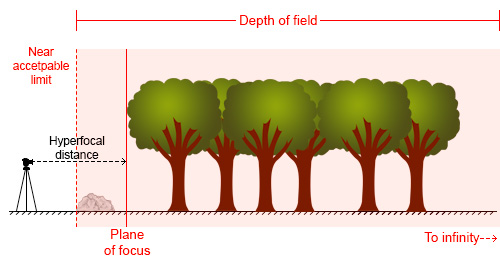
Hyperfocal Distance Diagram 2

By focussing at the hyperfocal distance, the entire scene (and more beyond) will fall within the depth of field

So theoretically, by selecting the correct aperture and moving the point of focus to the hyperfocal distance (assuming the composition and therefore focal length remain unchanged) it would be possible to render the entire scene in focus.  A point worth noting is that when focussing at the hyperfocal distance, the near acceptable limit is always half of the hyperfocal distance.

The calculation to determine the hyperfocal distance isn’t trivial, so there are numerous sites or apps to help you when out in the field.  However by frequent application, it isn’t long until you gain an appreciation of where to set your point of focus, for a given aperture at your commonly used focal lengths.

Aperture Selection

For any focal plane, the depth of field extends 1/3rd in front and 2/3rd behind the point of focus.  Therefore, an easy, but potentially flawed, application of hyperfocal focussing is to select a very small aperture, e.g. f/22 or f/18, and to focus 1/3rd of the way into the scene from the bottom of the frame.  It’s not a bad assumption, as often you will achieve the desired depth of field, however in choosing such a small aperture, you may well be losing any benefits of infinite focus due to decreased image sharpness as a result of diffraction.

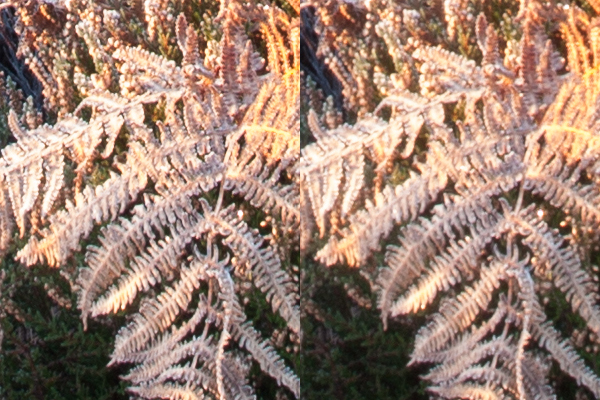
For example, the image below shows a comparison of the same scene, shot at f/8 (left) and f/16 (right).
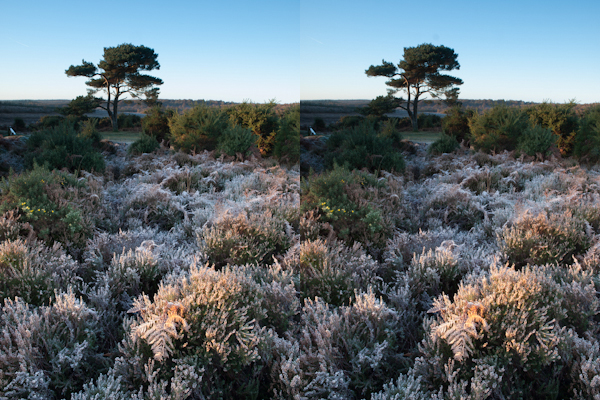
Hyperfocal distance aperture selection 1

The frosty fern leaf in the centre of the frame at the bottom of the image, was an important part of the foreground interest here.  Even though both images look perfectly sharp, the 100% zoom for each image below shows the difference in sharpness for between using f/8 and f/16, even though both apertures result in a depth of field that extends from before the fern leaf to infinity:
Hyperfocal distance aperture selection 2

The sharpness of the fern leaf at f/8 (left) vs. f/16 (right). Even though the lens was stopped down from f/22 to f/16, the resulting image could still be captured with greater sharpness throughout, by using a wider aperture of f/8, and focussing at the hyperfocal distance

Diffraction becomes an issue all lenses as the aperture gets smaller, especially at the edges of the image, and will be more pronounced on inexpensive lenses.  Typically, the sweet spot, in terms of lens performance, will be somewhere between f/8 and f/11.  Therefore, use of the smallest  ‘diffraction limited’ aperture that can still achieve the required depth of field becomes important.

So, hopefully, you will see that it is worth being aware of the hyperfocal distance for your commonly used focal lengths, especially for the apertures that result in optimum lens performance.  With the tools available to us today, it isn’t difficult to work it out, even when out in the field, so why not give it a go the next time you are out photographing landscapes.

Post originally from: Digital Photography Tips.

Check out our more Photography Tips at Photography Tips for Beginners, Portrait Photography Tips and Wedding Photography Tips.

Getting Landscapes Sharp: Hyperfocal Distances and Aperture Selection


Digital Photography School

 
Comments Off on Getting Landscapes Sharp: Hyperfocal Distances and Aperture Selection

Posted in Photography


Digital Photography 1 on 1: Episode 45: Getting to know your DSLR

12 Feb

Holding a DSLR for the first time can be quite overwhelming and you may want to completely understand how your camera does what it does with the buttons and switches that it has. This week Mark will show you what these buttons do.
Video Rating: 4 / 5


Studio Portraits – Getting Started With One Light

07 Feb

Working with studio lights can be a daunting process for many photographers. Many find the studio to be a place of fear and anxiety where the sanctity of natural light has vacated and the hauntingly, horrific wasteland of light stands, strobes and modifiers is all that remains.

So how does one meander there way through this alien landscape and find a corridor of comfort in which they can relax? The simplest and often most powerful way to navigate this network of nerves is with a go to one light set-up that will provide a never ending reservoir of great imagery.

Early on when I started shooting with studio lighting, I was always overly concerned with the light. Sounds like a strange comment, huh? You must be thinking, “Of course he should be concerned with the light, it is studio lighting.” As intuitive as that thought might sound, I was always so focused on my light source that what I never paid attention to was the shadows created by the light.

In studio lighting, it is the transition of light to shadow that provides depth, beauty and interest to your photos.

Is this a hard transition with a distinct line and harsh contrast separating the two? Or is it a soft, gradual melting of the light into the shadow? This transition zone is what should be the focus of your attention when getting into studio lighting.

How do these shadows change with a large, soft light close to your subject or a small, harsh light placed several feet from your subject? These are concepts that need to be experimented with and understood and the best way to do it is to practice.

So let’s go ahead and give you a place to get started and begin to nurture your studio skills.

Keep it Simple

The best way to get started with studio lights is to keep it simple. This means one light and one light only.

That way if you don’t like what you see while you are shooting, you only need to adjust, move, or tweak one thing. You will not be fiddling around with everything and getting lost in the set-up. You will be able to keep your attention on your subject and the shoot. Also, use a large, diffuse light modifier that throws light like a hand grenade at your subject such as a shoot through umbrella (no smaller than 36 inches).

Light Source

My favorite go to light modifier for these cases is a Westcott 5 foot Octabox. I recommend using a large light source so that you can light both your subject and your background at the same time. Also, I recommend a diffused light source to soften the quality of the light and prevent extreme hot spots on your subject. Make it big, cause really, its okay if the light seems to go everywhere when you are starting out.

Okay, we have picked a light source, now where do we place it?

Light Placement

Without getting into too much physics, basically the closer the light source is to your subject the softer the light will be, giving you a nice gradual transition from light to shadow.

Subsequently, the farther the light source is from your subject, the more harsh the light gets and you get a harder transition form light to shadow.

Ultimately, you should try both scenarios to learn more about how it changes the look of your portrait. To start with, however, I recommend keeping the light source within three feet of your subject as a softer, more diffuse light is more flattering to your subject.

Also, in terms of light direction, you cannot go wrong with a traditional loop lighting pattern (named for the shadow created by the nose on the cheek) where the light is placed at roughly a 45 degree angle to the side and a 45 degree angle above your subject.

Loop Light Shadow

Loop Light Shadow

Here is a basic diagram of a simple set-up I frequently use.

Basic Set-up

Think Before You Shoot

Now before you set the power on your lights, think about what you want the portrait to look like and what sort of depth of field you will need.

If it s a simple head shot and you want a nice shallow depth of field with the eyes in focus and the rest of the photo gently blurring into a beautiful bokeh, then choose a wide open aperture of f/4.0.

If you have props and other elements in the portrait that you need in focus, then choose a smaller aperture and a broader depth of field of f/11. ISO should be set as low as possible to prevent noise. Shutter speed is not much of a factor with studio strobes as the flash is illuminating everything, so I would keep it set just below your sync speed at something like 1/160 sec. Thus, let the aperture you want dictate the shot.

Now, you can either adjust the power of the strobe till it reaches the proper exposure for your shot, or if you want to get even more detailed you can go ahead and use a light meter to set the strobe at the exact aperture you require.

Experiment and Learn

Now go to town! Shoot away! Move the light a little to the left or a little to the right. Bring the light farther form the subject or so close it is almost touching the subject. Experiment and learn. Stop worrying about making mistakes. That is how we learn and get better.

What is the worst that can happen? We get a series of horrible captures?

I do not know about you, but as a photographer I have had plenty of shoots that have been disappointing. Big deal!

Study the bad shots to figure out what went wrong and try again. Learn to embrace your mistakes and I promise you that improvement is not far away.

Katie Make-up-159(sRGB-websize)

Post originally from: Digital Photography Tips.

Check out our more Photography Tips at Photography Tips for Beginners, Portrait Photography Tips and Wedding Photography Tips.

Studio Portraits – Getting Started With One Light


Digital Photography School

 
Comments Off on Studio Portraits – Getting Started With One Light

Posted in Photography


Selling Your Images As Art: 5 Tips To Getting Started

14 Jan

As photographers, the highest compliment we can be paid is to have someone pay us for our vision and creativity.  For some, this means becoming wedding or portrait photographers, getting paid per event or session.  But what about those of us who enjoy shooting landscapes, or wildlife? Subjects that aren’t often paid for in advance? Aspiring photographers are often told they should try selling their work, but are unsure where to start. It’s relatively easy to set up a website, but getting potential customers there can be difficult.  So how do you get your work seen? What are the options?  Here are five tips to getting started.

1. Establish an Online Presence

This allows you to get customers when you aren’t otherwise selling your work.  The secret here is to go with a web presence that will allow you to be found when others don’t even know they are looking for you.  I use FineArtAmerica.com to host my website.  The beauty here is that all of my work gets entered into their database. I keyword my images, so they appear in pertinent searches by people who’ve come to the site looking for art to purchase. Visitors who know of me can use my own URL, but my guess is that few, if any of my sales actually have come from people visiting my personal URL.  There are other websites out there- Zazzle.com and RedBubble.comare two others. 

I will admit I know very little about how they operate, so do some research before you commit to any of these websites.  One of the beautiful things about the online presence is that it can work with the other outlets I mention below.  It will allow you offer other sizes and products, such as canvas prints, that you may not keep in stock at an art show or be displaying in a gallery. It allows someone who saw you at a show, but wasn’t prepared to purchase, place that order a day, a week, or a month later.  With any of these sites, depending on how quick you are to upload your work, you can be selling within hours.

Horton Point Sunset

This image of a local point of interest on Long Island, NY would do well in a local restaurant, cafe, or art show but would probably not garner interest in a more national setting.

2. Look Locally

There are opportunities to sell your work everywhere.  That coffee shop on the corner. That new restaurant down the block.  Many local banks will occasionally show local artists’ work.  The local library will as well.  Prepare a portfolio and ask who to speak with at the establishment. 

Be prepared to have your images printed, matted, and framed.  Work with the establishment to set up guidelines, commissions, and payment for the images.  The best images for this kind of use are images of local landmarks that compliment the restaurant, or images that work well with the restaurant or establishment’s theme.

3. Besides local restaurants and cafes, local art galleries and framing shops are also a good bet

Contact the gallery owners for their guidelines and ask how they like to review new submissions. I’ve found they all seem to work a little differently. Some galleries will charge a membership fee, or a rental fee for space. Most will have specific requirements for digital files, and commission structure will vary- the usual range is from 40%-60%

4. Local art and Craft Shows

These can be tricky, because you never know what kinds of buyers will show up.  It’s best to avoid shows that may be more crafty than artsy, but you’ll have to evaluate each show on it’s own merits. These are a good way to get your feet wet, as they tend to have low entry fees and less stringent requirements, but at the same time, you don’t get the kind of buyer who is necessary looking for fine art and is willing to pay top dollar for it.

Local shows, like local eateries, tend to look for more local art.  My first show I showed up with lots of images from around the country in my travels.  The stuff that got the most interest was all stuff local to where I lived. You’ll want to have a variety of sizes, with most images matted and a few framed images.  While the larger images look great, it’s generally the smaller sizes that will sell better.

5. A-list Art Fairs are the “Big Time”

I have not ventured into this arena yet but have researched it thoroughly.  Sunshine Artist Magazine(subscription required) is pretty much the definitive resource for these larger art fairs. Each fair is different, with artists required to apply and be accepted into the show.  Application fees can be in the hundreds of dollars and apply to your booth fee if accepted. The applications are generally accepted months in advance, so planning is required.

There are requirements for your booth layout as well.  Nothing about these shows is just thrown together at the last minute.  It is virtually a full time job to do such fairs, so be prepared for a commitment.  It is an expensive proposition as well.  You must have a stockpile of prints, framed and unframed, as well as a way to display them.  Several artists I know well have spent well over $ 1000 just on displays. That said, they can be lucrative as there are many who do make a good portion of their income doing such shows.

An image of a national park or other nationally known landmark will have broader appeal.

As I mentioned, it’s incredibly gratifying when someone is so taken with your work that they actually pay for it.  There are various outlets for you to get started in selling your work. All it takes is some commitment, and some time to get started.  Remember, ultimately,

Post originally from: Digital Photography Tips.

Check out our more Photography Tips at Photography Tips for Beginners, Portrait Photography Tips and Wedding Photography Tips.

Selling Your Images As Art: 5 Tips To Getting Started


Digital Photography School

 
Comments Off on Selling Your Images As Art: 5 Tips To Getting Started

Posted in Photography


Fuji Guys – Fujifilm X10 – Getting Started

12 Jan

(Intro) Billy (the Fuji Guys) walks you through how to load and start shooting with your Fujifilm X10 For more information visit www.fujifilm.ca Follow the Fuji Guys on Twitter: www.twitter.com
Video Rating: 4 / 5


Photoshop Getting Started Tutorials

11 Jan

Learn Photoshop CS6 video tutorials

Adobe TV (Jul. 11, 2012)

video-tutorial

Layers 101

Infinite Skills (Aug. 9, 2012)

video-tutorial

Introduction to layers and the Layers panel

What is Photoshop?

Lynda.com (May. 7, 2012)

video-tutorial

An introduction to the essential digital imaging application.

Adobe Photoshop CS5/CS6 tutorials

article (Dec. 19, 2012)

Enhancing Raw images

video2brain (May. 7, 2012)

video-tutorial

Draw upon the full range of image data.

Selecting areas of a photo

video2brain (May. 7, 2012)

video-tutorial

Discover the basic building block of image editing.

Straightening a crooked image

video2brain (May. 7, 2012)

video-tutorial

Define the horizon line.

Any suggestions, ideas? Feel free to comment on this article!

Back to Top

BlogPhoto

 
Comments Off on Photoshop Getting Started Tutorials

Posted in Equipment


Canon EOS – Getting Started: What Camera Do I Buy

09 Dec

With such great options to choose from, choosing a DSLR, especially if its your first Digital SLR Camera, can be quite hard to do. Chris Bray introduces a range of Canon EOS DSLR Cameras including the 500D, 550D and 5D Mark II and provides tips on how to make the right DSLR choice. Join in, find the inspiration for your photography and share at www.canon.com.au/worldofeos
Video Rating: 4 / 5

 
Comments Off on Canon EOS – Getting Started: What Camera Do I Buy

Posted in Photography Videos


Getting Started in Panoramic Photography

23 Nov

Panoramas – Plain Sailing!

One of the most enjoyable things about photography is the scope for learning new techniques and using these creatively to take your images to the next level.  Of all the different types of photography available one of the most satisfying techniques has to be shooting panoramas.  Panoramas are impressive because they convey scale and detail in a way that standard format photos are unable to.   So if you are looking for an opportunity to learn something new and add some real punch to your portfolio then you could do worse than learning to shoot panoramas.

Basic Techniques

Panoramas are generally made by taking a number of shots and digitally ‘stitching’ them together to make a much bigger image.   The key to a perfect panorama is achieving an image that contains lots of detail whilst ensuring that each individual shot is perfectly meshed together without any visible seams or joins.  The big plus for panoramic photography is that despite what you may have been told, taking a good panorama requires very little in terms of gear and with a little bit of technique and processing making a good panorama is actually very easy.  To get you started here are a few basic pointers on how to make a start in panoramic photography:

Nodal Points & Expensive Brackets

Do any research into panoramic photography and you will be quickly presented with an array of specialised brackets and tripod heads.  These are designed to ensure that the camera rotates around the focal plane of the camera sensor, otherwise known as the nodal point.  Rotating the camera as close to the nodal point is a good thing as it helps to minimize distortion and improves the overall success of the stitching process.  Whilst I won’t argue that these brackets do make a difference, they can be expensive and unless you are a die-hard panorama enthusiast you can achieve a more than acceptable result just by practicing good technique.

The Shots

The key to achieving a good stitch lies in how the base shots are taken.  Making sure that you have a set of clear, sharp images will provide a much better start point for the stitching software.   The best way to do this is to meter your scene in aperture priority, selecting an exposure that gives a high depth of field but also a shutter speed fast enough to give a sharp shot.  Once you have a workable exposure, lock this in using by selecting Manual mode and dialing in the metered settings.  Its also important to manage your focus carefully, assuming you are shooting with a small aperture the large depth of field should help however a good habit to get into is setting your focus and then again locking this in to avoid variation.  Ideally all of your camera settings should remain fixed throughout the entire image sequence.

Shooting Technique

The most significant factor in determining the overall success of the stitching process is the way in which the individual component images are taken, within this there are two main variables; orientation and overlap.

Image orientation is important as it can have a big effect how much perspective changes from shot to shot, the smaller the perspective difference the less distortion correction needed by the stitching software.   The best way to achieve this is to shoot in a portrait orientation as this both gives the stitching software a longer edge to work with but also keeps the perspective change between each shot to a minimum.

The second important factor in achieving a good stitch is the amount of overlap for each shot in the sequence.  The temptation here is to overlap the images by a large amount, actually this can hinder rather than help as overlapping too much can actually introduce stitching errors as the software tries to mesh the larger area.  My ideal overlap is anywhere between 20-30% and has seemed to work well for me.

Hand holding is perfectly acceptable for pano shooting so long as you can hold your camera steady and your shutter speeds are fast enough.  All this that said if you can use a tripod as a stable base will always increase the overall sharpness and reduce the potential for blur.  The image below was taken at the recent London Olympics and was created from a sequence of ten images, all of which were hand held and shot right from my seat in the stadium!

Olympic Effort – A Hand Held Panoramic Shot

Stitching & Post Processing

As with all post processing techniques it is possible to go into a great amounts of detail, however for the majority of situations and assuming you have a good set of base images, the software will pretty much take care of everything making the whole process relatively simple.  I perform all my stitching using Photoshop, although there are a number of alternatives that work in a similar way and give just as good results.   Here is my typical stitching workflow:

  1. Open Photoshop
  2. Select File > Automate > Photomerge
  3. Click ‘Browse’ and select the images to be stitched.
  4. Ensure that the ‘Blend Images’ option is selected.
  5. Click OK to start the stitching process (be warned it can take some time).

Basic Pano Workflow

In most situations it should be possible to get a decent panorama without too much manual intervention however there is always the potential for errors or other ‘unusual results’.  My general approach in this situation is to experiment by trialing the various perspective modes and toggling the ‘Geometric Distortion’ option on and off.  In certain situations it can be the case that one or two of the images have trouble meshing, a way around this can be to try stitching the sequence in smaller batches, picking the problematic images first and then stitching these with the remaining images afterwards.  Other tactics for overcoming errors include cropping each image to achieve the optimum overlap or using cloning and patching to correct any minor glitches.

Once the final panorama has been generated, it’s a simple case of cropping to remove the resulting curvature from the image edges and then applying any further post processing to achieve the desired look.

Things to Remember When Shooting Panoramic Photography

Whilst it can seem like there is a lot to remember when attempting panoramic photography, actually the basics are fairly simple:

  • Meter and focus for the scene, locking off all your camera settings to prevent changes between shots.
  • Keep your shots sharp by using a fast shutter speed and using a tripod if possible although hand holding is also fine.
  • Shoot in portrait to minimize distortion.
  • Overlap each shot by about 20-30%.

Conclusions

Taking decent panoramic images can be an extremely rewarding skill to master and one that doesn’t necessarily need a lot of equipment to be successful.  Once you have gotten to grips with the set up and technique, producing impressive panoramas can be very achievable and unlocks a wide new world of creative opportunities.  As a technique for beginners or photographers wanting to try something different its a must, so if you have ever fancied panoramic photography why not expand your horizons and give it a try.

Post originally from: Digital Photography Tips.

Check out our more Photography Tips at Photography Tips for Beginners, Portrait Photography Tips and Wedding Photography Tips.

Getting Started in Panoramic Photography


Digital Photography School

 
Comments Off on Getting Started in Panoramic Photography

Posted in Photography


Getting Down Low in Wildlife Photography

15 Nov

When photographing wildlife, the images that most resonate with the viewer are those that evoke emotion and offer an insight into the world of a particular animal.  There are numerous tips and pieces of advice that can be given to help improve your wildlife photography but the one tip that is the easiest to implement, and will show immediate benefit, is to get down low when taking your wildlife images.

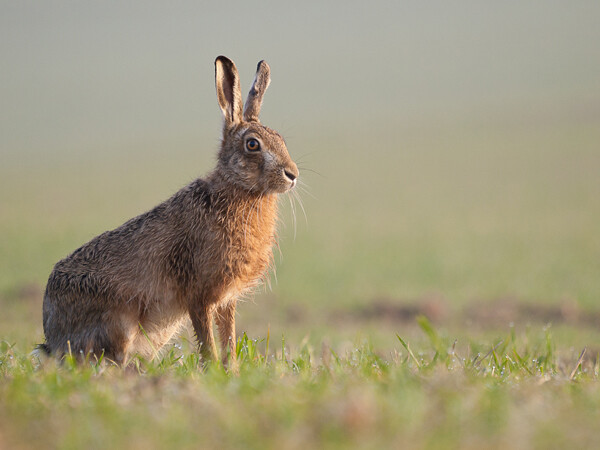
Brown Hare (Lepus europaeus)

Brown Hare (Lepus europaeus)

Here are three reasons to persuade you to try it next time you are out taking photos of wildlife:

1. Getting closer

If you are shooting wild animals, as soon as they become aware of your presence, they will often retreat in the opposite direction.  You typically can’t just walk up to wildlife and expect it to pose for you and getting down low is only part of the good field craft required to get closer to wild animals.  By lying down, you will be far less noticeable than by standing upright or crouching, allowing you to crawl much closer to your subjects before they either become aware of you, or feel threatened.  Often, good field craft is better than the longest telephoto lens for capturing frame-filling shots.

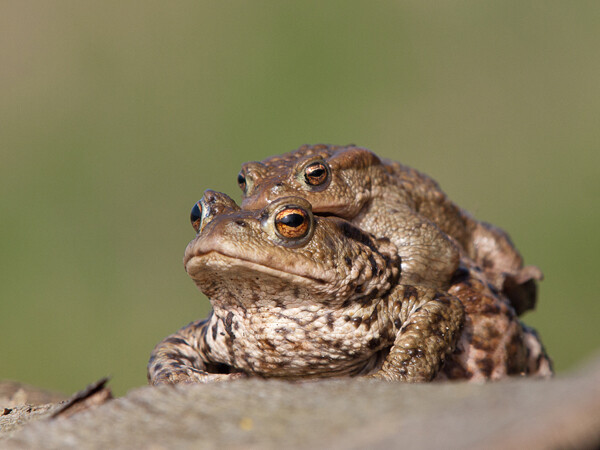
European toad (Bufo bufo)

European toads (Bufo bufo)

2. Isolating your subject

If shooting an animal at ground level from a standing position, you will be looking down on it, meaning that the ground or plants behind it will form the immediate background of the shot.  As this background isn’t very far away, it will be difficult to render it out-of-focus, even with the largest aperture, causing the background to distract the attention of the viewer away form the subject, in the final image.  Getting down low will often result in the background of the shot being much further away, meaning that you can capture the entire subject in sharp focus whilst ensuring that both the foreground and background are soft and blurred, isolating your subject in a fine plane of focus.

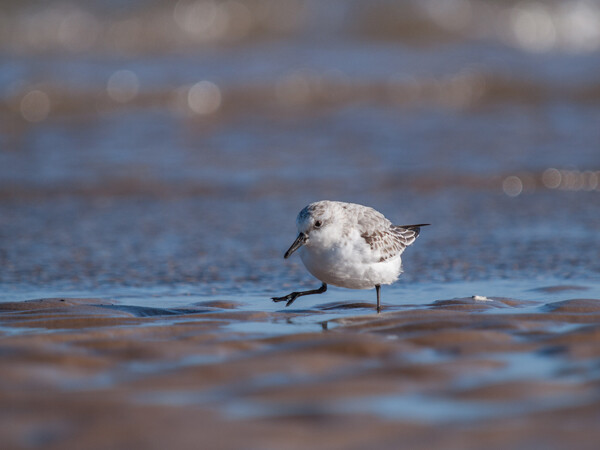
Sanderling (Calidris alba)

Sanderling (Calidris alba)

3. Eye level

By getting down low, you can take photos of animals at their eye level.  Typically in wildlife photography, if the face of the animal has been captured, it is key for the eyes to be the point of focus as that is where the eyes of the viewer will immediately be drawn.  If the eyes are soft or out of focus, you will lose the viewers attention, however if the eyes are sharp you create a relationship between the subject and the viewer.  This relationship is made all the more intimate by being down at eye level with the subject as the viewer feels like they are looking at the animal from within its world.  If you take a photograph looking down on an animal, the perspective gives the animal a sense of vulnerability (which can be used creatively in some circumstances) however by getting down low this is easily avoided, and much more powerful portraits an be captured.

You may find that you initially feel awkward crawling around on your front after wildlife and that you get much muddier than if you stay on our feet, but once you start doing it and see the results, you won’t be able to stop.

Post originally from: Digital Photography Tips.

Check out our more Photography Tips at Photography Tips for Beginners, Portrait Photography Tips and Wedding Photography Tips.

Getting Down Low in Wildlife Photography


Digital Photography School

 
Comments Off on Getting Down Low in Wildlife Photography

Posted in Photography


Deponia Walkthrough – PART 5 | Major’s Office & Getting Booze

07 Nov

Deponia Walkthrough 5 Major’s Office Getting Booze ———- Deponia is a fast-paced comedy of errors and one of the most unusual love stories in gaming history. The twist-filled story takes its off-beat characters all over trash planet Deponia, a unique game world in the style of Douglas Adams, Terry Pratchett and Matt Groening. From Kuvaq, an improvised village built inside a giant trash heap, to the swimming black market and the dark corners of the elevated planetary railways: The new adventure game from the makers of The Whispered World, Edna & Harvey: The Breakout and A New Beginning is brought to life with detailed hand-painted backgrounds in widescreen format and top-quality cartoon animation. Rufus is not a pleasant guy. Ill-tempered and entirely too convinced of his own greatness, he lives at the edge of a small settlement somewhere in the most remote sector of the garbage-covered planet Deponia. He dreams of a better life in the floating cities of wealth and beauty high above the planet surface. When the angelic Goal falls from these privileged spheres down into a neighboring trash heap, Rufus sees his chance. He decides to bring the unconscious beauty back to her home. Only a vague hope of making it off Deponia at first, he soon formulates an unscrupulous plan, as he learns that he is a dead ringer for Goal’s upper-class husband. The planned handover is only the beginning of a wild chase across Deponia full of twists, turns and mystifying mix-ups… HDPLAY
Video Rating: 4 / 5

Part 6 of my Walking Dead walkthrough

 
Comments Off on Deponia Walkthrough – PART 5 | Major’s Office & Getting Booze

Posted in Animation Videos