RSS
 

Posts Tagged ‘gear’

5 Ways to Create Better Images Without Buying More Gear

17 Jul

You are a photographer. You love getting out there and doing your best to create great images. Photographers also love something else. Camera equipment. Sometimes you may find that you spend more time searching for a new lens, filter or accessory than actually photographing with it. When you meet other photographers you will hear them talking about the latest piece of equipment that has just launched.

Why is this? Why are some photographers obsessed with equipment. My personal opinion is that we fall into the marketing trap. Sometimes we really do think that a new lens, or new camera body, will improve our images simply because it is a better piece of equipment. That might be true, but it’s only half true. A new lens might make your images a little sharper or have better bokeh, but the best way to get better images is to improve your ability as a photographer. Here are some thoughts that may help you create better images.

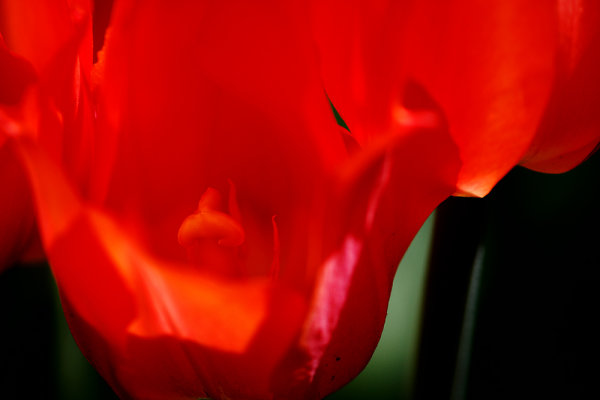
The key ingredient in any image is light

The key ingredient in any image is light

1. Become a light snob

Light is the key to every image you make. If you want a good image, shoot in good light, if you want a dramatic image, shoot in dramatic light. There really is no such thing as bad light, there is simply better light for creating images.

Light is the all important component of great photography. You may feel that shooting in the middle of the day is best because it is bright, and all the light you need is in that shot. Yes, there may be lots of light, but there is also a lot of contrast (bright highlights and dark shadows). The resulting shot may be unappealing because the light is flat or uninteresting.

How do you overcome this tendency to photograph at any time? Become a light snob. What does that mean? I mean in a good way, try this next time you go out with your camera. Make a point of shooting in the golden hours. Think about the light you are shooting in, go out in the early morning or early evening. Choose your subject carefully, compose your scene purposefully and shoot it with intention. Don’t shoot the same scene twice, work with the light, make sure you think about the exposure, try your best to get the shot and walk away from the scene. Make sure you expose for the light the results will speak for themselves.

2. Become more flexible – in more ways than one

POV2

How often do you photograph from your standing height and mostly in landscape orientation? I know I do, it is natural to do that, we shoot they way we feel comfortable. Change this up a little. Look for unusual angles and vantage points. We have all seen the photographs of children looking up at the camera. Change that, kneel down or even lie down in front of a child you are photographing. Turn your camera to portrait orientation, that changes the scene immediately. If you are photographing a street scene, maybe get to a higher vantage point on a balcony. If you are in a city, shoot straight up! The key thing here is, change your viewing angle and you will change the view of your image. You will give your viewers a unique perspective on a familiar topic and that can make for some very dramatic images.
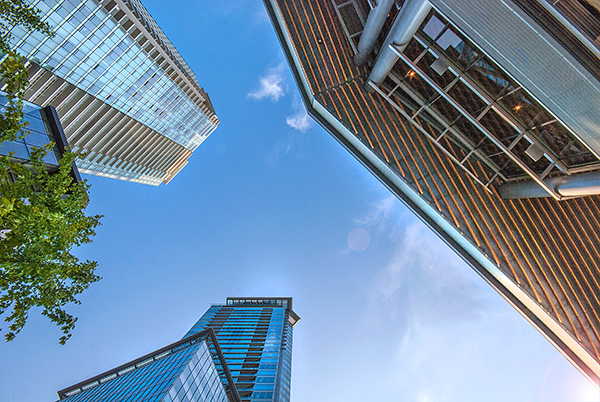
A unique point of view can make for dramatic images

A unique point of view can make for dramatic images

3. Time it right

You have probably heard this about many things, particularly sports:  “its all about the timing”. This is true in certain genres of photography too. In street photography, timing can be crucial to making or breaking the image. The famed street photographer Henri Cartier-Bresson spoke about “The Decisive Moment”. What he was saying was this, if you take the shot a moment too soon, the scene has not yet unfolded, if you are a moment too late, the scene has passed, you have to release the shutter at the precise moment.

This is not easy to get right. It requires lots of practice and the ability to sense or anticipate what will happen next. With practice you will get better and better, and in time, you will find that you will “time” the shot better. When is the right moment? It is different for every photographer and every photograph. It might be the moment before a smile, or the moment the first tear appears, the moment of surprise or elation. Each moment is different and each photographer will shoot it differently. You will know when you get that moment captured because the image will be memorable. The moment will come, but you have to be ready and you may have to be patient.

Photographing fireworks is often about timing.

Photographing fireworks is often about timing.

4. Get your exposure right

We all know this one, it’s an old one, but exposure is all important. How do you affect exposure? You take control of your aperture and your shutter speed. This alone is a topic for another article, but what is important is that you, as the photographer, need to take control of your image exposure and not let the camera do that. If you still shoot on Auto and hope for the best, now might be a good time to start venturing into the world of shooting on manual or even aperture priority. Learning how the aperture and shutter speed affect your images will help you make stronger images in just about any light. This is what makes the difference between a good image and a spectacular image, the exposure.

Mastering exposure will make a big difference in your images

Mastering exposure will make a big difference in your images

5. Use what you have

You have a great camera, seriously, you do! If your camera is less than five years old, it is perfect for taking astounding images. A new camera body will take pictures with more megapixels or better noise reduction, but I am pretty sure, in fact I am CERTAIN, that you can get some amazing images on your current camera. One key element in getting great images is choosing the right lens for the scene. The lens is the eye to the camera. If you are going to invest in any equipment, save up and buy good lenses. Buy some prime lenses and see the results.

First though, use the current lenses you have, make sure you know how each lens affects a scene. A wide angle lens has the effect of making everything in the scene seem far away and spread out, a telephoto lens (say a 200mm) has the effect of compressing everything in the scene (bringing the elements closer together). If you were to photograph a mountain scene with a wide angle lens and switch to a long (or telephoto) lens and shoot the same scene, the elements in that scene would look really different. The perspective and viewing angle changes on each lens, so make sure that you use your lenses and understand the effect that they have on your scene.

Exposure2

Putting it all together

By using these techniques with light, composition, timing, exposure and current equipment, your images will improve. You need to practice, constantly. Keep pushing the boundaries, do the weekly challenges that dPS puts out, try different techniques. Only buy new equipment if your current setup is limiting your photography. The best way to create better images is by practicing and spending hours and hours behind the camera.

I heard a story that a professional golfer who was one of the top three golfers in the world used a very unique way of practicing. Before playing a golf course in an upcoming tournament, he would book the whole course for a week. He would then take 300 golf balls and set up on the first tee. He would tee off from there, hitting each ball from that tee. He would then play each ball from where it landed. He did this on every hole of the golf course. By the end of the week he knew every inch of that course and he knew exactly which clubs he could use from where on the course. Try this in photography. Shoot 100 shots on aperture priority or shoot 100 shots with your 50mm only. Don’t change lenses until you have 100 shots with that lens. Then move to your next lens and do the same. Try each lens with different subject, use a 500mm and shoot some sports, landscapes and macro photos. Mix it up, but learn how that lens works and learn how your camera works and pretty soon, you will be making great images with all your equipment and that shiny new camera will not seem so tempting!

Look for the light, work with the scene and practice, practice, practice.

Look for the light, work with the scene and practice, practice, practice.

I will end off with a quote from the actor Will Smith, which sums it up in a good way:  “The separation of talent and skill is one of the greatest misunderstood concepts for people who are trying to excel, who have dreams, who want to do things. Talent you have naturally. Skill is only developed by hours and hours and hours of beating on your craft.” – True enough!

Have you put in the hours? Do you have any other additional tips? Please share in the comments section below.

The post 5 Ways to Create Better Images Without Buying More Gear by Barry J Brady appeared first on Digital Photography School.
Digital Photography School

 
Comments Off on 5 Ways to Create Better Images Without Buying More Gear

Posted in Photography


Tamrac brand and assets acquired by Gura Gear

29 Jun

Camera bag maker Tamrac has been acquired by the Ogden, Utah-based Gura Gear. Tamrac, under Chapter 11 bankruptcy protection since January, will see its brand and assets handed over when the acquisition is finalized later this month. At that point Tamrac’s assets will be relocated to Gura Gear’s Utah headquarters.

related news: Digital Photography Review (dpreview.com)

 
Comments Off on Tamrac brand and assets acquired by Gura Gear

Posted in Uncategorized


Reviewing the Loka UL Adventure Backpack from F-Stop Gear

28 Jun
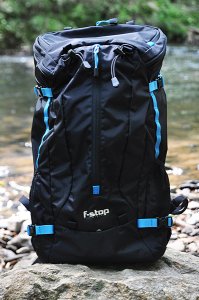
The new Loka UL backpack from F-Stop Gear combines rugged protection for your camera gear with the space you need for other outdoor essentials.

The new Loka UL backpack from F-Stop Gear combines lightweight rugged protection for your camera gear with the space you need for other outdoor essentials.

Among the many life lessons learned from my father was the one about always making sure you have the right tool for the job. I think we all do our best to apply this wisdom to the gear we pack inside our camera bags, but I’ve always felt that it’s just as important to apply it to the bags themselves. For starters, the bag that gets you to the gig isn’t always the best bag for getting you through the gig. I have a lot of bags. A lot. Until recently, though, I never had a bag that adequately combined protective storage for the gear with room for other essentials like a jacket, food, or other hiking gear for when an assignment– or life– takes me off the beaten path. The just-released Loka UL (Ultra Light) from F-Stop Gear not only combines those elements for me, but does so in one of the more innovative ways I’ve seen in a while.

First Impressions

Fresh out of the box, I was impressed with the high-quality construction and attention to detail. Modeled after F-Stop’s original Mountain Series Loka pack, the Loka UL has been stripped down to the essentials.  More than a full 1/3 lighter than the original, this newer version has been simplified in the interests of weight reduction and better freedom of movement. Those goals have been achieved without any compromise whatsoever in the build quality. A ripstop nylon water-repellent shell, internal aluminum frame, and a new ergonomic harness provide the lighter weight, as well as a more even distribution of the load.

Specs and Features

  • Height:  22 inches (55.9 cm)
  • Width:  12.5″ (31.8 cm)
  • Depth: 11″ (27.9 cm)
  • Volume: 37 liters
  • Weight empty:  2.25 lbs. (1.02 kg)
  • Price: $ 249.00 (USD)
  • DWR (durable water repellant) treated, 210D Ripstop Nylon with PU2 (Urethane moisture curing) coating
  • EVA (Ethylene vinyl acetate) padded hip belt, EVA-padded shoulder straps, and internal aluminum frame for easier handling of heavy loads
  • Jersey laminate EVA-padded back panel for ventilation and comfort control
  • YKK brand reversed zippers for extra weather protection
  • ITW brand buckles
  • Easy-to-reach side mesh pocket with ripstop nylon base and elastic cuff for water bottles
  • Drainage weep holes on sides and front pockets
  • Rain cover pocket in base of pack
  • Organizer pockets in top lid for batteries, memory cards, smart phones, etc.
  • Front panel pocket ideal for jackets, extra layers, ground tarp, etc.
  • Internal nylon sleeve fits up to a 13″ laptop, or doubles as a hydration bladder pocket
  • Quick-release side compression straps can secure tripods, ski poles, skis, etc.
  • Sternum strap includes integrated whistle for emergencies
  • Belt and shoulder suspension straps help adjust load for optimum weight distribution
  • Several exterior D-rings and attachment points for accessories
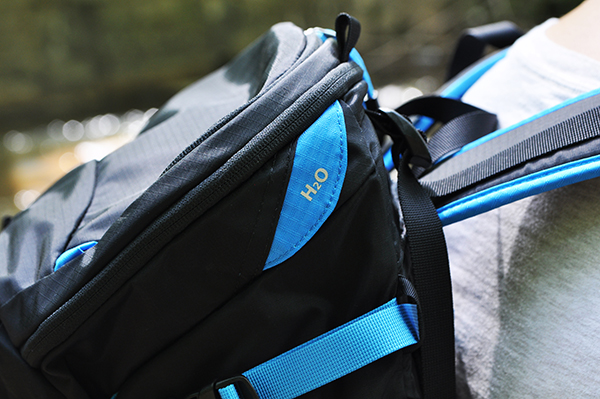
An integrated hydration system (bladder not included) will be a plus for outdoor photographers.

An integrated hydration system (bladder not included) will be a plus for outdoor photographers.

Internal Camera Unit (ICU)

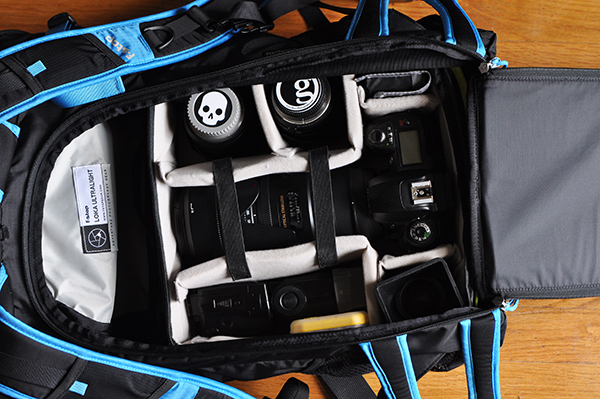
The heart and soul of the F-Stop Mountain Series is the Internal Camera Unit (ICU). Available in ten different sizes, the ICU lets you select the ideal-sized padded insert for your camera gear, while balancing available space between camera gear and other essentials like clothes, food, camping equipment, etc. Like other bags in the Mountain series, the Loka UL can accommodate one or more ICUs, depending on the size selected. Pictured here is the Shallow Medium ICU– one of the three recommended ICU sizes for this bag. Six of the 10 available ICUs will fit the Loka UL, but the other larger ones would seriously cut down on space available for non-camera essentials, defeating the entire purpose of the bag. The ICU rests securely in the bottom of the Loka UL and is kept in place with four Velcro tabs around the internal aluminum frame. Camera gear is accessed through the back panel of the pack.

Gear stored in the ICU is accessed through the back of the pack.

Gear stored in the ICU is accessed through the back of the pack.

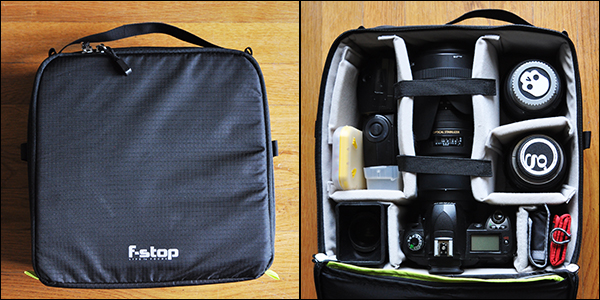
Every ICU is made with double ripstop nylon and a polyurethane coating.  High-density cross link foam dividers and side walls keep gear secure and protected. The ICU also works well as a modular storage system for your gear. The foam lid protects your precious cargo when used for storage or transport, and can be folded back and out of the way for easier access to gear when it’s in the pack. The dimensions of the ICU shown here are:

  • External:  5″ (L) x 11.5″ (W) x 11″ (H) (12.7 cm x 29.2 cm x 27.9 cm)
  • Internal: 4.5″ x 10.5″ x 10″  (11.4 cm x 26.7 cm x 25.4 cm)
  • Weight Empty: 0.95 lbs (0.43 kg)
ICUs also work well as modular storage systems when the bag's not in use.

ICUs also work well as modular storage systems when the bag’s not in use.

It’s worth pointing out that the Loka UL makes for a great all-around backpack with the ICU completely removed, for those unheard of situations (GASP!) when you might actually leave the photo gear at home. Note: If this happens to you, seek help immediately.

Hitting the Trails

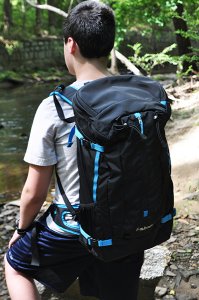
Stabilizing straps on the shoulders and at the waist help maintain a comfortable, even distribution of weight.

Stabilizing straps on the shoulders and at the waist help maintain a comfortable, even distribution of weight.

Summer has already hit here in Georgia (USA) with all the grace of a runaway freight train, so I’ll have to get back to you on how the Loka UL performs in cold, snowy conditions. But I can say that it did great in the heat, humidity and rain while hiking through paths, hills and riverbeds. Obviously, comfort is the #2 priority when choosing a camera backpack. I say #2 because let’s face it– protecting the gear is #1. But comfort is key and the Loka not only met my expectations, but vastly exceeded them. By biggest complaints in the past about camera backpacks has been the comfort issue. I’ve never doubted their ability to protect the gear. Sometimes, though, it’s their unfailing gear protection that makes them too heavy or unwieldy for actual hiking or camping. The fact that the Loka has been designed specifically for hiking, camping, skiing and other outdoor activities helps ensure that it strikes a great balance of form and function.

I was very impressed with the wide variety of pockets on this bag. Someone was obviously paying attention to the real-life needs and concerns of outdoor photographers. Features such as a pocket perfectly sized for a protein bar on the harness straps, as well as drainage “weep holes” at the bottom of some exterior pockets all add up to maintaining what you need and discarding what you don’t. There’s an old saying when it comes to hiking– “Take only pictures and leave only footprints.” This bag even has multiple pockets available for responsibly taking your trash with you.

With stabilizing straps at both shoulders and each side of the hip belt, adjusting and readjusting distribution of the load was extremely easy. Obviously, the bag alternates between getting lighter and heavier over the course of the day. The camera goes in and out of the bag. You stop to eat. Put on or take off a jacket. Being able to make those adjustments quickly and easily takes one more item off the list of things you need to worry about. The stabilizers and harness straps work well together to keep any potential back strain to a minimum.

We did encounter some light to moderate rain while testing the Loka. I opted to skip the rain cover, and was pleased to see that the water-repellent fabrics did exactly what they were supposed to do.

What I Packed in Mine

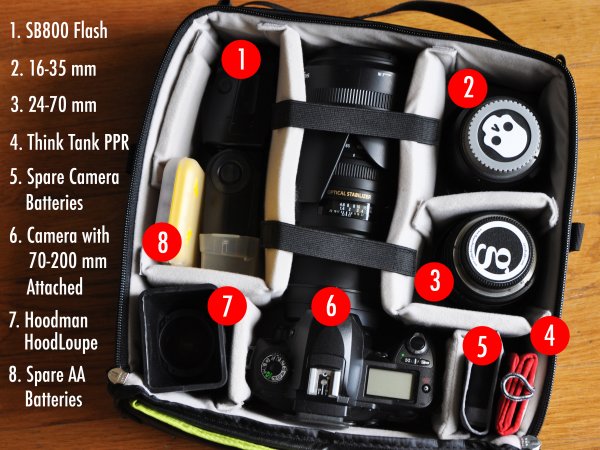
The image below breaks down the camera gear I packed in the ICU. Other items packed in the remaining areas of the bag included: Jacket, hat, towel, dry shirt, bug spray, two water bottles, lunch, and a few snacks.

fstop-loka-review-dps-008

Wrap-up and Recommendations

Variety is the spice of life and that same philosophy can (and should) apply to camera bags. I have bags that I only use for storage. I have one that’s been configured for nothing but lighting equipment. I have “everything but the kitchen sink” bags for commercial shoots, and small shoulder bags that won’t hold much more than a camera and two lenses. They all serve their specific purpose and the Loka UL is no different. It’s the first bag I’ve had that can carry not only the right amount of gear, but the other essentials needed for a day on the trails. Outdoor photography is both a challenge and an adventure. The Loka UL from F-Stop Gear helps you meet those challenges head-on and I highly recommend it for whenever adventure comes knocking on your door.

fstop-loka-review-dps-005

I try to steer you guys towards Amazon as much as I can, but the Loka UL backpack is currently available exclusively through F-Stop gear. That’s actually a good thing, insofar as configuring your bag and ICU combination is a lot easier when you have every possible combination in one place. Prices for the bag and ICU as shown in this review: Loka UL Backpack ($ 249.00 USD), Medium Shallow ICU ($ 79.00 USD). Click here for more information. As always, feel free to post any questions you have in the comments.

The post Reviewing the Loka UL Adventure Backpack from F-Stop Gear by Jeff Guyer appeared first on Digital Photography School.

Digital Photography School

 
Comments Off on Reviewing the Loka UL Adventure Backpack from F-Stop Gear

Posted in Photography


Tamrac brand and assets acquired by Gura Gear

25 Jun

tamrac_bag.png

Camera bag maker Tamrac has been acquired by the Ogden, Utah-based Gura Gear. Tamrac, under Chapter 11 bankruptcy protection since January, will see its brand and assets handed over when the acquisition is finalized later this month. At that point Tamrac’s assets will be relocated to Gura Gear’s Utah headquarters.

News: Digital Photography Review (dpreview.com)

 
Comments Off on Tamrac brand and assets acquired by Gura Gear

Posted in Uncategorized


How to do Surreal Digital Infrared Photography Without Expensive Gear or Camera Conversions

17 Jun

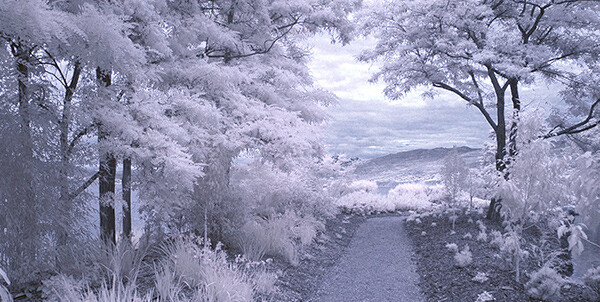
Photos made with invisible infrared light, rather than visible light, yield wildly strange and eerie photographs that always have the “WOW Factor.”  For landscapes or scenic imagery, infrared (IR) photography is highly regarded as fine art. But back in the days of film photography, shooting infrared was complicated, expensive and the results were often not great. For those with determination though, that one image that did ‘work” was always worth the trouble.

But now the complexity of capturing infrared photos has changed – digital cameras have made the technique almost foolproof, inexpensive, and a lot of fun! All you’ll need is a tripod, a special infrared filter, and any camera that is sensitive to infrared light. With a few easy steps you’ll be shooting infrared photos in no time at all.

But before I get into the process, it’s not my intention in this article to delve into the physics of infrared light, and all the scientific mumbo jumbo that goes along with understanding WHY infrared light creates amazing images, but rather to give you some simple steps to get you started in this super creative technique.

_DSC1747W

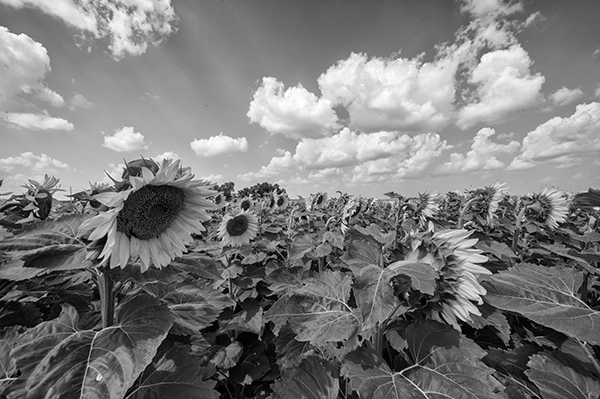
Visible Light Black and White Image

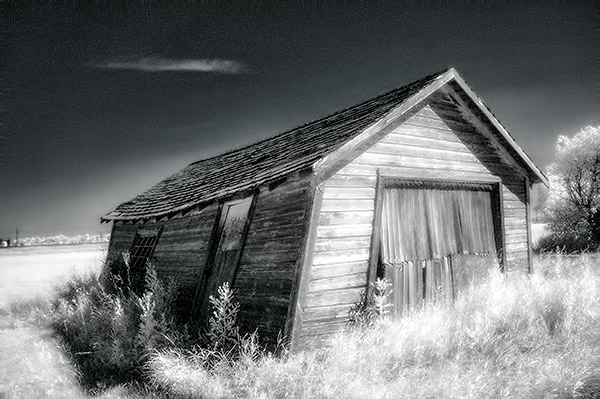
Just know that anything that is alive will reflect a greater amount of infrared light than inanimate objects. Leaves, foliage, and grass, along with skin, reflect the greatest amounts of infrared light, and so will be the whitest objects in your image. Stones, concrete, mountains, water and sky tend to absorb infrared light and so appear as darker objects in your images.  The tonality is very different from that of visible light black and white photography though. Notice how the tones of the leaves, seeds and sky are quite different in the infrared image below.

Digital Infrared Image

Digital Infrared Image

Okay, are you ready to give this a try? Here are the simple steps you need to follow so your images will turn out into hauntingly beautiful, surreal infrared photographs. The first steps deal with equipment and settings, and the last steps are all about how to best capture beautiful infrared light.

Step 1: Test your Camera

Before you go out and buy an infrared filter test your camera to make sure it’s sensitive to infrared light.  Not all digital camera sensors are able to “see” infrared light. In fact the newer the camera, the less sensitive to infrared light it may be. Try this simple test to see if your camera will give you good results.

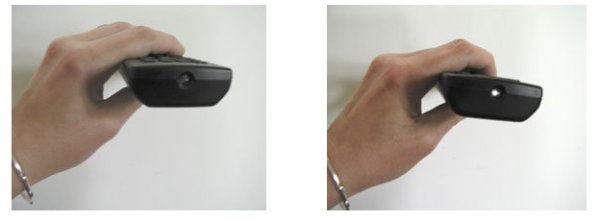
Testing your camera for infrared sensitivity.

Testing your camera for infrared sensitivity.

Hunt down a TV, VCR or DVD player remote control. Look at the end that points to the TV (or VCR etc), and you’ll see a little bulb or flat back plastic window. This is the transmitter that sends the signal from the remote to your device. That signal usually uses infrared light. You can see that it is invisible light – i.e. when you look at the remote with your eye, you can’t see anything when you press the buttons. But just wait until you do this looking through your camera! You’ll be able to see invisible light – the infrared spectrum that makes such cool photos.

If you have a point & shoot camera look through your LCD viewer while pressing any button on the remote. If you see the bulb light up, your camera can see infrared light.  If you have a DSLR you’ll have to take a photo to see the results, or if you camera has a live view feature, you will be able to see the the results on your LCD as well.

The whiter and brighter the light you see from the remote, the more sensitive your camera is to infrared. If the light is more purple or red your camera may not be a good candidate for shooting infrared photos.

Step 2: Equipment

If your camera passed the sensitivity test, you’ll need two more pieces of equipment before you can shoot infrared photos, a tripod and an infrared filter. The tripod will help you take a sharp shot, as your exposure times will be quite long. The filter will  block most of the visible light from reaching your camera sensor, but will allow the beautiful infrared light to pass through.

When I first started shooting infrared images, I used  a Hoya R72 screw-on infrared filter. B+W, Tiffen and other manufacturers also have equivalent infrared filters.  If you are using a slide in filter system, such as Cokin or Lee, they also make infrared filters to work with their holders. If this is the filter you’ll be using, make sure to slide it into the slot closest to the camera to prevent unwanted visible light from sneaking in. The R72 refers to the amount and type of infrared light that passes through to your sensor and I recommend using this to start. It allows some visible light to pass to the sensor so it will allow you do to all sorts of creative post processing with your images.

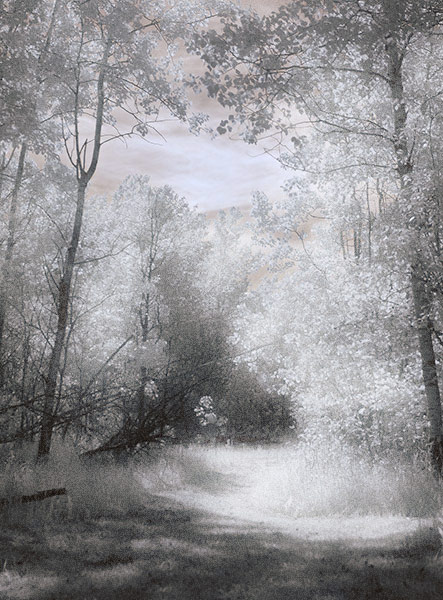
Infrared Image with creative post processing.

Infrared Image with creative post-processing

Step 3: Camera settings

Because the infrared filter blocks out most of the visible light, your exposures will be quite long. You’ll have to adjust your camera settings to ensure you get a good exposure, while keeping noise to a minimum.  Set up your camera on your tripod and make these adjustments:

  1. Set your ISO between 200 and 400, keep it as low as you can
  2. Set your Long Exposure noise reduction to ON
  3. Set your camera to shoot in RAW mode
  4. Set your camera to Aperture Priority (Av mode on a Canon), and your aperture to around f/8 for maximum sharpness
  5. If your camera does auto bracketing (refer to your owner’s manual), set your bracketing to +/-1 EV.  Your series should be -1 EV, 0 EV, good exposure, and + 1 EV. You can also bracket manually.

Shooting in RAW will give you a bit more latitude for processing and adjusting.  Bracketing will help you find the sweet spot for exposure at your preferred aperture and ISO.

I’m not going to go deep into the White Balance setting, as this could be an entire article on its own. But for now set your White Balance to the Sunny or Daylight preset.

Step 4: Composition

Just as in regular light photography, composition is a critical component of infrared photography. However there are a few additional considerations to keep foremost in your mind when planning your infrared composition.

A variety of textures make the image more dynamic.

A variety of textures make the image more dynamic.

Infrared photography is similar to black and white photography, in that you are dealing with a limited number of tones. To add more dynamism and energy to your infrared shots, add contrasting elements. By this I mean using dark and light objects in close proximity to each other. But also use smooth and textured objects together. You can mix and match for artistic composition and design.

 COLUMN 1  COLUMN 2
  • light
  • white
  • smooth
  • large patterns
  • light with fine textures
  • light with large textures
  • dark
  • black
  • textured
  • small patterns
  • dark with fine textures
  • dark with large textures

In every infrared shot you make, include at least one element from Column 1 with the corresponding one from Column 2. You can add as many elements as you want, but it’s best to keep your composition simple. You can use light and small patterns, with dark and large patterns and so on. Foliage and clouds will always be a light element in your image; the sky, stones, bark, water  and concrete will be darker. Leaves from a distance are a rough texture, with many small elements appearing rough and textured; while human skin is very smooth.  This should give you a great starting point for infrared compositional considerations.

Step 5: Shooting Infrared

There is only one critical thing to remember when shooting infrared – you must shoot when there is lots of sunshine, and in the summer when there is lots of deciduous foliage. Overcast days won’t give you great results, and because living things reflect the most infrared light, snowy winter days are usually devoid of anything that reflects infrared.  If there are clouds in the sky these can add an element of interest, but don’t make your capture until the sun is out, and shining on your subject.

Find a great place to shoot and adjust the settings on your camera. I like graveyards, parks, and old abandoned buildings. The contrast between the stones, the pathways, the old wood and leaves and grass provides outstanding tonality for infrared images. If you can get a few wisps of cloud in your sky all the better.

Put your camera on your tripod, and compose your image. Place the infrared filter on your camera, and use your autofocus as usual. Yes, it works just fine for infrared photos! Your light meter will work too but be sure to bracket on either end to make sure you have at least one usable exposure. Then click the shutter.  You’ve just made an infrared photograph.

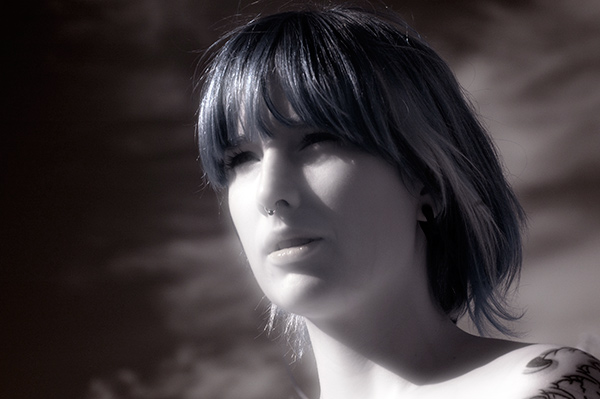
Skin looks like alabaster when shot using infrared light.

Skin looks like alabaster when shot using infrared light

For techniques and ideas for post-processing our infrared images, watch for my article on post processing infrared photos coming soon!

The post How to do Surreal Digital Infrared Photography Without Expensive Gear or Camera Conversions by Alex Morrison appeared first on Digital Photography School.

Digital Photography School

 
Comments Off on How to do Surreal Digital Infrared Photography Without Expensive Gear or Camera Conversions

Posted in Photography


Two Videos on How to Take Care of Your Camera Gear

16 Jun

This week I found two different videos on how to take good care of your camera gear from two different perspectives (serious and more tongue in cheek). It’s important to take care of your equipment to make sure it keeps functioning properly and takes nice clean images with no dust spots.

The first video by photographer Gregory Cazillo is the serious one. He goes through a list of a few things you can do to protect, clean and maintain your gear in good condition.

He recommends jotting down all your serial numbers so when you are are travelling out of the country you don’t have any issues with customs coming back home. I suggest taking it one step further and actually register your gear with customs before you leave. Most airports have a customs area, just take your equipment in there and get a customs registration card from them. Make sure to arrive early to have time to do that.

The second video is from DigitalRevTV (The most subscribed and viewed photography show on the interweb, presented by an asian dude with British accent – as they describe on their YouTube channel) and guest host Ultrasonic Dragon 88 (aka Ian Wong). Obviously this one is a little “cheeky” and is meant to be humorous. Take it with a grain of salt and have a little fun.

Here are some links to other articles here on dPS about taking care of, and protecting your camera equipment:

  • Do you Clean your Own Sensor?
  • Tips to Protect your Gear in Harsh Weather Conditions
  • How to Protect your Camera in Extreme Conditions
  • Embrace the Weather with Your Photography
  • So You Want to Keep your Camera Safe? Here’s How
  • Readers: Lens Filters: To Use or Not To Use? Your 2 cents, if you please!

The post Two Videos on How to Take Care of Your Camera Gear by Darlene Hildebrandt appeared first on Digital Photography School.

Digital Photography School

 
Comments Off on Two Videos on How to Take Care of Your Camera Gear

Posted in Photography


Video: Canon REALLY wants you to look after your camera gear

14 Jun

Screen_Shot_2014-06-13_at_11.15.50_AM.png

Canon USA has released a video explaining how to take care of your camera gear. In the video, hosted by Holly Groder of Canon’s call center, Canon gives a series of recommendations for things to avoid, and things to get into the habit of doing, to keep your gear clean and fully functional. If you mentally delete the word ‘Canon’ from every other sentence there’s plenty of sensible advice for caring for your gear – whatever the manufacturer. Click through to see the video.

News: Digital Photography Review (dpreview.com)

 
Comments Off on Video: Canon REALLY wants you to look after your camera gear

Posted in Uncategorized


Take a Hike!With Camping-Friendly Photo Gear

28 Apr

We love camping. The scenery is beautiful, the wildlife photogenic, the tent mishaps hilarious and the burnt marshmallows the best ones.

Don’t let Mother Nature with her water, dirt & total-lack-of-outlets stop you from photoing it all. Pack along these camping-friendly gadgets.

We field tested each one on a recent camping weekend in Big Sur. Check out this photo story of our trip, or scroll on down to see our favorite gear of the weekend.

Power Pot Stovetop Charger

The Power Pot turns heat from your campfire or stove into power to charge your phone, camera or any USB cable charged device!

Cook up your dinner and the power to snap a few more photos at the same time.

Learn More or Buy

DryZone Duffle

Like the little yellow rain slicker of your childhood, this waterproof bag will keep your camera bone dry. Plus, it’s super padded to keep your gear safe.

Pack the DryZone Duffle full of camera equipment (and dry socks) when you’re on the water.

Learn More or Buy

iPhone Super Suit

With the iPhone Super Suit your phone will have the ultimate protection from the elements … like water, sand and gravity.

This sleek case protects and leaves the buttons, screen, camera and headphones totally usable (even while underwater)!

Learn More or Buy

Spring Break Camera Strap

Take your camera on a hike with the Spring Break Strap.

It not only provides a comfy way to carry your most precious cargo, but it makes you look pretty good too.

Learn More or Buy

Gorillapod Mobile

The Gorillapod will hold onto your phone in any terrain. Its bendy legs will stand atop a mountain or hang onto a tree branch for great pics at just the right angle.

Use it as a tripod for self-timer selfies, group pics and shake-free videos.

Learn More or Buy

Now, check out the photos we snapped on our weekend camping trip to Big Sur RIGHT HERE!


© laurel for Photojojo, 2014. |
Permalink |
No comment |
Add to
With Camping-Friendly Photo Gear”>del.icio.us

Post tags:


Photojojo

 
Comments Off on Take a Hike!With Camping-Friendly Photo Gear

Posted in Equipment


Win a $1500 of Camera Gear with Loving Landscapes

24 Apr

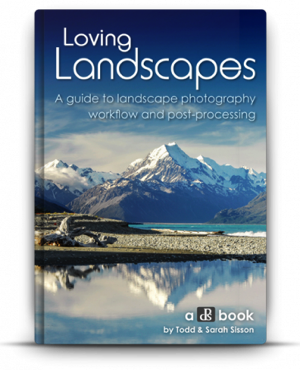
NewImageLast week we announced a brand new dPS eBook – Loving Landscapes: a Guide to Landscape Photography Workflow and Post-Processing with the early bird discount of 33% off what will be its normal price.

We’re really pleased both with the eBook and how it helps readers improve their Landscape Photography Post Processing – but also the feedback it is already getting.

Here’s what one of our readers – Belinda said:

Thanks for this ebook. I downloaded it at 11pm last night moments after getting your email and was up until 3am reading it and practicing the techniques inside using Lightroom.

While it was a later night than expected I was amazed at the results on some of my old landscape shots that I’d not paid enough post processing attention to.

Win $ 1500 Worth of Camera Gear

Given the fantastic response to this eBook, we’re going to celebrate by giving you the chance to win $ 1500 of photographic gear and/or post processing software to help you improve your photography.

To further celebrate the launch of this new eBook we’re putting a $ 1,500 prize up for grabs.

One lucky owner of Loving Landscapes will be randomly drawn to win $ 1,500 USD to spend on either some new post-processing software (Lightroom/Photoshop etc) or some new camera gear (a lens, tripod, camera etc). You can choose what to spend the $ 1,500 on depending upon your needs.

Entries close midnight on the 9th of May EST, so make sure you have your copy ordered before then.

Note: If you ordered a copy last week then congrats, you’re already entered.

FAQ

Based upon previous competitions I know we’ll get a number of questions so here are some FAQs:

  • What if I already purchased Loving Landscapes? You’re in the draw and don’t need to do anything else.
  • Is this open to all international readers? Yes. We’ll ship the prizes to you anywhere at our cost. Our preference for the gear is to use B&H Photo and Video but if you live outside of their delivery area we’ll work with a local supplier to get your prize to you or arrange for you to get the $ 1500 so you can make the purchase at your chosen supplier.
  • Can I enter more than once? No, there is only one entry per person. Multiple purchases of the eBook only get you one entry.
  • Are there any conditions of entry? Yes, just one. The only condition of entry is that you allow us to publish your name on the blog when you’re drawn as a winner (we’ll keep any other details private). This way everyone will know who has won (we’ve previously had winners ask not to be named which has been difficult to be transparent about winner announcements).

Here’s the deal in a Nutshell

Buy Living Landscapes before Thursday 9th May and you get:

  • 33% off the eBook – worth $ 29.99, you get it for $ 19.99
  • An entry into the $ 1500 USD Prize Draw
  • Plus (and most importantly) you’ll come away from reading the eBook with some inspired landscape photography post processing skills!

We’ll draw and notify the winner on the 9th May and then publish their name here on the dPS blog. If the winner doesn’t respond within 7 days we’ll draw another winner and publish their name on the blog.

Pick up a copy of Loving Landscapes today.

Loving landscapes

The post Win a $ 1500 of Camera Gear with Loving Landscapes by Darren Rowse appeared first on Digital Photography School.


Digital Photography School

 
Comments Off on Win a $1500 of Camera Gear with Loving Landscapes

Posted in Photography


Is it REALLY the Gear?

31 Mar
EOS-1D X with EF 200-400 f/4L IS USM +1.4x Extender. 1/1000, f/5.6, ISO 800.

EOS-1D X with EF 200-400 f/4L IS USM +1.4x Extender. 1/1000, f/5.6, ISO 800.

Recently, I’ve noticed some comments from readers who seem to feel that the gear I use for my shots is the reason I get the images I do. They seem to feel that similar results cannot be achieved using consumer level gear. True, I use some top-of-the-line gear, and there are many reasons for that. But rare is the shot that I was able to get with an EOS-1D X or 5D Mark III that I could not also get with a Rebel T5i.

So that begs the question: why do pros spend so much money on top-of-the-line cameras and lenses? 

There are three basic reasons:

#1 – The first is speed

The EOS-1D X and Nikon D4s, the top two leading pro level cameras available, both shoot at 12 frames per second (fps) or faster. Often, shooting that fast is unnecessary. But when you are a working pro, and your paycheck depends on you capturing just the right moment at a sporting event, or when shooting a news event, that speed can mean the difference between missing the decisive moment, or capturing the exact shot your editor or client is looking for. In the series above, I was shooting at 12 frames per second, and these three consecutive frames were the peak action of a save made by the goalie.

Rebel_Sports

Rebel T2i and EF-S 55-250 f/4-5.6 IS – 1/500 at f/5.6, ISO 640

Could I have gotten this shot with a slower camera? If my timing was good, I’d have gotten one of these frames, or something close. But when I’m shooting for a paycheck, I need to be sure, and if possible, come away with several shots. Keep in mind, of these three shots, for a camera that shoots at 5 fps, you’d be getting less than half of this sequence. For the average person shooting their child’s sporting event, five frames per second may seem like plenty. But a lot can be missed in those spaces between images. In addition, processor speed is faster, and the camera is able to get images from the camera’s buffer to the memory card faster. It’s all about what is good enough for you. For most people, five frames per second is plenty.

#2 – The second reason is durability

Canon’s EOS-1D series cameras, and Nikon’s D4s camera, are among the toughest cameras ever made. They are built to withstand heavy use, with shutters rated to handle several hundred thousand frames. The bodies are constructed of magnesium alloy, making them resistant to impact damage, and they are sealed to resist dust and moisture. A working pro is dependent on his cameras and lenses to put food on his table, and professional cameras are designed to help him do that over and over again. While these features may help make the camera more reliable to a working pro, it has very little to do with that pro’s ability to capture a compelling image.

#3 – The third reason is an expansion of basic features

Autofocus systems tend to have more focus points, and are more configurable than in consumer grade cameras. AF systems in pro level cameras generally have more cross-type points as well, which helps them to focus more quickly. Metering systems are also generally more elaborate in higher level cameras, offering RGB metering in some models, as well as face and color recognition. These enhanced features may make it somewhat easier for a pro to get a shot, but also keep in mind that pros are often working in more extreme situations, for both lighting and action, than the average person with a camera.

EOS 5D Mark III with EF 70-200 f/2.8L IS II. 1/320 at f/5.6, ISO 640.

EOS 5D Mark III with EF 70-200 f/2.8L IS II – 1/320 at f/5.6, ISO 640

This brings us to the next topic – lenses

EOS-1D X with EF 85mm f/1.2L II lens. 1/4000 at f/1.2, ISO 100.

EOS-1D X with EF 85mm f/1.2L II lens. 1/4000 at f/1.2, ISO 100.

One particular comment asked how I expected others to be able to achieve the results I did using top of the line lenses, when others were using only kit lenses. The bottom line answer to this is, that some shots you won’t be able to duplicate without a particular lens. Others can be done regardless of which lens you have, like the image above. While it was taken with an EF 70-200 f/2.8L IS II, the focal length was 135mm, and I was stopped down to f/5.6. This means that someone using an EOS Rebel T5i, with the EF-S 18-135 f/3.5-5.6 lens could easily duplicate the shot. The differences will be notable when a fast aperture is used – for instance, when I use the Canon EF 85mm f/1.2L II lens wide open, while you may using a 70-200 zoomed to 85mm at f/2.8. While the framing will be the same, the depth of field will not be, and the bokeh (the quality of the out of focus area) will be different. This is evident in the shot to the left. While the EF 85mm f/1.8 lens will come closer to achieving this look, the bokeh is quite different between the 1.8 and 1.2 apertures. Certain lenses have certain characteristics and often photographers use these lenses specifically because of these characteristics. This is not to say that equally stunning images cannot be captured with a kit lens- they most certainly can. I am simply stating that certain lenses have a quality I prefer for certain shots.

Read: the most popular lenses among dPS readers here

So, is it the gear? Really? Yes, and no.

The bottom line is that compelling images can be captured with a point and shoot just as well as can be captured with a top-of-the-line DSLR. But a point and shoot, or an entry level DSLR have some limitations that a pro level DSLR doesn’t. As a photographer, it’s up to you to learn to work around these limitations, or to decide if it’s time to upgrade to a higher level camera or lens. But don’t simply assume that because an image was made with a pro-level camera that it could not just as easily have been made with a consumer-level camera. In the image below, I would have loved to have a 5D Mark III with EF 100mm f/2.8L IS macro. I didn’t have that with me the day I shot this. Instead, a Rebel XSi with EF-S 55-250 did the job, and got me just as nice a shot. Saying it’s the gear is giving the gear too much credit, and it also sells the photographer short.

EOS Rebel XSi with EF-S 55-250 IS. 1/250 at f/5.6, ISO 100.

EOS Rebel XSi with EF-S 55-250 IS – 1/250 at f/5.6, ISO 100

The post Is it REALLY the Gear? by Rick Berk appeared first on Digital Photography School.


Digital Photography School

 
Comments Off on Is it REALLY the Gear?

Posted in Photography