RSS
 

Posts Tagged ‘gear’

DPReview Gear of the Year part 4: Barney’s choice – Sony RX1R II

21 Dec
The Sony Cyber-shot RX1R II is a 42MP full-frame compact camera, with one of the best AF systems of any non-DSLR camera on the market. And I want one. 

Photo: Sam Spencer.

I’m a sucker for 35mm. I reckon that 90% of the pictures I like to take could be (or are) taken at this focal length. That’s why I have a Sigma 35mm F1.4 Art almost permanently attached to my DSLR, and why when I’m not shooting with that, I can probably be seen out and about using my old Fujifilm X100S. In fact it was the X100S that I wrote about for my last ‘Gear of the Year’ article, way back in 2013 (no offense, noble cameras of 2014. I guess I was just really busy this time last year. I’ll call you). 

It’s because I love 35mm that I really wanted to love the original Sony Cyber-shot RX1 and R. On paper they were perfect: a high-quality 24MP full-frame sensor (without an AA filter, in the case of the RX1R), 35mm F2 lens, with full manual control and the option to add a high resolution external EVF, in a compact body. What’s not to like?

I had a love / hate relationship when shooting with the original RX1R. In low-ish light, the camera’s AF system would routinely fail to accurately acquire focus. Both this image (and the one below) were shot in manual focus mode.  

Sony RX1R, ISO 640, F2.5, 1/80sec 

Quite a lot, as it turns out. Despite high hopes (and to be fair – after taking some pictures that I quite liked) I just didn’t get on with those cameras at all. The external viewfinder was almost essential, but clunky, and made a compact camera into a not-at-all-compact camera the minute it was attached. Battery life was fairly pitiful, and autofocus – dear God the autofocus… Fussy in bright light, unreliable in moderate light and downright unavailable in low light.

Until I tried to take nighttime shots with the RX1R I didn’t believe it was possible for an inanimate object to shrug, but I swear that’s what the damned thing did whenever I half-pressed the shutter button.

Taken by the light of a campfire, this image shows the strength of the original RX1R’s 24MP sensor, but like the previous image I had to resort to manual focus to get a sharp result (focused on the little girl’s face). 

Sony RX1R, ISO 6400, F2, 1/80sec

The original RX1 and RX1R were on the market for a long time, and just when I was beginning to give up hope of ever seeing an improved replacement, along came the RX1R II. 

Compared to the original RX1R, the Mark II version is a breath of fresh air. Inheriting the same 42MP BSI-CMOS full frame sensor (but with an all-new switchable anti-aliasing filter) and 399 phase-detection AF system from the Sony a7R II, the RX1R II is a significant step up.

What I love

  • Excellent resolution
  • High-resolution built-in EVF
  • Very accurate, flexible AF system
  • Compact, relatively lightweight form-factor
  • Large manual controls

Gone is the clumsy add-on FDA-EVM1K, replaced by a built-in, retractable 2.3 million dot OLED finder. I shoot with my eye to the viewfinder almost exclusively, so when Sony representatives first showed us the camera, I nabbed one of the new lockable rubber viewfinder hoods they brought along. The hood prevents the finder from being retracted, but after resorting – twice – to using needle-nosed pliers to loosen the locking screw* I decided just to leave it permanently attached.

With 42MP and a new BSI design, the sensor in the RX1R II is significantly more advanced than the already very good 24MP sensor in the older RX1R. Like all current Sony full-frame sensors it offers extraordinary dynamic range, allowing me to expose just shy of highlight clipping for this ISO 100 shot, and pull up the shadows very significantly in Photoshop. The final result shows a very wide dynamic range from bright to dark without feeling too ‘HDR’. 

Sony RX1R II, ISO 100, F6.3, 1/400sec

Just aesthetically, I really like the RX1R II, and it’s a camera that tends to attract admiring glances when I’m out shooting. Like the Fujifilm X100S, more than a few people have commented to me that it looks like a film camera, but the semi-retro styling doesn’t come at the expense of usability (keep walking, Nikon Df…). 

Cosmetics aside, the RX1R II also produces great images, exactly as we’d expect from a camera using such a high-quality sensor. Like recent a7-series cameras, Sony has included an uncompressed Raw option in the RX1R II.This gives maximum quality but at the expense of very large file sizes – roughly 80MB each, to be precise, compared to JPEGs which are typically less than ten. This slows the camera down, and eats through memory cards with frightening rapidity. 

While I didn’t much care for the original RX1/R overall but I did enjoy that 35mm F2 Zeiss lens. And although it was designed for a 24MP resolution it successfully keeps up with the much higher pixel density of the new sensor in the RX1R II. Sadly though, neither the sensor nor the lens is stabilized so with 42MP in play, even though sometimes I’ve gotten away with 1/30sec, I’m in the habit of treating 1/125sec as my safe ‘slowest’ shutter speed when hand-holding.

After dark, the RX1R II’s focus system is far superior to that of its predecessor. This shot was hand-held after dark, and shot wide open at F2.

Sony RX1R II, ISO 400, F2, 1/50sec

Alright, so the sensor is great, the AF system is transformed, and the built-in viewfinder is lovely. What about my one remaining major criticism of the original RX1R? – Battery life. 

Sadly, the RX1R II’s battery is the same NP-BX1 found in the first generation RX1R and all of Sony’s RX100 series compacts. Even just physically, the BX1 is comically small. Like, lose-it-in-your-pocket small. And while it’s rated for a modest 200 shots, in cold weather I’ve come to expect far less. 

In temperatures around freezing, I quickly fell into the habit of holding the battery slipped into a glove, and placing it in the camera only when needed. You know – like we had to do in the 1990s. Fortunately, Sony is shipping the RX1R II with a handy USB-powered charger, which means you don’t need to plug the camera in to charge the battery, as with other RX-series Sony compacts. So that’s one step forward, at least. 

Face detection worked well for this shot in one sense – it resulted in a nicely-balanced exposure, in a situation where my subject could easily be backlit. I should have activated Eye-AF though, because focus has fallen slightly short of my subject’s eyes.

Sony RX1R II, ISO 100, F4, 1/125sec

I’ve been using the RX1R II for a while now and I keep on having to remind myself that despite its high price-tag it is still a Cyber-shot camera, with a lot of the same quirks of much cheaper compact cameras in Sony’s lineup. In fact, it’s impossible to ignore. There’s the same lengthy startup time, the same lag – before – you – can – zoom – in to the images you’ve captured, the same confusing, rather passive aggressive error messages when you try to do something before the camera is ready or when it’s in the wrong mode, and the same somewhat confusingly-named array of AF modes.

Exposed to retain the very delicate warmth in the sky just above the horizon, this ISO 320 shot was converted from a Raw file, and the shadows lifted in Adobe Camera Raw. I performed some very slight noise reduction, but could still smooth out the midtones a lot more if I wanted to. 

Sony RX1R II, ISO 320, F2, 1/60sec

There are a couple of outright bugs, too. For example, despite not offering any form of SteadyShot image stabilization in still capture, the RX1R II will still blink a reminder at slow shutter speeds that this non-existent feature is turned off.

After shooting thousands of frames with the RX1R II, I’ve learned to live with these minor annoyances but I do with Sony had sprung for a couple of extra components. A more powerful processor would make a huge difference to the overall handling experience (especially in uncompressed Raw mode) and I wish it had a touchscreen. I’ve come to really value touch-sensitive screens over the past couple of years, mostly for AF placement when shooting from low angles.

This grabshot was taken on a tabletop, using live view. The RX1R II’s flip-out screen is very handy for pictures like this, but even handier would be a touch-sensitive screen, which would have allowed me to position the autofocus point precisely, by touch. 

Sony RX1R II, ISO 12800, F2, 1/60

All this being said, after a lot of thought, I picked the RX1R II as my personal choice for gear of the year. And I did that because it’s one of those cameras – like my Fujifilm X100S – that is capable of such good results that I am prepared to work around its quirks and largely forgive its faults. I should give an honorary mention to the Leica Q, though. In some ways the Q is a more pleasant camera to use but its sensor isn’t as advanced, I don’t love 28mm as much as 35mm, and my Christmas bonus* wasn’t generous enough to justify its higher cost.

Not that the RX1R II is cheap, of course. But if I have to move into a tent for a couple of months to save up enough to buy one, I’m willing to consider it. Once it’s stopped raining.


* Pliers were resorted to only after I broke a nail trying to do it with my fingers. Yeah, I know. Shut up.  
** Ha ha ha ha ha. 

Articles: Digital Photography Review (dpreview.com)

 
Comments Off on DPReview Gear of the Year part 4: Barney’s choice – Sony RX1R II

Posted in Uncategorized


Gear of the Year Part 4: Dale’s pick – Samsung NX1

18 Dec

Before anything else, let’s address the elephant in the room: for my Gear of the Year I’ve just selected a camera whose future appears a bit dark. As in ‘Luke, I am your father’ kind of dark. The Samsung NX1 was the camera that some photographers saw as A New Hope for the future, but there’s a disturbance in The Force with signs that the Dark Side might prevail when it comes to Samsung’s camera business. 

Some might find my lack of faith disturbing, but I have a bad feeling about this…

It wasn’t an easy choice. On the one hand, how could I choose a product that has more clouds hanging over it than the DPReview offices on a December day in Seattle? On the other, there’s a bunch of engineers somewhere who built a serious kick-ass camera that continues to impress us with its features, quality, and performance. So, yeah… I’m going with the Samsung NX1.

What I love:

  • Best in class image and video quality
  • Excellent design and handling
  • My favorite EVF of any still camera
  • Outstanding AF performance
  • Continuous improvement through firmware updates

“You must unlearn what you have learned…”

To provide a bit of context, I’m historically an SLR shooter, though I’ve gone through my share of rangefinders, compact cameras, and other random stuff that converts light into images. For the past several years I’ve relied on a system built mostly around one manufacturer’s products that I could trust day-in and day-out to work reliably and predictably when I had to get it right the first time (in my case Canon). 

But in recent years I’ve also been using a lot of mirrorless cameras, particularly Panasonic’s GH series, for video work. I love the idea of what mirrorless cameras can do, and in particular I love the flexibility they provide for shooting video. However, mirrorless cameras never provided the level of performance that I needed for some projects.

Cloud City: the Space Needle rises from a foggy Seattle sunset.

Samsung 50-150mm F2.8 S lens, ISO 100, 1/1250 sec. at F5.6

Enter the Samsung NX1. I’ll freely admit that little more than a year ago Samsung was barely on my radar as a camera manufacturer. I knew Samsung made cameras, but like that guy who shows up to every party but never gets noticed, Samsung’s products lurked in the shadows where I conveniently looked past them. Then Barney asked me to review the NX1 as one of my first assignments at DPReview.

I was blown away. The NX1 was the first mirrorless camera that made me forget that I wasn’t shooting a DSLR. And that was using a camera with pre-production firmware.

Don’t misunderstand – I’m not implying that the pre-production NX1 was perfect. The camera had a nasty habit of crashing and re-booting into German, menu items occasionally went walkabout, and a couple of lenses sometimes decided that they would no longer autofocus. But despite its flaws it was fun to use and hinted at great things to come.

Samsung fixed most of those annoyances with a firmware update, and I spent the next month shooting the NX1 almost every day, sleeping with it under my pillow to absorb its goodness, and pushing the video to its limits.

All was good in the world. Several weeks later I was ready to publish my review, but three days before it was scheduled to go live on our site Samsung released another major firmware update. That changed everything.

Samsung 16-50mm F2-2.8 S lens, ISO 4000, 1/125 sec. at F2.8 

With the updated firmware the NX1 was practically a new camera. It added numerous video features including additional frame rates, gamma curves, and other custom settings. Autofocus improved significantly for both stills and video, and new customization options gave users an additional level of control over the camera. 
My review was toast. A couple months later, after re-testing the entire camera again and writing a new review, we were ready to go to press one more time when… wait for it… Samsung released another firmware update. Fortunately, this update wasn’t as dramatic as the previous one, so we made an editorial decision to go ahead and publish anyway lest we repeat the process in perpetuity, but you get the idea.

I share this backstory because it highlights one of my favorite things about the NX1: Samsung seems (seemed?) intent on not just innovating a great product, but on a program of continued improvement. These weren’t just minor firmware updates, but things that significantly impacted the performance and value of the camera.

“Aren’t you a little short for a stormtrooper?”

But as we all know, a camera is not just about electronics and firmware. It’s also about hardware. It needs to be well designed, solidly built, and most importantly it needs to feel right in your hand.

That last item is a bit nebulous and hard to define, but anyone who’s been shooting for more than a few years knows the feeling of picking up a camera that just feels right. I’m convinced that Samsung did the unthinkable and actually involved photographers in the design of this camera, something I can’t say about every model that comes through the DPReview offices. (And you will never find a more wretched hive of scum and villainy, I assure you.)

Not only does the NX1 feel great in your hand, but it’s solid. Maybe not solid in a ‘I can use my Nikon F3 to pound nails into a board’ type of way (and really, what is anymore?), but it’s certainly tough enough to stand up to typical professional use.

At one point I took the NX1 on a winter shoot where the temperature hovered in the range of 0 to 5 degrees F (-18 to -15 C). Based on previous experience with mirrorless cameras I fully expected to run into trouble at some point. I didn’t. Like the Energizer Bunny the NX1 kept going, and going and going… Everything just worked, including the EVF and touch screen, for several hours in sub-freezing temperatures. I gave in before the camera did.

Some like it Hoth: Even after a couple hours outdoors working at 0? F (-18? C) temperatures, the NX1 continued to operate normally. In this case, the camera outlasted me.

Samsung 50-150mm F2.8 S lens, ISO 160, 1/500 sec. at F2.8

Speaking of the EVF, it’s one of the standout things I love about this camera. It’s clear, bright, and has essentially zero lag. You won’t mistake it for a true optical viewfinder, but it works so well that 1) I don’t care, and 2) after a short period of time I simply forget about it and just get on with shooting. I know other cameras have EVFs with similar specs for resolution and lag, but somehow Samsung has managed to make the EVF experience on the NX1 exceed the sum of its parts.

“She may not look like much, but she’s got it where it counts, kid.”

The other thing that almost makes me forget I’m using a mirrorless camera when shooting the NX1 is it’s performance. I’ve shot cameras with 10 fps shooting speeds before, but even so the NX1’s 15 fps is scary fast. As in ‘you could easily tell if Greedo shot first’ fast. (Did he? Share your opinion in the comments!) And with 28MP of resolution to play with you would have plenty of detail to examine closeups of those blaster shots. Combine that speed with an AF system that, somewhat incredibly, is able to keep pace and it’s a blast to shoot with.

I say almost because high speed shooting isn’t quite perfected yet. The screen briefly freezes on each exposure, making it a tad difficult to shoot continuously while panning with a subject, and the best part of the AF system – ‘Tracking AF’ – can only be invoked from the touch screen, but overall it’s as good as almost every DSLR I’ve used, and better than most.

Samsung’s 28MP sensor doesn’t really provide any additional detail beyond the standard 24MP found on most APS-C cameras, but in terms of quality it’s right up there with the best of them, including the very impressive Nikon D7200. I also love the fact that I can push exposure in post several stops with almost no penalty to image quality, a feature I’ve leveraged to underexpose in order to preserve highlights.

This photo from Channel Islands National Park in California is actually a single frame of 4K video from the NX1. (Samsung 50-150mm F2.8 lens, exposure unrecorded)

I mentioned above that I do a lot of video work, something that has pushed me into using two parallel camera systems in recent years. In principle, the NX1 could replace both systems. Its video is as good as my go-to workhorse, the Panasonic GH4, but in a package that provides the performance of a high-end DSLR.

In fact, in my perfect world where I can use one system for everything, the NX1 comes remarkably close to meeting almost all my needs.

If we can momentarily ignore that whole ‘Will Samsung even be in the camera business in a few months?’ thing, I’m still not completely convinced that I could make a wholesale switch to the NX system as it stands today. Samsung still doesn’t have as many lens options as competing systems – though some of their lenses are outstanding – and the company hasn’t managed to foster a strong third party ecosystem of tools and adapters similar to what we’ve seen for mirrorless systems from Panasonic and Sony. As much as I like the NX1 these are real limitations.

Laugh it up, fuzzball! Samsung 50-150mm F2.8 S lens, ISO 640, 1/500 sec. at F2.8 

“Difficult to see. Always in motion is the future.”

There are no shortage of rumors about the future of Samsung’s camera business, and believe it or not we here at DPReview don’t know any more than you. But I think I speak for the whole team when I say that we would be disappointed if Samsung didn’t continue to pursue this market, especially since the company has been one of the most innovative in the business of late. Notably, the NX1 won DPReview’s 2015 Innovation Award amid some very credible competition.

Some people have suggested to that Samsung tried its luck in the camera market but never completely committed to it. I’m not convinced that’s the case, but my advice to Samsung is to be bold and heed the words a great philosopher who said ‘Do or do not. There is no try,’ and stick with it. However, in the event that the NX1’s future is not long for this galaxy, my hope is that it doesn’t go quietly into the starry night, but instead continues to live on in some form or inspires other manufacturers to make products that push the limits of what’s possible.

Articles: Digital Photography Review (dpreview.com)

 
Comments Off on Gear of the Year Part 4: Dale’s pick – Samsung NX1

Posted in Uncategorized


DPReview Gear of the Year Part 3: Sam’s Choice – The Fujifilm Instax SP-1

14 Dec

On the face of it the SP-1 seems costly and pointless; it costs $ 0.75/shot to use, which is a unit of measurement long forgotten by hobbyist digital photographers who already share their images digitally. Plus, the prints are smaller than the venerable square Polaroids that have been nearly beaten to death in the fine art photography world. Even with their higher-quality origin, the digital files end up printing at a similar not-very-sharp quality that an instant camera would produce. And compared to an instant camera, the SP-1 printer requires more steps to produce the final result. It all sounds a bit fussy, expensive, and with little reward.

However, after using the SP-1, I believe it to be a unique little bridge between the digital and analog worlds that can be just as useful as it is nostalgic.

It can be used it to print one’s phone images with the Wi-Fi app, but I don’t believe that’s the real way to get the most from the printer. At that point, a better choice would be skipping the phone and printer and buying a dedicated instant camera, like Fujifilm’s Instax Mini. The real joys of the SP-1 come with a prerequisite; a Wi-Fi enabled Fujifilm X-mount camera. When paired together they become a digital instant camera with interchangeable lenses, which is a big deal, especially when considering the X system takes its lenses seriously. Additionally, the printer takes up very little bag space and weighs a negligible amount. While the process could be improved, printing is relatively quick and easy through a Fujifilm X-T1 or X100T. Plus, the initial cost is the same as a cheap lens but produces results that aren’t limited to the rear LCD out in the field.

Admittedly, there is plenty of room for growth in terms of image quality and consistency. Sharpness is never perfect and leaves a bit to be desired, and sometimes a JPEG will need a quick re-process in the in-camera raw converter to get it looking right in instant format. With that said, I don’t think the Instax Mini format is meant for a photographer to print images with for themselves, and looking at the prints with a pixel-peepers fine-toothed comb is going about it the wrong way. These images are best for what made the square format inspired Instagram popular in the first place: sharing.

When was the last time most people have had an instant image taken of them? Sure, there are ways of doing it if you look. Photo booths, for example, still offer that immediate tangible souvenir. People don’t expect results like that from a photographer using a digital camera these days, as I learned when I brought an XT-1, X100T and the SP-1 to my sister’s wedding in March.

After the ceremony there was a little lull in mandatory precious wedding moments as tables and chairs were re-configured from ceremonial purposes to a more social setup. I took the time to shoot and print a handful of candid images before doing groups. When the images were completely developed, I made a couple duplicates and handed them to their corresponding subjects.

Those exchanges were priceless. At first there would be a perplexed look on their face as they realized I wasn’t showing them an image on the back of a camera. That moment then led to even more confusion as I handed them a credit-card looking sort of thing. Then, after a closer look, eyes widened, smiles grew, hugs were exchanged, and ‘brownie points’ were earned. I had my party piece, and the shoot was in the bag.  Plus, people left the wedding with tangible mementos tied to a happy memory.  Isn’t that what a photographer’s job is? Also, my thrilled sister had 40 or so prints in her hand to hold her off until I could finish editing, which took a little pressure off me.

This writer is joining the ranks of X fans that are begging for an Instax Wide format instant printer, just for the extra bit of size and quality to possibly match those venerable Polaroid Land Camera square images.  Either way, Fujifilm is on the right track with the SP-1 and the Instax printer lineup deserves all the R&D money they can throw at it, if only to make the output slightly sharper. For now, it is doing a great job of freeing photography from the screen and bringing us back to a tangible medium, digitally.

Articles: Digital Photography Review (dpreview.com)

 
Comments Off on DPReview Gear of the Year Part 3: Sam’s Choice – The Fujifilm Instax SP-1

Posted in Uncategorized


Gear Review – Glow QuadraPro Portable Softbox

11 Dec

There is no greater teacher in life than time and experience. If I could go back in time and teach myself some photography lessons, high on my list would be OCF – off-camera flash. Back when I was starting out in photography, I used to dread using my flash. In fact, I think for the first two years of my photography career, I did not even own one. If a client would enquire about a family photoshoot, I would promptly reply back saying I am strictly a natural light photographer and the best times to schedule the session would be a little after sunrise or around sunset. I think I might have even turned down some indoor photo sessions because I hated the look and feel of a flash.

Fast forward a few years, as I ventured into the genre of wedding photography, I started to get over my fear of using a flash. As I educated myself on studio lights, flashes, and all the other lightning paraphernalia out there, I stopped hyperventilating as much at the thought of using artificial light for my photos. Although I am now fairly comfortable using an on-camera flash, I still consider myself a novice artificial light photographer. The next step to mastering artificial lights is to get comfortable with off-camera flash. To that end, I knew I needed, at the bare minimum, a light stand, a soft box, and my flash. So when I got the opportunity to review the GLOW QuadraPop Portable Softbox from Adorama I jumped at the chance.

Screen Shot 2015-12-03 at 1.37.49 PM

Let me preface this article by setting the record straight. I have never used an off-camera lighting system from the ground up. I have watched several online classes and tutorials on how a single light off-camera system works. In fact there are several wonderful articles on dPS that discuss off-camera flash like this one. But this is the first time I have handled such a setup ,and so, in essence, I am reviewing this product as a novice off-camera flash/softbox user.

Contents and what’s in the box

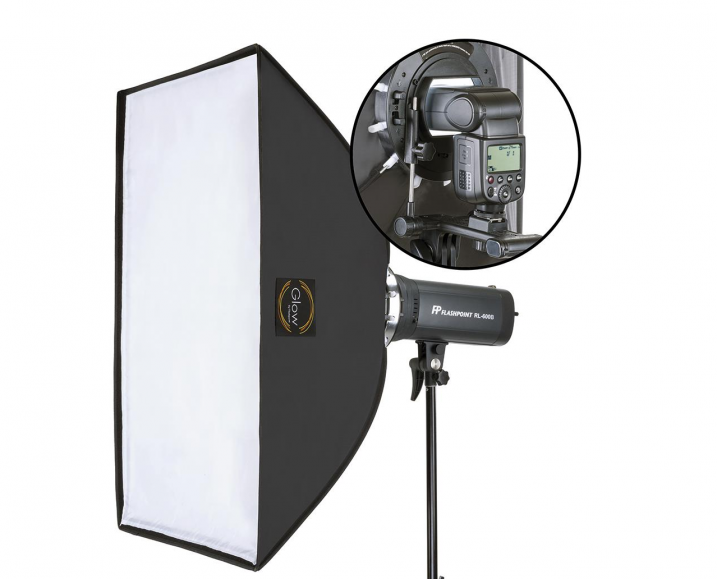
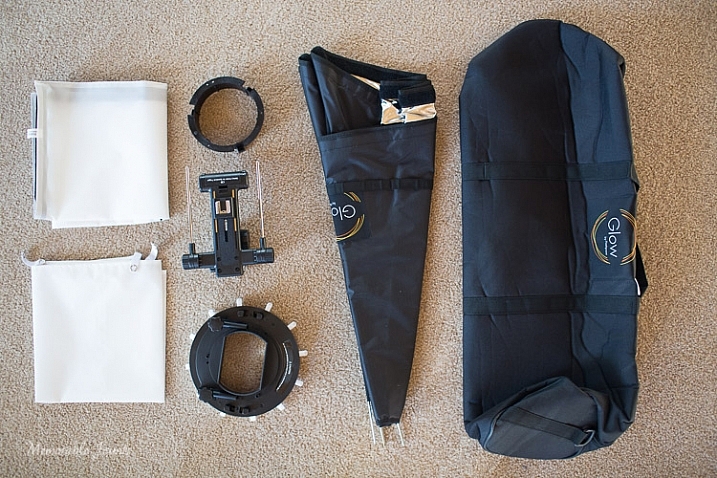
The QuadraPro comes fully equipped to use with a speedlight, as well as a studio strobe. Included in the box were the actual soft box, angle adjustment shoe bracket that can be adjusted for height and depth, removable inner and outer diffusers, removable cold shoe, and a protective bag to carry the QuadraPro on location. The only thing you will need to have is a light stand. I have a generic, lightweight stand that I had purchased from a local camera shop last year, and the GLOW QuadraPro worked perfectly with it.

Memorable Jaunts Glow QuadraPro Softbox Article Image Whats in the bag-1

I have to admit that when I opened the box, I was a little nervous about how to set up the whole system. I am used to reading manuals and watching product videos prior to handling equipment, but for this softbox setup I decided to skip all the research and prep work, and start using the product right away. The setup did take me a few minutes to figure out, but once I read through the one page instruction sheet that comes with the GLOW QuadraPro, it was easy enough.

The flash cold shoe bracket was easy to use, but attaching the actual softbox to the QuadraPro ring did take me a couple of tries. Once I was able to secure the rods into the rings, it was easy to snap them in to place by adjusting the rings in a circular manner. The inner and outer diffuser panels are quite literally a snap to attach. The outer diffuser panel has a velcro attachment mechanism, while the inner panel snaps with push buttons.

Ease of use and comfort

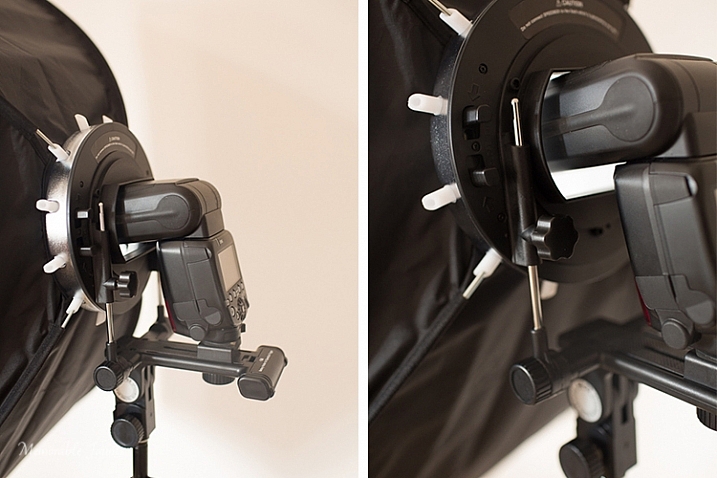
The Glow QuadraPop line is perfect for mobile studios, on-location work, and also travel. The entire system is quite lightweight, and easy to set up and dismantle. This is ideal for individual portraits and product shots, as well as for use on location. The one I used is the QuadraPop Rectangular softbox that comes in two sizes – 28×38″ and 24×34″. I used the GLOW QuadraPop with both the internal, and external, diffuser panels. Additionally the flash shoe bracket has an angle adjustment knob for easy tilting, thereby adjusting the angle of light – perfect for photographing things from above.

Memorable Jaunts Glow QuadraPro Softbox Article Image Angle Adjustment on the Flash Hotshoe-3

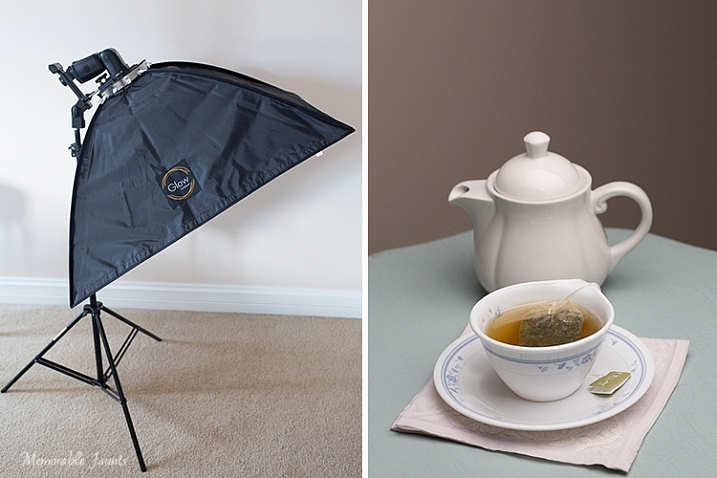
My afternoon tea was photographed with the softbox above and to the right of the tea cup, as seen in the reflection on the surface of the tea in the cup, and the light on the tea pot.

Basic setup and portability

I created a quick video on how easy it is to set up the softbox:

Memorable Jaunts Glow QuadraPro Softbox Article Image Softbox Setup-1

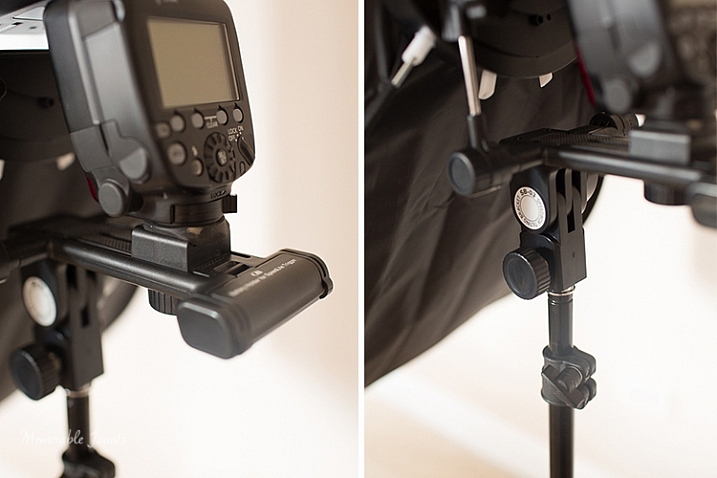
The softbox is mounted on the circular ring using the white clasps. The softbox is mounted on the light stand via the cold-shoe mount that also holds the flash.

Memorable Jaunts Glow QuadraPro Softbox Article Image Softbox Setup-4

The cold-shoe mount has an adjustable screw that slides the flash forward or backward on the base.

Memorable Jaunts Glow QuadraPro Softbox Article Image Softbox Setup-6

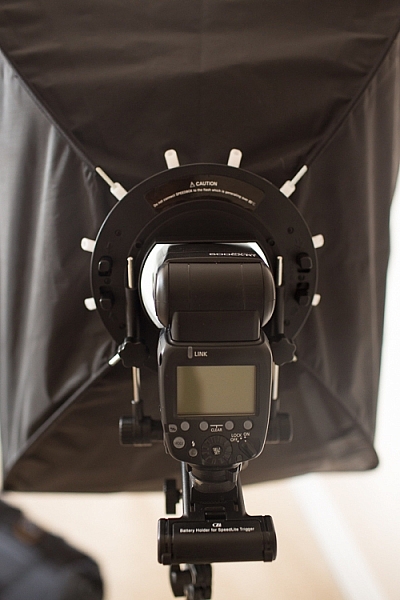
Back view of the fully assembled GLOW QuadraPro Softbox with the flash attached.

Memorable Jaunts Glow QuadraPro Softbox Article Image Softbox Setup-8

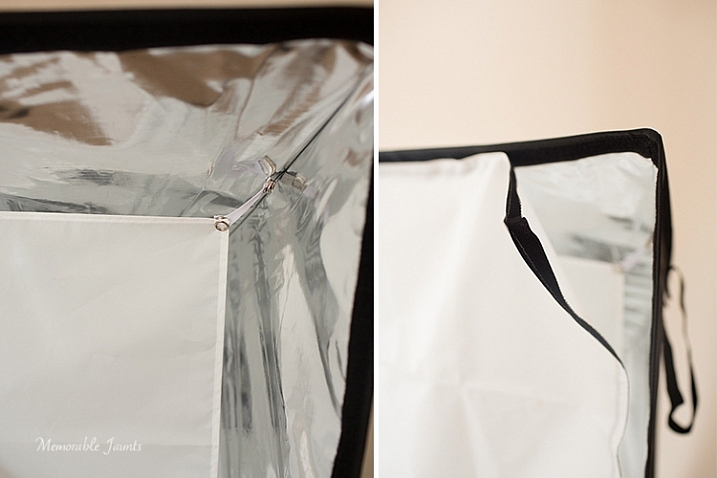
Inside diffuser panel that snaps into place, while the outside diffuser panel has velcro that attaches to the inside of the softbox close to the edge.

Indoor and outdoor use

I planned on putting the GLOW QuadraPop to the test with both indoor and outdoor use. But, just as I was writing this article, Chicago got the first major snow storm of the season. So, with subzero temps, I decided to forgo the outdoor test and just use it indoors with my obliging models, a.k.a my kids!

While indoors I moved the GLOW system from one room to the other, to see how easily I could manage carrying the system around. Before moving it, I removed the flash from the cold-shoe attachment, and also collapsed the softbox by squeezing the tabs on the sides of the ring. This did take some force, as the softbox rods were quite secure in their respective white sockets. I did not remove the diffuser panels as recommended, because I wanted the set up process to be easy at my next location (similar to what it would be like on a live on-location photoshoot). This made the set up, and take down process, much easier and faster.

Please note – I was experimenting with various softbox positions and had the flash on ETTL. My focus here was not on posing, but on the look and feel of a diffused lighting setup using a single softbox, i.e. the GLOW QuadraPro.

Memorable Jaunts Glow QuadraPro Softbox Article Image Indoor setup -4

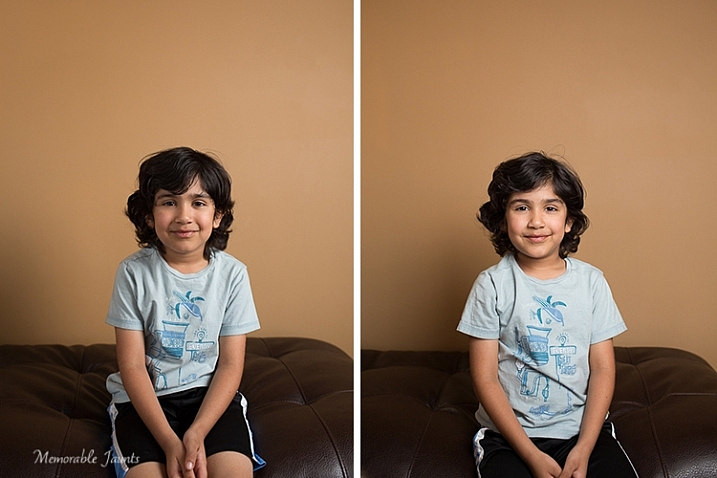
The image on the left has the softbox to the right of the camera. There is a slight shadow on the left hand side, and a nice drop-off of light on the background. The image on the right has the softbox placed directly in front of the model for a more even tone, and even lighting on the face.

Memorable Jaunts Glow QuadraPro Softbox Article Image Indoor setup -3

For this image, I moved to the basement where it was much darker. I quite like the effect of the dramatic lighting on the left side of his face, with some shadows on the other side. His body is turned slightly towards the softbox, which is at approximately at a 45 degree angle from the subject’s position.

Next up, my other willing model who had to be constantly bribed with treats and food!

Memorable Jaunts Glow QuadraPro Softbox Article Image Indoor setup -5

This image was taking WITHOUT the softbox. The flash was just bounced straight up without any additional diffusion. The image is quite dark and the color of the wall is quite terrible in this image.

Memorable Jaunts Glow QuadraPro Softbox Article Image Indoor setup -8

The image on the left had the softbox placed at a 45 degree angle to the dog. The image on the right has the softbox pointed straight ahead, giving a more even lighting and beautiful catchlights in his eyes. Plus the color of the wall is more true to its actual color!

Final Thoughts

In conclusion, the GLOW QuadraPro softbox is a fairly easy to use, lightweight and portable, flash diffusion system. I quite liked the convenience of having the setup all ready to use as I was experimenting with a single off-camera flash. Initially the softbox was a bit difficult to put together, and that was purely because I have never used this type of lighting system from the ground up. But once I got used to the clamps, they were very easy to assemble and dismantle.

googletag.cmd.push(function() {
tablet_slots.push( googletag.defineSlot( “/1005424/_dPSv4_tab-all-article-bottom_(300×250)”, [300, 250], “pb-ad-78623” ).addService( googletag.pubads() ) ); } );

googletag.cmd.push(function() {
mobile_slots.push( googletag.defineSlot( “/1005424/_dPSv4_mob-all-article-bottom_(300×250)”, [300, 250], “pb-ad-78158” ).addService( googletag.pubads() ) ); } );

The post Gear Review – Glow QuadraPro Portable Softbox by Karthika Gupta appeared first on Digital Photography School.


Digital Photography School

 
Comments Off on Gear Review – Glow QuadraPro Portable Softbox

Posted in Photography


DPReview Gear of the Year part 2: Carey’s choice – Fujifilm X-A2

10 Dec

Since joining the team at DPReview a few months ago, I’ve been doing my best to borrow and get my hands on as much gear as I possibly can. Like most working photographers, I am heavily invested in a single system, and beyond obsessive review-reading across far corners of the Internet, I didn’t come to DPReview with too much hands-on experience with other brands and their respective systems. In the process of trying to familiarize myself with all the cameras and systems I could, it’s the Fujifilm X-A2 that has surprised me the most and has become my personal pick for Gear of the Year.

What I love

  • 16MP Bayer APS-C sensor promises great clarity, color and ISO performance
  • Full X-mount compatibility for those wanting a system to grow into
  • Twin control dials for rapid changing of settings
  • Tilting screen with good visibility
  • Cheap.

Fujifilm’s X-system is filled with fast lenses and quality bodies: the company knows how to make great cameras. But I’ll admit, even with the possibility of putting some gorgeous Fuji glass on the X-A2, I had pretty low expectations because the camera just feels so cheap. My fixed-lens X100 is made of metal, and it feels like it. By contrast, the X-A2 is made almost entirely of plastic, and… it feels like it. The surface is fairly slick and hard to get a good grip on, the controls have nowhere near the satisfyingly dense and damped action as those on higher-end Fuji’s, and while I appreciate a tilting display more than the average Joe, this one hangs somewhat loosely when it should be secure against the back of the camera.

So here comes the surprise: I don’t really care so much that this camera feels so cheap, simply because it is so cheap. It is among the lowest-priced interchangeable lens cameras, and yet, still packs a 16MP APS-C sensor that produces absolutely stellar files.

ISO 500, F5.6, 1/60 at 16mm on the kit lens. If not for the articulating screen, this would have been much more of a ‘spray and pray’ situation. Processed to taste from Raw.

Glance over the spec list and you’ll note that this is the only Fujifilm camera in its current lineup that lacks an X-Trans sensor. Given that Fujifilm has put X-Trans at the heart of almost all of the X-series models, this also served to temper my expectations a bit. But make no mistake, the Bayer sensor in the X-A2 may not have a pixel-level detail advantage over an X-Trans, but I found that it still produces excellent colors and controls noise very well all the way through ISO 3200 (6400 is usable in a pinch). An added bonus: Raw file support is wider, thanks to the near-ubiquity of the Bayer pattern.

The included kit lens also feels very cheap, right down to the plastic mount, but as with the body, its build and appearance bely the ultimate results it’s capable of. It is pleasantly sharp for a kit zoom, offers swift, silent and accurate focusing in good light, and includes effective image stabilization. When you pair the X-A2 with one of Fuji’s compact primes, such as the 18mm F2 R or the 27mm F2.8, the setup is coat-pocketable and remains light enough to be handled with only a wrist-strap.

ISO 6400, F2.8, 1/56 on the Fujifilm 27mm F2.8 lens. Straight-out-of-camera JPEG.

So while the large sensor and sharp kit lens are big selling points for most people looking at a new and affordable ILC, this little camera keeps on going with additional features that only serve to further enrich the shooting experience, even for seasoned DSLR shooters. Integrated Wi-Fi, above-average battery life, twin control dials, a tilting screen and a bounce-capable pop-up flash make for a camera that is both flexible and responsive for a wide variety of shooting scenarios. There’s also incredibly useful one-button 100% magnification feature during playback, something that is annoyingly omitted on many competing entry-level models.

The X-A2 is kind of like that kid that skipped a grade in school. He’s the odd one out, maybe a little immature and doesn’t quite belong, but hey, he keeps up with the bigger kids just fine. So yes, the camera and bundled lens are built more cheaply than I’d like and it lacks the X-Trans sensor, but the Bayer sensor is still a treat.

Shooting with the X-A2 reminded me a lot of shooting with my X100, which is a good thing (yes, I have the latest firmware). As long as you don’t often drop or abuse your cameras too heavily, the X-A2 represents a solid investment in the Fuji X-system, and its image quality can easily hang with its bigger and pricier brethren. With its well-implemented controls, it’s also a great choice for those who are considering taking more manual control over their photography, and is an excellent camera to grow into. 

ISO 800, F2, 1/60 on the Fujifilm 18mm F2 R lens. Straight-out-of-camera JPEG.

Articles: Digital Photography Review (dpreview.com)

 
Comments Off on DPReview Gear of the Year part 2: Carey’s choice – Fujifilm X-A2

Posted in Uncategorized


Flickr launches 360 degree image viewing app for Samsung Gear VR

10 Dec

Image sharing platform Flickr has announced today its app for the Samsung Gear VR virtual reality headset. It allows you to view the tens of thousands of 360-degree panorama images that have been uploaded by Flickr users in an immersive way that allows for panning by moving your head. Read more

Articles: Digital Photography Review (dpreview.com)

 
Comments Off on Flickr launches 360 degree image viewing app for Samsung Gear VR

Posted in Uncategorized


DPReview Gear of the Year 2015: Nikon D750

08 Dec

This is less the story of a DPReview.com editor professing his favorite piece of gear from the year, and more the story of a photographer and system owner holding out several years for the perfect camera. This isn’t about Nikon vs Canon or Sony or mirrorless vs DSLR. It’s about investing in a system, expectations, and the joy of photography.

Nikon D750 – What I love:

  • 24MP Full-frame sensor offers excellent high ISO performance and great dynamic range
  • 1080/60p video capture
  • Robust build-quality, while remaining fairly light-weight for a Full-frame DSLR
  • Flip out 3.2″ LCD lets me get those high and low angles I so crave for skateboard photography
  • 51-point AF system performs well, even in very dark or low contrast shooting environments

In the Winter of 2012 I purchased a lightly used Nikon D700 for a trip I was planning in the Spring, to document Egypt’s first-ever freely-held presidential elections. While the camera was technically a current model, it had been on the market, at the time of my purchase, for nearly four years.

I had also strongly considered the D800 at the time, which had been announced a few weeks prior. But after field testing the camera (I was working at Popular Photography at the time), I decided that is was simply not the body for me. I was upgrading from a Nikon D300, and the D800 felt too much like a studio camera: the Raw files were far larger than I needed, or was used to, the burst not fast enough (the D300 with a grip gave me 8 fps), and the price, way more than I could afford to pay. It’s also worth mentioning that the D600 had not been announced yet. So my options were pretty much limited to a camera that appeared to be near the end of its product life.

Fast forward two and half years to the late Summer of 2014. I had been using the D700 aggressively for freelance work, and put more than a half million actuations on it. Despite the rubber skin starting to peel a bit, the camera still functioned like new. Still, I couldn’t help but feel like I was ready for an upgrade, the same upgrade I had been yearning for when I initially settled on the D700, due to lack of options.

ISO 640, 1/1000 sec F5.6 shot with a Nikon 24mm F2.8D lens affixed. The D750 is the only Full-frame camera in Nikon’s line that offers an articulating LCD, which I used to frame this image.

I’ll never forget the day Nikon first unveiled the D750 to us in a press meeting. It was an incredibly muggy August afternoon in New York City. As I walked down Park Avenue with a co-worker, I felt anxious. Rumors had been circulating for months of a new full frame camera, and I was eager to find out if they were true. Moreover, I was eager to find out if the camera I had long dreamed of, since the day I started shooting with my D700, was going to come to fruition.

At the time, both the Nikon D610 and D810 had been announced. But like so many Nikon shooters upgrading from a D700 or D300, neither camera felt right. I already mentioned my misgivings about the D800 (and the same go for the D810), but on the other end of the spectrum, the D610 felt too plasticky and simply not-professional enough for my use. By comparison, both the Nikon D700 and D300 are substantially more ruggedized than the D610 and I was not willing to purchase a new camera that felt less robust than that I was replacing.

Needless to say, Nikon PR unveiled the D750 that afternoon, and it was everything I could have asked for: a robust weather sealed body, with an updated sensor, full video capture (neither my D300 nor my D700 offered any sort of real video mode), an articulating screen and built-in Wi-Fi. Months later, as the reviews rolled in, the verdict seemed clear: the D750 offered great image quality and excellent AF performance, in a feature-packed body that also happened to be smaller and lighter than both the D300 and D700 (without sacrificing build quality or weather sealing).

 ISO 1250, 1/400 sec, F4. Shot was a Nikon 85mm F1.8D lens affixed.

It wasn’t until the Spring of 2015 I was able to afford one: a wedding assignment on the East Coast (I had moved from New York to Seattle in the winter of 2014), was ultimately the reason I pulled the trigger on my purchase. The camera arrived a week before my departure, giving me little time to try it out before the big shoot. To further complicate matters, at the time, I was in between finishing a Sony A77 II review and starting a Fujifilm X-T10 review, which is to say, Nikon cameras and the way they function, were not at the forefront of my brain.

It didn’t matter. Picking the D750 up instantly felt familiar. I had been using Nikon cameras since 2006, including a D100 and D2h at my college newspaper, and I was pleased to see that generation, to generation, to generation, Nikon had largely kept menus, functions and button placements fairly uniform throughout the company’s high-end models.

“It was truly a moment of pointing, shooting and hoping. But the D750 did not let me down.”

The wedding proved to be an epic first field test for the D750. The ceremony took place outdoors, in torrential downpours. It was raining so hard during the reciting of the vows, I physically could not see anything through the viewfinder other than the red AF confirmation square lighting up on what I hoped were the bride and grooms faces. It was truly a moment of pointing, shooting and hoping. But the D750 did not let me down. Despite the shooting conditions, I was able to still capture all of the crucial wedding ceremony moments. And thanks to the camera’s image quality, I was able to work with the Raw files, which were substantial washed out due to fogging and moisture, to add back in some contrast and saturation.

  ISO 1250, 1/400 sec, F4. Shot was a Nikon 85mm F1.8D lens affixed.

Of course, one of the biggest selling points of Nikon DSLRs are the incredible dynamic range they offer, and the D750 is no exception. I shoot a ton of live music and band portraiture and the amount of detail I can recover from the shadows of Raw files is truly impressive. Simply put, the flexibility of Nikon’s Raw files have, at times, been job saving. The D750 also holds its own in very low light shooting as well as some of the very best cameras I’ve tested. The same goes for AF performance; I rely heavily on a camera’s AF system for shooting in dark venues (I try to avoid using a flash as much as possible), and the D750 provides AF acquisition speeds and performance comparable with the best.

Video capture and Wi-Fi were also two features I had long yearned for in my D700. And while you can find other DSLRs and mirrorless cameras that offer a wider range of video function, and higher-resolution capture, the D750 is still a pleasure to use for multimedia, and the video quality is very good. Wi-Fi connectivity is also painless to use, and quite handy for transmitting images in a pinch. A close friend of mine, who also purchased a D750 around the same time, swears the D750 has revolutionized the way he sends image of breaking news assignments back to his editor. Of course Wi-Fi connectivity in cameras is nothing new, but the D750 was the first full frame Nikon to offer it, and it does so in a reliable fashion.

 ISO 6400, 1/160 sec, F2.8. Shot with a Nikon 24mm F2.8D affixed.

At the end of the day, the D750 may not be the greatest camera of all time. And there are plenty of cameras that beat it out in specific shooting scenarios, but as a long time Nikon user, looking for the perfect all-arounder to compliment my system, it is the best camera for me.

Working at a website like DPReview, I constantly think about cameras in terms of the future. Will mirrorless cameras completely surpass DSLRs to become the pros’ tool of choice? Will the D760 do 4K? How about a Nikon full framer with a stabilized sensor, to bring VR to all lenses? The point is, we can dream and dream, and the perfect camera will always be just one rumor away. But at the end of the day, the best camera is the one you have. And I’m happy to call the D750 my own, finally.

 ISO 3200, 1/400 sec, F2.2. Shot with a Nikon 85mm F1.8D affixed.

Articles: Digital Photography Review (dpreview.com)

 
Comments Off on DPReview Gear of the Year 2015: Nikon D750

Posted in Uncategorized


Tamrac retires Gura Gear brand, introduces G-Elite Series camera bags

17 Nov

In June 2014, Gura Gear acquired the Tamrac brand and assets as part of the latter company’s bankruptcy proceedings. Now, more than a year later, it has been announced that the two brands have been consolidated under the Tamrac label, as the Gura Gear brand is retired. Read more

Articles: Digital Photography Review (dpreview.com)

 
Comments Off on Tamrac retires Gura Gear brand, introduces G-Elite Series camera bags

Posted in Uncategorized


Pack your gear: Lonely Planet’s Top 10 must-visit countries in photos

08 Nov

Travel and photography are two pursuits that are often intertwined. While photographers who’ve been bit by the travel bug will usually have a long list of destinations they plan to visit in their back pocket, others may need a little inspiration or encouragement to head in a particular compass direction. Lonely Planet is happy to help out, as always, with its annual list of top travel destinations. Read more

Articles: Digital Photography Review (dpreview.com)

 
Comments Off on Pack your gear: Lonely Planet’s Top 10 must-visit countries in photos

Posted in Uncategorized


6 Tips for Protecting Your Gear from Any Hazard and Being Prepared

03 Nov

There is no such thing as a magic camera, lens, filter, flash, or tripod that does it all – hence the variety of brands, focal lengths, composite materials, etc., that are available is endless. Actually, part of the fun is not just having what you need, but sometimes what you want. Like something different, even though it doesn’t have the best reviews and specs by others, or something to experiment with, to broaden your creative horizons.

Tiffany Joyce

By Tiffany Joyce

But, there is one thing we all must consider when going out for a shoot, and that is what to bring, or even more importantly, what NOT to bring. Oh that agonizing decision of going through the pros and cons of each widget you could bring. There countless variables depending on personal tastes, what you will be shooting, and how long you will be on your photo shoot, just to mention a few.

There is one constant though, stuff goes wrong, things break, bags get lost, and it is not always easy to get a replacement in time, or even at all. Most of us don’t have sponsors who pay for our gear, and that last lens you just picked up was a financial hardship (that you were happy to endure). So, there are some simple pieces of advice that I have picked up from my own stupid mistakes, and from others, professionals and avid amateurs alike, which might save you and your gear in a pinch.

There are many articles on, what’s in my bag, and while it is fun to see what others are doing, the real question is what should you be doing? How much of everything do you want, and what specifics are you really going for? Do you want to bring your best gear, or will something more average do just fine with much less worry? Here are some tips for protecting your gear and being prepared for anything.

001 UV filter

In the far NE of China this longing village was cutting down full trees, and making them into dowels to be shipped to the US to make hammers. With all the flying wood chips and dust, a UV filter was added protection.

1 – UV Filters

Better than me telling you the answer here, you can google, “Should I Use a UV Filter on my lens?”. You will find results galore, and many varying opinions. But, let me show you a picture and it may just persuade you to use one.

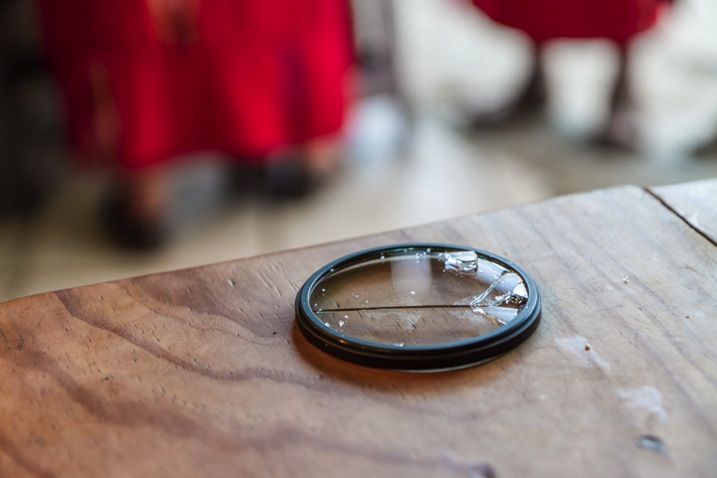
My lens hood was on, but I had just turned it backwards to save space while I was going to eat. My lens cap was also on. Sitting down on a street market bench to indulge, I brushed the lens cap pinching the hinges just enough that the cap popped off. Then, as momentum carried me down, a steel bench post smashed into my camera and I heard glass break. My heart sank, as horrible thoughts of my lens dying raced through my head.

It could have been my front lens element, but it wasn’t! It was my $ 35 UV filter, not my $ 900 dollar lens. For casual use, keep a UV filter on! If it breaks like mine did, a circular polarized filter can be a great backup too. Just don’t forget to turn it, to make sure you are getting the best out of your filter.

002 UV filters

This is the glass that broke and saved my front lens element. I was in a small mountain town in central Guatemala with no possibility of replacing the lens.

2 – Lens Hoods

When I generally think of my lens hoods, image quality is what first comes to mind. Less glare, less flair, better saturation and contrast, etc. Sometimes the tulip hoods look nice on a lens, so cosmetically it can be pleasing as well. But they do add significant length, and even when screwed on backwards, not protruding outwards, they increase the diameter, especially on larger lenses, making it tough to cram into your travel bag.

Recently, in Cuba I ran across another amateur photographer, and one of his first comments after exchanging pleasantries was, where is the hood for your lens? The 70-200mm f2.8 IS is a big lens, and making it 25% longer while trying to not impose on subjects, was my deciding factor for leaving the hood at the hotel. I replied, “I have my UV filter on.” He quietly said to me that he was a glass engineer, and he politely suggested, with total altruistic intention, to keep my lens hood on. It has been on ever since.

Protection value is even better than a UV filter and image quality improvements are worth it!

003 lens hood

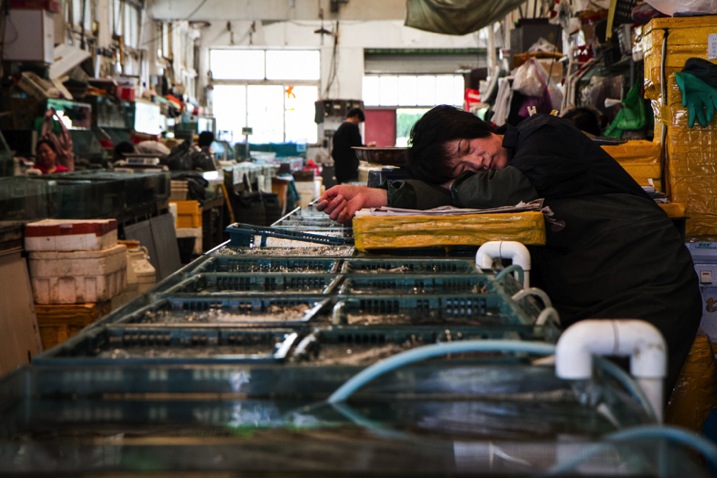
In a seafood market in a coastal city in NE China, squirming fish, spitting clams and twitching shrimp will definitely get salt water on your lens. Only a UV filter would leave you with water spots, but a lens hood helps keep the salt water off of the front element.

004 lens hood and UV

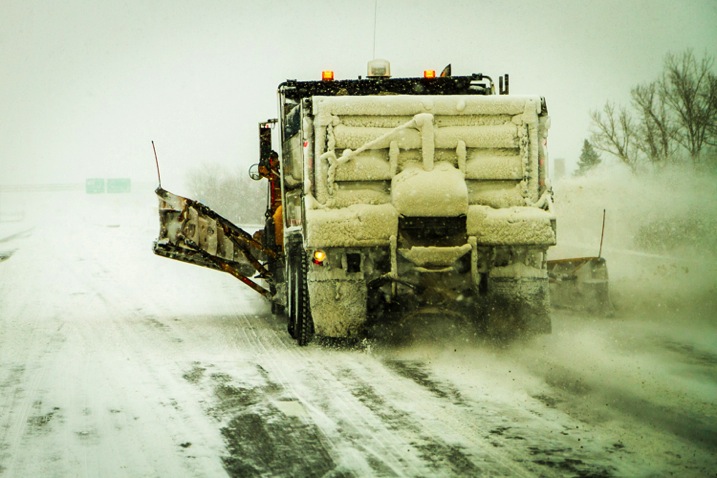
In New York State during the 2015 super snow year, following this plow, that lays gravel and salt, with my camera out the window is dangerous for a front lens element. Having all the protection of a lens hood and a UV filter is important to protect your gear.

3 – Lens Cap (front and rear)

The little lens cap: This one goes out to amateurs more than the enthusiast. If you are not shooting, keep your lens cap on. This is a very good line of defence for your front lens element. A doctor doesn’t examine a patient without protective gloves, nor should a photographer leave his lens exposed, while enjoying carnival rides or waterfalls. Keeping your lens protected is most important, but clean is essential as well.

Also, if you are switching lenses, keep an extra cap for the back of your lens in your bag. They are all the same size, unlike the front lens cap, so if you lose one it is no big deal as one size fits all. Cleaning dust, dirt, hair or oil from the inside of the lens is a nightmare.

4 – Extra things to think about when travelling

Access to your camera shop or online retailer is not possible when you’re away from home. Maybe your favorite online shop could overnight you something in any developed country, but outside the US, Canada, and some parts of Western Europe, you are out of luck.

UV filters can be found at many small electronic stores at a 20% markup or so, but the sizes available may be limited. Kit lenses these days usually have a 58m or 67mm thread size, and maybe you might get lucky if they have a 72mm filter. Anything in the 77mm or higher range will be near impossible to find. Underdeveloped nations don’t have the ability to hold stock for the occasional guy who smashed his fancy gear, (that which could feed a whole village for a week). Thus, don’t bring more, simplify. Think how you can adapt if something breaks? Like using a polarized filter or an ND filter if your UV filter bites the dust. Using an ND filter and bringing your tripod might just help you broaden your portfolio for the trip; a little blessing in disguise.

5 – CF cards

It used to be no film, no picture. Now it is no memory, no picture. Recently, I was in Central America and one trip got cancelled, and another one came up. It was a photographer’s delight, Cuba! I didn’t have my computer, and didn’t want to plug my gear into a sketchy internet bar computer. The solution in a developed country is to just stock up on a few more CF cards.

The reality is that in developing markets CF cards are not available. Finding a name brand CF card that will have 30mb/second or more, is near impossible. Developing nations are still using basic point and shoot cameras, if they have any at all, and even more popular are mobile phones with mini SD’s in them. SD cards are abundant, along with mini SD cards with adapters, but that does you no good for the higher end DSLRs. CF cards are relatively cheap and tiny compared to lenses, camera bodies and flashes. Stuff a couple extra in your bag.

IMG 9188 bw

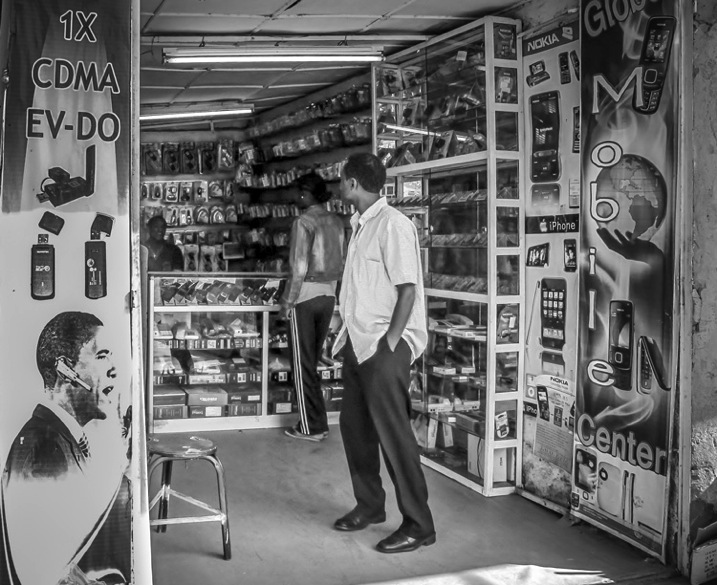
In northern Ethiopia this was the one of two stores that carried electronic goods. Most items are mobile phone related.

Getting into other parts of the world, like SE Asia and China, both of which are still in the developing stage, you will find much better luck. CF cards are available, and SD cards are going to be much cheaper. UV filters will also be available for any size. If they don’t have them in that store, ask them to get you one by the end of the day, and they will call up partner stores and send them over on the back of a moped. But you know the catch, it might not be real despite how legit it looks. In a bind, strike a deal, and you will have solved your solution at least temporarily.

006 Electronic store 2bw

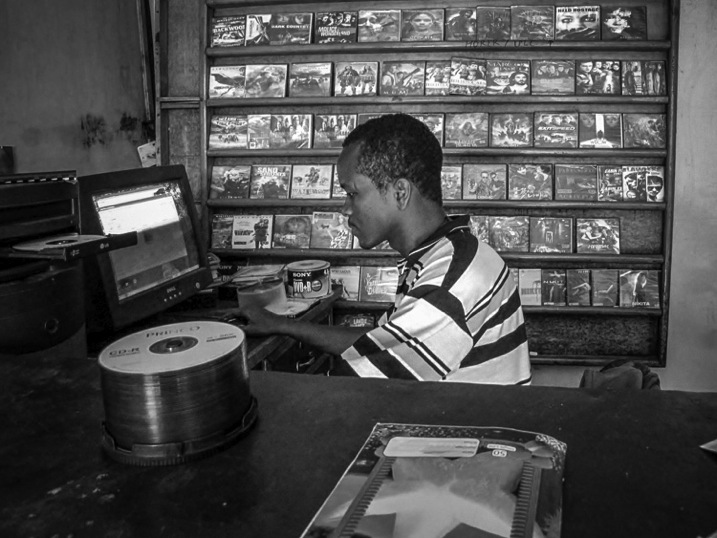
This was my second option for electronics. A desktop computer which was used for burning pirated movies and music. No possibility of finding higher end camera supplies.

6 – The Lens Pen

A final item that is a must is the lens pen. These are so compact, and convenient, to keep your front and rear lens elements clean. Make sure you use the brush first, then the moistened concave end for smudges. Ideally you would have air to blow off the lens first, but don’t use your mouth. No matter how careful you are particles of your saliva will appear on the lens giving you double duty. The lens pens are tiny and do wonders. Keep one in your bag, and one in your pocket, so you can get up close and personal to the crashing waves, market activity, or the big sports event. By the way, these lens pens can be found all over the world now. Grab a couple before you go, but if you lose one, or give one away to a local photographer, you may be able to find another.

Bottom line

So, when you are off on your next photo shoot, be prepared. You can’t anticipate everything, but even combined, all of the items on this list could easily fit in your pant’s pocket. Put all of them in a sturdy Ziploc bag, and you just added another element of protection. Wrap your camera or lens in the bag in really treacherous situations.

These tips provide a pretty good insurance policy for keeping your gear safe, and in proper working condition. Keeping your gear protected in harsh environments lets you focus on your creative ability to see and capture your favorite photographic styles, and do it with confidence too. Now, you still need to decide what major pieces of gear you want: super wide angle lens, telephotos, primes, single flash or multiple flashes, tripod, and the list goes on.

But be sure you have your UV filters screwed on, your hoods attached, your front and rear lens caps, and some extra memory, along with the most portable and simple cleaning lens pens.

What essentials do you have in your bag when you leave for a long photo shoot out of your home range?

googletag.cmd.push(function() {
tablet_slots.push( googletag.defineSlot( “/1005424/_dPSv4_tab-all-article-bottom_(300×250)”, [300, 250], “pb-ad-78623” ).addService( googletag.pubads() ) ); } );

googletag.cmd.push(function() {
mobile_slots.push( googletag.defineSlot( “/1005424/_dPSv4_mob-all-article-bottom_(300×250)”, [300, 250], “pb-ad-78158” ).addService( googletag.pubads() ) ); } );

The post 6 Tips for Protecting Your Gear from Any Hazard and Being Prepared by Branson Quenzer appeared first on Digital Photography School.


Digital Photography School

 
Comments Off on 6 Tips for Protecting Your Gear from Any Hazard and Being Prepared

Posted in Photography