RSS
 

Posts Tagged ‘gear’

Brand Name Versus Third-Party Photography Gear: Which is better?

07 Jun

Not long ago, there were two types of camera accessories to buy: brand items designed by known manufacturers such as Canon and Nikon, OR third-party items of questionable quality that you’d likely buy only if you were on a tight budget. Today, this situation has changed, with third-party manufacturers such as Sigma and Tamron stepping up their game and producing alternatives that even serious professionals have begun using.

Still, the question remains: does the brand name truly matter when it comes to camera accessories?

Let’s explore some of the pros and cons of each side. Keep in mind that this is a highly debatable topic, and this is just a short list of general pros and cons for using brand name and third-party items. If you have any other points to add, please mention them in the comments below.
third party camera lenses

Why brand names matter

Brand name items are almost always going to be more expensive than third-party ones, but as most photographers say, “you get what you pay for.” Some reasons for the premium pricing on brand name items include:

Better build quality and dependability

This can be extremely important if you belong to any professional organizations such as Canon or Nikon Pro Services, as cleaning and repair of brand name gear is generally included in your membership. While most third-party manufacturers have begun adding their own repair services, they’re not known to be as fast and consistent as name brands, and guaranteed compatibility with your brand name camera of choice.
third party camera lenses

Guaranteed compatibility

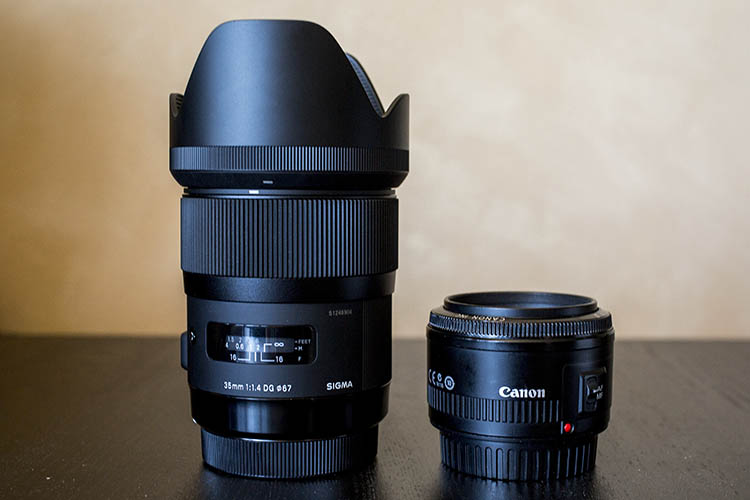
Third-party vendors thrive on the ability to produce accessories and items that are compatible with many major brand name cameras. If you buy say a Sigma 35mm f/1.4 lens, there will be both a Nikon and Canon mount option. This means you have to be ultra diligent to make sure a third-party item will work with your camera model. However, if you buy a 35mm f/1.4 lens from Nikon (for example), you know for sure that lens will work your Nikon camera.

Respect from other photographers

When you shoot with a brand name accessory, you’re more likely to get nods of respect from other photographers who recognize the value of that authentic, name brand lens (the coveted red ringed lenses from Canon and gold ring on Nikon lenses). This is becoming more of a debatable point lately with the rise of high-quality third-party gear options, but there’s still something to be said about acknowledging the real deal over a third-party brand.

Why third-party brands are coming up

Unique innovations
third party camera lenses

As mentioned earlier, the scene for third-party brands has shifted to the point where Sigma and Tamron are no longer necessarily viewed as compromises, just for the budget-minded photographer. Instead, these brands are focusing not only on improving old designs perfected by established name-brands, but they’re innovating alternatives that even Canon and Nikon haven’t come up with. Consider the Sigma 120-300 f/2.8, which is already in its third incarnation, or the Sigma 18-35mm f/1.8 lens, the first zoom lens for DSLRs that holds a consistent f/1.8 aperture throughout its entire zoom range. These are lenses with features that even Canon and Nikon have yet to offer. Quality and consistency of these Sigma lenses might be questionable depending on your photography standards, but the fact that a third-party brand is innovating and selling unique lenses speaks to how third-party brands are shifting in the overall industry. (Read this to see why one dPS writer uses the Sigma 150-600mm for wildlife photography.)

The price is right

Every photographer knows that camera gear isn’t cheap, and while brand name items may be ideal, sometimes they just aren’t realistic price points for what is affordable. This is where third-party items can help beginners, or photographers on a budget, can get their hands on some quality equipment. If the gear is kept in good shape, resale value should still be pretty decent, if and when they decide to upgrade to a brand name alternative down the road.
third party camera lenses

One item you probably shouldn’t buy third-party

When it comes to third-party accessories, there’s one in particular that you may want to make sure is brand name authentic: your camera batteries. Personally, I’ve had mixed experiences using third-party batteries on both my DSLR and mirrorless cameras. Most of the time they work, but every once and a while, there’s a battery that just won’t hold a charge, or fails for some mysterious reason. That battery is always from a third-party brand. A simple way to work around this would be to stock your camera battery arsenal with some brand name batteries, and some third-party ones to make sure you’re covered. There’s nothing worse than having a battery fail when you need it the most.

Over to you

What has been your experience using brand names and third-party brands? Are you partial to one over the other? Do you go for brand name camera bodies and lenses, and opt for third-party accessories like filters, tripods, and batteries?

What has your experience been, let us know in the comments below.


Editor’s Note: This is one of a series of articles this week that are Open for Discussion. We want to get the conversation going, hear your voice and opinions, and talk about some possibly controversial topics in photography.

Give us your thoughts below on the article above and watch for more discussion topics.

See all the recent discussion topics here:

  • 7 Commonly Accepted Photography Beliefs Debunked
  • Is HDR dead? Some dPS Writer’s Thoughts on this Controversial Topic
  • How to Find your Personal Photographic Style
  • Why You May be Failing to Reach Your Potential as a Photographer
  • To Process or Not To Process? Let’s Discuss
  • How much do you process your images? – a dPS POLL
  • Does the Camera Matter? SLR versus Mirrorless versus Smartphone
  • Natural Light Versus Artificial Light: Which is Better?
  • How Limitations Can Help You Grow as a Photographer

googletag.cmd.push(function() {
tablet_slots.push( googletag.defineSlot( “/1005424/_dPSv4_tab-all-article-bottom_(300×250)”, [300, 250], “pb-ad-78623” ).addService( googletag.pubads() ) ); } );

googletag.cmd.push(function() {
mobile_slots.push( googletag.defineSlot( “/1005424/_dPSv4_mob-all-article-bottom_(300×250)”, [300, 250], “pb-ad-78158” ).addService( googletag.pubads() ) ); } );

The post Brand Name Versus Third-Party Photography Gear: Which is better? by Suzi Pratt appeared first on Digital Photography School.

Digital Photography School

 
Comments Off on Brand Name Versus Third-Party Photography Gear: Which is better?

Posted in Photography


How to Clean Your Photography Gear and Keep it in Good Shape

23 May

A long time ago when I started my first steps into the photography world, a good friend of mine that worked many years as a photojournalist, told me:

“Treat your camera like a soldier treats his gun, keep it clean and ready to fire!”

I never forgot that advice from him, and I kept a Pentax K1000, my very first camera, in pristine condition to this day. Nowadays things are a bit different, and electronic digital equipment is not really built to last like in the good old days of mechanical equipment.

Modern cameras and lenses are built with a lot of sensitive electronic components, and are much more difficult to maintain. Most of the equipment I use is exposed to the elements, and to a lot of abuse during my shooting sessions, and to me it is fundamental to sometimes take a little bit of time off and make sure everything is clean, working properly, and ready to fire.

01

In this article I will guide you through the steps I usually take cleaning my photo equipment.

Like everything in life, everyone has their own method of doing things. The way I do this process might not be perfect, but it is the best method I have used so far, with all the tips and tricks I have been collecting along the years.

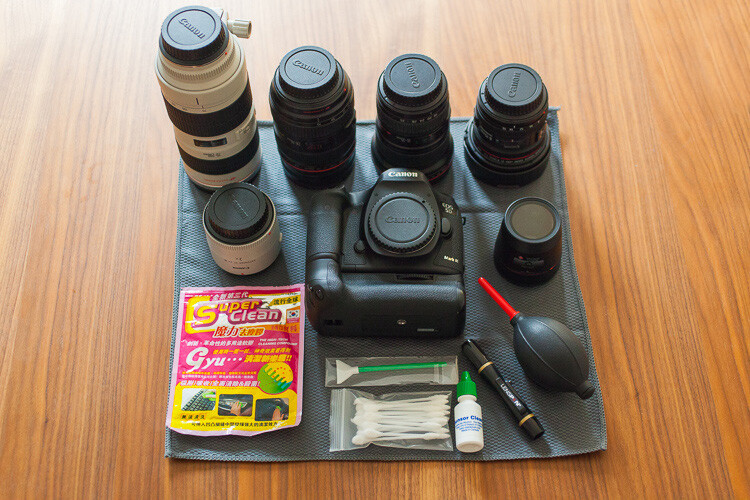
To start, I always try to be in a dust free environment, and have an anti-static microfiber cloth under the equipment I am cleaning. This is really important because your equipment is going to grab all the dust that is in the air like a magnet every time you try to clean it.

The way I do it is always to go from the outside to the inside, meaning I always clean the outer part of the lenses before I clean the glass, and I always clean the outside of the camera body before I clean the sensor. This way I gradually eliminate the dust that is stuck to the equipment.

Starting with the lenses, I used to just clean the outside of the lens with a microfiber cloth, and use a blower to keep the dust away. But a few years ago I was introduced to a new product from Japan that was the answer to all the germophobes that were really concerned with all the germs computer keyboards collect.

02

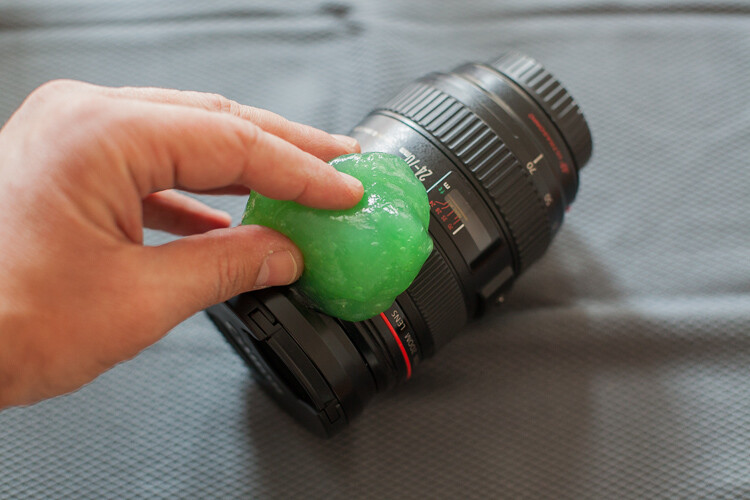
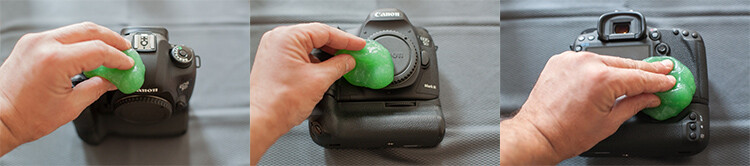
This cleaning compound is like a sticky jelly, with anti-bacterial properties that can be used on everything you want to keep clean and germ free.

I use it on the outside of my lenses and camera body, always with the caps on, because it is not supposed to be used on glass.

03

This product was expensive, and really hard to find when I first bought it, but nowadays it seems to be much cheaper and available in most stores online.

I find it really useful to clean the camera body in the buttons areas, where it collects a lot of dust that is difficult to clean.

04

Next it’s time to concentrate on the glass

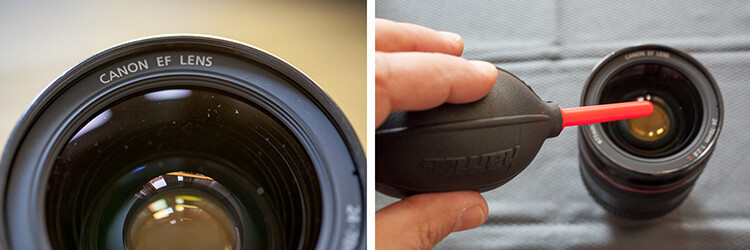
Dust specs are really difficult to keep away from your lenses, and you should never try to wipe the glass off with a cloth like most people do. Wiping off dust might result in scratching your lens. The correct process should always be to blow it off first. You can use a blower or a compressed air can, and this way you remove the dust but don’t touch the glass.

05

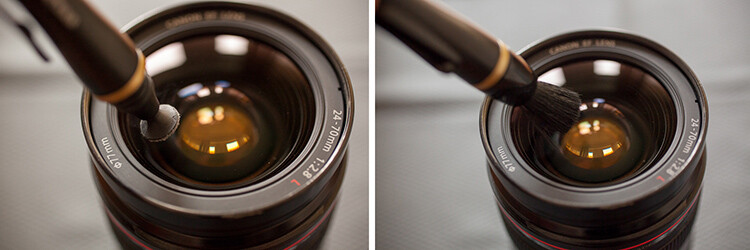
Now the dust is gone it is time to clean eventual smudges or fingerprints you might have on the glass. My favorite tool for this process is the Lens Pen. It has a tip with a soft compound that is made to safely wipe the glass, without damaging it.

After cleaning with the soft tip, you may use the anti-static brush on the other side of the pen to get rid of any dust that is still around.

I usually don’t use any lens cleaning fluid unless it’s really needed. Those kinds of chemicals are never good for your lens coating, but if your lens has grease smudges, then cleaning fluid and a soft cloth might be the only solution.

06

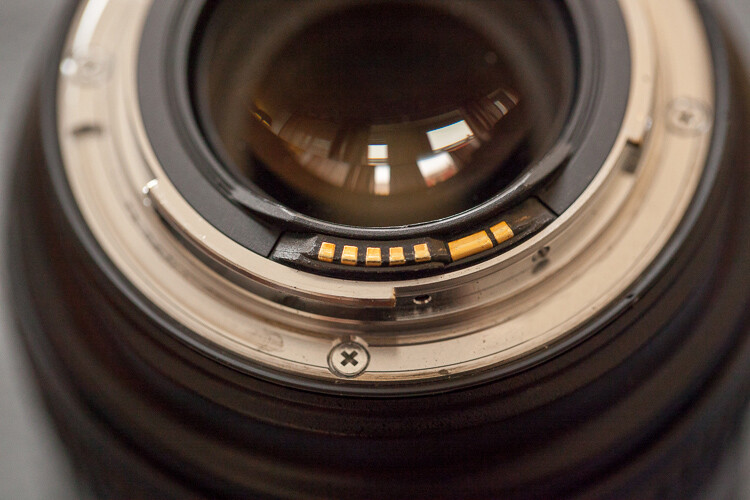
Repeat that process on the glass on the other side of your lens, and while you’re at it it’s also a good idea to check the electrical contacts of your lens (metal parts on the back). Dirty or oxidized contacts are most often responsible for camera malfunctions or errors, so I always clean them off with a soft cloth.

In extreme situations I have heard of people cleaning these contacts with a rubber or really fine sand paper, but I’ve never had to do anything like that.

07

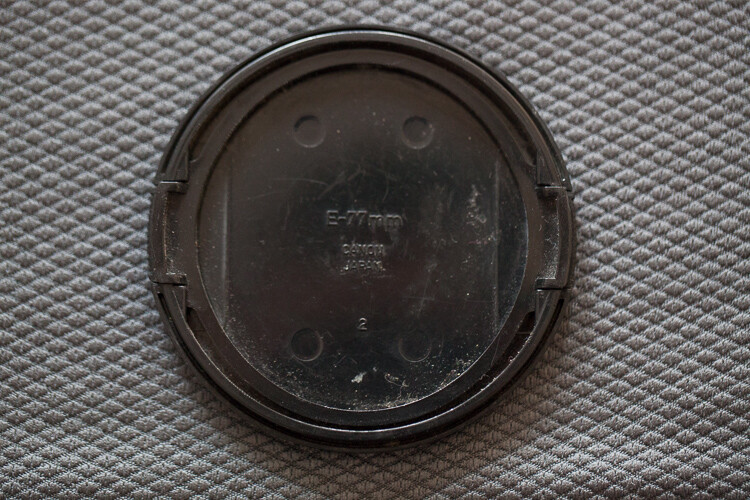
Dirty lens caps are also something to keep in mind to clean, as they always end up in your pocket or at the bottom of your camera bag while you’re photographing, so they collect a lot of dust. It doesn’t make sense to have your lens all cleaned up, then cover it with a dirty cap, the same applies to the body caps.

Replacing your caps with new ones from time to time might be a good idea, as they are not that expensive and give your equipment a newer look.

08

Now it is time to clean the camera body

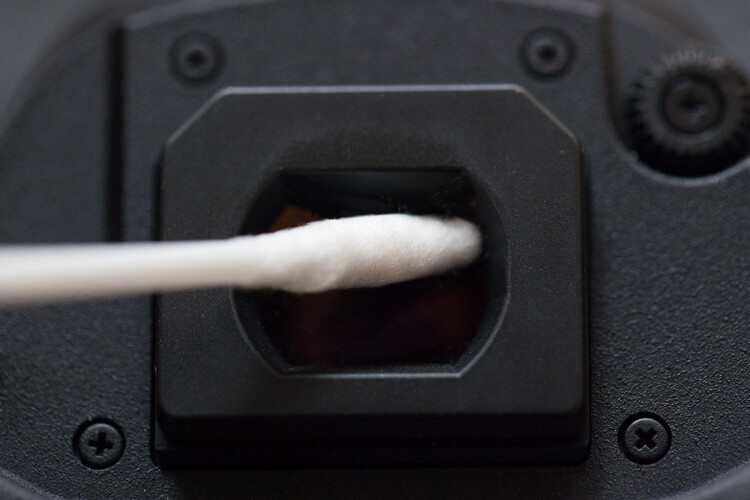
After cleaning the outside with the anti-bacterial jelly compound, I usually clean the viewfinder. That is a difficult operation as it is a small, deep, and difficult to reach area. My trick for it is Q-Tips, but not the regular ones. I use some special ones made for babies that have a smaller pointy tip, and are made from a softer cotton, which allows a deeper and more efficient cleaning.

09

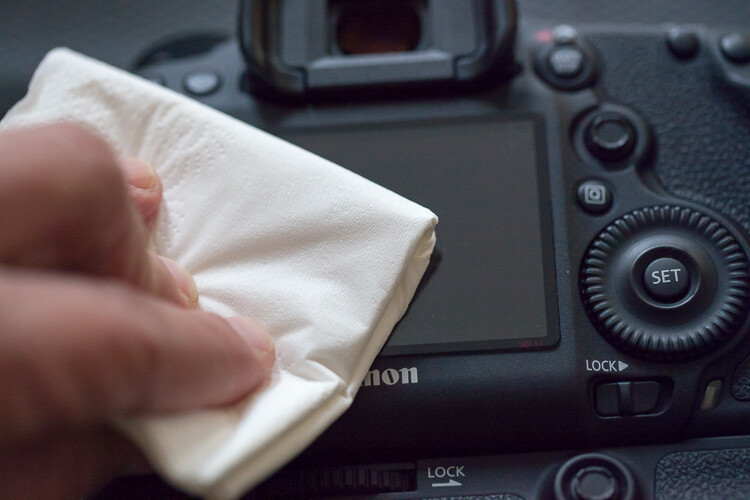
Next I clean the LCD screen glass with a little drop of glass cleaner and a paper tissue. This removes all the grease that the LCD screen gets from being stuck to my face all the time.

10

Cleaning the inside of the camera

As tempting as it might be I never try to clean the mirror of the camera. It usually seems to do more harm than good, and it usually sends more dust to the inside of the camera chamber, making it land on the sensor sooner or later.

We finish with the most complicated part of the whole process that is the sensor cleaning.

Camera makers always advise that this process should only be done in the brand’s technical assistance, by a trained technician, so if you are not comfortable with doing this yourself, please don’t try it.

I remember I was a bit scared the first time I tried to clean the sensor myself. But, the fact is that I have done it lots of times, with different cameras over the years, and it always worked out fine. You just have to be careful and do things slowly and steadily.

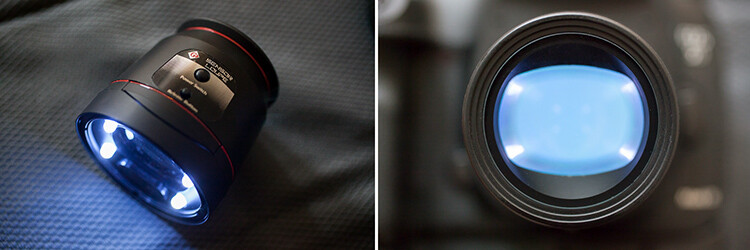
This is a totally optional step, but I usually use a sensor loupe to check the sensor before I clean it. It is a really nice device that illuminates and magnifies the inside of your camera, making it possible to see with good precision any dust that is on your sensor.

11

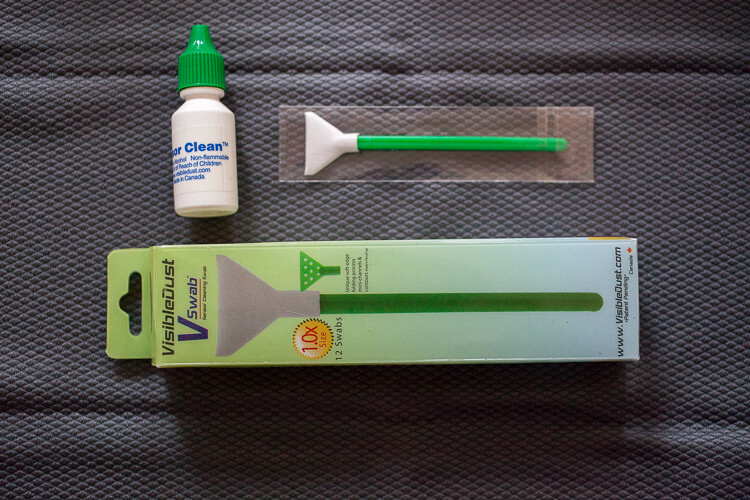
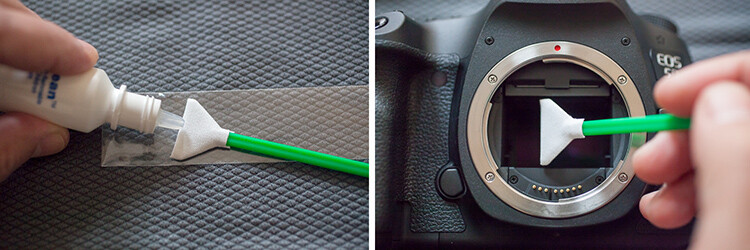
Now for the cleaning part itself, there are many different systems and brands out there for sensor cleaning. I have tried a few and my favorite is the Vswab by Visible Dust which consists of one time use soft-edge swabs, and a sensor cleaning fluid that you use to clean the sensor from any smudges or dust specs. There are specific swabs for different size sensors, so be sure to buy the correct one for your camera.

12

Just get the swab a little wet with the cleaning fluid (a drop or two is all you need) then activate the mirror lockup on your camera (or use the sensor clean setting – check your camera’s user manual if you aren’t sure how to lock it up for cleaning). Wipe your sensor from left to right, just one time, touching it but trying not to apply too much pressure.
Most of the times it works at first, but I always check it again with the sensor loupe after cleaning, and if needed I swab a second time.

Note: Keep it mind that these swabs can only be used one time, so if you go for a second clean use a new swab.

This allows the sensor to be clean all the time, avoiding spots on your images, caused by dust specs the get inside your camera every time you change your lenses.

13

These simple maintenance steps gives me confidence that my equipment is in top shape, and that I can be sure that it is going to work fine next time I pick it up.

Remember, keep it clean and ready to fire!

googletag.cmd.push(function() {
tablet_slots.push( googletag.defineSlot( “/1005424/_dPSv4_tab-all-article-bottom_(300×250)”, [300, 250], “pb-ad-78623” ).addService( googletag.pubads() ) ); } );

googletag.cmd.push(function() {
mobile_slots.push( googletag.defineSlot( “/1005424/_dPSv4_mob-all-article-bottom_(300×250)”, [300, 250], “pb-ad-78158” ).addService( googletag.pubads() ) ); } );

The post How to Clean Your Photography Gear and Keep it in Good Shape by Ivo Guimaraes appeared first on Digital Photography School.

Digital Photography School

 
Comments Off on How to Clean Your Photography Gear and Keep it in Good Shape

Posted in Photography


How to Decide What Gear to Pack for a Wilderness Trip

11 Apr

AK-ANWR-Kongakut-108094-162

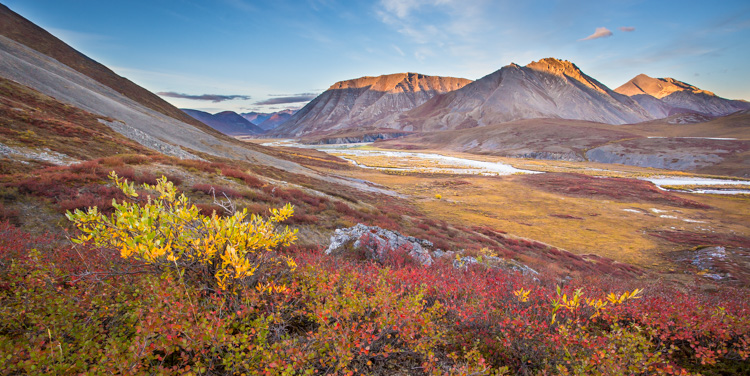
Each year, I spend many weeks guiding, and exploring, in the mountains and rivers of Alaska. The trips are a mishmash of different adventures; base-camp trips, mellow canoe trips, backpacks over rugged terrain and high peaks, or multi-day whitewater rafting trips.

One thing that always plays a part, no matter what type of journey I’m taking, is photography. The gear however, varies. Different types of trips demand different kinds of equipment, and there are a number of things that need to be taken into consideration. For me, photo equipment decisions are a multi-step process, and there are a few things to consider. Here are three and my tips at the end for packing a kit.

#1 – Weight Limitations

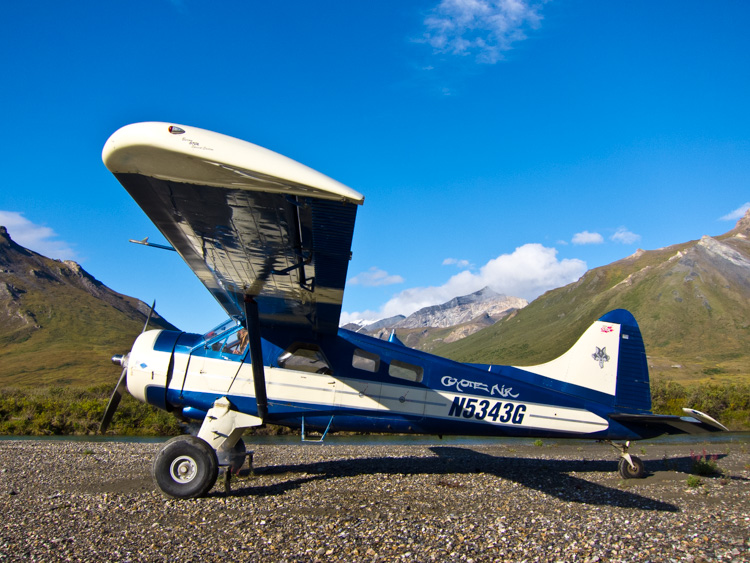
A DeHaviland Beaver, classic Alaska bush plane on a riverside gravel bar in the Brooks Range of northern Alaska.

A DeHaviland Beaver, the classic Alaska bush plane, on a riverside gravel bar in the Brooks Range of northern Alaska.

This is a constant in the backcountry. Weight is always, ALWAYS an issue. On backpacking trips, every ounce of camera gear has to be added to clothing, tents, food, cookware, and safety equipment that cannot be left behind. When I’m guiding backpacking trips in Alaska’s wilderness, this can mean that on top of my usual backpacking gear, I also have an expedition first aid kit, satellite phone, ground to air radio, and more than my own share of food. My pack is heavy, long before I add camera gear. Making sure that anything extra is as light as possible, is my priority.

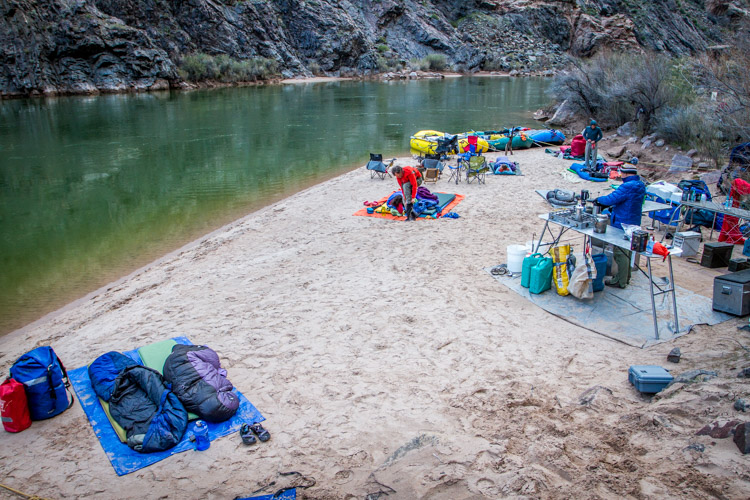
Sometimes you can carry a lot of gear, as you can see from this camp along the Colorado River in the Grand Canyon, but even here every pound has to be loaded and unloaded daily.

Sometimes you can carry a lot of gear, as you can see from this camp along the Colorado River in the Grand Canyon, but even here every pound has to be loaded and unloaded daily.

Other types of trips are not as restrictive, but weight is always a concern. Most of the trips I lead involve small bush planes to get to and from our start and end points. These tiny aircraft have limits on the amount of weight that be carried. So even it’s a rafting trip where there is plenty of space in the boats, the number of pounds of excess gear is still a concern.

Even photography-specific trips are limited. Any time you are in the backcountry, you will have to carry your gear, so it’s got to be compact and light enough that you can get it where it needs to go, quickly, and without fuss.

I often find it helpful to run the numbers. How many pounds of total gear can I handle? For example, on backpacking trips I know that the most weight I can carry comfortably for extended periods without risking injury is around 70 lbs (31.75 kg). If non-photography gear weighs 60 (27.2 kg), then I’ve got 10 (4.5 kg) to play with (though I’m always happier with less!). For the guided trips I lead, we set a weight limit on our clients which is necessary to keep our cargo under the required limit of the small airplanes we use. Usually that number is around 50 lbs (22.7 kg) per person, less for backpacking. Start there, weigh your mandatory clothes and equipment, and then figure out what is left over for camera stuff. Safety first!

Falklands-2Jan10-CarcassIsl-114
#2 – Photographic Priorities

Are you hoping to shoot primarily wildlife or landscapes? Do you plan to make formal portraits along the way? Will you need a flash or light modifiers? Ask yourself these questions, and know about the trip you are making.

On the night before, I get together with my clients to talk about the upcoming trip. I’ve been surprised how often photographers really don’t know anything about where they are going. Since they don’t know what to expect, they are often carrying far too much gear. Do your research, find out your likely photo subjects, and make educated decisions about your equipment. If you are primarily expecting landscapes, but may have a chance at shooting wildlife, then consider a compact telephoto rather than a monster 600mm f/4. If wildlife is a major target, then by all means, take that big lens, but consider cutting out some of the smaller glass. Maybe you can get by with a single wide-angle zoom?

#3 – Trip Types

AZ-GCNP-FebMar12-510

Base-camps:

Photography trips that I lead into Alaska’s wilderness are often based out of single site. We set up a comfortable camp somewhere beautiful, where we can explore the surroundings for a few days. These kind of trips (keeping in mind airplane weight limitations), usually permit a broad array of gear, and few special precautions are needed. To haul your equipment around,  a standard camera backpack or daypack with a rain cover, is all that is needed. If the weather is really sour, we are usually drinking hot chocolate and playing cards back at camp.

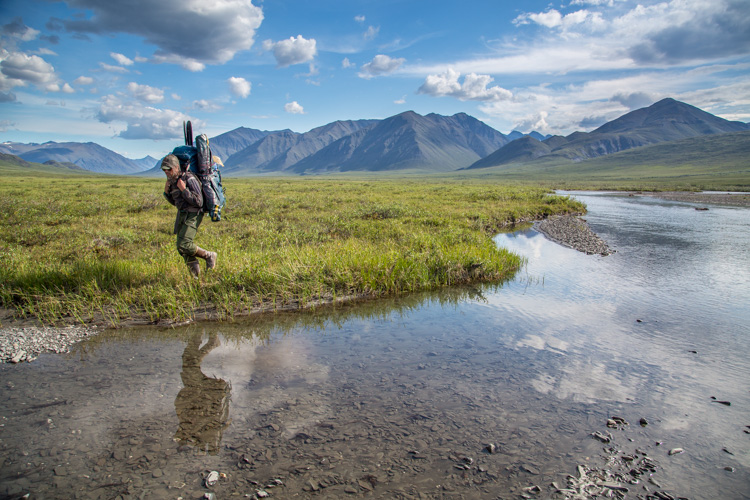
Backpacking means every piece of gear needs to be carried, so think light.

Backpacking means every piece of gear needs to be carried, so think light.

Backpacking:

On most backpacking trips, weight limitations will keep you to the bare minimum of gear. My standard kit is a lens or two, and a single body. I attach a holster style case to the chest straps of my pack with small carabiners. My camera is always there when I need it, and I don’t have to take the pack off every time I want to make a photo. Any extra gear is placed in convenient outside pockets.

AK-Noatak-Aug-1505

Mellow River Trips:

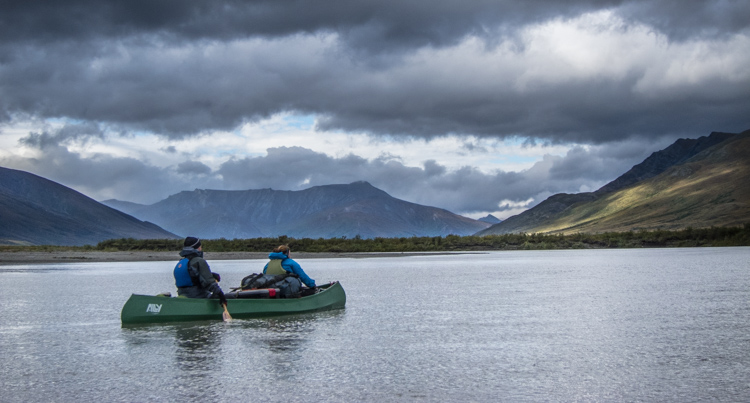
Even on the quietest of rivers, accidents happen. A camera, left carelessly on the seat of a canoe can slip into the water with an unexpected wobble of the boat. Splashes from riffles can soak an unprotected camera. Your gear needs to be protected from these threats. On an easy river, where the risk of a flip, or rock-induced swim is small, I usually store my gear in soft-cases, placed inside a larger, roll-top dry bag. Such protection is sufficient to fend off splashes, or even short dunks, as long as the seals on the bags are closed tightly.

AZ-GCNP-FebMar12-246

Whitewater:

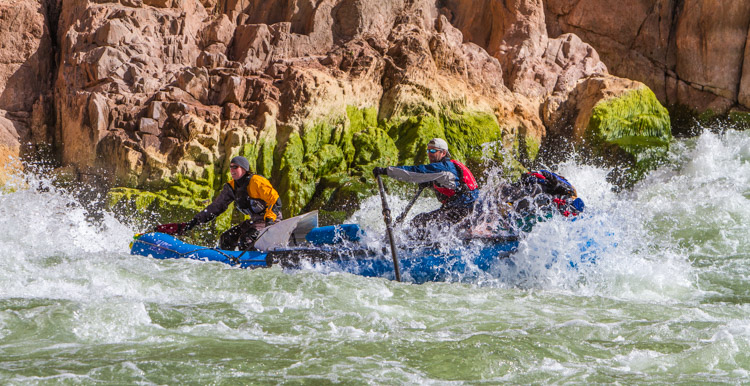
In big rapids, bad things can happen. Boats hit rocks and canyon walls, tipping, or flipping over entirely. Big waves routinely flood boats. No matter how perfectly a rapid is navigated, you and your gear will get wet, and may be submerged. This is not the time to mess around with ziplocks and cheap dry bags. If you are headed out on a whitewater trip, invest in a hard-sided water-tight case like a Pelican. Not only will these keep your gear dry, they will also protect your delicate electronics from impacts and the inevitable jarring they will receive in rough water.

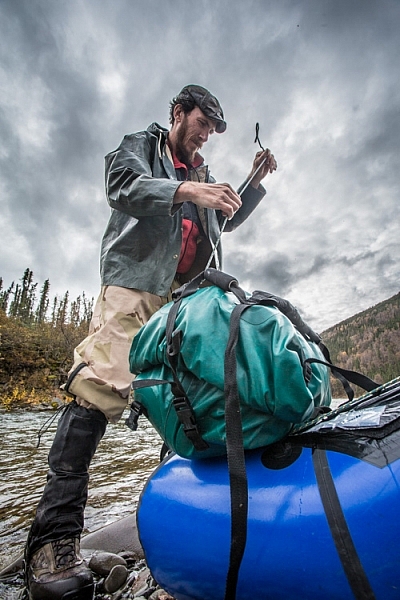
Securing well-sealed dry bags to the front of a packraft, a daily chore on a remote river trip.

Securing well-sealed dry bags to the front of a packraft, a daily chore on a remote river trip.

Sample Gear Kits

Base-camp: DSLR (or two), wide angle zoom, mid-range lens, telephoto (even a big 500mm or 600mm f/4), backpack, tripod, and accessories.

Backpacking Heavy: DSLR, wide angle zoom, telephoto zoom like a 100-400mm, soft cases, ultralight tripod, and ultralight nylon dry bags.

Backpacking Light: DSLR, wide-mid range zoom (24-105mm), case, and an ultralight nylon dry bag.

Mellow River: DSLR, wide angle zoom, fixed mid-range lens (40 or 50mm), telephoto zoom (100-400mm), tripod, second body or backup camera, dry bags. (If wildlife is a top priority, I’ll replace the 100-400 with a 500mm f/4).

Whitewater River: Same as mellow river with the addition of a suitably large pelican case.

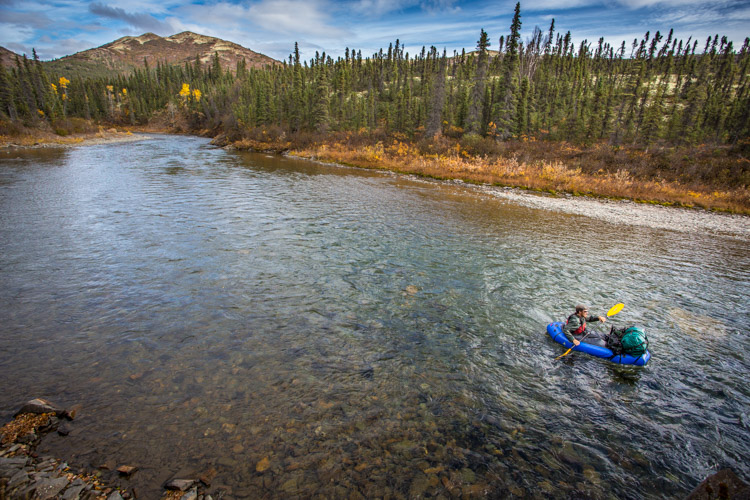
Packrafting in western Alaska.

Conclusion

If you pay attention to your photography gear choices at the beginning of your trip, you are unlikely to have any troubles along the way. Think about the limitations of your journey, what it is you are planning to photograph, and how you are going to protect and transport your gear. When those decisions are made, actually selecting what to take gets easier.

A final note of warning from someone who as been there: Please don’t overpack. It’s happened too many times to count, when have I stood around with clients at a pre-trip meeting and been forced to ask them to remove some of their precious gear due to plane, boat, or pack, weight limitations. Too much gear is just as bad, maybe worse, than too little during a wilderness trip, so pack thoughtfully.

googletag.cmd.push(function() {
tablet_slots.push( googletag.defineSlot( “/1005424/_dPSv4_tab-all-article-bottom_(300×250)”, [300, 250], “pb-ad-78623” ).addService( googletag.pubads() ) ); } );

googletag.cmd.push(function() {
mobile_slots.push( googletag.defineSlot( “/1005424/_dPSv4_mob-all-article-bottom_(300×250)”, [300, 250], “pb-ad-78158” ).addService( googletag.pubads() ) ); } );

The post How to Decide What Gear to Pack for a Wilderness Trip by David Shaw appeared first on Digital Photography School.

Digital Photography School

 
Comments Off on How to Decide What Gear to Pack for a Wilderness Trip

Posted in Photography


Tamrac Goblin gear pouches protect lenses, cameras and memory cards

01 Mar

Tamrac has a new line of Goblin gear pouches designed for individual lenses and cameras, as well as a couple larger accessory pouches for storing multiple items together. The product line includes half a dozen lens pouches, all with drawstring enclosures, three body pouches, two accessory pouches and one memory card wallet. 

The Goblin pouches feature ripstop nylon exteriors and quilted interiors. The lens pouches span bag models 0.3 to 2.4, with the smallest model (0.3) having an interior space of 6 x 8cm/2.25 x 3 in, and the largest (2.4) having an interior space measuring 12 x 21cm/4.75 x 8 in. The camera body pouches are similar, with the smallest model (0.4) offering 3 x 5.5 x 2 in/8 x 14 x 5 cm of interior space, and the largest model (1.4) offering 4.25 x 5 x 3.5 in/11 x 13 x 9 cm of interior space.

Unlike the lens and body pouches, the two accessory pouches, models 1.0 and 1.7, feature YKK zippers and mesh windows to offer a view of what’s in the bag while it’s closed. The Goblin line is rounded out with a memory card wallet with a micro mesh window and three difference size options, one that fits 6 SD cards, another that fits 4 Compact Flash cards, and a third option that fits all ten cards at once.

The Goblin line of pouches is available now through Tamrac’s website. Prices start at $ 12.95.

Via: Fstoppers

Articles: Digital Photography Review (dpreview.com)

 
Comments Off on Tamrac Goblin gear pouches protect lenses, cameras and memory cards

Posted in Uncategorized


3 Easy Steps to Photograph Glassware with Minimal Gear

22 Feb

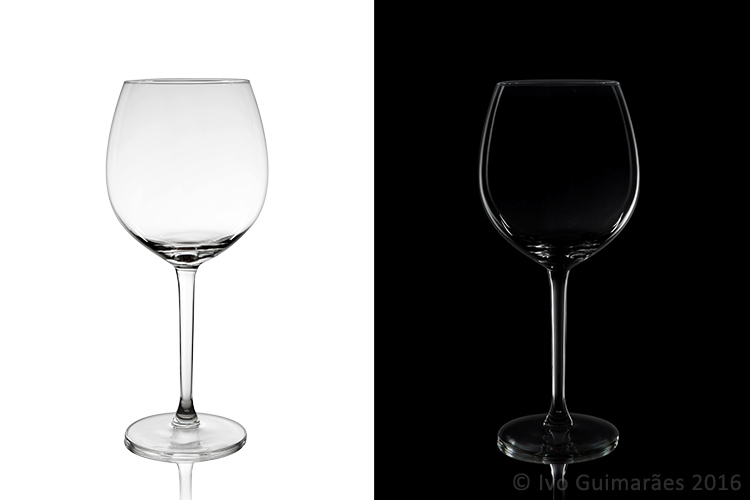
Photographing glass objects is always a complicated task because of the reflective surface, and at the same time translucent nature, of this material. The catalogue images with great glassware perfectly illuminated, are usually done with complicated setups, in studios that allow the control of reflections, and lighting equipment with accessories that are not accessible to most photographers.

In this article I will show you how photograph a glass on both white and black backgrounds, with minimal equipment, and a fairly simple lighting setup.

01

The techniques used here are known as black-line and white-line lighting, and are defined by the way light is shown at the edges of the glass, in contrast to the color of the background. This is usually done with a light placed behind and above the object, with softboxes or diffusion panels to create the transparency in the glass, black and white cardboard to create the edges, and black and white acrylic panels to create the bottom reflection.

Equipment needed

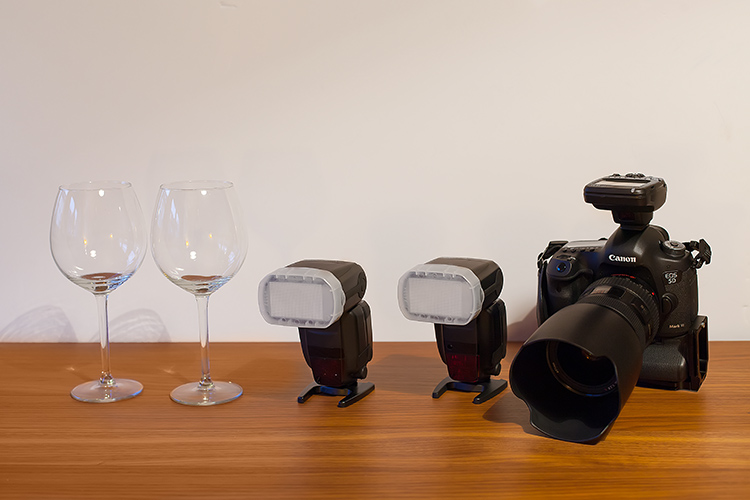
Well, you may not have a studio and lighting equipment with accessories available, but it doesn’t mean you can’t give this kind of photography a try. Here is what you will need:

02

Besides the camera body and the lenses of your choice, you will need two flashes with diffusers, a trigger to fire them, some white cardboard, and two identical glasses (you will see why you need two of them later).

Step one: Clean the glasses

The first step, and a really important one may I add, is to clean the glasses really well, as any dirt in the glass will be visible in the image. Toilet paper and glass cleaning fluid are a good choice to get rid of spots or smudges, and a compressed air can be a good choice to get rid of dust specks.

03

Step two: Prepare your set

In these images, instead of an acrylic panel to create a reflection effect, I decided to use an old school technique to simulate the same effect – with the use of another glass turned upside down, under the main photographed glass. I use this technique a lot, as it allows me to have a pure white or black background, without a horizon line created by the base that holds the object, which can give ghost reflections sometimes, and is hard to keep clean due to electrostatic.

Step three: set up your lights

Even though camera flashes (speedlights) are very low power compared to studio units, they have more than enough power for this kind of setup, and are an accessible and simple solution.

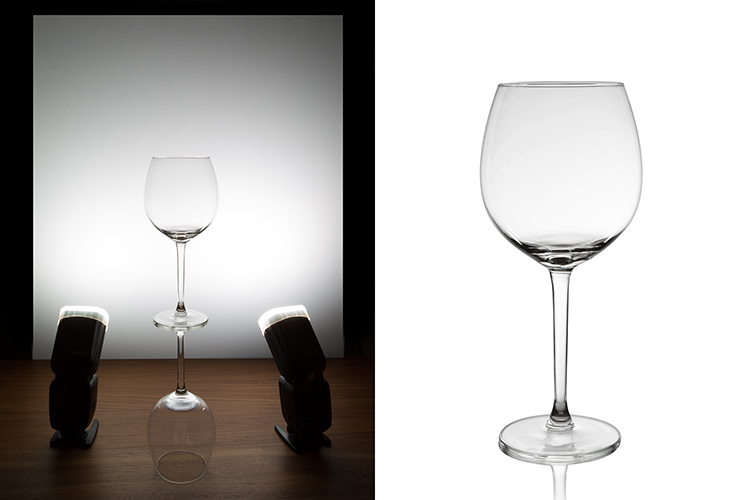
You will need to use the white cardboard as the background, and one flash with a diffuser on each side of the glas, illuminating the background evenly. This simulates the use of a softbox as backlight in a really simple way.
Here is the behind the scenes image showing the setup:

04

Voila, here is a perfect white background glassware image. It’s amazing what you can get straight out of the camera with such a simple setup. The camera settings used were: f/22, 1/200th (flash sync speed), ISO 50. Both flashes were on 1/2 power with a 50mm zoom setting.

It is important to have a large depth of field to get well-defined glass edges (including the back side of the glass), and to use the highest sync speed for your flash/camera combination to avoid the ambient light making a reflection and changing the color temperature of the image.

Bonus step: Black background setup

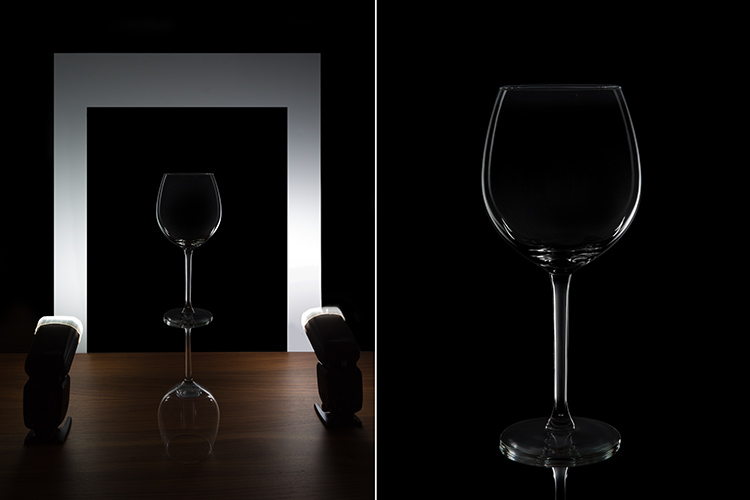
The black background image might seem a lot more complicated, but actually it’s as simple as cutting a hole in your white cardboard, that will function as an open window for the black background. Here is the behind the scenes image for that setup:

05

Here is the black background glass image.

The camera and flash settings are the same, but the white cardboard acts as a reflector, defining the white line around the glass. Just be sure not to have anything behind the cardboard or use some black velvet as the background, which doesn’t reflect light and guarantees you a pure black.

So, there you go, a simple, yet highly effective technique to produce amazing glassware images with white or black background, and bottom reflection effect – without a studio, fancy lighting equipment, or a ton of accessories.

Give it a try, I’m sure you’ll get great results! Please share your images in the comments area below.

googletag.cmd.push(function() {
tablet_slots.push( googletag.defineSlot( “/1005424/_dPSv4_tab-all-article-bottom_(300×250)”, [300, 250], “pb-ad-78623” ).addService( googletag.pubads() ) ); } );

googletag.cmd.push(function() {
mobile_slots.push( googletag.defineSlot( “/1005424/_dPSv4_mob-all-article-bottom_(300×250)”, [300, 250], “pb-ad-78158” ).addService( googletag.pubads() ) ); } );

The post 3 Easy Steps to Photograph Glassware with Minimal Gear by Ivo Guimaraes appeared first on Digital Photography School.

Digital Photography School

 
Comments Off on 3 Easy Steps to Photograph Glassware with Minimal Gear

Posted in Photography


Gear of the Year Part 8: Wenmei’s choice – Lensbaby Velvet 56mm f/1.6

31 Dec

My photographic style has always favored precision and sharpness with rich tones and vibrant colors.  I also have a bit of a control issue – my inner engineer likes predictable behaviors and consistent results. But sometimes I get into a photographic rut and I need something to give me a creative jump-start. Where do I turn? To Lensbaby of course, because how better to feed my need for precision, sharpness, control and predictable results than by using creative lenses that have very few of those qualities?

Predictable behavior. ISO 400, F4, 1/125sec.

My pick for Gear of the Year is the Velvet 56 F1.6 lens from Lensbaby. It’s a portrait lens that is incredibly versatile, going from a soft ethereal glow at F1.6 to satisfyingly sharp details when stopped down.

What I love:

  • 56mm focal length, perfect for portraits
  • Sharp focus when stopped down, if I need a break from the velvet glow
  • 1:2 magnification means I can get up close and personal with my subjects or shoot near-macro details
  • Soft focus effect forces me outside of my comfort zone and makes me think more creatively when setting up my shots
  • Sleek body looks cool, especially the silver version

When I first picked up the Velvet 56, I had a hard time figuring out how to make it work for me. My creative style does not naturally include soft edges or ethereal glow, so getting a feel for the lens and how it works took several days of shooting. (In contrast, colleagues who tend to shoot in a dreamier, more vintage style have tried the lens and fallen in love with it immediately.)

Still shooting stopped down to F4, having trouble embracing the glow. ISO 200, F4, 1/200sec

With the Velvet 56, once you open up above F2.8 it’s impossible to get a sharp edge. Having a direct relationship between the wide apertures I typically use to capture light and the soft focus that is a signature of this lens was very frustrating to me. However, once I gave up on the idea of being able to control both light and focus in the ways I expected, I found creative freedom in allowing myself to shoot for the “feeling” of a moment rather than the precision of it.

Sleeping children helped me step into the world of intentionally soft focus (by taking “dreamy” a bit literally…each of us takes the path that works for us). ISO 800, F2, 1/125sec.

I am still a huge fan of sharp focus and the comfortably predictable results I get from more conventional lenses, but I find that I reach for the Velvet 56 more and more for personal projects and family lifestyle or legacy sessions. The phrase “emotionally in focus” is often used to justify keeping a blurry shot that you like, but I find that it is an accurate description of how I use the Velvet 56. Sometimes, emotionally in focus is the best way to capture the moment.

This ’emotionally in focus’ moment brought to you by an irritated 5 year old. ISO 400, F2, 1/250sec.

And sometimes you just have to appease the engineer inside and stop down to F5.6 or F8 to try for that tack-sharp focus. Luckily, the Velvet 56 can do that too (manual focusing ability of the photographer notwithstanding).

Nesting dolls on the mantel, no emotion required. ISO 800, F5.6, 1/200sec.

Articles: Digital Photography Review (dpreview.com)

 
Comments Off on Gear of the Year Part 8: Wenmei’s choice – Lensbaby Velvet 56mm f/1.6

Posted in Uncategorized


Gear of the Year Part 7: Allison’s choice – Olympus Tough TG-4

29 Dec

Over the summer I took part in a great American tradition called ‘tubing’ with some friends. Don’t be fooled by the semi-rugged sounding name of this activity. It’s basically an opportunity to sit outside surrounded by nature and friends, consuming alcoholic beverages (in a responsible manner) while floating lazily down a river. In short, it’s everything summer should be.

In our pre-float preparations my companions were busy stuffing their smartphones into complicated plastic pouches to be hung around their necks, or into ziplock bags, which seemed risky. I left my phone on dry land and headed into the water with the Olympus Tough TG-4, no waterproof pouch required.

A great American tradition. ISO 100, f/8.0 1/400sec @ 25mm equiv. processed to taste in ACR.

What I love:

  • Waterproof, crushproof, dustproof and freezeproof
  • Raw shooting for better image fine-tuning
  • Compact enough to carry in my bag without noticing
  • Decent wide to moderate zoom

There’s something incredibly liberating, even rebellious-feeling, about dunking a piece of technology underwater. The TG-4 was a great little sidekick on the water. Its operation is simple enough that I could pass it around among my friends, some of whom wanted to take underwater selfies. To each her own. Shooting Raw, I knew I would have some decent flexibility with my images later. It was pure fun, and I got some nice mementos from the trip out of it.

Tough cams can go places that would be too risky for mere smartphones. ISO 100, f/8.0, 1/500sec @ 25mm equiv.

Later in the year, the TG-4 accompanied me on another trip. Florida is a strange place. Like the Pacific Northwest, it seems to rain pretty much every day, but unlike my home of over two years the rain is heavy, sudden, and often happens at the same time as sunshine. It generally stops raining after twenty minutes, at which point the sun comes out and transforms the place back into the wild swamp it once was.

Florida is also, of course, the theme park capital of the world, and that’s what took me there in late November. The point of the trip was to spend time with my boyfriend and his family drinking butter beer (responsibly) at Universal’s ‘Wizarding World of Harry Potter.’ Naturally, I’d want photos, but I didn’t want to have to worry about a camera getting wet or smashed in a storage locker.

This dragon breathes fire every so often, but apparently had the day off when this photo was taken. ISO 100, f/2.8, 1/2000sec @ 25mm equiv.

The TG-4’s modest zoom range was still enough to help achieve framing that I couldn’t quite get with my smartphone. Raw capture came in handy again, with lots of high contrast scenes that could be rescued in post-processing. And what good is it taking a vacation to a fictional English village if you can’t share photos with all of your friends instantly? Wi-Fi was key in making sure I shared important moments with all of my BFFs just moments after I’d captured them.

To be totally honest the TG-4 isn’t that special outside of its rugged properties. Its sensor is small, controls are limited, zoom range is minimal and its metering keeps you guessing. But bringing it on a raft or to a theme park and knowing that I won’t have to coddle it is worth a lot to me. I can take pictures, or throw it in my bag and just enjoy my butter beer and hardly know the difference.

Articles: Digital Photography Review (dpreview.com)

 
Comments Off on Gear of the Year Part 7: Allison’s choice – Olympus Tough TG-4

Posted in Uncategorized


The Top Gear Related Articles from 2015

27 Dec

As much as we hate to admit it, we photographers love gear. We want the latest greatest lens, camera, bags, and gadgets. While we can’t always afford new things, nor do we need them, it’s nice to know what’s available when we are ready to upgrade.

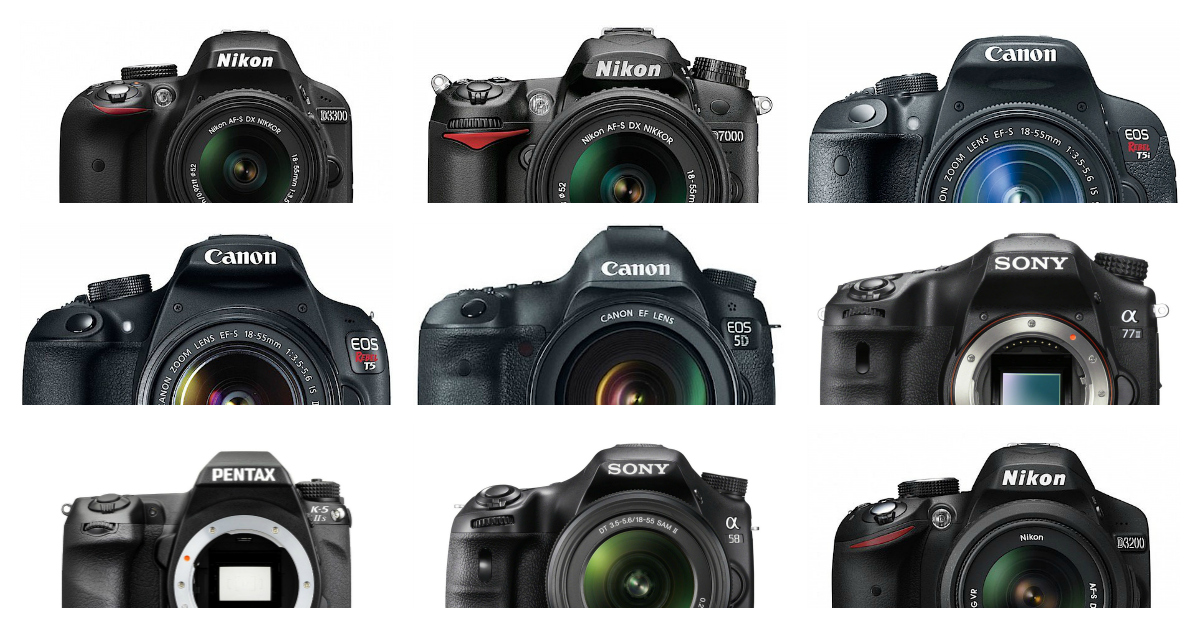
popular dslrs

Let’s look at some of the top gear related articles from the last year, 2015.

Cameras and General

  • 6 of the Most Essential but Underused Camera Features
  • How to Clean Your Camera Sensor and Lenses
  • Gear Envy: Five Things to Consider Before Buying Your First Camera
  • 5 Lessons Learned Switching from DSLR to Mirrorless for Travel Photography
  • The 20 Most Popular DSLRs Among our Readers
  • The 19 Most Popular Compact System and Mirrorless Cameras with Our Readers
  • Mirrorless, DSLR or Point and Shoot: Which Camera is Best for Macro Photography?
  • Do You Really Need the Latest Greatest Gear?

Lenses

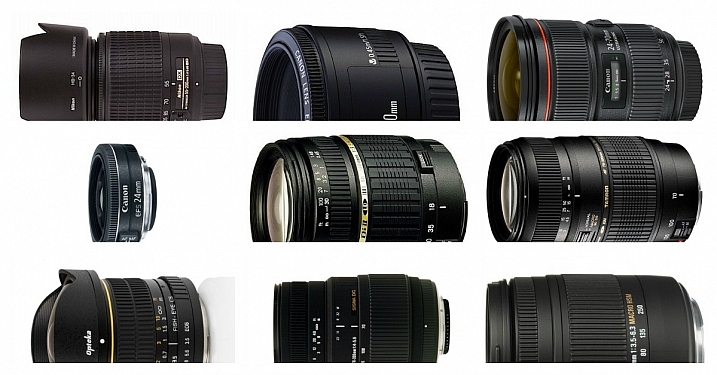
popular lenses

  • The 20 Most Popular DSLR Lenses Among our Readers
  • 7 Tips to Help When You’re Stuck with Only a Prime Lens
  • Writer’s Favorite Wildlife Lens – Tamron 150-600mm
  • Writer’s Favorites – 35mm Prime Lens
  • Writer’s Favorite Lens: 50mm f/1.8
  • Photographing Stars Using a Kit Lens
  • How to Use a Wide-Angle Lens for People Photography
  • Why Every Photographer Should Use a Manual Focus Lens
  • 5 Ways a Telephoto Lens Can Improve Your Landscape Photography
  • Comparing a 24mm Versus 50mm Lens for Photographing People

Other

  • How to Select the Right Camera Memory Card
  • 5 DIY Hacks to Have in Your Camera Bag
  • dPS Writer’s Favorite Photography Gadgets
  • How to Shoot in Low-Light Conditions Without Using Flash
  • Essential Accessories for Landscape Photography
  • A Beginners Guide to Light Modifiers

googletag.cmd.push(function() {
tablet_slots.push( googletag.defineSlot( “/1005424/_dPSv4_tab-all-article-bottom_(300×250)”, [300, 250], “pb-ad-78623” ).addService( googletag.pubads() ) ); } );

googletag.cmd.push(function() {
mobile_slots.push( googletag.defineSlot( “/1005424/_dPSv4_mob-all-article-bottom_(300×250)”, [300, 250], “pb-ad-78158” ).addService( googletag.pubads() ) ); } );

The post The Top Gear Related Articles from 2015 by Darlene Hildebrandt appeared first on Digital Photography School.

Digital Photography School

 
Comments Off on The Top Gear Related Articles from 2015

Posted in Photography


DPReview Gear of the Year Part 6: Richard’s choice – Fujinon 56mm F1.2R APD

23 Dec

My Gear of the Year isn’t a product launched in 2015. Nor is it necessarily the absolute best option available. However, it is the product that I’ve grabbed whenever I wasn’t committed to something else we’ve been testing, and it’s a product I’ve really enjoyed.

What I love

  • Classic portrait focal length 85mm equivalent field-of-view
  • Bright maximum aperture for shallow depth-of-field or low light work
  • Apodization filter to ensure smoother bokeh
  • Well built solid-feeling without being too heavy

I’ve always liked the idea of classic 85-135mm equivalent portrait lenses but they’ve tended to be somewhat thin on the ground for the APS-C cameras I seem to end up testing. So I’m delighted to see Fujifilm go the extra mile and create a fast 85mm equivalent.

Better still, the APD version of the lens is specifically designed to offer pleasant bokeh. None of this ‘X rounded blades to give pleasing bokeh’ nonsense, the APD version actually has a radial gradient neutral density filter to smooth off the bright edges of the out-of-focus rendering. I’ve taken the availability of this very specialized tool as encouragement to practice and improve my portraiture.

A quick re-process in camera and there’s a JPEG ready to send to my patient volunteer.

Fujinon 56mm F1.2R APD
F1.2, 1/35sec, ISO 800 

The Fujifilm 56 isn’t the only tool I could have used: the Zeiss Batis 85mm F1.8 would give very similar depth of field and, mounted on a Sony a7 series camera, would result in a fairly similarly sized package. However, although both have been present in the DPReview offices, it’s been hard to justify taking them out of the hands of the people reviewing and testing them, just to experiment. So it just happens to have ended up that I’ve spent more time enjoying the Fujinon.

Beyond the lens’s inherent properties, there’s another reason I’ve tended to grab the 56 and it relates to winning my subjects over and helping them feel comfortable with being photographed. 

While shooting, I’ve been using Fujifilm’s Wi-Fi system to send my favorite shot along to my subjects’ phones, letting them see the results and ensuring they have an image to walk away with. Lots of modern cameras have Wi-Fi of course, but it’s the combination of in-camera Raw processing and one of my favorite JPEG engines that makes it particularly useful. It’s relatively easy to choose the most appropriate Film Simulation mode, fine-tune the white balance and tone curve and arrive at a file I can comfortably share before I get a home to Lightroom. That ability to put the images quickly into the hands of my subjects has helped maintain their enthusiasm for standing around and being photographed.

The 56mm F1.2 APD is sharp where you want it and pleasantly smooth where you don’t. The X series cameras can place the focus with a good degree of accuracy, too.

Fujinon 56mm F1.2 APD
F1.2, 1/550sec, ISO 400

Furthermore, the relatively small size of an X-T10 with the 56mm mounted to it isn’t quite so intimidating as a full frame DSLR and has the advantage that I can continue to shoot when I’ve taken the camera away from my eye, to talk to my subject.

It’s not all dreamy bokeh and pretending to be David Hemmings*, of course.

The 56mm F1.2 APD is an expensive lens. For a start, it’s a rather specialized lens, meaning fewer buyers to share the development costs across. But equally, it’s likely that Fujifilm understands the mystique conveyed by the idea of a bokeh-smoothing filter and being able to etch the numbers 1:1.2 into the front of the lens, allowing them to charge a substantial premium.

Autofocus is also rather slow. The design appears to have a lot of glass to shift around when focusing, which slows things down, as does the loss of on-sensor phase detection, which would be confused by the lens’s internal filter. However, so long as the subject doesn’t move too fast or unpredictably (which is a reasonable expectation in semi-posed portraits), this isn’t a fatal drawback and is at least partially made up for by the accuracy and consistency of the focus.

It’s not just for close-up head shots, of course.

Fujinon 56mm F1.2 APD
F1.8, 1/1000sec, ISO 200

So why, when I know the 56mm is far from perfect, is it my Gear of the Year? On a technical level, it’s very good: it’s impressively sharp where it’s in focus and pleasantly smooth where it’s not, but the reason it’s my Gear of the Year is because I’ve enjoyed shooting with it and it’s encouraged me to go out and take photos.

I’m certainly not even going to claim the 56mm F1.2 APD has magically made me a great portrait photographer, but it’s certainly increased the number of my friends using my images to represent them on social media. And knowing the lens will take lovely images has left me able to concentrate on developing the soft skills for relaxing and posing the people I’m shooting. Now, where’s my reflector?


*I very seldom pretend to be David Hemmings.

Articles: Digital Photography Review (dpreview.com)

 
Comments Off on DPReview Gear of the Year Part 6: Richard’s choice – Fujinon 56mm F1.2R APD

Posted in Uncategorized


DPReview Gear of the Year part 5: Barney’s choice – Sony RX1R II

21 Dec
The Sony Cyber-shot RX1R II is a 42MP full-frame compact camera, with one of the best AF systems of any non-DSLR camera on the market. And I want one. 

Photo: Sam Spencer.

I’m a sucker for 35mm. I reckon that 90% of the pictures I like to take could be (or are) taken at this focal length. That’s why I have a Sigma 35mm F1.4 Art almost permanently attached to my DSLR, and why when I’m not shooting with that, I can probably be seen out and about using my old Fujifilm X100S. In fact it was the X100S that I wrote about for my last ‘Gear of the Year’ article, way back in 2013 (no offense, noble cameras of 2014. I guess I was just really busy this time last year. I’ll call you). 

It’s because I love 35mm that I really wanted to love the original Sony Cyber-shot RX1 and R. On paper they were perfect: a high-quality 24MP full-frame sensor (without an AA filter, in the case of the RX1R), 35mm F2 lens, with full manual control and the option to add a high resolution external EVF, in a compact body. What’s not to like?

I had a love / hate relationship when shooting with the original RX1R. In low-ish light, the camera’s AF system would routinely fail to accurately acquire focus. Both this image (and the one below) were shot in manual focus mode.  

Sony RX1R, ISO 640, F2.5, 1/80sec 

Quite a lot, as it turns out. Despite high hopes (and to be fair – after taking some pictures that I quite liked) I just didn’t get on with those cameras at all. The external viewfinder was almost essential, but clunky, and made a compact camera into a not-at-all-compact camera the minute it was attached. Battery life was fairly pitiful, and autofocus – dear God the autofocus… Fussy in bright light, unreliable in moderate light and downright unavailable in low light.

Until I tried to take nighttime shots with the RX1R I didn’t believe it was possible for an inanimate object to shrug, but I swear that’s what the damned thing did whenever I half-pressed the shutter button.

Taken by the light of a campfire, this image shows the strength of the original RX1R’s 24MP sensor, but like the previous image I had to resort to manual focus to get a sharp result (focused on the little girl’s face). 

Sony RX1R, ISO 6400, F2, 1/80sec

The original RX1 and RX1R were on the market for a long time, and just when I was beginning to give up hope of ever seeing an improved replacement, along came the RX1R II. 

Compared to the original RX1R, the Mark II version is a breath of fresh air. Inheriting the same 42MP BSI-CMOS full frame sensor (but with an all-new switchable anti-aliasing filter) and 399 phase-detection AF system from the Sony a7R II, the RX1R II is a significant step up.

What I love

  • Excellent resolution
  • High-resolution built-in EVF
  • Very accurate, flexible AF system
  • Compact, relatively lightweight form-factor
  • Large manual controls

Gone is the clumsy add-on FDA-EVM1K, replaced by a built-in, retractable 2.3 million dot OLED finder. I shoot with my eye to the viewfinder almost exclusively, so when Sony representatives first showed us the camera, I nabbed one of the new lockable rubber viewfinder hoods they brought along. The hood prevents the finder from being retracted, but after resorting – twice – to using needle-nosed pliers to loosen the locking screw* I decided just to leave it permanently attached.

With 42MP and a new BSI design, the sensor in the RX1R II is significantly more advanced than the already very good 24MP sensor in the older RX1R. Like all current Sony full-frame sensors it offers extraordinary dynamic range, allowing me to expose just shy of highlight clipping for this ISO 100 shot, and pull up the shadows very significantly in Photoshop. The final result shows a very wide dynamic range from bright to dark without feeling too ‘HDR’. 

Sony RX1R II, ISO 100, F6.3, 1/400sec

Just aesthetically, I really like the RX1R II, and it’s a camera that tends to attract admiring glances when I’m out shooting. Like the Fujifilm X100S, more than a few people have commented to me that it looks like a film camera, but the semi-retro styling doesn’t come at the expense of usability (keep walking, Nikon Df…). 

Cosmetics aside, the RX1R II also produces great images, exactly as we’d expect from a camera using such a high-quality sensor. Like recent a7-series cameras, Sony has included an uncompressed Raw option in the RX1R II.This gives maximum quality but at the expense of very large file sizes – roughly 80MB each, to be precise, compared to JPEGs which are typically less than ten. This slows the camera down, and eats through memory cards with frightening rapidity. 

While I didn’t much care for the original RX1/R overall but I did enjoy that 35mm F2 Zeiss lens. And although it was designed for a 24MP resolution it successfully keeps up with the much higher pixel density of the new sensor in the RX1R II. Sadly though, neither the sensor nor the lens is stabilized so with 42MP in play, even though sometimes I’ve gotten away with 1/30sec, I’m in the habit of treating 1/125sec as my safe ‘slowest’ shutter speed when hand-holding.

After dark, the RX1R II’s focus system is far superior to that of its predecessor. This shot was hand-held after dark, and shot wide open at F2.

Sony RX1R II, ISO 400, F2, 1/50sec

Alright, so the sensor is great, the AF system is transformed, and the built-in viewfinder is lovely. What about my one remaining major criticism of the original RX1R? – Battery life. 

Sadly, the RX1R II’s battery is the same NP-BX1 found in the first generation RX1R and all of Sony’s RX100 series compacts. Even just physically, the BX1 is comically small. Like, lose-it-in-your-pocket small. And while it’s rated for a modest 200 shots, in cold weather I’ve come to expect far less. 

In temperatures around freezing, I quickly fell into the habit of holding the battery slipped into a glove, and placing it in the camera only when needed. You know – like we had to do in the 1990s. Fortunately, Sony is shipping the RX1R II with a handy USB-powered charger, which means you don’t need to plug the camera in to charge the battery, as with other RX-series Sony compacts. So that’s one step forward, at least. 

Face detection worked well for this shot in one sense – it resulted in a nicely-balanced exposure, in a situation where my subject could easily be backlit. I should have activated Eye-AF though, because focus has fallen slightly short of my subject’s eyes.

Sony RX1R II, ISO 100, F4, 1/125sec

I’ve been using the RX1R II for a while now and I keep on having to remind myself that despite its high price-tag it is still a Cyber-shot camera, with a lot of the same quirks of much cheaper compact cameras in Sony’s lineup. In fact, it’s impossible to ignore. There’s the same lengthy startup time, the same lag – before – you – can – zoom – in to the images you’ve captured, the same confusing, rather passive aggressive error messages when you try to do something before the camera is ready or when it’s in the wrong mode, and the same somewhat confusingly-named array of AF modes.

Exposed to retain the very delicate warmth in the sky just above the horizon, this ISO 320 shot was converted from a Raw file, and the shadows lifted in Adobe Camera Raw. I performed some very slight noise reduction, but could still smooth out the midtones a lot more if I wanted to. 

Sony RX1R II, ISO 320, F2, 1/60sec

There are a couple of outright bugs, too. For example, despite not offering any form of SteadyShot image stabilization in still capture, the RX1R II will still blink a reminder at slow shutter speeds that this non-existent feature is turned off.

After shooting thousands of frames with the RX1R II, I’ve learned to live with these minor annoyances but I do with Sony had sprung for a couple of extra components. A more powerful processor would make a huge difference to the overall handling experience (especially in uncompressed Raw mode) and I wish it had a touchscreen. I’ve come to really value touch-sensitive screens over the past couple of years, mostly for AF placement when shooting from low angles.

This grabshot was taken on a tabletop, using live view. The RX1R II’s flip-out screen is very handy for pictures like this, but even handier would be a touch-sensitive screen, which would have allowed me to position the autofocus point precisely, by touch. 

Sony RX1R II, ISO 12800, F2, 1/60

All this being said, after a lot of thought, I picked the RX1R II as my personal choice for gear of the year. And I did that because it’s one of those cameras – like my Fujifilm X100S – that is capable of such good results that I am prepared to work around its quirks and largely forgive its faults. I should give an honorary mention to the Leica Q, though. In some ways the Q is a more pleasant camera to use but its sensor isn’t as advanced, I don’t love 28mm as much as 35mm, and my Christmas bonus* wasn’t generous enough to justify its higher cost.

Not that the RX1R II is cheap, of course. But if I have to move into a tent for a couple of months to save up enough to buy one, I’m willing to consider it. Once it’s stopped raining.


* Pliers were resorted to only after I broke a nail trying to do it with my fingers. Yeah, I know. Shut up.  
** Ha ha ha ha ha. 

Articles: Digital Photography Review (dpreview.com)

 
Comments Off on DPReview Gear of the Year part 5: Barney’s choice – Sony RX1R II

Posted in Uncategorized