Nikon has just posted a small 6-image sample gallery from the new D7100. The D7100 is a 24MP, APS-C DSLR that does not feature an optical low-pass filter on its sensor. Theoretically, this should increase detail resolution. As well as an unconventional sensor, the D7100 offers a 51-point AF system and a 1.3X crop mode in stills and video capture. The images that Nikon has posted were taken in .NEF raw mode with the D7100 fitted with the AF-S NIKKOR 500mm f/4G ED VR and AF-S NIKKOR 70-200mm f/4G ED VR. Click through for pictures and a link to the images on Nikon’s website.
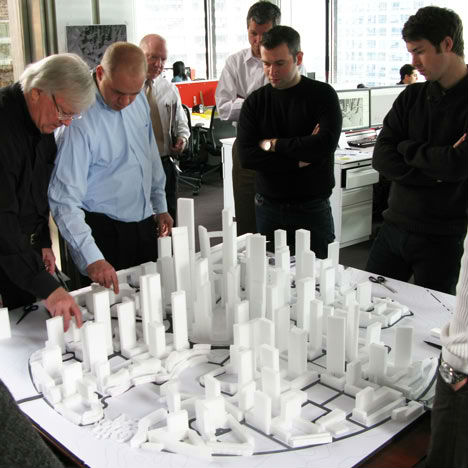
Altering most of today’s cities to eliminate cars altogether would be a daunting, if not impossible, proposition – which is why China is starting from scratch. Great City will be built around a high-rise core housing 80,000 people, entirely walkable, and surrounded by green space.
Planned for a rural area outside Chengdu, the high-density Great City will give residents access to a ‘buffer area’ of gardens and greenery making up 60% of the total area of the city. Walking from the center of the city to the green spaces takes just ten minutes, and other nearby urban centers will be accessible by a mass transit system.
Chicago architecture firm Adrian Smith + Gordon Gill Architecture say the city will use 48% less energy and 58% less water than a more conventional city of the same size; it will also produce 89% less landfill waste and generate 60% less carbon dioxide.
The development addresses the problem of overpopulation, pollution and urban sprawl by compacting a lot of residents into vertical housing, growing food nearby. “The design is attempting to address some of the most pressing urban issues of our time, including the need for sustainable, dense urban living at a cost people can afford,” says Gill.
“Accordingly, we’ve designed this project as a dense vertical city that acknowledges and in fact embraces the surrounding landscape—a city whose residents will live in harmony with nature rather than in opposition to it. Great City will demonstrate that high-density living doesn’t have to be polluted and alienated from nature. Everything within the built environment of Great City is considered to enhance the quality of life of its residents. Quite simply, it offers a great place to live, work and raise a family.”
Strobist reader (and relative lighting newb) Ron Ibarra of New York City asks, via Twitter:
"I can't control the flash through the PC cord. Am I doing something wrong?"
Nope, Ron, you are not. A PC cord is what we call a "dumb sync," meaning it only triggers the flash but does not otherwise control it. And if you are a smart photographer, all you really need is a dumb sync.
That's because you can control everything right from the camera itself. And today's follow-the-bouncing-ball post will show you the super-easy way to do just that.
You’ve probably got a bag of them stashed away with old envelopes and Mr. Sketch markers.
Rubber stamps. The classic currency of Valentine’s Day and letters from your penpal.
Stamps don’t have to be boring or cheesy. They can be classy, and they can even be art.
Especially if you design them from your very own photos!
Follow along with our DIY stamp project as we take you from the pixel to the pad without breaking a sweat.
Make a Custom Photo Stamp!
p.s. Need Photoshop skillz? creativeLIVE is hosting a week of Photoshop classes. You can take over 40 different online classes taught by pros for free!
p.p.s. Happy V-Day! Sign up for Phoneography 101 and add your sweetheart (or pal) on us. TODAY ONLY!
Why it’s cool:
Remember that feeling of opening the mailbox and actually finding a letter addressed to you?
Give facebook a rest and show the world that snail mail isn’t dead!
Turn up the fun on your postcard with a stamp of your fat cat, or make that party invitation fancy with a stamp of people dancing.
The possibilities are endless so why not send someone a little love for the price of a stamp!
THE GOODS:
A stamp worthy photograph
A computer with Photoshop or similar
Some carving material, this Speedy-Cut rubber block is a great option
A cutting tool, this Speedball linoleum cutter is the stamp carvers weapon of choice
A No. 2 pencil
Tracing paper
An ink pad
An X-Acto knife or box cutter
A paint brush
Newspaper or a cutting mat
A block of wood or similar for mounting your stamp
Super glue
A NOTE ABOUT THE PHOTO:
When choosing a photo for your stamp aim for an image with high contrast and a plain background. The best designs will have strong lines and simple geometries.
STEP 1: GENTLEMAN, START YOUR STENCIL
Import your image into photoshop and turn up the contrast as needed. The more defined the lines of your photo the easier it will be to carve.
Now turn it black and white by going to Image>>Adjustments>>Desaturate.
STEP 2: ERASE THE EXTRAS
Use your eraser tool to get rid of any distracting background elements from your photo leaving a clean white backdrop.
Trickier portions you may want to select with your lasso tool and delete. When using the lasso just select, hit the delete key, and set the color to white.
STEP 3: SLIM IT DOWN NOW
To get that Banksy stencil effect go to Image>>Adjustments>>Threshold and adjust the toggle until you’ve got the prefered balance of black and white.
If you don’t get the perfect lines from your adjustment, you can always clean up your image with the brush and eraser tools.
Then you’re gonna tape your watercolor sheet of paper on top of the print out.
STEP 4: DE-DIGITIZE YOUR DESIGN
Pixels? Where we’re going, we don’t need pixels.
We’ve reached that magical time where we’ll take your pic off the computer and onto your carving surface. Start by printing your design in the size that you would like to carve, and grabbing your tracing paper and a No. 2 pencil.
Trace over your printed design using a dull pencil to give you thicker lines. Also, try and leave out any tiny details which will be too tricky to carve.
STEP 5: RUB IT IN
Now it’s time to break out a bucket of elbow grease for our transfer step. Place your tracing paper graphite side down onto a corner of your eraser and use the back of your cutting tool to rub over your design.
Make sure to hold down your tracing paper securely so it doesn’t slippity slide. Voilà! It transfers just that easy.
STEP 6: CUT IT OUT
Use your exacto knife or box cutter to trim down your stamp block to just the area surrounding your image. Be careful: These things are sharp!
Start with the smallest blade of your cutting tool, carving around the outside edges of your stencil. You may also want to carve any small details first just in case your lines start to smudge. Apply only light pressure when making cuts. You can always go back and cut deeper if you need to.
Once you have your outline carved, you can switch to a larger blade to carve out unfilled space. Your paint brush will help to clear off the dusty rubber bits that build up while carving.
Hint: If you’re not sure whether to cut something out or not, don’t! Wait until after you’ve tested your design to see how your stamp looks. Its a lot easier to take pieces off afterwards then to glue them back on!
STEP 7: TEST THE INKY WATERS
Ink up your carved creation with your ink pad and press it firmly into a piece of scratch paper. This will show you any stray dots or dashes that may need to be removed.
Excess rubber bits will show up black after you’ve tested your stamp and can be easily airbrushed out with your cutting tool.
STEP 8: MOUNT YOUR MASTERPIECE
A little super glue and a wooden block will work wonders to class up that already ravishing stamp of yours.
Don’t limit yourself though, mount your stamp however you like: on a domino, an oversized lego, a serving spoon, or on the back of an old pattern block.
KEEP STAMPING
Use your new cutting tools to carve the ultimate pumpkin!
Turn your stamp into a fashion statement! Use it to design t-shirts, make earrings, or decorate your kicks.
Use your stamp to create a custom iPhone case. Get yourself a clear plastic case, cut out a template, and stamp away.
Take your game up tp the next level with linoleum printing (think rubber stamps, just on a bigger scale).
Related posts:
Mykea: Photos + Ikea = Custom Furniture Art Darn you Ikea: so easy on the wallet, so hard…
Make Custom-Printed Fabric Using Your Photos Don’t miss our second New York Photo Safari this Sunday!…
Turn your photos into a custom sketch: The best $ 1 you will ever spend The almighty dollar doesn’t go as far as it once…
Altering most of today’s cities to eliminate cars altogether would be a daunting, if not impossible, proposition – which is why China is starting from scratch. Great City will be built around a high-rise core housing 80,000 people, entirely walkable, and surrounded by green space.
Planned for a rural area outside Chengdu, the high-density Great City will give residents access to a ‘buffer area’ of gardens and greenery making up 60% of the total area of the city. Walking from the center of the city to the green spaces takes just ten minutes, and other nearby urban centers will be accessible by a mass transit system.
Chicago architecture firm Adrian Smith + Gordon Gill Architecture say the city will use 48% less energy and 58% less water than a more conventional city of the same size; it will also produce 89% less landfill waste and generate 60% less carbon dioxide.
The development addresses the problem of overpopulation, pollution and urban sprawl by compacting a lot of residents into vertical housing, growing food nearby. “The design is attempting to address some of the most pressing urban issues of our time, including the need for sustainable, dense urban living at a cost people can afford,” says Gill.
“Accordingly, we’ve designed this project as a dense vertical city that acknowledges and in fact embraces the surrounding landscape—a city whose residents will live in harmony with nature rather than in opposition to it. Great City will demonstrate that high-density living doesn’t have to be polluted and alienated from nature. Everything within the built environment of Great City is considered to enhance the quality of life of its residents. Quite simply, it offers a great place to live, work and raise a family.”
Want More? Click for Great Related Content on WebUrbanist:
Utopian ‘Private City’ Envisioned as Crime-Free Oasis
A private city surrounded by white walls is envisioned as a crime-free paradise away from the realities of homicide-plagued Guatemala City. But is it realistic?
Click Here to Read More »»
Starting at the End: 12 New Cities Built From Scratch
Cities take centuries to evolve – or do they? Here are 12 urban centres that offer a radical alternative to tradition – they are cities from the first day they open for business.
Click Here to Read More »»
www.silberstudios.tv Join us for this behind the scenes interview with David Hobby,when we caught up with him on his FlashBus Tour with fellow master of light, Joe McNally.They were stopping off near Silber Studios on their 29 city, 6 week tour to teach America how to see the light!. David Hobby loves to teach photographers how to improve their control of light, including “how to use off-camera flash with your DSLR to take your photos to the next level. Or the next ten levels,” as he said. David gave use some important photography tips including why you need to get your flash off of your camera, how to use “China ball lighting” for very soft lighting and the “secret setting on the Nikon SB 800, and a lot more, including some inside stories. Grab your flash, and step on board the FlashBus as we talk with David Hobby. Read the transcript here http Video Rating: 4 / 5
Canon 60 Automatically stops intermittently within few seconds of shooting video.The error comes intermittently and so each time i want to record anything , it turns off automatically withing few seconds . I have Bought Camera and card as recommened by the from TED’s camera Sales man See the video below , People with Class 10 is having issue too , So is it camera issue ? . but after watching the video below it could be canon issue ? www.youtube.com TEDs camera Sydney, poor after sales service . Had to run behind them for months to fix an issue on around 2000$ purchase even though bought Their 5 year total care plan. I will not buy from them again . Everyone I spoke to had similar experience. Video Rating: 4 / 5
Chris Hadfield might be the hippest astronaut yet.
He shares recordings from space on Soundcloud, chats with William Shatner on Twitter, and plays guitar shows from the International Space Station.
Best of all, he shoots and tweets jaw-dropping photos of Earth from space every. single. day.
Sure you’ve seen a photo from space before, but not like this. Chris’ poignant tweets show us what it’s really like to have a daily view of Earth from far, far above.
Here’s a sampling of some of the best! (Word is he shoots with a Nikon and a 400mm lens.)
A full moonrise over Earth
Swirls off the coast of Mumbai
A curious capture of eight clouds in a row
Philadelphia at night
The rippling sands of Namibia
Snowy farms in central Asia
A “screaming ghost”
Inspiration for Pollack
And an Australian bushfire
If you’re lucky, you could even get featured in one of his photo challenges! Chris will be in space through May 2013, so keep an eye out for more daily photos (see past ones on his Tumblr & Facebook).
Wanna shoot your own space photos? DIY it with a weather balloon or reverse it with this NASA tutorial on how to shoot the ISS from home. Also, the official Chris Hadfield photo contest.
Daily Photos Tweeted from Outer Space
Related posts:
Using Old Photos to Tear the Fabric of Space-Time Itself ~Have a cool photo product or site? Reach 260,000 photo…
Turn Your Photos into Gibberish — How to Convert Photos into ASCII Art If you’re old-skool like us, you remember hurrying home from…
Take a Picture of the Whole Entire Planet ~Have a cool photo product or site? Reach 260,000 photo…
Video uploaded from my hTC mobile phone Video Rating: 5 / 5
Andrea Hass is board certified in opthalmology and an ophthalmic plastic and reconstructive surgeon trained at the prestigious Wills Eye Hospital in Philadelphia, Pennsylvania. Video Rating: 0 / 5
Developer Dave Pawlowski and his wife Melissa have announced the CamRanger that lets users wirelessly control Canon and Nikon DSLRs to Apple’s iPad, iPhone or iPod touch. The standalone device connects the cameras with a USB cable and creates an ad-hoc WiFi network for the Apple devices. It allows live live view control and playback of images and videos. Head over to connect.dpreview.com for more details.




 When choosing a photo for your stamp aim for an image with high contrast and a plain background. The best designs will have strong lines and simple geometries.
 Import your image into photoshop and turn up the contrast as needed. The more defined the lines of your photo the easier it will be to carve.
  Use your eraser tool to get rid of any distracting background elements from your photo leaving a clean white backdrop.
  To get that Banksy stencil effect go to Image>>Adjustments>>Threshold and adjust the toggle until you’ve got the prefered balance of black and white.
  Pixels? Where we’re going, we don’t need pixels.
  Now it’s time to break out a bucket of elbow grease for our transfer step. Place your tracing paper graphite side down onto a corner of your eraser and use the back of your cutting tool to rub over your design.
  Use your exacto knife or box cutter to trim down your stamp block to just the area surrounding your image. Be careful: These things are sharp!
 Ink up your carved creation with your ink pad and press it firmly into a piece of scratch paper. This will show you any stray dots or dashes that may need to be removed.
  A little super glue and a wooden block will work wonders to class up that already ravishing stamp of yours.




You must be logged in to post a comment.