RSS
 

Posts Tagged ‘from’

24 Frames Per Second: Finding Photographic Inspiration From Cinema

25 Jul

I don’t believe that, as a photographer, it didn’t occur to me for quite some time to look to movies for inspiration and lessons I could use in my own art. But as I’ve grown as a consumer of movies and art, I’ve learned to look more closely at the choices filmmakers have selected in order to convey information to Continue Reading

The post 24 Frames Per Second: Finding Photographic Inspiration From Cinema appeared first on Photodoto.


Photodoto

 
Comments Off on 24 Frames Per Second: Finding Photographic Inspiration From Cinema

Posted in Photography


Photograph Summer Fun From Festivals to Farmers Markets

23 Jul

Street fairs and block parties and farmer’s markets, oh my!

Summer’s the time for outdoor fun. But so much activity can be overwhelming. How do you make sure you capture it all?

You use this list we made just for you! It has all the photo actions you’re gonna wanna take during your next outdoor summer extravaganza.

Now slap on some sunscreen and let’s go!

Photograph Outdoor Summer Memories

(…)
Read the rest of Photograph Summer Fun From
Festivals to Farmers Markets (437 words)


© Taylor for Photojojo, 2015. |
Permalink |
No comment |
Add to
Festivals to Farmers Markets”>del.icio.us

Post tags:


Photojojo

 
Comments Off on Photograph Summer Fun From Festivals to Farmers Markets

Posted in Equipment


How the Switch from DSLR to Mirrorless Changed How I Edit Photos

22 Jul

When I started in photography more than 10 years ago, the only viable option for editing images was Adobe Photoshop. At that time, 100% of my photo editing was done there.

A few years later, Adobe introduced Lightroom and I embraced it right away for its speed and organizational features. I immediately adopted it into my photo processing workflow and it was the first big transition that drastically changed my processing.

The next big change in my processing happened when I discovered HDR photography. As a photographer with a background in graphic design, I quickly saw the potential in the new processing technology and, again, I incorporated it into my workflow.
Images How Switch to Mirrorless Change Photo Edit 1

Canon 60D, HDR processed

By the end of 2014, after 10 years of shooting with a Canon DSLR, I had established my own photo editing workflow – one that I was comfortable with, that reflected my style of photography, and covered different scenarios of travel and landscape photography. Below is a list of four main processing techniques in my editing workflow, with the percentage of the total use for each.

HDR Processing in Photoshop HDR Pro and Lightroom – 50%

The foundation of my natural looking HDR photography style, this technique is based on merging bracketed photos in Photoshop HDR Pro and later editing the new HDR image in Lightroom. The beauty of this method is that Photoshop HDR Pro does not change the pixels (luminosity, contrast, saturation) of the original images. Instead, it combines data from the bracketed photos into one enormous 32-bit TIFF image.

I outlined this technique in detail in one of my previous articles: Natural Looking HDR in Photoshop and Lightroom in 5 Easy Steps.
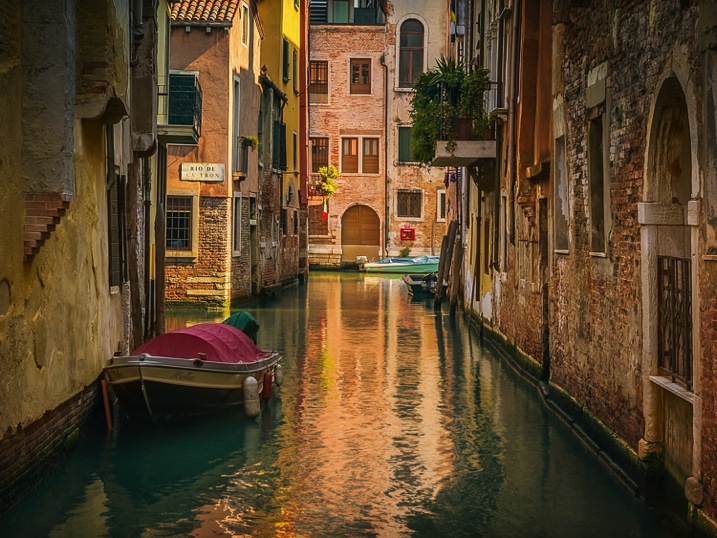
Images How Switch to Mirrorless Change Photo Edit 2

Canon 60D, HDR processed with Photoshop HDR Pro

HDR Processing in Photomatix – 30%

Photomatix is the most popular, and matured standalone HDR program. It has a completely different approach compared to Photoshop HDR Pro. Besides standard HDR features like image alignment, de-ghosting and merging for HDR, it has unique image editing tools that allow me to create distinctive looks in my photographs.

Images How Switch to Mirrorless Change Photo Edit 3

Canon 60D, HDR processed with Photomatix

Luminosity Blending in Photoshop – 10%

This technique is based on blending multiple images together in Photoshop using transparency masks. It gives me the most flexibility and control over image processing but, at the same time, it is the most involved and time consuming. I use it in the most complex cases when everything else has failed.
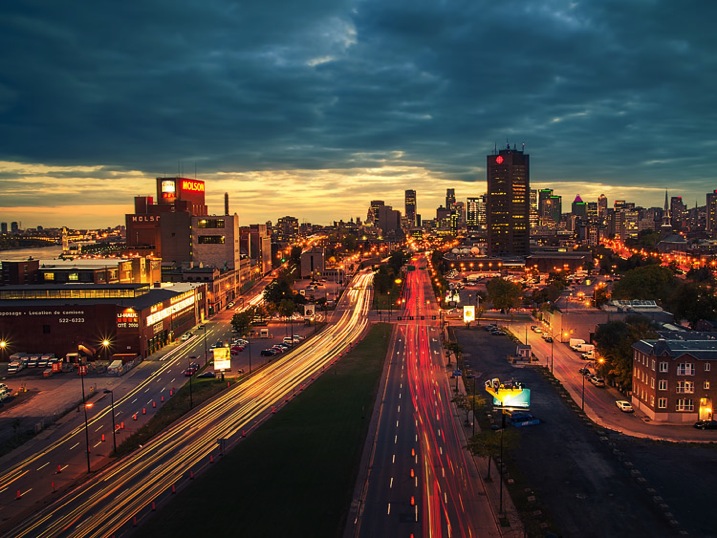
Images How Switch to Mirrorless Change Photo Edit 4

Canon 60D, digital blending with Luminosity Masks

Single RAW processing in Lightroom – 10%

When the light is not very dynamic, I use a single image and process it in Lightroom.

Images How Switch to Mirrorless Change Photo Edit 5

Canon Digital Rebel, single RAW image processed in Lightroom

The Switch

The biggest change in my photography happened at the end of 2014 when, after shooting with a Canon DSLR for 10 years, I switched to Sony mirrorless. It was quite an adjustment. After shooting for so long with one brand, I had become extremely comfortable with it. During the switch, I had to learn how to work with something very different (more details on that topic here: 5 Lessons Learned Switching from DSLR to Mirrorless for Travel Photography).

But, I did not expect that the brand switch would dramatically change my editing. I was wrong.

After I returned from my first photography trip to Hawaii and California, where I put my new equipment through the test of real life scenarios of travel photography, I had 3000 brand new photos shot with the Sony a6000.

When I started to edit the new photos, I could see some differences. In general, the images were much cleaner and sharper with a higher amount of detail. These changes did not surprise me because the a6000 has a new generation sensor with a higher pixel count, and in combination with quality lenses from Sony and Zeiss, it could easily resolve a staggering amount of detail.

What surprised me was how the images behaved when I started to edit them. I could immediately see that the images were more responsive, meaning that I could push them much further, with more aggressive editing, and that I could recover more shadows and highlights from a single RAW image. I realized that I could process some images without using HDR techniques, which was not possible before.

This is when I started to look around trying to find the reason for the different behaviour. I found my answers on the DoX Mark website when I compared camera sensors. The dynamic range of the Sony a6000 sensor is wider by almost 2 stops (11.5EV vs 13.2EV) or 14%.
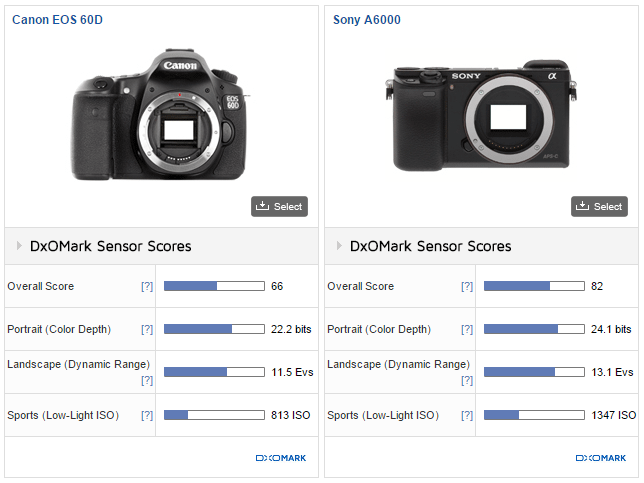
Images How Switch to Mirrorless Change Photo Edit 6

The difference is probably not a big deal if you are a wedding or street photographer but, for someone like me who specializes in travel and landscape HDR photography, this was a game changer. I saw the opportunity to streamline and optimize my digital techniques once again.

Now, six months later, below is my new modified digital photography workflow.

Single RAW Preset Based Lightroom Processing – 50%

A major shift toward the single RAW Lightroom editing made me realize that it could be the perfect opportunity to optimize my workflow in order to save time on processing. I organized my Lightroom presets into four collections: Landscapes and HDR, Cross Processing, People and B&W. Now, I start the process of editing by applying different presets to the image trying to find the right look. When I find the one I like the best, I tweak it with standard Lightroom and Photoshop editing tools.

Images How Switch to Mirrorless Change Photo Edit 7

Sony A6000, Sony 10-18mm lens, Lightroom Preset Based Processing

HDR Processing in Photoshop HDR Pro and Lightroom – 20%

With Adobe introducing Merge to HDR in Lightroom 6, I find myself using it more and more but I still use Photoshop HDR Pro.
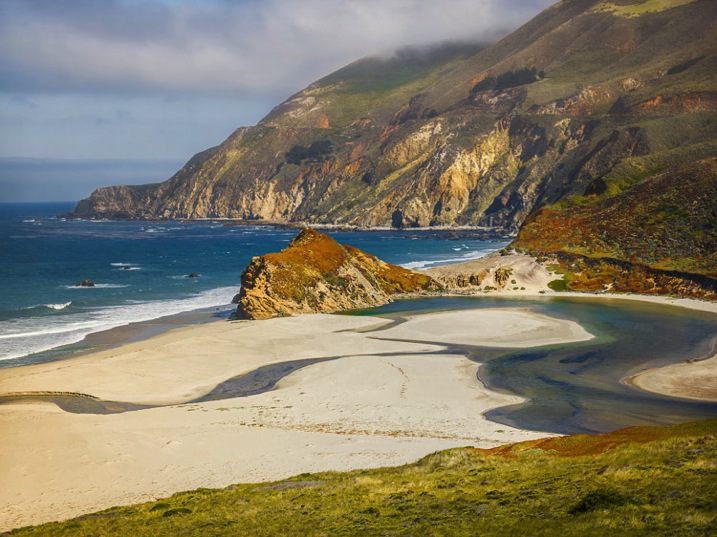
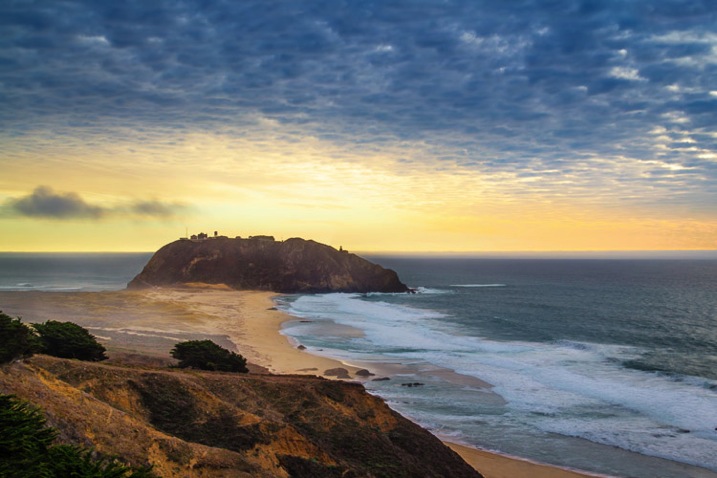
Images How Switch to Mirrorless Change Photo Edit 8

Sony A6000, Zeiss 16-70mm lens, Lightroom 6 HDR Processed

HDR Processing in Photomatix – 20%

Cleaner digital files allow me to push the images even further in Photomatix.

Luminosity Blending in Photoshop – 10%

Nothing has changed here.

Conclusion

The switch from Canon DSLR to Sony mirrorless had unexpected consequences that drastically changed the way I edit my photos. In the end, the change was very positive, it allowed me to save time on processing and editing photos. Also, the extended dynamic range of the new sensor resulted in me taking fewer photos. I do not have to take five or seven bracketed shots anymore; in most cases, three brackets are all that is needed.

Have you made the switch? Have you noticed any changes in your processing workflow? Share with us your thoughts in the comments below.

googletag.cmd.push(function() {
tablet_slots.push( googletag.defineSlot( “/1005424/_dPSv4_tab-all-article-bottom_(300×250)”, [300, 250], “pb-ad-78623” ).addService( googletag.pubads() ) ); } );

googletag.cmd.push(function() {
mobile_slots.push( googletag.defineSlot( “/1005424/_dPSv4_mob-all-article-bottom_(300×250)”, [300, 250], “pb-ad-78158” ).addService( googletag.pubads() ) ); } );

The post How the Switch from DSLR to Mirrorless Changed How I Edit Photos by Viktor Elizarov appeared first on Digital Photography School.


Digital Photography School

 
Comments Off on How the Switch from DSLR to Mirrorless Changed How I Edit Photos

Posted in Photography


Tree Church: Organic Arbortecture Grown from Living Branches

19 Jul

[ By WebUrbanist in Architecture & Public & Institutional. ]

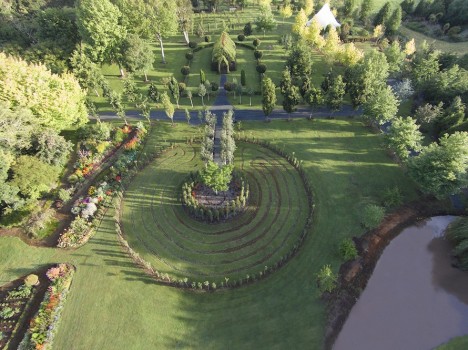
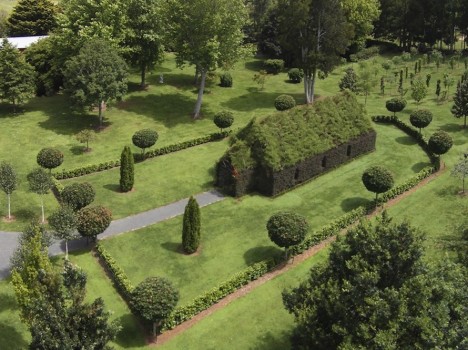
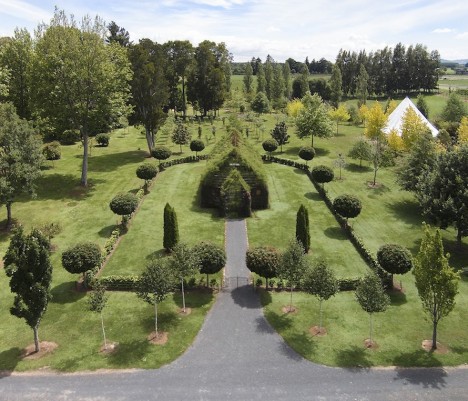
tree church and grounds

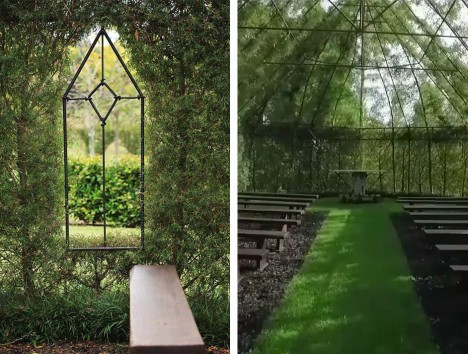
‘Built’ may not be the right word for this compelling hybrid of architectural and arborsculptural design (or: arbortecture), featuring a complete chapel with landscaped fences and carefully cultivated gardens on all sides, the primary structure at its heart made from five species of tree.

tree church

Begun by Barry Cox on his New Zealand property just four years ago, the project originated as a private retreat but as word spread he decided to open it up to guest events as well starting this fall – the structure seats 100 people.

tree church interior view

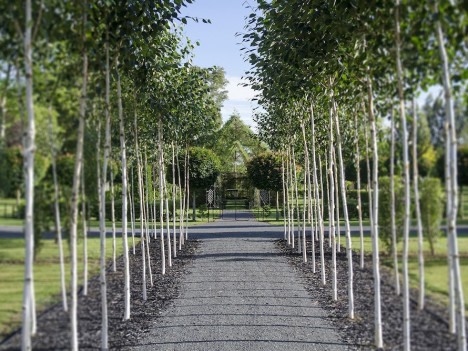
Leptospernum (Copper Sheen) grows up to create the walls while Alnus Imperialis (Cut Leaf Alder) completes the roof, forming a complete canopy above. amelia Black Tie, Acer Globosum, and Thuja Pyramidalis were also employed in the construction process.

tree church entry walkway

Within the main building, a slim steel frame underlies the living components, serving as latticework around which the supporting trunks and branches were able to grow.

tree church gardens

On the grounds around the central structure are a number of other intriguing and interactive elements, including a labyrinth and extensive additional gardens for walking and exploring. The entire site is carefully sculpted and maintained, featuring traditional as well as more novel landscapes.

Share on Facebook


[ By WebUrbanist in Architecture & Public & Institutional. ]

[ WebUrbanist | Archives | Galleries | Privacy | TOS ]


WebUrbanist

 
Comments Off on Tree Church: Organic Arbortecture Grown from Living Branches

Posted in Creativity


Two new lenses and ‘Post-Focus’ technology on the way from Panasonic

17 Jul

Alongside two camera announcements, Panasonic has gone public with plans for a new post-focus feature for selected cameras and two new lenses. Enabled by 4K video capture and its DFD (Depth From Defocus) technology, Post Focus will allow users to select a focus point after capture. New lenses on the way include a Leica DG 100-400mm F4-6.3 zoom and Lumix G 25mm F1.7 prime. Read more

Articles: Digital Photography Review (dpreview.com)

 
Comments Off on Two new lenses and ‘Post-Focus’ technology on the way from Panasonic

Posted in Uncategorized


European Parliament removes troubling wording from copyright reform proposal

11 Jul

A vast majority of Members of the European Parliament have voted to remove wording from a current copyright reform proposal that may have caused a lot of trouble for photographers. The proposal would have required photographers who would create or use images that feature buildings or public artwork under copyright to obtain permission to do so. Read more

Articles: Digital Photography Review (dpreview.com)

 
Comments Off on European Parliament removes troubling wording from copyright reform proposal

Posted in Uncategorized


Canon PIXMA MG3620 can print photos directly from social networks

09 Jul

Canon has introduced a new printer that can print images directly from Instagram and other social networks. The PIXMA MG3620 Wireless Inkjet all-in-one printer works with the Canon PRINT app for iOS and Android to both access and print from Instagram accounts, as well as other online services like Facebook, Twitter, Flickr, OneDrive, Evernote, Google Drive, Photobucket, and Dropbox. Read more

Articles: Digital Photography Review (dpreview.com)

 
Comments Off on Canon PIXMA MG3620 can print photos directly from social networks

Posted in Uncategorized


Slow-motion video samples from the Sony Cyber-shot DSC-RX100 IV

08 Jul

What’s more fun than fireworks on the Fourth of July? Fireworks at 960 fps. We grabbed a few slow-motion clips recently with the Sony Cyber-shot DSC-RX100 IV to test out its slow-mo video modes. Take a look at three 960 fps videos and a bonus clip at 240 fps – still pretty neat in our book. See videos

Articles: Digital Photography Review (dpreview.com)

 
Comments Off on Slow-motion video samples from the Sony Cyber-shot DSC-RX100 IV

Posted in Uncategorized


Create Stunning Works Of Art from Your Photography: Our Most Popular Deal Back for 24 Hours

06 Jul

Today as part of our Mid Year Deal week we’ve got two amazing courses for you from the amazing Sebastian Michaels.

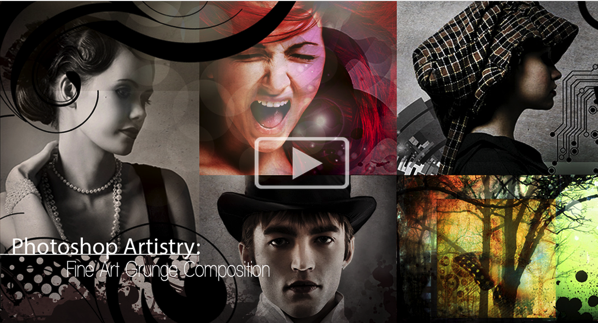
Deal 1: 70% Off Photo Artistry: Fine Art Grunge Composition Course

It’s back! But for 24 hours only…

Photoshop Artistry: Fine Art Grunge Composition course — at an incredible 70% off the RRP!

Screen Shot 2015 07 05 at 7 50 11 pm

This was the hottest deal featured on our site in 2014. It flew out the door and smashed records in our dPS Christmas sale.

So due to popular demand, we’ve brought it back for one more day here!

Create Stunning Works Of Art from Your Photography

If you want to go from merely editing your photos to creating intricate photo-art compositions, then this is is the deal for you.

This cutting edge course will awaken your creative genius and reveal the secrets the pros use to create stunning works of art.

By showing you how to create something new and extraordinary with your images, it will completely transform the way you approach your photography and use Photoshop. You’ll find yourself turning out richer, more sophisticated compositions than you ever thought you could create.

With glowing reviews and an unbelievable amount of included value (over 70 training videos, downloadable PDF cheat sheets and over 7GB of bonus pro-designed content), you definitely can’t go wrong with this one.

And at $ 89, it’s a MASSIVE $ 208 off… a price course creator, Sebastian Michaels, has only offered to dPS (you won’t find it anywhere else).

Go ahead and see what all the fuss is about!

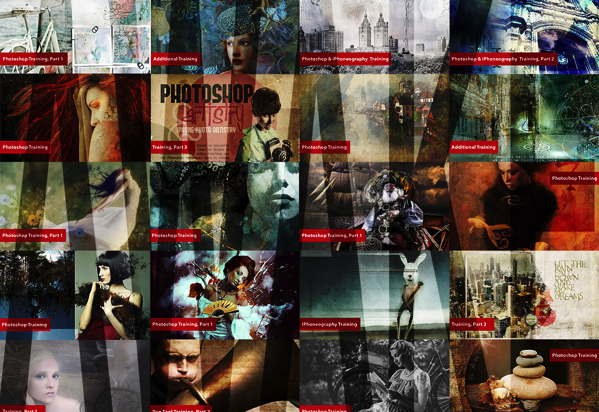
Deal 2: Awake: Living the (Photo)-Artistic Life – $ 118 Off the Normal Price

NewImage

If you’re like one of the many dPS readers who took advantage of this deal in our Christmas sale, Sebastian’s new course is sure to tickle your fancy, too…

‘Awake: Living the (Photo)-Artistic Life’ is about waking up to all the possibilities and beauty around you — stimulating your imagination, vitality and inspiration, to find your unique artistic voice. Your art will become a more present, more powerful part of your life.

With a full year of training, artist tutorials and pro-designed content, spots in the course are limited. So at $ 118 off the normal price just for today, you’ll have to be quick!

Sign up here.

Grab one or grab them both – these courses from Sebastian are only available at these prices for 24 hours!

googletag.cmd.push(function() {
tablet_slots.push( googletag.defineSlot( “/1005424/_dPSv4_tab-all-article-bottom_(300×250)”, [300, 250], “pb-ad-78623” ).addService( googletag.pubads() ) ); } );

googletag.cmd.push(function() {
mobile_slots.push( googletag.defineSlot( “/1005424/_dPSv4_mob-all-article-bottom_(300×250)”, [300, 250], “pb-ad-78158” ).addService( googletag.pubads() ) ); } );

The post Create Stunning Works Of Art from Your Photography: Our Most Popular Deal Back for 24 Hours by Darren Rowse appeared first on Digital Photography School.


Digital Photography School
 
Comments Off on Create Stunning Works Of Art from Your Photography: Our Most Popular Deal Back for 24 Hours

Posted in Photography


5 Tips That Will Make Your Food Photos Stand out from the Crowd

01 Jul

1 Cornish Game Hen

Food photography may be more popular now than ever before. The blogosphere is exploding with pictures of food, and social media sites like Pinterest and Instagram are flooding you with never-ending streams of food photos 24/7. Creating food images that stand out in this massive sea of content is a difficult task. Here are five tips to help you get your food photos noticed.

#1 Don’t be afraid of shadows

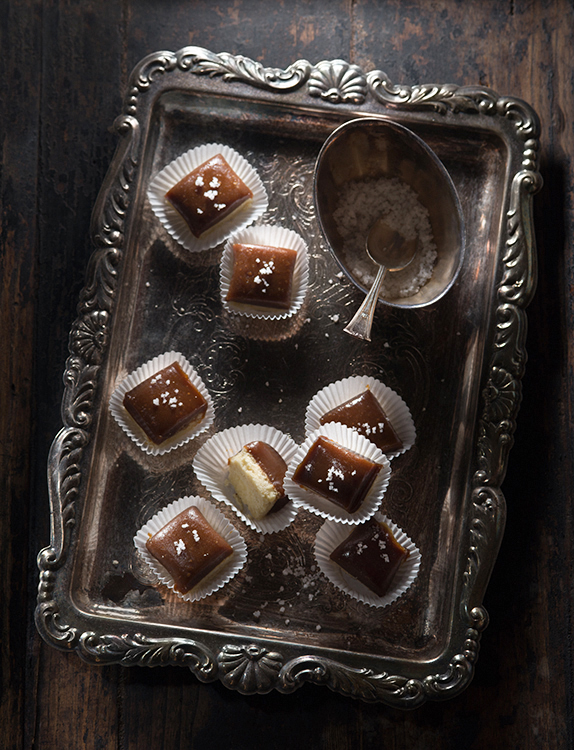
Shadows make a scene look realistic, give your food texture, and create mood, so don’t hesitate to make them part of your food photo. To create nice, dark shadows let your light fall onto your food either from the back or the side at a fairly low angle, from just a little bit above the surface of your set. Use reflectors sparingly, or not at all. Reflectors bounce light back into the areas of your photo that your light source doesn’t reach, in other words, into the shadows. So to keep the shadows dark, don’t reflect the light.

1 Salted Caramel Candy

In the salted caramel candy photo above my light was falling onto the set from the back at a low angle and I didn’t use any reflectors.

#2 Imply action

Action makes your viewers feel as if they are part of your scene; that kind of engagement is always a good thing. Action can be literal, such as a hand holding a hamburger or pouring syrup over a stack of pancakes, but there are other (and actually easier) ways for you to suggest that something is happening in your photo. One example is a glass of freshly poured beer. Your viewers likely know that the lifespan of the foam top on a beer is only a minute, so seeing a fresh beer tells them that someone must have just been at the scene to pour it.

2 BBQ Ribs

#3 Point your lens up at food that is tall and stacked

Shooting up from slightly below the food is an unusual angle for food photography; but it can create really compelling images of tall items such as cakes, and things that are stacked, like burgers or, as in the example below, shards of toffee. The food will be towering above the viewer which makes it look big and impressive. Needless to say this angle doesn’t work for flat food, so don’t shoot a pizza with this method.

3 Toffee

#4 Create visual contrast

Contrast comes in many varieties and helps make your food photo look interesting. You can create contrast by incorporating different shapes into your photo, such as round and rectangular (or square). You can also create contrast by including colors in your photo that are on opposite sides of the color wheel (complementary), like red and green, or blue and orange. The lettuce cup photo below illustrates both of these concepts, the square dish contrasts the round lettuce cups and the red sauce provides contrast to the green lettuce.

4 Lettuce Cups

#5 Leave negative space in the image

Don’t feel that you have to fill every square inch of the frame with food or props. A little negative (empty) space gives the food room to breathe, and will keep your viewers from getting overwhelmed and feeling claustrophobic. There are no hard and fast rules that dictate where to leave negative space in a food photo but the rule of thirds is always a good place to start. Imagine your photo dissected into thirds, both vertically and horizontally, and place your subject on or near one of the four points where those lines intersect. Leave the rest of your photo empty and take a test shot. Does the scene look good to you or is it too barren? If it looks like it’s missing something, add more elements to the frame, one by one and along the imaginary lines that dissect your frame, until you have a composition that looks pleasing to you. That’s how I went about composing the Thai curry ingredients shot below.

5 Thai Curry Ingredients

I hope these tips give you some new ideas for your food photography. If you have any others please share them in the comments below.

googletag.cmd.push(function() {
tablet_slots.push( googletag.defineSlot( “/1005424/_dPSv4_tab-all-article-bottom_(300×250)”, [300, 250], “pb-ad-78623” ).addService( googletag.pubads() ) ); } );

googletag.cmd.push(function() {
mobile_slots.push( googletag.defineSlot( “/1005424/_dPSv4_mob-all-article-bottom_(300×250)”, [300, 250], “pb-ad-78158” ).addService( googletag.pubads() ) ); } );

The post 5 Tips That Will Make Your Food Photos Stand out from the Crowd by Nicole Branan appeared first on Digital Photography School.


Digital Photography School
 
Comments Off on 5 Tips That Will Make Your Food Photos Stand out from the Crowd

Posted in Photography