RSS
 

Posts Tagged ‘from’

Fly-by: Learn how to shoot the Milky Way from an airplane

24 Jun

Photographing the Milky Way from the ground can be challenging in itself, but photographer Ian Norman has taken the challenge to new heights. In a new video tutorial, he explains how he and his partner Diana Southern photographed the Milky Way from an airplane. 

Together, the couple make up the team behind Lonely Speck, a blog dedicated to astrophotography. They were on a flight to Budapest when they began to wonder if they could capture the Milky Way from the plane. Sure enough, after some trial and error outlined in the video above, they found it was possible. Ian explains in the tutorial how he layered multiple exposures in post-processing to reduce noise in his final images.

The results are pretty amazing. We know what we’ll be doing next time we get bored on an overnight flight. 

Articles: Digital Photography Review (dpreview.com)

 
Comments Off on Fly-by: Learn how to shoot the Milky Way from an airplane

Posted in Uncategorized


Plugin allows direct Instagram posting from Lightroom

21 Jun

Despite its success and millions of users, many people still think of Instagram as an image sharing platform for teenagers to post selfies and pictures of their breakfast. In reality, Instagram is full of inspiring photography as many professional photographers and talented amateurs have discovered the platform as a viable tool for promoting themselves and their work.

Problem is that, despite more and more ‘serious’ photographers using it, Instagram remains a mobile platform and posting pictures that have been taken with a non-connected camera and edited on a computer typically involves some third-party uploading tool or image transfer to a mobile device for upload. 

Now a new Lightroom plugin makes things considerably easier, at least for those users who rely on Adobe’s editing and image management software. LR/Instagram lets you post images to Instagram directly from Lightroom. Once installed you can authorize one or more Instagram accounts. Images are uploaded by dragging them into a publish collection and before you do so you can add hashtags or captions or crop your images to an aspect ratio that is supported by Instagram. By default images are auto-padded with a white border.

The plugin can be downloaded and installed for free from the LR/Instagram website but the developers ask for a $ 10 contribution via registration in the Lightroom Plugin Manager if you like the tool.

Articles: Digital Photography Review (dpreview.com)

 
Comments Off on Plugin allows direct Instagram posting from Lightroom

Posted in Uncategorized


The Winner of $1000 from our 101 Landscape Lightroom Presets Competition is….

19 Jun

Recently we launched 101 Landscape Lightroom Presets product. As part of the launch we put everyone who purchased a copy into the draw to win $ 1000 in camera gear. Those who purchased the bundle (101 Lightroom Presets and 101 Landscape Lightroom Presets) received 2 entries.

The winner of this competition is Terrence Jones

Congratulations – we’ve just emailed you with details of how we’ll get you your prize and can’t wait to see what you buy!

landscape-lightroom-presets

Thanks everyone else for picking up a copy of the the presets packs – we’ve received some amazing feedback and appreciate you supporting dPS with your purchase.

googletag.cmd.push(function() {
tablet_slots.push( googletag.defineSlot( “/1005424/_dPSv4_tab-all-article-bottom_(300×250)”, [300, 250], “pb-ad-78623” ).addService( googletag.pubads() ) ); } );

googletag.cmd.push(function() {
mobile_slots.push( googletag.defineSlot( “/1005424/_dPSv4_mob-all-article-bottom_(300×250)”, [300, 250], “pb-ad-78158” ).addService( googletag.pubads() ) ); } );

The post The Winner of $ 1000 from our 101 Landscape Lightroom Presets Competition is…. by Darlene Hildebrandt appeared first on Digital Photography School.


Digital Photography School

 
Comments Off on The Winner of $1000 from our 101 Landscape Lightroom Presets Competition is….

Posted in Photography


5 Tricks from Professionals to Help You Do Better Wildlife Photography

17 Jun

Whether professional or an amateur, most photographers who enjoy wildlife photography do it because we love being outside in nature, and we love to share our experiences of the world’s wild creatures. Carrying our cameras, and making images along the way, helps us to truly see and appreciate what nature has to offer.

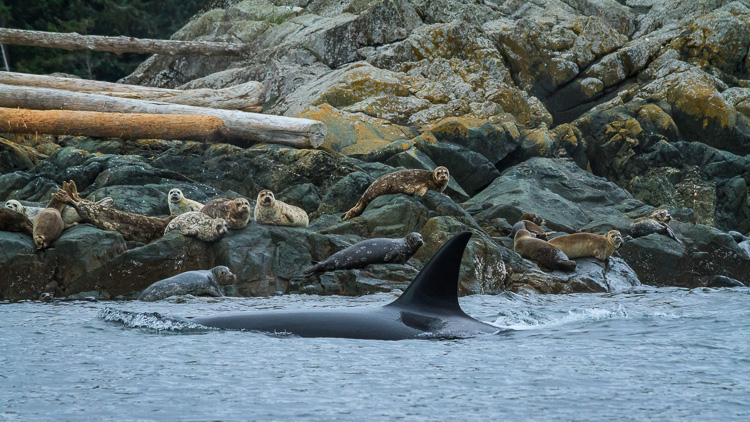
Orca, also known as killer whales, hunting seals by Anne McKinnell

But there’s more to making a captivating wildlife photograph than simply having an animal in the frame. If you just snap a shot when an animal is in front of you, you may find that your photograph lacks the impact you were after.

Next time you are out in the wild, try out these five tricks that professional wildlife photographers use to capture the world’s wild creatures at their best.

1. Watch and Learn

Every one of the world’s many species of animals are different. You cannot photograph them all the same way. But, if you spend some time observing your creature’s behaviour, you’ll be better equipped to click the shutter at exactly the right moment.

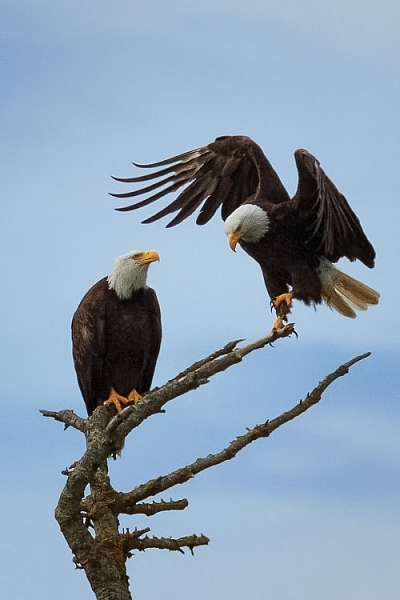
Two bald eagles by Anne McKinnell

It’s all about that special moment when the animal is doing something – whether it’s flying, walking, making eye contact, or interacting with another animal. Like spending time with friends, you come to know when they are going to do a particular thing and what triggers a reaction. Once you observe and understand their behaviour, be patient, be quiet, and wait for the right moment.

We often think of wildlife photography as being exciting, but more often than not, better images are made when it is a quiet, contemplative experience.

2. Use Faster Shutter Speeds

Many a great wildlife photograph has been ruined when an animal moves faster than the photographer anticipated, resulting in a slightly blurry image. It has happened to us all. Try not to let that happen by increasing your camera’s ISO, which will allow you faster shutter speeds.

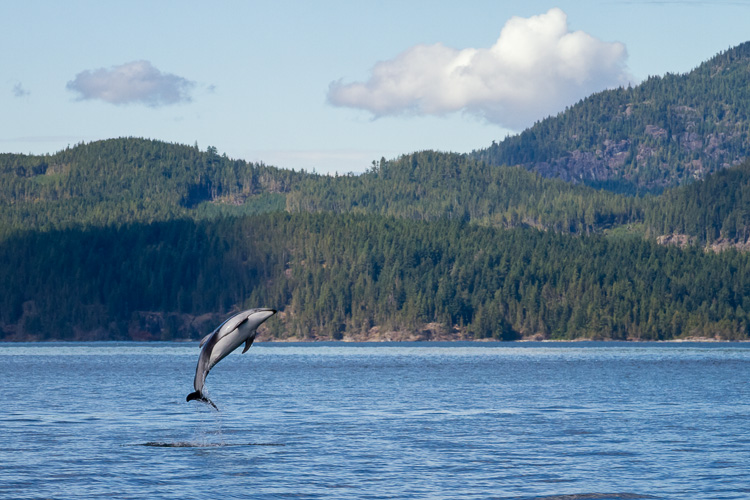
Pacific White Sided Dolphins by Anne McKinnell

Even when your subject is absolutely still, you never know when they’ll decide to move, and that could be the magic moment you’ve been waiting for. Be ready by using a shutter speed of at least 1/500th of a second.

3. Carry Two Camera Bodies

The most important thing is to capture that special moment, so don’t miss it by changing lenses. It’s better to pick two lenses to work with, and have each mounted on its own camera body. Then, when you need to switch, you simply put down one camera, pick up the other, and you’ll be ready to shoot in less than one second. I usually use one camera with a 70-300mm lens, and the other with a 400mm lens.

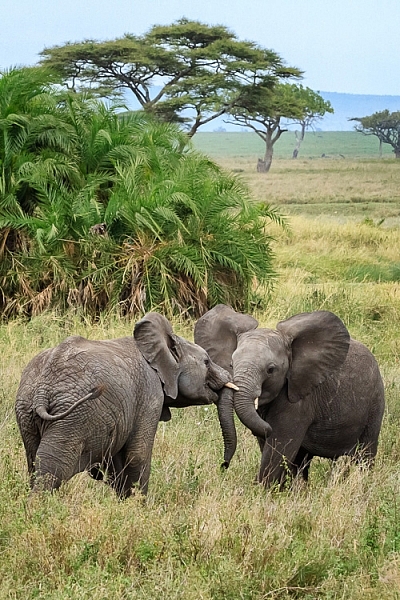
Two elephants playing in Serengeti National Park, Tanzania by Anne McKinnell

4. Don’t Get Rusty

You don’t have to wait until you have an exotic animal to work with! Keep your skills sharp by practicing with whatever animals are nearby. You might surprise yourself and come up with some of your favourite shots. Practicing with seagulls and geese, will ultimately improve your photos of cranes and spoonbills when you have the opportunity to shoot them.

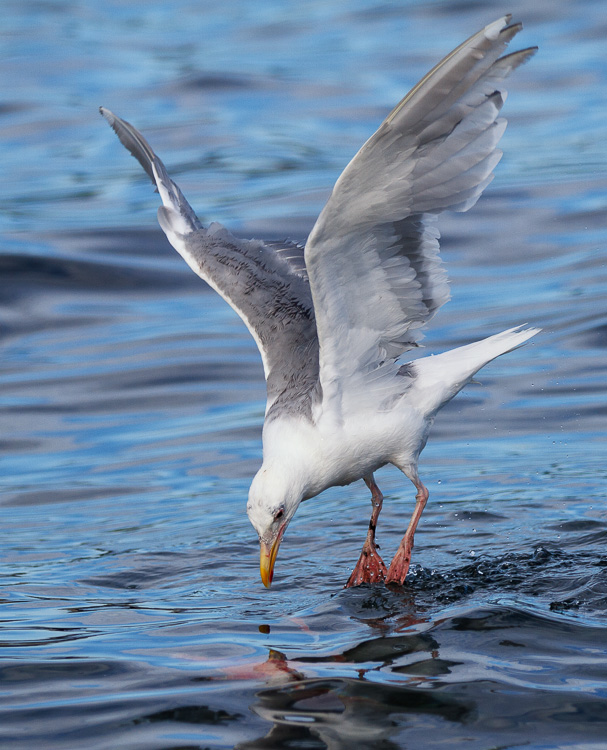
Seagull looking at underwater sockeye salmon by Anne McKinnell

Try setting up a bird feeder outside your window and you can practice on the birds that come right to you.

5. Vary Your Compositions

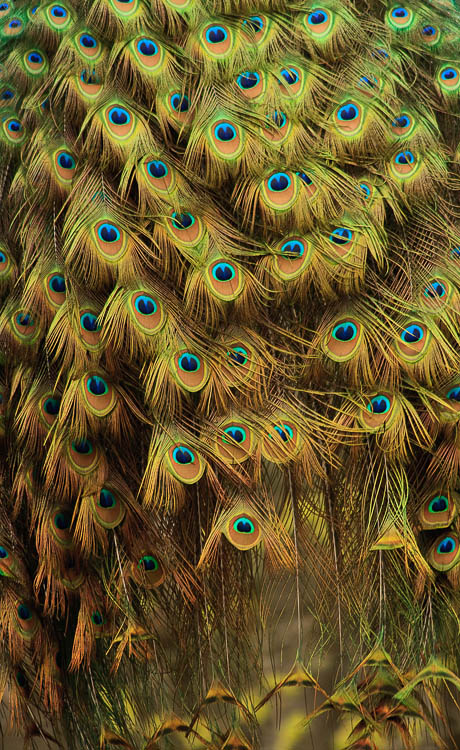
Usually when we photograph wildlife, we want the animal to fill as much of the frame as possible. But once you get that shot, don’t keep making the same shot over and over. Try some different compositions, such as getting super close to just part of the animal. You can shoot just the eye, or zoom in on an interesting detail.

The tail feathers of a peacock by Anne McKinnell

Then try zooming out and photographing the animal and its environment. Also try to change your perspective. Get on eye level with your subject or try making an image from a lower angle.

By understanding your subject, having good techniques under your belt, and lots of practice, you’ll be well on your way to making more captivating wildlife photographs. If you have any other tips of tricks for wildlife photography please share them, and your images in the comments below.

googletag.cmd.push(function() {
tablet_slots.push( googletag.defineSlot( “/1005424/_dPSv4_tab-all-article-bottom_(300×250)”, [300, 250], “pb-ad-78623” ).addService( googletag.pubads() ) ); } );

googletag.cmd.push(function() {
mobile_slots.push( googletag.defineSlot( “/1005424/_dPSv4_mob-all-article-bottom_(300×250)”, [300, 250], “pb-ad-78158” ).addService( googletag.pubads() ) ); } );

The post 5 Tricks from Professionals to Help You Do Better Wildlife Photography by Anne McKinnell appeared first on Digital Photography School.


Digital Photography School

 
Comments Off on 5 Tricks from Professionals to Help You Do Better Wildlife Photography

Posted in Photography


Amazing underwater 4K footage from Canon EOS-1D X Mark II

14 Jun

Backscatter Underwater Video & Photo in Monterey CA is the world’s leading supplier for underwater imaging equipment. But as well as selling underwater photography gear, the staff at Backscatter also put it to good use.

Staff member Russ Sanoian has been diving with the Canon EOS-1D X Mk II for a little while and you can check out the results of his dives in the video below. We spoke to Russ about what makes a good underwater camera, and why he thinks the EOS-1D X Mark II is a good option for stills and video shooters.

What do you do at Backscatter?

Backscatter is the largest underwater Photography store in the world. We dive, shoot and service everything we sell and all employees are underwater videographers and photographers. I am our Product Manager and responsible for sales of underwater equipment. 

What makes a good underwater camera?

Large sensors and High ISO are critical for good underwater performance as it’s typically a low light environment. Artificial lights or strobes can help with macro/close up, but for wide-angle photography. To shoot with the EOS-1D X Mark II I’m using a Nauticam 1D X Mk II housing with a Small HD Monitor.

What has impressed you about the Canon EOS-1D X Mark II underwater?

I owned and shot with the Sony a7R II before the 1D X Mk II, but the Canon shoots 4K at 60p, which is a big deal. It’s great in low light and ISO at 2500 footage is incredibly clean.

I’ve also found that Canon cameras are the best for manual white balance underwater, they will nail a custom white balance setting at any depth and have the best blues in the industry even edging out RED cameras. So far I have shot the EOS-1D X Mark II with the Canon EF 100mm F2.8L IS USM Macro IS and the Canon EF 8-15mm F4L Fisheye USM attached.

Can you share some quick tips for underwater photography?

Always shoot in manual mode, and lock focus manually. This can be extremely challenging for macro subjects but is the best way to shoot with such a narrow depth of field. The 1D X Mk II has incredible autofocus and I have been testing it but so far it’s just not accurate enough for underwater work.

Articles: Digital Photography Review (dpreview.com)

 
Comments Off on Amazing underwater 4K footage from Canon EOS-1D X Mark II

Posted in Uncategorized


Tokina AT-X 11-16 Pro DX II Review: Best Value from Wide Angle

09 Jun

Tokina 11-16mm f2.8 is an ultra wide angle lens for crop sensor camera bodies (DX) with a moderately fast constant aperture of f2.8. It is Tokina’s top of the line lens (AT-X) with an internal focusing (IF) and Super-low Dispersion glass (SD). It is available in Canon, Nikon and Sony A mounts. Due to its focal length and fast aperture, Continue Reading

The post Tokina AT-X 11-16 Pro DX II Review: Best Value from Wide Angle appeared first on Photodoto.


Photodoto

 
Comments Off on Tokina AT-X 11-16 Pro DX II Review: Best Value from Wide Angle

Posted in Photography


Photo Composition Tips from Bob Holmes – Composition in Travel Photos

23 May

Who better to get photo composition tips from than four-time Travel Photographer of the Year award-winner, Bob Holmes? He shares some techniques you can use to work with composition and take better photos, no matter where your travels may take you.

Havana 012016 1314 Thumb dPS

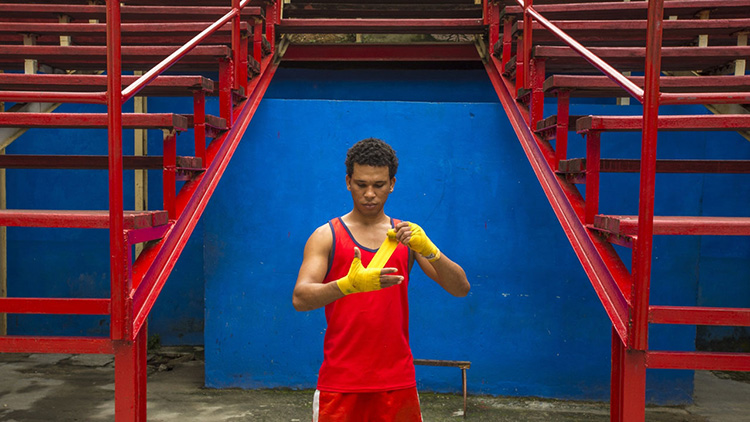
Bob has been all over the world, and his travel photos have appeared in National Geographic, Departures, and 46 books as the sole photographer. Working outdoors on most of his trips, Holmes is an expert at using natural lighting in photos.

He loves looking for composition that grabs you, and his unique tip is that you need to “get in the zone” and be fully responsible for everything in the frame. The key to learning composition is to practice – you can’t become a great photographer in a week, but you will get there by shooting as much as you can.

Bob Holmes dPS

Watch this video interview I did with Bob Holmes, then look below the video for more helpful resources.

Check out these dPS resources for more info:

  • LIFE IN NATURAL LIGHT- The Ultimate Guide to a photographer’s most powerful tool
  • NATURAL LIGHT – Mastering a Photographer’s Most Powerful Tool
  • TRANSCENDING TRAVEL – A guide to captivating travel photography

googletag.cmd.push(function() {
tablet_slots.push( googletag.defineSlot( “/1005424/_dPSv4_tab-all-article-bottom_(300×250)”, [300, 250], “pb-ad-78623” ).addService( googletag.pubads() ) ); } );

googletag.cmd.push(function() {
mobile_slots.push( googletag.defineSlot( “/1005424/_dPSv4_mob-all-article-bottom_(300×250)”, [300, 250], “pb-ad-78158” ).addService( googletag.pubads() ) ); } );

The post Photo Composition Tips from Bob Holmes – Composition in Travel Photos by Marc Silber appeared first on Digital Photography School.


Digital Photography School

 
Comments Off on Photo Composition Tips from Bob Holmes – Composition in Travel Photos

Posted in Photography


Striking: Photos from a lightning hotspot in Venezuela

21 May

$ (document).ready(function() { SampleGalleryV2({“containerId”:”embeddedSampleGallery_2035541136″,”galleryId”:”2035541136″,”isEmbeddedWidget”:true,”standalone”:false,”selectedImageIndex”:0,”startInCommentsView”:false,”isMobile”:false}) });

For landscape photographer and storm chaser Jonas Piontek, Lake Maracaibo in Venezuela is practically paradise. The lake’s proximity to the Andes and the Caribbean Sea set the conditions for a so-called ‘never ending storm,’ with lightning storms occurring almost 300 days of the year. You’d even notice it from space apparently, as NASA has named it the ‘Lightning Capital of the World.’

You can see a few of his photos here, and over at Resource Travel Piontek describes what it’s like photographing Maracaibo’s daily light show.

Articles: Digital Photography Review (dpreview.com)

 
Comments Off on Striking: Photos from a lightning hotspot in Venezuela

Posted in Uncategorized


5 Tips for Going from Pixels to Print Quality

18 May

Whatever level of photographer, you are sure to have gathered a stockpile of pixels.

It’s just the way it is nowadays. Whether you are the kind of person that clogs up their hard drive, gradually slowing your Mac or PC down until you are forced to do something about it. Or perhaps you are already super organized having kept negatives, CDs, DVDs, hard drives, a raid system or even the cloud?

Indeed whatever storage method you choose you need to catalogue the files by name, event, and year, so you may retrieve without having a complete breakdown while searching for your favorite file. After all photography should be fun, not pain.

Many photographers use Lightroom, which is a great program, not only for editing but also for organizing your ever-increasing pile of pixels. But then what? What do you do with them then? I think you would agree we all spend too much time in front of screens? So why would you keep your masterpieces locked away in digital format?

To create that killer slideshow you will amaze your friends with is a lot of fun, especially if you have a large TV or digital projector. However, be careful of the content of your slideshow. Nothing worse than visiting a friend, only to be subjected to look through every snap taken on their holiday. Slideshows really should not be much more than ten minutes long or people generally loose interest. Keep them simple also, not too many whizzy effects, that just makes your viewer feel queasy!
PIC 10 simonjohn co uk

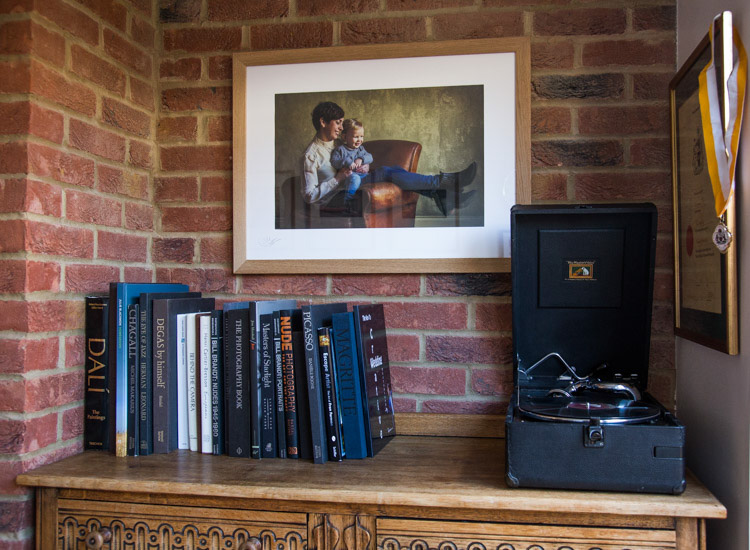
So you have this catalogue full of great images, what next? I would say enjoy them. Have your favorites printed and framed. Photography is personal, just like any other art form. By printing your special images, and hanging them in your home, you are not only enjoying the fruits of your labour, but also creating personalized wall art. This shows friends your talents, without the need for a longwinded slideshow.

You may find as time goes by, the framed photographs mean more or less to you. This is quite natural as we grow, and our taste and habits change also. Not to worry, you can always replace them with fresh images. It’s not like the old days when the portrait your parents had remained in the given spot forevermore. In fact, it is refreshing to change your images from time to time. Just like wallpaper or any other interior design things, move on. Only when you can look back at a photograph you made perhaps 10, 20, or 30 years ago, and still love it, will you know it’s a keeper!

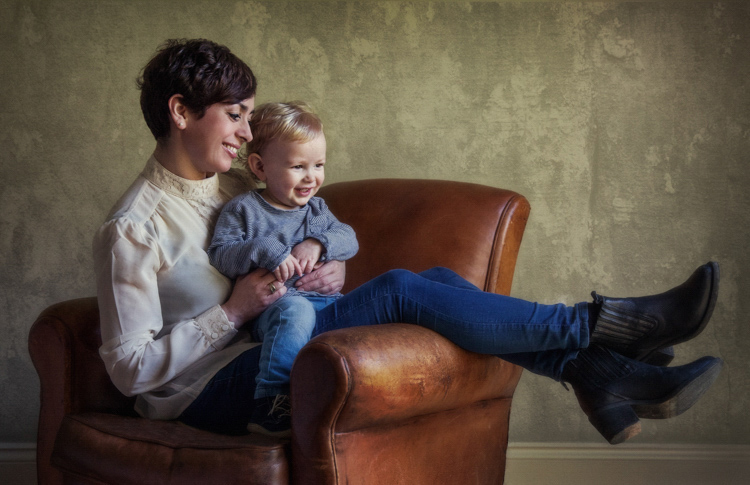
My background is a portrait and wedding specialist. Lets take a look at an image from my portfolio. I will describe the process from capture through editing, and finally the framed piece for the wall (above).

#1 – Get it right in-camera
Pic 1 simonjohn co uk

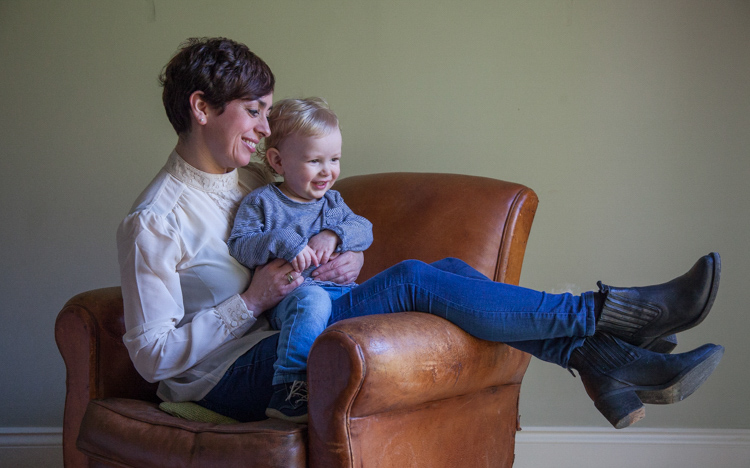
As you can see the old chair, and soft natural light, was perfect for the basis of this portrait. I positioned the mother in the first third of the image, placing her legs over the arm of the chair for a more relaxed contemporary look. My directions to her were simply to get close, and look at your beautiful boy. All I had to do then was to get the toddler to look in the right direction, with the expression to fit. A squeaky toy often saves the day!

The mother is in profile, while the toddler is in three quarter face, adding interest and different angles to the image. The lighting was a large window (not with hard sunlight) off to the right. I also placed a reflector just below the mum’s boots, to bring light back into the eyes and softly wrap around into the shadows. The exposure was 1/250th (freezing the toddler) with an aperture of f/5.6, using a 70mm focal length, as my back was pressed against the far wall of the room.

So to summarize; I feel the expressions are captured well. The lighting is fitting, being soft and directional. The image has style, and is well balanced compositionally. But it just needs something more. The capture stage is so important to get right. Photoshop should not be regarded as a fixer. The great Ansel Adams talked about “printing virtuosity” and just because we now craft our images on a screen, as opposed to in the darkroom, quality and finishing are still paramount.
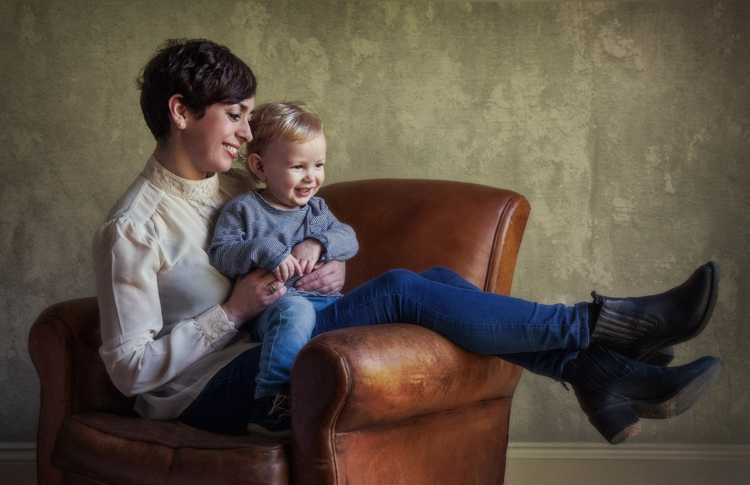
So take a look at the edited image below.
Pic 2 simonjohn co uk

#2 Basic adjustments in Photoshop or Lightroom

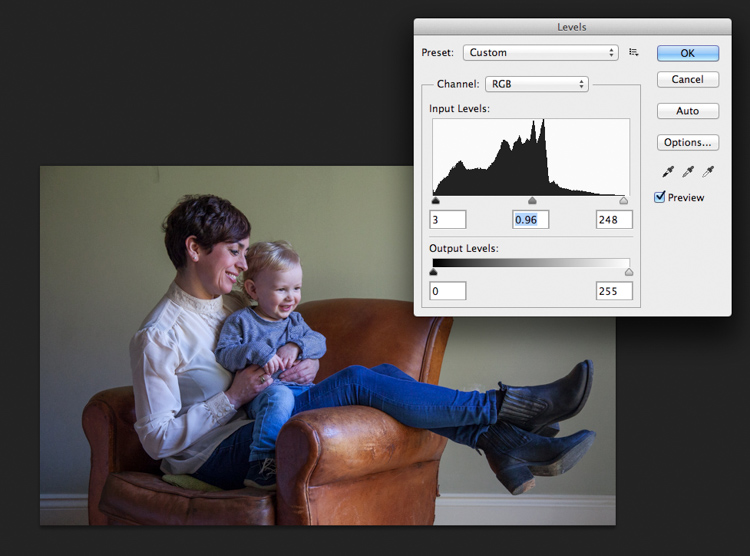
Firstly, you will need to level the image in Photoshop, bringing the sliders in to just clip the histogram at both ends. This ensures depth in the blacks and good clean whites. The mid-tone is really your X factor, but just be aware that you have detail throughout all tones if that is the look you are after. Be careful if you make it too light, the image could appear milky. While if you make the mid-tones too dark the image could appear muddy.
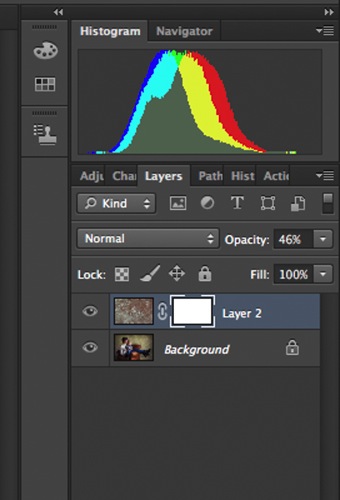
Screen Shot 2016-04-27 at 21.12.41-untitled

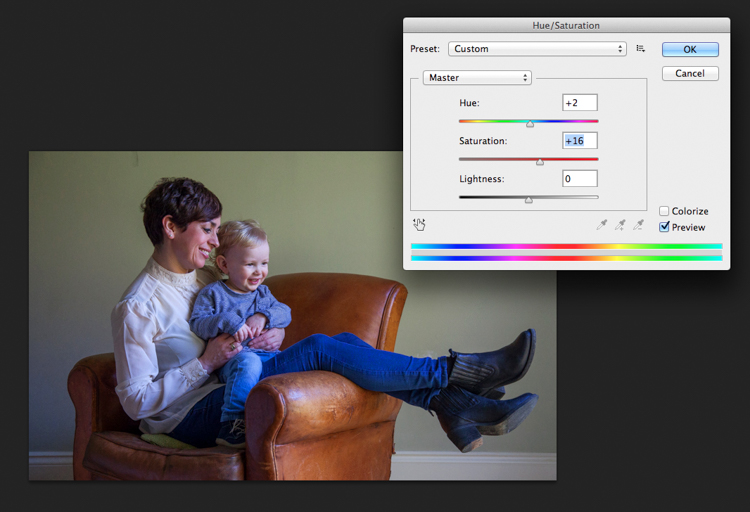
Secondly, I have adjusted the Saturation and the hue of the image to achieve the color pallet I require. Often you can go between the levels and saturation, and make small tweaks as the image takes shape.
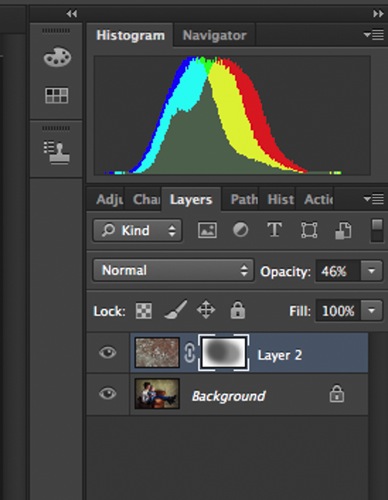
Screen Shot 2016-04-27 at 21.13.20-untitled

#3 – Add a texture overlay (optional)

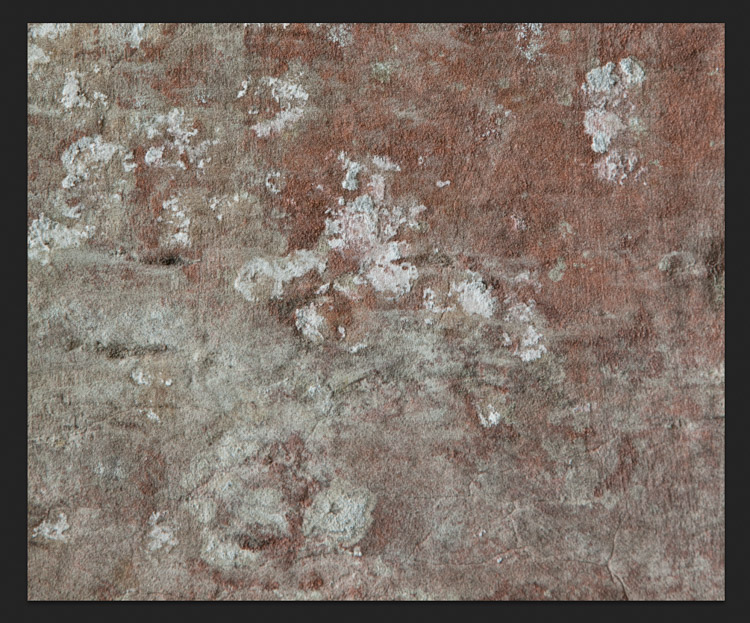
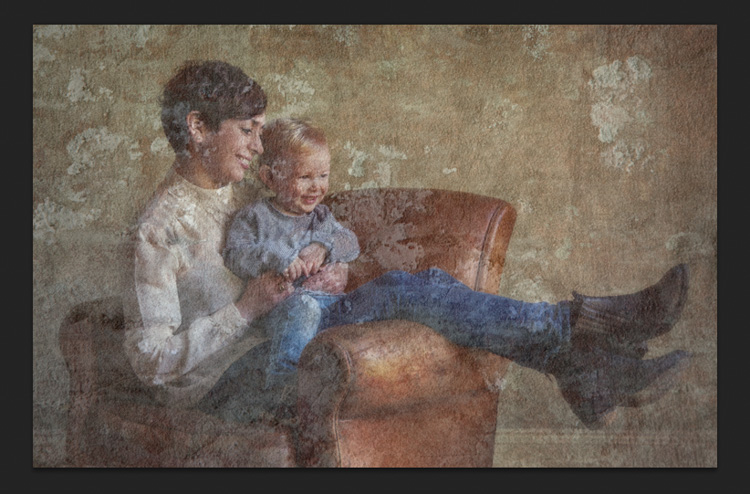
Next you could do as I have here, added a texture overlay. I felt it complimented the chair in its shabby chic style. I photographed a piece of wall, then blended the two images using opacity in the layers pallet. I added a layer mask, then rubbed through with a soft brush to create the subtle look you see here. I then added a soft Gaussian blur from the PS filters, blending the two layers together.
PIC 5 simonjohn co uk

PIC 6 simonjohn co uk

Pic 2-simonjohn.co.uk-untitled

PIC 8 simonjohn co uk PIC 9 simonjohn co uk

#4 – Local tone control

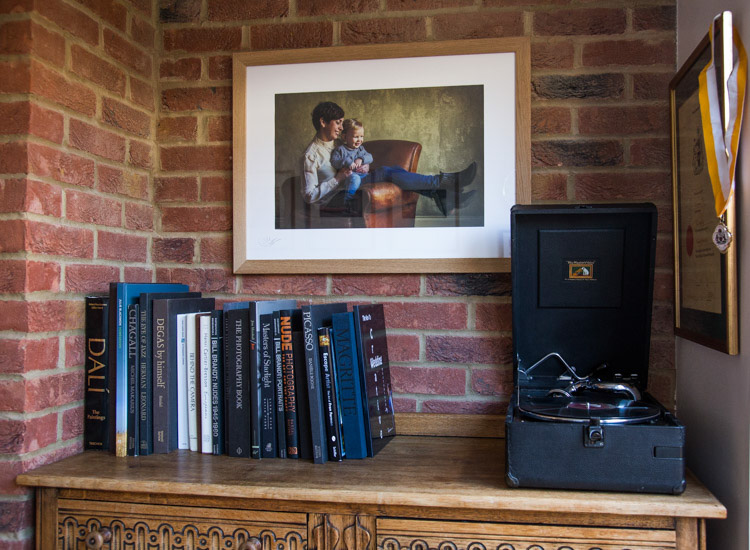
Finally to complete my image I needed to Dodge and Burn. As you can see this really is a subtle finishing skill, and should not be left to a Photoshop filter. In a future article I will explain exactly how to dodge and burn your images like a professional, directing the eye of your viewer to the important parts of the image. But for now, let’s see the final piece as it was hung on my gallery wall.
PIC 10 simonjohn co uk

#5 – Print it

I have printed the image on Fuji fine art 300mgs rough texture paper, which I love. The paper is not only excellent for color rendition but has a wonderful tooth to it, adding texture and depth. I have framed the portrait in a simple natural oak and white acid free mount. I have chosen clear glass. Although there is much talk about non-reflective glass, this simply flattens and dulls the image; I would not recommend it. The finished portrait compliments its surroundings, and fits well into the décor and given space.

As I said at the start of the article, it’s important to display your favorite images rather than hide them away on a computer. I am happy to share with you, that I have done just that here. This is my girlfriend Yvonne and my son Miles.

Some photographers prefer to print their own images. This can be a very good way of speeding up workflow and achieving exactly the right colors you require. In recent years printers have became smaller, and inks and paper more archival. I will perhaps invest this year simply for ease of use, and meeting clients deadlines. Perhaps one issue, according to friends who print their own, is you tend to have a fair amount of wastage profiling papers and inks. If you are not particularly a high volume, large output photographer, ink wells can get clogged up causing spattering of pigment. However I think both these problems are now almost eradicated as technology improves year after year.

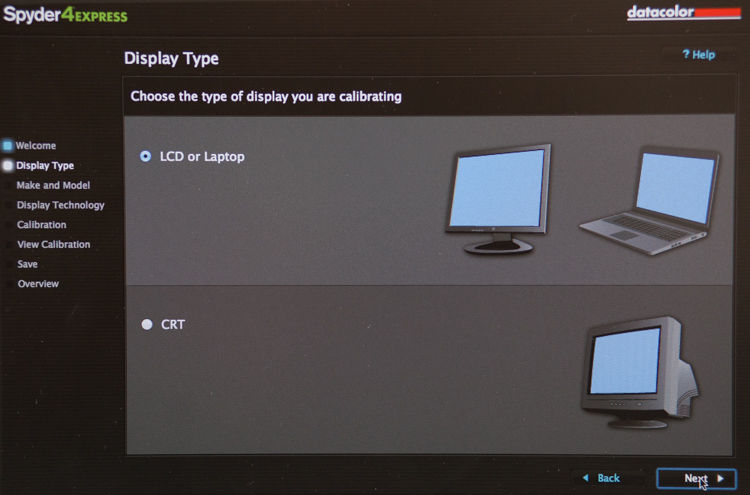
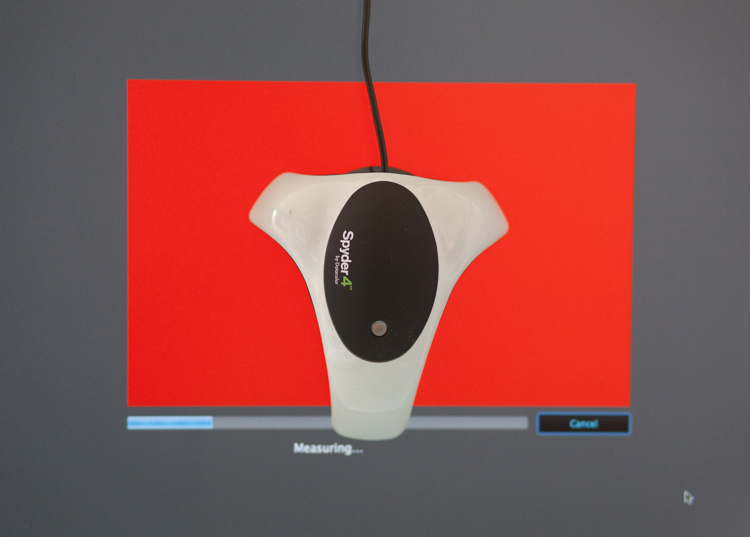
If you choose, as many professional photographers do, to use a pro lab you have to close the color loop from the start. I use a Spyder 4, as seen in the screenshots below, and my lab use the Epson 9900 and 4900 for printing the Giclee fine art papers I require.
 

2

4
It is attached via USB to your monitor, and simple to follow with onscreen instructions. Basically it brings the colors back in line within the colors space you use. Until recently most labs suggested sRGB, as the colors seen on your screen were pretty much what could be printed. The other often used space is Adobe 98, but not all printing machines can produce such subtleties in color. Progress moves on and there are machines that can print Adobe 98, but my advice for now would be stick with sRGB (ask your lab if you want to know which they use).

Because you are working in a given color space the lab can set its own monitors accordingly, and with a skilled technician the loop should be closed. Sometimes you may find a print is slightly too dark or light. This may be due to the ambient light in yours or your printer’s room being marginally different. A good working relationship is what is needed when using a lab. When asked to reprint an image they should work with you, and offer tips and help if needed; its in everyone’s interest. I rarely have a print that is off, but if I do my lab simply reprints without charge.

So how should you prepare your files? Follow this checklist below for ease of use:

  • Always shoot in raw. Much more detail recorded through highlight to shadow.
  • Save the raw file but create a working tiff.
  • Once you are happy with the finished tiff export as a jpg if sending to a lab.
  • Export or print always at 300dpi for best quality.
  • Check your prints against your monitor and if adjustments are needed, make sure you talk to your lab first.
  • Never compromise composition for print size, i.e. if your image looks better 10×5.5 rather than 10×8, make it that way and drop it on the nearest paper size available. Simply have a mat made to fit your masterpiece.

Do not hang your finished prints in direct sunlight. Like anything that has natural fibers and dyes they will fade. Hung correctly, ink jet prints are now considered very stable, and a alternative to traditional lab chemistry for environmental reasons, but also better quality colors and increased tonal range.

Please share photos of prints you make and hang up on your walls in the comments below. Ask any questions you may have about the process as well and I will try and help you out.

googletag.cmd.push(function() {
tablet_slots.push( googletag.defineSlot( “/1005424/_dPSv4_tab-all-article-bottom_(300×250)”, [300, 250], “pb-ad-78623” ).addService( googletag.pubads() ) ); } );

googletag.cmd.push(function() {
mobile_slots.push( googletag.defineSlot( “/1005424/_dPSv4_mob-all-article-bottom_(300×250)”, [300, 250], “pb-ad-78158” ).addService( googletag.pubads() ) ); } );

The post 5 Tips for Going from Pixels to Print Quality by Simon John appeared first on Digital Photography School.


Digital Photography School

 
Comments Off on 5 Tips for Going from Pixels to Print Quality

Posted in Photography


Win One of Three Lenses from Tamron – Enter the Sunshine Photography Contest

09 May

Win one of THREE lenses from Tamron! Enter the “Sunshine” photography contest today.

Win one of the following:

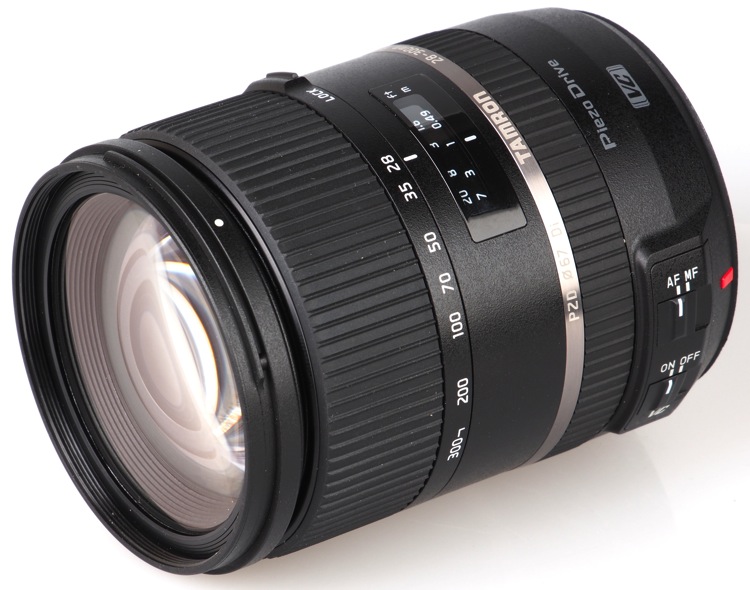
  • A Tamron 28-300mm Di VC PZD lens
  • A Tamron SP 90mm F/2.8 Di VC USD lens
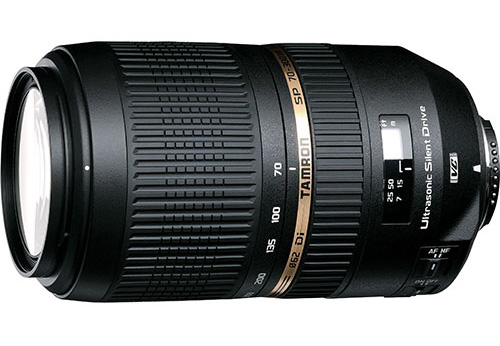
  • A Tamron SP 70-300mm Di VC USD lens

Over the last few years here at dPS, we’ve run very some very popular competitions with our partners, to give away to lucky dPS readers some of their great photographic products. We are lucky enough to be able to do it again.

For this contest, Tamron is giving away three lenses!

These three unique prizes are designed to help every level of photographer create better pictures. Tamron is the world’s most awarded photographic lens line. Each will be won by a different dPS reader. Here’s what you could win:

Our First Prize Winner will receive:

A Tamron 28-300mm Di VC PZD (model A010) – $ 849 value, for canon, Nikon or Sony cameras.

Tamron 28 300mm

The Second Place Winner will receive:

A Tamron SP 90mm F/2.8 Di VC USD Macro Lens (model F017-new) – $ 649 value, for canon, Nikon or Sony (without VC) cameras.

Second Prize SP 90mm

The Third Place Winner will receive:

A Tamron SP 70-300mm Di VC USD Zoom Lens (model A005) – $ 449 value, for canon, Nikon or Sony cameras.


Tamron-70-300

Learn a little more about Tamron here: Tamron USA

How to win

To win this competition you’ll need to:

  • Visit the above lens information pages and learn more about the lens and its core use.
  • Post your sunshine photo, along with a few words on how you feel one of the above Tamron lenses would help your photography. It’s as easy as that!
  • Do this in the next 21 days and after June 1st, 2016, the team at dPS will choose the best three photos and we will announce the winners in the following days.
  • The deadline to enter is May 30th at 11:59pm PST (UTC-7). Photos and comments left after the deadline will not be considered.

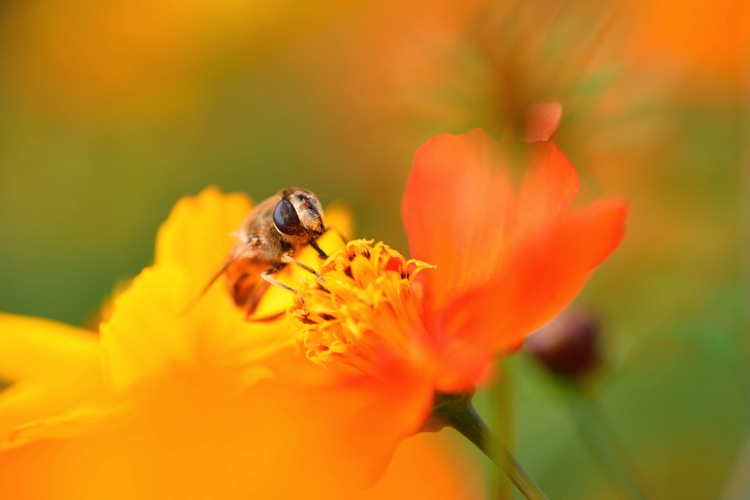
Bee Image

By best – we’re looking for people who have an understanding of photography, the role of lenses, and how they will best suit your needs. So you’ll need to check out the product pages to put yourself in the best position to win.

There’s no need to write essay length comments to win – but we’re looking to hear what you like about the lens, and how it would help your development as a photographer. Don’t forget to include your favorite sunshine themed photo. We encourage you to have fun and be creative.

This competition is open to everyone, no matter where you live – but there is only one entry per person. To enter – simply leave your photo and comment below.

Tamron logo

Disclaimer: Tamron is a paid partner of dPS

googletag.cmd.push(function() {
tablet_slots.push( googletag.defineSlot( “/1005424/_dPSv4_tab-all-article-bottom_(300×250)”, [300, 250], “pb-ad-78623” ).addService( googletag.pubads() ) ); } );

googletag.cmd.push(function() {
mobile_slots.push( googletag.defineSlot( “/1005424/_dPSv4_mob-all-article-bottom_(300×250)”, [300, 250], “pb-ad-78158” ).addService( googletag.pubads() ) ); } );

The post Win One of Three Lenses from Tamron – Enter the Sunshine Photography Contest by Darlene Hildebrandt appeared first on Digital Photography School.


Digital Photography School

 
Comments Off on Win One of Three Lenses from Tamron – Enter the Sunshine Photography Contest

Posted in Photography