RSS
 

Posts Tagged ‘Focus’

Review of The Promote Control for Time Lapse and Focus Stacking

20 Aug

Want to take super sharp “focus stacked” photographs that boast corner to corner sharpness with perfect focus? Want to shoot spectacular ‘holy grail’ time lapse sequences that capture the change from day to night? How about advanced bracketing for HDR shooting? Do you fancy getting shots like this?
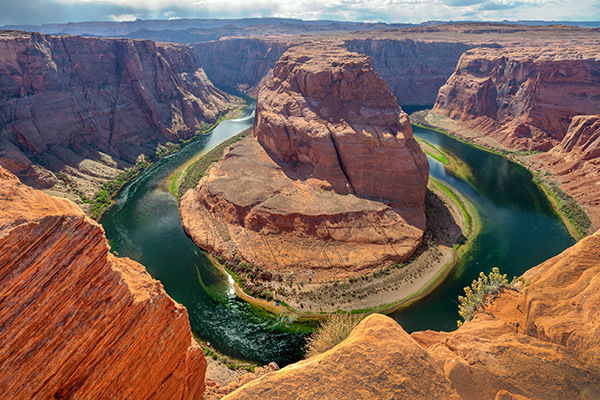
Horseshoe Bend Focus Stacked Gavin Hardcastle

The Promote Control from Promote Systems delivers very precise control over DSLR cameras to open up new creative possibilities. Here’s a list of things that the Promote Control can do:
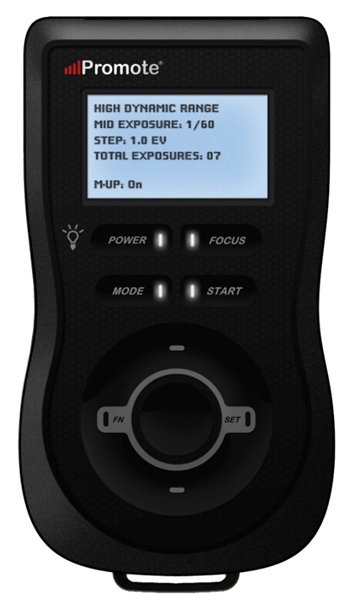
  • Promote Control ReviewHyperfocal Distance Calculator
  • Remote Shutter (One Shot)
  • Time Lapse Intervalometer
  • HDR Bracketing
  • BulB HDR Bracketing
  • Bulb Ramping for Time Lapse
  • Focus Stacking
  • Video Control
  • Manual Shutter for long Bulb Exposures

This device is like a Swiss Army Knife for photographers who want to get the most out of their DSLR cameras. Currently priced at $ 299, it’s an accessory that will appeal to the more hardcore shooters, but for those photographers that regularly need advanced HDR bracketing, focus stacking or bulb ramping, the Promote Control is worth every penny.

Rather than go into every single function of the Promote Control, I’m going to highlight its three most powerful features, which I believe merit the asking price themselves.

Focus Stacking

As a landscape shooter, I mostly want corner to corner sharpness in my images and sometimes I’ll use focus stacking to achieve maximum sharpness throughout the frame. This really only works when your static subjects are perfectly still, with little to no breeze. If you’ve ever tried focus stacking the manual way, you’ll know that there is some margin for error and it can take practice to do it well. The Promote Control takes all the guess work out of focus stacking by incrementally adjusting your focus from start and end points that you specify.

Once you’ve done this a couple of times you’ll never be able to go back to doing it manually. When you see the results of your focus stacked image and the lack of weird looking artifacts that can sometimes result from inaccurate focus adjustments done manually, you’ll be hooked.

Macro and small product photographers will love this feature.

Here’s an example of a focus stacked shot with corner to corner focus using a mid range aperture.

Focus Stacking with the Promote Control

Here’s a video demonstrating how this works with the Promote Control.

Bulb Ramping for day to night Time Lapse

If you’ve ever tried to shoot a time lapse sequence of the setting sun, you’ll know that there are only two ways to capture the correct exposures as the light changes. You either adjust the shutter speed manually while shooting (which introduces terrible flicker) or you use a bulb ramping device that can gradually and smoothly alter your shutter speed over time.

This technique is known as Bulb Ramping, and there really aren’t that many devices out there that do a good job. The Promote Control has become something of a “go to” bulb ramping solution for quite some time now, because it simply does such an excellent job of adjusting your DSLR camera’s shutter speed in tiny increments, over a set period of time. You tell the Promote Control how long you’d like to shoot, and when you’d like it to begin increasing or decreasing the exposure time.

Of course, it can’t know exactly when the changes in light occur, you have to know in advance by casing your location the night before, and making a note of the sunset time. The Promote  Control simply does what you tell it to do, and it does it well. Here’s a video of Joel Schat explaining how to achieve bulb ramping with the Promote Control.

HDR Bracketing

If three or five bracketed exposures simply aren’t enough to capture the dynamic range of your scene, how does 45 exposures sound? Simply tell the Promote Control what shutter speed to use for the middle (or correct) exposure, then tell it how many EV steps to use and the number of total exposures. The Promote Control will do the grunt work while you look around for the next shot.

A jack of all trades

Everything that the Promote Control does, it does well. I expect that most users will only use two to three of this device’s powerful features but at $ 299 it’s worth every penny.

Build quality
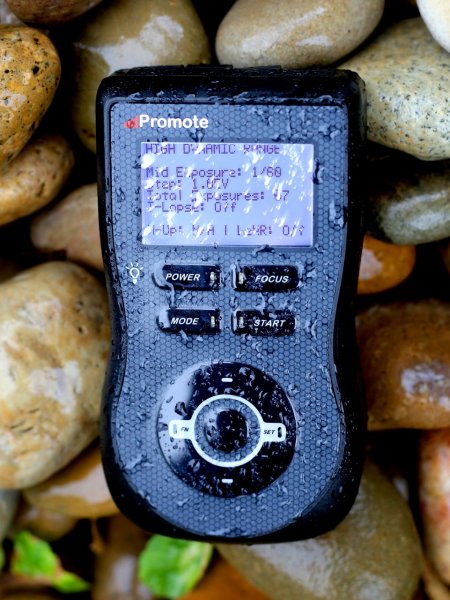
weather sealed promote control

The Promote Control is very well built. It’s a solid little unit that’s about the same size as a Smartphone, but is just under an inch thick. The backlit LCD screen is easy to read and there are only eight buttons on the entire unit. It’s small enough to pack into any mid-sized camera bag, and comes with a tidy little carry case. It even comes with a lifetime warranty for manufacturing and workmanship defects. How often do you see that?

The device is powered by two AA batteries which last a long time. You can also power the Promote Control with an external DC power jack for taking super long exposures, or lengthy time lapse shoots.

What I’d like to see in the next update

To me, there is one glaringly obvious function that is missing from this device. HDR Focus Stacking. Why not combine the advanced HDR bracketing feature and the focus stacking feature? When I focus stack manually, I often have to bracket in order to capture the dynamic range. I can’t imagine why this feature is not available with this device.

My only two complaints

The Promote Control is such a simple little device that there’s not much to complain about, it either works or it doesn’t. My only gripe isn’t with the unit itself, but with the hotshoe attachment, required for bulb ramping when shooting time lapse sequences. I found that the cable fell out of the hotshoe attachment at the slightest nudge, not something I would trust out in the field when shooting a lengthy time lapse.
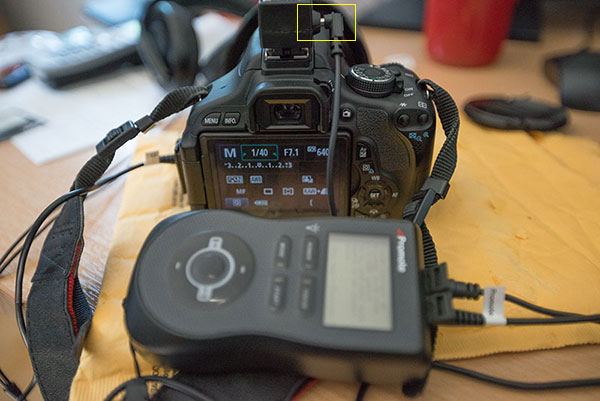
Hot Shoe Cable

I had problems with the cable that attaches to the hotshoe accessory.

My other complaint is that the Promote Control is not compatible with mirrorless cameras like my Sony A7R. Full compatibility only extends to Nikon and Canon, with limited compatibility for Sony and Sigma cameras. This is the only reason I decided not to buy the Promote Control. But if Promote Systems manages to catch up with the mirrorless movement, I’ll be unleashing the credit card.

I asked Promote Systems about it and this was their response:

We get a lot of requests for compatibility with the A7/A7R and we would love to support the cameras, but unfortunately Sony doesn’t make that possible. They implemented a tethering protocol on A7 cameras, but just as with earlier cameras, it refuses to save images on the card – you MUST pick them up and save them elsewhere, or all subsequent USB image acquisition commands will fail. Until Sony resolves the issues with not saving images on to the in-camera card when tethered, we can’t do much about it, unfortunately.

Why can’t my camera do all this?

When you look at what the Promote Control does and the results that it achieves, there’s obviously a demand for this level of functionality. There’s no reason why digital cameras can’t have all of this functionality built in, and with cameras like the Sony A7R able to run Apps that users install, it’s only a matter of time until all of this can be done in camera. Until then, Promote Systems are filling a gap in the market and they are doing it very well. I’m going to award the Promote Control 4 stars.

Would you buy this clever little device?

The post Review of The Promote Control for Time Lapse and Focus Stacking by Gavin Hardcastle appeared first on Digital Photography School.


Digital Photography School

 
Comments Off on Review of The Promote Control for Time Lapse and Focus Stacking

Posted in Photography


Lastolite ‘Out of Focus’ backgrounds bring beautiful bokeh to your home studio

26 Jul

Everyone loves the look of a nice out of focus background, but it’s hard to achieve in a home studio. Accessory manufacturer Lastolite believes it might have the solution, with two new reversible backgrounds printed with out of focus images of the ocean / autumn foliage and summer foliage / city lights. Measuring 1.5 x 1.2m, the backgrounds are big enough for almost full-length portraits of most adults, and weigh in at 3kg (6.6lb) each. Click through for more details.

Articles: Digital Photography Review (dpreview.com)

 
Comments Off on Lastolite ‘Out of Focus’ backgrounds bring beautiful bokeh to your home studio

Posted in Uncategorized


Adobe announces new ‘Focus masks’ feature in CC update

19 Jun

adobe_cc.jpg

Following last week’s video teasing the release of a new feature coming to Photoshop CC, Adobe has made the update official. In addition to the ‘Focus Masks’ feature that we already knew about, today’s official announcement brings a host of mostly minor new features including new blur effects, updates to content aware fill, and improvements to tools like smart guides. Read more

News: Digital Photography Review (dpreview.com)

 
Comments Off on Adobe announces new ‘Focus masks’ feature in CC update

Posted in Uncategorized


Adobe teases new ‘Focus masks’ feature

12 Jun

creativecloud.jpg

Adobe has released a video sneak-peek of a new feature due to be introduced into Creative Cloud which the company is calling ‘Focus masks’. In the video, Zorana Gee, senior Photoshop product manager explains that with focus masks, Adobe is ‘adding a new way to make an automatic selection based [on] pixels that are in focus versus out of focus’. Click through to watch the video and learn more. 

News: Digital Photography Review (dpreview.com)

 
Comments Off on Adobe teases new ‘Focus masks’ feature

Posted in Uncategorized


Using Focus Creatively with Food Photography

30 May

There are ways to use selective focus, or shallow depth of field, to completely control how you look at an image. Selective focus is using a large aperture, like f/4.5 or wider, to show only a small part of your image in focus. You can control where you want your viewer to look in your image by using this technique.

Eliminate Distracting Elements

If you have a potentially busy scene or environment, you can use selective focus to calm things down a bit and get your viewer to look where you want.

Selected Focus Olives

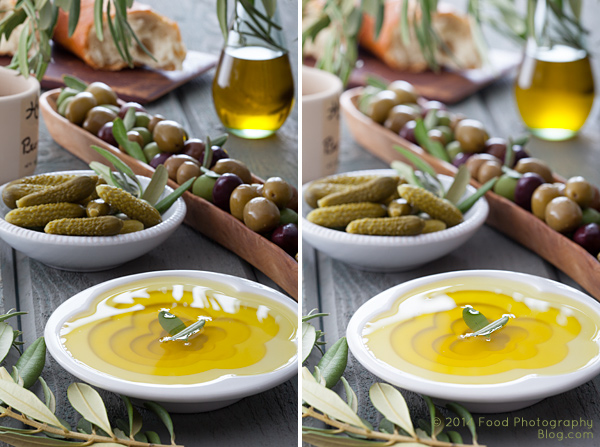
The left image was shot at f/16 while the right image was shot at f/5.6

When you compare the two images above pay attention to what you are looking at first, and how your eye moves around the images. There’s a lot going on in the image on the left. You really don’t know where to look at first. In the image on the right your eye goes right to the olive oil in the front, which is exactly where I wanted you to look. I wanted to make sure you didn’t get distracted by the text on the jar on the left side, so I focused on the garnish in the olive oil and blurred everything else out. I wanted the first read to be the olive oil, then all other items become secondary. Your eyes naturally look at what is in focus in an image.

Which Element is the Hero?

You can use focus in some shots to clearly show which element the image is about – this element is your hero element. In food photography we call this the hero food.

Who Is Your Hero

In each shot the focus is shifted to change which jar of pickles is the hero jar, the one I want you to look at.

Here are some pickles that I made. You can use selective focus to tell the viewer where they should be looking. If this image was for a recipe of dill pickles, then you would use the image on the left. If this image was for a recipe on golden pickled beets, then you’d use the image on the right.

Pick Your Focus Point

Pick Your Focus

The image on the left was shot at f/8 while the image on the right was shot at f/4.5

I focused on the dill pickle laying on top of the cut pickles. In the left image you really can’t tell where my focus point is so your eye goes all over the place. In the image on the right, it’s a little more obvious. My hero food is the cut dill pickles.

All the images including pickles were styled by my good friend and prop stylist, Amy Paliwoda. We work on a lot of jobs together. Amy is always talking about using props to tell your story. It’s my job as the photographer to make sure I use the proper aperture to have the props help with the story, not cause distractions. With everything in focus, a simple prop can take away from your story. Once you pick your focus, take several shots at different apertures to see which one works the best to tell your story.

When One Aperture Isn’t Enough

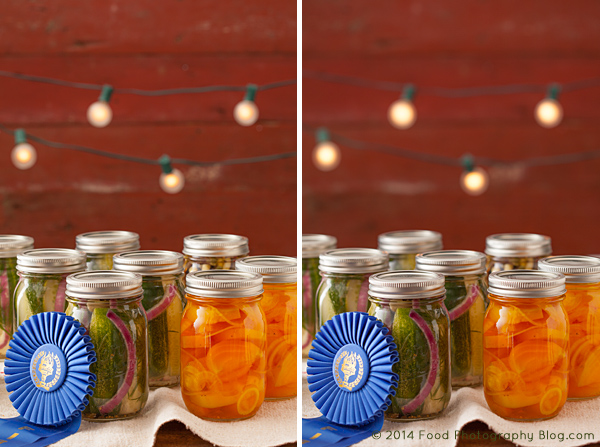
Now I’m going to show you a technique I use a lot. I take two images at different apertures, with different depth of fields and then I composite them together in Photoshop by using layer masks. I use this technique when I want the background to be more out of focus, yet keep the food or product in focus.

I have to mention that I ALWAYS shoot with my camera on a tripod. This type of compositing would be very difficult with files that were handheld.

Two Images for Composite

The image on the left was shot at f/8 and the image on the right was shot at f/4.5

For this image I really like how the jars look at f/8, but I prefer the background shot at f/4.5, so I’m going to put the two together in Photoshop by creating a layer mask and put the best background, on top of the preferred foreground.

Making a Layer Mask

There are many ways to do the same thing in Photoshop. My favorite way to do a composite of multiple images is to use layer masks.

In the final composite I will be putting the background of one image onto another image, and also making a duplicate of one light bulb and pasting it onto the background.

I first open both files that are to be put together in Photoshop.

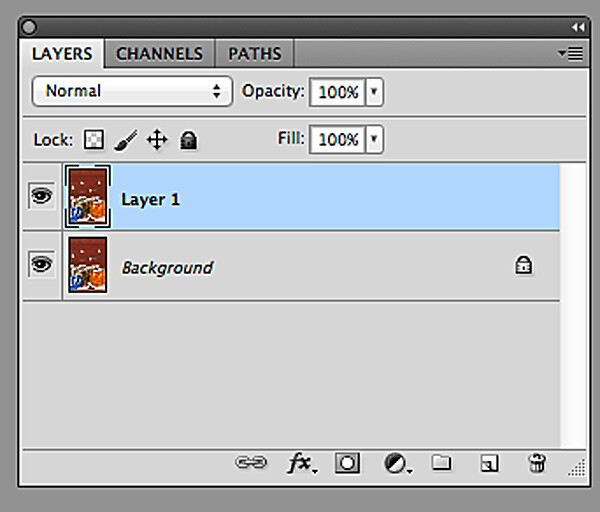
Next, I copy the image with the desired background and then paste the entire image into the file with the jars that I like. Now I have one file with two layers.

Two Layers

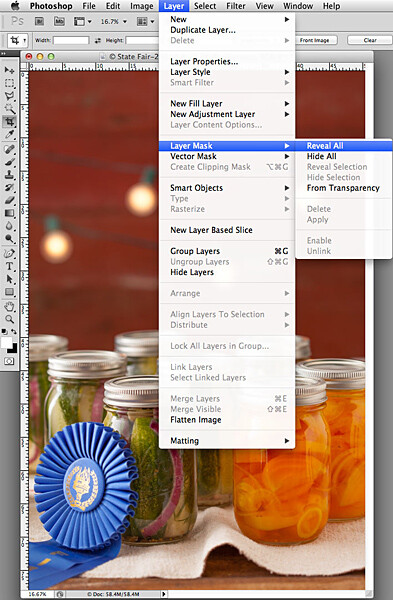
Now I need to make the top layer into a layer mask:

  1. Go to the top menu
  2. Click on “Layer”
  3. Scroll down to “Layer Mask”
  4. Scroll over to “Reveal All”

Converting Layer Mask2

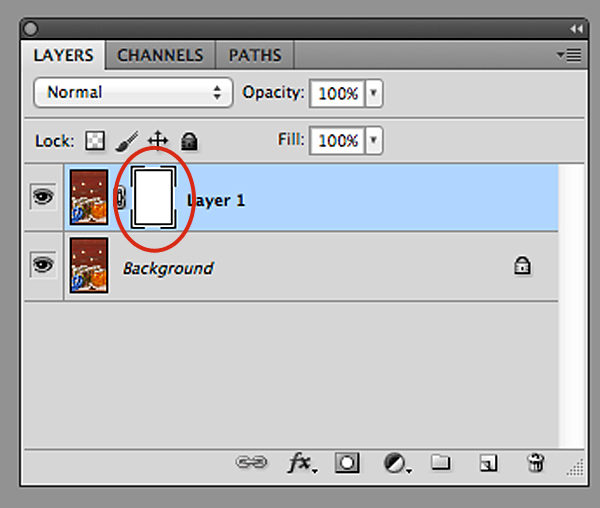
Now, look in your layers palette. Your image should look similar to what you see below – the two files, with the top one having a white box next to the image. That is the layer mask.

New Layer Mask

You can see the new layer masked circled in red.

To start working inside the layer mask, you have to use the brush tool. Then make sure your color palette is set to black on top of white for masking through the image. If you mask too far in one area, you can correct it by reversing the color palette to white on top of black and then go back over the area.

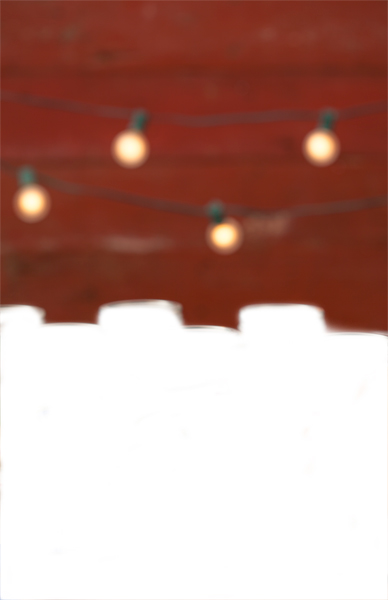
In this image I am using a soft edge brush (brush set to a hardness of “0″) for masking through the foreground of the top layer so that only the red background with the lights are left. The image below is how my layer looks mask work completed.

Background Layer Mask

This only took me a few minutes to create in Photoshop.

Now for the final composite below. I also added some text, then copied and pasted an additional light bulb in Photoshop to balance things out in the background.

The additional light bulb was also turned into a layer mask so that I could blend the edges of the image I pasted on top of the file.

Final Composite

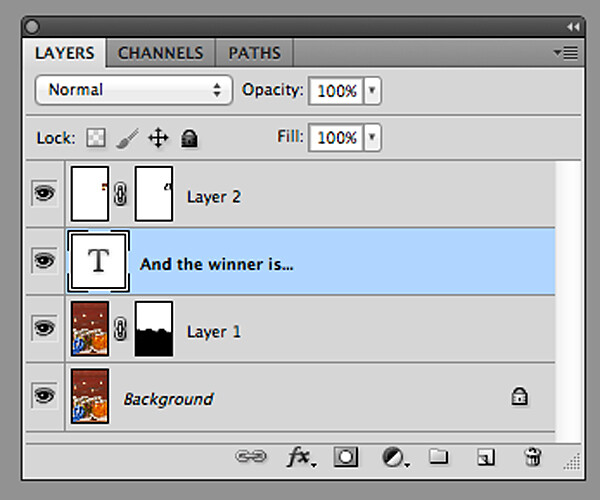
Final Layers

Here is what all the layers look like. Layer “2″ is the extra light bulb. If this was a file with a lot of layers, I would name each layer so that I knew what they were. In this case it’s easy to figure out, so I didn’t do that. You can see in the mask of layer “1″ that the bottom half of the frame is black. This is the part of the image that I masked.

So, next time when shooting on a tripod, experiment a little and take your shot with multiple apertures to bracket your depth of field, and maybe you’d like to composite a couple of files together.

The post Using Focus Creatively with Food Photography by Christina Peters appeared first on Digital Photography School.


Digital Photography School

 
Comments Off on Using Focus Creatively with Food Photography

Posted in Photography


GorillaPod Focus

20 May

Nachdem mir ein befreundeter Fotograf seinen nicht ungefährlichen Stativaufbau für ein Selbstportrait zeigte, erinnerte ich mich an den Gorillapod: Ein kleines Stativ mit flexiblen Beinen, die man um Geländer, Äste und Ähnliches klammern kann.

Da ich selbst viel im Wald fotografiere und auch gern einmal aus ungewöhnlichen Perspektiven, schrieb ich kurzerhand die Firma Joby an, ob sie mir den Gorillapod kurze Zeit zum Testen zur Verfügung stellen würden.

Wenige Tage später konnte ich den GorillaPod Focus mit Kugelkopf* in Händen halten. Laut Hersteller trägt er ein Gewicht von bis zu 5 kg.

Etwas unsicher begutachtete ich das Stativ und bog die kleinen Beinchen in alle erdenklichen Richtungen. Das Verbiegen benötigte ein klein wenig mehr Kraft als ich dachte, was mich aber auch beruhigte, denn so kann es sich definitiv nicht einfach lösen, wenn es irgendwo hängt. Die helle Gummiumrandung an jedem Kugelsegment gibt dem Stativ zusätzlich noch etwas mehr Halt.

Also wagte ich meinen ersten Versuch: Ich klemmte das kleine Äffchen zunächst in der Wohnung um eine Leiter. Für ein Selbstportrait benötigte ich die Perspektive von oben. Ein idealer erster Versuch. Meine Kamera wiegt mit Objektiv etwa 1,5 kg. Es hätte für meine Testzwecke also auch locker der GorillaPod SLR-Zoom* ausgereicht, der nur bis zu 3 kg hält.

Aber ich war schon ziemlich froh, dass ich den großen Bruder nutzen durfte. Das Vertrauen zu so einem Stativ baut sich doch nur sehr langsam auf.

GorillaPod im Test auf einer LeiterPortrait, entstanden mit dem GorillaPod

Ich verdrehte also die Stativbeine um die Leiter. Das dauerte eine kleine Weile, da ich ein paar Positionen ausprobieren wollte, um die meiner Meinung nach sicherste zu nehmen. Als es dann endlich hing, war ich auch enorm froh über den Kugelkopf. Denn damit lässt sich die Kamera noch in jede Richtung schwenken und man kann die ideale Position suchen, ohne die Beine lösen und neu justieren zu müssen. Die Nutzung des Stativs ohne Kugelkopf kann ich mir nur schwer vorstellen.

Kurzum: Mein Experiment funktionierte hervorragend. Das Stativ hing bombenfest und ich fasste so viel Vertrauen, dass ich es am nächsten Tag mit in den Wald nahm. Hier nutzte ich es vor allem für unebenes Gelände, denn dafür eignet sich das Stativ auch bestens. Es muss nicht immer um etwas geklammert werden, sondern steht auch selbstständig auf seinen drei Beinen.

Allerdings ist es nur knapp 30 cm hoch und daher kein kompletter Ersatz für ein normales Stativ. Mit seinem geringen Gewicht von nur 0,5 kg ist es aber ein leichter zweiter Begleiter für unterwegs.

Mit meiner leichten Kamera konnte mich das Stativ überzeugen. Ich habe jedoch auch noch einige Rezensionen gelesen. Negativ wurde hier oft die Tragkraft angesprochen, die von einigen Testern als überschätzt bewertet wird.

Das konnte ich leider nicht voll ausreizen und so testen, da das Gewicht meiner Kamera weit unter dem Möglichen liegt. Im Zweifel würde ich mich jedoch wieder für das Modell Focus mit der größten Tragkraft entscheiden. Einfach, um sicher zu gehen.

Der GorillaPod Focus* kostet mit Kugelkopf 123 €. Mehr über das Stativ findet Ihr auf der Webseite der Firma Joby.

* Das ist ein Affiliate-Link zu Amazon. Wenn Ihr darüber etwas bestellt, erhält kwerfeldein eine kleine Provision, Ihr bezahlt aber keinen Cent mehr.


kwerfeldein – Fotografie Magazin | Fotocommunity

 
Comments Off on GorillaPod Focus

Posted in Equipment


Getting Sharper Images – an Understanding of Focus Modes

14 May

The longer you shoot, the larger the repertoire of subjects and assignments you photograph becomes. You start off photographing flowers in the garden, your neighbour’s dog, your sister’s kids, your friend’s wedding and then before you know it you’re doing product shots for your friend’s new company. All this happens over time and there is one pretty fundamental skill that must remain paramount throughout out your process, properly focused images. Sure we’ve all been there, we’ve all taken that shot once in while which is slightly soft (a polite photographer’s term to describe out-of-focus images). But, it’s a great shot so we keep it anyway, even tho we would still have preferred it to be tack sharp.

MG 3504flat

In focus images have been one of the most fundamental rules of photography right from the dawn of the craft. In the early 1900s it was a craft in its own right, but in the 1960s Leica introduced a rudimentary autofocus system that changed everything. Since then, autofocus has developed dramatically and it’s no longer a feature on cameras, it’s a given.

So, bringing autofocus up-to-date you have a few options to choose from in your modern DSLR. Those are some of the features I will cover in this article, along with when to use them. Both Canon and Nikon have very similar settings, albeit incorporating different technologies the results are very similar. There are also other brands like Sony and Olympus etc., that also follow suit, but here I will be discussing the four main focus modes in Canon and Nikon.

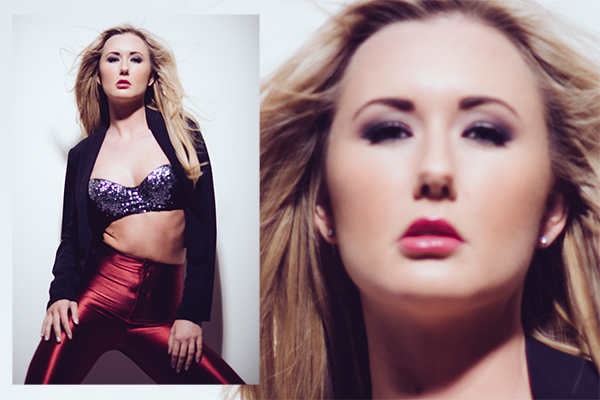
This image above was shot utilizing the AF-S (Nikon) or One Shot (Canon) autofocus mode on the camera. Here I focused on the models eyes and then recomposed my image so that she was over to the left of the frame, allowing for more space in the image in the direction she is looking.

Single Shot Mode

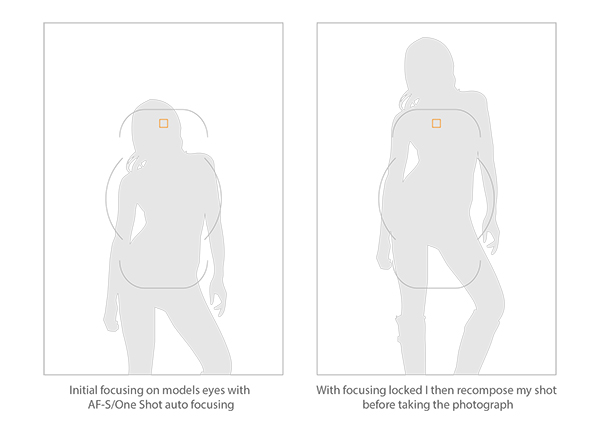
First off, you have the mode that’s probably been around the longest – Canon’s One Shot and Nikon’s AF-S. Both of these will do pretty much the same thing. This mode is predominantly used for stationary objects like model shoots (most of the time – more on when not to use it for model shoots later) and anything that doesn’t require your subject to move around too much in the frame. You half press the shutter in this mode, and then you can recompose the image. For example, you focus on the model’s eyes, then recompose to put her on the left hand side of the image. This autofocus mode will get you through most situations.

Active or Continuous Focus Modes

Next we have the step up from the single focus to Canon’s AI Servo, and Nikon’s AF-C modes. Essentially what this setting does is to continuously track your initial focus point and readjust the focus accordingly. This setting is ideal for moving subjects like active children, and pets that are constantly on the move.

Auto Modes

Finally out of the autofocus settings we have Canon’s AI Focus, and Nikon’s AF-A. Both of these settings actually leave it up to the camera to decide which is best out of the other two focusing modes to use. In this mode it will either choose to continuously track your chosen subject should it decide to move, or focus lock if you would like to recompose. In theory, then I needn’t of bothered explaining the other two settings as surely this is the best of both worlds? Not quite. I personally have tested this mode a fair amount with stop-start subjects and although the camera does a good job of keeping up with them it’s always more accurate to use continuous focus mode. The same also goes for its ability to determine when a subject has stopped and when to focus lock for recomposing. Personally I never use this mode as although it has the best of both, it also has the worst of both.

Infocus600px

Image above taken with an 85mm f/1.8 prime lens using manual focus. Shooting in manual focus negates the need to recompose and loose focus in autofocus modes.

So, although I have just covered the three basic settings here very briefly, there is, of course, a whole of host other technological advancements in autofocus that I haven’t covered. I know Nikon has extensive, matrix and 3D autofocusing features. As well most modern DSLR have incorporated the “back button autofocus” which also helps with focus locking. But going over all of that is not the purpose of this article.

Manual Focus Mode

The last focus mode I wanted to cover and one that is rarely used is the Manual focus mode. This mode strikes fear into the heart of nearly all modern photographers and that’s simply because they’ve probably never used it. Do you ever need to use it? That is something that only you can decide and is probably based on the type of photographs you take. If you only ever take portraits of energetic kids or fast paced sports, then autofocus is probably always your go-to mode. If however you shoot still life, architecture, landscapes and other detailed, relatively motionless subjects, then manual focus is probably a good way to go.

There are a few reasons for this. Landscape photographers will want to find the hyperfocal distance of their scene to maximize the amount of in-focus points (depth of field) in the image. This is based on an equation so autofocusing on a specific object is not always the way to go. Still life photographers will usually have their camera locked-down on a tripod so they will not want to focus and recompose once they’ve set up the shot, so it’s just far easier to focus manually. There is also another reason to want to use manual mode on some cameras and certain situations, and that was the catalyst for this article.

Outoffocus600px

This version of the image was shot using the autofocus mode AF-S/One Shot, and meant that after I had focused and recomposed the shot, the model’s eyes were left out of focus.

I recently purchased an 85mm f/1.8 prime lens, and I wanted to test the lens out and see what the sharpness was like at f/1.8. I predominately only photograph models so I set up my test and went about taking some shots at f/1.8 using my usual AF-S/One Shot autofocusing mode. When I got my shots back to the computer to take a look, I was surprised to see that most of them were very soft. It took a few minutes to realize my error and since then I’ve adjusted how I shoot with these parameters.

Recompose600px

Here you can see that the selected focal node is still situated in the middle of the viewfinder even though I have elected the outer most one when shooting in the portrait format.

I haven’t done a lot of very shallow depth of field shots up until this point so I hadn’t seen the now exaggerated results of my
poor focusing technique previously. At f/1.8 you have a very, very shallow amount in focus (depth of field). For example, a head shot with the eyes in focus, the tip of the subject’s nose will be out of focus. For the test I was photographing the model at 3/4 length and shooting up at her so my camera height was probably about her waist height. I was about 6 feet (2 meters) away from her and I was focusing on her eyes with my focal point in camera then recomposing my shot to capture the 3/4 length crop. The problem with most cameras is that although they have a lot of focusing points, they’re all clustered in the centre of the viewfinder so even though I chose the outer most focal point I still have a dramatic amount of recomposing to do.

Focusstack600px

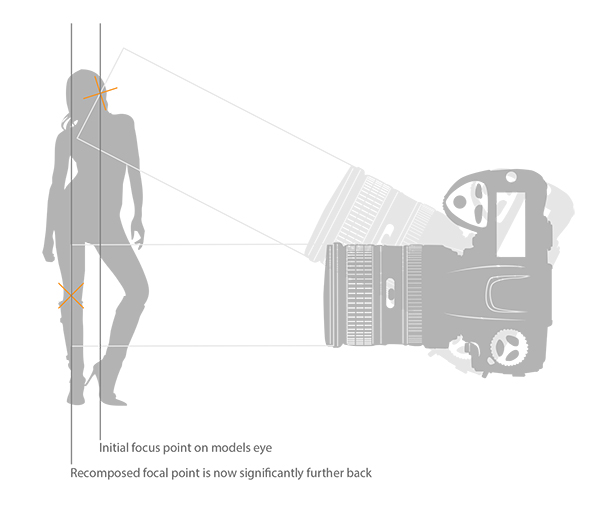
The diagram above clearly illustrates what’s actually going on when you recompose an image after focusing in AF-S/One Shot autofocus mode. The actual part of the image that was in focus, is now out of focus.

This isn’t normally a noticeable problem when recomposing at f/16, but at f/1.8 that dramatic shift in the focal plane means the resulting image is very soft around the model’s eyes. As I recomposed it actually repositioned my focal point further back behind the model, meaning the back of her head and hair were in focus but not her eyes.

There aren’t too many ways around this pesky little issue, especially as you may not notice it on the back of the camera’s little screen. One thing that did resolve it though was by switching to manual focus. I could then compose my shot and manually focus on the model’s eyes, resulting in a fantastically sharp image where I wanted it to be sharp.

Granted there were a few things conspiring together here to really exaggerate the issue. Firstly, I was shooting at f/1.8, that’s always going to rely on critical sharpness. Secondly, I was down low shooting up. This always exaggerates the focal plane shift when recomposing and lastly I was stuck with limited focal nodes. There are many technical reasons why modern DSLRs don’t allow focal nodes towards the edges. A lot of smaller frame cameras like the mirrorless, APS-C and micro 4/3 cameras all have selectable focal nodes covering the viewfinder, but alas, DSLR technology isn’t there yet. Until it is, it’s a good idea to be aware of what’s going on in autofocus modes on your camera, and be prepared and ready to switch to manual focus when required.

Good Luck!

The post Getting Sharper Images – an Understanding of Focus Modes by Jake Hicks appeared first on Digital Photography School.

Digital Photography School

 
Comments Off on Getting Sharper Images – an Understanding of Focus Modes

Posted in Photography


A newfound focus: Sony SLT-A77 II First Impressions Review

01 May

beautyshot.jpg

It may look the same as its predecessor, but the Sony SLT-A77 II’s insides are quite a bit different. Featuring a new 24MP CMOS sensor and image processor, along with a dramatically improved AF system, this SLT could be one of the best subject-tracking cameras out there. While we’ve yet to test its performance, we did spend some brief time with the a77 II and have put together our first impressions.

News: Digital Photography Review (dpreview.com)

 
Comments Off on A newfound focus: Sony SLT-A77 II First Impressions Review

Posted in Uncategorized


Lensbaby adds Android option for its selective focus lens

24 Apr

kickstarter.jpg

When Lensbaby launched the  Kickstarter project for its ‘Sweet Spot’ selective focus lens at the beginning of April it was initially iPhone only. Now the company has added a pledge level for Android users, too. For $ 50 you can pre-order the Sweet Spot lens and the Android application for your device. Delivery is expected in October. Learn more

News: Digital Photography Review (dpreview.com)

 
Comments Off on Lensbaby adds Android option for its selective focus lens

Posted in Uncategorized


Lensbaby brings ‘Sweet Spot ‘ selective focus lens to iPhone

04 Apr

lensbaby1.jpg

Lensbaby is well known among DSLR photographers for its array of special-effect lenses. Now the Portland, Oregon-based company wants to expand into mobile photography and has launched a Kickstarter project to fund the final development stage of its Lensbaby Sweet Spot lens for iPhones. Learn more

News: Digital Photography Review (dpreview.com)

 
Comments Off on Lensbaby brings ‘Sweet Spot ‘ selective focus lens to iPhone

Posted in Uncategorized