RSS
 

Posts Tagged ‘Focus’

How To Lead Your Viewer’s Focus to the Subject

05 Jul

Take a look at this photo and remember what your initial thoughts are:

Inlaid Marble Detail Inside Taj Mahal, Agra, India, Asia

Inlaid marble detail inside Taj Mahal, Agra, India, Asia

Where was the first place you looked in the photo? What about the second?

Some of the more interesting photos (and artwork in general) moves your view around the image, and often brings you back for more.

When you take a photo, you know what you’re looking at and what is most important, but this doesn’t always come through in your picture, unless you make a concerted effort to help the viewer see the same thing. Luckily, as a photographer you have more than a few tricks to lead your viewers in your photos.

Leading Lines

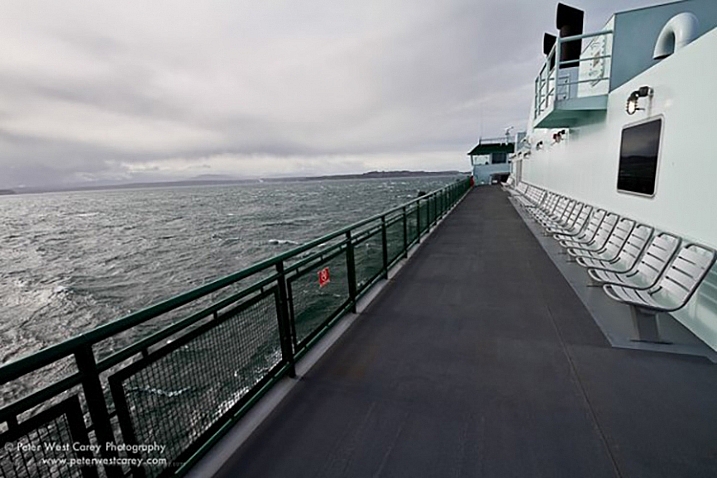
The first technique is to simply point the way. As humans, we like lines that go somewhere and we tend to follow them. A trail, a road, repeating patterns; they are all fodder for the technique of leading lines.
PWC-2011-0207-0588

Crossing to the Olympic Peninsula, Washington, USA

Prayer Wheel Wall, Kathmandu, Nepal

Prayer wheel wall, Kathmandu, Nepal


Leading lines, when stretched far, can also give your image greater depth by taking viewers into your scene. The lines need not be straight. They can be as meandering as a forest path.

PWC-110402-153640-3017

Meandering path, Cascade Mountains, USA

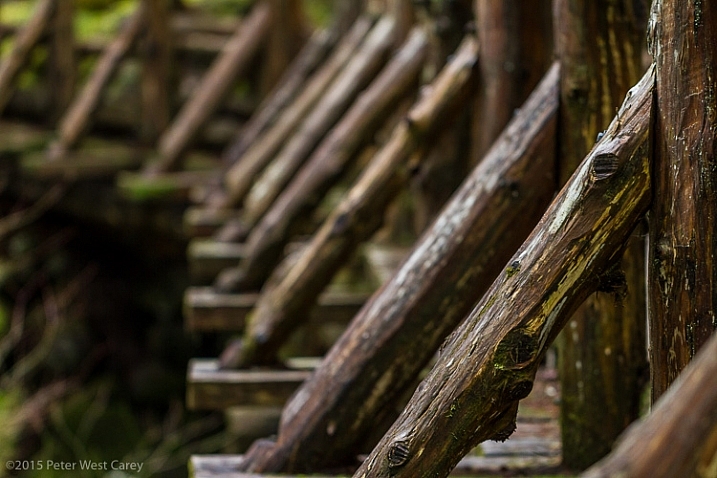
Non-traditionally, I consider a repeating pattern, moving in a particular direction, to be a form of leading line. Such as with this line of bridge braces.
Across The Bridge

Wooden bridge in Olympic National Park, Washington, USA

Selective Focus

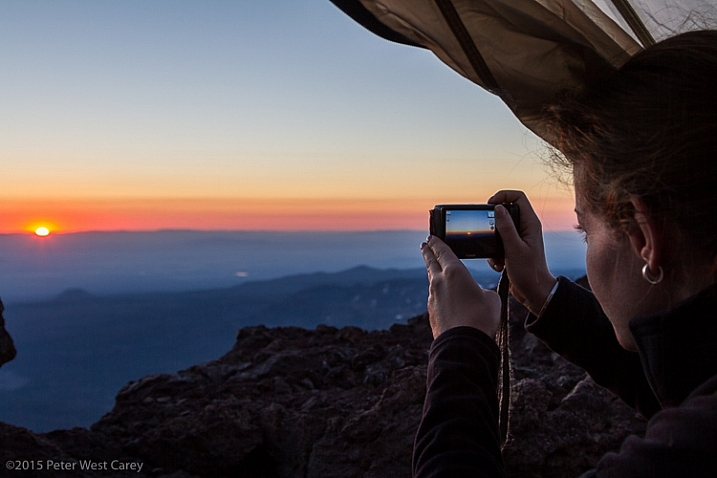
Selective focus seems so simple, but can be tricky if you haven’t mastered the use of aperture in your photography. Selective focus is also useful when you have a subject far on the edge of your photo. By habit we tend to look at the middle of a scene first and it’s quite easy to use selective focus to move your viewers to the edge, and the main subject.
PWC-100815-070403-0541

Sunrise on South Sister Mountain, Oregon, USA

It’s also another way to help your viewers ignore the distractions in the scene and find the main subject.

Alaska Rainforest Floor, Glacier Bay National Park, Alaska, USA

Alaska Rainforest Floor, Glacier Bay National Park, Alaska, USA

There is a great article here: How to Use Leading Lines for Better Compositions by Anne McKinnell, that expands on this topic.

Colors

We’ve all seen this technique that became quite popular many years ago.

Chocloate Chip Mint Icre Cream Cone, Balboa Island, California, USA, North America

Chocolate chip mint ice cream cone, Balboa Island, California, USA, North America

You might have just cringed or you might have liked the technique, but there is no doubting where you looked in the photo.

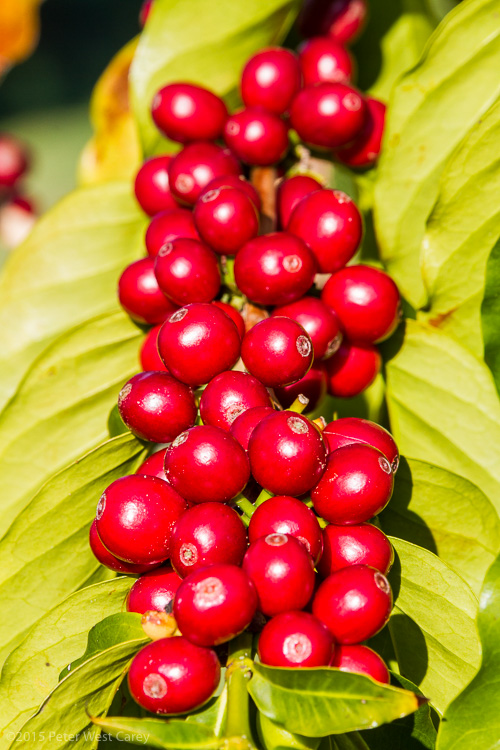
But color need not be a single instance amongst black and white. Simply having a splash of color in a fairly monotone scene helps move the viewer to your main subject.

Prayer Flags And Cho Oyu, Gokyo, Nepal, Asia

Prayer flags and Cho Oyu, Gokyo, Nepal, Asia

Plumeria flowers, outdoors
Plumeria flowers, outdoors

Coffee Cherries Sit Ripe For Picking In Hawaii, USA

Coffee cherries sit ripe for picking In Hawaii, USA

Contrast

Something or someone going against the grain also brings focus and attention to that point.
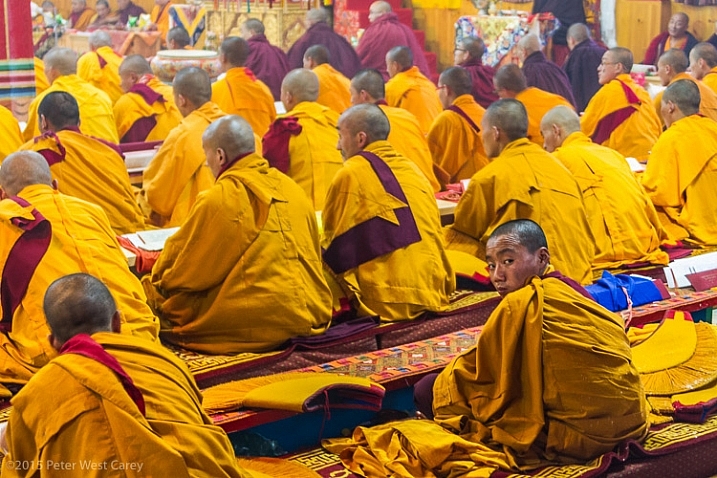
PWC-Bhutan2013-0321-6240

Buddhist monks, Jakar, Bhutan

It can also be a contrast in colors or patterns.
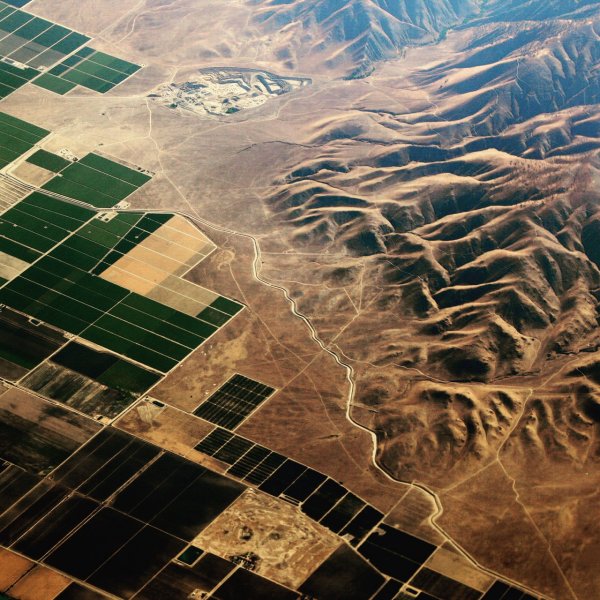
High above California's Central Valley, USA

High above California’s Central Valley, USA

The wide open spaces of Serengeti National Park beckon, Tanzania, Africa

The wide open spaces of Serengeti National Park beckon, Tanzania, Africa

Or it can be a juxtaposition that is the contrast; old and new, youth and elders, fast and slow, etc…
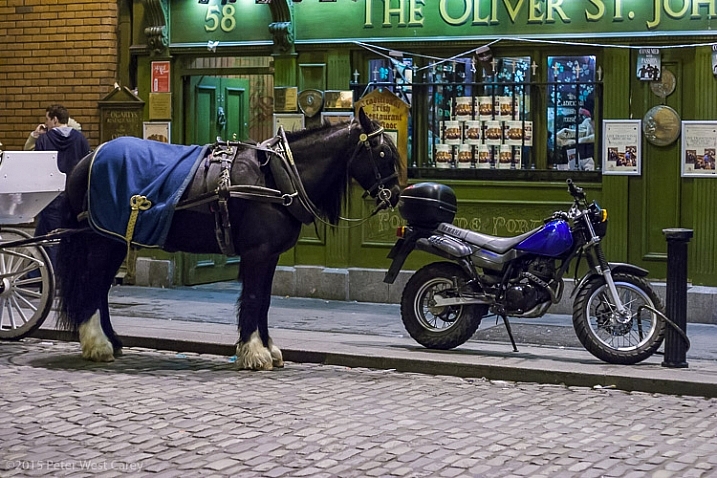
PWC-040318-215251-9790

Old:New; Slow:Fast, Natural:Man-made – Dublin, Ireland

Eyes

Eyes are an easy way to draw focus. So easy, it almost seems like cheating. We naturally connect with eyes, be they human or animal. We can look around a scene and find eyes faster than most objects.

Use that to your advantage!

Close-up of monkey - East Africa - Tanzania

A baboon in the thicket, Serengeti National Park, Tanzania

PWC-India2012-0418-7848

Pygmy owl, Ranthambhore National Park, India

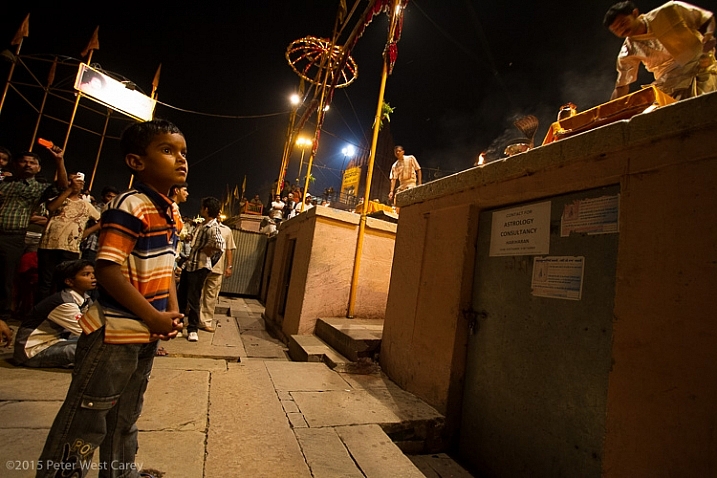
Eyes can also be used to point a way. I have often stated that we don’t like eyes looking off the edge of the photo because we want to know what the person is looking at. But eyes looking toward the middle of an image invite exploration.
PWC-India2012-0422-8911

Child watching Ganga Arti Celebration, Varanasi, India

Frozen Action

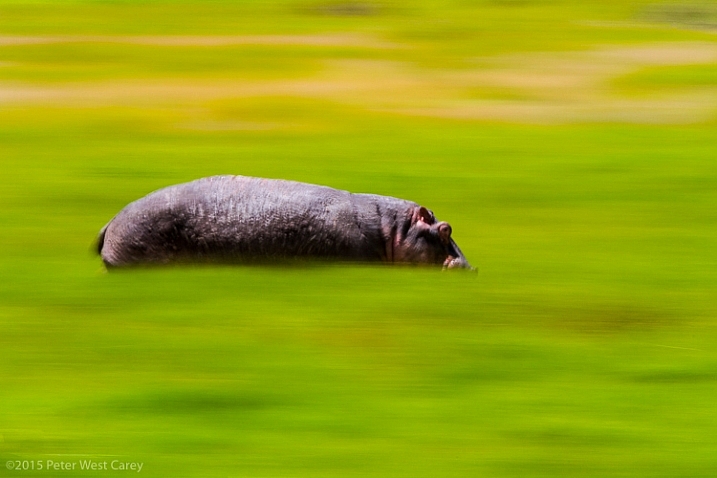
Panning blur is a simple technique to freeze action on your subject, while letting the rest of the image blur. This is a type of selective focus, when we get right down to it, but used in a unique way.
Hippos are amazingly fast animals, deceptively so. I had heard about this before heading to Africa in 2010, but once I witnessed just how fast they can run, and how mean they can be, I made sure my daughter and I were always close to, or in, a vehicle larger than a hippo when they were around. Ngorongoro Conservation Area, Tanzania.

Hippos are amazingly fast animals, deceptively so. I had heard about this before heading to Africa in 2010, but once I witnessed just how fast they can run, and how mean they can be, I made sure my daughter and I were always close to, or in, a vehicle larger than a hippo when they were around. Ngorongoro Conservation Area, Tanzania.

The technique not only leads viewers directly to the main subject as it is the only thing in focus, but also has them looking back where the subject came from, and asking why is there movement.

For more on this technique, check out: Mastering Panning – Photographing Moving Subjects.

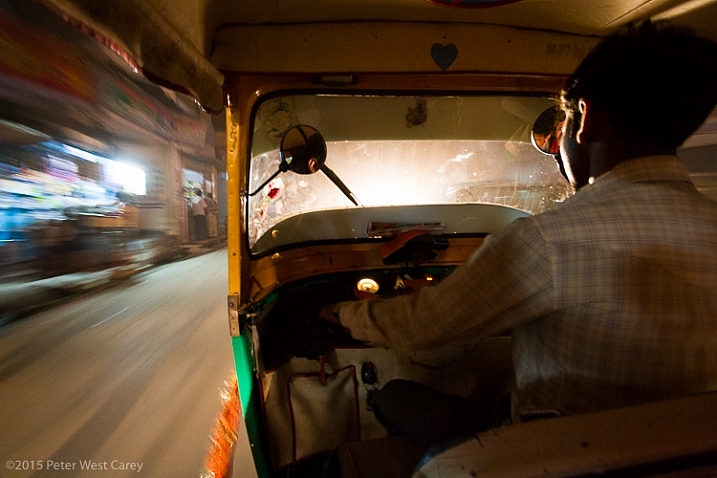
It can also be used when inside a moving object to emphasize speed, while also giving focus to the stationary objects of interest.
Speeding through the night streets of Varanasi, India

Speeding through the night streets of Varanasi, India

Going Into Your Photo

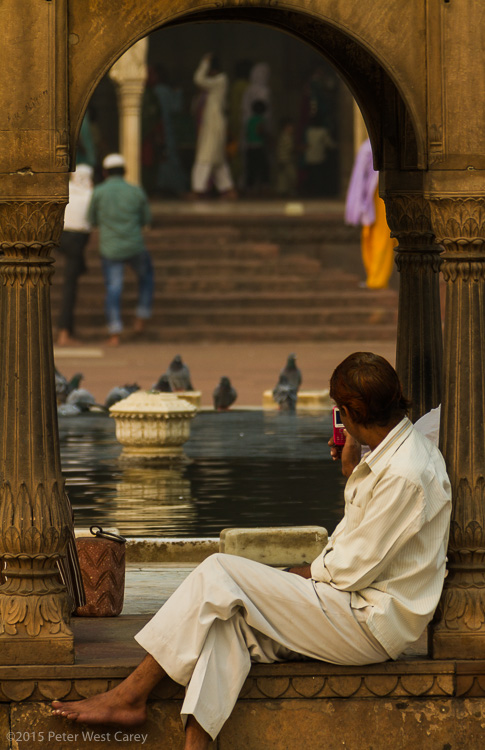
Arches, doorways, tunnels…these are all things that naturally make us want to go “into” a photo. We want to progress from the outside in. Craft your images by having more than one layer, in a three dimensional sense.
PWC-India2011-1031-9584

Taking photos at Masjid-i Jah?n-Num?, Delhi, India

Through The Arch

Arches National Park, Utah, USA

Conclusion

Postcard shots are certainly a fine use of a digital camera. They capture a whole scene and make things static. But if you want to move your viewers around your images and have them coming back for more, think about how you are composing your photos.

googletag.cmd.push(function() {
tablet_slots.push( googletag.defineSlot( “/1005424/_dPSv4_tab-all-article-bottom_(300×250)”, [300, 250], “pb-ad-78623” ).addService( googletag.pubads() ) ); } );

googletag.cmd.push(function() {
mobile_slots.push( googletag.defineSlot( “/1005424/_dPSv4_mob-all-article-bottom_(300×250)”, [300, 250], “pb-ad-78158” ).addService( googletag.pubads() ) ); } );

The post How To Lead Your Viewer’s Focus to the Subject by Peter West Carey appeared first on Digital Photography School.


Digital Photography School

 
Comments Off on How To Lead Your Viewer’s Focus to the Subject

Posted in Photography


Sony: An eye on focus

02 Jul

Sony recently shook things up with the announcement of the 42.4MP, backside-illuminated full-frame a7R II mirrorless camera, alongside stacked 1″-type sensors in the updates to the popular RX100 and RX10 lines. While stills and video quality are sure to break new ground with these updates, perhaps even more interesting are the autofocus improvements. We put the new AF systems to the test in our brief hands-on time with the cameras recently. See videos of the cameras in action

Articles: Digital Photography Review (dpreview.com)

 
Comments Off on Sony: An eye on focus

Posted in Uncategorized


The week in review: Coming into focus

17 May

It was a week of lens announcements, sample galleries and updates to our existing content for one of the year’s most notable new cameras – the Canon EOS 5DS R. And if that wasn’t enough, we went and added a second installment of our series exploring the source of noise. Catch up on any photography news you may have missed over the busy week, here and elsewhere. Read more

Articles: Digital Photography Review (dpreview.com)

 
Comments Off on The week in review: Coming into focus

Posted in Uncategorized


LG G4 puts focus on the camera

30 Apr

LG’s new flasgship smartphone, the LG G4, takes over some of the G3’s design details, but from a hardware point of view it’s an all-around new device. Specifically, it puts a lot of emphasis on camera specifications. Its 16MP 1/2.6-inch CMOS sensor is larger than the 1/3-inch sensors in many other phones, and the F1.8 aperture is the fastest among the current crop of high-end mobile devices. Read more

Articles: Digital Photography Review (dpreview.com)

 
Comments Off on LG G4 puts focus on the camera

Posted in Uncategorized


Don’t Be Afraid of Manual Focus

04 Mar

If you’re a beginner in the wonderful world of photography, if you’ve never used an older film camera, or a combination of both, you might be unfamiliar with the workings of manual focus. Even if you are, you may not have thought about how you would use it in real-world situations.

Fortunately as DSLR owners, we have the best of both worlds between manual and automatic focusing; we have a choice as to how we decide the subject of our photo, and other points that aren’t as important. This is an advantage for you, and having a better understanding of the “other” focusing method will allow you more flexibility and leave you better prepared for a wider array of situations while in the field.

seagrass

But keep in mind, you’re not learning manual focus as a replacement for automatic focus, you’re learning it as a compliment.

While modern DSLR’s and their lenses have varying degrees of complexity for automatically focusing on a specific point within a scene, film cameras before them relied on a manual system to focus. The photographer would turn the focusing ring on the lens until the subject was sharp, then snap the photo. When the modern AF (autofocus) systems came around, the camera became smart enough to identify the subject(s) or the more important part of the photo, and focus on that without much interaction from the user.

You might think, why would I want to do it any other way? I can have the camera choose the most important thing to put into focus, or I can even manually select a focus point, and have it always focus there. What reason would I have to turn this system off completely and rely on myself?

There are a few reasons, in fact, but first, let’s cover how to use manual focus in the first place.

How to manually focus your camera

To manually focus an AF-capable lens on a DSLR, first locate the mode switch on the lens. It is usually labelled “AF – MF”. Switch it to MF. After you’ve done that, the lens will be in manual mode, and pressing down the shutter release halfway will no longer engage the autofocus system.

Find the focusing ring near the end of the lens. Twisting this ring will adjust focus, and you will immediately see the effects of this through the viewfinder, with different areas of the frame coming into, and going out of focus. Because your viewfinder isn’t a perfect representation of what your image will look like, you may need to use a couple of other tools to verify focus.

The AF-MF switch is located on the lens itself if compatible.

The AF-MF switch is located on the lens itself if compatible.

Firstly, you can use the depth of field preview button. Almost all modern DSLR’s have this feature, and it allows you to get an idea of how your current aperture and focus will appear in the final image. If equipped, the button is usually next to the lens mount, although the exact placement might vary depending on your camera model; be sure to check your camera’s manual if you’re unsure of its location.

When you press the button, the aperture will close down to its actual setting, so the preview image could darken a bit. This darkening will not be recorded on the actual image.

An even better way to monitor your focus is by using the Live View feature of your camera, which gives you an accurate representation of what your camera sees on the LCD screen. After focusing, switch to Live View and zoom in to the area you’re focusing on (zoom the view, not the lens). You’ll be able to clearly see what is actually in focus, and what is not.

So what shooting situations might benefit from the wonders of focusing like our forefathers?

Macro photography

When you’re shooting macro or close-up photography, you’re usually dealing with an extremely thin depth of field. At larger apertures, focusing is extremely important. Manual focus allows you to ensure that the most important part of your subject is crisp.

When shooting subjects up close, focusing manually will give you tighter control.

When shooting subjects up close, focusing manually will give you tighter control.

Low-light situations

As wonderful as autofocus is, it tends to falter a bit in low-light situations, the amount of which usually depends on the lens being used. You’ve undoubtably experienced times where the autofocus struggles to find a focal point, and leaves you with nothing more than a blurry preview through the viewfinder.

Subjects captured in low light are notorious for muddling up autofocus systems; manual focus is the best way to solve the problem.

Subjects captured in low-light are notorious for muddling up autofocus systems; manual focus is the best way to solve the problem.

Focusing manually allows you to take the guesswork out of these situations (remember to use Live View to check it)

Selective focus

There are also times where you may prefer to control your focus for creative reasons. Shooting a model through a frame of trees, for example, or requiring the background of the photo to be in focus while the foreground is not.

While modern autofocus system can usually get this right, manual focus allows you a level of control that’s hard to automate.

A photo like this gives the autofocus system too many options to get the depth of field exactly right.

A photo like this gives the autofocus system too many options to get the depth of field exactly right.

Wide-angle shots

When shooting with a wide-angle lens, particularly in landscape photography, your subjects can tend to be a larger objects shown on a smaller scale, such as trees, buildings, and other inanimate objects. In this situation, since they occupy a smaller area of the frame, controlling the focus of the shot on your own will usually yield better results.

Smaller subjects in a wide-angle picture means more work for the autofocus system.

Smaller subjects in a wide-angle picture means more work for the autofocus system.

Panoramas

When we take panoramic photos, or a set of photos stitched together in post-production, consistency throughout the shots is key in several areas, one of which is focus. Not ensuring your focus is consistent throughout the shots, along with other things such as lighting and white balance, can produce a disjointed result, failing to convince the viewer’s mind that they’re looking at one continuous photograph.

When your camera is set to focus manually, you can be sure that the proper subjects are always sharp in a panoramic shot.

When your camera is set to focus manually, you can be sure that the proper subjects are always sharp in a panoramic shot.

Low contrast situations

Autofocus on modern cameras work best when there is a higher level of contrast between the dark and light tones within an image. These systems tend to struggle when contrast in the frame is reduced, such as shooting a light-colored subject against a bright background.

Low contrast is another situation that tends to confuse autofocus systems; your eyes can better differentiate between the subject and the background.

Low contrast is another situation that tends to confuse autofocus systems; your eyes can better differentiate between the subject and the background.

Since the human eye has a much higher dynamic range than the cameras you’re shooting with, you can manually choose the best focus in these situations.

Give it a try!

Although it may seem counterintuitive to disable systems on our cameras that are intended to make things easier, it may be just the thing to spark our creativity.

A habit I always try to maintain is to visualize what settings I’ll need to use before I go out to shoot, and this is a good time to determine if the scenario I’m going to be presented with lends itself to turning my autofocus system off.

At the end of the day, just keep in mind that there is no right way or wrong way. The “right way” is different for all of us. However, knowledge is power, and you can only benefit from knowing the ins and outs of how your camera works and what options are available to you.

“There is only you and your camera. The limitations in your photography are in yourself, for what we see is what we are.” – Ernst Haas

googletag.cmd.push(function() {
tablet_slots.push( googletag.defineSlot( “/1005424/_dPSv4_tab-all-article-bottom_(300×250)”, [300, 250], “pb-ad-78623” ).addService( googletag.pubads() ) ); } );

googletag.cmd.push(function() {
mobile_slots.push( googletag.defineSlot( “/1005424/_dPSv4_mob-all-article-bottom_(300×250)”, [300, 250], “pb-ad-78158” ).addService( googletag.pubads() ) ); } );

The post Don’t Be Afraid of Manual Focus by Tim Gilbreath appeared first on Digital Photography School.


Digital Photography School

 
Comments Off on Don’t Be Afraid of Manual Focus

Posted in Photography


Back Button Focus: What is it and why should you try it?

04 Mar

What operation on a camera could possibly be more simple than pressing the shutter button to take a picture? There’s not much to it, really –  you look through the viewfinder (or at the LCD screen on the back of the camera), press a button with your index finger, wait for the camera to focus, and voilà! You’ve got a photo.

Well, as the popular saying goes, what if I told you there was a better way? Hidden deep within the settings of most cameras is a feature called Back Button Focusing, and enabling it can transform your approach to photography.

A Brief History

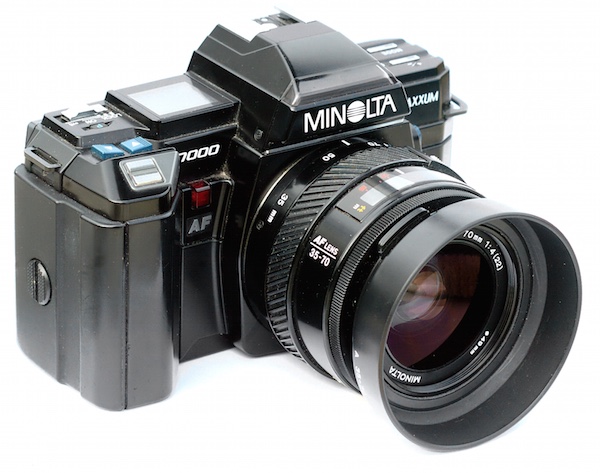
MinoltaMaxxum7000

The Minolta Maxxum 7000 was one of the first SLR cameras with autofocus capability in 1985.

To understand what Back Button Focusing is, it’s important to know a little about the history of the autofocus function on your camera. Until the mid-1980s, there was no such thing as autofocus on consumer-level film cameras. You had to hold your camera up to your eye and either turn a ring on the outside of the lens or adjust what’s known as a rangefinder in the top-left corner. It required a great deal of patience and practice, and there are many photographers today that still swear by this method.

In 1985 Minolta released the Maxxum 7000 which integrated the autofocus function into the shutter button, which seemed like a sensible choice because you would normally want to make sure the camera was focused before taking a photo. This implementation of autofocus worked well, but required a bit of maneuvering if the photographer wanted to focus on something other than what was in the center of the photo. To do that, he or she would have to aim the camera at the object to be in focus, carefully hold the shutter button down halfway to keep the focus locked while re-composing the shot, then pushing the button all the way when the picture was ready.

This system remains in place on most cameras today, and it’s probably how your own camera operates. At this point you might be wondering why you should bother to change something that has worked perfectly well for the past 30 years.

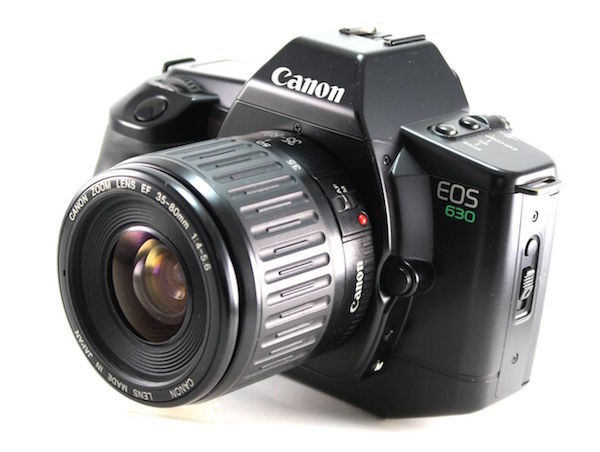
CanonEOS630

Canon’s EOS 630 was the first camera to give users the option of using a separate button for focusing instead of the shutter button.

The answer is because there really is a better way to focus your camera before you take a picture, and it was invented by Canon in 1989. On their EOS 630 camera they included an option within the camera’s custom settings menu to separate the actions of focusing and snapping the shutter. Users could tell the camera to use a separate button on the back of the camera to handle focusing duties, which left the shutter button to do one thing and one thing alone: take the picture. It was not an immediately obvious feature, and it never really caught on like Canon may have hoped, but the same capability is in every Canon DSLR today as well as virtually all cameras from other manufacturers like Nikon, Pentax, Sony, and the rest. If you have any sort of DSLR or mirrorless camera there is probably an option in your settings menu to enable Back Button Focus, and it’s something I highly recommend trying out.

Back Button Focus requires your thumb to press a button on the back of your camera (hence the name) and your index finger to press the shutter, which does take a few days to get used to, but soon becomes second nature. All this begs the question – why should you re-learn how to do something as basic as focusing your camera when the shutter half-press works perfectly fine? The answer lies in the overall concept of giving more control back to you, the photographer.

More Creative Freedom

Cameras today have a dizzying array of autofocus points – those little dots or squares that light up in the viewfinder when you press the shutter button down halfway. You also have a ton of options in how you use these points. You can select an individual point, you can have the camera select what it thinks is the best one, you can tell your camera to use some of them in conjunction with one another, and many cameras have modes such as automatic face detection as well. To be honest, all these options works really well. But just know that by decoupling the act of focusing from the shutter button, and moving it to a separate button, you will be able to do a lot more with your photography than you may realize.

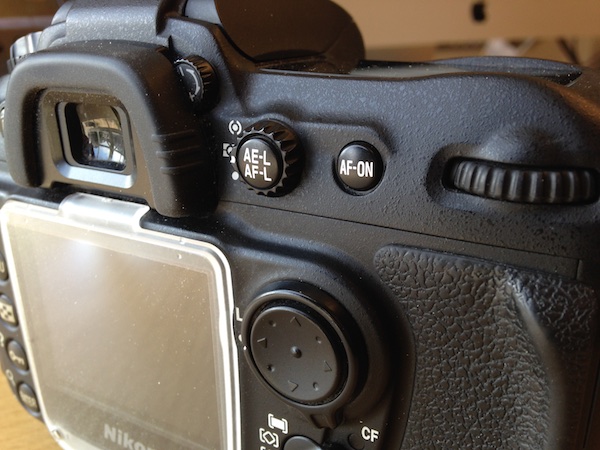
NikonD200BackButton

If your camera has an AF-ON button, you can use it to focus instead of the shutter button. If your camera does not have this button, you can usually adjust the camera’s settings to make another button such as AE-L/AF-L perform this function.

By using a button on the back to focus, you will no longer have to hunt around for the specific autofocus point you want to use or wait for the camera to focus on what it thinks you want to before allowing you to take a picture. Trying to keep a moving subject in focus while deftly holding the shutter down halfway is a feat of dexterity that would keep Legolas himself at bay. This is easily remedied by using back button focus. With this method you can hold the back button down as long as you want, which keeps your camera continually focusing on your subject, until you are good and ready to snap a photo. This is incredibly useful when your subject is in motion, whether people, animals, mechanical objects, or simply a flower petal meandering across a meadow.

One of my favorite cameras is the Nikon D7100, which has 51 autofocus points that cover almost the entire frame. For a while I used all of them, frantically shifting from one to the next as I adjusted each shot or tried to track a moving subject. It worked fairly well, especially in conjunction with Nikon’s 3D subject tracking algorithm (variants of that can be found in most cameras today) which did a good job of keeping my subject in focus whether it moved or I altered my perspective. But I found that I often messed up some critical shots because I was either too busy changing the autofocus point, or letting my camera decide what it thought should be in focus. Switching to back button focus remedied all of this, and helped me gets shots that would have been much more difficult otherwise.

To get this shot I used the back button to focus on a different passer-by, and then waited for others to come down the sidewalk. I was then free to snap photos no matter where people were in the frame, because the shutter button was not also refocusing the picture.

To get this shot I used the back button to focus on a different passer-by, and then waited for others to come down the sidewalk. I was then free to snap photos no matter where people were in the frame, because the shutter button was not also refocusing the picture.

By using the back button to focus I will often just utilize the center focus point to get my subject in focus, and then release my thumb from the button while re-composing to frame the subject. It’s much faster than hunting for a specific autofocus point, and allows me to take the photo at the exact instant I want -not when the camera thinks the subject is in focus. This focus-and-recompose technique works great for a variety of situations, but there are certainly times when I like to utilize one of the built-in AF points. When that happens I just go through the motion of selecting one and then taking a picture like normal while using the back button to focus. In essence, using the back button to focus simply gives me more options when taking a photo, which allows me to think more about the pictures I’m taking instead of fiddling with the camera.

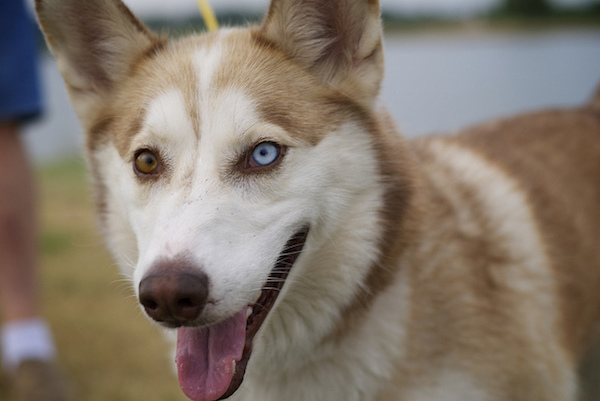
I was able to snap a few photos of this husky by holding my thumb down on the back button to continually adjust the focus, and pressing the shutter to snap photos whenever I wanted.

I was able to snap a few photos of this husky by holding my thumb down on the back button to continually adjust the focus, and pressing the shutter to snap photos whenever I wanted.

Taking the Power Back

Most cameras have a few common focusing modes: Single, Continuous, and Manual. In Single mode, the camera focuses once and then won’t re-focus again until after you take a picture. This is how many photographers use the focus-and-recompose method without using the back button, and it works fine in a variety of situations. The Continuous method forces your camera to constantly adjust focus while your finger is held down on the shutter button, and doesn’t stop until you snap a photo. Manual, as its name implies, leaves all the focusing duties to the photographer who must adjust a ring on the lens in order to nail the focus without any assistance from the camera. All three of these methods have their uses, and you will often encounter situations in which you need to switch from one to the other (for example, switching quickly from Single to Continuous). Doing this requires digging through menus or flipping a dial on your camera, and it can be a bit of a pain.

Using the back button combines all three focusing modes, giving an incredible amount of power and control to the photographer:

Manual: Take your thumb off the back button and focus by rotating your lens barrel. (Note: do not do this if your lens doesn’t have a “M/A” focus setting. If it is in fully autofocus you will be forcing the gears)

Single: Press your thumb on the back button until your camera is in focus, and then lift your thumb up to keep the focus locked until you press the button again.

Continuous: Hold your thumb on the back button as long as you want, forcing your camera to continually adjust the focus until you take a picture. (Note: you must be using Continuous focus mode for this to work).

Nailing this shot of falling water drops required a lot of switching between automatic and manual focus, and would have been virtually impossible if the shutter button was used for focusing instead of the back button.

Nailing this shot of falling water drops required a lot of switching between automatic and manual focus, and would have been virtually impossible if the shutter button was used for focusing instead of the back button.

You can effortlessly switch between all three methods without doing anything at all except moving your thumb away from the back button, which means you can spend far more of your effort on things like composition and framing, instead of digging through menus on your camera.

Finally, one of the most overlooked benefits of using the back button to focus is that it frees up your shutter half-press to do other functions like lock the exposure. You will have to enable this option using your camera’s settings menu, and you might not use it on every shot, but it’s yet another tool in your photographic arsenal that can help you get better photos. When your subject is in danger of being over or underexposed, you can quickly point your camera at something else to get a better exposure, press the shutter button down halfway to lock the shutter/aperture/ISO values, and then recompose to get the image you want. This trick, combined with back button focusing, has saved my proverbial bacon more times than I can count. Normally this exposure-locking function is handled by its own dedicated button, but I have found it to be far more useful to use the exposure-lock button for locking focus and the shutter for locking exposure – effectively reversing the default behaviours of both buttons, but making your camera much more versatile in the process.

All this talk of button-switching and extra finger-pressing might seem inordinately confusing, but it’s much easier than it sounds. Though it might seem counterintuitive at first the more you use the back button to focus the more it will make sense and help you unlock new creative possibilities with your camera.

If you can’t figure out how to set it up on your camera, try and quick YouTube search for “setting up back button focus on a _________” and fill in your camera model.

Do you like to use back button focus? What other tricks do you have up your sleeve to help you get better photos? Leave your feedback in the comments section below.

googletag.cmd.push(function() {
tablet_slots.push( googletag.defineSlot( “/1005424/_dPSv4_tab-all-article-bottom_(300×250)”, [300, 250], “pb-ad-78623” ).addService( googletag.pubads() ) ); } );

googletag.cmd.push(function() {
mobile_slots.push( googletag.defineSlot( “/1005424/_dPSv4_mob-all-article-bottom_(300×250)”, [300, 250], “pb-ad-78158” ).addService( googletag.pubads() ) ); } );

The post Back Button Focus: What is it and why should you try it? by Simon Ringsmuth appeared first on Digital Photography School.


Digital Photography School

 
Comments Off on Back Button Focus: What is it and why should you try it?

Posted in Photography


24 Uber Sharp Images with Huge Depth of Field to Focus Your Attention

27 Feb

Over the last few weeks on dPS we’ve had some collections of images that demonstrate some of the basic photography principals. Last week it was using a large aperture for shallow depth of field. This time we’re going the other way and looking for images with a lot of depth of field, ones that utilize small apertures like f/16 or even smaller.

These are usually images with a lot of depth and focus from near to far. Landscape photographers use this technique often as do, surprisingly, macro shooters. When you get up close the depth of field is really slim so you need that added focus from the smaller apertures (if not using focus stacking techniques).

As a neat side effect if you include a light source like direct sunlight – smaller apertures will turn those into starbursts – a telltale sign you know a small aperture was used.

So here are some images that exemplify maximum sharpness and large depth of field:

Photograph True Grit by Sean Bagshaw on 500px

True Grit by Sean Bagshaw on 500px

Photograph Golden Gate In Chains by Robert Schmalle on 500px

Golden Gate In Chains by Robert Schmalle on 500px

Photograph From Above by Dylan Gehlken on 500px

From Above by Dylan Gehlken on 500px

Photograph Taillante by Gabriele Mannelli on 500px

Taillante by Gabriele Mannelli on 500px

Photograph Exuberance I by Julia Anna Gospodarou on 500px

Exuberance I by Julia Anna Gospodarou on 500px

Photograph Happy Holidays from the Bay Bridge by Aaron M on 500px

Happy Holidays from the Bay Bridge by Aaron M on 500px

Photograph Darkroot Grotto by Alex Noriega on 500px

Darkroot Grotto by Alex Noriega on 500px

Photograph Arch Angel Falls, Zion National Park by Don Smith on 500px

Arch Angel Falls, Zion National Park by Don Smith on 500px

Photograph Under the Bridge by Dariusz Klimczak on 500px

Under the Bridge by Dariusz Klimczak on 500px

Photograph Mr. Robber & Prey by Donald Jusa on 500px

Mr. Robber & Prey by Donald Jusa on 500px

Photograph Sitting on th</p>
<div class=

Photograph f by Martin Brown on 500px

f by Martin Brown on 500px

Photograph Macro Snail by Enrico Salvati on 500px

Macro Snail by Enrico Salvati on 500px

Photograph rose by Guido Schulze on 500px

rose by Guido Schulze on 500px

Photograph Pipevine Swallowtail Butterfly Eggs by Douglass Moody on 500px

Pipevine Swallowtail Butterfly Eggs by Douglass Moody on 500px

Photograph canon 5d mark 2 by maxime  nadeau on 500px

canon 5d mark 2 by maxime nadeau on 500px

Photograph Gdansk by ?ukasz Derangowski on 500px

Gdansk by ?ukasz Derangowski on 500px

Photograph Portland Head Light by Joseph Rossbach on 500px

Portland Head Light by Joseph Rossbach on 500px

Photograph Only Three Left in Our Care... by Dana Allen on 500px

Only Three Left in Our Care… by Dana Allen on 500px

Photograph Crystalline Chamber by Justin Grimm on 500px

Crystalline Chamber by Justin Grimm on 500px

Photograph Keizersgracht - Amsterdam by Iván Maigua on 500px

Keizersgracht – Amsterdam by Iván Maigua on 500px

Photograph Winter Chapel Dobratsch 2159m by Reinhold Samonigg on 500px

Winter Chapel Dobratsch 2159m by Reinhold Samonigg on 500px

Photograph BMW 2002 by Ivan Barinov on 500px

BMW 2002 by Ivan Barinov on 500px

Photograph Echoes of Light by Adrian Borda on 500px

Echoes of Light by Adrian Borda on 500px

Photograph Highest Mountain In Indochina by Por Pathompat on 500px

Highest Mountain In Indochina by Por Pathompat on 500px

googletag.cmd.push(function() {
tablet_slots.push( googletag.defineSlot( “/1005424/_dPSv4_tab-all-article-bottom_(300×250)”, [300, 250], “pb-ad-78623” ).addService( googletag.pubads() ) ); } );

googletag.cmd.push(function() {
mobile_slots.push( googletag.defineSlot( “/1005424/_dPSv4_mob-all-article-bottom_(300×250)”, [300, 250], “pb-ad-78158” ).addService( googletag.pubads() ) ); } );

The post 24 Uber Sharp Images with Huge Depth of Field to Focus Your Attention by Darlene Hildebrandt appeared first on Digital Photography School.


Digital Photography School

 
Comments Off on 24 Uber Sharp Images with Huge Depth of Field to Focus Your Attention

Posted in Photography


Lytro plans to shed jobs as it shifts focus to video

26 Feb

Lytro CEO Jason Rosenthal has announced that the company has raised an additional $ 50M in funding, but plans to use it to make a strategic shift into video and virtual reality, while shedding some jobs. Although the exact number of layoffs has yet to be decided, website re/code is reporting that between 25-50 of Lytro’s 130-strong workforce may be made redundant as the company seeks to hire new employees with video and virtual reality experience. Click through to read more

Articles: Digital Photography Review (dpreview.com)

 
Comments Off on Lytro plans to shed jobs as it shifts focus to video

Posted in Uncategorized


9 Tips to Help you get Sharp Focus at Night

12 Dec

Autofocus is so good on modern cameras that most photographers use it all the time. It seemingly never lets you down. But, let’s say it’s nighttime and you are going to do some shooting. You find a good spot. You set up your tripod. You go to focus your camera using the autofocus. You can feel the camera’s focus ring twisting back and forth, trying to focus. But it never gets there. The camera keeps hunting for a focus spot but never finds one.

Uh-oh.  What are you going to do now?

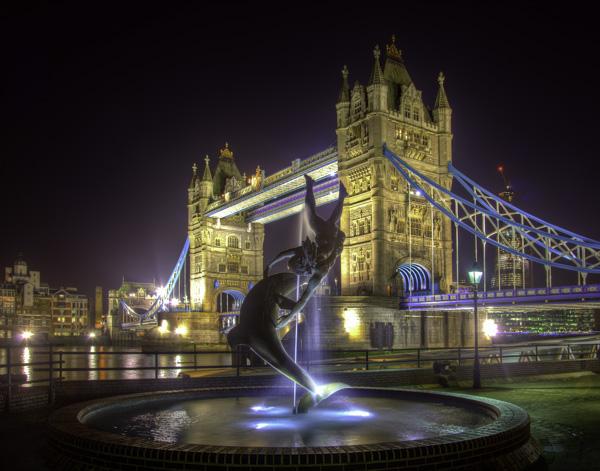
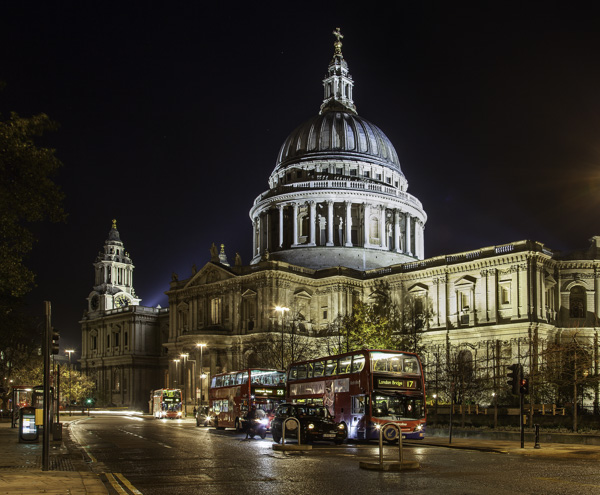
Tower Bridge, March 2011

Actually, this problem doesn’t arise only at night. Your camera will typically have trouble focusing in any really dark scene. So here are some tips for dealing with that situation and focusing your camera when it is dark:

1. Aim for the bright spot

Sometimes you can still use your autofocus. Even though it is dark, most night scenes will have a bright spot or two. They might be streetlights, or a lit-up building, or even the moon. That bright spot can be used to set your autofocus.

To do so, find a bright spot that is reasonably close to your desired plane of focus (i.e., the same distance away as your focal point). Autofocusing on that point should take care of your problem. Just focus on that bright spot in a normal fashion and your camera is now focused on something the same distance away as your subject. You should then be able to take your picture with proper focus.

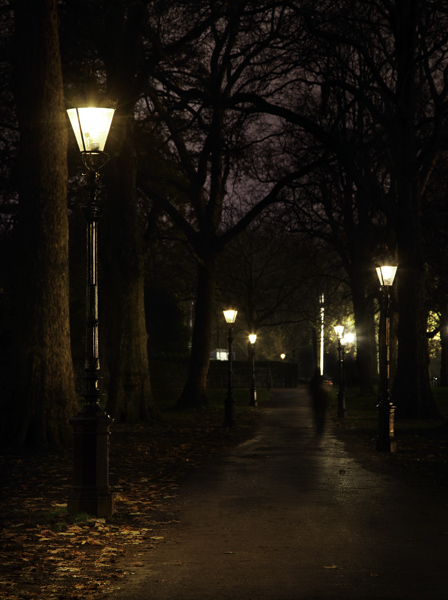
Green Park, November 2012

2. Focus on the edge

Most cameras focus using something called contrast detection. That means the camera will have the best chance at finding something to focus on if you aim at the area of high contrast between something bright and the dark background.  So don’t aim your focus point at the middle of the bright spot in your frame. Rather, focus on the edge of the bright point. The camera will use the contrast between the very light and the very dark tones to focus.

CaCoast

3. Use a flashlight

If you are attempting to autofocus on a relatively close subject, you can use a flashlight to assist with the focus. This is one of the many reasons to keep a flashlight in your camera bag.

To do that, shine your flashlight on your subject. That will lighten it up enough for the camera to focus on it. Set your focus, then you can turn off the flashlight and take your shot.

4. Recompose after focusing

Assume you now have your focus set using the methods set forth above. But to get that focus, you had to move your camera away from your desired composition to focus on the edge of a bright spot. Move your camera back to your desired composition to get the shot. Don’t refocus as you do so though – just move the camera and take the shot with the focus you’ve already set. (You will need to either hold the shutter button part way down, use focus lock, or focus and then turn off the AF so it doesn’t attempt to refocus once you have recomposed – or see #5 below.)

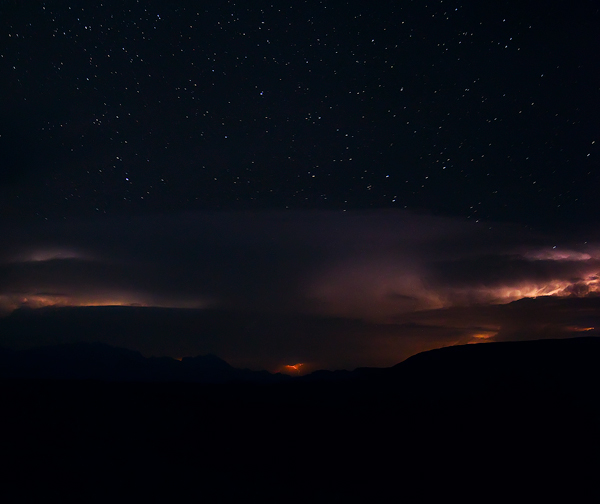
BigBendNight

5. Use back-button focus

It is times like this, when you want to take a shot with out refocusing, that back-button focus really pays dividends. If your camera allows it, go into the menu and set up your focus so that it is not triggered when you press the shutter button halfway down, but rather is triggered when you press a button on the back of your camera. That way since your focus is not set with the shutter button, when you take the picture by pressing it there is no chance that your camera refocuses.

6. Manually focus using the lens scale

If there is nothing for you to use to set your autofocus, you might have to use the dreaded manual focus. But don’t worry, it is not difficult. In the dark, it is often easier to focus manually than hunt for something to use for autofocus.

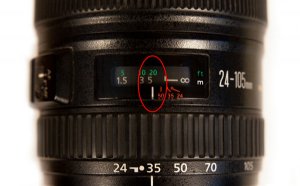
Higher-end lenses make it easier to manually focus. In a high-end lens there should be a scale on the front that tells you the distance (in both feet and meters) at which you are focused. Use that to set the focus.

You might need a flashlight to see the scale.  This is yet another reason to keep a flashlight in your camera bag.

TopOfLens

7. Manually focus by guestimating

If you cannot find a point to focus on, and your lens does not have a distance scale, all is not lost. You can guestimate and get it right in a lot of cases.

To do so, make sure you are shooting with a high aperture value (small opening, large f-number). That will create a wide depth of field to give you some wiggle room in your focus. Specifically, the wide aperture will make a wider range of things acceptably sharp in your frame.

In addition, be sure you are shooting with a wide angle lens. This is not the time to try anything telephoto. The wider angle of view creates a more forgiving environment for your focus.

With a wide aperture and the wide angle of view, you have a broader latitude in your focusing. Now manually focus your camera. If you are shooting a broad scene that extends to infinity, set the manual focus just shy of infinity. The latitude you built-in will make things acceptably sharp all the way to infinity and a certain distance in front of your focus point as well. That will give you the best chance of having the whole scene in focus.

St. Paul, November 2012

8. Use Live View

If you can see anything on your camera’s LCD using Live View, then you can use that to manually focus. This is frequently better because you can zoom in on your subject and clearly see if you have nailed the focus. Try using this whenever possible, as it allows a degree of control over focus that is not otherwise possible.

9. Remember you get a do-over

One of the beautiful things about digital photography is that shooting is free. Unless your scene is moving in front of you, you get a free do-over. Use it liberally. Take a shot, look at it on the LCD, and if the focus isn’t right, just do it again. If your camera allows it, go ahead and zoom in on the preview to clearly see the detail and whether or not you have nailed the focus.

Destin

Conclusion

These tips will help you set your focus at night or when you are in a very dark scene. In fact, some of these tips will also help in broad daylight when the camera thinks it is dark because you are using a 10-stop neutral density filter. Try them when your autofocus is hunting but not finding the focus. You should be able to nail the focus in almost any situation.

googletag.cmd.push(function() {
tablet_slots.push( googletag.defineSlot( “/1005424/_dPSv4_tab-all-article-bottom_(300×250)”, [300, 250], “pb-ad-78623” ).addService( googletag.pubads() ) );
} );

googletag.cmd.push(function() {
mobile_slots.push( googletag.defineSlot( “/1005424/_dPSv4_mob-all-article-bottom_(300×250)”, [300, 250], “pb-ad-78158” ).addService( googletag.pubads() ) );
} );

The post 9 Tips to Help you get Sharp Focus at Night by Jim Hamel appeared first on Digital Photography School.


Digital Photography School

 
Comments Off on 9 Tips to Help you get Sharp Focus at Night

Posted in Photography


Lytro software update introduces Focus Spread feature

11 Dec

Lytro’s processing software just received a significant update. Lytro Desktop 4.1 provides some additional features for users of the Illum light field camera, including Focus Spread, which allows photographers to pick beginning and ending points for depth of focus. Learn more

Articles: Digital Photography Review (dpreview.com)

 
Comments Off on Lytro software update introduces Focus Spread feature

Posted in Uncategorized