RSS
 

Posts Tagged ‘Focus’

Panasonic Lumix GH4 firmware 2.5 brings Post Focus and 4K Photo Mode

16 Mar

Panasonic has announced a firmware update for the Lumix DMC-GH4, bringing Post Focus, 4K Photo Mode and burst shooting with flash to the video-centric mirrorless camera. The update will be available at the end of March, free of charge. 

Post Focus was first announced in July of last year. It captures a short clip of 4K footage while racking focus from one end to the other, allowing the user to select a frame in playback mode after capture with the desired focus point. The Lumix GX8, G7 and FZ300 were the first in line to get the feature via firmware update.

Also taking advantage of the GH4’s video capabilities is the newly added 4K Photo feature, which enables 4K burst, 4K Burst (Start/Stop) and 4K pre-burst. These modes optimize 4K shooting for still photo extraction, and aim to help photographers catch hard-to-get moments, like the elusive group shot with all eyes open. Firmware 2.5 also enables consecutive shooting with compatible Panasonic external flash units.

In the past, Panasonic has used Photokina to launch its DSLR-style mirrorless cameras, so it would make sense if we see an update to the GH-series come September. However, a significant firmware update in the meantime indicates that it’s still alive and kicking.

Check Panasonic’s support website at the end of March to download the update.


Press release:

DMC-GH4 Firmware Update Version 2.5

Newark, NJ (March 16, 2016) – Panasonic has today announced the new firmware update Version 2.5 for the DMC-GH4 to further enhance its performance at no charge. The new firmware Version 2.5 includes following functional updates:

-Post Focus
Post Focus is a special function that enables users to select an in-focus point after shooting. It has already been integrated in new LUMIX cameras such as the GX8. With this function, users can enjoy changing the perspective for greater photographic expression or to choose the best in-focus shot for macro shooting.

-4K PHOTO (4K Burst / 4K Burst (Start/Stop) / 4K Pre-burst)
With 4K PHOTO mode there are three dedicated modes – 4K Burst / 4K Burst (Start/Stop) / 4K Pre-burst – are all now available on LUMIX GH4*. The addition of these modes further enhances the usability of 4K PHOTO to capture fleeting photo opportunities at 30p. 

-External Flash Burst
Consecutive shooting with flash burst is available with an external flash that is capable of continuous emission.  This includes the following Panasonic models: DMW-FL580L, DMW-FL360L, DMW-FL500, DMW-FL360 and DMW-FL220.

The new DMC-GH4 firmware Version 2.5 is scheduled to be released at the end of March 2016 at the LUMIX Customer Support website: http://panasonic.jp/support/global/cs/dsc/

Articles: Digital Photography Review (dpreview.com)

 
Comments Off on Panasonic Lumix GH4 firmware 2.5 brings Post Focus and 4K Photo Mode

Posted in Uncategorized


Understanding the Focus and Recompose Technique

28 Jan

Digital cameras have an array of squares or dots, that you see when you look through the viewfinder, which represent the points at which it is capable of focusing. Put your subject on top of one of those dots, press the shutter button, and you’ll get a nice sharp image….usually.

But, sometimes your camera doesn’t light up the right dot, or your subject is out of the range of the focus points, or you want to select a specific point but you have trouble moving the buttons, knobs, and dials on your camera fast enough. If this sounds like you, or if you just want to check out a new way of using your camera, you might want to try the focus-and-recompose technique.

focus-and-recompose-shoes

Kids move around all the time, so rather than hunt for a specific focus point I used the center point to focus on their shoes and then instantly recomposed before snapping the photo.

Every digital camera allows you several options when selecting which focus points to use such as:

  • Full automatic – Your camera decides which dot to use, and what should be in in focus, often based on what’s closest to the viewfinder.
  • Face Detect – Your camera looks at the scene to see if there are any faces and prioritizes those above all else. If there are multiple faces, it usually looks for the ones that are closest.
  • Single Point – You select one point to be in focus and your camera makes sure that one specific spot is sharp before taking the picture.

There are other methods as well, but these are the most common, and all of them are quite effective but can also be a bit limiting. Automatic and Face Detect generally work fine but aren’t always accurate. If you want to select the focus point yourself you will usually have to turn a dial or press a joystick on the back of your camera, which can cost you precious seconds, and lead to some missed shots. Focus-and-recompose inverts the equation a bit, and instead of moving the focus point around you focus once, and then move your camera around to compose and get the shot you want.

focus-and-recompose-squirrel

Focus-and-recompose is a process wherein you select the focus point, often just one single dot or square in your viewfinder, and lock focus with a half-press of the shutter button. Then with a flick of your wrist you physically move your camera back and forth, or up and down just a bit, in order to recompose your shot will still keeping the focus where you locked it. It sounds a bit complicated, but once you get used to this technique it quickly becomes second nature, and is much faster than fiddling with buttons and dials to select a focus point every time.

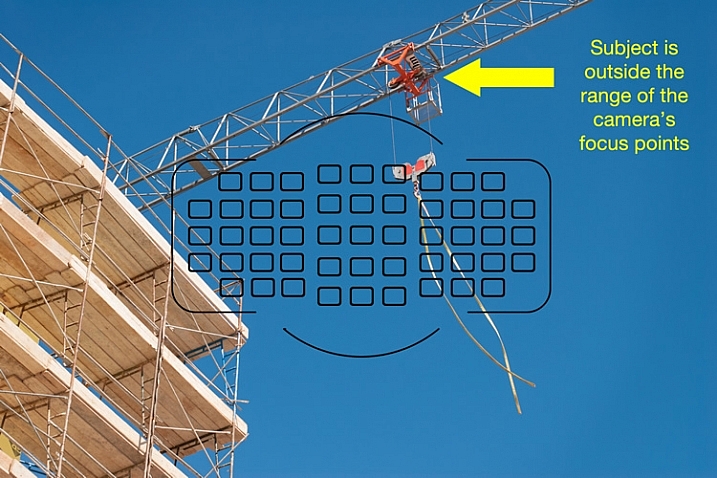
In the following image I have overlaid an exact representation of all 51 focus points on my Nikon D750 camera. You will notice that the object on which I wanted to focus, the red pully mechanism on the crane arm, falls outside the focus points of my camera.

focus-and-recompose-focus-points-crane

If I had to rely solely on the focus points of my camera, I wouldn’t have been able to get the shot I wanted. However, the focus-and-recompose technique offered an easy solution. All I had to do was focus on the top pully, lock it with a button on my camera, and then recompose the shot by shifting my camera’s field of view down just a bit. By using this method I did not need to make an compromises, and I am pleased with the final image

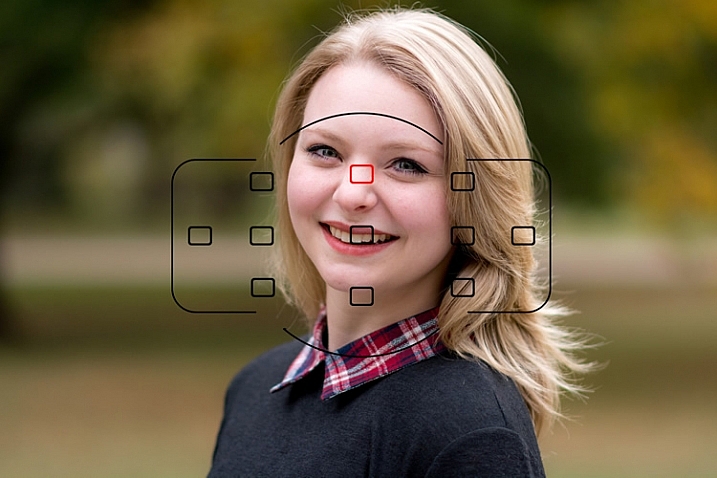
Even though some cameras offer a much broader spread of focus points that can reach to the very edge of the frame, it is time-consuming to select them, or shift from one to the next using the dials on your camera. Some cameras don’t have nearly the number of focus points as higher-end models, which can be a bit frustrating when your subject falls between two points, but focus-and-recompose can solve this issue as well. I don’t even use all 51 of my camera’s points, because it’s quicker to select one from only 11, as you can see in the image below, and then recompose as needed.

focus-and-recompose-portrait

It’s not always possible to get the focus precisely where you want it, if you let your camera do all the work for you.

This portrait of a college sophomore (above) illustrates a big problem for traditional focusing methods, especially on cameras without a lot of focus points. In order to get the focus point precisely on her left eye where I wanted it, the only option using traditional methods would have been to scoot my camera’s field of view over a bit, which would have meant compromising what I wanted the shot to look like. Rather than sacrifice my artistic vision because of the limitations of my camera, I selected the top center point (highlighted in red), focused my camera on her eye, and then shifted my camera over just a bit to get the picture. Because I was only using 11 out of 51 possible focus points it was much quicker to select the one I wanted instead of repeatedly tap-tap-tapping on the dial on the back of my camera.

focus-and-recompose-baby

This baby’s eyes were out of the reach of my focusing area so I used the top-left square to lock focus and then recomposed to get the shot I wanted.

There are some important limitations to know about this method, and it does not work for every type of photographic situation. Most cameras have a few different autofocus modes such as single (the camera focuses once and doesn’t refocus until you shoot a picture) and continuous (the camera refocuses continually until you take a shot). If you shoot static subjects, such as landscapes and architecture, you can leave your camera in single mode, in which focus-and-recompose works quite well.

However if you shoot things that are always on the move such as families, kids, sports, autos, or animals, you will get better results using continuous focusing. This makes focus-and-recompose tricky because as soon as you move your camera to re-frame your shot, the focusing point moves too. In these instances I usually just leave my camera in continuous focusing mode while I move myself around to get the picture I want, since the subject has usually moved by the time I would normally lock focus, and recompose the shot.

One of the trickiest aspects of focus-and-recompose involves the physical action of holding the shutter button halfway down with your finger, while you reframe your shot. Fortunately you can solve this if you use the back button focus, technique which decouples the action of focusing, from that of actually taking a picture. Moving to back button focus, along with using focus-and-recompose, has entirely transformed my approach to photography, and made me a lot more nimble and versatile as a photographer.

focus-and-recompose-tesla

I used focus-and-recompose to nail focus precisely on the Tesla “T” logo.

One other thing to note about focus-and-recompose is that the center focusing points on most cameras are typically more sensitive than those along the outer edge of the frame, and are thus able to get more a more accurate focus, especially in dim light. If you use the outer focusing points, your pictures might not always be as sharp as they could be, but if you focus with the center point and then recompose your shot you will likely get more keepers. Of course this is not recommended for macro photography or other applications where your depth of field is razor thin, since any tiny movement of the camera will dramatically alter your picture, but for most other situations it can be a huge benefit.

What about you? Have you tried this technique or do you have other focusing tips to share? Leave your thoughts in the comments below!

googletag.cmd.push(function() {
tablet_slots.push( googletag.defineSlot( “/1005424/_dPSv4_tab-all-article-bottom_(300×250)”, [300, 250], “pb-ad-78623” ).addService( googletag.pubads() ) ); } );

googletag.cmd.push(function() {
mobile_slots.push( googletag.defineSlot( “/1005424/_dPSv4_mob-all-article-bottom_(300×250)”, [300, 250], “pb-ad-78158” ).addService( googletag.pubads() ) ); } );

The post Understanding the Focus and Recompose Technique by Simon Ringsmuth appeared first on Digital Photography School.


Digital Photography School

 
Comments Off on Understanding the Focus and Recompose Technique

Posted in Photography


In use: Panasonic Post Focus after-capture focus selection feature

25 Nov

As announced on Friday, Panasonic has just released new firmware that enables a post-capture refocusing feature in some of its cameras that run 4K video on a Micro Four Thirds sensor. We got hold of a pre-release copy of the firmware and have been able to try it out on the Lumix DMC-GX8 body. Read more

Articles: Digital Photography Review (dpreview.com)

 
Comments Off on In use: Panasonic Post Focus after-capture focus selection feature

Posted in Uncategorized


Panasonic’s Post Focus feature arrives November 25

21 Nov

In July, Panasonic revealed plans to launch a feature it calls Post Focus for select camera models via a firmware update. Panasonic today announced that firmware update will be available via the Lumix Global website on November 25. The Panasonic Lumix DMC-GX8, DMC-G7, and DMC-FZ330 will be supported. Read more

Articles: Digital Photography Review (dpreview.com)

 
Comments Off on Panasonic’s Post Focus feature arrives November 25

Posted in Uncategorized


Sony a7 II gains faster focus for adapted lenses and uncompressed Raw

04 Nov

Sony’s a7 II will receive a firmware update that will boost its AF performance with adapted lenses as well as adding support for uncompressed Raw. The update adds a menu option that pushes the camera to either use phase detection (for speed) or contrast detection (for accuracy) when using non-native lenses. Read more

Articles: Digital Photography Review (dpreview.com)

 
Comments Off on Sony a7 II gains faster focus for adapted lenses and uncompressed Raw

Posted in Uncategorized


Tripod Review: Gorillapod Focus Field Test

25 Oct

I personally have one of these guys and find it extremely handy for travel and using in places where you either aren’t allowed to have a tripod, or don’t want to haul a big heavy one around. Check out what you can do with the Gorillapod Focus with X ball head kit in this video from Big Iris Productions.

They put it in some pretty challenging situations and gave it a mixed review. I would add that I find it to work great just to put your DSLR onto and walk around with. I did that while travelling in Spain – put the camera on Gorillapod, and the strap around my neck as usual  – but then just rested the legs of the tripod on my hip. It takes all the weight off your neck and I found it really comfortable to walk around that way, ready to shoot.

googletag.cmd.push(function() {
tablet_slots.push( googletag.defineSlot( “/1005424/_dPSv4_tab-all-article-bottom_(300×250)”, [300, 250], “pb-ad-78623” ).addService( googletag.pubads() ) ); } );

googletag.cmd.push(function() {
mobile_slots.push( googletag.defineSlot( “/1005424/_dPSv4_mob-all-article-bottom_(300×250)”, [300, 250], “pb-ad-78158” ).addService( googletag.pubads() ) ); } );

The post Tripod Review: Gorillapod Focus Field Test by Darlene Hildebrandt appeared first on Digital Photography School.


Digital Photography School

 
Comments Off on Tripod Review: Gorillapod Focus Field Test

Posted in Photography


Why Every Photographer Should Use a Manual Focus Lens

27 Aug

Your camera is smart. It has processors that are able to run algorithms, for near instantaneous adjustments to compensate for lighting conditions and changing environments. I’m a professional lens reviewer, and tend to complain if a lens/camera combination takes more than a split second to achieve accurate autofocus. But the reality is that most modern camera/lens combinations achieve accurate autofocus remarkably fast. Modern DSLRs can pretty much see in the dark, and still focus reasonably well with a near absence of light, and their performance at extremely high ISO settings is phenomenal.

Yes, your camera is most certainly smarter than your father’s, but the question is, are you a smarter photographer than your father?

Dustin Abbott DPS MF 15

Could it be that the wizardry of modern processors, sensors, and autofocus motors (AF) cocoon modern photographers from what actually happens in the process of taking photos? And, in doing so keep us from having to learn some of the essential basics of photography that could make us better? Here is why I think every photographer should spend some time with a manual focus only lens.

Aperture

A press release for a modern lens will say something like, “Nine rounded aperture blades.” That means next to nothing to most modern photographers for one simple reason – they will never see those blades. All they will ever see is the glass within the barrel of their lens. The reason for this is simple: lenses with an automatic iris aperture (the camera sets the aperture electronically), focus with the lens wide open (aperture blades withdrawn), and only stop down to the chosen aperture in the split second when that the shot is taken. It is pretty amazing how quickly this all happens, when you stop and think about it.

Most lenses produced for Canon EF mounts (excluding Samyang/Rokinon lenses along with a few non-mainstream models) have an auto iris aperture control. Even Zeiss manual focus lenses in Canon (ZE) mounts have automatic irises, and Samyang/Rokinon is retooling many of their lenses with AE versions with auto aperture control. Put simply, very few modern lenses in a Canon mount have an actual aperture ring. Nikon shooters get a few lenses with manual aperture rings (for some reason Zeiss lenses include one on Nikon [ZF] mounts.)

Auto aperture iris control is great for convenience. Just twist the dial on your camera (often in third stop increments) and select the aperture you want, or even let the camera choose it for you in an auto mode. It’s quick and painless.

The downside, of course, is that the actual significance of what is happening when that iris is opened wide or closed down is often lost upon modern photographers. We can talk about “stopping down” a lens or the advantage of a wide aperture prime, but until you have actually seen the difference in an aperture iris you won’t have a full sense of what that really means. Take a look at this series from the new Rokinon 50mm f/1.4.

When you actually see that aperture closing down you really get a sense of the difference between the f-stops and how much more light gathering there actually is at wide apertures. This series starts at f/1.4 and goes to f/8 – see how much difference the aperture size makes in the amount of light entering the camera?

Dustin Abbott DPS MF 8

Dustin Abbott DPS MF 9

Dustin Abbott DPS MF 10

Dustin Abbott DPS MF 11

Dustin Abbott DPS MF 12

Dustin Abbott DPS MF 13

Dustin Abbott DPS MF 14

My wife is an intelligent woman. She even has a pretty decent eye as a photographer, and has taken some great photos. But despite having been married to a gear guy since 1997, and having a hundred or so lenses going in and out of our house, she still to this day often gets confused about aperture. It can be confusing, as the logic (due to the way that f-stops often get reported) is backwards. Bigger numbers mean smaller apertures -and that seems backwards. There is no mistaking this with a manual focus lens with a manual aperture ring – you can physically see the aperture iris shrinking as you stop the lens down (choose a smaller aperture size – larger f-stop, like f/11 etc).

More photographers would get what aperture numbers really mean in terms of light gathering, if they physically saw the aperture blades close down or open in their lenses.

Light Gathering

Most cameras have a standard focusing screen, that does not show the true depth of field. This, added with the fact that the camera typically focuses with the lens wide opened, means that you often don’t get a sense of how much less light is available when the lens is stopped down (f/4-f/16, for example) or how much more is available at large apertures (f/1.2-f/2.8). Most DSLRs have a DOF (depth of field) preview button somewhere, but it is often in an obscure location and rarely gets used by many people. For this reason many photographers have never seen the true depth of field of any of their wide aperture lenses, or any other lens for that matters. This changes when you use a manual focus lens (particularly with a focus screen that shows true depth of field). More on this in a moment.

Yes, it is a pain when the viewfinder is quite dark when you have a manual aperture lens mounted and stopped down to, say, f/8. That’s the reason that modern lenses and cameras don’t show you this in your viewfinder. But it also means that you aren’t being forced to learn what f/8 really means in terms of light gathering. You also don’t see how much more light is available, or how much more shallow the depth of field is with a large aperture. You don’t really think about your aperture setting at the time of capture, resulting in a loss of creativity because your mind isn’t forced to visualize what aperture means to the shot.

But beyond this, manually selecting your aperture really helps you to mentally dial in the relationship between aperture and depth of field. The fact that you have to think about selecting the aperture, and see a difference in the viewfinder, in both the depth of field and the amount of light, helps you to realize how shallow depth of field shots (with a large aperture) and large depth of field shots (with a small aperture) are going to turn out. I have learned how to mentally visualize how depth of field is going to affect a scene so much more because of using manual aperture lenses. Here is a series from the Zeiss Planar T* 50mm f/1.4 lens. It starts at f/1.4, f/2, f/2.8, and then finally shows f/4. Notice the huge difference this makes to the degree in which the background is blurred.

Dustin Abbott DPS MF 1

Dustin Abbott DPS MF 2

Dustin Abbott DPS MF 3

Dustin Abbott DPS MF 4

The large aperture shots are much more attractive, and give a better three dimensional effect to the image. You probably won’t always shoot with manual focus lenses, but using one will help train your brain to visualize your shots more effectively and artistically.

Depth of Field and Focus

It is quite a revelation to use a wide aperture, manual focus prime, with a focusing screen like an EG-S that shows true depth of field. At close to medium distances you can actually watch focus travel from one thing to another, and subjects pop into focus. It really helps you think about storytelling as a part of your imagery. When you think about what you want in focus, it means that you have become intentional about what you want your viewer to see.

Many cameras have AF point spreads that are not wide enough to reach the edges of the frame. Manual focus lenses remove that limitation, and I am more likely to take an image with my subject in focus in an extreme corner when I use one. The rule of thirds for composition is a great starting tool, but sometimes rules are made to be broken. Take a look at this shot of a family games night. The cards are in the extreme bottom corner. Your eye goes there first, but then considers the whole out of focus scene beyond. Your brain allows you to mentally fill in the blanks, and image possibilities, rather than just a looking at a scene.

Dustin Abbott DPS MF 7

Many macro photographers have learned to choose to use manual focus at those very fine distances. It is often challenging to place an AF focus point right where you need it (particularly when using a tripod), but manually focusing allows you to simply focus until what you need to be in focus is sharp. I’ve heard a lot of people fuss over the focus speed of some macro lenses, including the amazing EF 100mm f/2.8L IS. All I can say is that you need to use a manual focus macro lens sometime. Using the Zeiss Makro-Planar in either a 50mm or 100mm focal length helps you to realize how much the macro range adds to the focus possibilities of such a lens. There are so many extra focus points! Using a manual focus macro lens will certainly help you appreciate the AF on macro lenses, and will also help you understand why the AF focus (distance) limiter switch is there and how to properly use it.

Dustin Abbott DPS MF 6

Dustin Abbott DPS MF 5

Learning to focus with a manual focus lens will help your mind to understand how to better use autofocus lenses (particularly those with focus limiters).

In Conclusion

We live in a high-paced world. We want everything to be faster and easier. But great art is rarely created is rarely created in a rush. When I am shooting professional event work and weddings, I tend to use image stabilized, wide aperture, zoom lenses. They are big and heavy, but they are extremely flexible and deliver great results. I need speed in those situations, but some of my most creative shots in my catalogue have been taken with manual focus lenses. I slow down and become more creative. Some of my most critically acclaimed images have been taken with manual focus lenses, both inexpensive and expensive ones.

If you have been guilty of doing most of your photography in a rush, do yourself a favor a get yourself a manual focus lens (even a cheap one). If you want a cheap option, grab yourself an SMC Takumar 55mm f/1.8, and an adapter to your mount of choice. You can probably get a lens and an adapter for under $ 100. It takes some amazing pictures, and will open a world of appreciation for some of the lenses from another era. It will probably also make you a better photographer.

Even better is the SMC Takumar 50mm f/1.4, or if you want to use a value oriented modern manual focus lens, try one in your favorite focal length from Rokinon or Samyang (same thing, just rebranded lenses). You’ll find a number of reviews of different ones on my website. If you are willing to spend more and want the finest optics and image quality available, Carl Zeiss makes some of the best lenses period. They tend to be mostly manual focus, and I’ve had the privilege of using and reviewing many of them.

Once you learn how to take good pictures with a manual lens, shooting with your modern gear will seem easier than ever, and you might even use it more creatively. These are just a few reasons why every photographer should spend some time with a manual focus only lens.

googletag.cmd.push(function() {
tablet_slots.push( googletag.defineSlot( “/1005424/_dPSv4_tab-all-article-bottom_(300×250)”, [300, 250], “pb-ad-78623” ).addService( googletag.pubads() ) ); } );

googletag.cmd.push(function() {
mobile_slots.push( googletag.defineSlot( “/1005424/_dPSv4_mob-all-article-bottom_(300×250)”, [300, 250], “pb-ad-78158” ).addService( googletag.pubads() ) ); } );

The post Why Every Photographer Should Use a Manual Focus Lens by Dustin Abbott appeared first on Digital Photography School.


Digital Photography School

 
Comments Off on Why Every Photographer Should Use a Manual Focus Lens

Posted in Photography


How To Quickly Focus Stack an Image in Photoshop

04 Aug
Four-image focus stack of sunset in Bishop, California. The foliage in the foreground was just inches away from the camera.

Four-image focus stack of sunset in Bishop, California. The foliage in the foreground was just inches away from the camera.

When you take into account all the different ways to get a tack sharp image, it can be quite overwhelming. I’ve been photographing landscapes as a full time photographer for six years now, and have tested just about every method out there. Focus stacking is just one more option, but it is one of my favorites, if the conditions are right.

Focus stacking is a life saver when you have a foreground subject that is very close to the frame, and a background subject that is equally important to the image. This happens quite a bit in landscape photography when using super wide angle lenses! Some will argue that hyperfocal calculations work in these situations too, and while they certainly can, I personally don’t like hassling with the charts and measurements unless I really have to.

Two image focus stack of Lily Lake near Estes Park, Colorado.

Two image focus stack of Lily Lake near Estes Park, Colorado.

One of the most important things you can do out in the field is to inspect your shots instead of just assuming you nailed it. You’ll find articles all over the place making fun of photographers for chimping, but the ability to zoom in on all the tiny details of your shot is a major advantage over the film days.

When I’m taking pictures of a magnificent sunset, I’m working fast and keeping my head on a swivel. When I take a shot, I’ll quickly review it and zoom in all the way on my main subject. Then, I’ll zoom in on the other parts if they need to be sharp as well (sometimes they don’t). If you have a really close foreground subject and it’s tack sharp, but the mountains in the background are just a bit soft; this is a good time to consider focus stacking.

Two image focus stack at Great Sand Dunes National Park in Colorado. One for the sand that was less than a foot from the lens, and one for the background.

Two image focus stack at Great Sand Dunes National Park in Colorado. One for the sand that was less than a foot from the lens, and one for the background.

The best part about focus stacking is that it’s super easy! Just put your camera on a tripod and set your lens to manual focus. I use live view on the back of my camera to zoom in as close to my subject as possible and turn the focus ring on my lens until I see the subject become tack sharp. Once you’ve gotten that shot, scroll around the image and see what is soft in the background. If the mid-ground is soft, turn your focus ring until it’s sharp and take the same picture with the same settings. Then, dial the focus ring for the background and take another shot. That’s it until post processing!

Stacking the Images Together in Photoshop

Final image from the video. Three image focus stack from Zion National Park.

Final image from the video. Three image focus stack from Zion National Park.

When Focus Stacking Doesn’t Work

In all the images above that had foliage in them, there was virtually no wind at the time I took the shots. The foliage was perfectly still. If the wind is blowing and the leaves are swaying back and forth, focus stacking is going to be a nightmare, and isn’t even worth bothering with in most cases.

It’s also important to note that having the entire image in sharp focus isn’t always the best artistic approach to a scene. Sometimes having your subject sharp and the background soft will do a much better job of drawing the viewer’s eye where you want. It really just depends on the situation.

Conclusion

Focus stacking is just one trick to have in your bag, and this is just one method of doing it. There are also third party programs like Helicon Focus to consider. I personally haven’t used the program but have heard great things about it.

Have anything to add to the article? Let me know in the comments below!

googletag.cmd.push(function() {
tablet_slots.push( googletag.defineSlot( “/1005424/_dPSv4_tab-all-article-bottom_(300×250)”, [300, 250], “pb-ad-78623” ).addService( googletag.pubads() ) ); } );

googletag.cmd.push(function() {
mobile_slots.push( googletag.defineSlot( “/1005424/_dPSv4_mob-all-article-bottom_(300×250)”, [300, 250], “pb-ad-78158” ).addService( googletag.pubads() ) ); } );

The post How To Quickly Focus Stack an Image in Photoshop by James Brandon appeared first on Digital Photography School.


Digital Photography School

 
Comments Off on How To Quickly Focus Stack an Image in Photoshop

Posted in Photography


Sony reportedly shifting focus to full-frame cameras

04 Aug

Sony is planning to heavily target the full-frame camera market, according to a report from The Korea Times. At a press conference, Sony Korea’s Digital Imaging & Alpha Marketing Department head Bae Ji-hoon said that Sony plans to first target current full-frame camera users, then shift toward attracting new customers who currently use ‘entry and mid-class models.’ Read more

Articles: Digital Photography Review (dpreview.com)

 
Comments Off on Sony reportedly shifting focus to full-frame cameras

Posted in Uncategorized


Discover the Secrets to Perfectly Focused Photos [Save 50% on Jay & Varina Patel’s Focus Collection]

06 Jul

It’s deal #6 in our mid year sale and this one is courtesy of two of our favourite photography teachers, Jay & Varina Patel.

For the next 24 hours, you can save 50% off their Focus Collection — In Sharp Focus & Hyperfocal Distance!

The $ 44.50 discount will be automatically applied when you click ‘Add to the Cart’ here.

These two in-depth courses will help master your focusing techniques.

You’ll learn the best practices and camera settings for getting sharp focus every time, and gain the confidence to get in close using a wide angle lens.

With 15 video lessons, over 80 minutes of invaluable content taught in the field, case studies and a post processing workflow walkthrough, not only will you be shown how to handle difficult focusing situations, but you’ll see how to get creative with focus too.

One day is all you have, so get this great training now before time runs out!

googletag.cmd.push(function() {
tablet_slots.push( googletag.defineSlot( “/1005424/_dPSv4_tab-all-article-bottom_(300×250)”, [300, 250], “pb-ad-78623” ).addService( googletag.pubads() ) ); } );

googletag.cmd.push(function() {
mobile_slots.push( googletag.defineSlot( “/1005424/_dPSv4_mob-all-article-bottom_(300×250)”, [300, 250], “pb-ad-78158” ).addService( googletag.pubads() ) ); } );

The post Discover the Secrets to Perfectly Focused Photos [Save 50% on Jay & Varina Patel’s Focus Collection] by Darren Rowse appeared first on Digital Photography School.


Digital Photography School

 
Comments Off on Discover the Secrets to Perfectly Focused Photos [Save 50% on Jay & Varina Patel’s Focus Collection]

Posted in Photography