RSS
 

Posts Tagged ‘Focus’

Kowa to make three manual focus lenses for Micro Four Thirds

17 Feb

kowa2.png

Japanese optical company Kowa – best known for its spotting scopes and binoculars – has revealed that it plans to make three lenses for Micro Four Thirds cameras. The Kowa Prominar 8.5mm F2.8 MFT, 12mm F1.8 MFT and 25mm F1.8 MFT will all feature manual focus and aperture control, and use low-dispersion XD glass and aspheric elements to minimise distortion and aberrations. They’re due to be released in summer 2014.

News: Digital Photography Review (dpreview.com)

 
Comments Off on Kowa to make three manual focus lenses for Micro Four Thirds

Posted in Uncategorized


Focus on Blur: Bokeh Cityscapes Celebrate Color & Light

06 Jan

[ By WebUrbanist in Art & Photography & Video. ]

bokeh urban color light

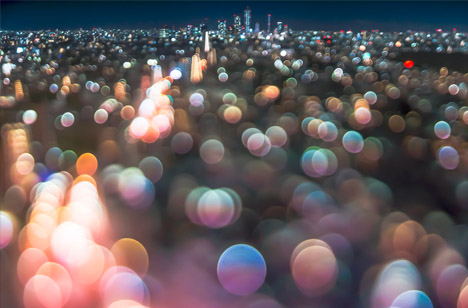
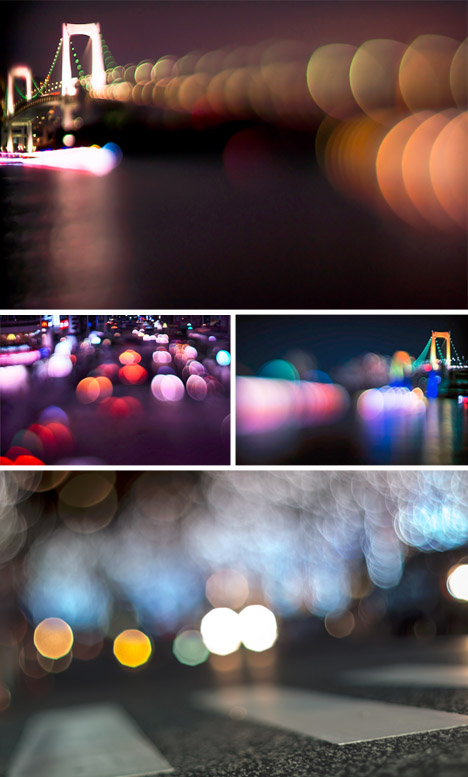
Stretching and reversing conventions for balancing foreground and background, one urban photographer in Tokyo is taking the Japanese concept of Bokeh to dazzling extremes.

bokeh vertical landscape city

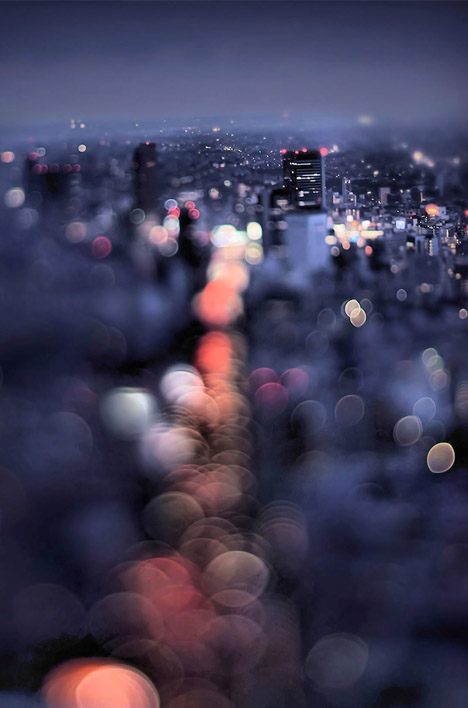
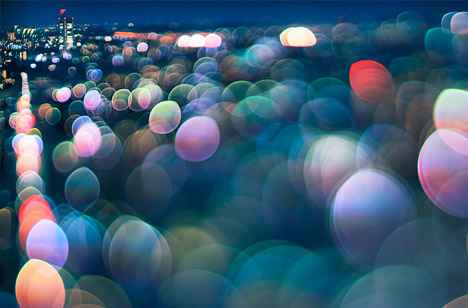
Bokeh (which translates as ‘blur’) plays with a lens’s circle of confusion in which points of light become glowing discs, but instead of making the background fuzzy, Takashi Kitajima unexpectedly lets the foreground become the backdrop.

bokeh blurred city street

The result seems to highlight the chaos and movement of what is closest to the viewer’s perspective in a surreal but suggestive way that indirectly resonates with our actual experience of cities.

bokeh city angled view

bokeh statue monument focus

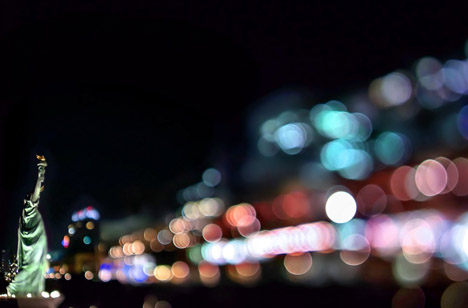
In turn, more distant monuments, buildings and bridges on the horizon or off to one side emerge as stable anchors, contrasted with a sea of light.

bokeh zoom foreground background

The net effect is something between a photograph and a watercolor or pastel painting, a fusion of concrete realism and playful abstraction.

Share on Facebook


[ By WebUrbanist in Art & Photography & Video. ]

[ WebUrbanist | Archives | Galleries | Privacy | TOS ]


WebUrbanist

 
Comments Off on Focus on Blur: Bokeh Cityscapes Celebrate Color & Light

Posted in Creativity


Samyang announces 10mm F2.8 manual focus wide-angle prime

06 Dec

Samyang_10mm_news-2.png

Samyang has announced the 10mm F2.8 ED AS NCS SC, a wide-angle manual focus prime for APS-C format cameras. It’s the company’s first lens to feature nano crystal coating for increased light transmission and reduced internal reflections. With a 15mm equivalent angle of view (20mm equivalent on Micro Four Thirds), it’ll be made in mounts for all current SLR and mirrorless systems. It’ll go on sale at the end of January 2014 at an RRP of £469.99 for Nikon AE mount, or £429.99 for all other versions.

News: Digital Photography Review (dpreview.com)

 
Comments Off on Samyang announces 10mm F2.8 manual focus wide-angle prime

Posted in Uncategorized


Voigtlander creates VM-E Close Focus adapter for Sony cameras

24 Oct

close-focus-adapter-web.png

Voigtlander has announced the VM-E Close Focus adapter, which will allow the use of M-mount lenses on Sony E-mount cameras such as the recently-announced full frame A7 and A7R. Unlike most similar adapters, though, Voigtlander’s latest includes a focusing helicoid for close-up work, with 4mm travel. This overcomes a limitation of many rangefinder lenses, which often have longer minimum focus distances than similar SLR lenses. It’s set to be available in December for €289.

News: Digital Photography Review (dpreview.com)

 
Comments Off on Voigtlander creates VM-E Close Focus adapter for Sony cameras

Posted in Uncategorized


UK’s Focus on Imaging photo trade show to close

31 May

focus-on-imaging-crop.jpg

The organisers of Europe’s largest photographic trade show, Focus on Imaging, have declared that this year’s show was the last. Mary Walker Exhibitions had organised the show, held in March at the National Exhibition Centre in Birmingham UK, for the past 24 years. In a statement Mary Walker announced that the rights to the show would not be sold on, but instead it is simply being brought to an end.

News: Digital Photography Review (dpreview.com)

 
Comments Off on UK’s Focus on Imaging photo trade show to close

Posted in Uncategorized


Getting Landscapes Sharp: Focus Stacking

07 May

A key aspect of successful landscape photography is image sharpness.  Usually, it is desirable to ensure that all elements of a scene, whether close or far, are captured in sharp focus.  This can prove to be challenging and, if not achieved with the click of the shutter, cannot be corrected later during post processing.

One approach that is often taken is to use the smallest aperture available, e.g. f/22, to obtain the largest depth of field.  Whilst maximising the depth of field is a good intent, using such a small aperture will actually result in softer images due to an effect known as diffraction.

Most lenses are at their sharpest when used at apertures between f/8 and f/11 and whilst hypefocal focussing may allow you to capture an entire scene acceptably sharp in one image using these apertures; it is always still a compromise between a number of factors and there will be times when you cannot generate enough depth of field to capture a whole scene at optimum sharpness.

That is where focus stacking comes in.

Focus stacking is the technique of stacking (or blending) a number of images that have been focussed at different points throughout a scene to give a final image that contains the sharpest portions of the originals, seamlessly blended into one.  It isn’t as laborious as it sounds and can give really good results, rendering scenes far sharper than possible in just one exposure.
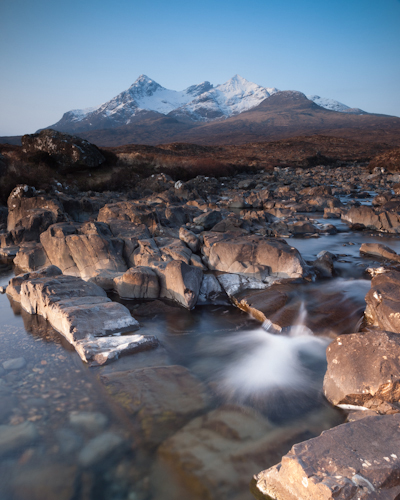
Focus Stack Initial Image

The initial image, shot at f/8, lacked front-to-back sharpness as there was not sufficient depth of field. ISO100, f/8, 2 secs

In the field…

As you will be stacking the images into one, aside from the point of focus, you want the individual photographs to be identical in all other respects.  Therefore, it is best to have the camera positioned on a tripod and use a remote release.

Using your optimum aperture (can easily be determined for a given camera/lens combo using focus charts, however you will most likely find that f/8 is a good starting point), take the required number of images focussed at different points throughout the frame.

A minimum of two images are required, i.e. one focussed for the foreground and one focussed for the background, however an additional third image, focussed for the middle ground can also be a good idea.
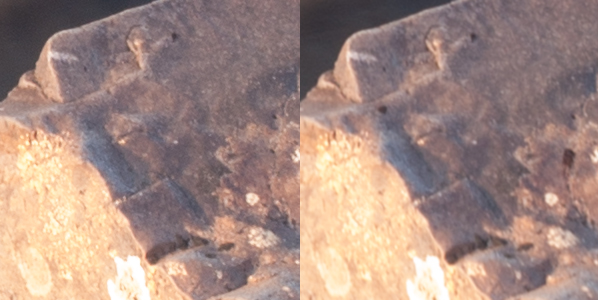
Focus stack comparison foreground

A comparison of a 100% crop of the foreground from two images, one focussed for the foreground (left) and one focussed for the background (right).  Both shot at ISO100, f/8, 2 secs.
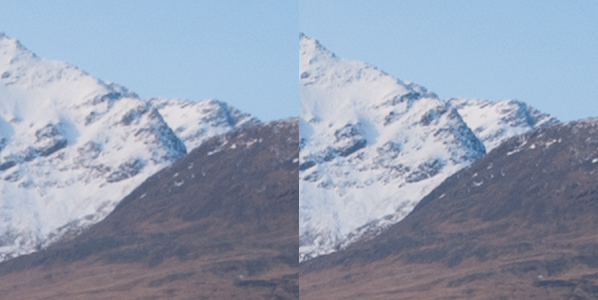
Focus stack comparison background

A comparison of a 100% crop of the background from two images, one focussed for the foreground (left) and one focussed for the background (right).  Both shot at ISO100, f/8, 2 secs.

Back at home…

Open the two images in Photoshop and create a new file that contains both images as different layers, in the one file (to make life easier, name the layers accordingly, e.g. near, far).

Select both layers and go to Edit > Auto-Align Layers to ensure both images overlay perfectly.  Select the ‘Auto’ option, and deselect the ‘Vignette Removal’ and ‘Geometric Distortion’ options.

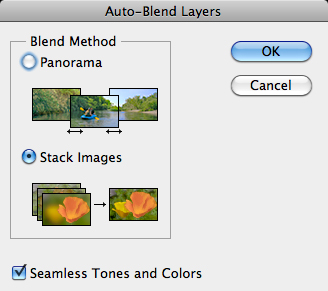
Then select Edit > Auto-Blend Layers, and choose ‘Stack Images’, ensuring ’Seamless Tones and Colours’ is selected.
Focus stack auto blend dialog box

The Auto-Blend dialog box

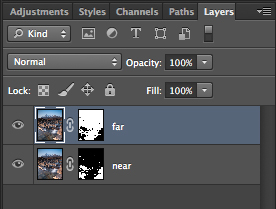
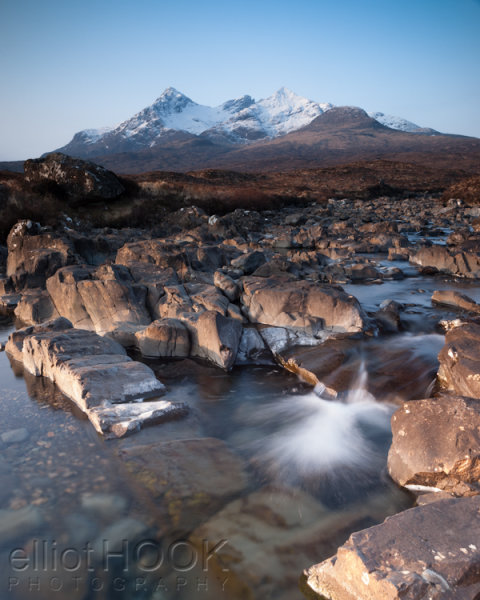
At this point, Photoshop will determine the sharpest portions of each image to incorporate into the final image, and apply a mask to each layer.  Below you can see the layer masks applied to the two images.  In this instance, you can see the rocks in the lower portion of the image are the main area selected by the layer mask for the ‘near’ layer whereas the rocks in the middle distance and the background mountains are incorporated from the ‘far’ layer.
Focus stacks layer masks

The automatically generated layer masks, applied to each layer, includes the sharpest portions of each layer (shown in white).

It is worth checking the image at 100% zoom to ensure that there are no strange artefacts caused by poor blending of any moving grasses or branches.  These can be fixed by manually painting white or black on to the relevant layer mask (remember: white reveals, black conceals).  For those using Elements, if you are only using 2 or 3 images, it is possible to do the blend manually using layer masks and white/black gradients.  In some instances, it actually gives better results, with fewer ‘blending artefacts’ to do the blend manually.

Once you are happy with the blend, merge the layers to give your final, focus stacked image.
Focus Stack final image

The final image with good sharpness from the foreground rocks right through to the mountains in the background

It may not be immediately apparent when showing images at web resolutions, but the difference in the overall sharpness when using optimum apertures and focus stacking is astounding when printing images.  To be able to focus stack, it only takes a little more forethought when out capturing the scene, and a few short processing steps when back at your computer so why not give it a go the next time you are out photographing landscapes.

Post originally from: Digital Photography Tips.

Check out our more Photography Tips at Photography Tips for Beginners, Portrait Photography Tips and Wedding Photography Tips.

Getting Landscapes Sharp: Focus Stacking


Digital Photography School

 
Comments Off on Getting Landscapes Sharp: Focus Stacking

Posted in Photography


Abandoned Asylums in Focus: Photos by Jeremy Harris

07 May

[ By Steph in Abandoned Places & Architecture. ]

Abandoned Asylum Photos 1

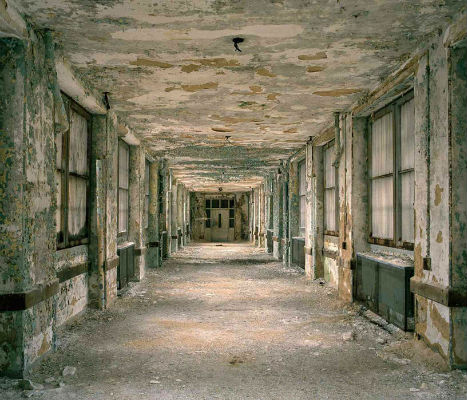
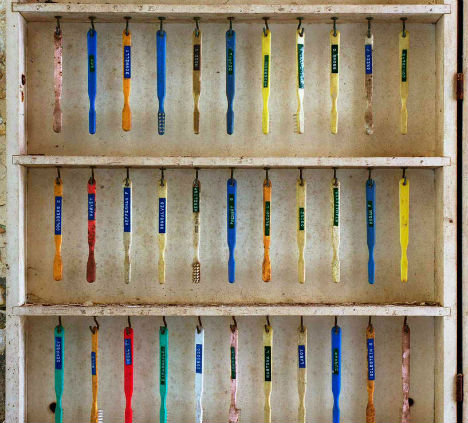
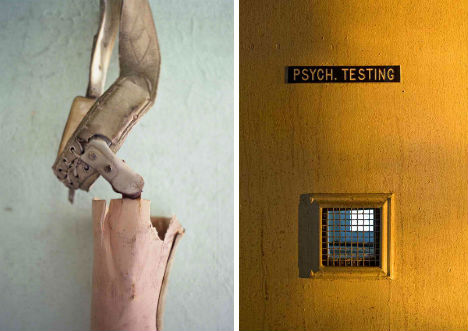
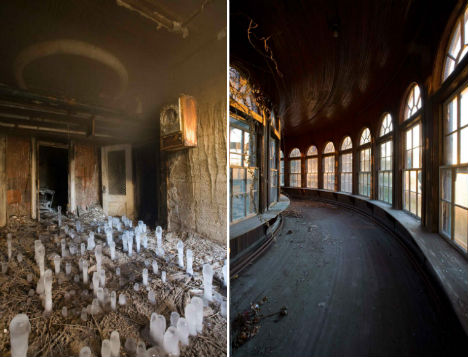
It’s not just the morbid and macabre horror movie ambiance of abandoned psychiatric facilities that makes them so haunting and fascinating; it’s the shadows of the people who often lived their entire lives there. Toothbrushes hanging on hooks, bedding still wadded on cots, wheelchairs and patient records are stark reminders of the humanity that once existed between these walls. Photographer Jeremy Harris has documented many of the structures still standing in a series called ‘Abandoned American Asylums: The Moral Architecture of the Nineteenth Century.’

Abandoned Asylum Photos 2

Abandoned Asylum Photos 4

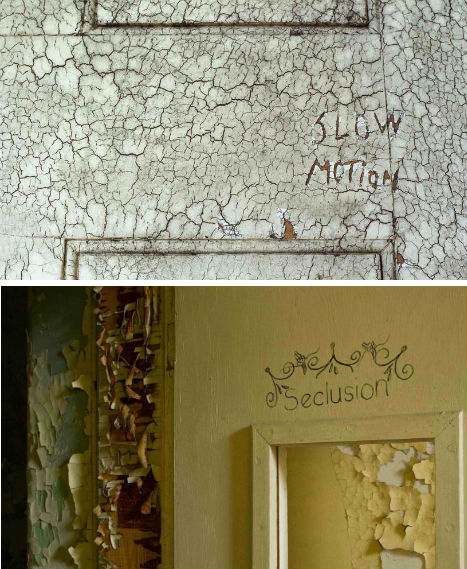
Harris has been sneaking into abandoned asylums since 2005 to take his photos. The series includes just about everything you’d expect: peeling paint, foreboding hallways and a whole lot of rusting metal. But there are also faded murals, grand theaters and bowling alleys.

Abandoned Asylum Photos 3

In the 19th century, a large number of people – whether seriously mentally ill or not – were institutionalized against their will, often left in hospitals their entire lives without visits from family. At the time, mental illness was often thought of as a moral or spiritual failing. Circumstances improved by the 20th century, in most facilities.

Abandoned Asylum Photos 5

Mother Jones produced a video about the photo project. You can also read more about early psychiatric hospitals and asylums at the U.S. National Library of Medicine, and see the rest of the photos at Jeremy Harris’ website.

Share on Facebook


[ By Steph in Abandoned Places & Architecture. ]

[ WebUrbanist | Archives | Galleries | Privacy | TOS ]


WebUrbanist

 
Comments Off on Abandoned Asylums in Focus: Photos by Jeremy Harris

Posted in Creativity


Erez Marom Explains Focus Stacking in Macro Photography

12 Apr

image_9.0.jpg

Macro photography can be extremely challenging, but very rewarding if you get it right. In this article – the latest in a series – Erez Marom explains how to use focus stacking to achieve deep depth of field for capturing tiny subjects with a macro lens. Click through for a link to the article ‘Focus Stacking in Macro Photography’.

News: Digital Photography Review (dpreview.com)

 
Comments Off on Erez Marom Explains Focus Stacking in Macro Photography

Posted in Uncategorized


Quickly toggle Ai Servo Focus on the Canon 5D Mark III

17 Mar

Here’s a quick tip for Canon 5D MkIII users.

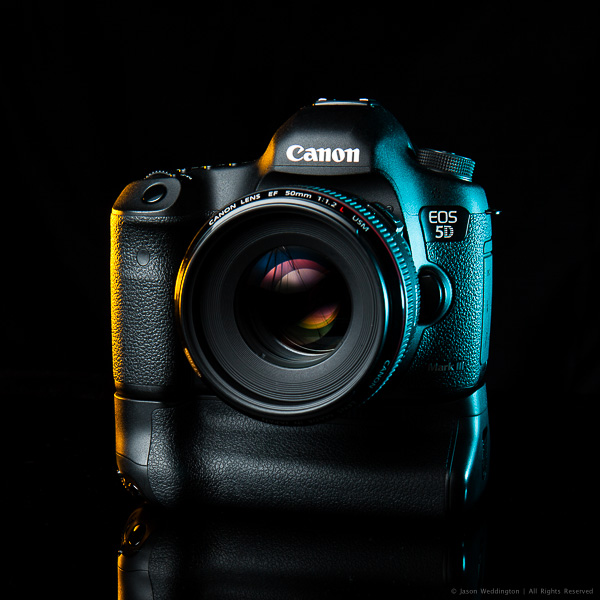
Canon EOS 5D MkIII with EF 50mm f/1.2L

Canon EOS 5D MkIII with EF 50mm f/1.2L

If you don’t use this camera, this tip probably isn’t very helpful for you. Instead you might be interested to read about how I shot the above photo. Also, I recommend skimming through your camera manual to see what customizations are available. Customizing your camera’s button configuration can help taylor the camera to your shooting style.

With the 5D Mark III, Canon added the ability for users to change the function of several of the buttons on the camera body. In addition to this new functionality, Canon also moved the Depth of Field (DoF) preview button. It’s now on the left side of the lens, in approximately the 8 o’clock position, as you look at the camera’s front.

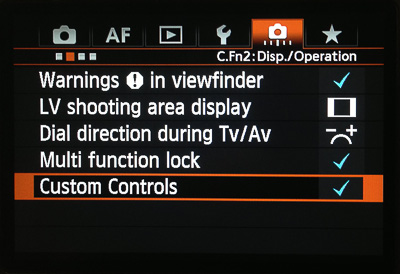
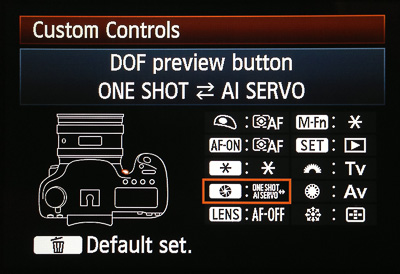
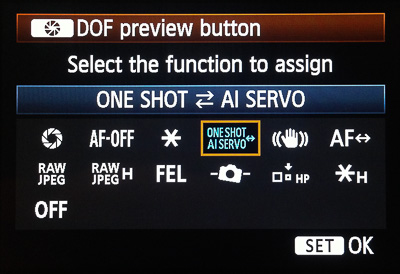
The new location of the DoF preview button and the ability to assign different functions to the standard buttons brings an interesting new shooting option. As I rarely use the DoF Preview Button, I’ve changed it’s function to toggle Ai Servo Focus when held down. To re-assign the DoF Preview Button to toggle Ai Servo focus mode on the 5D MkIII follow these steps:

1. Navigate to menu C.Fn2:Disp/Operation

Step 1

Step 1

2. Select the DoF Preview Button from the list of buttons

Step 2

Step 2

3. Change the button’s function to ONE SHOT AI SERVO

Step 3

Step 3

This customization allows me to stay in Single Shot AF mode, and toggle Ai Servo focus with my right ring finger if my subject starts moving. This is an incredibly flexible way to handle moving subjects and I like being able to toggle between two AF modes without moving the camera from my eye.

Give this a try and let me know how you like it. It took me a couple weeks to train myself to use my ring finger to toggle Ai Servo, but now that I’m used to it, I love shooting this way. As always, you can find me on Facebook.

Post originally from: Digital Photography Tips.

Check out our more Photography Tips at Photography Tips for Beginners, Portrait Photography Tips and Wedding Photography Tips.

Quickly toggle Ai Servo Focus on the Canon 5D Mark III


Digital Photography School

 
Comments Off on Quickly toggle Ai Servo Focus on the Canon 5D Mark III

Posted in Photography


Nikon Stand Tour At The Focus On Imaging Show, NEC, Birmingham, 2012

26 Jan

A quick blast around the massive Nikon display stand at the FOCUS Photography show, The NEC, Birmingham, 2012. A huge display, with a live conference & photography tips, all the latest Coolpix and DSLR range to try out and lots and lots of helpful Nikon staff. You could also try Binoculars and some massively expensively Nikon Lenses. www.lordsphotodigital.co.uk http www.facebook.com www.youtube.com www.flickr.com All your photography needs, Lords PhotoDigital, Commercial Street, Brighouse, West Yorkshire Filmed using a Sony Alpha 35, 18-55mm Lens, AVCHD Full HD 1080p

 
Comments Off on Nikon Stand Tour At The Focus On Imaging Show, NEC, Birmingham, 2012

Posted in Nikon Videos