
Tag: Flickr
-
Flickr Users Uploading 71% More Photos to Flickr Since New Design Rolled Out
Recently I blogged about the new design on Flickr noting that engagement on my own personal photostream had skyrocketed. By my own estimation, activity (comments/faves) have increased approximately 294% on my stream since the redesign.
Despite a loud, vulgar, disrespectful chorus, by a small group of torch and pitchfork type haters in the Flickr Help Forum, I’ve wondered how the larger Flickr community has felt about the site changes. To hear it told by the haters, *everybody* on Flickr hates the new design and they are all leaving in droves for other sites on the web.
One of the interesting things about Flickr, is that each photo on Flickr is assigned a unique ascending number on upload that signifies its numerical place as a Flickr upload. Because of this structure, it is fairly easy to measure the pace of uploads at any given time on Flickr.
I wanted to see if users were uploading more or less photos since the changes.
My measurement is approximate, but would seem to indicate that the number of uploads to Flickr since the site redesign have increased *dramatically*, about 71%.
To measure this, I tried to find a photo about as close to the redesign implementation as possible. In this case I found this photo taken by Veronica Belmont posted at about 3pm PST on the date of the change, May 21. This was within minutes of the change as implemented on Flickr. This is what I’m using as a baseline image. It is Flickr photo number 8,776,546,808 (you see this number in the url of the photo).
Next, I went and looked at a recent photo uploaded today. This photo by my contact rollerphoto works. This photo is upload number 8,855,853,505
So roughly between today and the changes made by Flickr, users have uploaded almost 80 million photos to the site. The time measured is about six hours short of six days.
Next, I went and found an older photo uploaded about six days *before* the change was implemented. In this case I found this photo taken by my contact Jazzyblue TR. This photo is one hour short of six days from the changes. This photo is upload number 8,730,146,140.
So, in the 6 days prior to the change, users uploaded about 47 million photos to the site.
So, roughly, as measured in the six days before and the six days after Flickr’s new site design, uploads are up about 71% site wide.
Now, number of photos uploaded is only one metric to measure when looking at the effect of this change. As I mentioned earlier, personally my own engagement numbers are up even higher — but to hear it told by a loud, vocal contingent of about 3,000 members in the Flickr Help Forum, 99% of users hate this change. This simply is not true. The vast silent majority of Flickr users are chugging along just like they always have been and I suspect Flickr signups have *far* exceeded deletions since the change has been made.
Flickr can view much more data internally than I can from the outside, but I suspect that by every way they measure success on the site, this most recent change has been an absolute homerun for them.
Unfortunately, with all change comes haters. Flickr would do well to ignore these haters. Of the almost 100 million Flickr users, we may lose a few thousand of the most vulgar and vitriolic accounts on Flickr, but I suspect what we gain in terms of new users is far greater.
Interestingly enough, earlier last week, the Founder of Flickr himself, Stewart Butterfield, had high praise for the new design on Flickr. Butterfield left as General Manager of Flickr back in 2008, but remains a user still today. In a tweet, Butterfield described the new design as “fantastic,” noting that history will ultimately vindicate the work as “nicely done.” I posted about this praise by Butterfield in the hatefest in the Flickr Help Forum and it only took about 21 minutes for one of the haters to compare his words with Adolph Hitler.
Hopefully the worst of these haters *do* actually leave the site as they keep threatening to do over and over and over and over again, and let the rest of us who *do* like the changes enjoy the new design for what it is, a new, better, fresher version of Flickr.
-
Dear Marissa Mayer, Please Give Us a Tool to Better Block Bad Actors on Flickr
As an opinionated blogger, watching Flickr roll out recent changes to the site this past week has been an interesting experience, to say the least.
Thanks, Marissa Mayer, for making Flickr awesome again. Thanks also to the Flickr team who have worked so hard to roll out these changes. The new Flickr is the most photo immersive experience anywhere on the web. It is far more engaging and far more beautiful than I ever could have imagined.
Witnessing and countering in the vile hatefest that the Flickr Help Forum has become this past week has also been interesting. Simply for expressing my opinion in a public feedback forum on the new design, I’ve been called a shill, a troll, a sock puppet, a scrotum sack, and many things far worse that I don’t really feel like printing.
I’ve been told that my photography is absolute crap, been accused of working for Yahoo, of being related to Marissa Mayer, of trying to pump up Yahoo’s stock price by supporting the changes — my work, motives and integrity have all been subject to relentless attacks there.
There is little civility in a forum taken over by the ugliest and most vulgar of what the web represents.
The vandalization of Marissa Mayer’s own Flickrstream, and the encouraged vandalism in the same forum, saddens me. To see someone leave an offensive comment on a Mother’s Day Photo, of all things, makes Flickr less of a place to want to spend time.
One Flickr staffer had to actually turn off public comments on his Flickrstream. “You are going to hell,” was the comment that made him turn them off.
There is, at least, a partial answer to this problem: give us a tool to block other users on Flickr.
Flickr already does have a blocking feature of course, it’s just super weak and only prevents someone from leaving a comment on one of *your* photos.
On the other hand, even if you block someone, they can still attack you in all sorts of other places on Flickr, where you spend time. Flickr users should be able to use the public areas of the site without being subject to vile personal attacks. The Help Forum, Groups, other people’s photos, all should be places where Flickr users can visit and feel safe and comfortable.
I left Flickr groups for good a few years back (so did a lot of my friends). The reason why I left was that groups were becoming too ugly. Especially as an opinionated and high profile user, I found myself subject to constant terrible attacks. There was nothing that could really be done about this. Sure, you could report someone violating the Flickr Community Guidelines to Flickr, and maybe 5 days later their account would be deleted, but then they’d just make up a new troll account and be right back at it over and over again.
It was simply easier to just leave the public community of Flickr than to deal with the hate.
When I first joined Google+, I saw some of these same bad actors appear over there, too. I’d watch both myself and my good friends be attacked by others — jealous, petty haters and trolls, mostly. But then Google did a really smart thing. Google rolled out a really strong blocking tool and, just like that, all the hate went away.
You see, on Google+, when you block somebody, they become entirely invisible to you. They are entirely filtered out of all of your views on G+. Poof. Gone for good, not just in your stream, but *everywhere* for you on the site — and that has made Google+ a far better, nicer and more polite place for community than Flickr. Where the Flickr community is a negative hatefest, the G+ community is the most amazing, optimistic, supportive community I’ve ever known online.
You see, blocking the worst of the web doesn’t just filter it out of your view. The more significant thing that it does is it *encourages* civility.
Right now on Flickr we have no power against incivility. People can be as nasty and as rude and as ugly and as disrespectful as they want. They can spam the Flickr help forum with images of excrement (as they actually did last week) and you can’t do a damn thing about it — but if you give us the ability to block these bad actors, then their power is reduced. They know that as soon as they begin the ugliest of hate that the vast majority of positive contributing members will simply block them. Their audience is diminished and soon they are standing on a soap box shouting only to the 10 or so other users who share their hate filled outlook on life.
Before I quit using Flickr groups, one particular nasty member was looking at the photos that I was favoriting (this is forced public and Flickr won’t allow me to control who gets to see it — unlike on G+ where it is private) and this person began leaving vile comments on every photo that I was commenting on. This way, every single one of their comments was showing up in my recent activity, even though I’d blocked them from commenting on my own photos. That’s just wrong.
If Flickr wants to be a place where community can flourish, they need to give us tools to protect ourselves from the hate.
Marissa, I don’t need to tell you how bad the hate can be on Flickr. If you’ve reviewed your own Flickrstream this past week, you know what I’m talking about. It’s deplorable. Especially when any user can so easily just keep making anonymous troll account after anonymous troll account — please, give us a tool to remove the bad actors from our Flickr experience.
This week’s new design work was fantastic, now let’s go to work on improving the community for those of us who want to positively contribute there as well.
-
Top 10 Ways to Get the Most Out of the New Flickr
Earlier this week, Flickr rolled out the most significant changes to their service since purchased by Yahoo back in 2005.
In addition to a major web redesign and a new Android app, Flickr also changed the basic fee structure of their account types and storage limits.
Former Pro users are being allowed to retain their $ 24.99 year fee structure for unlimited, ad free service. If you are a Pro account user, nothing changes if you want to keep it.
Free account users were all given 1 terabyte of free high res photo storage. Free accounts are still ad supported, as they have been in the past, but now you are no longer limited to only viewing your 200 most recent uploads to the site.
Despite the typical torch and pitchfork mob rage emanating from the Flickr Help Forum*, (a group of super negative Flickr users representing less than .01% of all Flickr users), I’ve found over the past week that engagement on my own photos is up dramatically. More specifically, based on my Flickr stats page, engagement (as measured by comments and favorites) is up approximately 294% on my own photos since the new release.
*Dear Marissa Mayer, PLEASE, give us the ability to block users on Flickr, it would make it a much nicer place for those of us who want to enjoy it.

I have no way of knowing, more broadly speaking, if the stats numbers look this good for Flickr in general, but if they do, I suspect that they are very happy indeed with the success of this week’s new features.
This post is not meant to be a debate about the new changes; this post is for those of you who are ok with the site design and are now looking for ways to get the most out of it.
On with the list.

1. Consider a strategy for uploading your batches of photos. I upload two batches of photos to Flickr a day — one in the morning and one in the evening. Your upload strategy and the ordering of your batch uploads matters. With the new Flickr redesign, photos on the flickr.com homepage are really, really, big. Big photos get far more engagement. However, the only photo that gets shown ginormous on the flickr.com homepage is the very last one that you upload. The 5 before that are shown as small thumbnails there.
So, if you are uploading a batch of photos to Flickr, make sure the one that is uploaded last is the best of the batch. Also, landscape oriented and square photos show up much larger on the flickr homepage than portrait oriented crops. So, all other things being equal, consider making sure your last photo uploaded in a batch to Flickr is one of your strongest square or landscape oriented photographs.

2. Anyone who ever complains about losing photos on a crashed hard drive again is just dumb. While you, of course, should not depend on Flickr as your sole backup strategy, everyone now has a free 1TB drive in the sky for photos.
Even if you don’t want to share certain photos, or you only want to share them with your very close friends and family, upload them to Flickr anyways and mark them private or friends/family only. If nothing else, you will have a backup of last resort if you need to go get those photos later. I don’t know of anyplace else on the web where you can get 1TB of free storage. Take advantage of that not only for the photos you want to share publicly, but all your photos.

3. This is not necessarily a tip new to the new Flickr, but it’s one everyone ought to know about — keyboard commands..
On Flickr you can use the F key to fave a photo, the C key to comment on a photo, the G key to add a photo to a group, and the T key to tag a photo. This will make your Flickr experience much faster. For those complaining that, with larger photos, they now have to scroll down the page to comment, no you don’t — simply press the C key and you will jump right there, with your cursor right in place and ready to type.

4. … = MORE! This is a universal symbol on the internet for more. Anytime you see … anywhere, this means that there are things hidden underneath the … that you may want to find. It’s a good way for a site to de-clutter. I’ve seen many people ask where their favorite lesser used Flickr feature went (EXIF data, gallery functionality, all sizes, etc.). Just click on the … and you’ll find it all there.

5. Make the most out of your sets. By default, Flickr puts your sets in the order created. Your most recent sets are shown first, and older sets are shown last. This may not be the best way to present your sets though. One of my most viewed sets is one of my oldest, my 10 faves or more set. If I didn’t manually move this to the top of my sets page, it would be buried in the over 1,800 sets I have on Flickr. Go to the Flickr organizer page here and make sure that your sets are in the order that you want them in.
If you have a lot of sets and find it cumbersome to move them around in the organizer (like I do). Shrink your browser view to super small and it will make more and more thumbnails in the organizer that are easier to move around.
Make sure your sets page shows your best sets on the first page. This will give people a great first impression of what your albums are all about.
Consider making a few “best of” sets on Flickr. If you use Jeremy Brooks’ SuprSetr app it will automatically tag all of your photos that have been favorited 10 times or more fav10. It can then build an album for you of just these popular photos of yours that you can highlight on your sets page.
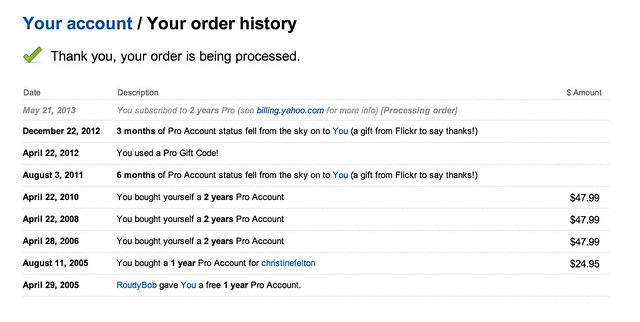
6. If you have a Flickr Pro account, do NOT let that expire. Your Flickr Pro account is worth more than it’s ever been worth in the past. It’s pure gold. Getting unlimited, high res, ad-free photos was the deal of a lifetime. Although Flickr is no longer offering this extraordinary deal anymore, if you have it, you get to keep it.
Go here to check on the status of your Flickr Pro and I’d recommend both renewing it now AND making sure you are set up as a recurring Pro so it automatically charges your credit card in the future. Don’t lose this awesome benefit.

7. Make sure you reupload your Flickr avatar on the new Flickr. The old Flickr used a smaller version of your avatar, so you might notice that you have sort of this weird small avatar over a larger, dimmed out version of your old avatar on your Flickr page. You can reupload a better sized version of your avatar which will override this and make your new, larger avatar look much better.

8. Change your cover photo. Flickr added a number of new cover photos by default with the new page design. Go to your page and change your cover photo to something new. Find a photo of yours (or a portion of a photo of yours) that uses an extreme landscape crop and will fit there and work well. I used a mosaic strip of photos for mine.

9. Make sure to review your “who calls you a contact” page. This is a page that shows everyone on Flickr who has contacted you. You may be surprised that some of your friends have contacted you that you are not aware of. Review this list to see if you’ve missed any old or new friends on Flickr and add them back if you want.

10. Make the most out of mobile. Although 95% of my own personal Flickr time is spent on the web version, don’t forget about mobile. Earlier this week, Flickr rolled out their Android app, which is every bit as good as their previous iPhone app and probably even better.
One of the easy things to do with this app is to favorite photos by your friends. Simply pull up your contacts photostream on the app and tap/tap to fave a photo. You can scroll down and see different friend’s photos or you can scroll sideways and see more photos from a single friend. When you have down time on the bus, or are waiting for your table at Bob’s Big Boy or wherever, use that time to favorite photos of your friends. They will see that and favorite your photos back most likely.

Bonus tip: Get the new Flickr app for Google Glass. It’s awesome!
 Just kidding. There’s no new Flickr app for Google Glass…
 …yet.
You can find me on Flickr here.
-
The Hangout Where We Review the New Flickr
Last night I recorded a special hangout show with nine other Flickr users where we talk about the new changes at Flickr. In the show we give a tour of the new Flickr, discuss/debate the changes, and provide Pro Tips on how to make the best of the new design.
We also review the recent changes in your account options and discuss the differences between Free, Paid and the old Pro account.
To get a look at what some of Flickr’s active users think of the new changes check it out.
What do YOU think of the New Flickr?
-
Flickr: Yahoo CEO sorry for ‘no such thing as pro photographers’ comment, Pro accounts live on

Much of the fallout surrounding Flickr’s massive updates this Monday continues to center around the legacy ‘Pro’ accounts and a contentious statement from Yahoo CEO Marissa Mayer: ‘There’s no such thing as Flickr Pro today because […] there’s really no such thing as professional photographers anymore.’ She apologized today for her ‘misstatement’, and it appears that existing Flickr Pro account holders will now be able to take advantage of unlimited storage. Read all about it at connect.dpreview.com.
-
How Flickr Screwed Me Out of My Pro Account On a San Francisco Photo Walk
Earlier today, I wrote a blog post about today’s new changes at Flickr which included a free, ad-supported terabyte of storage for all Flickr users. In my article I referenced that Flickr Pro account users would be given an opportunity to stay Pro going forward. I reported this because this, in fact, was my understanding of what was told to me by a Flickr Senior Manager in a briefing earlier this morning before the announcement.
Unfortunately, I found out the hard way, later today, that this is not, in fact, the case.
In actuality, only *some* of Flickr’s Pro accounts are eligible to retain Pro status. More specifically, users had to be paid Pro accounts in January of 2013 and be set up for auto renewal at that time. If you were not specifically a paid, recurring Pro account user in January of 2013, set up on renewal, you will now be screwed out of your Flickr Pro account.
In my case, in August of 2011, I complained to Flickr about an error in their stats reporting. I had to send in several complaints about the same problem, but finally Flickr customer service acknowledged the error in their stats reporting. They said that they’d fix this error and that to make up for my inconvenience they would “gift” me 6 months of Flickr Pro.
My Pro account was set to expire in 2012 but I used another “gift” certificate from Flickr. This time it was a gift certificate that they handed out to all photowalkers on a big Flickr San Francisco photowalk.
Because I applied this 6 months of free pro that Flickr gave to every photowalker at the SF photowalk, my account was not set up to recurring Pro in January of 2013.
So, after paying consistently for two year at a time of Pro on Flickr for years, my Flickr Pro account is now NOT eligible for renewal, and I’m not grandfathered into the Pro Flickr service.
This blows.

I wish I’d never accepted the Flickr trojan horse “gift” of 6 months of free Pro at the San Francisco Photowalk. If I’d not accepted it then I could be grandfathered as a paid Pro account along with everyone else. As it stands now, my Pro account will expire in July of this year with no way to renew it.
Now I’ll be forced to pay Flickr twice as much ($ 49.99 instead of $ 24.99) to remove my ads — and since I probably use more than a terabyte of storage, my Flickr fees will probably increase from $ 24.95/year to $ 499.99/year.
Earlier today I thought Flickr was doing a very fair thing by allowing Pro accounts to continue on as Pros by paying $ 24.95 per year. I’ve invested thousands of hours uploading over 80,000 photos to Flickr with the understanding that I was purchasing unlimited photo storage.
Now, today, I’ve been screwed out of my deal because I made the mistake of attending Flickr’s San Francisco photowalk and redeeming a 6 months certificate for free Pro that they handed out.
This is just wrong and also contrary to what I was told earlier today.
Flickr should allow ALL Pro account users the ability to keep their Pro status, and not discriminate against those of us who happened to attend their San Francisco Photowalk last year.
There is a post on Flickr’s help forum about this here, where a Flickr staffer confirms that only some of Flickr Pro accounts are eligible for renewal.
I’m assuming that Flickr will sort some of this out before my Pro account expires in July, but I’m certainly concerned that Flickr would so easily take away Pro accounts from long time members who have supported the site with paid Pro accounts over the years. To offer someone unlimited uploads only to renege on that promise later for attending one of their photowalks feels wrong to me.
I’m still a big fan of today’s design changes and the 1 terabyte free account that Flickr unveiled today, but disappointed that long time Pro account users may now lose their Pro account status.
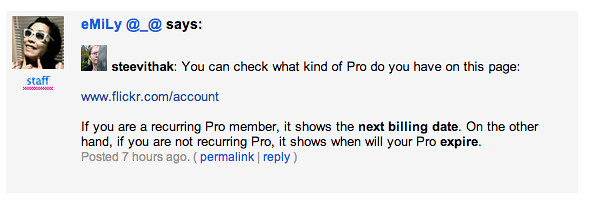
You can check to see if you are eligible to renew your Flickr Pro account here. If it doesn’t specifically say your Flickr Pro account will renew automatically on this page, you may be screwed too.
-
All-new Flickr comes with free terabyte – and ads

Flickr fans may find the lure of a free terabyte attractive, but they might be put off by the accompanying advertisements that support Flickr’s new free account model. A major update to the photo sharing service has completely revamped the look of accounts and restructured the way users may pay for Flickr in the future. We take a look at the changes on connect.dpreview.com.
-
Holy Mash Potatoes Batman! Flickr to Offer All Users 1 Terabyte of Free Photo Storage!
Wow! Well just when you thought the Tumblr acquisition was the big Yahoo news of the day, Yahoo drops yet another bombshell. All free accounts on Flickr just got upgraded to 1 terabyte of FREE storage!
Yep, you heard that correctly; the Flickr 200 photo limit for free accounts is being done away with. If you’re one of those Flickr users who, in the past, complained about Flickr holding your photos beyond 200 in a free account “hostage,” well, the Navy Seals at Flickr HQ have just set them all free.
Starting today, everyone will be able to upload full high res photos up to 50MB to Flickr for FREE up to 1 terabyte. For the .01% of the population who might store more than a terabyte on Flickr, Flickr will sell you an additional terabyte beyond your free one for $ 499 per year. By comparison, Google would charge you about $ 1,199 for 2 terabytes of storage per year and only gives you 15GB of high res storage for free. Facebook doesn’t allow high res photos at all and won’t allow photos larger than 2048px on the site.
While this might sound really great for today’s free account users, it should be noted that the new free 1 TB account will contain advertising. If you want to opt out of advertising on your free account, you will need to pay $ 49 per year….
…unless…
you are already an existing Pro account member. While Flickr will no longer offer new Pro accounts, existing Pros will be allowed to keep their Pro account and continue paying $ 24.95/year for full unlimited high res ad free storage (still the best deal in my opinion).
If a user wants to downgrade from their current paid Pro account today, Flickr will allow them to do this and claim their 1TB free/ad supported account and rebate back the residual remaining value on their Pro account early.
In my opinion, this is a game changer. Just last week at Google I/O, Google upgraded everyone from 5GB of free, high res storage to 15GB of free, high res storage, but upgrading from 15GB to 1TB is quite a leap from there.
Of course, on Google+ there are no ads, and on a 1TB free Flickr account a user would see ads.
You have to love competition in the online photo space and today Flickr is raising the stakes. This will likely put more pressure on Google and Facebook both to consider increasing high res storage for users as well.
While giving all users 1TB of free storage was the biggest news from Flickr today, it is only the beginning.
In addition to offering all users 1TB of free storage, today Flickr also ships their highly anticipated Android app. Many users were super excited late last year when Flickr rolled out their new iPhone app. I reviewed the iPhone app here. Now Flickr is bringing a similar, amazing mobile experience to Android users. I was able to see the new app prior to release and it is truly awesome — I’d say even BETTER than the highly regarded 4.5/5 rated iPhone version — one more reason to switch to Android right?
But there’s more…
In addition to an increase in storage limits and a new Android app, Flickr is also shipping today a complete redesign of the entire site. The new version is amazing and beautiful and full of mosaic walls of photos with infinite scroll everywhere. Gone are the days of tiny little thumbnail results using Flickr image search (my favorite feature in today’s new site redesign). Instead, now you see big, bold images of whatever your looking for.
Sets on Flickr were also given this same facelift. With the old Flickr, the sets page looked the same as it had since as long as I can remember (I joined Flickr in 2004). Sets contained super tiny little teensy weensy thumbnails of square icons for photos. Today’s release showcases photos in sets in much larger format.
The Flickr photo page now shows a giant, oversized version of your photo with just enough basic photo info above the fold on the page to tempt the user into scrolling down for more. The Flickr recent activity stream now shows giant, oversized photos by your contacts and lots of new information.
It really is a whole new Flickr in the best way possible.
Undoubtedly there will be some critics of the new Flickr site, just like there were critics when the automobile came out and some crotchety old folks still wanted to use their horse and buggy. This is, however, in my opinion the single most positive day for innovation being released by Flickr ever.
Last night when digesting all of the Yahoo Tumblr news, I posted on Twitter, Flickr + Tumblr = chocolate + peanut butter. I’m a huge fan of Reeces Peanut Butter Cups and I think that, in addition to this Flickr news today, future innovation coming from Tumblr and the Tumblr team will only be positive for Flickr. Already, I get the most viral views on my Flickr photos from Tumblr more than any other site. By deepening the Flickr/Tumblr integration, this will create even more synergy for Yahoo.
Maybe instead of titling this post “Holy Mash Potatoes Batman,” I should have titled it “How Yahoo got its Groove Back” — because with what’s gone on there over the past 24 hours, I’d say Yahoo, once again, is a power player in social media.
There is still work at Flickr that needs to be done — groups still need a refresh, for example — but after failing to innovate for years, Yahoo is showing the world that Flickr is indeed super important to their company and that photos are very important to a biggr, boldr, more beautiful Yahoo going forward. Yahoo is investing heavily in Flickr (they are hiring), the first Yahoo CEO ever has an actual active Flickr account, and staff morale feels super high. Flickr VP Brett Wayn and Flickr Head of Product Markus Spiering, are leading the charge, backed by strong commitment from senior management and an enthusiastic all-star team who is pushing out the most significant innovation we’ve seen at Flickr yet.
Congrats to the Flickr team on a wonderful release today.
You can find me on Flickr here and posting again on Tumblr now here.
-
Thanks to Flickr for Featuring Me and My Photography on the Flickr Blog
Thanks so much to Yahoo and Flickr for featuring me and my photography today on the Flickr blog and the Weekly Flickr. I joined Flickr back the year that they started in 2004 and publish photos there every single day. It’s been a wonderful place to build my library and archive and publish my photography. I thought they did a really nice professional job with this video. Thanks!