RSS
 

Posts Tagged ‘Flickr’

Flickr software bug makes some private photos public

12 Feb

Untitled-1.jpeg

Flickr users may be alarmed to learn some of their private images could have been temporarily viewable publicly. Yahoo’s photo sharing site alerted affected users with an email message last week, detailing the error and explaining what steps to take. According to Flickr, a software bug resulted in some private images, uploaded between April – December 2012 becoming public for a short period from January 18th to February 7th this year. Are photos posted on the Internet ever really private? Click through for more details and analysis on connect.dpreview.com.

News: Digital Photography Review (dpreview.com)

 
Comments Off on Flickr software bug makes some private photos public

Posted in Uncategorized


Flickr Commons marks 5-year anniversary with galleries of most-viewed pics

17 Jan

flickr-logo-5221212.png

Flickr Commons is five years old, and to celebrate, Flickr has created galleries of the most viewed, ‘favorited’ and commented-upon images. Commons was launched in 2008 with 1500 photos, in partnership with the US Library of Congress. Five years later, the collection of public domain photographs boasts more than 250,000 images. Click through for more information, and links to the galleries of most popular images in the growing collection. 

News: Digital Photography Review (dpreview.com)

 
Comments Off on Flickr Commons marks 5-year anniversary with galleries of most-viewed pics

Posted in Uncategorized


Joy to the World, Flickr Offers 3 Months of Pro for FREE!

22 Dec

Joy to the World, Flickr Offers 3 Months of Pro for FREE!

I saw an unusual notification on my Flickrstream this morning — you probably did too. It seems that Flickr just offered to extend to every account on Flickr (and new accounts too) three months of free Pro service. Ho Ho Ho! Merry Christmas! Happy Hanukkah!

Thank you Flickr!

This is an absolutely brilliant move on Flickr’s part, for many reasons.

First, the timing of this offer could not be better. After last week’s Instagram fiasco, Flickr signed up a lot of new accounts. Now these new accounts get to have the cleanest advertising free Flickr experience possible during those formative first three months.

Folks will like the paid service more than the free version and after three months they’ll be more invested in the site than after two days, and potentially will be more likely to keep paying. Flickr is also signing up more new accounts due to their fantastic new mobile app.

Second, Flickr limits Pro accounts to 200 visible photos. More active users will post more than 200 photos there in the next three months. After their Pro term is up, they will want to see their photos that will then disappear (or the critic might say “held hostage”), the only way to do that will be to reup and pay for more Pro service.

If people are not paying attention to the 200 photo limit, they will be more likely to reup when they have 300 photos uploaded than if they have 200 uploaded and all of a sudden notice that photo number 201 is not showing up. Most people will just quickly accept the offer rather than carefully consider the differences between free and Pro accounts and Flickr will end up with more Pro accounts three months from now than they would have had without the offer. Some will stick.

Third, the Holidays are an especially important time to be out there recruiting new accounts. People share a lot of family photos during the Holidays and Flickr is striking while the iron is hot here at just the right time. BTW, those important family Christmas photos will be some of the first to disappear for new Flickr accounts three months from now. ;)

Fourth, activity begets activity. You will be more likely to use a Pro Flickr account than a free Flickr account. Already Flickr is seeing a big influx of new relationships because of their new find friend features with Twitter and Facebook.

If you haven’t logged into your Flickr account in a while, log in now and look at your recent activity. What you’ll notice is a lot more people have been adding you as a contact. You’ll also notice that a lot of the familiar names are people that are connected to you on Twitter and Facebook. That’s because your friends are using the new Flickr iOS mobile feature that allows you to add your Facebook and Twitter friends to Flickr. More people will be hoping on Flickr to claim their free Pro upgrade and notice all the new activity and be more likely to engage.

BTW PRO TIP: If you are an Android user, you don’t need the iOS app to add your Facebook friends. You can do that on the web here.

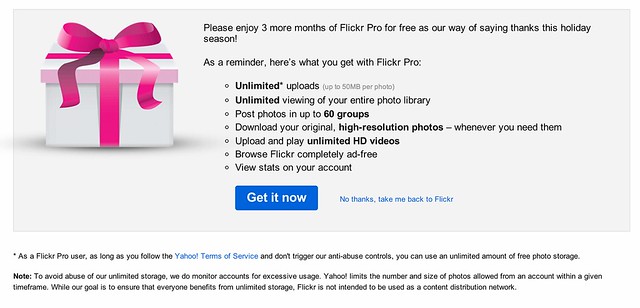
Now, the free gift doesn’t come without just a tiny bit of controversy though. Although Flickr in NO WAY changed their Terms of Use or their Community Guidelines (this is important and smart after the Instagram debacle), they DID, for the first time that I’m aware of, put users on warning that unlimited at Flickr really does not in fact truly mean unlimited. All of us seasoned and cynical internet geeks knew this anyways, but I’ve never seen Flickr say it before. Tacked on to today’s free gift is the following bit:

“Note: To avoid abuse of our unlimited storage, we do monitor accounts for excessive usage. Yahoo! limits the number and size of photos allowed from an account within a given timeframe. While our goal is to ensure that everyone benefits from unlimited storage, Flickr is not intended to be used as a content distribution network.”

Aha! Say what? Wait, a minute, what’s this all about?

Users have already raised this issue with Flickr in their help forum and so far there is no definitive answer as to what exactly constitutes this sort of abuse. I doubt you’ll see one either.

Flickr’s deal with us in the past has always been that Pro accounts get an unlimited number of photos to upload. For someone like me who is planning on publishing one million photos to the web during my lifetime, this has always been a huge benefit in using Flickr over other services. To publish the same amount of photos I’ve already published to Flickr at Google’s Picasa, it would cost me hundreds of dollars a year. I am clearly taking advantage of the whole unlimited storage thing at Flickr with over 77,000 high res photos up there currently. At $ 24.95/year for me, this is a HUGE bargain.

It’s fine that I’m doing this by the way, and all in, even though it probably costs Flickr more to store my photos than I pay in subscription fees, my photos make up for it in other ways (by driving more users to Flickr as a community member, through my participation in the program with Getty, etc.). I’m probably still actually a profitable account to Flickr all things considered.

Personally speaking, I feel 99.9% confident that even uploading a million photos to Flickr during my lifetime I will not run afoul of this new notice. That’s because I’m doing the sort of thing on the site that is good for Flickr. I’m a good community member. Although I’m very prolific and using Flickr in an extreme way, I’m basically using it for what it is meant for, to share my photos with my friends and the world.

If I was truly doing something abusive (like uploading a million private high res copies of the exact same black square 24 hours a day and just chewing up bandwidth and storage for no apparent reason) I’d probably be shut down.

So for the 99.9% of you out there who read that notice and worry a little bit, don’t. You are not who Flickr is concerned with here. Besides, you can always say, why is Thomas Hawk allowed to upload so many photos if I can’t. ;) Unlimited really does mean practically unlimited for almost every conceivable authentic use case for Flickr.

By the way, even without this sort of “excessive use” disclaimer from Flickr today, Flickr always could have deleted your account for excessive use in the past anyways. Flickr’s Community Guidelines are wide enough to drive a Mack truck through. You can have your account deleted on Flickr simply for being “that guy.” So Flickr always has had the right to delete your account for essentially any reason that they feel like.

Anyways, thanks to Flickr for three extra months of Pro — a good marketing effort at just the right time. Flickr has really been firing on all cylinders lately and this is great to see. Now just give me that new Android app for New Year’s Day and justified photos in sets and search as a token of love on Valentine’s Day. Oh and better blocking tools and the ability to mute threads would be cool for Lincoln and Washington’s birthday! ;)


Thomas Hawk Digital Connection
 
Comments Off on Joy to the World, Flickr Offers 3 Months of Pro for FREE!

Posted in Photography


Thinking of Starting a Photo Community on the Web? Should You Do It on Flickr or Google+?

15 Dec

Google+ Communities vs Flickr Groups

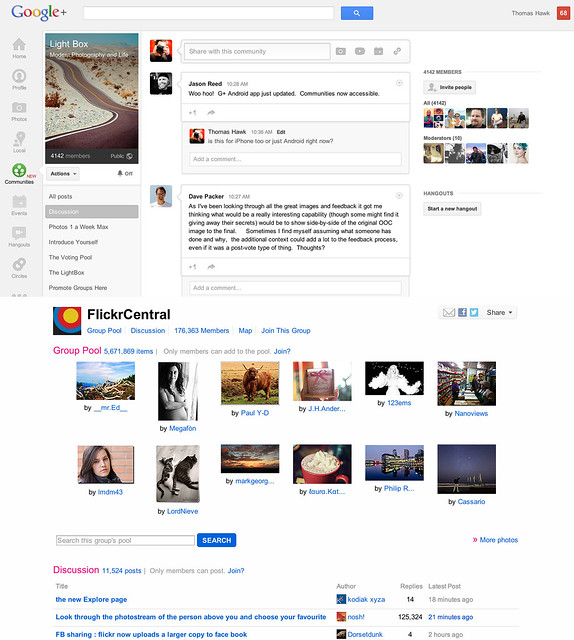
Google+ launched their new communities last week and I’ve spent a lot of time exploring how they work since launch. I’ve also spent quite a bit of time super active over the past eight years in Flickr groups. Google+ communities are a lot like Flickr groups, but there are key differences, advantages and disadvantages to both. I thought I’d write a post comparing the two. I’ve long held that Flickr groups represent Yahoo’s best chance for social going forward.

So here’s the smackdown.

1. Thread bumping. Flickr wins. Probably the most significant problem with G+ communities is that they do not bump threads. With Google+’s new communities discussion topics are only shown by most recent post. Unfortunately the most recent post is not always the most interesting/engaging post. What’s more, because threads are not bumped upon a new comment, almost every thread over 24 hours in an active community on Google+ dies. Good conversations should last more than 24 hours. Flickr solves this problem by simply bumping each thread back to the top of the discussion forum anytime someone makes a comment on it. This is a far better way to keep a discussion forum active and engaged.

2. Muting discussions. Google+ wins. One of the problem with Flickr is that there is no way to screen out discussions that you are not interested in. If I don’t care about football, why should I have to see a thread about football in my favorite photography forum. At Google+ the answer is simple. Just go to the thread and choose to “mute this post.”

3. Photo pools. Flickr wins. At G+ you are forced to try to use typical discussion threads to post photos. Flickr, by contrast has a group photo pool that is associated with each group. Although it’s tempting to see photo pools as more of a photography niche feature, I’d argue that every community potentially has photos to share. Even if the photos are not artistic oriented photography, every group of people will potentially want to share photos with each other. Ideally, a group/community should be allowed to have more than one photo pool/album with settings to allow how content can be shared in those pools.

4. Community activity. Google+ wins. Even less than two weeks old, communities on Google+ are far more active than Flickr. Individuals are far more engaged and the rate of velocity around community conversations is much higher at Google+.

I started a new community called Light Box on Google+. It’s based on a voting game similar to voting groups I’d created on Flickr in the past. On Google+ the group already has over 4,000 members in less than a week. At Flickr it would take me months to build a group up that large. The G+ community is already 20x more active than any voting group/game I’ve ever seen on Flickr. When it comes to community velocity there is simply no comparison. Google+ communities are some of the most active I’ve ever seen anywhere on the web.

5. Invite process. Google+ wins. Google allows you to invite participants in circles up to around 195 people max. Sending out one invitation to 195 people is a lot easier than the way that Flickr allows you to invite people. On Flickr you can only invite a single member one by one by one by typing their individual name — wayyyyy too much work.

6. Sticky threads. Flickr wins. One of the thing Flickr allows a group owner/moderator to do is to make certain threads sticky so that they always stay at the top of the discussion threads. This is helpful if you have a group/community FAQ or other material that is important to stay prominent to the membership. At present you cannot make sticky threads at Google+.

7. Adult oriented communities. Flickr wins. Although there are some deep underground private communities on G+ focusing on nudes, G+ by TOS doesn’t allow nudity and this content is subject to being removed. On Flickr, they do allow nudity as long as it is properly flagged as nudity. In Flickr’s case this has resulted in both communities discussing artistic fine art nudes, but also a pretty seedy amateur underground porn network as well. Flickr routinely deletes many of the most offensive adult oriented communities, but if fine art nudes are your thing, you’re probably more likely to find these communities on Flickr than G+.

8. Moderating community membership. Flickr wins. It’s much easier to moderate community members in Flickr groups than in Google+ communities. On G+ you must scroll through an entire list of community members in order to find the person you wish upgrade to moderator or ban from your community — page after page after page after page. With any large community on G+ this is a very cumbersome process. Flickr by contrast has a powerful search tool which allows you to search for a member my name to upgrade or ban them.

9. Blocking members. Google+ wins. It cannot be overstated how important a good blocking tool is to community management. Inevitably some community members will not get along. Especially since Flickr allows obvious anonymous troll accounts to inhabit communities, users need some way to immediately protect themselves against bullying and harassment. Flickr’s community blocking tools are weak and non-existent. By contrast Google+ provides users a powerful blocking tool which turns anyone invisible that you choose to block.

Even more important than this user option is the tone that is set in communities because of it. When you know that you can be blocked by other people you are nicer and more polite. I wrote a post a while back about how Google+ is the nicer community for photographers on the web. Flickr groups are routinely full of trolls, jerks and assholes. Even the ones who are tolerable oftentime pride themselves on abusing other community members with their snide, disparaging comments. They think it’s cool to be “snarky.” On Google+ these people are routinely dismissed and blocked and the overall tone is far more positive.

10. Mobile tools. Google+ wins Earlier this week Flickr rolled out a new version of their iPhone app that has a simple thread reader for Flickr groups. The app is AWESOME by the way. When Google+ rolled out communities last week they did not have support for mobile, but today they added it for both iPhone AND Android. I would suspect that a group thread reader will be coming to a future Android app for Flickr.

11. Group/Community recommendation. Google+ wins. On Flickr I am recommended groups that are years old, super dead and with zero activity in them. These are old groups that some Flickr employee chose to highlight years ago. By contrast on G+ I’m recommended communities that really are personally directed and targeted towards me. These are communities that are thriving and active. I’m guessing that there may be some Google curation of these recommendations, but what I’m seeing feels much more algorithmically based and the algorithm recommending communities on G+ feels super smart and personalized to me.

12. Hangouts. Google+ wins. From time to time you will want to get more involved with the members of your community than just discussion threads. With Google+ you can hold a hangout and do live video/voice interaction with other members through Google’s hangout feature. Flickr doesn’t have anything like this.

13. SEO. Google+ wins. While both Google+ and Flickr offer you private communities with an option to not index the community for the web, both also allow public communities that can be indexed for the web. With any public community you will want to have your community index well in search on the web. Google promotes Google+ posts by the people that you follow — if you are searching for a group on the web, there is a much better chance that you will find groups by your friends on Google+. Already my new Light Box group indexes for the first page search results for Light Box when I search regular Google and am logged in. Personalized search gives your group an advantage for being found on Google by your contacts and friends.

The final verdict? Google+ communities win. In my opinion Google+ communities are far more engaging, active, positive places to hang out than Flickr groups. As much as I enjoyed Flickr groups in the past, I think all of my community time going forward will be happening on Google+ instead. While I’m optimistic that team Flickr can/should create a better group experience for users, it may be too little too late at this point.

While Flickr does have Google+ beat on some important features like thread bumping and photo pools, these features are not enough to make up for the current velocity and dynamic advantage that Google+ communities have. Social photographers have been leaving Flickr groups over the past few years as they’ve been setting up camp at G+. Now G+ gives them the one thing that they missed from Flickr, a solid community experience. I suspect that communities on G+ will only get better and better in the weeks ahead. Google+ tends to release things in beta form, bugs and all, and then iterate very rapidly. I’m confident that some of their limitations today will be improved in the future. Hopefully they even give us thread bumping and photo pools like Flickr. :)


Thomas Hawk Digital Connection

 
Comments Off on Thinking of Starting a Photo Community on the Web? Should You Do It on Flickr or Google+?

Posted in Photography


Flickr brings much demanded updates to web interface and iOS app

14 Dec

flickr_logo.png

Flickr has updated its web interface and released an updated version of its iOS app as it tries to reassert its relevance in a post-Instagram landscape. The refresh of the web interface sees the navigation bar at the top of the site get slimmer, to devote more page space to photos. The ‘Explore’ page has also been redesigned – taking on the full-width, large tiled design used in the ‘My Contacts’ page. Flickr has also updated its famously poor iOS app, adding processing filters and better discovery tools.

News: Digital Photography Review (dpreview.com)

 
Comments Off on Flickr brings much demanded updates to web interface and iOS app

Posted in Uncategorized


The New Flickr iPhone App is Really, Really, Really, Really, Really Mind Blowingly Fantastic

13 Dec

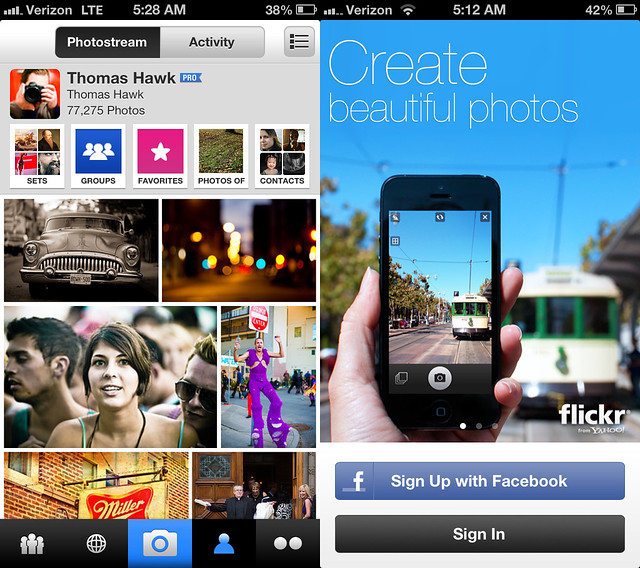
My Photos and the New Splash Screen for the New Flickr iPhone App
My photostream and the new Flickr splash screen for their new iPhone app.

Hot damn. Well Christmas is coming early this year for Flickr iPhone users. This morning Flickr is rolling out a brand spanking new Flickr iPhone app and it is that good — really, really, really, really mind blowingly fantastic good. It not only smokes every other previous mobile version of Flickr it smokes every other mobile photo sharing app on the market today.

I had some time to play around with the app yesterday and it is pretty much does 100% exactly what you’d want a Flickr mobile app to do. It’s nice to finally see a decent Instagram competitor out there.

First the basics. The app takes photos. It has some pretty good simple editing tools powered by Aviary. You can crop photos, straighten photos, increase contrast, stuff like this. You can select different points for focus and exposure when you snap your photo. You can then apply one of about 15 different Instagrammy sort of filters that are all named after animals in the app. This stuff is probably super important to the average minor league user, but is actually pretty boring to me. It’s a solid decent camera app.

Where the app starts to get exciting for me though is the browsing of photos. Here Flickr delivers and delivers big. The best basic view is of your contacts’ most recent photos. As you vertical scroll down the screen it shows the last photos uploaded by all your favorite people that you follow. You can just keep scrolling down the page (infinitely) to see new photos by all your contacts or at any individual contact you can stop and start scrolling horizontally (infinitely) to go through their entire photostream, very, very fast.

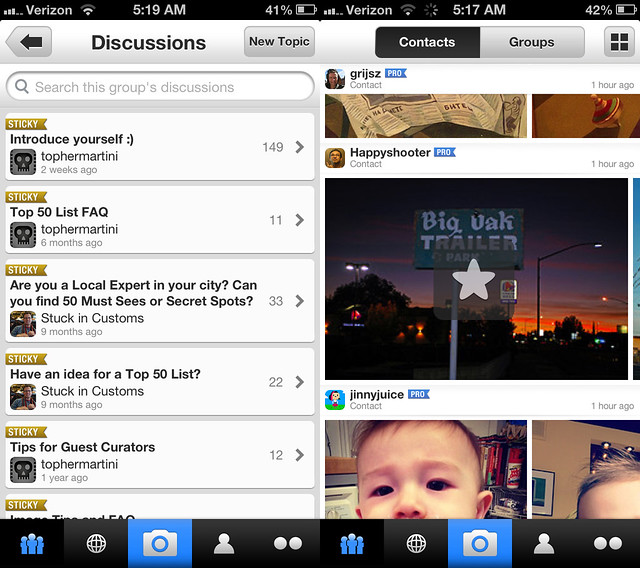
Group Discussions and Faving a Contacts' Photo in the New Flickr iPhone App
Browsing group discussions and faving a contacts’ photo in the new Flickr iPhone app.

For newer users who don’t have a lot of contacts yet that might browse through their entire contacts list, new recommended photographers are added so that a user never runs out of contacts’ photos to see. Who and how these individuals are selected and included is Flickr secret sauce, but it should make sure that you never have a shortage of photos to see even if you’re new.

EVEN BETTER. Tap tap = fave. Yep, Instagram gave us the first big fave inflation tool by allowing us to tap tap fave our way through life and Flickr now has adopted that protocol allowing you to tap tap fave photos by all your favorite photographers.

What does this mean? It means that all of a sudden you are going to start noticing a ton more faves on your Flickr photos. Every time your friends have 10 minutes in line at the bakery they are going to be all up in your Flickrstream faving things like crazy. It’s so easy now. Flickr is also now going to begin counting mobile views of your photos as views for your photo stats (previously mobile views were not counted) so expect both the views and faves on your photos to sky rocket.

In addition to viewing your contacts’ most recent photos and going fave bombastic Billy Wilson style you’re also now able to view all kinds of other areas of Flickr in a beautiful mosaic photo layout — your own photostream and sets, group photo pools, other people’s sets, Explore, all have a justified photo layout that just invite you to go tap tap crazy.

Speaking of Flickr groups, with this new app Flickr introduces a really nice basic thread reader that will allow you to stay on top of all of your favorite threads while you’re mobile. The reader is super simple and does exactly what it’s supposed to do, it lets you easily read your threads and respond if you want from mobile. The previous version of Flickr’s mobile app lacked this important feature. Some of Flickr’s biggest power users live in these threads and this is an important improvement because it will help keep people plugged into their Flickr groups more often.

Another nice feature of the new app is that if you want to see any photo you are looking at full screen size you just tilt your iphone sideways and the photo immediately fills up the entire screen. You can then swipe from photo to photo as you scroll your way through whatever stream, set, group, etc. you are in. Flickr also uses a larger higher res version of your photo for this view so you get to see the photo with amazing clarity even if you pinch in to see a section in detail.

Flickr also includes lots of other detail on a photo page that you can access if you want to see it — EXIF data, location data, people tags, etc. Flickr also partnered with Foursquare to give you a list of venues to easily geotag your own photos as you upload them.

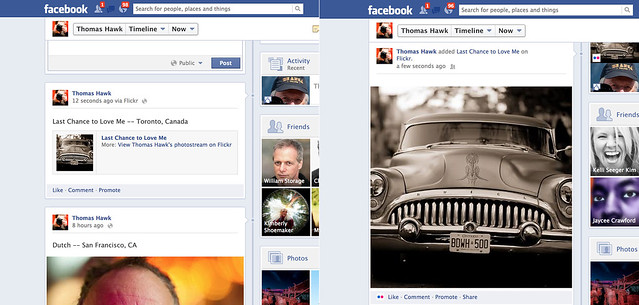
Flickr Photos Now Show Larger on Facebook, Before and After
Flickr photos are now full-sized when you share them to Facebook and Twitter — before vs. after.

What about sharing your photos beyond Flickr? Yes! What about sharing your photos beyond Flickr? With the new Flickr app you can now share your Flickr photos to Facebook, Twitter, Tumblr or by email. Where it gets exciting though is how your photos are shared on these other sites. Beginning today, photos shared from Flickr to Facebook will now be shared full sized just like your Facebook photos are. In the past Flickr photos were given the downsized thumbnail treatment. Now your Flickr photos shared to Facebook will look as gloriously large as your photos shared directly on Facebook. This not only applies for your photos shared from the new app by the way, but from your photos shared via the web as well.

Likewise Flickr has now adopted Twitter’s envelope and your Flickr photos posted to Twitter will be seen full sized as well. What Twitter/Instagram taketh away Twitter/Flickr giveth back.

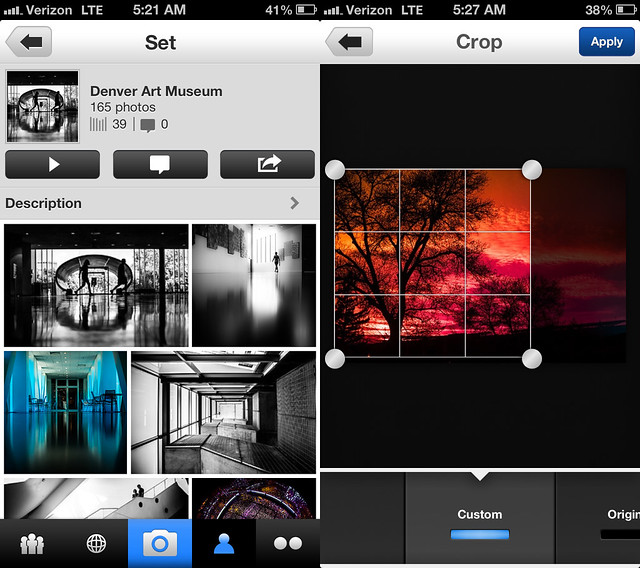
Sets and Editing Photos With the New Flickr iPhone App
A Flickr set and editing a photo in the new Flickr iPhone app.

The only downside to today’s announcement is that as is usually the case, iPhone users get all the love while us Android fan boys get left out in the cold yet again. Flickr Product Head Markus Spiering did confirm that Flickr is working on future versions of their app for both Android and iPad though and said that Flickr hoped to have feature parity with today’s new iPhone app, but couldn’t confirm what the time frame might be on these future apps. He did emphasize that Flickr and Yahoo both are very committed to mobile going forward.

Flickr is also rolling out a few new enhancements to the web version of Flickr today as well. They’ve redesigned the global navigation and menus so that they are more intuitive and added their new justified photo view that they’ve been rolling out to various areas earlier this year to Explore. Explore is much easier to browse now as one big infinite scroll mosaic to go through each day. Hopefully Flickr’s awesome justified photo mosaic layout will be coming to sets and search next. :)

The new Flickr for iPhone app is available to download in Apple App Store this morning. Run, don’t walk and get it NOW! Trust me, you won’t be disappointed.

Stephen Shankland’s review over at CNET here. Review at the Next Web here. A blog post from the Flickr blog here.

Update: Pro Tip. Anil Dash points out that with the new “Find Friends” feature on the app you can find Facebook and Twitter friends’ flickr accounts that you may not know about. Try this feature and you many find a whole bunch of new Flickr contacts to add.


Video on the new Flickr app.


Thomas Hawk Digital Connection

 
Comments Off on The New Flickr iPhone App is Really, Really, Really, Really, Really Mind Blowingly Fantastic

Posted in Photography


Flickr brings much demanded updates to web interface and iOS app

13 Dec

flickr_logo.png

Flickr has updated its web interface and released an updated version of its iOS app as it tries to reassert its relevance in a post-Instagram landscape. The refresh of the web interface sees the navigation bar at the top of the site get slimmer, to devote more page space to photos. The ‘Explore’ page has also been redesigned – taking on the full-width, large tiled design used in the ‘My Contacts’ page. Flickr has also updated its famously poor iOS app, adding processing filters and better discovery tools.

News: Digital Photography Review (dpreview.com)

 
Comments Off on Flickr brings much demanded updates to web interface and iOS app

Posted in Uncategorized


Flickr brings much demanded updates to web interface and iOS app

13 Dec

flickr_logo.png

Flickr has updated its web interface and released an updated version of its iOS app as it tries to reassert its relevance in a post-Instagram landscape. The refresh of the web interface sees the navigation bar at the top of the site get slimmer, to devote more page space to photos. The ‘Explore’ page has also been redesigned – taking on the full-width, large tiled design used in the ‘My Contacts’ page. Flickr has also updated its famously poor iOS app, adding processing filters and better discovery tools.

News: Digital Photography Review (dpreview.com)

 
Comments Off on Flickr brings much demanded updates to web interface and iOS app

Posted in Uncategorized


Google+ Launches “Communities” — Will Compete Directly With Flickr Groups for Photographers

07 Dec

This morning Google+ launched communities. It will be rolling out to users over the course of today. I don’t have it yet this morning but my Pal Trey Ratcliff does and has written a blog post about it here.

Over the past year, the photographic community has come together on Google+ probably more than any other site on the internet. Many of the most active of these social photographers early on migrated over from Flickr to Google. While there have been some great conversations that have gone on in many Google+ posts by individuals, what Google has lacked is a town square sort of feature where individuals could congregate around a shared idea. Today’s launch of communities addresses that and it also offers photographers a direct competing platform for Flickr groups for the first time.

I haven’t tried communities yet, so I don’t know how robust it is compared to Flickr groups, but one thing Google seems to do really well is quickly innovate and improve new features on G+ after they launch them. I’ll write a follow up post once I get a chance to try them out. I’m sure I’ll be joining Trey’s new community and probably creating one of my own. Stay tuned. :)


Thomas Hawk Digital Connection

 
Comments Off on Google+ Launches “Communities” — Will Compete Directly With Flickr Groups for Photographers

Posted in Photography


Could On Air Hangouts Be Coming to Flickr?

06 Dec

An interesting article over on TechCrunch about Yahoo buying a company called OnTheAir. The company makes a hangout app similar to Google+’s hangouts that lets people interact via video voice and chat. The OntheAir team is coming to work on mobile at Yahoo under Adam Cahan — the same Adam Cahan who is also the Yahoo exec in charge of Flickr (and who just went public with his own personal Flickr account this weekend — welcome to Flickr Adam!).

Google Hangouts have been one of the killer features for community as far as photographers go on Google+. Many photographers have produced hangout based shows — but more than anything they are a place where photographers who kinda/sorta get to know each other on the web and through commenting on each other’s photos, can get to know each other much better live. Earlier this week I wrote an article about photographers Brian Matiash and Nicole S. Young who actually met on a Google+ Hangout and ended up married.

Google+ Hangouts are powerful tools for community building most of all. There’s something about spending time with someone in video/voice that strengthens the resulting online bonds around a website after the fact. While community has been growing at Google+, community has been slipping at Flickr. The real hardcore community on Flickr mostly takes place in Flickr groups which feel like they are dying. Most groups on Flickr are far less active than they were two years ago.

Flickr would seem to me like an ideal place for Yahoo to build out hangouts. They tried a horrible feature called Photo Session where two people could go into a chat room and doodle on photos while they chatted together last year that they subsequently cancelled, but that feature was nowhere near the experience that a Google Hangout is. It makes me wonder if Yahoo couldn’t seed some of the initial push towards a hangout product through some of the key remaining groups on Flickr to see if they couldn’t get some traction with this product there.

Getting people more connected around a website is a powerful tool to making them stickier more impassioned users. The other thing that video chat does is it causes people to be nicer to each other. One of Flickr’s current problems with their groups is that there are a lot of jerks in them. People in Flickr groups seem to pride themselves on being mean, or snide or snarky. This drives people away. Allowing people in groups to block each other would help a ton with this problem, but getting people to see each other as real human beings through video chat sessions is also helpful. I’m always amazed at how much nicer people are to each other on Flickr once they’ve actually met in real life.


Thomas Hawk Digital Connection

 
Comments Off on Could On Air Hangouts Be Coming to Flickr?

Posted in Photography