RSS
 

Posts Tagged ‘Flickr’

Getty and Flickr to cease partnership

11 Mar

Screen_Shot_2014-03-10_at_3.28.29_PM.png

Getty is back in the news, announcing in an email to contributors that its near 6-year partnership with Flickr has has ended, and will not be renewed. In the letter, Getty stresses the fact that the partnership has been terminated does not affect existing contributors’ contracts, and the Flickr Collection will form the the basis of a new ‘house collection’ on Getty’s site called ‘Moment’. Click through for more details. 

News: Digital Photography Review (dpreview.com)

 
Comments Off on Getty and Flickr to cease partnership

Posted in Uncategorized


Testing New Flickr Web Embeds Feature

19 Dec

New Flickr format for blogged photos

Flickr Web Embeds

To The Open Arms of the Sea
Old Flickr format for blogged photos

I like the old format a lot better. The new format forces a title and Flickr logo watermark on your photo. I do love Flickr but I don’t want a Flickr watermark on every single photo I blog. I don’t want *ANY* watermark on the photos that I blog.

Also, look how bad the watermark looks on a white background. White text on a white photo becomes unreadable. Also, why is the r in Flickr cut off on the right on the flickr logo with the new iframe crap code?

As it stands right now, users on Flickr have an option to use the new embed feature or they can also still get the old html code. On the new Flickr beta photo page though users are only given the option of the new iframe code. I hope when the new beta photo page becomes default, we still have an option to choose between the old, clean and simple code instead of the new forced watermark code.

More conversation on today’s change in the Flickr help forum here.

Update: More from TechCrunch here:

“But perhaps a logo with more transparency would be nice, or one that faded away with navigation controls, appearing on interaction or mouse-over. It’s a fairly minor complaint for me, though some photogs might have an issue with it.”

Yep, I’m one of those photogs that probably has an “issue” with a forced Flickr watermark on every single photo on blog on my paid Flickr Pro account that is supposed to exempt me from advertising on my photos.


Thomas Hawk Digital Connection

 
Comments Off on Testing New Flickr Web Embeds Feature

Posted in Photography


How to Upload Photos to Flickr and 500px using Lightroom 5

14 Dec

Lightroom 5 Publish Services

The main benefit of Lightroom’s Library module is that it saves you time. It is much quicker, and ultimately simpler, to organize your photos using Lightroom Collections, than it is to search through the folders on your hard drive containing those photos when you need something.

The skills you’ve learned so far in this series (yes, there is a series – I’ll provide links to the relevant articles at the appropriate points) all come together with Lightroom’s Publish Services. You can use these to publish photos to photo sharing websites like Facebook, Behance, Flickr, 500px and more. Today I’ll concentrate on the two you are most likely to use for your best images: Flickr and 500px.

How to Upload Photos to Flickr and 500px using Lightroom 5

Publishing Collections

Lightroom 5 Publish Services

Lightroom’s Publish Services use a special type of Collection called Published Collections (there are also Published Collection Sets and Published Smart Collections). These are the same as regular Collections (which you can learn more about in my article Use Lightroom Collections to Improve Your Workflow) except for these key differences:

  • Published Collections have one purpose only:  to publish your images to either a hard drive location or a photo sharing website such as those listed above.
  • Published Collections are dynamic. They tell you if a photo has changed after you have published it, so you can re-publish it.

Here’s how it works. You create a Published Collection containing the photos that you would like to upload to a website (for example, Flickr). Lightroom tells you which photos have already been uploaded, and which ones haven’t. But wait, there’s more: if you publish a photo to Flickr, then make changes to that photo in Lightroom’s Develop module, Lightroom’s Publish Service marks it and gives you the option of uploading it again.

That’s clever, and very, very useful, as it enables you to see at a glance whether you have uploaded the most recent version.

Setting up a new Flickr Publish Collection

That’s the theory, let’s see how to put it into action:

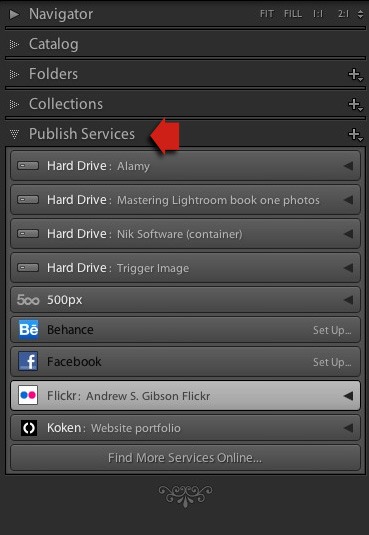
Step 1. Go to the Publish Services panel. It’s at the bottom of the left-hand panels in the Library module (see below)

Lightroom 5 Publish Services

Step 2. Click the New Published Collection icon and select the Go to Publishing Manager option.

Lightroom 5 Publish Services

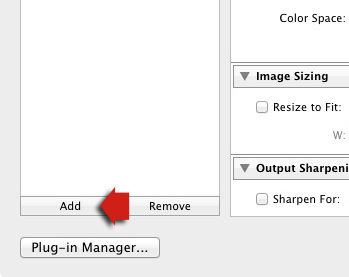
Step 3. Click the Add button in the bottom left of the Publishing Manager window.

Lightroom 5 Publish Services

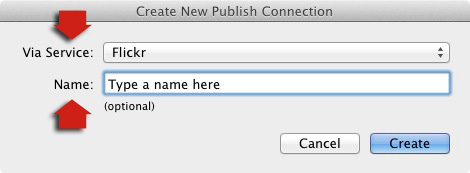
Step 4. In the next window, select Flickr from the Via Service drop-down menu. Type a name for your service underneath.

06

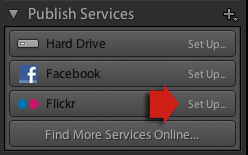
Alternatively, if this is the first time you’ve done it, you’ll see something like the screenshot below. Click the words Set Up next to the Flickr icon to get started.

05a

Step 5. Start by clicking the Authorize button and entering your Flickr log-in details. This authorizes Lightroom to access your Flickr account.

07

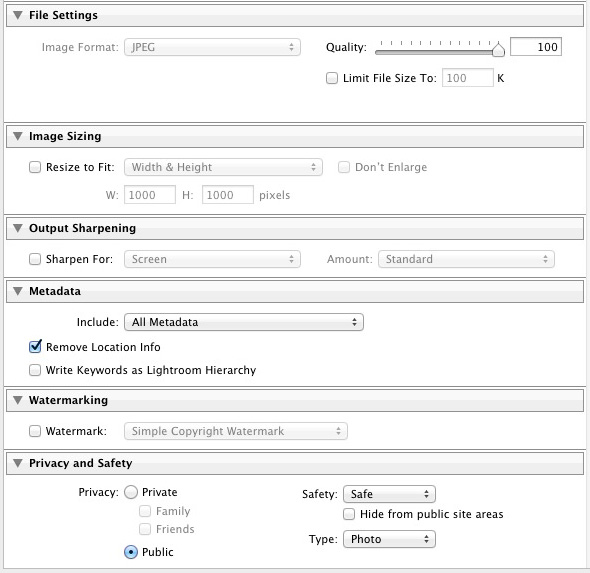
Step 6. Now it’s just a simple matter of adjusting the settings to what you want. The most important ones are near the bottom of the Publishing Manager window. You can set things like image quality, image size and sharpening, add a watermark, set which metadata (if any) to include and select the appropriate privacy setting. Press the Save button at the bottom-right of the window when you’re done. The Flickr Publish Service is now set up.

08

Using the Flickr Publish Service

You’ll see that there is a Published Collection called Photostream in the Flickr Publish Service. Any photos you add to this Published Collection will be uploaded to your Flickr account using the size and quality settings you selected earlier.

Lightroom 5 Publish Services

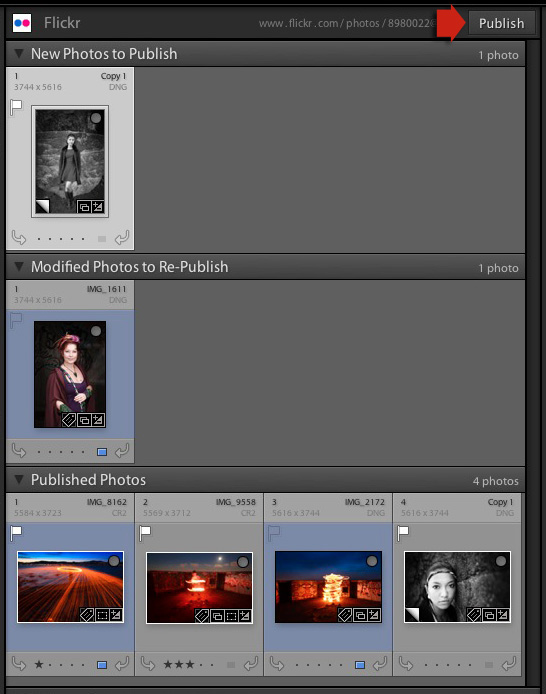
Click on the Photostream Publish Collection and you’ll see something like the image below if you’re in Grid View – press ‘G’ on your keyboard if you aren’t. If you’re not familiar with how Grid View works, then see my article Making Sense of Lightroom’s Grid View.

09

There are three sections:

New Photos to Publish: photos added to the Published Collection but not yet uploaded to Flickr. Click the Publish button at the top right to publish them.

Modified Photos to Re-Publish: these are photos already uploaded to Flickr that have changed since being published. Note that any change, however minor, will result in a photo appearing in this section. That includes things like adding keywords, or any tweaks you make in the Develop module. Modified photos are uploaded again when you press the Publish button. If you don’t want to upload the modified photo, right-click on the thumbnail and select the Mark as Up-to-Date option.

Published Photos: Photos already published to Flickr.

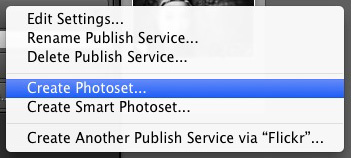
You can also manage Flickr Photosets from within Lightroom. Right-click the Flickr Published Collection heading and select Create Photoset from the menu. This lets you add photos to Sets as well as your photostream.

10

Finally, another benefit of using Lightroom’s Publish Services is that you can add keywords and a description to your images in Lightroom and these are populated automatically when you upload your photos to a photo sharing website. That means you only have to type in those details once, instead of multiple times. You can learn more about keywords in my article Creative Ways to Use Keywords in Lightroom 5.

Publishing to 500px

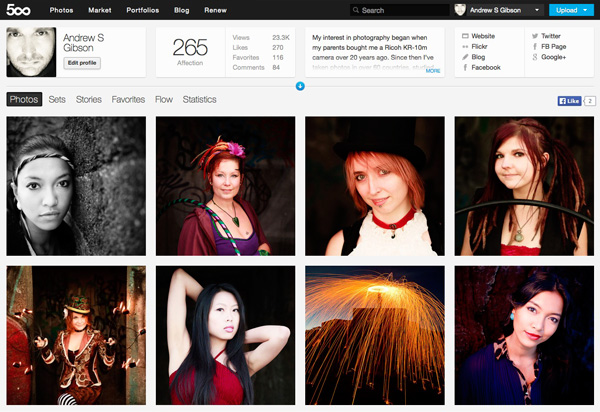
The 500px Publish Service works in a similar way to the Flickr Publish Service except that it is not built-in to Lightroom. You need to download the plug-in from the 500px website, which you can do here.

Unzip the file and move it to your Programs folder (PC) or Applications folder (Mac). Go to the Lightroom Plug-in Manager (File > Plug-in Manager) and click the Add button to install the plug-in. Once installed, it works virtually the same way as the Flickr Publish Service. The main difference is that the 500px plug-in downloads any photos you have already uploaded to 500px and adds them to your Lightroom Catalog.

Mastering Lightroom Book One: The Library Module

Mastering Lightroom ebook

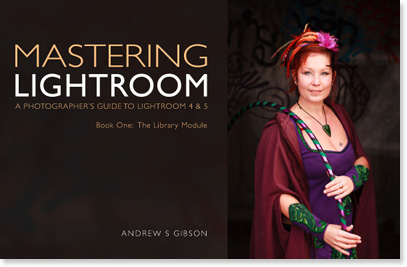
My latest ebook Mastering Lightroom Book One: The Library Module is a complete guide to using Lightroom’s Library module to import, organize and search your photo files. You’ll learn how to tame your growing photo collection using Collections and Collection Sets, and how to save time so you can spend more time in the Develop module processing your photos.

The post How to Upload Photos to Flickr and 500px using Lightroom 5 by Andrew Gibson appeared first on Digital Photography School.


Digital Photography School

 
Comments Off on How to Upload Photos to Flickr and 500px using Lightroom 5

Posted in Photography


Why I Don’t Support “Black Day” at Flickr

08 Dec

Why I Don't Support Flickr Black Day

If you notice something different about photos on Flickr today, it might just be “black day.” Over the past week or so, hundreds (maybe thousands) of users who dislike an impending photo page change (and in many cases, redesign changes from earlier this year) have organized and are protesting by posting black protest images to their Flickr accounts today, December 8th.

Here is why I don’t support this protest.

Flickr users have protested quite literally *everything* that has ever been changed to the site. Every change over the past decade or so that Flickr has been around, has been meet by strong resistance. When Flickr added video, when Flickr required Yahoo accounts to sign in, and certainly design changes most of all, all of these and so many more have been met with various protest movements.

The “who moved my cheese” crowd is strong with Flickr.

At the same time, in order to improve and grow Flickr *MUST* change. Flickr must evolve. Flickr must improve.

Whether or not Flickr gets their design changes right or wrong, they simply must move forward and compete with other photo sharing sites today. Hopefully they get it more right than wrong, but I simply can’t support something that’s primary premise is based on not changing for the sake of, well, not changing. That is how things die. As good as Flickr is, it can always improve, and if the site is paralyzed by the “no change” crowd it cannot innovate and grow.

Competition in the photo sharing space is stronger than it ever has been. Flickr, Google+, Instagram, Twitter, Facebook, Pinterest, SmugMug, Behance, 500px and more are all competing for our photos and our attention. If Flickr is going to survive as a contender in this space, they must produce a more compelling experience than they have in the past.

Many of those currently protesting design changes on Flickr are loud, very loud — and some are some of the rudest, vulgar and offensive people I’ve ever come across online. They way they trashed Marissa Mayer and other Flickr employees’ *personal* photostreams after the last redesign was way over the line.

Even as a large protest group, however, this group most certainly does NOT represent the majority opinion on Flickr. Most (the silent majority) Flickr users couldn’t be bothered to get worked up about anything and quite simply don’t care enough about whatever happens at some photo sharing site to have much of an opinion one way or the other.

For this silent majority, the best tool Flickr has is data. The best thing that they can do is watch how the majority use the site and react to changes based on their online usage patterns and actions. I suspect that recent design changes on Flickr have contributed to more users, more views, and more engagement — despite what a small, but vocal, minority might want you to believe.

Only Flickr has access to this data, but I suspect that they are quite happy with usage results (even just going by my own anecdotal increase in activity that I’ve seen on the site as changes have been rolled out this year).

Now, as far as the new photo page redesign goes, mostly I like it. I say mostly, because even as I’ve used the page (it’s in an optional opt in or out beta form right now), I usually end up turning it off and going back to the old page. It simply is missing too much functionality that I rely on and need to use Flickr at present.

For example, I need to be able to click on the faves button and see who has faved my photo. That is important (and pretty basic) social information that I want access to. At present you cannot do this with the new photo page (but it is planned per Flickr’s feedback page). Assuming Flickr gets all of the basic functionality right in the final product though, I like the design better in general.

I also like the redesign changes that Flickr implemented earlier this year. I think that the justified layout combined with infinite scroll is the fastest, most efficient, way to consume photos on the internet today. Both Google and Facebook use infinite scroll. While some people have claimed that Flickr is slower for them, it is not for me. Images load very quickly on a modern laptop with a broadband internet connection. I also don’t have bandwidth caps on my primary internet connections.

Flickr has never been faster and I’ve been able to see more images on Flickr this year than any year previous due to these efficiency improvements.

I think Flickr needs to change even more in fact — mostly around social. There is still so much that could be improved on Flickr from a social standpoint.

The primary role of a social network should be as a social lubricant. Flickr should be obsessed with social, much more than it feels that they are. How can Flickr create even more social interaction? How can Flickr turn online social interaction into offline social interaction? How can Flickr make it easier and easier to favorite and comment on photos? How can Flickr show me more photos that I like (and will interact with socially) and less photos that I do not like?

These are the questions Flickr should be asking as they innovate and improve, and, yes, change.

Why does Explore still exist as it does? It’s so broken. Why are power users blacklisted from Explore? Shouldn’t Flickr care about their power users?

Explore is boring to me because it is not customized to me. Flickr has so much data about me. Why aren’t they analyzing my data to provide me a better photo exploration tool? Flickr knows whose photos I favorite. Flickr knows what tags on photos I favorite (and with image recognition analysis in the future, even more).

Flickr knows the geolocational location of photos that I favorite. Why is Flickr wasting valuable Explore real estate by showing me photos with watermarks when I hate watermarks? Why is Flickr showing me images of overcooked HDR? Explore has so much potential to truly provide a compelling image discovery system and yet it still falls flat.

I hope more change is coming to Flickr, not less. 2013 was the most innovative year of Flickr since Yahoo purchased them. Hopefully 2014 will be every bit as good.

More comments on this at the original Flickr photo here and on Facebook here.


Thomas Hawk Digital Connection

 
Comments Off on Why I Don’t Support “Black Day” at Flickr

Posted in Photography


My Flickr Book Arrived — It’s AWESOME!

29 Nov

My New Flickr Book Has Arrived!

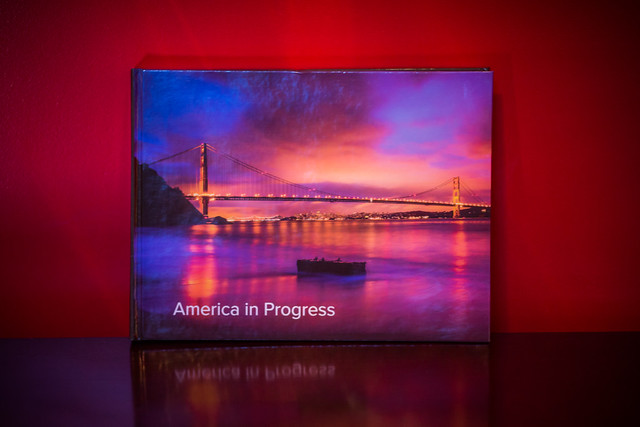
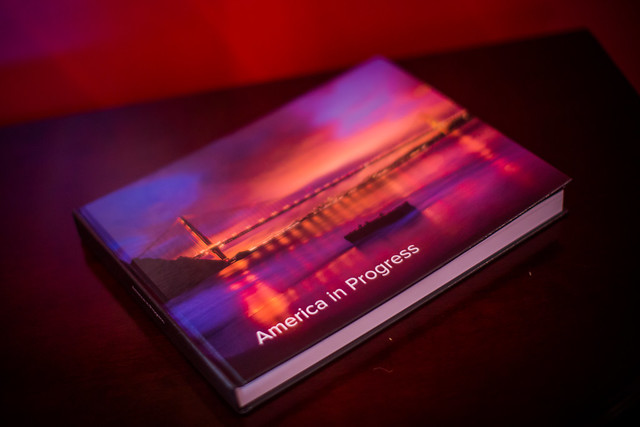
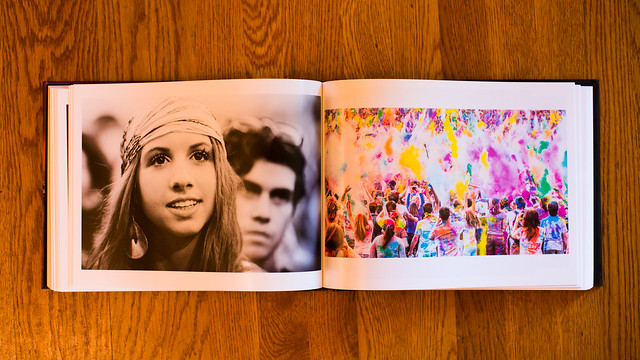
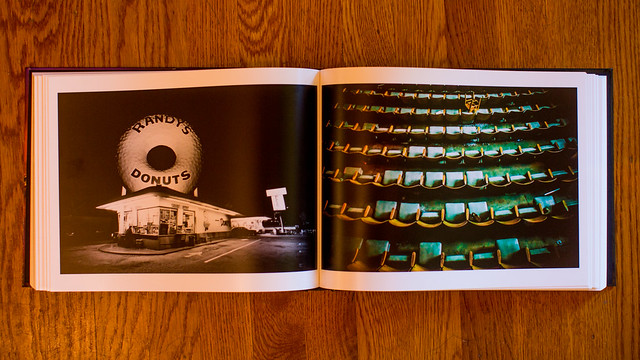
Yesterday my first book that I made with Flickr’s new book publishing service arrived. I was very impressed. My 200 page book was one of the best self publishing books that I’ve seen yet. I was most impressed with the paper that was used in the book. It was super premium high quality photo paper and as you turned each page it felt much weightier than most paper I’ve seen in other self publishing books.

The binding was not as nice as professionally printed books, but it was consistent with the binding that I’ve seen on other self published books from places like blurb.

It took my book exactly 7 days to arrive from the time of order to receipt. Once it was shipped, it was delivered next day.

As it stands right now you can just order books for yourself. You can’t sell them to others through Flickr. I had a few people that I showed the book to inquire about ordering a copy for themselves. As it stands right now this is a one of a kind book and I don’t plan on making additional copies of it.

Although I did not see a way to get text into the book, it seems like it might be possible looking at this example of another Flickr book by Flickr user Snoop Pac Doggy Dog. The book comes with a very nice printed removable slip cover and the book also has the same image on the cover itself.

I would definitely order more books from this service by Flickr. The quality of the product was first rate. It’s also nice that I did not need to upload high res photos to another site. Because Flickr already has my high res photos, it made it easier to just build my book through them.

It’s nice to finally be able to look at my own photo book and especially put it up on the shelf with my other photo books when I’m done — it sits right between photo books by Friedlander and Winogrand. :)

My New Flickr Book Has Arrived!

My New Flickr Book Has Arrived!

My New Flickr Book Has Arrived!


Thomas Hawk Digital Connection

 
Comments Off on My Flickr Book Arrived — It’s AWESOME!

Posted in Photography


Flickr Rolls Out New Photo Preview Page to All Users

16 Oct

Flickr Opens Up New Photo Preview Page to Users

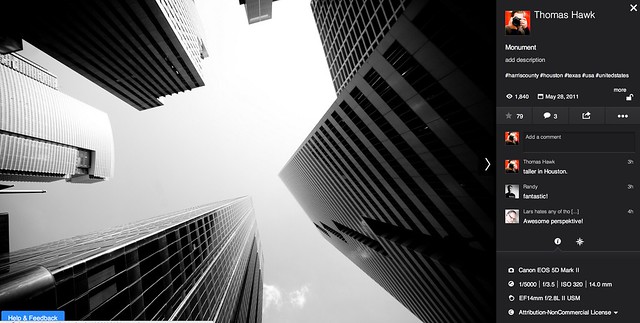
Yesterday Flickr opened up their new photo page preview to the world. I opted in to the new photo page this morning and here are my initial thoughts on it. Overall I like it.

1. Photos are bigger. The bigger the photo the better. Flickr eliminated top menu items on the page. They also eliminated the hint area to encourage people to scroll below the fold. By moving the top and bottom non-photo information to the side of the photo, this allows bigger photos.

2. You no longer have to scroll to see a lot of the important information around a photo. Having a lot of the information that people care about to the side of the photo, makes it easier to get to this information. You know, sort of like how Google+ does it. ;)

3. I’ve got mixed feelings on the new hashtags. I do like the fact that Flickr has added #tags to all Flickr tags… I think. This is the new methodology for tags in social media (i.e. Twitter, Instagram, Facebook, Google+ and everybody else in the world), so it would make sense that people would be more familiar with this concept, especially new users.

On the other hand, hashtags don’t really work very well for multi word tags and descriptions (the space between words gets stripped out). So “Saved by the Deleteme Uncensored Group” on the old Flickr photo page now becomes #savedbythedeletemeuncensoredgroup, which looks like a big mess. A lot of Flickr users would tag phrases and thoughts in the tag section of their photos and these are now pretty much unreadable.

Also Flickr now hides a lot of tags underneath a “more” button. This to me would seem to discourage users from using lots of descriptive tags, which I think are important for organizational and search reasons on Flickr. I don’t think any tags should be hidden under a “more” button. All tags should be shown on the photo page.

Groups and others who relied on multi word tags for photo games, may not like the new tagging structure.

4. A lot of the full functionality of the new photo page is being developed. This new photo page is by no means the final product. I think it’s good that Flickr lets people opt in and opt back out, to try it out. It’s a little bit of perpetual beta in a way and I like that Flickr is willing to put itself out there without having everything at 100%. Move fast and break things (as they say over at Facebook).

5. The new Flickr photo page is an under-developed preview, this means that there are quite a few things that still need to be done (some of which are planned and in the works by Flickr).

We need to be able to generate html code to blog images off site still (it’s coming). We need to be able to see all sizes of our photos and download our photos (it’s coming). We need to be able to click on favorites and see who has favorited an image. We need to be able to click on a date an image was taken and have it take us to the calendar archive view for that day of our photos. You can’t edit a comment on a photo after you make it (you can only delete your comment and start over). HTML formated links seem to be borked in photo descriptions.

Lots of little things still need to be added in to the photo page. It’s missing a lot of functionality still. The design looks good though and I hope they implement all these little things quickly.

6. My favorite thing about the new photo page is that it really highlights your sets. Sets are one of my favorite things on Flickr. I’ve made over 1,800 sets on Flickr. With the new photo page, Flickr now shows other thumbnails of photos from the same set and not just a link to the set. I think this will drive more views to people’s sets on Flickr, which is a great thing. [Note: this seemed to be working earlier today, but now it seems like this feature is not showing on my photos]

7. According to Neil Howard, the new Flickr photo page doesn’t support secure SSL browsing. SSL is the “https://” that makes a connection encrypted which is used by a lot of people.

8. I do like the new feedback forum that Flickr is also pushing with this preview. It has a way to vote answers up or down. This seems like an interesting way for staff to pay attention to the things that need to be fixed the most. The forum is already full of the “who moved my cheese” cheeshead bellyaching that comes with every Flickr change, but there is some useful criticism and feedback there that seems to bubble up to the top at the same time.

One other thing worth noting with these new bigger photos. A lot of photographers have told me over the years that they only load small, low res images on social media sites like Flickr. They think that these smaller photos are “good enough” and fret about having their larger images “stolen.”

I’ve always uploaded my full high res originals to the Flickr. As display sizes keep getting bigger and bigger, some of the people who have uploaded low res, small photos are going to see their photos begin to look bad in the larger size formats. On the other hand, those of us who always upload high res photos, our photos will still look good at these larger sizes. Especially as more and more photos are being consumed on things like the Flickr app on AppleTV, people ARE actually looking at your photos in much larger format than what you may have initially considered. Everything with photos on today’s web is going BIGGER — just something to think about.

It is pretty cool that Flickr gives everyone a full terabyte of high res original sized images for free — which means virtually unlimited free storage for your high res photos on Flickr. Google and Facebook should do that too.

These are my initial thoughts. Now I’m actually going to revert back to the old photo page (so that I can get the html code to blog the image in this post) and then revert back to the new page and keep testing it out.

What do you think of the new Flickr Photo Page? Do you like it? Love it? Hate it? And why?

More from The Verge here.


Thomas Hawk Digital Connection
 
Comments Off on Flickr Rolls Out New Photo Preview Page to All Users

Posted in Photography


Flickr announces auto-upload feature for iOS app

10 Oct

TS250x0~cms_posts-0200950401-flickr_ios72.png

Good news for iPhone photographers. Flickr has released an update to its iOS application that allows users to automatically upload their photos to Flickr’s free terabyte of cloud storage. In addition to the automatic uploading feature, users now have access to an easy auto-straightening tool. Read more on connect.dpreview.com.

News: Digital Photography Review (dpreview.com)

 
Comments Off on Flickr announces auto-upload feature for iOS app

Posted in Uncategorized


Flickr improves capture and editing tools in latest iOS app update

29 Aug

Screen_Shot_2013-08-29_at_9.52.55_AM.jpg

As part of its effort to ‘make Flickr awesome again’, parent company Yahoo has released a hefty update to its Flickr app for iOS. Improved capture tools include the ability to lock separate focal and exposure points on the capture screen with a two finger tap. In addition, users can view the filters ‘live’. When you are ready to edit, you can customize the exposure using the new Levels adjustment, correct color balance, sharpen, brighten, crop, straighten, or even add vignetting to your image. Click through for more details at connect.dpreview.com.

News: Digital Photography Review (dpreview.com)

 
Comments Off on Flickr improves capture and editing tools in latest iOS app update

Posted in Uncategorized


Yahoo and Flickr Renege on Their Paid Advertising Free Accounts

03 Jul

The New Yahoo Advertising Tool Bar on Flickr is Ugly

One of the things that I’ve liked about being able to pay Yahoo and Flickr $ 24.95 per year, is that it comes with an advertising free experience. The deal between Yahoo and Pro accounts is simple, and can be summed up in Flickr’s own words: “No ads in your browsing experience.”

While new Flickr Pro accounts are no longer available, all existing Pro accounts were given an opportunity to grandfather in their Pro accounts and continue them ad free. If users want an ad free experience now, they have to pay double the price as the old Pro account, but it’s still an option.

In the past, when paid accounts on Flickr have complained about advertisements, Flickr pointed them to a toolbar that a user likely installed: “If you are pro, we don’t show you ads on Flickr, but you may have unintentionally installed a browser toolbar, extension or add-on that is serving them.”

I’ve always respected Flickr for offering this ad-free option, it’s a refreshing departure from Facebook, where we are bombarded with ads at every turn.

Unfortunately, today Flickr has reneged on their advertising free account by forcing a new Yahoo tool bar on all Flickr users, both those with free ad supported accounts and those of us with paid ad-free versions. It’s an ugly intrusion to an otherwise beautiful new Flickr. It also advertises at me on *every* *single* *page* on Flickr — a bunch of Yahoo services that I *do* *not* *want.*

Complete with a Yahoo logo, the forced real estate takeover also offers me Home, Mail, News, Sports, Finance, Weather, Games, Groups, Answers, Flickr, omg!, Shine, Movies, Music, TV, Health, Shopping, Auto, Travels, Home.

There is no way to disable this forced tool bar. Worse it follows you as you scroll down the page. It never goes away. As of right now it is impossible to be on any page on Flickr without having these hyperlinked ads in your face.

I think these advertisements are just awful. I think they are distasteful and I think it’s unfortunate that Yahoo is so greedy that they cannot be satisfied with our simply paying them for an ad-free experience. If Yahoo cannot make enough money off of Flickr, then increase the price, or give us an option to pay more and remove this intrusive forced advertising bar.

Flickr is supposed to be an elegant, paid, ad-free, photo experience — or at least one version of it is. Forcing advertisements like this on ad-free accounts is wrong. Flickr should give all paid accounts an option to x out this ugly marketing based tool bar and make it go away.

There are few things as annoying as having a toolbar forced on you with a bunch of advertising links to things that you do not want. You can follow user reaction to this new forced tool bar in the Flickr Help Forum here.

You can and should do better than this Flickr.


Thomas Hawk Digital Connection
 
Comments Off on Yahoo and Flickr Renege on Their Paid Advertising Free Accounts

Posted in Photography


Yahoo Running Television Commercials for the New Flickr

05 Jun

Yahoo Running a Television Commercial Promoting the New Flickr

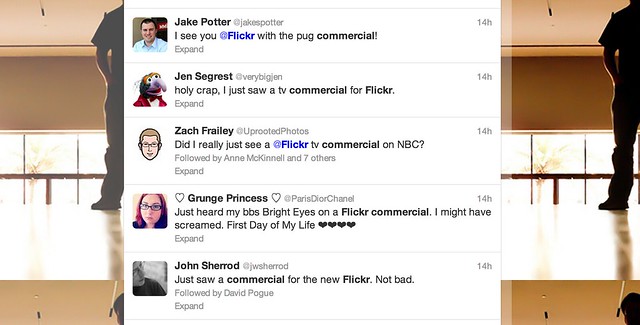
Lest anyone doubt Marissa Mayer and Yahoo’s new commitment to photo sharing site Flickr, apparently Yahoo is now running a paid television commercial for the photo sharing site — the first of its kind as far as I’m aware. Following some of the tweets on the commercial spot, it sounds like it may have begun running yesterday on NBC programming.

The advertisement, which features the Bright Eyes song, “The First Day of My Life,” shows a photo montage of pug dogs, among other images. You can watch the commercial yourself above from Yahoo’s corporate YouTube account.

The commercial comes out a few weeks after a successful new redesign of the site that gave all Flickr users a free terabyte of high res photo space.

I posted previously on an informal statistic of uploads being up 71% at Flickr since the redesign, these statistics would seem to be in line with other metrics that Yahoo is also seeing internally, according to Flickr Community Manager Thea Lampkin.

“[W]e have a lot of data already and are measuring traffic to all the new pages (don’t worry, it’s all anonymous),” writes Lampkin. “So far the metrics have been overwhelmingly positive, and we’re very happy with how Flickr members everywhere are interacting with the new site. Sets in particular are getting more traffic than ever before.”


Thomas Hawk Digital Connection
 
Comments Off on Yahoo Running Television Commercials for the New Flickr

Posted in Photography