RSS
 

Posts Tagged ‘Flash’

Nikon adds underwater housing and flash to 1 System

10 Apr

pic_140410_01_02.png

For those who want to take a swim with Nikon’s latest 1 System mirrorless camera – the J4 – the company is also releasing both an underwater housing and speedlight. The WP-N3 housing lets you take the camera up to 45m underwater and supports several 1 System kit lenses. It also has a port for connecting to a strobe, such as the new SB-N10, which has a maximum depth of 100m and works with the already waterproof AW1, as well.

News: Digital Photography Review (dpreview.com)

 
Comments Off on Nikon adds underwater housing and flash to 1 System

Posted in Uncategorized


Light it up: Phottix Mitros Flash for Canon review

08 Apr

Phottix-Mitros-Feature.jpg

The Phottix Mitros flash is a high-end TTL flash designed to compete with Canon’s 580EX II at well over half the price. The Mitros for Canon shares many features with the 580EX II, including high-speed sync and built-in IR triggering with Master and Slave modes. But is the Mitros mighty enough to match one of Canon’s most beloved flash models? Find out in our review

News: Digital Photography Review (dpreview.com)

 
Comments Off on Light it up: Phottix Mitros Flash for Canon review

Posted in Uncategorized


[MODIFIED] Google Chrome – Clear Browsing Data including Cookies, Flash Cookies, Cache, History, and Saved Passwords

07 Apr

For privacy, clear the data Google Chrome stores regarding your browsing history.

Even though Google Chrome supports “Incognito” browsing where history information is not kept and cookies are removed after browsing (press CTRL + SHIFT + N to open an “Incognito” window), you might accidentally forget to use this mode. You might also wish to remember cookies for a few hours while checking e-mail, chatting on social networking, or accessing your bank account online, then later decide to clear your tracks for privacy.

Google Chrome supports a feature where without the use of any extensions, you can clear browsing and download histories, the cache, cookies, Flash cookies, saved passwords, saved form data, and/or other details….

Read more at MalekTips.
New Computer and Technology Help and Tips – MalekTips.Com

 
Comments Off on [MODIFIED] Google Chrome – Clear Browsing Data including Cookies, Flash Cookies, Cache, History, and Saved Passwords

Posted in Technology


Kenro launches Nissin i40 compact flash with video light

04 Apr

i40_FR_L.png

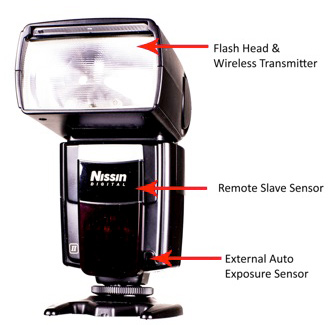
Kenro has announced the Nissin i40 compact flash gun that also has a built-in video light. It’s compact in size and has a flash output of GN40 at 105mm with wireless TTL mode. The new model also has a LED video light providing nine steps of output level adjustment. The Nissin i40 is now available for Nikon and Canon, with Sony and Fujifilm fits coming soon. It will sell for £204/~$ 338. Learn more

News: Digital Photography Review (dpreview.com)

 
Comments Off on Kenro launches Nissin i40 compact flash with video light

Posted in Uncategorized


Understanding Flash Metering Modes

19 Mar

flash-metering-modes

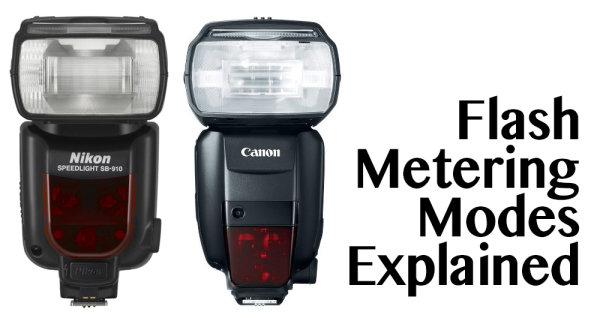
Flash Metering Systems TTL, A-TTL,  E-TTL and E-TTL II

Terms used in this article are Canon specific but there are the same or similar terms for Nikon, Sony, Olympus and other camera manufacturers. _J6L0002-Edit-Edit

When you use your camera’s metering system, the meter will measure the reflected light from your subject (see Metering Modes and How Your Camera Meter Works).  This is not the case when you use your camera with a flash, either a pop-up or mounted on your camera’s hot shoe and set to one of the TTL modes. (TTL is an acronym for Through The Lens) Irrespective of which TTL flash mode you choose, the exposure is not based on reading the ambient light,  (see: Balancing Flash and Ambient Light with a Light Meter)  it is based on the flash output. Measuring flash output can be achieved by either measuring a fixed output pre-flash and evaluating the exposure, or by measuring the flash output as it is fired. This data is then used to calculate the flash output required to expose the scene correctly.

So on to understanding flash metering modes . . .

There are three flash metering modes

TTL or through the lens metering

This is the standard metering mode, typically used when your camera has a pop-up flash or a dedicated external flash heads. The exposure is based on the flash firing. The quantity of the flash output is monitored through the lens by a flash sensor that is mounted below the mirror.

Keep in mind, that when you use a flash the maximum (fastest) shutter speed is the sync speed of your camera (check your manual to check what your camera sync speed is, most are 1/200 or 1/250th). You must never attempt to use faster shutter speeds unless your flash supports “High Speed Sync”.  Since the shutter speed is fixed at the sync speed or slower (in Aperture priority mode: Av on Canon, A on Nikon) the camera will automatically set it at the sync speed.  In Manual (M) mode you must set the shutter speed to the sync speed or slower otherwise you will get black bands in your image.  This is because the shutter starts closing before the flash has had a chance to fully expose the sensor.

In TTL mode the flash will read the exposure from the light bouncing off your subject and the flash sensor will turn off the flash when it believes the image has been exposed correctly. In this TTL mode changes to the aperture setting will typically affect the exposure of the areas of your image that is lit with just the ambient light.

TTL Flash in modes other than Aperture Priority or Manual:

flash-metering-modes

P – is the Program mode  or Program auto mode.  In this mode the camera manages all the settings. Some cameras have an “A” or full Auto mode. Canon cameras may also have a “CA” setting for Creative Auto mode. In these modes the camera sets shutter speed at the sync speed, and the aperture based on the ambient light. When using TTL the flash fires and turns off when the auxiliary sensor tells it to based on the evaluated exposure of the flash.

For TTL the flash power and duration is based on the ISO and the aperture setting. In most cameras the ”through the lens“ flash exposure reading is taken from the same area as your focus point. For TTL flash metering there is no pre flash.

A-TTL (Advanced through the lens)

This metering mode performs in the same basic manner as TTL. It will read the exposure through the lens, from the area of focus and trigger the flash to turn off when the appropriate exposure is achieved. The main difference is that this method uses a pre-flash. This pre-flash is used to determine f-stop based on the distance to the subject that reflects the flash output. The pre-flash is fired when the camera’s shutter is half depressed, the camera evaluates the readings and sets the aperture. Now when the shutter is fully depressed the flash fires to correctly expose for the subject. Based on the model of your flash, the pre-flash can be an actual white light flash or an infrared flash.

nikon-flash

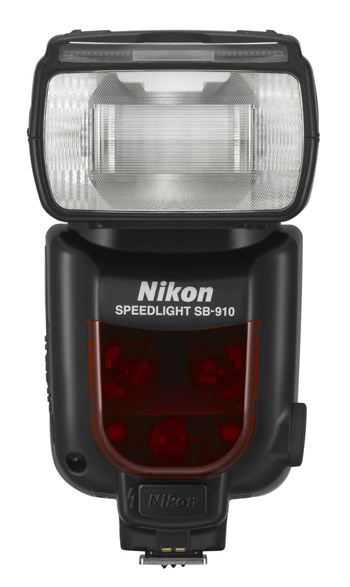
Nikon’s latest, the SB910

In all cases the main flash is fired as a pre-flash if the flash head is oriented in any position other than directly at the subject. This pre-flash can be an annoyance. The pre-flash is measured by the flash unit and the evaluated data is communicated back to the camera. If you use your camera in Program or Automatic mode with A-TTL, ambient light exposure and flash based exposure are collectively evaluated and the camera attempts to resolve the lighting to establish the f/stop (aperture) for the best exposure. Since the sensor that evaluates the pre-flash is located on the flash unit instead of the camera’s sensor, using a filter on the camera lens will cause inaccurate readings.  This is because the sensor on the flash is not covered with an equivalent filter.

E-TTL (evaluative through the lens)

As with A-TTL, E-TTL also uses a pre-flash. However, the flash exposure is not measured by the dedicated flash sensor but the main sensor that is used for ambient light exposure readings. This is similar to the exposure calculations and focus locking that occurs before the shutter opens.  This is true for images captured in ambient light when your camera is in Aperture, Shutter Priority or Program mode. E-TTL has far greater exposure accuracy than TTL or A-TTL modes. The pre-flash in E-TTL mode is not triggered when the shutter is half depressed but when the shutter is fully depressed. Since flash durations are very short the pre-flash is not visible to the naked eye. The pre-flash measures the distance and reflectivity, and calculates the appropriate flash output. All this is accomplished just before the shutter actually opens.  The pre-flash is fired immediately before the main flash except when your camera is set for 2nd curtain sync. In addition, if FEL (flash exposure lock) is used, the pre-flash is fired only when FEL is established.

41Dl+k0z0pL

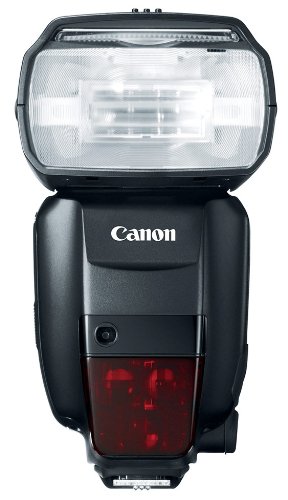
Canon’s newest speedlite the Canon 600EX-RT

E-TTL II

This is the new standard in Canon EOS systems.  It is a firmware enhancement that uses the camera and not the flash to do all the evaluation. Fortunately it is compatible with older E-TTL flash units.  E-TTL II uses the camera’s evaluative metering zones before and after the pre-flash. In this process, areas with small changes in brightness are then averaged for flash metering. This method prevents the issue where highly reflective materials result in specular highlights. With ETT-L II the  flash metering system is not linked to the selected focus area. This allows focus and recomposition without affecting correct flash exposure. Overall the E-TTL II system allows for much more natural exposures with out the harsh appearance typical of direct flash photography.

The post Understanding Flash Metering Modes by Shiv Verma appeared first on Digital Photography School.


Digital Photography School

 
Comments Off on Understanding Flash Metering Modes

Posted in Photography


50K Creative Profesisonals Creating Their Websites Code-Free in a Flash with Webydo, See Why

24 Feb

Some of you may have already heard about Webydo, and some of you may have not, but that’s alright. You’ll probably be hearing plenty more about it in the future. Webydo’s a web-design platform that lets people create pretty rad-looking HTML websites that have a built-in CMS, too. And they’re able to do all of this without even knowing the Continue Reading

The post 50K Creative Profesisonals Creating Their Websites Code-Free in a Flash with Webydo, See Why appeared first on Photodoto.


Photodoto

 
Comments Off on 50K Creative Profesisonals Creating Their Websites Code-Free in a Flash with Webydo, See Why

Posted in Photography


Quick Off-Camera Flash Tutorial

17 Feb

Using off-camera flash is one of the most requested articles we get here at dPS. I found this short but informative video on YouTube on using off-camera flash. My thought after watching it was “oh that poor girl” at it was clearly shot in some rather nasty weather.

check it out here:

For more articles on off-camera flash see:

  • Balancing Color for Flash and Ambient Light using Gels
  • Working with Off Camera Flash and TTL
  • Balancing Flash and Ambient Light Using an Incident Light Meter
  • Yongnuo YN622C TTL Flash Trigger Review – I personally have a set of these and they work GREAT!!
  • The Basics of a One Light Setup: A Lighting Tutorial

The post Quick Off-Camera Flash Tutorial by Darlene Hildebrandt appeared first on Digital Photography School.


Digital Photography School

 
Comments Off on Quick Off-Camera Flash Tutorial

Posted in Photography


Balancing Color for Flash and Ambient Light using Gels

13 Jan

Flash with 1 CTO plus 1/8 CTOIn the last article Balancing Flash and Ambient Light Using an Incident Light Meter I did not mention color temperature or any correction for the colorcast in the background. There were however requests for it in the comments section, so in this article we will cover three ways of balancing color for flash and ambient light (tungsten yellow/orange which is approximately 3200°K, flash which has a color temperature close to daylight or 5500°K).

Color Temperature Explained

Before you go into the process of correcting color imbalance you will need to understand color temperature. A basic description of color temperature is based on the color characteristics of visible light from warm (yellows) to cool (blues) and the ability to measure this in degrees Kelvin (°K). Degrees Kelvin is a numerical value assigned to the color emitted by a light source. Visualize a lamp filament that is heated using an electric current. It starts off as black and starts getting hot. At a particular point it will become hot enough to start glowing, typically a dark red. As it gets hotter, it will change from dark red to orange to yellow to practically white. It is important to understand that technically, red light has a lower color temperature but is described as warm, while blue light is a higher color temperature but is described as cool. So remember that the terms warm and cool describe color, not temperature. This is a fairly extensive topic but for a quick explanation this should help.

Read more on White Balance and color temperature:

  • Practical White Balance and Why You Should Learn It!
  • Introduction to White Balance

Since warm and cool are colors, we can change their characteristics by modifying color. In lighting we achieve this modification by using various colored gels of varying densities. Lets examine the first and simplest method.

Method One – Using Color Gels on the Flash

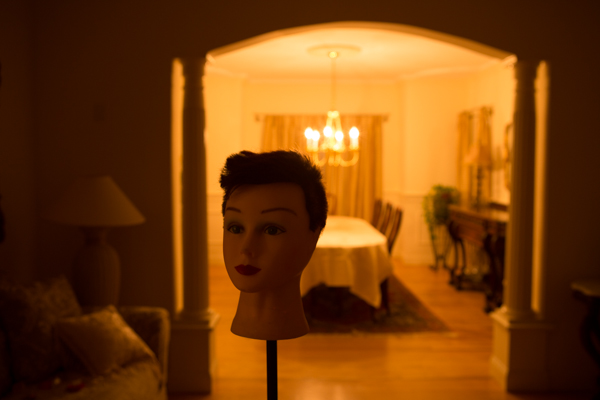
Here are two images of the same scene, one using Auto White Balance (AWB) and the next using Daylight White Balance (WB). The daylight WB is 5200°K while the AWB applied 3200°K. Clearly the Daylight WB is too yellow.
Auto WB

Image captured with camera set to Auto White Balance (AWB)
Same scene as above captured with the camera set to Daylight White Balance

Same scene as above captured with the camera set to Daylight White Balance

The Problem

The background room is lit by tungsten bulbs (typically around 3200°K). We will use a flash to light the main subject (approximately 5500°K).  This is a considerable difference that you will need to resolve. So if you can make both the light sources match in color temperature, you can then set the WB on your camera to that, and get a perfectly balanced image.

The Solution

To achieve this balance, you will use a color correction gel on your flash, to match the orange color of the tungsten bulbs. Theoretically both sources will now produce the same color. So if you set your camera’s WB to “tungsten” you will capture the background without any colorcast and it will look neutral. What about your primary subject? Since the flash output has been color modified to “tungsten”, the entire scene will look natural and devoid of any colorcast as long as the lights are close to the color temperature of tungsten.

Color correction is achieved using gels. These gels are manufactured by companies like Roscoe, Lee and ExpoImaging. Gels come in all sizes from large rolls to precut sheets. My preferences are the Rogue Gels made by ExpoImaging as they are the perfect size for flash heads and are attached using an elastic band. Each gel is marked for its strength and light loss. As a starter, for under $ 10 you can buy sample packs from most lighting supply stores.

Gels that create yellow/orange light are known as CTO gels (Color Temperature Orange). These gels are available in various strengths as follows:

  • 1/8 CTO Converts 5500°K to 4900°K
  • 1/4 CTO Converts 5500°K to 4500°K
  • 1/2 CTO Converts 5500°K to 3800°K
  • 3/4 CTO Converts 5500°K to 3200°K
  • Full CTO Converts 5500°K to 2900°K

I recommend you start with a full CTO and adjust by adding or reducing the color temperature correction by either combining gels or using gels of lesser strength. Since these gels add color they also reduce the amount of light transmitted. Based upon the gel that you are using, you will need to compensate for the loss of light. The typical light loss is mentioned in “f” stops with each gel strength. This information is typically imprinted on the gel or provided on a backing sheet of paper. You should use this information as an initial guideline for compensating your exposure.

This method will work reasonably well. However, it is not the most accurate, as it relies purely on a visual color correction. See the result in the following image:

The camera White Balance is set to Tungsten and the flash is gelled using a Full CTO

The camera White Balance is set to Tungsten and the flash is gelled using a Full CTO

Notice that the color of the subject is fairly accurate but the background is still a bit yellow/orange. The color temperature of the lights in the background may not be true 3200°K.

Method Two – Gels on the Ambient Light Source

In the second method, you will use gels over the offending lights if at all feasible. In this example consider it not feasible. However, you can use additional flash heads to overcome the problem of the tungsten colorcast. You do this by applying an opposing color gel to one or more flash light sources to fill the background. Keep in mind that based upon the size or the area and the intensity of the ambient light in the background, this too may not always be feasible. Take the additional flashheads (make sure they can be fired as slaves) and put a CTB (Color Temperature Blue) gel on each. What you are attempting to do is to negate the effect of the Tungsten by adding blue light to the ambient environment. Test your exposure and set the camera to “flash” white balance. Once again, you may need to add or subtract the gel intensity.
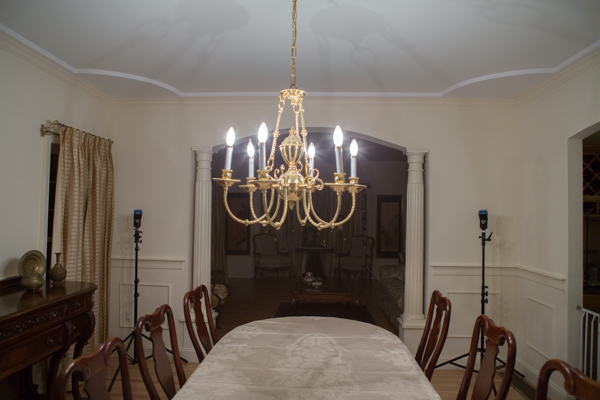
The set up. Note how the flash heads are concealed from view

The set up: note how the flash heads are concealed from view and pointed into the room that is the background

The CTB gels like CTO gels are available in multiple strengths as follows:

  • 1/8 CTB Boosts 3200°K to 3300°K
  • 1/4 CTO Boosts 3200°K to 3500°K
  • 1/2 CTO Boosts 3200°K to 3800°K
  • 3/4 CTO Boosts 3200°K to 4100°K
  • Full CTO Boosts 3200°K to near daylight

Once you are satisfied with the background color, go ahead and photograph the primary subject. Do not gel the main flash and leave the white balance on “flash”.

Color Bal

Color Correction using blue gels in the background

In each of the cases above there is still some color cast in the final image. This is because the lights in the background are not true 3200°K and we have been relying on tungsten color temperature for our corrections.

Method Three – Custom White Balance for Background and Matching Gels on Flash

Here you use custom white balance to establish an exact white balance setting for the ambient light. It is best to use a “white balance card” or a device like the X-Rite Color Checker Passport.

Color Checker Passport in Ambient Light

Image captured of  a Color Checker Passport in ambient light

Zoomed in for creating a Custom White Balance

Color Checker Passport – Zoomed in for creating a Custom White Balance

Image of the Color Checker Passport after Custom White Balance was established

Image of the Color Checker Passport after Custom White Balance was established

If possible, bring that image into Lightroom or Adobe Camera Raw and determine the actual color temperature. In this case, it is 2400°K, which, as you can see, is vastly different from the 3200°K tungsten. No wonder there was still a yellow colorcast in the first method. Use this measurement to establish the gel strength needed for the primary flash. If you cannot use Lightroom or any other software to obtain an accurate color temperature reading, you will need to do a bit of trial and error to determine how much CTO to use. In this case we need to get to 2400°K. A full CTO will drop 5500°K to 3200°K and a 1/8 CTO will drop an additional 600°K bringing the correction to 2600°K which is fairly close to what we need. Leave the camera set to the custom WB and gel the flash with one Full CTO gel and one 1/8 CTO gel to get a well balanced image.
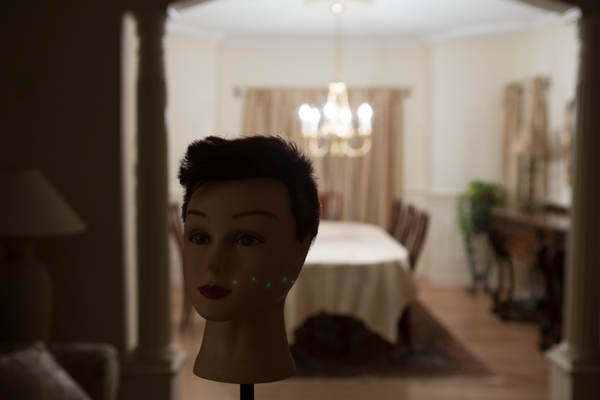
The correct White Balance for the background

The correct White Balance for the background


Using a Full CTO on flash head

Using a Full CTO on flash head

Flas with 1 CTO plus 1/8 CTO

Flash with a Full CTO plus a 1/8 CTO – a well color balanced image

One full CTO and one 1/4 CTO – the subject is a bit warm

One full CTO and one 1/4 CTO – the subject is a bit warm

In Conclusion

Always keep a set of color correction gels in your bag if you use flash on location.  Not only will you need them for indoor flash photography but the CTO gels are a ideal when using flash for portraiture at sunrise or sunset.

The post Balancing Color for Flash and Ambient Light using Gels by Shiv Verma appeared first on Digital Photography School.


Digital Photography School

 
Comments Off on Balancing Color for Flash and Ambient Light using Gels

Posted in Photography


Working with Off Camera Flash and TTL

18 Dec

Working with Off Camera Flash and TTL

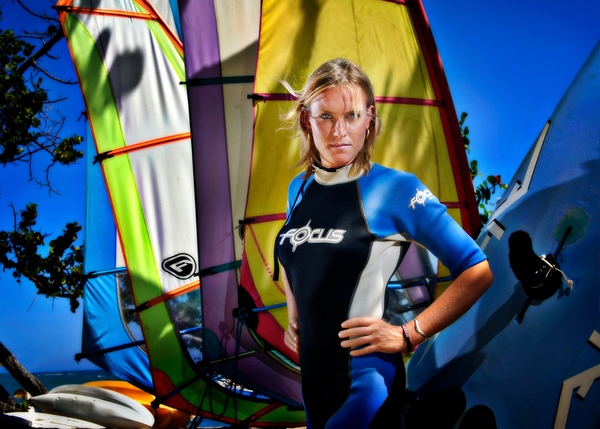
To be able to create a portrait of someone is a wonderful experience. To do so in an interesting location is even better. To be able to make use of lighting techniques that allow your imaginative ideas to come to life and bring out the personality of the subject and the location environment… is where it really gets exciting!

Working with Off Camera & Remote Flash

Step one – analyze the natural light first

The natural, or ambient light, even though it may seem to be everywhere all at once, actually has the same qualities of direction, intensity, colour and softness that are so easily seen in studio conditions. Taking a moment to observe and think about these ambient light qualities is the first step in determining how you can best make use of additional lighting from off camera flash.

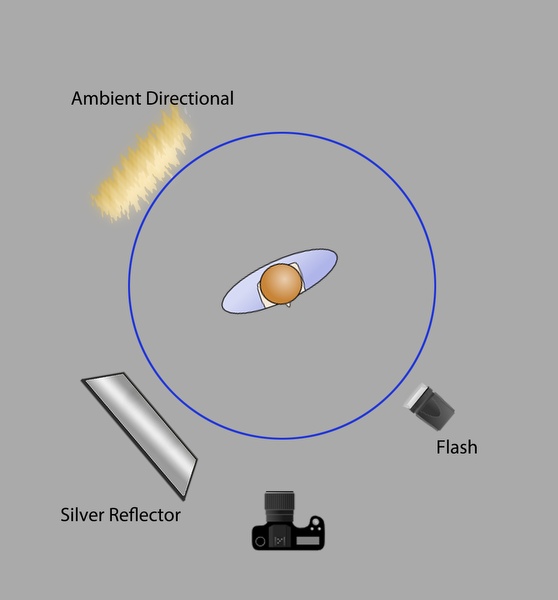
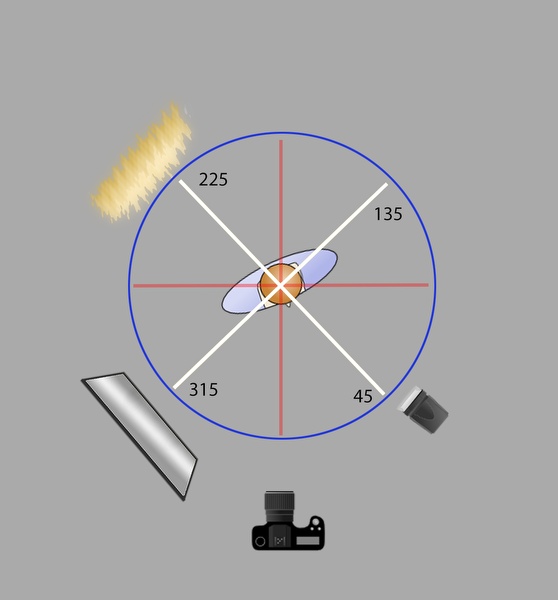
You might find it helpful to think of your location portrait setting as a clock or compass with your subject in the middle, and the camera and light sources arranged around the subject in a circular manner, through a 360 degree arc.

The first example below shows a natural light style portrait, with differing qualities of light on the subject and the background. The ambient light direction comes from slightly behind the subject, through the trees, without being too distinct, but enough to provide interest to the background.

005-Natural-Style-Portrait

Adding more light – main light placement moulds the portrait

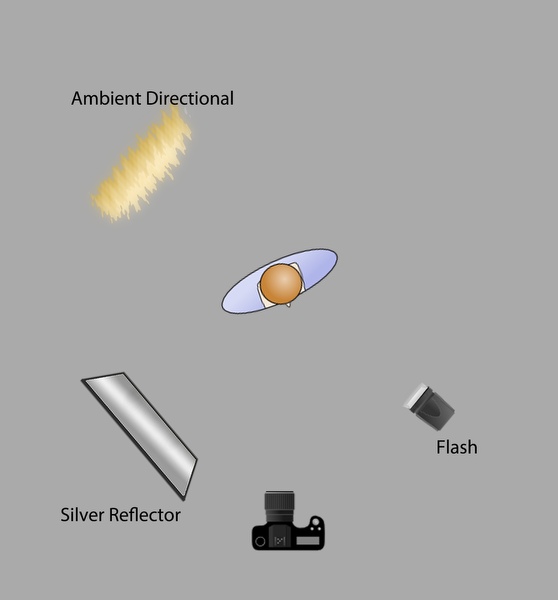
The diagram below shows the lighting setup with the added a reflector and flash to our scene, in a circular arrangement with the subject in the centre. Light sources have been placed at 45 degree positions, relative to the subject and camera.

Working with Off Camera & Remote Flash

Working with Off Camera & Remote Flash

Strong lighting positions

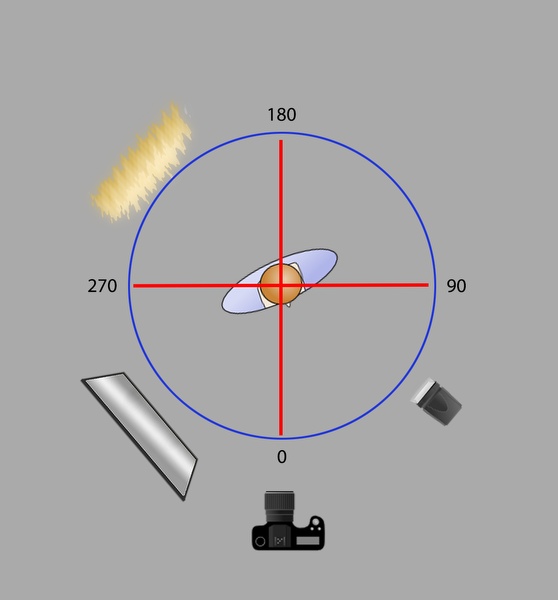
On camera flash, is generally known to be harsh and often not that interesting, similarly, light sources from directly from behind and the side are equally strong and not used that often for traditional portraits. These positions of 0, 90, 180 and 270 degrees are shown in the diagram below. These are not “bad” light setups, you can consider them “strong style” positions that are not as flexible to make use of, so they are used less often than more “desirable” lighting setups.

Working with Off Camera & Remote Flash

007-Athlete-Portrait-Harsh-Light

Working with Off Camera & Remote Flash

Adjusting lighting positions

Between these hard angle positions is where you want to position your primary or “Main” light sources. Doing so allows you to shape our subject with light in a natural manner and provides a more flexible set so that your subject can easily adjust their pose without “missing” the light. This is more comfortable setup for the photographer and will almost always provide more pleasing results of the subject. Photographs become more interesting as there is now more definition provided by the presence of highlights and shadows, which are also easier to control when working with this setup (003)

Working with Off Camera & Remote Flash

Adding secondary lights or reflectors

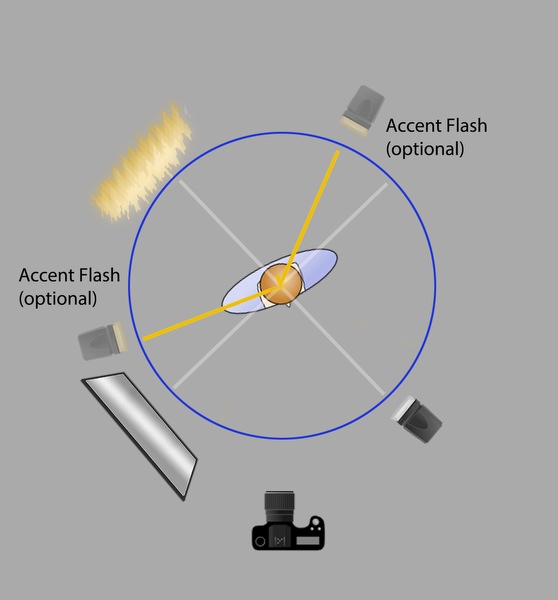
Once you have identified your ambient light conditions, and placed your main light source, you can now determine where to best place your accent lighting with additional flashes or reflectors. These lights provide enhanced interest to the image, by bringing out the subtleties of texture, colour and form. Placing them too close to your primary light will cause them to wash out each other, so remember the desirable angles created by our light compass earlier. When you think of the compass, you’ll want to have your additional light sources at least 90 degrees away from each other. This allows them to be effective on their own, without overlapping the other lights and losing their intended effect.

Working with Off Camera & Remote Flash

Accent lights are always positioned relative to the main light and tend to provide the feeling of a skimmed light back to the camera. This is the most effective way to enhance the creative style within an image, and is surprisingly easy to do now that you understand how the lights work with each other, and how you can arrange them to work best with your subject and where you position your camera.

Working with Off Camera & Remote Flash

Working with Off Camera & Remote Flash

Working with Off Camera & Remote Flash

Working with Off Camera & Remote Flash

TIP 1: To gain even more flexibility with outdoor flash, make use of the High Speed Sync feature, which will allow you to use shutter speeds that go beyond the traditional limits of 1/125th or 1/250th. Look to your camera manual for setting that up, so you can use speeds up to 1/8000th , it really works!.

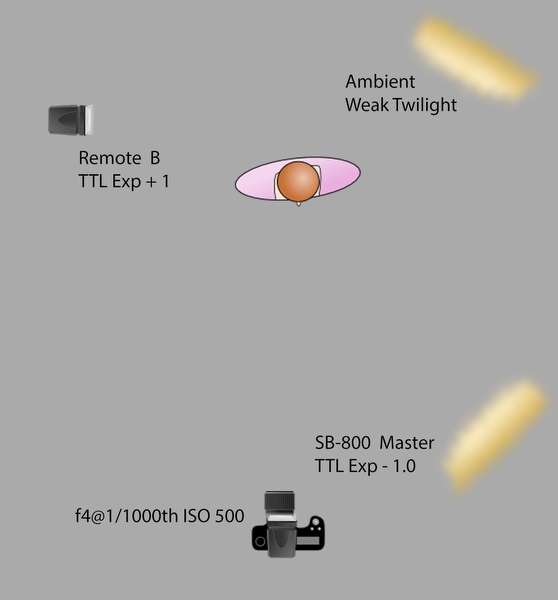
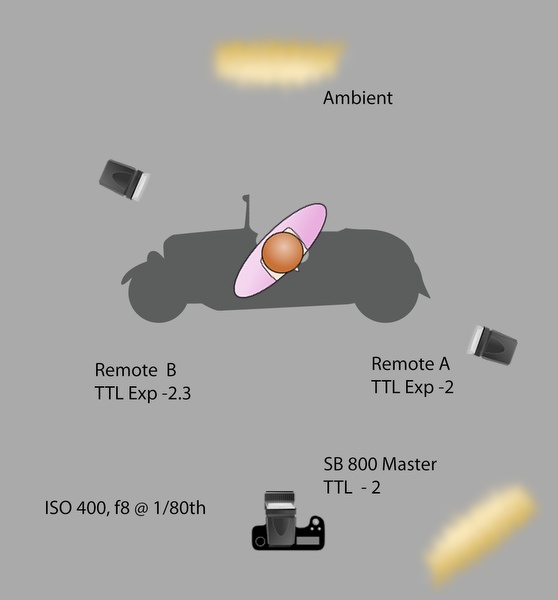
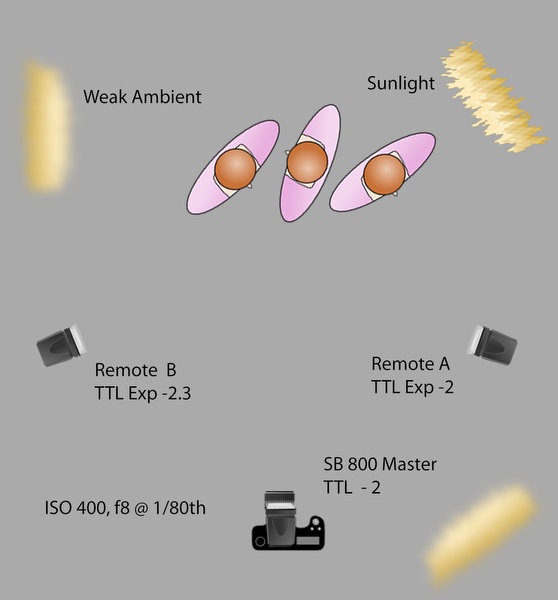
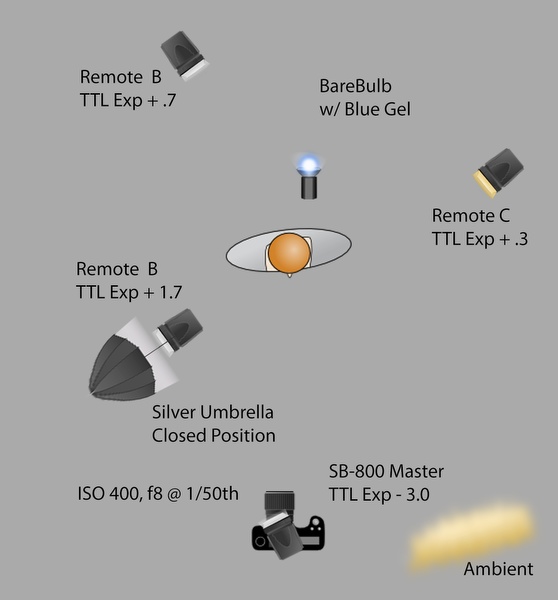
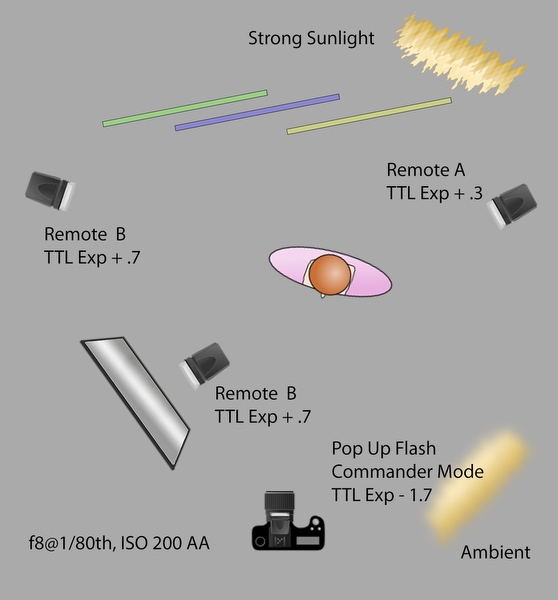
It may seem intimidating, but controlling the off camera flashes can actually be very easy, surprisingly intuitive, and very effective. Nikon have their way of remotely controlling the settings of their flashes, with their Creative Lighting System (CLS) using highly accurate Through The Lens (TTL) metering. You can use a separate flash on camera as the “Master” to control the Remotes, or even use the camera’s built-in pop up flash in “Commander Mode”. You can adjust the flash output, so the light portion doesn’t affect your image, or use it as additional fill. Nikon has a separate controller as well, called the SU-800. At half the price, it’s like a flash, but without the actual flash head.

Canon has their equivalent versions available, and other manufactures also enable TTL options. These controls take the fear and pain out of the remote flash experience. Controlling the remote flashes can be as simple as deciding you want more or less light output, then bumping the dial up or down from the camera location.

Tip 2: Setting your camera to under-expose the natural light by one or two steps, allows your flashes to take over the look of the image and dominate the lighting conditions.

You can set your camera Manually or use Aperture Priority, either way the camera will “talk to the flash” to calculate the correct flash exposures as they appear in camera, on the sensor. With the internal technology that works so well, the simple camera and flash setups do the work, so you don’t have to.

Yes, it can be that simple!

More example images and diagrams

013-Executive-Indoor-Portrait

Working with Off Camera & Remote Flash

Working with Off Camera & Remote Flash

Working with Off Camera & Remote Flash

The post Working with Off Camera Flash and TTL by Craig Minielly appeared first on Digital Photography School.


Digital Photography School

 
Comments Off on Working with Off Camera Flash and TTL

Posted in Photography


Cyber Monday All Day Flash Sales

02 Dec

We’re putting a new goodie on mega sale every hour.

… but *you* set the sale price. Follow us on Facebook and share our Cyber Monday posts. Every share drives down the cost of the item we’ve posted by $ 0.01!

You have one hour to share, one hour to buy.

Sharing starts at:
9AM PST – Super Fisheye Lens
10AM PST – Pocket Spotlight
11AM PST – iPhone Shutter Remote
12PM PST – Sony QX Lens
1PM PST – Lomo Smartphone Scanner
2PM PST – Instax 90

Head on over to the Shop to snap up a deal!


© laurel for Photojojo, 2013. |
Permalink |
No comment |
Add to
del.icio.us

Post tags:


Photojojo

 
Comments Off on Cyber Monday All Day Flash Sales

Posted in Equipment