Previously introduced on its European website, Metz has announced its new flagship model the Mecablitz 64 AF-1 in the US market. It’s the most powerful flash in that manufacturer’s lineup with a guide number of 64 at ISO 100 and a zoom range covering 24-200mm focal lengths, and will be available for Canon, Nikon, Sony, Olympus, Panasonic and Pentax cameras. Read more
Tag: Flash
-
Cactus Launches $55 Radio Trigger For Multiple TTL Flash Systems
Hong Kong-based manufacturer Cactus has launched a wireless flash trigger that it claims will work with any hotshoe or PC sync socket-equipped camera and can control the power output from Canon, Nikon and Pentax-compatible flash units all at the same time. According to the manufacturer, even photographers working with multiple flashguns designed for different TTL systems will be able to link them via the wireless trigger. Click through for more information.
-
Metz flash units now available for Sony Multi Interface Shoe
Owners of Sony SLT, NEX and R-series cameras with Multi Interface Shoes now have a couple more flash options. Two flash units offered by Metz, the mecablitz 44 AF-1 digital and 52 AF-1 digital, are now available for the Sony Multi Interface shoe. Read more
-
Using Off-camera Flash to Fix Lighting Problems for Outdoor Portraits
When you’re taking pictures of family and friends outdoors, you are often not in control of the light, and that can lead to poor portraits.
A few of the possible problems include:
- Raccoon eyes – deep shadows in the eye sockets (and other the nose) caused by bright overhead sunlight or light overcast skies
- Bright background obscuring the subject’s face – although some cameras automatically compensate for it, if you’re shooting in the shade and there’s a really bright background, that can mislead your camera into underexposing the image, leaving your subject’s face too dark.
- No control over direction of the light – the sun is here, and you are there. You can move around the person you’re photographing to get better light, but then you may lose the desired background.
With a wireless flash, these problems can be overcome, and it’s surprisingly easy. Canon’s Rebel line, D-series DSLRs and advanced G-series compact cameras let you control off-camera flash wirelessly, which opens up many possibilities when it comes to changing the quality and quantity of light that you use to photograph someone outdoors.
Raccoon eyes – below (left) is a typical portrait shot under direct midday sunlight with our model, Leanne. The sun, almost directly overhead, casts deep shadows over eye sockets, below the nose and chin, and wherever hair blocks the light. Gear: Canon EOS 70D, 85mm f/1.8 USM Canon lens. Exposure: 1/320 second at f/4.5, ISO 100.
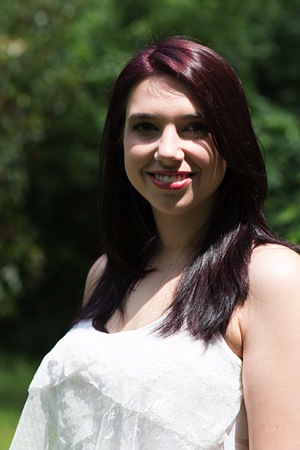

Raccoon eyes fixed – (above right) the flash was mounted on the camera’s hot shoe and provided enough fill light to blow away the shadows, but the light is flat. Gear: same as above plus Canon 430 EX II Speedlight. Exposure: 1/250 second at f/10, ISO 100.
Raccoon eyes, cloudy skies (below left) the clouds move in and soften the light. Better, right? Well, sort of. Leanne’s eyes are still in the shadows. Gear: Canon EOS 70D, 85mm f/1.8 USM Canon lens. Exposure: 1/250th at f/3.5, ISO 100.
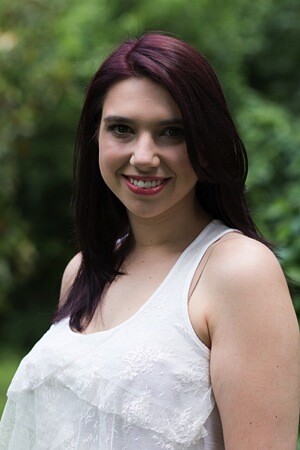

A lighter touch with light – (above right) in this case, less light was required to lighten the shadows, so I used the on-screen flash intensity control (on the Canon 70D, press Q and then touch the flash power icon to access this feature) and reduced the flash output. Determining the right amount of flash output is often a matter of trial and error. In this case, the default setting was too dark, +2 was too bright, but +1 was perfect. Gear: same as above plus Canon 430 EX II Speedlight. Exposure: 1/250th at f/7.1, ISO 100.
Balancing light when shooting in the shade
The ideal way to take a portrait in the shade without flash is to shoot with the bright area behind you (behind the camera). This will give you a wide light source and with nice, flattering light. However, you may not have this option, or you want to include interesting background elements that are, alas, drenched in sunlight.
While an on-camera flash will add enough light, you can add more dimensionality and features to your subject’s face by taking the flash off the camera and moving it around. By combining ambient (existing) light with your off-camera flash, you introduce infinite creative portrait-taking possibilities.
(Not sure how to use wireless? Scroll down to read our primer)
It’s best to have what flash guru Joe McNally calls a “voice-activated light holder” (also known as a human being, a friend, relative or cooperative stranger) to move around and hold the flash wherever you need it. If it’s just you and your model, however, an inexpensive light stand and shoe-mount flash adapter, such as the Flashpoint Heavy Duty Lightstand and Adorama Universal Swivel Holder, will do the job. Total cost? Less than $ 50!
Fixing harsh backlighting without flash
Exposed for the background – in the photo below (left), the background is perfectly exposed but Leanne, standing in the shade of a large Maple tree, is in deep shadow. Gear: Canon 70D, 85mm f/1.8 Canon Lens mounted on a Velbon GEO E535D Carbon Fibre Tripod. Exposure: 1/320 second at f/4, ISO 100.
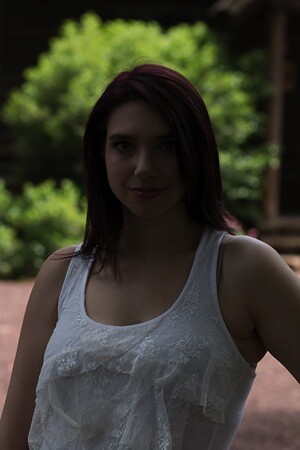
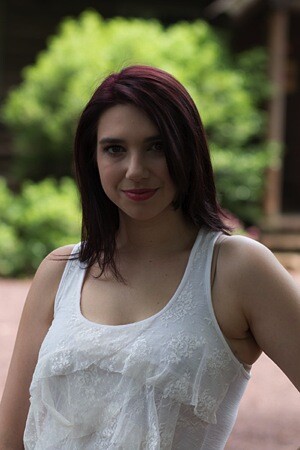
Add one stop of exposure – (above right image) better, but Leanne’s face is still too dark. Gear: same as above. Exposure: 1/200th at f/3.2, ISO 100.
Spot meter on the subject – by taking a spot meter reading you can eliminate the misleading bright background from the exposure equation and get a pretty good exposure on the face (below left). But the eyes are still too dark, and the background is getting blown out. Gear: same as above. Exposure: 1/160th at f/2.8, ISO 100.
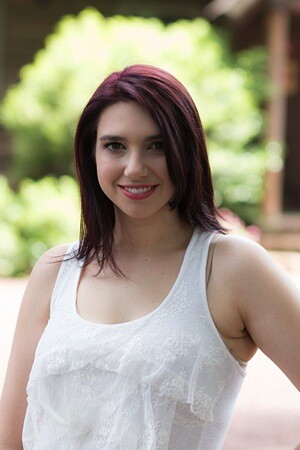
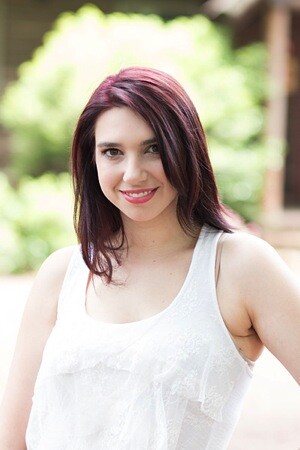
Exposed for the eyes – now you can see Leanne’s eyes clearly (above right), but overall the image is too bright, especially the background. So let’s introduce a flash and balance things out. Gear: same as above. Exposure: 1/125th at f/2.5, ISO 100.
Adding flash to balance with the ambient light
Balanced light, image below left. Now the exposure is spot on! If you hold a flash up a foot or so above your camera while shooting, you should get this kind of light. The slight angle gives Leanne’s face a bit of dimensionality. Gear: Canon 70D, 85mm f/1.8 Canon Lens, Canon 430 EX II Speedlight flash mounted on Flashpoint Heavy Duty Lightstand via an Adorama Universal Swivel Holder. Exposure: 1/200th at f/5.6, ISO 100.


Flash at a 45 degree angle (image above right). By moving the flash (now mounted on a light stand) further to the left of the camera and about a foot above eye-level you get this classic Loop pattern portrait lighting. Note how Leanne is turned slightly towards the light, and how the light falls off her left cheek, creating a more flattering, dimensional look. Same gear and exposure as above.
Flash at 90 degree angle (image below left). Now the flash is directly to camera left, and her face is divided into light and dark halves (also known as Split Lighting). This is a more dramatic look. Same gear and exposure as above.
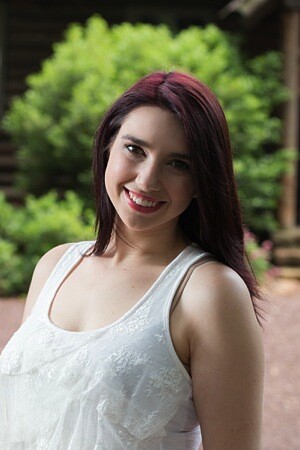
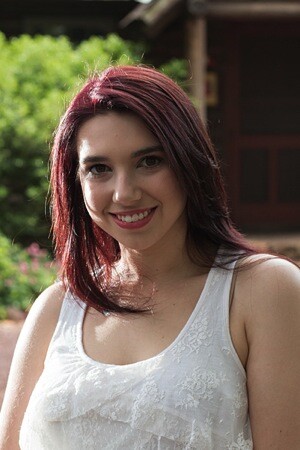
Backlighting (above right) – even though the sun was to the right of the camera, after placing the flash above and behind and slightly to camera left, it looks like she is backlit by the sun. These are the kinds of effects you can get by moving the light around. Same gear and exposure as above.
Add a reflector
If one additional light source isn’t enough, you can easily, and inexpensively, add a second by using a reflector. The Glow 5-in-1 32-inch Reflector Kit, for $ 26, is a versatile option. This dramatically increases the possibilities for controlling and shaping the light, and bringing out the contours in your subject’s face.
One problem – running out of hands. The solution? Have your subject hold the reflector and compose a nice tight headshot.
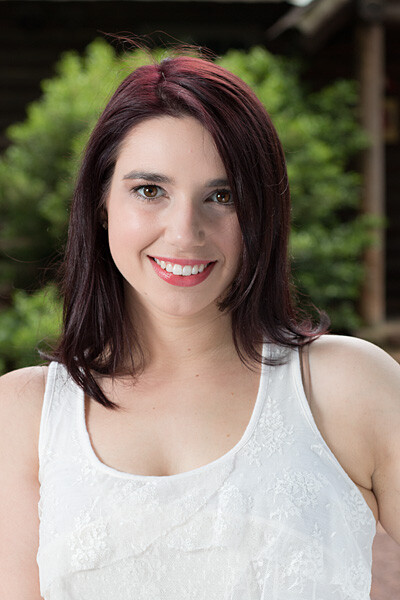
The reflector adds a new dimension. Here Leanne is holding a silver reflector to her left, which is bringing light back to her face in an approximately 2:1 lighting ratio (the reflected light is half that of the direct light from the flash). Notice how the more angular cross-light brings out her facial features. Same gear as above plus Glow 5-in-1 32-inch Reflector Kit. Exposure: 1/160th at f/7.1, ISO 100.
What if you take away the reflector and put a flash in the model’s hands?

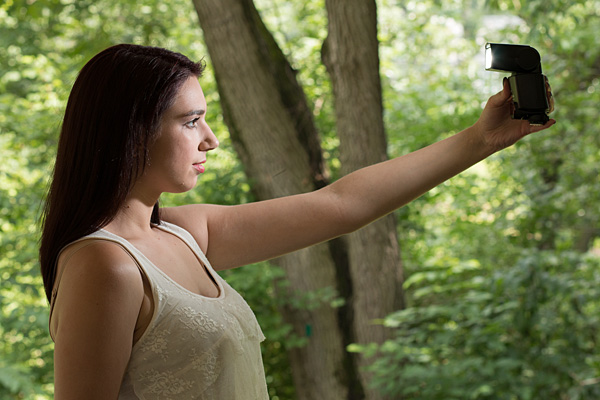
Flashie? In another setup, Leanne is holding the flash to her side as the sole light source. This is kind of like a “selfie” but with a flash.

She’s holding the light. In this tight headshot, Leanne is still holding the flash in the same position as above, but with a reflector to camera left adding light on the other side of her face.
Adding an umbrella
While a stand-alone flash (or one used in tandem with a reflector) is great for close shots, light falls off quickly and may not illuminate the person in a longer shot. To solve this, consider adding an umbrella to your arsenal. This will enlarge the light source and will result in more even illumination when shooting a full body or ¾ length portrait. Using an umbrella is worth an article of its own.
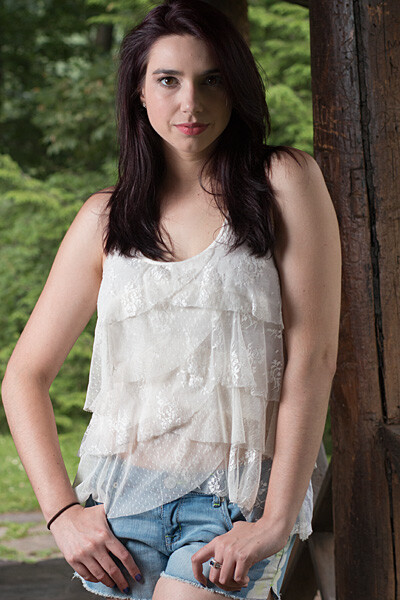
While a stand-alone flash (or one used in tandem with a reflector) placed near a subject can be great for close shots, it won’t evenly illuminate your portrait subject in a wider shot such as this one. Normally, the solution is to move the flash farther away, but in this scene, an outdoor porch, there was a wall immediately to the left of the camera. In this situation, bounce the flash off an umbrella. This will enlarge the light source to create more even illumination. Be sure to increase flash power approximately one stop to compensate for the light loss that results from bouncing the flash into the umbrella. (Using an umbrella is worth an article of its own!)
Step-by-step instructions on how to trigger Canon off-camera flash wirelessly
Here are the step-by-step directions for triggering a Canon 430 EX II wireless Canon flash from the Canon 70D. If you’re using another camera, check your manual for wireless flash instructions. Among other Canon systems, the directions will be similar.
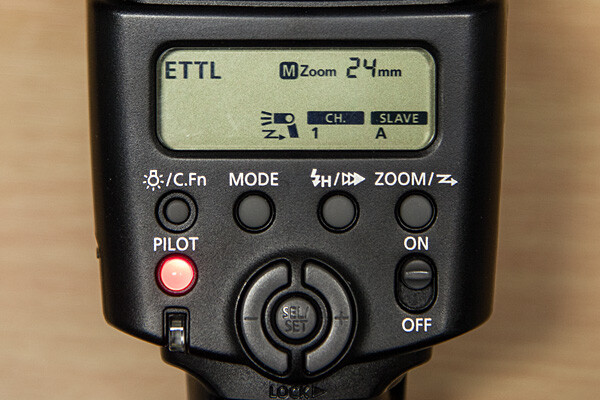
- Turn the flash on, then press and hold the Zoom button for a second or two. You’ll see a new flash icon and Ch 1 Slave A appear in the LCD screen (see photo above).
- Turn the camera on and pop up the flash
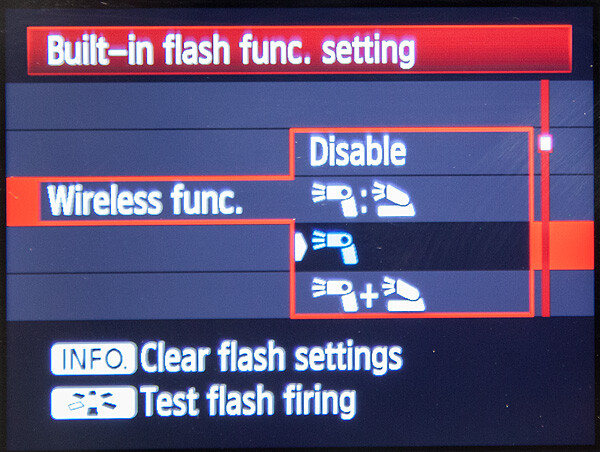
- Go to Menu; in the first tab (camera operation), choose Flash Control, then scroll down to Built-in flash function setting, select “Wireless Func.” and choose the middle setting of the single flash (see below) Note: Although the on-camera flash is flipped up, it will not fire during the exposure. Rather, it will flash a split-second before the exposure, which triggers the off-camera flash to fire during exposure, so your only source of flash illumination during exposure will be the off-camera flash.
Hopefully you can take these off-camera flash tips and apply them in your photography to help you make better portraits outdoors. If you have any additional questions or tips please share in the comments below.
The post Using Off-camera Flash to Fix Lighting Problems for Outdoor Portraits by Mason Resnick appeared first on Digital Photography School.
-
Spice-Up Your Outdoor Photos with Wireless Off-camera Flash and Gels
Wireless off-camera flash is a great way to add a splash of light and give a scene an added dimension, or to fill in shadows in high-contrast scenes. The TTL (through the lens) exposure feature makes it easier than ever to get a well-exposed image without the need for a flash meter. However, there’s one more ingredient that you can add that will open up a new world of creative possibilities for your photography. That ingredient is easy to find, easy to use, and affordable: colored flash gels.
What’s a gel?
A gel is a piece of colored cellophane that you place over your flash head. Gels are available individually (expensive) or in more pocketbook-friendly multiple gel kits, which may contain anywhere from half a dozen to 20 or more different color variations. Gels come in primary (red, yellow, blue), secondary (green, purple, orange), and tertiary colors (Kelly green, red violet, pink, aquamarine, etc.).
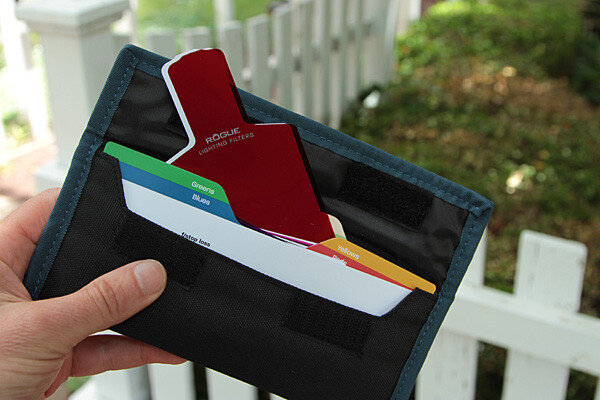
The Expoimaging Rogue Gel Universal Lighting Filter Kit has 20 different gels that are: well-organized in tabbed compartments; housed in a handy-dandy holder; and divided logically into warm colors, cool colors, and color corrective gels. Each gel has information about how many stops of light it blocks, as well as White Balance values. This will help you determine appropriate exposure, flash output, and camera White Balance settings.
Some kits include color correction gels, which are intended to balance the flash (normally balanced for daylight) with artificial light sources, such as incandescent or fluorescent lights. They can also be used to add elements of warm, or cool light, as more subtle effects. While individual gels are larger and can be cut to custom-fit your flash, kits gels are generally smaller but large enough to fit over nearly any shoe-mounted flash, and usually come with a band or fabric fastener strip that affixes the gel to the flash.
Simple setup
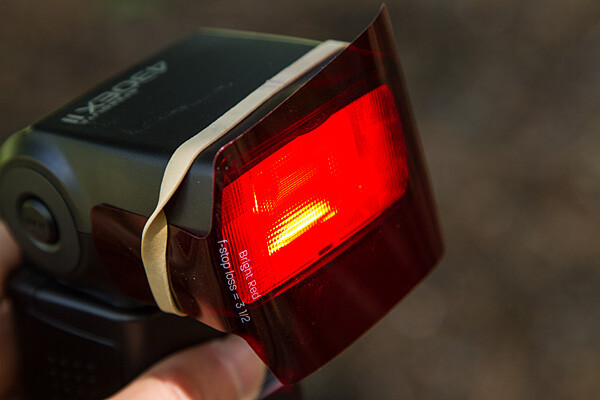
All you have to do is take the gel and affix it to the front of your flash. While Rogue includes a black band that will do the job with just about any flash unit, sometimes a forgetful author needs to make due with a MacGuyver-like solution, such as using a rubber band (see image above).
The key to using a color gel to accent a scene is to use it with an off-camera flash. Fortunately, the cost of a TTL wireless flash is low. For instance, the Canon Speedlite 430 EX II currently costs under $ 260 USD, which is quite affordable. Whether you are using a DSLR, such as the Canon EOS 70D, or an advanced compact with wireless flash control, such as the Canon G16, you can fire the off-camera flash via a pulse from the on-camera flash.
Let’s take a look at one example of gels in action
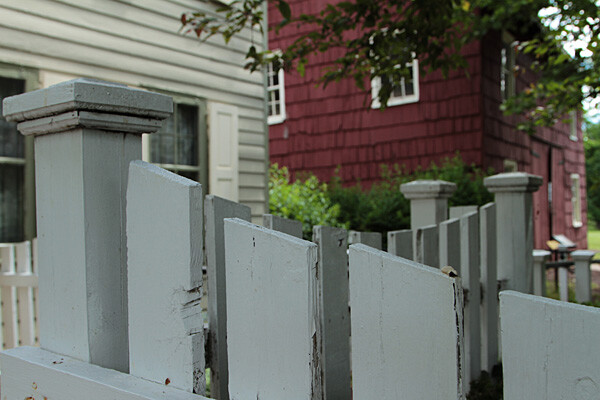
Blah foreground – this white fence could be a unifying element in this photo of a restored colonial village in Piscataway, New Jersey, but because it’s in the shade, it’s just a boring grey. Gear: Canon EOS 7D, Canon 24-105mm f/4L IS USM lens.
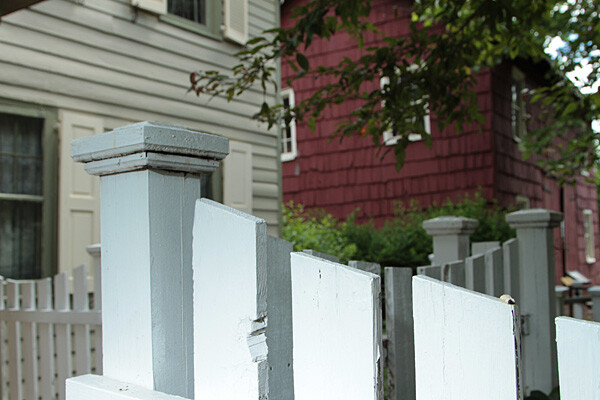
A splash of flash – even if the fence had been more evenly lit, the plain white flash on the fence overpowers the image. Gear: Canon EOS 7D, Canon 24-105mm f/4L IS USM lens, and Canon Speedlite 430 EX II flash.
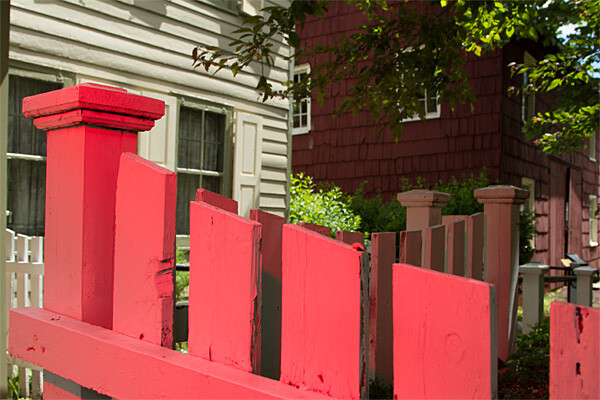
Bright red adds interest – the idea was to pick up the red tones of the building in the background while leading the eye into the shot by adding a red gel, courtesy ExpoImaging Rogue Gels (read on). Reducing the intensity of the flash output would have changed the color from pink to red. Gear: same as above with Rogue Bright Red Gel added.
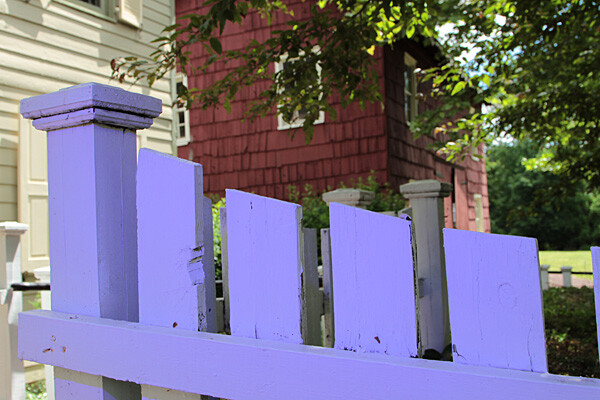
Oops, wrong color! In this case, the lavender gel was a mismatch. A color wheel, available at art supply stores, will help you make better choices. Gear: Same as above with Rogue Special KH Lavender Gel.
Step-by-step – how to trigger a Canon off-camera flash wirelessly
Here are the step-by-step directions for triggering a Canon 430 EX II wireless Canon flash from the Canon 7D. If you’re using another camera, check your manual for wireless flash instructions. Among Canon bodies, the directions will be similar to the following:
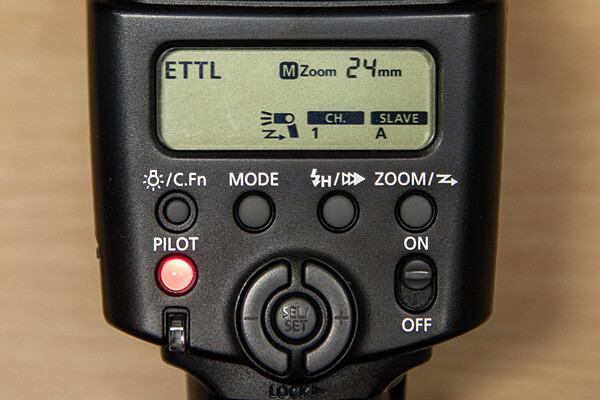
- Turn the flash on, then press and hold the Zoom button for a second or two. You’ll see a new flash icon and Ch 1 Slave A appear in the LCD screen (see photo above).
- Turn the camera on and pop up the flash.
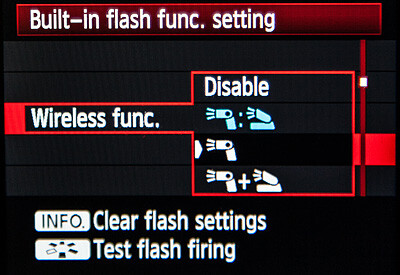
- In Menu in the first tab (camera operation), choose Flash Control, then scroll down to Built-in flash function setting, select Wireless Functions and choose the middle setting of the single flash (see above)
Take pictures!
Although the on-camera flash is flipped up, it will not fire during the exposure. Rather, it will flash a split-second before the exposure, which triggers the off-camera flash to fire during exposure, so your only source of flash illumination during exposure is the off-camera flash. To the naked eye, it looks as if the two flashes are going off simultaneously, but they’re not.
If you want both the on-camera and off-camera flash to trigger simultaneously during exposure, go back to Wireless Functions and choose the bottom setting, which shows the off-camera flash icon + a flip-up flash icon. In this setting, your off-camera flash is your key (strongest) light source, and the flip-up flash is a fill light. Choose the top setting (Off camera flash = flip-up flash) and both will provide equal power. We’ll explore these options in future articles.
The other way to set off a wireless flash is by using a separate wireless transmitter such as the Canon Speedlite Transmitter ST-E2. The advantage of using a transmitter over triggering your off-camera flash via your camera’s built-in flash, is that the transmitter uses infrared signals, and can trigger the flash from farther away, and at greater angles. When using your on-camera flash, your flash sensor must always be within line of sight of your camera. If you’re using a full-frame DSLR, such as the Canon EOS-6D or 5D Mark III, neither of which has a built-in flash, you will need a transmitter to trigger off-camera flash.
Let your imagination run wild! You can add crazy colors and transform a scene, or you can use a more subtle approach to improve a scene without overpowering it. Here are a few examples of both techniques.
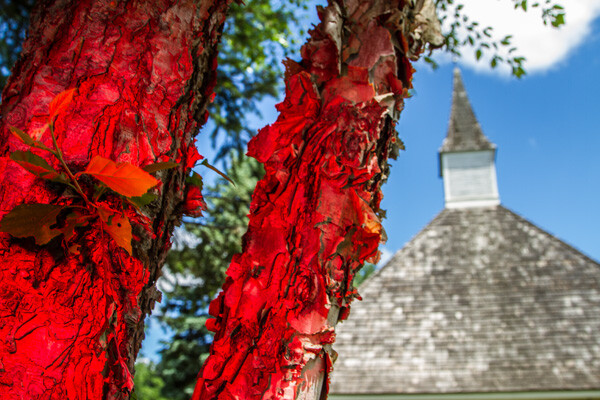
Wild and crazy – red tree adds primary color to offset the deep blue sky and add foreground interest. Too much? It’s a matter of personal taste.
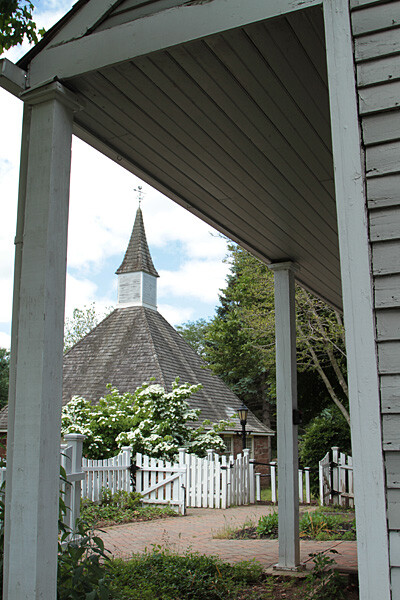
Before -this “frame within a frame” composition doesn’t quite work because the foreground is too dark, and the sun-drenched but interesting background is too light.
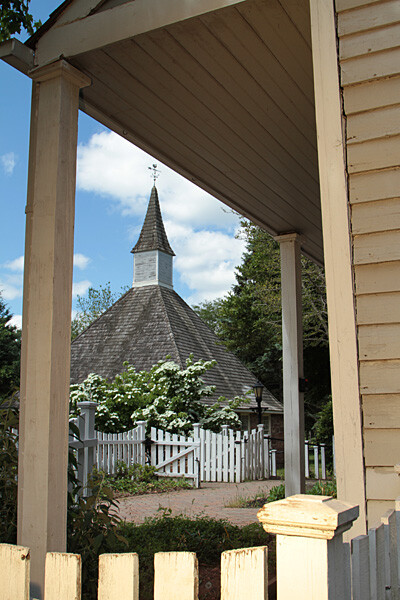
When lit with an unadorned flash, the foreground was uninvitingly cool. After adding a full CTO gel, the subtle splash of warmer light frames the background nicely.
Experiment. Try different gels to see what they look like. Don’t like your result? Try another one. Here are several variations where different color gels were used against a foreground wall in the shade, to balance a bright, sunlit scene in the background. Camera and flash setup are same as above.
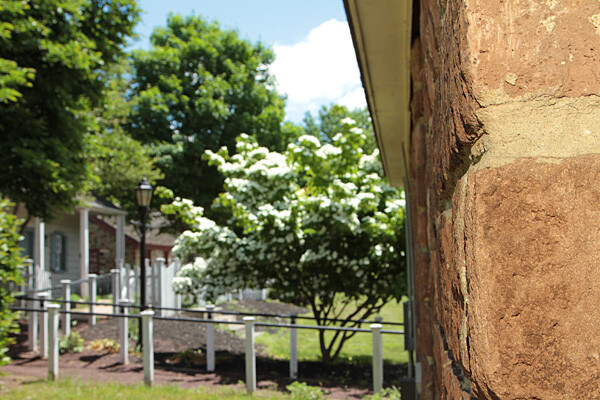
Gel: full CTO, balanced for 3,200K ambient light
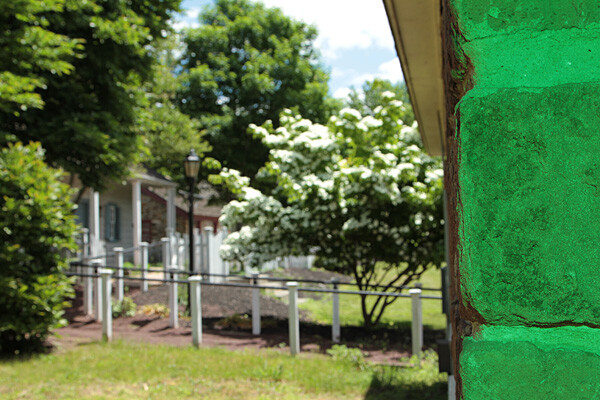
Gel: Moss Green
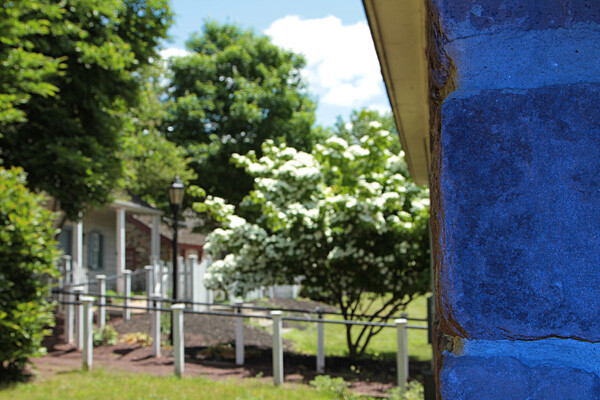
Gel: Just Blue
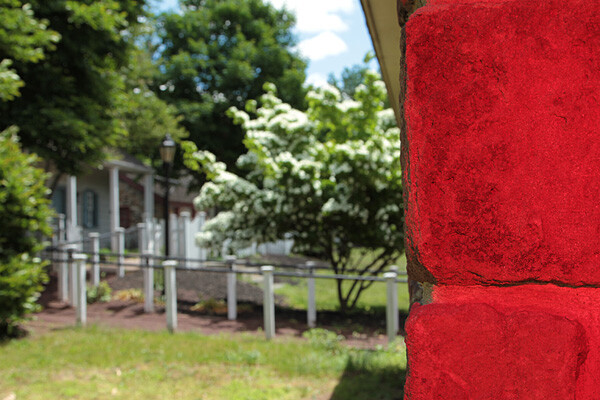
Gel: Red
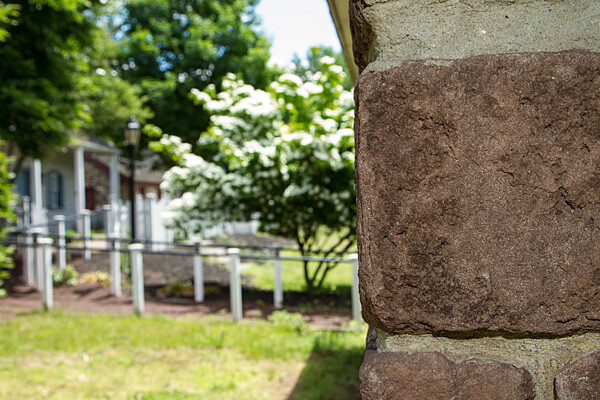
No gel
Have you done any experimenting with colored gels and off-camera flash? Please share your results and comments below.
The post Spice-Up Your Outdoor Photos with Wireless Off-camera Flash and Gels by Mason Resnick appeared first on Digital Photography School.
-
Nova: The First Ever Off-Phone Flash that Really Flashes

Extra photos for bloggers: 1, 2, 3
Who is that ghost haunting all of the pics you took last night? Oh, it’s you? There has got to be a better flash than that one on your phone.
There is! It’s the Nova, the first ever off-phone flash that syncs with your phone (and protects you from haunted photos).
It talks to your phone via bluetooth so it’s free to roam up to 20 feet away, light from any angle and still flash when you hit your shutter.
The Nova is so small it fits in your wallet, but it is packed with LEDs that make it mighty bright.
Use the Nova app to adjust the brightness and color of your flash. Add warmth when the lights are low to give your smiling face an attractive glow and keep ghostly creatures from creepin’ in.
Get Your Own Nova Flash
$ 59 at the Photojojo Shop
© Britta for Photojojo, 2014. |
Permalink |
No comment |
Add to
del.icio.us
Post tags:
-
Phottix Mitros+ Review – the Best Flash System You Have Never Heard of
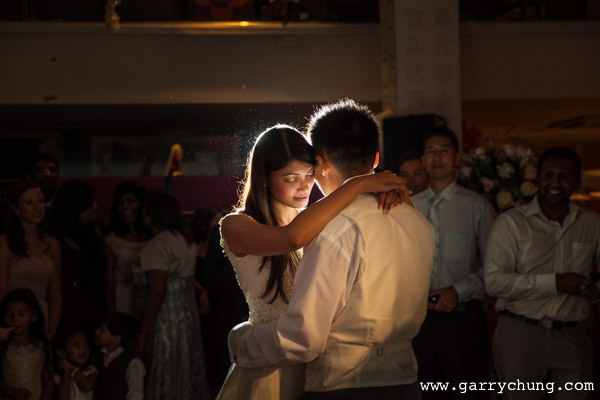
Photo taken using the Phottix Mitros+ system
As a professional wedding and portrait photographer, I would say the most important accessory in my kit bag besides my main camera and lenses would by my flashes. So when it came to making a decision on what flash system use, I did a lot of research and in the end I opted for the Phottix Mitros+/ Odin system. I don’t normally write gear reviews as I think the internet has enough top quality content. I realized however in my research that the Phottix Mitros+, although sold internationally, is comparatively less well known and not well documented on the web.
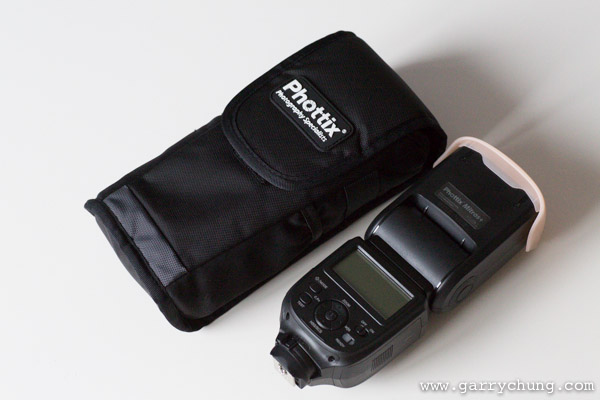
Phottix Mitros+ – comes with carrying case and accessories
I am a big fan of using off-camera flash and as a Canon shooter and have previously been using Canon 580 EX II / Pocket wizard combination for the last 4 years. The Canon 580 EX IIs in all fairness have served me well. They have been dropped many times, and rained on, but never skipped a beat. The problem occurs when I take them off camera. Using the PocketWizard Mini TT1 and TT5 trigger and receiver I have experienced a whole host of reliability problems that eventually was the catalyst for me to look for alternate solution.
I started by looking at the Phottix Odin TTL triggering system, which I have used before and has had excellent reviews. That was when I realized Phottix also sells the Mitros+ flash, that includes the wireless transceiver built into the unit. The “+” denotes that it has radio transceiver built in as they also do a non “+” version with no transceiver. The Mitros+ flash is great for a number of reasons;
- It’s one less piece of equipment to buy and worry about
- There is so need to carry more batteries or worry about connection issues between your radio receiver and your flash
- The Phottix Odin trigger system is also a tried, tested, reliable market leader and so I was confident it would work well
Review – Phottix Mitros+ Flash System
First impressions when you take the Mitros+ out of the box; it comes in a nice pouch and feels solidly built to take a few bumps, which is essential as I will put it though the rigours of professional use. The first thing you notice is that it makes a beep, like studio lights, to tell you the flash is recycled and ready for use. This is especially useful if you are firing at full power, and can be turned off using the custom functions if you don’t like it. I fired off a few successive frames and it seems extremely quick to recycle. This is by no means a scientific test but I set the flash in manual mode 1/2 power and fired consecutive bursts. It seems to recycle at least as fast, if not faster, than a Canon 580 EX II. In the real world, it holds up very well; I tested it all day in different lighting situations and the ETTL worked consistently. The battery consumption seems about the same as the 580 EX II, I did a full day shoot and didn’t need to change batteries, so all in all I am very happy.
The real benefit of the unit however, is taking it off camera. It’s an absolute joy to use; no having to set up the PocketWizard receivers, and no misfires. I don’t have to do my usual five minutes of troubleshooting if the flashes aren’t firing. It just works like it is supposed to. With this system you can also control everything directly from my Odin transmitter, or using another Mitros+ flash. You can alter settings remotely such as TTL exposure compensation, manual power, high-speed sync and even flash zoom level. You can configure three groups of flashes and adjust each one individually. This basically allows you to control everything you need from the camera so no need to walk up and down making adjustments.
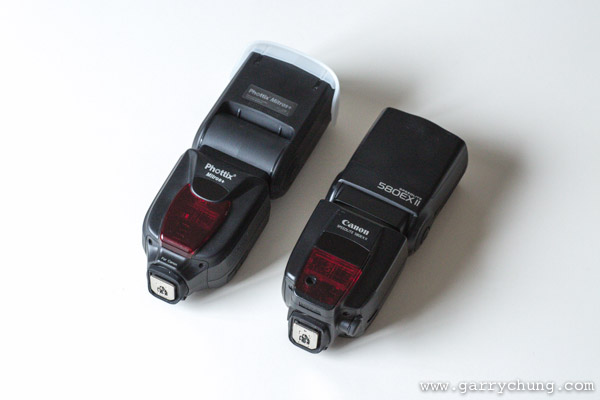
Hands on it’s a quite a large flash as you can see here next to the Canon 580EX II
Features (as listed on the Phottix website)
- E-TTL, M, Multi (Stroboscopic) modes
- Auto/Manual Flash Head Zoom with 180 degree rotation and 97 degree tilt
- High Speed Sync and Rear Curtain Sync
- Flash Exposure Compensation: Manual, Bracketed
- Fast Flash Mode: with 0.1-2.5 sec. recharge times
- USB port for upgrades
- 3.5mm Sync port
- Canon-compatible IR Wireless Triggering with Master and Slave mode
- Optical Slave Sync Mode
- Uses 4 AA batteries
- Port for external battery pack
- Compatible with Phottix Odin TTL Flash Triggers for Canon
- Battery Compartment for 4 AA batteries (below left)
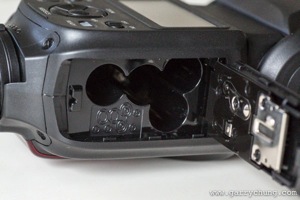
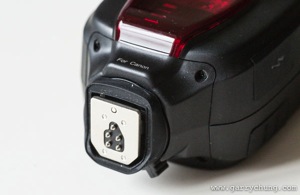
- Rubber seals around metal hot-shoe for weather sealing (above right)
- Mine also came with a plastic diffuser and 1/2 CTO which will come in handy (below left)
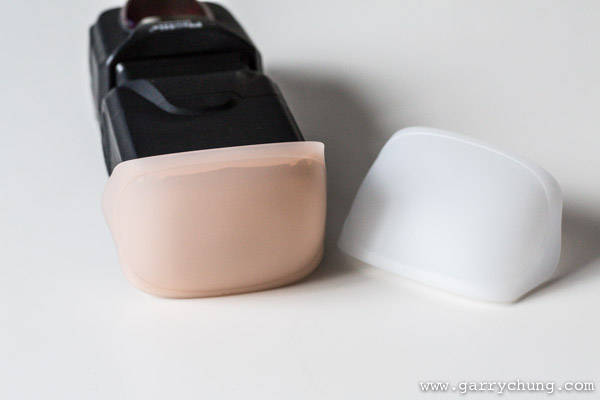
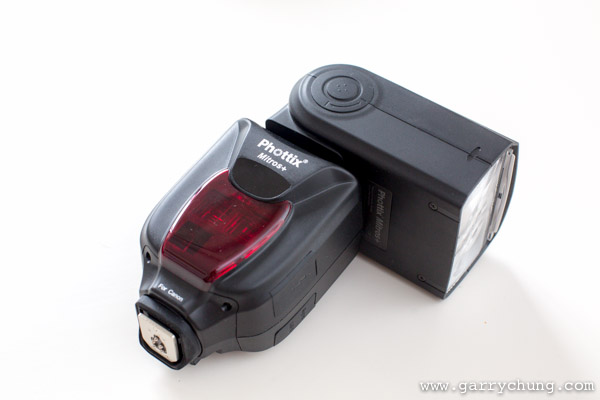
- Swivel and tilt head great for bouncing in all directions (above right)
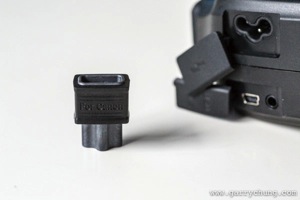
- Connections for USB power, 3.5mm jack for sync and external power the kit also comes with an adapter to convert the head for Canon’s CP-E4
- The display a the back is large backlit and clear
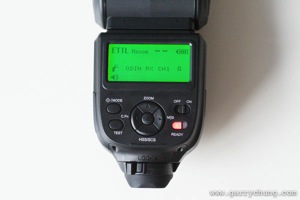
- Menu System identical to Phottix Odin when set to Trigger Mode
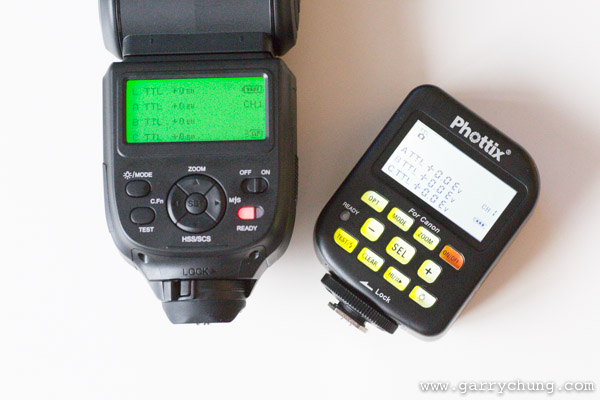
The litmus test for me to judge how intuitive a menu system is; if I need to read the manual, it’s probably not that intuitive. I very quickly figured out how switch from ETTL to Manual, activated high-speed sync and got the radio trigger system working. I actually think the menu system is better than the Canon 580 EX II, which took me a long time to figure out. Like the Canon speedlite, you can also control flash exposure compensation from the Canon 5D Mark III’s menu, although this is not recommended by Phottix. An advantage of the Mitros is that it has an indicator to see how much battery life left, which is absent in the Canon 580 EX II.
I recently took the Mitros+ system for an intensive four day shoot on Tinian Island and I am glad to report it has been flawless. I was asked to do a beach shoot at 1 p.m. in the blazing afternoon heat and managed to overpower the sun with three of Mitros+ flashes set up in cluster.
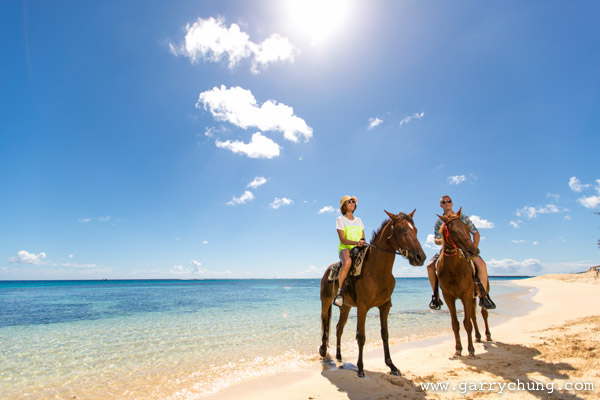
Final image
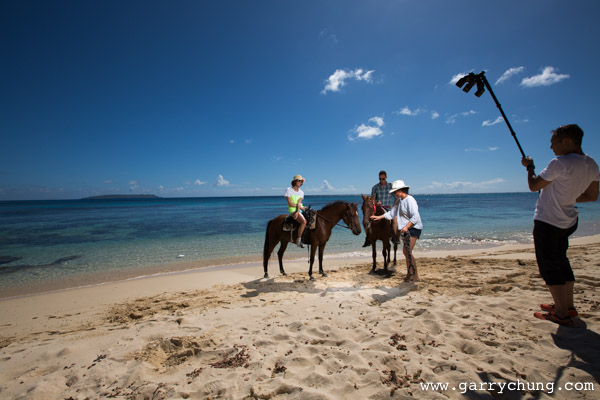
Lit with three Phottix Mitros+ flashes
The determining factors for choosing the Phottix system were twofold
Firstly, it is an open system. Odin can be used to trigger not just the Mitros+ but other studio lights as well. In comparison the latest Canon 600EX–RT flash and Canon ST-E3 trigger are only compatible with each other. I have also bought Phottix Odin receivers to bolt onto my old Canon 580s, so can use them with the Mitros+/Odin system together.
Another positive for Phottix is that it’s more backwards compatible than the Canon 600 EX-RT, which is not fully compatible with pre-2012 models, such as Canon 5D Mark II, which I also own. I read reports that you lose features like HSS, (High Speed Sync) and the sync speed is lowered to 125th/sec but I haven’t tested it myself. It seemed very odd to me that a third party company can get their flash working with older Canon cameras but Canon can’t. I have tested the Mitros+ system with both the Canon 5D Mark II and 5D Mark III. It works fine and it is even compatible using infrared with the Canon 580 EX IIs, so you can use the Mitros+ to trigger the Canon flashes and vice versa. The Mitros+ also has optical slave which is something Canon never put on the 580 EX for unknown reasons.
The final factor is the Phottix retails at $ 399 USD, which offers a significant saving to the Canon equivalent. At time of print, the Mitros+ is $ 150 USD cheaper than the Canon 600EX–RT flash.
I talked about comparisons with Canon in my review as I am a Canon user, but the Mitros+ is available for Nikon now also. It should be quite attractive to Nikon shooters as I think Nikon have yet to release a flash with a built-in radio transceiver.
Conclusion
Things really have moved on for third party flash manufacturers in the last few years. When I first researched into non-proprietary flash systems, they were generally cheaper, but vastly inferior product to the brand name equivalents. The Mitros+ is a great quality product, at a great price. It’s well built, easy to use and packed with features. Phottix as a company feels like they are selling products designed by photographers, and have really listened to their customers. Looking back at reviews of the original Mitros when it came out, customers were just saying “if only it had the Odin radio system built in that would be fantastic”, not long after the Mitros+ was released.
The Phottix Odin radio trigger system fully deserves all the praise it gets. PocketWizard, which has historically commanded such a market dominance in this sector, should be well aware of the new competition – which I think is a good thing. I remember paying nearly $ 500 USD for a PocketWizard TT1 Trigger and TT5 receiver, but had to as there was just no competition at the time. I experienced range issues, reception/connection problems, broken hot-shoe and general unreliability which is unacceptable for such a premium priced product.
The Mitros+ / Odin combination so far has been solid as a rock in terms of reliability. Time will tell if the build quality is as good as it looks but at least Phottix shipped with a two year warranty peace of mind. For those of you looking to either buy your first flash, or add to existing flash system, it’s worth keeping an eye out for products from third party manufacturers such as Phottix. Light is light at the end of the day, and I don’t care what brand name it says on the side as long as it gives me consistently good results and so far my Mitros+ has done exactly that.
Here are a few more images created with the Phottix Mitros+



The post Phottix Mitros+ Review – the Best Flash System You Have Never Heard of by Garry Chung appeared first on Digital Photography School.
-
Bounce Flash Secrets – Bouncing Your Way to Better Photography
If you have ever seen a professional photographer using flashgun on top of their camera, and wondering why the flash is not pointing directly at the subject, that’s because they are bouncing the flash. In this article I will reveal to you the secrets of bounce flash, which I have learned over the years working as a professional wedding photographer. I will unveil my killer techniques that will allow you to bounce your way to better photography.
If you are new to photography you may be apprehensive about using flash. I understand. A lot of it has to do with when you first buy a point-and-shoot camera the flash on it just creates a horrible direct flash look and that is what you associate with flash photography. Once you master the art of bouncing however, I promise you will never look back.
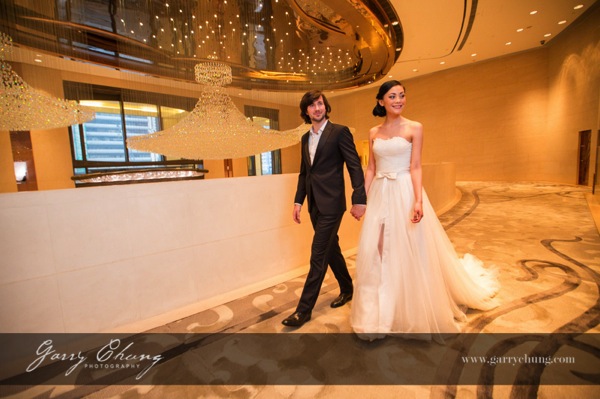
The image above is lit by bouncing flash off the wall on the right side, just out of frame. Notice how it doesn’t look obviously flashed.
What is bounce flash?
Bounce flash is when, rather than firing your flashgun pointing directly at your subject, you point it elsewhere typically up or at an angle, bouncing off a wall or ceiling. The objective is to “bounce” light to soften it before it hits your subject.
Why bounce it and not point directly at my subject?
Because generally speaking direct bare flash, pointing at your subject, is terrible for two reasons:
- The light is “hard” and can cash horrible shadows on your subject. It just generally is not very nice light for portraits. The definition of hard and soft light if you are confused is simply the transition the light makes between shadow and highlights. A gradual transition is called soft light and a sudden transition where you have a strong shadow edge is called hard light. Portrait photographers talk a lot about nice soft quality light and that is why they use light modifiers such as soft boxes and umbrellas.
- Direct flash produces “flat lighting” which gives that deer in the headlights look and also does not give a 3-dimensional quality to the photo
It is probably easier to show you in pictures so here are a few images of my friend Theresa, that I took just to illustrate the point. Just to set the scene, below is the area where I took these photos. This is a shopping center in Hong Kong and I have chosen the area because of the white walls.

This was shot with the flash pointed directly at the subject. Because there were a lot of white walls surrounding Theresa, there was a lot of wrapping light and it didn’t turn out too bad. But, there is a hard shadow in the neck area and the lighting is flat.

Manual Mode, 50mm lens, f/4, 1/80th, ISO 800, flash in ETTL Mode
This was shot with the flash tilted upwards towards ceiling. The light is much softer and you can see that the shadow on her neck is softened. It’s OK but could be better.

Manual Mode, 50mm lens, f/4, 1/80th, ISO 800, flash in ETTL Mode
This is the way I would light this portrait. The flash is tilted, in this case aimed to bounce off the wall to the left, and bounce back. The result is a nice soft light, and also notice the eyes have better catch lights.

Manual Mode, 50mm lens, f/4, 1/80th, ISO 800, flash in ETTL Mode
But wait, I think I can do one better. I want a more dramatic and contrasty image so I cut out the ambient light by setting a faster shutter speed and stopping down to f/8. Still with the flash pointed to the left I now have my nice professional high key headshot, one flash on camera, no light modifier shot in a shopping mall.

Manual Mode, 50mm lens, f/4, 1/200th, ISO 800, flash in ETTL Mode
When do I bounce my flash?
Indoors when there is ceiling or wall, preferably a white wall so there is no colour cast in the light, or outdoors if there is a surface nearby to bounce off. I see so many “professional photographers” have their flash pointing upwards when shooting outdoors when there is nothing to bounce off and I assure that does nothing other than sap power from you flash as it requires more power to light your subject.
How do I bounce my flash?
Firstly you will need a hotshoe flashgun (speedlight) that allows you to both tilt and swivel the head such as a Canon 600EX-RT, Phottix Mitros+ or if you are a Nikon user a SB900. Some flashes allow only tilt such as the Canon 430EX. This is not ideal as I like to bounce the flash in all directions.
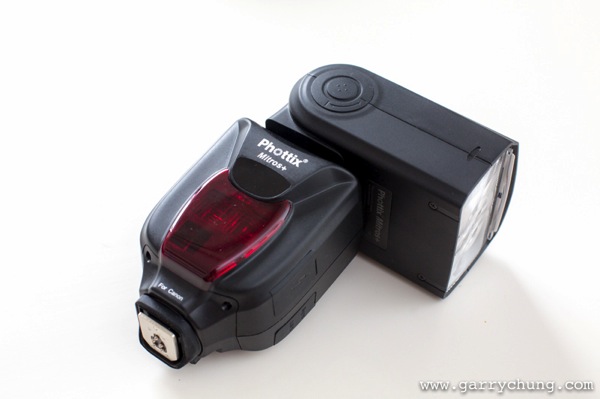
Phottix Mitros+ with swivel head
Which direction to bounce the flash?
Most people just point the flash upwards, which is fine, but I actually seldom do this because I always want to light a portrait using directional light if possible. So most of the time I am pointing the flash to the side, or tilted behind me to one side to give that nice slimming shadow on the face.
There is a simple formula to achieve this look that I learned from Jerry Ghionis – just point your flash head in the same direction as the nose of the subject so you are bouncing. So you are normally pointing the flash away from your subject, to one side. This is of course assuming that you have something to bounce off within a reasonable distance. The other way is to think of your walls as the light source itself, position your subject, frame your shot and then adjust your flash to target the walls.
Remember if you ware shooting events and weddings to readjust your flash direction when shooting from portrait to landscape. For me I am always looking at ways to bounce my flash. One final tip is to crop out the wall or ceiling that you are photographing, that way you don’t end up with a distracting bright wall in your photo.
Camera settings
In terms of camera settings I rely heavily on the Auto TTL system which works for me, so all I do is set the camera in manual mode so something like 1/60th of a second, ISO 1000 and let TTL do the rest. If you have a light subject and dark background, you can bring in more ambient light by:
- Increasing ISO
- Have wider aperture, lower F number
- Slowing down the shutter speed
The more ambient light you drag in, the less “obvious” the flash effect. When it is a really dark scene, and most of the light is actually coming from your flash, I will drag the shutter down to 1/20th which sounds crazy because you could never handhold a shot at 1/20th in daylight. But, as you know the flash helps freeze the frame and hence helps get rid of camera shake. You want to be dragging in as much ambient light as possible if you don’t want your subject to be lit and the background very dark.
One method I use to see what Manual settings to dial into camera is to just take a picture with no flash and if it is totally black then I will increase ISO or switch to a faster lens. One I have the camera dialed-in with my Manual settings for the scene, I will use the flash exposure compensation to properly expose my subject.
You can see from the below image taken of the best man at a wedding reception, there is no obvious harsh shadow behind him, there is nice light falloff and modelling on his face which adds to 3 dimensional quality of the picture, and the surrounding area is properly exposed. I was kneeling down at the time shooting at 1/30th, 1600 ISO, f/4, 50mm lens with the flash pointed camera left tilted upward behind me about 45 degrees.
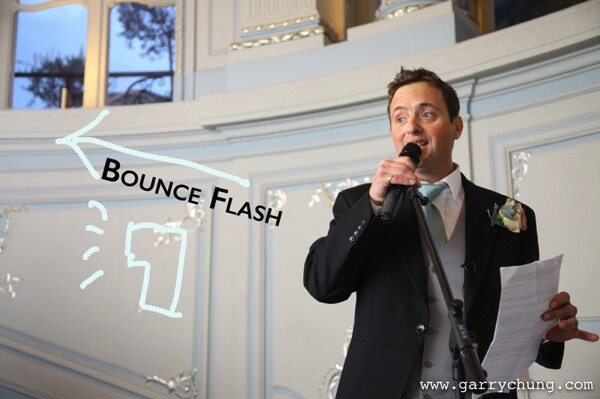
Some people put a plastic diffuser on top of their flash what is that for?
I should mention this, many photographers use diffusers on top of their flash to spread the light out in all directions, below are the two most popular products on the market, the Gary Fong Lightsphere and the Stofen Onmi Bounce. There are many more cheaper products, and copies, that essentially do the same thing.
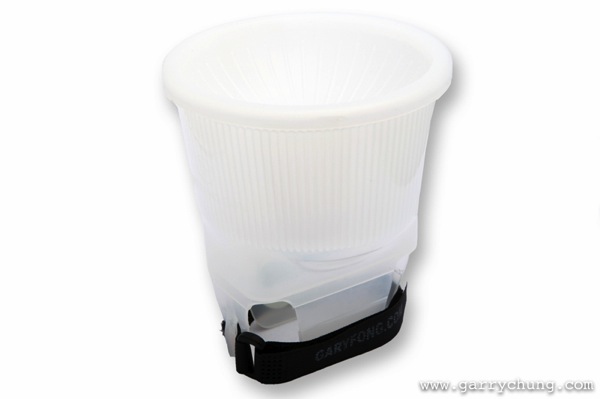
Gary Fong Lightsphere
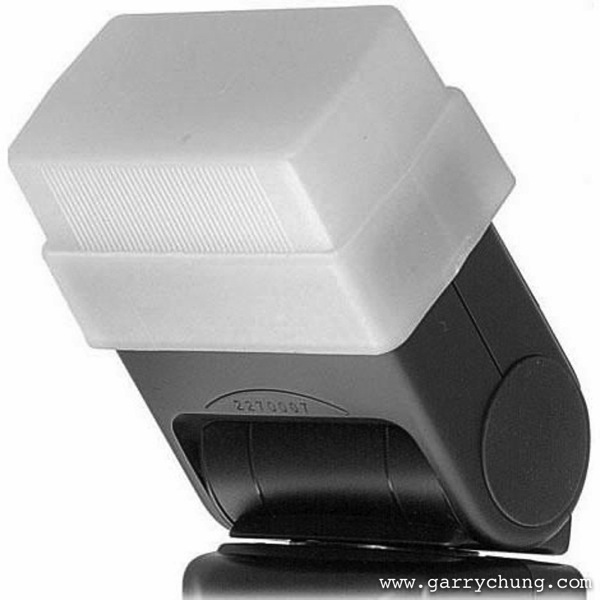
Stofen Onmi Bounce
I have actually owned, and tried, most of the diffuser products and I have nothing against them but I don’t use any of these any more. I prefer more bare bulb bouncing for more directional light and what the diffusers do is the opposite because they spread light in all directions.
Conclusion
Practice makes perfect and I have photographed many wedding receptions in the UK in the winter where it can be pitch black by 5 p.m. Mastering bounce flash technique really improved the quality of my work. Now when I know that there is not enough light and I have to use flash the first thing I do is look for surfaces to bounce off. Remember you have to be adjusting the direction of the bounce dependent on each frame if you are recomposing. So go ahead get a flashgun if you haven’t already and start experimenting with bouncing flash.
The post Bounce Flash Secrets – Bouncing Your Way to Better Photography by Garry Chung appeared first on Digital Photography School.
-
FlashQ: The little cube for flash photography

An IndieGoGo project called FlashQ seeks to make wireless flash triggers small in size and stylish to look at. The FlashQ is a 2.4Ghz wireless trigger and receiver system that mounts to a camera’s hotshoe and a flash’s hotshoe adapter. The compact device is aimed at owners of mirrorless cameras and other small camera bodies. Learn more
-
Off Camera Flash for Your Travel Photography
The creative use of artificial light in travel photography is a powerful tool that can take your images to the next level. While there’s a myriad of information available on getting started with off camera flash, the tutorial here is tailored for you. It will give you a start using these techniques with relatively cheap and portable equipment while on the road. The tutorial will cover the basics of gear you will need, along with real world examples of different techniques you can use to make your images pop.
It is assumed here that you have a full understanding of how to use your camera in manual mode, and some experience with the basics of flash photography. The techniques covered here are not overly difficult, and with some practice at home you will be able to approach your next trip with a new set of options to inspire your photography.
You may know, that images shot with on camera flash do not usually produce flattering results for your subjects. Moving your flash off camera often means an investment in more gear, though it doesn’t have to be super expensive or add too much bulk to your travel kit. The resulting images you get from this investment will be well worthwhile.
For this tutorial I’ll be covering some different options for putting together a basic one light setup that can be fired off camera remotely and modified through a small softbox or umbrella. This sort of setup is a practical way to travel, especially if you are on the road for an extended period, and don’t have help lugging around more elaborate studio style setups.
There are potentially many elements to your setup, each with wide ranging options in price, bulk and results. These bits of gear can be added to virtually any DSLR with manual functions and used with any lens that suits the type of images you want to produce.
Gear for Off Camera Flash Travel Photography
1. Flash gun or speedlight
There has never been a wider amount of choice when it comes to speedlites, or flash guns on the market. From the top of the range Canon and Nikon speedlights that cost upwards of $ 500.00, to excellent third party options, it can be a difficult choice to make.
Using off camera flash is best practiced via manual control of both the flash and camera, so higher end options like TTL (Through the Lens) flash metering are not essential, though this is increasingly an option with even cheaper third party flashes.
For a long time I’ve used a Canon 430 EX II, the mid-range option in the Canon Flash line-up, and a relatively affordable bit of gear. When starting out almost any flash will do, as even the cheapest can be fired off camera, and be modified to give you great quality light.
2. Flash Triggers
Once you have decided on which flash or speedlight fits your budget, then comes the maddeningly wide array of choices available to fire your flash remotely.
Radio triggers, which can be set to fire the flash from a small unit that slides into your camera’s hot shoe, and another attached to the flash itself, are amongst the easiest and cheapest way to get started.
You might hear many professionals touting the ownership of expensive ‘Pocket Wizards’ as something of an exclusive way into the mysterious world of off camera flash. They are great products but the market has changed. Cheaper options from Yongnuo or Photix cost a fraction of the price, and will work just as well.
I’m currently using a set of Yongnuo YN-622C Triggers, which have worked perfectly through some very tough travel. These also have the option on my Canon 5D3 of adjusting the flash power through the camera menu, which is really useful, though not essential.
3. Modifier
While bare flash can produce interesting results, this ‘hard light’ is not always desirable for the type of portraits most people will be looking to produce in their travel photography.
A ‘soft light’, produced by using a flash modifier, is the more common way to shoot, as it produces more flattering results for your subjects. Again, there is an endless array of options here. A small softbox or umbrella are the easiest and most versatile ways to get shooting.
A plain white shoot through umbrella is a cheap and compact option, and throws a fairly wide soft light that can be used for a range of portrait shots. The limitation with these umbrellas is that, as a travel photographer, you will more often than not be shooting outdoors. Any kind of wind while shooting with these might have you uttering expletives at the sight of your gear tipping over or the umbrella folding itself inside out.
A more easily managed item is a small softbox. While not as compact to transport or as simple to set up, these stay sturdy and produce a great, soft light that is useful in most portrait situations. I currently use the small Photoflex Light Dome XS, which has lasted a few years now without any damage. There are many similar options, and even DIY projects that you can find online.
4. Light Stand
This is an optional piece of gear that has the potential to be a lifesaver, or just a heavy metal rod in your bag. In most situations you will be able to get somebody to hold the flash or softbox, and roping in friends and family of your subjects to help can be a great way to help people relax.
If you do decide to bring a stand with you, it’s worth spending more over the cheap generic Ebay numbers, which from experience don’t last much past being taken out of the box. The Avenger range of stands are compact and sturdy.
5. Flash Gels
CTO (Colour Temperature Orange) gels are simply bits of plastic that you can place over your flash to vary the color temperature of light that reaches your subject. Use of these, or not, is according to personal taste. Strips of this plastic are cheap and easy to purchase online, with the sample packs offered by many companies a great way to experiment. Attaching a bit of velcro to the sides of the plastic and the flash to keep the gel in place is one way to keep things simple.
6. ND filter
Another optional piece of gear. The use of ND (Neutral Density) filters with off camera flash adds another tool to your creative arsenal. Using ND filters makes it possible to add more drama to your images with underexposed backgrounds and/or shallower depths of field during the day.
I use a range of ND filters, with the Lee 3 stop Solid ND filter, mounted with the Cokin Z Pro Holder the most common choice. Again, this is not an essential part of a flash setup, and something that can be added once you are more comfortable with the basics.
Shooting Off Camera Flash Travel Photography
Once you have your setup sorted it’s worthwhile practicing to get it all working in the quickest time possible. Without treating it like a frantic pit stop, it’s really handy to be able to get everything in order as fast as you can. On the road you don’t want to monopolize somebody’s precious time more than necessary. Being confident with your gear and shooting style, helps put your subjects at ease as well.
The following examples from recent shoots are broken into two rough styles of shooting with off camera flash. The first is the technique of balancing flash with ambient (available light), producing images where the light from your flash is subtle, and blends with the background of your subject. The second is the technique of underexposing the ambient or background light, and using shallow depth of field to add more drama to your images.
The golden rule to remember with flash photography is that your aperture setting, combined with your flash power, controls the amount of artificial or flash in your photos. Your shutter speed will control the ambient, or background, light.
Technique #1 – balancing flash with ambient

Natarajan, Little Andaman Island, India
I had met this elderly gentleman a few days prior to the shot taken here. At the time of our meeting he was the oldest living man in a remote part of the Andaman Islands Chain which was devastated by the 2004 Tsunami. I wanted to take his picture for a magazine feature I was putting together. By the time I got to his place to take a few shots one evening, it was right on dark, with only dim ambient light left to work with. This was a great time to break out the flash for a simple portrait.
After setting up a small softbox and attaching the radio flash triggers to fire the flash, I first exposed for the ambient light, setting my shutter speed and ISO to ensure a sharp image. I then chose an aperture of f/4, which combined with a telephoto lens, helped throw the background out of focus.
At these settings, without the use of flash, Natarajan’s features were dark and flat. Adding in the flash, fired remotely, allowed for a better portrait by emphasizing his strong features and throwing pleasing catch lights into his eyes (the reflection of the flash in your subjects pupils).

I asked my friend Stephan to hold the flash at a downwards 45 degree angle camera left, just out of frame, aimed at the left side of Natarajan’s face (see lighting diagram above). I usually start with the flash in manual mode, set to 1/16 power and work from there. If the flash is too strong you can power down or vice versa.
In this simple portrait, the flash light lends some shape to the subjects face without its use being so obvious.

Laura Dance Festival, Cape York, Queensland, Australia
The picture above was taken of a young boy from the Injanoo tribal group from the far north coast of Queensland, Australia. At the bi-annual Laura Dance Festival, tribal groups gather to dance and celebrate their ancient culture with outsiders.
After shooting the dance action for a few hours I wandered off to find some kids practicing their routines, with light from the setting sun filtering through the eucalyptus trees around the camp lighting up their moves.
With a small army of enthusiastic helpers I broke out the softbox and triggers, working quickly to keep the setting sun as an element to the shot. For this image a fairly heavy CTO gel was used over the flash to give the light the look of the setting sun. It’s not exact but lends a nice warmth to the light that would have otherwise looked more out of place at this time of evening.
I asked the boy to stand with the setting sun positioned behind his head, and then exposed for the background, ambient light. I chose to shoot from a low angle, as this usually works to emphasize strength in your subjects.
The flash was again set to manual and 1/16 power, which was close to the right flash exposure for the subject. This time the flash was held by another young dancer, just over my shoulder camera right (see lighting diagram below).

In the final image the highlights needed some recovery in post, and a slight vignette was added.
Backlighting your subjects this way (with the sun behind the subject) adds some dramatic effect, with the flash exposing a subject that would otherwise have been in near darkness without it.
Technique 2 – Underexposing with ND Filters for Dramatic Effect

Adrian, The Marrinyama Mob
The image above is from a shoot in a remote part of Queensland, Australia. For part of the year the guys live a traditional lifestyle, hunting, dancing and performing tough initiations on younger boys. It was the height of summer, and I was working alone with searing desert temperatures and strong winds whipping up dust from the red earth around the camps which the group called home.
In these situations being comfortable with your gear, and confident with what you are trying to achieve is really important. A flimsy umbrella or larger modifier for the flash shots would have been difficult to manage on my own. I chose to use my ever reliable little softbox setup, mounted on a decent light stand, and worked towards creating images that I had envisaged before the shoot.
For this shot of Adrian, a slightly more advanced setup was used. I wanted a shallow depth of field and for the portrait to look dramatic. This was achieved with the help of a 3 Stop ND filter to underexpose the background while keeping a shallow depth of field a f/2.8.

The flash was set to full power camera left, set just out of the frame (see diagram above). The result is that the flash is more noticeable than usual, with the background underexposed and blurred nicely for effect.
The video below is from a recent shoot in remote Arnhem Land, Northern Australia. The softbox – flash – trigger setup mentioned throughout the article is shown towards the end of the footage. Again, the flash setup was used to help out during less than ideal lighting situations on this trip.
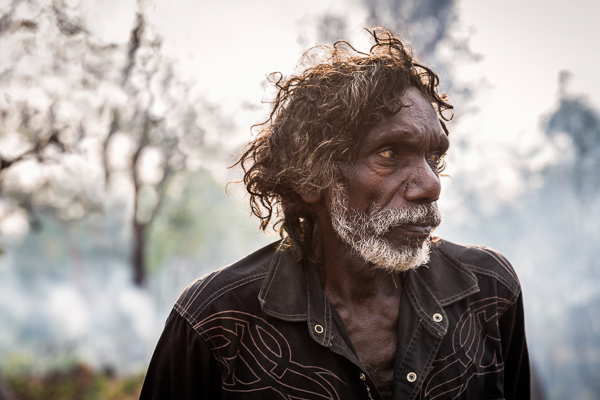
The sun filtering through the smoke of a slow burning bush fire behind Tom helped to add some drama to the image, with the flash providing the correct exposure for his face. The flash was held close to Tom, camera right, and fired at 1/16 power.
Hopefully this tutorial has given you a starting point to work from with off camera flash for your travel photography. There’s many tutorials available for every aspect of what has been mentioned here. Happy shooting.

The post Off Camera Flash for Your Travel Photography by Brook Mitchell appeared first on Digital Photography School.


