RSS
 

Posts Tagged ‘Flash’

3 Video Tutorials – How to Use On-Camera Flash

18 Jan

This week I have found some great videos to help you to understand how to use on-camera flash to your advantage. Flash can be confusing to understand and using on-camera flash incorrectly can make unflattering light, or worse yet ruin your photos completely. Have a watch of these tutorials on flash and see if you can pick up some helpful tips:

Video #1 Ed Vorosky – On-camera fill flash basics

Ed Vorosky covers some of the basics you will need to get a grasp on using flash on-camera. He goes over some of the settings to look for on your flash, different lighting situations, and which camera shooting mode to use. There’s a helpful demonstration of using Flash Exposure Compensation and how it affects your photo as well.

Video #2 Tony Northrup – Bounce Flash Basics

In this second video tutorial Tony Northrup goes into a little more detail using on-camera flash indoors and bouncing it for various different looks. He shows the results using just ambient light, flash straight on, and bounced off both the ceiling and side walls. You can see how just a small adjustment with your flash can completely change the look of your image or portrait.

Video #3 Mark Wallace – On-camera flash basics

In this last video Mark Wallace covers some of the basic flash settings for both Canon and Nikon flashes, then he goes outside to demonstrate how to control the exposure on the background (ambient) using both systems. Then he goes back indoors and shows several options for using the flash on-camera in that environment including bounce flash techniques.

Do you have any anxiety around using flash? Or are you a pro? Share any questions and comments you have below.

googletag.cmd.push(function() {
tablet_slots.push( googletag.defineSlot( “/1005424/_dPSv4_tab-all-article-bottom_(300×250)”, [300, 250], “pb-ad-78623” ).addService( googletag.pubads() ) ); } );

googletag.cmd.push(function() {
mobile_slots.push( googletag.defineSlot( “/1005424/_dPSv4_mob-all-article-bottom_(300×250)”, [300, 250], “pb-ad-78158” ).addService( googletag.pubads() ) ); } );

The post 3 Video Tutorials – How to Use On-Camera Flash by Darlene Hildebrandt appeared first on Digital Photography School.


Digital Photography School

 
Comments Off on 3 Video Tutorials – How to Use On-Camera Flash

Posted in Photography


Metz launches Mecablitz 26 AF-1, a pocket-sized flash for hotshoe compacts and CSCs

14 Jan

Lighting manufacturer Metz is to introduce a new miniature flash unit designed for use with small cameras, such as premium hotshoe-equipped compacts and compact system bodies. With a maximum guide number of 26m/85 ft at ISO 100, the Mecablitz 26 AF-1 is many times more powerful than the flash units that come bundled with, or built-in to, this sort of camera – and indeed many don’t come equipped with a flash at all. Learn more

Articles: Digital Photography Review (dpreview.com)

 
Comments Off on Metz launches Mecablitz 26 AF-1, a pocket-sized flash for hotshoe compacts and CSCs

Posted in Uncategorized


Small Flash Portraits on Location with Adorama TV

04 Jan

How to light portraits with a small flash or speedlight is a common topic request from our readers here at dPS.

In this video tutorial Daniel at Adorama goes over how to use a speedlight both on-camera and off-camera to take quick and easy portraits on location. He shows tips for modifying the light, balancing with the ambient or available light in the scene, and even using a gel for color balance.

Get some great tips from this video:

Have you tried these techniques before? Had any success? Share any tips you have in the comments below.

googletag.cmd.push(function() {
tablet_slots.push( googletag.defineSlot( “/1005424/_dPSv4_tab-all-article-bottom_(300×250)”, [300, 250], “pb-ad-78623” ).addService( googletag.pubads() ) ); } );

googletag.cmd.push(function() {
mobile_slots.push( googletag.defineSlot( “/1005424/_dPSv4_mob-all-article-bottom_(300×250)”, [300, 250], “pb-ad-78158” ).addService( googletag.pubads() ) ); } );

The post Small Flash Portraits on Location with Adorama TV by Darlene Hildebrandt appeared first on Digital Photography School.


Digital Photography School

 
Comments Off on Small Flash Portraits on Location with Adorama TV

Posted in Photography


Vela One LED promises 1/2,000,000 flash duration for the price of a normal hotshoe gun

02 Dec

An inventor from Bristol in the UK is developing an LED-based light source for high speed photography, promising to produce a burst of flash with a duration short enough to freeze a bullet. The Vela One, which will be priced at a similar level to standard hotshoe flashguns, uses nine LEDs arranged in a bank that generates a million lumens and is powered by just four AA cells that the inventor claims will last a full day’s shooting. Learn more

Articles: Digital Photography Review (dpreview.com)

 
Comments Off on Vela One LED promises 1/2,000,000 flash duration for the price of a normal hotshoe gun

Posted in Uncategorized


How to Balance Off-Camera Flash and Ambient Light on Location

01 Dec

In this Adorama TV video Gavin Hoey takes you on location to learn how to balance flash and ambient light to create some stunning portraits in the forest.

After going through three different setups outdoors he takes you inside for the post-processing stage so see how he completes the images in Photoshop.

Some of the items Gavin used and demonstrated in the video for your convenience:

  • Canon 70-200mm f/2.8L lens
  • BlackRapid Curve RS-7 camera strap
  • Flashpoint RoveLight 600ws monolight
  • Glow ParaPop 28″ R Series
  • Sekonic L-308S Flashmate light meter

You can get the free light ray brushes he mentions in the video here.

In Practice

Have you tried any location portraits using both the natural or ambient light combined with flash? If you have any other tips or want to share your images, please do so in the comments below.

The post How to Balance Off-Camera Flash and Ambient Light on Location by Darlene Hildebrandt appeared first on Digital Photography School.


Digital Photography School

 
Comments Off on How to Balance Off-Camera Flash and Ambient Light on Location

Posted in Photography


Phottix offers Mitros and Mitros+ TTL flash units for Sony multi-interface hotshoe

13 Nov

Phottix has unveiled Sony versions of its Mitros and Mitros+ TTL flash units for that manufacturer’s multi-interface hotshoe. The Mitros+ offers remote radio flash control, with built in Phottix Odin and Strato II receivers. Both flash units provide a guide number of 58, with 180° rotation and tilt by 97°. Learn more

Articles: Digital Photography Review (dpreview.com)

 
Comments Off on Phottix offers Mitros and Mitros+ TTL flash units for Sony multi-interface hotshoe

Posted in Uncategorized


How to Soften the Light When Using Flash

29 Sep

Same Flash mounted in a Photo Flex Light Dome

Why do flash images look harsh?

Recently, a number of dPS readers have asked the question on Facebook, “How do I use a flash and not have my images look so harsh?”.

Let us first understand the difference in using natural or ambient light and using a flash. With natural light you have little control over intensity, direction, or color. With a flash, you have a lot more control if you can grasp the fundamentals of light and exposure. Using a flash you can control the direction, intensity, color and distribution of the light.

A good understanding of how your flash affects the way the subject is lit, and how it will appear in the final image is important.

Understanding light

The properties of light include: quality of light, quantity of light, and also color of light, but we will exclude that from this article.

Brightness: is a relative expression of the intensity of energy output of a visible light source.

Contrast: is the difference in light between parts of an image.

Shadows and highlights: consider that the absence of light is shadow, so shadows are parts of your subject that are not lit, and highlights are the parts that are lit.

The quality of light: here we use the terms “hard” and “soft” to define the quality of light. Hard light is found on a bright, sunny day. It creates very bright and very dark areas in the same scene. Another good example of hard light is an on-camera flash. When it is used as the only light source it results in a brightly lit subject and a very dark background. Soft light on the other hand can be defined as smooth, diffuse and evenly distributed. This type  of light creates few shadows. Cloudy days and shaded areas are examples of this quality of light.

Size of the light:  small light sources produce hard light while large light sources produce soft light.

Distance: the farther the light source is from the subject, the harder the light it will produce.

Example: although the sun is very large, its relative size to us is small and it produces a hard light. However, on a cloudy day the light becomes a relatively large light source and the sun is no longer a hard light. Not only do the clouds make the light source relatively larger, they take that bright light source and diffuse it. As a result there is no direct light falling on anything in the scene you are photographing.
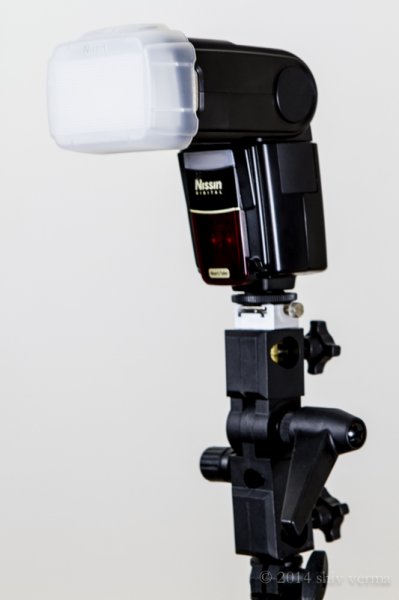
dps4-1

Nissin Flash with Diffuser

You can conclude that on a cloudless day, the light source is small, it is distant, it is bright and therefore is hard light. This light will create sharp shadows that define high contrast. On a cloudy day the relative size of the light source is large, it is much closer (the cloudy sky), less bright, and diffused. This light will create soft shadows and thereby lower contrast.

Photographing different types of subjects require different types of light. In response to the question asked, lets consider people photography. Your portraits will be far more pleasing when they are photographed with less contrast using a soft light. Yet in some cases, like for dramatic portraits of actors, high contrast looks great. High contrast using hard light is good when you want to show texture of the skin in older people. Contrast will exaggerate texture and facial features as the shadows are well defined. Less contrast, or the use of soft light (diffuse light), will deemphasize the texture and give skin a smoother appearance. This is what you are looking for, particularly with the female portrait.

When you use a flash, on or off camera, you are using a relatively small, hard, directional light source. This is a problem, since you end up with high contrast and a harsh appearance to your portrait. To solve this problem you have to make the light softer by making it larger. Remember, soft light is a large, light source, so the key to making your light softer is to make it larger.

Modifying light from the flash

On-camera flash

Here are some ways to make the on-camera flash into a soft light source. We will start with the simplest without using additional products, and move on to the more complex options using modifiers.

Bounce the flash: Bouncing is one way to make the light source larger but the light will also lose intensity. By bouncing the light off of walls and ceilings, the light falling on your subject will originate from a much larger area as compared to a directly aimed flash. Outdoors this may not be possible so you may have to find other means to bounce the flash. You can use large white foam core boards, umbrellas or you can buy a reflector. Reflectors come in various sizes and can have multiple surfaces that bounce or reflect the light. These can be twisted and folded into very compact and portable bags.  If all you have is a white business card or an index card on hand, use an elastic band and affix the card to the top of your flash.  This will serve as a small bounce and help provide catch lights in the subject’s eyes.

Tips:

  • Since bouncing the light reduces light intensity you will need to adjust your flash for higher output.
  • Bouncing off colored walls or ceilings will impart the same color cast on your subject
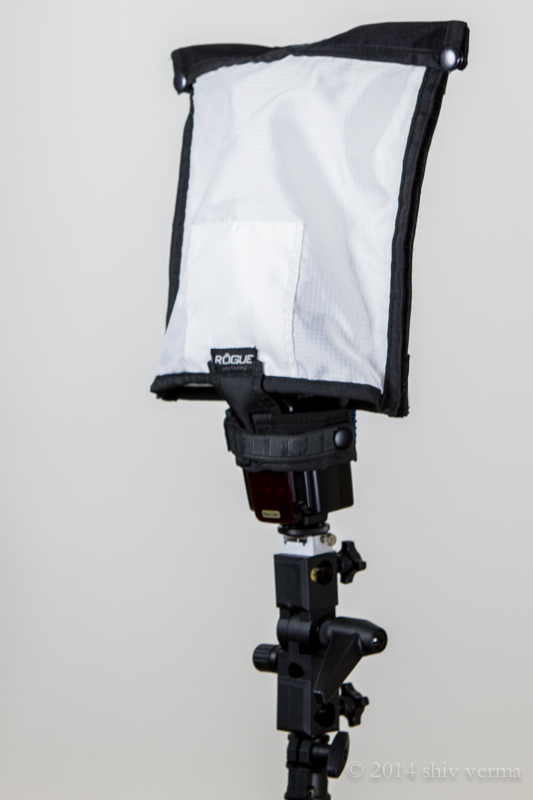
dps4-2

Rogue FlashBender Large

Use a Diffuser: The simplest diffuser is a piece of tissue paper taped in front of the flash lens. Plastic diffusers that either fit over the flash head or are fastened using Velcro or elastic bands, are the next step up. Stofen makes these diffusers in various sizes to fit most flash heads. A number of products that will bounce and diffuse light are available – Rogue Flash Bender products are a good example.  A number of manufacturers make small portable soft boxes designed for use with a flash.

Diffusers work well for indoor flash photography but are not that useful when outdoors. In addition, just as when using bounced light, diffusers also require higher power to achieve the same exposure.

There is one other problem that needs solving – flat lighting. The on-camera flash sits near the axis of your lens, so when you use a diffuser the light will still be coming from the same angle and you portraits will have little dimensionality. The images will appear flat. It gets worse if there is no diffuser. You will get red-eye or the deer in the headlights look.

Off- camera flash

The position and direction of the light source has a great impact on the appearance of your subject. We covered contrast and how contrast is defined, but the visibility of this contrast (visibility of shadows and highlights) depends on the position of the light source, be it diffused or not.

Any subjects, no matter how much texture and dimension it may have, when lit and photographed from the same angle will look flat as shown in the diagram below left. In order to show dimension and texture, the flash direction and the angle of the camera lens must not be coincidental, as shown below right.

Lighting-1 Lighting-2

The maximum dimension theoretically would be when the light source and the camera are at 90 degrees. However, this is a bit extreme. See the diagram below.Lighting-3

If the flash is mounted on-camera the camera will see and capture the side of the subject that is blasted with head-on light. As a result there are few if any shadows and you get the appearance of a harshly lit subject.

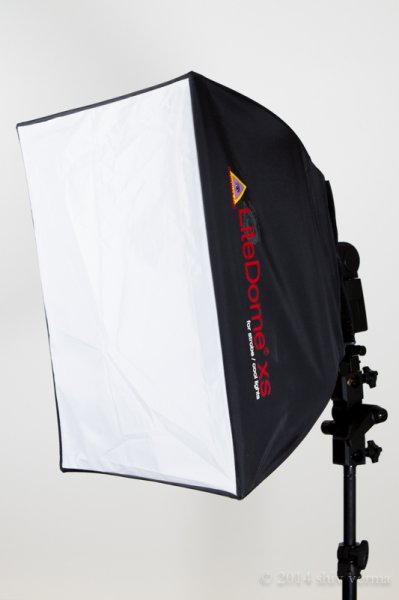
It may not always be possible to use the flash off-camera. Even small extensions using flash brackets to either side or above will help. A flash mounted on a light stand and controlled via wireless trigger is ideal. Flash heads mounted in small softboxes (see below) or with a Rogue Flash Bender style product will defuse the light well.
dps4-3

Photoflex LiteDome XS

If you are in a studio like environment or even at home you can increase the relative size of your flash by directing it through a translucent (white not clear) shower curtain. You can build a PVC pipe frame and drape a shower curtain over it, or buy ripstop nylon and use it as diffusion material.

Finally, remember that the closer the light source is to your subject, the softer the light. The edge of the light source is softer than the center. Keep these tips in your arsenal. Armed with the information in this article you will hopefully make better portraits when using a flash and have a better understanding of controlling the light from your speedlight.

The following two portraits were shot in a casual setting with a white foam core board serving as a fill from the left side of the camera.  For the first image a diffuser that comes with the flash head was used.  As you can see that despite the use of a diffuser the light source is still small and relatively harsh.  The second portrait was shot using the light dome.  Notice how much softer the light is on the subject.  Both images are straight from the camera – no post-processing was done.
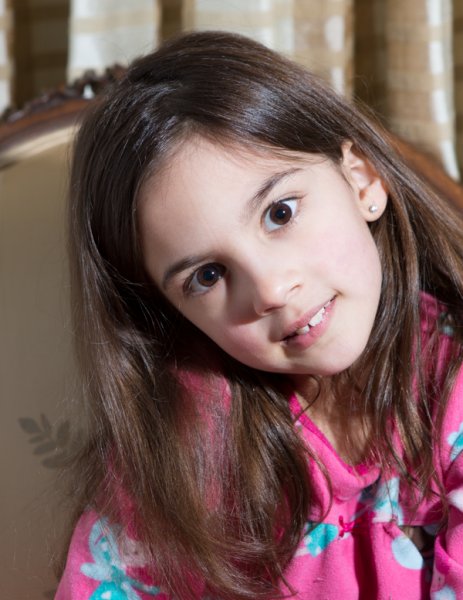
Single Flash with a manufacturer supplied Diffuser

Single flash on-camera using a manufacturer supplied diffuser
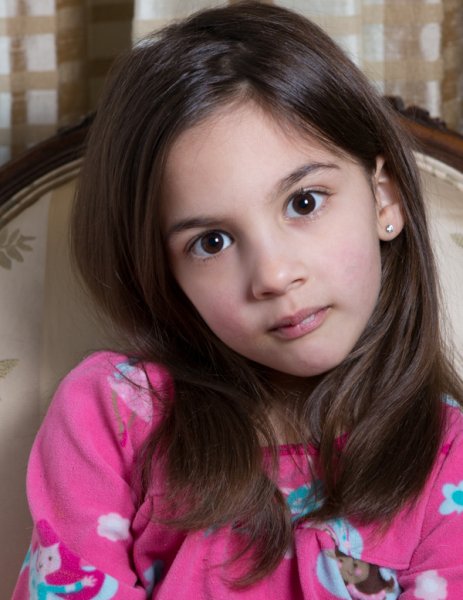
Same Flash mounted in a Photo Flex Light Dome

Same flash mounted in a Photoflex LiteDome XS Softbox

The post How to Soften the Light When Using Flash by Shiv Verma appeared first on Digital Photography School.


Digital Photography School
 
Comments Off on How to Soften the Light When Using Flash

Posted in Photography


Sony rolls out Zeiss FE 16-35mm F4 wide angle zoom and HVL-F32M flash

15 Sep

Sony has announced the Vario-Tessar T* FE 16-35mm F4 ZA OSS for its E-mount interchangeable lens cameras, as well as the HVL-F32M flash and XLR-K2M XLR audio adaptor kit. The 16-35mm is the fifth full-frame zoom for Sony’s Alpha 7 series. Read more

Articles: Digital Photography Review (dpreview.com)

 
Comments Off on Sony rolls out Zeiss FE 16-35mm F4 wide angle zoom and HVL-F32M flash

Posted in Uncategorized


How To Paint With Light using Rainbow Flash Filters

15 Sep
Extra photos for bloggers: 1, 2, 3

Hey you! Yes, hue!

Color your world one photograph at a time by painting with light.

Our guide will show you how to amp up your photos with color in a flash, without any fancy equipment or software.

Follow the light, friends. A whole chroma of possibilities await.

Learn How To Light Paint With Rainbow Photo Filters

WHY IT’S COOL

You’ve always wanted to take these photos but didn’t have the know how – ’til now. Also, color rules! Beige drools.

INGREDIENTS

before

  • Colorful Flash Filters (like these, or any see-through colored plastic)
  • Camera or Phone Camera
  • Tripod
  • Flashlight
  • External Flash
  • A room that is nice and dark

GET SET

To give yourself enough time for these effects, set your camera’s shutter speed to around 5 seconds (5″) and adjust the aperture and ISO accordingly. You can either do this on your camera’s Manual (M) mode (you set the aperture), or Time Value (TV) mode (it’ll choose aperture for you).

To make sure your image is sharp, mount your camera on a tripod or put onto a flat surface. Using the self timer option is also a good idea, to avoid shaking your camera when you press the shutter button.

COLOR CAMERA ACTION

beforePress that button and get ready. When the shutter opens, you’ve got 5 seconds to work!

Fire the flash to the left of your subject with your first colored filter, then (QUICKLY!) switch filters and fire a second flash to the right of your subject. Experiment with even more flashes in different part of the scene for an even more psychedelic result.

If you don’t have an external flash, don’t despair. You can use a bright flashlight by turning it on and off quickly.

DRAW SOME ATTENTION

beforeTime to get your drawing on, Da Vinci.

Grab your flashlight (or your phone’s flashlight mode) and cover it with a color filter (we used 2 flashlights with different color filters simultaneously to get this effect).

While the shutter is open, do a dance and move your arms around like crazy. Or write a message, or draw a love heart. Either or.

GHOST FACES

beforeEver thought your photos need more of you? We’ve got your back. Or front.

Starting from one side of the scene, fire the filter covered flash (or flashlight) around your subject’s face, then ask them to move sideways. Repeat with different colors until you run out of time and/or space.

Ooooohhhhoohh.

TAKING IT FURTHER

  • Combine flash to light up your face and flashlight to draw at the same time
  • This app for your phone can be used in the same way as a flashlight + filter. Use it to draw or hold it still over the part of the scene you want to illuminate in color
  • Flash filters aren’t just reserved for your flash or flashlight. For a super quick and easy effect, just slip a filter right in front of your lens

© Erika for Photojojo, 2014. |
Permalink |
No comment |
Add to
del.icio.us

Post tags:


Photojojo

 
Comments Off on How To Paint With Light using Rainbow Flash Filters

Posted in Equipment


Mastering On-Camera Flash

14 Sep

You get caught off-guard with a photo assignment and you might not have time to set up additional lights or have the luxury of using a reflector. Maybe it’s an awards event in a large room and you don’t want the background to go completely dark. You see a celebrity, rock star, astronaut or maybe it’s the president of your company that you need to photograph (see image below), or maybe you just need to travel light, with a minimum of gear.

Fig 1

George Lucas: 1/180 at f/13, ISO 200

Shoe-mount flashes are very portable and you CAN use them to get a great image. The key to getting that image is controlling the balance of camera, flash, and ambient light.

TTL TYPES

The automatic advantage to shoe-mount flash units is that they use TTL metering, which stands for Through The Lens. This type of flash metering is much more accurate than the thyristor technology that precedes it, and it’s also easier to use correctly.

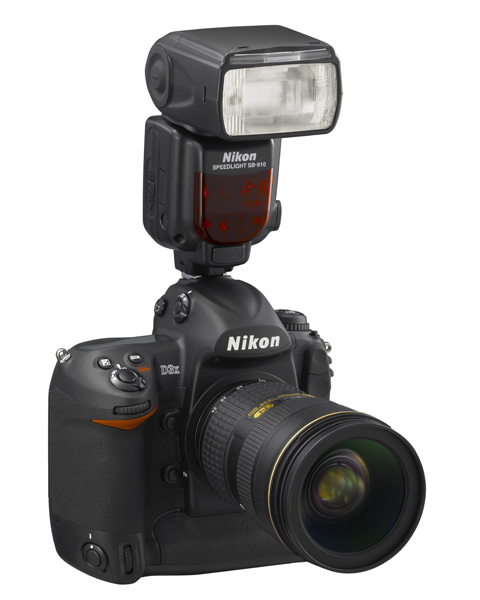
Sb910 d3x frt34r

Photo courtesy of Nikon

Camera manufacturers have their own versions of TTL flash and the alphabet soup of lettering can be a bit intimidating. Different types include i-TTL, P-TTL, E-TTL, etc. So what is the difference or similarity in each of these? Canon calls their flash technology E-TTL (introduced in 1995) or the newer E-TTL2 (since 2004). Firing a low power pre-flash immediately before the shutter opens, this type of Through The Lens metering is very accurate because the flash unit actually fires very quickly. This brief pre-flash determines the correct power output of the flash unit. The camera body and flash communicate together on the exposure by means of additional contact pins in the hotshoe and in the foot assembly of the flash unit.

Pentax’s P-TTL arrived in 2001 and it meters a low power flash with the lens wide open before opening the shutter. Nikon’s i-TTL has been available since 2003 and also uses a pre-flash to calculate the amount of light needed by the flash. Their TTL-BL is a separate mode for fill flash, with the idea of it giving you better balanced light, but for it to work accurately the subject needs to be darker than the background. So all of these systems are similar and no matter what brand of camera system you have, one of them will work great for you.

All of this solves the problem of getting the correct amount of light on the subject, which is weighted with the area of focus that you and your camera have selected. What about the surrounding elements in your artistic composition? You are seeing a potentially great image in the viewfinder, and whether you’re indoors or out, you want the flash to match the scene just enough to make it look right.

MATCHING THE LIGHT

Let’s take the example of photographing indoors. The best way to do this that I’ve found is to meter the ambient light in the room first. The camera can be in any exposure mode to take this reading. If for example, your exposure is 1/30 at f/5.6, ISO 800 – you would then switch the camera to Manual mode and make those your camera settings. Note that some cameras have a slow sync setting, or you could also use shutter priority to get this same balance.

Fig 2

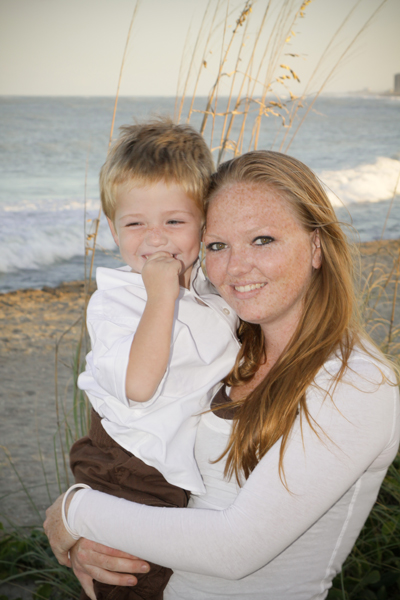
Paula and Cayden: 1/60 at f11, ISO 200

You can leave the flash set on TTL mode and let it adjust its power output automatically. When you take the image you should have a remarkably balanced exposure. This can be further fine-tuned by adjusting the flash exposure compensation to add a little more, or a little less, fill light to the image. Flash exposure compensation can be added on the flash unit itself, or by adjusting the settings in the camera.

If you find that you need a little more depth of field to get your subjects in focus you can bump up the ISO to 1600 and lower the aperture setting to f/8. If you can use less depth of field, do the opposite by lowering the ISO to 400 and opening your aperture to f/4. There are always tradeoffs to be made, and you might not be able to handhold that particular lens at 1/30 second to get a steady image. Try using a monopod or tripod to help with that issue. For a faster shutter speed you might want to try 1/60 at f/5.6 with 1600 ISO. If you need to get your depth of field back to f/8 then you might need to be daring and go to 3200 ISO. Digital noise levels are improving all the time so don’t be afraid to try a higher ISO.

If you are photographing outdoors the opposite is true. Go to the lowest ISO to match your ambient light with your flash. There’s no way a flash can compete with the sun, so if you can select a lower ISO you will have a better chance of balancing ambient and flash at f/8 or f/11, rather than f/16 or f/22.

DIFFUSERS

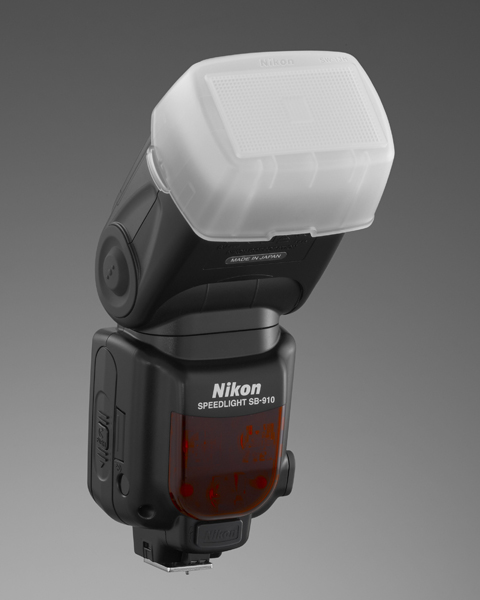
Sb910 sw13hSome flash units come with diffusers and I’ve had good luck with those. These are usually plastic, and they snap on tightly in front of the flash. There are also many innovative aftermarket diffusers available. Some units are a card type that bounce the light and redirect it to a larger pattern. Some diffusers are of the softbox type with a diffusion panel that the light passes through.

Some diffusers take the plastic design to a much higher level (such as the Gary Fong brand). All of these diffusers are variations on taking a directional light, such as an on-camera flash unit, and modifying the light to lower the amount of shadow
that you would normally get from a harsh light source. My recommendation is that you try some of these for yourself and see what works best for you. Your flash, the environment you’re photographing in, and the type of photos that you take are
all factors that could determine which is the best one for you. If you have a favorite please let us know in the comments following this article.

Bounce flash is when you angle the flash head so that the light reflects off of the ceiling or a nearby wall to disperse the light. Due to light falloff less light will get to the subject, so having a low ceiling is helpful for this to work. Light falls off and can be accounted for using the Inverse Square Law – an object that is twice the distance from the flash head will receive one quarter the illumination – or two stops less light.Ttl cord

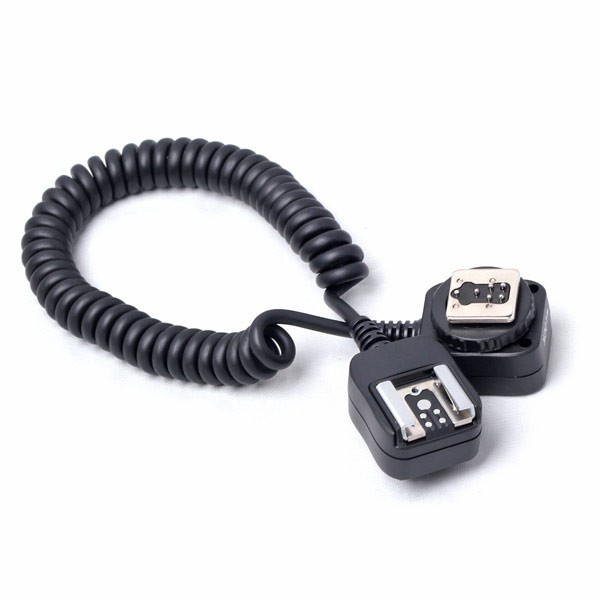
TTL CORDS

Off-camera TTL cords are another great option. I consider this to still be on-camera flash but the TTL cord allows you to be flexible with the direction of the light. Holding the camera in one hand, you can move the flash unit around with the other hand and try different variations of light on your subject. These cords are small, easy to carry with you, and they are relatively inexpensive. They’re a good item to keep in your camera bag.

FILTERS

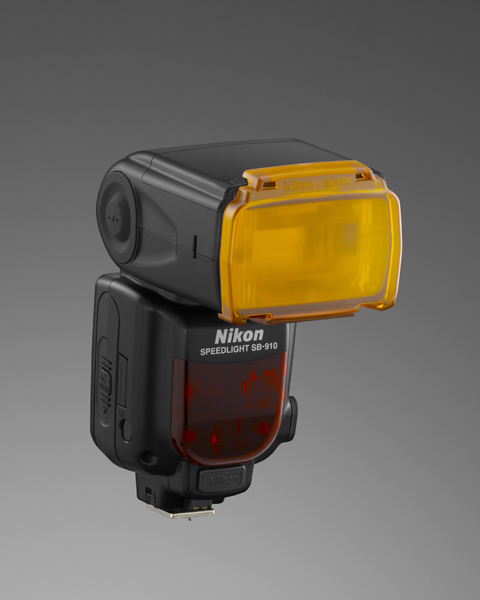
Sb910 sz2tnFilters sometimes come with a shoe mounted flash, and they are also available from aftermarket sources. The most common filters are tungsten and fluorescent. These are a great, and often overlooked, option to match the color of light from your flash unit to the ambient light temperature of a room. Color temperature from a shoe mounted flash is similar to a daylight balance of approximately 5500 degrees Kelvin. Fluorescent lights are in the 4000K range and tungsten light is around 3200K, so using these filters will make quite a difference in the color of your final image. Give those filters a try the next time you’re in that situation.

SUMMARY

Fill flash is a matter of finding the right amount of light to make the image appear to have been taken with natural light by using just enough flash to add catch-lights to the eyes, eliminate shadows, and give a more pleasing look overall to an image. You will be able to capture this balance using just your on-camera flash. It might sound difficult, but it doesn’t have to be.

Fig 3

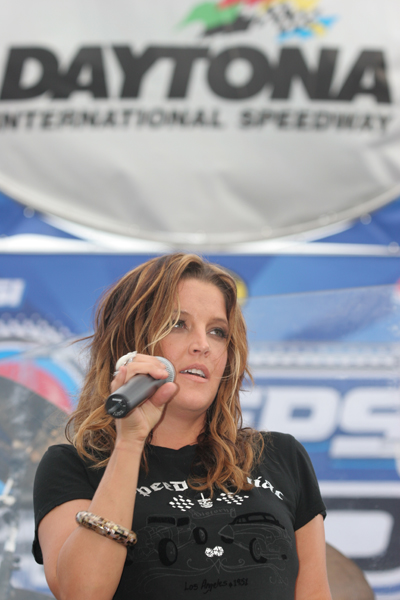
Lisa Marie Presley: 1/250 at f/4.5, ISO 200

The post Mastering On-Camera Flash by Jim Wise appeared first on Digital Photography School.


Digital Photography School

 
Comments Off on Mastering On-Camera Flash

Posted in Photography