RSS
 

Posts Tagged ‘Flash’

How to Shoot in Low-Light Conditions Without Using Flash

07 May

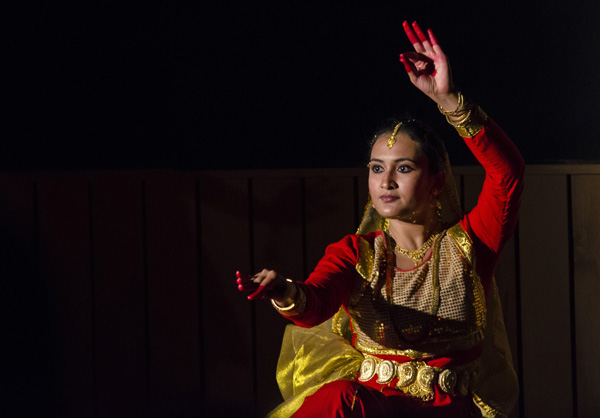
Photography is all about capturing the subject beautifully in the available light. Sometimes as the photographer you have more than optimum light (e.g., bright sunlight, halogens, etc.) to work with while some other times you have to work in suboptimal or low-light conditions. If you are not a pro photographer then it is always a great challenge, and sometimes it’s a nightmare, to capture great shots in low-light conditions.
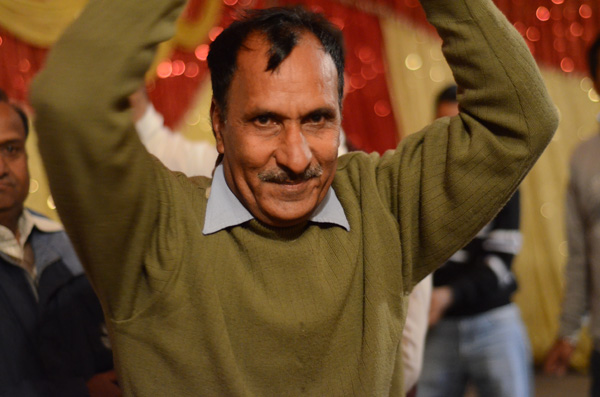
Aperture 1

Exposure info: f/1.8, 1/50th at ISO 3200

In order to face the challenges that low-light conditions come with, I will be sharing five techniques that you can use to capture your subjects, effectively. For better understanding, I have divided these techniques into two categories: technical and non-technical considerations.

Technical considerations

  • Use of high ISO
  • Use of large aperture
  • Use of slow shutter speed

Non-technical considerations

  • Capture image(s) in raw format
  • Use of remote shutter and a tripod

Use of high ISO

ISO is the sensitivity of your camera (sensor) towards available light. It is measured in numbers (for example 80, 100, 200, 400 etc.) The higher the number, the greater the sensitivity of your camera is towards light and thus, more light can be captured.

The amount of light captured is directly proportional to the selected ISO. In other words, at ISO 200 you can capture double the light than you can at ISO 100. Similarly, at ISO 800 you can capture 8 times more light than at ISO 100. Thus, in low-light conditions, you should use a higher ISO in order to capture your subject effectively.
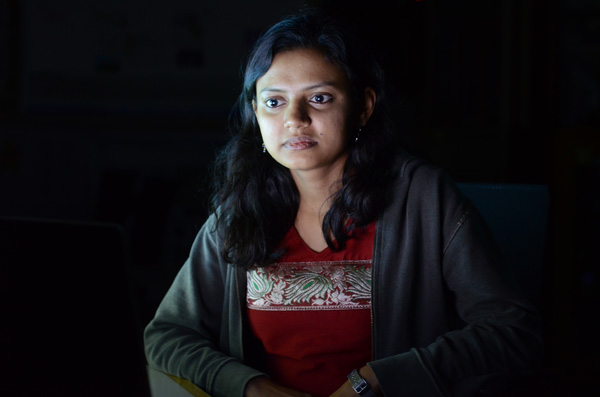
Iso 2

Exposure info: f/3.2, 1/5th at ISO 1600

Limitations of using a high ISO

As it also impacts the image quality that your camera (sensor) produces, ISO comes with its own limitations. By image quality, I mean, the ability of your camera to produce noise (grain). At a higher ISO your camera will always produce more noise (grain) than at a lower ISO. So, you will have to test and check what the ideal ISO setting is (for your camera) at which you can capture your subject with optimum light, along with maintaining good image quality.

NOTE: ISO is a feature of the camera and not the lens that you are using.
Iso 1

Exposure info: f/5, 1/125th at ISO 2500

Use of large aperture

Aperture is the opening (eye or hole) in the lens, through which light enters into the camera. Aperture size is also represented in numbers (for e.g., f/1.4, f/1.8, f/2.2, f/2.8, etc). The smaller the number, the wider the opening is and thus, more light can be captured.

The amount of light captured is inversely proportional to the selected aperture. Say, for a lens with aperture values of f/1.4, f/1.8, f/2.2, f/2.8, f/3.3, f/4.0 etc., the amount of light captured at f/1.4 will be double the light than at aperture f/1.8. Similarly, at f/1.4 you can capture 8 times more light than at f/2.8. Thus, in low-light conditions, you should use a larger aperture (smaller value) in order to capture your subject effectively.
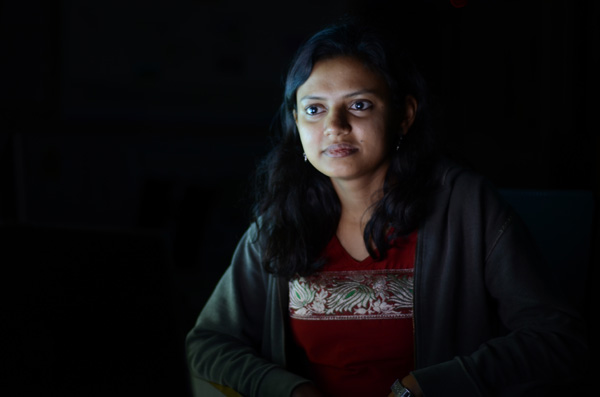
Aperture 2

Exposure info: f/1.8, 1/5th at ISO 400

Limitations of using a large aperture

As it also impacts the depth of field (sharpness or clear visibility) of the subject in your image, aperture comes with its own limitations. By depth of field, I mean, the ability of your lens to keep the subject in focus.

Generally, using a small aperture (higher f/number) you will be able to keep your entire subject in focus which is not possible using a large aperture (lower f/number). Again, you will have to test and check what the ideal aperture size is at which you can capture your subject with optimum light, keeping it in focus.

NOTE: Aperture is a feature of the lens and not the camera that you are using.

Use of slow shutter speed

Shutter speed, also known as camera exposure, is the length of time a camera shutter remains open in order to capture the light. Shutter speed is also represented in numbers (for e.g. 1/2, 1/4, 1/8, 1/16, 1/32, 1/64, 1/125, 1/250, etc.) The higher the number, the longer the camera shutter remains open and thus, more light can be captured.

The amount of light captured is directly proportional to the selected shutter speed. For a camera with shutter speed values of 1/4, 1/8, 1/16, 1/32, 1/64, 1/125 etc., the light captured at 1/2 second is double the amount of light than that at a speed of 1/4 second. Similarly, at a shutter speed of 1/2 you can capture 8 times more light than at a shutter speed of 1/16th. Thus, in low-light conditions, you should use a slower shutter speed in order to capture your subject effectively.
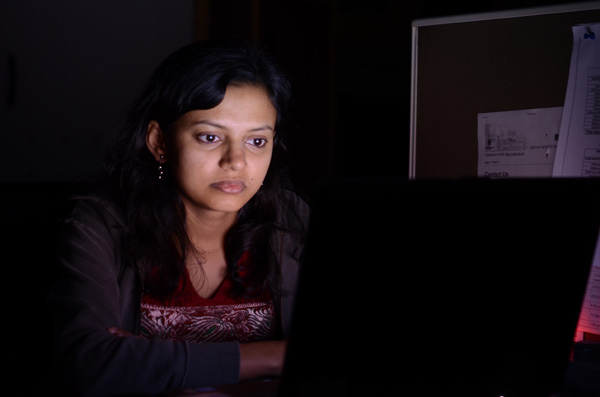
Shutter speed 2

Exposure info: f/3.2, 1 second at ISO 400

Limitations of using a slow shutter speed

As it also impacts the motion or movement of your subject, shutter speed comes with limitations. If you want to freeze the motion of your subject then you should use a higher shutter speed (e.g., 1/250, 1/500, 1/1000, etc.) While if you want to capture your subject with a motion blur then you should use a slower shutter speed (e.g., 1/8, 1/4, ½, etc.) Once again, you will have to test and check what the ideal shutter speed is at which you can capture your subject with optimum light, freezing or blurring its motion.
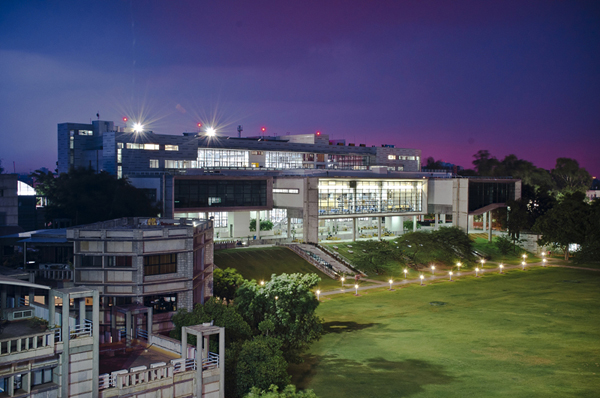
Shutter speed 1

Exposure info: f/10, for 8 seconds at ISO 200

NOTE: Shutter speed is a feature of the camera and not the lens that you are using.

Capture images in Raw format

A Raw image captures much more detail and information about the subject that you are shooting than a JPEG file. You get the luxury of improving the exposure, color, sharpness, etc., of the subject (using an editing software like Adobe Photoshop or Lightroom) while still preserving all the detail of the subject which is usually not possible while editing a JPEG file.
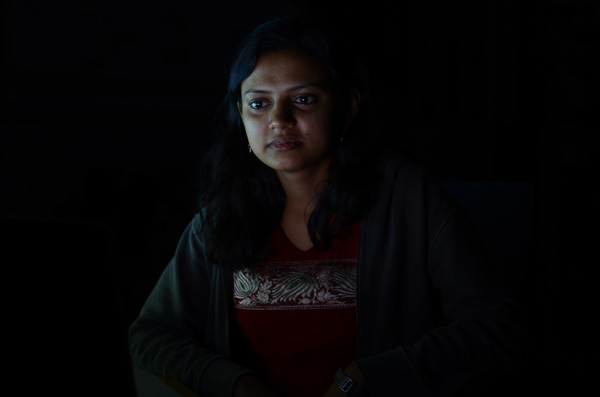
Raw 1 1

Exposure: f/3.2, 1/5th at ISO 400, before editing

Raw 2

Exposure: f/3.2, 1/5th at ISO 400, after editing

Note: the editing has been taken overly far just to show you the amount of detail in the Raw file.

Limitations of capturing images in raw format

  • Not all cameras can produce images in Raw format. Only selected higher-end cameras can. Most SLRs and Mirrorless camera can shoot Raw format as well as a few point and shoot models (check your manual if you are unsure, look for file formats)
  • Size of a Raw image is usually 4-5 times larger than the JPEG file that the camera produces. Thus, you will need more space for storing these images.
  • Only a handful of software can read and recognize Raw format files. Thus, you need specialized software (like Adobe Photoshop, Lightroom, etc.) to edit these images.

Raw 1

Exposure: f/2, 160th at ISO 2200

NOTE: I believe that capturing images in raw format comes with more advantages than disadvantages and that it is always better to shoot in Raw format.

Use of remote shutter release and a tripod

If you want to capture a stationary or slow moving subject in low-light conditions then it is always better to do so using a remote shutter release and a tripod. This will help you avoid possible camera shake and you will have a greater chance of capturing your subject, effectively.

NOTE: While most of the cameras can be mounted on a tripod, a smaller fraction of them can be used syncing with a remote shutter.

Conclusion

I have discussed in this article five techniques which you can use in order to take great photographs in low-light conditions. These techniques are: use of higher ISO, use of larger aperture, use of slower shutter speed, capturing images in Raw format and use of a remote shutter and a tripod. Almost all these techniques come with limitations, but they are also very effective, if tested properly for the camera and lens combination that you are using.

Which particular technique do you use for taking those challenging shots in low-light conditions? Did I miss any other technique which can be equally effective? I would love to have your thoughts regarding this issue.

googletag.cmd.push(function() {
tablet_slots.push( googletag.defineSlot( “/1005424/_dPSv4_tab-all-article-bottom_(300×250)”, [300, 250], “pb-ad-78623” ).addService( googletag.pubads() ) ); } );

googletag.cmd.push(function() {
mobile_slots.push( googletag.defineSlot( “/1005424/_dPSv4_mob-all-article-bottom_(300×250)”, [300, 250], “pb-ad-78158” ).addService( googletag.pubads() ) ); } );

The post How to Shoot in Low-Light Conditions Without Using Flash by Anshul Sukhwal appeared first on Digital Photography School.


Digital Photography School

 
Comments Off on How to Shoot in Low-Light Conditions Without Using Flash

Posted in Photography


Venus Optics offers hotshoe Macro Twin Flash KX-800 with guide number of 190ft/58m

09 Apr

Chinese flash manufacturer Venus Optics has launched a double headed macro flash unit, claiming that it has the highest guide number in the world for such a device. The Kuangren Macro Twin Flash KX-800 uses a pair of flash heads on extending flexible arms that can be positioned in front of the lens for extreme close-up work. Another arm houses an LED light to help with focusing. Read more

Articles: Digital Photography Review (dpreview.com)

 
Comments Off on Venus Optics offers hotshoe Macro Twin Flash KX-800 with guide number of 190ft/58m

Posted in Uncategorized


Review: Flash Disc Lighting Modifier by Fstoppers

28 Mar

The more you experiment with off-camera flash, the more you realize that many lighting modifiers are pretty large in size. From softboxes to beauty dishes to umbrellas, many take up space not only in your camera equipment bags, but also on site at a photo shoot. This may be a small price to pay for the dramatic impact these modifiers can have on the resulting image, but sometimes you just want a really compact lighting modifier that can produce great results. One of the answers to this problem is the new Flash Disc by Fstoppers.
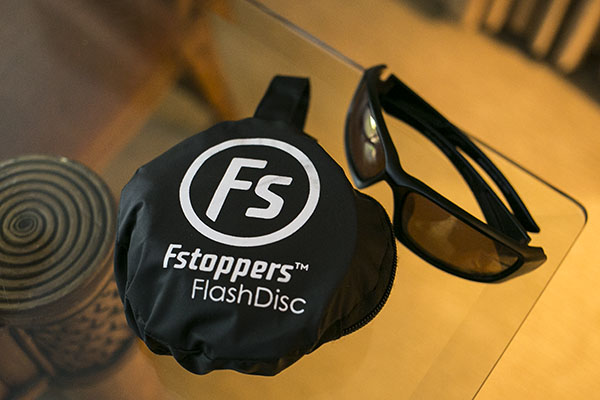
Flash Disc Product 02

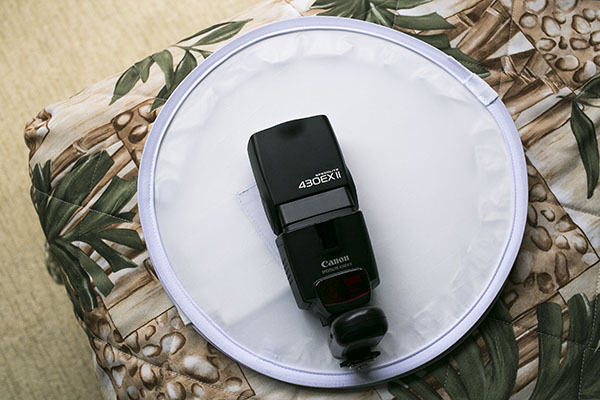
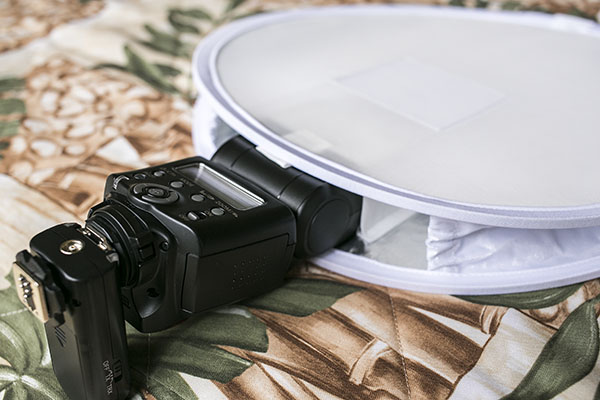
A handy little device made to fit speedlights, the Flash Disc was created by Lee Morris of Fstoppers with the intent of being a portable softbox. It appears at first to be a little white reflector, as it folds up like one into a compact size that can fit into a large pocket or small bag. However, the Flash Disc is actually more like two reflectors that sandwich your speedlight. When a flash is fired, the light bounces between the two reflectors, creating a softer spread of light. Available for purchase online at a price of $ 49.99, the first batch of Flash Discs were so popular they sold out and supplies were only recently replenished.

Flash Disc Product

As a food, portrait, and event photographer, who travels a lot for photo shoots, the main features I’m looking for in a lighting kit are portability and functionality. I generally travel with one Speedlite flash (Canon 430 EXII) and a pair of wireless flash triggers (Yongnuo RF-603 II) for on-location portraits, candid event shots, and food photos in varied lighting conditions. When I have the luxury of space, I’ll bring an octabox softbox or shoot-through umbrella as a lighting modifier, although these devices take up both space in my photography kit as well as setup time while on location. I recently got my hands on the Fstoppers Flash Disc and was very impressed by its compact form, as well as big impact in helping diffuse and bounce my off-camera flash lighting.

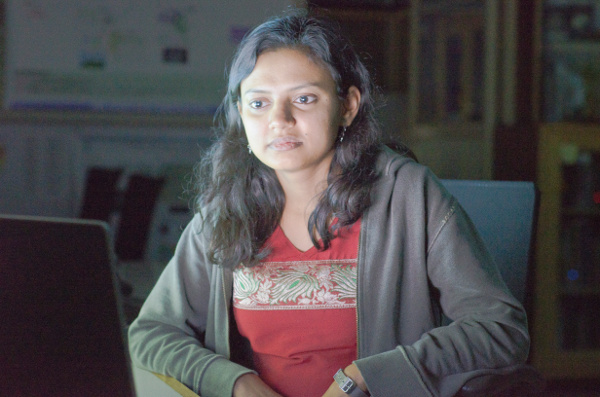
Without a lighting modifier, off-camera Speedlight flash tends to be way too harsh.

Without a lighting modifier, off-camera flash tends to be way too harsh and overpowering.

Pro: Small and low-profile

The first big plus about the Flash Disc is that it is incredibly tiny when it folds up like a reflector and is put into its little black carrying case. Dimensions-wise, the Flash Disc is 12 inches in diameter when open, and 4 inches in diameter when closed. It’s very lightweight at less than 1 pound, and it is compatible with most external flash units. It really can fit into a jacket pocket, or be clipped (via a carabiner) to a loop on your belt or camera bag.

Flash Disc 05

Con: Very tight when collapsed

A possible drawback to having two reflectors folded into each other is that the Flash Disc can literally pop opened. I had a close call once when I opened the Flash Disc with my hands right next to an open bottle of water, resulting in said bottle being knocked over and spilled. Be sure not to open it close to your body or camera as it could possibly knock something over.

Pro: Includes a grey card

One side of the Flash Disc is translucent white and the other has built-in strips of white, black, and 18% grey. This is helpful for setting your white balance in post-processing (or doing custom white balance in the field)

Con: Sometimes the lighting is too harsh

Considering the 12″” diameter of the Flash Disc, sometimes the light it emits isn’t the softest, especially when compared to light from a 30″” softbox or umbrella. It’s a size trade-off that can sometimes result in the Flash Disc light still being a tad too harsh, although there are certain situations and photography styles that can benefit from this look.

Best uses

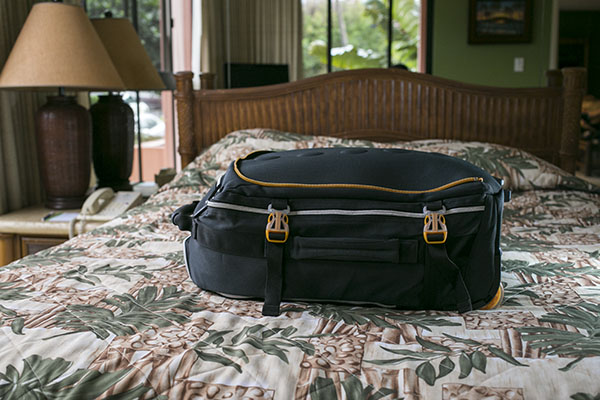
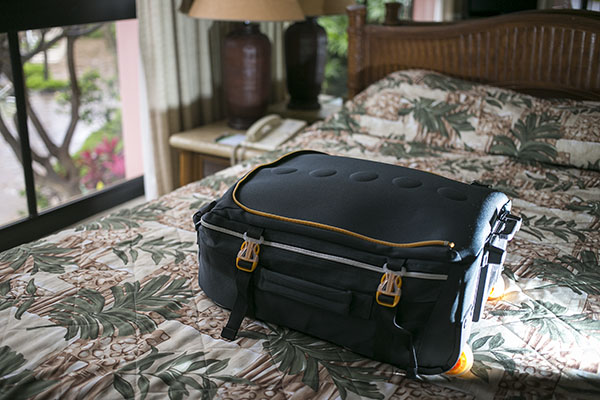
I tested out the Flash Disc during a recent tropical vacation-  using it on food, portrait, and product photography – and was pleased with the overall results. In the below product photo of a carry-on suitcase, the Flash Disc on a Canon 430 EXII was positioned camera right. The flash was in manual mode, dialled down to 1/64 power, and the result is a soft fill light on the bottom of the suitcase.

Flash Disc

For food photography, the Flash Disc’s compact size was crucial as many food photos are taken in restaurants or tight kitchens where there isn’t the space or time to indulge in more elaborate lighting setups. In the image below of a fish taco plate, natural lighting was illuminating most of the dish. The Flash Disc was camera right, fired at 1/64 power to fill in the shadow areas of the dish.

Flash Disc 02

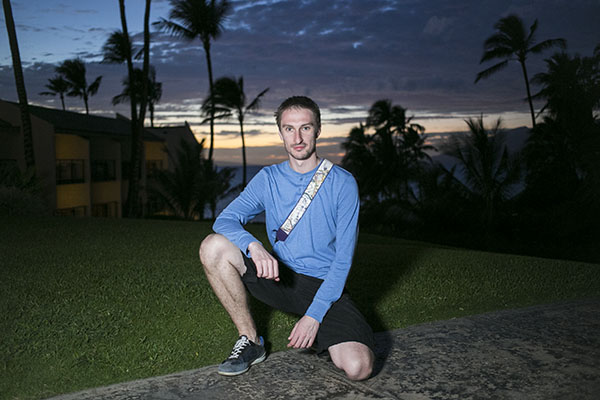
The Flash Disc also came in extremely handy while doing casual location-based outdoor portraits, another scenario in which lugging around a large umbrella or reflector wouldn’t be convenient without an assistant. The portrait below was taken just after sunset, and my subject is lit by the Flash Disc fired at 1/64 power from camera left. This is an example of when the Flash Disc’s light quality is arguably on the harsher side, especially if you’re working as a lone “run and gun” photographer without an assistant, meaning you can only place the Flash Disc as near or far from your subject as your arm can stretch.

Flash Disc Portrait

Has anyone else tested out the Flash Disc? I’d love to hear your thoughts on how useful (or not) you find it.

googletag.cmd.push(function() {
tablet_slots.push( googletag.defineSlot( “/1005424/_dPSv4_tab-all-article-bottom_(300×250)”, [300, 250], “pb-ad-78623” ).addService( googletag.pubads() ) ); } );

googletag.cmd.push(function() {
mobile_slots.push( googletag.defineSlot( “/1005424/_dPSv4_mob-all-article-bottom_(300×250)”, [300, 250], “pb-ad-78158” ).addService( googletag.pubads() ) ); } );

The post Review: Flash Disc Lighting Modifier by Fstoppers by Suzi Pratt appeared first on Digital Photography School.


Digital Photography School

 
Comments Off on Review: Flash Disc Lighting Modifier by Fstoppers

Posted in Photography


5 Reasons to Use Flash to Improve Your Travel Photography

19 Mar

When it comes to travel photography, I am all in for carrying less. However, a good flash is always within reach in my everyday camera bag. I strongly believe that a flash helps to achieve much better results in a number of situations, and here are five reasons and examples:

1) Fill the shadows

Fishing on the Cau River

The alleyway that protects these fishing villagers from the heat in Vietnam makes it almost impossible to have a good balance between the bright sunlight on the river, and the walls of the alley. The use of flash, in a controlled way, over the foreground helps to open up the shadows and show some detail on the otherwise totally dark foreground.

2) Under-expose your background

Farmer in Van Ha

When making portraits, it is always good to have decent separation between your main subject and the background. Granted, one of the most popular ways is to use a shallow depth of field and blur the background while keeping the principal element of your photo sharp. Another way is to intentionally under-expose your photo one or two stops, and light your subject with flash to compensate.

3) Freeze motion

For the love of the kids

If you are working with moving subjects, the use of flash will help to freeze some of the motion if you intend to do so. This depends on a number of factors, including what shutter speed you are shooting at and the length of the flash duration. But, if you notice in the example above, the flash is only being used to achieve points one and two of this article, meaning I am also underexposing the image a tad, and opening up the shadows in the main subject to bring more attention to them.

4) Dark interiors

Old Black Hmong man

This artisan from the Hmong minorities in North Vietnam was working his craft inside his house where no lights are available. Despite being close to a window, it was way too dark to photograph, even at high ISO. If you encounter a similar condition, the use of flash will not only make a big difference, but could also be the reason you get the shot at all.

5) Keep shooting at night

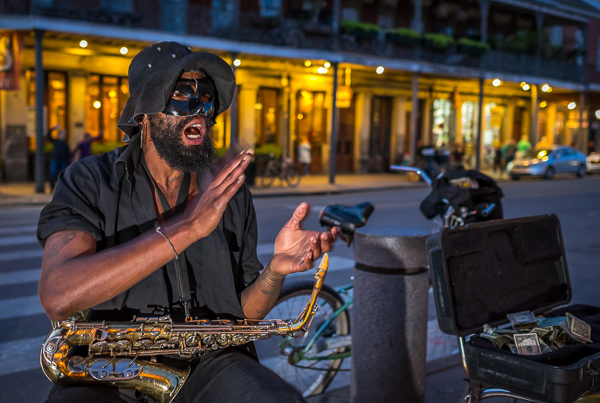
Street performer at night in New Orleans

Some places are meant to be enjoyed at night. All kind of photos are possible during this time. Cityscapes and lights trails are certainly compelling propositions, but when it comes to capturing street life there is no better way than with the aid of flash. That extra pop of light will make your subjects come alive and stand out.

The key to doing this is to practice and learn how to manage and balance ratios. Every moment is different and sometimes your key light will be your flash, and other times you’ll be using it just to fill. My personal preference is to do it manually. I think you have much better control by dialling in the power of your speedlights manually, rather than letting the camera figure it out. It takes practice, but it is not difficult to master.

In terms of equipment, I really like the Yongnuo YN 560-III, the main reason is the integrated radio trigger. The units are inexpensive, but well made, which doesn’t hurt either. But as I always use it off-camera, the fact that I don’t need to attach cables or be worried about optical slaves is something that I appreciate. That radio signal goes everywhere, even behind walls, making it very easy to trigger.

What about you? Do you use any flash in your travel photos or in situations like these? Share your images and comments below.

googletag.cmd.push(function() {
tablet_slots.push( googletag.defineSlot( “/1005424/_dPSv4_tab-all-article-bottom_(300×250)”, [300, 250], “pb-ad-78623” ).addService( googletag.pubads() ) ); googletag.pubads().enableSingleRequest();
googletag.pubads().disableInitialLoad();
googletag.pubads().collapseEmptyDivs( true );
googletag.enableServices();
} );

googletag.cmd.push( function() { googletag.display( ‘pb-ad-78623’ ); } );

googletag.cmd.push(function() {
mobile_slots.push( googletag.defineSlot( “/1005424/_dPSv4_mob-all-article-bottom_(300×250)”, [300, 250], “pb-ad-78158” ).addService( googletag.pubads() ) ); googletag.pubads().enableSingleRequest();
googletag.pubads().disableInitialLoad();
googletag.pubads().collapseEmptyDivs( true );
googletag.enableServices();
} );

googletag.cmd.push( function() { googletag.display( ‘pb-ad-78158’ ); } );

The post 5 Reasons to Use Flash to Improve Your Travel Photography by Daniel Korzeniewski appeared first on Digital Photography School.


Digital Photography School

 
Comments Off on 5 Reasons to Use Flash to Improve Your Travel Photography

Posted in Photography


Elinchrom announces new ELB 400 portable flash system

11 Mar

Flash equipment manufacturer Elinchrom has launched a new portable flash system that promises faster recycling times, more bursts per charge and greater flexibility than the company’s current battery-powered kits. The Elinchrom ELB 400 is a 424Ws pack that can manage up to 350 full power flashes per charge and can recycle in 1.6 seconds after a maximum output burst. Read more

Articles: Digital Photography Review (dpreview.com)

 
Comments Off on Elinchrom announces new ELB 400 portable flash system

Posted in Uncategorized


Flasher smartphone flash launched on Kickstarter

10 Mar

A poor built-in LED-flash is still one of the smartphone camera’s most glaring weaknesses. We’ve seen a number of accessory makers addressing the problem with different external light solutions. The latest one comes from Vision global which has launched a Kickstarter campaign to fund mass production of its Flasher accessory. Read more

Articles: Digital Photography Review (dpreview.com)

 
Comments Off on Flasher smartphone flash launched on Kickstarter

Posted in Uncategorized


Nissin launches radio-controlled Di700A and Commander Air 1 wireless flash system

05 Mar

Independent Japanese flash manufacturer Nissin has announced a new wireless flash system that uses radio transmission. The first gun to be compatible with the company’s Nissin Air System (NAS) will be an adapted version of the Di700 flash unit. The Di700A will have the same specification as the GN48m/157ft current model, but will also feature a 2.4GHz radio transmitter that will be able to communicate with other NAS guns and the Nissin Commander Air 1 command unit from a distance of up to 30m. Read more

Articles: Digital Photography Review (dpreview.com)

 
Comments Off on Nissin launches radio-controlled Di700A and Commander Air 1 wireless flash system

Posted in Uncategorized


Ricoh releases inexpensive all-weather AF201FG external flash

12 Feb

Ricoh has announced the AF201FG external flash for Pentax interchangeable lens cameras. The AF201FG is weather-resistant, can tilt down ten degrees and up ninety, and has a  guide number of 20 meters at ISO 100. It also weighs just 141g (5oz). The AF201FG will be available in March for $ 149/£129. Read more 

Articles: Digital Photography Review (dpreview.com)

 
Comments Off on Ricoh releases inexpensive all-weather AF201FG external flash

Posted in Uncategorized


Getting Started with Off-Camera Flash

10 Feb

Does the thought of attempting off-camera flash sound intimidating? If so, you’re not alone! Many photographers gravitate toward natural light or simple flash setups when tackling photo projects, but the truth is that mastering off-camera flash is one way to really make your work stand out from the rest. Best of all, it isn’t as complicated as it might seem. For this demonstration, forget about strobes, soft boxes, beauty dishes, umbrellas, and all of those gadgets. We’re going very basic with a simple speedlight – no light modifiers needed!

Basic off camera flash product photography

Basic Off-Camera Flash Equipment

To get started with off-camera flash, you need a lighting source. Arguably the most portable and convenient flash is a speedlight. When choosing a speedlight, be sure to consider features such as an articulating head that allows you to angle the direction of your flash, and connection ports for external battery packs and pc sync cables. Most flashes require four AA batteries to function and the power of the flash can suck up batteries really quickly; ports to external battery packs offer options to keep the flash powered longer and reduce recycling times. The pc sync port is also important as many trigger options will require this to connect your camera to the flash. Be sure that your flash includes these aforementioned ports. My Canon 430 EXII backup flash, while cheaper and smaller than the 580 EXII, fails in this sense since it lacks the battery port AND pc sync port.

Next, you need a way to sync the flash with the camera. The easiest way to do this is by using an inexpensive sync cord, although depending on your flash and camera models, you may need to purchase adapters such as the universal translator. Another more expensive, yet arguably more convenient option, is to use wireless flash transceivers. PocketWizard is probably the most well known in this department. One transceiver connects to your camera via the hot shoe mount and another connects to your speedlights via the pc sync port. These triggers are very dependable and durable, but they are pricey, costing as much as $ 149 each for the newest PocketWizard Plus III models.

For those on a budget, there are many cheaper, and just as high quality, transceivers out there. While I’ve been using PocketWizards for a couple of years, I recently invested in four Yongnuo RF-603 II wireless transceivers. Costing just $ 31 for two triggers, they connect to both the camera AND the speedlight via the hot shoe mount; this makes it much easier to sync flashes without the pc sync port, such as the cheaper 430 EXII. As an added bonus, the Yongnuo transceivers can also double as remote triggers by activating the shutter on your camera. If you’re on a budget or just getting started with flash, the Yongnuo transceivers are a great low-cost investment.

The final piece of gear that you should have is a light stand to support your speedlight. Light stands are lightweight and pretty cheap, but you’ll want to make sure that they include an adapter to hold your flash.

Off-Camera Flash in Action

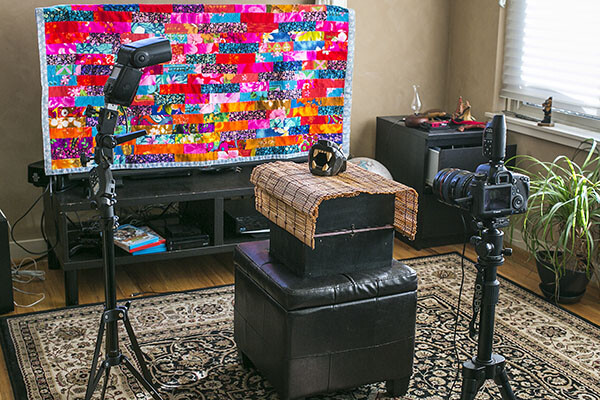
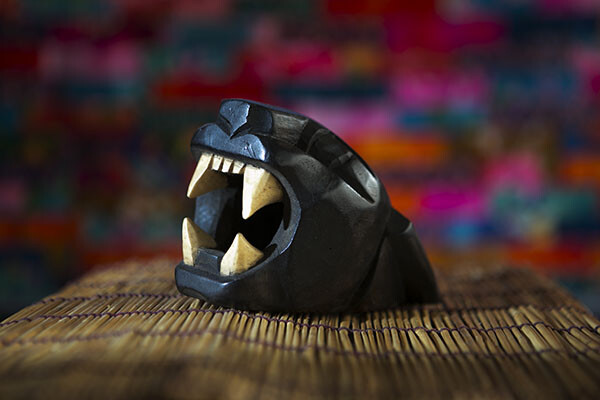
The following demonstration uses the basic tools mentioned above – a Canon 6D, 580 EXII flash, two PocketWizard Plus III transceivers, and a light stand with a swivel umbrella adapter. The photography subject is a wooden sculpture procured during a vacation in Mexico, sitting on a bamboo mat, with a colorful quilt as a background. The bare flash with no modifier is situated camera left, and there is some natural window light coming from camera right.

Off Camera Flash setup

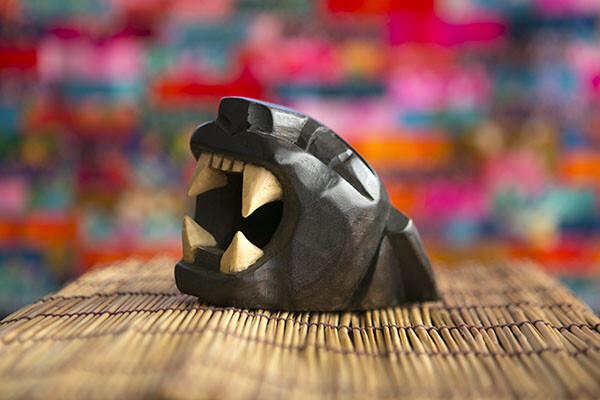
With the camera set at 1/160 for shutter speed, f/2.8 aperture and ISO 250, the natural light shot as seen below isn’t half bad, but the left side of the product is a bit shadowed.

Basic off camera flash product photography

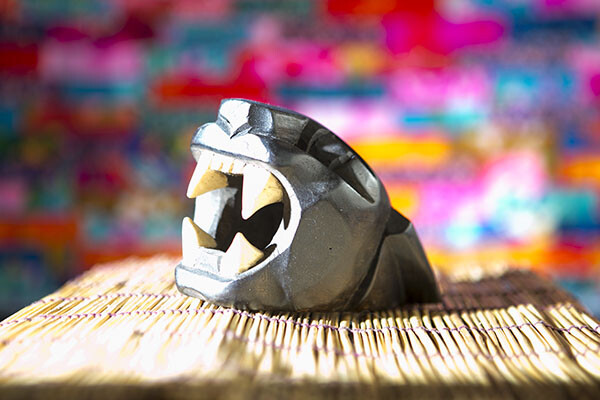
Enter the speedlight! If you aren’t familiar with a speedlight, all of the buttons and controls on the back can look intimidating, but the first button to be familiar with (besides the “on” switch) is the “Mode” button. This is what you hit to get from ETTL (automatic) to M (Manual) to Multi (for firing repeated flashes during a single long exposure). Leaving the flash on ETTL is fine when the flash is connected to your camera’s hot shoe mount, but it can produce disastrous, blown-out photos when the flash is moved off-camera. I won’t waste a photo showing you the result, but the resulting image is completely blown out and unsalvageable.

In order to adjust the off-camera flash’s output to better sync with your camera settings, it’s time to switch the flash onto Manual mode. Simply press the Mode button until M shows up on the flash LCD. Then, start playing around with the flash’s output. On the bottom portion of the flash, press the middle button that reads SEL/SET that is surrounded by the Select Dial. Numbered fractions will appear blinking in the LCD. Turn the Select Dial clockwise to change the numbers, going from 1/1 down as far as 1/128. The result below is shot at the same camera settings, but the off-camera flash firing at camera left at 1/16 power. The resulting image below is still blown out, but not nearly as bad as when the flash fires on ETTL mode.

Basic off camera flash product photography

Flash power set at 1/16


To continue balancing out the overpowering flash, dial the power down to 1/64. The result is much more balanced.

Basic off camera flash product photography

Flash power set at 1/64


Take the flash power down even lower to 1/128, and the photo subject is a bit more shadowy, adding more edge to it and really separating it from the background.

Basic off camera flash product photography

Flash power set to 1/128


This is just the start to experimenting with off-camera flash; many other variables such as camera settings, modifiers, and multiple light sources can produce similar and superior effects. However, the first thing to realize is how dramatic effects can be by just playing around with a single speedlight flash and its the manual settings.

googletag.cmd.push(function() {
tablet_slots.push( googletag.defineSlot( “/1005424/_dPSv4_tab-all-article-bottom_(300×250)”, [300, 250], “pb-ad-78623” ).addService( googletag.pubads() ) ); } );

googletag.cmd.push(function() {
mobile_slots.push( googletag.defineSlot( “/1005424/_dPSv4_mob-all-article-bottom_(300×250)”, [300, 250], “pb-ad-78158” ).addService( googletag.pubads() ) ); } );

The post Getting Started with Off-Camera Flash by Suzi Pratt appeared first on Digital Photography School.


Digital Photography School

 
Comments Off on Getting Started with Off-Camera Flash

Posted in Photography


A Beginner’s Guide to Working With Flash Off-Camera

23 Jan

FF HeroBW

I spent the first three years of my photography career avoiding the use of speedlights off-camera because I couldn’t wrap my head around the concepts and science behind them. I tried to cover it up saying things like “I’m a natural light photographer.” or “I really don’t like the aesthetics of flash photography.”

But then, I reluctantly invested in a flash for my first Nikon. This was the 90s, pre-digital, pre-autofocus, and pre-TTL. I had to calculate how much flash to use via a chart on the top of the flash. The formula was complicated, but if you knew how to split an atom, you were pretty much set.

Each shoot I went on that required flash was preceded by a sleepless night filled with anxious dreams about turning up to the shoot naked. And the thought of having to use flash also had a mild to moderate laxative effect on me.

Luckily those days are long gone and shooting flash has never been easier. In this tutorial, I’ll show you the quick and easy steps I take to shoot portraits using off-camera speedlights.

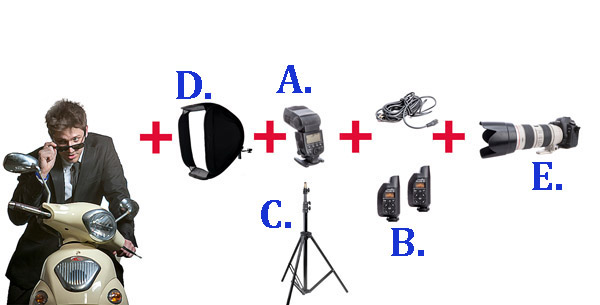
The Gear Essentials

A. Speedlights:

I use speedlights most often when I’m travelling and need light portable flashes, when I’m working on location without access to power, or when I’m working in small, confined locations where studio flashes would be too powerful or cramped.

I work with two Canon 580EX IIs. A great alternative if you are looking to save a few bucks is the Yongnuo YN-560 II. It has a very similar look to the Canon 580EX II and Nikon’s SB speedlight series.

B. Remote Triggers:

Remote triggers allow you to fire speedlights when they’re not mounted on your camera and are essential when using flash off-camera.

The cheapest and most reliable way to fire your speedlight off-camera is using a sync cord — basically you connect your speedlight to your camera via a long cable. The drawbacks of using a cable are that it reduces the distance you can be away from your flash, and can create a tripping hazard. Having said that, I still carry a couple of spare sync cables in my kit because remote triggers do fail from time to time, and the cords have saved my butt on a few occasions.

The next option is cheaper infrared triggers. They do the job of setting your flash off remotely, but they’re sensitive to bright sunlight and external factors such as alert lights on emergency vehicles and forklifts, etc., so they can go off without warning. I started out with a $ 30 set of triggers and used them for a couple of years before trading up to PocketWizards, which I’ve been using for the last eight years. A good entry level flash trigger is the YONGNUO RF-602 (approximatel $ 30).

Fill Flash Diagram 1W

C. Light Stands:

There are three options when it comes to mounting speedlights off-camera:

  1. First, you can use a light stand. Light stands vary in price from $ 20 to $ 200+ dollars, depending on the make and construction.
  2. Second, you can use a GorillaPod and mount your speedlight to a door or place it on top of something near your model.
  3. Third, you can mount your speedlight to an extension pole (or monopod) and have someone hold the light above your model. I like to do this because it gives me more options when shooting, and it also means there aren’t any light stands in the way of my shot.

D. Light Shapers:

Using a speedlight as a bare light source creates a very hard style of lighting similar to harsh sunlight. This looks great in certain situations, but I prefer to soften and control the light source by using a small or medium soft box over the flash unit. This creates a much softer, more flattering and realistic-looking light source.

A good one to start with is the LumiQuest Mini Softbox. It attaches to your speedlight with Velcro and folds flat for easy storage.

E. Camera with Hot Shoe Mount:

You will need a Camera that works in manual mode with a hot shoe mount.  The hot shoe mount is just a sexier way of saying that little square bit of metal on top of the camera that an external flash or wireless trigger slides into.

The Way

I used to believe that great portraits needed artificial lighting regardless of the environment. I often added two or three lights to my portrait shoots because I thought anything less was lazy or unprofessional. I actually felt guilty when I shot with natural light because I thought it was cheating.

Fortunately, I’ve gotten over that false notion and now understand that finding great light and being able to use it are learned skills, so is knowing when to use fill-flash in a portrait.

Nowadays, whenever I set up portrait shoots, I always look for opportunities to use great natural lighting first. It’s the most beautiful and flattering light for portraits, so if it ain’t broke, no need to fix it.

Having said that, there are many occasions when natural lighting is only just okay or even complete caca — and sometimes a portrait needs more mood or drama than the available light can provide.

The following is an example of how I used flash off-camera to light a heavily backlit image. My objective was to create an image that looked naturally lit. This technique can be used for any portrait that requires fill-flash using off-camera flash.

Daylight 001 Daylight 800ISO 001

Flash on camera 002

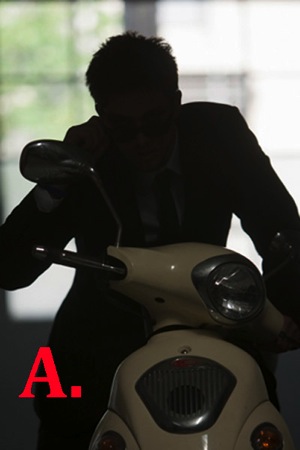
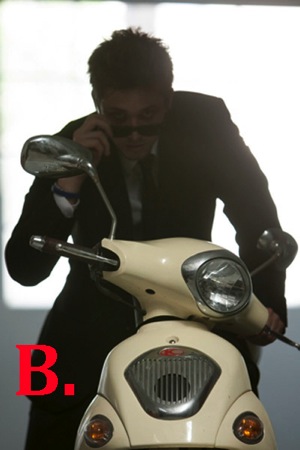
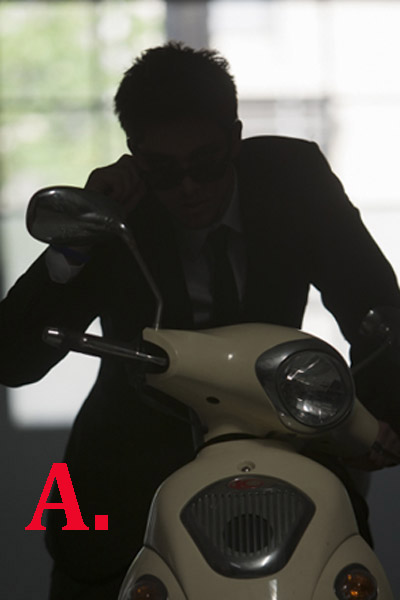
A. Here you can see that my model was heavily backlit, which makes a great silhouette, but not such a great portrait.

B. I attempted to correct the lighting by increasing my ISO, which overexposed the background and brings more detail to the motorbike, but leaves the model’s skin tone flat, dull and underexposed. It also added extra noise in the blacks. At this stage, I could also have used a reflector to bounce light back onto the model to help create a better skin tone.

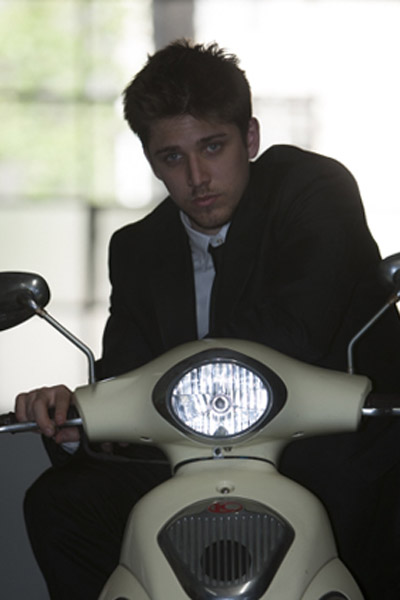
C. A quick fix to this problem would be to shoot flash on-camera using TTL, which uses the camera’s metering system to calculate the correct amount of light needed to create the portrait.

As you can see in my example, the Canon 580EX II did an okay job of lighting my model, given I was about five meters (16′) away using a 200mm lens.

The thing I don’t like about using flash on-camera for portraits is that it tends to make them look unnatural and have flat, lit look. By using my flash off-camera, I can control the direction and amount of light going onto my model to achieve a more natural look.

FF Diagram

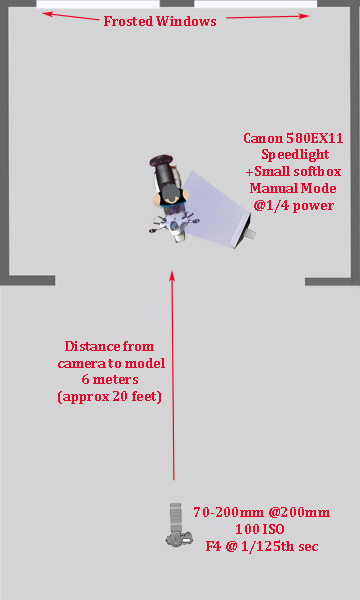
Here’s a bird’s eye view of my setup

My speedlight was positioned approximately one meter (three feet) from the model. I set it at a 45 degree angle because I wanted to make my model look like he was lit from the side.

I was working with a 70-200mm zoom lens set at a focal length of 200mm because I wanted to blur all the details in the background and work within a narrow focal range.

My camera was approximately six meters (twenty feet) from my model.

My ISO was set at 100 at f/4. I was working at f/4 rather than wide open at f/2.8 because I find it very difficult to make the eyes look sharp at f/2.8, at that distance, and in that extreme lighting condition.

Setting up the Gear

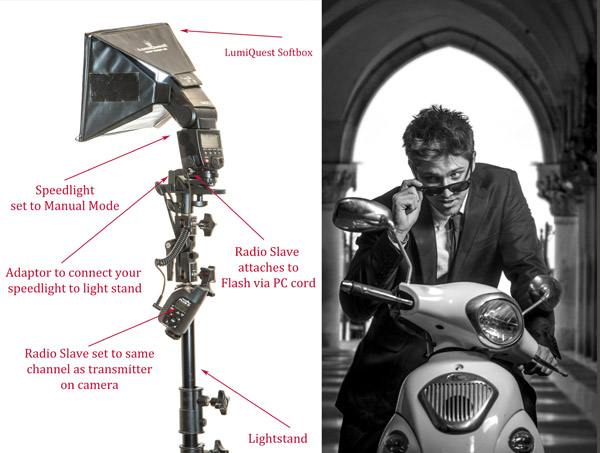
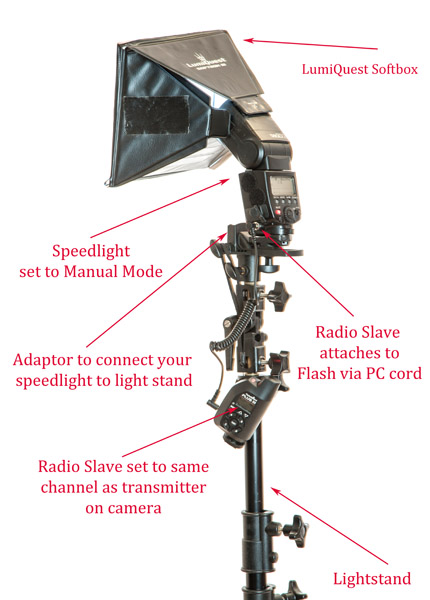
580EX+Lumiquest+stand 1

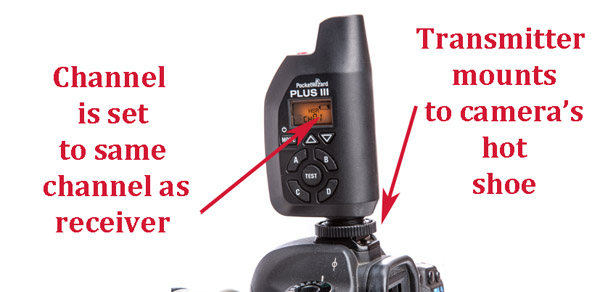
Setting up speedlights and radio slaves

For this motorbike model shoot, I mounted my speedlight to a light stand via an adaptor and used a small LumiQuest Softbox to soften and shape my light.

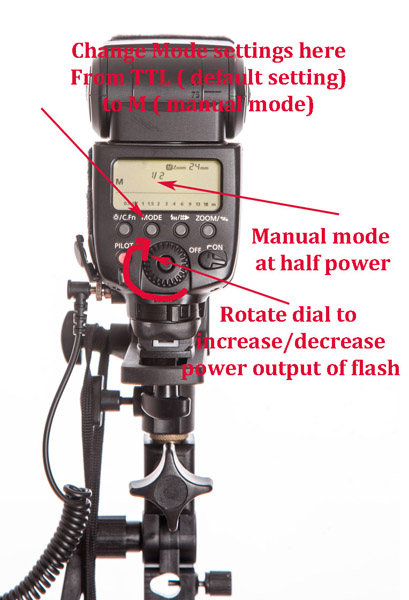
580EX+Power

PocketWizard+camera 1

To manually adjust the flash output of your speedlight, first switch the setting from its default of TTL to M (manual mode). As a general guide, I start with the following settings:

  • Full sun: 1/1 (full)
  • I would use a power setting of 1/1 (full) if you are shooting in full sun and need f/16 or higher.
  • If you are shooting wide open at f/2.8 or f/4, start at around 1/16th-1/32 power.

The above diagram is based on Canon’s 580EX II. For any other camera, check your manual for instructions on how to increase and decrease power. It should be very similar.

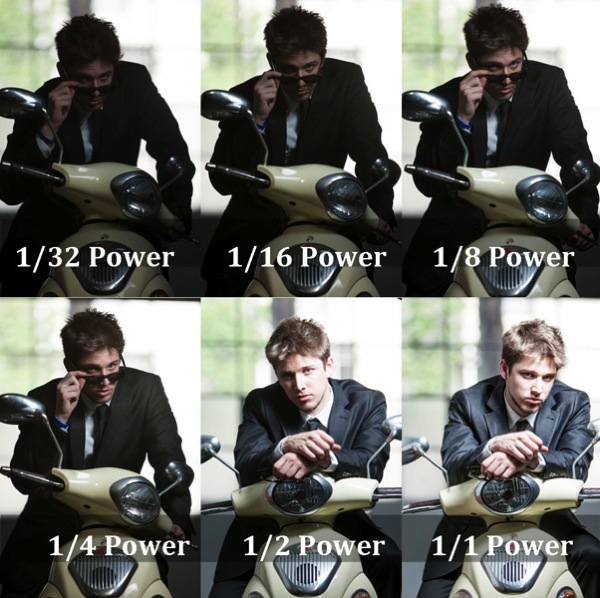
Fill Flash  001

  • Flash at 1/32 power is underexposed, skin tone looks muddy and there’s no detail in the blacks.
  • Flash set at 1/16th power is starting to look better.
  • Flash set at 1/8th power is looking good, but I prefer a slightly brighter skin tone.
  • Flash set at ¼ power is the correct reading for the look I was going for.
  • Flash set at ½ power gives a slightly overexposed skin tone, which is perfect for most portraits as it is a very flattering light (no model will ever tell you they love seeing all the detail in their pores and skin tone).
  • Flash set at full power is overexposed—there’s very little detail in the skin tone and the blacks are too light (gray).

A Step-by-Step Guide to How I Lit This Shot:

Daylight 001

Caption: My ambient reading was 4 at 1/125th second.

  1. Take an ambient reading to determine correct exposure for the background. In this case, my ambient reading was f/4 at 1/125th and ISO 100. This exposure will now remain fixed. I will next add light to create a nice skin tone.
  2. I ask myself if adding flash will improve or detract from the shot. In this case, the answer is a definite yes, it will improve my shot.
  3. I bring in my flash and set it up as per the diagrams above.
  4. The quickest and easiest way to figure out the best settings is to use a light meter (If you don’t have a light meter, you can still work with off-camera flash. It will just take a bit longer to work out your exposure). I believe the light meter is an essential tool in good portrait photography and would never leave home without one. When you use a light meter you know you have most accurate readings, and lighting becomes really easy.
    I suggest you set up your lights per the diagram, start at a power setting of 1/32, and gradually increase your power in small increments (1/32, 1/16, 1/8, ¼, etc.) until you get the desired results.
  5. Set your light meter to non-sync and press the button on the side of the meter. The non-sync button will flash on and off indicating it’s ready. If you don’t have an assistant, I suggest taking a radio slave off-camera and using it to test fire your flash so you can take a reading. Hold the meter in front of your subject’s face and point the sensor dome towards the camera.
  6. Keep increasing or decreasing the amount of light until you have it a half stop, to one stop over the ambient setting.
  7. If you want a clean, beauty-style shot with lots of shadow detail, add +1 stop of fill-flash and shoot at your ambient meter settings.

This is something I strongly urge you to practice with as many patient friends, family, and pets as possible so you can build up your confidence and really get to know your equipment.

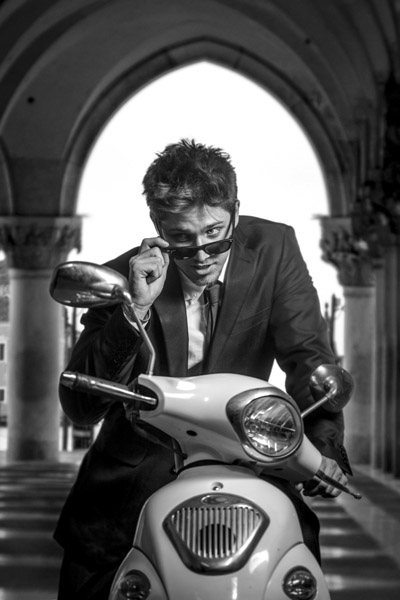
Here’s the final image, the new background is from a shoot I did in St Marks Square, Venice last year. I merged the two images together using Photoshop.

FF FINAL BW

Glauco Junior Solleri, Vespa courtesy Glow Studios

What are your experiences of working with off-camera flash? I’m keen to hear about the flashes, modifiers and flash triggers you rate highly and anything you’d like to add to the discussion.

googletag.cmd.push(function() {
tablet_slots.push( googletag.defineSlot( “/1005424/_dPSv4_tab-all-article-bottom_(300×250)”, [300, 250], “pb-ad-78623” ).addService( googletag.pubads() ) ); } );

googletag.cmd.push(function() {
mobile_slots.push( googletag.defineSlot( “/1005424/_dPSv4_mob-all-article-bottom_(300×250)”, [300, 250], “pb-ad-78158” ).addService( googletag.pubads() ) ); } );

The post A Beginner’s Guide to Working With Flash Off-Camera by Gina Milicia appeared first on Digital Photography School.


Digital Photography School

 
Comments Off on A Beginner’s Guide to Working With Flash Off-Camera

Posted in Photography